
PAD1500E - Battery EGO - Free user manual and instructions
Find the device manual for free PAD1500E EGO in PDF.



| Brand | EGO |
| Model | PAD1500E |
| Product type | Portable inverter (DC/AC converter) |
| Nominal input voltage | 56 V DC |
| Input voltage range | 37.8 – 58.8 V |
| USB output | 5 V DC, max 4.2 A (two ports combined) |
| AC output | 220-240 V AC, 50 Hz, max 150 W |
| Rated power | 150 W |
| Weight | 0.53 kg |
| Optimal charging temperature | 0 °C – 40 °C |
| Storage temperature | -20 °C – 70 °C |
| Protection rating | Indoor use only |
| Insulation class | Class II (double insulation) |
| Main functions | DC/AC conversion, USB charging, overload and overheating protection, auto shut-off |
| Safety | Automatic shut-off in case of overload, LED indicator (green/red) |
| Maintenance and cleaning | Clean with a dry cloth; do not use solvents |
| Storage | Remove battery, store in a dry, well-ventilated place out of reach of children |
| Spare parts and repairability | Repairs by a qualified technician; use only genuine EGO parts |
| Warranty | Visit egopowerplus.com for full terms |
| Compatible accessories | EGO 56 V batteries (see list in Fig. B of the manual) |
Frequently Asked Questions - PAD1500E EGO
User questions about PAD1500E EGO
0 question about this device. Answer the ones you know or ask your own.
Ask a new question about this device
Download the instructions for your Battery in PDF format for free! Find your manual PAD1500E - EGO and take your electronic device back in hand. On this page are published all the documents necessary for the use of your device. PAD1500E by EGO.
USER MANUAL PAD1500E EGO
natural_image
Technical line drawings of two identical 3D-printed mechanical components with no visible text or symbolsOPERATOR'S MANUAL
56-VOLT POWER INVERTER
MODEL NUMBER PAD1500E
| EN 56 Volt power inverter | 3 | RO | Invertor de energie 56 volti | 67 |
| DE 56 Volt-spannungswandler | 7 | SL | 56-V pretvornik napajanja | 71 |
| FR Onduleur 56 volts | 11 | LT | 56 Voltu srovès inverteris 75 | |
| ES Cargador de 56v 15 | LV | 56 Voltu invertors | 79 | |
| PT Inversor de potência de 56 volts 19 | GR | Аvtiotropeas peupatos 56 volt | 83 | |
| IT Alimentatore a batteria 56 volt 23 | TR | 56 Volt güç invertörü | 88 | |
| NL 56V lader 27 | ET | 56-Voldine inverter | 92 | |
| DK 56 Volt vekselretter 31 | UK | 56-Вольтний інвертор | 96 | |
| SE 56 Volt transformator 35 | BG | 56 V Електрически преобразувател | 100 | |
| FI 56 Voltin virtainvertteri 39 | HR | Pretvarač napajanja od 56 volta | 105 | |
| NO 56 Volt strømomformer | 43 | KA | 56 змфбосбо огбодо обзббюмбо | 109 |
| RU Инвертор 56B | 47 | SR | 56 Volti invertor struje | 114 |
| PL Przetwornica 56 v | 51 | BS | Akumulatorska motorna žaga | 118 |
| CZ Napájecí měniČ 56 v | 55 | HE | у7и 56 ны ны | 122 |
| SK 56 Voltový menič napätia | 59 | AR | محل الجهد لکهربتی 56 فوت | 126 |
| HU 56 Voltos feszültségátalakító | 63 |
A
B
READ ALL INSTRUCTIONS!

READ OPERATOR'S MANUAL
⚠️ Residual risk! People with electronic devices, such as pacemakers, should consult their physician(s) before using this product. Operation of electrical equipment in close proximity to a heart pacemaker could cause interference or failure of the pacemaker.
WARNING: To ensure safety and reliability, all repairs should be performed by a qualified service technician.
WARNING: This appliance is not intended for use by persons (including children) with reduced physical, sensory or mental capabilities, or lack of experience and knowledge, unless they have been given supervision or instruction concerning use of the appliance by a person responsible for their safety. Children should be supervised to ensure that they do not play with the appliance.
SAFETY SYMBOLS
The purpose of safety symbols is to attract your attention to possible dangers. The safety symbols and the explanations with them deserve your careful attention and understanding. The symbol warnings do not, by themselves, eliminate any danger. The instructions and warnings they give are no substitutes for proper accident prevention measures.
WARNING: Be sure to read and understand all safety instructions in this Operator's Manual, including all safety alert symbols such as "DANGER," "WARNING," and "CAUTION" before using this tool. Failure to follow all instructions listed below may result in electric shock, fire, and/or serious personal injury.
SAFETY INSTRUCTIONS
This page depicts and describes safety symbols that may appear on this product. Read, understand, and follow all instructions on the machine before attempting to assemble and operate.
 | Safety Alert | Precautions that involve your safety. |
 | Read Operator's Manual | To reduce the risk of injury, user must read operator's manual |
 | fuse-links | Time-lag miniature fuse-link |
 | Indoor use Use this device indoors only | |
 | Class II Construction | Double-insulated construction |
 | Keep dry | Use the inverter in dry environment |
 | CE | This product is in accordance with applicable EC directives. |
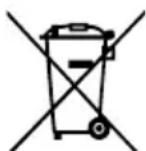
 | WEEE | Waste electrical products should not be disposed of with household waste. Take to an authorized recycler. |
| V Volt | Voltage | |
| A Amperes Current | ||
| Hz Hertz | Frequency (cycles per second) | |
| W Watt Power | ||
| VA Voltage-Amperes Power | ||
| min Minutes Time | ||
| ~ | Alternating Current | Type of current |
| --- | Direct Current | Type or a characteristic of current |
WARNING: Read and understand all instructions. Failure to follow all instructions listed below may result in electric shock, fire and/or serious personal injury.
IMPORTANT SAFETY INSTRUCTIONS
- Read all the instructions before using the product.
■ To reduce the risk of injury, close supervision is necessary when the product is used near children.
■ Do not put fingers or hands into the product.
EN
■ Use of an attachment not recommended or sold by the manufacturer may result in a risk of fire, electric shock, or injury to persons.
■ Do not use a battery pack or appliance that is damaged or modified. Damaged or modified batteries may exhibit unpredictable behavior resulting in fire, explosion or risk of injury.
■ When charging the battery, work in a well ventilated area and do not restrict ventilation in any way.
■ Under abusive conditions, liquid may be ejected from the battery; avoid contact. If contact accidentally occurs, flush with water. If liquid contacts eyes, additionally seek medical help. Liquid ejected from the battery may cause irritation or burns.
■ Do not expose the battery pack to fire or excessive temperature. Exposure to fire or temperature above 100irc C may cause explosion.
■ Do not expose the power inverter to rain or wet conditions. Water entering the power inverter will increase the risk of electric shock.
■ The power inverter is not intended for any use other than charging small (up to 4.2 Amp for two USB ports combined) USB electronics or small (up to 150W) AC devices. Any other use may result in damage.
■ Switch off the power inverter when not in use.
■ Use the power inverter only with specifically designated battery packs. Use of any other battery packs may create a risk of injury and fire.
■ Do not disassemble the power inverter, take it to a qualified service person when service or repair is required. Incorrect reassembly may result in a risk of fire or electric shock.
■ Have your power inverter serviced by a qualified repairperson using only identical replacement parts. This will ensure that the safety of the power inverter is maintained.
■ Save these instructions. Refer to them frequently and use them to instruct others who may use this tool. If you lend this tool to someone else, also lend these instructions to them to prevent misuse of the product and possible injury.
■ Only for class II appliance.
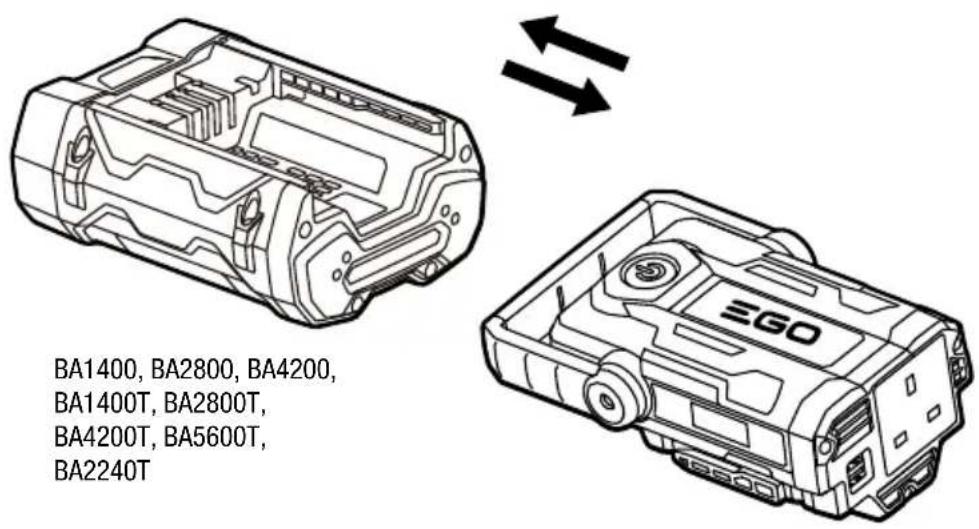
■ Use only with batteries listed in fig. B
SAVE THESE INSTRUCTIONS!
SPECIFICATIONS
| Input Voltage | 56V |
| Range of rated values 3 | 7.8-58.8V |
| USB Output | 5V, Max.4.2A (two USB ports combined) |
| AC Output 220V-240V ~ | 50Hz Max.150W |
| Optimum Charging Temperature | 0°C-40°C |
| Storage Temperature -20°C-70°C | |
| Weight 0.53 kg | |
DESCRIPTION
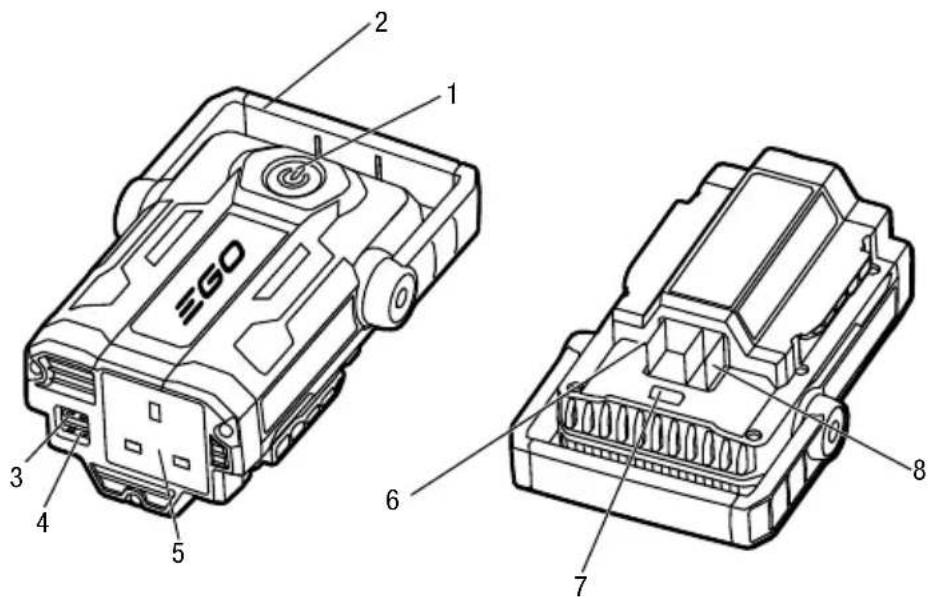
KNOW YOUR POWER INVERTER (Fig. A)
- Power Button
- Handle
- USB Port2
- USB Port1
- AC Port
- Negative Electric Contacts
- Spring Latch
- Positive Electric Contacts
OPERATION
⚠ WARNING: This device is intended to be used indoors only. Use the inverter in dry environment.
WARNING: Do not modify or attempt to repair the power inverter except as indicated in the instructions for use and care.
The power inverter provides two USB ports and one AC port. The two USB ports combined supply a maximum of 5V DC, up to 4.2 A output to power small USB devices, like your cell phone, MP3 player, etc. The AC port supplies a 220V-240V AC, max.150W output to power the small AC devices, such as a laptop computer.
NOTE: Fully charge your EGO POWER+ battery pack before first use. The battery should be charged in a location where the temperature is greater than 5°C and less than 40°C.
-
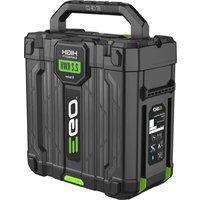
Align the mounting slots on the power inverter with the ribs on the battery pack, then move the power inverter towards the battery pack until it snaps into position (Fig. B).
NOTE: Make sure that the spring latch on the power inverter snaps into place and the battery pack is secured to the tool before beginning operation. -
Connect the small USB or AC device to the power inverter.
- Press and hold the power button until the green light in the button illuminates. The power inverter will begin charging the device.
- When not using or after charging, disconnect the device from the power inverter, then press and hold the power button until the green light turns off.
- Hold the battery pack with one hand and pull the power inverter with the other hand to separate them.
WARNING: Do not insert a nail, wire, etc. into the AC power supply port, or the risk of electric shock may occur.
NOTE:
■ The product may not supply power to some USB devices.
■ Do not insert a nail, wire, etc. into the USB power supply port. Otherwise a circuit short may cause smoke and fire.
■ If the devices connected to the power inverter draw more than the rated output of the ports (Total 4.2A for USB ports and maximum 150W for AC port), the power inverter will shut off automatically and the power button will flash red. In this situation, devices should be removed. To reactivate the power inverter, press and hold the power button until green light is illuminated.
■ When switching on the power inverter, if the USB output current is less than 500mA and the AC output power is less than 5W, the system will shut off automatically in 1 minute.
■ When switching on the power inverter, if the USB output current is beyond 500mA or the AC output power is beyond 5W, but then the USB output current is less than 500mA and the AC output is less than 5W for 3 hours, the system will shut off automatically.
MAINTENANCE
WARNING: To avoid serious personal injury, always remove the battery pack from the tool when cleaning or performing any maintenance.
WARNING: When servicing, use only identical EGO replacement parts. Use of any other parts may create a hazard or cause product damage.
GENERAL MAINTENANCE
Avoid using solvents when cleaning plastic parts. Most plastics are susceptible to damage from various types of commercial solvents and may be damaged by their use. Use clean cloths to remove dirt, dust, oil, grease, etc.
WARNING: Do not at any time let brake fluids, gasoline, petroleum-based products, penetrating oils, etc. come in contact with plastic parts. Chemicals can damage, weaken or destroy plastic which may result in serious personal injury.
STORING THE UNIT
■ Remove the battery pack from the power inverter.
■ Clean the tool thoroughly before storing it.
■ Store the unit in a dry, well-ventilated area, locked-up or up high, out of the reach of children. Do not store the unit on or adjacent to fertilizers, gasoline, or other chemicals.
Protecting the environment
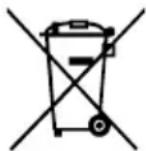

Do not dispose of electrical equipment, used battery and charger into household waste! Take this product to an authorized recycler and make it available for separate collection. Electric tools must be returned to an environmentally compatible recycling facility.
EN TROUBLESHOOTING
| PROBLEM CAUSE SOLUTION | ||
| The power inverter stops working during use. | ■ Battery capacity is depleted.■ The battery pack is too hot. | ■ Charge the battery.■ Cool the battery pack until its temperature drops below 67°C. |
| Red LED light on the power button flashes for 1 minute, then shuts off. | ■ The device(s) you are powering draws more than the rated output of the ports. | ■ Remove the device and reactive the power inverter. |
| Red LED light on the power button shines for 1 minute, then shuts off. | ■ The device is too hot. | ■ Cool the power inverter until its temperature drops below 105°C. |
WARRANTY
EGO WARRANTY POLICY
Please visit the website egopowerplus.com for full terms and conditions of the EGO Warranty policy.
SAVE THESE INSTRUCTIONS!
CARACTERÍSTICAS TÉCNICAS
| Voltagem de entrada | 56V --- |
| Raio dos valores nominais | 37,8-58,8V |
| Saída USB | 5V, Máx. 4.2A (duas portas USB combinadas) |
| Saída AC 220V-240V ~ | 50Hz Máx. 150W |
| Temperatura de carregamento ótima | 0°C a 40°C |
| Temperatura de armazenamento | -20°C a 70°C |
| Peso 0,53 kg |
DESCRIÇÃO
HET APPARAAT OPBERGEN
OPBEVARING AF APPARATET
GENERELT VEDLIKEHOLD
POLITYKA GWARANCYJNA EGO
DÔLEŽITÉ BEZPEČNOSTNÉ POKYNY
CITIȚI MANUALUL DE INSTRUCTIUNI
LUGEGE KASUTUSJUHENDIT
OLULISED OHUTUSJUHISED
The Ground Truth image displays a single, solid horizontal line. According to Rule 2 (UNDERSCORE & LINE RULES), if the GT contains lines used for stylistic emphasis or as background (like ruled paper), the OCR result must ignore them. The OCR content provided is "____", which consists of four underscores. This is incorrect because underscores are not equivalent to a solid line and are not permitted under the “Stylistic/Background Lines (Ignore)” rule. Outputting underscores for a stylistic line violates the rule and constitutes an error. Therefore, the OCR result is inconsistent with the Ground Truth.
VAŽNA SIGURNOSNA UPUTSTVA
■ Pročitajte sva uputstva pre korišćenja proizvoda.
■ Da bi se smanjio rizik od povreda, neophodan je pomniŠAČUVAJTE OVO UPUTSTVO! nadzor kad se proizvod koristi u blizini dece.
■ Ne stavljajte prste ili šake u proizvod.
■ Upotreba dodatka koji ne preporučuje ili ne prodaje proizvođač može da dovede do rizika od požara, strujnog udara ili telesnih povreda.
■ Ne koristite bateriju ili aparat koji su oštećeni ili modifikovani. Oštećene ili modifikovane baterije mogu da ispolje nepredvidivo ponašanje, dovodeći do požara, eksplozije ili rizika od povrede.
■ Kad punite bateriju, radite u dobro provetrenom prosto i ne ograničavajte provetravanje ni na koji način.
VAŽNA SIGURNOSNA UPUTSTVA
■ Prije upotrebe ovog proizvoda pročitajte sva uputstva.
■ Radi smanjenja rizika od povreda, potreban je neposredan nadzor kada se proizvod upotrebljava u blizini djece.
■ Nemojte stavljati prste ili ruke u proizvod.


- 56-VOLT POWER INVERTER
- READ ALL INSTRUCTIONS!
- READ OPERATOR'S MANUAL
- SAFETY SYMBOLS
- SAFETY INSTRUCTIONS
- IMPORTANT SAFETY INSTRUCTIONS
- EN
- SAVE THESE INSTRUCTIONS!
- DESCRIPTION
- KNOW YOUR POWER INVERTER (Fig. A)
- OPERATION
- NOTE:
- MAINTENANCE
- GENERAL MAINTENANCE
- STORING THE UNIT
- Protecting the environment
- EN TROUBLESHOOTING
- WARRANTY
- EGO WARRANTY POLICY
- CARACTERÍSTICAS TÉCNICAS
- DESCRIÇÃO
- HET APPARAAT OPBERGEN
- OPBEVARING AF APPARATET
- GENERELT VEDLIKEHOLD
- POLITYKA GWARANCYJNA EGO
- DÔLEŽITÉ BEZPEČNOSTNÉ POKYNY
- CITIȚI MANUALUL DE INSTRUCTIUNI
- LUGEGE KASUTUSJUHENDIT
- OLULISED OHUTUSJUHISED
- VAŽNA SIGURNOSNA UPUTSTVA
Brand : EGO
Model : PAD1500E
Category : Battery