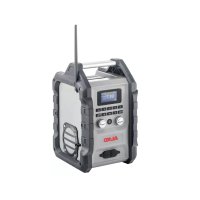
WR 2000 - Radio AL-KO - Free user manual and instructions
Find the device manual for free WR 2000 AL-KO in PDF.

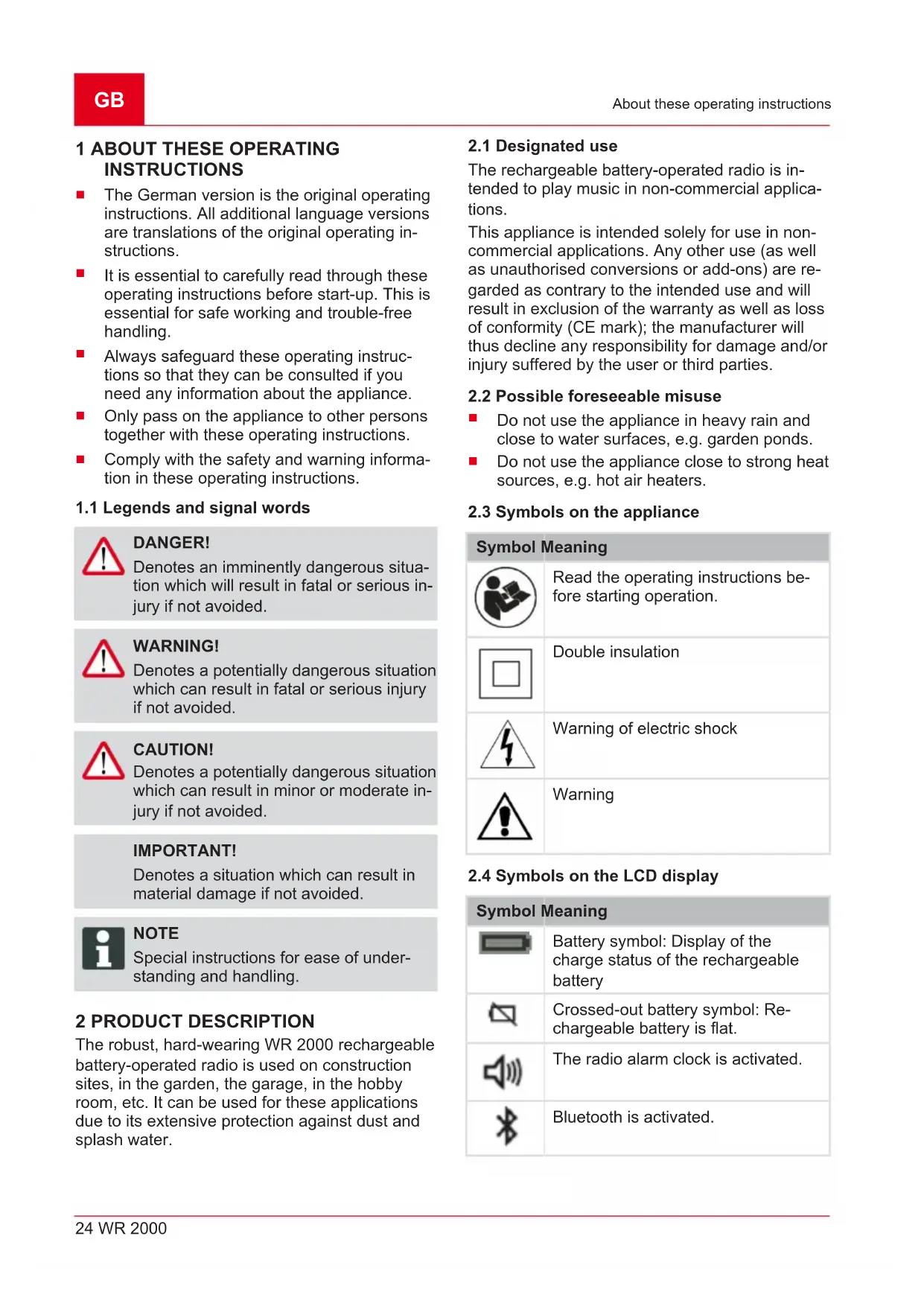


| Brand | AL-KO |
| Model | WR 2000 |
| Product type | Portable battery radio |
| Power supply | B50 Li lithium-ion battery (ref. 113559) or mains adapter (DC IN); AA batteries for memory backup |
| Frequency bands | DAB and FM |
| Connectivity | Bluetooth, AUX IN front and rear, USB port 5V 1A (smartphone charging) |
| Functions | DAB/FM radio, Bluetooth streaming, alarm, radio alarm, sleep timer, 5 preset slots, LCD screen |
| Protection | Dust and splash resistant |
| Maintenance | Clean with a slightly damp cloth; do not use chemicals |
| Safety | Do not expose to water, do not open, use only recommended battery, follow instructions for batteries and charger |
| Spare parts | Contact AL-KO after-sales service; use original parts |
| Package contents | WR 2000 radio, mains adapter; battery and charger sold separately |
| Compatible battery | AL-KO B50 Li (ref. 113559) |
| Compatible charger | AL-KO C30 Li (ref. 113560) or TC30 Li (ref. 113561) |
| Backup battery type | 2× AA batteries (not supplied) |
| USB port | USB-A 5V 1A for smartphone charging |
| Bluetooth | Yes (compatible with Bluetooth devices) |
| Radio alarm | Yes, with timer |
| Sleep function | Yes, adjustable from 15 min to 2h |
| Display | Backlit LCD screen |
| Warranty | Statutory warranty against manufacturing defects |
Frequently Asked Questions - WR 2000 AL-KO
User questions about WR 2000 AL-KO
0 question about this device. Answer the ones you know or ask your own.
Ask a new question about this device
Download the instructions for your Radio in PDF format for free! Find your manual WR 2000 - AL-KO and take your electronic device back in hand. On this page are published all the documents necessary for the use of your device. WR 2000 by AL-KO.
USER MANUAL WR 2000 AL-KO
natural_image
Exterior view of a beige AL-KO air conditioner device with digital display and antenna (no readable text or symbols beyond branding)DE
GB
NL
FR
ES
IT
SI
HR
PL
CZ
SK
HU
DK
SE
NO
FI
LT
LV
RU
UA





Inhaltsverzeichnis
Deutsch 8
English....22
Nederlands 36
Français....50
Español 66
Italiano 81
Slovenščina 96
Hrvatski....110
Polski 124
Česky 139
Slovenská 153
Magyarul....167
Dansk 182
Svensk....196
Norsk 210
Suomi 223
Lietuvių 237
Latviešu 251
Русский 265
Україна....280
© 2018
AL-KO KOBER GROUP Kötz, Germany
This documentation or excerpts therefrom may not be reproduced or disclosed to third parties without the express permission of the AL-KO KOBER GROUP.
01
02
03
04
05
Art.-Nr. 113631
WR 2000
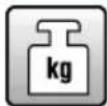
ca. 4,5 kg
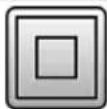
II / IP54
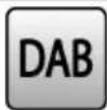
168 - 240 MHz

87,5 - 108 MHz
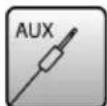
3,5 mm
www.al-ko.com/service-contacts
1 About these operating instructions 24
1.1 Legends and signal words.... 24
2 Product description 24
2.1 Designated use 24
2.2 Possible foreseeable misuse.... 24
2.3 Symbols on the appliance 24
2.4 Symbols on the LCD display 24
2.5 Scope of supply 25
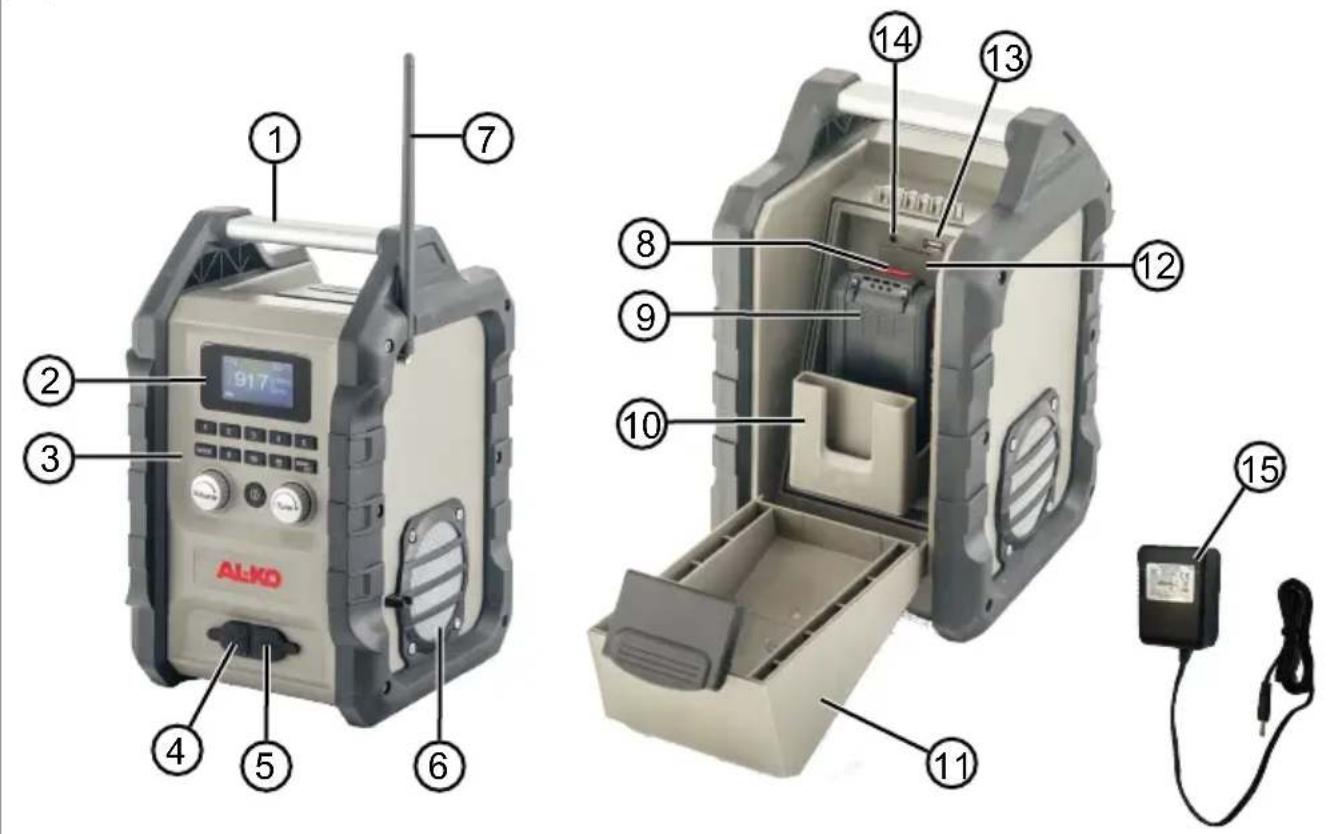
2.6 Product overview (01, 02) 25
3 Safety instructions 25
3.1 Operator 26
3.2 Use and handling of the rechargeable battery-operated radio 26
3.3 Appliance safety 26
3.4 Safety when operating with a power supply 26
3.5 Safety information regarding the rechargeable battery 26
3.6 Safety information regarding the charging unit.... 27
3.7 Safety instructions relating to non-rechargeable batteries 27
4 Commissioning/Decommissioning.... 28
4.1 Charging the rechargeable battery 28
4.2 Inserting AA batteries and the B50 Li rechargeable battery 28
4.2.1 Opening the rechargeable battery cover (03).... 28
4.2.2 Inserting/removing the two AA batteries (04) 28
4.2.3 Inserting and removing the B50 Li rechargeable battery (05/06) 28
4.2.4 Closing the rechargeable battery cover 29
4.3 Operating the appliance with a power supply (07) 29
5 Operation 29
5.1 Switching the appliance on/off (08) 29
5.2 Listening to the radio 29
5.2.1 Selecting and playing the station (09) 29
5.2.2 Setting the volume (10) 29
5.2.3 Carrying out the station search (11) 29
5.2.4 Saving and playing the station (12) 30
5.3 Convenient functions 30
5.3.1 Setting the time (13) 30
5.3.2 Activating/deactivating the alarm signal (14).... 30
5.3.3 Activating/deactivating the radio alarm clock (15) 30
5.3.4 Setting the sleep function (16).... 31
5.4 Connecting external appliances 31
5.4.1 Connecting the external appliance at the front (17) 31
5.4.2 Connecting the external appliance at the rear (01, 18) 31
5.4.3 Charging the Smartphone via USB (01, 19).... 31
5.4.4 Establishing a Bluetooth connection (20) 31
6 Maintenance and care 32
7 Transport 32
8 Storage 33
8.1 Storing the rechargeable battery and charging unit 33
9 Disposal 33
10 After-Sales / Service 34
11 Help in case of malfunction.... 34
12 Guarantee.... 35
13 Original EU declaration of conformity 35
1 ABOUT THESE OPERATING INSTRUCTIONS
The German version is the original operating instructions. All additional language versions are translations of the original operating instructions.
It is essential to carefully read through these operating instructions before start-up. This is essential for safe working and trouble-free handling.
■ Always safeguard these operating instructions so that they can be consulted if you need any information about the appliance.
■ Only pass on the appliance to other persons together with these operating instructions.
■ Comply with the safety and warning information in these operating instructions.
1.1 Legends and signal words

DANGER!
Denotes an imminently dangerous situation which will result in fatal or serious injury if not avoided.

WARNING!
Denotes a potentially dangerous situation which can result in fatal or serious injury if not avoided.

CAUTION!
Denotes a potentially dangerous situation which can result in minor or moderate injury if not avoided.
IMPORTANT!
Denotes a situation which can result in material damage if not avoided.

NOTE
Special instructions for ease of understanding and handling.
2 PRODUCT DESCRIPTION
The robust, hard-wearing WR 2000 rechargeable battery-operated radio is used on construction sites, in the garden, the garage, in the hobby room, etc. It can be used for these applications due to its extensive protection against dust and splash water.
2.1 Designated use
The rechargeable battery-operated radio is intended to play music in non-commercial applications.
This appliance is intended solely for use in non-commercial applications. Any other use (as well as unauthorised conversions or add-ons) are regarded as contrary to the intended use and will result in exclusion of the warranty as well as loss of conformity (CE mark); the manufacturer will thus decline any responsibility for damage and/or injury suffered by the user or third parties.
2.2 Possible foreseeable misuse
- Do not use the appliance in heavy rain and close to water surfaces, e.g. garden ponds.
- Do not use the appliance close to strong heat sources, e.g. hot air heaters.
2.3 Symbols on the appliance
Symbol Meaning
 | Read the operating instructions before starting operation. |
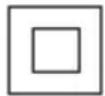 | Double insulation |
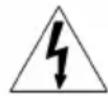 | Warning of electric shock |
 | Warning |
2.4 Symbols on the LCD display
Symbol Meaning
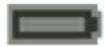 | Battery symbol: Display of the charge status of the rechargeable battery |
 | Crossed-out battery symbol: Re-chargeable battery is flat. |
 | The radio alarm clock is activated. |
 | Bluetooth is activated. |
Symbol Meaning

The alarm signal is activated.
2.5 Scope of supply

NOTE
The rechargeable battery and charging unit are not included in the scope of delivery and must therefore be purchased separately.
The rechargeable battery-operated radio is designed for operation with the B50 Li battery (art. no. 113559).
For charging the rechargeable battery, the charging unit C30 Li (art. no. 113560) or TC30 Li (art. no. 113561) is required.

NOTE
You will find further information in the following operating instructions:
■ "Li ion rechargeable battery B50 Li" (doc. no. 442228)
■ "Charging unit C30 Li / TC30 Li for battery B50 Li" (doc. no. 442230)
IMPORTANT!
Danger of damage to the appliance and battery
If the appliance is operated with an unsuitable battery, both the device and the battery may be damaged.
■ Only operate the appliance with the specified rechargeable battery.
2.6 Product overview (01, 02)
Components (01)
No. Component
| 1 Handle |
| 2 LCD display |
| 3 Control panel |
| 4 DC IN socket for power supply |
| 5 Input socket (AUX IN 1) |
| 6 Loudspeaker |
| 7 Antenna |
No. Component
| 8 Release button on the rechargeable battery |
| 9 Rechargeable battery* |
| 10 Slide-in compartment for Smartphone |
| 11 Rechargeable battery cover |
| 12 Battery compartment for AA batteries |
| 13 USB port |
| 14 Input socket (AUX IN 2) |
| 15 Power supply |
*: not included in the scope of supply
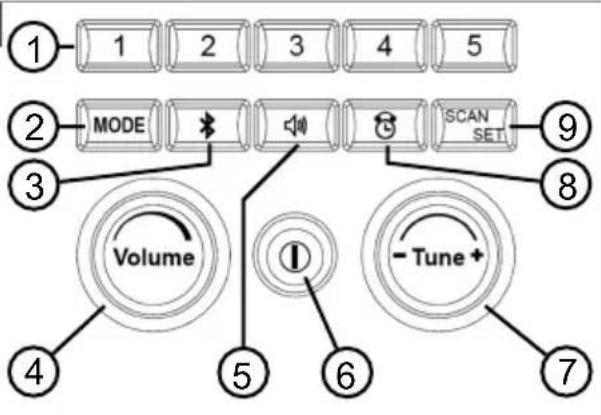
Control panel (02)
No. Component
| 1 Station memory selection buttons 1-5 |
| 2 MODE button |
| 3 Bluetooth button |
| 4 Rotary volume knob Volume |
| 5 Radio alarm clock button |
| 6 On/Off button / Sleep button |
| 7 Rotary knob/push-button for station search Tune |
| 8 Alarm clock button |
| 9 SCAN/SET button |
3 SAFETY INSTRUCTIONS

DANGER!
Danger of fatal injury and danger of extremely severe injury!
Lack of knowledge of the safety instructions and operating instructions can lead to extremely serious and even fatal injury.
- Observe all safety instructions and instructions for use in these operating instructions as well the operating instructions which are referred to before you start using the appliance.
- Keep all supplied documents in a safe place for future reference.
3.1 Operator
■ Persons who are not familiar with the operating instructions are not allowed to use the appliance.
3.2 Use and handling of the rechargeable battery-operated radio
- Do not place the rechargeable battery-operated radio on an unstable surface or in a high location. Do not suspend the rechargeable battery-operated radio by its handle. It could fall. This can result in injuries and malfunction.
- Do not sit on or step on the rechargeable battery-operated radio. This can result in injuries or malfunction.
■ Make sure that no foreign bodies and moisture gets into the rechargeable battery-operated radio when the battery cover is open. - Keep the appliance dry, clean and free from oil and grease. Always use a clean cloth for cleaning. Do not use petrol or other solvents.
3.3 Appliance safety
■ Only use the appliance under the following conditions:
■ The appliance is not soiled.
The appliance show no signs of damage.
All controls function properly.
- Do not immerse the appliance in water and do not use it in heavy rain.
- Do not expose the appliance to strong sources of heat.
■ Never operate the appliance with worn or defective parts. If the appliance is operated with worn or defective parts, guarantee claims against the manufacturer are excluded.
■ Always have defective parts replaced with original spare parts from the manufacturer. Do not dismantle the appliance yourself, take it to a customer service workshop.
■ Only operate the appliance with the intended rechargeable battery and the intended batteries.
3.4 Safety when operating with a power supply
Before operating with a power supply: Make sure that the specified mains voltage is present on the mains plug socket. Any other mains voltage can lead to fire or electric shock.
- Do not damage the mains cable in order to avoid fire or electric shock. Do not pull on the mains cable, do not place any objects on the mains cable, and leave it in its original condition.
■ When not using the appliance, pull the mains plug out of the socket.
3.5 Safety information regarding the rechargeable battery
This section mentions all the basic safety and warning information to be heeded when using the rechargeable battery. Read these instructions.
■ Only use the rechargeable battery as designated, i.e. for AL-KO rechargeable battery-driven appliances. Only charge the rechargeable battery with the AL-KO charging unit provided.
■ Only unpack the new rechargeable battery from the original packaging when it is to be used.
■ Fully charge the rechargeable battery before using it for the first time and always use the specified charger. Comply with the details given in these instructions for use for charging the rechargeable battery.
- Do not use the rechargeable battery in environments where there is a potential risk of explosion and/or fire.
- Do not expose the rechargeable battery to moisture and humidity when in use with the appliance.
■ Protect the rechargeable battery from heat, oil and fire to prevent it being damaged so no vapours and electrolyte liquids can escape.
- Do not subject the rechargeable battery to impacts or throw it.
- Do not use the rechargeable battery when soiled or wet. Before use, clean and dry the rechargeable battery with a dry, clean cloth.
When battery pack is not in use, keep it away from other metal objects, like paperclips, coins, keys, nails, screws or other small metal objects that can make a connection from one terminal to another. Burns or fire can result from a short-circuit.
- Do not open, dismantle or crush the rechargeable battery. There is a danger of electric shock and short-circuit.
An improperly used and damaged rechargeable battery can cause vapours and electrolyte liquid to escape. Vent the room ade-
quately and in the case of any disorders, consult a doctor.
If accidental contact with electrolyte liquid occurs, flush with water and thoroughly rinse the eyes immediately. Then consult a doctor.
This rechargeable battery must not be used by unauthorised persons unless they are supervised by a person responsible for their safety or have been instructed on how to use the rechargeable battery. Unauthorised persons include, for example:
■ Persons (including children) with limited physical, sensory or mental aptitude.
■ Persons who have no experience and/or knowledge of the rechargeable battery.
Children must be supervised and instructed so they do not play with the rechargeable battery.
- Do not leave the rechargeable battery permanently in the charger. For prolonged storage, remove the rechargeable battery from the charger.
- When not in use, remove the rechargeable batteries from the operated appliances.
Dry the unused rechargeable battery and store in a closed place. Protect from heat and direct sunlight. Unauthorised persons and children must not have access to the rechargeable battery.
3.6 Safety information regarding the charging unit
This section mentions all the basic safety and warning information to be heeded when using the charger. Read these instructions.
■ Only use the appliance as designated, i.e. for charging the intended rechargeable batteries. Only charge original rechargeable batteries from AL-KO in the charging unit.
Before each use, inspect the entire appliance – and especially the mains cable and the rechargeable battery compartment – for damage. Only use the appliance when it is in proper working order.
- Do not use the appliance in environments where there is a potential risk of explosion and/or fire.
■ Only operate the appliance indoors and do not expose it to moisture and humidity.
■ Always place the charging unit on a well ventilated and non-inflammable surface because it heats up during the charging process. Keep the ventilation slots clear and do not cover the appliance.
Before connecting the charging unit, make sure that the mains voltage matches the voltage stated in the "Technical data".
■ Only use the mains cable for connecting the charging unit, not for any other purpose. Do not carry the charging unit by the mains cable and do not remove the power plug from the power outlet by pulling on the mains cable.
■ Protect the mains cable from heat, oil and sharp edges to prevent it being damaged.
- Do not use the charging unit and rechargeable battery when soiled or wet. Before using the appliance, clean and dry the rechargeable battery.
- Do not open the charging unit or rechargeable battery. There is a danger of electric shock and short-circuit.
For your own safety, have your appliance repaired by qualified specialist personnel only using original spare parts.
This appliance must not be used by unauthorised persons unless they are supervised by a person responsible for their safety or have been instructed on how to use the appliance. Unauthorised persons include, for example:
■ Persons (including children) with limited physical, sensory or mental aptitude
- Persons who have no experience and/or knowledge of the appliance.
■ Children must be supervised and instructed so they do not play with the appliance.
Dry the unused appliance and store in a closed place. Unauthorised persons and children must not have access to the appliance.
3.7 Safety instructions relating to non-rechargeable batteries

WARNING!
Danger of explosion!
Non-rechargeable batteries can explode when charged and cause serious injuries.
■ Never charge non-rechargeable batteries.
- Handle batteries with care. Improper handling of the batteries can lead to breakage and escape of electrolyte liquid. This can cause fires, injuries and contamination of the environment.
If electrolyte liquid has escaped from the batteries, wipe the battery compartment clean to avoid further damage.
■ Only use the batteries intended for the appliance. - Do not heat or disassemble batteries.
- Do not throw batteries into fire or water.
■ Always insert batteries in such a way that the positive and negative poles are correct. - Do not insert discharged batteries in the appliance again.
■ Always insert batteries of the same type. - When the appliance is not in operation, remove the batteries.
4 COMMISSIONING/DECOMMISSIONING
4.1 Charging the rechargeable battery

CAUTION! Danger of fire during charging!
Due to heating of the charger, there is a danger of fire if it is placed on an inflammable surface and is not adequately ventilated.
■ Always use the charger on a non-inflammable surface or in a non-combustible environment.
If available: Keep the ventilation slots free.

NOTE
Heed the separate operating instructions for the rechargeable battery and for the charging unit.

NOTE
The battery is not charged and has to be charged before the tool is used for the first time.
4.2 Inserting AA batteries and the B50 Li rechargeable battery
Work through the following sections in sequence to insert the AA batteries and the rechargeable battery.
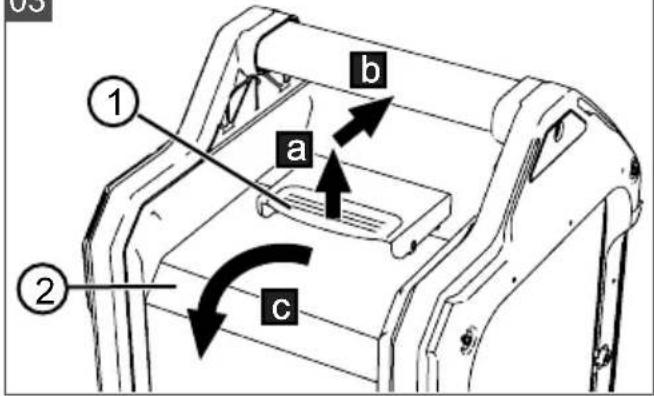
4.2.1 Opening the rechargeable battery cover (03)
- Pull the locking latch (03/1) upwards (03/a).
- Push the locking latch forwards (03/b).
- Fold the rechargeable battery cover (03/2) to the rear (03/c).
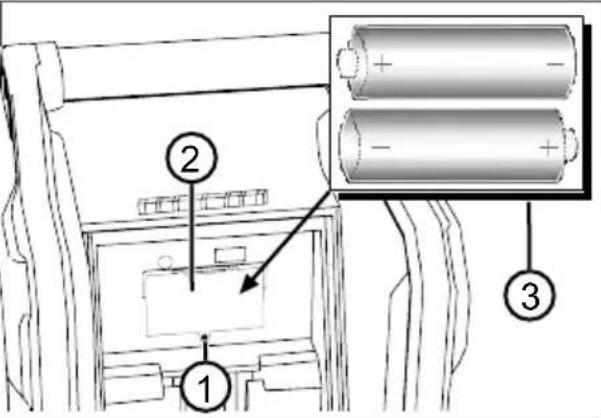
4.2.2 Inserting/removing the two AA batteries (04)
Two commercially available AA batteries* supply the station memory with current so that the saved stations are retained when the B50 Li rechargeable battery is pulled out.

NOTE
Always insert batteries of the same type and with the same charge status. Inserting different batteries or old and new batteries leads to premature discharging.
Requirements:
The rechargeable battery cover is open (see chapter 4.2.1 "Opening the rechargeable battery cover (03)", page 28).
The rechargeable battery has been removed (see chapter 4.2.3 "Inserting and removing the B50 Li rechargeable battery (05/06)", page 28).
- Unscrew the screw (04/1) of the battery compartment cover (04/2) with a screwdriver*.
- Remove the battery compartment cover.
- Insert the two AA batteries (04/3) in the battery compartment in such a way that the positive and negative poles are correct or take the two AA batteries out of the battery compartment.
- Insert the battery compartment cover and screw tight again.
- Insert the rechargeable battery (see chapter 4.2.3 "Inserting and removing the B50 Li rechargeable battery (05/06)", page 28).
- Close the rechargeable battery cover (see chapter 4.2.4 "Closing the rechargeable battery cover", page 29).
*: not included in the scope of supply.
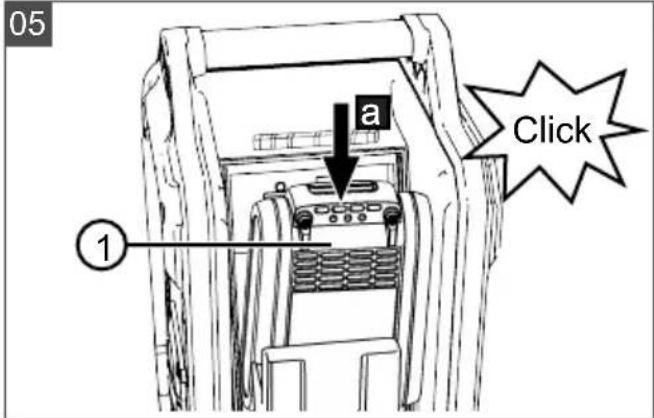
4.2.3 Inserting and removing the B50 Li rechargeable battery (05/06)
Precondition:
The rechargeable battery cover is open (see chapter 4.2.1 "Opening the rechargeable battery cover (03)", page 28).
Inserting the battery

NOTE
If the rechargeable battery cannot be easily inserted in the rechargeable battery guide, it is not correctly inserted.
■ Remove the rechargeable battery and push it in again.
- Push the rechargeable battery (05/1) into the rechargeable battery guide (05/a) until a click is heard. The battery symbol appears on the LCD display.
- Charge the rechargeable battery if an empty rechargeable battery is indicated by the battery symbol (see chapter 11 "Help in case of malfunction", page 34).
Removing the battery
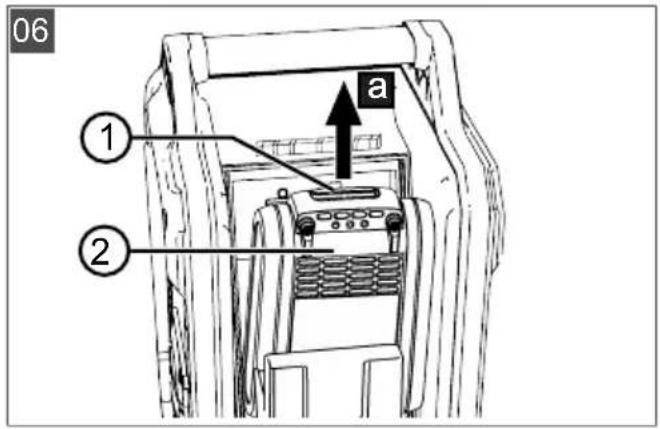
- Press the release button (06/1) and pull the rechargeable battery (06/2) out of the rechargeable battery guide (06/a).
4.2.4 Closing the rechargeable battery cover
-
Fold the rechargeable battery cover upwards until it lies against the housing of the rechargeable battery-operated radio.
-
Firmly press the locking latch until it engages.
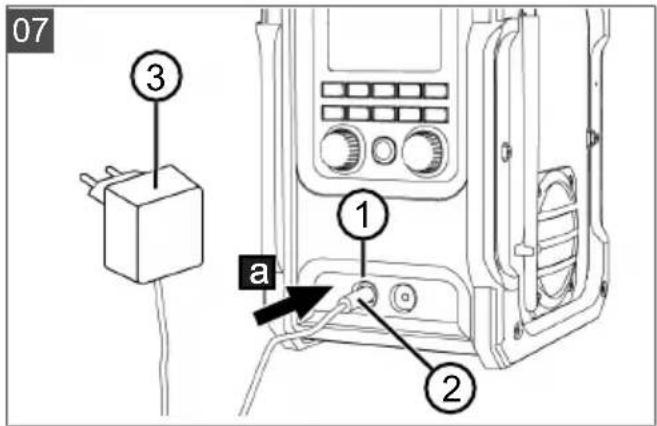
4.3 Operating the appliance with a power supply (07)
Instead of with the rechargeable battery and AA batteries, the rechargeable battery-operated radio can be operated with the power supply.
-
Fold the rubber cover to the DC IN socket (07/1) out of the way.
-
Insert the mains supply plug (07/2) into the DC IN socket (07/a).
-
Insert the power supply (07/3) into a mains plug socket.
5 OPERATION
5.1 Switching the appliance on/off (08)

NOTE
Where possible, do not operate the rechargeable battery-operated radio in the vicinity of a computer screen or other appliances that could interfere with reception.
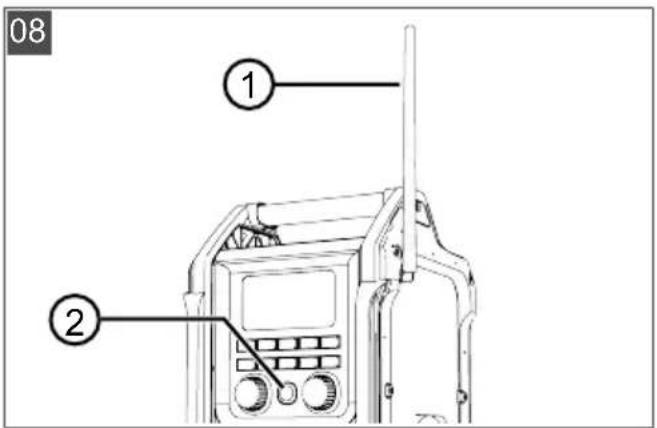
- Fold the antenna (08/1) upwards.
- Briefly press the On/Off button (08/2).
5.2 Listening to the radio
5.2.1 Selecting and playing the station (09)

NOTE
For good reception, fold the antenna upwards. If reception is poor during a station search, the station list may be empty or incomplete.
Selecting the frequency band and station
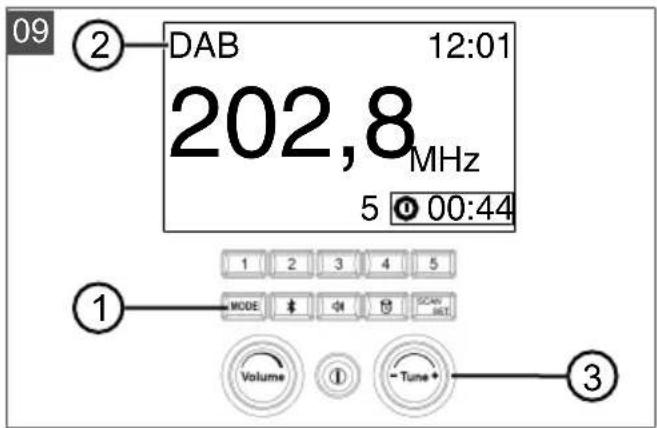
- Press the MODE button (09/1) until the required frequency band – DAB or FM (09/2) – is shown on the LCD display.
If DAB mode is selected for the first time, a station search starts automatically.
Starting the station search again: see chapter 5.2.3 "Carrying out the station search (11)", page 29.
- After the station search: Turn the rotary knob/push-button for station search [Tune] (09/3) until the required station is shown.
Playing the station
- Press the rotary knob/push-button for station search [Tune] (09/3) in order to play the displayed station.
- Or: After turning, release the rotary knob/push-button for station search [Tune]. After approx. 5 seconds, the rechargeable battery-operated radio automatically plays the displayed station.
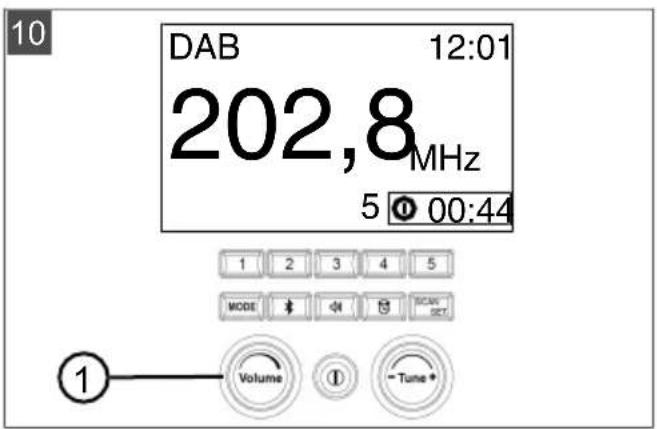
5.2.2 Setting the volume (10)
- Turn the rotary volume knob [Volume] (10/1) until the required volume is reached:
■ Turning clockwise: Increases the volume.
■ Turning anti-clockwise: Reduces the volume.
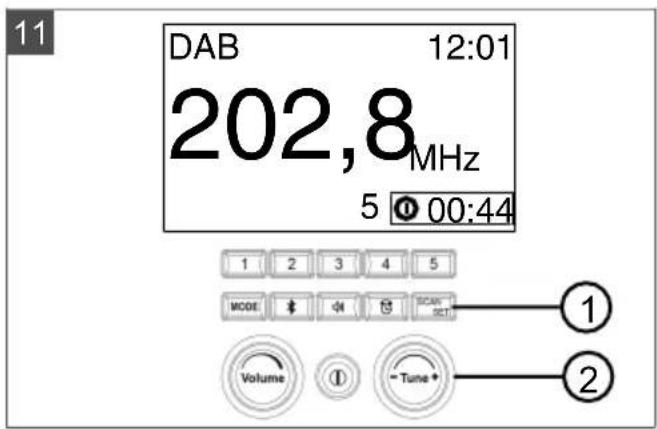
5.2.3 Carrying out the station search (11)
If another location has been searched since the last station search, a new station search should be carried out. This causes the stations available at this location to be saved in the station list of the rechargeable battery-operated radio.
Starting the station search
- Press the SCAN/SET button (11/1).
■ The following is shown on the LCD display: Scanning....
As soon as the station search is concluded, the first station that is found is played.
Searching for and playing another station
- Turn the rotary knob/push-button for station search [Tune] (11/2) until the required station is shown.
- Press the rotary knob/push-button for station search [Tune] (11/2) in order to play the displayed station.
- Or: After turning, release the rotary knob/push-button for station search [Tune]. After approx. 5 seconds, the rechargeable battery-operated radio automatically plays the displayed station.
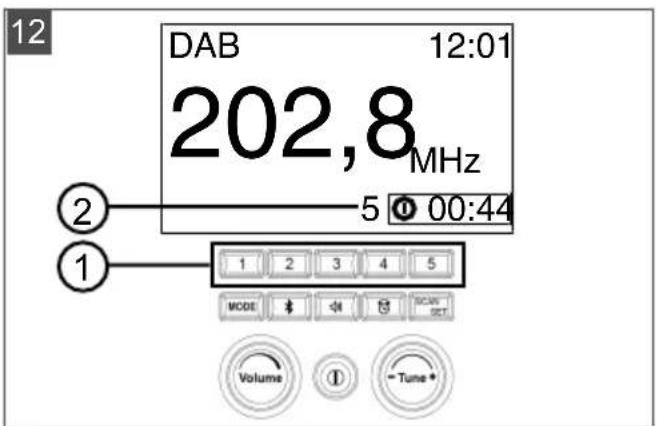
5.2.4 Saving and playing the station (12)
A station can be saved to each of the five station memory select buttons in order to select it more quickly.
Requirements:
■ The rechargeable battery-operated radio is switched on.
A station is playing.
Saving the current station
- Press one of the five station memory select buttons (12/1) and hold for approx. 3 seconds. The station is saved on the pressed button.
Playing the saved station
- Press the station memory select button on which the station is saved. The number (12/2) of the pressed station memory select button is shown on the display.
5.3 Convenient functions
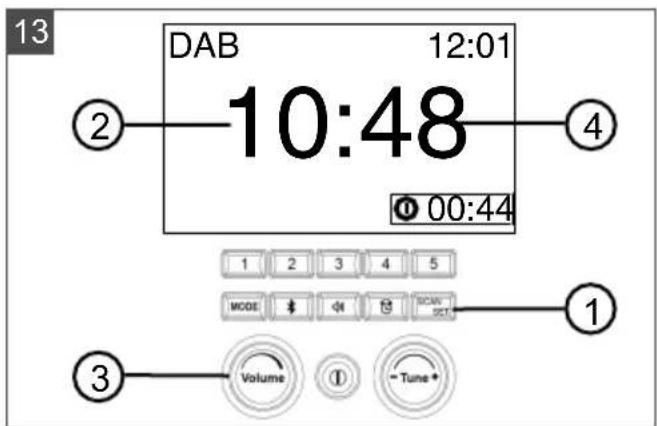
5.3.1 Setting the time (13)
- Press and hold the SCAN/SET button (13/1) for approx. 3 seconds.
■ The time is shown on the LCD display. The hour display (13/2) flashes.
-
Turn the rotary volume knob [Volume] (13/3) in order to set the hour display.
-
Press the SCAN/SET button again.
■ The minute display (13/4) flashes.
-
Turn the rotary volume knob [Volume] in order to set the minute display.
-
Press the SCAN/SET button to conclude the process.
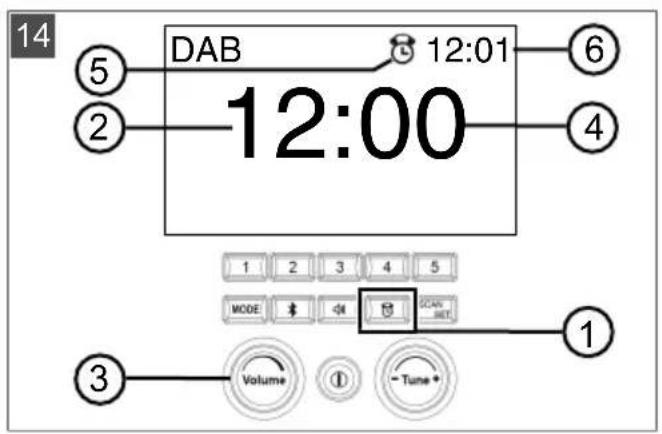
5.3.2 Activating/deactivating the alarm signal (14)
An alarm signal sounds at the set time.
Setting the alarm time
- Press and hold the alarm clock button (14/1) for approx. 3 seconds.
■ The alarm time is shown on the LCD display. The hour display (14/2) flashes. - Turn the rotary volume knob [Volume] (14/3) in order to set the hour display.
- Press the alarm clock button again.
■ The minute display (14/4) flashes. - Turn the rotary volume knob [Volume] in order to set the minute display.
- Press the alarm clock button to conclude the process.
Activating the alarm signal
- Press the alarm clock button (14/1).
■ The alarm clock symbol (14/5) and the set alarm time (14/6) are displayed on the LCD display.
■ An alarm signal sounds at the set time.
Deactivating the alarm signal
- Press the alarm clock button (14/1) again.
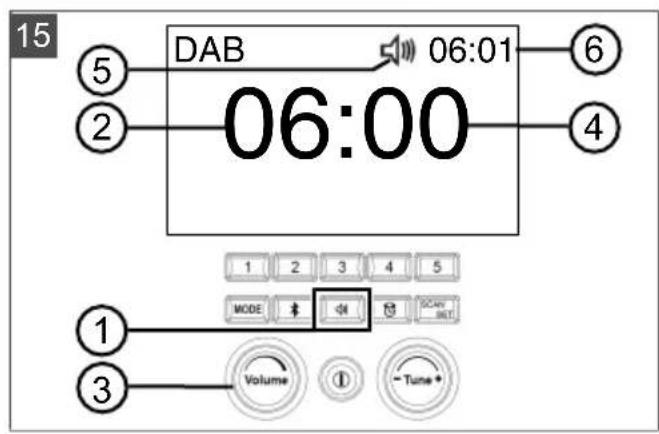
5.3.3 Activating/deactivating the radio alarm clock (15)
The radio is automatically started and a station is played at a time you set.
Setting the start time of the radio alarm clock
- Press and hold the radio alarm clock button (15/1) for approx. 3 seconds.
■ The start time is shown on the LCD display. The hour display (15/2) flashes. - Turn the rotary volume knob [Volume] (15/3) in order to set the hour display.
- Press the radio alarm clock button again.
■ The minute display (15/4) flashes. - Turn the rotary volume knob [Volume] in order to set the minute display.
- Press the radio alarm clock button to conclude the process.
Setting the station
- Selecting the frequency band and station: see chapter 5.2.1 "Selecting and playing the station (09)", page 29.
Activating the radio alarm clock
- Press the radio alarm clock button (15/1).
The radio alarm clock symbol (15/5) and the set start time (15/6) are shown on the LCD display.
■ The rechargeable battery-operated radio starts at the set time.
Deactivating the radio alarm clock
- Press the radio alarm clock button (15/1) again.
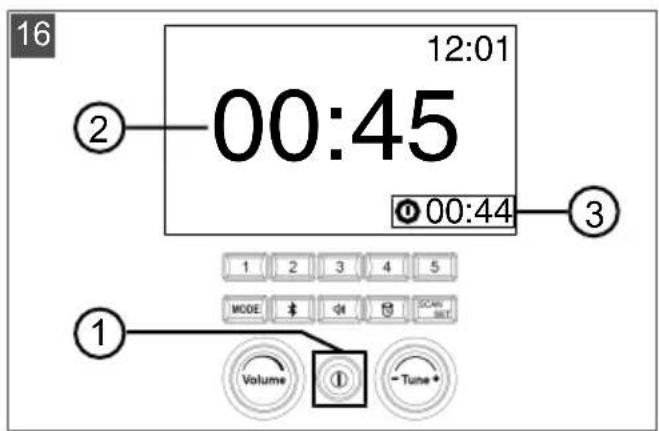
5.3.4 Setting the sleep function (16)
The sleep function can be used to set the runtime after which the rechargeable battery-operated radio is automatically switched off.
-
Switch on the rechargeable battery-operated radio (see chapter 5.1 "Switching the appliance on/off (08)", page 29).
-
Press and hold the On/Off button (16/1).
A short confirmation tone sounds and the possible runtimes (16/2) "02:00, 01:30, 01:00, 00:45, 00:30, 00:15" are shown sequentially on the LCD display.
- When the required runtime is shown, release the On/Off button.
■ The remaining time period (16/3) until the radio will be switched off is shown. The display counts downwards.
5.4 Connecting external appliances
External appliances can be connected to the rechargeable battery-operated radio in order to play music, e.g. Smartphone, MP3 player, CD player. The rechargeable battery-operated radio offers several connection options for this.

NOTE
The connecting cable is not included in the scope of delivery.

NOTE
Follow the information in the operating instructions of the external appliance.
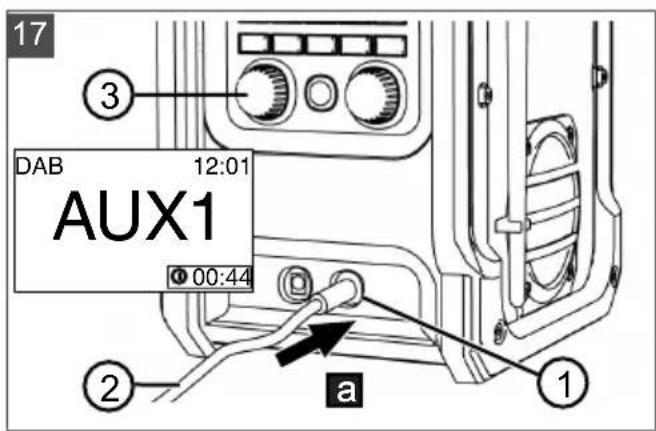
5.4.1 Connecting the external appliance at the front (17)
-
Fold the rubber cover out of the way to the AUX IN 1 socket (17/1).
-
Insert the plug of the AUX cable (17/2) in the AUX IN 1 socket (17/a).
■ The LCD display shows: AUX1.
- Use the rotary volume knob [Volume] (17/3) to adjust the volume.
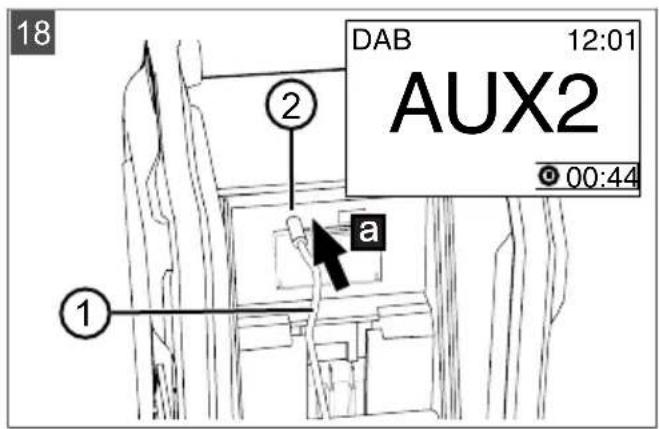
5.4.2 Connecting the external appliance at the rear (01, 18)
-
Open the rechargeable battery cover (see chapter 4.2.1 "Opening the rechargeable battery cover (03)", page 28).
-
Insert the (18/a) plug of the AUX cable (18/1) in the AUX IN 2 socket (18/2).
■ The LCD display shows: AUX2.
-
Use the rotary volume knob [Volume] to adjust the volume.
-
Insert the connected appliance, e.g. Smartphone, in the slide-in compartment (01/10) to store it.
-
Close the rechargeable battery cover (see chapter 4.2.4 "Closing the rechargeable battery cover", page 29).
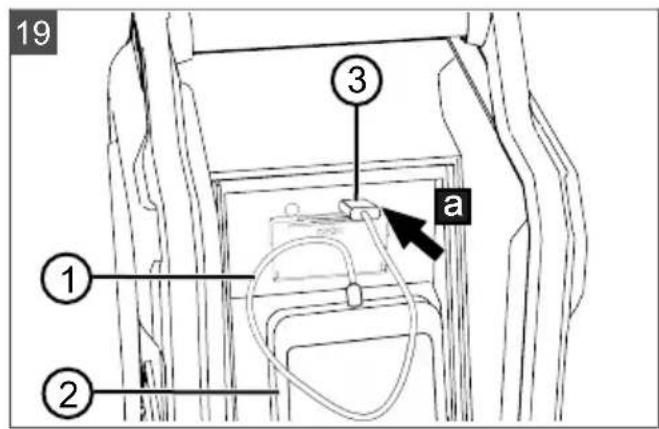
5.4.3 Charging the Smartphone via USB (01, 19)
The USB power connection can be used to charge the rechargeable battery of a Smart-phone. The USB power connection supplies a DC voltage of 5 V.
-
Open the rechargeable battery cover (see chapter 4.2.1 "Opening the rechargeable battery cover (03)", page 28).
-
Connect the USB cable (19/1) with the Smartphone (19/2).
-
Insert the plug (19/3) of the USB cable into the OUT 5V1A USB socket (19/a).
-
Insert the Smartphone in the slide-in compartment (01/10) to store it.
-
Close the rechargeable battery cover (see chapter 4.2.4 "Closing the rechargeable battery cover", page 29).
5.4.4 Establishing a Bluetooth connection (20)

NOTE
The connection quality of the Bluetooth system depends on the appliance to be connected. Compatibility with all types of appliances is not guaranteed. For a good connection, the distance between the appliance and rechargeable battery-operated radio should be no further than 5 m. There should be no obstacles between the appliances.
-
Activate Bluetooth on the required appliance.
-
Bring the appliance close to the rechargeable battery-operated radio.
-
Switch on the rechargeable battery-operated radio (see chapter 5.1 "Switching the appliance on/off (08)", page 29).
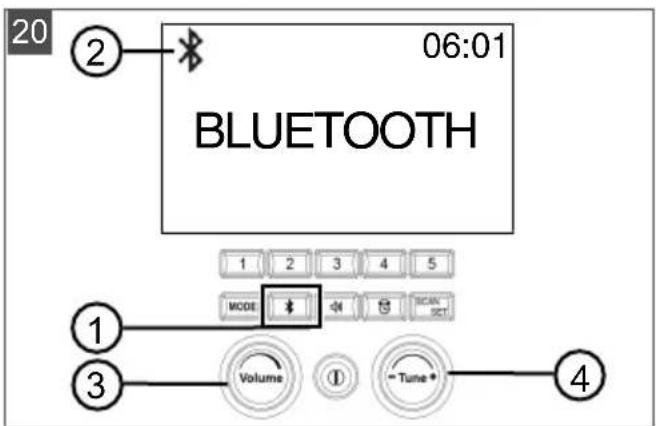
- Press the Bluetooth button (20/1) on the rechargeable battery-operated radio to activate the Bluetooth mode.
The Bluetooth symbol (20/2) is shown on the LCD display. On the LCD display, the following flashes: BLUETOOTH.
- On your Bluetooth appliance, select the menu item: TDR18-radio.
A confirmation tone sounds. The appliances are connected together.
- Use the rotary volume knob [Volume] (17/3) to adjust the volume.
- Turn the rotary knob/push-button to search for the station [Tune] (17/4) until the required music track plays.
6 MAINTENANCE AND CARE

WARNING!
Danger of injury from electric shock and fire!
Liquid penetrating the appliance can cause electric shock and fire.
■ Before cleaning or maintenance, remove the appliance from the power source.
■ Remove the rechargeable battery before cleaning the appliance.
- Do not use water to clean the appliance.
- Do not use chemical agents because plastic parts can be damaged.
■ Use a soft, slightly moist cloth to clean the outside of the rechargeable battery-operated radio by rubbing it gently.
We recommend regular cleaning to remove dust and dirt from the appliance.
7 TRANSPORT

NOTE
The nominal energy of the rechargeable battery is less than 100 Wh. Therefore, heed the following transport instructions.
The li-ion rechargeable battery contained in the appliance is subject to the hazardous goods law, but can be transported under simplified conditions:
The undamaged rechargeable battery can be transported on public roads by the private user without further conditions provided it is packaged for retail sale and the transport serves personal purposes. The weight limits for batteries sent separately must be observed:
Max. 30 kg total weight per package when transported by road, rail and water
No upper limit for air transport but max. 2 pieces per package
If damage to the battery (e.g. due to the appliance falling) is suspected, transport is not permissible.
■ Commercial users who carry out the transport in connection with their main activity (e.g. delivery from and to building sites, or demonstrations) can also take advantage of this simplification.
In both cases, it is essential to take the mandatory precautions mentioned above to prevent any leakage of the contents. In other cases, it is essential to comply with the regulations of the hazardous goods law. In the case of non-compliance, severe penalties can be imposed on the sender and possibly the transporter.
Additional notes on transport and shipment
■ Only transport or ship lithium-ion rechargeable batteries in an undamaged state.
- Secure the appliance in such a way as to prevent it from starting to operate inadvertently during transport.
- Secure the appliance with strong outer packaging (cardboard shipment box). Use the manufacturer's original packaging if possible.
■ Ensure correct identification and documentation of the consignment during transport or dispatch (e.g. by parcel or forwarding):
When transporting by road, rail and water, a warning sticker must be applied to the packaging when the battery/batteries accompany the appliance. No warning sticker is necessary if the battery/batteries are installed or fitted into the appliance, since the outer packaging/original packaging must already comply with specific regulations.
A warning sticker must always be placed on the packaging when transporting by air. The maximum weight limits for batteries sent together with the appliance must be observed: max. 5 kg battery weight
per package and max. 2 pieces per package, if the battery/batteries are accompanying the appliance.
Please find out in advance whether transport is possible with the selected service provider, and show your shipment.
We recommend involving a hazardous goods specialist in the preparation of the shipment. Please heed any other national regulations.
8 STORAGE
Thoroughly clean the appliance after every use. Store the appliance in a dry, lockable place out of the reach of children.
Carry out the following jobs before intervals in work lasting longer than 30 days:
■ Thoroughly clean the appliance and store it in a dry place.
8.1 Storing the rechargeable battery and charging unit

DANGER!
Danger of explosion and fire!
Persons will be fatally or severely injured if the rechargeable battery explodes because it was stored in front of naked flames or heat sources.
■ Store the rechargeable battery in cool and dry conditions, but not in front of naked flames or heat sources.

NOTE
When charging, the rechargeable battery is protected from overcharging due to automatic detection of the charge status and thus can remain connected to the charging unit for some time, but not permanently.
- Store the rechargeable battery in a dry, frost-free place at an ambient temperature between 0 °C and 25 °C and a charge state of approx. 40 - 60 %.
- Do not store the rechargeable batteries in the vicinity of metallic objects or objects containing acid to avoid the risk of short-circuit.
■ After approx. 3 months storage, charge the rechargeable battery for approx. 50 minutes.
9 DISPOSAL
Information on the German Electrical and Electronic Equipment Act (ElectroG)

■ Electrical and electronic appliances do not belong in household waste, but should be collected and disposed of separately.
■ Used batteries or rechargeable batteries that are not installed permanently in the old appliance must be removed before disposal. Their disposal is regulated by the battery law.
- Owners or users of electrical and electronic appliances are obliged by law to return them after use.
■ The end user bears personal responsibility for deleting his personal data from the old appliance to be disposed of.
The symbol of the crossed-through rubbish bin means that electrical and electronic appliances may not be disposed of in the household rubbish.
Electrical and electronic appliances can be handed in at the following places at no charge:
■ Public service disposal or collection points (e.g. municipal building yards)
■ Points of sale of electrical appliances (stationary and online) provided traders are obliged to take them back or offer this voluntarily.
These statements only apply to appliances that are installed and sold in the countries of the European Union and are subject to European Directive 2012/19/EU. Different provisions may apply to the disposal of electrical and electronic appliances in countries outside the European Union.
Information on the German Battery Act (BattG)

■ Used batteries and rechargeable batteries do not belong in household waste, but should be collected and disposed of separately.
For safe removal of batteries or rechargeable batteries from the electrical appliance and for information on their type or chemical system, follow the further information within the operating or installation instructions.
Owners or users of batteries and rechargeable batteries are obliged by law to return them after use. Return is limited to the handover of customary household quantities.
Used batteries can contain harmful substances or heavy metals that can cause damage to the environment and human health. Reuse of the used batteries and use of the resources contained therein contributes to the protection of these two essential commodities.
The symbol of the crossed-through rubbish bin means that batteries and rechargeable batteries may not be disposed of in household rubbish.
In addition, if the symbol Hg, Cd or Pb appears under the rubbish bin, this stands for the following:
■ Hg: Battery contains more than 0.0005 % mercury
Cd: Battery contains more than 0.002 % cadmium
■ Pb: Battery contains more than 0.004 % lead Rechargeable batteries and batteries can be handed in at the following places at no charge:
■ Public service disposal or collection points (e.g. municipal building yards)
■ Points of sale of batteries and rechargeable batteries
■ Disposal points of the common take-back system for the used batteries of appliances
■ Disposal point of the manufacturer (if not a member of the common take-back system)
These statements apply only to rechargeable batteries and batteries that are sold in the countries of the European Union and that are subject to European Directive 2006/66/EU. Different provisions can apply to the disposal of rechargeable batteries and batteries in countries outside the European Union.
10 AFTER-SALES / SERVICE
In the event of questions of warranty, repair or spare parts, please contact your nearest AL-KO Service Centre.
These can be found on the Internet at: www.al-ko.com/service-contacts
11 HELP IN CASE OF MALFUNCTION
| Malfunction Cause Remedy | ||
| Radio does not run. Rechargeable battery missing or not seated correctly. | Insert the rechargeable battery correctly. | |
| Battery power starts to wane. | Rechargeable battery is flat. Charge the rechargeable battery. | |
| Radio stops when playing music. | Rechargeable battery is flat. Charge the rechargeable battery. | |
| The service life of the rechargeable battery has expired. | Replace the rechargeable battery. Only use genuine accessories from the manufacturer. | |
| Rechargeable battery cannot be charged. | Rechargeable battery contacts are dirty. | ■ Contact an AL-KO service centre. |
| The rechargeable battery or charger is faulty. | ■ Order spare parts acc. to the spare parts card. | |
| Rechargeable battery is too hot. | ■ Allow the battery to cool down. | |

NOTE
If you encounter any malfunctions that are not listed in this table or that you cannot rectify yourself, please contact our customer service.
12 GUARANTEE
We will resolve any material or manufacturing faults on the appliance during the legal warranty period for claims relating to faults, in accordance with our choice either to repair or replace. The legal warranty period is determined by the legislation of the country in which the appliance was purchased.
Our warranty promise applies only if:
■ These operating instructions are heeded
■ The appliance is handled correctly
■ Original spare parts have been used
The warranty becomes void in the case of:
■ Unauthorised repair attempts
■ Unauthorised technical modifications
Non-intended use
The guarantee excludes:
■ Paint damage that can be attributed to normal wear and tear
■ Wear parts that are marked with a frame xxxxxx (x) on the spare parts card
The guarantee period commences with purchase by the first end user. The date on the proof of purchase is decisive. In the event of a guarantee claim, please take this guarantee declaration and the original proof of purchase, and contact your dealer or the nearest authorised customer service centre. This statement does not affect the purchaser's statutory claims for defects against the vendor.
13 TRANSLATION OF THE ORIGINAL EU DECLARATION OF CONFORMITY
We hereby declare, as the exclusive responsible party, that this product in its marketed form conforms to the requirements of the harmonised EU Directives, EU safety standards and the product-specific standards.
| Product | Manufacturer | Duly authorised person for technical file |
| Rechargeable battery-operated radio | AL-KO Geräte GmbH | Andreas Hedrich |
| Ichenhauser Str. 14 | Ichenhauser Str. 14 | |
| Serial number | D-89359 Kötz | D-89359 Kötz |
| G4990012 | Germany | Germany |
Type EU directives Harmonised standards
| WR 2000 2014/53/EU | EN 55032 | EN 62479 |
| 2014/30/EU | EN 55020 | EN 300 328 V2.1.1 |
| 2011/65/EU | EN 61000-3-2 | EN 301 489-17 V3.1.1 |
| EN 61000-3-3 | EN 60065:2014 |
Wolfgang Hergeth
Managing Director
VERTALING VAN DE ORIGINELE GEBRUIKERSHANDLEIDING
Inhoudsopgave
10 Klantenservice/service centre 48
2 PRODUCTOMSCHRIJVING
WAARSCHUWING! Explosiegevaar!
Conditions requises :
Conditions requises :
Conditions requises :
Régler la station radio
www.al-ko.com/service-contacts
11 AIDE EN CAS DE PANNES
www.al-ko.com/service-contacts
11 AYUDA EN CASO DE AVERÍA
www.al-ko.com/service-contacts
11 SUPPORTO IN CASO DI ANOMALIE
10 SERVISNA SLUŽBA/SERVIS
www.al-ko.com/service-contacts
11 POMOČ PRI MOTNJAH
| Motnja Vzrok Ukrep | ||
| Radio ne deluje. Akumulatorska baterija ni vsta-vljena ali ni pravilno nameščena. | Pravilno vstavite akumulatorsko bate-rijo. | |
| Akumulatorska baterija je praz-na. | ||
| Nadomestni bateriji sta prazni Vstavite novi nadomestni bateriji. | ||
| Stikalo je okvarjeno. Obiščite servisno delavnico AL-KO. | ||
| Moč akumulatorske bate-rije peša. | Akumulatorska baterija je praz-na. | Napolnite akumulatorsko baterijo. |
| Radio se med predvaja-njem glasbe ustavi. | Akumulatorska baterija je praz-na. | Napolnite akumulatorsko baterijo. |
| Čas polnjenja akumulatorske ba-terije se je iztekel. | Zamenjajte akumulatorsko baterijo. Uporabite samo originalni pribor proizvajalca. | |
| Akumulatorske baterije ni mogoče napolniti. | Kontakti na akumulatorski bateriji so umazani. | Obiščite servisno delavnico AL-KO. |
| Akumulatorska baterija ali polnil-nik sta pokvarjena. | Nadomestne dele naročite s po-močjo karte nadomestnih delov. | |
| Akumulatorska baterija je pregreta. | Počakajte, da se akumulator ohla-di. | |

NAPOTEK
www.al-ko.com/service-contacts
11 POMOĆ U SLUČAJU SMETNJI
www.al-ko.com/service-contacts
11 POMOC W PRZYPADKU USTEREK
www.al-ko.com/service-contacts
11 HIBAELHÁRÍTÁS
10 Kundeservice/service.... 193
LCD-displayet viser: AUX2.
www.al-ko.com/service-contacts
11 HJÆLP VED FORSTYRRELSER
4 SETTE I DRIFT/TA UT AV DRIFT
4.1 Lade batteri

6 VEDLIKEHOLD OG PLEIE

ADVARSEL!
www.al-ko.com/service-contacts
www.al-ko.com/service-contacts


- Inhaltsverzeichnis
- About these operating instructions 24
- Product description 24
- Safety instructions 25
- Commissioning/Decommissioning.... 28
- Operation 29
- Convenient functions 30
- Connecting external appliances 31
- ABOUT THESE OPERATING INSTRUCTIONS
- Legends and signal words
- DANGER!
- WARNING!
- CAUTION!
- IMPORTANT!
- NOTE
- PRODUCT DESCRIPTION
- Designated use
- Possible foreseeable misuse
- Symbols on the appliance
- Symbols on the LCD display
- Symbol Meaning
- Scope of supply
- Danger of damage to the appliance and battery
- Product overview (01, 02)
- Components (01)
- Control panel (02)
- SAFETY INSTRUCTIONS
- Danger of fatal injury and danger of extremely severe injury!
- Operator
- Use and handling of the rechargeable battery-operated radio
- Appliance safety
- Safety when operating with a power supply
- Safety information regarding the rechargeable battery
- Safety information regarding the charging unit
- Safety instructions relating to non-rechargeable batteries
- Danger of explosion!
- COMMISSIONING/DECOMMISSIONING
- Charging the rechargeable battery
- CAUTION! Danger of fire during charging!
- Inserting AA batteries and the B50 Li rechargeable battery
- Opening the rechargeable battery cover (03)
- Inserting/removing the two AA batteries (04)
- Requirements:
- Inserting and removing the B50 Li rechargeable battery (05/06)
- Precondition:
- Inserting the battery
- Removing the battery
- Closing the rechargeable battery cover
- Operating the appliance with a power supply (07)
- OPERATION
- Switching the appliance on/off (08)
- Listening to the radio
- Selecting and playing the station (09)
- Selecting the frequency band and station
- Playing the station
- Setting the volume (10)
- Carrying out the station search (11)
- Starting the station search
- Searching for and playing another station
- Saving and playing the station (12)
- Saving the current station
- Playing the saved station
- Convenient functions
- Setting the time (13)
- Activating/deactivating the alarm signal (14)
- Setting the alarm time
- Activating the alarm signal
- Deactivating the alarm signal
- Activating/deactivating the radio alarm clock (15)
- Setting the start time of the radio alarm clock
- Setting the station
- Activating the radio alarm clock
- Deactivating the radio alarm clock
- Setting the sleep function (16)
- Connecting external appliances
- Connecting the external appliance at the front (17)
- Connecting the external appliance at the rear (01, 18)
- Charging the Smartphone via USB (01, 19)
- Establishing a Bluetooth connection (20)
- MAINTENANCE AND CARE
- Danger of injury from electric shock and fire!
- TRANSPORT
- Additional notes on transport and shipment
- STORAGE
- Storing the rechargeable battery and charging unit
- Danger of explosion and fire!
- DISPOSAL
- Information on the German Electrical and Electronic Equipment Act (ElectroG)
- Information on the German Battery Act (BattG)
- AFTER-SALES / SERVICE
- HELP IN CASE OF MALFUNCTION
- GUARANTEE
- Our warranty promise applies only if:
- The warranty becomes void in the case of:
- The guarantee excludes:
- TRANSLATION OF THE ORIGINAL EU DECLARATION OF CONFORMITY
- VERTALING VAN DE ORIGINELE GEBRUIKERSHANDLEIDING
- Inhoudsopgave
- PRODUCTOMSCHRIJVING
- WAARSCHUWING! Explosiegevaar!
- Conditions requises :
- Régler la station radio
- AIDE EN CAS DE PANNES
- AYUDA EN CASO DE AVERÍA
- SUPPORTO IN CASO DI ANOMALIE
- SERVISNA SLUŽBA/SERVIS
- POMOČ PRI MOTNJAH
- NAPOTEK
- POMOĆ U SLUČAJU SMETNJI
- HIBAELHÁRÍTÁS
- HJÆLP VED FORSTYRRELSER
- SETTE I DRIFT/TA UT AV DRIFT
- Lade batteri
- VEDLIKEHOLD OG PLEIE
- ADVARSEL!
Brand : AL-KO
Model : WR 2000
Category : Radio