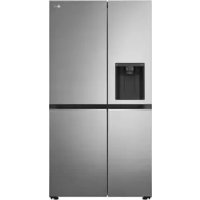
GSLV70PZLE - Refrigerator-freezer LG - Free user manual and instructions
Find the device manual for free GSLV70PZLE LG in PDF.



| Product Type | Refrigerator-Freezer |
| Brand | LG |
| Model | GSLV70PZLE |
| Dimensions (W x D x H) | 913 x 735 x 1750 mm (approx) |
| Net Weight | Approximately 110 kg |
| Electrical Supply | 220-240 V, 50 Hz |
| Refrigerant | R600a (isobutane) |
| Climate Class | SN, N, ST, T (10 °C to 43 °C) |
| Control Panel | Electronic with digital display |
| Water and Ice Dispenser | Yes, with automatic ice maker and Craft Ice option |
| Interior Lighting | LED (maintenance-free) |
| Wi-Fi Connectivity | Yes, via LG ThinQ app |
| Special Features | Express Cool, Express Freeze, Self Care (UV), Open Door Alarm, High Temperature Alarm |
| Water Filter | Yes, with replacement indicator |
| Defrost | Automatic (no frost) |
| Maximum Freezing Capacity | Indicated on the rating label (activate Express Freeze 7 hours in advance) |
| Care and Cleaning | Clean with a soft cloth and mild detergent; do not use abrasive products |
| Spare Parts | Available for 7 years (gaskets 10 years) |
| Warranty | 24 months |
| Safety | Child Lock, functional grounding, automatic shutdown of functions |
Frequently Asked Questions - GSLV70PZLE LG
User questions about GSLV70PZLE LG
0 question about this device. Answer the ones you know or ask your own.
Ask a new question about this device
Download the instructions for your Refrigerator-freezer in PDF format for free! Find your manual GSLV70PZLE - LG and take your electronic device back in hand. On this page are published all the documents necessary for the use of your device. GSLV70PZLE by LG.
USER MANUAL GSLV70PZLE LG
Before beginning installation, read these instructions carefully. This will simplify installation and ensure that the product is installed correctly and safely. Leave these instructions near the product after installation for future reference.
ENGLISH
Refer to the owner's manual on LG website for more detailed information.

MFL71798879
Rev.01_120622
www.lg.com
Copyright © 2022 LG Electronics Inc. All Rights Reserved.
TABLE OF CONTENTS
This manual may contain images or content that may be different from the model you purchased.
This manual is subject to revision by the manufacturer.
SAFETY INSTRUCTIONS
READ ALL INSTRUCTIONS BEFORE USE. 3
WARNING. 3
CAUTION 9
INSTALLATION
Before Installation 11
Removing the Fridge and Freezer Door. 12
Connecting the Water Line 14
Turning on the Power. 15
Moving the Appliance for Relocation 16
OPERATION
Before Use 17
Control Panel. 20
Ice and Water Dispenser. 23
SMART FUNCTIONS
LG ThinQ Application. 25
MAINTENANCE
Cleaning 27
TROUBLESHOOTING
Before Calling for Service. 28
SAFETY INSTRUCTIONS
READ ALL INSTRUCTIONS BEFORE USE
The following safety guidelines are intended to prevent unforeseen risks or damage from unsafe or incorrect operation of the appliance. The guidelines are separated into 'WARNING' and 'CAUTION' as described below.
Safety Messages

This symbol is displayed to indicate matters and operations that can cause risk. Read the part with this symbol carefully and follow the instructions in order to avoid risk.

WARNING
This indicates that the failure to follow the instructions can cause serious injury or death.

CAUTION
This indicates that the failure to follow the instructions can cause the minor injury or damage to the product.
WARNING

WARNING
To reduce the risk of explosion, fire, death, electric shock, injury or scalding to persons when using this product, follow basic precautions, including the following:
Technical Safety
- This appliance can be used by children aged from 8 years and above and persons with reduced physical, sensory or mental capabilities or lack of experience and knowledge if they have been given supervision or instruction concerning use of the appliance in a safe way and understand the hazards involved. Children shall not play with the
4 SAFETY INSTRUCTIONS
appliance. Cleaning and user maintenance shall not be made by children without supervision.
- This appliance is not intended for use by persons (including children) with reduced physical, sensory or mental capabilities, or lack of experience and knowledge, unless they have been given supervision or instruction concerning use of the appliance by a person responsible for their safety. Children should be supervised to ensure that they do not play with the appliance.
Children aged from 3 to 8 years are allowed to load and unload refrigerating appliances. -
This appliance is intended to be used in household and similar applications such as:
-
staff kitchen areas in shops, offices and other working environments;
- farm houses and by clients in hotels, motels and other residential type environments;
- bed and breakfast type environments;
-
catering and similar non-retail applications.
-
This refrigerating appliance is not intended to be used as a built-in appliance.

This symbol alerts you to flammable materials that can ignite and cause a fire if you do not take care.
- This appliance contains a small amount of isobutane refrigerant (R600a), but it is also combustible. When transporting and installing the appliance, care should be taken to ensure that no parts of the refrigerating circuit are damaged.
- The refrigerant and insulation blowing gas used in the appliance require special disposal procedures. Consult with service agent or a similarly qualified person before disposing of them.
- Do not damage the refrigerant circuit.
-
If the power cord is damaged or the hole of the outlet socket is loose, do not use the power cord and contact an authorized service centre.
-
Do not locate multiple portable outlet sockets or portable power supplies at the rear of the appliance.
- Securely plug the power plug in the outlet socket after completely removing any moisture and dust.
- Never unplug the appliance by pulling on the power cable. Always grip the power plug firmly and pull straight out from the outlet socket.
- Keep ventilation openings, in the appliance enclosure or in the built-in structure, clear of obstruction.
- Do not store explosive substances such as aerosol cans with a flammable propellant in this appliance.
- Do not tilt the appliance to pull or push it when transporting.
- When positioning the appliance, ensure the supply cord is not trapped or damaged.
- Do not use mechanical devices or other means to accelerate the defrosting process.
- Do not use a hair drier to dry the inside of the appliance or place a candle inside to remove the odours.
- Do not use electrical appliances inside the food storage compartments of the appliance, unless they are of the type recommended by the manufacturer.
- Make sure not to get a body part such as a hand or foot stuck while moving the appliance.
- Disconnect the power cord before cleaning the appliance interior or exterior.
- Do not spray water or inflammable substances (toothpaste, alcohol, thinner, benzene, flammable liquid, abrasive, etc.) over the interior or exterior of the appliance to clean it.
- Do not clean the appliance with brushes, cloths or sponges with rough surfaces or which are made of metallic material.
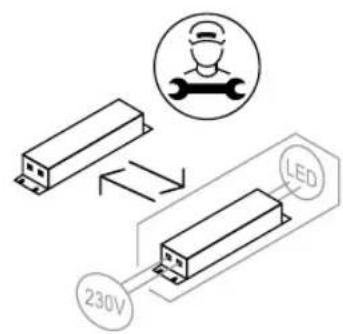
- Only qualified service personnel from LG Electronics service centre should disassemble, repair, or modify the appliance. Contact an LG Electronics customer information centre if you move and install the appliance in a different location.
6 SAFETY INSTRUCTIONS
Risk of Fire and Flammable Materials
- If a leak is detected, avoid any naked flames or potential sources of ignition and air the room in which the appliance is standing for several minutes. In order to avoid the creation of a flammable gas air mixture if a leak in the refrigerating circuit occurs, the size of the room in which the appliance is used should correspond to the amount of refrigerant used. The room must be 1m2 in size for every 8 g of R600a refrigerant inside the appliance.
- Refrigerant leaking out of the pipes could ignite or cause an explosion.
- The amount of refrigerant in your particular appliance is shown on the identification plate inside the appliance.
Installation
- This appliance should only be transported by two or more people holding the appliance securely.
- Install the appliance on a firm and level floor.
- Do not install the appliance in a damp and dusty place. Do not install or store the appliance in any outdoor area, or any area that is subject to weathering conditions such as direct sunlight, wind, rain, or temperatures below freezing.
- Do not place the appliance in direct sunlight or expose it to the heat from heating appliances such as stoves or heaters.
- Be careful not to expose the rear of the appliance when installing.
- Install the appliance in a place where it is easy to unplug the power plug of the appliance.
- Be careful not to let the appliance door fall during assembly or disassembly.
- Be careful not to pinch, crush, or damage the power cable during assembly or disassembly of the appliance door.
- Be careful not to point the power plug up or let the appliance lean against the power plug.
-
Do not connect a plug adapter or other accessories to the power plug.
-
Do not modify or extend the power cable.
- Ensure that the outlet socket is properly grounded, and that the earth pin on the power cord is not damaged or removed from the power plug. For more details on grounding, inquire at an LG Electronics customer information centre.
- This appliance is equipped with a power cord having an equipment-grounding conductor and a grounding power plug. The power plug must be plugged into an appropriate outlet socket that is installed and grounded in accordance with all local codes and ordinances.
- Never start up an appliance showing any signs of damage. If in doubt, consult your dealer.
- Dispose of all packaging materials (such as plastic bags and styrofoam) away from children. The packaging materials can cause suffocation.
- Do not plug the appliance into a multi socket adapter which does not have a power cable (mounted).
- The appliance should be connected to a dedicated power line which is separately fused.
- Do not use a multi socket outlet which is not properly grounded (portable). In case of using a properly-grounded multi socket outlet (portable), use the multi socket outlet with the current capacity of the power cord rating or higher and use the multi socket outlet only for the appliance.
Operation
- Do not use the appliance for any purpose (storage of medical or experimental materials or shipping) other than any domestic household food storage use.
- If water penetrates electrical parts of the appliance, disconnect power plug and contact an LG Electronics customer information centre.
- Unplug the power plug during a severe thunderstorm or lightening or when not in use for a long period of time.

8 SAFETY INSTRUCTIONS
- Do not touch the power plug or the appliance controls with wet hands.
- Do not bend the power cable excessively or place a heavy object on it.
- Immediately unplug the power plug and contact an LG Electronics customer information centre if you detect a strange sound, odour, or smoke coming from the appliance.
- Do not place hands or metallic objects inside the area emitting the cold air, cover or heat releasing grille on the back.
- Do not apply excessive force or impact to the back cover of the appliance.
- Be careful of nearby children when you open or close the appliance door. The door may bump the child and cause injury.
- Avoid the danger of children getting trapped inside the appliance. A child trapped inside the appliance can cause suffocation.
- Do not put animals, such as pets into the appliance.
- Do not place heavy or fragile objects, containers filled with liquid, combustible substances, flammable objects (such as candles, lamps, etc.), or heating devices (such as stoves, heaters, etc.) on the appliance.
- Do not place any electronic appliance (such as heater and mobile phone) inside the appliance.
- If there is a gas leakage (isobutane, propane, natural gas, etc.), do not touch the appliance or power plug and ventilate the area immediately. This appliance uses a refrigerant gas (isobutane, R600a). Although it uses a small amount of the gas, it is still combustible gas. Gas leakage during appliance transport, installation or operation can cause fire, explosion or injury if sparks are caused.
- Do not use or store flammable or combustible substances (ether, benzene, alcohol, chemical, LPG, combustible spray, insecticide, air freshener, cosmetics, etc.) near the appliance.
- This appliance incorporates an earth connection for functional purposes.
Disposal
- When discarding the appliance, remove the door gasket while leaving the shelves and baskets in place and keep children away from the appliance.
CAUTION

CAUTION
To reduce the risk of minor injury to persons, malfunction, or damage to the product or property when using this product, follow basic precautions, including the following:
Installation
- After unpacking, check the appliance for any damage that may have occurred during transit.
- Wait for at least 3 to 4 hours in order to ensure the refrigerant circuit is fully efficient.
- This appliance does not require changes in installation or use based on altitude.
Operation
- Do not touch frozen food or the metal parts in the freezer compartment with wet or damp hands. It may cause frostbite.
- Do not place glass containers, bottles or cans (especially those containing carbonated drinks) in the freezer compartment, shelves or ice bin that will be exposed to temperatures below freezing.
- The tempered glass on the front side of the appliance door or the shelves can be damaged by an impact. If it is broken, do not touch it with hands.
- Do not hang from the appliance doors, storage room, shelf or climb up into it.
- Do not store an excessive amount of water bottles or containers for side dishes on the door baskets.
10 SAFETY INSTRUCTIONS
- Do not open or close the appliance door with excessive force.
- If the hinge of the appliance door is damaged or operates improperly, stop using the appliance and contact an authorized service centre.
- Prevent animals from nibbling on the power cable or water hose.
- Never eat frozen foods immediately after they have been taken out in the freezer compartment.
- Make sure not to get a hand or foot stuck upon opening or closing the appliance door or door in door.
Maintenance
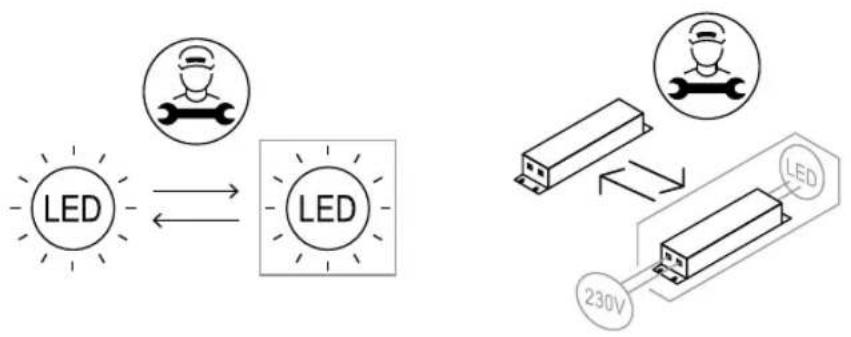
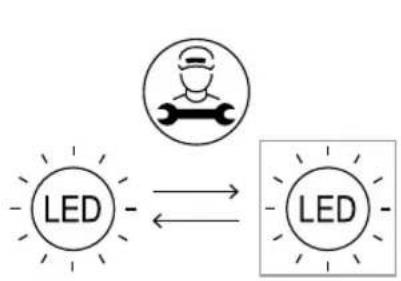
- This appliance is equipped with maintenance-free LED interior light. Do not remove cover or LED lamp in any attempt to repair or change it. Contact an LG Electronics customer information centre.
- Do not clean glass shelves or covers with warm water when they are cold. They may shatter if exposed to sudden temperature changes.
- Do not insert the shelves upside down. The shelves may fall.
- To remove frost from the appliance, contact an LG Electronics customer information centre.
- Dispose of the ice inside the ice bin in the freezer compartment during an extended power outage.
INSTALLATION
Before Installation
Dimensions and Clearances
Too small of a distance from adjacent items may result in the degradation of freezing capability and increased electricity costs. Allow over 50mm of clearance between the back of the appliance and the wall when installing the appliance.
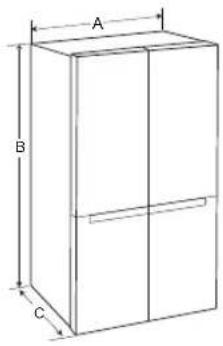

| - Size (mm) | |
| A | 913 |
| B | 1 |
| C | 735 |
| D | 620 |
| E | 691 |
| F | 735 |
| G | 1 |
| H | 1 |
NOTE
- You can determine what type of appliance it is by looking at the label inside the appliance.
Ambient Temperature
- The appliance is designed to operate within a limited range of ambient temperatures, depending on the climate zone.
- The internal temperatures could be affected by the location of the appliance, the ambient temperature, the frequency of door opening and so on.
- The climate class can be found on the rating label.
| Climate Class Ambient Temperature Range °C | |
| SN (Extended Temperate) | +10 - +32 |
| N (Temperate) +16 - +32 | |
| ST (Subtropical) +16 - +38 / +18 - +38** | |
| T (Tropical) +10 - +43* / +16 - +43 / +18 - +43** | |
* Australia, India, Kenya
7 Argentina 9 0
NOTE
The appliances rated from SN to T are intended to be used at an ambient temperature between 10°C and 43°C .
1 8 0
6 3 5
12 INSTALLATION
Accessories
*1 This feature is only available on some models.

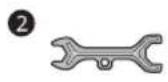
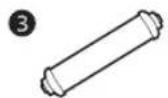


collet 1 to detach the water supply line. Unscrew the cover 2.

1 Spanner A*1
2 Spanner B1
Water Filter*1
Water Tube*1
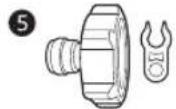
Tube Connector and Clip1
6 Tube Connector and Valve*1
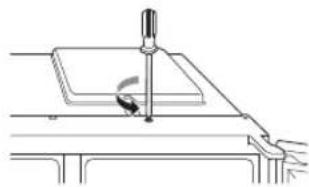
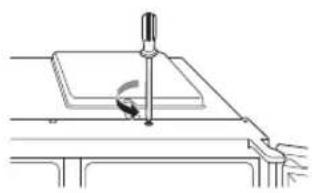
2 Remove the screw from the hinge cover at the top of the appliance. Lift the hook, located at the bottom of the front side of the cover, with a flat-head screwdriver.
Removing the Fridge and Freezer Door
If your entrance door is too narrow for the appliance to pass through, remove the appliance doors and pass the appliance laterally.
WARNING
- Disconnect the power cord, house fuse or circuit breaker before installing, removing the doors, or cleaning the appliance. Failure to follow these instructions may result in death, fire or electric shock.
Removing the Freezer Door
1 The water supply line is connected to the top right part in the back of the appliance. Hold the water supply connection and gently push the
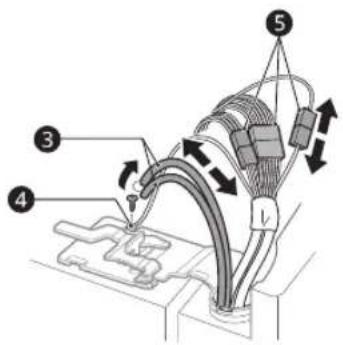
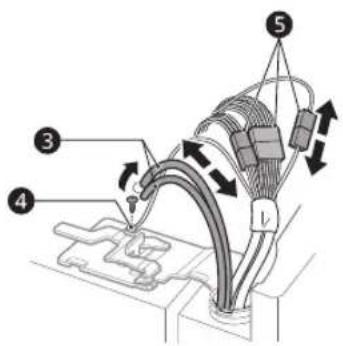
3 Pull out the tube 3. Unscrew the ground wire 4. Disconnect all wire harnesses 5.
NOTE
- The number of wire harnesses may vary depending on the model.
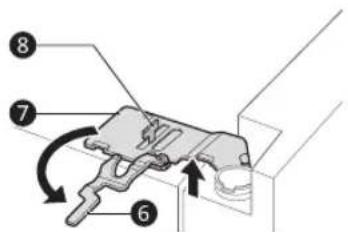
4 Rotate the hinge lever 6 counterclockwise. Lift the top hinge 7 free of the hinge lever latch 8

CAUTION
- When lifting the hinge free of the latch, be careful that the door does not fall forward. It is recommended that two or more people carry out the door removal and refitting.
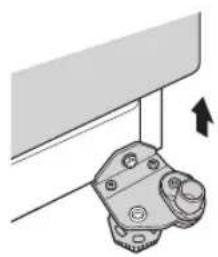
5 Lift the freezer door until it is free of the bottom hinge assembly.

CAUTION
- Place the door on a non-scratching surface with the inner side facing up.
Removing the Fridge Door
1 Disconnect all wire harnesses 1

NOTE
- The number of wire harnesses may vary depending on the model.
2 Rotate the hinge lever ② clockwise. Lift the top hinge ③ free of the hinge lever latch ④.

CAUTION
- When lifting the hinge free of the hinge lever latch, be careful that the door does not fall forward. It is recommended that two or more people carry out the door removal and refitting.
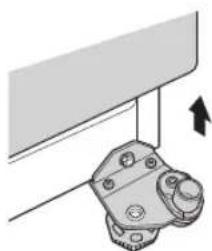
3 Lift the fridge door until it is free of the bottom hinge assembly.
14 INSTALLATION
CAUTION
- Place the door on a non-scratching surface with the inner side facing up.
Refitting the Fridge and Freezer Door
Refit the doors in the reverse sequence of their removal once the appliance has been passed through all access doors.
CAUTION
Install the fridge door first.
NOTE
- Disassembling/Assembling the water lines
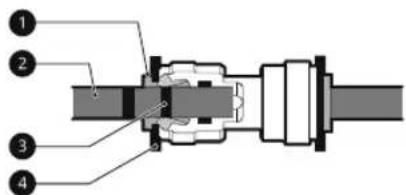
1 Collet 2 Tube 3 Insert line 4 Clip
- Gently insert the tube until only one of the tube's lines is visible. Pull on the tube to make sure that it is tightly fastened.
| Correct | |
| Incorrect |
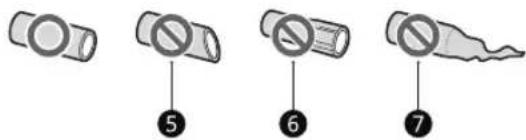
- If the water tube end is damaged, it should be trimmed to ensure it does not leak when refitted.
Not straight Damaged Stretched
Connecting the Water Line
This feature is only available on some models.
Water Supply Requirements
Connect the appliance to a cold water supply with a maximum inlet water pressure not exceeding 1.0 MPa. A water pressure between 138kPa and 827kPa is recommended for the optimal operation of the water dispenser. If the refrigerator is installed in an area with low water pressure (below 138kPa ), you can install a booster pump to compensate for the low pressure.
If a reverse osmosis water filtration system is connected to your cold water supply, the water pressure to the reverse osmosis system needs to be a minimum of 138kPa .
WARNING
- Unplug the appliance before carrying out any work on connecting the water line. Failure to do so may cause electric shock.
- Only connect the water line to a cold water supply. Failure to do so may cause the water filter to malfunction. Water hammer (water banging in the pipes) in house plumbing can cause damage to appliance parts and can lead to water leakage or flooding.
- Connect to potable water supply only.
- Connecting the water line must only be installed by a qualified plumber and in accordance with local legislation and regulations governing water quality.
NOTE
- This water line installation is not covered by the appliance warranty.
Connecting Water to the Appliance
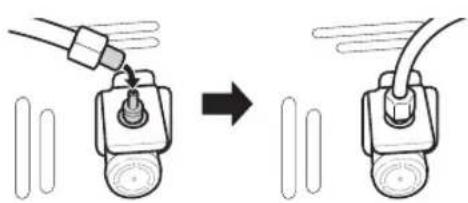
1 Unscrew the metal threaded collar nut at the back of the appliance and place it over one end of the water tube.
2 Firmly push the water tube onto the water inlet valve and tighten up the collar nut.

Connecting to the Water Tap
This feature is only available on some models.
1 Push the water tube into the hole of the tap connector supplied in the accessories. The pipe should be held firmly whilst the connector is pushed onto the pipe.
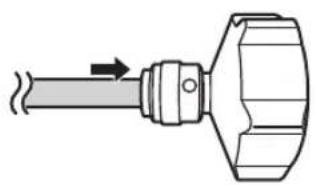
2 Ensure that the rubber washer is fitted to the inside of the tap connector before screwing it onto the tap.
- A separate connector or adaptor may need to be purchased if your tap fitting does not match the thread size of the connector provided.

NOTE
Only For Germany
- Connect your appliance only to a water tap with a safety device (according to EN 1717) to avoid drinking water pollution through water backflow.
To be sure, please ask your installer. In case water tap is without backflow prevention valve (according to EN 1717), you have to use an extra backflow prevention valve compliant with German drinking water ordinance between water tap and water inlet hose.
Checking the Water Connection
1 Turn on the water supply and switch on the appliance. Carefully check all fittings for possible leaks due to poorly fitted hoses.
2 Press and hold the Water Filter button for three seconds. The new water filter has been activated.
3 Place a cup under the water dispenser to verify that water is flowing through the appliance.
4 Check the connecting tube and joints for leaks once again.
Turning on the Power
Connecting the Appliance
To turn on the appliance, connect the power plug into the outlet socket. Do not double up with other appliances on the same outlet.
NOTE
- After connecting the power supply cord (or plug) to the outlet, wait 3 or 4 hours before you put food into the appliance. If you add food before the appliance has cooled completely, your food may spoil.
16 INSTALLATION
NOTE
- To turn off the appliance, disconnect the power plug from the outlet socket.
Moving the Appliance for Relocation
Preparing for Relocation
1 Remove all food from inside the appliance.
2 Pull the power plug out, insert and fix it into the power plug hook at the rear or on top of the appliance.
3 Tape parts such as shelves and the door handle to prevent from falling off while moving the appliance.
4 Move the appliance with more than two people carefully. When transporting the appliance over a long distance, keep the appliance upright.
5 After installing the appliance, connect the power plug into a mains outlet socket and switch it on.
OPERATION
Before Use
Notes for Operation
- Users should keep in mind that frost can form if the door is not closed completely or if the humidity is high during the summer.
- Ensure there is sufficient space between food stored on the shelf or door basket to allow the door to close completely.
- Opening the door for long periods can cause a significant increase of the temperature in the compartments of the appliance.
- If the refrigerating appliance is left empty for long periods, switch off, defrost, clean, dry, and leave the door open to prevent mould developing within the appliance.
- Note that a temperature rise after defrosting has a permissible range in the appliance specifications. If you wish to minimise the impact on the food storage due to a temperature rise, seal or wrap the stored food in several layers.
Door Open Alarm
The alarm sounds 3 times in 30 second intervals if the door is left open or not completely closed for 1 minute.
NOTE
- Contact the LG Electronics customer information centre if the alarm sound continues even after closing all doors.
High Temperature Alarm
The high temperature alarm is a function that warns when the temperature of the freezer increases enough to be a problem. The freezer temperature display LED flashes and the alarm sounds.
-
This alarm sounds in the following cases:
-
When the appliance is turned on for the first time (therefore the freezer temperature is high).
- When the freezer door is open for a long time or opens very frequently.
- When the power goes out for a long period of time.
-
When larger amounts of hot food are placed into the freezer.
-
Turning off the Alarm
-
Press the Freezer button until the alarm stops ringing.
Failure Detection
The appliance can automatically detect problems during the operation.
NOTE
- If a problem is detected, the appliance may not operate and an error code is displayed even when any button is pressed.
- If an error code is indicated on the display, do not turn off the power. Immediately contact the LG Electronics customer information centre and report the error code. If you turn off the power, the repair technician from the our information centre may have difficulty finding the problem.
Suggestion for Energy Saving
- For the most efficient use of energy, keep all inner parts (e.g. door bins, drawers and shelves) on their original location.
- Ensure there is sufficient space between stored foods. This allows cold air to be circulated evenly and lowers electricity bills.
- Store hot food only after it has cooled in order to prevent dew or frost.
- When storing food in the freezer compartment, set the freezer temperature lower than the temperature indicated on the food.
18 OPERATION
- Do not set the temperature of the appliance lower than needed.
- Do not put food near the temperature sensor of the fridge compartment. Keep a distance of at least 3cm from the sensor.
Storing Foods Effectively
- Food may freeze or spoil if stored at the wrong temperature. Set the refrigerator to the correct temperature for the food being stored.
- Store frozen food or refrigerated food inside sealed containers.
- Check the expiration date and label (storage instructions) before storing food in the appliance.
- Do not store food for a long period of time if it spoils easily at a low temperature.
- Do not place unfrozen food in direct contact with food that is already frozen. It could be necessary to reduce the quantity to be frozen if freezing every day is anticipated.
- Place the refrigerated food or frozen food in each fridge or freezer compartment immediately after purchasing.
- Store raw meat and fish in suitable containers in the refrigerator, so that it is not in contact with or drip onto other food.
- Refrigerated foods and other food items can be stored on top of the vegetable drawer.
- Avoid refreezing any food which has been completely thawed. Freezing any food which has been completely thawed again will lower its taste and nutrition.
- Do not overfill the appliance. Cold air can not circulate properly if the appliance is overfilled.
Cool hot food before storing. If too much hot food is placed inside, the internal temperature of the appliance can increase and negatively affect other foods stored in the appliance. - If you set an excessively low temperature for food, it may become frozen. Do not set a temperature lower than the required temperature for the food to be stored correctly.
- If there are chill compartments in the appliance, do not store vegetables and fruits with higher
moisture content in the chill compartments as they may freeze due to the lower temperature.
-
In the event of a blackout, call the electricity company and ask how long it is going to last.
-
You should avoid door openings while the power is off.
- When the power supply gets back to normal, check the condition of the food.
Maximum Freezing Capacity
Express Freeze must be switched on for 7 hours before fresh products are placed in the freezer compartment.
- To get better air circulation, insert all inner parts like baskets and shelves.
NOTE
- The max freezing capacity of your appliance is stated on the rating label inside the fridge compartment.
To have the maximum freezing capacity, we recommend that you set the freezer temperature to the coldest temperature setting.
Freezing the Maximum Amount of Food
If large quantities of food are to be stored, all the freezer drawers should be taken out of the appliance and the food should be stacked directly on the freezer shelves in the freezer compartment.
CAUTION
- To remove the drawers, first remove the food from drawers and then pull out the drawers carefully. Not doing so could cause injury or damage to the drawers.
NOTE
- The shape of each drawer may be different, insert in the right position.

Two Star Compartment
- Two star ( ) basket or drawer can be used to store ice and food from -12 °C to -18 °C for short periods.
- Two star frozen food compartments are suitable for storing pre-frozen food, storing or making icecream and making ice cubes.
-
Two star compartments are not suitable for the freezing of fresh food.
-
The two baskets at the bottom are not 2 star compartment according to old energy labeling regulation (EU) 2010/1060.
NOTE
- For more information about other compartments, visit lg.com and download owner's manuals.
Food Storage Compartments
Storing Food in the Fridge Compartment
Shelf
- Store refrigerated foods and other food items.
-
Store the foods with higher moisture content at the front of the shelf.
-
Fridge Printer
Stores fruits and vegetables to keep fresh for as long as possible. - Door Basket
- Store small packages of refrigerated foods, drinks and sauce containers.
Storing Food in the Freezer Compartment
- Freezer Shelf
Stores frozen food such as meat, fish, and ice cream.
- To freeze food items quickly, store the food on the left side of the top shelf. If you need to store more food, store it on the shelves in order starting from the top shelf. Food items will freeze most quickly in the zone.
- Freezer Printer
Stores frozen food for longer storage.
- The bottom drawer is not 2 star compartment according to new energy labeling regulation (EU) 2019/2016.
Freezer Door Basket
Stores small packages of frozen food. Do not store ice cream or food which will be stored for a long period of time.
20 OPERATION
Control Panel
The actual control panel may differ from model to model.
Control Panel and Functions
*1 This feature is only available on some models.
Control Panel


Dispenser Control Panel
Fridge
Press this button repeatedly to select a desired temperature between 1°C and 7°C .
- The default fridge temperature is 3°C .
NOTE
- The actual inner temperature varies depending on the food status, as the indicated setting temperature is a target temperature, not actual temperature within the appliance.
Non Plumbing*1
The Non Plumbing icon is illuminated when the water dispenser tank is installed correctly.
3 Freezer
Press this button repeatedly to select a desired temperature between -23°C and -15°C
- The default freezer temperature is -18 °C.
Self Care*1
UV light is used to keep the water outlet clean. UV clean function runs automatically for 10 minutes every hour or can be manually activated at anytime.
Press this button to activate it manually.
NOTE
- This function will momentarily stop each time the Water button is pressed if it is in operation and will resume the function after 1 hour.
- This function runs automatically for 10 minutes every hour without pressing the Self Care button.
-
When UV clean function is activated the LED on the dispenser control panel lights up.
-
This feature is only available on some models.
-
UVnano is a compound word derived from the words UV and its unit, nanometer.
⑤ Wi-Fi
This button allows the appliance to connect to a home Wi-Fi network. Refer to Smart Functions for information on the initial setup of the LG ThinQ application.
Express Cool
This function can quickly cool a large amount of foods such as vegetable, fruit and so on.
- This function is enabled and disabled in turn each time you press the button.
- This function automatically terminates after a specific period has passed.

22 OPERATION
Express Freeze
This function can quickly freeze a large amount of ice or frozen foods.
- Press the Express Freeze button to activate the function for 20 hours. The function automatically shuts off after 20 hours.
- This function is enabled and disabled in turn each time you press the button.
- This function automatically terminates after a specific period has passed.
Ice On/Off
Press and hold the Ice On/Off button for three seconds to turn the automatic icemaker On/Off.
9 Lock
The lock function disables every other button on the display.
- To lock the control panel buttons, press and hold the Lock button for 3 seconds until indicator light turns on and the function is activated.
- To disable the function, press and hold the Lock button for 3 seconds until the indicator light turns off and the function is deactivated.
Water Filter*1
Replace the water filter when the indicator light turns on.
Craft Ice*1
Press the Craft Ice button to set to 6 ICE, 3 ICE or OFF.
NOTE
- For more ice, select the 6 ICE mode. For clearer ice, select the 3 ICE mode.
- To change the Craft Ice mode:
1) Press the Craft Ice button and the current mode appears.
2) Press the Craft Ice button repeatedly to select a desired Craft Ice mode.
3) After 5 seconds of idle time, the last mode set will be saved, and the display will return to normal.
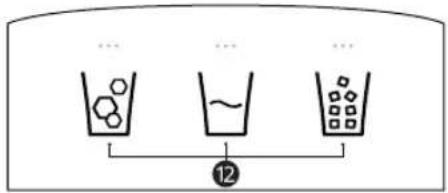
Water & Ice Type*1
Select the desired dispenser mode from the buttons on the dispenser control panel. Press the dispenser switch with a glass or other container to dispense cubed ice, water or crushed ice.
NOTE
- For optimal food preservation, increasing or decreasing 1°C from the default temperature is recommended for each compartment.
- The displayed temperature is the target temperature, and not the actual temperature inside the appliance.
- The actual temperature inside the appliance depends on the following factors: room temperature, the amount of food and how often the doors are opened, where the appliance is. Set the temperatures by considering these factors.
- If there is any finger or skin contacts to the control panel while cleaning it, the button function may operate.


- This appliance incorporates an earth connection for functional purposes only.
Ice and Water Dispenser
Before Using the Ice and Water Dispenser
*1 This feature is only available on some models.
WARNING
- Fill with potable water only into icemaker or dispenser water tank.
- Do not fill the water tank with drinks other than water or fill with hot water.
CAUTION
- Keep children away from the dispenser to prevent children playing with or damaging the controls.
- Throw away the first few batches of ice (about 20 cubes and 7 cups of water). This is also necessary if the appliance has not been used for a long time.
- Clean the water dispensing system if they have not been used for 48 hours. Flush the water system connected to a water supply if water has not been drawn for 5 days.
- To clean the water dispensing system, flush the water through the dispenser about 5 minutes and throw away the first few batches of ice.
- Do not use a thin crystal cup or chinaware when dispensing water or ice.
NOTE
- If you open the freezer door while water is being dispensed, the water dispensing will stop.
- If you open the fridge door while water, cubed ice or crushed ice is being dispensed, dispensing will be paused. When you close the door, the selected item will continue to be dispensed.
-
If the cup rim is small, water may splash out of the glass or miss it completely.
-
Use a cup with a rim of over 68mm in diameter when dispensing water, cubed ice or crushed ice.
- When the ice maker produces smaller ice cubes, or the cubes become lumped together, the amount of water supplied to the ice maker may be low due to insufficient water in the water tank. If ice is not used frequently or the freezer set temperature is too warm, it may also lump together.
- It is normal for milky / cloudy water to be dispensed after replacing the water filter. This air in the water will eventually clear and is safe to drink during this transition.
- Check if the water dispenser tank has been placed on the appliance correctly. If it is not assembled correctly, water may leak from the tank into the appliance.
- If there is an insufficient amount of water in the water dispenser tank, ice cube size and quantity may be affected and may result in no ice being made.
- Wait at least 15 seconds before removing the water tank after having dispensed water or ice from the dispenser.
Before Using the In-Door Icemaker
This feature is only available on some models. The icemaker produces ice normally when approximately 48 hours have passed after the appliance is initially installed.
CAUTION
- It is normal for milky or cloudy water to be dispensed after replacing the water filter. This air in the water will clear eventually and is safe to drink.
The first ice and water dispensed may include particles or odour from the water supply line or the water tank.
24 OPERATION
CAUTION
- If discolored ice is dispensed, check the water tank and the water supply for a possible source. If the problem continues, contact the LG Electronics customer information centre. Do not use the ice or water until the problem is corrected.
- Do not touch the ice outlet or the automatic icemaker with your hand or a tool.
- Dispense ice into a glass before filling it with water or other beverages. Splashing will occur if ice is dispensed into a glass that already contains liquid.
- Never use a glass that is exceptionally narrow or deep. Ice may jam in the ice passage, affecting the performance of the appliance.
- Keep the glass at a proper distance from the ice outlet. A glass held too close to the outlet may prevent ice from dispensing.
- Dispose of the ice inside the ice bin if you go on vacation or if an extended power outage occurs. Water from melting ice may drop from the dispenser onto the floor.
SMART FUNCTIONS
LG ThinQ Application
This feature is only available on models with Wi-Fi. The LG ThinQ application allows you to communicate with the appliance using a smartphone.
LG ThinQ Application Features
Communicate with the appliance from a smartphone using the convenient smart features.
Smart Diagnosis
If you experience a problem while using the appliance, this smart diagnosis feature will help you diagnose the problem.
Settings
- Allows you to set various options on the appliance and in the application.
NOTE
- If you change your wireless router, internet service provider, or password, delete the registered appliance from the LG ThinQ application and register it again.
- The application is subject to change for appliance improvement purposes without notice to users.
- Functions may vary by model.
Before Using LG ThinQ Application
1 Check the distance between the appliance and the wireless router (Wi-Fi network).
- If the distance between the appliance and the wireless router is too far, the signal strength becomes weak. It may take a long time to register or installation may fail.
2 Turn off the Mobile data or Cellular Data on your smartphone.

3 Connect your smartphone to the wireless router.

NOTE
To verify the Wi-Fi connection, check that the Wi-Fi indicator on the control panel is lit.
- The appliance supports 2.4 GHz Wi-Fi networks only. To check your network frequency, contact your Internet service provider or refer to your wireless router manual.
- LG ThinQ is not responsible for any network connection problems or any faults, malfunctions, or errors caused by network connection.
- If the appliance is having trouble connecting to the Wi-Fi network, it may be too far from the router. Purchase a Wi-Fi repeater (range extender) to improve the Wi-Fi signal strength.
- The Wi-Fi connection may not connect or may be interrupted because of the home network environment.
- The network connection may not work properly depending on the Internet service provider.
- The surrounding wireless environment can make the wireless network service run slowly.
- The appliance cannot be registered due to problems with the wireless signal transmission. Unplug the appliance and wait about a minute before trying again.
26 SMART FUNCTIONS
NOTE
- If the firewall on your wireless router is enabled, disable the firewall or add an exception to it.
- The wireless network name (SSID) should be a combination of English letters and numbers. (Do not use special characters.)
- Smartphone user interface (UI) may vary depending on the mobile operating system (OS) and the manufacturer.
- If the security protocol of the router is set to WEP, you may fail to set up the network. Please change it to other security protocols (WPA2 is recommended) and register the product again.
Installing the LG ThinQ Application
Search for the LG ThinQ application from the Google Play Store or Apple App Store on a smartphone. Follow instructions to download and install the application.
NOTE
- To disable the Wi-Fi function, press and hold the Wi-Fi button for 3 seconds. The Wi-Fi indicator will be turned off.
Open Source Software Notice Information
To obtain the source code that is contained in this product, under GPL, LGPL, MPL, and other open source licenses that have the obligation to disclose source code, and to access all referred license terms, copyright notices and other relevant documents, please visit https://opensource.lge.com.
LG Electronics will also provide open source code to you on CD-ROM for a charge covering the cost of performing such distribution (such as the cost of media, shipping, and handling) upon email request to opensource@lge.com.
This offer is valid to anyone in receipt of this information for a period of three years after our last shipment of this product.
Connecting to Wi-Fi
The Wi-Fi button, when used with the LG ThinQ application, allows the appliance to connect to a home Wi-Fi network. The Wi-Fi indicator shows the status of the appliance's network connection. The Wi-Fi indicator illuminates when the appliance is connected to the Wi-Fi network.
- Initial Appliance Registration
Run the LG ThinQ application and follow the instructions in the application to register the appliance.
- Re-registering the Appliance or Registering Another User
Press and hold the Wi-Fi button for 3 seconds to temporarily turn it off. Run the LG ThinQ application and follow the instructions in the application to register the appliance.
MAINTENANCE
Cleaning
General Cleaning Tips
- Performing manual defrosting, maintenance or cleaning of the appliance while food is stored in the freezer can raise the temperature of the food and reduce its storage life.
- Regularly clean any surfaces that can come in contact with food.
-
When cleaning the inside or outside of the appliance, do not wipe it with a rough brush, toothpaste, or flammable materials. Do not use cleaning agents containing flammable substances. This may cause discolouration or damage to the appliance.
-
Flammable substances: alcohol (ethanol, methanol, isopropyl alcohol, isobutyl alcohol, etc.), thinner, bleach, benzene, flammable liquid, abrasive, etc.
After cleaning, check if the power cable is damaged.
Cleaning the Exterior
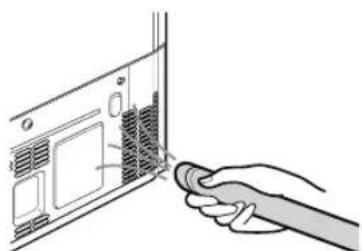
- When cleaning the outside air vents of the appliance by means of vacuuming, then the power cord should be unplugged from the outlet to avoid any static discharge that can damage the electronics or cause an electric shock. Regular cleaning of the rear and side ventilation covers is recommended to maintain reliable and economical operation of the unit.
- Keep the air vents on the exterior of the appliance clean. Blocked air vents can cause fire or appliance damage.
- For the appliance exterior, use a clean sponge or soft cloth and a mild detergent in warm water. Do not use abrasive or harsh cleaners. Dry thoroughly with a soft cloth. Do not use contaminated cloths when cleaning the stainless steel doors. Always use a dedicated cloth and wipe in the same direction as the grain. This helps reduce surface staining and tarnishing.
Cleaning the Interior
- When removing a shelf or drawer from inside the appliance, remove all stored foods from the shelf or drawer to prevent injury or damage to the appliance. Otherwise, injury may occur due to the weight of stored foods.
- Detach the shelves and drawers and clean them with water, and then dry them sufficiently, before replacing them.
Regularly wipe the door gaskets with a wet soft towel. - Door basket spills and stains should be cleaned as they can compromise storage ability of the basket and could even be damaged.
- Never clean the shelves or containers in the dishwasher. The parts may become deformed due to the heat.
- The automatic defrosting system in the appliance ensures that the compartment remains free of ice buildup under normal operating conditions. Users do not need to defrost it manually.
Cleaning the Condenser Cover
Use a vacuum cleaner with a brush to clean the condenser cover and vents. Do not remove the panel covering the condenser coil area.
We recommend that this be done every 12 months to maintain operating efficiency.
28 TROUBLESHOOTING
TROUBLESHOOTING
Before Calling for Service
Customer Care and Service
Contact an LG Electronics customer information centre.
To find information on LG authorized service centre, visit our website at www/lg.com.
- Only qualified service personnel from LG authorized service centre should disassemble, repair, or modify the appliance.
- The minimum warranty period of this refrigerating appliance is 24 months.
- Spare parts referenced in Regulation EU 2019/2019 are available for 7 years (only door gaskets are available for 10 years).
To purchase spare parts, contact an LG Electronics customer information centre or our website at www.lq.com.
NOTE
- Regulation EU 2019/2019, valid from 1st March 2021, is related to the Energy Efficiency classes by Regulation EU 2019/2016.
For more information about the energy efficiency of the appliance, visit https://ec.europa.eu and search using the model name (valid from 1st March 2021). - Scan the QR code on the energy label supplied with the appliance, which provides a web link to the information related to the performance of the appliance in the EU EPREL database. Keep the energy label for reference and all other documents supplied with the appliance (valid from 1st March 2021).
- The model name can be found on the rating label of the appliance.
- This product contains a light source of energy efficiency class G.
PbKOBOdCTBO 3A EKCnloatauЯ
XJIADINJIHNI
ΦPN3EP

Ipei 3aNoUbaHeTo Ha MOHTaKa IpoOeTeTe BHNMaTeJIHo Te3n INCTpyKcN. TOBa 1e OnpocT MoHTaKa N 1e rapaHTnpa,Ye npoDyKbT e MOHTpapn PpaBnHO n 6e3OpacHo.Octabete Te3n INCTpyKcN 6JIn3o Do npoDyKta CLeD MOHTaKa 3a 6bDeu cnpaBKn.
ББЛТAPCKN
BnKTe pkoBDCTBOTo 3a eKcPiOaTaunHa ye6caTHa LG 3a No-noDpo6Ha HOpMaun.
www.lg.com
Copyright © 2022 LG Electronics Inc. Bcunkpnaaba zanaaehn.
CbДbPЖAHNE
ToBa pBKOBOcTO BO MOKe Da CbDbpKa n3o6paKHeHn Nn CbDbpKaHaHne, pa3nUHO OT MoEla, KoTTo CTe 3aKynn.
PbKOBOCTBOTO noIeKn Ha peaKuia OT pON3BOIDTeJI.
INHCTPYKUN 3A B3OJNACHOCT
PPOYETETECNUCKINHCTPYKUINPDEINYNOTPEBA. 3
PPEyIPEKDEHNE 3
BHIMAHNE 9
MOHTIUPAHE
Ppei MoNTnpaHe 12
CbaIHe Ha BpaTnte Ha xlaIINHnka n pIn3epa 13
Cbbp3BaHe Ha BODHaTa IINHn 15
BkHouBaHe B eIeKtpo3axpaHbaHeTo 17
PpeMeCTBaHe Ha ypeHa Ha pyrO McTo 17
EKCПLOATAЦЯ
Ppeyn ynoTpe6a 18
KoHTpOlen nane1 22
ДиспенерзалдИВODa. 25
HHTENIHTHN FYHKUN
PpIIOJKeHHeTo LG ThinQ. 27
IODAPbXKKA
Почистван.. 29
OTCTPAHRABE HA HEN3ПРABHOCTN
Ppei Da ce o6aInTe Ha cepBn3Hna ceHTbp. 31
Инhoeчкции 3A БезогаCHOCT
ПОНУТЕ BCИЧКИ ИСТРУКЦИ ПЕДИ YNOTPEБА
Hacoknte 3a 6e3oNaChocT no-dOly nMaT 3a ueI da npedotBpaTt HnpeDbndEnPiCKOBe IIn yBpeKdaHe nopadn ONaCha IIn HnpaBnHa ynoTpe6a Ha ypeDa.
Hacoknte ca pa3deneHn B rpaΦn ,PPEyPExEHEHNE" n, BHIMAHNE", KaKTo e onncaHo no-dony.
Cb06eHnBvB Bpb3ka c 6e3oNaChocT Ta

To3n cIMBOJ e n3noJ3BaH 3a noocUbaHe Ha oakTopu N yIOTpe6N, KOINTo MOraT da Hocr PtCK. IpOcTeTe BHNMaTeJIHO YacCTTa, O6O3HaueHa C To3N cIMBOJ, IN CJIeDABaiTe INHCTpyKcUNTe, 3a da n36erHete pncKObE.

PPEyPPEKDEHNE
ToBa Noka3Ba, Ye HeCnA3BaHeTo Ha HNCTpyKcHnte MoKe da npuHH cepno3Hn HapaHraBaHna nIi CmbpT.

BHUMAHNE
ToBa noka3Ba, Ye HeCnA3BaHeTo Ha INHCTpyKcIInTe MoKe da npuHHn IeKn HapaHbAHn NII Da HaHece NOBpeDa Ha npodykTa.
PPEyPExKDEHNE

PPEyPExKdEHNr
3a da HamaJIte pUcKa OT noXap, eIekTpueckn ydap nIIHapaHЯBaHЯ Ha xopa npu ynoTpe6a Ha npOdyKta, Tp8Ba da ceCna3BaT OCHOBHTe npedna3HN MepKN, BkJIouHTeJHo N CJeHNTe :
TexHnuecka 6e30napocT
To3n ypeJ moKe Ja ce n3noJ3Ba OT deca Ha Bb3paCT ha8 roDHHn IInuca c HamaJIeHN fN3NuYeCKN, Ceh3OpHn IIN yMCTBeHN
4 INHCTPYKUN3ABE3ONACHOCT
cnooc6hoctn nnn nnca Ha ONIT N 3HaHnra, CTnra da ca noiHa6nOHeHne nnn Da nolUyAbaT INCTpyKcNn OTHOCHO yNoTpe6aTaHa ypeDa nO 6e3oNaceH naHH, pa3bnpaIKn Bb3MOxHnTe onacHocTn. Deca He 6nBa Da cn irpaT cypeDa. NouncTBaHeTo nIPOdPbXkata He 6nBa Da ce n3BbPWBat OT deca 6e3 Hnd3Op.
To3n ypeI He e npedHa3HaueH 3a n3noJ3BaHe OT Xopa (BkIIOHTeJIHO Deca) C ORpaHnueHn FIn3NueCKn, CeTINBn IINI yMCTBeHn cNoC6HocTH nIi IINCa Ha ONIT N Po3HaHn, OCBeh aKO He ca Na6IIODaBAHN IIN HNCTpyKtnpaHn OTHOCHO yNOTpe6aTa Ha ypeDa OT IINIe, OTROBOPHO 3a TExHaT a Be3OpacHocT. Deuata Tp86Ba Da ce Na6IIODaBAt, 3a Da ce rapaHTnpa, Ye He cn INrpaT C ypeDa.
- Deça Na Bb3pact OT 3 do 8 roDNH MORaT da 3apejdaT n n3npa3BaT xlaDnHn ypei.
To3n ypeE npedHa3NaueH 3a n3noJ3BaHe B DOMaKnHcN I noo6Hn npilOxKeHna, KaTO HaPpIMep:
- KyxHeNcKn 30Hn 3a nepcoHaJa B MaRa3HH, OΦncn I pyra pa6oTHa cpeDa;
- KbU B 3eMeJeLcN CToNaHCTBa N OT KJIeHTN BXOTeJI, MOTeJI IN Dpyr BnD XnIuNHO HaCTaHЯBaHe;
- HaCTaHЯBaHe OT TINa JERIo N 3aKycKa;
- KeTbprnHr I NOdo6Hn npniloxeHnra, KOnto He ca npedHa3NaueHn 3a TbproBna Ha Dpe6Ho.
To3n xlaIneH ypeH He e npedHa3NaueH da ce n3noJ3Ba KaTO BrpaJeH ypeD.

To3n cIMB0J BV npedynpexkaBa 3a 3aapanMm MaTePnaI, KOnTO MoRaT da Ce Bb3PnAmeHr T da npuHrT noXap, aKO He BHIMaBaTe.
To3n ypeI cIbpxa MaIKo KOJIuYeCTBO OT XlaIINHna areHT n3O6yTah (R600a), HO TO cIso e 3aIaIMMo. Korato TpaHCnOpTnpate N MOHTnPate ypeDa, CJIeBa Da BHNMaBaTe Da He NOBpeIte HЯKoJ YacT OT XlaIINHna KpbIg.
Heo6xoDnMa e cneuaHa npOeDpya no n3XbPraHe Ha XnaHnA areHT Na Hn 30launrTa, OTeJLa r3, N3NoJ3BaHn B
ypeda. KoHcyItpaIte ce c texHnK nIu npOIO6Ho KBaIINΦnCupaHO IInCe, ppeDu Da rN u3XBbPInTe.
He noBpeKdaIe XlaIINHnKpbI.
- Ako 3axpaHbaIyT ka6e e nobpeH nn aKO OTBOpIte Ha KOHTaKTA ca Xla6abN, He n3noI3BaIte ka6eHa n ce CBbpxKeTe c OTOpN3IpaH cepBn3eH ueHTbp.
He pa3noIaraiTe pa3KIOHnTei n HIAKO rHe3a nn IpeHocmN 3axpaHbauu yCTpoiCTBa OTkbM 3aHaTa cTpaHa Ha ypeDa.
- Bключete Добpe Урсеса на Зхранваши Кабел В контakта, сдд КATO пемaxHeTe ИЗцяло BCЯКВа Влага и npax.
- HnKora He n3KJIouBaIte ypeDa, KaTo d'bpNaTe 3axpaHBaIuJa Ka6eJ. BnHarn XBaIaIe Te IeIcEla 3dpABo N d'bpNaIe HappAo OT KOHTaKTa.
He nocTaBryTe npErpaN npEe BENTnlaCNoHHnTe OTBOpN B npErpaHnTe CteHn Ha ypeDa nn BbB BrpaDeHOTo TJIIO.
- He cxbxpaHЯBaI Te B3pNBn BeIeCTBa KaTo aepo30JIHn ΦlaKOHn CbC 3aPJIIM ra3 BypeDa.
- He naklaHaye ypea, 3a da ro npnbpaTe nnu 36yTaTe no Bpeme Ha TpaHCnOpT.
Korato no3nnoHnpate ypeda, yBepTe ce, ye 3axpaHbaunr Ka6eI He e 3aTnchat nll nobpeDeH.
He n3noJ3BaIte MexaHnUHn ypeDn nn dpyrncpeCTBa, 3a da yckOpHTe npOueca Ha pa3Mpa3raBaHe.
He n3noJ3BaIe ceIooap, 3a da n3cUHNTe BbTpeuHocCTTa Ha ypeDa, He noCTaBryTe CBeU BbTpe, 3a da npemaxHeTe MnpN3MnTe.
He n3noI3BaIte eIeKtpnueckn ypeN B OTdJeHnraTa 3a CbXpaHHe Ha XpaHa B ypeDa, OCBeH aKO He ca OT TnPa, npenopbUah OT npON3BODntela.
BnMaBaIe Da He npTnCKaTe Yactn OT TaIIOTo (HaP. KpaK nn pKa), DOkato npemecTBaTe ypeDa.
- Изкlioуete зхранвашия kaбел, пешдда поочитete урeded ATBьтpe nIN OTbH.
6 INHCTPYKUN3ABE3OJACHOCT
He npbckaite Boda nnn 3anaIteHn BeuecTba (naCTa 3a 3b6n, ankoXoI, pa3peiTeI, 6eH30I, 3anaIIMn TeuHocTn, a6pa3NBn n T.H.) 3a nouchTbaHe Ha ypeDa OTBbH nll OTBbTpe.
He nouchBaIte ypea c yeTk, Kbpnn nn r6n C rpy6n NOBbpxHOCTN nn TaKNa, HappaBeH ON MeTaleH MaTePnaI.
- Camo otopn3napan cepBn3eH nepcoHaI OT cepBn3Hna ZeHTbp Ha LG Electronics trpa6Ba da pa3rno6yBa, nonpaBra nIIM MoNΦnCnpa ypeDa. Cbpxte ce c ceHTbp 3a INΦOpMaun 3a KIneHTn Ha LG Electronics, ako npemecTBaTe n HCTaIInpaTe ypeDa Ha Dpyro Macto.
Puck ot noxap n 3aapanm MaTepnan
- Ako Иma yctaHOBeH TeU, n36yBaIte OTKpNTn PIAMbUu INIINOTeHuaJIHn 3aIaIIMn I3TOUHnCn INPOBETpeCTaTaN K0rTOce HAMnpa UpeDbT, 3a HRAKO MmHyTuN. 3a Da n36erHeteO6pa3yBaHeTo Ha Bb3dUSha CmecNuCa CbC 3aIaIIM ra3, aKO ceIIOBn TeU B XlaIINHn KpbT, pa3MepbT Ha NOMEuEHNeto, B KOeTOce I3PON3BaYpeDbT, Tp8Ba Da CbOTBcTCTBa Ha KOLNUcTBOTOn3PON3BaH XlaIIneH areHT. NOMEuEHNeto Tp8Ba Da e c pa3Mep 1m² 3a BceKn 8 g XlaIIneH areHT R600a BypeDa.
XlaIJIeH areHT, KOITo n3Tnua oT Tpb6nte, 6n MoBJ da ce 3aapanu nn da npedn3Bnka ekCnlo3n.
KolnueCTBOTO XlaIaIIeH aReHT 3a BaIIN KOnKpeTeH ypeI e IocOueHO Ha IeHTNΦIkaUIOHHaTa Ta6eIa BypeIa.
Mонтуранe
To3n ypei Tp86Ba Da ce TpaHcnpTupa cMo OT DbAma IIN NOBeue Ayu,Dbpxkaun 3dpaBO ypeia.
- PocTaBete ypeDa Bbpxy cta6nIeH npaBeH nOd.
He mONTpaIte ypeHa Ha BnaJHo n npaSho MrcTo. He mONTpaIte nn CbXpaHraBte ypeHa OTKpUTo MrcTo nn Ha MrcTo, KoETo e 3IOKeHO Ha aTMocOePHn ycIOBn KaTO dIpeKTHa cIbHueBa CBETnHa, BATbp, DbXd nn TempePaTpy nOd Hylata.
INHCTPYKUN 3A BE3OJACHOCT
He noctabray Te ypeHa Ha npKa CbHueBa CBeTnHa H He ro 3naarTe Ha TOnnHa OT HarpeBaTeHN ypeN, KaTo HAnp. NeKu nn OToPnIeHN TeJa.
BnImaBaIte da He n3laIate 3aHaTa yact Ha ypeDa npu MoHTaJ.
- Пoctabete урета на място, Кбдeto пспсьт Ha урета дa може lechoда се ИЗвжда OT KOHTaKta.
BnMaBaTe BpaTaTa Ha ypeDa Da He NaDHe No BpeMe Ha crIIO6BaHe IIN pa3rIo6BaHe.
BnMaBaIte da He npo6neTe, cMaUkate nn noBpeDnte ka6ena npn crlo6BaHe nn pa3rno6BaHe Ha BpaTata Ha ypeDa.
BnMaBaIe Da He n3BbPtaTe 3axpaHbAunr IeNceI Harope n da HocTAbTe ypeDa Da leKu Bbpy Hero.
He cBbP3BaIte aadTep nn npncnoc6JeHna KbM KOHTaKTA.
He npomeHn He yIbIkaBaTe eIeKtpnueckna Ka6eI.
- YBepete ce, ye KOHTaKTbTe npabunH0 3a3eMeH nYe 3a3eMaTnU Hbpy eJekTpueckn Ka6e He e NobpeDeH nIu n3BaHeO T UenCeLa. 3a NObeYe nHOpMaZn OTHOCHO 3a3eMaBaHeTo, nonTaIte B cEHTbpa 3a NHOpMaZn 3a KIneHTn Ha LG Electronics.
To3n ypeI e o6OpyDbaH cbc 3axpaHbAa, Ka6eI c npoBODnK 3a 3a3eMraBaHe Ha o6OpyDbaHeto n Cbc 3a3emraBaU, uenCeI. UencelbT Tp86Ba Da 6bDe BkIoUeH B NOxOJaU KoHTaKT, KOIToe MOHTnpaH N 3a3eMeH B CboTBeTCTBne C BCNUK MeCTH N KOKeCN I Hape6N.
- HnKora He BkIIOuBaIte ypeD, KOITo DaBa npN3Haun Ha NOBpeDa. Ako mATE cBmHeHna, KOHCyItnpaIte ce c Baun TbproBeU.
- I3xBpIeTe cIeIaOnaKOBbUeH MaTePnA1 (KaTo pIaCTMaCobN uHTn n CTIpOnp) daleue ot deua. ONaKOBbUHIne MaTePnA1MoraT da npuHnT 3aDywaBaHe.
He BkIIOuBaIte ypeDa B MHOROBXOIOB aIaITeP, KOITOn HrMa 3axpaHbau Ka6eI (BrpaJeH).
- YpeBbT Tp8Ba Da ce CbPxe KbM cAmOCToTeHa eNeKtpnuecka nnHnC OTdelenh 6ysoH.
He n3noI3BaIte pa3KIOHHTeI, KOITo He e npaBnIHo 3a3eMeH (npehocm). B clyuaye n3noI3BaTe npaBnIHo 3a3eMeH pa3KIOHHTeI (npehocm), n3noI3BaIte pa3KIOHHTeIc
8 INHCTPYKUN3ABE3OJACHOCT
dOpyCTMOTO TOKOBO HaTOBaBbAHe Ha 3axpaHbAunKa6eI nnIOBVCOKO ITO n3PON3BaIte camo 3a ypeDa.
Ekspnoataua
He n3noJ3BaIte ypeJa 3a KaKBInTo I da e cJIeN (cBxpaHHeNe Ha MednUHNCKn IIN EKcnepImeHTaIIH MaTePnaJI NII 3a IpeHoc), pa3JIuHn OT Te3N 3a CbXpaHHeNe Ha XpaH N DOMaKInHCTBOTO.
-
Ako B eIeKtpnuecknte qactn Ha ypea npOHnKHe B0da, pa3KaueTe IeIcEla n Ce CbBypXeTe c ceHTbp 3a INHΦOpMaunr 3a KJIneHTn Ha LG Electronics.
-
I3BaJdaIe ⅢeNceIa npn cIIHa rpbMOTeBnuHa 6ypr, npn CBetKaBUNI INI KOrATo ypeT He e B yNoTppe6a 3a Dblro BpeMe.
He nipaTe 旬encela nn cpeCTBaTa 3a ynpabHeHne Ha ypeDa C MOKpn Pbue.
He orbbaIte npekaleHo Mhoro 3axpaHbau n Ka6eI n He nocTabryTe TeKKn PpeMeTu Bbpxy Hero.
He3a6abHO n3BaTe Te 5eIceLa OT KOHTaKTa N ce CBbPjKeTe C cEHTbp 3a HOpMaun 3a KIneHTn Ha LG Electronics, aKO yCTaHOBtte Heo6nuaen Shm, Mnpnc nn Dm, nDaun OTypea.
He nocTabraIte pbcTe cN nn MeaHn npedMeTn B 3OHaTa,OT KOrTO n3nn3a CtydeHnT Bb3dYx,BbpXy KaNaKa nn peWetKata, IN3JIbUbaIa TOpIIHa B 3aHaTa YacT.
He noctabraye Bypea XNBOTHN, Hapnpmep domaunn IIO6mucn.
He nocTaBnTe TeKn nnu ChnBn npEdMeTn, CbdoBe C TeHocTn, 3aapanm BeueCTBa, IecHO Bb3PnaMeHmN npEdMeTn (Haep.
CBeu,JaMnN T.H.) Hn HaRpeBaTeHn UpeHn (neukn,paNaTOpn n T.H.) Bbpxy UpeHa.
He nocTaBryTe dpyr eJeKtpoHEn ypei (KaTo HArpeBaTeI nn MO6nJIeH TeIefoH) BypeHa.
Ako e haIuIe u3TuHaHe Ha ra3 (u3O6yTaH, npOnaH, npnpoJeH ra3 n dp.), He pInpaIte ypeDa, He BkIIOUBaIte BeDHaRa B 3axpaHbAHeTo H He3a6abHo npOBETpeMe MAcTOTO. To3n ypeD u3PON3Ba OxlaInteJeH ra3 (u3O6yTaH, R600a). Makap I da u3PON3Ba MaIKo KOLNueCTBO ra3, ToB BCE paK e 3aPAnm. U3TuHaTeHO Ha ra3 IO Bpeme Ha TpaHCnOpTnPaHe Ha ypeDa, npn MOHTAX IIN npn pa6Ota, MoKe da npNuHH NoXap, ekCnlo3Nn IIN HapaHbAHe, aKO ce NpOBRT NCKpn.
He n3noJ3BaIte n He cBxpaHЯBaIte 3aJaNTeHNn IJI rOpNBn cy6ctaHcUN (eTep, 6eH3OJ, aKoXoJ, XmNKaJI, BTeUHeN BbIeBOdOpOJeH ra3, rOpNBeH cPpei, HcKeTNUcIN, apOMaTI3aTOPn 3a Bb3dYx, K03MeTnKa n dP.) B 6In3OCT Do ypeDa.
To3n ypeB BKIOUBa 3a3eMaBa a Bp3Ka 3a 0yHKIOHaHn cJI.
I3xBbPJIaHe
Korato n3xBpIaTe ypeDa, cBaIeTe rapHHTypaTa Ha BpaTaTa, OCTaBeTe paΦTOBte I KOUHnIte Ha MЯCTO I He N03BOJRAuTe Ha Deuata Da ce do6nXkBaT Do ypeDa.
BHIMAHHE

BHUMAHVE
3a HamaJIyBaHe Ha pIcKa OT He3HaUHTeH O HapaHЯBaHe Ha IuCa, HenpaBnHa pa6Ota IIN NOBpeDa Ha npOdyKTA IIN MaTePnaIHN UETN CNa3BaIte OCHOBHIne PpeDnA3HN MepKN, BKJIHOHTeHIO:
Mонтуранe
CneI pa30nakOBaHeTo npOBepTe ypeDa 3a NOBpeN, KOITo MoKe Da ca Bb3HNKHaJI N O BpeMe Ha TpaHCnOPTnpaHETo.
- Изuaкайтпоне 3do4ча,задастсгурни,чeхладинота Верига e HanbЛHо eФeKTиВHA.
10 INHCTPYKUIN 3A BE3OJNACHOCT
To3n ypeI He n3nCKBa npomeHn B MOHTaJa nn ynoTpe6aTa Bb3 OCHOBa Ha NaDMOpcka BnCOuHa.
Ekspnoataua
He doKocBaIte c MOKpn nn BnaXn pBue 3aMpa3eHa XpaHa nn MeTaNHTe yactn B OTdJeHneTo Ha oPn3epa. Toba MoKe da DoBeDe do 3aMpb3BaHe.
He noctabraIte cTBkIeHn cIIOBe, 6yTNIKn IIN KeHOBe (OCo6eHo TaKIBa C r3NpaHn HApNTKN) B KaMepaTa, Ha paΦTOBe IIN B KOHTeHepa 3a Ied, KbJeTo Ue 6bDaT N3IoXeHn Ha TempePaTyPi NOd TOnKaTa Ha 3aMpb3BaHe.
3aKaJIeHOTo CTbKIO B InpEHaTa YacT Ha BpaTaTa Ha ypeDa nIi Ha paTOBTe MoKe Da ce NOBpeDi npu ydap. He ro nIpaIte c pIe, aKO Ce CUYPII.
He ce 6bIaTe Ha BpaTnte Ha ypeDa, Ha MrcToTO 3a CbXpaHHe HnHa DaAeH paOf T He ce KaTepeTe Bbpxy Tax.
- He cxbxaHbAaTe npekaJeHO roJMyo KoInuEcTBo 6yTuJIKN C BODa NIIcBdoBe 3a rapHNTya B KOUHNuTE Ha BpaTaTa.
He oTbapYTe n He 3aTbapYTe BpaTaTa Ha ypeDa C ppeKOMepHa cnla.
-
Ako nantata Ha BpaTata Ha ypea e nobpeDeHa nn pa60n He npabuInHo, npekpate Te ynoTppe6ata u ce CbpxKeTe c yIbHOMOueh cepBn3eH ueHTbp.
-
He no3B0JBAIte Ha XINBOTHn Da IbBvAT 3axpaHBaun Ka6eI nn MapKyu3a BODaTa.
-
HnKora He JxkTe 3aMpa3eHn XpaHn BeDHa r Ceed KaTo ca 6uJn n3BaJeHn OT oPn3epa.
BnMaBaTe Da He npTncHe Te pKa nn KpaK np OTBapHe nn 3aTBapHe Ha BpaTa Ta nn BpTa BB BpTa Ha ypeDa.
PoiapbKka
To3n ypeD e o6OpyDbAH OTBbTpe c LED cbEtInHa, KOrTO He n3nCKBa npdpjxka. He cBaJnte kanaka nn LED lamnata npn onnT 3a
INHCTPYKUIN 3A BE3OPIACHOCT
ПОпраВka Или смяна. Свьржete ce синфорmaцноHeN ZeHTbp 3a КліеHTи Ha LG Electronics.
He nouchBaIte cTbKJIeHITe pafoBe nII NOKpHTnC TOnla BODa, aKO ca CTydeHn. Te MoRat Da ce CuynT, aKO ce n3JaRaT Ha pe3Kn Tempepatyn npomehn.
He nocTaBraIte pafoTobete o6bphatn. Taka moraT da naHaT.
- 3a Да пемaxhte Zeampa3ЯВаняТа OTуpeД, CBьржTe ce C
центыра 3a Инфорmaцnia 3a Клиeenthа LG Electronics.
- Извьрlete леда OT кофата за лед ВьВ Фпзера пи пордьлжИтELNo спURAне Ha eLEKТрОЗХранВаHeTo.
12 MOHTIPAHE
MOHTUPAHE
Преши моNTиранe
Pa3mepn n OTCTOHHN
TbpeMaKTo Pa3ToHne Do CbceHN
IpeMeT MoKe Da DOBeDe Do HAmJIBaHe Ha
3aMpa3nteHaTcNoc6Hocn yBEnuYeH
paXoJN 3a eNeKTpoEHeprn. OcTabete NoBeye OT
50 MM pa3ToHne Mexdy Tbp6a Ha ypea n
CTeHata, KOrato NHCtAInpate ypea.

| - | Размер (MM) |
| A | 913 |
| B | 1 |
| C | 735 |
| D | 620 |
| E | 691 |
| F | 735 |
| G | 1 |
| H | 1 |
3A6EJIEXKKA
MokTe Da onpeJeNITE KaKbE tInbTypeI, KaTo nOrJIeHHeTe eTNKeTa BbTpE BypeJa.
Околна Temпера typa
- UpeBt e npedHa3haueh 3a pa6oTa B OrpaHnueh TempepaTypeH dnaNa3oH B 3aBnCIMOCT OT KInMaTnUHaTa 30Ha.
Temnepatypata Bypeda Moxe da 6bde NOBInraHa OT MecToNOJIOKeHHeTo My, OKoJIHaTa TeMnepaTypa, YecTOTaHa OTBapAHe Ha BpaTaTa N.T.H.
KImMaTnUHnT KlaC MoKe Da Ce BnHa eTnKeTa C daHHN.
- NocTaBeTe BpaTata Ha HeJaPaKaUa nOBbpxHOCT C BbTpewHaTa NaCT Harope.
CbaJHe Ha BpaTnTe Ha XlaAnlHnka
1 Pa3kaueTe BCnUKN Ka6eHNu Bpb3Kn 0.

3ABEJIEXKA
-БpoTHaKa6eHnHTeBp3KMOxKeJaBapupaB 3aBnCmOCTOTMoEla.
2 3aBbptete loctyeTo Ha naHTata ② no yacOBHNKOBaTa CTpeNka. NOBnHrHeTe rOpHaTa naHTa ③, Taka Ye da ce ocbo6oN ot nane Za Ha loCTa Ha naHTata 4.

BHUMAHVE
Koratoocbo6oxdaBate naHTataOTnaecaHa loCTaHa nAHTata,BHmAbaiTe BpataTa Da He naHe Happe.IpenOpbTuHHe eDbama nn NobueyDuNda N3BbPWBAT CBaJIHeTo Ha BpataTnO6paTHoI NoCTabRe.
3 ПОВДИНЕ ВРATAHa XlaДинИКа,ДOKАТо He ce OcBO6OДN OT DoHаТа ПlaHka Ha NaHTaT.
BHUMAHVE
- NocTaBeTe BpaTaHa Ha HePaackaHa NOBbPxHOCT C BbTpewHata NaCT Harope.
NocTabrHe Ha BpaTaTaHa XlaAnHnKa n φpn3epa
MoHTnpaTe BpaTte B o6paTHa Ha cBaJIaHTo nOcIeIOBaTeIHOCT, CLeI KaTO ypeIbTe IpeMHaI pPe3 BCNUK BpaTI.
BHUMAHVE
- MoHTnpaIte pBpBO BpaTaHa XlaIINHnka.
3A6EJIEXKKA
- DeMOHTaX/MOHTaX Ha BOdOpPoBOdnte

1 Myφa 2 Tpb6a 3 LInnHa BmkbBaHe 4 Cko6a
- Ieko nbxheTe Tpb6ata,doKaTo octaHe BuIMama cAmO eHa oTlinHnTe. DpbHneTe Tpb6ata,3a Da ce yBepuTe,ye e 3dpaBO 3akpeneha.

Ako kpaT Ha Tpb6ata 3a B0da e NOBpeDeH,Toi Tp8Ba Da ce NoDpeKe,3a Da ce rapaHTnpa,ue Hma Da npoteue CneI NOBTOphoTIOCTABHe.
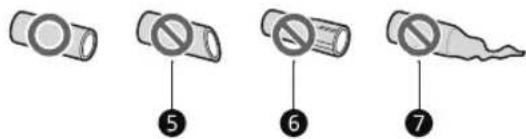
He n3npaBEN 6 POBpeH 7 Pa3TerIeH
Cbbp3BaHe Ha BODHaTaJIHHNIA
Ta3n xapaKtepncTka e HaNuHa cMo B HraKoN MoDeJI.
MaKcImaJIeH 3aMpa3ЯBaU KaIauNTeT
Express FreezeTpa6Ba da e BKIOUeHO B npoIbIxHHe Ha 7 yaca npedn da ce nocTaBrt npecHn npOyKTH BbB φpN3epHOTo OTdeJeHne.
3a noyuabahe Ha no-do6pa znpkylaqnaHa Bb3dyxa, BKapaTe BCnukn BbTpueHN qactN KaTO KOHNu pafoBe.
3ABEJIEXKKA
MaKcMaHnT KanaUTeT HaΦpU3epaHa ypeBa Bn e NocOeH Ha eTNKeTa C daHHN B OTdJeHHeTo Ha XnaDnHnKa.
3aДаИMaTe MaKcMmaJIeH KaIaCITeT Ha 3aMPa3BaHe,прелорьВаме Да 3aJaTe TeMpepaTypaHaФрИЗepaHaHacTpOиKaTa 3a Hau-CTydeHaTa TempepaTypa.
3aMpa3aBaHe Ha MaKcMaJHo KOJIYeCTBO XpaHn
Ako Tpr6Ba Da ce CbXpaHbAT rolemn KOINueCTBa XpaHa, BcNcKn YekMeJKeTa Ha KaMepaTa CneDbA da Ce n3BaJrT uXpaHaTa da 6bJe noOpdeHa DInpeKTHO Bbpxy paΦTOBTe B OTdEnHeNeTo Ha KaMepaTa.
BHUMAHVE
3aДаИЗВадиTe ueKMeJxKeTATA,пьрBo nI3BaIeTe xpaHATA OT ueKMeJxKeTATA ИпocлгИ nI3IbPnAITe BHNMaTeNHO. HecnaZBaHTo Ha TOBa yKa3aHne MoXe ДдОБeDE Do HapaHЯBaHe IIN NOBpeDa Ha ueKMeJxKeTATA.
3ABEJIEXKKA
-ΦopMaTaHa BcKaKO YeKMeJxKe MoKe Da e pa3nUHa, NoCTaBeTe rB nPaBnHaTa no3nUra.
OTdelenHe c DBe 3Be3dN
KoUHnUaTaIuNueKeMmExeToHaOTJeHeHneToC DBe 3Be3Dn ()MOraT Da ce N3NoJ3BaT 3a CbXpaHHeHne Ha JeI u XpaHa OT-12°C Do -18°C 3a KpATKn IepNOI OT BpeMe.
- OTdJIeHnTa 3a 3ampa3EHxpaHc DBe 3Be3dN ca NpOxDyIa 3a CbXpaHeHne Ha npEdbapuTeJHo 3ampa3EH xpaHn, CbXpaHeHne IIN npiroTbHe Ha cJaDoJeI npiroTbHe Ha Ky6YeTa JeI.
- OTeJIeHnraTa 3a 3ampa3EHn XpaHn C DBe 3Bc3dN He ca nOxOJaU 3a 3aMpa3BaHe Ha CBexKa XpaHa.
OTdelenna 3a cxbxpaHne Ha xpaHa
CbXpaHHe Ha XpaHa B XlaaHnHTo OTeJeHne
PaΦT
-3acbxpaHeHHe Ha oxlaeHn XpaHn IpyrnxpaHntHN npOdyKtn.
- He cbxpaHraBaIte MaKn 6ytNkN nn KyTn. ElemEHTnte MORa T da NaHaT n da npuHnHr HapaHraBaHe nn nobpeHa Ha ypeHa.
- YekmeJke Ha XnaIINHnka
-3a cbxpaHeHHe Ha IIODoBE N 3eJeHuYcI, 3a da ce 3ana3r CBexn No-dbIro BpeMe.
KoWNHaHaBpTaTa
-3a cxbx paHeHne Ha MaJIKN NaKeTueta C oxlaedeHN XpaHn, HApNTKN N CbdoBe Cbc COCOBE.
CbXpaHHeHa XpaHn B OTeJeHneTo 3a Dbl60Ko 3ampa3BaHe
PaΦT BbB φpɪn3epa
-3a cxbxaHbBaHe Ha 3aMpa3eHn XpaHn KaTo MecO, p6a n cnaDone.
-3a da 3ampa3nte 6bp30 xpaHHTINn npOyKTn,cbxpaHbBAite XpHaT B JIABaTa cTpaHa Ha Hau-rohPnra paFT. Ako Tpr6Ba Da cbxpaHbBaTe NOBce XpHa,cbxpaHbAitE Ha paTOBeTe, KATO 3anoHte OT roPHna paFT. XpaHHTENHe npOyKTn ue 3ampb3HaT Ha-bp3o B 30HaTa.
- YekmeiKeHa KaMePaTa
-3a cxbxpaheHne Ha 3aMpa3eHa xpaHa 3a no- IbIro BpeMe.
-ДолноTo ueKMeJxHe e OTeJeHnE c 2 3Be3dN cNopeI HOBnI perJaMeHT 3a eHeprInHo etuKeTupaHe (EC) 2019/2016.
KoHaBpaTaHaΦpN3epa
-3a cxbxpaHeHHe Ha MaIkn OnaKOBaHn 3ampa3eHn xpaHn. He cbxpaHaBaTe cnAdoJe nn XpaHa 3a No-dbIro BpeMe.
-ДБеTe KOUHnCиВdoJIHaTaчСТ He ca OTeJeHne c 23Be3dN cNopeДстapЯ perIaMeHT 3a eHeprMnHo eTnKeTnpaHe (EC) 2010/1060.
3ABEJIEXKKA
3a noBueye nHΦopMaζη OTHoC HpyrnoTdeJeHn, nocTeTe Ig.com Nn3TeIeTe pBkoBoDCTBaTa 3a Notpe6uTeJra.
22 EKCPLOATAUIA
KoHTpOJen paHeI
ДeистВИТЕЛНИТ KOHTРОЕн NaHEn MoKeJa ce pa3JIuHaBa cNopeД moDEJa.
KoHTpOJIeH paHeI n ФункцИ
*1 Ta3n xapaKTepeNtuka e HAnuHa cAmo B HJaKoM MoJeN.
KoHTpOEn nahen


KoHTpOJIeH NaHeI Ha DnCneHcepa

Fridge
HaTnCHeTo3n 6yToH NkOJIko NbTu, 3a Da n36peTe JeklaHaTa TempePaTypa MeJxdy 1°C n 7°C.
- TempepatyapaTHa XlaDInHnKa no nOpa3bupaHe e 3°C
3A6EJIEXKKA
PeaHaTa BbTpseHbTeMnepaTypa BapnpaB 3aBncmocT OcbctOarHneTo Ha XpaHaTa, TbKATOncOueHaTa TemnepaTypa 3a 3aDaBaHe e ceneBaTa, a He dIeNCTBNTeHnHaTa TemnepaTypa Bypeda.
Non Plumbing
IkoHaTaNoplumbingCBETKORATope3epBoapbTaHaDnCneHcepaaBDAaTeMOHTnpaH npabNlHO.
3 Freezer
HaTnchete To3n 6yToH HЯKoIko NbTn, 3a Da n36epTe XeJahata TempepaTypa Mexdy -23 ° C n-15 ° C - Temepaypata Ha pnp3epa no npda3bupahe e-18 ° C
Self Care*1
UV CBETINHATA ce n3nOJ3Ba 3a noDbPkaHe Ha uNCToTaHa n3xoJa 3a B0Ja.ФyHKUraT3a UV NOHCtBaHE pa6OTn ABTomTuHO 3a 10 MNHTn Ha BCEK uac NIM MOKe da 6bJe AKTNBpuHa pBuHO IIO BCAKO BpeMe.
HaTnCHeTe To3n 6yToH,3a Da a AKTNBnpuape pbuHO.
3A6EJIEXKKA
Ta3n FyHKUa Ie Cnnpa MOMeHTaJIHO BceKu NbT, KOrato 6bde HaTnCHaT 6yToHbT Water, aKO FyHKUOHNpa, nIe Bb3o6HOBn FyHKUra Ta Cne1 1ac.
- Ta3n ΦyHKUaCe BKNIOuBa aBbTOMaTuHOBnO bPNObJIxKeHHe Ha 10 MmHyTuHa BceKn Yac, 6e3 da HATnCKate 6yToHa Self Care.
Korato e aktubupaHa fynkuiyTa 3a UV nouchTbaHe, LED nHdkaTopbT Ha KOHTpOJIHH naHeI Ha do3aTopa CBETBa.
-Ta3nXapaKTePncTnKa e HAnuHa caMo B HraKoM MoJeN.
UVnano e cIoxKa yMa, cbCTaBeHa OT dymTe UV n HeHaTa MepHa eHnHa - HaHometbP.
5 Wi-Fi
To3n 6yToH n03BOLIa Ba ce BkIIOUypeIbT KbM DOMaUHa Wi-Fi MpeXa. BnXTe, yMHN yHKcUN" (Smart Functions) 3a INΦopMaζη OTHOCHO npBPOHaJHATA HAcTpOka Ha npInloXeHneTo Ha LG ThinQ.
6 Express Cool
24 EKCnIIOATAU
Ta3nФyHKZMA MoKe 6bp3o Da oxlaDN rOJIaMO KOJIuYeCTBO XpaHa KaTo 3eNeHcyu, nIOdoBe nT.H.
Bcekn nT, koraTo HaTnCHeTe 6yToHa, ta3n fYHKunCe BkHIOvBa nn N3KIOUvBa.
TaznФyHKUaBtOMaTHUHOcePpeKpaTaBaCneKaToN3MmHeOppeJeHepNoOt BpeMe.
Express Freeze
Ta3nФyHKZma MoKe 6bP3o Da reHepnpa rOJIMo KOJIuYeCTBO JeIIN Da 3Ampa3x XpaHa.
- HatncheTe 6yToHa Express Freeze, 3a da aKTbnpaTe yHKnraTa 3a 20 caca. FyHKnraTa abTomatnuHo ce nKJIouBa cIeD 20 caca.
Bcekn nT, koraTo HaTnCHeTe 6yToHa, ta3n fYHKunCe BkHIOvBa nn IN3KIOUvBa.
Ta3n fynKUa ABTomTuHc e npekpaTbA cIe KaTo N3MnHe onpeJeHn nepNoD OT BpeMe.
Ice On/Off
HaTnchTe 3aApbXkTe 6yToHa Ice On/Off 3a Tpu ceKHyDn, 3a Da BKnIOHTe/N3KIOHTe abTomatNHHI neDoREHepaTOP.
9 Lock
Функцята 3a 3aklnouBaHe DeakTNBnpa BceKeДpyr 6yToH HaДиCnIe.
3a da 3aKIOHnTe 6yToHnTe Ha KOHTpOINHaHeI, HATNCHeTe 3aApBxTe 6yToHa Lock 3a 3 cekyHn, DOkato CBteThe INHnKaTOpbT n FyHKnraTa ceaktnbnpa.
3a da deaktnbnpate yHKnraTa,HaTncheTe n 3aDpBxTe 6yToHa Lock 3a 3 cekyn,doKaTO CBETNIHHNRT NnKkTop He ce n3KnOuH n yHKnraTa 6bJe deaktnbnpaHa.
Water Filter*1
CMeHeTe BOdHnA ΦHnTbp, KOraTo HnDnKaTOpbT CBeThe.
1 Craft Ice*1
HaTncheTe 6yToHa Craft Ice,3a Da HaCTpOnTe6 ICE,3 ICE nn OFF.
3A6EJIEXKKA
For installation. 11
Installation of LG ThinQ-application
Sog after LG ThinQ-appen fra Google Play Store eller Apple App Store pa en smartphone. Folg anvisningerne for at hente og installere appen.
Copyright © 2022 LG Electronics Inc. All Rights Reserved.
INAKA ΠEPIEXOMENΩN
To exyepio auto mopei va nepiee EIOVEc n pteixoEv oiaqopetko ano to oovtoou ayopaaate.
To exyelio unoketai o avaewpon an tov katakeuaotn.
O△HΓIΕΣ AΣΦΑΛΕΙΑΣ
Δ IABASE OAE TIZ OAHHIEI PIN ANO TH XPHSH. 3
IPOEIAOIOIHSH 3
PPOsOXH. 10
EΓΚATAΣTAΣH
Pniv ano tnv eykataotaon 12
Apaipoeon twv npotwv toupsiyeiou kal tou katauktn. 13
el-gr_main.book.book Page 30 Friday, December 2, 2022 8:27 AM
ENIAYsH NPOBAHMATQN
Pniv Zntnoe T Eepic
Eeunnpétnon n eλatwv kal oεpβic
Eikovne Eevkvtpo npopopnpnnc natw v tng LG Electronics.
Ia mnpoopiec oxetka me Eosouoobotnveva kvtpa Eunnpetnonc tnc LG, nokpteite tov Iototoio mac otn S1eUovon www.lq.com.
- Movo Εξεδικευμένο προωπικό σερβις ἀπο εξουσιδοτημένο κεντρο εξιπηρετηος τής LG θα πρεπεύνα πασουναρολογεί, να επιδιρθωνεί ἡν τροτοπούει τή συσκεύπ.
H 3xotn npioo c yunonc autou tou yueiou ivai 24 mvec.
Ta av taalakia nou avapeovtal otov kavovioe EE 2019/2019 ival siathetaiya yia 7 etn (movo ta napeuBoumaata yia tis npotec ival siathetaiya yia 10 etn).
Ia ayopaavataaaktkwv, eikovwvoatee to kvtpo nnpopopnonc eaatwv tnc LG Electronics n EIOKEPTTE TOV IOTOTOno mac stn dEUVon www.lq.com.
ZHMEIΩΣH
O kavovluogoc (EE) 2019/2019, nou loxue ano 1n Maptiou 2021, oxetizetal e tnv Katnyopia Evpeyaknc anofoon c ouipwva tev kavovluogoc (EE) 2019/2016.
Ia neipoootepe nnpoopoe c oxetik a tyn evepyiaak anodoon tnc ouokeun, eniokeptite tn 1eouvnon https://ec.europa.eu kal npaymuonoiote evacntnon xpnouponowvtac to ovopa tou movteau (oyxu ano tvn 1n Maptiou 2021).
- Sapwote tov kwsiok QR otyn etiketa evepyelaou napextal me tn ouokeun, no onoi avaypaeivav diaiktuakó ovdeoipnooc tic nnpopopiec tou oxetizovtal me tn andoon tcuokeun ctn baon deoevuv EU EPREL. Kpatnote tny etiketa evepyelaou aoyouc avapopac ma zi e ola ta aaaa eypaqaou npaexovtaia zi me tn ouokeun (loxuei anto tn 1n Maptlou 2021).
To ovo ma oovteau Bpoketai otny nivakiδa katatae nts ouokeunc.
Auto to npoiov npiexel m npynpwtoc evpeiaakc anoosn katnyopiac G.
MANUAL DEL PROPIETARIO
Enpe paigaldamist 11
Application LG ThinQ
fr-fr_main.book.book Page 30 Friday.December 2,2022 8:32 AM
DéPANNAGE
Copyright © 2022 LG Electronics Inc. All Rights Reserved.
INDICE
it-it_main.book.book Page 30 Friday, December 2, 2022 8:36 AM
"LG ThinQ" programs characteristikos
Sudare ismaniojo Telefono rysj su prietaisu naudokites patogiomis ismaniosiomis fungcjomis.
Smart Diagnosis
Anlkaunja LG ThinQ 26
OДРЖУBAнБE
YncTeHe 28
PEUABAHIEIPOBJIEMI
Ipeidra ro noBnKaTe cepBncot 30
БЕЗБЕДНОСИУПАТСТВА
I P E D U N P E D Y B A H E
- UcknyeTe ro Ka6eIOT 3a cTpyja, oCnIgPyBaOTo nnn ΦNД-cklonkata nped da ro MoHITnpate, da rno OTCpaHyBaTe BpATnTe nnn da ro ChCTnTe anapatot. Bo cnpOTnBHO, moKe da dojde Do CmPT, noKap nn CTpyen ydap.
OtctpaHyBaHe Ha BpaTaTa Od 3aMp3HyBa4OT
1 IINHjata 3a DOBOHa Ba BOa e NOBp3aHa co roPHnOT DeceH DeH Ha 3aHaTa CtpaHa Ha anapaTOT. DpxTe ro NOBp3yBaHeTo 3a DOBOHa B0da N HexHo TypkajTe ja PhaHwaTa 3a
3 I3BneyeTe ja ueBkata 3. OdBpTeTe ja XnUaTa 3a 3a3emjyBaHe 4. NcknyeTe rN cnte Ka6eIcKn npNKlyuOu 5.
14 MOHTAXA
HANOMEHA
- 5pojOT Ha Ka6eLcKn PpIKLyHouCm MoKe DaBapupa 3aBnCHO Od MoJeIOT.
4 Cbptete ja paKaTa Ha waPkata Bo Hacoka cnpoTnBHa Ha cTepeKInTe Ha yacOBnKOT 6, Ocno6oTe je rOpHa ta WaPKa 7 HaBop od 6paBaTa Ha paKaTa Ha waPkata 8.
BHUMAHVE
Kora ja noDnHyBaTe rohpata 3a Ja ja ocNo6oJnte od 6paBata, BnImabajTe BpTaT a He naHe HaHaPpe. Ce npenopayBa Dbajca nn NobeKe Ja ja OTcPaHaT nn BpTaT BpTaTa.
5 IOnirajTe ja BpaTata OJ 3amp3HyBaOTo Dodeka da ce ocno6oN OJ DOHata waPka.

BHUMAHVE
CTabeTe ja BpaTata Ha NOBpUHHa ITO He MoKe da ja n3rpe6e, CBPTeHa CO BHaTpeuHaTa CTpaHa HArope.
He npabo 6 OwTeTeHo 7 N3doJKeHo
I P E A U N P E D Y B A H E
IcknyeTe ro anapaToT nped Da BpUInTe KaKBn 6nlo pa60Tu 3a NoBp3yBaHe Ha linHjata 3a BOda.Bo cnpOTuBHO,MoKe da Dojde do CtpyeH ydap.
JIINHjTa3a BOa NOBp3eJa cAmo Co DOBOdHa NaIHa BOa.Bo CnpOTnBHO,MOxE Da DoJde Do DeΦeKT Bo ΦIITepoT 3a BOa.BoDen Ydap (TpoNaHe Ha BOaTa BO ueBKeTe) BO BOOBOHaHTa MpeXa BO DOMOT MOxE Da npEiN3BnKa OWTeTyBaHe Ha DeIOBn BO anapaTOn I da npEiN3BnKa PpOTekyBaHe Ha BOaTa IINI NonJaByBaHe.
- POBp3eTe ce cMo co DOBOoT Ha BOaTa 3a nHeBe.
IIOBp3yBaHbetoHaIINHjata3aBOJaMopa DaTo HAnpaBNKBAJIINΦKYBaHBOOBOUNjaNBO COrlaacHOCTCoIOKaIIHaTa3aKOHcKapeRyJATNBa NIpONNC3aKBaJIInTeHaBOJn.
HANOMEHA
- HnctanaJnajaHa Ha nnHjata 3a Boda He e onphiTaHa co rapaHnjuata 3a anapatot.
Nobp3yBaHe Ha B0da co anapaTOT
1 OToIpafoTe ro metaJIHHOT cTeaU co HaBOHHa 3aJHHOT DeI oA anapaTOT nOcTaBeTe rHaedHNOT KpaJ Od UeBkata 3a BOda.
2 CBpTo npntncHeTe ja ueBkaTa 3a BOda BO DOBOHNOT BEHTnI 3a BOda I CTERHeTe ro CTeAOT.
Iobp3yBaHe co yeMaTa 3a B0da
Obaa yHkunja e DocTaHa caMo 3a HeKoMdoJI.
1 PnTnCHTe ro UpeBTo 3a BOa BO OTBopOT Ha NOBp3yBaHTo HA YeuMaTa IcnpaHaN Bo DONoJIHnTeHNrO np6Op. UeKaTa Tpe6a CBPCTo Da ce ApxN DoKeA ro PnTnckaTe KOHeKTopOT Ha UeKaTa.

2 IorpnKTe ce rymeHaTa waj6Ha da e BrpaDeHa BHaTpe BO KOHeKTOpOT npeDa ro cTerHete Ha HeMaTa.
Mozekne Tpe6a Da Kynite Noce6e H KOHeKTop nn aanTep aKO He ce coBnara co YeMaTa ToJ wTo BeKe e o6e36eH.

HANOMEHA
Camo 3a RepMaHnJa
Iobp3eTe ro Baunot anapat camo co cnaBnHa 3a Boda koja nma cnpyhocen ypei (cornacho EN 1717) co ce I da ce n36erHe 3araDyBaHc Ha BOdaTa 3a PneHb e npedn3BnKaHO od nobpaTeH TEK.
3a noCnrypHo, KOHcyItnpajTe ce co Baunot MOHTep. Bo cnyaj aKO cIaBnHaTa 3a BOda Hema BeHTnKoJ cPpeyBa NOBpaTe HcK (corlaCHO EN 1717) Tpe6a Da yNoTpe6nte DOnOJIHnTeJe H BeHTn3a 3aWtTa OD NOBpaTeH TeNOMery CIABnHaTa 3a BOda N DOBOdHOTUpeBO, KOJWTO
Ke e BO corlaacHOCT co Ope6aTa 3a B0da 3a Pnnebe BO TepMaHna.
3aMeHeTe ro ΦιNlTePoT 3a BOda KOra Ke CBeThe INHДnKaToPOT.
1 Craft Ice*1
PnTncheTo KOuTeTo Craft Ice 3a Da nocTaBnte 6 ICE, 3 ICE nn OFF.
HANOMEHA
- 3a noBeKe mpa3, n36epeTe ro pexmOT 6 ICE. 3a nonpOBUdEn mpa3, n36epeTe ro pexmOT 3 ICE.
3a da ro cmeHnte peKIMOT Craft Ice:
1) PnTcHTe Ha KOnyTo Craft Ice n Ke ce nojABM MOMHTaHNOt peKIM.
2) PnTnckajTe Ha KonHeTo Craft Ice noBeKeNa 3a da ro n36epeTe nocakyBaHmOT pexm Craft Ice.
3) 105 cekyn HeakTNBHOCT, Ke ce 3auyBa nocneHNOt peXIM n pniKa3OT Ke ce BpaTn BO HopMaIa.
TnHaBoDa mpa3*1
I36epeTo ro nocayBaHnOt pekm Ha dncneHepoT co KOnuHaTa Ha KOHTpOHaTa Ta6Na Ha IucnHe3epo. PpntucheTe Ha npkeHHyBaHOT Ha dncneHepoT co HaaHa nn Dpyr caD 3a da do6nTe KoKm mpa3, BODa nn n3dpo6EH mpa3.
HANOMEHA
- 3a onTmMaHNo yBaHe Ha xpaHaTa, ce npenopaUyBa 3roJeMyBaHe nIn HamaLyBaHe o1 ° C Ha cTaHapdHaTa TempepaTypa 3a cekoja nperpada.
- PπρικαχaHaTa TemnepaTypa e ζεηHaTa TemnepaTypa, a He αΚτγeΙηHaTa TemnepaTypa BO anapaTOT.
24 PABOTEHe
HANOMEHA
- AktyeHaTa TemnepaTpa Bo anapaTOT 3aBncn Oc cneHnTe oakTopn: co6HaTa TemnepaTpa, KOInuHaTa Ha XpaHa N KOnKy YecTo Ce OTbopaat BpaNTe, loKaunjaTa Ha anapaTOT. IocabyBaJte TemnepaTpa 3emajkn TnpdBnOBne oakTopn.
Ako dojde do KOHTaKT MeIy npct nII KOKa co KOHTpOHaTa Ta6la DoEka ja uNCTuTe, MoKe da ce aKTHBnpa FyHKnJaTa Ha DonpeHOTo KOnYe.
AnapaTOn mHa 3a3emjeHo NOBp3yBaHae HaMeHeTo cAmo 3a fYHKUHOHaHHuEHN.
I P E A U N P E A Y B A H E
- CtaBajTe B0da 3a nHeBe cAmO BO aBTOMATOT 3a Mpa3 mNn DnCneHepOT 3a B0da.
He noHHeTe ro pe3epBoaOp 3a B0da co npyro OCBEN BOda n He noHHeTe TOnla BOda.
BHUMAHVE
- CybajTe rN decaTa HactpaHa oD nucnepHepoT 3a da cnpeHTe Da cn nrgpaat nn da rN OWTeTaT KOHTPONTe.
- Φρηte HeKoIky Tpyn Mpa3 (okOly 20 KoUKN 7 yauN BODa). OBa e nCTO Taka Notpe6Ho aKO anapaTOT He ce KopncTeI NOdoIro Bpeme.
IcHCTeTe ro cHCTeMOT 3a IcHcH3npaHe BOa aKO He 6nKoPocHTeH 48 Yaca. IcNlaKaHHe ro cHCTeMOT 3a BOa IOBp3aH CO DOBOd 3a BOa aKO He 6nKoPocHTe H BO nOcNeDHNte 5 DeHa.
3a da ro ncuCTnte cncTeMOT 3a TOueHe BODa, OCTabeTe 5 MNHyTN da Teue BOda OD dncnEHepOT nnoToa oPJIeTe r mpa3OT OTkako Ke ce Hapabn npBNTe HeKoNky nATn.
He KopncTeTe TeHka KpncTaHa qaHa Nnnpucenah 3a DnCneHnpaHbe B0da Mpa3.
HANOMEHA
- DOKOJIky BO TEKOT Ha DCnneH3npaHbe BOda ja otBopnte BpataTo OD 3aMp3HyBaHT, BOdaTa Ke npeTaHe Da TeYe.
Ako ja OTbOpNTe BpTaTHa HApnKndepotdokeKa ce dncpeH3npaBoDa, KoUKn Mpa3 nnnKpWeH Mpa3, fyHKuJaTa Ke ce nay3npa. Kora ja3aTBopate Bpata,T36paHaTa CTaBka 3a npTeXoJHO NoCTaBeHNOT pexmKe npOdoJnxda Ce npImeHyBa. - Ak o OKBnpoT Ha 7oJnta e MaI, B0dTa MoKe da ce pa3JIe HAdBop Od YauWata NIN cEIoCHO da ja npOMaH.
KopncTeTe 7onja co djuametap od 68 mm kora nCTeKyBaTe B0da, KOUKNp3nKnKpweH pma.
Kora aBTOMaT0 3a Mpa3 npou3BvBa nomaiu KOUKNpMa3, NN KoUknte ce 3aIenyBaat edHn co dpyuN, KOINuHaTa BOa ITO ce nCnpaYBa BO aBTOMaT0 3a Mpa3 MoKe Da e MaIa NopaHn HeIOBOJHO BOa BO pe3epBoapOT Ha DCnpeH3epOT 3a BOda. Ako He ce KopncTu Mpa3 UcTo NN TempeaTypa Ta Ha 3aMp3HyBaQOT e IpeBucOka, KOUKNTe MoKe Da ce 3aJIenaT.
IIO 3aMeHyBaHBeTo Ha fHJItePoT 3a BOda HopMaJIHo eJa ce dIscIeH3npa MJIeUHa/ 3aMaTeHa BOda.Toa e Bo3JyX BO BOnTa,Ke ce n36NCTpn 3a OJpeJeHO BpeMe n e 6e36eJen 3a IIneHe. - PpOBepe DaIIN DnCneH3epo T noCTaBeH npaBnIHo. Ako He e nocTaBeH npaBnIHo, MoKe Da Dojde Do IpoTeKyBaHe Ha BODa od pe3epBoapOT Bo ypeDoT.
Ako Hema DOBOJHO BOa BO pe3epBoaop 3a BOda Ha DCNcH3epoT, Toa MoKe Da BInjae Bp3 rOJIemHaTa Ha KOUKeTe Mpa3 N KOnuHaTa, a MOKe I Da He ce Co3dAe Mpa3.

26 NAMETHN FYHKUIN
PAMETHN FyHKUIN
AnlinaJa LG ThinQ
Obaa fyuHKuJa e doCTaHa cAmo Ha MoJeIte Co Wi-Fi.
Anikkaunjata „LG ThinQ" Bn OBO3MOkyBa da KomyHnupaTe co ypeDoT co NOMoHa NaMeTeH TelefoH.
KapakTepncnKa ankknJaTa LG ThinQ
KomyHnucpajte co anapaTOn nAmTeH TeneoH co NOMOHa npaKTnHHTe NaMeTHN yHKuN.
Smart Diagnosis
Ako nckcnte npo6lemdoekaja kopnctnte anJnkaunjata, onuJaTa 3a naMeTHa DnjarHocTnKa Ke BN NOMOrHe da ro DnjarHocTnCupate npo6lemot.
NoecyBaHa
Bn OBO3MOxyBa da noDecuTe pa3nHn onCnKaj anapaTOT n BO anNkauJaTa.
HANOMEHA
Ako ro npomehnte cbojot 6e3xuueh pytep,do6abvbaoyaHa nHTepHET yCnyn nnI03nKata, n36pnwete ro pernctpupaHnot anapaT od anlkaunajaLG ThinQ nOBtpho pernctpapajTe ro.
Anlinajata noIeJn Ha npomeH3apaN noo6pyBaHe Ha anapatOT, 6e3 da nM ce daNe npedynpeDyBaHe Ha Kopncnnte.
KapakTepcntknte MoKe Da BapnpaaT Bo 3aBnCHOCT OId MOJeIOT.
Twee sterren compartment
Verbinding makes met Wi-Fi
30 PROBLEEMOPLOSSING
PROBLEMOPLOSING
Anbefalinger for strømsparing
pl-pl_main.book.book Page 30 Friday, December 2, 2022 8:43 AM
ROZWIAZYWANIE PROBLEMOW
1 Desligue todas as cablagens ①.

OBSERVACAO
Alarmdealta temperature
Ako zosadit'dvere chladnicky
30 RIESENIE PROBLEMOV
RIEŠENIE PROBLEMOV
Kym zavoláte servis
Copyright © 2022 LG Electronics Inc. All Rights Reserved.
VSEBINSKO KAZALO
Copyright © 2022 LG Electronics Inc. All Rights Reserved.
LABELA E PERMBAJTJES
Kymanual mund te perembaje figura ose materiale tendryshme nga modeli qekeni blere.
- Australi, Indi, Kenya
Argentine
9
SHENIM
Pajisjet e vleresuara nga SN tek T janekonceptuar te perdoren ne nj temperature tjmjetidit ndermjet 10°C dhe 43°C
1 8 0
6 3 5
Aksesoret
Copyright © 2022 LG Electronics Inc. Alla rattigheter reserverade
INNEHÄLLSFORTECKNING
Det kan finnas bildereller innehaill ienna braupsanvisning som skiljer sig fran modellen du kopt.
Fore installation. 11
Innan du ringer after service. 28
SÄKERHETSANVISNINGAR
LÄS ALLA ANVISNINGAR FÖRE ANVÄNDNING
Innan du ringer after service
Disposal of Your Old Appliance
- This crossed-out wheeled bin symbol indicates that waste electrical and electronic products (WEEE) should be disposed of separately from the municipal waste stream.
- Old electrical products can contain hazardous substances so correct disposal of your old appliance will help prevent potential negative consequences for the environment and human health. Your old appliance may contain reusable parts that could be used to repair other products, and other valuable materials that can be recycled to conserve limited resources.
- You can take your appliance either to the shop where you purchased the product, or contact your local government waste office for details of your nearest authorised WEEE collection point. For the most up to date information for your country please see www/lg.com/global/recycling.
БылгAPСКИ
H3XBpnaHe Ha cTapn ype
CIMBOBc3c3aepTAHKoHTHeHep NOKa3Ba,YeOTnAbcnteOT eNekTpuecknTe n ENEKtpOHnTE npOdykTN (WEEE) Tp6Ba da ce H3XBbPnT OTdEHN0 OT bNTOBte OTnAdu.
CTapnte eIektpueckn npOyKtn MoarTa cbdbpxat Onacn BeecCTBa n npabNHOto 3xBbPnHe Ha Baun ypeD uE nomorhe 3a npedotbpaTBAHe HA HeratNBHTe NocneJeCTBna 3a OKoHnata Cpea H OBeWkoTo 3dpabe. Baunr CTap ypeD moKe da cbDbpxa Yactn 3a MHorokpatha ynotpe6a, KOtO 6nxMaMOrn Da 6dAtn3No3BaHN 3a peMOHT Ha dpyrn npOyKtn, KaKTO n dpyrN ueHH MaTepnAIn, KOtO Morat Da 6dAt peuKnnpAHc cenl 3ana3BaHe Ha OrpaHnueHnte pecypcn.
Mokete da 3aheceTe Bauny ypei nn B Mara3nHa,OT KOITcTe ro 3akynnnn nn MOxete Da ce Cbpxkete C MeCTHnI DpbkAbeH OΦnC 3a OTnaDbuNTe,3a da nOnyUte HΦopMaunr 3a HaN-6n3KPA3PEUHEWEEE nyHKT 3a cbnpaHe Ha OTnadu.3a HaN-AkTyAnHa INΦopMaunr ot BaWata dbPxkaba,mon, norneHete tyk:www/lg.com/global/recycling
CESTINA
Likvidace starého pristroje
sv-se_main.book.book Page 29 Friday, December 2, 2022 8:54 AM


Life's Good
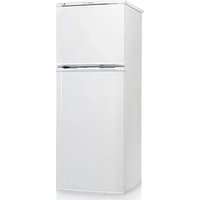


- TABLE OF CONTENTS
- SAFETY INSTRUCTIONS
- INSTALLATION
- OPERATION
- SMART FUNCTIONS
- MAINTENANCE
- TROUBLESHOOTING
- READ ALL INSTRUCTIONS BEFORE USE
- SAFETY MESSAGES
- WARNING
- CAUTION
- TECHNICAL SAFETY
- 4 SAFETY INSTRUCTIONS
- 6 SAFETY INSTRUCTIONS
- RISK OF FIRE AND FLAMMABLE MATERIALS
- 8 SAFETY INSTRUCTIONS
- DISPOSAL
- 10 SAFETY INSTRUCTIONS
- BEFORE INSTALLATION
- DIMENSIONS AND CLEARANCES
- NOTE
- AMBIENT TEMPERATURE
- 12 INSTALLATION
- ACCESSORIES
- REMOVING THE FRIDGE AND FREEZER DOOR
- REMOVING THE FREEZER DOOR
- REMOVING THE FRIDGE DOOR
- 14 INSTALLATION
- REFITTING THE FRIDGE AND FREEZER DOOR
- CONNECTING THE WATER LINE
- WATER SUPPLY REQUIREMENTS
- CONNECTING WATER TO THE APPLIANCE
- CONNECTING TO THE WATER TAP
- ONLY FOR GERMANY
- CHECKING THE WATER CONNECTION
- TURNING ON THE POWER
- CONNECTING THE APPLIANCE
- 16 INSTALLATION
- MOVING THE APPLIANCE FOR RELOCATION
- PREPARING FOR RELOCATION
- BEFORE USE
- NOTES FOR OPERATION
- DOOR OPEN ALARM
- HIGH TEMPERATURE ALARM
- FAILURE DETECTION
- SUGGESTION FOR ENERGY SAVING
- 18 OPERATION
- STORING FOODS EFFECTIVELY
- MAXIMUM FREEZING CAPACITY
- FREEZING THE MAXIMUM AMOUNT OF FOOD
- TWO STAR COMPARTMENT
- FOOD STORAGE COMPARTMENTS
- STORING FOOD IN THE FRIDGE COMPARTMENT
- STORING FOOD IN THE FREEZER COMPARTMENT
- 20 OPERATION
- CONTROL PANEL
- CONTROL PANEL AND FUNCTIONS
- DISPENSER CONTROL PANEL
- FRIDGE
- NON PLUMBING*1
- 3 FREEZER
- SELF CARE*1
- ⑤ WI-FI
- EXPRESS COOL
- 22 OPERATION
- EXPRESS FREEZE
- ICE ON/OFF
- 9 LOCK
- WATER FILTER*1
- CRAFT ICE*1
- WATER & ICE TYPE*1
- ICE AND WATER DISPENSER
- BEFORE USING THE ICE AND WATER DISPENSER
- BEFORE USING THE IN-DOOR ICEMAKER
- 24 OPERATION
- LG THINQ APPLICATION
- LG THINQ APPLICATION FEATURES
- SMART DIAGNOSIS
- SETTINGS
- BEFORE USING LG THINQ APPLICATION
- 26 SMART FUNCTIONS
- INSTALLING THE LG THINQ APPLICATION
- OPEN SOURCE SOFTWARE NOTICE INFORMATION
- CONNECTING TO WI-FI
- CLEANING
- GENERAL CLEANING TIPS
- CLEANING THE EXTERIOR
- CLEANING THE INTERIOR
- CLEANING THE CONDENSER COVER
- 28 TROUBLESHOOTING
- BEFORE CALLING FOR SERVICE
- CUSTOMER CARE AND SERVICE
- PBKOBODCTBO 3A EKCNLOATAUЯ
- XJIADINJIHNI
- ΦPN3EP
- CBДBPЖAHNE
- INHCTPYKUN 3A B3OJNACHOCT
- MOHTIUPAHE
- EKCПLOATAЦЯ
- HHTENIHTHN FYHKUN
- IODAPBXKKA
- OTCTPAHRABE HA HEN3ПРABHOCTN
- ИНHOEЧКЦИИ 3A БЕЗОГАCHOCT
- ПОНУТЕ BCИЧКИ ИСТРУКЦИ ПЕДИ YNOTPEБА
- CB06EHNBVB BPB3KA C 6E3ONACHOCT TA
- PPEYPEXKDEHNE
- PPEYPEXKDEHNR
- TEXHNUECKA 6E30NAPOCT
- 4 INHCTPYKUN3ABE3ONACHOCT
- 6 INHCTPYKUN3ABE3OJACHOCT
- PUCK OT NOXAP N 3AAPANM MATEPNAN
- MОНТУРАНE
- INHCTPYKUN 3A BE3OJACHOCT
- 8 INHCTPYKUN3ABE3OJACHOCT
- EKSPNOATAUA
- I3XBBPJIAHE
- BHIMAHHE
- BHUMAHVE
- 10 INHCTPYKUIN 3A BE3OJNACHOCT
- POIAPBKKA
- INHCTPYKUIN 3A BE3OPIACHOCT
- 12 MOHTIPAHE
- MOHTUPAHE
- ПРЕШИ МОNTИРАНE
- PA3MEPN N OTCTOHHN
- 3A6EJIEXKKA
- ОКОЛНА TEMПЕРА TYPA
- CBAJHE HA BPATNTE HA XLAANLHNKA
- 3ABEJIEXKA
- NOCTABRHE HA BPATATAHA XLAANHNKA N ΦPN3EPA
- CBBP3BAHE HA BODHATAJIHHNIA
- MAKCIMAJIEH 3AMPA3ЯBAU KAIAUNTET
- 3ABEJIEXKKA
- 3AMPA3ABAHE HA MAKCMAJHO KOJIYECTBO XPAHN
- OTDELENHE C DBE 3BE3DN
- OTDELENNA 3A CXBXPAHNE HA XPAHA
- CBXPAHHE HA XPAHA B XLAAHNHTO OTEJEHNE
- CBXPAHHEHA XPAHN B OTEJEHNETO 3A DBL60KO 3AMPA3BAHE
- 22 EKCPLOATAUIA
- KOHTPOJEN PAHEI
- KOHTPOJIEH PAHEI N ФУНКЦИ
- KOHTPOEN NAHEN
- NON PLUMBING
- 5 WI-FI
- 6 EXPRESS COOL
- 24 EKCNIIOATAU
- 1 CRAFT ICE*1
- INSTALLATION OF LG THINQ-APPLICATION
- INAKA ΠEPIEXOMENΩN
- O△HΓIΕΣ AΣΦΑΛΕΙΑΣ
- EΓΚATAΣTAΣH
- ENIAYSH NPOBAHMATQN
- PNIV ZNTNOE T EEPIC
- EEUNNPÉTNON N EΛATWV KAL OΕPΒIC
- ZHMEIΩΣH
- MANUAL DEL PROPIETARIO
- APPLICATION LG THINQ
- DÉPANNAGE
- INDICE
- LG THINQ" PROGRAMS CHARACTERISTIKOS
- OДРЖУBAНБE
- PEUABAHIEIPOBJIEMI
- БЕЗБЕДНОСИУПАТСТВА
- I P E D U N P E D Y B A H E
- OTCTPAHYBAHE HA BPATATA OD 3AMP3HYBA4OT
- 14 MOHTAXA
- HANOMEHA
- I P E A U N P E D Y B A H E
- NOBP3YBAHE HA B0DA CO ANAPATOT
- IOBP3YBAHE CO YEMATA 3A B0DA
- CAMO 3A REPMAHNJA
- TNHABODA MPA3*1
- 24 PABOTEHE
- I P E A U N P E A Y B A H E
- 26 NAMETHN FYHKUIN
- PAMETHN FYHKUIN
- ANLINAJA LG THINQ
- KAPAKTEPNCNKA ANKKNJATA LG THINQ
- NOECYBAHA
- TWEE STERREN COMPARTMENT
- VERBINDING MAKES MET WI-FI
- 30 PROBLEEMOPLOSSING
- PROBLEMOPLOSING
- ANBEFALINGER FOR STRØMSPARING
- ROZWIAZYWANIE PROBLEMOW
- OBSERVACAO
- ALARMDEALTA TEMPERATURE
- AKO ZOSADIT'DVERE CHLADNICKY
- 30 RIESENIE PROBLEMOV
- RIEŠENIE PROBLEMOV
- KYM ZAVOLÁTE SERVIS
- VSEBINSKO KAZALO
- LABELA E PERMBAJTJES
- SHENIM
- AKSESORET
- INNEHÄLLSFORTECKNING
- SÄKERHETSANVISNINGAR
- LÄS ALLA ANVISNINGAR FÖRE ANVÄNDNING
- INNAN DU RINGER AFTER SERVICE
- DISPOSAL OF YOUR OLD APPLIANCE
- БЫЛГAPСКИ
- H3XBPNAHE HA CTAPN YPE
- CESTINA
- LIKVIDACE STARÉHO PRISTROJE
Brand : LG
Model : GSLV70PZLE
Category : Refrigerator-freezer