SoundcupD 00173186 - Speaker HAMA - Free user manual and instructions
Find the device manual for free SoundcupD 00173186 HAMA in PDF.



| Product type | Portable Bluetooth speaker |
| Brand | Hama |
| Model | Soundcup-D 00173186 |
| Dimensions | 210 x 84 x 84 mm |
| Weight | 745 g |
| Battery type | 2 x Lithium-Ion 3.7 V, 1500 mAh / 5.5 Wh |
| Charging time | Approximately 3 hours |
| Battery life | Approximately 6 hours (depending on volume and audio content) |
| Charging voltage | Max. 5 V = 1 A |
| Bluetooth technology | Bluetooth 4.2 |
| Bluetooth range | < 10 meters (without obstacles) |
| Max. music power | 20 W (2 x 10 W) |
| Frequency response | 100 Hz - 20 kHz |
| Impedance | 4 Ω |
| Total harmonic distortion (THD) | ≤ 1 % |
| Sound system | Stereo / True Wireless Stereo (TWS) |
| Connections | Micro USB (charging) |
| Waterproof rating | IPX7 (waterproof up to 1 meter) |
| Package contents | Speaker, micro USB cable, silicone case, user manual |
| Care and cleaning | Clean with a slightly damp lint-free cloth; avoid harsh detergents; close the micro USB port after charging |
| Safety | Do not expose to excessive heat, do not open, only use with a suitable charger, keep out of reach of children |
| Spare parts and repairability | Non-replaceable built-in battery; do not repair yourself, contact Hama customer service |
Frequently Asked Questions - SoundcupD 00173186 HAMA
User questions about SoundcupD 00173186 HAMA
0 question about this device. Answer the ones you know or ask your own.
Ask a new question about this device
Download the instructions for your Speaker in PDF format for free! Find your manual SoundcupD 00173186 - HAMA and take your electronic device back in hand. On this page are published all the documents necessary for the use of your device. SoundcupD 00173186 by HAMA.
USER MANUAL SoundcupD 00173186 HAMA
MobileBluetooth® Speaker
SOUNDCUP-D
OperatingInstructions
Bedienungsanleitung
Moded'emploi
Instruccionesdeuso
natural_image
Pure diagram of a vertical cylindrical device with internal grid pattern and a plus sign, no text or symbols present.Работнаинструкция
Istruzioniperl'uso
Gebruiksaanwijzing
Οδηγίεςχρήσης
Instrukcjaobsługi
Használatiútmutató
Návodk p oužití
Návodnapoužitie
Manualdeinstruções
Manualdeutilizare
BG
1
NL
GR
PL
H
CZ
SK
P
RO
GB Operatinginstruction
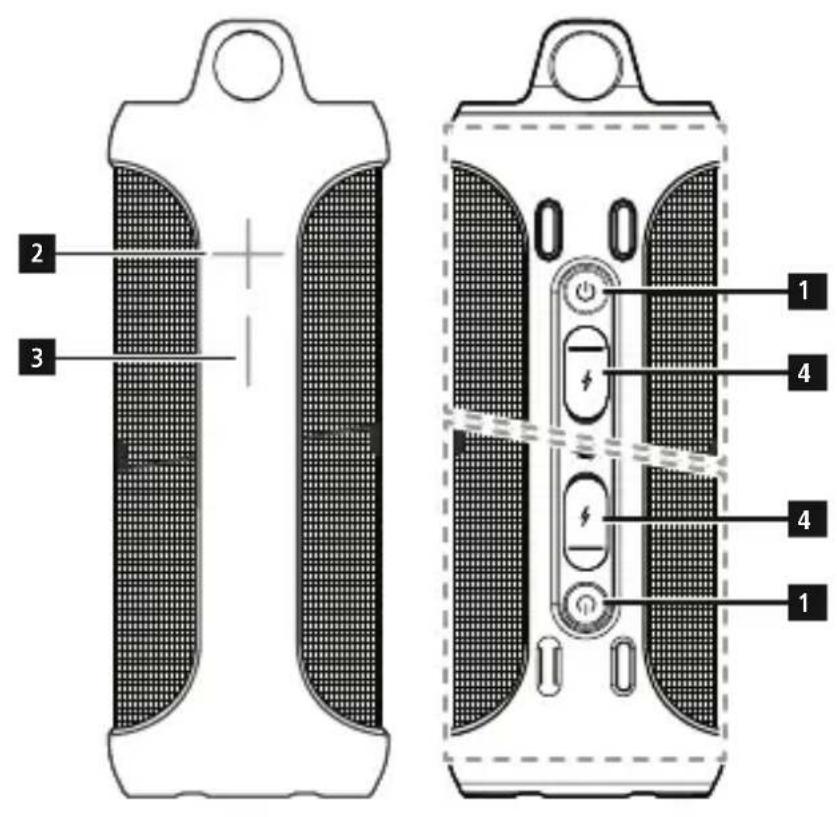
Controlsand Displays
- Poweron/offbutton
Function button
2.Functionbutton +
3.Functionbutton -
4. Micro-USB charging connection
Thank you for choosing a Hama product. Takeyourtimeandreadthefollowinginstructions and information completely. Please keep these instructions in a safe place for future reference. If you sell the device, please pass these operating instructions on to the new owner.
1. ExplanationofWarningSymbolsand Notes

Warning
This symbol is used to indicate safety instructions to draw your attention to specific hazards and risks.

Note
This symbol is used to indicate additional information or important notes.
2.Package Contents
• M o bBluetboth® SpeakerSoundcup-D
• M micro-USB chargingcable
- R emovablesiliconecase
• T heseoperatinginstructions
3. Safety Notes
• Use the product for its intended purpose only.
• T heproductisintendedfor p private,non-commercialuseonly.
• D o n otusetheproductintheimmediate vicinityofheatersorother h eatsources o r i n direct s unlight.
- Do not use the product in areas where the use of electronic devices is not permitted.
- Do not operate the product outside the power limits given in the specifications.
- Since the battery is integrated and cannot be removed, you will need to dispose of the product as a whole. Do this in compliance with the legal requirements.
- Do not drop the product and do not expose it toanymajorshocks.
- Do not attempt to service or repair the product yourself. Leave any and all service work to qualifiedexperts.
- Do not open the device or continue to operate itifitbecomes d amaged.
- Keep the packaging material out of the reach of childrenduetotheriskofsuffocation.
- Be considerate. Loud volumes can have a detrimentaleffectonyoursurroundings.
• D isposeofpackagingmaterialimmediately according to locallyapplicableregulations. - Do not modify the product in any way. Doing so voids the warranty.
- Keep this product, as all electrical products, out of the reach of children!

Note – Useinwet environments
The s peakeriswaterproofatdepthsofup to 1 m according to IPX7. It can therefore be used in wet environments (e.g. the shower) without problems. Please note that all charging ports must be closed when the speakercomesintocontactwithwater.
4. Gettingstartedandoperation
4.1 Switching on the product
- Press and hold the two function buttons ⏻ (1) for about 2 seconds to switch the speaker onoroff.
- A voice notification confirms that the device is ready for operation. The LED indicator ⏻(1) lightsupblue.
4.2 Switching o fftheproduct

Note - A utomaticshutdown
Notethatthespeaker will automatically switch off after 10 minutes without action (no audioplayback/no Bluetooth® function).
4.2 Charging t hebattery

Warning – Rechargeable battery
- Only use suitable charging devices or USBconnectionstochargetheproduct.
- A s a rule, donotusecharging devices or USB connection that are defective and do not try to repair them yourself.
• D o n otoverchargetheproductor allow the battery to completely discharge. - Avoid storing, charging or using batteriesinextremetemperatures.
- When stored over a long period of time, batteriesshouldbecharged regularly (atleast e verythreemonths).

Note
Each half of the SoundCup-D has its own battery. Both halves must be charged in order to u sethespeaker. The following steps therefore have to be performed f orbothhalves.

Note
- C arefullysealtheMicro-USB portafter chargingtomakesurethattheproduct iswaterproof.
- Note that water may affect the range andtoneofthe s peaker.
- Charge both speakers fully before using them for the first time.
- Open the closure on the Micro-USB port (4).
- Connect the included Micro-USB charging cable to the speaker's Micro-USB port (4).
- Connect the unused connector on the Micro-USB charging cable to a suitable USB charger. Please refer to the operating instructions for the U SBchargerused.
- T hestatus LED (1) lights up constantly in red during the charging process.
- If the battery is fully charged, the status LED ⏻(1) will go out.

Note- Charging
- I t t akesapprox.3-4hourstocompletely chargethe p roduct.
- The speaker's battery can be charged whetherthespeakerisonoroff.
- If the battery capacity is less than 10%, the speaker willemittwoacoustic signals. You will only receive this information if the speaker is on.
- T heactualbatterylifevariesdepending on use of the device, the settings and the ambient conditions (rechargeable batteries have a limited servicelife).
4.3 Bluetooth® pairing

Note
- Checkwhetheryourmobiledevice (MP3player, m obilephone,etc.)is Bluetooth® capable.
-
N otethatthemaximumrangefor Bluetooth ^ is 10metreswithout obstacles such as walls, people, etc.
-
M akesure t hatyouBluetooth® capableterminaldeviceisonand Bluetooth® isactivated.
-
M akesure t hatthespeakerislocated withinthe Bluetooth® rangeofmax. 10metres.
-
Switch on the speakers as described in 4.1 Switching the product on and
- The status LEDs ⏻(1) start flashing blue. The two halves of the speaker then connect to eachotherautomatically.
- Once the halves have successfully connected, the status LED ⏻ (1) on one speaker lights upblue.
- The status LED ⏻(1) on the master speaker continues flashing blue while the speaker searches for a connection to the terminal device.
- O pentheBluetooth® settingsonyourterminal device and wait until Hama Soundcup-D appearsinthelistof Bluetooth® devices found.
- Select Hama Soundcup-D and wait until the speaker is listed as connected in the Bluetooth® settings your terminal device. An acoustic signal confirms that connection was successful.
- The status LED ⏻(1) on the master speakerremainslit.

Note - Bluetooth® password
- Some terminal devices require a password in order to connect to another Bluetooth® device.
- If your terminal device requests a password for connection to the speaker, enter0000.

Note – Connectiontoa n e w device
- If you want to connect a new Bluetooth® terminal device to the speaker, press the function button (1) twice in short succession until the status LED (1) begins to flash blue and an acoustic signals sounds.
- T hecurrentconnectionisdisconnected andthe searchfornewterminal devices s tarts.
- T hespeakeralwaysstoresthelasteight terminal devices paired.
- T hespeakerwillautomaticallyconnect to the last terminal device paired when itisswitchedonthe n exttime.
4.4 Automatic Bluetooth ^® connection(after successfulpairing)
- M akesure that your Bluetooth ^ capable terminal device is on and Bluetooth ^ is activated.
• Make sure that the speaker is located within the Bluetooth® range of max. 10 metres. - Switch on the speakers as described in 4.1 Switching the product on and off.
- After successful connection, the status LED ⏻ (1) will light up in blue. An acoustic signal confirms that connection was successful.

Note- Connectionimpaired
- After the speaker and terminal device have been paired, a connection is established a automatically. If the Bluetooth® connection is not established automatically, check the following:
-
C heckthe Bluetooth® settingsof yourterminaldevicetoseewhether Hama Soundcup-D is connected. If not, repeat the steps listed under Bluetooth® pairing.
-
Check whether your terminal device and the speaker are less than 10 metres apart. If not, move them closer together.
- Check whether obstacles are impairing therange.Ifso,movethe devices closertogether.
4.5 Audioplayback(via Bluetooth®)
Start and control audio playback on the connected terminal device accordingly. Alternatively, audioplayback can also be controlled on the speaker (if the connected device supports this function).
- P ressthe function button (1) to start or pause a udio p layback.
- H olddownthe + functionbutton(2)toskip tothenexttrack.
- Hold down the – function button (3) to return to the previous track..
- Briefly press the + function button (2) to increase the volume.
- Briefly press the – function button (3) to reducethe volume.
5. True Wireless Stereo – connect the halves ofthespeaker forstereosound

Note-Master
- The speaker that is switched on first will bethemaster.
- If you are only using one speaker, it is automatically the master.
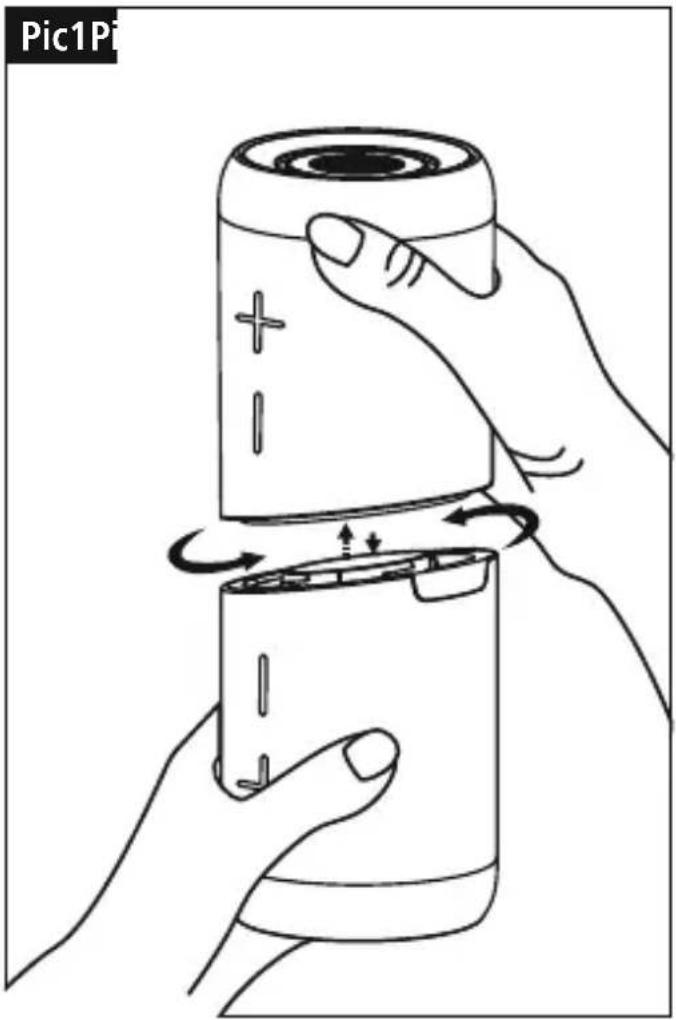
• D isconnectthespeakerhalvesbytwisting them.(Pic1) - D isabletheBluetooth® function on your terminal device.
• Switchonbothspeakersasdescribedin - T hetwo h alvesautomaticallyconnectto each o ther.
- N owenablethe Bluetooth® function on your terminaldevice.
- Open Bluetooth® settings your terminal device and wait until Soundcup-D appears in the list of Bluetooth® devices found.
- Select SoundCup-D and wait until the speakerislistedasconnectedinthe Bluetooth® settingsonyourterminaldevice.
• After successful connection, an acoustic signal sounds from both speakers.
4.1 Switching the product on and off.
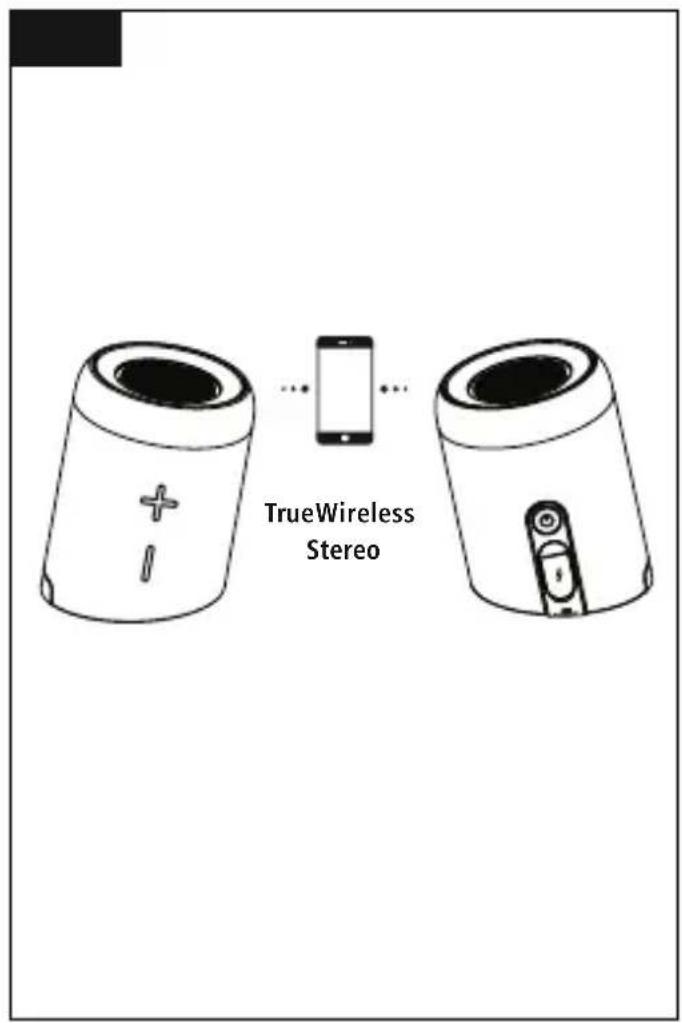
- Position the speaker that is the master to your left. Position the second speaker to your right.(Pic2)
6.Careand Maintenance
Only clean this product with a slightly damp, lint-free cloth and do not use aggressive cleaning agents.
7.WarrantyDisclaimer
Hama GmbH & Co KG assumes no liability and provides no warranty for damage resulting from improperinstallation/mounting,improperuse oftheproductorfromfailure t o o bservethe operatinginstructionsand/orsafetynotes.
8. Service and Support
Please contactHamaProductConsultingifyou have any questions about this product. Hotline: +49 9091 502-115 (German/English) Further support information can be found here: www.hama.com
- Service and Support
| Mobile Bluetooth® Speaker Soundcup-D | |
| Bluetooth® Technology | 4.2 |
| Frequency100Hz- 2 0 kHz | |
| Range< 10 m | |
| Max. music output | 20 W (2x 10 W) |
| Charging voltage | Max. 5V= 1 A |
| Sound System | Stereo/ TrueWireless Stereo |
| Impedanc4Ω | |
| Distortion (THD)≤1% | |
| Size210x 8 4 x 84mm | |
| Weight745g | |
| ConnectionsMicroUSB | |
| Battery | |
| Type | 2xLithium-Ion,3.7V, 1500mA/5.5Wh |
| Chargingtime | ~3 h |
| Playback | ~6 h (depending on volume and audio content) |
10. Declaration of Conformity
CE Hereby,HamaGmbH & CoKG declares that the radio equipment type [00173186]isin compliance with Directive 2014/53/EU. The full text of the EU declaration of conformity is available at the following internet address: www.hama.com->00173186->Downloads.
| Frequency b and(s) | 2402MHz ~ 2480MHz |
| Maximum radio-frequency power transmitted | 0.88 d B m |
4.5 Lecture a udio(via Bluetooth®)
com->00173186->Downloads.
Avertizare – accumulator
The Bluetooth® word mark and logos are registered trademarks owned by Bluetooth SIG, Inc. and any use of such marks by Hama GmbH & Co KG is under license. Other trademarks and trade names are those of their respective owners.
All listed brands are trademarks of the corresponding companies. Errors and omissions excepted, and subject to technical changes. Our general terms of delivery and payment are applied.