AirSense ECO AS100 - Air purifier Venta - Free user manual and instructions
Find the device manual for free AirSense ECO AS100 Venta in PDF.



User questions about AirSense ECO AS100 Venta
0 question about this device. Answer the ones you know or ask your own.
Ask a new question about this device
Download the instructions for your Air purifier in PDF format for free! Find your manual AirSense ECO AS100 - Venta and take your electronic device back in hand. On this page are published all the documents necessary for the use of your device. AirSense ECO AS100 by Venta.
USER MANUAL AirSense ECO AS100 Venta
We are convinced that this VENTA model will exceed your expectations and wish you joy while using it.
Please register your VENTA device: www.venta-air.com

Dear customer,
Thank you for purchasing the AirSense, in doing so you have acquired an indoor climate and air quality measuring device that measures, monitors and analyses the air components, the indoor atmosphere and environmental influences.
It is an important data transmitter and a modern and intelligent smart home device for controlling VENTA AirConnect compatible devices – for healthier living Made in Germany.
Symbols used in this document
| ! | Caution: Risk to health and the product. |
| Do not use outdoors or in damp environments. | |
| The device has a removable power supply | |
| This device complies with protection class II |
Table of contents
Symbols used in this document 12
Safety instructions 13
Declaration of Conformity 13
Warranty 13
Scope of delivery/description 14
Installation 14
Power plug 15
Hotspot mode 16
Activating WiFi 16
Downloading and installing the VENTA Home
App 16
Setting up WiFi 16
Displaying the sensor values 17
Restarting 19
Firmware update 19
Error messages 20
Disposal 21
Data protection 21
VENTA 242/243
SAFETY INSTRUCTIONS
Please read these operating instructions carefully before starting up and keep them for further reference. The current version of the operating instructions is available on www.venta-air.com.
- This device is intended for indoor air analysis in domestic use only.
- This device is not intended for use by persons (including children) with reduced bodily or mental capabilities, or a lack of experience and knowledge, unless they are supervised by a person responsible for their safety or instructed in the use of the device.
- Children should be supervised to ensure that they do not play with the appliance.
- Do not look directly into the illuminated light strip for extended periods of time.
- This device may only be installed and used in the manner described in the operating instructions.
- Do not expose the device to extreme temperatures, direct sunlight, extreme humidity or moisture.
- Do not subject the device to shocks or strong vibrations.
-
The device housing may only be opened by skilled personnel (manufacturer).
-
Clean the device with a cloth only. Do not use abrasive cleaners or cleaning agents containing solvents.
- Do not use/touch the device with wet hands.
- The device must not be used in explosive, aggressive or extremely dusty atmospheres.
- The device must not be used outdoors, near swimming pools or in wet terrain.
Declaration of Conformity
VENTA hereby declares that the models AS100 and AS150 for retrieving air quality data comply with Directive 2014/53/EU. The complete text of the EU Declaration of Conformity is available at the following internet address: www.venta-air.com
Warranty
Due to the high quality of the device, VENTA-Luftwäscher GmbH guarantees that this product will be free from defects for a period of two years from the date of purchase, provided that it is used properly. If a material or processing defect does occur, please contact the VENTA service team or your retailer. In addition, VENTA's general warranty conditions apply:
www.venta-air.com
ENGLISH
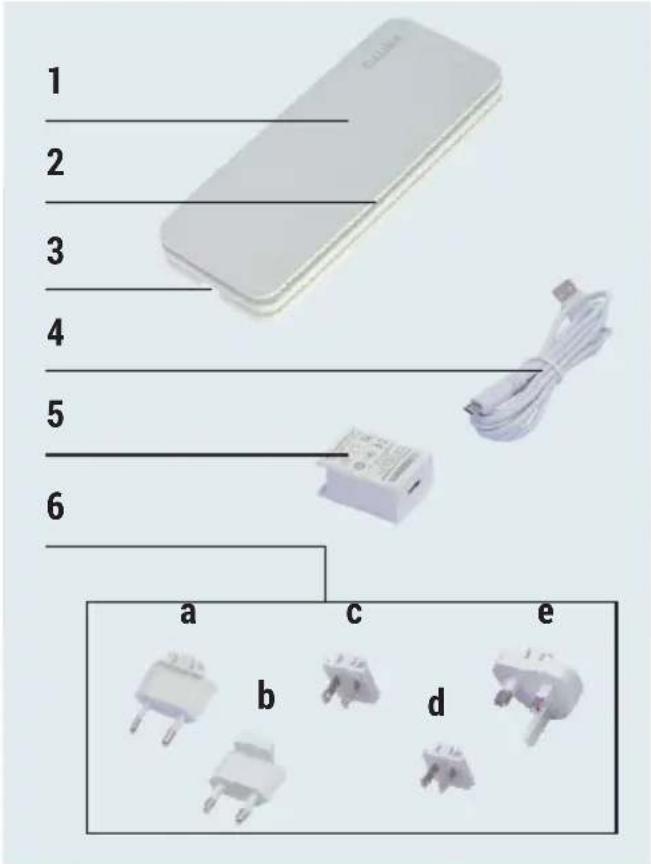
Scope of delivery/description
1x Short Introduction
1x Safety instructions
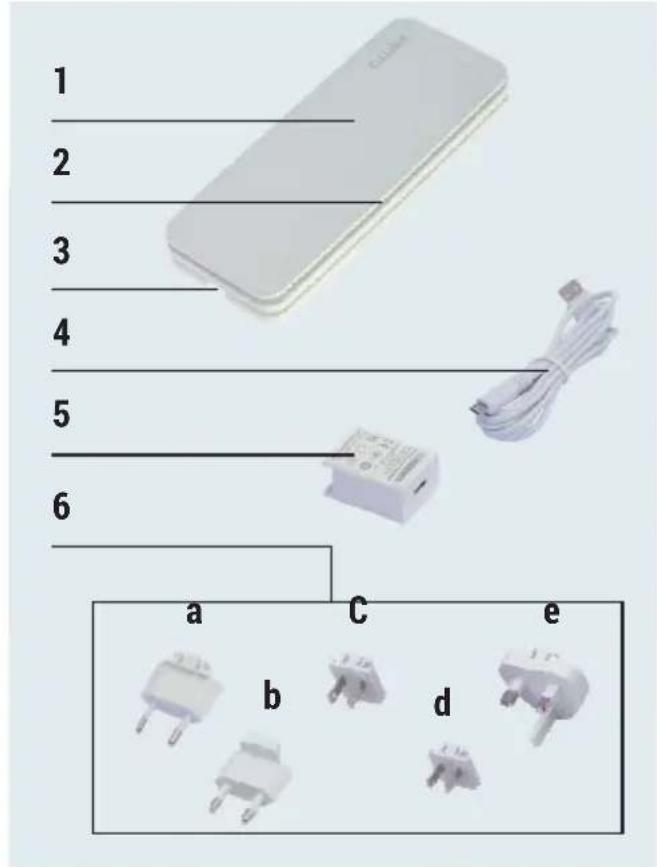
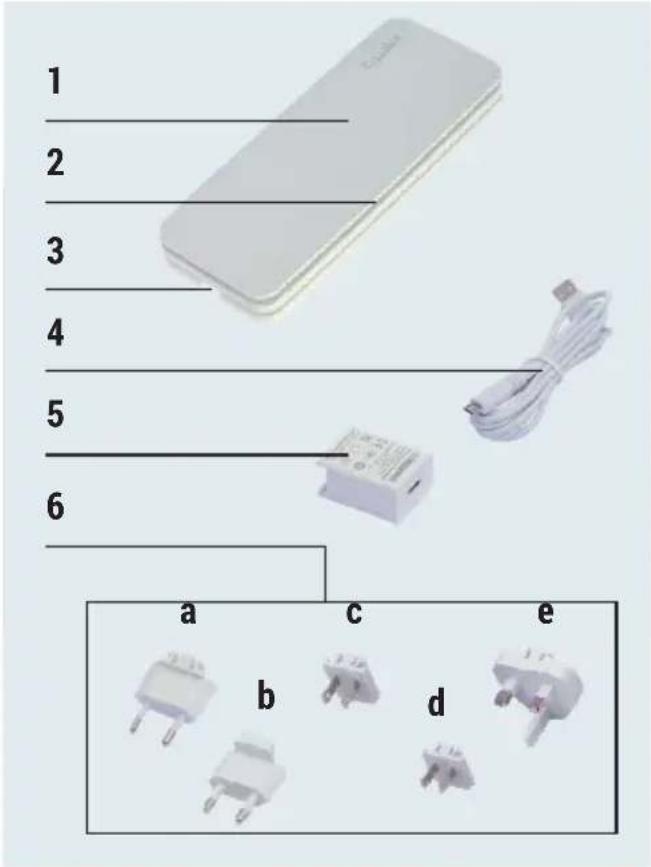
1 AirSense AS100/AS150
2 Light strip
3 Micro USB connector
4 USB cable
5 Power adapter
6 Power adapter plug *
- Country-specific scope of supply:
Europe: a
Korea: b
USA/Japan: c
China: d
United Kingdom: e
Malaysia: a, e
Global: a, b, c, d, e
Installation
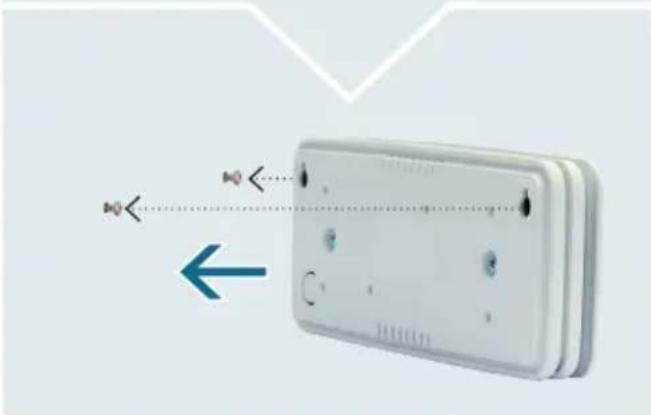
AirSense can be freestanding or mounted on wall brackets indoors.
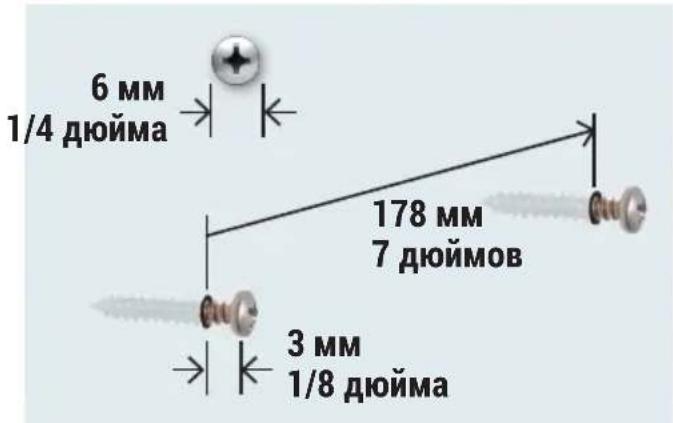
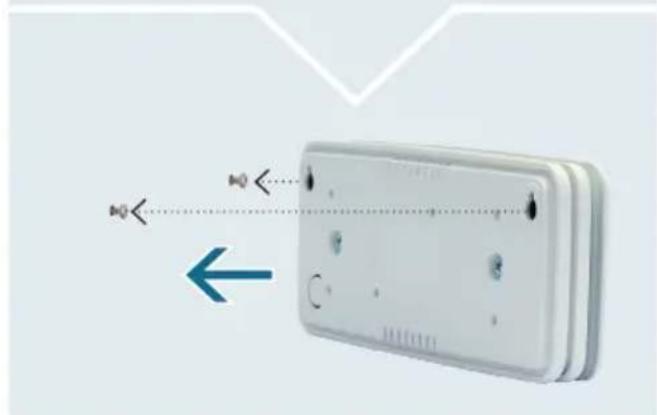
Select an instillation location without pipes or cables behind it. Place screws as shown in the figure.
Suspend the device on the screw heads using the openings provided in the back.
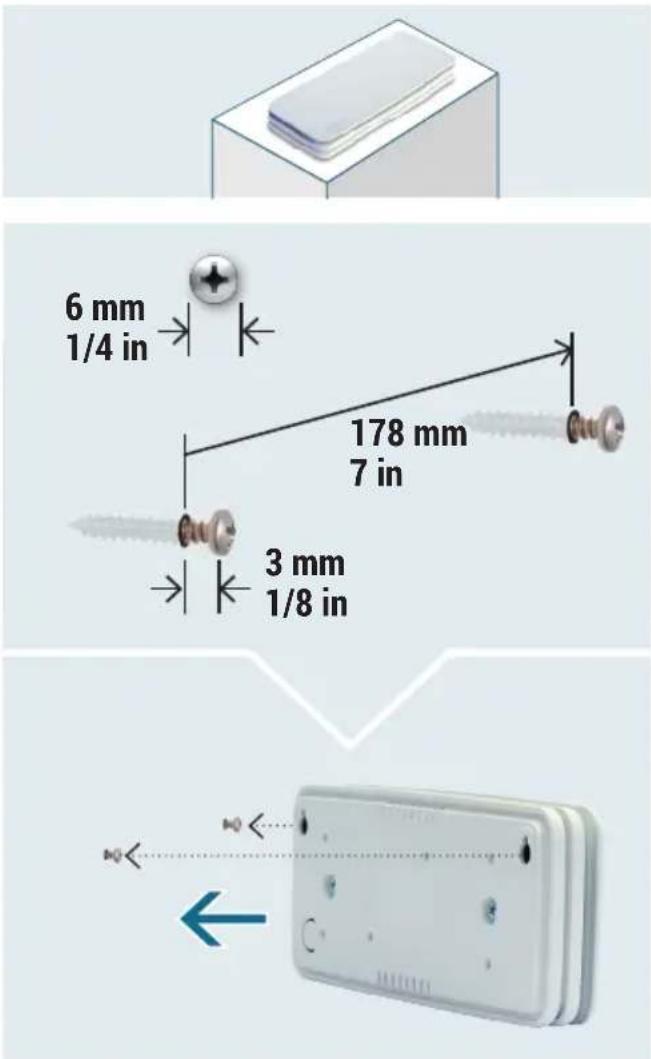
ENGLISH
Power plug
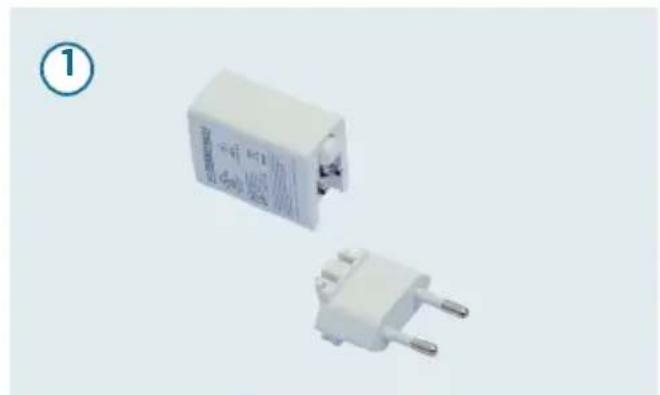
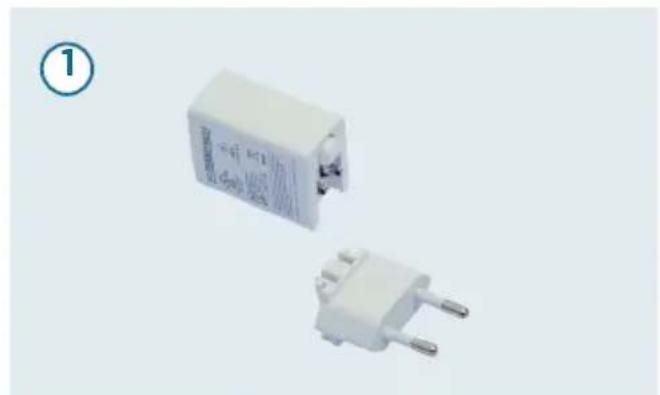
- Plug the appropriate power supply plug for your region into the power supply. The AirSense AS100 and AS150 models must be connected to a permanent power source to operate.
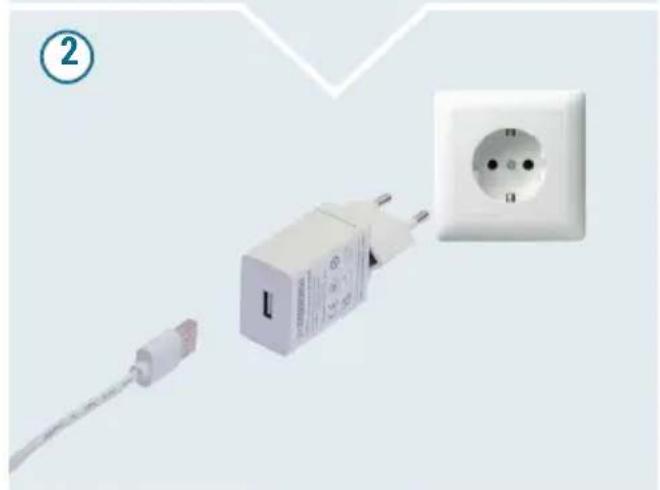
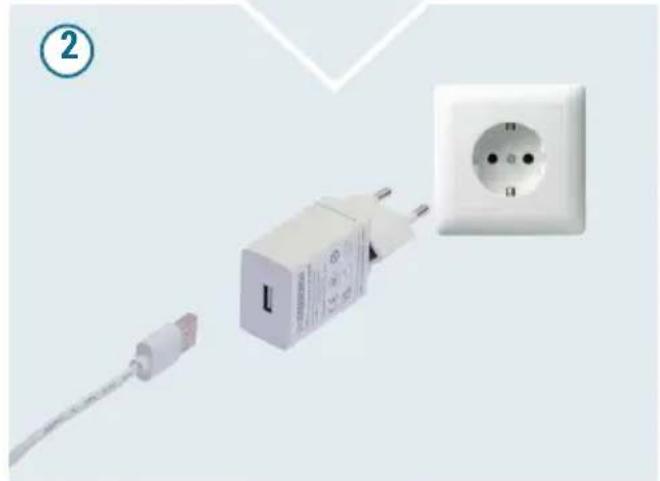
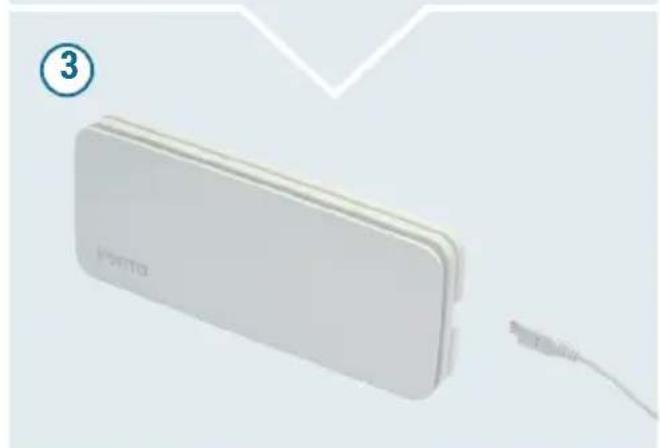
- Plug the assembled power plug into a suitable power outlet and connect the USB cable to the USB port of the power plug.
- Connect the USB cable to the micro USB connector on the device.
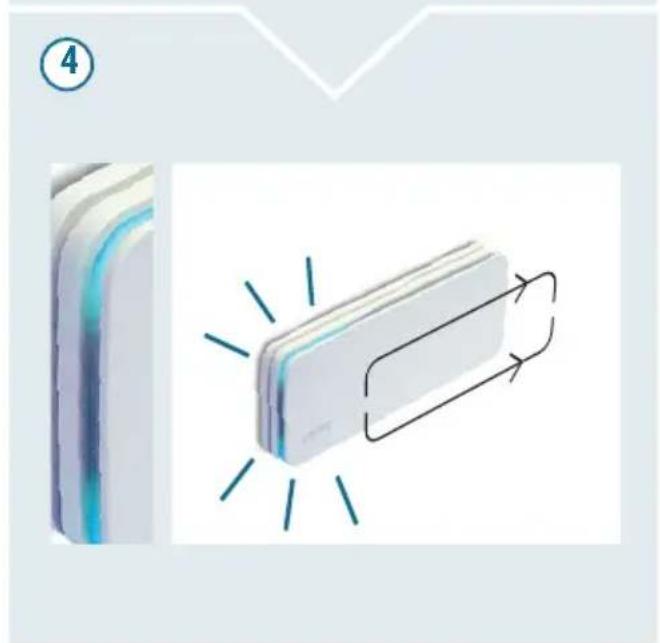
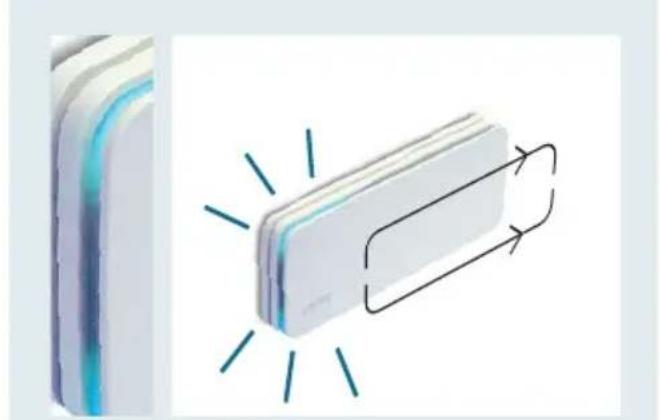
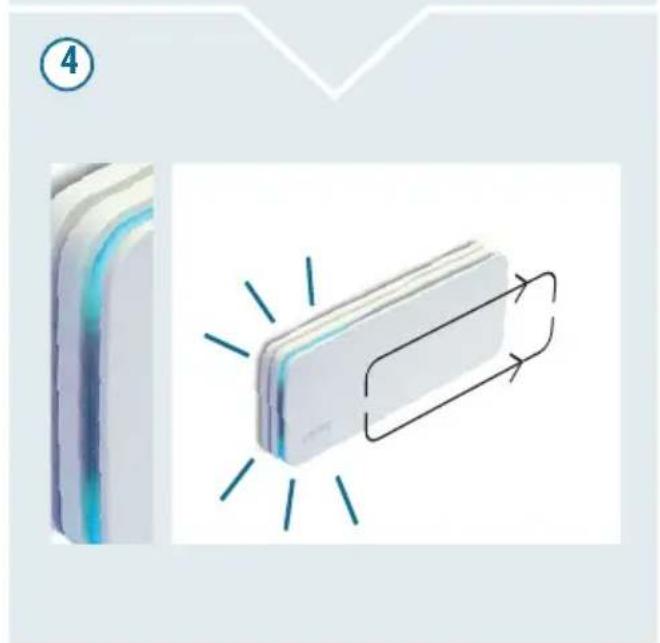
- Initialization (startup): A blue chase light crosses the light strips once only from one side of the device to the other in parallel at the top and bottom.
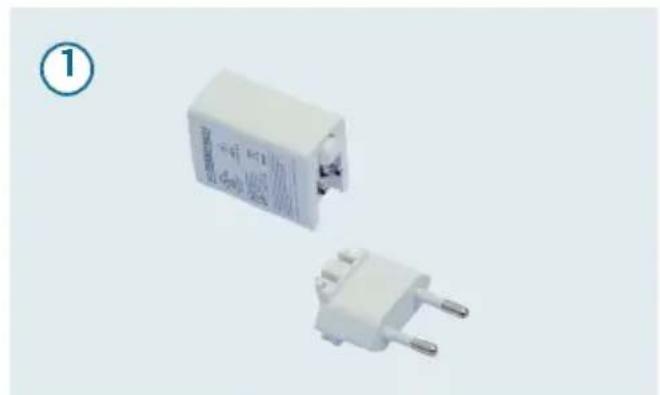
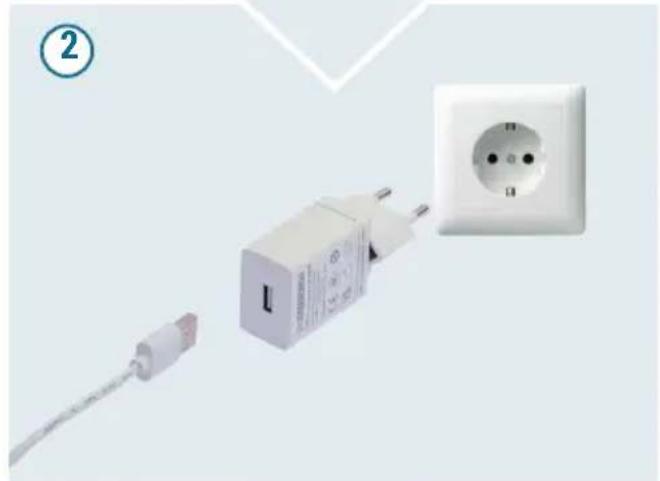
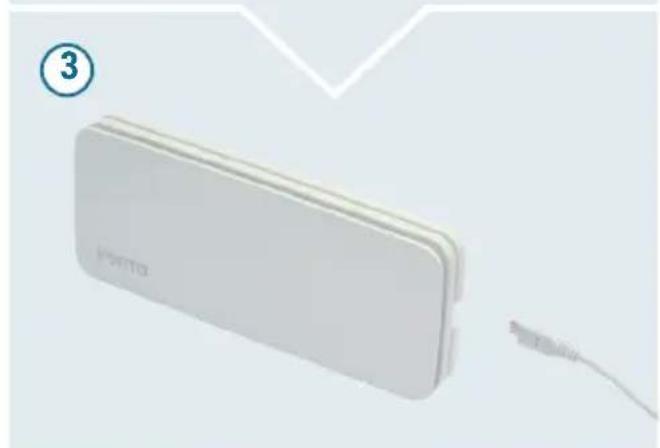
ENGLISH
Hotspot mode
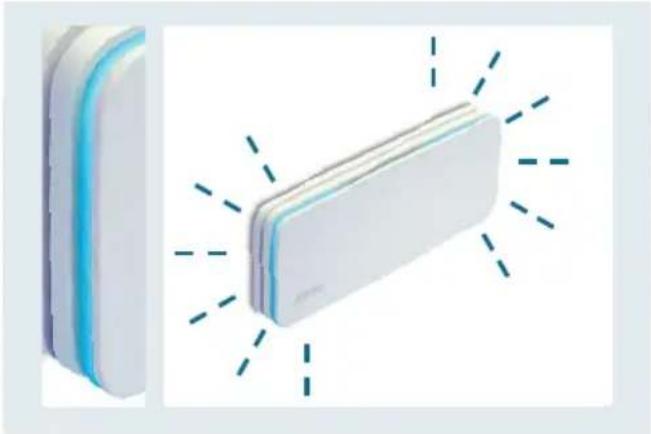
During initial startup, the device is automatically in hotspot mode after initialization (startup) and is ready for network setup: the LED strip flashes blue continuously on both sides.
Activating WiFi
Make sure your smartphone or tablet is connected to your home WiFi network.
Downloading and installing the VENTA Home App
The VENTA Home App lets you operate all of your VENTA devices that have a WiFi function easily via your smartphone.
This gives you a clear display of all measured values for each room at a glance. You can immediately see when a critical value is reached in a room and action is required. In the event of critical values, the VENTA Home App provides support with recommendations for action as well as information on possible causes. Detailed measured value analyses can be created for all measured values; this can help you draw conclusions on changes in values due to everyday activities.
Setting up WiFi
After you have downloaded and installed the VENTA Home App, please open the app and follow the instructions on the screen of your smartphone or tablet.
For more information please visit:
www.venta-air.com/en_gb/Service/Venta-Home-App/
Please make sure that...
- You use a 2.4 GHz or a mixed 2.4/5 GHz network, because the WiFi module in the device does not support 5 GHz networks.
- Your router supports 802.11b/g/n.
- The iOS operating system version 13.0 or newer, or Android version 8.0 or newer is installed. If necessary, update the operating system of your smartphone or tablet.
ENGLISH
Displaying the sensor values
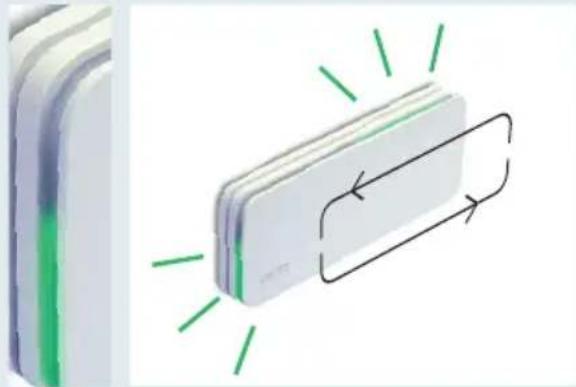
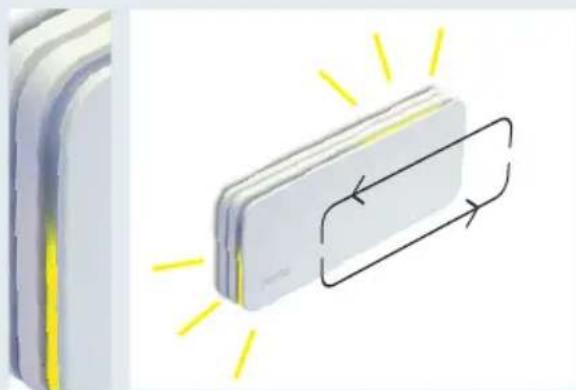
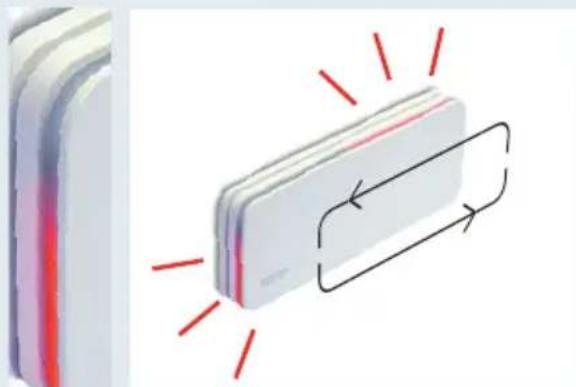
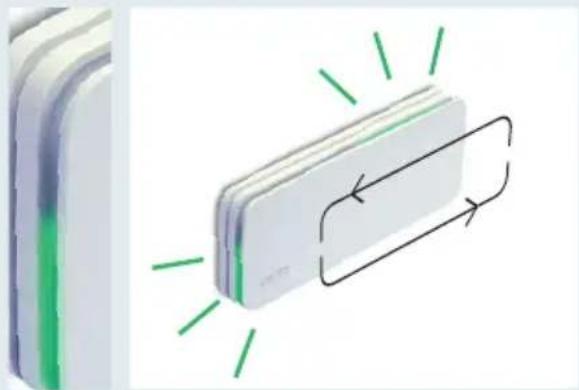
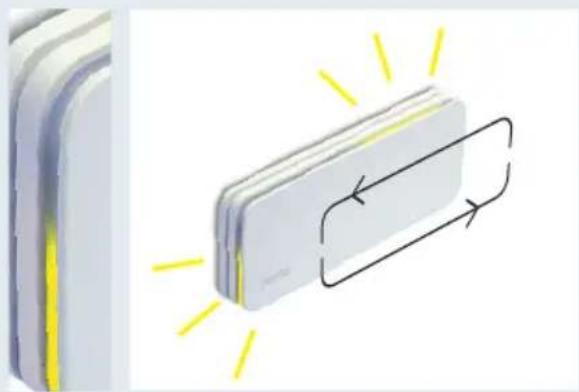
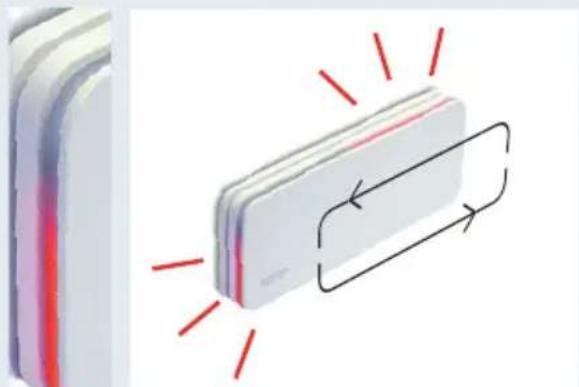
Two chaser lights which regularly move slowly around the entire device indicate the current quality of the measured values. The colour values gradually merge to reflect the measured values:
- Green: The sensor values are good:
- Yellow: As soon as a value deteriorates, the colour of the chaser lights gradually changes from green to yellow: at least one sensor value is below average.
- Red: As soon as a value drops below a mediocre quality level, the colour of the chaser lights gradually changes to red: at least one sensor value is poor.
For more information on the individual sensors and the values they measure, please refer to the app on your tablet or smartphone.
(1)
(2)
(3)


Displaying the sensor values
The values measured by the individual sensors can be accessed via the VENTA Home App on your smartphone or tablet:
AS100 AS150
| x CO2 | Carbon dioxide | |
| x x | VOC Volatile organic compounds | |
| x HCHO Formaldehyde | ||
| x x | RH Air humidity | |
| x x | T Temperature | |
| x PM 1.0 Particulate matter | ||
| x PM 2.5 | ||
| x PM 10 | ||
ENGLISH
Restarting
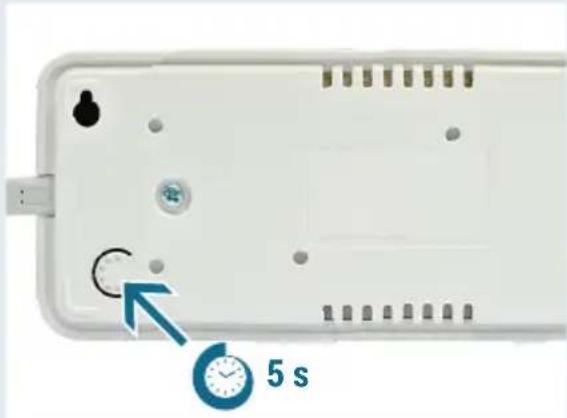
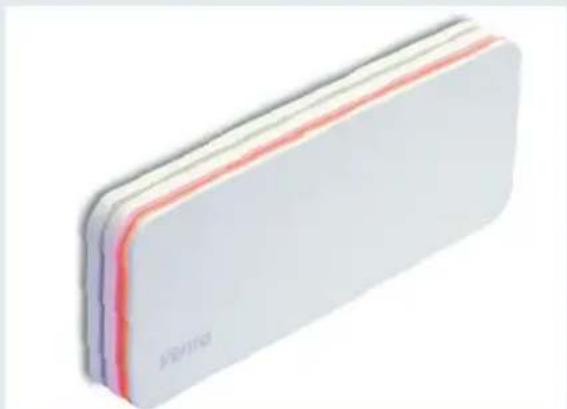
Press and hold the Reset button on the back of the device for approx. 5 seconds until the LED strip shows orange:
The device has now been reset to the factory settings and is in hotspot mode (see section Hotspot mode).
Note: Each time the device is restarted, the locally stored data is deleted.
Firmware update
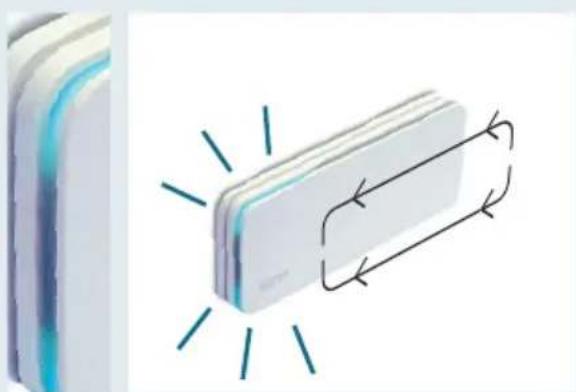
Two blue chaser lights run from the micro USB connector along the LED strip to the other side of the device. When updates are available, firmware updates take place automatically.
ENGLISH
Error messages
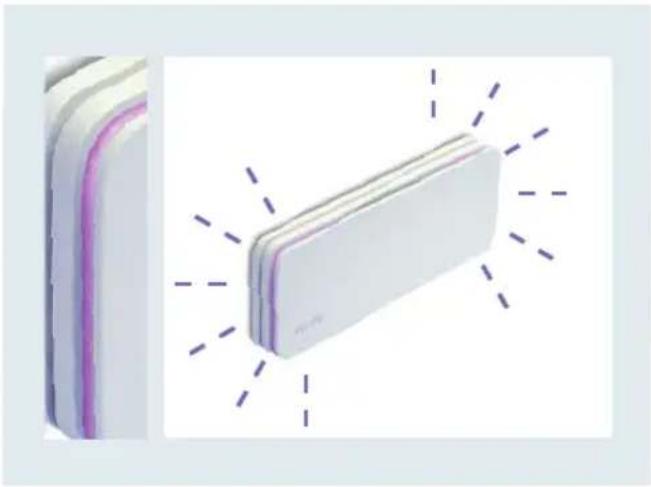
The light strip flashes purple on the sh sides at the same time:
It is not possible to connect to the WiFi network.
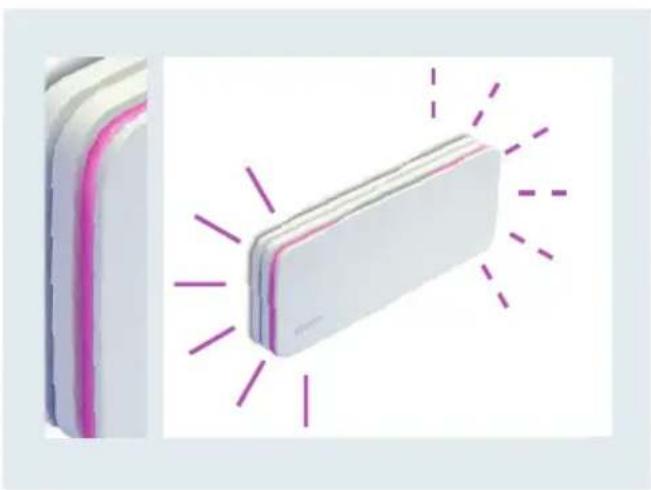
The left short side lights up continuously in red-violet, the right short side flashes, also in red-violet:
No connection to the VENTA cloud can be established.
Technical specifications AS 100 AS 150
Frequency range 2.4 GHz 2.4 GHz
Max. transmitter power 20 dBm 20 dBm
WiFi Standard IEEE 802.11 b/g/n IEEE 802.11 b/g/n
Dimensions (LxWxH) 207 × 84 × 28 ~mm
207 × 84 × 28 mm
8.15 x 3.3 x 1.1 in 8.15 x 3.3 x 1.1 in
Weight without power supply unit + cable
248g/8.75oz 283g/10oz
Weight with power supply unit + cable
334g/11.75oz 369g/13oz
Weight with power supply unit + cable (global)
381g/13.65oz 416g/14.9oz
Power consumption 3.5 W 3.5 W
USB pluggable power adapter Input: 100 - 240V 50 / 60~Hz max.0.3 A
Output: 5V = 1.0A (5.0 W),
Model ADS-6RC-06 05050E
Protection class II
Subject to changes and errors.
Disposal


The symbol with the crossed out dustbin indicates the requirement to dispose of electrical and electronic appliances separately (WEEE). Such devices can contain hazardous substances that are harmful to the environment. These devices must be re
turned to a designated collection point for the recycling of WEEE and must not be disposed of as assorted domestic waste. In this way, you can help to conserve resources and protect the environment. For further information, please consult your local authority.
The packaging material is recyclable. Please dispose of the packaging in an environmentally friendly manner and take it to a collection point for recyclable materials.
Children must not play with plastic bags and packaging material, due to the risk of injury and suffocation. Store such material safely or dispose of it in an environmentally friendly way.
Data protection
Your data will be treated confidentially by VENTA Luftwäscher GmbH. For more information on privacy, please see our privacy policy on: www.venta-air.com
Merci beaucoup!
Firmware-upppatering 79
Felmeddelanden 80
Avfallshantering 81
Sekretess 81
VENTA 242/243
SÄKERHETSANVISNINGAR
Firmware-upppatering
Mult stimate client,
YKA3AHNЯ NO TEXHNIKE 6E30PACHOCTN
Ipeed BBODOM B 3KcPnyatauHO BHNMaTeIbHo IpoUHe 3TO pyKOBoDCTBO NO 3KcPnyatauHn I COxpaHnTe eOДЯДaJIbHeIWeRo NcNoJb30BaHnJa. TeKyUHbVepCnHO pyKOBoDCTBa IIO 3KcPnyatauHn CM. NaCaHTe: www.venta-air.com.
- это устюпговпраздаимачени Толъкдя раниза Вордуха в жи- Львixnomeшени.
- Пибор He п徳назнayeh Для
ИСПОЛБЗОВАнЯ ЛИЧАМN (В ТОМ
ЧИСLE DeТьМN) C ORpaHnueHHbIMN
ФИЗЧЕСКИМ NДУ YMCTBEHнБIMN
СПОСОБНOCТЯМN, ИЛ NДИ AMN, KOTOPBIE IMeIOT HeDOSTaTOUHO ONbITa
ИЛN 3HaHnI, КрOMе CNYuaEB, KOrda
ОHI HAXOДЯТСЯ NOД HAД30POM OT-
ВETCTBEHNO 3a INX 6e3ONaCHOCTb
ЛИЦA ИЛ NРОШИ INHCTpyKTaЖ ПО
ИСПОЛБЗОВАнЮ Пибopa.
-ДeТи ДОЛЖны НахODИТьСЯ NOД HaД-ЗОРМ,ЧTOБI 6bITb YВЕрEHьIMВ TOM,ЧTO OН He ИграIoT CппбОрМ.
He cmoTpne npraMo Ha cBeTayocc CBeTOByo JeHTy Ha npOTaJKeHnДЛNTeJIbHO BpeMeHn. - 3TO yCTpoIcTBO MOxH0 yCTaHaBJIINBaTb I NCIOJIb3OBaTb TOJIbKO ONICAHhbIM B pyKOBODCTBE IO 3KCIpyatauIN CNOCO6OM.
He noDbepraTe yctpoNCTBO B03-DeiCTBnIO 3KCTpeMaJIbHbIX TempePapTyp, npMbIX COJHeuHbIX Jyuei, CInuKOM BblCOKOIBlaXHOCTIN BO3dyxa INI BnaI.
-ИзбегаиTe BOЗдeиCTВЯ уДapOB ИЛСильн ВибрациН ha yCtpoIcTBO. - OTKpbIbAtb KOpnyc yCTpoiCtBa pa3peWaeTcra TOnbKO KBaIINΦnCi
poBaHHbIM CneuJaNtAm (PpOn3-BoNTeJIa).
OuHuaTe yCTpOcTBO TOLbKO nOJIoTeHcEm. He nCNoJIb3yIte a6pa3NBbIe YnCTaUne CpeIcTBA nII MOnIOUne CpeIcTBA, CoedePkaUne paCTBOpNTb.
He nCnoJb3yIe/He kacaiTecb yCTpoiCTBa MOKpbIMn pyKaMn.
- UcTpoIcTBo 3aIpeUaTeCra Ic-IOJIb3OBaTb BO B3pblBOONaCHO, aRpeCCuBHOI INI Ype3BbIuaHNO IIbIbHOI aTMocΦepe.
- UcTpoIcTBo 3aIpeIaETCsI NCIOJIb3O-BaTb BHe IOMeUeHnI, B6JIu3N 6acCeIHOB IJN BO BJaXHOJ MeCTHOCTN.
3aayBleHne O COOTBeTCTBmN
HactoIIM KOMpaHnVENTA 3a- yBnaTe, YTO MoJeN AS100 n AS150 DJIa CHTbIBaHn DaHHbIX O KaueCTBe BO3dyXa COOTBeTCTByIOT DnpeKtNBe 2014/53/EC. POnhbl TeKcT DeKla- paunO COOTBeTCTBn HOpMaM EC DoctypeH NO CLeNyUoSeMy INTepeHET-aDpecy: www.venta-air.com
TapaHTnA
BcIeIcTBnE BbICOKOrO KaueCTBa
KOMnHnY VENTA-LuftwAscher GmbH
Ha npOTJKeHn DByx IeT C DaTbI NO
KyIKNr rapaHTnpuyet, YTO 3TO n3DeJIne
He 6yJeT NMeTb DeΦeKTOB pRn yCIOBn HADJIeKaUeRo NcIOJIb3OBAHnR.
OdHaKO B CJIyuae BbIaBLeHnRA DeΦeKTOB MaTePnAJa NN N3rOToBJIeHn
ObpaaIteScb B cepBnCHyu O clyX6y
KOMnHnVENTA nn K BaIeMy npo
DaBuY. Kpome TOrO, DeIcTByIOT o6uine
ycIOBnra rapaHTnn KOMnHn VENTA:
www.venta-air.com
PYCCKM
KoMnJIeKT NOCTABKN/ONNCAHne
1x KpaTKoe pyKOBOdCTBO
1x Yka3aHnI NO TexHnke 6e3ONaCHOCTN
1 AirSense AS100/AS150
2 CBeTaaCraNoIoca
3 Pa3beM Micro-USB
4 Ka6eJb USB
5 BLOK nHTAHNIA
6 Bnka 6noKa nntaHna
*KOMJIeKT NOCTaBKN B 3aBnCmOCTN OT CTpaHbl:
Ebpona: a
Kopera: b
CUSA/Anonna: C
Knta: d
Belenko6pntaHn: e
Maiai3n: a, e
Bce cTpaHbI: a, b, c, d, e
MoHTaJx
Ipn6op AirSense moKHO yCTaHaBnBaTb B NOMEeHNx B JIO6OM MeCTe NIN Ha CTeHe C NOMOuI KpeJIeHn.
ДлЯ 3ТOrO Bbl6epnTe MeCTO MOHTaJa, 3a KOTOpbIM HeT Tpy6 nII Na6eJIe. YcTaHOBnTe BnHTbl, KaK nOKa3aHo Ha pncyHke.
HaBecbTe npi6Op c nOmoIbI O ppeDycmToPehhIX dIg 3TOrO Ha o6paTHo CTOPOHe OTBepCTn Ha rOJOBKn BINTOB.

PYCCKN
BvJka 6Ioka nHTaHnA
- BCTaBbTe noDxOJaIyU O IJBaWero peTnOHa BnIky B 6Iok nITaHnJ. IJpa6oTbMoJeIeN AirSense AS100 nAS150nx Heo6xoIIMo NOKJIIOuHTb K nOCTOAHOMY nCTOHNKy nITaHnJ.
- BcTaBbTe cO6paHHyo BnIky 6Ioka nITa-HnRA B NOxOJaUyO p03eTKy I NOKJIIO-QuTe Ka6eJb USB K pa3bemy USB BnIkn 6Ioka nITaHnra.
- Поdkлочи Te Ka6eNB USB K pa3bemy Micro-USB npnbopa.
- Иниалзаця (3anyck): no cBeTaei-cra noloc napaJIeIbH0, CBepxu n CHn3y, npoxoNT rOly6oB 6euyuC BcET C OJHO CTOpOHbl npnbopa Ha dpyru.


PYCCKM
Pexm Tocn DocTyna
Ipi nepBOM BBOe B 3KcNlyaTaUIO nocJe HnuaJn3aun (3aynska) np6op aBTOMaTnueckn nepexoNT B pexm TOnkN DoCTynp N cpa3y rTOB K HactpoKe CETN: CBETOINODHnA NOLOCA NOCTOARHHO MInaET rOJy6bIM CBeTom C OBeHX CTOpOH.
AKTINBaIg 6ecnpoBODHn IOKaIbHOcETN
Y6eIITecbBTOM,HTO Bau cMapTfoH nnnnnaanweT NOdkJIOueH K 6ecnpoBOHOcTeN.
3arpy3ka n yctaHOBka npnloXeHnVENTA Home
PpnojKeHne VENTA Home no3BoJraT Bam OueH npocTo ynpaBnTb Bcemn Baunm np6opamn VENTA, kOtOpbIe oHaJeHbI WiFi-mOdyJem, uepe3 BaW cMaprfoH.
BbI MrHOBeHNO nOlyuAeTe 063Op BCex n3MepeHHbIX 3NaueHn IIO KaXDOMy NOMEUeHnO.
No3ToMycpa3y BnDHO, YTO B KaKOM-Jn6o
PomeuHn peNCTpnpyeTc KpNTUeCKoe
3NaueHne n Heo6xOIMo PpNHrTa MepbI. B
Clyuae KpNTUeCKHX 3NaueHn PpINOJKeHne
VENTA Home daet peKoMeHdaun O Heo6XoIMbIX MEPax N BBIOHT INHΦOpMaunO BO3MOXbIX PpUHNax TaKNX 3NaueHn.
Pi Bcem n3MepeHHbIM 3NaueHnM MoXHO BblONHTb aHaJIIN3, KOToPbI NO3BOJNT
CdeJaTB BBIOd 6 n3MeHeHn 3NaueHn Bpe3yJbTaTe NOBceIDHeBHO DeaTeJbHOCTN.
Iocne 3aRpy3Kn uYcTaHOBKn OTKpoiTe npiloxeHnVENTAHome n cIeDyIte yka-3aHnMa hAkpaHe BaWero cMapTfoHa nn PnaHweta.
Hndnkaunpaoka3aHn daTcNKOB
Tekuie KaecTBO B03dyxa OTo6paKaetc
DByMg 6eRyUIMN OToHbKaMn, NOCTOHHo
MeJeHNO npoxOJaUMN IO nepUmEtpy
Pnp6opa. LBeTa noCTepeHNo nepTeKaOT
dpyB dpyra B COOTBETCTBm C n3MepeHHblMN 3HaueHnMaN:
- 3eIeHbI: noka3aHnJaTaTcIKOB Haxo- JATcB IIpeJeJax HOpMbI.
2.KeIbI:KaKToJIbKO KaYeCTBO B03dYxa yXyIaaeTcA,UBET OROHbKOB NOCTeNEHHO MeHReTcC 3eJIeHOrO Ha KeIbI:No MeHbWeMepe OIN NOKa3aTeIb DaTUnKa HaxoNTcHa CpeHem yPoBHe. - Kpacb: KaTToJIbKO KaYeCTBO Bo3dUxa yXyIaETcA Do yPoBnH HIXe CpeHrero, CBET OROhKOB NocTepeHH MeHReTcHa Kpacb: PO MeHbWe Mpe OINN POKa- 3aTeJIb DaTUnKa HaXoDITcRa Hn3KOM ypoBHe.
(1)
(2)
(3)
IOnoHnTeIbHyU INHΦOpMaunO6OT- DeIbHbIX DaTcKax N peRNCtpnpyEmbIX MM3HaueHnX CM. B pInJIOKeHn Ha CBOeM PAnhSeTe nn CMaprfoHe.

HdNkaunpaoka3aHn daTcNKOB
I3MepeHHbIe 3HaueHnO TdJIbHbIX DaTcIKOB MOxHO CHTaTb Yepe3 npJIOKeHne VENTA Home Ha BaWe mCapTfoHe nII nn Hwete:
AS100 AS150
BKA3IBKN 3 TEXHIK N E3NEKN
Ipeed BBeDeHnM dIe ekCnnyatauii yBaJHo npouHTaTe cIo IHcTpkyciIO 3 ekCnnyatauii Ta 36epeXiTb II dJI naNo-dalbwoBnKOpncTahnn. IotoHy Bepcio IHcTpkyciII 3 ekCnnyatauii DIB. Ha caiTi: www.venta-air.com.
- Léen npincptpi npn3nauehen liuwe dans aHaJI3y NOBITpy y XHTIOBnx npmimiueHHx.
- Ппсстрин He пиз nauseй дя ВИКОПСТАНHA OCOБAMN (3OKpeMaДITbMn) 3OBмжЕнМNФi3HUNMn a6O pOЗуMOВИМN 3Дi6HOCТЯМN, a6O OCOБaMn,Як MaIOTb HeIoCTaTHbO DOCSBIDy a6O 3HaHb, OKpIM BUnaIDKIB, KOLN BInH 3HaxODaTbCЯ NiД HaIЯdOM BiDNoBIDAJIbHOI 3aix 6e3neky oc6b n a6O npoiшл nIHCtpyKTaJx ⅢOdo KOpNCtYBaHHa NpIcSTpoE M.
-ДiTи MaIOTb 3HaxOДNTUCЯ ПID HarJIaDOM, ΜΟБ 6ByTN yNeBHeHIM, ΜΟ BOHn He rpaIOTb 3 npIcTpoE M.
He nBtbc8e3nocepEnbO Ha CBITNOBy cTpiKU, 0CbitNbCn, npotrrom TpNBaIoro yacy. - Lecnncpti moxHa BCTaHOBIOBAtu Ta BnKOpNCTOByBaTu JnIe OINcAHM B iHCTpyKci 3 ekCnlyaTaCi cNoCo6om.
He nidaBaTe npicTpBnInBy ektpemaIbHnx TeMnepaTpy, npaMIX COHauHnx IpOMeHIB, HADBnCOKOI BOIoroCTi NOBiTPra a6O BOLOrn.
He donyckaTe BnInBy ydapiB a60 cnIbHOi Bi6paui Ha npncTpii.
BikpnBaTn Kopnyc npncTroO IO3-BOJAEbCra IINe KBAJIΦIKOBaHm axIBzM (BInpo6Hnka).
OuynyTe npictpiJnWe pyHnKOM.He BnKOpncTObyIte a6pa3NBHi 3ac06n dJa YNuSeHHa 6o 3ac06n dJa MNTTa, 1o MiCTaTb p03UnHHNK.
He KopnctyuTeCra/He TOpKaITeCra npnstpoIO MOKpIMN pyKamN.
- Ппстрии заборонястбая ВИКОпостовыbatи у вибухоюезneун, arpeсиВий abo haДЗВичайно пььнй aTMOсфepi.
- Ппстризбогоньсь ВИКОпостовыbatи NO3a пимiцehнм,поблney басянв abo y BOIorimicceBOcTi.
3aBa npo BiDnoBidHicTb
LIMKOMPANIA VENTAZaBnE,MOpeJI AS100i AS150IJ3uNTyBaHHaHnx 0oO JaKocTI NOBiTPBbIDNOBIdAOTb DnpeKtNBI 2014/53/EC. NOBn TeKCT DeKnapaui npo BiINOBiHicTh HopMaM EC DocTyHn3aIHTepHeT-aDpecoU: www.venta-air.com
TapaNTiA
Yepe3 BnCOky kKiCTb KOMnaHia VENTA-Luftwascher GmbH npotraom DBOX pOKIB 3 DaTn NOKyKNI rapaHTye, UO ueBnBn6 He MaTIme DeΦeKTiB 3a yMOBn HaleKHO BnKOpNCtAHN. Ppote y pa3i BnABLeHnA DeΦeKTiB MaTepiAly a6o BnTOBJeHnA 3BeP TaInTeCnDo cepBicHOi CnyXbN KOMnA Hi VENTA a6o Do BaWoRo npOdaBuz. Kpim TOrO, DiOTb 3aRaJIbHi yMOBn rapaNTII KOMnAHI VENTA:
www.venta-air.com
yKPAIHcBKA
KOMNJIeKT NOCTaBKN/ONHC
1x Kopotka iHctpykuia
1x Bka3iBkn 3 texhikn 6e3nekn
1 AirSense AS100/AS150
2 CbiTHa cMyra
3 Po3'em Micro-USB
4 Ka6eJb USB
5 BLOK XINBJIeHHN
6 BnIka 6Ioka XNBJIeHHra
* KomnneKT noCTabKn 3aJIexKHO BID KpaIHN:
EBpona: a
Kopera: b
CUSA/raonoi: C
Kunai: d
Belenka Bpntania: e
MaJau3i: a, e
Bci kaiHn: a, b, c, d, e
MoHTaX
IpiCTPi AirSense MoXHa yCTaHOBIOBaTH B npMiuEHHx y 6yDb-RAKOMy Micci a6o Ha CTiHi 3a DOnOMOHO KpINJIeHb.
ДляцьогВиберпь Mсцe moHTажу,3a ЯкIM He Mae Tpy6 abo Ka6eJIb. YcTaHOВiTb ГВИNTN,ЯК ПOKa3aHo Ha pUCyHKy.
HabicbTe npnstpi 3a donomoro nepe6a-ueHX IJI cyBOrHO Ha 3BOpOTHomy 60ci OTBopiB HA rOIOBKN TBnHTIB.


YKPAIHcBKA
BnIka 6IOka KMBJeHHa
- BctabTe BnIky, 0oPiXoJntb Do BaWoOr o perioHy, B6loK XuBHeHHa. Ira po6OtMoJeNei AirSense AS100 i AS150ix Heo6xIDHO nIKNoHTn Do noCTInHoro DKepeLa XuBHeHHa.
- BcTaBTe 3i6paHy BnIky 6Ioka XnBJIeHHa B nIXOJaU y po3eTKy Ta nIKJIOuHiTb Ka-6eNb USB do pa3'Emy USB BnIkn 6Ioka XnBJIeHHa.
3.ПдклочьkaбьUSBdo pa3'emy Mikro-USB npictpoI. - Ihiizaii3aia (3anyck): no cbiTHi Cmy3i napaneIbHo, 3Bepxy Ta 3Hn3y, npoxo-dntb roJybe 6ixHe cBITIO 3 Ondoro 60ky npicTpOHa iHsni.
yKPAIHcBKA
Pexm Tocn DocTyny
Ipi nepwomy BBeDeHnB EKcnnyatauio nic Ihiiai3aii (3anycky) npictpi ABtomaTNUHO nepexoNDtbypeXmTOUKN DOCTUY Ta BiDpa3y rOTOBN Do HalaSTyBaHHa MepeXi:CBITIOIDHa CMyra NOCTINHO 6JImaE 6JaKTHM KOJIbOpOM 3 060x 6OKIB.
AknBaucia 6e3dpoTOBOI JOKaJIbHOI MepeKi
Ipekehntecy y TOMy, 0 BauchcmaptfoH a6o nnanweT nKluueHn do 6e3dpoTOBOi MEPexi.
3aBaHTaXeHHa Ta yCTaHOBJIeHHa 3actocyHky VENTA Home
3acctocy Hok VENTA Home Do3Bolnae Bam dYke npocTo kepyBatn ycima Baunm npncTpormVNTA, kki ochauehi WiFi-modylern, uepe3 Baw cmapTfoH.
Bn MNTEBO OTPMByTe OrlaY ycix BmipHnx 3NaueHb NO KOKHOMy npmiueneHHIO. Tomy BiDpa3y BnIHO, IIO B JAKOMycb npmiueneHHi peectpyeTbcra Kpntuue 3NaueHHa T a Heo6xIDHO BxHTN 3axOdb. Y pa3i Kpntuue Hx 3NaueHb 3actocyHok VENTA Home dae pekomehdaui 10o Heo6xIDHx 3axOdb i BnBOJNb IHOpMaiciIO pno MojJIbI npuHH TaKHX 3NaueHb. 3a BCima BmipRHMn 3NaueHHaM MoXHa npOBectn aHaJI3, kNIMdo3BOJNTb 3pObHTN BnCHOBOK 5oDo 3MiH N 3NaueHb B pe3yJbTaTi NOBCKaDeHHoi DiJIbHoCTi.
HajawtyBaHHa WiFi
Iicra 3aBaHTaxKeHH Ta yCTaHOBJIeHH BIDKpInTe 3actocyHOK VENTA Home i doTpmyItecb Bka3IBOK Ha ekpaHi BaWoRo cMapTfoHa a6o nnHseTa.
1111 North Plaza Drive,
Suite 715
Schaumburg, IL 60173
United States of America
1111 North Plaza Drive,
Suite 715
Schaumburg, IL 60173
United States of America
service-hu@venta-air.com
www.letmerepair.com
ITALY
LetMeRepair GmbH
Fichtestrasse 1a
02625 Bautzen
service-it@venta-air.com
www.letmerepair.com
JAPAN
Address Service Co., Ltd.
17-9, Shinoda, Togane-shi,
Chiba, 283-0013 Japan
Tel.: +81-120-407-554
venta_support@adservice.
co.jp
LATVIA / LITHUANIA
SIA, BALTIJAS
TIRDZNIECIBAS
UZNEMUMS"
Darzauglu iela 1-201,
Riga LV-1012, Latvia
Tel.: +371 67790720
info@btu.lv
MALAYSIA / SINGAPORE / PHILLIPINES / VIETNAM
GA MAKMUR SDN BHD
No. 27, Jalan PP 11/4,
Alam Perdana
Industrial Park,
Taman Putra Perdana,
47130 Puchong, Selangor,
Malaysia
Tel.: +603-8322 6628
Fax: +603-8322 6066
info@gasales.com.my
MONGOLIA
AERIS LLC
SUITE 316, Barilga Architectu
re Building, Chinggis Avenue,
Oron Suuts Street,
2nd horoo, Khan-Uul district, Ulaanbaatar,
Mongolia 17032
Tel.: +976-99101185,
+976-99096696
sales@aeris.mn
www.aeris.mn
PORTUGAL
LetMeRepair GmbH
Fichtestrasse 1a
02625 Bautzen
service-pt@venta-air.com
www.letmerepair.com
RUSSIA
VENTA Russia TSK IMPORT (offizieller Importeur)
Kelvin South Business
Park, East Kilbride, G75
OYB, Scotland, UK
Tel.: +44 (0) 1355 241 222
service-uk@venta-air.com
Fax: +44 1355 246575
SLOVAKIA
LetMeRepair GmbH
Fichtestrasse 1a
02625 Bautzen
service-sk@venta-air.com
www.letmerepair.com
SPAIN
LetMeRepair GmbH
Fichtestrasse 1a
02625 Bautzen
service-es@venta-air.com
www.letmerepair.com
SOUTH AFRICA
EUROCARE Wellness
5 Star Business Park, Unit 2,
Persimmon Close,
Honeydew, Johannesburg
Südafrika
Tel.: +27 11 888 3255
Fax: +27 11 888 9874
info@eurocarewellness.
co.za
SOUTH KOREA
VENTAKOREA CO.,LTD.
3/F., Seojin Bldg., 754,
Seolleung-ro,
Gangnam-Gu,
Seoul 135-948, Korea
Tel.: +82 22 03 40 114
Fax: +82 22 03 40 119
UKRAINE
VENTA-Centre Ukraine
Schlichtera, 11
Kharkov, Ukraine
Tel.: +38 057 752 72 72
Fax: +38 057 768 01 57
venta@venta.com.ua
SERVICE AND SUPPORT
www.venta-air.com/Service/Service-Support/
VENTA WORLD WIDE
www.venta-air.com/en_de/Venta-worldwide/