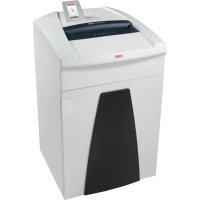
Securio P40c - Shredder HSM - Free user manual and instructions
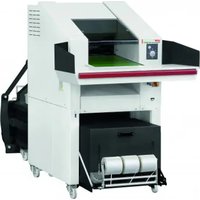
Find the device manual for free Securio P40c HSM in PDF.

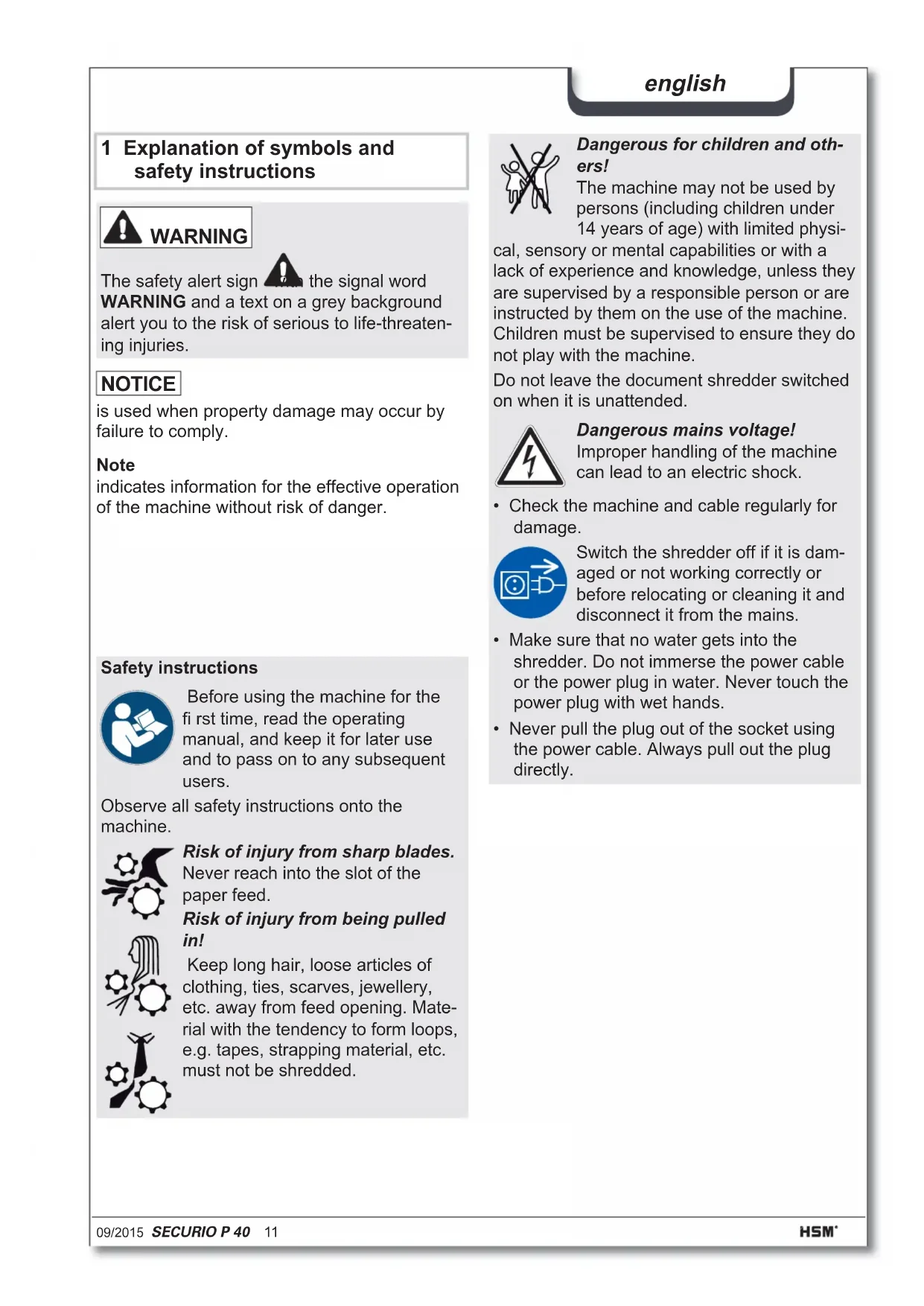


| Product Type | Document Shredder |
| Brand | HSM |
| Model | Securio P40c |
| Cut Type | Strip cut (5.8 mm or 3.9 mm) or cross cut (4.5x30 mm, 1.9x15 mm, 0.78x11 mm, 1x5 mm) |
| Security Level (DIN 66399) | P-2 to P-7 / O-2 to O-4 / T-2 to T-6 / E-2 to E-5 / F-1 to F-3 depending on cut type |
| Feed Width | 330 mm |
| Cut Capacity (A4 sheets, 70 g/m²) | 11 to 60 sheets per pass depending on cut type |
| Cut Speed | 100 to 110 mm/s |
| Bin Volume | 145 liters (paper) |
| Dimensions (L x W x H) | 580 x 550 x 936 mm |
| Weight | 67 to 72 kg depending on cut type |
| Power Supply | 230 V, 50 Hz |
| Power Consumption (max.) | 2,100 W |
| Standby Consumption | < 2 Wh |
| Operating Mode | Continuous operation possible |
| Noise Level | 60 - 69 dB(A) under load |
| Destructible Materials | Paper, staples, paper clips, credit cards, CDs, floppy disks (depending on model) |
| Main Functions | Auto start/stop, reverse, continuous mode, standby mode, auto stop after 40 min, automatic oiling (cross cut), metal detection (optional) |
| Safety | Automatic stop in case of overload, open door, full bin, metal detection; finger safety device |
| Maintenance | Clean exterior with soft cloth and soapy solution; regular oiling of cutters (special HSM oil) |
| Warranty | 3 years; lifetime warranty (HSM Lifetime Warranty) on steel cutting cylinders (except certain models) |
| Spare Parts | Available up to 10 years after end of production |
| Included Accessories | 5 waste bags, 1 special oil bottle (250 ml), instruction manual |
Frequently Asked Questions - Securio P40c HSM
User questions about Securio P40c HSM
0 question about this device. Answer the ones you know or ask your own.
Ask a new question about this device
Download the instructions for your Shredder in PDF format for free! Find your manual Securio P40c - HSM and take your electronic device back in hand. On this page are published all the documents necessary for the use of your device. Securio P40c by HSM.
USER MANUAL Securio P40c HSM
1 Explanation of symbols and safety instructions

WARNING

the signal word grey backgroundous to life-threaten
The safety alert sign the signal word WARNING and a text on a grey background alert you to the risk of serious to life-threatening injuries.
NOTICE
is used when property damage may occur by failure to comply.
Note
indicates information for the effective operation of the machine without risk of danger.
Safety instructions

Before using the machine for the first time, read the operating manual, and keep it for later use and to pass on to any subsequent users.
Observe all safety instructions onto the machine.

Risk of injury from sharp blades.
Never reach into the slot of the paper feed.
Risk of injury from being pulled in!
Keep long hair, loose articles of clothing, ties, scarves, jewellery, etc. away from feed opening. Material with the tendency to form loops, e.g. tapes, strapping material, etc. must not be shredded.

Dangerous for children and others!
The machine may not be used by persons (including children under 14 years of age) with limited physi
cal, sensory or mental capabilities or with a lack of experience and knowledge, unless they are supervised by a responsible person or are instructed by them on the use of the machine. Children must be supervised to ensure they do not play with the machine.
Do not leave the document shredder switched on when it is unattended.
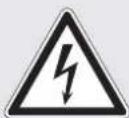
Dangerous mains voltage!
Improper handling of the machine can lead to an electric shock.
- Check the machine and cable regularly for damage.

Switch the shredder off if it is damaged or not working correctly or before relocating or cleaning it and disconnect it from the mains.
Make sure that no water gets into the shredder. Do not immerse the power cable or the power plug in water. Never touch the power plug with wet hands.
- Never pull the plug out of the socket using the power cable. Always pull out the plug directly.
Check the name plate on the back of the machine to find out the cutting width and mains voltage for your document shredder and observe the applicable instructions in the operating manual.
The shredder is designed for destroying paper. Depending on the cutting type, it can also handle small quantities of the following materials:
| Shred width (mm) 5.8 3.9 4.5x | 30 1 | 9x15 | ||
| Credit cards | · | · | ||
| CDs | · | · | ||
| Floppy discs | · |
Its sturdy drive mechanism is not damaged by paper clips and staples. Only on machines with a cutting width of 1 × 5 mm can the paper not contain staples or paper clips.
Note
You can also shred CDs, diskettes and credit cards in the separate CD cutting unit (optional) without using the paper cutting unit.
The warranty period for the document shredder is 3 years. There is a special warranty for the HSM solid steel cutting rollers in the document shredder, which is provided independently of the guarantee, and remains valid for the entire service life of the machine (HSM Lifetime Warranty). This does not apply to document shredders with cutting widths of 0.78 × 11 mm and 1 × 5 mm . This warranty and guarantee exclude wear and damage caused by improper handling or actions taken by third parties.
HSM guarantees the delivery of spare parts for up to 10 years after the production of this model has been discontinued.
3 Overview2 Proper use, warranty
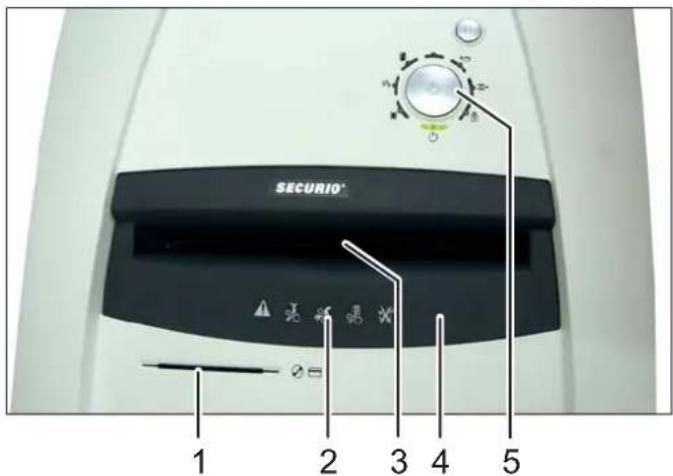
Note: Depending on the version, your machine may not include all the assemblies.
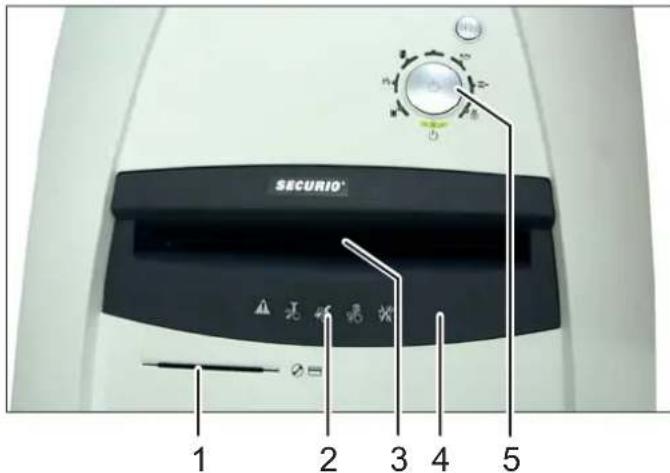
1 Feed slot for CDs, floppy discs and credit cards (optional)
2 Safety instructions
3 Light barrier in the paper feed
4 Safety element
5 Operating and display unit
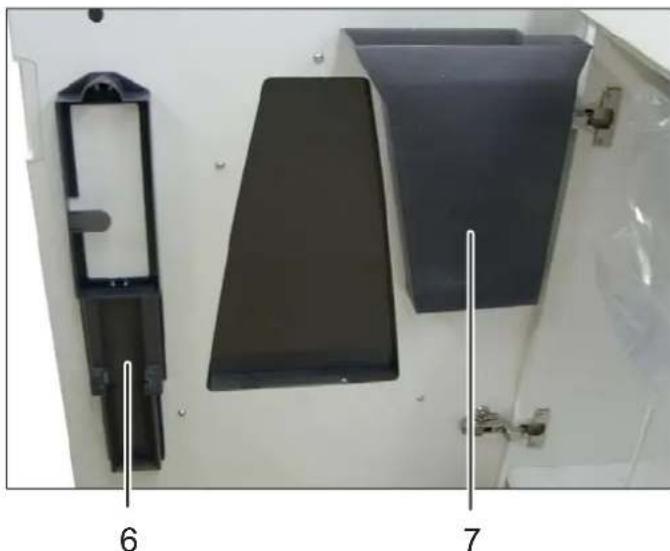
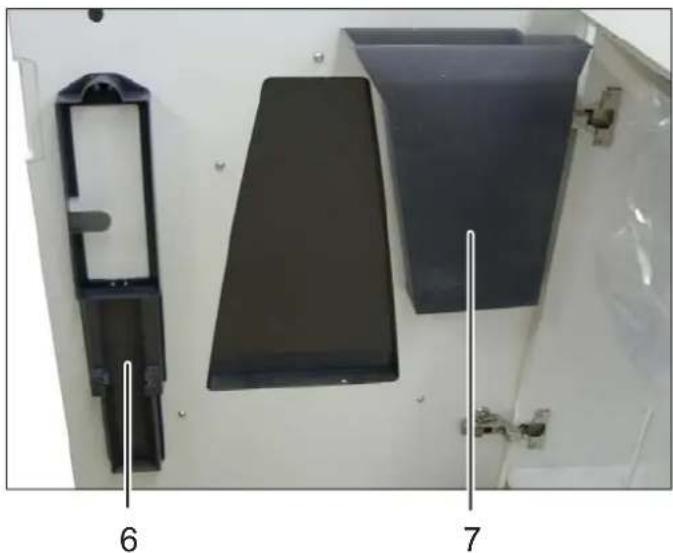
6 Holder for operating manual and oil bottle
7 Shredded material for CDs, floppy discs and credit cards (optional)
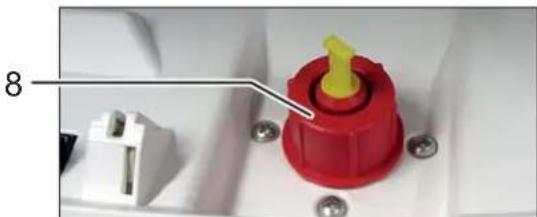
8 Filler opening for cutting apparatus oil (cross cut only)
english
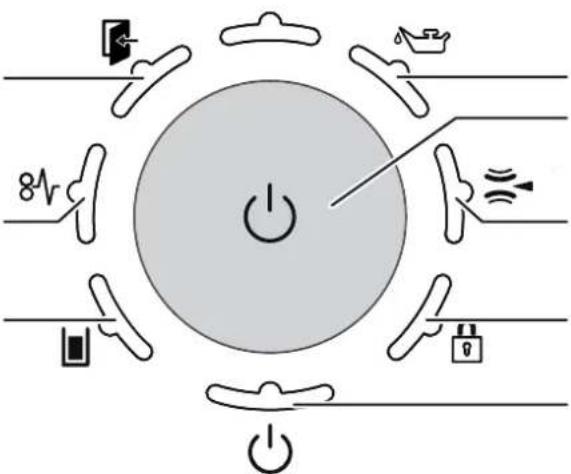
Operating and display elements
Note: Depending on the machine version, not all functions may be available.
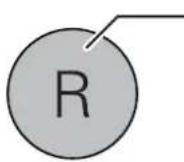
R button:
Cutting unit runs in reverse
- Error acknowledgement
- Software version display (for service technicians only)
Indicator: door open or safety element not latched
Indicator: overload (paper jam)
Indicator: paper/CD container full
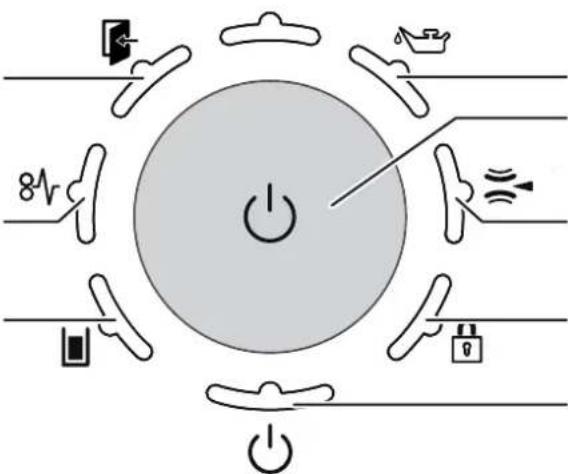
Indicator: oil reservoir empty
Function button "On/off/start"
Indicator: metal detection
Indicator: button lock
Indicator: ready for operation / Stand-by
4 Initial start-up

WARNING
Dangerous mains voltage!
Improper handling of the machine can lead to an electric shock.
- Only use the machine in a dry room indoors. Never operate the machine in damp rooms or in the rain.
- Keep the machine, the plug and cable away from open fire and hot surfaces. The ventilation slots must not be blocked or covered and there must be at least 5 cm space between the shredder and any wall or furniture.
Make sure that the power plug is easily accessible. -
Before you insert the power plug, make sure that the voltage and frequency of your power supply comply with the information on the name plate.
-
Before starting up the machine for the first time, open the door and remove the two wing nuts of the transport locks from the base plate under the cutting unit.
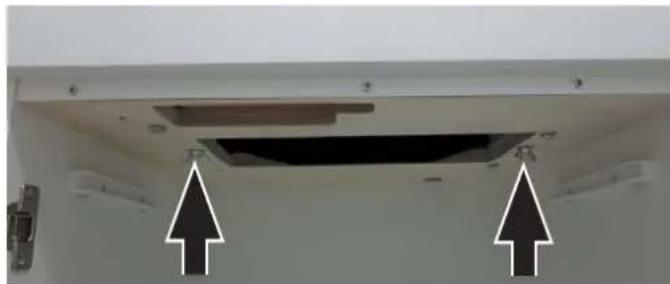
- Connect the power plug of the machine into a properly installed socket.
english
5 Operation
Switching on the shredder
- Only US-version: Set mains switch at rear of paper shredder to "l".
- Check that no paper is in the slot of the paper feed.
- Press the operation button.
The "Ready for operation" indicator lights up.
Note
Paper and CD cutting unit cannot be used at the same time. Only shred one kind of material at a time.
Shredding paper
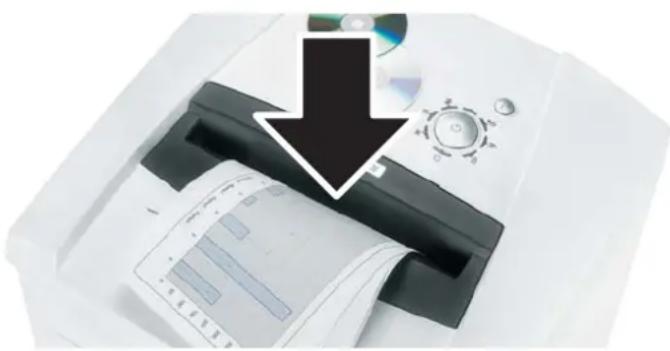
- Feed the paper into the centre of the paper slot. The light barrier starts the cutting unit automatically. Therefore, with thin paper strips, make sure the light barrier detects them.
NOTICE
Do not shred paper in the CD cutting unit. This can cause damage.
3 seconds after the light barrier in the paper feed opening is free again, the cutting unit is switched off automatically and the shredder switches to standby.
Shredding CDs, credit cards and fl oppy disks
- Check whether your machine is certified for destroying these materials (see "Proper use").
- For machines with a separate CD cutting unit (optional), put the material in the feed slot of this cutting unit. This protects you from splin
ters. For machines without a separate CD cutting unit, use the paper feed.
- Dispose the shredded material and the waste paper separately.
Switching off the shredder
- Press the operation button.
The "Ready for operation" indicator goes out. - Only US-version: Set mains switch at rear of paper shredder to n0n .
Other function modes
Permanent mode
Function: Cutting unit runs continuously. If no material is fed in within a period of 2 minutes, the cutting unit shuts down and the shredder switches to standby.
Start: Press the operation button for three seconds.
Premature cancellation: Press the operation button.
- Stand-by mode
Function: Two minutes after the last paper feed operation, all consumers that are not required are switched off automatically.
The „Ready for operation“ indicator flashes briefly at regular intervals.
The shredder starts automatically when paper is fed in.
Automatic shutdown
Function: If the shredder is not used for 40 minutes, it shuts down completely and therefore does not consume any more electricity (at night, at the weekend).
Restart: Press the operation button.
Fault and function indicators
Display Problem Measure
| 8V Continuous lamp | Paper jam Overload | You have fed in too much paper. The cutting unit runs in reverse for a few seconds and pushes the paper back out again. If necessary, press the reverse button “R” to remove the stack of paper. Take half the stack of paper. Feed the paper in portions. Note You can lift up the safety element in order to better remove paper. To do this, press the middle section of the front of the safety element and lift up the flap. This indicator lamp also lights up when the motor is overloaded. In this case, let the shredder cool down for 20 minutes before using it again. |
| Flashing light | Paper and CD fed at the same time | Do not use both cutting units at the same time, but rather shred paper and CDs/diskettes/credit cards separately. |
| Press safety element | The LED also flashes if you press the safety element or open the door while there is a paper jam. | |
| Continuous lamp | Paper/shredded material container full | Empty the paper/shredded material container. Note If you press the reverse button briefly before opening the door, part of the material is pulled back into the cutting apparatus. |
| Flashing light | CD container full | Empty the CD container. To do so, lift it upwards out of the bracket. |
| Door is open or safety element not latched | Close the door or latch in the safety element. Note Movement of the safety element was detected during the shredding procedure. If your machine switches off without signalling an error, pull the paper out of the paper slit and feed it back in again. | |
| Metal detection | Press the reverse button and pull the paper put of the feed slot. Remove any metal which is in the paper or on the safety element. Acknowledge the error by pressing the R button. |
| Problem | |
| Cutting unit runs con- tinueously even though the machine is not in the permanent mode. | The light barrier is soiled with paper dust. • Clean the light barrier in the paper feed using a dry brush or cloth. |
| Display Indicator | |
| Several indicators are lit The R button was pressed for more than 20 s.: Software version display (for service technicians only) | |
| Display Problem Measure | |
| Oil reservoir empty | Fill the reservoir with cutting apparatus oil. Nur Hersteller-OI verwenden! Exclusive use with manufacturer oil! 1 2 |
| Display Function Activate/deactivate | |
| Button lock is activated | To activate or deactivate the button lock • Press and hold the reverse button • Press the on/off button • Release the on/off button and then the R button |
| Automatic oiler (cross cut only) The cutting units are oiled for 1.5 seconds after: • The cutting unit is in operation for 200 sec- ons (corresponding to 50 paper shreds) • The cutting unit runs forwards after the reverse button has been pressed The "Oil reservoir empty" signal is automatici- cally deactivated after the reservoir is fi lled. The shredder remains operational even when the oil reservoir is empty. Metal detection (optional) The document shredder can be optionally equipped with a metal detector. The automatic switch-off allows damage to the cutting unit by paper clips or other metal objects to be avoided. Safety element monitoring Movement of the safety element was detected during the shredding procedure. If your machine switches off without signalling an error, pull the paper out of the paper slit and feed it back in again. | |
6 Cleaning and maintenance

WARNING
Dangerous mains voltage!
Improper handling of the machine can lead to an electric shock.

Switch the shredder off before relocating or cleaning it and disconnect the mains plug.
Service work which requires the housing covers to be removed may only be carried out by HSM Customer Service and service technicians of our contractual partners.
See page 180 for our customer service addresses.
Clean the document shredder only with a soft cloth and a mild soap-water solution. However, no water must enter the equipment.

Strip cut only:
Oil the cutting unit when cutting performance decreases or the device becomes noisy, or every
time you empty the waste container. Only use HSM special lubricating oil for the cutting unit to do this:
- Spray the special cutting unit oil through the paper feed along the entire width of the cutting shafts.
- Let the cutting unit run in the permanent mode for about 10 seconds without any paper.
Paper dust and particles are shaken off.
7 Disposal / Recycling
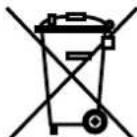
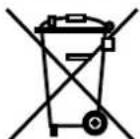
Electrical and electronic old devices contain a variety of valuable materials, but also hazardous substances which were required for function and safety. Incorrect disposal or handling can be dangerous to your health and
the environment. Never dispose of old devices in the household waste. Observe the current applicable regulations and use the collection points for returning and recycling electric and electronic devices. Dispose of all the packaging materials also in an environmentally-responsible way.
8 Scope of delivery
- Paper shredder, ready for connection, in carton packing
- 5 bags for shredded material
- Special cutting block oil (cross cut)
- Operating instructions
Acces sories
10 bags for shredded material, order No.: 1.442.995.110
- Special cutting block oil 250 ml, order No.: 1.235.997.403
See page 180 for our customer service addresses.
9 Technical data
| Cutting type Strip cut Cross cut | ||||||
| Cut size (mm) 5.8 3.9 4.5 x 30 1.9 x 15 0.78 x | 11 1 x 5 | |||||
| Security level DIN 66399 P-2 / O-2 | T-2 / E-2 | P-2 / O-2 T-2 / E-2 | P-4 / O-3 T-4 / E-3 F-1 | P-5 / O-4 T-5 / E-4 F-2 | P-6 / F-3 P-7 / F-3 | |
| Cutting capacity* (sheets), A4 70 g/m2 80 g/m2 | 58 - 60 51 - 53 | 45 - 47 40 - 42 | 35 - 37 31 - 33 | 22 - 24 18 - 20 | 13 - 14 11 - 12 | 10 8 |
| Weight | 67 kg | 72 kg | ||||
| Cutting speed | 100 mm/s | 110 mm/s | ||||
| Intake width | 330 mm | |||||
| Power supply | 230 V, 50 Hz | |||||
| Power consumption with max. number of sheets | 2.100 W | |||||
| Energy consumption in standby mode | < 2 Wh | |||||
| Operating mode | Continuous operation | |||||
| Dimensions W x D x H (mm) | 580 x 550 x 936 | |||||
| Ambient conditions in operation: Temperature Relative humidity Height above sea-level (MSL) | -10°C to +25°C max. 90%, without condensation max. 2,000 m | |||||
| Volume of the shredded paper container | 145 l | |||||
| Sound pressure level emissions (Idle running/ load) | 60 - 62 dB(A) / 65 - 69 dB(A) | |||||
| A-weighted sound power level (LWAd in idle mode) | 69.0 dB | |||||
| Cutting size of the separate CD cutting unit (optional) | Order number +C, E ** | Order number +M, N ** | ||||
| 4 x 7 mm | 2 x 2 mm | |||||
| Security level of the CD cutting unit O-4 / T-5 / | E-4 | O-6 / T-6 / | E-5 | |||
- The maximum number of sheets (DIN A4, 70 g/m² or 80 g/m²), fed lengthways, which can be cut in one cycle. The performance data is determined when the motor is cold and the cutting device is freshly oiled. A weaker mains voltage or a different mains frequency to the one specified could result in less sheet capacity and increased noise during operation. The sheet capacity can vary depending on the structure and properties of the paper and on the way it enters.
** Identified by the letter after the 7-digit order number on the name plate on the back of the machine.
e.g. 1873111C >> cutting size 4 x 7 mm

This document shredder meets the applicable harmonisation legislation of the European Union:
Low Voltage directive 2006/95/EU
EMC directive 2004/108/EU
RoHS directive 2011/65/EU
The EU declaration of conformity can be requested from the manufacturer.
Cd's / creditcards / diskettes vermietigen
Farlig netspaending!
Symbol Störning Atgard

Lyser konstant
Pappersstopp, overbelastning
peepaBaIe ee nocJeDyUOuM NOB3OBaTeJAM.
CobnndaTe Bce yka3aHnaNo texHnke 6e3o- nachocTN, npNBeHeHHbI Ha caMOM Wpepepe.

Onachocmb mpaemupoeaHua ocmpbIM HOXOM!
Hn B Koem cnyuae He BBOIDTe pykn B MexaHn3M NOdaun 6yMaHn.
Onachocmbmpaemupoeahua u3-3a bma2ueahua!
He donyckaIte nonadaHnaIINHHbIX BOJOC, CBO6oHON OeKDbI, rANCTyKOB, PNaTkoB, HaSeiHbIX N HapUHbIX cENOueK B 30Hy, paCnoIOXeHNyO B HEnocpeDcTBeHHoN 6n3OCTN OT pPneMHoN JIeJI.
He yHnTuKaIe MaTePnaJIb, CKIOHHbIe K o6pa3oBaHnIO nTeJIb, HApNIMep, IeHTbl, UHypbl, PIACTMaCCOByIO pJeHky N.T.I.

Onachocmu dna demeu u uHbIX IIOdeu!
MaunHon 3anpeuaetc noIb3oBaTbcnIuam (BkIouaJeTeMnaDwe 14 net) c orpaHueHHbIMN
ФИЗЧЕСКIMN,CEHCOPHBIMN IIN yMCTBEH HBIMN CNO6HOCTYIM NIN C HeIOCTaTKOM ONbITA N/INN 3HaHIN,3a NCKJIQUeHNEM CNYaEB,KORda OHN HAXOJrTcI NOI NOCTOHHbIM INPNCMOTpOM OTBETCTBEHHbIX 3a HNX JINU INI INONYHNIOT HNX YKa3AHNIA,KAK NOLb3OBaTBcR INP6OpOM.3a DeTbMn Heo6XoIMO NOCTOHHO CJIeINTb,YTO6bI He DOnyCTNTb INx INrpbIC INP6OpOM.
He octabnayte wpeep BknoyeHHbIM 6e3 npncmotpa.

Onachocmb, bbl3b1baemar 3neKmpuueckum mokom!
HenpaBnIbHoe o6paueHne c MaunHO MoKet npNBOuNTb K nopaXeHHO 3JIeKTPnueCKM TOKOM.
Perynepno KOHTpOIpnyte yCTpoiCTBO n Ka6eNb Ha npEaMeT NOBpeKdEnH.

Pn noBpeXdEHNx nn HnpaBnIbHOn paBoTe, a TaKke nepeCMeHO MeCTa NcNoJIb3OBAHnA nnOuNCTKO BbIKJIIOHTe WpeDEp nIte 1TEnCeNB n3 p03ETKn.
IpeodTbpaaainTe nonadHne BObblB wpeep. He norpykaite cetebon ka6eInn ceteByIO BNky B Body. KaTeOpueckn3anpeuaetc8paTbcra 3a ceteByIO BNkyMOKpbIMn pykamn.
He BbITacknBaIte BNkCy n3 po3eTKn 3a ceTeBOI Ka6eIb, a BCerDa 6epNTecb 3a camy BNkY.
2 IcnoIb3OBAHne no Ha3HaueHnIO, rapaHTna
Iocmptne Ha 3aBODCKo Tabnue, pacnoJIOXeHHo HA 3aHHeN CTOpOHe yCTpOInCTBa,Ha KaKyU shnPnHy pe3a n HapPjKeHne CETn paCCHTan WpeDep, n COIoJaTe COOTBeTCTByIOUe Yka3aHn B INHCTpyKuIN NO 3kCnPyataun.
Upeep npedHa3NaeH NCKNIOHTeJIbHO dIyHnTOXKeHNA6ymaH. Kpme TOrO, B 3aBNCIMOCTN OT TnPa pe3AHN MOxHO yHnTOXkATb He6oJbWne KOJIueCTBa cJeDyUOuNX MaTePnaJIOB:
| ШирINA peзки (MM) 5,8 3,9 4 | 5x30 | 1,9x | 15 | |
| КредиNTные каръI | ● | ● | ||
| Компakт-диSCКИ | ● | ● | ● | ● |
| ДиSCket | ● | ● | ● |
Hadejhbpekyu mexaHn3m HeBoc-npnnmUb K CkO6kam n KaHcIepckm CkpenKam. Toblko B MaunHax c WnpHoi pe3a 1x5 MM 6yMaRa He dOnJXHa coedePkaTb CkO6Kn n CkpeKN.
Yka3aHne
B OTeJIbHOM pexyIeM mExaHn3Me dIЯ KOMnakT-DnCKOB (OOnu) MoXHO, He3aBnCmO OTpeKyuIero MEXaHN3Ma dIЯ 6ymarN, yHnHToXaTbKOMnakT-DnCKN, DnCKeTbI IN KpeDnTHbIe KapTbl.
TapaHTnHbI cPOk Ha 7peDEp COCTaBnIeT 3 roJa. IpeIOCTaBnIeTcR He3aBnCImaR OT rapaHTnHbIX o6ra3aTeNbCTB rapaHTnHa ueJIbHbIe CTAJbHbIe peKyuIe BaJI bI 7peDEpoB HSM B TeueHne BCero cPoka CnyKbI yCTpoNCTBa (HSM Lifetime Warranty). NckIoUeHne COCTaBJIHO T 7peDEpbIC uInpHOn Pe3a 0,78x11 MM n 1x5 MM. B rapaHTnIO He BXoJr tN3Hoc, yUep6, Bbl3BaHHbI He npabINbHbIM O6paUeHnEM, IN BMeuATeJIbCTBa NOCTOpOHnX JnC. KomnaHn HSM rapaTnpyET NOCTaBky 3anacMbix qAcTei B TeueHne 10 let noCne CHrTnE 3ToI MoJeN C npOn3BOIDCTBa.
3 O6nnBnD
Yka3aHHe: B 3aBnCmOCTn OT nCNoJIHeHnA, MaUNHa MoKet He IMeTb HEKOtOpbIX y3NoB.

1 3arpy3oHoe OTBepCTne IJRA KOMnAKT-DNCKOB, NICKET KpeuTHbIX KapT (onua)
2 Yka3aHnno TEsHHke 6e3oNaChOCTN
3 FOToOJIeMeHbIeJINdIa6yMaRn
4 3aunTHbIeJemeH
5 BLOK ynpabBneHn nHnKaun
6 6yTBIOUKN C MacnOM
7 C6opHbI pe3epByap JIJI KOMNaKT-DnCKOB/ DnCKET/KpeDnTHbIX KapT (onu)
8 3aINBHOe OTBepCTne DnMa Macna DnPa peKyUx MExaHn3MOB (TOnbKO Hape3Ka Ha actu)
pycckn
Oprahbl ynpablenn n Hndkaun
Yka3aHHe: B 3aBnCmOCTN OT NcNoJIHeHnMaIINHbI, IMeOTcR He BCE yHKUIn.

Khoika R:
Pexyun MexaHm pa60-Taet B 6paTHOM HnpaBneHH
KbntnpobAHne HncnpaBHOCTN
- Poka3 Bercn nporpaMMHoro oecneueHHa (ToIbko
Hnka: DBepa OKpbita nn 3aunTHbI OneMeHT He 3aФNKcnpoBaH
Инданаши:перерузka (3atop6ymaru)
Hnka:emKocb dny 6ymaru/KomnaKT- DnCKOB nepenonHeHa
HnnaacpBBNcKEXHkHbMa Macna npcta
A B T O M A T N U E C K A M C P E H K A (T O L B K O P P H A P E 3 K E H A Y A C T N U C B I)
Cma3ka pexyuix MexaHn3MOB npOn3BOIDTCB TeueHne 1,5 cekyHdbi uepe3
200 c pa6oTbI pexyUeTo MexaHn3Ma (npu- 6n3ntelbHo COOTBeTCTByet 50 onepaunm no yHHTOKeHHo 6ymar)
Haxatn KhoNppeBepCnpOBaHn np CneDyUoue pa6ote B pa6ooyem HanpaBHeHn CnHaun3aun «EMKocTb DnMa macna ncyta» ABTomatnueckn Ncye3aet nocne 3aONHeHn emKocTn. Wpeep daKe npn nyctOn emKocTn DnMa macna ocTaetc rOToBbIM K pa6ote.
MetaIIOeTeKTop (onu)
Upepe OchaueH MeTAnNoTeKTopOM B KaueCTBe onu. IlaOapra ABToMaTuYeCKomy OTKnUoyEnu npedOTBpaaIOTc NOBpeXdEHH peKyuIero MexaHn3Ma cKpenkamN IIn dpyrMM MeTaJINuYeCKMn DeTaJAMN.
pycckn
KoHTpoJIb 3aUHTHOrO 3JeMeHtA
Ipeed cmeHoi MeCTOnOJIOKeHn HIN OCHKO BbIKNoHTb Wpeep IN BbITaUNTb WTeNCeNB n3 p03eTKN.
CepBnchbIe pa60tbl,C83aHHbIe co CHrTneM KpbIWeK Kopnyca,pa3pe- WaeTcBbIOHnTb TOnbKO cnyk6e TexHueckoro obecneueHn HSM IIN cepBnC-TexHnKaM HaXnx aBTO
pN3OBaHHbIX NapTHePOB.
AapecacepBnchbIXueHTpOBcm. ctp.180
OuNCTky pa3peWaaTcBbIIOJHrTb TOnbKO MmKo TKaHbIO, CMOueHHoB B BodHom pactBOpe HeITpaJIbHoro MOIOSeTo cpeDCTBa. Pn 3tOM B np6Op He DoJXHa nonaDaTb BODa.

Tolbko npn Hape3ke Ha NOJOCKN:
Cma3bBaItepejxuM
MexaHn3MaIcIOM npN
UMeHbWeHn IPOu3BOD
TeNbHOCTN, BO3HnKHOBeHn NyMoB INI NocJIe KaJdOro ONOpOxHeHn C6OpHOro pe3epByapa. Ia 3ToRo nCNoB3yInTe TOnbKO cneuaJIbHoE Macno dnnpekUzero 6noka HSM:
Yepe3 npnemHyo 7eB dIy6ymaHn IO Bcei shnpHe paCbJIInTe MacNo Ha peKyuune BaJIbl.
7 YtJn3aunr / PucaiKlnHr
OTcnykBwne 3nEeKtpueckne n3nEeKTPoHHbI np6Opbl qacto eue coepxat cHHbI MaTePnAbl, Ho HOrda N BpeHbI BeSeCTBa, KOTOp bI IN Heo6XODmbl IJRA oBeCne- yehna 6e3onacHOCTn pa6OTocno
co6hoCTn. Pn HnnpaBnBHO yTnN3aunn nn
O6paueHnn OHN MOyT 6bITb ONaCHbl dIe 3doPobBy IIODeI nIg OkpykaUoee Cpebl. He Bbl6paCbIBaIte OTCnyKINBUnne np6opbl B npouhe OTXoDbI. Co6niOJaTe DeiEcTBYIOuNe npedncaHn I NcNoJIb3yIte c6OpHbIe NyHKtbl IO BO3BpATy IN yTnN3aUNn OTCnyKINBUnx 3JNEKTpuYeCKNX IN 3JeKTKPOHHbIX np6opOB.
Takke oecneuBaTe 3KoIOnHyU yTuN3aCnIO BCEX yNaKOBOUhBIX MaTePnaNoB.
8 O6bem nocTaBKn
- TOTOBBI K NOKJIHOeHIO Wpeep, ynaKOBaHHBI B KapTOHHBI RAUK
5 c6opHbIX MeIKOB
16ytbIka cneuaJIbHOro MacnaДЯpekUeRo 6noka (ToIbko npn Hape3Ke Haactubl) - INHCTpykunno 3Kcnnyatau
PnHaJneXHocTb:
10 c6opHBix MeiKOB apt.Ng 1.442.995.110
- Bytbilka cneuunbHoro macna (250 m)
apt. № 1.235.997.403
Adeca cepBnchbIX ueHTpoB cm. ctp. 180.
9 TexHnueckne daHHbIe
Indicator: recipient ulei gol
Tasta-function "Pornire / Oprire / Start"
Yka3aHna 3a6e3oNaCHOCT

Ipei npckane B ekcnnoataaHa MaunhaTApoTeTe HnCTpyKu- rTa 3a ekcnloataa,cbxpanete Ta 6bdeo n3non3BaHe n npe
daiTe Ha 6bDeuHTe non3Baun.
Cb6IIOdaBaTe BCNUKn NOCTaBeHn Bbpxy MaunHaTa 3a yHnOxKaBaHe Ha DOKymeHTn yka3aHna 3a 6e3OpacHOCT.

Onachocm om HapaHraVeHe om ocmpu Hoxoee!
B HnkaKbB cnyaH He nbXaIte pkbKa B nOdaBaHeTo Ha xapTnaTa.
Onachocm om HapaHyahe ype3 noemaHe ha pbkama!
Дьлга кoca,свобODи Дрexи,ВразOBрь3кИ,шаловe,КолNETa И Гинп пазete далоч OT OTbopa 3a Радаане Ha xaptnя. He yнцоЖавaite MaTePnAni,СКПОни КБМ 3aBbp3BaHep,нарример,ЛeHTN,shHypoBe,плacrMaOBOФОпNo.

Onachocmu 3a deua u dpyuu nuca!
MaunHata He Tp6Ba Da ce H3no3Ba OT Nua (BKnUHTeHNo Dea no14 roHN) c orpaHueHn
NCHXUeCKn, CeH3OpHN IIN yMCTBeHN CnOCO6-HoCTN IIN IINca Ha ONIT N/IIIN No3HaHne, OCBeh, aKO ca NOD HAd3opa Ha OTROBaprIoo 3a TExHata CNyypHOCT Nlue IIN ca NOnyUHNI Yka3AHNAOT Hero, KaK Da N3NoJ3BaT UpeDa. Deuata Tp6Ba Da ce Ha6JIIOdaBAT Da He INrpaTc cypeDa.
He octabraye BKIOUyeHa MaunHaTa 3a yHn-ooXaBaHe Ha DOKyMeHTN 6e3 HAD3Op.
Onachocm om eIekmpuuecku ydap!
HenpaBnHTo n3NoT3BaHe ha MaunHaTa MoKe Da IOBeDe Do eNeKtpnueckn TOKOB ydap.
- PeioBHO npOBepaIte ypeHa n Ka6eNa 3a 1

Pn noBpeHa nn HnepaBnHNO
fynKuOnHpaHe KaKTo n npedn
npemecTbaHe nn NOUncBaHe
n3KnIOyTe MaunHaTa 3a yNooJa-
DOKyMeHTn n3BaTe UeNCeNa.
BHMabaTe Da He nonaHe Boda B MaHnHaTa 3a yHnOxKaBaHe Ha DokyMeHTn. He NotanrTe MpeKOBn Ka6eN nIn UeKepa BbB BODa. He nPiNaTe Hnkora UeKepa C BnaXn pBue.
- HnKora He nbpnaIte igekepa 3a Ka6eJa oT KOHTaKTa, XBaIauIte BnHaRn 3a igekepa.
2 I3noI3BaHe no npedHa3HaueHne, rapaHcna
IpoBepTe Ha cfa6pHnHaTa Tabenka Ha obaTnHa TcPana Ha ypeDa, 3a KaKBa shnPnHa Ha p3aHe mpeXoBO HnpeXeHne e npeBnDeHa BaWata MaunHa 3a yNtOxJaBaHe Ha DOkyMeHTn N Cb6JIHOdaBaIte CbOTBeTHnTE TOKN OT INHCTpyKuYrTa 3a EKCnNoatau.
MaunhaTa 3a yHnOxKaBaHe Ha DOKymeHTn e npedHa3HaueHa cAmo 3a yHnOxKaBaHe Ha XapTna. B 3aBncmocT OT BnDa Ha pR3aHe MOrat Da yHnOxKaBaT B MaJKN KOInueCTBa N CneIHNTe MaTePnAJI:
- PexkIM CbCTOARHHe Ha rOTOBHOCT
Функия: 2 Mнутслд послдноаBaHe Ha xapTЯ abTomatuHо ce n3KnOчВaT BCnUKN HeHyxHn Notpe6nteJI.
HnkaunraT a,ToOB 3a pa6ota" npMnRbKaPakO Ha paBn INTEpBaII.
Пи падаыне Ha xapTЯ Maшинота 3a yHnIoxkaBaHe Ha дokументи abTomatnUHO ce 3aДВИЖВ.
- ABTomatnHOn H3KJIIOUyBaHe
Функця: Аков подьлжени на 40 минутmaшината 3a униюхаразе на дOKументи He ce n3ПОЛЗВа, ТЯ сиКЛЮчВа HanBJHOnИ He n3ПОЛЗВа NOBE ue TOK (HaNP. Hoцem, c6Ota n HeDEJI).
NyckaHe OTHOB B EKCNNoaTaunr:
HaTnchete 6yToHa 3a yInpabJIeHHe.
Hdkaa 3a cmyeHn yHKoHaHn Hdkaun
88699 Frickingen / Germany
Tel. +49 7554 2100-0
Fax +49 7554 2100 160
info@hsm.eu
www.hsm.eu
HSM (UK) Ltd.
14 Attwood Road / Zone 1
Burntwood Business Park
Burntwood • Staffordshire
WS7 3GJ
United Kingdom
Tel. +44 1543 272-480
Fax +44 1543 272-080
info@hsmuk.co.uk
www.hsm.eu
HSM of America LLC
419 Boot Road
Downingtown, PA 19335
USA
Tel. +1 484 237-2308
+1800613-2110
Fax +1 484 237-2309
customerservice@hsm.us
info@hsm.us
www.hsm.us
HSM Polska SP. z o.o.
ul. Emaliowa 28
02-295 Warszawa
Poland
Tel. +48 22 862 2369
Fax +48 22 862 2368
Handlowy@hsm.eu
www.hsm.eu
HSM France SAS
Parc de Genève
240, Rue Ferdinand Perrier
69800 Saint-Priest
France
Tel. +33 472 210580
Fax +33 472 517481
France@hsm.eu
www.hsm.eu


- 1 EXPLANATION OF SYMBOLS AND SAFETY INSTRUCTIONS
- WARNING
- NOTICE
- NOTE
- SAFETY INSTRUCTIONS
- DANGEROUS FOR CHILDREN AND OTHERS
- DANGEROUS MAINS VOLTAGE
- 3 OVERVIEW2 PROPER USE, WARRANTY
- ENGLISH
- OPERATING AND DISPLAY ELEMENTS
- 4 INITIAL START-UP
- 5 OPERATION
- SWITCHING ON THE SHREDDER
- SHREDDING PAPER
- SHREDDING CDS, CREDIT CARDS AND FL OPPY DISKS
- SWITCHING OFF THE SHREDDER
- OTHER FUNCTION MODES
- PERMANENT MODE
- STAND-BY MODE
- AUTOMATIC SHUTDOWN
- FAULT AND FUNCTION INDICATORS
- 6 CLEANING AND MAINTENANCE
- 7 DISPOSAL / RECYCLING
- 8 SCOPE OF DELIVERY
- ACCES SORIES
- 9 TECHNICAL DATA
- CD'S / CREDITCARDS / DISKETTES VERMIETIGEN
- FARLIG NETSPAENDING
- SYMBOL STÖRNING ATGARD
- ONACHOCMU DNA DEMEU U UHBIX IIODEU
- ONACHOCMB, BBL3B1BAEMAR 3NEKMPUUECKUM MOKOM
- 2 ICNOIB3OBAHNE NO HA3HAUEHNIO, RAPAHTNA
- YKA3AHNE
- 3 O6NNBND
- PYCCKN
- OPRAHBL YNPABLENN N HNDKAUN
- A B T O M A T N U E C K A M C P E H K A (T O L B K O P P H A P E 3 K E H A Y A C T N U C B I)
- METAIIOETEKTOP (ONU)
- KOHTPOJIB 3AUHTHORO 3JEMEHTA
- 7 YTJN3AUNR / PUCAIKLNHR
- 8 O6BEM NOCTABKN
- PNHAJNEXHOCTB
- YKA3AHNA 3A6E3ONACHOCT
- ONACHOCM OM HAPAHRAVEHE OM OCMPU HOXOEE
- ONACHOCM OM HAPAHYAHE YPE3 NOEMAHE HA PBKAMA
- ONACHOCMU 3A DEUA U DPYUU NUCA
- ONACHOCM OM EIEKMPUUECKU YDAP
- 2 I3NOI3BAHE NO NPEDHA3HAUEHNE, RAPAHCNA
- PEXKIM CBCTOARHHE HA ROTOBHOCT
- ABTOMATNHON H3KJIIOUYBAHE
- HDKAA 3A CMYEHN YHKOHAHN HDKAUN
Brand : HSM
Model : Securio P40c
Category : Shredder