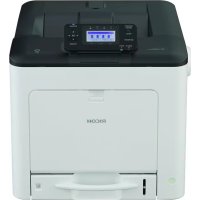
SP C360DNw - Printer RICOH - Free user manual and instructions
Find the device manual for free SP C360DNw RICOH in PDF.



| Product type | Color laser printer |
| Brand | Ricoh |
| Model | SP C360DNw |
| Power supply | 220-240 V, 50/60 Hz, 5 A |
| Weight | 32 kg (71.0 lb) |
| Network connectivity | Ethernet 10/100/1000, Wi-Fi 802.11 a/b/g/n/ac (2.4 GHz and 5 GHz bands) |
| Main functions | Color printing, automatic duplex printing |
| Consumables | Color toner cartridges (cyan, magenta, yellow, black) |
| Maintenance | Regular cleaning of the inside of the device; contact customer service for thorough cleaning |
| Safety | Do not use flammable aerosols; do not block ventilation openings; unplug before any maintenance |
| Operating environment | Indoor, spacious and well-ventilated room; avoid humidity and dust |
| Consumables storage | Keep out of reach of children; avoid open flames |
| Waste disposal | Follow local regulations; do not burn toners |
| Available ports | USB host, Ethernet, Wi-Fi |
| Paper tray capacity | 250 sheets standard (estimate) |
Frequently Asked Questions - SP C360DNw RICOH
User questions about SP C360DNw RICOH
0 question about this device. Answer the ones you know or ask your own.
Ask a new question about this device
Download the instructions for your Printer in PDF format for free! Find your manual SP C360DNw - RICOH and take your electronic device back in hand. On this page are published all the documents necessary for the use of your device. SP C360DNw by RICOH.
USER MANUAL SP C360DNw RICOH
- Information
- Safety Symbols for This Machine
- Safety Information
- Safety Labels of This Machine
- Other Information for This Machine
For information not found in paper manuals, see the online manuals available on our web site (http://www.ricoh.com/).



Read this manual carefully before you use this machine and keep it handy for future reference. For safe and correct use, be sure to read the Safety Information in this manual before using the machine.
English
1.Information
Introduction
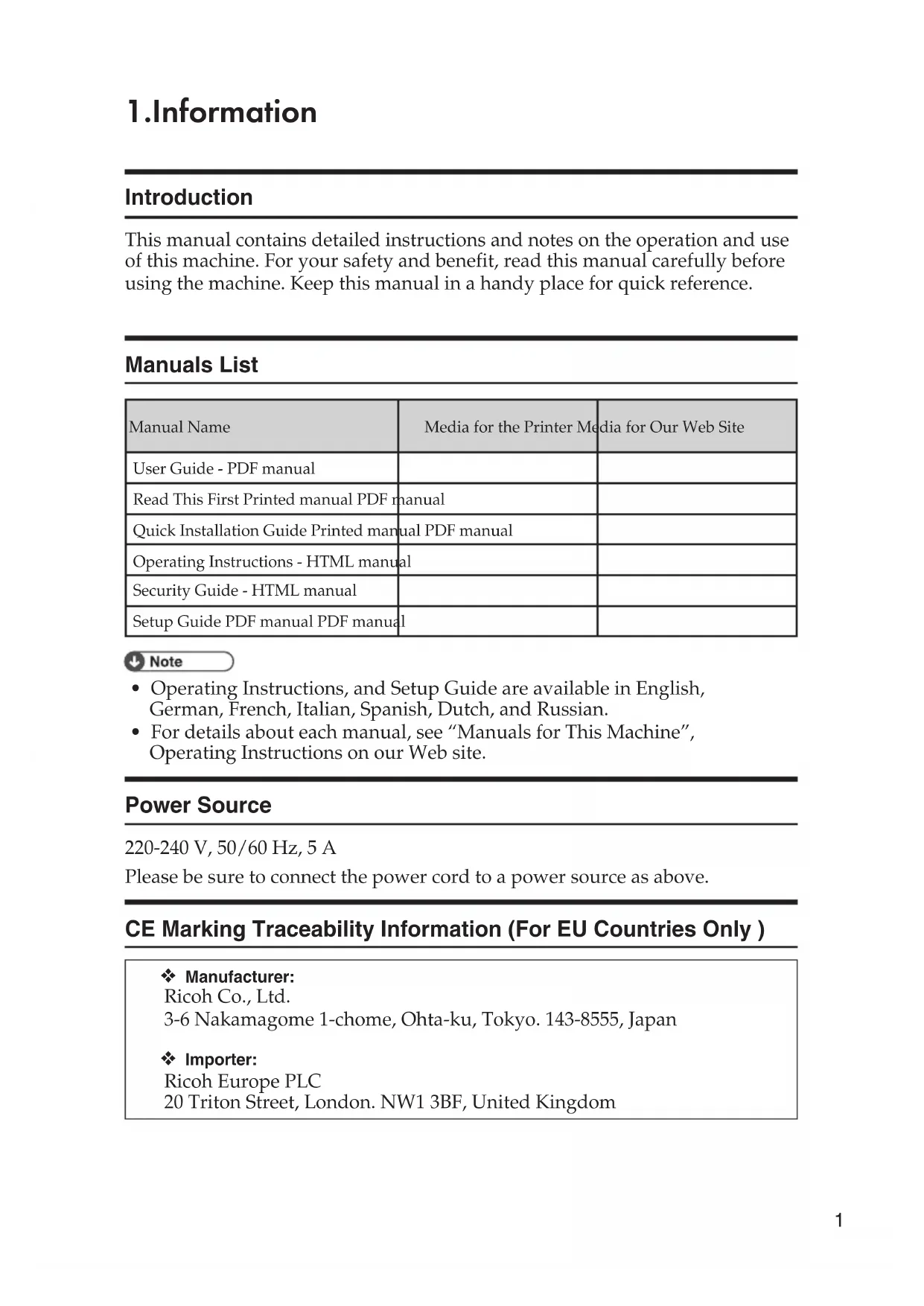
This manual contains detailed instructions and notes on the operation and use of this machine. For your safety and benefit, read this manual carefully before using the machine. Keep this manual in a handy place for quick reference.
Manuals List
| Manual Name | Media for the Printer Media for Our Web Site | |
| User Guide - PDF manual | ||
| Read This First Printed manual PDF manual | ||
| Quick Installation Guide Printed manual PDF manual | ||
| Operating Instructions - HTML manual | ||
| Security Guide - HTML manual | ||
| Setup Guide PDF manual PDF manual | ||
Note
- Operating Instructions, and Setup Guide are available in English, German, French, Italian, Spanish, Dutch, and Russian.
- For details about each manual, see "Manuals for This Machine", Operating Instructions on our Web site.
Power Source
220-240 V, 50/60 Hz, 5 A
Please be sure to connect the power cord to a power source as above.
CE Marking Traceability Information (For EU Countries Only)
Manufacturer:
Ricoh Co., Ltd.
3-6 Nakamagome 1-chome, Ohta-ku, Tokyo. 143-8555, Japan
Importer:
Ricoh Europe PLC
20 Triton Street, London. NW1 3BF, United Kingdom
Disclaimer
To the maximum extent permitted by applicable laws, in no event will the manufacturer be liable for any damages whatsoever arising out of failures of this machine, losses of the registered data, or the use or non-use of this product and operation manuals provided with it. Make sure that you always copy or have backups of the data registered in this machine. Documents or data might be erased due to your operational errors or malfunctions of the machine. In no event will the manufacturer be responsible for any documents created by you using this machine or any results from the data executed by you.
Notes
For good output quality, the manufacturer recommends that you use genuine toner from the manufacturer.
The manufacturer shall not be responsible for any damage or expense that might result from the use of parts other than genuine parts from the manufacturer with your office products.
2. Safety Symbols for This Machine
The meanings of the safety symbols for this machine are as follows:
| Caution | |
| Caution, hot surface | |
| Do not touch | |
| Do not throw into the fire | |
| Do not use the cleaner | |
| Keep out of reach of children | |
| Prohibition | |
| General mandatory action sign | |
| Attention Electric Sensitive Device |
3.Safety Information
Safety During Operation
In this manual, the following important symbols are used:
WARNING:
Indicates a potentially hazardous situation which, if instructions are not followed, could result in death or serious injury.
CAUTION:
Indicates a potentially hazardous situation which, if instructions are not followed, may result in minor or moderate injury or damage to property.
**Environments Where the Machine Can be Used**
WARNING:
- Do not use flammable sprays or solvents in the vicinity of this machine. Also, avoid placing these items in the vicinity of this machine. Doing so could result in fire or electric shock.
- Do not place vases, plant pots, cups, toiletries, medicines, small metal objects, or containers holding water or any other liquids, on or close to this machine. Fire or electric shock could result from spillage or if such objects or substances fall inside this machine.
CAUTION:
- Keep the machine away from humidity and dust. Otherwise a fire or an electric shock might occur.
- Do not place the machine on an unstable or tilted surface. If it topples over, an injury might occur.
- Do not place heavy objects on the machine. Doing so can cause the machine to topple over, possibly resulting in injury.
- Make sure the room where you are using the machine is well ventilated and spacious. Good ventilation is especially important when the machine is used heavily.
- Do not obstruct the machine's vents. Doing so risks fire caused by overheated internal components.
Handling Power Cords and Power Plugs
WARNING:
- Do not use any power sources other than those that match the specifications shown in this manual. Doing so could result in fire or electric shock.
- Do not use any frequencies other than those that match the specifications shown. Doing so could result in fire or electric shock.
- Do not use multi-socket adaptors. Doing so could result in fire or electric shock.
- Do not use extension cords. Doing so could result in fire or electric shock.
- Do not use power cords that are damaged, broken, or modified. Also, do not use power cords that have been trapped under heavy objects, pulled hard, or bent severely. Doing so could result in fire or electric shock.
- If the power cord is damaged and its inner wires are exposed or broken, contact your service representative for a replacement. Use of damaged power cords could result in fire or electric shock.
Be sure to disconnect the plug from the wall outlet at least once a year and check for the following:
There are burn marks on the plug.
The prongs on the plug are deformed.
If any of the above conditions exist, do not use the plug and consult your dealer or service representative. Use of the plug could result in fire or electric shock.
Be sure to disconnect the power cord from the wall outlet at least once a year and check for the following:
The power cord's inner wires are exposed, broken, etc.
The power cord's coating has a crack or dent.
- When bending the power cord, the power turns off and on.
Part of the power cord becomes hot.
The power cord is damaged.
If any of the above conditions exist, do not use the power cord and consult your dealer or service representative. Use of the power cord could result in fire or electric shock.
-
Touching the prongs of the power cable's plug with anything metallic constitutes a fire and electric shock hazard.
-
The supplied power cord is for use with this machine only. Do not use it with other appliances. Doing so could result in fire or electric shock.
It is dangerous to handle the power cord plug with wet hands. Doing so could result in electric shock.
CAUTION:
- Be sure to push the plug of the power cord fully into the wall outlet. Partially inserted plugs create an unstable connection that can result in unsafe buildup of heat.
- If this machine is not going to be used for several days or longer at a time, disconnect its power cord from the wall outlet.
- When disconnecting the power cord from the wall outlet, always pull the plug, not the cord. Pulling the cord can damage the power cord. Use of damaged power cords could result in fire or electric shock.
- Be sure to disconnect the plug from the wall outlet and clean the prongs and the area around the prongs at least once a year. Allowing dust to build up on the plug constitutes a fire hazard.
- When performing maintenance on the machine, always disconnect the power cord from the wall outlet.
Power Source 220-240 V, 5 A, 50/60 Hz
Please be sure to connect the power cord to a power source as above. For users in Norway, this product is also designed for an IT power distribution system with phase-to-phase voltage of 230V.
Handling the Main Machine
WARNING:
- Be sure to locate the machine as close as possible to a wall outlet. This will allow easy disconnection of the power cord in the event of an emergency.
-
If the machine emits smoke or odours, or if it behaves unusually, you must turn off its power immediately. After turning off the power, be sure to disconnect the power cord plug from the wall outlet. Then contact your service representative and report the problem. Do not use the machine. Doing so could result in fire or electric shock.
-
If metal objects, or water or other fluids fall inside this machine, you must turn off its power immediately by first pressing the operation switch on the control panel and then pressing the main power switch. After turning off the power, be sure to disconnect the power cord plug from the wall outlet. Then contact your sales or service representative and report the problem. Do not use the machine. Doing so could result in fire or electric shock.
- When replacing the Fusing Unit, turn the main power switch off and wait at least 30 minutes before proceeding with the replacement.
- Do not touch this machine if a lightning strike occurs in the immediate vicinity. Doing so could result in electric shock.
-
The following explains the warning messages on the plastic bag used in this product's packaging.
-
Keep the polythene materials (bags, etc.) supplied with this machine away from babies and small children at all times. Suffocation can result if polythene materials are brought into contact with the mouth or nose.
-
The following explains the warning messages on the plastic bag used in this product's packaging.
- Keep the polythene materials (bags, gloves, etc.) supplied with this machine away from babies and small children at all times. Suffocation can result if polythene materials are brought into contact with the mouth or nose.
- If the machine topples, or if a cover or other part gets broken, you must turn off its power immediately. After turning off the power, be sure to disconnect the power cord plug from the wall outlet. Then contact your service representative and report the problem. Do not use the machine. Doing so could result in fire or electric shock.
CAUTION:
- Unplug the power cord from the wall outlet before you move the machine. While moving the machine, take care that the power cord is not damaged under the machine. Failing to take these precautions could result in fire or electric shock.
- If you have to move the machine when the optional paper tray unit is attached, do not push on the main unit's top section. Doing so can cause the optional paper tray unit to detach, possibly resulting in injury.
- Before installing or removing options, always disconnect the power cord plugs from the wall outlet and allow time for the main unit to fully cool. Failing to take these precautions could result in burns.
The printer weighs approximately 32kg (71.0 lb.).
- When moving the printer, hold the handles located on both sides, and then lift it slowly. Lifting it carelessly or dropping it may cause an injury.
Handling the Machine's Interior
WARNING:
- Do not remove any covers or screws other than those explicitly mentioned in this manual. Inside this machine are high voltage components that are an electric shock hazard. Contact your sales or service representative if any of the machine's internal components require maintenance, adjustment, or repair.
- Do not attempt to disassemble or modify this machine. Doing so risks burns and electric shock.
CAUTION:
- If the machine's interior is not cleaned regularly, dust will accumulate. Fire and breakdown can result from heavy accumulation of dust inside this machine. Contact your sales or service representative for details about and charges for cleaning the machine's interior.
Some of this machine's internal components get very hot. For this reason, take care when removing misfed paper. Not doing so could result in burns. - When removing jammed paper, make sure not to trap or injure your fingers
- When loading paper, take care not to trap or injure your fingers.
- During operation, rollers for transporting the paper and originals revolve. A safety device has been installed so that the machine can be operated safely. But take care not to touch the machine during operation. Otherwise, an injury might occur.
Handling the Machine's Supplies
WARNING:
-
Do not incinerate toner (new or used) or toner containers. Doing so risks burns. Toner will ignite on contact with naked flame.
-
Do not store toner (new or used) or toner containers anywhere near naked flames. Doing so risks fire and burns. Toner will ignite on contact with naked flame.
- Do not use a vacuum cleaner to remove spilled toner (including used toner).
Absorbed toner may cause a fire or explosion due to electrical contact flickering inside the vacuum cleaner.
However, it is possible to use a vacuum cleaner that is explosion-proof and dust ignition-proof.
If toner is spilled on the floor, remove the spilled toner slowly using a wet cloth, so that the toner is not scattered.
- The following explains the warning messages on the plastic bag used in this product's packaging.
- Keep the polythene materials (bags, gloves, etc.) supplied with this machine away from babies and small children at all times. Suffocation can result if polythene materials are brought into contact with the mouth or nose.
CAUTION:
- When replacing a toner or waste toner container or consumables with toner, make sure that the toner does not splatter. Put the waste consumables in a bag after they are removed. For consumables with a lid, make sure that the lid is shut.
- Do not crush or squeeze toner containers. Doing so can cause toner spillage, possibly resulting in dirtying of skin, clothing, and floor, and accidental ingestion.
- Store toner (new or used), toner containers, and components that have been in contact with toner out of reach of children.
- If toner or used toner is inhaled, gargle with plenty of water and move into a fresh air environment. Consult a doctor if necessary.
- If toner or used toner gets into your eyes, flush immediately with large amounts of water. Consult a doctor if necessary.
If toner or used toner is swallowed, dilute by drinking a large amount of water. Consult a doctor if necessary. -
When removing jammed paper or replacing toner, avoid getting toner (new or used) on your clothing. If toner comes into contact with your clothing, wash the stained area with cold water. Hot water will set the toner into the fabric and make removing the stain impossible.
-
When removing jammed paper or replacing toner, avoid getting toner (new or used) on your skin. If toner comes into contact with your skin, wash the affected area thoroughly with soap and water.
- Do not attempt to print on stapled sheets, aluminum foil, carbon paper, or any kind of conductive paper. Doing so risks fire.
- USB flash memory devices out of reach of children. If a child accidentally swallows an USB flash memory device, consult a doctor immediately.
4.Safety Labels of This Machine
This section explains the machine's safety information labels.
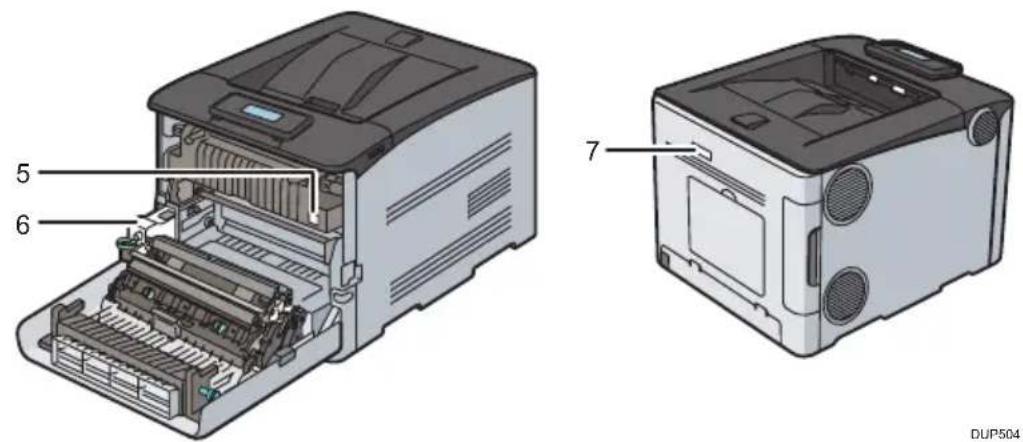
Positions of WARNING and CAUTION labels
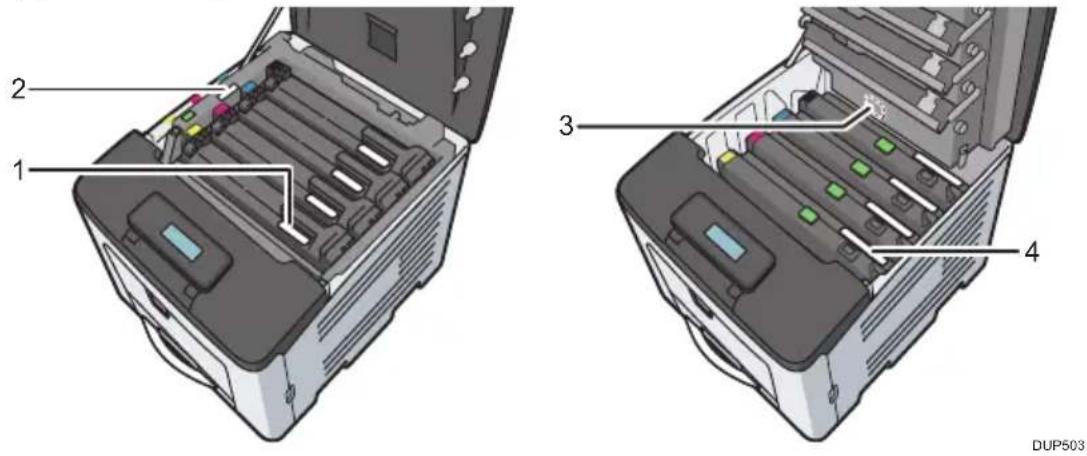
This machine has labels for WARNING and CAUTION at the positions shown below. For safety, please follow the instructions and handle the machine as indicated.
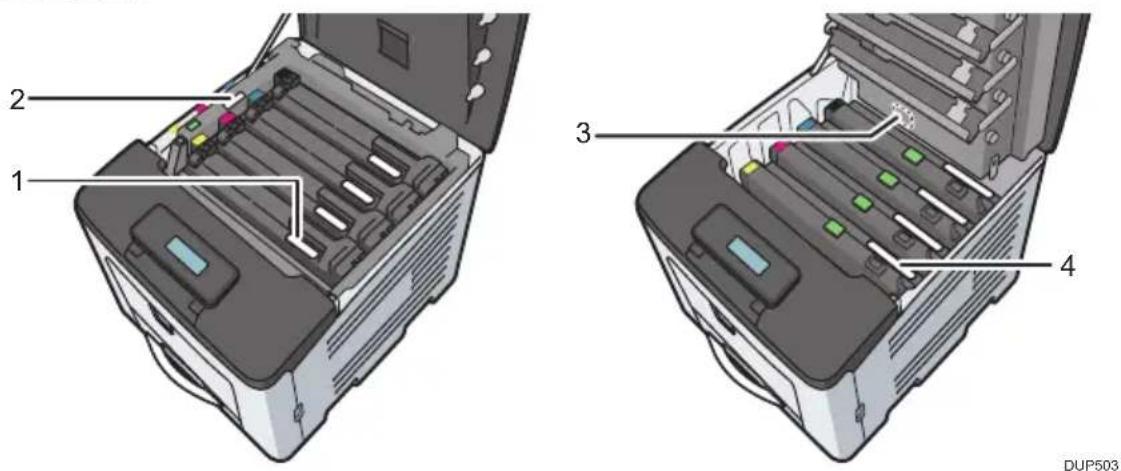
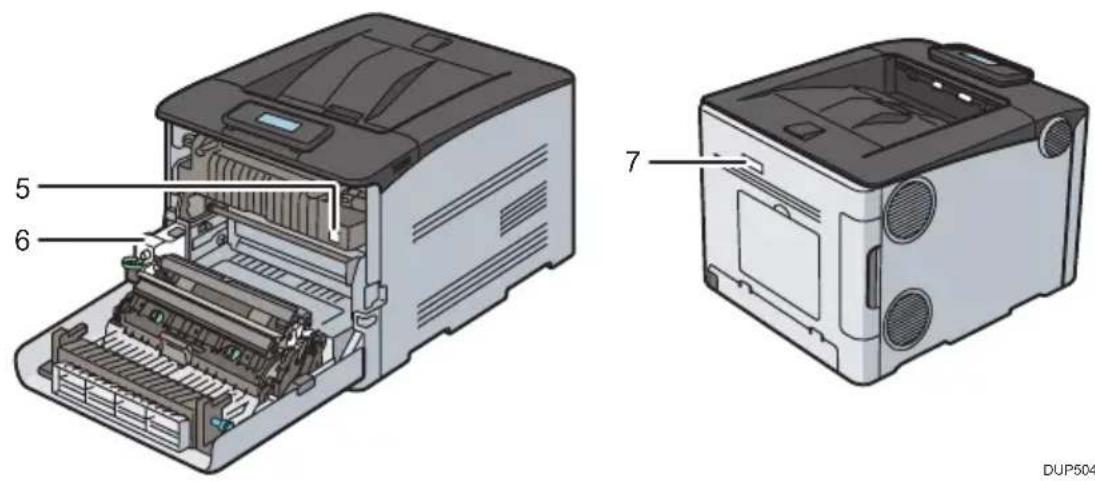
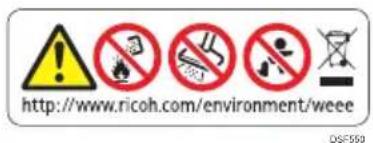
1
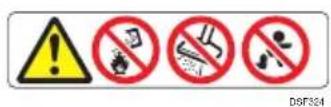
4
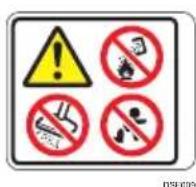
6
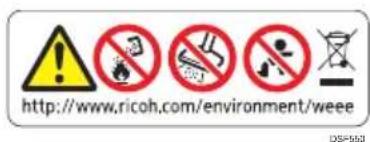
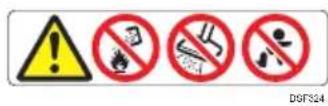
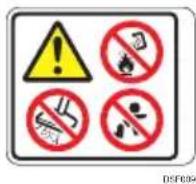
Do not incinerate toner (new or used) or toner containers. Doing so risks burns. Toner will ignite on contact with naked flame.
Do not store toner, used toner, or toner containers in a place with an open flame. The toner might ignite and cause burns of a fire.
Disposal should take place at an authorized dealer or an appropriate collection site. If you dispose of the used toner containers yourself, dispose of them according to local regulations.
Do not use the cleaner to suck spilled toner (including used toner). Sucked toner may cause firing or explosion due to electrical contact flickering inside the cleaner. However, it is possible to use the cleaner designed for dust explosion-proof purpose. If toner is spilled over the floor, sweep up spilled toner slowly and clean remainder with wet cloth.
Store toner (new or used), toner containers, and components that have been in contact with toner out of reach of children.
2
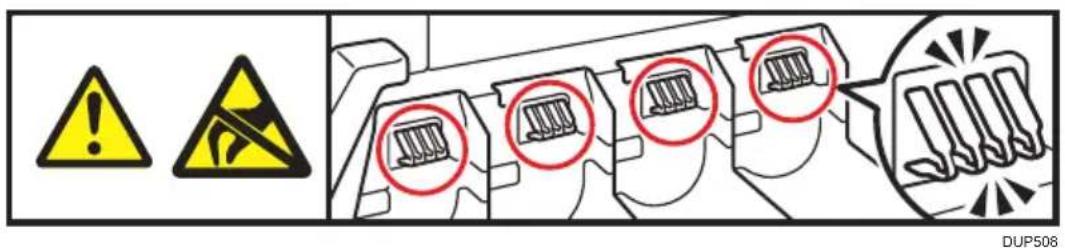
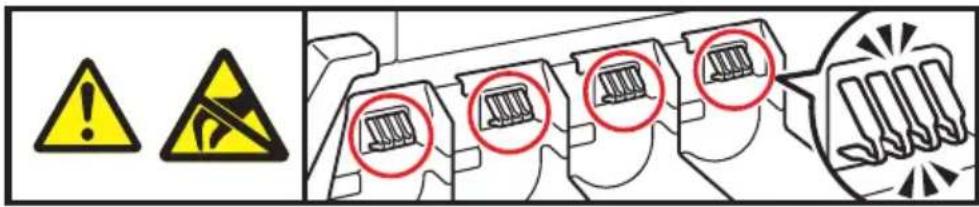
Be careful not to touch the terminals on the ID part. Doing so may cause static electricity to occur, and damage the machine.
3
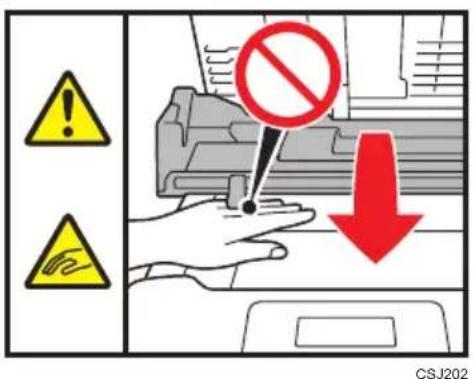
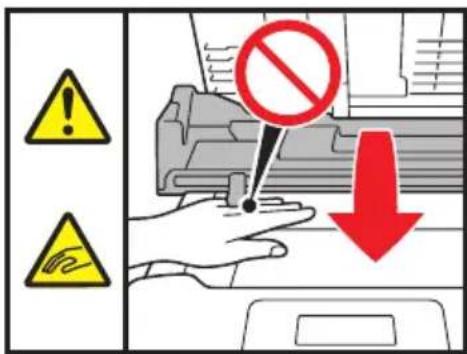
Be careful not to trap your fingers when opening or closing the inner cover.
5
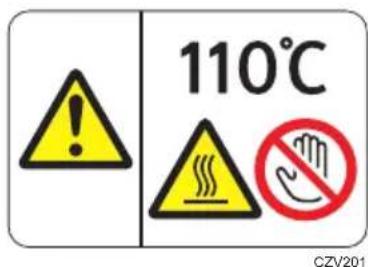
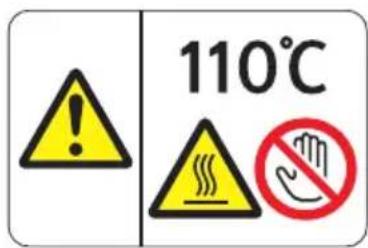
The inside of the machine could be very hot. Do not touch the parts with a label indicating the "hot surface". Otherwise, an injury might occur.
7
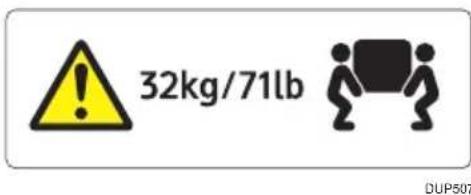
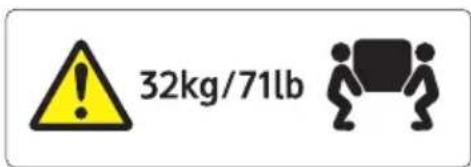
The printer weighs approximately 32kg (71.0 lb.). When moving the printer, use the inset grips on both sides, and lift slowly in pairs. The printer will break or cause injury if dropped.
Power Switch Symbols
The meanings of the symbols for the switches on this machine are as follows:
- STANDBY
5. Other Information for This Machine
Overseas Affiliates and Noise Emission Information
In accordance with TUV "GS Symbol" requirements, details of the EU office or representative company are given below.
Overseas Affiliates
Ricoh Europe PLC
20 Triton Street, London. NW1 3BF, United Kingdom
Noise Emission
Duplication and Printing Prohibited
Do not copy or print any item for which reproduction is prohibited by law.
Copying or printing the following items is generally prohibited by local law: bank notes, revenue stamps, bonds, stock certificates, bank drafts, checks, passports, driver's licenses. The preceding list is meant as a guide only and is not inclusive. We assume no responsibility for its completeness or accuracy. If you have any questions concerning the legality of copying or printing certain items, consult with your legal advisor.
Note to users EU Countries
Declaration of Conformity
Notice to Users in EEA Countries
This product complies with the essential requirements and provisions of Directive 2014/53/EU.
The CE Declaration of Conformity is available by accessing the URL:
http://www.ricoh.com/products/ce_doc2/
and selecting the product applicable.
Outdoor use of the 5.150-5.350 GHz band is prohibited.
Operating frequency band: 2400 - 2483.5 MHz
maximum radio-frequency power: less than 13.0dBm
maximum radio-frequency power(e.i.r.p): less than 15.0 dBm(with Trancemit Output Power)

Bitte zuerstesen
20 Triton Street, London. NW1 3BF, United Kingdom
Haftungsausschluss
20 Triton Street, London. NW1 3BF, United Kingdom
Gerauschemission
http://www.ricoh.com/products/ce_doc2/
20 Triton Street, London. NW1 3BF, United Kingdom
20 Triton Street, London. NW1 3BF, United Kingdom
Émission sonore
http://www.ricoh.com/products/ce_doc2/
20 Triton Street, London. NW1 3BF, United Kingdom
20 Triton Street, London. NW1 3BF, United Kingdom
Rumorosità
http://www.ricoh.com/products/ce_doc2/
Importer:
Ricoh Europe PLC
20 Triton Street, London. NW1 3BF, United Kingdom
Ansvarsfraskrivelse
Sikkerhed under driften
20 Triton Street, London. NW1 3BF, United Kingdom
Stojemission
http://www.ricoh.com/products/ce_doc2/
under det relevante produit.
http://www.ricoh.com/products/ce_doc2/
20 Triton Street, London NW1 3BF, United Kingdom
Disclaimer
20 Triton Street, London NW1 3BF, United Kingdom
Geluidsniveau
http://www.ricoh.com/products/ce_doc2/
Importer:
Ricoh Europe PLC
20 Triton Street, London. NW1 3BF, United Kingdom
Ansvarsfraskrivelse
20 Triton Street, London. NW1 3BF, United Kingdom
Stoyemisjon
http://www.ricoh.com/products/ce_doc2/
20 Triton Street, London. NW1 3BF, United Kingdom
20 Triton Street, London. NW1 3BF, United Kingdom
Emissão de ruido
http://www.ricoh.com/products/ce_doc2/
bastando seleccionar o respetivo dato.
20 Triton Street, London. NW1 3BF, United Kingdom
Vastuuvapauslaseke
20 Triton Street, London. NW1 3BF, United Kingdom
MelutasO
http://www.ricoh.com/products/ce_doc2/
Importor:
Ricoh Europe PLC
20 Triton Street, London. NW1 3BF, Storbritannien
Friskrivningsklausul
http://www.ricoh.com/products/ce_doc2/
CE Marking Traceability Information (For EU Countries Only)
Fabricant:
Ricoh Co., Ltd.
3-6 Nakamagome 1-chome, Ohta-ku, Tòquio. 143-8555, Japó
Importador:
Ricoh Europe PLC
20 Triton Street, Londres. NW1 3BF, Regne Unit
http://www.ricoh.com/products/ce_doc2/
20 Triton Street, London. NW1 3BF, United Kingdom
20 Triton Street, London. NW1 3BF, United Kingdom
Hlučnost
http://www.ricoh.com/products/ce_doc2/
20 Triton Street, London. NW1 3BF, United Kingdom
Jogi nyilatkozat
20 Triton Street, London. NW1 3BF, United Kingdom
Zajkibocsátás
http://www.ricoh.com/products/ce_doc2/
20 Triton Street, London. NW1 3BF, United Kingdom
Zastrzezenia
20 Triton Street, London. NW1 3BF, United Kingdom
Poziom haftasu
http://www.ricoh.com/products/ce_doc2/
20 Triton Street, London. NW1 3BF, Birlesik Krallik
Sorumluluk Reddi
20 Triton Street, London. NW1 3BF, Birlesik Krallik
Gürültü Emisyonu
http://www.ricoh.com/products/ce_doc2/
ilgili urunu和地区。
20 Triton Street, London. NW1 3BF, United Kingdom
Aπoπoin Σuθuvωv
20 Triton Street, London. NW1 3BF, United Kingdom
EkTouTecOopUβou
20 Triton Street, London. NW1 3BF, United Kingdom
OTka3 OT OTBETCTBEHHOCTN
B paMKkax IeIcTByIOIIeRO 3aKOHOJaTeJIbCTBa KOMIIaHnra-IPoN3BOJNTeJIb HN IIpn KaKnx OBCTOAeJIbCTBax He HecET OTBeTcTBeHHocTb 3a yIIep6, BO3HNKIIIN B pe3yJIbTaTe IOLOMKn N3IeJIIA, IOTepn 3apeIncTpnpOBaHHbIX JaHHbIX, NCIOJIb3OBAHnRA WIn HeNCIOJIb3OBAHnRA DaHHORO IPOJyKTA n pyKOBODCTB IOJIb3OBATeJI, IIOCTaBJIeEMbIX C Hm. BceIgA BblIOJIHnTe pe3epBHbIE KOIIIN DaHHbIX, 3apeIncTpnpOBaHHbIX Ha daHHOM aIInapaTe. OkyMeHTbI n daHHbIe MOryt cTepeTbcr IIpn OIIepaIHNOHHbIX OIIIN6Kax n c6oX B pa6ote aIIIapata. KomIIaHnra-IPoN3BOJNTeJIb Hn IIpn KaKnx OBCTOAeJIbCTBax He Hecet OTBeTCTBEHHOCtB 3a IOKyMeHTbI, CO3JaAHHbIe IIpn NCIOJIb3OBAHnRA daHHoro aIIIapata, WIn 3a pe3yJIbTaTbIC DaHHbIX, oΦopMJIeHHbIX Bamn.
Приимechanicals
IIra ObecIeueHnBbICOKOTo KaueCTBa TOTOBbIX OTIIeuaTKOB IIPOUN3BOJNTeJIb HAcTOTeJIbHO peKOMeHdyET NIOJIb3OBaTb OpiINHaJIbHbI TOHeP, IIOCTaJIeMbI INPOUN3BOJNTeJIeM.
IPOU3BOUNTEJIb He HecET HUKaKoN OTBeTCTBeHHOCTN 3a IIOBpeJKeHnRA JIN HaKJIaIIHbIE paCXOJIbI, CBra3aHHbIE C NCIIOJIb3OBaHnEM He OPIUHaJIbHBIX 3aIIaChbIX YacTeH IN MaTePuaIOB OT IPOU3BOUNTEJIa.
2. Празупраздгельные симboлы на данHom annapate
B daHHOM pa3eIe IIpNBODITcR OINcaHHe IIpeIyIIpeIHTeJIbHbIX CnMBOJIOB Ha DaHHOM aIIIapaTe.
I P E D U N P E X D E H N E:
-
YctaHabnBaIte aannapat kaK moXHO 6nJke K 3neKtpnuecko po3eTke. 3To n03BOJNT 6bICTPO OTKnIOHTb KaBEnb NtAHnB B Cnyuae 3KCTpeHHOcNtYaUIN.
Heo6xOIMo He3aMeIITeJIbHO OTKIOUHTb INTaHHe, ECNI 13 aIInapaTa IET dIIM nIIN 3anax, IN cIIN aIInapaT pa6OtaE T He DOJXHBIM O6pa3OM. Pocne OTKIOUeHnI NITAHNIO 6B3aTeJIbHO OTCOeHNITE Ka6eJIb NITAHNIO T 3NeKTPnuECKoP03eTKN. 3aTeM 6bpatNTecB B CepBnCHbI CEHTp IN COO6uInTe O HeNCnpabHocTn. He NOIb3yIteCB aIInapaTOM. 3TO MOKeT npNBecTN K BO3rOpAHNO IINI NopaxeHIO 3NeKTPnuECKM TOKOM. -
Pn nnonaHn B aannapat metaanuecknx npedmetOB, BObI nn Dpyrnx KndKoCTe HEO6xOIMO He3aMeJNTeBHO OTKIOHTb NITaHne annapata, haxab pa6oyn BBkIOUaTeNb Ha naHeN ynpabNeHna, a 3aTEM bIKIOuATeNB pNTAHNA. Nocne OTKIOUeHn NITaHn O63aTeBHO OTOEHNTE Ka6JIb NtAHN O T JNEKTpuCeCKo PO3ETKn. 3aTEM 06paTntecb K TOPROBOMy PpeDCTABNTeIO IIN B CepBnCHbI ueHtp IN COo6uNTe IM O HenCnpabHOCtN. He nol3yIteCb aannapatom. 3To MoKeT npNBecTN K BO3ROPaHNO IIN NopaxeHIO 3NEKTpuCeCKm TOKOM.
- Pn 3aMeHe 6Ioka 3aKepeHneHb BbIKIOHTe OCHOBHO BbIKIOHTeJIb NITaHn I NOOxJnte 30 MmHyT nepeD TEM, KaK npNCTyNTb K 3aMeHe.
He npikacaiTecsb Kaannapaty,ecnB HenocpeiCTBeHHoB 6nn30ctu OT Hero ynapna MoHnra. 3To MOKeT npNBecTu K nopaxeHIO 3JIeKTPnueckm TOKOM.
Hnke pa3brcnTc npdynpeKdaoune coo6ueHna NOIN3TNHeOBOM nakeTe,NCNOJb3yeMOM dnyyNAKOBKn npOdyKTa.
Bcerda xpaHnTe npnlaraembIe K daHHOMy aannapaty noN3TNHeHOBbie MaTePnAbl (naKeTbI N T.I.) B HeIOCTynHom dIeTei MeTe. PpNKlaDbIbAHne NOIN3TNHeHOBbIX MaTePnAIOB KO pTy IIN HOCY MoKET nPnbEcTn K ydyUWeHIO.
Hnke pa3brcnTc npdynpeKdaIOune coo6ueHna NOIN3TNHeOBOM NaKeTe,NCNOJb3yeMOM Ira yNaKOBKn IpOdyKTa.
Bcerda xpaHnte npnaraembie K daHHomy annapaty noNtneHOBbie MaepnaIbI (naKeTbI, nepaTKn T.I.) B HeOCTyNHOM dIeTeMecTe. PpKJaDbIBaHne NOITNeHOBbIX MaepnaIOB Ko pTy IIN HOCY MOxET npNBecTu K ydyWeHIO.
- Пи ONPOKINdbiBaHn yCTPOINCTBa, a TAKKe npN NOBpeJdeHn erO KpbIuK INN dpyrnx YacteN, CNeDyET HeMeIeHNO OBeCTOHTb YCTPOINCTBO. NocNe OTKnIOUeHn INTahn IOB3aTeNbHO OTCoEINHIne Ka6JIb NITAHN O T 3JIeKTPNueCKoN p03eTKN. 3aTeM O6paTNTecB B CepBnCHbI ZcHTp IN COO6UIne O HenCnpaBHOCTN. He NOnb3yInTECb annapaTOM. 3TO MOKeT nPnBecTN K BO3ropaHnIO INN nOpaxKeHNIO 3JIeKTPNueCKm TOKOM.
BHUMAHVE:
- Ipeen nepeemeeHnem annapata OTcoeHNHTe Kaebnb NtAHnO Tpo3etKn. Pn nepeemeeHn annapata 6ydbTe BHNMaTeNbHbI, YTO6bl He nobpeintb Kaebnb NtAHn, pacnoJooKeHHbI noaannapatom. B npOTNBHom Cnyae 3TO MOKeT npNBecTN K BO3rOpAHIO INN nopaxeHHIO 3JIeKtpnueckm TOKOM.
- Ipn Heo6xOIMOCn nepemeueHna annapata C yctaHOBJIeHHbIM dONOHHTeHBHIM NOTKOM Jn8 6yMaHn He Haxmamte Ha BepXHOU qACTb OCHOBHO RO MOyJ. 3TO MoKeT npVBecTu K OTJeHIO dONOHHTeHBHO rNotKa Dn8 6yMaHn BO3MOxHOn TpaBMe.
- Ipeed yctahOBKoN u ydaJIeHnEM ONuH Heo6xOJMo BcerDa OTcoEduHrTa ceTeBOI Ka6eBb OT cTeHHo P03eTKN u DOXnDaTbCn NOHoro OXnaJdeHnA annapata. B npOTNBHom cnyae 3TO MOKeT pINBeCTN K OXOrAM.
Bec npntepa coctabnreT OKoNo 32 Kr (71 yHT).
- Пи перемешип ринтета BO3bMNTecb 3a pyuK, paCNoLOXeHHbIe c obEnx CTOpOH annapata, n MeJNeHNO NOHNMTe erO. ПонгТи e annapata 6e3 CO6JIIODeHnЯ Мер пpeOCTOpOXHOCTn IIn erO NaDEHne MOKeT pNBeCTn K TpaBMe.
06paueHne c BHyTpEHHMn KOMNoHEtAmn annapaTa
IpeDyIpeXdEHNE:
He cHmMaIte npyTne KpbIshn He BbIKpyuBaIte BNHTbl, KpOme Tex, KOtOpBie ABHO yka3aHbI B daHHOM pyKOBoDCTBe. BHyTpN yCTpoNCTBa IMeIOTcKOMNoHEtbl NOBbICOKM HapJxKeHNEM, IpeIcTaBnIOUWe ONaCHOCTb NopaxeHnA 3JIeKTPnuCeCKM TOKOM. PnH Heo6XoIMOCTN TexHnueCKOrO O6CnykBaHnA, peryInpOBKn nII peMOHTa ONpeJeHnBIX BHyTpEHHNX KOMNoHEtOB o6paNTecb K NoCTaBUzHKU INI INpeICTaBNTeJIIO cepBnCHOn Clyx6bl.
He nbitaTeceb pa3o6paTb nIIM MoIeNcIupOBaT b 3To annapaT. 3To MOxET npNBecTu K OXOrAM IIN NopaxKeHnO 3JIeKTPnuecknM TOKOM.
BHIMAHVE:
- Be3 perynapHOu YnCTKu BO BHytpEHnX qactaX aannapata MoKeT cKaJIIBaTbCra nbIb. CkONJIeHne nbIIN MOKeT cTaTb npUHoi HO3RopAHN I NOJOMKn annapata. NOpO6HyIO INΦOpMaunIO O YnCTKe BHyTpEHnX qacteAnnapaTa n CTOnMOCTn 3ToN yCJyRn MOxHO y3HaTb y NoCTaBUnKa IIN ppeCTaBHTeJIa CepBnCHOH cnYK6bl.
- HeKOTOpBie BHyTpeHHHe KOMNoHEnTbI aannapTa CnIbHO HarpeBaIOTc. ITo 3ToI npuHHe c6JIoJaIte oCtOPOXHoCTb npu n3BJeHuN 3aMToI 6ymarN. B npOTNBHom cIyae 3TO MoKeT npUBeCTn K OxKOrAm.
- Pn n3BneHnn 3amrToB 6yMaRn CneIte, YTObI He npndaBtB n He npaHTb NaIbUbl.
3arpykay 6ymary, cIeINTE 3a TEM, yTObI He 3aXaTb I He TpaBMnPOBaTb NaIbCuI.
Bo Bpempa6oTbI annapata polnK TpaHcnpTupOBKn 6ymaruOpunHaNoB BpaaOTcra. IpeoxpaHnteJbHbM mexaHn3M yCTaHOBneH TaKIM o6pa3OM, UTo6bI o6ecneHTb 6e0nacHyO pa6Oy C annapatom. Ondako cTapaTeCb He npKaCatbcr K annapaty Bo Bpempa6oTbI. HecobJeHne 3TOrO npabnla MoKeT cTaTB npuHOn TpaBMbl.
O6paueHne c paCXoHbIMn MaTePnaJamn annapaTa
△PDEyPExKdEHNE:
He cXnraTe TOHep (HObI INN OTPa6OtaHHbI) INN KOHTeHepbl N3- NOd Hero. 3TO MOKeT npNBecTu K OXoRam. Pn KOHTaKTe C OTKpbITbIM nnameHem ToHep 3aropaetc.
He xpaHnte ToHep (HObIu nn Otpa6oTaHHbI) nn KOHTeHepbln3-nO Hero PAnOM C OTKpbITbIM nJaMeHem. 3TO MOKeT npNBecTu K BO3ropaHIO nn OXoram. Pn KoHTaKTc C OTKpbITbIM nJaMeHem ToHep 3aropaTeC.
He nCnoB3yIe nbinecoc dIy ydaJeHn npocbnaBweroCTohepa (BKIOUaOtpa6oTaHHbI ToHEp).Co6paHHbI TOHEP MoKET CTAb IpruHOB O3ropaHn IIN B3pbBa N3-3a KOJIe6AHN 3JIeKTPnuCeCKNX KOHTaKTOB B nbinecoce.ODnako DoynckaeTcN cNoJb3OBaHne nbinecoCA, o6NaiaUeeroXapakTePNCtUKAMN NbIEB3pbIBO6e30NAChOCTN.PocbInabWmnc Ha non ToHEp cJe dyet akkypatHO Co6paTb MOKPO TPNKO
Hnke pa3brcnTc npdynpeKdaoune coo6ueHna NOIN3TNHeOBOM NaKeTe, INONb3yeMOM IyNAKOBKn IpOdyKTa.
Bcerda xpaHnTe npnlaraembIe K daHHOMy annapatY noNtHHeHOBbie MaTePnAbl (naKeTbI, nepaTkN I T.D.) B HeOCTynHom dIЯ DeTeMecTe. PpIKJaIbIBaHne NOIN3TNHeHOBbIX MaTePnAIOB KO pTu nH HOCy MoKET npNBecT N ydyWeHNo.
BHIMAHHE:
- Пи заме TOHEpa ИИ КОТeнЕра ДЯ OТрабOTAHHOrO TOHEpa, a TAKKe paCXODhbIX MaTePnaIbOB, COdEpXaUx ToHEp, CO6JIOnaIte Мepbl npedocToPOXHOCTN BO n36eXaHne paccbInaHn ToHEpa. IomecTnte CHrTbIe paCXoDhbIe MaTePnaIbI B NaKeT. Y6eINTEcB, YTO paCXoDhbIe MaTePnaIbIC KpbIuKamN repMeTuH0 3aKpbITbl.
He pa36nBaIte n He cIIIOUbaIte KOHTeHepbIC TOHEpOM. Ppn 3TOM TOHEP MOKET npocBInaTbcra N nCpaKaTb KOKy, OdeJdy n non, a TaKKe BO3MOXHO CnyaHoe erO BdbixaHne.
XpaHnTe TOHEp (HOBbI INN OTPa6OtaHHbI), KOHTeINHepbIC TOHEpOM IN KOMNoHEtbl, KOTOpBIE BCTynaII N B KOHTaKT C TOHEpOM, B MeCTax, HeIOCTynHbIX dIra DeTei. - Ppr nonaHn HOBORO nIe OtraHoro Tohepa B dIbIXaTeNbHbIe Nyt nponolounte ropno 6oIbShm KOnueCTBOM BoIb I BdbixaHTe CBexKn BO3dyx. Ppr Heo6xOumocTn 6paTntecb K BpaCy.
- Пи пonaаданн HOBOrO ИИО OTPa6ToHHOrO ToHepa B rIa3a HemeДлeHHO npomOnTe Ix 60JIbShm KOLInueCTBOM BoIbI. Пи Heo6XoDnMoCTn O6paTntecb K BpaUy.
- Pn nonaHn HOBOr nnn Otpa6oTaHHoro Tohepa B XeJydoK Heo6xOIMo BbInntb 60JIbWoE KOINueCTBO BoIbI, YTO6bl pa36aBNTb erO. Pn Heo6xOIMocTn 6paTnTEc b K BpaUy.
-
Ipn n3Bneeynn 3amrTo6bymarnn 3ameHe Tohepa n36eayte nonaHaHn TOhepa (HOBOrO nn Otpa6oTaHHoro) Ha oJekny. Pnp nopaHn TOhepa Ha Odejdy npomoyte 3arpy3HeHHyO oJnaCTb XoJOnHO BODI. PoJ DeiNCTBnEM rOpayeB OdbI TOHep BBeJaETcB TKAHb TaK, YTO pTHO HeBO3MOxHO ydaNTb.
-
Пи n3BleueHn 3amrTo6bymaru nn 3ameHe Tohepa n36eraTe -пonaDAHn TOHepa (HOBOrO nnn Otpa6oTaHHoro) Ha Koxy. Пр -пonaDAHn TOHepa Ha Koxy TuaTeNbHO npOMoTe 3TOT yUaCTOK BODOn C MbILOM.
He nbItaTecb neaTaTb Ha cKpeIJIeHHbIX cKO6aMn JNCTax, anIOHMnHBeBOJ FOJbRE, KOINPOBaJIbHOJ 6yMaRe IIN Ha JIO6oJ 3JIeKTPoPpOBoDAJSeJ 6yMaRe. 3TO MoKeT npNBecTu K BO3rOpaHNo.
XpaHnTe USB-HaKoNtEnB MeCTax, HeIOCTyINbIX dIra DeTei. Ipn npOrnataBaan USB-HaKoNtEnpe6eHkOM HemeJeHNO 6paTntecb K BpaYu.
4. Ппсдунрждаюше накLEMКУ STORO annapata
B 3TOM pa3dJIe OINcAHb IpeIyIIpeJdaIOUIne HaKJIeIKN daHHoro aIIIapaTa.
Pa3meueHne haKleek PPEdUnPEXKeEHNE n BHHMAHNE
Ha 3OM yCTpoIcTbe paIOIOJKeHb I HaKJIeIKN △IPEDyIPPEKJDEHNE n BHUMAHNE B MeCTax, yKa3aHHbIX HnKe. B IeJIax 6e3OIIacHOCTn Co6JIIOaIITe INHCTpyKIIIN N O6paIIaITecb C aIIIIapATOM B COOTBeTCTBmC yKa3aHnIMN.
1
4
6
He cKnraTe TOHep (HOBbI WJIN OTPa6OtaHHbI) WJIN KOHTeHepbI N3-IOId Hero. 3TO MOKeT IIpNBecTN K OXoRam. IIpn KOHTaKTc C OTKpbITbIM IJIaMeHem TOHep 3aropaeTc.
He xpaHnTe HOBbI WIn OTrpa6oTaHHbI ToHEp, a TaKxE KOHTeHepbI c ToHEpOM B6JIN3N OTKpbITOrO OrHЯ. ToHEp MoXe 3aRopeTbCЯ CtA Tb IIpuuHoi NIOxapa.
YTNIN3aIIHЯ IOJIKHа IIpON3BOIHTbcr y YIIOJIHOMOeHHORO IINIepa NIN B COOTBeTCTByIOIIHX MeCtax c6opa OTXoIOB.
Ipn caMocToaHbOn yTuIN3aUIM KOHTeHepOB n3-IOJ ToHepa Ix cJIeIyET yTuIN3uPoBaTb B COOTBeTCTBmC MeCTHBIM 3aKOHODaTeJIbCTBOM.
He nCIOJIb3yIte IIbIIEcOC IJIa c6opa IIpOcBIIaBIIErOcra ToHEpa (BKJIIOUaI aOTpa6oTaHHbI ToHEp). Co6paHbI ToHEp MoKet CTAb IIpNtHoB BO3ROPAH NIN B3PbIBa N3-3a KOJIe6aHn EJIeKTpuYeCKNX KOHTaKTOB B IIbIIEcoCe. OIIHaKO IOnyckaeTc NcIOJIb3OBaHne IIbIIEcOca, pa3pa6oTaHHoro c yUeTOM IIbJIeB3PbIBo6e3OAnChOCTn. EcIn ToHEp paCCbIIaH IIO IIOJy, MeJIeHHO co6epNTe paCCbIIaHHbI ToHEp IN y6epNTe ocTaTKBJIaXHO TprIKoI.
XpaHnTe ToHep (HOBbI INJIN OTPa6oTaHHbI), KOHTeHepbIC TOHEpOM N KOMIOHeHTbI, KOTOpBIE BCTyJIaJIIN B KOHTaKT C TOHEpOM, B MeCTax, HeIOCTUINbIX IJIaJeTei.
2
DUP508
He IOTpaIbIaItecB IO TepMnHaIOB Ha NJIeHTNΦKAIHOHOM MOJyIe. 3TO MoKeT BbI3BaTb CTAInueCKoe 3JIeKTPnueCTBO N CTaTb IIpNHyON IOBpeXJeHNAIIIapata.
3
CSJ202
ByIbTe BHIMaTeJIbHbI, YTObI He IIpNIiEeMTb IIaJIbIbI IIpN OTKpbIBaHIN JIN 3aKpbIBaHIN BHyTpeHHeI KpbIIIKU.
5
CZV201
Ieta, pacnoioxeHHbE BHyTpna aIInapaTa, MoryT cnIbHO HaIpeBaTbc. He IpiKacauTecb K IeTaJIM C 3TNKeTKoI, O6O3HauaIOJIe IopAUYIO IOBepXHOCTb. HecobIOJeHne 3TOrO IIpaBJIa MoKe TcTaB IIpNHNOH TpaBMbl.
7
DUP507
Bec npHTepa coCTabJraTe OKoIO 32 Kr (71 cyHT).
Pn IepemEeHn PpHTepa NcIOJIb3yIte BcTpoEHbIe pyKu IIO oBeHM CTOpOHa aIIIapTa U MeJIeHHO IOHNMaIte eTo BIDBOe. Pnp IpaHeHn IpnHTep MoKeT IOJIyUHTb IOBpeKdEHne WIM CTAb PpNHyHO TpaBMbl.
3haKbBbIKJIOaTeJI NITaHnI
Ha 3TOM aIIIapate HaxoJrTc8 3NaUKN BbIKIOuTeJIeN IITaHnC o CJIeIyIOIIM 3HaueHnE M:
- PEXIM OXNDAHNA
5. Почая Информацьno зтуу спару
HOpMaun O nnnaan 3a rpaHnue H o yMoBOM n3JnyeHHN
B coOTBeTCTBnC tpe6oBaHnA m CtaHJapTa TUV "GS Symbol" HnKe IpiNBeIeHbI DaHHbI eBpOIIeNCKOro OΦnca NIN IIpeIcTaBNTeJIbCTBa.
ФильыВдругхСтранх
Ricoh Europe PLC
20 Triton Street, London. NW1 3BF, United Kingdom
шумовец n3лунецнe
He koninyte n He paeeaTbBaIte KOyMeHTbI, KOIpOBaHne KOTopbIX 3aIIpeIeHO 3aKOHOM.
KoIIpOBaHHe IepeuNCJIeHHbIX HIXe IOKyMeHTOB, KaK IIpaBUNIO, 3aIIpeIeHO MeCTHBIM 3aKOHOJaTeJIbCTBOM:
6aHKHObI, rep6OBbIe MapKn, 6JIINrAIIu, aKIIIOHePbIe cepTuΦNkATbI,
6aHKOBCKNe IpebeOJHbIe BeKcJIa, YeKN, IIacIIOpTa N BOJITeJIbCKNe
yIOCTOBepeHn. BbIeYKa3aHHbI cINcOK IIpNBeIeH IINIIb B KaueCTBe
IpiMepa H He ABJIeTcNcHepIIbIBaIOIiM. Mbl He Hecem OTBETCTBEHHOCtB
3a IIOJIHOy N TOUHOCTb 3TOrO cINsKa. EcJIn y Bac BO3HnKHyT BOIIPOcBi
IIO IOBOy 3aKOHHOCTN KOINPOBaHnOIIpeJeHHbIX IOKyMeHTOB,
IPOKOHcyJIbTnpyITecb C IOpNCtOM.
Приимechanical Galя noIb3ObaTeJeN n3 cTpaH EC
ДeКларацnia O COOTBETCTBnN

YBeIOmTeHnE IJIa IIOJIb3OBAteJIeB CtpaHax E3
IaHHbI IIpOdyKT COOTBeTCTByeT BCEM cyIecTBeHHbIM TpeOBaHnM INIOJOxKeHNrM
http://www.ricoh.com/products/ce_doc2/
N BbI6paB COOTBeTCTByIOIIIM IpoIyKT.
IcIOJB3OBaHHe YacTObI 5,150-5,350 TII BHe IIOMeIeHn 3aIIpeIeHo.
Paobu paioocToHbI nnaa3OH: 2400-2483,5 M
MacImaJIbHa paIIOuAcToTHa MOIIHOCtB: MeHee 13 IbM
Pa60uH Iuaa3oH qactOT: 5150-5250 MΓ( W52)/5250-5350 MΓ( W53)/ 5470-5725 MΓ( W56)
MaKcImaJIbHaJa paIIOuAcTOTHaЯ MOIHOCTb (EIRP): MeHee 15,0 IbM (c BbIXOHN MOIHCtBIO IIpN IIpeJaue)
EN
GB
DE
DE
FR
FR
IT
IT
DA
DK
ES
ES
NL
NL
NO
NO
PT
PT
FI
FI
SV
SE
CA
ES
CS
CZ
HU
HU
PL
PL
TR
TR
EL
GR
RU
RU
- 1.Information
- Introduction
- Manuals List
- Note
- Power Source
- CE Marking Traceability Information (For EU Countries Only)
- Disclaimer
- Notes
- Safety Symbols for This Machine
- 3.Safety Information
- Safety During Operation
- WARNING:
- CAUTION:
- **Environments Where the Machine Can be Used**
- WARNING:
- Handling Power Cords and Power Plugs
- Handling the Main Machine
- Handling the Machine's Interior
- Handling the Machine's Supplies
- 4.Safety Labels of This Machine
- Positions of WARNING and CAUTION labels
- Power Switch Symbols
- Other Information for This Machine
- Overseas Affiliates and Noise Emission Information
- Overseas Affiliates
- Noise Emission
- Duplication and Printing Prohibited
- Note to users EU Countries
- Declaration of Conformity
- Bitte zuerstesen
- Haftungsausschluss
- Gerauschemission
- Émission sonore
- http://www.ricoh.com/products/ce_doc2/
- Rumorosità
- Ansvarsfraskrivelse
- Sikkerhed under driften
- Stojemission
- Geluidsniveau
- Stoyemisjon
- Emissão de ruido
- Vastuuvapauslaseke
- MelutasO
- Friskrivningsklausul
- Hlučnost
- Jogi nyilatkozat
- Zajkibocsátás
- Zastrzezenia
- Poziom haftasu
- Sorumluluk Reddi
- Gürültü Emisyonu
- Aπoπoin Σuθuvωv
- OTka3 OT OTBETCTBEHHOCTN
- Приимechanicals
- Празупраздгельные симboлы на данHom annapate
- I P E D U N P E X D E H N E:
- BHUMAHVE:
- 06paueHne c BHyTpEHHMn KOMNoHEtAmn annapaTa
- IpeDyIpeXdEHNE:
- BHIMAHVE:
- O6paueHne c paCXoHbIMn MaTePnaJamn annapaTa
- △PDEyPExKdEHNE:
- BHIMAHHE:
- Ппсдунрждаюше накLEMКУ STORO annapata
- Pa3meueHne haKleek PPEdUnPEXKeEHNE n BHHMAHNE
- 3haKbBbIKJIOaTeJI NITaHnI
- Почая Информацьno зтуу спару
- ФильыВдругхСтранх
- шумовец n3лунецнe
- Приимechanical Galя noIb3ObaTeJeN n3 cTpaH EC
- ДeКларацnia O COOTBETCTBnN
Brand : RICOH
Model : SP C360DNw
Category : Printer