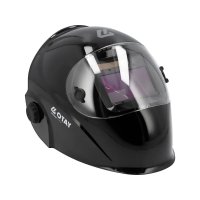
YT73936 - Auto welding mask Yato - Free user manual and instructions
Find the device manual for free YT73936 Yato in PDF.



| Product Type | Auto-darkening Welding Helmet |
| Brand | Yato |
| Model | YT73936 |
| Power Supply | CR2032 battery + solar cells |
| Shade Range | 5 to 13 (manually adjustable) |
| Operating Modes | Welding (WELD), Cutting (CUT), Grinding (GRIND) |
| Response Time | 1/25000 second |
| Sensitivity Adjustment | 0 (low) to 9 (high) |
| Delay Adjustment | 0 (short) to 9 (long) |
| Compliance Standards | EN 166:2001, EN 175:1997, EN ISO 16321-1:2021, PPE Regulation 2016/425/EU |
| Mechanical Resistance (Helmet Shell) | Class F (particles at 45 m/s) |
| Mechanical Resistance (Front Lens) | Class B (particles at 120 m/s) |
| Mechanical Resistance (Rear Lens) | Class C (particles at 45 m/s) |
| Working Temperature | -5°C to +55°C |
| Storage Temperature | -20°C to +70°C |
| Helmet Material | Polyamide |
| Lens Material | Polycarbonate |
| Maintenance and Cleaning | Soft damp cloth, no solvents |
| Available Spare Parts | Front lens YT-73937, CR2032 battery |
| Repairability | Contact an authorized service center |
Frequently Asked Questions - YT73936 Yato
User questions about YT73936 Yato
0 question about this device. Answer the ones you know or ask your own.
Ask a new question about this device
Download the instructions for your Auto welding mask in PDF format for free! Find your manual YT73936 - Yato and take your electronic device back in hand. On this page are published all the documents necessary for the use of your device. YT73936 by Yato.
USER MANUAL YT73936 Yato

natural_image
Close-up of hands adjusting a mechanical component with a gear-like tool (no visible text or symbols)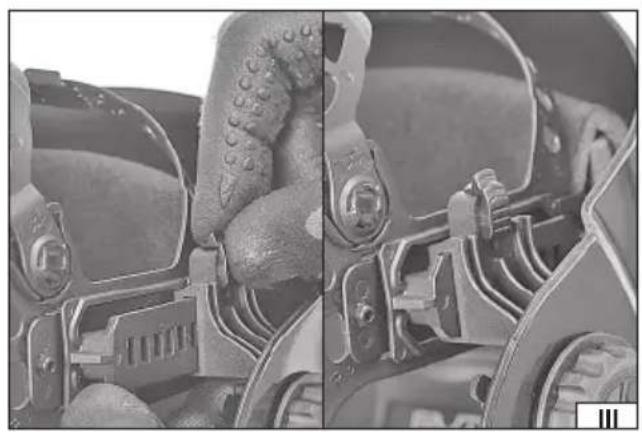
natural_image
Close-up of mechanical components with no visible text or symbolsnatural_image
Close-up of hands operating a mechanical component with a screw and adjustment knob (no visible text or symbols)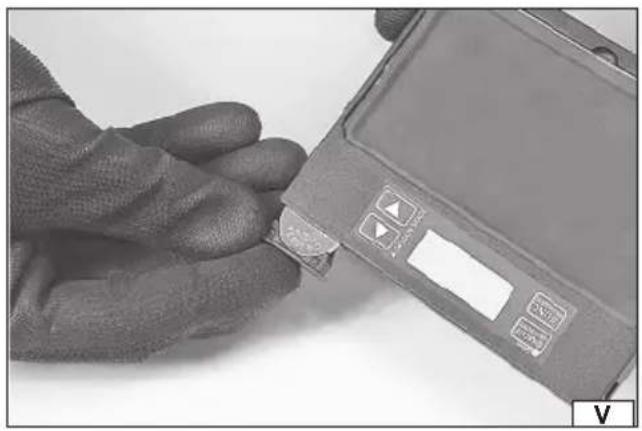
natural_image
Close-up of a gloved hand inserting a small electronic component into a smartphone (no visible text or symbols)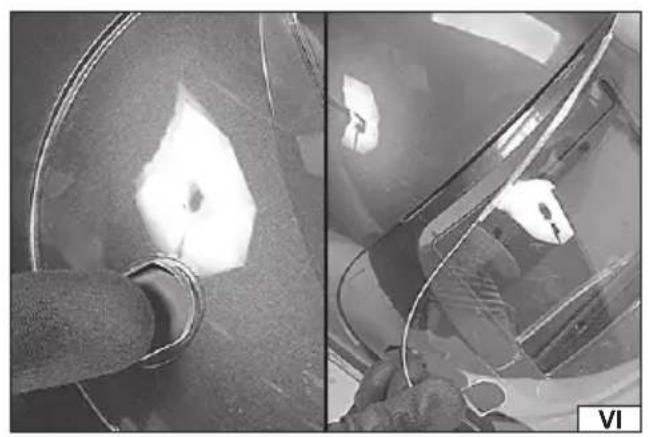
natural_image
Close-up of a car interior showing a pipe and illuminated surface, with no visible text or symbols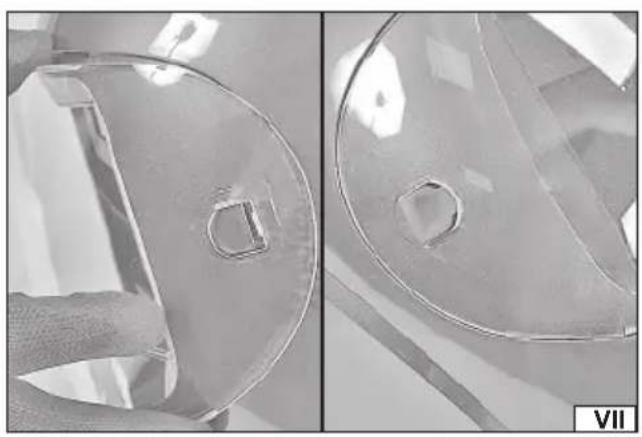
natural_image
Close-up of two transparent plastic components with circular cutouts, one showing a small square hole (no text or symbols)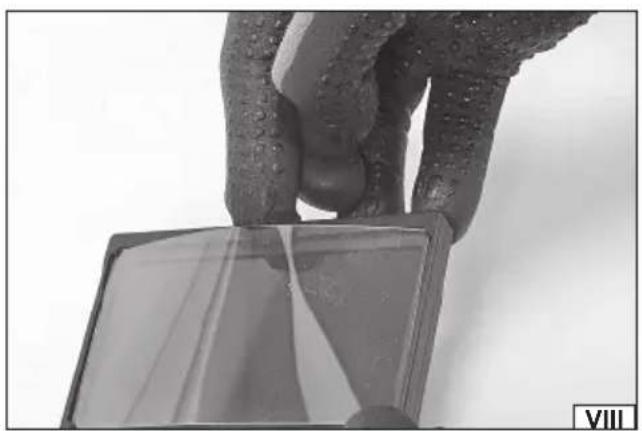
natural_image
Close-up of a hand holding a small transparent object with visible reflection, against a plain background (no text or symbols)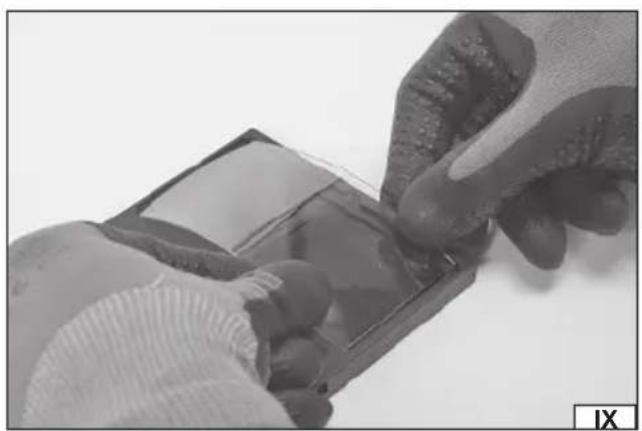
natural_image
Close-up of hands holding a small transparent object with a grid-like structure, no visible text or symbols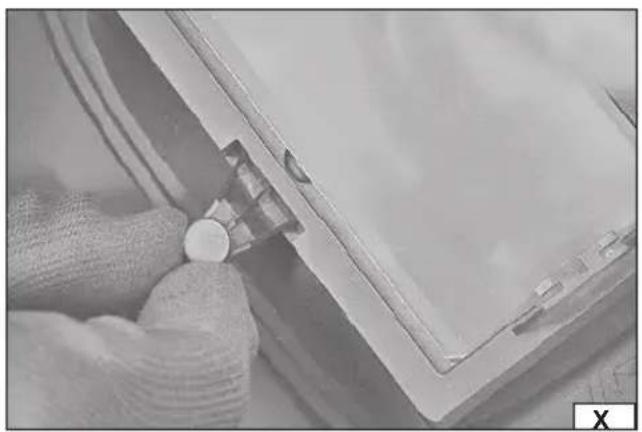
natural_image
Close-up of hands holding a small white object near a transparent panel, no visible text or symbols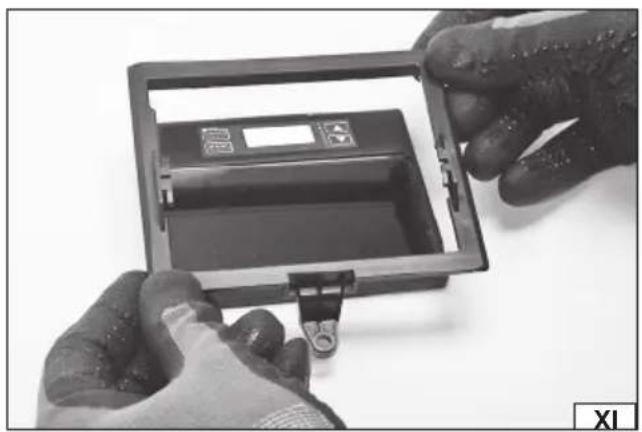
natural_image
Close-up of hands installing or adjusting a black plastic enclosure with a small clip, no visible text or symbolsPL
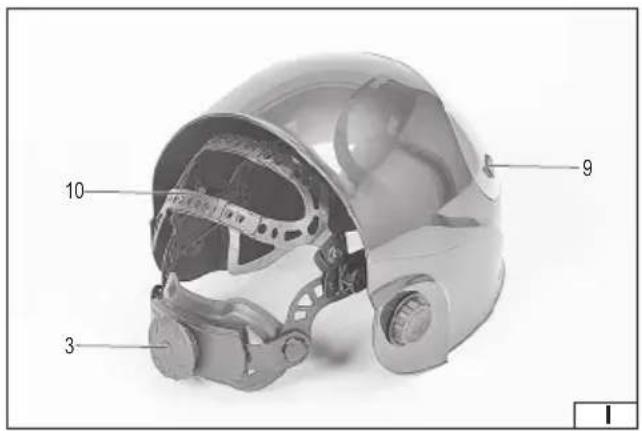
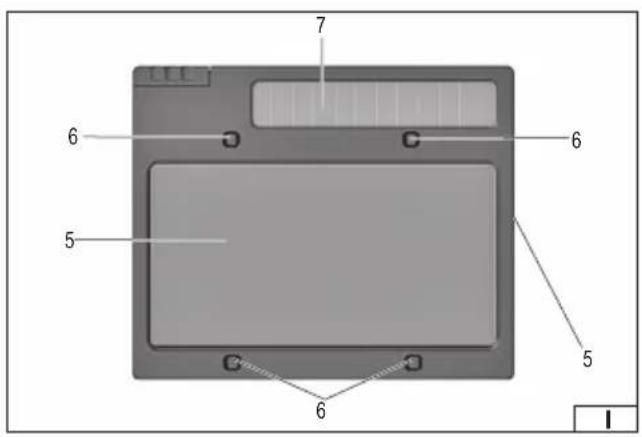
- protective glass panel
- welding shield
- headband adjustment knob
- welding protection fi lter
- fi lter visor
- fi lter sensor
- solar cells
- fi iter control panel
- front glass catch
- headband strap
- battery compartment cover
DE
This symbol indicates that waste electrical and electronic equipment (including batteries and storage cells) cannot be disposed of with other types of waste. Waste equipment should be collected and handed over separately to a collection point for recycling and recovery, in order to reduce the amount of waste and the use of natural resources. Uncontrolled release of hazardous components contained in electrical and electronic equipment may pose a risk to human health and have adverse effects for the environment. The household plays an important role in contributing to reuse and recovery, including recycling of waste equipment. For more information about the appropriate recycling methods, contact your local authority or retailer.
The content of the manual as per EN 166:2001; EN 175:1997; EN ISO 16321-1:2021 / PPE Regulation 2016/425/EU
Manufacturer: TOYA SA, ul. Sołtysowicka 13/15, 51-168 Wrocław, Poland
Product description: The welding helmet with an automatic welding protection filter with manual adjustment is a Category II eye and face protection equipment designed for individual protection of eyes and face against mechanical and light hazards. The helmet has increased mechanical resistance. It does not protect against liquid drops and splashes, coarse and fine dust particles, gas and arcs caused by electrical short-circuits. The helmet is made of polyamide and fitted with a retaining headband to keep the helmet on the head. The welding filter protects the eyes against radiation generated by electric arc during welding and has a shade level adjustment in the range of 5 to 13. The filter is protected by a polycarbonate glass panel. Persons allergic to these materials may develop an allergic reaction.
Shelf life: The product does not have a specific lifetime. Pay attention to wear and damage of the helmet components. Replace in accordance with the instructions in the manual.
Explanation of filter markings: YATO – manufacturer's marking; 16321 – number of European standard for eye and face protection for professional use; W4/5-8/9-13 – marking of welding filter with manual adjustment of protection level: W4 – bright state No.; 5 – brightest darkest state No.; 13 – darkest state No.; V1 – class of dependence of the light transmission coefficient on angle; CE – mark of conformity with EC New Approach Directives; “i” – mark indicating that supplementary information should be read; EAC – mark confirming that the product complies with the Technical Regulations of the Eurasian Customs Union.
Explanation of visor markings: YATO – manufacturer's marking; YT-73936 – manufacturer's catalogue number; EN 175 – number of the European standard for eye and face protection for welding; F – protection against high-velocity, low-energy particles (45 m/s); CE – mark of conformity with EC New Approach Directives.
Explanation of front glass markings: YATO – manufacturer's marking; B – protection against high-velocity, medium-energy particles (120 m/s); CE – mark of conformity with EC New Approach Directives.
Explanation of back glass markings: 16321 – European standard number for eye and face protection for professional use; YATO – importer's mark; C – protection against high-velocity particles (45 m/s); CE – mark of conformity with EC New Approach Directives.
Operating Instructions
Before first use, remove the protective film from the protective glass panel. Leaving the film on reduces the transparency and affects the operation of the welding protection filter. To remove the protective film it may be necessary to disassemble the filter and/or the protective glass panels described further in the manual.
Ensure that the filter sensors are not dusty. If contamination is found, the filter must be removed as described under “Welding filter replacement” section in the manual and then cleaned with a soft, damp cloth. Do not use abrasive cleaning agents. Do not use solvents to clean the filter. Do not immerse the welding filter in water. Install the filter in the welding shield.
Check the condition of the protective glass before each use. If scratches, cracks, clouding or other damage to the protective glass panels are found, they must be replaced.
Replace worn and damaged components with original parts only. Do not modify the helmet yourself. It is forbidden to use the shield if any component shows signs of damage, is worn out or needs to be replaced. A cover that has suffered a mechanical impact must not be reused. It should be replaced with a new one free of defects.
Adjustment of the helmet support system
Put the helmet on your head, adjust the position of the upper headband strap, if necessary, to make sure the helmet is at the right height. By turning the knob on the occipital strap, adjust the length of the strap so that it does not press the head while working and at the same time the helmet does not move during head movements (II). Use the side knobs to adjust the force needed to lower and lift the helmet (II). By pressing the clip at the attachment of the straps inside the visor, it is possible to adjust the distance of the visor from the face (III). When pressure is released, the helmet should lock into one of several positions (III). Make sure that both sides are set in the same position. On the inside of the helmet at the left and right knobs, there is an adjustment of the helmet angle at maximum lowering and raising. Raise the upper adjustment wing (IV), move it relative to the lower one, then lower and lock it in the desired position.
Operation of the automatic welding fi Iter
ATTENTION! Before starting work, ensure that the filter is set to the correct mode for the type of work to be carried out. It is forbidden to work with a non-functioning welding protection filter, as it can lead to irrecoverable damage to the eyesight.
Control panel
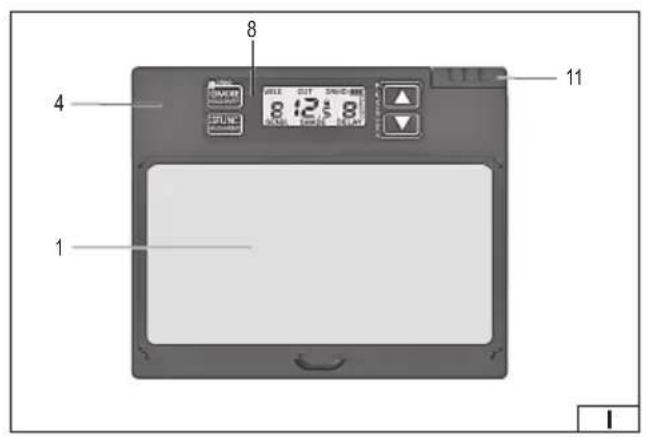
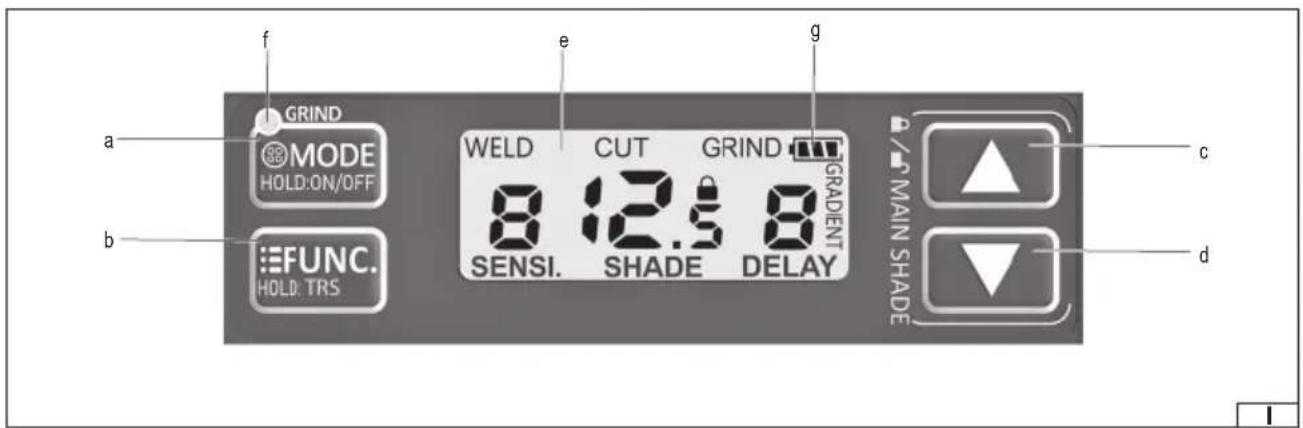
There are buttons on the control panel to control the filter (I). The buttons marked with two colours are dual-function. A short press will activate one function, while pressing and holding the button for approx. 1 second will activate the second function. Button markings and messages on the display are in English. Parameter settings are made using the increase or decrease setting button. Below is a description of the buttons and functions of the welding filter:
a.MODE HOLD:ON/OFF operating mode button – pressing and holding the button for approx. 1 second activates the filter. A short press of the button selects the operating mode indicated on the display: "WELD" – this mode allows setting the dark state in the range between 9 and 13. "CUT" – this mode allows setting the dark state in the range between 5 and 8. "GRIND" – in this mode
EN
the auto-dimming function is disabled and the filter will remain in bright state regardless of external conditions. The selection of bright mode is also indicated by a light, labelled "GRIND" on the filter control panel. When the bright mode is selected, the indicator light will first illuminate with a continuous light and then illuminate intermittently.
b.FUNC. HOLD:TRS function selector button— a short press of the button allows the filter function to be manually set in the dark state. The value to be set will start fl ashing on the display.
The function labelled "SENSI" allows to adjust the sensitivity, i.e. the threshold at which the filter is triggered in the dark state.
Using the increase or decrease setting button, it is possible to set the sensitivity in the range 0-9. Setting "0" – indicates the lowest sensitivity, the filter will only react to a greater change in the intensity of light falling on the sensors. Setting "9" – indicates the highest sensitivity, the filter will react to a slighter change in the intensity of light falling on the sensors. Setting "8" setting is recommended for most welding work, particularly when welding at low amperage. The set value is confirmed by pressing the function button again or the value will be confirmed automatically after approx. 6 seconds of inactivity.
The function labelled "SHADE" allows selecting the degree of filter darkening. Depending on the selected shading mode, it is possible to select the degree of shading in the range between 5 and 8 in the operating mode marked "CUT" on the display or in the range between 9 and 13 in the mode marked "WELD" on the display using the increase or decrease button. Thanks to the sensors, the filter is automatically darkened to the set level when bright light from the welding process is detected. When choosing the dark state you can refer to the table in the manual showing the recommended protection levels for arc welding. The set value is confirmed by shortly pressing the function selection button or the value will be confirmed automatically after approx. 6 seconds of inactivity.
The function labelled "DELAY" allows to change the delay time of the filter, i.e. the time it takes for the filter to react to a change in light intensity. Using the increase or decrease buttons, it is possible to set a switch-off time between 0 and 9 hours. Setting "0" indicates the smallest filter darkening delay suitable during tack welding. Setting "1" and "2" will be suitable for spot welding. A setting of "9" indicates the greatest filter darkening delay, suitable for most applications and particularly when welding at high amperage and longer intervals between welds. The set value is confirmed by shortly pressing the function selection button or the value will be confirmed automatically after approx. 6 seconds of inactivity.
Pressing and holding the button for approx. 1 second activates the gradient function, which allows a smooth transition from dark to bright state. This function will not activate if bright mode has been selected. Selection of the function will be confirmed by the "TRS" symbol appearing on the display. The selection of this function is not recommended for tack or spot welding.
c. setting increase button, d. setting decrease button – Pressing the setting increase and decrease buttons simultaneously allows the filter shading to be locked at the selected level, regardless of the currently selected operating mode. Using the increase or decrease setting button, it is possible to select the degree of darkening between 5 and 13. The darkening of the filter is constant, independent of the change in incident light on the sensors. The filter darkening lock at the selected level can be deactivated by pressing the increase and decrease setting buttons simultaneously.
e. display
j. indicator light labelled "GRIND" – the selection of bright mode is signalled by a red light marked "GRIND" on the control panel. When the bright mode is selected, the indicator light will first illuminate with a continuous light and then illuminate intermittently.
k. battery indicator – the welding filter has a charge indicator for the power supply batteries. If the battery symbol on the display is full, the battery is fully charged. Gradual discharging of the battery is indicated by the reduction of the number of icons in the battery symbol. If the battery symbol is empty, the battery must be replaced with a new one. Replacement of the power supply battery is described later in this manual.
Replacing the battery
To change the battery, the welding filter must be removed as described under “Removing the welding fi Iter” section of the manual. The welding filter requires one CR 2032 battery to operate correctly. The battery compartment is located in the filter housing. Open the compartment cover and replace the batteries (V). Place the batteries in the battery compartment so that the positive terminal is on top. Snap the battery cover back in place. Run the filter and check the condition of the new battery. Dispose of the used battery in accordance with regional regulations governing the disposal of such materials.
Replacing the protective glass panels
Check the condition of the protective glass before each use. If scratches, cracks, clouding or other damage to the protective glass panels are found, they must be replaced. The front protective glass panel is mounted directly in the visor. To replace the front glass, press the glass catch (VI) and then remove the glass from the visor catches (VI). Place the new glass in the catches (VII) so that it fits tightly against the visor and then press down until the catch engages (VII). The front protective glass is available separately as YATO YT-73937. The rear protective glass is mounted in the filter housing. To remove the protective glass of the filter, lift the glass near the notch (VIII) and then slide it out of the filter catches. Bend the new glass slightly and then slide the side edges under the catches in the filter housing (IX). Do not bend the protective glass too strongly to avoid damaging it. Caution! It is forbidden to use the helmet without the protective glass panels.
EN
Removing the welding fi Iter
Remove the screw securing the welding filter frame (IX). Lift the lower part of the filter frame, then pull the upper catches of the filter frame out of the welding helmet. Carefully slide the welding filter out of the filter frame (X). Reassemble the filter in the reverse order of removal. Ensure that the filter is correctly installed in the welding helmet and does not change its position during work.
Working with the welding helmet
The filter installed in the helmet shell will work automatically if it is illuminated by the electric arc generated during welding. The response time is 1/25,000 seconds. Before welding, make sure that the welding filter is set to the dark state appropriate for the type of welding to be performed. If during operation you notice that the filter is not automatically darkening, stop working immediately and adjust the filter. If, despite adjustment, the filter does not function properly, contact an authorised service centre of the importer. It is forbidden to work with a non-functioning welding protection filter, as it can lead to irrecoverable damage to the eyesight. Temperature range of the working environment is from -5 °C to +55°C. The filter is not designed to protect the eyesight during laser welding.
Operating instructions
Filter sensors should be kept clean and not obscured. In the automatic welding protection filter with manual adjustment, the maximum and minimum degree of protection is when the adjustment is set to zero. Eye protection against high-speed particles, worn in conjunction with standard corrective glasses, can transmit the impact, posing risk to the user.
Caution! If high-speed particle impact protection is required at extreme temperatures, the selected eye protection device should be marked with the letter T immediately after the letter identifying the impact symbol, i.e. FT, BT or AT. If the letter indicating the impact symbol is not directly in front of the letter T, then the eye protection can only be used to protect against high-speed particles at room temperature.
Maintenance, storage and transport
After finishing work, clean the helmet with a soft and damp cloth. Larger instances of soil should be removed with soapy water and dried with a cloth. Do not use abrasive cleaning agents. Do not use solvents to clean the filter and the helmet. Do not immerse the welding filter in water. The product should be stored in supplied unit packaging in a dark, dry, ventilated and closed room. During storage, do not exceed the temperature range of -20^ to +70^ . Protect against dust, dirt and other contaminants (plastic bags, handbags, etc.) Protect against mechanical damage. Transport in the supplied unit packaging in carton boxes using closed transport.
Declaration of Conformity: Available at toya24.pl in the product data sheet.
Table of recommended protection levels for arc welding
| Process | Current [A] | |||||||||||||||||||||||
| 1.5 6 10 | 15 30 | 40 60 | 70 | 100 12 | 25 150 | 175 | 200 | 225 250 | 300 | 350 | 400 | 450 | 500 | 600 | ||||||||||
| Covered electrodes | 8 | 9 | 10 | 11 | 12 | 13 | 14 | |||||||||||||||||
| MAG | 8 | 9 | 10 | 11 | 12 | 13 | 14 | |||||||||||||||||
| TIG | 8 | 9 | 10 | 11 | 12 | 13 | ||||||||||||||||||
| MIG for heavy metals | 9 | 10 | 11 | 12 | 13 | 14 | ||||||||||||||||||
| MIG for light alloys | 10 | 11 | 12 | 13 | 14 | |||||||||||||||||||
| Arc gouging | 10 | 11 | 12 | 13 | 14 | 15 | ||||||||||||||||||
| Plasma cutting | 9 | 10 | 11 | 12 | 13 | |||||||||||||||||||
| Microplasma welding | 4 | 5 | 6 | 7 | 8 | 9 | 10 | 11 | 12 | |||||||||||||||
| 1.5 6 10 | 15 30 | 40 60 | 70 | 100 12 | 25 150 | 175 | 200 | 225 250 | 300 | 350 | 400 | 450 | 500 | 600 | ||||||||||
| ATTENTION! The term "heavy metals" is used for steel, steel alloys, copper, copper alloys, etc. | ||||||||||||||||||||||||
DE
Brand : Yato
Model : YT73936
Category : Auto welding mask