
TDGBR750 - 3D Glasses SONY - Free user manual and instructions
Find the device manual for free TDGBR750 SONY in PDF.
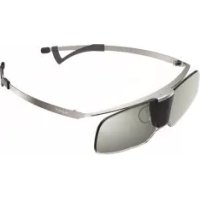



| Product type | Active 3D glasses |
| Brand | Sony |
| Model | TDGBR750 |
| Weight | 34 g |
| Dimensions (L × H × D) | 141 × 36 × 166 mm |
| Battery type | Built-in rechargeable nickel-metal hydride battery |
| Battery life | Approximately 15 hours |
| Charging time | Approximately 40 hours (via USB of Sony TV) |
| Operating temperature | 0 °C to 40 °C |
| Synchronization technology | Infrared (3D sync emitter) |
| LED indicator | Green: operating; Yellow: charging; Flashing: battery status |
| Power on/off | Short press: power on; Long press (2 s): power off; Auto off after 5 min without signal |
| Nose pads | Adjustable sizes included |
| Temple adjustment | Sliding (adjustable frames) |
| Charging connector | Micro USB (cable included) |
| Optional accessories | AC adapter for USB charging AC-U50AG |
| Maintenance | Soft cloth; stubborn stains: warm water and mild soap |
| Safety | Do not throw into fire, do not disassemble, avoid high temperatures, use supplied USB cable |
| Compatibility | Sony TVs compatible with 3D with built-in sync emitter |
| Manufacturer | Sony Corporation, 1-7-1 Konan Minato-ku Tokyo, 108-0075 Japan |
Frequently Asked Questions - TDGBR750 SONY
User questions about TDGBR750 SONY
0 question about this device. Answer the ones you know or ask your own.
Ask a new question about this device
Download the instructions for your 3D Glasses in PDF format for free! Find your manual TDGBR750 - SONY and take your electronic device back in hand. On this page are published all the documents necessary for the use of your device. TDGBR750 by SONY.
USER MANUAL TDGBR750 SONY
Location of the identification label
Labels for Model No., Production Date (month/year) and Power Supply rating (in accordance with applicable safety regulation) are located on the rear of the TV or package.
Disposal of waste batteries (applicable in the European Union and other European countries with separate collection systems)
This symbol on the battery or on the packaging indicates that the battery provided with this product shall not be treated as household waste. On certain batteries this symbol might be used in combination with a chemical symbol. The chemical symbols for mercury (Hg) or lead (Pb) are added if the battery contains more than 0.0005% mercury or 0.004% lead. By ensuring these batteries are disposed of correctly, you will help prevent potentially negative consequences for the environment and human health which could otherwise be caused by inappropriate waste handling of the battery. The recycling of the materials will help to conserve natural resources. In case of products that for safety, performance or data integrity reasons require a permanent connection with an incorporated battery, this battery should be replaced by qualified service staff only. To ensure that the battery will be treated properly, hand over the product at end-of-life to the applicable collection point for the recycling of electrical and electronic equipment. For all other batteries, please view the section on how to remove the battery from the product safely. Hand the battery over to the applicable collection point for the recycling of waste batteries. For more detailed information about recycling of this product or battery, please contact your local Civic Office, your household waste disposal service or the shop where you purchased the product.
Disposal of the 3D Glasses
Disposal of Old Electrical & Electronic Equipment (Applicable in the European Union and other European countries with separate collection systems)
This symbol on the product or on its packaging indicates that this product shall not be treated as household waste. Instead it shall be handed over to the applicable collection point for the
recycling of electrical and electronic equipment. By ensuring this product is disposed of correctly, you will help prevent potential negative consequences for the environment and human health, which could otherwise be caused by inappropriate waste handling of this product. The recycling of materials will help to conserve natural resources. For more detailed information about recycling of this product, please contact your local Civic Office, your household waste disposal service or the shop where you purchased the product.
The manufacturer of this product is Sony Corporation, 1-7-1 Konan Minato-ku Tokyo, 108-0075 Japan. The Authorized Representative for EMC and product safety is Sony Deutschland GmbH, Hedelfinger Strasse 61, 70327 Stuttgart, Germany. For any service or guarantee matters please refer to the addresses given in separate service or guarantee documents.
Caution
Please read these safety instructions to ensure your personal safety and prevent property damage.
Warning
- Do not put the 3D Glasses in a fire.
- Do not disassemble the 3D Glasses.
- Do not use, charge, store, or leave the 3D Glasses near a fire, or in places with a high temperature, e.g., in direct sunlight, or in sun-heated cars.
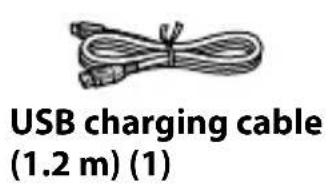
- Use only the supplied USB cable.
- Do not charge the 3D Glasses with anything other than a Sony 3D TV or recommended USB charging AC power adapter. For details on Sony devices compliant with 3D, refer to the operating instructions supplied with the device.
- Do not allow water or foreign material to enter the 3D Glasses.
Precautions for use
- The 3D Glasses are operated by receiving infrared signals from the 3D Sync Transmitter.
Mis-operation may occur if:
- The 3D Glasses do not face the 3D Sync Transmitter
- If there are objects blocking the path between the 3D Glasses and the 3D Sync Transmitter
- If there are other infrared communication devices or lighting equipment, residential heating equipment, etc. nearby, this may affect their performance.
- Watch the TV using the 3D Glasses, facing squarely towards the TV.
- 3D effect is inadequate and screen colour will shift when lying down or tilting your head.
Safety Precautions
- You should only use this product for watching 3D video images on a compatible Sony television.
- Some people may experience discomfort (such as eye strain, fatigue, or nausea) when using this product. Sony recommends that all viewers take regular breaks while watching 3D video images or playing stereoscopic 3D games. The length and frequency of necessary breaks will vary from person to person. You must decide what works best. If you experience any discomfort, you should stop using this product and watching the 3D video images until the discomfort ends; consult a doctor if you believe necessary. You should also review (i) the instruction manual of your television, as well as any other device or media used with your television and (ii) our website (http://www.sony-europe.com/myproduct) for the latest information. The vision of young children (especially those under six years old) is still under development. Consult your doctor (such as a pediatrician
or eye doctor) before allowing young children to watch 3D video images or play stereoscopic 3D games. Adults should supervise young children to ensure they follow the recommendations listed above.
- Do not drop or modify the 3D Glasses.
- If the 3D Glasses are broken, keep broken pieces away from your mouth or eyes.
- Avoid eye injury with the tip of the temple arms.
- If the temple arms impact your hand, fingers or ears, injury to your skin may result. Be sure to handle this product with care.
- Be careful not to pinch your fingers in the hinges when bending the temple arms.
- Keep this product out of reach of children, so that they are not mistakenly swallowed.
- When using the 3D Glasses, do not apply excessive pressure on the lenses, as they may break.
Maintenance of your Glasses
- Wipe the Glasses gently with a soft cloth.
- Stubborn stains may be removed with a cloth slightly moistened with a solution of mild soap and warm water.
- If using a chemically pretreated cloth, be sure to follow the instructions provided on the package.
- Never use strong solvents such as a thinner, alcohol or benzine for cleaning.
Specifications
Weight (g) 34
Battery Type nickel hydride rechargeable battery
Operating time (Approx.) 15 (hours)
Charging time (Approx.) 40
(minutes) (in case of charge from TV's USB terminal)
Dimensions (Approx.) 141 × 36 × 166
(w × h × d (mm))
Operating temperature (°C) 0~40
Optional accessories USB charging AC power adapter AC-U50AG*
- May not be available in some regions.
Design and specifications are subject to change without notice.
Parts and Components
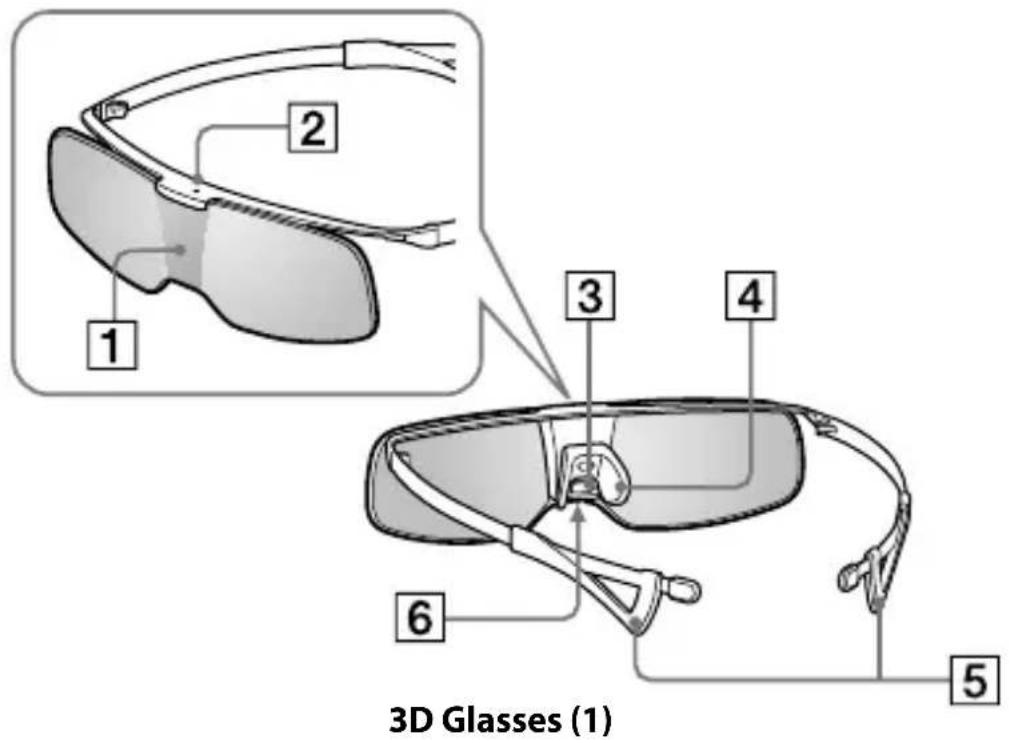
1 IR Sensor
Receiving IR (infrared rays) signals are emitted from the front of the 3D Sync Transmitter.
IR's entry angle differs according to distance and/or usage environment.
Note
Please keep the IR Sensor clean.
2 LED indicator
When operating, the indicator lights up green.
- Flashes once every 2 seconds: Battery operation
- Flashes three times every 3 seconds: Low battery - Charge the battery. When charging, the LED indicator lights up yellow. (When charge is completed, the indicator turns off.)
Note
When operating: the indicator lights up green and the battery cannot be charged.
3 Power Button
Power on: Press once
Power off: Hold power button down for 2 seconds (LED flashes three times and turns off)
- Auto power off: More than 5 minutes without IR signal
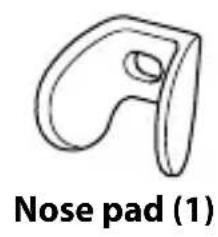
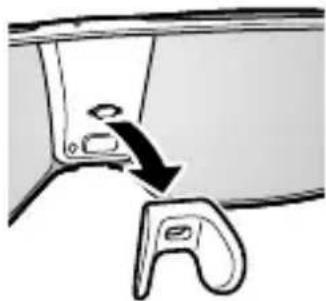
4 Nose pad
Select the appropriate size of supplied nose pad, according to your nose shape.
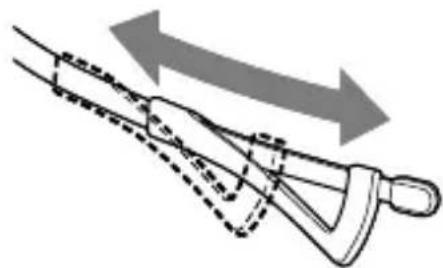
5 Adjuster
Slide the temple frames to the best position.
6 Connector for charge
Charge the battery.
Charging the battery
To prevent battery deterioration, charge the battery at least once every half a year or a year.
1 Turn the 3D Glasses power off. 2 Turn the TV power on.
Note
When the TV is in standby mode, this product cannot be charged.
3 Connect the 3D Glasses and the TV with the supplied USB cable.
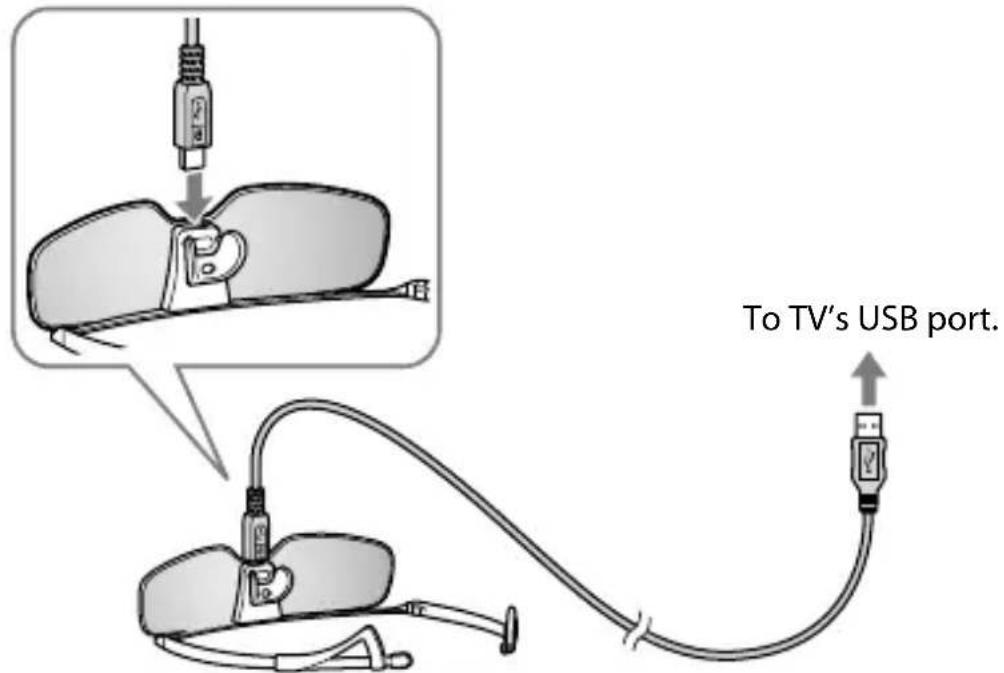
- When connecting this product and the TV with USB cable, this product will start to charge. (When charging, the LED indicator lights up yellow.)
- If you turn the power of this product on when charging the battery, charging will be stopped. (When operating, the indicator lights up green.)
- The 3D Glasses can be charged either by the TV, or the USB charging AC power adapter AC-U50AG (not supplied).
Troubleshooting
In the event of a problem, refer to the TV's instruction manual.
Disposal of the 3D Glasses
- The battery is built into this product.
- Dispose of batteries in an environmentally friendly way. Certain regions may regulate the disposal of batteries. Please consult your local authority.
Charging time (approx.) 40
Charging time (approx.) 40
Dimensions (approx.) 141 × 36 × 166
(L × h × I (mm))
Operating temperature 0~40 (°C)
Optional accessories: USB charging AC adapter, AC-U50AG*
Turning on: Press the button.
Turning off: Press and hold the button for 2 seconds (LED flashes three times).
* Automatic shutdown: After 5 minutes without a signal.
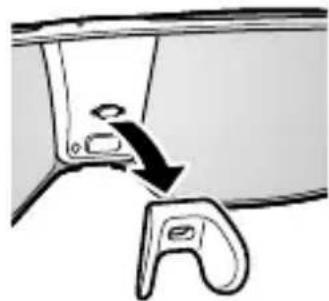
4 Nose pad
Choose the appropriate size nose pad according to the shape of your nose.
5 Regulator
Press the buttons on the device to the desired position.
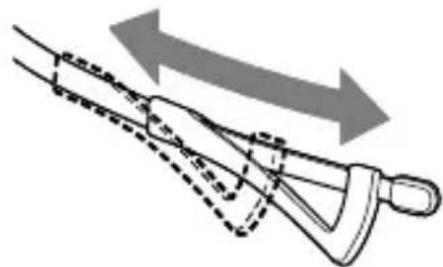
6 Charging connector
Charge the battery.
Charging the battery
To prevent battery damage, charge it at least once every six months or once a year.
1 Turn on the 3D device. 2 Turn on the TV.
Note
When the TV is in standby mode, the product cannot be charged.
3 Connect the 3D device to the TV with the provided USB cable.
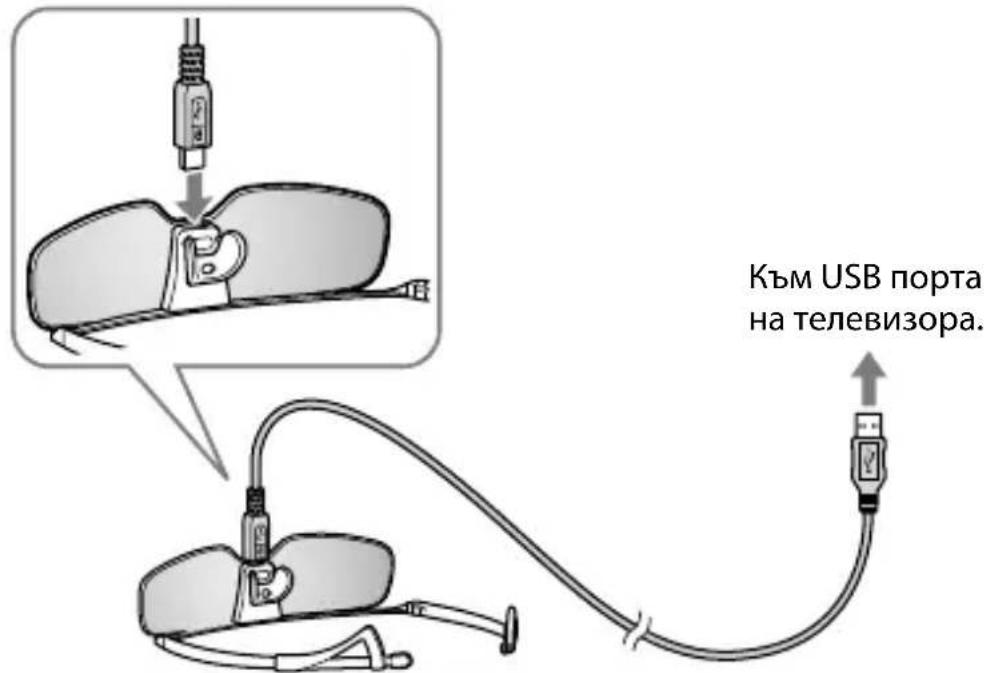
When you connect this product to the TV with a USB cable, the product will start charging. (The LED indicator lights up in orange.) - If you turn on the product while the battery is charging, charging stops. (During operation, the indicator lights up in green.) - The 3D glasses must be charged via the TV or via the USB AC adapter for charging AC-U50AG (not supplied).
Troubleshooting
If there is a problem, refer to the TV operating instructions.
Disposal of the 3D glasses
The battery is built into the product. - Dispose of used batteries according to local regulations. In some areas, disposal of batteries may be regulated. Consult your local authorities.
Location of the identification label
Sony Corporation, 1-7-1 Konan, Minato-ku, Tokyo, Japan Made in China
Conn KopnpoeH1-7-1, Konan, Minato-ku, Tokyo, Japan. Made in China.
Importer in Russia: JSC "Sony Electronics", 123103, Moscow, Karamyshevsky proezd, 6, Russia
Sony Europe Ltd. Representative Office in Kazakhstan 050059 Almaty, ulitsa Ivanilova, d. 58 050059 Almaty, Ivanilov kөhesi, 58 үй
Precautions
Read these safety instructions to ensure safety and prevent property damage.
Precautions
Do not expose the 3D glasses to fire. Do not disassemble the 3D glasses. Do not use, charge, store, or leave the 3D glasses near sources of open flame or in places with high temperature, such as in direct sunlight or in cars parked in the sun. - Use only the supplied USB cable. Charge the 3D glasses only with a Sony 3D TV or a recommended USB AC adapter for charging. For additional information on Sony devices compatible with 3D, refer to the operating instructions supplied with the device. Do not allow foreign materials to enter the 3D glasses.
Precautions for use
The 3D glasses are based on the reception of infrared signals from the 3D signal transmitter.
Malfunctions may occur if: - The 3D glasses are not aimed at the 3D signal transmitter; - There are obstacles between the 3D glasses and the 3D signal transmitter; - If other devices controlled by infrared rays or lighting equipment, optical equipment, etc. are used in the immediate vicinity, this may affect their operation.
- When using the 3D glasses, it is necessary to look directly at the TV screen.
- If the viewer tilts or turns their head, the 3D effect will be insufficient, and the colors after the image will be shifted.
Safety Precautions
- This product can only be used for viewing 3D video images on a compatible Sony TV. - When using this device, some people may experience discomfort (e.g., eye strain, fatigue, or nausea). Sony recommends that all viewers take regular breaks while viewing 3D video images or while playing stereoscopic 3D games. The duration and frequency of breaks depend on individual needs. You should choose the most suitable option. In case of discomfort, you must stop using the device and viewing 3D video images until the discomfort disappears; if necessary, consult a doctor. You should also refer to (i) the operating instructions of the TV and any other device or media used with the TV, and also visit (ii) the website (http://www.sony-europe.com/myproduct) for the latest information. The vision of small children (especially under six years old) is not yet fully developed. Before allowing children to watch 3D video images or play stereoscopic 3D games, consult a doctor (e.g., a pediatrician or ophthalmologist). Small children must be under adult supervision to ensure compliance with the above recommendations.
The IR sensor must remain clean.
2 LED indicator
When using the indicator, it lights up green.
- Blinks every 2 seconds: battery operation
- Blinks 3 times every 3 seconds: low battery - charge the battery
During charging, the LED indicator lights up red. (When charging is complete, the indicator turns off.)
Note
When using the indicator, it lights up green, and the battery is not charged.
3 Power button
Turn on power: press once.
Turn off power: press and hold the power button for 2 seconds.
(The LED indicator flashes three times and then goes out)
- Automatic power off: absence of infrared signal for more than 5 minutes.
4 Nose pad
Select the required size of the attached nose pad depending on the shape of the nose.
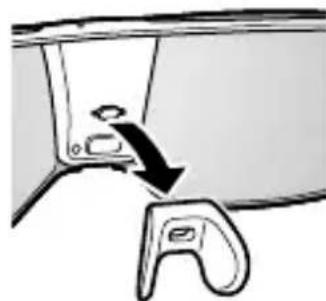
5 Adjuster
Bend the frames of the glasses to ensure a comfortable position of the glasses on the head.
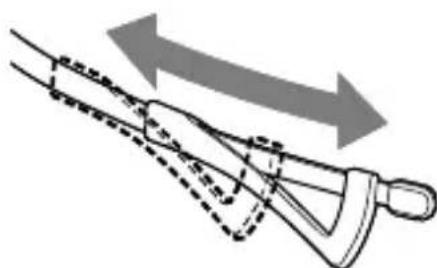
6 Charging connector
Charge the battery.
Battery charging
To avoid damaging the battery, charge it no more than once a day.
1 Turn off the 3D glasses. 2 Turn on the TV.
Note
If the TV is in standby mode, the product will not charge.
Connect the 3D glasses to the TV using the supplied USB cable.
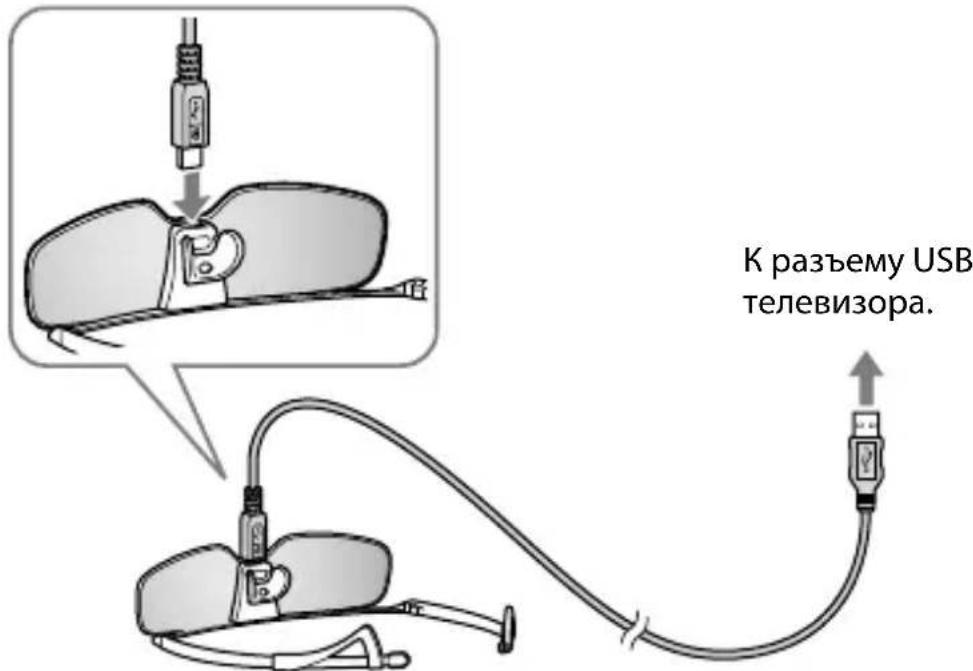
- When connected to the TV via the USB cable, the device will start charging. (During charging, the LED indicator lights up in orange.)
- If the device is turned on while charging, charging will be interrupted. (During use, the indicator lights up in green.)
- The 3D glasses can also be charged using the TV's USB port or the separately sold USB AC adapter AC-U50AG (not included).
Troubleshooting
If problems occur, refer to the TV's operating instructions.
Disposal of the 3D glasses
- The battery is built into this device.
- When disposing of batteries, always observe local environmental protection regulations. In some regions, battery disposal regulations may be regulated. Please contact your local authorities regarding this matter.
Labels and markings
Labels indicating the model number, production date (month/year), and electrical parameters (in accordance with applicable safety regulations) are located on the back of the TV or on the packaging.
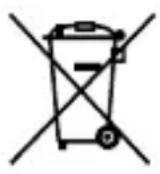
Disposal of used electrical and electronic equipment (applicable in EU countries and other European countries with separate collection systems)
Battery type: Lithium-ion rechargeable battery
Operating time: 15 hours
Charging time: 3 hours
Press and hold the power button for 2 seconds (the indicator light will flash three times and turn off).
* Automatic shutdown: if the device is not used for more than
4 Nose pad
Choose the nose pad of the appropriate size (included) depending on the shape of your nose.
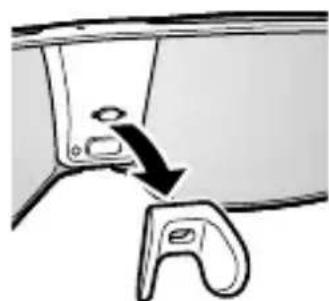
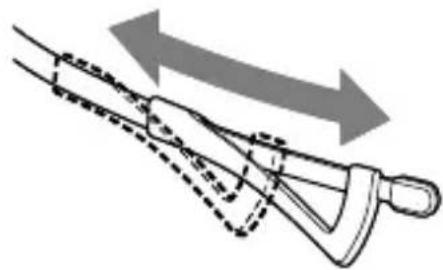
5 Regulator
Set the ear hooks in the optimal position.
6 Charging socket
Battery charging.
Battery charging
To prevent the battery from draining, charge it at least once every six months or year.
1 Turn off the 3D glasses. 2 Turn off the TV.
Charging
If it is impossible to charge, the TV may be in standby mode. Connect the 3D glasses to the TV using the USB cable from the delivery set.
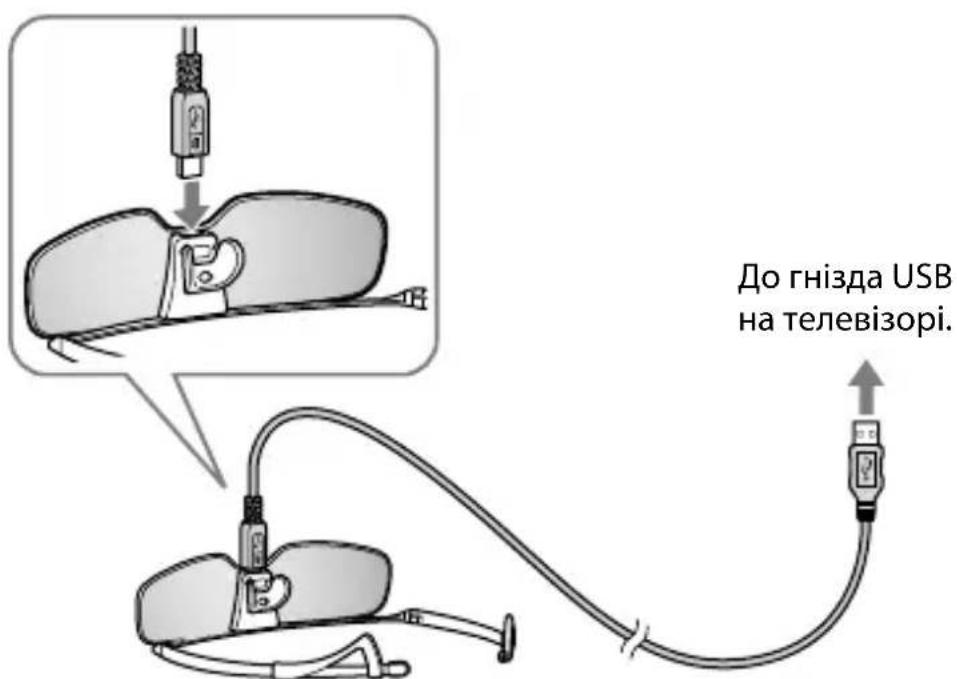
- Connecting the TV via a USB cable may not charge the glasses. (During charging, the indicator lights up in yellow.)
- When the battery is fully charged, the indicator will turn off.
(The indicator lights up when the power is turned on.)
- The 3D glasses can be charged using a TV or a USB AC adapter AC-U50AG (not supplied).
Troubleshooting
If the problem persists, refer to the TV operating instructions.
Cleaning the 3D glasses
- The battery is built into the product.
- Dispose of used batteries according to local regulations. In some regions, there are rules for disposing of batteries. Please be careful and check with your local authorities.
http://www.sony.net/
Printed in China
- LOCATION OF THE IDENTIFICATION LABEL
- DISPOSAL OF WASTE BATTERIES (APPLICABLE IN THE EUROPEAN UNION AND OTHER EUROPEAN COUNTRIES WITH SEPARATE COLLECTION SYSTEMS)
- DISPOSAL OF THE 3D GLASSES
- DISPOSAL OF OLD ELECTRICAL & ELECTRONIC EQUIPMENT (APPLICABLE IN THE EUROPEAN UNION AND OTHER EUROPEAN COUNTRIES WITH SEPARATE COLLECTION SYSTEMS)
- CAUTION
- WARNING
- PRECAUTIONS FOR USE
- SAFETY PRECAUTIONS
- MAINTENANCE OF YOUR GLASSES
- SPECIFICATIONS
- PARTS AND COMPONENTS
- IR SENSOR
- NOTE
- LED INDICATOR
- POWER BUTTON
- NOSE PAD
- ADJUSTER
- CONNECTOR FOR CHARGE
- CHARGING THE BATTERY
- TROUBLESHOOTING
- REGULATOR
- CHARGING CONNECTOR
- PRECAUTIONS
- BATTERY CHARGING
- LABELS AND MARKINGS
- CHARGING SOCKET
- CHARGING
- CLEANING THE 3D GLASSES
Brand : SONY
Model : TDGBR750
Category : 3D Glasses