
TDGBT500A - 3D Glasses SONY - Free user manual and instructions
Find the device manual for free TDGBT500A SONY in PDF.
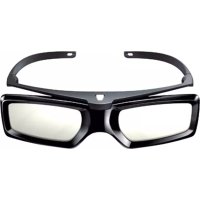



| Product Type | Active 3D Glasses |
| Brand | Sony |
| Model | TDGBT500A |
| Dimensions (W × H × D) | 147 × 46 × 170 mm |
| Weight (with battery) | 36 g |
| Battery Type | Lithium manganese dioxide CR2025 |
| Continuous Battery Life | Approximately 100 hours |
| Main Functions | 3D viewing, SimulView™ mode, pairing with compatible Sony TV |
| Power On/Off | Short press (on), long press 2 seconds (off) |
| Low Battery Indicator | Indicator blinks 3 times every 2 seconds (green or yellow) |
| Communication | 2.4 GHz RF signals with TV |
| Operating Distance | Varies with obstacles; recommended minimum distance: 3 times screen height |
| Care and Cleaning | Wipe with a soft cloth; use a cloth slightly dampened with warm water and mild soap for stubborn stains; do not use strong solvents |
| Safety | Do not disassemble, do not expose to fire or excessive heat, do not allow water or foreign objects to enter |
| Available Replacement Parts | CR2025 battery, battery compartment |
| Compatibility | Sony 3D compatible TVs |
| Initial Pairing | Press and hold the power button for 2 seconds at 50 cm from the powered TV |
| SimulView™ Mode | Allows two players to see independent full-screen images (2D); the yellow LED blinks according to the player |
| Operating Temperature | Avoid high temperatures; 3D effect may be less pronounced in cold weather |
Frequently Asked Questions - TDGBT500A SONY
User questions about TDGBT500A SONY
0 question about this device. Answer the ones you know or ask your own.
Ask a new question about this device
Download the instructions for your 3D Glasses in PDF format for free! Find your manual TDGBT500A - SONY and take your electronic device back in hand. On this page are published all the documents necessary for the use of your device. TDGBT500A by SONY.
USER MANUAL TDGBT500A SONY
Location of the identification label
Labels for Model No., Production Date (month/year) and Power Supply rating (in accordance with applicable safety regulation) are located on the rear of the product or package.
This product has been manufactured by or on behalf of Sony Corporation, 1-7-1 Konan Minato-ku Tokyo, 108-0075 Japan. Inquiries related to product compliance based on European Union legislation shall be addressed to the authorized representative, Sony Deutschland GmbH, Hedelfinger Strasse 61, 70327 Stuttgart, Germany. For any service or guarantee matters, please refer to the addresses provided in the separate service or guarantee documents.
CE
Hereby, Sony Corp., declares that this Active 3D Glasses is in compliance with the essential requirements and other relevant provisions of Directive 1999/5/EC.
For details, please access the following URL:
http://www.compliance.sony.de/
Disposal of the Active 3D Glasses
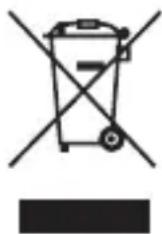
Disposal of Old Electrical & Electronic Equipment (Applicable in the European Union and other European countries with separate collection systems)
This symbol on the product or on its packaging indicates that this product shall not be treated as household waste. Instead it shall be handed over to the applicable collection point for the recycling of electrical and electronic equipment. By ensuring this product is disposed of correctly, you will help prevent potential negative consequences for the environment and human health, which could otherwise be caused by inappropriate waste handling of this product. The recycling of materials will help to conserve natural resources. For more detailed information about recycling of this product, please contact your local Civic Office, your household waste disposal service or the shop where you purchased the product.
Disposal of Waste Batteries
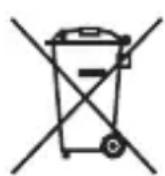
Disposal of waste batteries (applicable in the European Union and other European countries with separate collection systems)
This symbol on the battery or on the packaging indicates that the battery provided with this product shall not be treated as household waste.
On certain batteries this symbol might be used in combination with a chemical symbol. The chemical symbols for mercury (Hg) or lead (Pb) are added if the battery contains more than 0.0005% mercury or 0.004% lead.
By ensuring these batteries are disposed of correctly, you will help prevent potentially negative consequences for the environment and human health which could otherwise be caused by inappropriate waste handling of the battery. The recycling of the materials will help to conserve natural resources.
In case of products that for safety, performance or data integrity reasons require a permanent connection with an incorporated battery, this battery should be replaced by qualified service staff only.
To ensure that the battery will be treated properly, hand over the product at end-of-life to the applicable collection point for the recycling of electrical and electronic equipment.
For all other batteries, please view the section on how to remove the battery from the product safely. Hand the battery over to the applicable collection point for the recycling of waste batteries.
For more detailed information about recycling of this product or battery, please contact your local Civic Office, your household waste disposal service or the shop where you purchased the product.
Caution
Please read these safety instructions to ensure your personal safety and prevent property damage.
Danger of explosion if battery is incorrectly replaced.
Observe the correct polarity when inserting the battery.
Use only CR2025 type battery.
Warning
- Do not put the Active 3D Glasses in a fire.
- Do not disassemble the Active 3D Glasses.
- Do not use, charge, store, or leave the Active 3D Glasses near a fire, or in places with a high temperature, e.g., in direct sunlight, or in sun-heated cars.
- Do not allow water or foreign material to enter the Active 3D Glasses.
- Batteries must not be exposed to excessive heat such as sunshine, fire or the like.
Precautions for use
- The Active 3D Glasses are operated by receiving RF signals from the TV.
- Mis-operation may occur if:
- The Active 3D Glasses do not face the TV
- If there are objects blocking the path between the Active 3D Glasses and the TV
- If there are other 2.4GHz RF communication devices such as an Internet AP or microwave oven, etc. nearby, this may affect their performance.
- Watch the TV using the Active 3D Glasses, facing squarely towards the TV.
- 3D effect is inadequate and screen colour will shift when lying down or tilting your head.
Safety Precautions
- You should only use this product for watching 3D video images on a compatible Sony television.
- Some people may experience discomfort (such as eye strain, fatigue, or nausea) when using this product. Sony recommends that all viewers take regular breaks while watching 3D video images or playing stereoscopic 3D games. The length and frequency of necessary breaks will vary from person to person. You must decide what works best. If you experience any discomfort, you should stop using this product and watching the 3D video images until the discomfort ends; consult a doctor if you believe necessary. You should also review (i) the instruction manual of your television, as well as any other device or media used with your television and (ii) our website (http://www.sony-europe.com/myproduct) for the latest information. The vision of young children (especially those under six years old) is still under development. Consult your doctor (such as a pediatrician or eye doctor) before allowing young children to watch 3D video images or play stereoscopic 3D games. Adults should supervise young children to ensure they follow the recommendations listed above.
- Do not drop or modify the Active 3D Glasses.
- If the Active 3D Glasses are broken, keep broken pieces away from your mouth or eyes.
- Be careful not to pinch your fingers in the hinges when bending the temple arms.
- Keep this product out of reach of children, so that they are not mistakenly swallowed.
- Watch the TV from a distance of more than three times the TV's screen height.
- Be careful not to harm your eyes with the glasses' temple when wearing the Active 3D Glasses.
- Flickering or flashing may occur under some fluorescent or LED lighting, etc.
- When you use the Active 3D Glasses and watch or play 3D video images or SimulView™ contents under some fluorescent or LED lighting, etc.,
flickering or flashing lights may be observed. This flickering or flashing may trigger epileptic seizures or blackouts (photosensitivity) in a very small percentage of individuals. If you observe such flickering or flashing, IMMEDIATELY take off the Active 3D Glasses and stop watching or playing the 3D video images or SimulView™ contents. This flickering or flashing may trigger previously undetected epileptic symptoms or seizures in persons who have no history of prior seizures or epilepsy. If you have an epileptic condition or have had seizures of any kind, consult your doctor before watching or playing the 3D video images or SimulView™ contents. If you experience any of the following health symptoms while using the Active 3D Glasses, IMMEDIATELY take off the Active 3D Glasses and stop watching or playing the 3D video images or SimulView™ contents and consult your doctor before resuming: dizziness, altered vision, eye or muscle twitches, loss of awareness, disorientation, seizures, or any involuntary movement or convulsion.
- Dispose of batteries in an environmentally friendly way. Certain regions may regulate the disposal of batteries. Please consult your local authority.
Maintenance of your Glasses
- Wipe the Glasses gently with a soft cloth.
- Stubborn stains may be removed with a cloth slightly moistened with a solution of mild soap and warm water.
- If using a chemically pretreated cloth, be sure to follow the instructions provided on the package.
- Never use strong solvents such as a thinner, alcohol or benzine for cleaning.
Overview
Active 3D glasses need registration to the TV.
When using Active 3D glasses with another TV, re-registration is necessary.
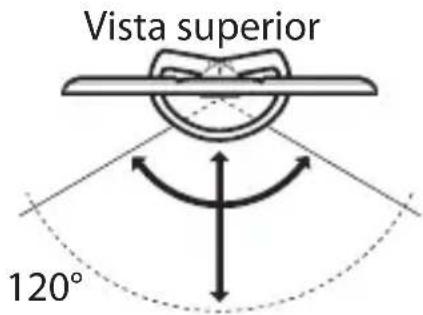
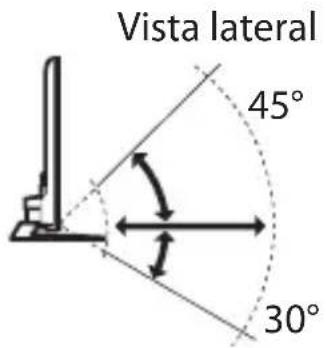
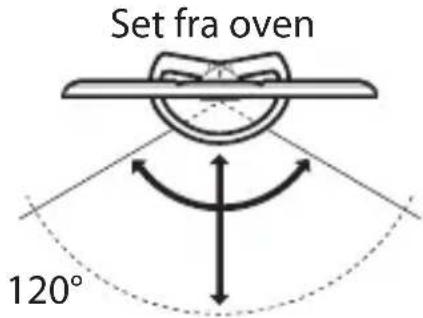
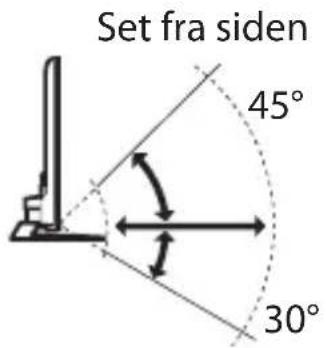
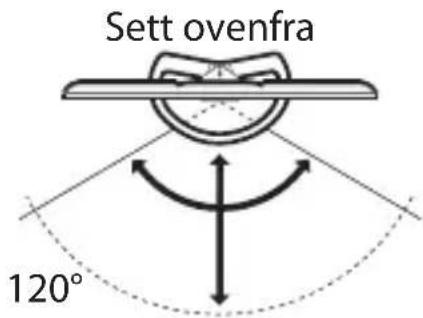
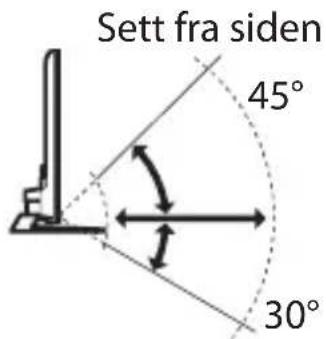
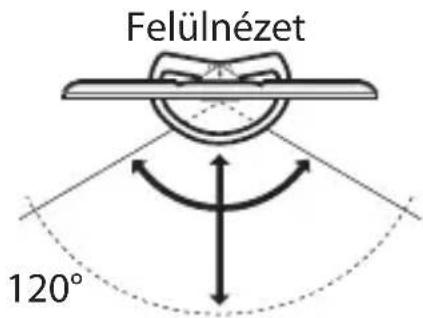
TV and Active 3D Glasses communication range
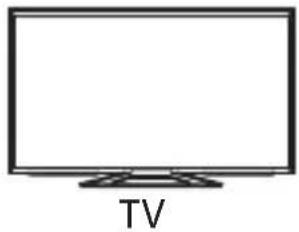
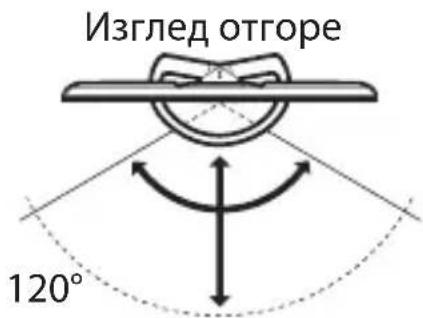
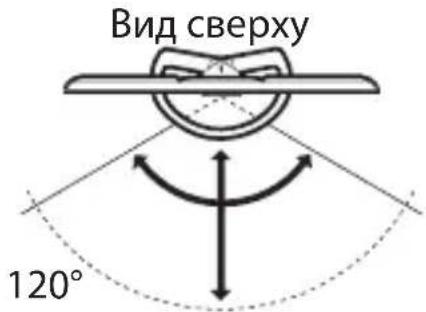
The preferred viewing position needs to be kept within the proper range. See the following chart.
The recommended minimum viewing distance is 3 times the screen height. The working distance depends on obstacles (person, metal, walls, etc.) or electromagnetic waves.
Overhead view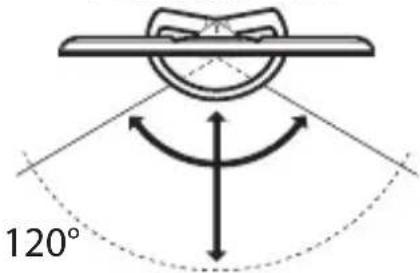
Side view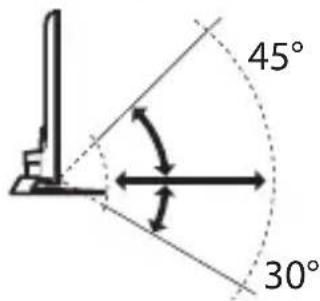
Steps
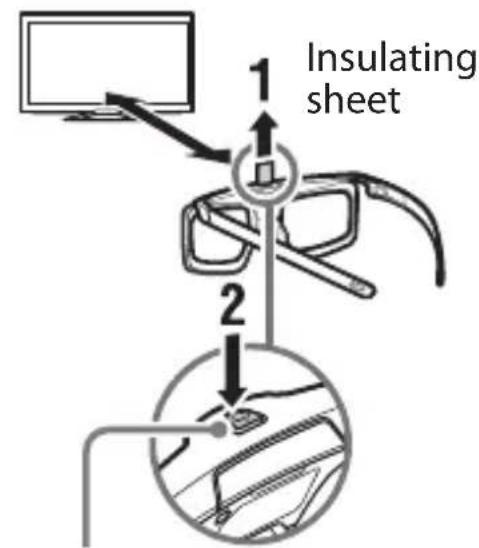
1. Remove the battery's insulating sheet before using the product for the first time.
2. When using Active 3D Glasses for the first time, hold the glasses within a 50 cm range of the TV and turn on the TV. Then hold the ⏻ (Power) button/indicator for 2 seconds. The Active 3D Glasses turn on and registration starts.
(The ⏻ (Power) button/indicator blinks green and yellow). When registration is finished, a message appears in the bottom right of the screen for 5 seconds, and the indicator will light up green for 3 seconds. This process is only required one time.
If registration fails, the Active 3D Glasses will turn off automatically. In this case, repeat the above.
(Power) button / indicator
To turn on and off
To turn on: Press once the power button. To turn off: Hold the power button down for 2 seconds.
To use the SimulView™ mode
SimulView™ allows two players to view independent screen images in full screen while playing the same game on a shared screen. The image is displayed in 2D. To use this feature, the game software and the TV must support SimulView™. When using this mode, the Active 3D Glasses automatically change to SimulView™ mode. Every press of the button on the Active 3D Glasses can switch between the players as follows.
- Mode: SimulView™ mode (Player 1) ↔ SimulView™ mode (Player 2)
- Indicator: Yellow LED blinks every 2 seconds with SimulView™ mode (Player 1) ↔ Yellow LED blinks 2 times every 2 seconds with SimulView™ mode (Player 2)
To replace the battery
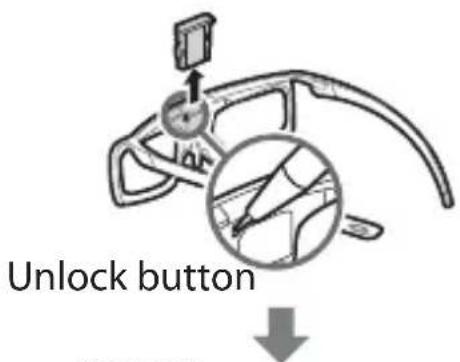
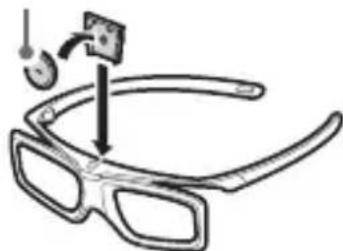
If the LED indicates low battery power (indicator blinks green (yellow when SimulView™ mode) 3 times every 2 seconds), replace the battery. Use a CR2025 battery only. Press the unlock button with the tip of a pen, etc, and take out the battery case, then replace the battery with a new one. After that, be sure to lock the battery case again.
Tips
- If you wear glasses, remove the nose pad of the Active 3D Glasses by pulling it down, then wear them over your glasses.
Notes
- Power off the Active 3D Glasses, when re-register the glasses.
- The glasses turn off if you hold the power button down for 2 seconds, or if no signal from the TV is detected for more than 1 minute.
- 3D effect or SimulView™ effect may be less pronounced if ambient temperature is low.
CR2025
(-) side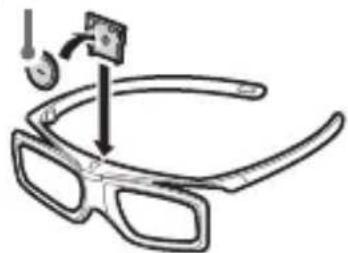
Additional Information
Troubleshooting
In the event of a problem, refer to i-Manual/Help Guide on your TV.
Specifications
Battery type
CR2025 Lithium Manganese Dioxide Battery
Continuous operating time (Approx.)
100 hours
Dimensions (Approx.) (w × h × d)
147 × 46 × 170 mm
Weight including battery
36 g
Design and specifications are subject to change without notice.
Trademark Information
- "SimulView" is a trademark of Sony Computer Entertainment Inc.
- The Bluetooth® word mark and logos are owned by the Bluetooth SIG, Inc. and any use of such marks by Sony Corporation is under license. Other trademarks and trade names are those of their respective owners.
Television
Top view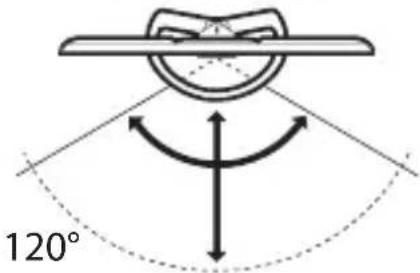
Side view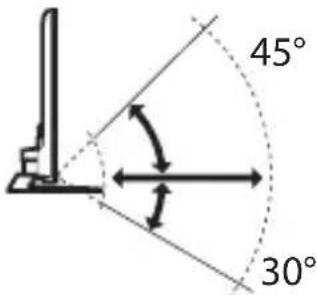
Steps
Top view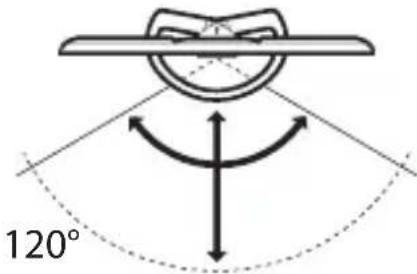
Side view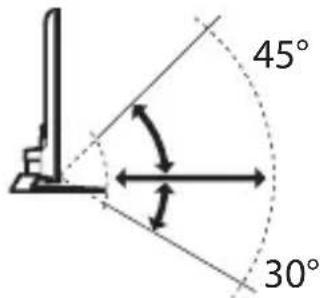
Steps
Television set
Top view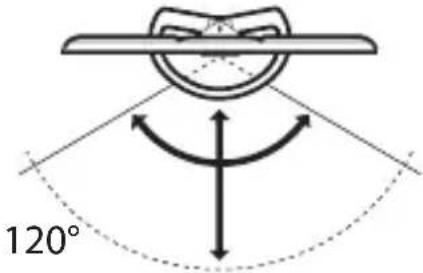
DE
Side view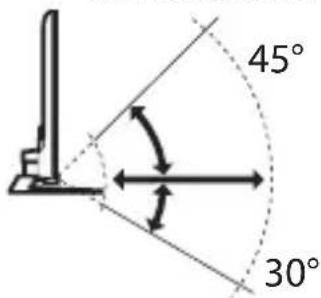
Steps
Top view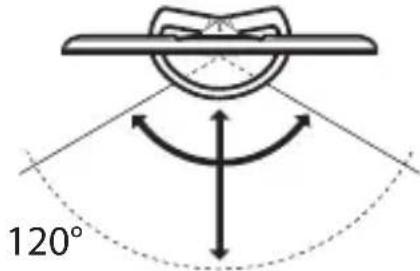
Side view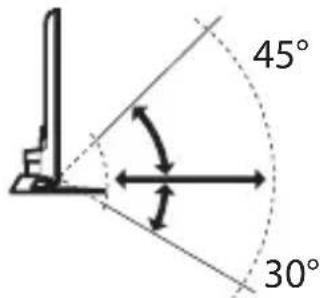
Steps
Dimensions (approx.) (w × h × d)
147×46×170mm
Top view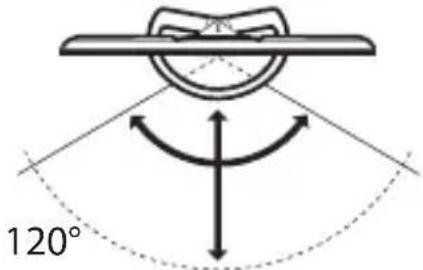
Side view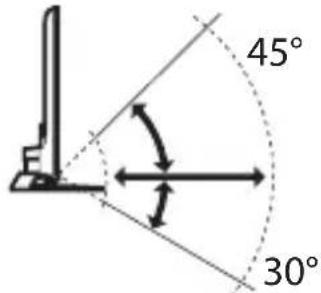
Procedure
Dimensions (approximate) (l × w × h)
147 × 46 × 170 mm
Top view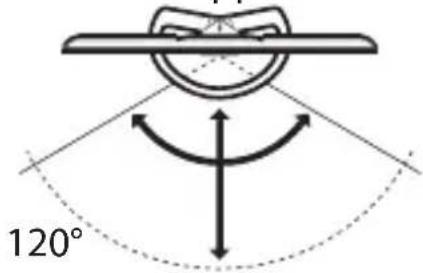
Side view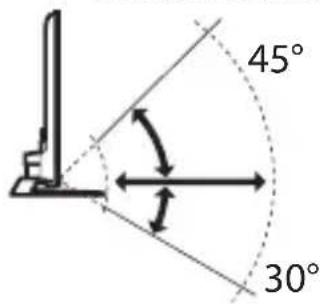
Steps
TV
Top view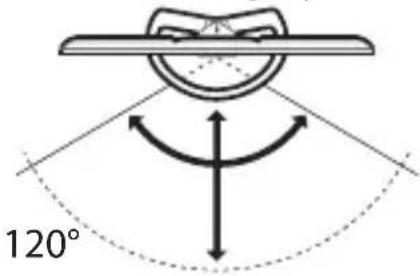
Side view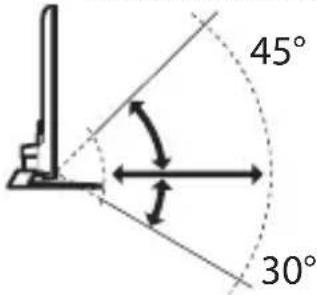
PL
Steps
PT
Steps
DK
Step
DK
Dimensions (approx.) (W × H × D)
147 × 46 × 170 mm
Weight with battery
36 g
Top view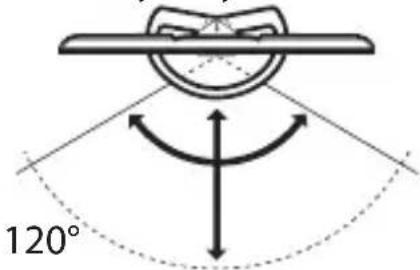
Side view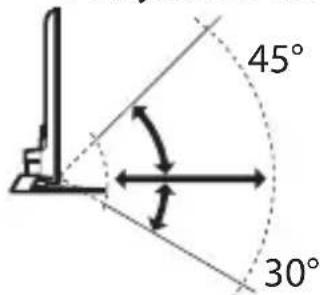
Steps
Steps
TV
Top view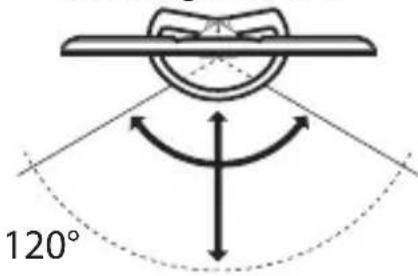
Side view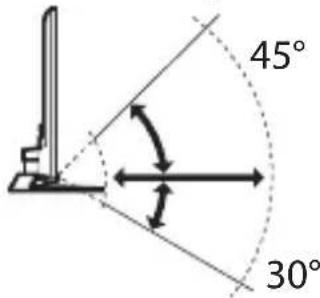
Steps
Unlock button
CR2025
(-) side
Troubleshooting
Top view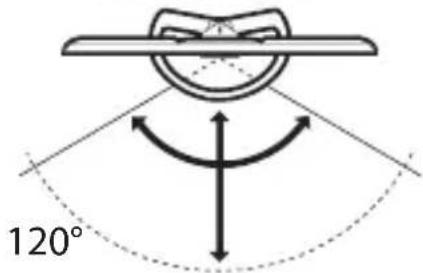
Side view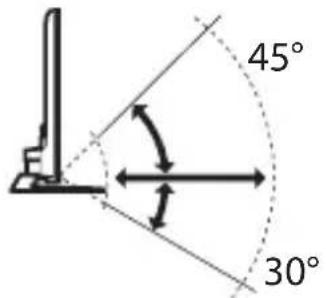
Steps
Top view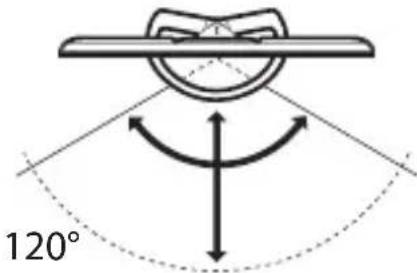
Side view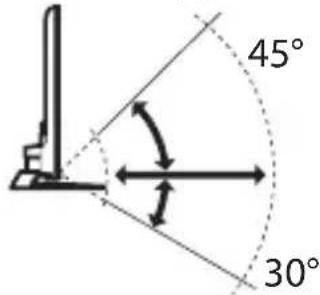
SK
Procedure
SK
Additional information
Troubleshooting
Top view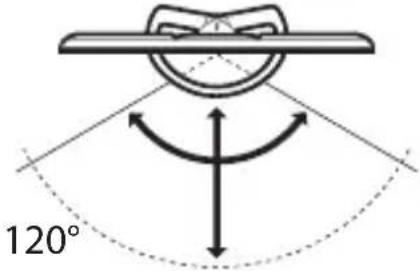
Side view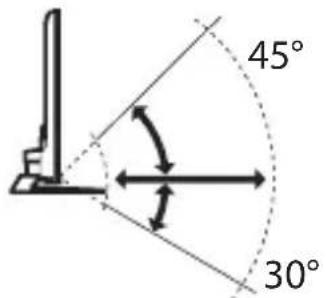
Step
(Power) button/indicator
To turn on or off
Sony Corporation, 1-7-1 Konan, Minato-ku, Tokyo, Japan, 108-0075 Made in China or Malaysia
TV
TV
Top view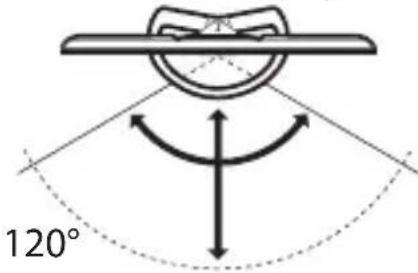
Side view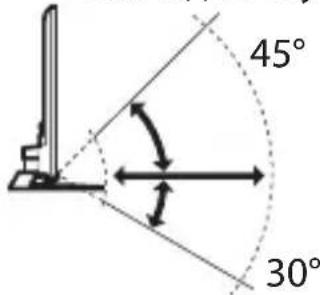
Actions
© 2013 Sony Corporation
- LOCATION OF THE IDENTIFICATION LABEL
- CE
- DISPOSAL OF THE ACTIVE 3D GLASSES
- DISPOSAL OF WASTE BATTERIES
- CAUTION
- WARNING
- PRECAUTIONS FOR USE
- SAFETY PRECAUTIONS
- MAINTENANCE OF YOUR GLASSES
- OVERVIEW
- TV AND ACTIVE 3D GLASSES COMMUNICATION RANGE
- STEPS
- TO TURN ON AND OFF
- TO USE THE SIMULVIEW™ MODE
- TO REPLACE THE BATTERY
- TIPS
- NOTES
- ADDITIONAL INFORMATION
- TROUBLESHOOTING
- SPECIFICATIONS
- BATTERY TYPE
- CONTINUOUS OPERATING TIME (APPROX.)
- DIMENSIONS (APPROX.) (W × H × D)
- WEIGHT INCLUDING BATTERY
- TRADEMARK INFORMATION
- PROCEDURE
- DIMENSIONS (APPROXIMATE) (L × W × H)
- STEP
- WEIGHT WITH BATTERY
- TO TURN ON OR OFF
- ACTIONS
Brand : SONY
Model : TDGBT500A
Category : 3D Glasses