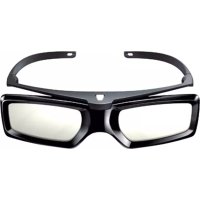
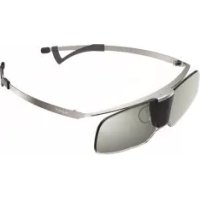
TDG-BR50 - 3D Glasses SONY - Free user manual and instructions
Find the device manual for free TDG-BR50 SONY in PDF.



| Product type | Active shutter 3D glasses |
| Brand | Sony |
| Model | TDG-BR50 |
| Dimensions (W × H × D) | 152 × 40 × 157 mm |
| Weight (with battery) | 49 g |
| Battery type | CR2032 (3 V) |
| Battery life | Up to 100 hours |
| Sensor | Infrared for 3D synchronization |
| LED indicator | Flashes every 3 s (power on), 3 flashes (low battery) |
| Power on | Press the Power button |
| Auto power off | After 5 minutes without infrared signal |
| Compatibility | Compatible Sony 3D televisions |
| Usage | Watching 3D images on Sony TV |
| Care and cleaning | Soft cloth, soapy water; avoid solvents |
| Safety instructions | Do not drop, do not modify, keep out of reach of children |
| Storage temperature | Avoid high temperatures and direct sunlight |
| Battery replacement | Open the cover with a pen, insert CR2032 respecting polarity |
| Color | Black |
Frequently Asked Questions - TDG-BR50 SONY
User questions about TDG-BR50 SONY
0 question about this device. Answer the ones you know or ask your own.
Ask a new question about this device
Download the instructions for your 3D Glasses in PDF format for free! Find your manual TDG-BR50 - SONY and take your electronic device back in hand. On this page are published all the documents necessary for the use of your device. TDG-BR50 by SONY.
USER MANUAL TDG-BR50 SONY
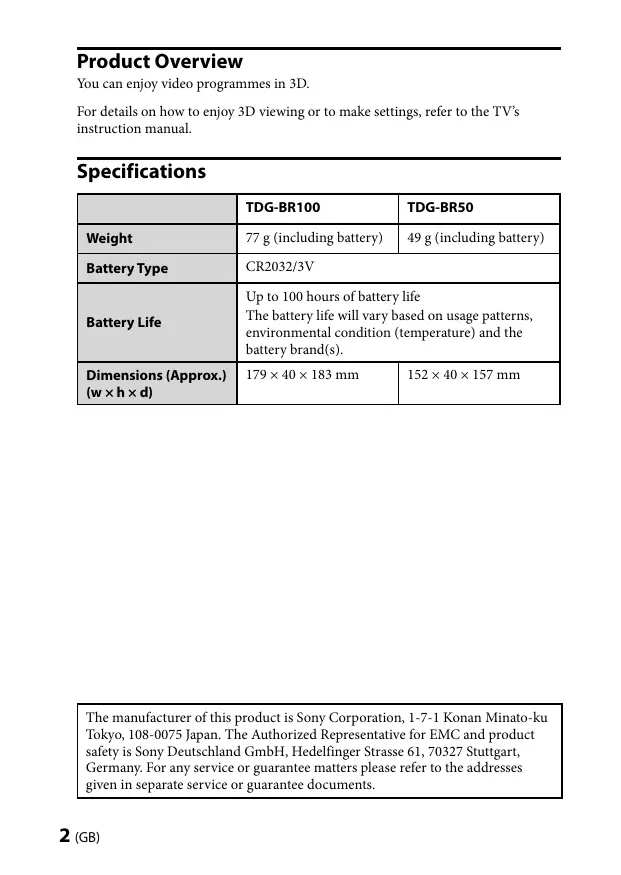
You can enjoy video programmes in 3D.
For details on how to enjoy 3D viewing or to make settings, refer to the TV's instruction manual.
Specifications
| TDG-BR100 | TDG-BR50 | |
| Weight | 77 g (including battery) | 49 g (including battery) |
| Battery Type | CR2032/3V | |
| Battery Life | Up to 100 hours of battery life The battery life will vary based on usage patterns, environmental condition (temperature) and the battery brand(s). | |
| Dimensions (Approx.) (w × h × d) | 179 × 40 × 183 mm | 152 × 40 × 157 mm |
The manufacturer of this product is Sony Corporation, 1-7-1 Konan Minato-ku Tokyo, 108-0075 Japan. The Authorized Representative for EMC and product safety is Sony Deutschland GmbH, Hedelfinger Strasse 61, 70327 Stuttgart, Germany. For any service or guarantee matters please refer to the addresses given in separate service or guarantee documents.

Disposal of waste batteries (applicable in the European Union and other European countries with separate collection systems)
This symbol on the battery or on the packaging indicates that the battery provided with this product shall not be treated as household waste. On certain batteries this symbol might be used in combination with a chemical symbol. The chemical symbols for mercury (Hg) or lead (Pb) are added if the battery contains more than 0.0005% mercury or 0.004% lead. By ensuring these batteries are disposed of correctly, you will help prevent potentially negative consequences for the environment and human health which could otherwise be caused by inappropriate waste handling of the battery. The recycling of the materials will help to conserve natural resources. In case of products that for safety, performance or data integrity reasons require a permanent connection with an incorporated battery, this battery should be replaced by qualified service staff only. To ensure that the battery will be treated properly, hand over the product at end-of-life to the applicable collection point for the recycling of electrical and electronic equipment. For all other batteries, please view the section on how to remove the battery from the product safely. Hand the battery over to the applicable collection point for the recycling of waste batteries. For more detailed information about recycling of this product or battery, please contact your local Civic Office, your household waste disposal service or the shop where you purchased the product.
Disposal of the 3D Glasses


Disposal of Old Electrical & Electronic Equipment (Applicable in the European Union and other European countries with separate collection systems)
This symbol on the product or on its packaging indicates that this product shall not be treated as household waste. Instead it shall be handed over to the applicable collection point for the
recycling of electrical and electronic equipment. By ensuring this product is disposed of correctly, you will help prevent potential negative consequences for the environment and human health, which could otherwise be caused by inappropriate waste handling of this product. The recycling of materials will help to conserve natural resources. For more detailed information about recycling of this product, please contact your local Civic Office, your household waste disposal service or the shop where you purchased the product.
Caution
Please read these safety instructions to ensure your personal safety and prevent property damage.
Precautions for use
- The 3D Glasses are operated by receiving infrared rays from the 3D Sync Transmitter.
Mis-operation may occur if:
- The 3D Glasses do not face the 3D Sync Transmitter
- If there are objects blocking the path between the 3D Glasses and the 3D Sync Transmitter
-
If there are other infrared communication devices or lighting equipment, residential heating equipment, etc. nearby, this may affect their performance.
-
Watch the TV using the 3D Glasses, facing squarely towards the TV.
- 3D effect is inadequate and screen colour will be shifted with lying down position or leaning your head.
- To preserve our environment dispose of used batteries according to your local laws or regulations.
Safety Precautions
- You should only use this product for watching 3D video images on a compatible Sony television.
- Some people may experience discomfort (such as eye strain, fatigue, or nausea) when using this product. Sony recommends that all viewers take regular breaks while watching 3D video images or playing 3D stereoscopic games. The length and frequency of necessary breaks will vary from person to person. You must decide what works best. If you experience any discomfort, you should stop using this product and watching the 3D video images until the discomfort ends; consult a doctor if you believe necessary. You should also review (i) the instruction manual of your television, as well as any other device or media used with your television and (ii) our website (http://www.sony-europe.com/myproduct) for the latest information. The vision of young children (especially those under six years old) is still under development. Consult your doctor (such as a pediatrician or eye doctor) before allowing young children to watch 3D video images or play 3D stereoscopic games. Adults should supervise young children to ensure they follow the recommendations listed above.
- Do not drop or modify these 3D Glasses.
- If these glasses are broken, keep broken pieces away from your mouth or eyes.
- Keep children away when replacing the battery or opening the battery cover. If a child swallows the battery or battery cover, consult a doctor immediately.
- Do not dispose of the batteries used in 3D Glasses in a fire.
- When replacing the battery, insert it using the correct +/- orientation.
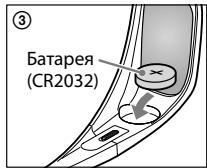
- Use only the specified battery for this product: Lithium coin cell battery, CR2032.
- Be careful not to pinch your fingers in hinges when bending the temple frames.
- Do not use, store, or leave the 3D Glasses or the battery near fire, or in places with a high temperature, e.g., in direct sunlight, or in sun-heated cars.
Maintenance of your Glasses
- Wipe the Glasses gently with a soft cloth.
- Stubborn stains may be removed with a cloth slightly moistened with a solution of mild soap and warm water.
- If using a chemically pretreated cloth, be sure to follow the instructions provided on the package.
- Never use strong solvents such as a thinner, alcohol or benzine for cleaning.
Before use
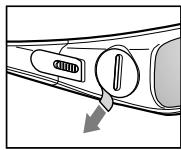
Remove the battery's insulating sheet before using the product for the first time.
Parts and Components
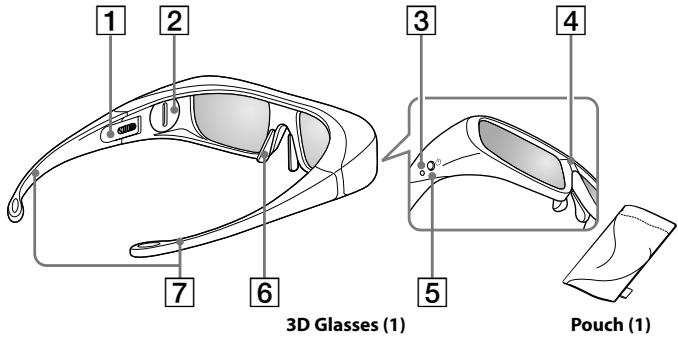
TDG-BR100
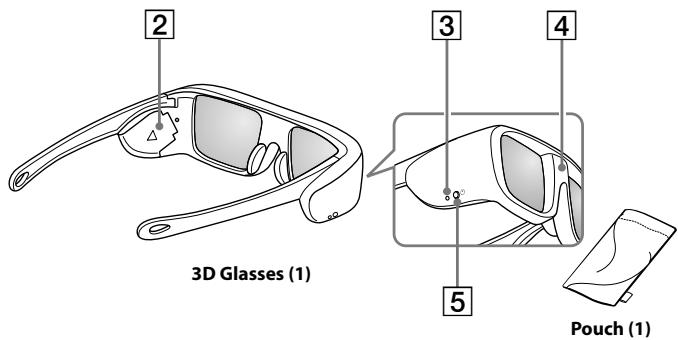
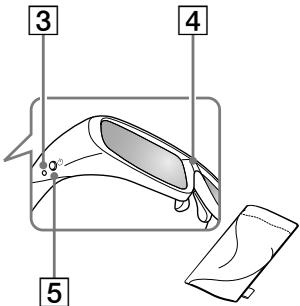
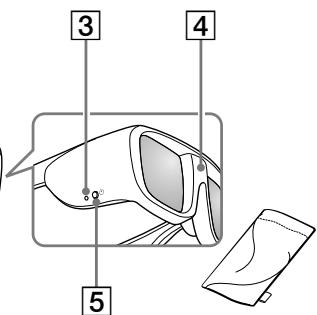
TDG-BR50
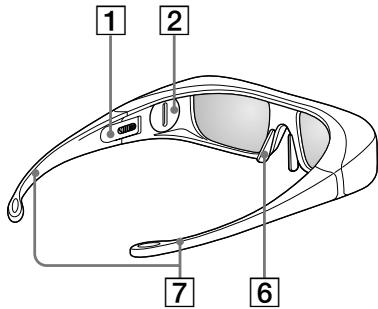
1 Slide Switch (TDG-BR100 only)
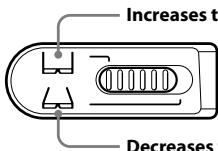
Increases the width of the glasses
Set both the switches on either side for a comfortable fit. Close the temple frames slightly inwards to set the switch.
Decreases the width of the glasses
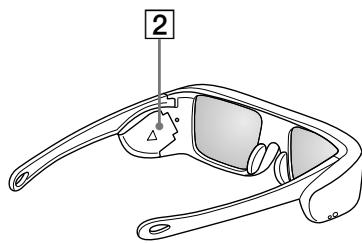
2 Battery Cover
Detaching or opening the cover when replacing the battery.
3 LEDindicator
Flashes one time every 3 seconds: Power on
Flashes three times every 3 seconds: Low battery: Battery capacity is almost running out.
Flashes three times: Power off
4 IR Sensor
Receiving signals from the 3D Sync Transmitter.
This part receives IR (infrared rays) from the 3D Sync Transmitter.
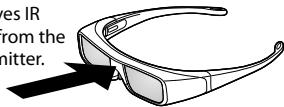
IR's entry angle differs according to distance or usage environment.
Note
Please keep the IR Sensor clean.
5 Power Button
Power on: Press once
Power off: Hold power button down for 2 seconds
- Auto power off: More than 5 minutes without IR signal
6 Nose pad (TDG-BR100 only)
Adjust the nose pad for a comfortable fit.
7 Temple frames (TDG-BR100 only)
You can bend (adjust) the temple frames for a comfortable fit.
Replacing the battery
If the LED indicates low battery power, replace the battery. Use a CR2032 battery.
TDG-BR100
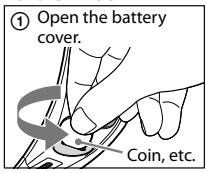
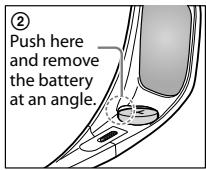
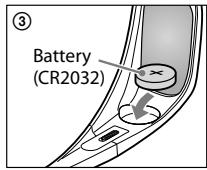
Note
When opening or closing the battery cover, make sure the coin, etc., is properly inserted in the groove of the battery cover.
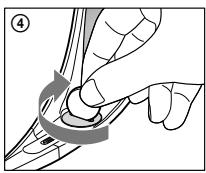
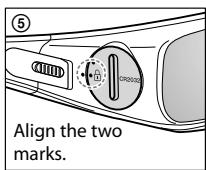
TDG-BR50
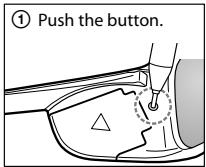
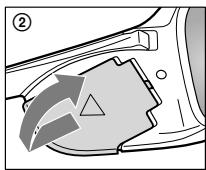
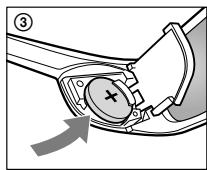
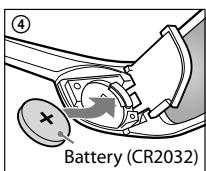
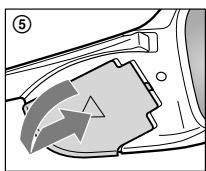
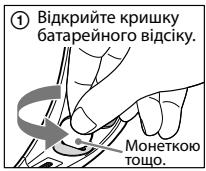
- Push the button of the battery cover with the tip of a pen, etc. (①)
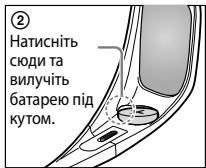
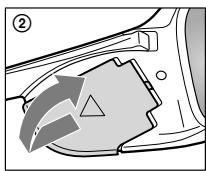
- Slide the battery cover upward to open. (2)
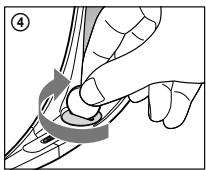
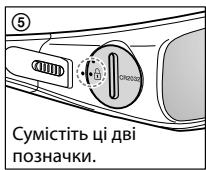
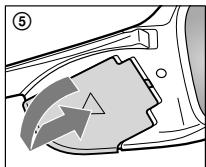
- Slide the battery cover to close. (⑤)
Troubleshooting
In the event of a problem, refer to the TV's instruction manual.
Aperçu du produit
Vou puez profiter de programmes video en 3D.
Aqaipeote to movwtko ovlo tnc mtatapiac npotou xnpouoioiouste to poiov yia npwtn opa.
Mépn kaléaptnμata
TDG-BR100
Tuaia 3D (1)
Onkn (1)
TDG-BR50
Tuaλiδ 3D (1)
Onkn (1)
Product Compliance Europe (PCE),
70327 Stuttgart, Germany
Tel: (0)711-5858-0, Fax: (0)711-5858-488
URL of EU DoC Database: http://www.compliance.sony.de/
Uretici Firma:
Sony Corporation
1-7-1 Konan, Minato-ku, Tokyo 108-0075 Japan
TexhiHixapaKTepeNtKN
3 Cbitnloioghn iHdkaTop
BIIMae 1 pa3 KOxHi 3 cekyHn: KINBJIeHHB BBIMKHeHe
BIIMaE 3 pa3n KOxHi 3 cekyHn: Hn3bKn 3apJd 6aTapeKn, 6aTapeKa
maJxpeo3pIuIaIc
BIMMa3pa3n:KMBJIeHHBIMKHeHe
4 14-DAuHK
IaTnIK OTpIMYe cngHaJIb BiI IpepaBaa 3D cnHaJIb.
LjaactnHa npimmae
iHpaepboHi npomehi
BIDpepeaBaay3D
CnHany.
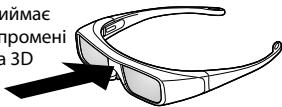
KyT BxOyI INΦpaupeBPOHIN IπPOMeHIB 3aJIeKHTb BiI BICIaTHa TEcePEOBIIa BIKOPKCTAHNIA.
Ppumitka
Iu-ceHcOp MaE 6yTN uNCTm.
5 KhoNkaXMBJIeHHa
YbIMKHeHHa:HaTnCHiB 1 pa3
BmKHeHHa:HaTncHt b i TpMaIte KHOIIKy XnBJIeHHa 2 cekyHnn
*ABTomatuHHe BmKHeHHa: kIIO IU-cnHaJI BiICyTHiI 6JIbIe 5 XBNINH
6 PiiklaKa dya Hoca (nme dTGD-BR100)
BipperyIIOte Hocoby HaKlaIaKy TaK, IIo6 Bam 6yIo 3pyuHo.
7 Dzykni (niiue nTGD-BR100)
BipreynTe PIOJKeHHa DyKo, a6H 3a6e3neHTN KOMΦOpTHy Iocay OkyIPIB.
3amHa 6aTapei
JiKIO CBITIOIOHN HINIKATOP BKA3YE HA HN3bKN 3apJI 6aTapei, 3amHITb 6aTapeo. BHKOpNCTOBYe 6aTapei TNIY CR2032.
TDG-BR100
Ppmmitka
IIo6 BiikpnTn QI 3aKpnTn KpNlkiy 6aTaapeHOrO BiCiKy, BCTaTe MoHETy a60 IHIN CXOXJN PpeMTe Y Na3 Ha KpnIi.
TDG-BR50
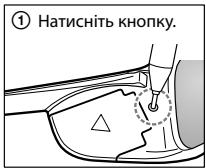
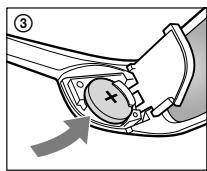
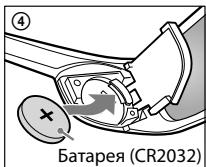
- Hatachitb KhoNkUHa KpHnIi 6aTaapeHOrO BiCicKy KInHcKOM KyIbKOBoi pyuKn ToIO. (1)
- IocyHbTe KpnIky 6aTaapeHoro BiDckiy Bropy, IIO6 BiKpIu II. (2)
- Nocyhbte Kpnikky 6aTaapeHoro BiicKi, yio6 3akpurtn. (⑤)
UcyhenHHHeCnpaBHOCTe
KIO BUNHIIa HecippaBHiCTb, 3BepHItbcI IO Noci6Hnka 3 ekciyyataaTeIeBi3opa.
http://www.sony.net/
Printed in China