
TDG-BR100 - 3D Glasses SONY - Free user manual and instructions
Find the device manual for free TDG-BR100 SONY in PDF.



| Brand | Sony |
| Model | TDG-BR100 |
| Product type | Active 3D glasses |
| Weight | 77 g (including battery) |
| Dimensions (W × H × D) | 179 × 40 × 183 mm |
| Power source | 1 CR2032 lithium coin cell battery (3 V) |
| Battery life | Up to 100 hours (depending on usage and temperature) |
| Main function | Viewing 3D content on compatible Sony TVs |
| Synchronization technology | Infrared with TV emitter |
| LED indicator | Slow blink (on), fast blink (low battery), triple blink (off) |
| Power on/off | Single press to turn on, hold 2 s to turn off, auto off after 5 min without signal |
| Width adjustment | Sliding switches on temples |
| Nose pad | Adjustable for optimal comfort |
| Care and cleaning | Soft cloth, warm soapy water; avoid strong solvents |
| Spare parts | CR2032 battery available in stores |
| Safety | Do not modify, keep out of reach of children, do not dispose of in fire |
| Package contents | 3D glasses, protective case |
| Compatibility | Sony 3D TVs with built-in infrared emitter |
Frequently Asked Questions - TDG-BR100 SONY
User questions about TDG-BR100 SONY
0 question about this device. Answer the ones you know or ask your own.
Ask a new question about this device
Download the instructions for your 3D Glasses in PDF format for free! Find your manual TDG-BR100 - SONY and take your electronic device back in hand. On this page are published all the documents necessary for the use of your device. TDG-BR100 by SONY.
USER MANUAL TDG-BR100 SONY
You can enjoy video programmes in 3D.
For details on how to enjoy 3D viewing or to make settings, refer to the TV's instruction manual.
Specifications
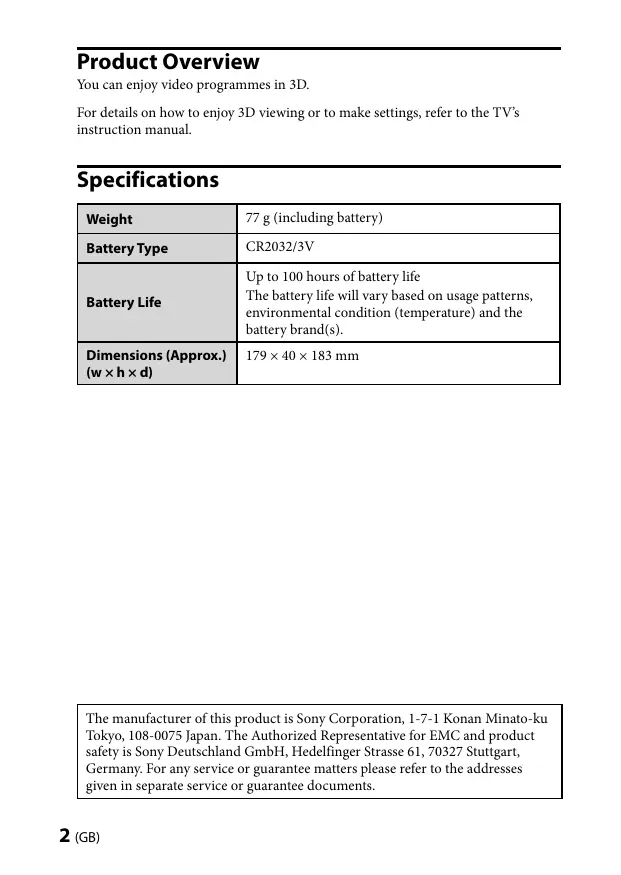
| Weight | 77 g (including battery) |
| Battery Type | CR2032/3V |
| Battery Life | Up to 100 hours of battery life The battery life will vary based on usage patterns, environmental condition (temperature) and the battery brand(s). |
| Dimensions (Approx.) (w × h × d) | 179 × 40 × 183 mm |
The manufacturer of this product is Sony Corporation, 1-7-1 Konan Minato-ku Tokyo, 108-0075 Japan. The Authorized Representative for EMC and product safety is Sony Deutschland GmbH, Hedelfinger Strasse 61, 70327 Stuttgart, Germany. For any service or guarantee matters please refer to the addresses given in separate service or guarantee documents.

Disposal of waste batteries (applicable in the European Union and other European countries with separate collection systems)
This symbol on the battery or on the packaging indicates that the battery provided with this product shall not be treated as household waste. On certain batteries this symbol might be used in combination with a chemical symbol. The chemical symbols for mercury (Hg) or lead (Pb) are added if the battery contains more than 0.0005% mercury or 0.004% lead. By ensuring these batteries are disposed of correctly, you will help prevent potentially negative consequences for the environment and human health which could otherwise be caused by inappropriate waste handling of the battery. The recycling of the materials will help to conserve natural resources. In case of products that for safety, performance or data integrity reasons require a permanent connection with an incorporated battery, this battery should be replaced by qualified service staff only. To ensure that the battery will be treated properly, hand over the product at end-of-life to the applicable collection point for the recycling of electrical and electronic equipment. For all other batteries, please view the section on how to remove the battery from the product safely. Hand the battery over to the applicable collection point for the recycling of waste batteries. For more detailed information about recycling of this product or battery, please contact your local Civic Office, your household waste disposal service or the shop where you purchased the product.
Disposal of the 3D Glasses
Disposal of Old Electrical & Electronic Equipment (Applicable in the European Union and other European countries with separate collection systems)
This symbol on the product or on its packaging indicates that this product shall not be treated as household waste. Instead it shall be handed over to the applicable collection point for the recycling of electrical and electronic equipment. By ensuring this product is disposed of correctly, you will help prevent potential negative consequences for the environment and human health, which could otherwise be caused by inappropriate waste handling of this product. The recycling of materials will help to conserve natural resources. For more detailed information about recycling of this product, please contact your local Civic Office, your household waste disposal service or the shop where you purchased the product.
Caution
Please read these safety instructions to ensure your personal safety and prevent property damage.
Precautions for use
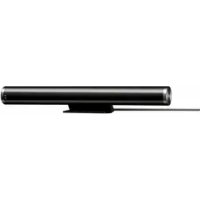
- The 3D Glasses are operated by receiving infrared rays from the 3D Sync Transmitter.
Mis-operation may occur if:
- The 3D Glasses do not face the 3D Sync Transmitter
- If there are objects blocking the path between the 3D Glasses and the 3D Sync Transmitter
- If there are other infrared communication devices or lighting equipment, residential heating equipment, etc. nearby, this may affect their performance.
- Watch the TV using the 3D Glasses, facing squarely towards the TV.
- 3D effect is inadequate and screen colour will be shifted with lying down position or leaning your head.
- To preserve our environment dispose of used batteries according to your local laws or regulations.
Safety Precautions
- You should only use this product for watching 3D video images on a compatible Sony television.
- Some people may experience discomfort (such as eye strain, fatigue, or nausea) when using this product. Sony recommends that all viewers take regular breaks while watching 3D video images or playing 3D video games. The length and frequency of necessary breaks will vary from person to person. You must decide what works best. If you experience any discomfort, you should stop using this product and watching the 3D video images until the discomfort ends; consult a doctor if you believe necessary. You should also review (i) the instruction manual of your television, as well as any other device or media used with your television and (ii) our website (http://www.sony-europe.com/myproduct) for the latest information. The vision of young children (especially those under six years old) is still under development. Consult your doctor (such as a pediatrician or eye doctor) before allowing young children to watch 3D video images or play 3D video games. Adults should supervise young children to ensure they follow the recommendations listed above.
- Do not drop or modify these 3D Glasses.
- If these glasses are broken, keep broken pieces away from your mouth or eyes.
- Keep children away when replacing the battery or opening the battery cover. If a child swallows the battery or battery cover, consult a doctor immediately.
- Do not dispose of the batteries used in 3D Glasses in a fire.
- When replacing the battery, insert it using the correct + / - orientation.
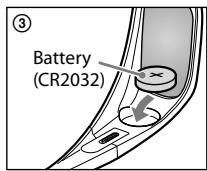
- Use only the specified battery for this product: Lithium coin cell battery, CR2032.
- Be careful not to pinch your fingers in hinges when bending the temple frames.
Maintenance of your Glasses
- Wipe the Glasses gently with a soft cloth.
- Stubborn stains may be removed with a cloth slightly moistened with a solution of mild soap and warm water.
- If using a chemically pretreated cloth, be sure to follow the instructions provided on the package.
- Never use strong solvents such as a thinner, alcohol or benzine for cleaning.
Parts and Components
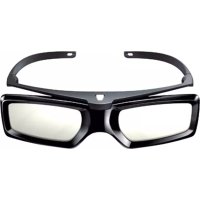
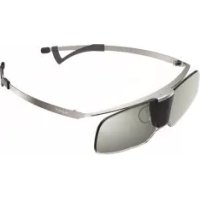
3D Glasses (1)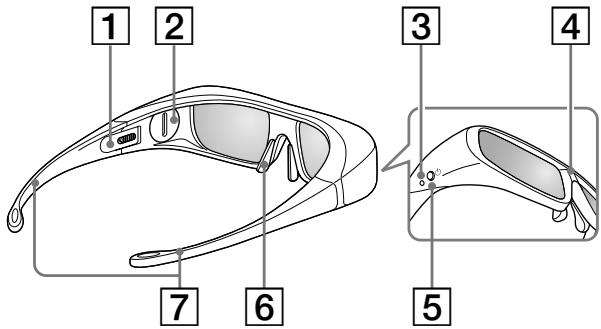
Pouch (1)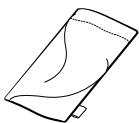
1 Slide Switch
Set the switch for a comfortable fit. Set both switches on either side for a comfortable fit. Close the temple frames slightly inwards to set the switch.
Increases the width of the glasses Decreases the width of the glasses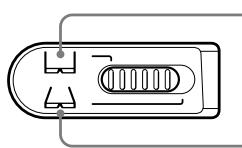
2 Battery Cover
Detaching the cover when replacing the battery.
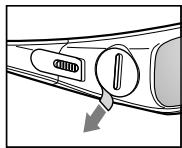
Before use: Remove the battery's insulating sheet before using the product for the first time.
3 LED indicator
Flashes one time every 3 seconds: Power on
Flashes three times every 3 seconds: Low battery: Battery capacity is almost running out.
Flashes three times: Power off
4 IR Sensor
Receiving signals from the 3D Sync Transmitter.
This part receives IR (infrared rays) from the 3D Sync Transmitter.
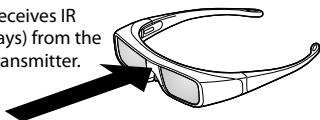
IR's entry angle differs according to distance or usage environment.
Note
Please keep the IR Sensor clean.
5 Power Button
Power on: Press once
Power off: Hold power button down for 2 seconds
- Auto power off: More than 5 minutes without IR signal
6 Nose pad
Adjust the nose pad for a comfortable fit.
7 Temple frames
You can bend (adjust) the temple frames for a comfortable fit.
Replacing the battery
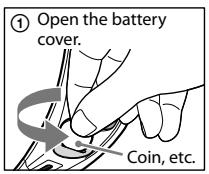
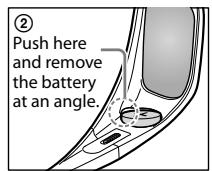
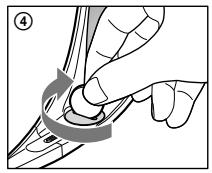
If the LED indicates low battery power, replace the battery. Use a CR2032 battery.
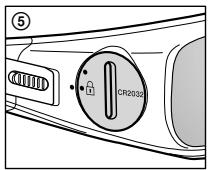
Note
When opening or closing the battery cover, make sure the coin, etc., is properly inserted in the groove of the battery cover.
Troubleshooting
In the event of a problem, refer to the TV's instruction manual.
Product Overview
Product Compliance Europe (PCE),
70327 Stuttgart, Germany
Tel: (0)711-5858-0, Fax: (0)711-5858-488
URL of EU DoC Database: http://www.compliance.sony.de/
Manufacturer:
Sony Corporation
1-7-1 Konan, Minato-ku, Tokyo 108-0075 Japan
Safety Regulations
- This device can only be used for viewing 3D video images on a compatible Sony television. When using this device, some viewers may experience discomfort (such as eye strain, fatigue, or nausea). Sony recommends that all viewers take regular breaks while viewing 3D video images or playing 3D games. The duration and frequency of breaks depend on individual needs. You should choose the most suitable option. If you experience discomfort, you should stop using the device and viewing 3D video images until the discomfort subsides; if necessary, consult a doctor. You should also refer to (i) the operating instructions for the television and any other device used with the television, and also visit (ii) the website (http://www.sony-ep.com/myproduct) for the latest information. The vision of young children (especially those under six years old) is not yet fully developed. Before allowing children to watch 3D video images or play 3D games, consult a doctor (for example, a pediatrician or ophthalmologist). Young children should be under the supervision of adults to ensure they follow the above recommendations.
- Do not drop or subject these 3D glasses to impact.
- Do not allow debris to enter the eye area. If the lens cover is damaged, contact the manufacturer. If a child swallows the lens cover, seek medical attention immediately.
- Do not ingest batteries used in 3D glasses.
- When replacing batteries, insert them with the correct polarity (+/-).
- Use only the specified battery type for this device: lithium coin battery, CR2032. Follow safety precautions to avoid swallowing the battery.
Care for the glasses.
- Gently wipe the lenses with a soft cloth. Stubborn dirt can be removed with a cloth slightly dampened with a mild soap solution. If using a chemical cleaner, always follow the instructions on the package. Do not use strong solvents such as thinner, alcohol, or gasoline.
Parts and components
3D glasses (1)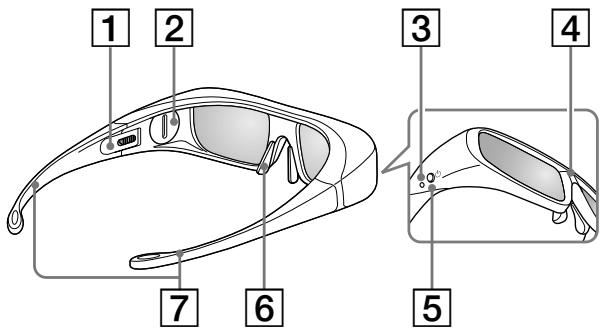
Case (1)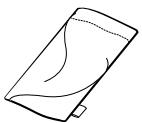
1 Hinge switch
Set the switch to a position that provides comfortable placement of the glasses on the head.
Set the hinge switch to the desired position on both sides. To change the switch position, gently bend the temple arms inward.
Increase width of glasses / Decrease width of glasses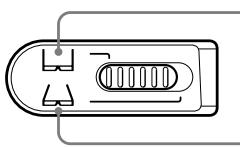
2 Battery compartment cover
When replacing batteries, remove the cover.
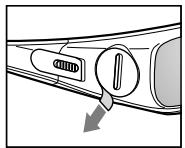
Before first use: Before first use, remove the insulating strip from the battery.
LED indicator
Flashes once every 3 seconds: power on. Flashes 3 times every 3 seconds: low battery, battery almost discharged.
Flashes rapidly: power off
4 IR transmitter
Receives signals from the 3D transmitter.
These parts receive infrared (IR) signals from the 3D transmitter.
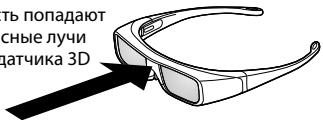
The reception angle of the infrared signal depends on the distance from the screen and the conditions of use.
Usage
The IR transmitter must remain clean.
5 Power button
Turn on: press once.
Power off: press and hold the power button for 2 seconds.
*Automatic power off: absence of infrared signal for more than 5 minutes.
6 Headphone jack
Operating instructions for the device.
7 Functions
To ensure comfortable positioning, the bracket can be adjusted.
Battery replacement
If the indicator light shows low battery, replace it. Use a CR2032 battery.
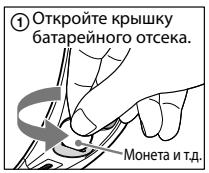
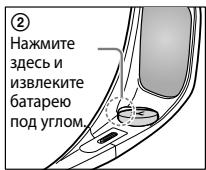
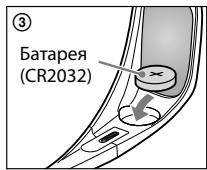
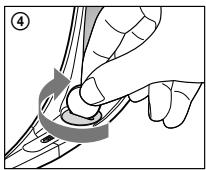
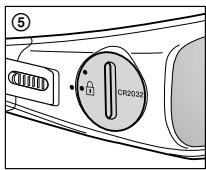
Note
When opening and closing the battery cover, make sure the coin and similar items are firmly inserted into the slot on the battery cover.
Troubleshooting
If problems occur, refer to the TV operating instructions.
3D function
This function provides the possibility of viewing video material in three-dimensional format.
Information about 3D image transmission and parameter settings is in the TV screen menu.
Technical specifications
Power on/off: Press the power button for 2 seconds. Automatic power on: When a signal is detected, it turns on automatically.
Adjust the headband so that it is comfortable for you.
7 Buttons
Adjust the headband to ensure a comfortable fit.
Battery replacement
When the indicator light shows a low battery, replace the battery. Use a CR2032 battery.
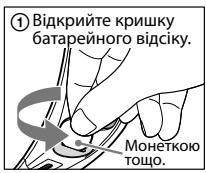
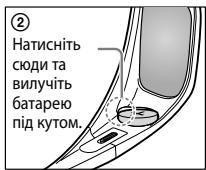
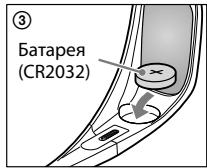
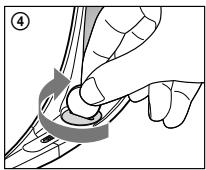
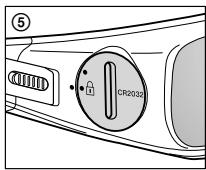
Lid
To open or close the battery compartment lid, insert a coin or similar object into the slot on the lid.
Troubleshooting
If a malfunction occurs, refer to the operating instructions.
http://www.sony.net/
Printed in China
- SPECIFICATIONS
- DISPOSAL OF WASTE BATTERIES (APPLICABLE IN THE EUROPEAN UNION AND OTHER EUROPEAN COUNTRIES WITH SEPARATE COLLECTION SYSTEMS)
- DISPOSAL OF THE 3D GLASSES
- DISPOSAL OF OLD ELECTRICAL & ELECTRONIC EQUIPMENT (APPLICABLE IN THE EUROPEAN UNION AND OTHER EUROPEAN COUNTRIES WITH SEPARATE COLLECTION SYSTEMS)
- CAUTION
- PRECAUTIONS FOR USE
- SAFETY PRECAUTIONS
- MAINTENANCE OF YOUR GLASSES
- PARTS AND COMPONENTS
- SLIDE SWITCH
- BATTERY COVER
- LED INDICATOR
- IR SENSOR
- NOTE
- POWER BUTTON
- NOSE PAD
- TEMPLE FRAMES
- REPLACING THE BATTERY
- TROUBLESHOOTING
- PRODUCT OVERVIEW
- SONY CORPORATION
- SAFETY REGULATIONS
- CARE FOR THE GLASSES
- HINGE SWITCH
- BATTERY COMPARTMENT COVER
- IR TRANSMITTER
- USAGE
- HEADPHONE JACK
- FUNCTIONS
- BATTERY REPLACEMENT
- D FUNCTION
- BUTTONS
- LID
Brand : SONY
Model : TDG-BR100
Category : 3D Glasses