SPIW4222 - Air-conditioner WHIRLPOOL - Free user manual and instructions
Find the device manual for free SPIW4222 WHIRLPOOL in PDF.



| Product type | Split air conditioner (indoor unit + outdoor unit) |
| Brand | Whirlpool |
| Model | SPIW4222 |
| Power supply | 220-240 V, 50 Hz (estimated) |
| Recommended circuit breaker capacity | 16 A (for 9K-12K models) |
| Refrigerant | R410a, GWP 2088 |
| Maximum refrigerant charge | 2.5 kg |
| Main functions | Cooling, heating, ventilation, 6th Sense, Sleep (4 levels), Around U, Jet, Super Silent, Energy saving, Timer |
| Remote control | Infrared, range up to 7 m, auto lock, AAA batteries (2 × 1.5 V) |
| Air filter | Washable, cleaning recommended every 200 hours, cleaning indicator after 720 hours |
| Auto restart | Yes, adjustable via button on the indoor unit |
| Auto defrost | Yes, in heating mode (duration 6-10 min) |
| Anti-freeze protection | Yes, compressor stops if heat exchanger < 0°C |
| Emergency button | Yes, on the indoor unit (on/off and 6th Sense mode) |
| Installation | By a qualified professional, distance from floor > 2.5 m, wall > 50 mm, ceiling > 200 mm |
| Cleaning | Front panel: soft dry cloth. Filter: warm water (<40°C) and neutral detergent |
| Safety | Automatic shutdown in case of overload, mandatory grounding, electrical leakage protection (RCD 30mA) |
| Optional accessories | Wpro SmartClim for Wi-Fi control |
Frequently Asked Questions - SPIW4222 WHIRLPOOL
User questions about SPIW4222 WHIRLPOOL
0 question about this device. Answer the ones you know or ask your own.
Ask a new question about this device
Download the instructions for your Air-conditioner in PDF format for free! Find your manual SPIW4222 - WHIRLPOOL and take your electronic device back in hand. On this page are published all the documents necessary for the use of your device. SPIW4222 by WHIRLPOOL.
USER MANUAL SPIW4222 WHIRLPOOL
Instructions for use
Gebrauchsanweisung
- Download the complete instruction manual on docs.whirlpool.eu or call the phone number shown on the warranty booklet.
- Before using the appliance, read these safety instructions. Keep them nearby for future reference.
• These instructions and the appliance itself provide important safety warnings, to be observed at all times. The manufacturer declines any liability for failure to observe these safety instructions, for inappropriate use of the appliance or incorrect setting of controls. - Very young children (0-3 years) should be kept away from the appliance. Young children (3-8 years) should be kept away from the appliance unless continuously supervised. Children from 8 years old and above and persons with reduced physical, sensory or mental capabilities or lack of experience and knowledge can use this appliance only if they are supervised or have been given instructions on safe use and understand the hazards involved. Children must not play with the appliance. Cleaning and user maintenance must not be carried out by children without supervision.
PERMITTED USE
- CAUTION: the appliance is not intended to be operated by means of an external switching device, such as a timer, or separate remote controlled system.
- This appliance is intended to be used in household and similar applications such as: hotels and working offices.
• ⚠️ This appliance is not for professional use. - Always turn off the air conditioner by remote control first. Do not use the power supply circuit breaker or pull off the plug to turn it off. Disconnect the air conditioner from the power supply if it is to be left unused for a long period of time or during a thunder/lightning storm.
- ⚠️ Never insert obstacle in the air outlet-risk of injury. Keep ventilation openings clear of any obstruction.
- Do not place any other electrical products or household belongings under indoor unit or outdoor unit. Condensation dripping from the unit might get them wet, and may cause damage or malfunction of your property.
INSTALLATION
- The appliance must be handled and installed by two or more persons - risk of injury. Use protective gloves to unpack and install - risk of cuts.
-
Installation, including electrical connections, and repairs must be carried out by a qualified technician according to national wiring rules. Do not repair or replace any part of the appliance unless specifically stated in the user manual. Keep children away from the installation site. After unpacking the appliance, make sure that it has not been damaged during transport. In the event of problems, contact the dealer or your nearest After-sales Service. Once installed, packaging waste (plastic, styrofoam parts etc.) must be stored out of reach of children - risk of suffocation. The appliance must be disconnected from all remote power supply before any installation operation - risk of electric shock. During installation, make sure the appliance does not damage the power cable - risk of fire or electric shock. Only activate the appliance when the installation has been completed.
-
When moving or relocating the air conditioner, consult experienced service technicians for disconnection and reinstallation of the unit.
- The appliance shall not be installed in the laundry.
- Appliance shall be installed, operated and stored in a room with a floor area larger than 10m^2 . Mount the indoor unit at least 2.5m above floor or grade level.
- The installation of pipe-work shall be kept in a room with a floor area larger than 10m^2 in compliance with national gas regulations.
ELECTRICAL WARNINGS
- The power supply must be of rated voltage with special circuitry for the appliance. The diameter of the power cord must comply with requirements.
- A multi-pole switch shall be installed in the fixed wiring in accordance with the wiring rules and the appliance must be earthed in conformity with national electrical safety standards.
- An all-pole disconnection switch having a contact separation of at least 3 mm in all poles should be connected in fixed wiring in accordance national with wiring rules, and the appliance must be earthed in conformity with national electrical safety standards.
- Do not use extension leads, multiple sockets or adapters. The electrical components must not be accessible to the user after installation. Do not use the appliance when you are wet or barefoot. Do not operate this appliance if it has a damaged power cable or plug, if it is not working properly, or if it has been damaged or dropped.
- If the supply cord is damaged, it must be replaced with an identical one by the manufacturer, its service agent or similarly qualified persons in order to avoid a hazard - risk of electric shock.
- A residual current device (RCD) having rated residual operation current not exceeding 30 mA shall be incorporated in fixed wiring according to national law.
- The temperature of refrigerant circuit will be high, please keep the interconnection cable away from the copper tube.
- Ensure safe grounding and a grounding wire connected with the special grounding system of the building, installed by professionals. The appliance must be fitted with electrical leakage protection switch and an auxiliary circuit breaker with sufficient capacity. The circuit breaker must also have a magnetic and a thermal tripping function to ensure protection in case of short-circuit and overload.
| Model 9K & 12K 18K 24K | |||
| Required capacity of circuit breaker 16A 20A 25A |
- For the connection of power cord and cable connection between indoor and outdoor units, please see the wiring diagram on the appliance.
CLEANING AND MAINTENANCE
- ⚠ WARNING: Ensure that the appliance is switched off and disconnected from the power supply before performing any maintenance operation; never use steam cleaning equipment - risk of electric shock.
DISPOSAL OF PACKAGING MATERIALS
The packaging material is 100% recyclable and is marked with the recycle symbol ( ) The various parts of the packaging must therefore be disposed of responsibly and in full compliance with local authority regulations governing waste disposal.
DISPOSAL OF HOUSEHOLD APPLIANCES
This appliance is manufactured with recyclable or reusable materials. Dispose of it in accordance with local waste disposal regulations. For further information on the treatment, recovery and recycling of household electrical appliances, contact your local authority, the collection service for household waste or the store where you purchased the appliance. This appliance is marked in compliance with European Directive 2012/19/EU, Waste Electrical and Electronic Equipment (WEEE). By ensuring this product is disposed of correctly, you will help prevent negative consequences for the environment and human health.
The (✗) symbol on the product or on the accompanying documentation indicates that it should not be treated as domestic waste but must be taken to an appropriate collection center for the recycling of electrical and electronic equipment.
DECLARATIONS OF CONFORMITY
This product contains Fluorinated Greenhouse Gases covered by the Kyoto Protocol, the refrigerant gas being in a hermetically sealed system. (R410a, GWP 2088). The maximum refrigerant charge amount is 2.5 kg. Please refer to the rating label for detailed information.
Product description
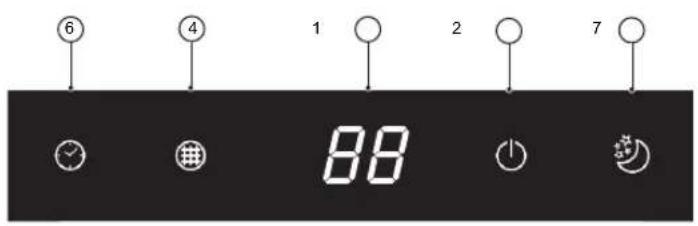
Indoor unit
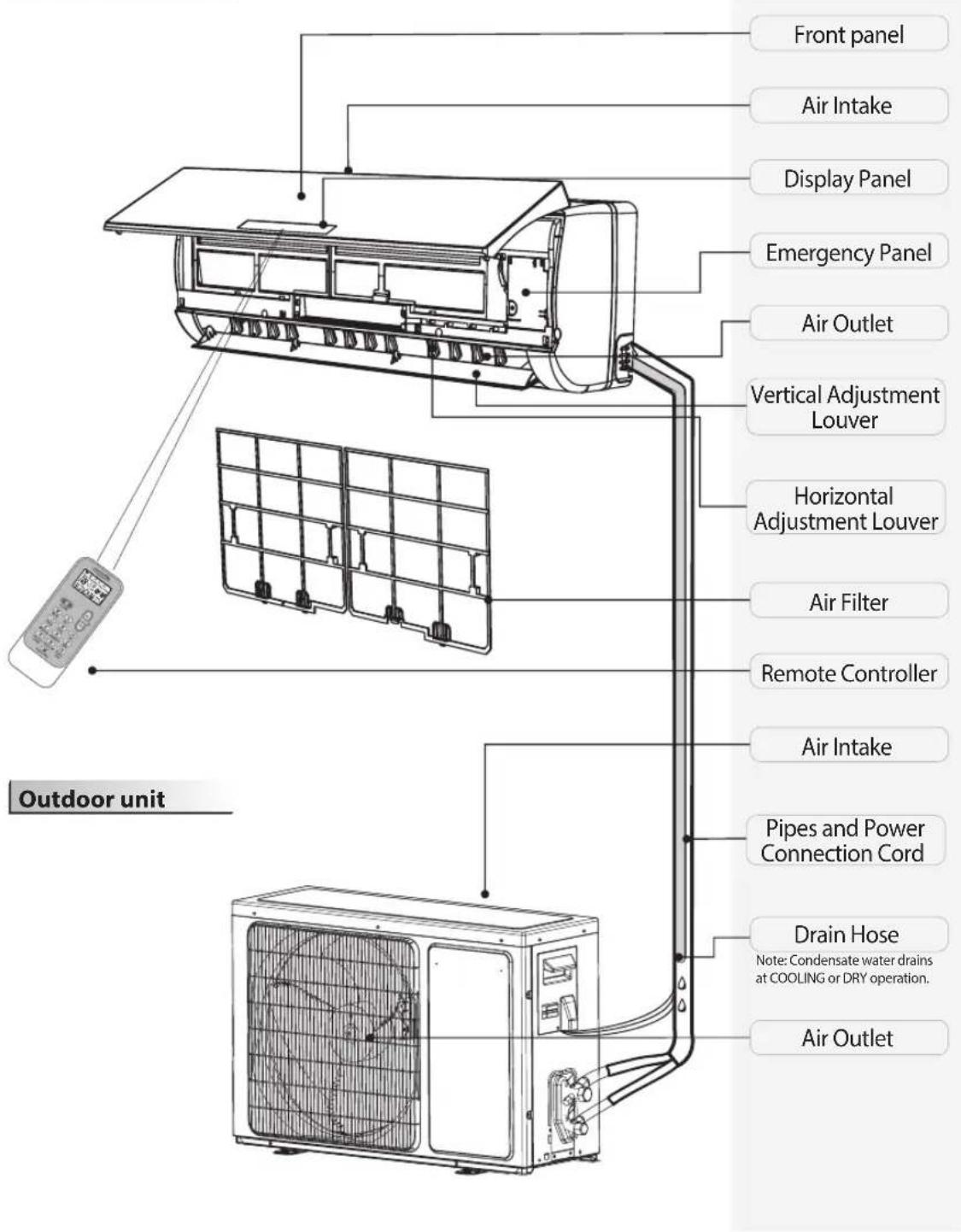
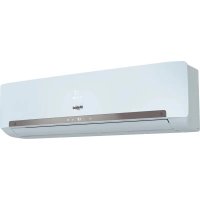
The figures in this manual are based on the external view of a standard model. Consequently, the shape may differ from that of the air conditioner you have selected.
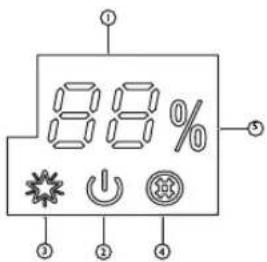
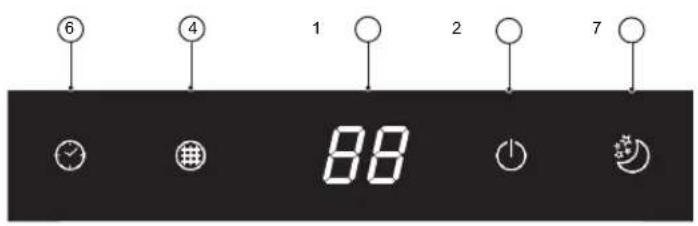
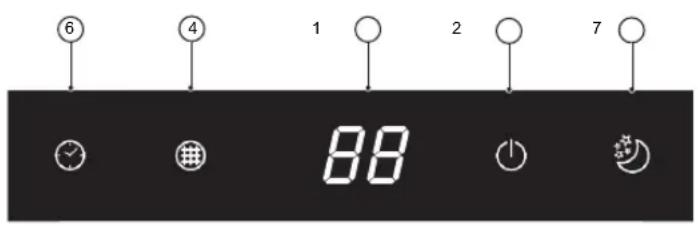
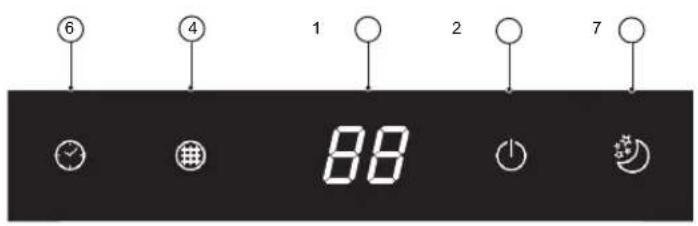
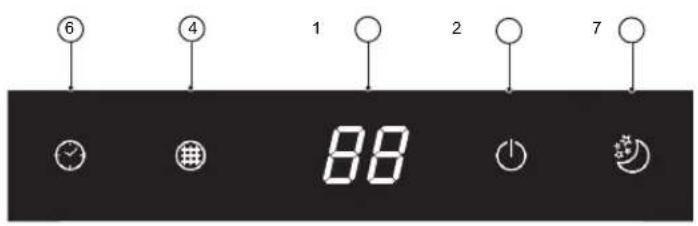
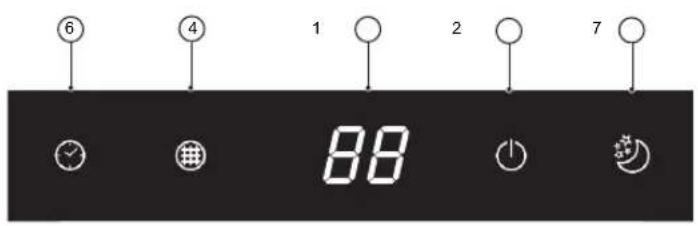
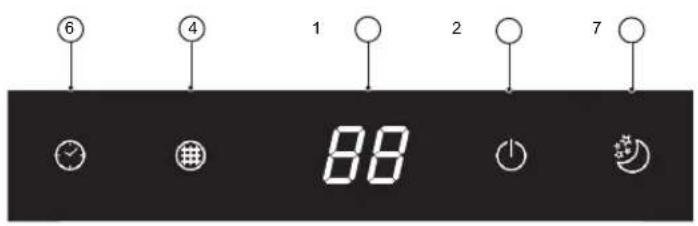
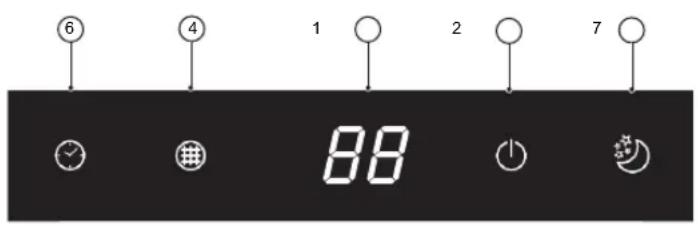
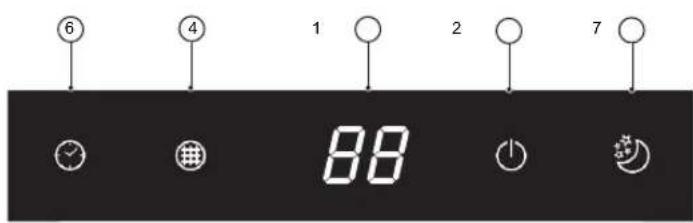
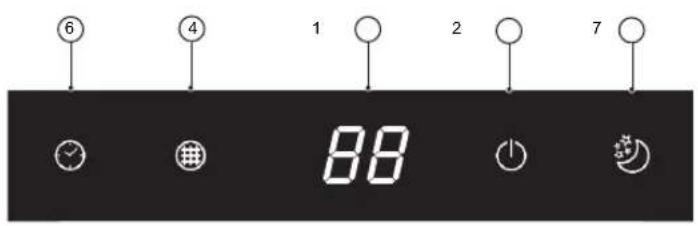
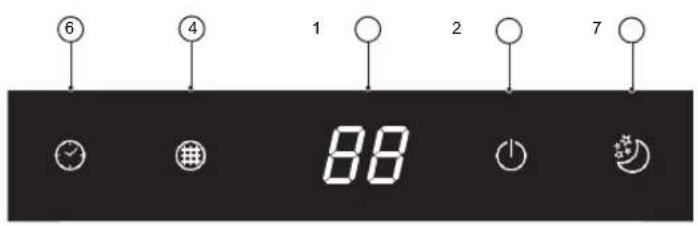
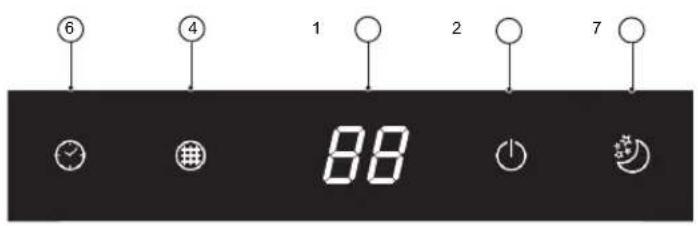
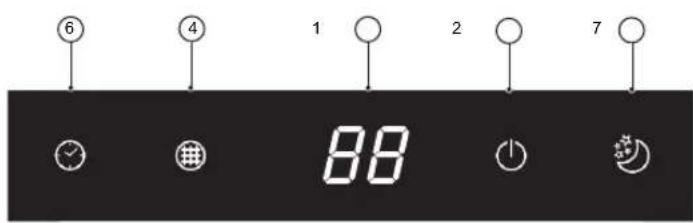
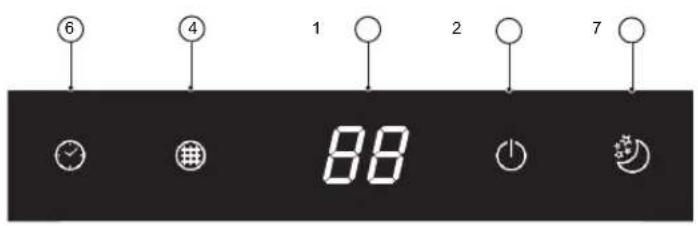
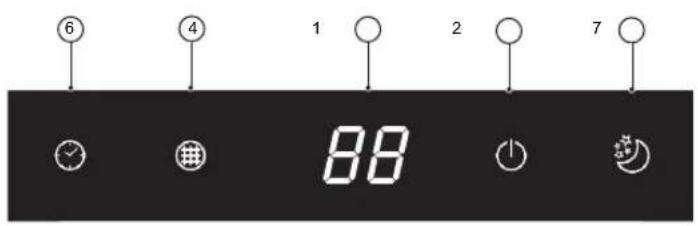
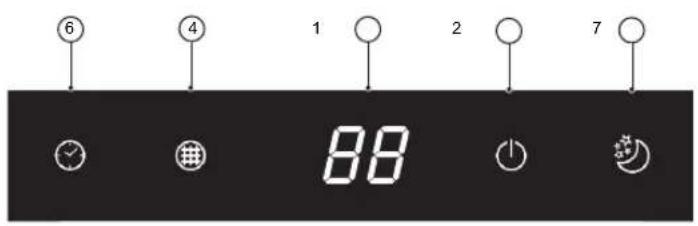
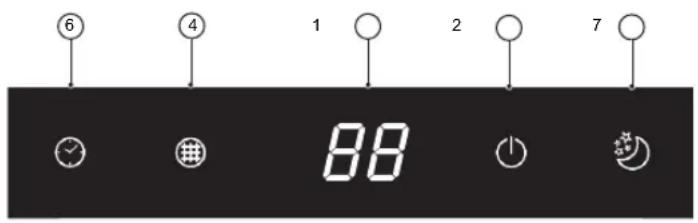
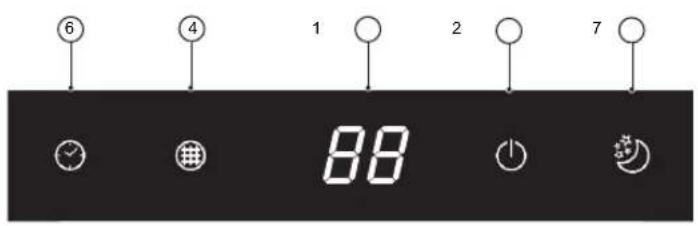
88
Temperature indicator (1)
Displays set temperature.
It shows "FC" as a reminder to clean the filter.

Running indicator (2)
It lights up during operation.
It flashes during outside unit defrosting.

6^th Sence indicator (3)
It lights up when 6^th sense is on.
It goes off when 6^th sense ends.

Filter monitor indicator (4)
It flashes when the filter needs to be cleaned.
Filter monitor indicator flashes after 720 hours of usage as reminder to clean the filter.
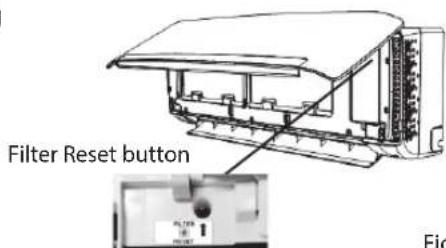
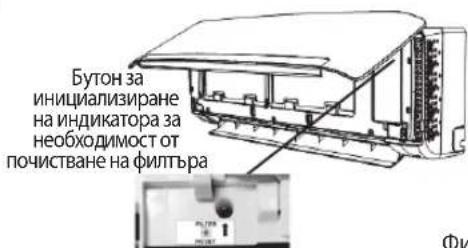
After filter cleaning, press the filter reset button located on the indoor unit behind the front panel in order to interrupt the flashing of the filter monitor indicator.

Humidity indicator (5)
It lights up when showing the humility level.
It goes off when showing the temperature.

Timer indicator (6)
It lights up during the set time.
It goes off when timer operation ends.

Sleep indicator (7)
It lights up once sleep mode is set, "Running" indicator will flash for 10 times then the whole display will light off.
For air conditioners without Wi-Fi control, we recommend the Wpro SmartClim: a smart device to control via Wi-Fi the main settings of your appliance from your smartphone.
This accessory is not included inside the product packaging. Please contact our After-Sales Service for more details and purchase.
Remote controller
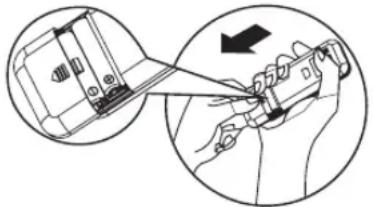
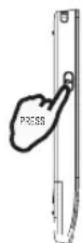
Insert the batteries into RC
- Insert a pin and gently press down on the battery cover and push in the direction of the arrow to remove, as shown.
- Insert 2 AAA batteries (1.5V) into the compartment. Ensure that "+" and "-" polarity is correctly positioned.
- Close the battery cover on the remote control.
natural_image
Illustration of a hand holding a tool with an arrow indicating direction (no text or symbols present)• Remote Control presetting
Each time the batteries are replaced in the remote controller, the remote controller pre-set at Heat Pump mode. The heat pump AC remote controller can be used to control the cool only AC models.
Use RC to control the appliance
- To operate the appliance by remote control, point the remote control at the receiving device on the indoor unit, to ensure receiving sensibility.
- To send a message from remote control, the symbol will flash for 1 second. On receipt of the message, the appliance will emit a beep.
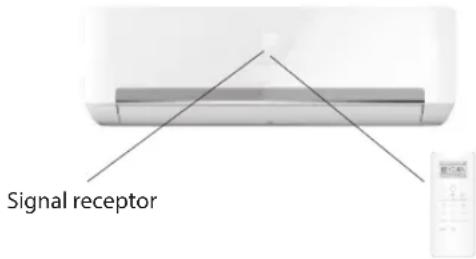
- The remote control will operate the air conditioner at a distance of up to 7m.
- Each time the batteries are replaced in the remote control, the remote control is pre-set at Heat Pump mode.
Note: please follow the instruction which matches to the remote controller you receive for Air Conditioner operation.
Function description of buttons (P1-04)
1. ON/OFF BUTTON
Starts or Stops the appliance by pressing this button.
3. FAN BUTTON
Used to select fan speed in sequence auto, high, medium or low.
4-5. TEMPERATURE BUTTON
Used to select the room temperature. Used to set the time in timer mode.
6. 6 ^th SENSE BUTTON
Sets or cancels 6^th sense operation.
7. SWING BUTTON
Stops or starts horizontal adjustment louver swinging and sets the desired up/down airflow direction.
10-11. HUMIDITY BUTTON
Used to set desired humidity level, they are only available under 6^th SENSE mode.
16. SUPER SILENT BUTTON
Used to start or stop the super silent operation to have a low noise environment.
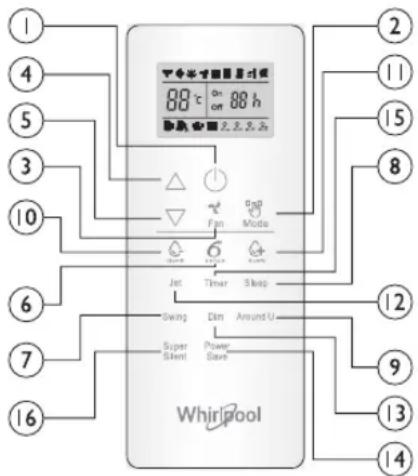
2. MODE BUTTON
Used to select the operation mode in sequence Cooling, hearing or fan.
8. SLEEP BUTTON
Used to select the sleep mode in sequence of sleep 1, sleep 2, sleep 3 sleep 4 and sleep off.
9. AROUND U BUTTON
Used to set or cancel Around U function.
12. JET BUTTON
Used to start or stop the fast cooling or heating.
13. DIM BUTTON
Used to turn on or turn off display light on indoor unit.
14. POWER SAVE BUTTON
Used to start or stop the power save operation.
15. TIMER BUTTON
Used to set the time for turn on or turn off the appliance.
Symbols on RC display
Cooling indicator Auto fan speed Sleep indicator 1
Humidity plus indicator High fan speed Sleep indicator2
Humidity minus indicator Medium fan speed Sleep indicator 3
Fan only indicator Low fan speed Sleep indicator 4
Heating indicator Super silent indicator
Around U indicator 6 ^th SENSE indicator
≡5 Jet indicator Power save indicator


88° Display set temperature
ON 88 h Display set timer
Signal transmission
Active RC by pressing UNLOCK button
Press the button, the backlight will be lighted up and function buttons will be activated for use. Press again to lock remote controller. If no operation on remote controller for 10s, the remote controller will be locked automatically.
Function description of buttons (J1-3A)
1. ON/OFF BUTTON
Starts or Stops the appliance by pressing this button.
2. MODE BUTTON
Used to select the operation mode in sequence of Cooling, dry, fan only or heating.
3. FAN BUTTON
Used to select fan speed in sequence auto, high, medium or low.
4-5. TEMPERATURE BUTTON
Used to select the room temperature. Used to set time in timer mode and real time clock.
6. 6^TH SENSE BUTTON
Sets or cancels 6^th sense operation.
7. SWING BUTTON
Stops or starts horizontal adjustment louver swinging and sets the desired up/down airflow direction.
8. SLEEP BUTTON
Sets or cancels Sleep Mode operation in sequence of sleep 1, sleep 2, sleep 3, sleep 4 or sleep off.
9. AROUND U BUTTON
Used to set or cancel Around U function.
10. TIMER ON/CLOCK BUTTON
Used to set the current time.
Used to set or cancel the timer on operation.
11. TIMER OFF BUTTON
Used to set or cancel the timer off operation.
12. JET BUTTON
Used to start or stop the fast cooling or heating mode.
Symbols on RC display

Cooling indicator Sleep 1 indicator Auto fan speed Jet indicator

Dry indicator Sleep 2 indicator High fan speed Signal transmission

Fan only indicator Sleep 3 Indicator Medium fan speed

Heating indicator Sleep 4 indicator Low fan speed Display current time

6^th Sense indicator Around U indicator


current time

Super silent indicator
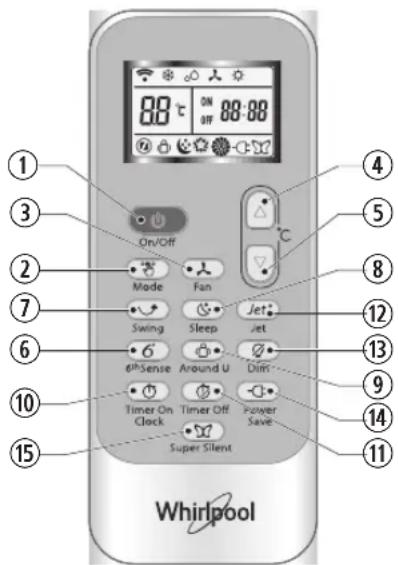
13. DIM BUTTON
Used to turn on or turn off display light on indoor unit.
14. POWER SAVE BUTTON
Used to start or stop the power save operation.
15. SUPER SILENT BUTTON
Used to start or stop the super silent operation to have a low noise environment.


Display set timer

Display set temperature

Power save indicator
PROTECTION
Operating condition
The protective device maybe trip and stop the appliance in the cases listed below.
| Heating | Outdoor air temperature is over 24°C |
| Outdoor air temperature is below -7°C | |
| Room temperature is over 27°C | |
| Cooling | Outdoor air temperature is over 43°C |
| Room temperature is below 21°C | |
| Dehumidifying | Room temperature is below 18°C |
If the air conditioner runs in COOLING or DRY mode with door or window opened for a long time when relative humidity is above 80%, dew may drip down from the outlet.
Features of protection device
Wait at least 3 minutes before restarting the unit after operation stops or changing mode during operation. After connecting to power supply and turning on the appliance immediately, a delay of 20 seconds may occur before it starts to operate. If all operation has stopped, press ON/OFF button again to restart. Timer should be set again if it has been cancelled.
Features of COOLING mode
Anti-freezing
When the temperature of the indoor heat exchanger drops to 0^ or below, compressor will stop working to protect the appliance.
Features of HEATING mode
Preheating
In order to prevent cool air blowing, 2-5 minutes are necessary to preheat the indoor unit at HEATING operation start. The indoor fan will not work during preheating.
Defrosting
In HEATING operation the appliance will defrost (de-ice) automatically to raise efficiency. This procedure usually lasts 6-10 minutes. During defrosting, fan stops running and running indicator flashes.
After defrosting is completed, it returns to HEATING mode automatically.
Clean front panel of Indoor Unit
1. Disconnect from the power supply
Turn off the appliance first before disconnecting from power supply.
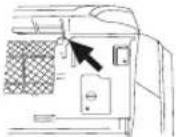
2. Remove the front panel
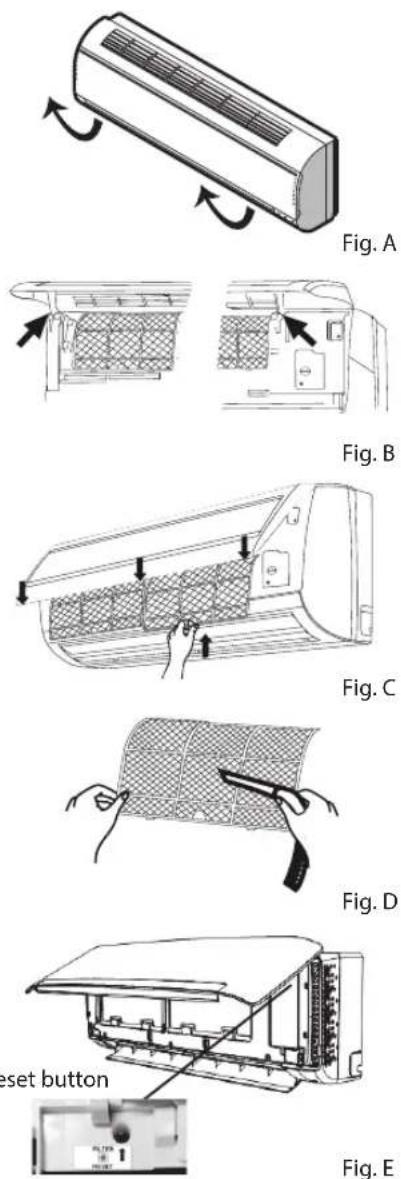
Open the front panel as shown by the arrow (Fig. A).
Pull the slots at the side of the front panel with force to take out the front panel (Fig. B).
3. Clean the front panel
Wipe it with a soft and dry cloth. Use lukewarm water (below 40^ C) to clean if the appliance is very dirty. After cleaning let it dry.
4. Refit and close the front panel
Refit and close the front panel by pushing it downward.
Note:
- Do not use substances such as gasoline or polishing powder to clean the appliance.
- Do not sprinkle water onto the indoor unit Dangerous! Electric shock!
Clean Air filter
It is necessary to clean the air filter after using it for about 200 hours. Clean the air filter every two weeks if the air conditioner operates in an extremely dusty environment.
1. Disconnect from the power supply
Turn off the appliance first before disconnecting from power supply.
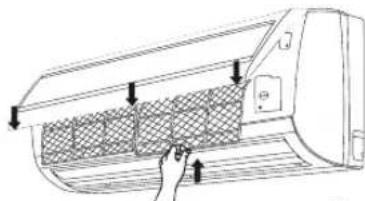
2. Take out air filter (Fig. C).
- Open the front panel. 2. Press the handle of the filter gently. 3. Slide out the filter.
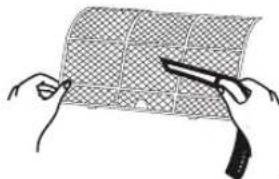
3. Cleaning the air filter (Fig. D)
If the filter is very dirty, clean it with a solution of lukewarm water and neutral detergent.
After cleaning let it dry.
- Refit the filter, press the filter reset button (Fig.E) at right side by using a cylinder pin and close the front panel.
Note:
- To avoid injury, do not touch the fins of indoor unit with your fingers after removing the filter.
- Do not attempt to clean the inside of the air conditioner by yourself.
- Do not clean the filter in washing machine.
EMERGENCY OPERATION
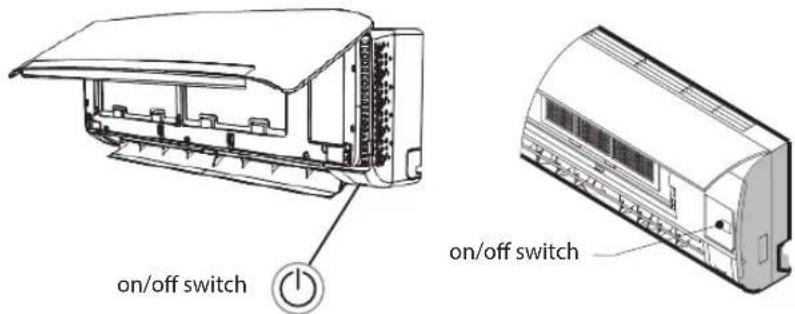
Under emergency situation or when remote control is missing, you can control the unit by pressing the on/off swith located on the indoor unit.
- Turn on the appliance: when the unit is off, press this button, it will start up and operate in 6^th SENSE mode.
- Turn off the appliance: when the unit is on, press this button, the unit will stop working.
Note: Do not press this button for a long time as it will cause malfunction.
Auto-Restart Function
If you want to set auto-restart, switch on the power supply, press the ON/OFF button on the indoor unit and hold for over 5 seconds, auto-restart is set with buzz sound.
If the auto-restart has been set, press the ON/OFF button on the indoor unit and hold for over 5 seconds, auto-restart function will be cancelled with a buzz sound and air conditioner is on standby mode.
Disposal of the batteries
To protect natural resources and to promote material reuse, please separate batteries from other types of waste and recycle them through your local, free battery return system.
Installation instruction
Installation diagram
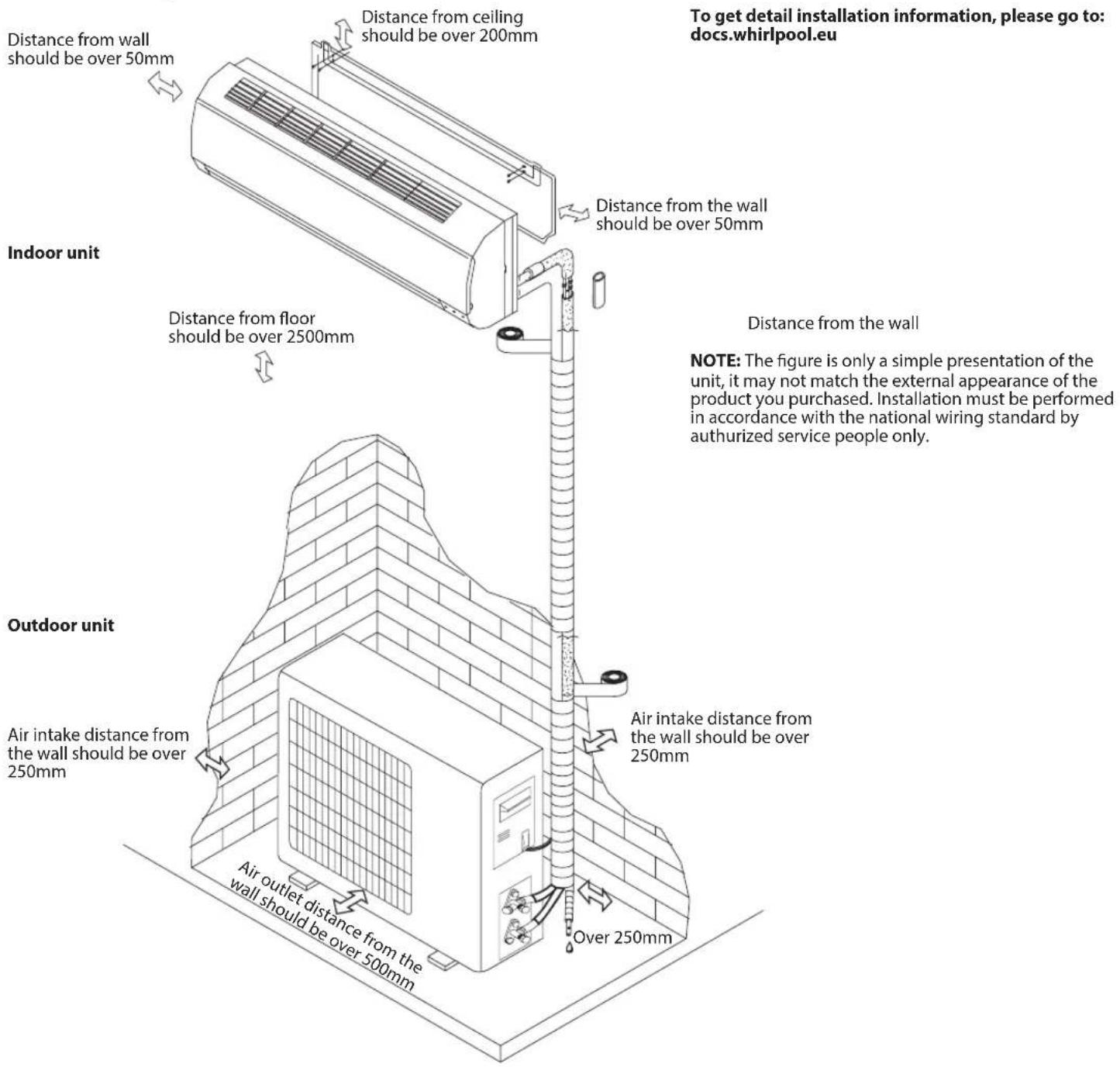
When install interconnection cord, make sure that the color of wires and the terminal No. of outdoor unit shall be same as those in indoor unit.
Cable Specifications
| Capacity (Btu/h) | Power cord Power connecting cord | |||
| Type | Normal cross - sectional area | Type | Normal cross - sectional area | |
| 7K, 9K, 12K H07 | RN-F 1.0mm | ^2X3 H07 | RN-F 1.0mm | ^2X5 |
| 18K H07RN | -F 1.5mm | ^2X3 H07 | RN-F 1.5mm | ^2X5 |
| 24 K H07RN | -F 2.5mm | ^2X3 H07 | RN-F 2.5mm | ^2X5 |
Operation problems are often due to minor causes, please check and refer to the following chart before contacting the service. This may save time and unnecessary expenses.
| Trouble Analysis | |
| Does not run | Is the protection device or fuse blown?Please wait for 3 minutes and start again, protection device may be preventing unit to work.Are the remote control batteries low?Is the plug not properly plugged? |
| No cooling or heating air | Is the air filter dirty?Are the intakes and outlets of the air conditioner blocked?Is the temperature set properly?Are doors or windows open? |
| Ineffective control | Has there been a strong interference (from excessive static electricity discharge, power supply voltage abnormality)? Note that operation will be abnormal, in this case unplug from the power supply and re-plug after 2-3 seconds. |
| Does not operate immediately | 3 minute delay will occur when changing mode during operation. |
| Peculiar smell | This smell may come from another source such as furniture, cigarette etc, which is sucked in the unit and blown out with the air. |
| A sound of running water | Normal behaviour caused by the flow of refrigerant in the air conditioner.Defrosting sound in heating mode. |
| Cracking sound | The sound may be generated by the expansion or contraction of the front panel due to temperature changes. |
| Mist sprays from the outlet | Mist is present in the room with low temperature? Normal behaviour due to cool air discharged from indoor unit during COOLING or DRY operation mode. |
| Running indicator flashes but indoor fan stops | The unit is shifting from heating mode to defrost. The indicator will light off and return to heating mode. |
Note: If the problems still have, turn off the appliance and disconnect from power supply, then contact the nearest Whirlpool Authorized Service Center. Do not attempt to move, repair, disassemble, or modify the appliance by yourself.
AFTER SALES SERVICE
Before contacting the Customer Care Centre:
- Try to solve the problem yourself based on the descriptions given in the "Troubleshooting".
- Turn the appliance off and restart it to see if the fault persists.
If after carrying out the above checks, the fault persists, contact the Customer Care Centre.
Please give:
- a short description of the fault;
• the exact model of the air conditioner; - the service number (this is the number found below the word Service on service sticker which is located on the side or on the bottom of the indoor unit).
The service number can also be found in the warranty booklet; - your full address;
- your telephone number.
If repair work has to be carried out, contact the Customer Care Centre (Use of original spare parts and a proper repair is guaranteed).
You will need to present the original invoice.
Failure to comply with these instructions could compromise the safety and quality of your product.
SERVICE
0000 000 00000
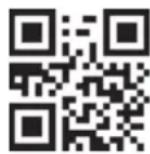
Note: if you want the full manual for your appliance, please help to download it from website through below link: docs.whirlpool.eu using QR code
88
DÉCLARATIONS DE CONFORMITÉ
88
FONCTIONNEMENT D'URGENCE
88
Indicatorlampje "Temperature" (Temperatuursindicatorlampje) (1)
• Standaardinstelling afstandsbediening
- "MODE"-TOETS (MODUSTOETS)
- "SWING"-TOETS (ZWENKTOETS)
- "SLEEP"-TOETS (SLAAPTOETS)
88
natural_image
Illustration of a hand holding a tool with a device, showing a close-up of the component (no text or symbols present)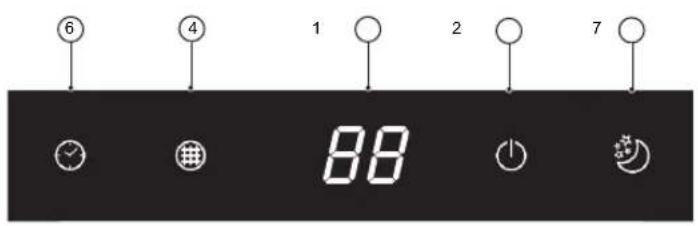
88
Indicador da temperatura (1)
Apresenta a temperatura definida.
88
2. TASTO MODE (MODALITÀ)
88
8. KOYMΠI SLEEP (ΥΠΝΟΥ)
8. KOYMΠI SLEEP (ΥΠΝΟΥ)
88
Temperaturindikator (1)
RENHOLD OG VEDLIKEHOLD
88
Temperaturindikator (1)
Viser innstilt temperatur.
- Forehåndsinnstilling av fjernkontrollen
Hver gang det skiftes batterier på fjernkontrollen, vil fjernkontrollen stilles inn på modus for Varmepumpe. Varmepumpens AC fjernkontroll kan benyttes til å kontroller nedkjøling kun på AC modeller.
3. FAN (VIFTE) KNAPP
Indikator for Cooling (nedkjøling)

Humidity plus (Fuktighet pluss) indikator

Humidity minus (Fuktighet minus) indikator

Fan only (Kun vifte) indikator

Heating (oppvarming) indikator

Around U (rundt deg) indikator

Jet (hurtig) indikator Power save

Auto fan speed (viftens hastighet)

3. FAN (VIFTE) KNAPP
88
Temperaturindikator (1)
Viser den indstillede temperatur.
"FC" visualiseres, for at minde om rengøring af filteret.

Driftsindikator (2)
• Fjernbetjeningens forindstilling
88
natural_image
Illustration of a hand holding a tool with an arrow indicating direction (no text or symbols present)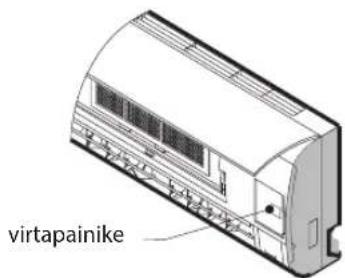
88
1. PRZYCISK ON/OFF (WŁ./WYŁ)
1. PRZYCISK ON/OFF (WŁ./WYŁ)
88
Indikátor teploty (1)
Zobrazuje nastavenou teplotu.
natural_image
Illustration of a hand holding a tool with an arrow indicating direction (no text or symbols present)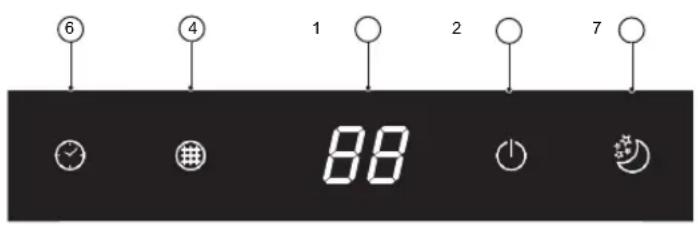
88
Indikátor teploty (1)
Zobrazuje nastavenú teplotu.
natural_image
Illustration of a hand holding a tool with an arrow indicating direction (no text or symbols present)4-5. TLAČIDLO TEPLOTY
4-5. TLACIDLO TEPLOTY
88
8. SLEEP (ALVAS) GÓMB
88
88
natural_image
Illustration of a cylindrical air conditioner unit with airflow arrows indicating direction (no text or symbols)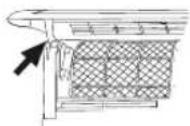
Фиг. Б
natural_image
Line drawing of a car air conditioner unit with hand pointing to a grid-patterned panel (no text or symbols)Фиг. В
natural_image
Illustration of two hands cutting a grid-patterned sheet with scissors (no text or symbols)Фиг. Г
88
Indicator 6th Sense (3)
• Presetarea telecomenzii
2. BUTONUL MODE (DE MOD)
2. BUTONUL MODE (DE MOD)
6. BUTONÜL FUNCTIEI 6th SENSE