
DSC-W530 - Camera SONY - Free user manual and instructions
Find the device manual for free DSC-W530 SONY in PDF.



| Product type | Compact digital camera |
| Brand | Sony |
| Model | DSC-W530 |
| Sensor | 7.76mm (1/2.3 type) CCD color with primary color filter |
| Effective pixels | Approx. 14.1 megapixels |
| Lens | Carl Zeiss |
| Optical zoom | 4x |
| LCD screen | 6.7cm (2.7 in.) TFT active matrix, 230,400 dots |
| Maximum still image resolution | 14M (4320 x 3240) |
| File format (still images) | JPEG (DCF Ver. 2.0, Exif Ver. 2.21, MPF Baseline) |
| File format (movies) | AVI (Motion JPEG) |
| Recording media | Internal memory (24MB), Memory Stick Duo, SD/SDHC/SDXC memory cards |
| Battery | Rechargeable lithium-ion battery NP-BN1, 3.6V, 630mAh |
| Battery life (recording) | Approx. 125 min |
| Battery life (playback) | Approx. 290 min |
| Dimensions (W x H x D) | 92.9 x 52.4 x 19.3 mm |
| Weight | Approx. 113 g (with battery and Memory Stick Duo) |
| Built-in flash | Range: 0.3 - 3.5m (W) / 0.6 - 1.8m (T) |
| Connections | USB/AV OUT jack (Hi-Speed USB 2.0 compatible) |
| Main functions | Smile detection, scene recognition, sweep panorama, burst mode (1.0 sec), self-timer |
| Operating temperature | 0°C to 40°C |
| Care and cleaning | Clean exterior with a soft cloth slightly dampened with water; avoid chemicals |
| Safety | Do not expose to moisture; use only Sony original batteries and chargers; do not disassemble |
| Spare parts and repairability | Battery NP-BN1, charger BC-CSN/BC-CSNB, USB cable, strap; repair by authorized Sony service center |
| General information | Manual available in multiple languages; CD-ROM with user guide included |
Frequently Asked Questions - DSC-W530 SONY
User questions about DSC-W530 SONY
0 question about this device. Answer the ones you know or ask your own.
Ask a new question about this device
Download the instructions for your Camera in PDF format for free! Find your manual DSC-W530 - SONY and take your electronic device back in hand. On this page are published all the documents necessary for the use of your device. DSC-W530 by SONY.
USER MANUAL DSC-W530 SONY
The model and serial numbers are located on the bottom. Record the serial number in the space provided below. Refer to these numbers whenever you call upon your Sony dealer regarding this product.
Model No. DSC-W530/W550
Serial No.
WARNING
To reduce fire or shock hazard, do not expose the unit to rain or moisture.
IMPORTANT SAFETY INSTRUCTIONS
-SAVE THESE INSTRUCTIONS
DANGER
TO REDUCE THE RISK OF FIRE OR ELECTRIC SHOCK, CAREFULLY FOLLOW THESE INSTRUCTIONS
If the shape of the plug does not fit the power outlet, use an attachment plug adaptor of the proper configuration for the power outlet.
CAUTION
Battery pack
If the battery pack is mishandled, the battery pack can burst, cause a fire or even chemical burns. Observe the following cautions.
- Do not disassemble.
- Do not crush and do not expose the battery pack to any shock or force such as hammering, dropping or stepping on it.
-
Do not short circuit and do not allow metal objects to come into contact with the battery terminals.
-
Do not expose to high temperature above 60^ (140^) such as in direct sunlight or in a car parked in the sun.
- Do not incinerate or dispose of in fire.
- Do not handle damaged or leaking lithium ion batteries.
- Be sure to charge the battery pack using a genuine Sony battery charger or a device that can charge the battery pack.
- Keep the battery pack out of the reach of small children.
- Keep the battery pack dry.
- Replace only with the same or equivalent type recommended by Sony.
- Dispose of used battery packs promptly as described in the instructions.
Battery charger
Even if the CHARGE lamp is not lit, the battery charger is not disconnected from the AC power source (mains) as long as it is connected to the wall outlet (wall socket). If some trouble occurs while using the battery charger, immediately shut off the power by disconnecting the plug from the wall outlet (wall socket).
The power cord (mains lead), if supplied, is designed specifically for use with this camera only, and should not be used with other electrical equipment.
For Customers in the U.S.A. and Canada
I RECYCLING LITHIUM-ION BATTERIES
Lithium-Ion batteries are recyclable.
You can help preserve our environment by returning your used rechargeable batteries to the collection and recycling location nearest you.

For more information regarding recycling of rechargeable batteries, call toll free
1-800-822-8837, or visit http://www.rbrc.org/
Caution: Do not handle damaged or leaking Lithium-Ion batteries.
Battery pack
This device complies with Part 15 of the FCC Rules. Operation is subject to the following two conditions:
(1) This device may not cause harmful interference, and (2) this device must accept any interference received, including interference that may cause undesired operation.
This Class B digital apparatus complies with Canadian ICES-003.
For Customers in the U.S.A.
UL is an internationally recognized safety organization. The UL Mark on the product means it has been UL Listed.
If you have any questions about this product, you may call:
Sony Customer Information Center
The number below is for the FCC related matters only.
Regulatory Information
Declaration of Conformity
Trade Name:SONY
Model No.: DSC-W530
Responsible Party: Sony Electronics Inc.
Address: 16530 Via Esprillo,
San Diego, CA 92127 U.S.A.
Telephone No.: 858-942-2230
This device complies with Part15 of the FCC Rules. Operation is subject to the following two conditions: (1) This device may not cause harmful interference, and (2) this device must accept any interference received, including interference that may cause undesired operation.
Declaration of Conformity
Trade Name:SONY
Model No.: DSC-W550
Responsible Party: Sony Electronics Inc.
Address: 16530 Via Esprillo,
San Diego, CA 92127 U.S.A.
Telephone No.: 858-942-2230
This device complies with Part15 of the FCC Rules. Operation is subject to the following two conditions: (1) This device may not cause harmful interference, and (2) this device must accept any interference received, including interference that may cause undesired operation.
CAUTION
You are cautioned that any changes or modifications not expressly approved in this manual could void your authority to operate this equipment.
I Note:
This equipment has been tested and found to comply with the limits for a Class B digital device, pursuant to Part 15 of the FCC Rules.
These limits are designed to provide reasonable protection against harmful interference in a residential installation. This equipment generates, uses, and can radiate radio frequency energy and, if not installed and used in accordance with the instructions, may cause harmful interference to radio communications. However, there is no guarantee that interference will not occur in a particular installation. If this equipment does cause harmful interference to radio or television reception, which can be determined by turning the equipment off and on, the user is encouraged to try to correct the interference by one or more of the following measures:
- Reorient or relocate the receiving antenna.
- Increase the separation between the equipment and receiver.
- Connect the equipment into an outlet on a circuit different from that to which the receiver is connected.
- Consult the dealer or an experienced radio/TV technician for help.
The supplied interface cable must be used with the equipment in order to comply with the limits for a digital device pursuant to Subpart B of Part 15 of FCC Rules.
For Customers in Europe
I Notice for the customers in the countries applying EU Directives
The manufacturer of this product is Sony Corporation, 1-7-1 Konan Minato-ku Tokyo, 108-0075 Japan. The Authorized Representative for EMC and product safety is Sony Deutschland GmbH, Hedelfinger Strasse 61, 70327 Stuttgart, Germany. For any service or guarantee matters please refer to the addresses given in separate service or guarantee documents.
This product has been tested and found compliant with the limits set out in the EMC Directive for using connection cables shorter than 3 meters (9.8 feet).
Attention
The electromagnetic fields at the specific frequencies may influence the picture and sound of this unit.
Notice
If static electricity or electromagnetism causes data transfer to discontinue midway (fail), restart the application or disconnect and connect the communication cable (USB, etc.) again.
Disposal of Old Electrical & Electronic Equipment (Applicable in the European Union and other European countries with separate collection systems)

This symbol on the product or on its packaging indicates that this product shall not be treated as household waste. Instead it shall be handed over to the applicable collection point for the recycling of electrical and electronic equipment. By ensuring this product is disposed of correctly, you will help prevent potential negative consequences for the environment and human health, which could otherwise be caused by inappropriate waste handling of this product. The recycling of materials will help to conserve natural resources. For more detailed information about recycling of this product,
please contact your local Civic Office, your household waste disposal service or the shop where you purchased the product.
Disposal of waste batteries (applicable in the European Union and other European countries with separate collection systems)

This symbol on the battery or on the packaging indicates that the battery provided with this product shall not be treated as household waste. On certain batteries this symbol might be used in combination with a chemical symbol. The chemical symbols for mercury (Hg) or lead (Pb) are added if the battery contains more than 0.0005% mercury or 0.004% lead. By ensuring these batteries are disposed of correctly, you will help prevent
potentially negative consequences for the environment and human health which could otherwise be caused by inappropriate waste handling of the battery. The recycling of the materials will help to conserve natural resources.
In case of products that for safety, performance or data integrity reasons require a permanent connection with an incorporated battery, this battery should be replaced by qualified service staff only. To ensure that the battery will be treated properly, hand over the product at end-of-life to the applicable collection point for the recycling of electrical and electronic equipment.
For all other batteries, please view the section on how to remove the battery from the product safely.
Hand the battery over to the applicable collection point for the recycling of waste batteries. For more detailed information about recycling of this product or battery, please contact your local Civic Office, your household waste disposal service or the shop where you purchased the product.
Notice for customers in the United Kingdom
A moulded plug complying with BS 1363 is fitted to this equipment for your safety and convenience.
Should the fuse in the plug supplied need to be replaced, a fuse of the same rating as the supplied one and approved by ASTA or BSI to BS 1362, (i.e., marked with an or mark) must be used.
If the plug supplied with this equipment has a detachable fuse cover, be sure to attach the fuse cover after you change the fuse. Never use the plug without the fuse cover. If you should lose the fuse cover, please contact your nearest Sony service station.
Refer to "Cyber-shot User Guide" (HTML) on supplied CD-ROM
For details on advanced operations, please read "Cyber-shot User Guide" (HTML) on the CD-ROM (supplied) using a computer.
GB

Insert the CD-ROM into the CD-ROM drive.
For Windows users:
① Click [User Guide] [Install].
② Start "User Guide" from the shortcut on the desktop.
For Macintosh users:
① Select the [User Guide] and copy [eng] folder stored in [User Guide] folder to your computer.
② After copying is complete, double-click "index.html" in [eng] folder.
Checking the accessories supplied
- Battery charger BC-CSN/BC-CSNB (1)
- Power cord (mains lead) (not supplied in the USA and Canada) (1)
- Rechargeable battery pack NP-BN1 (1)
Dedicated USB cable (1) -
Wrist strap (1)
CD-ROM (1) -
Cyber-shot application software
"Cyber-shot User Guide" -
Instruction Manual (this manual) (1)
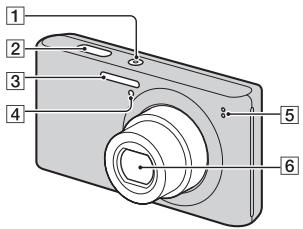
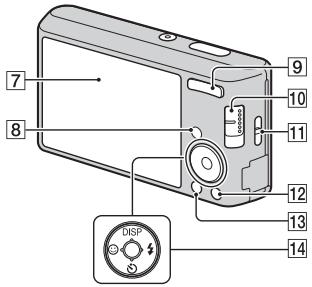
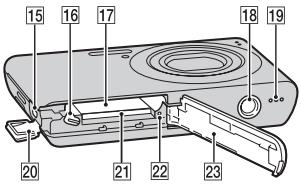
Identifying parts
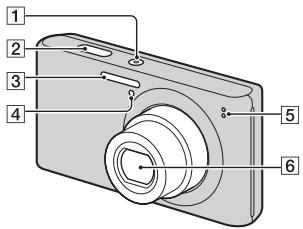
1 ON/OFF (Power) button
2 Shutter button
3 Flash
4 Self-timer lamp/Smile Shutter lamp
5 Microphone
6 Lens
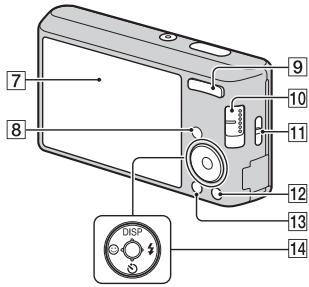
7 LCD screen
8 Playback) button
For shooting: W/T (Zoom) button For viewing: (Playback zoom) button/ (Index) button
10 Mode switch
11 Hook for wrist strap
12 1 (Delete) button
13 MENU button
14 Control button Menu on: / / / Menu off: DISP/
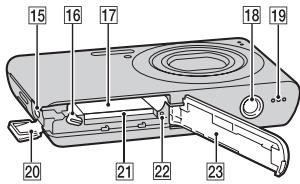
15 (USB)/A/V OUT jack
16 Battery eject lever
17 Battery insertion slot
18 Tripod receptacle
- Use a tripod with a screw less than 5.5mm (7/32 inches) long. Otherwise, you cannot firmly secure the camera, and damage to the camera may occur.
19 Speaker
20 Terminal cover
21 Memory card slot
22 Access lamp
23 Battery/memory card cover
Charging the battery pack
For customers in the USA and Canada
For customers in countries/regions other than the USA and Canada
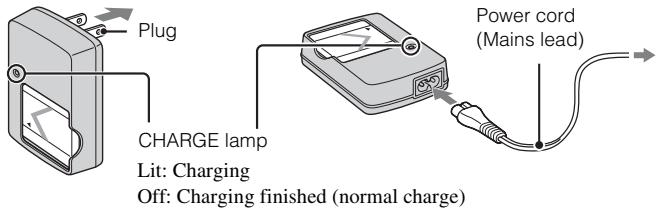
GB
1 Insert the battery pack into the battery charger.
- You can charge the battery even when it is partially charged.
2 Connect the battery charger to the wall outlet (wall socket).
- If you continue charging the battery pack for about one more hour after the CHARGE lamp turns off, the charge will last slightly longer (full charge).
Charging time
Full charge time: approx. 245 min.
Normal charge time: approx. 185 min.
Notes
- The above charging times apply when charging a fully depleted battery pack at a temperature of 25^ ( 77^ ). Charging may take longer depending on conditions of use and circumstances.
- Connect the battery charger to the nearest wall outlet (wall socket).
- When charging is finished, disconnect the power cord (mains lead) from the wall outlet (wall socket), and remove the battery pack from the battery charger.
- Be sure to use the battery pack or the battery charger of the genuine Sony brand.
Battery life and number of still images you can record/view
DSC-W550
Battery life: approx. 125 min. (recording)/approx. 280 min. (viewing)
Number of images: approx. 250 images (recording)/approx. 5,600 images (viewing)
DSC-W530
Battery life: approx. 125 min. (recording)/approx. 290 min. (viewing)
Number of images: approx. 250 images (recording)/approx. 5,800 images (viewing)
Note
- The number of still images that can be recorded is based on the CIPA standard, and is for shooting under the following conditions.
(CIPA: Camera & Imaging Products Association) - DISP (Screen Display Settings) is set to [Normal].
- Shooting once every 30 seconds.
- The zoom is switched alternately between the W and T ends.
- The flash strobes once every two times.
- The power turns on and off once every ten times.
- A fully charged battery pack (supplied) is used at an ambient temperature of 25^ (77^) .
- Using Sony "Memory Stick PRO Duo" media (sold separately).
Inserting the battery pack/a memory card (sold separately)
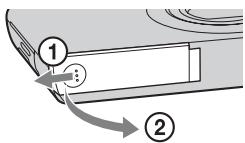
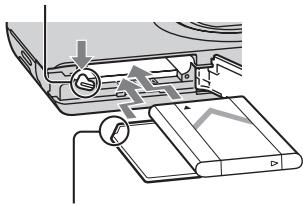
Eject lever
Ensure the notched corner faces correctly.
GB
1 Open the cover.
2 Insert the memory card (sold separately).
- With the notched corner facing as illustrated, insert the memory card until it clicks into place.
3 Insert the battery pack.
- Align the battery pack with the guide arrow inside the battery insertion slot. Then, insert the battery pack until the battery eject lever locks into place.
4 Close the cover. - Closing the cover with the battery inserted incorrectly may damage the camera.
Memory cards that you can use
| Memory card | For still images | For movies | |
| A | Memory Stick PRO Duo | ○ | ○ |
| Memory Stick PRO-HG Duo | ○ | ○ | |
| Memory Stick Duo | ○ | — | |
| B | SD memory card | ○ | ○ |
| SDHC memory card | ○ | ○ | |
| SDXC memory card | ○ | ○ |
- In this manual, products in A are collectively referred to as "Memory Stick Duo" media.
- In this manual, products in B are collectively referred to as SD card.
- When recording movies, it is recommended that you use Mark2 "Memory Stick Duo" media and Class 2 or faster SD cards.
To remove the memory card/battery pack
Memory card: Push the memory card in once.
Battery pack: Slide the battery eject lever. Be sure not to drop the battery pack.
Note
- Never remove the memory card/battery pack when the access lamp (page 8) is lit. This may cause damage to data in the memory card/internal memory.
Setting the date and time
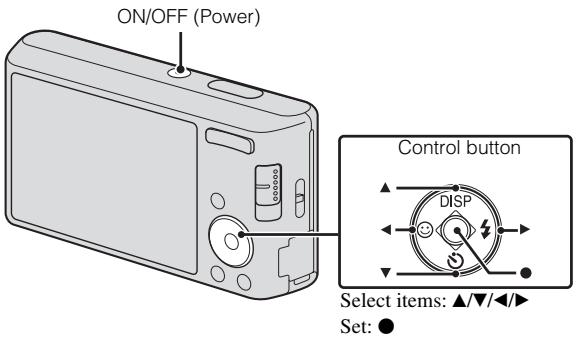
GB
1 Press the ON/OFF (Power) button.
Date & Time setting is displayed when you press the ON/OFF (Power) button for the first time.
- It may take time for the power to turn on and allow operation.
2 Set [Date & Time Format] and [Date & Time], then press [OK].
- Midnight is indicated as 12:00 AM, and noon as 12:00 PM.
3 Select the desired display color and display resolution mode, following the instructions on the screen.
Shooting still images/movies
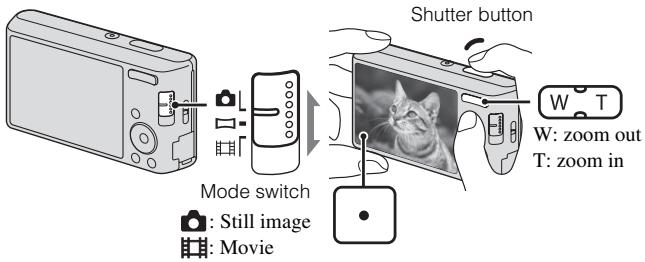
Shooting still images
1 Press the shutter button halfway down to focus.
When the image is in focus, a beep sounds and the indicator lights.
2 Press the shutter button fully down.
Shooting movies
1 Press the shutter button fully down to start recording.
- Use the zoom button to adjust the zoom before recording.
2 Press the shutter button fully down again to stop recording.
Note
- The operating sound of the lens is recorded when the zoom function operates while shooting a movie.
GB
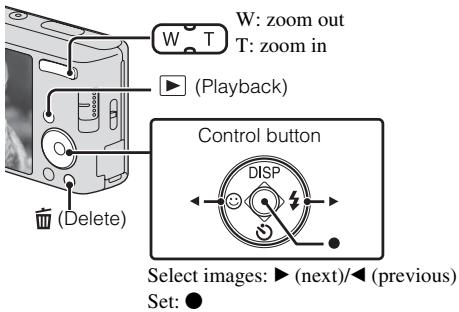
1 Press the (Playback) button.
The last image shot is displayed.
Selecting next/previous image
Select an image with (next)/ (previous) on the control button. Press in the center of the control button to view movies.
- Deleting an image
① Press (Delete) button.
② Select [This Image] with on the control button, then press .
Returning to shooting images
Press the shutter button halfway down.
List of icons displayed on the screen (When shooting still images)
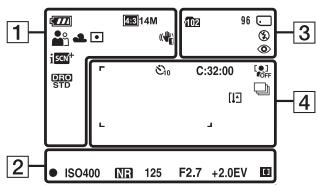
1
| Battery remaining |
2
| ● | AE/AF lock |
| ISO400 | ISO number |
| NR | NR slow shutter |
| 125 | Shutter speed |
| F2.7 | Aperture value |
| +2.0EV | Exposure Value |
| # | AF range finder frame indicator |
3
| 102 | Recording folder |
| 96 | Number of recordable images |
| 100Min | Recordable time |
| Recording Media (Memory card, internal memory) | |
| Flash mode | |
| Red-eye reduction | |
| Flash charging |
4
| 0 | Self-timer |
| 32:00 | Self-diagnosis display |
| OFF | Face Detection |
| Burst Settings | |
| Overheating warning | |
| AF range finder frame | |
| + | Spot metering cross hair |
Introduction of other functions
Other functions used when shooting or playing back can be operated using the control button or MENU button on the camera. This camera is equipped with a Function Guide that allows you to easily select from the functions. While displaying the guide, try the other functions.
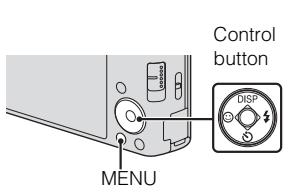
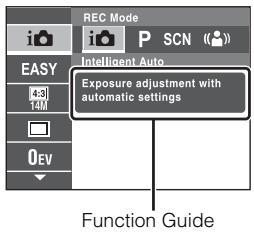
Control button
DISP (Screen Display Settings): Allows you to change the screen display.
(Self-Timer): Allows you to use the self-timer.
(Smile Shutter): Allows you to use the Smile Shutter mode.
(Flash): Allows you to select a flash mode for still images.
Menu Items
Shooting
| REC Mode | Select recording mode. |
| Scene Selection | Select pre-set settings to match various scene conditions. |
| Easy Mode | Shoot still images using minimal functions. |
| Shooting Direction | Set the direction to pan the camera when shooting Sweep Panorama images. |
| Image Size | Select the image size for still images, panorama images or movie files. |
| Burst Settings | Select single-image mode or burst mode. |
| EV | Adjust the exposure manually. |
| ISO | Adjust the luminous sensitivity. |
| White Balance | Adjust color tones of an image. |
| Focus | Select the focus method. |
| Metering Mode | Select the metering mode that sets which part of the subject to measure to determine the exposure. |
| Scene Recognition | Set to automatically detect shooting conditions in Intelligent Auto mode. |
| Smile Detection Sensitivity | Set the Smile Shutter function sensitivity for detecting smiles. |
| Face Detection | Select to detect faces and adjust various settings automatically. |
| DRO | Set DRO function to correct the brightness and contrast and improve the image quality. |
Viewing
| Easy Mode | Set the text-size increases and all indicators become easier to see. |
| Slideshow | Select a method of continuous playback. |
| Retouch | Retouch an image using various effects. |
| Delete | Delete an image. |
| Protect | Protect the images. |
| DPOF | Add a print order mark to a still image. |
| Rotate | Rotate a still image to the left or right. |
| Select Folder | Select a folder which contains the images you want to play back. |

Setting items
If you press the MENU button while shooting or during playback,
(Settings) is provided as a final selection. You can change the default settings on the (Settings) screen.
| Shooting Settings | Grid Line/Disp. Resolution/Digital Zoom/Red Eye Reduction |
| Main Settings | Beep/Language Setting/Function Guide/Display color/Power Save/Initialize/Video Out/USB Connect/LUN Setting |
| Memory Card Tool* | Format/Create REC. Folder/Change REC. Folder/Delete REC. Folder/Copy/File Number |
| Clock Settings | Date & Time Setting |
- If a memory card is not inserted, (Internal Memory Tool) will be displayed and only [Format] and [File Number] can be selected.
Number of still images and recordable time of movies
The number of still images and recordable time may vary depending on the shooting conditions and the memory card.
Still images
(Units: Images)
| Capacity Size | Internal memory | Memory card |
| Approx. 24 MB | 2 GB | |
| 14M | 4 | 295 |
| VGA | 130 | 9800 |
| 16:9(11M) | 4 | 360 |
Movies
The table below shows the approximate maximum recording times.
(Units: hour : minute : second)
| Capacity Size | Internal memory | Memory card |
| Approx. 24 MB | 2 GB | |
| VGA | 0:00:20 | 0:25:00 |
| QVGA | 0:01:00 | 1:40:00 |
GB
Notes on using the camera
Changing the language setting
To change the language setting, press MENU (Settings) (Main Settings) [Language Setting].
Notes on recording/playback
- Before you start recording, make a trial recording to make sure that the camera is working correctly.
- The camera is neither dust-proof, nor splash-proof, nor water-proof.
- Avoid exposing the camera to water. If water enters inside the camera, a malfunction may occur. In some cases, the camera cannot be repaired.
- Do not aim the camera at the sun or other bright light. It may cause the malfunction of the camera.
- If moisture condensation occurs, remove it before using the camera.
- Do not shake or strike the camera. It may cause a malfunction and you may not be able to record images. Furthermore, the recording media may become unusable or image data may be damaged.
Do not use/store the camera in the following places
- In an extremely hot, cold or humid place In places such as in a car parked in the sun, the camera body may become deformed and this may cause a malfunction.
- Under direct sunlight or near a heater The camera body may become discolored or deformed, and this may cause a malfunction.
- In a location subject to rocking vibration
- Near a location that generates strong radio waves, emits radiation or is strongly magnetic place. Otherwise, the camera may not properly record or play back images.
- In sandy or dusty places
- Be careful not to let sand or dust get into the camera. This may cause the camera to malfunction, and in some cases this malfunction cannot be repaired.
On carrying
Do not sit down in a chair or other place with the camera in the back pocket of your trousers or skirt, as this may cause malfunction or damage the camera.
Carl Zeiss lens
- The camera is equipped with a Carl Zeiss lens which is capable of reproducing sharp images with excellent contrast. The lens for the camera has been produced under a quality assurance system certified by Carl Zeiss in accordance with the quality standards of Carl Zeiss in Germany.
Notes on the LCD screen and lens
- The LCD screen is manufactured using extremely high-precision technology so over 99.99% of the pixels are operational for effective use. However, some tiny black and/or bright dots (white, red, blue or green) may appear on the LCD screen. These dots are a normal result of the manufacturing process, and do not affect the recording.
On camera's temperature
Your camera and battery may get warm due to continuous use, but it is not a malfunction.
On the overheat protection
Depending on the camera and battery temperature, you may be unable to record movies or the power may turn off automatically to protect the camera.
A message will be displayed on the LCD screen before the power turns off or you can no longer record movies.
Warning on copyright
Television programs, films, videotapes, and other materials may be copyrighted. Unauthorized recording of such materials may be contrary to the provisions of the copyright laws.
No compensation for damaged content or recording failure
Sony cannot compensate for failure to record or loss or damage of recorded content due to a malfunction of the camera or recording media, etc.
Cleaning the camera surface
Clean the camera surface with a soft cloth slightly moistened with water, then wipe the surface with a dry cloth. To prevent damage to the finish or casing:
- Do not expose the camera to chemical products such as thinner, benzine, alcohol, disposable cloths, insect repellent, sunscreen or insecticide.
Recommended computer environment (Macintosh)
OS (pre-installed):
USB connection: Mac OS X (v 10.3 to v 10.6)
PMB Portable: Mac OS X* (v 10.4 to v 10.6)
- Macintosh equipped with Intel processor
On Illustrations
Illustrations used in this manual are of the DSC-W530 unless noted otherwise.
On use and care
Avoid rough handling, disassembling, modifying, physical shock, or impact such as hammering, dropping or stepping on the product. Be particularly careful of the lens.
Camera
[System]
Image device: 7.76mm (1/2.3 type) color CCD, Primary color filter
Total pixel number of camera: Approx. 14.5 Megapixels
Effective pixel number of camera: Approx. 14.1 Megapixels
Lens: Carl Zeiss Vario-Tessar 4× zoom lens
f = 4.7 ~mm - 18.8 ~mm (26 mm - 105 mm (35 mm film equivalent))
F2.7 (W) - F5.7 (T)
Exposure control: Automatic exposure, Scene Selection (9 modes)
White balance: Automatic, Daylight, Cloudy, Fluorescent 1/2/3, Incandescent, Flash
Recording interval for Burst mode: Approx. 1.0 second
File format:
Still images: JPEG (DCF Ver. 2.0, Exif Ver. 2.21, MPF Baseline)
compliant, DPOF compatible
Movies: AVI (Motion JPEG)
Recording media: Internal Memory (Approx. 24 MB), "Memory Stick Duo" media, SD cards
Flash: Flash range (ISO sensitivity (Recommended Exposure Index) set to Auto): Approx. 0.3m to 3.5m W 11 7/8 inches to 11 feet 5 7/8 inches) Approx. 0.6m to 1.8m T1 foot 11 5/8 inches to 5 feet 10 7/8 inches)
[Input and Output connectors]
- (USB)/A/V OUT jack Video output
Audio output (Monaural)
USB communication
USB communication: Hi-Speed USB (USB 2.0)
[LCD screen]
LCD panel:
DSC-W550:
7.5cm (3.0 type) TFT drive
DSC-W530:
6.7cm (2.7 type) TFT drive
Total number of dots: 230 400 (960 × 240) dots
[Power, general]
Power: Rechargeable battery pack NP-BN1, 3.6 V
Power consumption (during shooting): 1.0 W
Operating temperature: 0^ to 40^ (32^ to 104^)
Storage temperature: -20^ to +60^ (-4^ to +140^)
Dimensions: DSC-W550 95.9mm× 57.3mm× 19.3mm (37/8inches × 23/8inches × 25/32inches) DSC-W530 92.9mm× 52.4mm× 19.3mm (33/4inches × 21/8inches × 25/32inches) (W/H/D, excluding protrusions)
Mass (including NP-BN1 battery pack, "Memory Stick Duo" media): DSC-W550 Approx. 122g 4.3 oz.) DSC-W530 Approx. 113g 4.0 oz.) Microphone: Monaural Speaker: Monaural Exif Print: Compatible PRINT Image Matching III: Compatible
BC-CSN/BC-CSNB battery charger
Power requirements: AC 100 V to 240 V, 50/60 Hz, 2 W
Output voltage: DC 4.2 V, 0.25 A
Operating temperature: 0^ to 40^ (32^ to 104^)
Storage temperature: -20^ to +60^ (-4^ to +140^)
Dimensions: Approx. 55mm× 24mm × 83~mm (21/4 inches × 31/32 inches × 33/8 inches) (W/H/D)
Mass: Approx. 55g (1.9 oz.)
Rechargeable battery pack NP-BN1
Used battery: Lithium-ion battery
Maximum voltage: DC 4.2 V
Nominal voltage: DC 3.6 V
Maximum charge voltage: DC 4.2 V
Maximum charge current: 0.9A
Capacity: typical:2.3 Wh (630 mAh) minimum: 2.2 Wh (600 mAh)
Design and specifications are subject to change without notice.
Trademarks
- The following marks are trademarks of Sony Corporation.
Cybershot, "Cyber-shot,"
"Memory Stick PRO Duo,"
"Memory Stick PRO-HG Duo,"
"Memory Stick Duo"
Windows is registered trademark of Microsoft Corporation in the United States and/or other countries.
- Macintosh is registered trademark of Apple Inc.
- SDXC and SDHC logo are trademarks of SD-3C, LLC.
- In addition, system and product names used in this manual are, in general, trademarks or registered trademarks of their respective developers or manufacturers. However, the TM or marks are not used in all cases in this manual.
Additional information on this product and answers to frequently asked questions can be found at our Customer Support Website.
http://www.sony.net/
Printed on 70% or more recycled paper using VOC (Volatile Organic Compound)-free vegetable oil based ink.
Français
Aide-memoire
Responsible : Sony Electronics Inc.
Adresse:16530 Via Esprillo, San Diego, CA 92127 E.-U.
Responsible : Sony Electronics Inc.
Adresse: 16530 Via Esprillo, San Diego, CA 92127 E.-U.
1 Touche ON/OFF (Alimentation)
2 Declencheur
3 Flash
Batterie rechargeable NP-BN1
Elementary apparatus
Nabiječka akumulatoru BC-CSN/BC-CSNB
Požadavky napajeni: AC 100 V až 240 V, 50/60 Hz, 2 W
Vystupni napěti: 4,2 V DC, 0,25 A
Provozné teplota: 0^ až 40^ Skladovací teplota: -20^ až +60^ Rozměry: Zhruba 55mm × 24mm × 83mm ( /V/H )
Hmotnost: Asi 55g
Nabijeci bloc akumulatoru NP-BN1
(CIPA: Camera & Imaging Products Association)
A membranous cystitis (BCC) is a rare entity that is characterized by the presence of a single or multiple cystic lesion in the bladder. It is usually associated with a history of bladder cancer, and it is also common in men.
Alkalmazott akkumulator: Litium-ion akkumulator
Grid Line/Disp. Resolution/Digital Zoom/Red Eye Reduction
SK
| Main Settings | Beep/Language Setting/Function Guide/Display color/Power Save/Initialize/Video Out/USB Connect/LUN Setting |
| Memory Card Tool* | Format/Create REC. Folder/Change REC. Folder/Delete REC. Folder/Copy/File Number |
| Clock Settings | Date & Time Setting |
- Ak vo fotoparáte nie je vlozena pamà'tová karta, zobrazi sa (Internal Memory Tool), pričom budeMZne zvolit'len [Format] a [File Number].
Pocet statickych zaberov a cas zaznamu pre videozáznamy
Pocet statickych zaberov a maximaly chas nahravania sa mozu lisi v zavislosti od podmienok snmania a pamafovej karty.
Staticke zabery
(Jednotky: Zábery)
Cybershot, "Cyber-shot", "Memory Stick PRO Duo", "Memory Stick PRO-HG Duo", "Memory Stick Duo"
Mjukvara for Cyber-shot
"Bruksanvising for Cyber-shot"
(CIPA: Camera & Imaging Products Association)
(CIPA: Camera & Imaging Products Association)
Cybershot, "Cyber-shot",
"Memory Stick PRO Duo",
"Memory Stick PRO-HG Duo",
"Memory Stick Duo"
(CIPA: Camera & Imaging Products Association)
(CIPA: Camera & Imaging Products Association)
VAŽNE SIGURNOSNE UPUTE
-SACUVAJTE OVE UPUTE
OPASNOST
POZORNO SLIJEDITE OVE UPUTE KAKO BISTESMANJILI OPASNOST OD POZARA ILI STRUJNOG UDARA
Ako se utikač ne moze izravno utaknuti u mrežnu uticnicu, prikljucite ga preko adaptera za utikač Čija konfiguracija odgovara mrežnoj uticnici.
POZOR
I Baterijska Jedinica
(CIPA: Camera & Imaging Products Association)
Cybershot, "Cyber-shot", "Memory Stick PRO Duo", "Memory Stick PRO-HG Duo", "Memory Stick Duo"
(CIPA: Camera & Imaging Products Association)
Isletim systemd (onceden kurulmus):
USB baglantisi: Mac OS X (v 10.3 ila v 10.6)
PMB Portable: Mac OS X* (v 10.4 ia v 10.6)
- Intel islemcili Macintosh
7-1 Konan, Minato-ku, Tokyo, 108-0075 Japan
Türkiye İrtibat Numaralari:
Tel: 0216-633 98 00
Faks: 0216-632 70 30
e-mail: bilgi@eu.sony.com
TR
SONY YETKILI SERVISLERI
ADANA CENGIZ ELEKTRONIK (322) 2251587/ADIYAMAN STAR ELEKTRONIK (416) 2165383/ANKARA (Anittepe) BILGILI ELEKTRONIK (312) 2308382, (Mamak) FILIZ ELEKTRONIK (312) 3689834, (Aydinlikevler) DUZOLLAR ELEKTRONIK (312) 3169852/ANTALYA NECMI ELK.SAN.TIC. LTD. STI. (242) 3451374, EKEN ELEKTRONIK (242) 3124242, OLCAY ELEKTRONIK (242) 7467603, (Alanya) ERTUNC ELEKTRONIK (242) 5136314/BURSA UFO ELKT. MUH.TIC.LTD.STI. (224) 2341192/BOLU ARDA ELEKTRONIK (374) 2155748/ CANAKKALE GUVEN ELEKTRONIK (286) 2173618/DENIZLI MAVI ELK. LTD. STI. (258) 2421749/DIYARBAKIR TELEVIZON HASTANESI (412) 2236869/ ESKISEHIR GÖRGUN ELEKTRONIK (222) 2265626/ERZURUM ELEKTRONAL TIC. (442) 2130528/GIRESUN ÖZEN ELEKTRONIK (454) 2168161/GAZIANTEP IBRAHIM SERIN (342) 2153545/HATAY ZEKİ ELEKTRONIK (326) 2210597/ICEL SEDAFON ELK.S.T.LTD. STI. (324) 3227655/ISTANBUL (Moda) SENTEZ ELK.S.T.LTD. STI. (216) 4145250, (Kadiköy) ENDER ELEK.LTD. (216) 3468024, (Suadiye) MERCOM ELK.LTD.STI. (216) 3612858, (Goztepe) ITEM LTD. STI. (216) 5664888, (Usküdar) BURCU ELEKTRONIK (216) 5536929, (Maslak) MODVI ELK.SAN.TIC.LTD. (212) 2862270, (Sisli) VEBE ELK.SN.TC.LT.STI. (212) 2336778, (Levent) AVE ELEKTRONIK (212) 2860477, (Fatih) CIHAN ELK. SAN. TIC. LTD. STI. (212) 5317001, (Bakirköy) VIP VIDEO ELK. TIC. LTD. STI. (212) 5705868, (Bakirköy) MEST ELK.SAN.TIC.LTD. (212) 5438242, (Besiktas) P.M. ELEKTRONIK LTD.STI. (212) 2275247, (Florya) AVC ELK.LTD. STI. (212) 5740426/ZIMIR BULENT EROL (232) 4221225, (Hatay ASIL- ELK.SR.T.LTD. STI. (232) 2288310, (Karshiaka) TEKNIK TV.ELK.LTD. STI. (232) 3696175, (Güzelyali) APEX ELEKTRONIK (232) 2464044/KARS SAHIN ELEKTRONIK (474) 238373/ KAYSERI CAGDAS ELEKTRONIK (352) 222627, KÜRΚCUOGLU (352) 2210634/KOCAELI TEKNIK TV. (262) 3223368/KONYA DENIZ ELEKTRONIK (332) 3501735, ÖZEL ELEKTRONIK (332) 3514425/MALATYA GURBUZ ELEKTRONIK (422) 3250460/MARDIN(Nusaybin) CFTSÜREN ELK.PAZ.LTD.(482) 4153592/MUGLA(Marmaris) MTM SERVICE (252) 4126217/RIZE METE ELEKTRONIK (464) 2120078/SAKARYA ISMAIL SENOGLU (264) 2714704/SAMSUN YALIM ELEKTRONIK (362) 2334883/SiIRT ISMET ELEKTRONIK (484) 2245724/SIVAS CAN ELEKTRONIK (346) 2230015/TRABZON LIIDER ELEKTRONIK (462) 3232641/ZONGULDKO ZDEMIRLER TV. (372) 3167044
ITHALATCL FIRMA
SONY®
SONY EURASIA PAZARLAMA AS.
TR
NPOEIAOONIOIHsH
Tia va anotpεεTE Tov kivduvo npkayiac nλEKTPoanlξiac, mnv ekθεTE Tn oukeun σβpoxn uypaia.
HMANTIKEOADHIGEΓIA THN AΦAΛEIA -ΦYΛATEAYTESTIOADHIGE KINΔYNO
ΓIA NA MEIΩΣΕTE TON KINΔYNO ΠYPKΑΓΙAΣ 'H HAEKTPONΛΗΙΑΣ, AKOΑΟΥΘΗΣΤΕ ΠPOΣEXTΙΚA AYTEΣ TΙΣ OΔΗΓΙΕΣ
Av to ojma tov bvoaos dev taqacemu nynlaxn qica, xonoiomotone 0oogoyea bvoaos xataaans diataes ytny nlaeuxn poia.
PPO2OXH
Mnatapia
Av nataia vanootei xanetaxeigoun, mtooge va exqayei, va pooxaoleo4 oia anoia xanmuixyxaumata.Abetaetic axolovoe poofovalaeis.
Myn nay aaoovvaguooyei.
- Myn oaoeTe xu my npiatoTe me duvoan tn utatopia, my nT XwntoTe me ophiui, my n T oieTe xawu uyn my nyn tnaoTe.
MnV nTbQaXuXuXuXuXe Xau nV aHVFte mTaaluaavtxeIeva va eGxovta 0E eAe Hteqatua Tns ptaraoias.
Mv exoetete nTu mataqia oe vnu h cegooqaoieg avw to 60C, yia naagdeyva, eaeoteevn aoe oto oos to hauov, n eoe autoxinro otaeueve xato tonv hio.
Mv taTe tv maataqia, oute va tv tate otn foTu.
Mivxonouoite Miataagieosov exov xataotqaei n aogovoiocov diooio Iaiiov.
Na fogtiEe TnV mataqia moV eva yviofo qoTovtH mtaqovSony n ma oovexv nou mtoei va fogtiEe TnV mtaqia.
Koatae tvuataogia maqga aTo ta mga naia.
- Duaatneite Tny mataqia oTey.
- Avtxataotntoe mvo e idio n avtiotyo tvo noov ovvtata a o ty Sony.
Aioogqiye tsmuataagiee aeeoa,0wncpiyuefetai otic odnyies.
Φoptiotic μnatapia
Axa aav nLvvyCHA GEREv eva avamevn, o oototns 5 pataqow dev aooovdeetat ao tv npofooiova evalaooouevov oeuato5, eoov eviva ouvedeuevo s0e vuaotodot. Eav naooviaotei ooiodntore p0bIma nata t xonno t vo ootfmoi maataov, diawoyte aieos tv naoxh oeuvato5, aoovdeovtac to bua aio to vgeuataodto.
To extoio xalodio, av a t a, eivai oxedioumevo edixia yia xion aevt Tnv xaeog oivo xau dev e i va xonouotoeita u aallo extoio eoiuio.
Tia Touc nEaTeC oTnv Eupwnn
- WARNING
- IMPORTANT SAFETY INSTRUCTIONS
- DANGER
- TO REDUCE THE RISK OF FIRE OR ELECTRIC SHOCK, CAREFULLY FOLLOW THESE INSTRUCTIONS
- CAUTION
- Battery pack
- Battery charger
- For Customers in the U.S.A. and Canada
- I RECYCLING LITHIUM-ION BATTERIES
- For Customers in the U.S.A.
- Regulatory Information
- Declaration of Conformity
- I Note:
- For Customers in Europe
- I Notice for the customers in the countries applying EU Directives
- Attention
- Notice
- Disposal of Old Electrical & Electronic Equipment (Applicable in the European Union and other European countries with separate collection systems)
- Disposal of waste batteries (applicable in the European Union and other European countries with separate collection systems)
- Notice for customers in the United Kingdom
- Refer to "Cyber-shot User Guide" (HTML) on supplied CD-ROM
- For Windows users:
- For Macintosh users:
- Checking the accessories supplied
- Identifying parts
- Charging the battery pack
- For customers in the USA and Canada
- For customers in countries/regions other than the USA and Canada
- Charging time
- Notes
- Battery life and number of still images you can record/view
- DSC-W550
- DSC-W530
- Note
- Inserting the battery pack/a memory card (sold separately)
- Memory cards that you can use
- To remove the memory card/battery pack
- Setting the date and time
- Shooting still images/movies
- Shooting still images
- Shooting movies
- Press the (Playback) button.
- Selecting next/previous image
- - Deleting an image
- Returning to shooting images
- List of icons displayed on the screen (When shooting still images)
- Introduction of other functions
- Control button
- Menu Items
- Viewing
- Setting items
- Number of still images and recordable time of movies
- Still images
- Movies
- Notes on using the camera
- Changing the language setting
- Notes on recording/playback
- Do not use/store the camera in the following places
- On carrying
- Carl Zeiss lens
- Notes on the LCD screen and lens
- On camera's temperature
- On the overheat protection
- Warning on copyright
- No compensation for damaged content or recording failure
- Cleaning the camera surface
- Recommended computer environment (Macintosh)
- OS (pre-installed):
- On Illustrations
- On use and care
- Camera
- [System]
- [Input and Output connectors]
- [LCD screen]
- [Power, general]
- BC-CSN/BC-CSNB battery charger
- Rechargeable battery pack NP-BN1
- Trademarks
- http://www.sony.net/
- Français
- Aide-memoire
- Batterie rechargeable NP-BN1
- Elementary apparatus
- Nabiječka akumulatoru BC-CSN/BC-CSNB
- Nabijeci bloc akumulatoru NP-BN1
- A membranous cystitis (BCC) is a rare entity that is characterized by the presence of a single or multiple cystic lesion in the bladder. It is usually associated with a history of bladder cancer, and it is also common in men.
- Pocet statickych zaberov a cas zaznamu pre videozáznamy
- Staticke zabery
- VAŽNE SIGURNOSNE UPUTE
- -SACUVAJTE OVE UPUTE
- OPASNOST
- POZORNO SLIJEDITE OVE UPUTE KAKO BISTESMANJILI OPASNOST OD POZARA ILI STRUJNOG UDARA
- POZOR
- I Baterijska Jedinica
- Isletim systemd (onceden kurulmus):
- SONY YETKILI SERVISLERI
- NPOEIAOONIOIHsH
- HMANTIKEOADHIGEΓIA THN AΦAΛEIA -ΦYΛATEAYTESTIOADHIGE KINΔYNO
- ΓIA NA MEIΩΣΕTE TON KINΔYNO ΠYPKΑΓΙAΣ 'H HAEKTPONΛΗΙΑΣ, AKOΑΟΥΘΗΣΤΕ ΠPOΣEXTΙΚA AYTEΣ TΙΣ OΔΗΓΙΕΣ
- PPO2OXH
- Mnatapia
- Φoptiotic μnatapia
- Tia Touc nEaTeC oTnv Eupwnn
Brand : SONY
Model : DSC-W530
Category : Camera