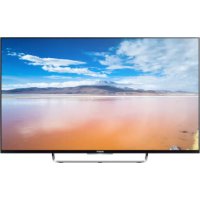
Bravia KDL43W808C - TV SONY - Free user manual and instructions
Find the device manual for free Bravia KDL43W808C SONY in PDF.


| Product Type | LED Television |
| Brand | Sony |
| Model | Bravia KDL43W808C |
| Screen Size | 108.0 cm (43 inches) |
| Display Resolution | 1920 x 1080 pixels (Full HD) |
| Backlight | LED |
| TV Standards | Analog: B/G, D/K, L, I; Digital: DVB-T/DVB-T2/DVB-C |
| Audio Power | 2 x 10 W |
| Wireless Connectivity | Wi-Fi 802.11a/b/g/n, Bluetooth 4.1 |
| HDMI Connectors | 4 HDMI inputs (1 with MHL, 1 with ARC) |
| USB Connectors | 2 USB ports (1 for HDD REC) |
| Other Connectors | SCART, component/composite input, optical audio output, headphone jack, LAN Ethernet |
| Power Supply | AC adapter: input 220-240 V AC, 50 Hz; output 19.5 V DC |
| Standby Power Consumption | 0.50 W |
| Average Annual Power Consumption | 76 kWh (for 43-inch model) |
| Operating Temperature | 0 °C to 40 °C |
| Operating Humidity | 10 % to 80 % RH (non-condensing) |
| Smart TV Functions | Access to NETFLIX, apps, BRAVIA Sync, Football mode |
| Installation Options | Table top stand (supplied) or wall mount (SU-WL450, not supplied) |
| Care and Cleaning | Unplug before cleaning; use a soft, slightly damp cloth; do not spray liquid directly |
| Safety | Do not block openings; install on a stable surface; keep away from heat sources; use recommended Sony accessories |
| General Information | Manufactured by Sony Corporation; CE compliance; disposal in accordance with WEEE directive |
Frequently Asked Questions - Bravia KDL43W808C SONY
User questions about Bravia KDL43W808C SONY
0 question about this device. Answer the ones you know or ask your own.
Ask a new question about this device
Download the instructions for your TV in PDF format for free! Find your manual Bravia KDL43W808C - SONY and take your electronic device back in hand. On this page are published all the documents necessary for the use of your device. Bravia KDL43W808C by SONY.
USER MANUAL Bravia KDL43W808C SONY
Parts and Controls. 7
Controls and Indicators 7
Inputs and Outputs 8
Using Remote Control 10
Remote Control Parts Description. 10
Installing the TV to the Wall 12
Troubleshooting. 14
Troubles and Solutions 14
Specifications 15
Introduction
Thank you for choosing this Sony product.
Before operating the TV, please read this manual thoroughly and retain it for future reference.
Note
Before operating the TV, please read "Safety information" (page 3).
- Images and illustrations used in Startup Guide and this manual are for reference only and may differ from actual product appearance.
Location of the identification label
Labels for the TV Model No., Production Date (year/month) and Power Supply rating are located on the rear of the TV or package. Labels for the mains adaptor Model No. and Serial No. are located on the bottom of the mains adaptor.
WARNING
TO PREVENT THE
SPREAD OF FIRE, KEEP

CANDLES OR OTHER OPEN
FLAMES AWAY FROM THIS
PRODUCT AT ALL TIMES.
NOTICE FOR CUSTOMERS IN THE UNITED KINGDOM
A moulded plug complying with BS1363 is fitted to this equipment for your safety and convenience.
Should the fuse in the plug supplied need to be replaced with the same rating of fuse approved by ASTA or BSI to BS 1362 (i.e., marked with & 口 & 口 ) must be used.
If the plug supplied with this equipment has a detachable fuse cover, be sure to attach the fuse cover after you change the fuse. Never use the plug without the fuse cover. If you should lose the fuse cover, please contact your nearest Sony service station.
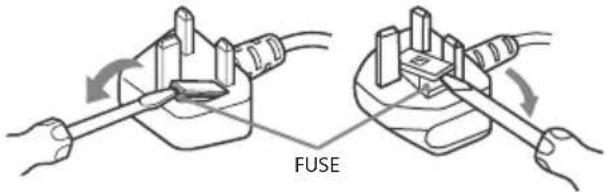
How to replace the fuse
Open the fuse compartment with a blade screwdriver, and replace the fuse.
Please refer to the illustration that actually equipped with the product.
IMPORTANT NOTICE
This product has been manufactured by or on behalf of Sony Corporation, 1-7-1 Konan Minato-ku Tokyo, 108-0075 Japan. Inquiries related to product compliance based on European Union legislation shall be addressed to the authorized representative, Sony Belgium, bijkantoor van Sony Europe Limited, Da Vincilaan 7-D1, 1935 Zaventem, Belgium. For any service or guarantee matters, please refer to the addresses provided in the separate service or guarantee documents.
Notice for Wireless Signal

Hereby, Sony Corporation declares that this unit is in compliance with the essential requirements and other relevant
provisions of Directive 1999/5/EC.
For details, please access the following URL: http://www.compliance.sony.de/
Notice for customers: the following information is only applicable to equipment sold in countries applying EU directives.
TV wireless system may be operated in following countries:
AT, BE, HR, CY, CZ, DK, EE, FI, FR, DE, GR, HU, IE, IT, LV, LT, LU, MT, NL, PL, PT, SK, SI, ES, SE, GB, IS, LI, NO, CH, BG, RO, TR, AL, BA, MK, MD, RS, ME, Kosovo
This equipment can be operated in other non-European countries.
Safety information
WARNING
Batteries must not be exposed to excessive heat such as sunshine, fire or the like.
Installation/Set-up
Install and use the TV set in accordance with the instructions below in order to avoid any risk of fire, electrical shock or damage and/or injuries.
Installation
- The TV set should be installed near an easily accessible mains socket.
- Place the TV set on a stable, level surface to avoid it from falling down and cause personal injury or damage to the TV.
- Only qualified service personnel should carry out wall installations.
- For safety reasons, it is strongly recommended that you use Sony accessories, including:
Wall-Mount Bracket SU-WL450
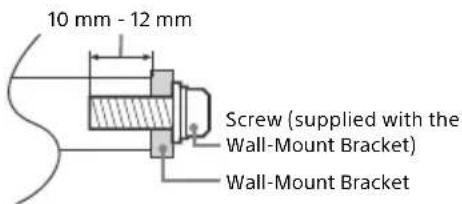
- Be sure to use the screws supplied with the Wall-Mount Bracket when attaching the Wall-Mount Bracket to the TV set. The
supplied screws are designed as indicated by illustration when measured from the attaching surface of the Wall-Mount Bracket. The diameter and length of the screws differ depending on the Wall-Mount Bracket model.
Use of screws other than those supplied may result in internal damage to the TV set or cause it to fall, etc.
Transporting
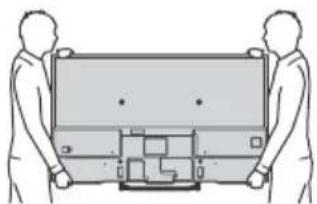
- Before transporting the TV set, disconnect all cables.
- Two or three people are needed to transport a large TV set.
- When transporting the TV set by hand, hold it as shown below. Do not put stress on the LCD panel and the frame around the screen.
- When transporting the TV set, do not subject it to jolts or excessive vibration.
- When transporting the TV set for repairs or when moving, pack it using the original carton and packing material.
Ventilation
- Never cover the ventilation holes or insert anything in the cabinet.
- Leave space around the TV set as shown below.
- It is strongly recommended that you use a Sony Wall-Mount Bracket in order to provide adequate air circulation.
Installed on the wall
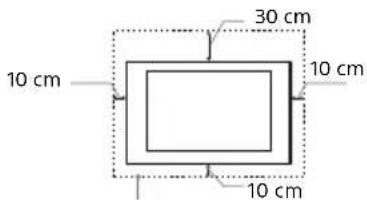
Leave at least this space around the set.
Installed with stand
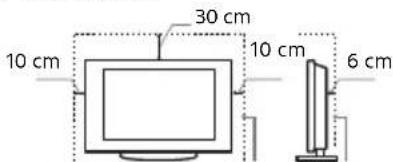
Leave at least this space around the set.
To ensure proper ventilation and prevent the collection of dirt or dust:
- Do not lay the TV set flat, install upside down, backwards, or sideways.
Do not place the TV set on a shelf, rug, bed or in a closet. - Do not cover the TV set with a cloth, such as curtains, or items such as newspapers, etc.
Do not install the TV set as shown below.
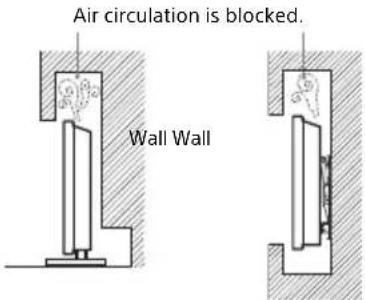
Mains lead
Handle the mains lead and socket as follows in order to avoid any risk of fire, electrical shock or damage and/or injuries:
Use only mains leads supplied by Sony, not other suppliers.
- Insert the plug fully into the mains socket.
- Operate the TV set on a 220 V - 240 V AC supply only.
- When wiring cables, be sure to unplug the mains lead for your safety and take care not to catch your feet on the cables.
- Disconnect the mains lead from the mains socket before working on or moving the TV set.
- Keep the mains lead away from heat sources.
Unplug the mains plug and clean it regularly. If the plug is covered with dust and it picks up moisture, its insulation may deteriorate, which could result in a fire.
Note
- Do not use the supplied mains lead on any other equipment.
- Do not pinch, bend, or twist the mains lead excessively. The core conductors may be exposed or broken.
- Do not modify the mains lead.
- Do not put anything heavy on the mains lead.
- Do not pull on the mains lead itself when disconnecting the mains lead.
- Do not connect too many appliances to the same mains socket.
- Do not use a poor fitting mains socket.
NOTE ON MAINS ADAPTOR
Warning
To reduce the risk of fire or electric shock, do not expose this apparatus to rain or moisture.
To prevent fire or shock hazard, do not place objects filled with liquids, such as vases, on the apparatus. Do not install this equipment in a confined space, such as a bookshelf or similar unit.
- Please ensure that the mains socket is installed near the equipment and shall be easily accessible.
- Be sure to use the supplied mains adaptor and mains lead.
- Do not use any other mains adaptor. It may cause a malfunction.
- Connect the mains adaptor to an easily accessible mains socket.
-
Do not coil the mains lead around the mains adaptor. The core wire may be cut and/or it may cause a malfunction of the media receiver.
-
Do not touch the mains adaptor with wet hands.
- If you notice an abnormality in the mains adaptor, disconnect it from the mains socket immediately.
- The set is not disconnected from the mains source as long as it is connected to the mains socket, even if the set itself has been turned off.
- As the mains adaptor will become warm when it is used for a long time, you may feel hot when touching it by hand.
Prohibited Usage
Do not install/use the TV set in locations, environments or situations such as those listed below, or the TV set may malfunction and cause a fire, electric shock, damage and/or injuries.
Locations:
- Outdoors (in direct sunlight), at the seashore, on a ship or other vessel, inside a vehicle, in medical institutions, unstable locations, near water, rain, moisture or smoke.
Environments:
- Places that are hot, humid, or excessively dusty; where insects may enter; where it might be exposed to mechanical vibration, near flammable objects (candles, etc.). The TV set shall not be exposed to dripping or splashing and no objects filled with liquids, such as vases, shall be placed on the TV.
Situations:
- Use when your hands are wet, with the cabinet removed, or with attachments not recommended by the manufacturer. Disconnect the TV set from mains socket and aerial during lightning storms.
Install the TV so that it sticks out into an open space. This may result in injury or damage from a person or object bumping into the TV.
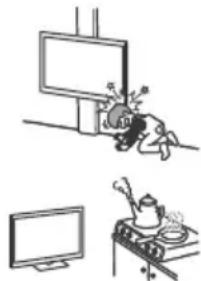
-
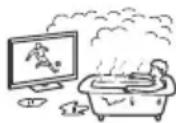
Place the TV in a humid or dusty space, or in a room with oily smoke or steam (near cooking tables or humidifiers). Fire, electric shock, or warping may result.
-
Install the TV in places subject to extreme temperature such as in direct sunlight, near a radiator or a heating vent. The TV may overheat in such condition which can cause deformation of the enclosure and/or TV malfunction.
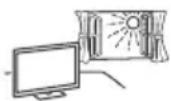
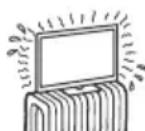
- If the TV is placed in the changing room of a public bath or hot spring, the TV may be damaged by airborne sulfur, etc.
- For best picture quality, do not expose the screen to direct illumination or sunlight.
- Avoid moving the TV from a cold area to a warm area. Sudden room temperature changes may cause moisture condensation. This may cause the TV to show poor picture and/or poor colour. Should this occur, allow moisture to evaporate completely before powering the TV on.
Broken pieces:
- Do not throw anything at the TV set. The screen glass may break by the impact and cause serious injury.
- If the surface of the TV set cracks, do not touch it until you have unplugged the mains lead. Otherwise electric shock may result.
When not in use
- If you will not be using the TV set for several days, the TV set should be disconnected from the mains for environmental and safety reasons.
- As the TV set is not disconnected from the mains when the TV set is just turned off, pull the plug from the mains to disconnect the TV set completely.
However, some TV sets may have features that require the TV set to be left in standby to work correctly.
For children
- Do not allow children to climb on the TV set.
- Keep small accessories out of the reach of children, so that they are not mistakenly swallowed.
If the following problems occur...
Turn off the TV set and unplug the mains lead immediately if any of the following problems occur.
Ask your dealer or Sony service centre to have it checked by qualified service personnel.
When:
- Mains lead is damaged.
Poor fitting of mains socket.
TV set is damaged by being dropped, hit or having something thrown at it.
Any liquid or solid object falls through openings in the cabinet.
About LCD Monitor Temperature
When the LCD Monitor is used for an extended period, the panel surrounds become warm. You may feel hot when touching there by the hand.
Precautions
Viewing the TV
- Some people may experience discomfort (such as eye strain, fatigue, or nausea) while watching 3D video images or playing stereoscopic 3D games. Sony recommends that all viewers take regular breaks while watching 3D video images or playing stereoscopic 3D games. The length and frequency of necessary breaks will vary from person to person. You must decide what works best. If you experience any discomfort, you should stop watching the 3D video images or playing stereoscopic 3D games until the discomfort ends; consult a doctor if you believe necessary. You should also review (i) the instruction manual of any other device or media used with this television and (ii) our website (www.sony.eu/support) for the latest information. The vision of young children (especially those under six years old) is still under development. Consult your doctor (such as a paediatrician or eye doctor) before allowing young children to watch 3D video images or play stereoscopic 3D games. Adults should supervise young children to ensure they follow the recommendations listed above.
- Do not use, store, or leave the 3D Glasses or battery near fire, or in places with a high temperature, e.g., in direct sunlight, or in sun-heated cars.
View the TV in moderate light, as viewing the TV in poor light or during long period of time, strains your eyes. - When using headphones, adjust the volume so as to avoid excessive levels, as hearing damage may result.
LCD Screen
- Although the LCD screen is made with high-precision technology and 99.99% or more of the pixels are effective, black dots may appear or bright points of light (red, blue, or green) may appear constantly on the LCD screen. This is a structural property of the LCD screen and is not a malfunction.
- Do not push or scratch the front filter, or place objects on top of this TV set. The image may be uneven or the LCD screen may be damaged.
- If this TV set is used in a cold place, a smear may occur in the picture or the picture may become dark. This does not indicate a failure. These phenomena disappear as the temperature rises.
- Ghosting may occur when still pictures are displayed continuously. It may disappear after a few moments.
- The screen and cabinet get warm when this TV set is in use. This is not a malfunction.
- The LCD screen contains a small amount of liquid crystal. Follow your local ordinances and regulations for disposal.
Handling and cleaning the screen surface/ cabinet of the TV set
Be sure to unplug the mains lead connected to the TV set from mains socket before cleaning.
To avoid material degradation or screen coating degradation, observe the following precautions.
- To remove dust from the screen surface/cabinet, wipe gently with a soft cloth. If dust is persistent, wipe with a soft cloth slightly moistened with a diluted mild detergent solution.
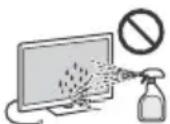
- Never spray water or detergent directly on the TV set. It may drip to the bottom of the screen or exterior parts and enter the TV set, and may cause damage to the TV set.
- Never use any type of abrasive pad, alkaline/acid cleaner, scouring powder, or volatile solvent, such as alcohol, benzene, thinner or insecticide. Using such materials or maintaining prolonged contact with rubber or vinyl materials may result in damage to the screen surface and cabinet material.
Periodic vacuuming of the ventilation openings is recommended to ensure to proper ventilation.
- When adjusting the angle of the TV set, move it slowly so as to prevent the TV set from moving or slipping off from its table stand.
Optional Equipment
- Keep optional components or any equipment emitting electromagnetic radiation away from the TV set. Otherwise picture distortion and/or noisy sound may occur.
- This equipment has been tested and found to comply with the limits set out in the EMC Directive using a connection signal cable shorter than 3 meters.
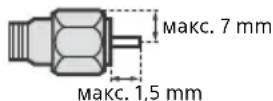
Recommendation of F-type plug
Projection of the inner wire from the connection part must be less than 1.5mm
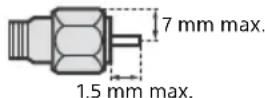
(Reference drawing of the F type plug)
Caution about handling the remote control
- Observe the correct polarity when inserting batteries.
- Do not use different types of batteries together or mix old and new batteries.
- Dispose of batteries in an environmentally friendly way. Certain regions may regulate the disposal of batteries. Please consult your local authority.
- Handle the remote control with care. Do not drop or step on it, or spill liquid of any kind onto it.
- Do not place the remote control in a location near a heat source, a place subject to direct sunlight, or a damp room.
Wireless Function of the unit
- Do not operate this unit near medical equipment (pacemaker, etc.), as malfunction of the medical equipment may result.
- Although this unit transmits/receives scrambled signals, be careful of unauthorised interception. We cannot be responsible for any trouble as a result.
Disposal of the TV set
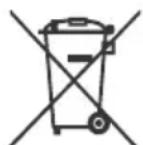
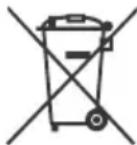
Disposal of Old Electrical & Electronic Equipment (Applicable in the European Union and other European countries with separate collection systems)
This symbol on the product or on its packaging indicates that this product shall not be treated as household waste. Instead it shall be handed over to the applicable collection point for the
recycling of electrical and electronic equipment. By ensuring this product is disposed of correctly, you will help prevent potential negative consequences for the environment and human health, which could otherwise be caused by inappropriate waste handling of this product. The recycling of materials will help to conserve natural resources. For more detailed information about recycling of this product, please contact your local Civic Office, your household waste disposal service or the shop where you purchased the product.
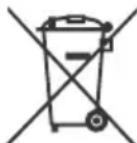
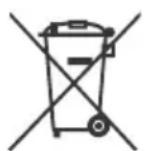
Disposal of waste batteries (applicable in the European Union and other European countries with separate collection systems)
This symbol on the battery or on the packaging indicates that the battery provided with this product shall not be treated as household
waste. On certain batteries this symbol might be used in combination with a chemical symbol. The chemical symbols for mercury (Hg) or lead (Pb) are added if the battery contains more than 0.0005% mercury or 0.004% lead. By ensuring these batteries are disposed of correctly, you will help prevent potentially negative consequences for the environment and human health which could otherwise be caused by inappropriate waste handling of the battery. The recycling of the materials will help to conserve natural resources. In case of products that for safety, performance or data integrity reasons require a permanent connection with an incorporated battery, this battery should be replaced by qualified service staff only. To ensure that the battery will be treated properly, hand over the product at end-of-life to the applicable collection point for the recycling of electrical and electronic equipment. For all other batteries, please view the section on how to remove the battery from the product safely. Hand the battery over to the applicable collection point for the recycling of waste batteries. For more detailed information about recycling of this product or battery, please contact your local Civic Office, your household waste disposal service or the shop where you purchased the product.
Parts and Controls
Controls and Indicators
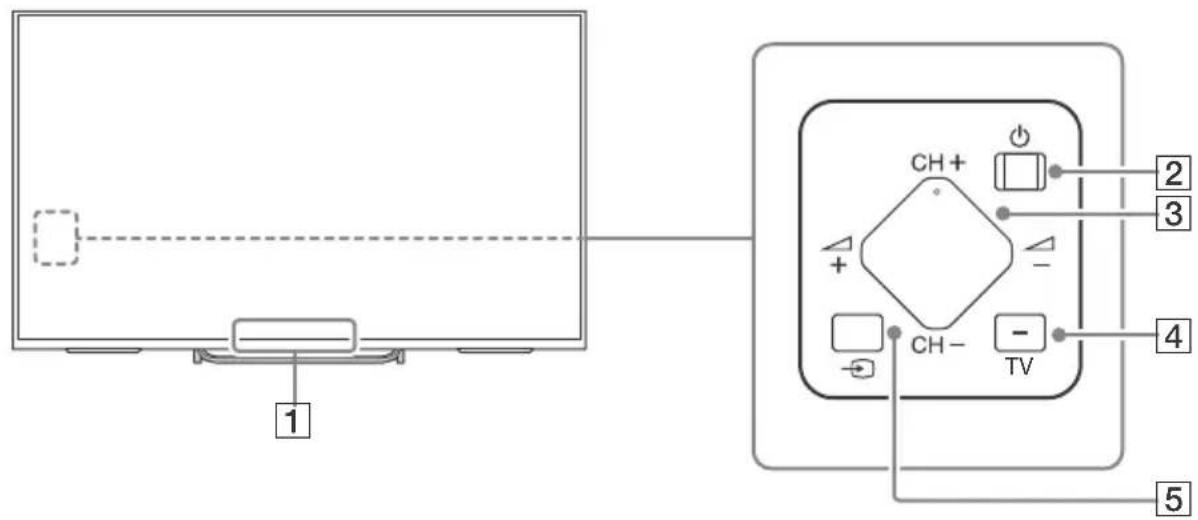
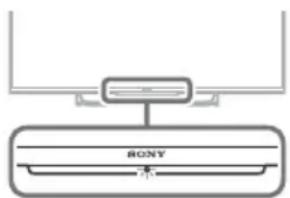
Remote Control sensor\*/ Light sensor\*/Illumination LED/3D Sync Transmitter\*/2
The Illumination LED lights up or blinks according to the status of the TV.
White
When turning on the TV/picture off mode/software update, etc.
Cyan
When connecting with a mobile device wirelessly.
Pin2k
Recording mode.
- Amber
Timer is set.
2 (Power)
3 CH + / - (Channel)
+ / - (Volume)
4 TV
Switch to a TV channel or input from other applications.
(1) (Input select)
Display and select the input source.
1 Do not place anything near the sensor.
2 Only on limited region/country/TV model.
Inputs and Outputs
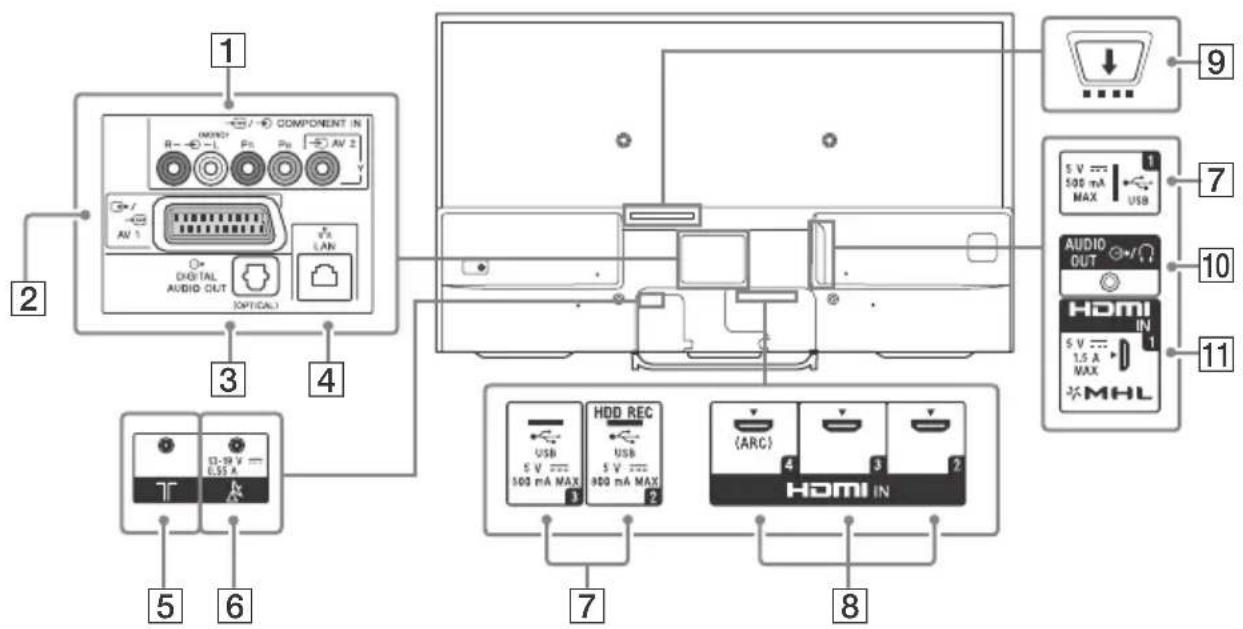
1 AV2,COMPONENT IN
For a composite connection: Use AV 2, and (L/R) of / COMPONENT IN*1.
For a component connection: Use Y, PB, PR and (L/R).
2 A V 1
Connect with a SCART cable. When you connect an analogue decoder, the TV tuner outputs scrambled signals to the decoder, and the decoder unscrambles the signals before outputting them.
3 DIGITAL AUDIO OUT (OPTICAL)
4 LAN
5 (RF input)
Connect to your cable or antenna (aerial).
6 (Satellite input)
Connect to your satellite antenna (aerial).
7 -BSB 1/2 (HDD REC)* 2 × 3 / 3
- Connecting a large USB device may interfere with other connected devices beside it.
- When connecting a large USB device, connect to the USB 1 jack.
HDMI IN 2/3/4
If connecting a digital audio system that is compatible with Audio Return Channel (ARC) technology, use HDMI IN 4. If not, an additional connection with DIGITAL AUDIO OUT (OPTICAL) is necessary.
CAM (Conditional Access Module)
- Provides access to pay TV services. For details, refer to the instruction manual supplied with your CAM.
- Do not insert the smart card directly into the TV CAM slot. It must be fitted into the Conditional Access Module provided by your authorised dealer.
- CAM is not supported in some countries/ areas. Check with your authorised dealer.
- A CAM message may appear when you switch to a digital programme after using the Internet video.
10 AUDIOOUT
To listen to the TV's sound through the connected equipment, press HOME. Select [Settings] [Sound] [Headphone/Audio out] and then select the desired item.
11 HDMI IN 1/MHL
You can connect your MHL (Mobile High-definition Link) device using an HD quality MHL cable.
1 When connecting mono equipment, connect to the L (MONO) audio jack (socket).
2 Only on limited region/country/TV model.
*3 HDD REC function will be available within 2015. You will receive HDD REC function automatically as a software upgrade. Make sure your TV is connected to the Internet. If you do not have a network connection, you will be able to download the software from the Sony support website using your PC. For details on how to upgrade, please visit the Sony support website. To stay informed about the exact release date, please subscribe at http://www.sony.eu/support/2015tvnetworkupdate
Using Remote Control
Remote Control Parts Description
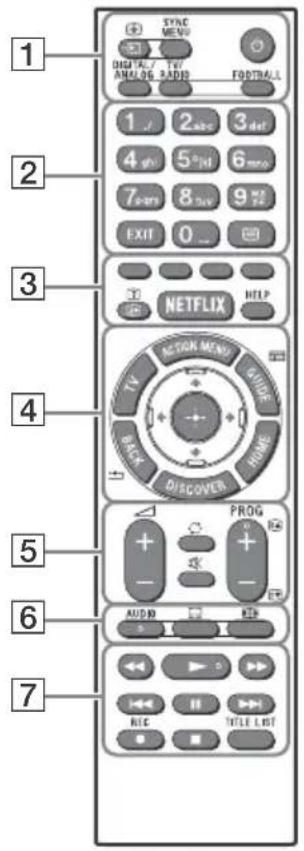
Input select/Text hold)
In TV mode:Display and select the input source.
In Text mode: Hold the current page.
(TV standby)
Turn on or turn off the TV (standby mode).
DIGITAL/ANALOG
Switch between digital and analogue mode.
TV/RADIO
Switch between TV or RADIO broadcasts.
SYNC MENU
Display the BRAVIA Sync Menu.
FOOTBALL
Turn Live Football Mode on or off (when the feature is available).
Number buttons
EXIT
Return to the previous screen or exit from the menu. When an Interactive Application service is available, press to exit from the service.
(Text)
Display text information.
3 Colour buttons
Execute correspondent function at that time.
+/-? ( I n f o / T e x t r e
Display information.
NETFLIX*1
Access the "NETFLIX" online service.
HELP
DisplayHelpMenu.
4 ACTION MENU
Display a list of contextual functions.
TV
Switch to a TV channel or input from other applications.
GUIDE/1
Display the digital programme guide.
BACK/
Return to previous screen.
HOME
Display the TV Home Menu.
DISCOVER
Bring up the Content Bar to search for content.
/ / / (Item select/Enter)
5 +/-(Volume)
Adjust the volume.
(Jump)
Jump back and forth between two channels or inputs. The TV alternates between the current channel or input and the last channel or input that was selected.
(Muting)
Mute the sound. Press again to restore the sound.
PROG + / - / 3/
In TV mode: Select the channel.
In Text mode: Select the next (▲) or previous (▼) page.
6 AUDIO
Change the language for the programme currently being viewed.
(Subtitle setting)
Turn subtitles on or off (when the feature is available).
(Wide mode)
Change the screen format.
7
Operate media contents on TV and connected BRAVIA Sync compatible device.
REC\*1\*2
Record the current programme with the USB HDD recording function.
TITLE LIST\*1
Display the Title list.
1 The location, availability and function of remote control button may vary depending on your country/ region/TV model.
2 HDD REC function will be available within 2015. You will receive HDD REC function automatically as a software upgrade. Make sure your TV is connected to the Internet. If you do not have a network connection, you will be able to download the software from the Sony support website using your PC. For details on how to upgrade, please visit the Sony support website. To stay informed about the exact release date, please subscribe at http://www.sony.eu/support/2015tvnetworkupdate
Installing the TV to the Wall
This TV's instruction manual only shows the steps on preparing the installation of the TV before installing to the wall.
To Customers
For product protection and safety reasons, Sony strongly recommends that installation of your TV be performed by Sony dealers or licensed contractors. Do not attempt to install it yourself.
To Sony Dealers and Contractors
Provide full attention to safety during the installation, periodic maintenance and examination of this product.
Sufficient expertise is required for installing this product, especially to determine the strength of the wall for withstanding the TV's weight. Be sure to entrust the attachment of this product to the wall to Sony dealers or licensed contractors and pay adequate attention to safety during the installation. Sony is not liable for any damage or injury caused by mishandling or improper installation.
Use the Wall-Mount Bracket SU-WL450 (not supplied) to install the TV to the wall.
When installing the Wall-Mount Bracket, also refer to the Operating Instructions and Installation Guide supplied with the Wall-Mount Bracket.
SU-WL450
GB
1 Attach Wall-Mount Attachment (supplied with the TV) to the rear of the TV (to make it parallel with the wall).
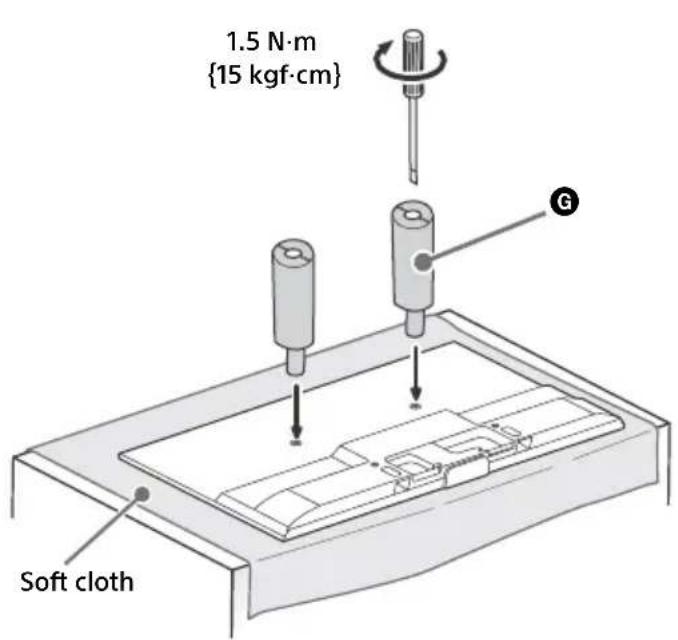
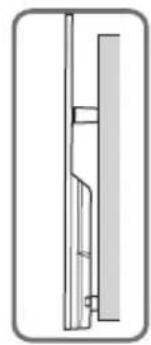
Note
- If using an electric screwdriver, set the torque at approximately 1.5N· m {15 kgf·cm}.
- Be sure to fasten the Wall-Mount Attachment when attaching them to the TV.
Use only a flat head screwdriver to install the Wall-Mount Attachment. Use of another tool might result in over torqueing the Wall-Mount Attachment and damaging the TV.

For instructions on Wall-Mount Bracket installation of your TV model, refer to the following website: www.sony.eu/tv/wall-mount-bracket-manual
Troubleshooting
In order to keep your TV software up-to-date, it is necessary to download the latest software information via the digital broadcasting system or Internet and to update the software. Select [Update Now] to start a software update. The illumination LED flashes white while the software is updating. Do not unplug the AC power cord during the software update. If you do, the software update may not finish completely, and it may cause a software malfunction. Software updates can take up to 30 minutes. If you do not wish to update the software automatically, press HOME and select [Help] [System software update] [Automatic software download] [Off].
When you plug in TV, the TV may not be able to turn on for a while even if you press the power button on the remote control or the TV, because it takes time to initialize the system. Wait for about one minute, then operate it again. When you turn on by pressing the power button on the remote control or the TV, it takes some time to turn on the illumination LED and for the remote control to be functional.
When the illumination LED is flashing in red, count how many times it flashes (interval time is three seconds).
If the illumination LED flashes red, reset the TV by disconnecting the mains lead for two minutes, then turn on the TV.
If the problem persists, contact your dealer or Sony service centre with the number of times the Illumination LED flashes red (interval time is three seconds). Disconnect the mains lead, and inform your dealer or Sony service centre.
When the illumination LED is not flashing, check the items as follows.
You can also refer to [Troubleshooting] in the Help Guide or perform self-diagnosis by selecting [Help] [Self diagnostics]. If the problem persists, have your TV serviced by qualified service personnel.
Troubles and Solutions
There is no picture (screen is dark) and no sound.
- Check the antenna (aerial)/cable connection.
- Connect the TV to AC power (mains), and press on the TV or remote control.
Some programmes cannot be tuned.
- Check the antenna (aerial)/cable connection or dish.
- The satellite cable might be short-circuited or there might be connection problems of the cable. Check the cable connection and then turn the TV off with the Mains power On/Off switch, and turn it on again.
- The frequency that you entered is out of range. Consult the received satellite broadcasting company.
There is no Cable TV services (programmes) found.
- Check the cable connection or tuning configuration.
- Attempt the [Digital Auto Tuning] by selecting [Antenna] instead of [Cable].
The remote control does not function.
- Replace the batteries.
The [Parental lock] password has been forgotten.
- Enter 9999 for the PIN code. (PIN code 9999 is always accepted.)
The TV surrounds become warm.
- When the TV is used for an extended period, the TV surrounds become warm.
You may feel hot when touching there by the hand.
Frozen audio or video, a blank screen, or the TV does not respond to TV or remote control buttons.
- Perform a simple reset of the TV by unplugging the AC power cord for two minutes, then plug it in again.
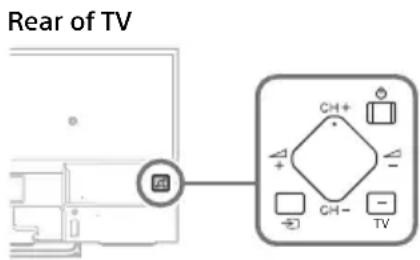
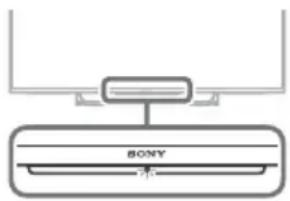
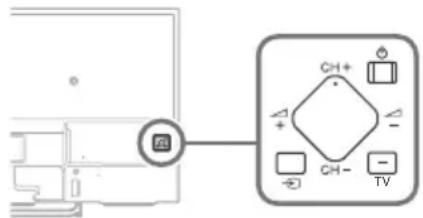
The ,CH + / - , + / - , and TV buttons cannot be located on the TV.
See below illustration for location of the buttons on the TV.
The illumination LED is turned on.
If you do not wish to light up the illumination LED, you can turn it off.
Press HOME, then select [Settings] [Illumination LED] [Off].
Cannot connect to a wireless router by WPS (Wi-Fi Protected Setup).
- If you use WEP security, select [Easy] [Wi-Fi] [Connect by scan list].
Then, select the network name (SSID) you want to connect.
Cannot find the required network name in network setup.
- Select [[Manual entry]] and press to enter network name.
Specifications
System
Panel system
LCD (Liquid Crystal Display) Panel, LED Backlight
TV system
Depending on your country/area selection
Analogue: B/G, D/K, L, I
Digital: DVB-T/DVB-C
DVB-T2
Satellite: DVB-S/DVB-S2
Colour/video system
Analogue: PAL, SECAM, NTSC3.58 (Video only), NTSC4.43 (Video only)
Digital: Refer to the Help Guide.
Channel coverage
Analogue: UHF/VHF/Cable, Depending on your country/area selection.
Digital: UHF/VHF/Cable, Depending on your country/area selection.
Satellite: IF Frequency 950-2150 MHz
Sound output
10W+10W
Wireless technology
Protocol IEEE802.11a/b/g/n
Bluetooth Version 4.1
Input/Output jacks
Antenna (aerial) cable
75 ohm external terminal for VHF/UHF
Satellite antenna
Female F-Type Connector IEC169-24, 75 ohm.
DiSEqC 1.0, LNB 13 V/18 V & 22 kHz tone, Single
Cable Distribution EN50494.

A V 1
21-pin scart connector (CENELEC standard)
including audio/video input, RGB input and TV audio/video output.

C O M P O N E N T I
YP_BPR (Component Video): 1080p (50, 60 Hz),
1080i (50, 60 Hz), 720p (50, 60 Hz), 576p, 576i, 480p, 480i
Audio input (Phono pin jack)

Video input (common phono pin with Y input)
HDMI IN 1,2,3,4 (except KDL-55/50/43W75xC)
Video (2D): 1080p (30, 50, 60 Hz), 1080/24p, 1080i (50, 60 Hz), 720p (30, 50, 60 Hz), 720/24p, 576p, 576i, 480p, 480i, PC Formats
Video (3D):
Frame Packing: 1080p (30 Hz), 1080/24p, 1080i (50, 60 Hz), 720p (30, 50, 60 Hz), 720/24p
Side-by-Side: 1080p (50, 60 Hz), 1080/24p, 1080i (50, 60 Hz), 720p (50, 60 Hz)
Over-Under: 1080p (30, 50, 60 Hz), 1080/24p, 1080i (50, 60 Hz), 720p (50, 60 Hz)
Audio: 5.1 channel linear PCM: 32, 44.1, 48, 88.2, 96, 176.4 and 192kHz , 16, 20 and 24 bits, Dolby Digital and DTS
ARC (Audio Return Channel) (HDMI IN 4 only)
HDMI IN 1, 2, 3, 4 (KDL-55/50/43W75xC only)
Video: 1080p (30, 50, 60 Hz), 1080/24p, 1080i (50, 60 Hz), 720p (30, 50, 60 Hz), 720/24p, 576p, 576i, 480p, 480i, PC Formats
Audio: 5.1 channel linear PCM: 32, 44.1, 48, 88.2, 96, 176.4 and 192kHz , 16, 20 and 24 bits, Dolby Digital and DTS
ARC (Audio Return Channel) (HDMI IN 4 only)
MHL (common with HDMI IN 1) (except KDL-55/50/43W75xC)
Video (2D): 1080p (30 Hz), 1080/24p, 1080i (50, 60 Hz), 720p (30, 50, 60 Hz), 720/24p, 576p, 576i, 480p, 480i
Video (3D):
Side-by-Side: 1080/24p, 1080i (50, 60 Hz), 720p (50, 60 Hz)
Over-Under: 1080p (30 Hz), 1080/24p, 1080i (50, 60 Hz), 720p (50, 60 Hz)
Audio: 5.1 channel linear PCM: 32, 44.1, 48, 88.2, 96, 176.4 and 192kHz , 16, 20 and 24 bits, Dolby Digital and DTS
MHL (common with HDMI IN 1) (KDL-55/50/43W75xC only)
Video: 1080p (30 Hz), 1080/24p, 1080i (50, 60 Hz), 720p (30, 50, 60 Hz), 720/24p, 576p, 576i, 480p, 480i
Audio: 5.1 channel linear PCM: 32, 44.1, 48, 88.2, 96, 176.4 and 192kHz , 16, 20 and 24 bits, Dolby Digital and DTS
DIGITAL AUDIO OUT (OPTICAL)
Digital optical jack (Two channel linear PCM, Dolby Digital, DTS)
AUDIO OUT (Stereo Mini Jack)
Headphone, Audio Output, Subwoofer
1/3, (HDD REC)
USB HDD device port ( 空 only), USB port
CAM (Conditional Access Module) slot
DCIN19.5V
AC adapter input

LAN
10BASE-T/100BASE-TX connector (Depending on the operating environment of the network, connection speed may differ. 10BASE-T/ 100BASE-TX communication rate and communication quality are not guaranteed for this TV.)
Others
Optional accessories
Touchpad Remote Control: RMF-TX100E
Wall-Mount Bracket: SU-WL450
Wireless Subwoofer: SWF-BR100
MHL Cable:DLC-MC10, DLC-MC20
Active 3D Glasses: TDG-BT500A
(Except KDL-55W75xC/50W75xC/43W75xC)
Operating temperature
0^ - 40^
Operating humidity
10% - 80% RH (non-condensing)
Power and others
Power requirements
19.5 V DC with AC adapter
Rating: Input 220 V - 240 V AC, 50 Hz
Energy Efficiency Class
KDL-55W80xC/FWL-55W805C:A+
KDL-55W75xC: A+
KDL-50W80xC/KDL-50W75xC:A+
KDL-43W80xC/KDL-43W75xC:A+
Screen size (measured diagonally) (Approx.)
KDL-55W80xC / FWL-55W805C: 138.8 cm / 55 inches
KDL-55W75xC: 138.8 cm / 55 inches
Average annual energy consumption4
KDL-55W80xC / FWL-55W805C: 104 kWh
KDL-55W75xC:104 kWh
KDL-50W80xC/KDL-50W75xC:100kWh
KDL-43W80xC / KDL-43W75xC: 76 kWh
Standby power consumption*2*3
0.50 W (10 W in software/EPG update mode)
Display resolution
1,920 dots (horizontal) × 1,080 lines (vertical)
Dimensions (Approx.) (w × h × d)
with Table-Top Stand
KDL-55W80xC, KDL-55W75xC:
123.0 × 75.3 × 21.0 ~cm
KDL-50W80xC, KDL-50W75xC:
111.6 × 69.1 × 19.1 cm
KDL-43W80xC, KDL-43W75xC:
96.2 × 60.2 × 17.9 ~cm
without Table-Top Stand
KDL-55W80xC, KDL-55W75xC:
123.0 × 71.5 × 6.1 ~cm
KDL-50W80xC, KDL-50W75xC:
111.6 × 65.4 × 5.9 ~cm
KDL-43W80xC, KDL-43W75xC:
96.2 × 56.5 × 5.9 ~cm
Mass (Approx.)
with Table-Top Stand
KDL-55W80xC, KDL-55W75xC: 18.0 kg
KDL-50W80xC, KDL-50W75xC: 14.6 kg
KDL-43W80xC, KDL-43W75xC: 11.8 kg
without Table-Top Stand
KDL-55W80xC, KDL-55W75xC: 17.0 kg
KDL-50W80xC, KDL-50W75xC: 13.7 kg
KDL-43W80xC, KDL-43W75xC: 10.9 kg
1 Energy consumption per year, based on the power consumption of the television operating 4 hours per day for 365 days. The actual energy consumption will depend on how the television is used.
^2 Specified standby power is reached after the TV finishes necessary internal processes.
^3 Standby power consumption will increase when your TV is connected to the network.
4 Only on limited region/country/TV model.
Note
- The "x" that appears in the model name corresponds to a numeric digit, related to design, colour or TV system.
- Do not remove the dummy card from TV CAM (Conditional Access Module) slot other than to insert a smart card fitted in CAM.
- Optional accessories availability depends on countries/region/TV model/stock.
- Design and specifications are subject to change without notice.
- This TV set incorporates MHL 2.
Notes on Digital TV function
- Any functions related to Digital TV (DWV) only work in countries or areas where DVB-T/DVB-T2 (MPEG-2 and H.264/MPEG-4 AVC) digital terrestrial signals are broadcast or where you have access to a compatible DVB-C (MPEG-2 and H.264/MPEG-4 AVC) cable service. Please confirm with your local dealer if you can receive a DVB-T/ DVB-T2 signal where you live or ask your cable provider if their DVB-C cable service is suitable for integrated operation with this TV.
- Your cable provider may charge a fee for their services, or require you to agree to its terms and conditions of business.
- This TV set complies with DVB-T/DVB-T2 and DVB-C specifications, but compatibility with future DVB-T/DVB-T2 digital terrestrial and DVB-C digital cable broadcasts are not guaranteed.
- Some Digital TV functions may not be available in some countries/areas and DVB-C cable may not operate correctly with some providers.
Trademark information
- The terms HDMI and HDMI High-Definition Multimedia Interface, and the HDMI Logo are trademarks or registered trademarks of HDMI Licensing LLC in the United States and other countries.
- Manufactured under license from Dolby Laboratories. Dolby and the double-D symbol are trademarks of Dolby Laboratories.
- "BRAVIA" and Bare Attitudes of Sony Corporation.
- Gracenote, Gracenote eyeQ, Gracenote VideoID, Gracenote Video Explore, the Gracenote logo and logotype, and the "Powered by Gracenote" logo are either registered trademarks or trademarks of Gracenote in the United States and/or other countries.
- Opera® Devices SDK from Opera Software ASA. Copyright 1995-2014 Opera Software ASA. All rights reserved.
-
Wi-Fi, Wi-Fi Direct, Miracast and Wi-Fi Protected Setup are trademarks or registered trademarks of Wi-Fi Alliance.
-
MHL, Mobile High-Definition Link and the MHL Logo are trademarks or registered trademarks of MHL Licensing, LLC.
- For DTS patents, see http://patents.dts.com. Manufactured under license from DTS, Inc. DTS, the Symbol, & DTS and the Symbol together are registered trademarks, and DTS Digital Surround is a trademark of DTS, Inc. © DTS, Inc. All Rights Reserved.
- Designed with UETM Technology Under License from Universal Electronics Inc. Portions © UEI 2000 - 2014
- The Bluetooth® word mark and logos are owned by the Bluetooth SIG, Inc. and any use of such marks by Sony Corporation is under license. Other trademarks and trade names are those of their respective owners.
- DiSEqCTM is a trademark of EUTELSAT. This TV supports DiSEqC 1.0. This TV is not intended for controlling motorized antennas.
- TUXERA is a registered trademark of Tuxera Inc. in the US and other countries.
Table des matieres
AVIS IMPORTANT. 2
AT, BE, HR, CY, CZ, DK, EE, FI, FR, DE, GR, HU, IE, IT, LV, LT, LU, MT, NL, PL, PT, SK, SI, ES, SE, GB, IS, LI, NO, CH, BG, RO, TR, AL, BA, MK, MD, RS, ME, Kosovo
3 DIGITAL AUDIO OUT (OPTICAL)
4 LAN
5T (Entree RF)
Satellite:DVB-S/DVB-S2
Norme Couleur/Video
Analogue: PAL, SECAM, NTSC3.58 (Vidente
uniquement), NTSC4.43 (Vidente uniquement)
ARC (Audio Return Channel) (HDMI IN 4 uniquely)
HDMI IN 1, 2, 3, 4 (KDL-55/50/43W75xC, unique)
Video: 1080p (30, 50, 60 Hz), 1080/24p, 1080i (50, 60 Hz), 720p (30, 50, 60 Hz),
720/24p, 576p, 576i, 480p, 480i, PC Formats
ARC (Audio Return Channel) (HDMI IN 4.1, unquipment)
DIGITAL AUDIO OUT (OPTICAL)
KDL-55W75xC : 75,0 W
KDL-50W80xC/KDL-50W75xC:72,0 W
KDL-43W80xC / KDL-43W75xC : 55,0 W
en mode [Intense]
KDL-55W80xC / FWL-55W805C : 119,0 W
KDL-55W75xC:119,0 W
KDL-50W80xC/KDL-50W75xC:110,0W
KDL-43W80xC / KDL-43W75xC : 98,0 W
AT, BE, HR, CY, CZ, DK, EE, FI, FR, DE, GR, HU, IE, IT, LV, LT, LU, MT, NL, PL, PT, SK, SI, ES, SE, GB, IS, LI, NO, CH, BG, RO, TR, AL, BA, MK, MD, RS, ME, Kosovo
7 -BSB 1/2 (HDD REC)* ^2 * ^3/3
Sistema de television
720p(50,60Hz),576p,576i,480p,480i
Video (2D): 1080p (30 Hz), 1080/24p,
1080i (50, 60 Hz), 720p (30, 50, 60 Hz),
720/24p,576p,576i,480p,480i
Video (3D):
Lado a lado: 1080/24p, 1080i (50, 60 Hz), 720p (50, 60 Hz)
Encima-debajo: 1080p (30 Hz), 1080/24p, 1080i (50, 60 Hz), 720p (50, 60 Hz)
Audio: PCM lineal de 5,1 canales: 32, 44,1, 48
88,2, 96, 176,4 y 192 kHz, 16, 20 y 24 bits, Dolby Digital y DTS
MHL (normal con HDMI IN 1)
(sólo KDL-55/50/43W75xC)
Video: 1080p (30 Hz), 1080/24p, 1080i (50, 60 Hz), 720p (30, 50, 60 Hz), 720/24p, 576p, 576i, 480p, 480i
Audio: PCM lineal de 5,1 canales: 32, 44,1, 48, 88,2, 96, 176,4 y 192 kHz, 16, 20 y 24 bits, Dolby Digital y DTS
DIGITAL AUDIO OUT (OPTICAL)
Toma digital optica (PCM lineal de dos canales, Dolby Digital, DTS)
AUDIO OUT (minitoma estereo)
Auriculares, salute de audio, subwoofer
1 / 3 , (HDDREC)* 4
10% - 80% RH (sin condensation)
123,0 × 75,3 × 21,0 cm
KDL-50W80xC, KDL-50W75xC:
111,6×69,1×19,1cm
KDL-43W80xC, KDL-43W75xC:
96,2× 60,2× 17,9cm
AT, BE, HR, CY, CZ, DK, EE, FI, FR, DE, GR, HU, IE, IT, LV, LT, LU, MT, NL, PL, PT, SK, SI, ES, SE, GB, IS, LI, NO, CH, BG, RO, TR, AL, BA, MK, MD, RS, ME, Kosovo
De timer is ingesteld.
2 (Aan/uit)
3 CH + / - (Zender)
+ / - (Volume)
4 TV
DIGITAL AUDIO OUT (OPTICAL)
AT, BE, HR, CY, CZ, DK, EE, FI, FR, DE, GR, HU, IE, IT, LV, LT, LU, MT, NL, PL, PT, SK, SI, ES, SE, GB, IS, LI, NO, CH, BG, RO, TR, AL, BA, MK, MD, RS, ME, Kosovo
3 DIGITAL AUDIO OUT (OPTICAL)
4 LAN
576p, 576i, 480p, 480i, Computerformate Video (3D):
Frame Packing: 1080p (30 Hz), 1080/24p,
1080i (50, 60 Hz), 720p (30, 50, 60 Hz), 720/24p
Nebeneinander: 1080p (50, 60 Hz), 1080/24p, 1080i (50, 60 Hz), 720p (50, 60 Hz)
Untereinander: 1080p (30, 50, 60 Hz), 1080/24p, 1080i (50, 60 Hz), 720p (50, 60 Hz)
Audio: 5,1-Kanal linear PCM: 32, 44,1, 48, 88,2, 96
720/24p, 576p, 576i, 480p, 480i,
Computerformate
Audio: 5,1-Kanal linear PCM: 32, 44,1, 48, 88, 2, 96
Video (2D): 1080p (30 Hz), 1080/24p,
1080i (50, 60 Hz), 720p (30, 50, 60 Hz),
720/24p, 576p, 576i, 480p, 480i
Video (3D):
Nebeneinander: 1080/24p, 1080i (50, 60 Hz), 720p (50, 60 Hz)
Untereinander: 1080p (30 Hz), 1080/24p,
1080i (50, 60 Hz), 720p (50, 60 Hz)
Audio: 5,1-Kanal linear PCM: 32, 44,1, 48, 88, 2, 96
DIGITAL AUDIO OUT (OPTICAL)
AT, BE, HR, CY, CZ, DK, EE, FI, FR, DE, GR, HU, IE, IT, LV, LT, LU, MT, NL, PL, PT, SK, SI, ES, SE, GB, IS, LI, NO, CH, BG, RO, TR, AL, BA, MK, MD, RS, ME, Kosovo
Estequipment podeserutilzado noutrospaisesnao europeus.
1080/24p, 1080i (50, 60 Hz), 720p (50, 60 Hz)
Audio: PCM linear do canal 5,1: 32, 44,1, 48, 88,2,
96, 176, 4 e 192 kHz, 16, 20 e 24 bits, Dolby Digital e DTS
ARC (Audio Return Channel) (apenas HDMI IN 4)
HDMI IN 1,2,3,4 (apenas KDL-55/50/43W75xC)
Video: 1080p (30, 50, 60 Hz), 1080/24p,
1080i (50, 60 Hz), 720p (30, 50, 60 Hz),
720/24p, 576p, 576i, 480p, 480i, Formatos PC
Audio: PCM linear do canal 5,1: 32, 44,1, 48, 88,2
96, 176, 4 e 192 kHz, 16, 20 e 24 bits, Dolby Digital e DTS
ARC (Audio Return Channel) (apenas HDMI IN 4)
MHL (normal com HDMI IN 1)
(excepto para KDL-55/50/43W75xC)
Video (2D): 1080p (30 Hz), 1080/24p,
1080i (50, 60 Hz), 720p (30, 50, 60 Hz),
720/24p, 576p, 576i, 480p, 480i
Video (3D):
Lado-a-Iado: 1080/24p, 1080i (50, 60 Hz),
720p (50, 60 Hz)
MHL (normal com HDMI IN 1)
(aperas KDL-55/50/43W75xC)
Video: 1080p (30 Hz), 1080/24p, 1080i (50, 60 Hz),
720p (30, 50, 60 Hz), 720/24p, 576p, 576i, 480p, 480i
Audio: PCM linear do canal 5,1: 32, 44,1, 48, 88,2
96, 176, 4 e 192 kHz, 16, 20 e 24 bits, Dolby Digital e DTS
DIGITAL AUDIO OUT (OPTICAL)
Tomada digital otica (PCM linear de dois canais,
Dolby Digital, DTS)
AUDIO OUT (Minitomada estétero)
AT, BE, HR, CY, CZ, DK, EE, FI, FR, DE, GR, HU, IE, IT, LV, LT, LU, MT, NL, PL, PT, SK, SI, ES, SE, GB, IS, LI, NO, CH, BG, RO, TR, AL, BA, MK, MD, RS, ME, Kosovo
3 DIGITAL AUDIO OUT (OPTICAL)
4 LAN
5 (Ingresso RF)
7 -BSB 1/2 (HDD REC)* ^2 * ^3/3
Impossible connecttersi a un router wireless tramite WPS (Wi-Fi Protected Setup).
Frame Packing: 1080p (30 Hz), 1080/24p,
1080i (50, 60 Hz), 720p (30, 50, 60 Hz), 720/24p
Fianco a fianco: 1080p (50, 60 Hz),
1080/24p, 1080i (50, 60 Hz), 720p (50, 60 Hz)
Sotto-sopra: 1080p (30, 50, 60 Hz),
1080/24p, 1080i (50, 60 Hz), 720p (50, 60 Hz)
Audio: PCM lineare 5,1 canali: 32, 44,1, 48, 88, 2, 96, 176,4 e 192 kHz, 16, 20 e 24 bit, Dolby Digital e DTS
ARC (Audio Return Channel) (solo HDMI IN 4)
HDMI IN 1,2,3,4 (solo KDL-55/50/43W75xC)
Video: 1080p (30, 50, 60 Hz), 1080/24p,
1080i (50, 60 Hz), 720p (30, 50, 60 Hz),
720/24p, 576p, 576i, 480p, 480i, Formati PC
Audio: PCM lineare 5,1 canali: 32, 44,1, 48, 88,2, 96, 176,4 e 192 kHz, 16, 20 e 24 bit, Dolby Digital e DTS
ARC (Audio Return Channel) (solo HDMI IN 4)
Video (2D): 1080p (30 Hz), 1080/24p,
1080i (50, 60 Hz), 720p (30, 50, 60 Hz),
720/24p, 576p, 576i, 480p, 480i
Video (3D):
Fianco a bianco: 1080/24p, 1080i (50, 60 Hz), 720p (50, 60 Hz)
Sotto-sopra: 1080p (30 Hz), 1080/24p,
1080i (50, 60 Hz), 720p (50, 60 Hz)
Audio: PCM lineare 5,1 canali: 32,44,1,48,88,2
96, 176, 4 e 192 kHz, 16, 20 e 24 bit, Dolby Digital e DTS
DIGITAL AUDIO OUT (OPTICAL)
123,0 × 75,3 × 21,0 cm
KDL-50W80xC, KDL-50W75xC:
111,6×69,1×19,1cm
KDL-43W80xC, KDL-43W75xC:
96,2× 60,2× 17,9cm
3 DIGITAL AUDIO OUT (OPTICAL)
4 LAN
[RF-ingang]
Anslut din kabel aller antenn.
6 (Satellitingang)
Frame Packing: 1080p (30 Hz), 1080/24p,
1080i (50, 60 Hz), 720p (30, 50, 60 Hz), 720/24p
Sida-vid-sida: 1080p (50, 60 Hz), 1080/24p,
1080i (50, 60 Hz), 720p (50, 60 Hz)
Over-under: 1080p (30, 50, 60 Hz), 1080/24p,
1080i (50, 60 Hz), 720p (50, 60 Hz)
Ljud: 5,1-kanals linjar PCM: 32, 44,1, 48, 88,2, 96
Video (2D): 1080p (30 Hz), 1080/24p,
1080i (50, 60 Hz), 720p (30, 50, 60 Hz),
720/24p, 576p, 576i, 480p, 480i
Video (3D):
Sida-vid-sida: 1080/24p, 1080i (50, 60 Hz),
720p (50, 60 Hz)
Over-under: 1080p (30 Hz), 1080/24p,
1080i (50, 60 Hz), 720p (50, 60 Hz)
Ljud: 5,1-kanals linjar PCM: 32, 44,1, 48, 88,2, 96
DIGITAL AUDIO OUT (OPTICAL)
AT, BE, HR, CY, CZ, DK, EE, FI, FR, DE, GR, HU, IE, IT, LV, LT, LU, MT, NL, PL, PT, SK, SI, ES, SE, GB, IS, LI, NO, CH, BG, RO, TR, AL, BA, MK, MD, RS, ME, Kosovo
Hent indholdsbjaelken for at soge after indhold.
/ / / / (Valg af element/Enter)
5 +/-(Lydstyrke)
Juster lydstyrken.
(Spring)
Over-under: 1080p (30, 50, 60 Hz), 1080/24p,
1080i (50, 60 Hz), 720p (50, 60 Hz)
Lyd: 5,1-kanals linear PCM: 32, 44,1, 48, 88,2, 96
Video: 1080p (30, 50, 60 Hz), 1080/24p, 1080i (50,
60 Hz), 720p (30, 50, 60 Hz), 720/24p, 576p, 576i, 480p, 480i, Pc-formater
Lyd: 5,1 -kanals linear PCM: 32, 44,1, 48, 88,2, 96
Video (2D): 1080p (30 Hz), 1080/24p,
1080i (50, 60 Hz), 720p (30, 50, 60 Hz), 720/24p,
576p, 576i, 480p, 480i
Video (3D):
Side om side: 1080/24p, 1080i (50, 60 Hz), 720p (50, 60 Hz)
Over-under: 1080p (30 Hz), 1080/24p, 1080i (50, 60 Hz), 720p (50, 60 Hz)
Lyd: 5,1 -kanals lineaer PCM: 32, 44,1, 48, 88,2, 96
DIGITAL AUDIO OUT (OPTICAL)
Digitalt optisk stik (to-kanals lineer PCM, Dolby Digital, DTS)
AUDIO OUT (Mini-stereostik)
Hovedtelefon, lydudgang, subwoofer
1/3, (HDD REC)* 4
USB HDD-enhedsport (kun 2), USB-port
CAM (Conditional Access Module)-holder
DC IN 19,5 V
Adapterindgang
品
LAN
10BASE-T/100BASE-TX-stik
AT, BE, HR, CY, CZ, DK, EE, FI, FR, DE, GR, HU, IE, IT, LV, LT, LU, MT, NL, PL, PT, SK, SI, ES, SE, GB, IS, LI, NO, CH, BG, RO, TR, AL, BA, MK, MD, RS, ME. Kosovo
DIGITAL AUDIO OUT (OPTICAL)
123,0 × 75,3 × 21,0 cm
KDL-50W80xC, KDL-50W75xC:
111,6×69,1×19,1cm
KDL-43W80xC, KDL-43W75xC:
96,2× 60,2× 17,9cm
ilman poytajalustaa
KDL-55W80xC, KDL-55W75xC:
123,0×71,5×6,1cm
KDL-50W80xC, KDL-50W75xC:
111,6×65,4×5,9cm
KDL-43W80xC, KDL-43W75xC:
96,2× 56,5× 5,9cm
Paino (Noin)
Sony Corporation erklaerer herved at
NL, PL, PT, SK, SI, ES, SE, GB, IS, LI, NO, CH, BG, RO, TR, AL, BA, MK
MD, RS, ME, Kosovo
3 DIGITAL AUDIO OUT (OPTICAL)
4 LAN
5 (RF-inngang)
7 -BSB 1/2 (HDD REC)* ^2 * ^3/3
Vis TV-ens home-meny.
DISCOVER
/ / / (Velg element / enter)
5 +/-(Volum)
Juster lydstyrken.
(Hopp)
Over-under: 1080p (30, 50, 60 Hz), 1080/24p,
1080i (50, 60 Hz), 720p (50, 60 Hz)
Lyd: 5,1 kanal lineaer PCM: 32, 44,1, 48, 88,2, 96
Over-under: 1080p (30 Hz), 1080/24p,
1080i (50, 60 Hz), 720p (50, 60 Hz)
Lyd: 5,1 kanal lineer PCM: 32, 44,1, 48, 88,2, 96
DIGITAL AUDIO OUT (OPTICAL)
Digital optisk kontakt (tokenals linear PCM,
Dolby Digital, DTS)
AUDIO OUT (stereomini-kontakt)
Hodetelefon, Iydutgang, subwoofer
1/3, (HDD REC)* 4
123,0 × 75,3 × 21,0 cm
KDL-50W80xC, KDL-50W75xC:
111,6×69,1×19,1cm
KDL-43W80xC, KDL-43W75xC:
96,2× 60,2× 17,9cm
uten bordstativ
KDL-55W80xC, KDL-55W75xC:
123,0×71,5×6,1cm
KDL-50W80xC, KDL-50W75xC:
111,6×65,4×5,9cm
KDL-43W80xC, KDL-43W75xC:
96,2× 56,5× 5,9cm
Masse (Ca.)
med bordstativ
KDL-55W80xC, KDL-55W75xC: 18,0 kg
KDL-50W80xC, KDL-50W75xC: 14,6 kg
KDL-43W80xC, KDL-43W75xC: 11,8 kg
uten bordstativ
KDL-55W80xC, KDL-55W75xC: 17,0 kg
KDL-50W80xC, KDL-50W75xC: 13,7 kg
KDL-43W80xC, KDL-43W75xC: 10,9 kg
The Heights, Brooklands
Weybridge, Surrey, KT 13 0XW
United Kingdom.
AT, BE, HR, CY, CZ, DK, EE, FI, FR, DE, GR, HU, IE, IT, LV, LT, LU, MT, NL, PL, PT, SK, SI, ES, SE, GB, IS, LI, NO, CH, BG, RO, TR, AL, BA, MK, MD, RS, ME, Kosovo
7 USB1/2(HDDREC)* 2*3/3
Video (2D): 1080p (30 Hz), 1080/24p,
1080i (50, 60 Hz), 720p (30, 50, 60 Hz),
720/24p, 576p, 576i, 480p, 480i
Wideo (3D):
Obok siebie: 1080/24p, 1080i (50, 60 Hz),
720p (50, 60 Hz)
Nadi pod: 1080p (30 Hz), 1080/24p, 1080i (50,
60 Hz), 720p (50, 60 Hz)
Video: 1080p (30 Hz), 1080/24p, 1080i (50,
60 Hz), 720p (30, 50, 60 Hz), 720/24p, 576p, 576i, 480p, 480i
Dzwi:k:5,1kanalow,liniowePCM:32,44,1,48
88,2,96,176,4 i 192 kHz, 16, 20 i 24 bity, Dolby Digital i DTS
DIGITAL AUDIO OUT (OPTICAL)
123,0 × 75,3 × 21,0 cm
KDL-50W80xC, KDL-50W75xC:
111,6×69,1×19,1cm
KDL-43W80xC,KDL-43W75xC:
96,2 × 60,2 × 17.9 cm
bez podstawy
KDL-55W80xC, KDL-55W75xC:
123,0×71,5×6,1cm
KDL-50W80xC, KDL-50W75xC:
111,6×65,4×5,9cm
KDL-43W80xC, KDL-43W75xC:
96,2×56,5×5,9cm
Waga (Ok.)
z podstawa
KDL-55W80xC, KDL-55W75xC: 18,0 kg
KDL-50W80xC, KDL-50W75xC: 14,6 kg
KDL-43W80xC, KDL-43W75xC: 11,8 kg
bez podstawy
KDL-55W80xC, KDL-55W75xC: 17,0 kg
KDL-50W80xC, KDL-50W75xC: 13,7 kg
KDL-43W80xC, KDL-43W75xC: 10,9 kg
AT, BE, HR, CY, CZ, DK, EE, FI, FR, DE, GR, HU, IE, IT, LV, LT, LU, MT, NL, PL, PT, SK, SI, ES, SE, GB, IS, LI, NO, CH, BG, RO, TR, AL, BA, MK, MD, RS, ME, Kosovo
Toto vybaveni muze byt pouzito vostatnich neevropskych zemich.
Frame Packing: 1080p (30 Hz), 1080/24p,
1080i (50, 60 Hz), 720p (30, 50, 60 Hz), 720/24p
Vedle sebe: 1080p (50, 60 Hz), 1080/24p,
1080i (50, 60 Hz), 720p (50, 60 Hz)
Nad/pod: 1080p (30, 50, 60 Hz), 1080/24p,
1080i (50, 60 Hz), 720p (50, 60 Hz)
Video (2D): 1080p (30 Hz), 1080/24p,
1080i (50, 60 Hz), 720p (30, 50, 60 Hz),
720/24p, 576p, 576i, 480p, 480i
Video (3D):
Vedle sebe: 1080/24p, 1080i (50, 60 Hz),
720p (50, 60 Hz)
Nad/pod: 1080p (30 Hz), 1080/24p,
1080i (50, 60 Hz), 720p (50, 60 Hz)
DIGITAL AUDIO OUT (OPTICAL)
AT, BE, HR, CY, CZ, DK, EE, FI, FR, DE, GR, HU, IE, IT, LV, LT, LU, MT, NL, PL, PT, SK, SI, ES, SE, GB, IS, LI, NO, CH, BG, RO, TR, AL, BA, MK, MD, RS, ME, Kosovo
Toto zariadenie mozete pouzivat' krajinach mimo Europsku uniu.
Video (2D): 1080p (30 Hz), 1080/24p,
1080i (50, 60 Hz), 720p (30, 50, 60 Hz),
720/24p, 576p, 576i, 480p, 480i
Video (3D):
Vedla seba: 1080/24p, 1080i (50, 60 Hz), 720p (50, 60 Hz)
Nad sebou: 1080p (30 Hz), 1080/24p, 1080i (50, 60 Hz), 720p (50, 60 Hz)
Zvuk:5,1 lineárny kanál PCM:32,44,1,48,88,2,96
176,4 a 192 kHz, 16, 20 a 24 bitov, Dolby Digital a DTS
DIGITAL AUDIO OUT (OPTICAL)
3 DIGITAL AUDIO OUT (OPTICAL)
4 LAN
[RF-bemenet]
Video (2D): 1080p (30 Hz), 1080/24p,
1080i (50, 60 Hz), 720p (30, 50, 60 Hz),
720/24p, 576p, 576i, 480p, 480i
Video (3D):
Egymás mellett: 1080/24p, 1080i (50, 60 Hz), 720p (50, 60 Hz)
Egymas follt: 1080p (30 Hz), 1080/24p, 1080i (50, 60 Hz), 720p (50, 60 Hz)
DIGITAL AUDIO OUT (OPTICAL)
AT, BE, HR, CY, CZ, DK, EE, FI, FR, DE, GR, HU, IE, IT, LV, LT, LU, MT, NL, PL, PT, SK, SI, ES, SE, GB, IS, LI, NO, CH, BG, RO, TR, AL, BA, MK, MD, RS, ME, Kosovo
3 DIGITAL AUDIO OUT (OPTICAL)
4 LAN
( intrare RF)
Conecta-va la cablu sau la antenna (exteroara).
6 A (Intrare satelit)
Conecta-va la antenna prin satelit (exteroar).
7 USB 1/2 (HDD REC)* ^2 * ^3 / 3
Analogic: B/G, D/K, L, I
Digital: DVB-T/DVB-C
DVB-T2
Satelit: DVB-S/DVB-S2
Sistem color/video
Analogic: PAL, SECAM, NTSC3.58 (Numai video), NTSC4.43 (Numai video)
Alaturate: 1080p (50, 60 Hz), 1080/24p,
1080i (50, 60 Hz), 720p (50, 60 Hz)
Suprapuse: 1080p (30, 50, 60 Hz), 1080/24p,
1080i (50, 60 Hz), 720p (50, 60 Hz)
Audio: PCM liniar pe 5,1 canale: 32, 44,1, 48, 88,2
96, 176,4 s i 192 kHz, 16, 20 s i 24 bit i, Dolby Digital s i DTS
Video (2D): 1080p (30 Hz), 1080/24p,
1080i (50, 60 Hz), 720p (30, 50, 60 Hz),
720/24p, 576p, 576i, 480p, 480i
Video (3D):
Alaturate: 1080/24p, 1080i (50, 60 Hz),
720p (50, 60 Hz)
Suprapuse: 1080p (30 Hz), 1080/24p,
1080i (50, 60 Hz), 720p (50, 60 Hz)
Audio: PCM liniar pe 5,1 canale: 32, 44,1, 48, 88,2
96, 176,4 s i 192 kHz, 16, 20 s i 24 bit i, Dolby Digital s i DTS
MHL (comun cu HDMI IN 1)
DIGITAL AUDIO OUT (OPTICAL)
Mufa optica digitala (PCM liniar pe doua canale, Dolby Digital, DTS)
AUDIO OUT (mini mufa stereo)
Castei, iesire audio, subwoofer
1/3, (HDD REC)
in modul [Stralucitor]
KDL-55W80xC / FWL-55W805C: 119,0 W
KDL-55W75xC:119,0 W
KDL-50W80xC/KDL-50W75xC:110,0 W
KDL-43W80xC / KDL-43W75xC: 98,0 W
Consum mediu anual de energia*1
KDL-55W80xC / FWL-55W805C: 104 kWh
KDL-55W75xC:104 kWh
KDL-50W80xC/KDL-50W75xC:100kWh
KDL-43W80xC / KDL-43W75xC: 76 kWh
Consum de energia in modul standby*2*3
0,50 W (10 W in modul software/actualizare program)
Rezolute ecran
1.920 puncte (horizontal) × 1.080 linii (vertical)
Dimensiuni (Cca.) (l × × a)
cu suport de masă
KDL-55W80xC, KDL-55W75xC:
123,0×75,3×21,0 cm
KDL-50W80xC, KDL-50W75xC:
111,6×69,1×19,1cm
KDL-43W80xC, KDL-43W75xC:
96,2 × 60,2 × 17.9 cm
fārā suport de masā
KDL-55W80xC, KDL-55W75xC:
123,0×71,5×6,1cm
KDL-50W80xC, KDL-50W75xC:
111,6×65,4×5,9cm
KDL-43W80xC,KDL-43W75xC:
96,2× 56,5× 5,9cm
Masa (Cca.)
cu suport de masa
KDL-55W80xC, KDL-55W75xC: 18,0 kg
KDL-50W80xC, KDL-50W75xC: 14,6 kg
KDL-43W80xC, KDL-43W75xC: 11,8 kg
fara suport de masa
KDL-55W80xC, KDL-55W75xC: 17,0 kg
KDL-50W80xC, KDL-50W75xC: 13,7 kg
KDL-43W80xC, KDL-43W75xC: 10,9 kg
Pn60np 3a npabIeHne nNdkaTOpn .7
BxOIOBe u n3xoOnu.8
I3noJ3BaHe Ha nCTaHNoHHO
ynpablenne 10
Korato He n3noJ3BaTe yCTpoiCTBOTo
- Iopapn npuHHN, Cbbp3aHn c 6e3oNaChocTt Na OKJHaTa CpeDa, Bn npenOpBvMaMe Da n3KIOuBaTe TeEbn3Opa OT Mpekata, KOrTo He PnAHpAte Da rO n3No3BaTe HrKaJko DnH.
TeIeBn3OpbT He e N3KIOUcH eOT MpeKaTa, KOraTo e N3KIOUcH eOT KOnyTe. 3a Da N3KIOUChTE HaNBJHO YCTPOJCTBOTo, N3KIOUcTe KaBeNa Ha 3axpaHBAHeTo oT eNeKTpUYeCaTa MPeKa.
HЯко TeileBnOPI npTeKbAT yHKUN, KOnTO n3NCKBaT OCTaBHeTo Ha yCTpoIcTBOTo B peXIM FOTOBHOCT.
OTHOCHOeata
- He no3B0JIaIbAaTe Ha da ca KaYBaT BbPxy TeNeBu3Opa.
- Na3eTe MaJIKeTte akcecoapn daJeu OT Deua, 3a da He 6bDaT NOBHNATN OT TIX NO HEBHMaHHe.
Ako Bb3HnKHaT CneHnTe npo6IeMn...
He3a6abHn 3KIOUeTe TeNeBUNOpu IN3BaDeTe 3aXpaHbAunna Ka6en B CnyuaH, Ye B3HNKHe HAKON OT CneDHNTE npo6JIemn. KOcYItnPapTe Ce CB aBaUN SyN OTOCTaBvNK NIn C yNbJHOMOueH cepBn3 HA SoNy dAn e HANOIXeTNO TeNeBUNOpbT da 6bJe npOBepeH ON KBaINNfUnpaH cepBn3.
Korato:
3axpaHbauT Ka6eI e nobpeH.
- THe3DoTo Ha KOHTaKaTa He 3axBaUa cTa6nHcEcnEea.
TeIeBn3OpbTe nOBpeH, nOHeKe e n3nyChaT, ydapeHnn Heo e Xbplno No Hero.
TeuHn HIN TBbpN INpeDMETN Ca nonaHaHbN B OTBOpNTe Ha Kopnyca.
OTHOCHO TEMNEPATypata Ha LCD MOHTopa
Korato LCD MOHITOpbT ce n3nO3Ba npOdbJnxTeHNO BpeMe, OKoHNHT naHEn ce 3aToNJI. MoKe da ycetnte TOnNIHata, aKO ro DOKOCHete.
Ppepa3Hm MepKu
TpeaHe Ha TeLeBn3n
- HЯкох ора мога тд усетат HeydбctBO (kaTo ha npягане Ha
OuHTe, yMopa nIIIraDEHe)doKato rIeJaT 3D Bndeo
N3ObpaxKeHn nIurpaT CTpeocckOnnHn 3D irpn. Sony
npenopbUbaHa BCnHKn 3PitEnI Da npabrt peOOBn noOpBKN
KOraTO rIeJAT 3D Bndeo N3ObpaxKeHn nIurpaT Ha
CTpeocckOnnHn 3D irpn. PnoBnxItenHOCCTTa uYeCTOTATA Ha
Heo6XoDMInTe NOuBKn e pa3NnuHa 3a BCEkn YOBeK. Bne
TpRaBA da peuHte Koe e hai-dO6po 3a Bac. Ako nIeNtate
HrkakBO HeydO6cTBTO, Tpr6Ba DA cnpete Da rIeJate 3D Bndeo
N3ObpaxKeHn nIurpaTe CTpeocckOnnHn 3D irpn,
DOKATO HeydO6CTBO To OTMNHe; KOHCytnpaTe CE c IeKap, aKO
CmETHeTe 3a Heo6xOIMO. CbIo TaKa TPr6Ba DA npErpeJate
(i)pbKOBoDCTBOTo 3a yNtpeBa HA BCAKO dpyrO yCTpoiCTBO nIi
MeDN, nI3NoI3BaHn CTo3n TeNeBn3Op i (ii) hauNya Ye6caTt
(www.sony.eu/support) 3a hai-HOBaTaNHOpMaun.
3peHneTo Ha MaNKte Deua (ocobeno Ha Te3n NOD
WecTroOnnHa Bb3pact) BCE oSe ce pa3BnBa. O6bpHeTe Ce KBM
JIeKap (PeNaTbp nIIu OChE NLeKap), npei Da nO3BONITE Ha
MaNKe Da tA rIeJat 3D Bndeo N3ObpaxKeHn nIu DNRaT
Ha CTpeocckOnnHn 3D irpn. Bb3pactHtTe rIe6Ba Da
Ha6NIOdaBt MaNKte Deua, 3a Da rapAnHpT, Ye TE cnaBt
OnncanHte No-rope npenopbKn.
He 3n0n3BaTte, CxpaHraBbAte He nO octaTe 3D OunIata He bApTeRaTa 6bn3o Do oBh, HnHa MeCTa C BnCOKa TEMepaTa, HapPmep Ha DnpeKTHa CbHueBa CBeTlnHa Nn B HArPeTI ON CbHNeTO ABTomObIMn. - IJedaIte TeneBn3B CpeDHO OCBeTeHa CTaA, TbKaTo
- IJIeAnHeTo Ha TeJeBn3B Cna6o OCBeTeHa CTaHATOBapBa
- DOnbJIHNTeHNO OCHTE Bn.
Korato n3noJ3BaTe cnyaJKN, HAcTpoJTe cJnata Ha 3Byka, 3a Da npdeoTbpaTne yBpeXdaHe Ha cJyxa.
LCD ekpaH
BbnpeknueLCDekpaanbte n3pa6oTeH no BncoKo-npeun3Ha TexHOJorNIOBceOT 99,99% OT NIKCEINTE My ca eKNTHBn, BbpxycLDekpaaMoKe TpaHNO da ce noB8T cepHNnnCBETNI TOCK (eepBeHn,CnHnn3eNEH).ToBa e ctpyKtPha oO6eHocHT Ha LCD naHena HnepeCTablaRa Heu3npaBHOCT.
He HATnckaIte He npackaIte npedHMy fHITbp n He noCTabraIte npedMeTb Bbpxy UcTPOINCTBOTO. N3O6paXeHneTo MOxKe da e HepaBHomepHO nn LCD naHeJIbT moKx da ce nobpeu.
AkoN3No13BaTe yCtpoCTBoto Ha CtyeHO MRCTo, KapTHaTa MoKe Ta Ce 3aMbIIN JIn Da CTAHe NO-TbMHa. ToBa He e HEn3nPaHBoc.To3n FeHOMeH N3Ye3Ba, KOrATo TemnepaTypaTa ce NobuNIs
Korato Ha ekpaHa npOdbJNKeHbBpeMa nokaAHN HeoDbMxHn H3obpaeHH, Bb3MOxH0 e Da Ce NOBaT OCTaBHyn Obpa3n. Te MoRaT da N3ye3Ha TcIeH JHKoIKo CEKYHdN.
EkpaHbT N KopnycBt Ce 3aToTnIaT, Korato n3non3BaTe yCTpOJIcTBOTo. TOBa He e HEN3npaBHOCT.
LCDekpaHbTcBdBpKaMaIKOKONueCTBOTeuHNKpIeTAni. CneBaIteMeCHTHe npaBnlaN3aKOH3aN3XBpJrHeHa noo6HOrOTnabUci.
IopdpbKka n nouCTBaHe Ha nobbpxHocTTa Ha ekpaHa/kopnyca Ha TeleBn3opa
YBepeTe ce, ye cte N3KJIOUHIN CbBp3aHnN KBM TeJIeBn3Opa 3axpaHbau Ka6en, npEdu Da 3aNooyHeTne NouchTahe. 3a da npedotbpaTne NOBpeDa Ha noKpntNeTo Ha ekpaHa, cIeDbaiTe HNCTpyKUnnte, n3bpoEnn No-dOly.
3a Da npemaxheTe npaxoT O nobpXHOCTHa eKpaHa/Kopnyca, noocHTBaNTe C MeO cyxo Napye NnAT. Ako nolennHnT npax He Moxte Da Ce NoCHTN, noocTBAnte ekpHa C MeKo napYe NNat, JeKO HbNAkHeHo Cbc CnaB noocTBAu pa3TbOp.
Hnkora He npbckaIte Boda nn pa3TbOp DnpeKTHo Bbpxy TebeN3opa. Moke da o6pa3yBa KaKnNo DbHOTo Ha ekpaHa nn BbHNu YactN, Da HAbNe3e B TebeN3opa N da Ro NoBpeDi.
He n3no3BaIte rpanabnnapetaTn, nouCTBaun npenapatHa aKanHb/KncenHHa OCHOBa, noouCTBaun npaxoBe nn pa3TBOPN, KaTO HApnPmep aKoxOJI, 6eH30J, pa3peDntennnnHcckTeuND. N3no3BaHeTo Ha taKNBa BeuecCTBa NN pOdbNxITeHNrT KOHTAKTC rMa nn BNHN MoKe da NobpeDN NOBbpxHOCTTa Ha ekpaHa NN NOBbPxHOCTTa HA KopnyCa HA yCTpoCTBOTo.
-Преничыспегидунноочистанспрахocmykaчка Ha OTBOPHTa npobetprbahe cцel ocrypbaHe Ha npabunha BEHTnlaua.
Korato perynnapate bfbna Ha TeeneBn3opa, MeCeTe 6abHO yCTpoIcTBOTo, 3a Da npedOTbpaNTe N3MeCTBaHe Ha TeeneBn3opa NN NaDaHe OT MacTa NN CTOnKaTa.
DonblHnTeJHo 06OpyBaHe
He npbKTe 6n3o Do TeneBn3opa DonbHnTEnHnTe KMOHOHTN JINK KaBOTO N da e 6nlo O6OpyBaHe, N3bYBaIoo eNEkTPomAHnTH BnBnH. B nPOTuBEcnya e Bb3MOXHO KAPITHaT N JINN 3BykbT Da 6bDat Cbc CMyueHn.
TOBAOBopydBaHe e TectBaHO n CbOTBeTCTBa Ha N3NCKBaHnraHa DnpeKTHBa EMC, KaTo N3NON3Ba CBbp3BaU CNrHaJIe H Ka6eI NO-KbcOT 3 MeTpA.
Ppenopbkn 3a KOHeKTop TnF
BbtpewHnT npoBOHNK Tp6Ba Da e n3daen cnpmaO Cbbp3BaauTa YacT HaimaIko 1,5 mm.
(PpenopbunTeHa cxema Ha KOHeKTop TnF)
BHMaHne npa6ota c dncTaHcNoHHoto ynpabJeHne
Cb6IIOJaBaTe npabUNHaTa NOJAPHOCT npn noCTaBHe Ha 6atepuite.
He n3no3BaIe CbBmecTHo 6aTePnN OT pa3NIueH TUN, KaKTo n CTAP N HOBn 6aTePnN.
I3XbPnIe N3pa3XoDBAHnTE 6aTePN No ⅡAJaO OKoHaTa CpeDa HauHH. B HAKOn HaceNeH MeCTa E Bb3MoXHO I3XbPnIeHa To 6aTePNeTa e peryuynpAHO HopMaTNBHO. KOHCyTNpAte ce c MeCTHnTE BnactN.
Pa6oTeBHNMaTeHcNCTaHnOHHOTyUnpabJIeHne.He ro n3yckTaHe CTbNaTBe Bbpyx Hrero He Hn3nBaTHe HkKaBn TeHuOCTbBpXHrero.
He nocTabaTe dIcTaHIOHOTo ynpaBHeHne B 6n3OCT Do MTOCHUHa H TaONHtA, Ha npKa CbHYeBa CBETInHa NIN B CTaN CNOBIIeHa BJaXHOch.
Be3xNnHa fynKun Ha npOdykTa
He pa6oTe c ypeDa 6n3o Do MeuunHcO o6OpyDbaHe (neMcmKbnp np.),3aUTo MOKe Da DOBeDe Do NOBpeHa MedunHcKO TO o6OpYBaHe.
MaKap, YeTo3n ypei npedaba/npneMa KoOpapaHcRHaHbBHMaBaIe 3a HeOTOpuHaPOn npuxBaUaHe. He HocmOTROBOPHOCT 3a Bb3HNKHJIN B pe3yntat npo6nEMN.
N3XbPnHe Ha TeJeBu3opa

TpetaeHa cTapn eIektpnueckn n eIektpoHH ypei (npHIOXmO B Ebponeckna cbIO3 n dpyrN EbponeCKn cTpaHn cbc cnCTemn 3a pa3dJIHo cb6npaHe Ha OTpaBun)
To3N CUMBOJ Bbpyx yCTPOINTO INN Bbpxy Herobata ONAKOBA NOKA3Ba, Ye To3N pOyoYKT He Tp8Ba Da ce TeTnpa Kato DOMAKHCKU OTnAdbk. BMeCt TOBa ToTp8Ba Da 6BJe
npedaeH CbOTBeTHNcBbipaTeIeH NyHKT3apeuKnnpaHa Ha eJeKTPnueckn I eneKtpoHNypeKn. Kato npedeAteTo 3n npOyKT Ha npabunHOTMoCTo, Bne ige NOMORHe 3a npedOBpTaRBAHe HA HeaTnBHnTe NocneDCTBna 3a OkONHaTa cpeNa YOBEwKOTO 3dPaBe, KOtTO 6xNA Bb3NkHAnPi npn 1X3XBpJHrETo My Ha HEnoDxoJaIO McTo. PeuKnnpaHTo Ha MaTePnAInTe ige CNOMOrHe da Ce cbxpaHrT npropdHnTe pecypcn. 3a NoDpObHa INΦopMaun OTHcHo peuKnnpaHTo Ha To3n npOyDKMT MoKeTe da Ce o6bPheTe KbM MeCtHaTa rpaDcKa yPpBa, fOpMaTa 3a CbnpHa Ha bIoTNbOn tNpOyKta.
TpetaHa H3noJI3BaHn 6aTeepnn (npuJIOXmO B Ebponeckn CbIO3 n dpyrnu ebponeckn DbpxkABn CbC cnCTeMn 3a pa3dJIHo cb6npaHe Ha otnaDbuNTe)
To3n CmB0J Bbpy BaTePnra TnBbpy onakOBKaTn Oka3Ba, ye BaTePnra,doCTabeHa c To3n IpOdyKT,He Tp86Ba Da ce TpeTnpa Kato DOMAKINCKo TnAdbk. PnR HKAOn BaTePnno To3n CmB0JcE N3IOI3BA B KOMoHauN C 03NaueHne Ha XmMnueckn EmeHent O3NaueHne Tox HAUMueckn EmeHENT XmMnueckn EmeHENT XmBak (Hg) nnn OLOBO (Pb) cIoobAkyo BSePnna CbDpaXna Noboeye ot 0,0005 % JxNBak nnn 0,004 % oNoBo. KaTO npedeAte Ta3n BaTePnna H npabInHto MAcTo, Bne ue nomorHete 3a npedOTbPaTaBAhe Ha HeratmbHnTe NoCJeCTBnA 3a OKoJIHaTa CpeDa uOBeWkoT O3pabe, KonTO bXxa B3hNKHaIn npi N3XbPbnHe To Ha HeoNDxOJaO MAcTo. PeuKnPaHeto Ha MaTePnAInTe Ue CNOMOrHe da Ce cbXpaHant npipOdnHe pecypcn. 3a npOdykTN, KOtO OT rIeHa ToUcKa Ha Be3oNaChocT, npabIne H aN H a DeCTBne IIN CBxpaHeHne Ha daHHN N3NCKBat BSePnra Tda 6bDe NoCToAHNO CBbp3Ana (BpradEha), Ta3n BSePnna Tp86Ba Da 6bDe NoDMehHa CaMo OT KBaIINfUpan CepBn3eH nepcoHAn. 3a Da CTe CnYpHn, Ye BrpAedHata BSePnna Ue 6bDe TpETnPana H npabInHo, npeda Te CTApaNpOyKT Bc6bnpateHn NykT 3a peuKnPaHane Ha eNeKtpuWeckn n eNeKTPoHNu ypeDi. 3a BCnuKn OctaHaII BSePnN MoJI npOvTeT B yNbTBaHTo Kak Da n3BaJnte NO Be3oNaCe H aN H IN 3BaxJaDa BSePnna OT npOdykTA. PpeAitre R Bc6bnpateHNyHKT 3a peuKnPaHane Ha n3NoL3BaHn BSePnna. 3a NoDpo6Ha NfOpmaun OTHOCHO peuKnPaHeto Ha To3n IpOdyKT nll BSePnna MoKeTae Da ce ObpHete KbM MeCTHaT a rPadCKa Ynpaba, fmpMaTa 3a CB6bnpaHe H bHTOBN OTNaDbu nn MaRa3Ha, OkbTeTo Cte 3aKynnnPi npOdykTA.
7 -BSB 1/2 (HDD REC)* ^2 * ^3/3
Cbbp3BaHeTo Ha 06eMHO USB yCTpOInCTBO MoKe Da NOBnIe Ha pa6oTaHa dpyrN CBbp3aHn YCTPOINCTBa B 6Jn3OCT Do Hero.
Korato CBp3Bate o6eMHO USB yCTPOIcTBO, CbP3BaITe ro KbM USB1 kak.
8 HDMI IN 2/3/4
Ako cBbP3BaTe uNphiPoBa ayDIO CnCTema, CbBMeCTMa C TexHoJorna Audio Return Channel (ARC), n3noJ3BaIe HDMI IN 4. B npotuBEn CnyaH e Heo6xoJMa DOnbJIHNTeJHa Bpb3ka c DIGITAL AUDIO OUT (OPTICAL).
9 CAM (Moyn 3a ycnoBEN doctbn)
- PpeIOCTaBAI DOCTbI DO IJIATEH N TB yClyr.3a NOIDPO6HOCTN BIXTe pBKOBOIDTBOTO C HHTpyKUIN,DOCTaBeHO C BaUNA CAM.
He nocTabaIte cMapT KapTaTa dIpuKeTHO B CAM cnota Ha TeIeBn3opa. Ta Tpr6Ba da ce nocTabu B MOyJa 3a ycNoBeH DoCTbN, npedocTabeH OT Baun DoCTaBuNK. - CAM He ce noDbpxKa B HЯKo IbpxkAbN/ 3OHN. Поверете пи Baшь дoctabун.
Korato npeBkIouHTe KbM uΦpoBa npoRpaMa cIeN3nOJ3BaHe Ha INHTepHET BnDeO, MoKe Da ce noaBn CAM cbO6uHne.
10 AUDIO OUT
3a da yBaTe 3Byka ot TeJeBn3opa npe3 CBbP3aHTo O6OpyDbaHe,HaTnCHeTe HOME. N36peTe [HacTroPk] [3Byk] [CnywaJkn/Aydno n3XoJ], cneJ KOeTo N36peTe XeJaHn eJemEHT.
11HDMI IN 1/MHL
Moxete da cBbpxeTe MHL (Mobile Highdefinition Link) yctpoiCTBOTo C nOmoTuHaMHL ka6eI c HD kaueCTBO.
^1 Korato CBbp3BaTe MOHO obopydBaHe, CBbpXeTe KbM JI (MONO) ayDno xak.
^2 Camo 3a onpeedeene npereohn/ctpaH/Moelen Telebeu3opn.
^*3 ФункшетаHDDRECибдeHaJIuHbВpaMKnte Ha2015r.山e noIyUHTeФункшетаHDDREC abTomatuHO kATO COfTyepHaakTyaIIaIaIy. YBepTe ce,ue BaIIMrTeJIeBn3Op e Cbbp3aH KbM INHTepHET.AKO HMaTe MpeKoBa Bpb3Ka,Je MOxKeTe Da n3TeIInTe COfTyepaOT Ye6caITa 3a noIpbXka Ha Sony upe3 BaIINKOMNIOTp.b.3a DeTaNtOTHOCHOAKTyAInI3aCUnrTa BNe3Te B ye6caITa 3a noIpbXka Ha Sony.3a Da bDeTe InHΦOpMnPaHn 3a ToHATA data Ha n3DaBaHe, aboHnpaiTe ce Ha http://www.sony.eu/support/2015tvnetworkupdate.
I3noJ3BaHe Ha dNCTaHcNoHHO ynpabJeHne
IpeBkIIOUeTe MeKdy UHΦpOB uHaIaIorOB peKIM.
TV/RADIO
IpeBkiuoye Mejdy TV nnn RADIOpnpedabAHn.
SYNC MENU
3aHa YacT Ha TeJeBn3Opa
LEDOCBeTJIeHHeToeBKLIOUcHo.
- Ako He nckaTe LED ocBeTneHneTo da cBeTu, moKeTe Da ro n3KnIOuHTe. HatncHeTe HOME, noCte n36epTe [HaCTpoiKn] [LED ocBeTneHne] [N3Kn].
He moxe da ce cBbpxe c 6e3xuyeH pyTepe3 WPS (Wi-Fi Protected Setup).
- Ako n3noJ3BaTe WEP 3aUHTa, n36epeTe [Jecho] [Wi-Fi] [N36op Ha mpeXa OT cncbK]. Nocne n36epeTe mpeXOBOTnMe (SSID), KbM KOeTO nCKaTe da ce CbbpXKeTe.
He moKe Ia Hamep Hno6xOuMoto MpeXkoBO IMe B HaCTpoiKaTa Ha MpeXkaTa.
- 136epete [[PbUHO BbBExJaHe]] nHaTnCHTe3a Da BbBeJeTe NMe Ha MpeKa.
CneuФkaun
CnCTema
CnCTemaHa naneJa LCD(TeuHOKpncTaJeH ducnpe)naHeJ, LED noDCBETka
TeJIeBn3IOHHa CnCTeMa B 3aBnCmOcT OT BaIaIg N36Op Ha IbpxKaBa/ perNoH AnJorOba: B/G, D/K, L, I LcIΦpOba: DVB-T/DVB-C DVB-T2 CateJIrT: DVB-S/DVB-S2
CnCTema Ha ZBEtOBeTe/BuJeO CnCTema
Analoroba: PAL, SECAM, NTSC3.58 (cAmo BnJeO),
NTSC4.43 (camo BuJeO)
UΦpoB:BuxTe B POMoUHOTOpbKOBOdCTBO.
Покпгпе на Каналпe Аналогова: UHF/VHF/ka6eJ, B 3abncmocT OT Вашяи n3бop Ha Дьржавa/pernoH. LфpoBa: UHF/VHF/ka6eJ, B 3abncmocT OT Вашяи n3бop Ha Дьржавa/pernoH. CateNT: IF yecToTa 950-2 150 MHz
C O M P O N E N YPBR(KomnoHeTHo BnIeO):1080p(50,60Hz), 1080i(50,60Hz),720p(50,60Hz),576p,576i, 480p,480i Aydno BXoD (ΦoHo JkaK)
AV2 Bndeo BXoJ (O6uΦOHO pHcYBXoJa)
HDMI IN 1,2,3,4 (6e3 KDL-55/50/43W75xC)
Büdeo (2D): 1080p (30, 50, 60 Hz), 1080/24p, 1080i (50, 60 Hz), 720p (30, 50, 60 Hz), 720/24p, 576p, 576i, 480p, 480i, PC φopMaTi
Bndeo (3D):
NaKeTupaHe Na KaIpn: 1080p (30 Hz), 1080/
24p, 1080i (50, 60 Hz), 720p (30, 50, 60 Hz), 720/24p
Eинадуra:108Op(50,60Hz),1080/24p, 1080i(50,60Hz),720p(50,60Hz)
Enda nad npya: 1080p (30, 50, 60 Hz),
1080/24p, 1080i (50, 60 Hz), 720p (50, 60 Hz)
Aydno:5,1KaHaJIeH JInHeeH PCM:32,44,1,48
88,2,96,176,4 n 192 kHz, 16, 20 n 24 6nTa, Dolby Digital n DTS
ARC (Audio Return Channel) (camo HDMI IN 4)
HDMI IN 1,2,3,4 (camo KDL-55/50/43W75xC)
Bndeo:1080p (30,50,60 Hz), 1080/24p, 1080i (50,60 Hz), 720p (30,50,60 Hz),
720/24p, 576p, 576i, 480p, 480i, PC φορmaTη
Aydno:5,1KaHaJIeH JInHeeH PCM:32,44,1,48
88,2,96,176,4 n 192 kHz, 16, 20 n 24 6nTa, Dolby Digital n DTS
ARC (Audio Return Channel) (camo HDMI IN 4)
MHL (o6u c HDMI IN 1)
(6e3 KDL-55/50/43W75xC)
Bündoe (2D): 1080p (30 Hz), 1080/24p,
1080i (50, 60 Hz), 720p (30, 50, 60 Hz),
720/24p, 576p, 576i, 480p, 480i
Bnpeo (3D):
Enda lo npya: 1080/24p, 1080i (50, 60 Hz), 720p (50, 60 Hz)
Eинадлpyra:1080p(30Hz),1080/24p, 1080i(50,60Hz),720p(50,60Hz)
Aydno:5,1KaHaJIeHJIInHeeHPCM:32,44,1,48
88,2,96,176,4 n 192 kHz, 16, 20 n 24 Σnta, Dolby
Digital n DTS
MHL (o6u c HDMI IN 1)
(camo KDL-55/50/43W75xC)
Bündieo: 1080p (30 Hz), 1080/24p,
1080i (50, 60 Hz), 720p (30, 50, 60 Hz),
720/24p, 576p, 576i, 480p, 480i
Aydno: 5,1 kaHaJIeH JInHeeH PCM: 32,44,1,48
88,2,96,176,4 n 192 kHz, 16, 20 n 24 6nTa, Dolby Digital n DTS
DIGITAL AUDIO OUT (OPTICAL)
LHpOB ONTnueH JAK (DBykaHaJIeN nHeeH PCM,
Dolby Digital, DTS)
AUDIO OUT (CTepeo MmHxak)
Cnywankn,ayuio n3xod, cy6yep
1 / 3 (HDDREC)
IopT 3a USB HDD yCTpoNCTBO (cAmO 2)
USB nopT
CAM (moyn 3a ycIOBEN DocbN) rHe3do
DC IN 19,5 V
Bxod 3a aadantop
LAN
10BASE-T/100BASE-TX KOHeKTop (B 3aBnCmOcT OT yCNoBnTa Ha pa6oTa Ha MpeKaTa, ckOpocTTa Ha npeHoc Ha daHHnte MoKe Da ce pa3IuyaBa.
10BASE-T/100BASE-TX 3a To3n TeJIeBn3Op He rapaHTnpa ckopocT n KaueCTBO Ha
KOMyHnKaUraTa.)
Дугн
Akecoapn no n36op
Tbunaad nuctaunnoHoo: RMF-TX100E
KoH3OJa 3a 3aKpenBaHe KbM cTeHa: SU-WL450
Be3xuueh cy6yep: SWF-BR100
MHL ka6eI: DLC-MC10, DLC-MC20
Aктувни 3D очILA: TDG-BT500A
(6e3 KDL-55W75xC/50W75xC/43W75xC)
Pa6oTha TempepaTpya
0^ - 40^
Pa6oTHa BnaJxHocT
OTHOCHTJIHa BnJXHOCT 10% -80% (6e3
06pa3yBaHe Ha KOHdeH3)
3axpaHbHe n npyrn
ИЗИСКВАнЯ 3a 3axpaHBAHe
19,5V DC c npomeHnIBOTOKOB aanTop
HomHaJIHO BxOJHO HanpeXeHne:
220V-240VAC,50Hz
Eheprnien KnaC
KDL-55W80xC / FWL-55W805C: A+
KDL-55W75xC: A+
KDL-50W80xC/KDL-50W75xC:A+
KDL-43W80xC / KDL-43W75xC: A+
Pa3mep Ha ekpaHa (n3mepen no daHana) (np6J.)
KDL-55W80xC / FWL-55W805C: 138,8 cm /
55 nHua
KDL-55W75xC:138,8 cm/55 mHua
- E E E E E E O O C X W O P O C (A E U E I E A C O T O N L A K O F W C), A K T E C, N L O I A N A L A A O K A F N, M E O A O X N J A T A, O E V O O K O M E I A, O E M N O T A B E P E C E N L F A V E L E C, K O V T A O E V E P O, B P O X N, U P A O I A N K A T V O.
περιβαλλον:
3 DIGITAL AUDIO OUT (OPTICAL)
4 LAN
5 T (Eiooδoc RF)
1080/24p, 1080i (50, 60 Hz), 720p (50, 60 Hz)
Hxoc: rpaumkoPCM 5,1 kavaauw: 32,44,1,48, 88,2,96,176,4 ka 192 kHz, 16, 20 ka 24 bit, Dolby
Digital kαι LTS
MHL (ouvnOteuyn uo8xHDMI IN 1)
(óvo yia KDL-55/50/43W75xC)
BivTeo: 1080p (30 Hz), 1080/24p, 1080i (50,
60 Hz), 720p (30, 50, 60 Hz), 720/24p, 576p, 576i, 480p, 480i
Hxoc: rpaumkoPCM 5,1 kavaaivv: 32,44,1,48, 88,2,96,176,4kai 192 kHz,16,20kai 24 bit,Dolby Digital kai DTS
DIGITAL AUDIO OUT (OPTICAL)
7 USB1/2(HDDREC)* 2*3/3
Kare Paketleme: 1080p (30 Hz), 1080/24p,
1080i (50, 60 Hz), 720p (30, 50, 60 Hz), 720/24p
Yan Yana: 1080p (50, 60 Hz), 1080/24p,
1080i (50, 60 Hz), 720p (50, 60 Hz)
Alt Alta: 1080p (30, 50, 60 Hz), 1080/24p, 1080i
(50, 60 Hz), 720p (50, 60 Hz)
Ses: 5,1kanal dogrusal PCM:32,44,1,48,88,2,96
176,4 ve 192 kHz, 16, 20 ve 24 bit, Dolby Digital ve DTS
ARC (Audio Return Channel) (sadece HDMI IN 4)
HDMI IN 1,2,3,4 (sadece KDL-55/50/43W75xC)
Video: 1080p (30, 50, 60 Hz), 1080/24p,
1080i (50, 60 Hz), 720p (30, 50, 60 Hz),
720/24p, 576p, 576i, 480p, 480i, PC Formatlari
Ses: 5,1kanal dogrusal PCM:32,44,1,48,88,2,96
176,4 ve 192 kHz, 16, 20 ve 24 bit, Dolby Digital ve DTS
ARC (Audio Return Channel) (sadece HDMI IN 4)
Video (2D): 1080p (30 Hz), 1080/24p,
1080i (50, 60 Hz), 720p (30, 50, 60 Hz),
720/24p, 576p, 576i, 480p, 480i
Video (3D):
Yan Yana: 1080/24p, 1080i (50, 60 Hz),
720p (50, 60 Hz)
Alt Alta: 1080p (30 Hz), 1080/24p,
1080i (50, 60 Hz), 720p (50, 60 Hz)
Ses: 5,1kanal dogrusal PCM:32,44,1,48,88,2,96
176,4 ve 192 kHz, 16, 20 ve 24 bit, Dolby Digital ve DTS
DIGITAL AUDIO OUT (OPTICAL)
Dijital optik jak (Iki kanal dogrusal PCM, Dolby
Digital, DTS)
AUDIO OUT; (Stereo Mini Ak)
- Introduction
- Note
- Location of the identification label
- WARNING
- NOTICE FOR CUSTOMERS IN THE UNITED KINGDOM
- How to replace the fuse
- IMPORTANT NOTICE
- Notice for Wireless Signal
- Safety information
- Installation/Set-up
- Installation
- Transporting
- Ventilation
- Installed on the wall
- Installed with stand
- Mains lead
- NOTE ON MAINS ADAPTOR
- Prohibited Usage
- Locations:
- Environments:
- Situations:
- Broken pieces:
- When not in use
- For children
- If the following problems occur...
- When:
- About LCD Monitor Temperature
- Precautions
- Viewing the TV
- LCD Screen
- Handling and cleaning the screen surface/ cabinet of the TV set
- Optional Equipment
- Recommendation of F-type plug
- Caution about handling the remote control
- Wireless Function of the unit
- Disposal of the TV set
- Disposal of Old Electrical & Electronic Equipment (Applicable in the European Union and other European countries with separate collection systems)
- Disposal of waste batteries (applicable in the European Union and other European countries with separate collection systems)
- Parts and Controls
- Controls and Indicators
- Remote Control sensor\*/ Light sensor\*/Illumination LED/3D Sync Transmitter\*/2
- (Power)
- CH + / - (Channel)
- TV
- (Input select)
- Inputs and Outputs
- AV2,COMPONENT IN
- A V 1
- DIGITAL AUDIO OUT (OPTICAL)
- LAN
- (RF input)
- (Satellite input)
- -BSB 1/2 (HDD REC)* 2 × 3 / 3
- HDMI IN 2/3/4
- CAM (Conditional Access Module)
- AUDIOOUT
- HDMI IN 1/MHL
- Using Remote Control
- Remote Control Parts Description
- Input select/Text hold)
- (TV standby)
- DIGITAL/ANALOG
- TV/RADIO
- SYNC MENU
- FOOTBALL
- Number buttons
- EXIT
- (Text)
- Colour buttons
- NETFLIX*1
- HELP
- ACTION MENU
- TV
- GUIDE/1
- BACK/
- HOME
- DISCOVER
- / / / (Item select/Enter)
- +/-(Volume)
- (Jump)
- (Muting)
- PROG + / - / 3/
- AUDIO
- (Subtitle setting)
- (Wide mode)
- 7
- REC\*1\*2
- TITLE LIST\*1
- Installing the TV to the Wall
- To Customers
- To Sony Dealers and Contractors
- SU-WL450
- Troubleshooting
- When the illumination LED is flashing in red, count how many times it flashes (interval time is three seconds).
- When the illumination LED is not flashing, check the items as follows.
- Troubles and Solutions
- There is no picture (screen is dark) and no sound.
- Some programmes cannot be tuned.
- There is no Cable TV services (programmes) found.
- The remote control does not function.
- The [Parental lock] password has been forgotten.
- The TV surrounds become warm.
- Frozen audio or video, a blank screen, or the TV does not respond to TV or remote control buttons.
- The O,CH + / - , + / - , and TV buttons cannot be located on the TV.
- The illumination LED is turned on.
- Cannot connect to a wireless router by WPS (Wi-Fi Protected Setup).
- Cannot find the required network name in network setup.
- Specifications
- System
- Input/Output jacks
- LAN
- Others
- Power and others
- Dimensions (Approx.) (w × h × d)
- Mass (Approx.)
- Notes on Digital TV function
- Trademark information
- Table des matieres
- 5T (Entree RF)
- (Aan/uit)
- CH + / - (Zender)
- Impossible connecttersi a un router wireless tramite WPS (Wi-Fi Protected Setup).
- / / / / (Valg af element/Enter)
- +/-(Lydstyrke)
- (Spring)
- Paino (Noin)
- / / / (Velg element / enter)
- +/-(Volum)
- (Hopp)
- Masse (Ca.)
- Waga (Ok.)
- [RF-bemenet]
- ( intrare RF)
- A (Intrare satelit)
- USB 1/2 (HDD REC)* 2 * 3 / 3
- Dimensiuni (Cca.) (l × × a)
- Masa (Cca.)
- Korato He n3noJ3BaTe yCTpoiCTBOTo
- OTHOCHOeata
- Ako Bb3HnKHaT CneHnTe npo6IeMn...
- Korato:
- OTHOCHO TEMNEPATypata Ha LCD MOHTopa
- Ppepa3Hm MepKu
- TpeaHe Ha TeLeBn3n
- LCD ekpaH
- IopdpbKka n nouCTBaHe Ha nobbpxHocTTa Ha ekpaHa/kopnyca Ha TeleBn3opa
- DonblHnTeJHo 06OpyBaHe
- Ppenopbkn 3a KOHeKTop TnF
- BHMaHne npa6ota c dncTaHcNoHHoto ynpabJeHne
- Be3xNnHa fynKun Ha npOdykTa
- N3XbPnHe Ha TeJeBu3opa
- TpetaeHa cTapn eIektpnueckn n eIektpoHH ypei (npHIOXmO B Ebponeckna cbIO3 n dpyrN EbponeCKn cTpaHn cbc cnCTemn 3a pa3dJIHo cb6npaHe Ha OTpaBun)
- TpetaHa H3noJI3BaHn 6aTeepnn (npuJIOXmO B Ebponeckn CbIO3 n dpyrnu ebponeckn DbpxkABn CbC cnCTeMn 3a pa3dJIHo cb6npaHe Ha otnaDbuNTe)
- 11HDMI IN 1/MHL
- I3noJ3BaHe Ha dNCTaHcNoHHO ynpabJeHne
- LEDOCBeTJIeHHeToeBKLIOUcHo.
- He moxe da ce cBbpxe c 6e3xuyeH pyTepe3 WPS (Wi-Fi Protected Setup).
- He moKe Ia Hamep Hno6xOuMoto MpeXkoBO IMe B HaCTpoiKaTa Ha MpeXkaTa.
- CneuФkaun
- CnCTema
- Дугн
- 3axpaHbHe n npyrn
- περιβαλλον:
- T (Eiooδoc RF)
Brand : SONY
Model : Bravia KDL43W808C
Category : TV