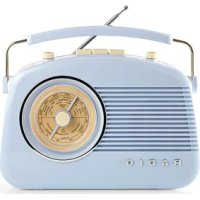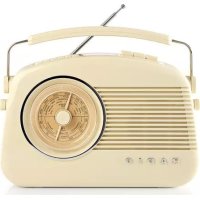
RDDB5000BG - Radio NEDIS - Free user manual and instructions
Find the device manual for free RDDB5000BG NEDIS in PDF.



User questions about RDDB5000BG NEDIS
0 question about this device. Answer the ones you know or ask your own.
Ask a new question about this device
Download the instructions for your Radio in PDF format for free! Find your manual RDDB5000BG - NEDIS and take your electronic device back in hand. On this page are published all the documents necessary for the use of your device. RDDB5000BG by NEDIS.
USER MANUAL RDDB5000BG NEDIS
MANUAL DE USO (p. 57)
A triangle with a lightning symbol draws the user's attention to 'dangerous voltage' without insulation in the cabinet which may be high enough to entail a risk of electric shock.
WARNING
RISK or ELECTRIC SHOCK DO NOT OPEN
CAUTION: TO REDUCE THE RISK OF ELECTRIC SHOCK, DO NOT REMOVE COVER (OR BACK). THERE ARE NO USER SERVICEABLE PARTS INSIDE, REFER SERVICING TO QUALLIFIED SERVICE PERSONNEL.

A triangle with an exclamation mark draws the user's attention to important instructions; for use and maintenance in the accompanying manual, which should be studied.
FURTHER INFORMATION

Beware of small pieces and batteries, do not swallow them. It may be hazardous to your health and lead into suffocation. Please, Make sure to keep small devices and batteries out of the reach of children.

Important advice regarding hearing protection
Caution:
You care for your hearing, and so do we.
Therefore, use caution while using this appliance.
Our recommendation: Avoid high volumes.
Children should be supervised while using headphones; make sure that the appliance is not set to high volume.
Caution!
High volumes may cause irreparable damage to children's ears.

NEVER let allow anyone, especially children, to put objects into the holes, slots or openings on this device. The device must only be opened by a qualified assistant.

Only use the appliance for its intended purpose.
This device may only be used in housings and business premises.

Please keep this instruction manual for further reference.

Instructions on environment protection
Do not dispose of this product in the usual household garbage at the end of its life cycle; hand it over at a collection point for the recycling of electrical and electronic appliances. The symbol on the product, the instructions for use or the packing will inform about the methods for disposal.
The materials are recyclable as mentioned in its marking. By recycling, material recycling or other forms of re-utilisation of old appliances, you are making an important contribution to protect our environment.
Please inquire at the community administration for the authorised disposal location.

Do not obstruct the ventilation of the device. Make sure, that no curtains, newspapers, furniture or any other type of objects are blocking the ventilation system of the apparatus. The ventilation system must be clear of objects at all times! Overheating may lead into serious damage of the device and reduce its performance and lifespan.
Heat and warmth
Do not expose the appliance to direct sunlight. Make sure that the appliance is not subject to direct heat sources such as heaters or open fire. Make sure that the ventilation slots of the appliance are not covered.
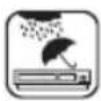
Moisture and cleaning
This appliance is not waterproof! Do not immerse player in water. Do not allow player to come in contact with water. If water gets inside the player it may cause serious damage. Do not use cleaning agents that contain alcohol, ammoniac, benzene or abrasives as these could damage the player. For cleaning, use a soft, moistened doth.

Professional recycling
Batteries and packaging should not be disposed of in the trash, Batteries must be handed over to a collection centre for used batteries. Separating disposable packaging materials is ecologically friendly.
Location of the controls
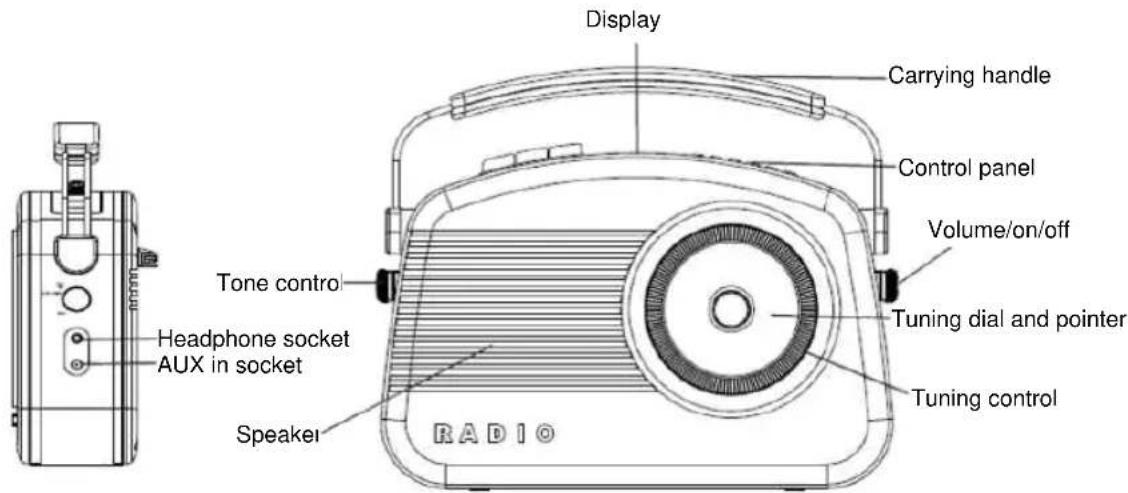
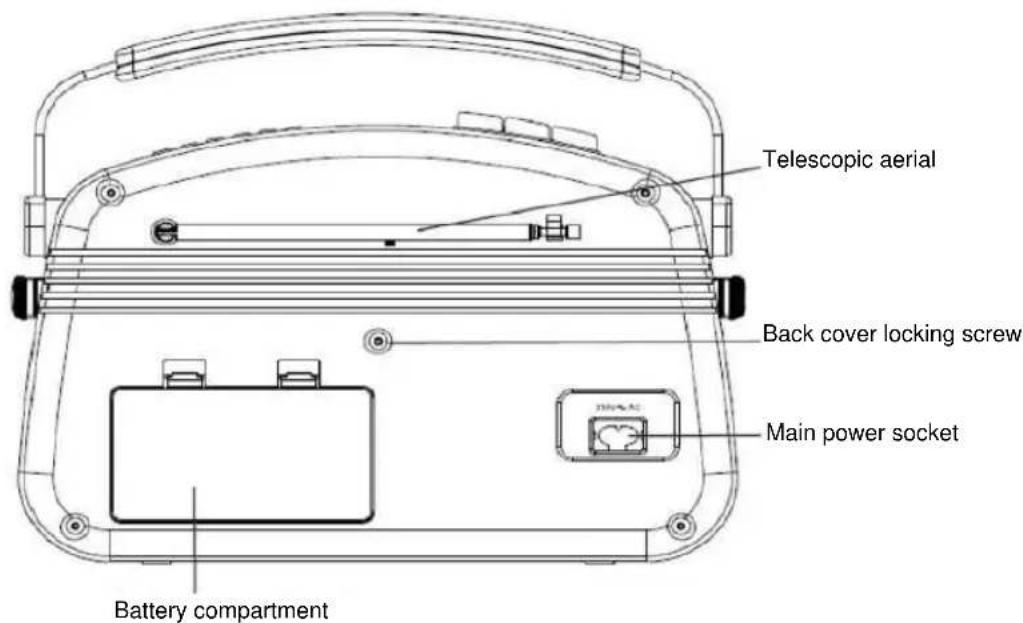
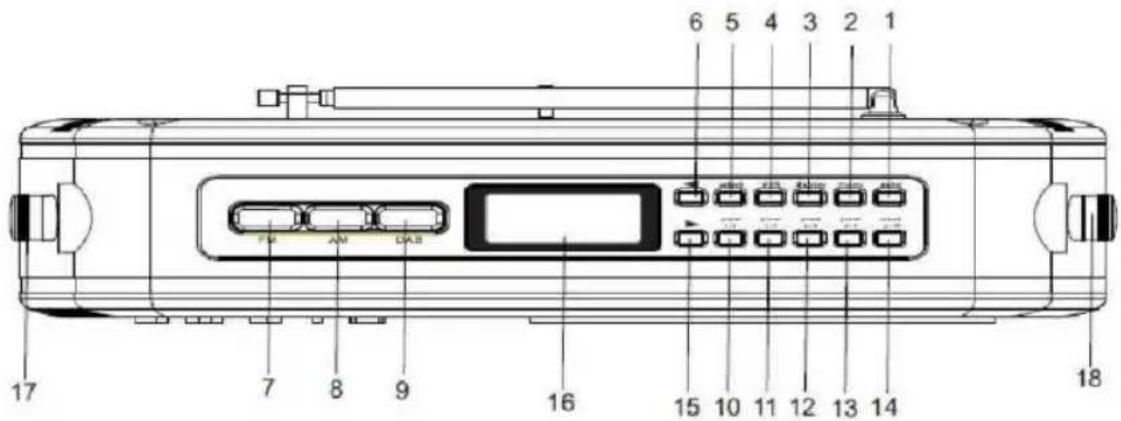
- Auto button (scan for DAB stations)
- Menu button
- Display option button
- Shift button (for presets 6 to 10)
- Select button
6.Up button - AM select button
- FM select button
-
DAB select button
-
Preset 1 and 6
- Preset 2 and 7
- Preset 3 and 8
- Preset 4 and 9
- Preset 5 and 10
- Down button
- DAB LCD screen
- Tone control
- On/off & volume control
Using your DAB+ radio
Switching on for the first time
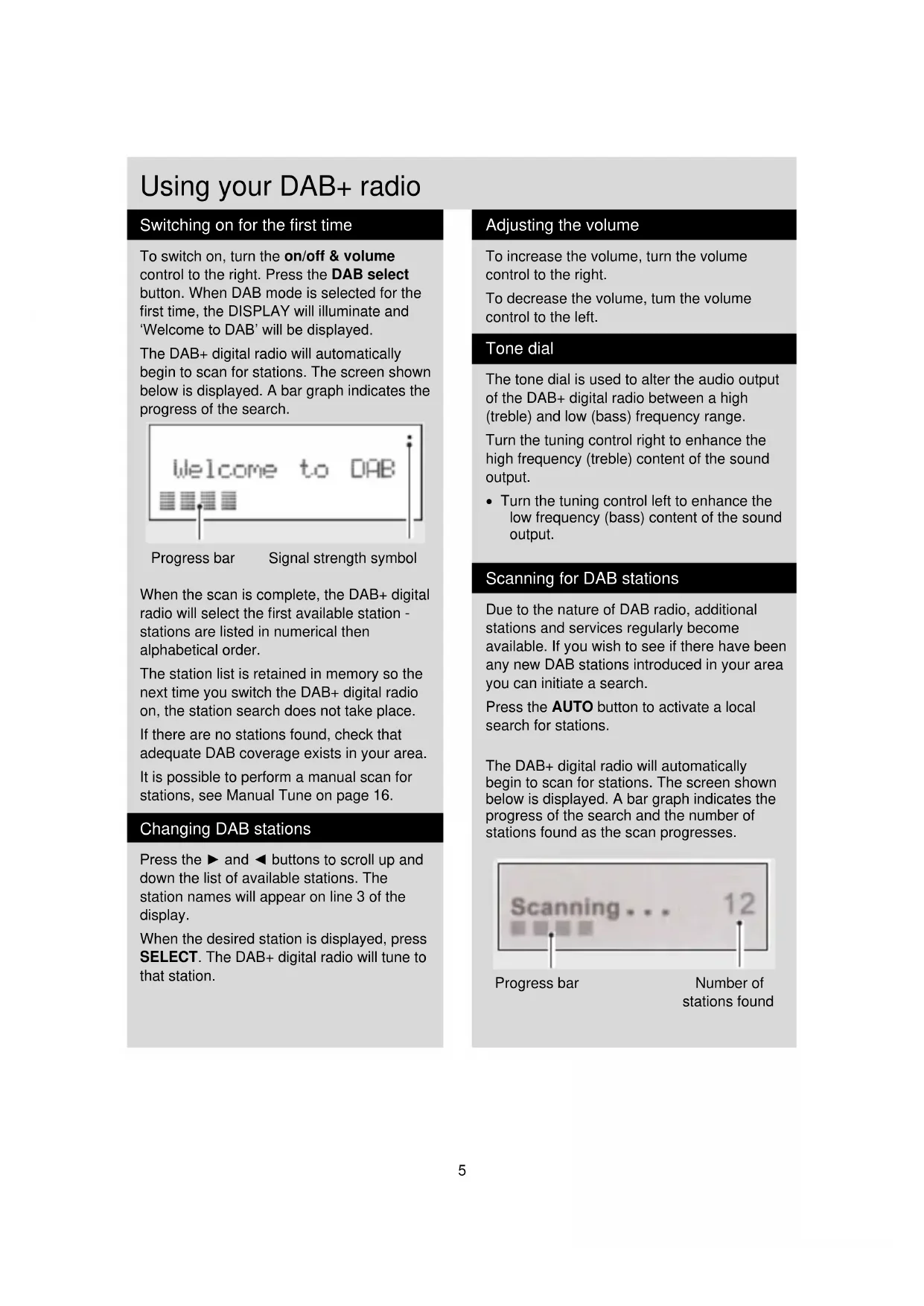
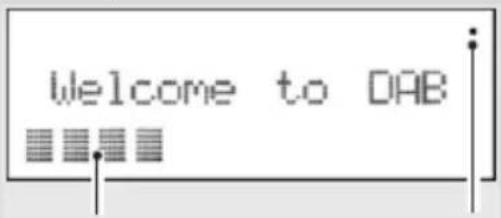
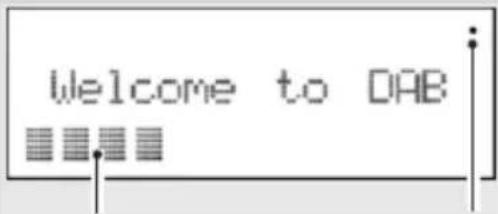
To switch on, turn the on/off & volume control to the right. Press the DAB select button. When DAB mode is selected for the first time, the DISPLAY will illuminate and 'Welcome to DAB' will be displayed.
The DAB+ digital radio will automatically begin to scan for stations. The screen shown below is displayed. A bar graph indicates the progress of the search.
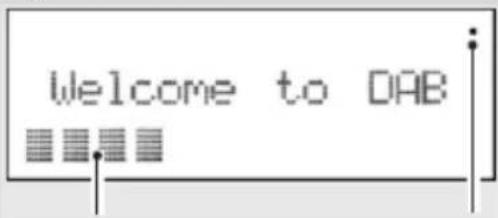
Progress bar
Signal strength symbol
When the scan is complete, the DAB+ digital radio will select the first available station - stations are listed in numerical then alphabetical order.
The station list is retained in memory so the next time you switch the DAB+ digital radio on, the station search does not take place.
If there are no stations found, check that adequate DAB coverage exists in your area.
It is possible to perform a manual scan for stations, see Manual Tune on page 16.
Changing DAB stations
Press the and buttons to scroll up and down the list of available stations. The station names will appear on line 3 of the display.
When the desired station is displayed, press SELECT. The DAB+ digital radio will tune to that station.
Adjusting the volume
To increase the volume, turn the volume control to the right.
To decrease the volume, tum the volume control to the left.
Tone dial
The tone dial is used to alter the audio output of the DAB+ digital radio between a high (treble) and low (bass) frequency range.
Turn the tuning control right to enhance the high frequency (treble) content of the sound output.
- Turn the tuning control left to enhance the low frequency (bass) content of the sound output.
Scanning for DAB stations
Due to the nature of DAB radio, additional stations and services regularly become available. If you wish to see if there have been any new DAB stations introduced in your area you can initiate a search.
Press the AUTO button to activate a local search for stations.
The DAB+ digital radio will automatically begin to scan for stations. The screen shown below is displayed. A bar graph indicates the progress of the search and the number of stations found as the scan progresses.
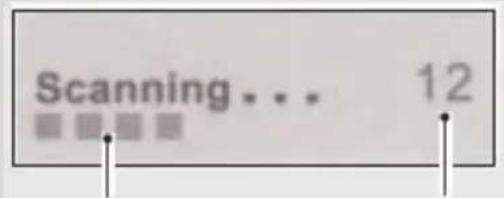
Progress bar
Number of stations found
Using your DAB+ Radio
Station display symbols
You may see same symbols displayed alongside the station names. These are defined as follows:
? Displayed before the station name if the station is not available or not active.
Displayed after the station name indicate that this is a primary station with secondary services.
<< Displayed before the station name indicate that this is a secondary station.
Storing DAB presets
Note: Each preset button holds two presets. For example, the 1/6 preset button, on the DAB+ digital radio, holds preset positions 1 and 6.
You can preset up to 10 DAB stations for easy access as follows:
- Tune to the station you wish to preset.
- Press and hold one of the preset buttons (e.g. 1/6), located on the top of the DAB+ digital radio. 'Preset # saved' will appear on the second line of the display, where # is the number of the preset position.
- To save to preset positions 6-10, hold down the SHIFT button then press and hold the desired preset button. If you have already saved a DAB station in that preset location, it will be over-written with the new station.
Selecting a preset station
To select presets 1-5, press the relevant preset button.
To select presets 6-10, hold down the SHIFT button and then press the relevant preset button.
If you have not already stored a DAB station in one of the presets, 'Empty preset' will be displayed. The display will revert to the previously selected station after a few seconds.
Reset
You can delete all of the preset stations and return the DAB+ digital radio to its factory settings as follows:
- Press and hold the MENU button.
- The display will show 'Press SELECT to confirm reset...'
- Press the SELECT button. The display will show 'Welcome to DAB' before performing a new scan for stations.
The DAB+ digital radio will be returned to its factory condition.
If you do not wish to reset the DAB+ digital radio, wait a few seconds without pressing any buttons and the DAB digital radio will revert to its previous operating condition.
Using your DAB+ radio
Changing the DAB display information
It is possible to change the Information that Is displayed on the third line of the display when listening to a DAB station. Note that this information is not available when listening to conventional AM/FM stations. There are seven types of information available listed below with examples listed to the right of the text. To change the information displayed press the display button repeatedly.
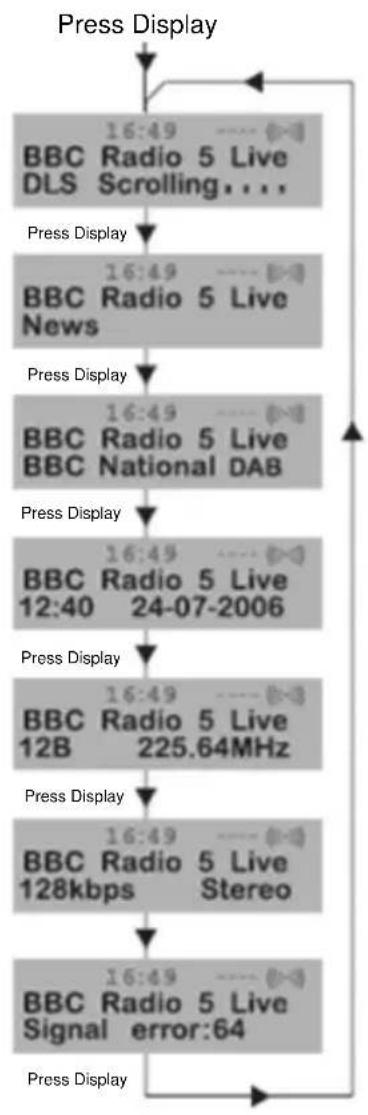
Dynamic label segment (DLS)
This Is scrolling text information supplied by the DAB station. It may comprise information on music titles or details of the programmer and is provided by the broadcaster.
Program type (PTY)
This is a description of the type of programmer provided by the DAB station and is provided by the broadcaster.
Multiplex name
This will show the multiplex that is broadcasting the programmer you are listening to.
Time and date
This displays the time and date and is provided by the broadcaster, so will be accurate.
Channel and frequency
This displays the channel number and the transmission frequency.
Signal information
This shows the digital bit-rate and the signal mode.
Signal error rate
If the transmission signal contains errors the system can apply correction.
The amount of signal correction can be displayed as a numerical value between 0 and 99. As the value increases, you will hear the signal degrade.
To improve reception, try adjusting the position of the aerial.
Using your DAB+ radio
Using the Menu System
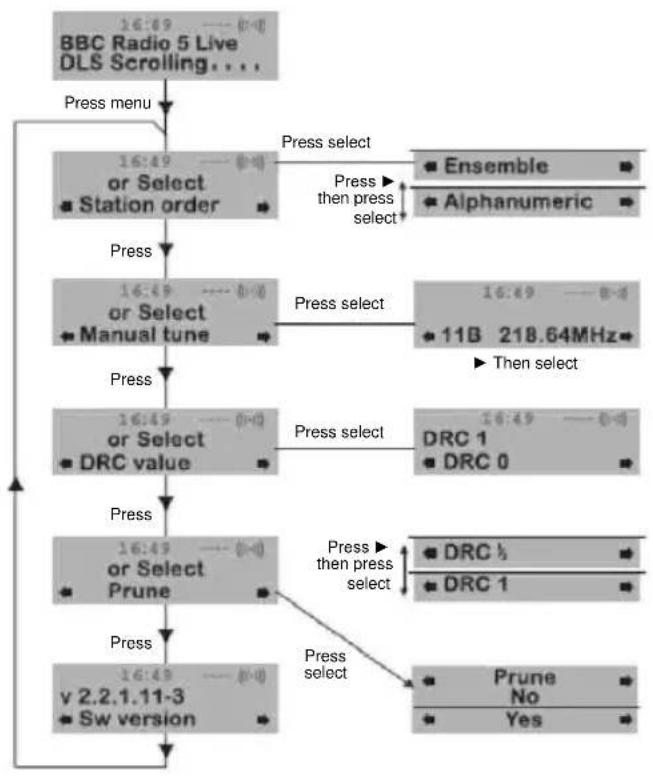
The MENU button allows you to change some of the system options on your DAB+ digital radio. These options are arranged in a menu structure as shown below.
Pressing the MENU button will enter the menu control. The options are described below.
Station order
This function enables you to define how the stations are arranged when scrolling the stations list.
- Press the MENU button to access the menu control.
-
Press either the or buttons until 'Station order' is displayed.
-
Press the SELECT button to access 'Station order'.
- Use either the or to display the desired option.
There are options available as described below.
Alphanumeric
This is the default setting. The stations are arranged in numerical then alphabetical order.
- Press SELECT to confirm.
Using your DAB+ radio
Manual tune
It is possible to manually tune to a specific channel/frequency and add this to the station list.
This function can be used to obtain the optimum reception for a specific channel/ frequency, taking into account the position of the aerial.
- Press the MENU button to access the menu control.
- Press either the or button until 'Manual tune' is displayed.
- Press the SELECT button to access 'Manual tune'.
- Use either the or button to select the desired channel/frequency
- Press SELECT button.
A rectangle will be displayed on the second line of the display. The position of this rectangle indicates the signal strength (the further towards the right, the greater the signal strength).
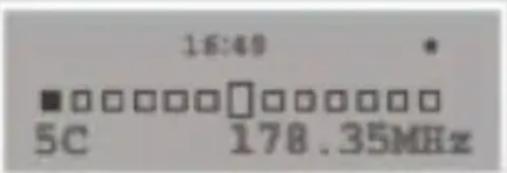
- Adjust the position of the aerial to obtain the optimum signal strength.
- Press the SELECT button to confirm.
Version
This is only provided as an engineer's reference in the unlikely event that servicing should ever be necessary.
Press the MENU button to access the menu control.
Press either the or button until 'Sw version' is displayed.
The version number will appear on line 2.
Dynamic range control
DRC adds or removes a degree of compression to compensate for the differences in the dynamic range between radio stations. For example, a station broadcasting popular music may have a high level of compression applied since the emphasis is on a constant high listening level, whereas a station broadcasting classical music will have little or no compression as the listener requires all of the highs and lows in the music to define the detail.
There are three levels of compression:
- DRC 0: no compression applied.
- DRC 1: maximum compression applied (this is the default).
- DRC 1/2: medium compression applied.
The best way to determine which of these settings suits you best is to experiment with them on a variety of source material.
- Press the MENU button to access the menu control.
- Press either the or button until 'DRC value' is displayed.
- Press the SELECT button to access 'DRC value'. The current DRC level will be displayed on line 2 of the display.
- Press the button to select between the three DRC values. The available options appear on line 3 of the display.
- When the required DRC value is displayed, press SELECT to confirm. You should be able to hear the difference in compression immediately.
- Prune station.
No
Yes
Using the AM/FM Radio
Switching to AM/FM mode
If the DAB+ digital radio is in DAB mode, press the desired frequency band button (AM or FM). You may hear background noise as no station has been tuned in. The display looks like the image shown below.
Tuning the radio
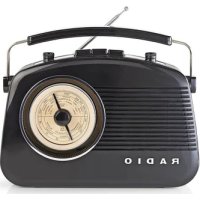
To tune into a radio broadcast/station turn the tuning control left or right until the pointer is aligned with the desired frequency markings on the tuning dial (see below).
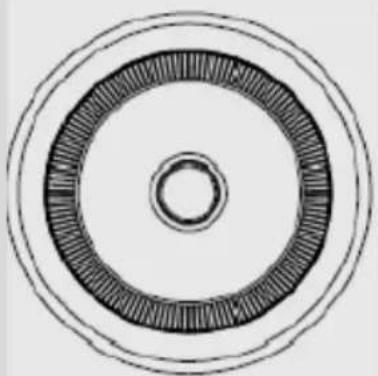
When the pointer is horizontal you have reached either the start or end of the frequency range. Do not attempt to force the dial further in the same direction.
Volume dial
When the DAB+ digital radio is switched on, either turn the volume dial right to increase the volume, or left to decrease the volume.
Tone dial
The tone dial is used to alter the audio output of the DAB+ digital radio between a high (treble) and low (bass) frequency range.
Turn the tuning control right to enhance the high frequency (treble) content of the sound output.
Turn the tuning control left to enhance the low frequency (bass) content of the sound output.
Using aux in
The signal from another home entertainment system can be connected to the digital radio via 3.5mm aux in socket on the right hand side of the digital radio.
You will require a stereo cable with connectors which match the sockets on your other audio device.
Adjust the desired volume level by tuning the volume control of the digital radio.
Troubleshooting
If you believe that something is wrong with your DAB+ digital radio, first check the points listed below.
There is no sound from my radio
Check that the volume is not set to the minimum.
Make sure that the radio has been able to locate DAB/AM/FM stations.
The display shows 'no services available' in DAB mode
Make sure that DAB coverage easts in your area.
Try adjusting the position of the aerial or location of the radio.
Poor reception
As with any radio service, there will be areas of weak signal that may cause poor reception. Follow the instructions for manual tuning on page 16 and adjust the aerial while monitoring the signal strength until the optimum signal is obtained. If reception is still poor, try re* locating the radio to another part of the room.
I cannot access secondary services
At the time of publishing this manual, not many secondary services are available in the Australia. This will increase as more DAB stations start broadcasting. If a secondary service station is available, the secondary indicator '»' will be displayed next to the station name.
The display goes blank, saying 'SERVICE OFF AIR'
This may occur if a broadcaster changes the label of a service or removes a label whilst you are listening to the station. The radio will try to re-tune to the station. Alternatively, perform a scan by pressing the AUTO button.
I cannot hear the station I have selected
The station you are listening to is displayed on line 2. Line 3 shows the selected option, but you have to press the SELECT button to tune to the selected station.
I hear distortion on some stations
This is due to a weak signal. Re-positioning the aerial to gain maximum signal strength. If the trouble persists, consult your dealer or contact the Customer Helpline.
CLEANING AND MAINTENANCE
- Please observe also the safety advices.
- Before cleaning, always pull the power plug.
Clean the housing with a soft and moist cloth and a mild detergent. - Never use abrasive detergents or sharp utensils.
Safety precautions:

To reduce risk of electric shock, this product should ONLY be opened by an authorised technician if service is required. Disconnect the product from mains and other equipment if a problem should occur. Do not expose the product to water or moisture.
Maintenance
Clean the product only with a dry cloth.
Do not use cleaning solvents or abrasives.
Warranty
Any changes and/or modifications to the product will void the warranty. We cannot accept any liability for damage caused by incorrect use of this product.
Disclaimer
Designs and specifications are subject to change without notice. All logos, brands and product names are trademarks or registered trademarks of their respective holders and are hereby recognized as such.
Disposal

- This product is designated for separate collection at an appropriate collection point. Do not dispose of this product with household waste.
- For more information, contact the retailer or the local authority responsible for waste management.
This product has been manufactured and supplied in compliance with all relevant regulations and directives, valid for all member states of the European Union. It also complies to all applicable specifications and regulations in the country of sales.
Formal documentation is available upon request. This includes, but is not limited to: Declaration of Conformity (and product identity), Material Safety Data Sheet, product test report.
Please contact our customer service desk for support:
via website: http://www.nedis.com/en-us/
via e-mail: service@nedis.com
via telephone: +31 (0)73-5993965 (during office hours)
NEDIS B.V., De Tweeling 28, 5215 MC 's-Hertogenbosch, THE NETHERLANDS
DEUTSCH
SICHERHEITSHINWEISE

Dynamic Label Segment (DLS)
RISQUE D'LECTROCUTION NE PAS OUVRIR
ATTENTION:POUR ELIMINER LES RISQUES D'LECTROCUTION,NE PAS RETIRER LE CAPOT (OU LE PANNEAU ARRIERE).AUCUNE PIECE N'EST REPARABLE PAR L'UTILISATEUR FAIRE APPEL A UN TECHNICIEN QUALIFIÉ POUR TOUTE RÉPARATION.

Recyclage responsible
Changer de station DAB
Controller of er DAB-dekking is in uw omgeving.
Mudar as esta-oes DAB
Displayen visar "no services available" i DAB-lage
Ukazatel prubehu
Symbol sily signalu
Afisajul indică „no services available" in modul DAB
Asigurat-vacexista acoperire DAB in zona dvs.
Incercati sa reglati positia antenei sa mutati radioul.
Receptie slaba
Sogning after DAB-stationer
Dynamic Label Segment (DLS)
Displayet viser "no services available" i DAB-modus
RENGJØRING OG VEDLIKEHOLD
PpeDyuctaHOBKa cTaHcN DAB
PpmeHne:Kkdou KhoK npedycmHOeKu Ha3NayeHo dee cmaHuu. Hnnpemep, dN KhoKu npedycmHOeK 1/6 Ha ufoPoBom paduo DAB+ coxpanHebl npedapumelbHble noJoxehua 1 u 6.
BbMoKeTe HacTpOuTb Do 10 DAB-CTaHcNIM dIg 6bICTpOro DoctyNa CneDyUOcM o6pa3OM:
- HactpoTecb Ha cTaHcNIO, KOTOpYIO Bbl XOTnTe COxpaHNTb.
- Haxmte u ydepKbAte OHy n3 KHOIOK npedBapntelbHou yctahOBKn (HaepnmeR, 1/6), pacnoIooKeHHyO B cepxHeu qactn uΦpOBOr o paNIO DAB+. Bo BVtOPOI cTPOKe dncnpeoTO6pa3NTcra HaDnCb "Preset # saved", rDe # - 3TO Homep 3aDaHHoro noJoxhenia.
- YTO6bI COxpaHnTb npEynCTaHOBKn B NOIOXeHN 6-10, HaxMnTe n ydepXnBaYTe KhoNkY SHIFT, 3aTeM HaxMnTe n ydepXnBaYte Heo6xOuMyU KhoNkY npEynCTaHOBKn. EcIn Bbl yxe coxpaHnIn cTaHcNIO DAB B bTom MeCte npEynCTaHOBKn, OHa 6yDet npe3aNaCaHa HOBOI cTaHcNnei.
Bb6op npedyctaHOBHeHHo cTaHcIM
Дя Bыбopa npeуctaHObOK 1-5 HaxMnte COOTBeTCTByUOyU KONky.
Дя Вьбopa npedуctaHOBOK 6-10 haxMITE n ydepxnBaTe KhONky SHIFT, 3aTe m HaxMITE COOTBETCTByUOyIO KhONky.
EcnHnOndaCTaHcNRA DAB He coxpaHeHa B KaueCTBe npedyctaHOBKn, OTo6pa3ntcR "Empty preset".Ha dncJIee uee3 HeckoIbko cekyHd OTo6pa3ntcRaBb6paHHa pahee cTahcNra.
C6poc
BblMOxTe ydaJIHTb BCE npdeYCTaHOBJIeHHbIe CTAHcUN N BblIOJIHNTb c6poc uΦpOBOrpaDnO DAB+do 3aBOcKnx HacTpoE cnEduoUm o6pa3OM:
- Haxmte u ydepKbAte KhoIky MENU.
- Ha dincnnee oTo6pa3ntcra "Press SELECT to confirm reset...
- Haxmte KhoNky SELECT. Ha dinnnee oTo6pa3ntcra "Welcome to DAB" nepei BbINOHeHnem HOBOrO noncKa cTaHcI.
Ha ufoBOM paIIO DAB+ 6yU T BO3BpaueHbI 3aBOIDCKne HAcTPOIK N O yMOJuaHIO.
EcnBbI He XOTnTE BbIOJNHTb C6poc
UnpoBoro paNo DAB+, noOxDnTe
HeckoJIbKO CeKyH, He Haxmam KHOPIK,
nocne yero UnpoBoe paNo DAB BepHeTc
K PpeBdUyEmy paOoyEmy coCToHNIO.
HomepBercnn OTo6pa3ntcB Ctpoke 2.
YnpaBneHHe DnHaMmUeCKnM DnAna3OHom
DRCdoabnreTnn ydaanet ctenehb CxatnaIyKOMneHcaun pa3nucbl B DnHaMnueckom dnaana3OHe Mekdy padnoocTaHcmaH. Hanpimep, cTahcnr NOnyIaRHO My3bIKMOXeT IMeTB BbcOKm IyPoBeH Cxatna, NOCKoNbky ynop DeJaETC HbBICOKYIO rPOMKOCT IpocnyuINBaHn, B TO BpeMa KAc CTaHcNq KNaccnueCKoMy3bIK MoXeT IMeTB Hn3Kyo CTeneHb Cxatna IIn He IMeTB ee BOo6e, NOCKoNbky CnyuataJIIO Tpe6yeTcYETKO pa3nuaTb BbcOKne Hn3Kne YacTOtBi DnIyAaBnBaHn My3bIKaJIbHbIX HIOAHCOB.
Icnojb30BaHne aux in
CnHaI dpyroon cnCTembl IJRA DomaHero pa3BneueHn MOXHO NOKNIQUHTb K uNpOBOmy paINO uepe3 3,5-MnnlImetpoBb pa3bem aux in B npaBoY qactn yctpoNCTBa.
Bam noTpe6yeTcA cTepeokabe b c pa3bemAMn,poXoJrUIMN K pa3bemAM Ha dpYROM ayDIOOyCTPOINCTBE.
HacptpoTe Heo6xOIMbI ypOBeHb rpOMKocTn,IOBOpaUNBa peyIANTop rpOMKocTn UΦPOBOrO paINo.
Понь устараенье несправност
EcnBbI cHTaTe, YTO uΦpOBoe paNo DAB+ HncnpaBHO, IpocmOTpe Chauana nyHKtbl, yka3aHHbIe HIXke.
Het 3Byka n3 paNo
Y6eIITecb,HTO rpoMkoCTb He HAcTpoEHa Ha MNHIMyM.
Y6eIntecb, yTO paIIO MOKeT BbIINHrTb nonck ctaHcN DAB/AM/FM.
Ha nucnlee oTo6paKaetaTcra "no services available" B pexime DAB
Y6eIntecb, YTO Ba7a oBnactb YBJIeTc3 30Hoi nokpItna DAB.
HactpoTe noJIOXeHne aHTeHHbI nn paacnoJoxeHne paJIO.
Pnoxne ycNoBn npHema
CyueCTbYOT obnaCTn, rIe HabniOaETcnnIOXoI npneM. CneDyIte nHcTpyKuIyMpUHOH NACTPOIKN Ha cTp. 16 nOTperyInpuyTe aHTeHNy, CneJa a cnIoCNHaJa, noka MOUHOCTb CNHaHaHe cTaHET ONTMaJIbHOH. Ecnu YcNoBnIPnEMa BCE eUe HeyIOBNETBOPITeNbHbIe, NepMeCTNTe padno B dpyryo YacTb NOMEeHnI.
HeB03MOxHNOJyUHTbDocTynK DOnONHHTeNbHbIM CnyX6am
Ha MOMENT ny6nkaun daHHoro pykoBOcTBa B ABCTpaNN DoCTynHO He ouheb MHOro DOnONHITeNbHbIX CnyX6. Iocne hauana Beuahna cTaNm DAB nx YNCIO NOBICNTcEcnI DOCTynHa cTaNur cDOnONHITeNBHcN cyx6o, INDAKATOp ** 6ydet OTo6paKaTbcra PAnOM C Ha3BaHnem CTAHUN.
Dncnne OTKIOaETcN OTO6paKaetc coo6ueHne "SERVICE OFF AIR"
3TO MOKET BO3HNKHyT,ecJIN BeUaIOuaCTOPoHa N3MeHReT Ha3BaHne CnyKbI INyDJIaRE TERO BO BpEM npocNyuINBaHnCTAHcN.PaINO BBINOHT NOBtKy nepehacTpOuTB CTAHcNIO. JNo6 Bo BVINOHNTeONCK,HaKaB KHOKNy AUTO.
He cnblweH 3ByK BbI6paHHoI CTaHcN
Bocpon3BODmamcTaHnO OTo6paXaETcB CTPOKe 2.BCTPOKe 3OTo6paXaETcB BbIpaHHbI npaMeTp,HO Heo6xOIMO HaxaTB KONKy SELECT,HTo6bl HaCTpOnTb BbIpaHHyIO CTaHnIO.
Pn Bocnpo3BeDeHn HekoTOpbIX CTaHcN CblhBn NckaKeHn 3ByKa
3TO BO3HnKaeI 3-3a Cna6oro CnHaJa.
N3MeHnTe NIOXKeHne aHTeHHb IJRA
DOCTNXKeHn Ha6oBbWei CNJIb CnHaJa.
Ecn npo6nema coxpanaetcra, o6paTntecb K dInepy nIn B cnYk6by noDnepKKn kIneHTOB.
OuHCTKA IN PEMOH
CobnDaaTe coBeTbI NO TEXHKe 6e3oNaChOCTN.
- Pered ouhctkou Bcerda otknouaTe uhyp nntanra.
OuHuaTe KOpnyc MraKoB NbAaXHO TKaHbIO, CMOeHHoM MRAKIM OUHuaOuHm CpeDCTBOM.
Hikorda He nCnoIb3yIte a6pa3nBbl nTBepdbie IHCTpyMeHTbl IJRA OHCTKN yCTpoiCTBa.
Mepb6e3onacHoctn:


Ipn Heo6xOaMmocTn npOBeHnraTexHnueckoro
06cnyKuBaHHn dIa CHNKeHHn PnCKa NopaxeHHn
3JIeKTPnueCKnM TOKOM 3TO yCTpoiCTBO DOJXHO 6bITb OTKpbITo
TOJIbKO yONHOMOeHHbIM TexHnueCKnM CneUaJIncTOM.
OTKnIOHTe yCTpoiCTBO OT cETn I dpYrOro oBOpyDoBaHHn,
ecnn Bo3HNkHyT npO6JIeMbI. He doNyckaTe BO3DeIcTBnRA
BODbI INI BnAri.
TexHnueckoe o6cnykBaHne
OuIaIe yCTpOInCTBO ToIbKO cyXOn TkaHbIO.
He npo3BOJTe OunchKy, nCNoJIb3yra pactBOpTeJI nn a6pa3nBbl.
TapaANTn
IIO6bIe I3MeHEnn H/INMOMDfNkauHN yCTPOJCTBa pINBeyT K aHHyIInpOBAHnIO npAB NOLb3OBaTeJIHa rapaHTmHoe 06cnyXmbHne. Mbl He Hecem OTBETCTBEHHOCTH 3a yUep6, NOHeCEHHBI BCNEIDCTBHe HENpaBnIBHO nCNOJB3OBaHnI 3TOI rpoDyKta.
OroBopkn
I3aH N TeXnueckne XapaKTePncTnK MoYr 6bItb n3MeHeHb Ie3 npedBaPntJbHorO yBeOMJIeHn.
Bce IoroTnbl 6peHIOB Hn3BaHnI npOdyKTOB YBnIOTc TOBaHPbIM 3HaKaMn IIN 3aperuCTpnpoBAHHbIMN TopRObbIMN MapkAMN IX COOTBeTCTByUx IN BnaJeIbCeB IN CJIeDObaTeNbHO npn3HaOTc TaKOBbIMN.
yTNn3aun

- 3To yctpoiCTBO npedHa3NaeHOn dIpa3dEJIbHOc6Opa B COOTBeTCTBYIOUeM IyHKTe c6Opa OTXoIOB. He Bb6paCbIBaIte 3TO yCTpoiCTBO BmecTe C 6bITOBIMN OTXoAMn.
-ДляпolyчehнддОПЛHHTeJIbHои ИФсрмци ИбраTITecь K npOdaBу ИИN B MecTHbI OprанВlaCTN,OTBETCTBeHHbI 3a yTIN3aUNO OTXODOB.
JaHHoe n3dene 6bIIO n3rOToBJeHO nIOCTaBJIeHO B COOTBeTCTBm CO BCEMn pIMMeHmblIMnIOJoxKeHmN dIpeKtUBaMn, DeIcTByUoUHMn IINBCExC TpaH-JIeHOB Ebponeckoro Co103a. OHO TaKke COOTBeTCTByeT BcEM HOpMaMn IN paBUNaMn, DeIcTByUoUHM B CTpaHe npOdaXn.
OΦnuaIbHna DOKyMeHTaIg npEOCTaBnIeTcno 3anpocy. Θa DOKyMeHTaIg BKnIOHaET (HO He orpaHnUHbaeTcra TIm): DeKlapaIg COOTBeTcTBnI (u n3JeIi), nacnpT 6eONaCHOctN, OTcT no npOBepke npOdykTa.
Iy npuyehn npmoOnn obaTecb Hauy cnyk6y noDpeKKn KIneHToB:
uepe3 Be6-caT: http://www.nedis.com/en-us/
no 3n. noyTe: service@nedis.com
no Tepeohy: +31 (0)73-5993965 (B pa6oyn acbl)
NEDIS B.V., De Tweeling 28, 5215 MC's-Hertogenbosch, THE NETHERLANDS (HINDEPJIAHIbl)
TÜRKÇE
GÜVENLIK TALIMATLARI

ELEKTRIK CARPMA TEHLIKESI AÇMAYIN
DIIKKAT: ELEKTRIK CARPMA TEHLIKEsINI AZALTMAK ICIN KAPAGI (VEYA ARKA TARAFI) SOKMEYIN. ICERISINDE KULLANICININ ONARABILECEGI PARCA YOKTUR, SERVIS HIZMETLERINI UZMAN SERVIS PERSONELINE YAPTIRIN.

Liša priebehu
Symbol intensity signalu
Ked sa vyh'adavanie dokonci, digitalne DAB+ radio vyberie prvu dostupn stanicu. Stanice su v zozname uvedene v abecednom poradi.