RDFM2225BK - Radio NEDIS - Free user manual and instructions
Find the device manual for free RDFM2225BK NEDIS in PDF.


| Product type | Portable FM radio with clock |
| Brand | Nedis |
| Model | RDFM2225BK |
| Dimensions (approx.) | 140 x 70 x 40 mm |
| Weight (approx.) | 200 g |
| Power supply | Built-in rechargeable Li-ion 3.7 V battery, charging via USB-C (5 V) |
| Battery life | Up to 8 hours of moderate listening |
| FM frequency range | 87.5 – 108 MHz |
| Number of presets | 20 |
| Main functions | Auto search, manual tuning, presets, clock, standby mode, adjustable brightness |
| Display | LCD screen with backlight |
| Speaker | Built-in speaker |
| Connectors | 3.5 mm audio input, 3.5 mm audio output, USB-C port |
| Antenna | Telescopic antenna |
| Controls | Power/standby button, volume knob, up/down buttons, scan, preset, favorites 1 and 2 |
| Charge indicator | Red LED (charging), off (charged) |
| Material | ABS plastic |
| Care and cleaning | Clean with a soft, dry cloth. Disconnect before cleaning. |
| Safety | Do not expose to water or moisture. Do not open. Avoid heat sources. |
| Intended use | Indoor, domestic use. Suitable for children aged 8+ under supervision. |
| Package contents | Radio, USB-C cable, quick start guide |
Frequently Asked Questions - RDFM2225BK NEDIS
User questions about RDFM2225BK NEDIS
0 question about this device. Answer the ones you know or ask your own.
Ask a new question about this device
Download the instructions for your Radio in PDF format for free! Find your manual RDFM2225BK - NEDIS and take your electronic device back in hand. On this page are published all the documents necessary for the use of your device. RDFM2225BK by NEDIS.
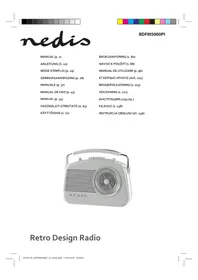
USER MANUAL RDFM2225BK NEDIS
natural_image
Line drawing of a vintage radio receiver with antenna, digital display, and control buttons (no text or symbols)
Quick start guide 6

Kurzanleitung 10

Specifications
| Product FM Radio | |
| Article number RDFM2225BK | |
| Dimensions (l × w × h) 161.0 × 46.0 × 91.0 mm | |
| Material ABS | |
| Radio bands FM | |
| FM frequency range 87.5 - 108.0 MHz | |
| Preset stations 20 | |
| Light types LCD light | |
| Battery charge method USB-CTM | |
| Battery type Internal Li-lon battery 1900 mAh | |
| Charging time 2 hours | |
| Operating time 10 hours | |
| Power 3.5 - 5.0 W | |
| Audio input 3.5 mm audio jack | |
FM Radio
RDFM2225BK
For more information see the extended manual
online: ned.is/rdfm2225bk
Intended use
This product is a portable FM radio that can be charged via the USB-C™ port.
This product is equipped with a clock function.
This product functions wirelessly with a built-in, rechargeable battery.
This product is intended for indoor use only.
This product is intended to be used in household and similar applications such as kitchen areas.
This product can be used by children aged from 8 years and above and persons with reduced physical, sensory or mental capabilities or lack of experience and knowledge if they have been given supervision or instruction concerning use of the product in a safe way and understand the hazards involved.
This product is not a toy. Never allow children or pets to play with this product. Cleaning and user maintenance shall not be done by children without supervision.
This product is not intended for professional use.
Any modification of the product may have consequences for safety, warranty, and proper functioning.
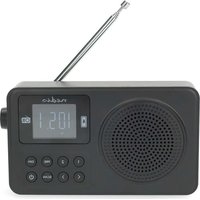
Main parts (image A)
1 Antenna
2 LCD display
3 Speaker
4 Favourite preset button 2
5 Favourite preset button 1
6 Down button
7 Up button
8 Scan button
9 Power button
10 USB – USB-C™ charging cable
11 Volume dial
12 Preset button
13 Dim button
14 3.5 mm audio input
15 3.5 mm audio output
16 Charge indicator LED
17 USB-C™ charging port
Safety instructions
WARNING
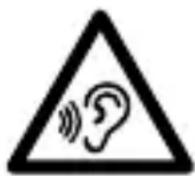
To prevent possible hearing damage, do not listen at high volume levels for long periods.
- Ensure you have fully read and understood the instructions in this document before you install or use the product. Keep the packaging and this document for future reference.
- Only use the product as described in this document.
- Do not let children play with the packaging material. Always keep the packaging material out of the reach of children.
- Do not use the product if a part is damaged or defective. Replace a damaged or defective product immediately.
- Keep the product away from heat sources. Do not place the product on hot surfaces or near open flames.
- Do not drop the product and avoid bumping.
- Do not immerse the product in water or other liquids.
- Do not expose the product to water, rain, moisture, or high humidity.
- Do not open the product, there are no user serviceable parts inside.
- Disconnect the product from the power source before cleaning.
- Do not use aggressive chemical cleaning agents when cleaning the product.
Charging the product
Charge the battery completely before first use.
The charger is not included.
-
Plug the USB-C™ end of the USB – USB-C™ charging cable A 10 into the USB-C™ charging port A 17.
-
Plug the other end of the charging cable A 10 into a 5.0 V USB adapter.
-
Plug the USB adapter into a power outlet.
A red charge indicator LED A16 indicates that the device is charging. When the light turns off, the battery is fully charged.
Switching the product on/off
Press and hold the power button A9 to switch the product on or off.
The product automatically enters the standby mode.
Entering FM mode and searching for a radio station
- Press the power button A 9 to activate FM mode.
- Extend the antenna A 1.
- Press the up button A ⑦ or down button A ⑥ to search for a station automatically.
- Press and hold the up button A ⑦ or down button A ⑥ to adjust the FM frequency manually.
Saving radio presets
This function is only available in FM mode.
- Press and hold the preset button A ^12 .
P shows on the LCD display A 2.
- Press the up button A 7 or down button A 6 to select a storage position and press the scan button A 8 to confirm.
Select pre-stored radio stations
Press the preset button A12 to select the pre-stored radio stations.
By tapping the preset button A ^12 you will go through your preset channels and select the station you would like to listen.
Press the favourite preset button 1 A5 to select preset 1 directly.
Press the favourite preset button 2 A4 to select preset 2 directly.
Presets 3 through 20 do not have a direct preset button.
Controlling the volume
Rotate the volume dial A11 to adjust the volume to the desired sound level.
Controlling the LCD backlight brightness
Press the dim button A13 to adjust the backlight brightness of the LCD display A2.
Entering standby mode
Press the power button A9 to switch the product to standby mode.
Setting the time
This function is only available in standby mode.
- Press and hold the scan button A 8.
HH:MM shows on the LCD display A2.
The product automatically returns to standby mode after 15 seconds of inactivity.
- Press the up or down buttons A 6 7 to set the current hours and confirm by pressing the scan button A 8.
- Press the up or down buttons A 6 7 to set the current minutes and confirm by pressing the scan button A 8.
Disposal
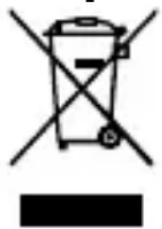
The product is designated for separate collection at an appropriate collection point. Do not dispose of the product with household waste.
For more information, contact the retailer or the local authority responsible for the waste management.
Declaration of Conformity
We, Nedis B.V. declare as manufacturer that the product RDFM2225BK from our brand Nedis ^® , produced in China, has been tested according to all relevant CE standards and regulations and that all tests have been passed successfully. This includes, but is not limited to the RED 2014/53/EU regulation.
The complete Declaration of Conformity (and the safety datasheet if applicable) can be found and downloaded via:
nedis.com/rdfm2225bk#support
UKW-Radio
RDFM2225BK