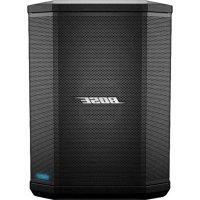
S1 Pro - Speakers BOSE - Free user manual and instructions
Find the device manual for free S1 Pro BOSE in PDF.



User questions about S1 Pro BOSE
0 question about this device. Answer the ones you know or ask your own.
Ask a new question about this device
Download the instructions for your Speakers in PDF format for free! Find your manual S1 Pro - BOSE and take your electronic device back in hand. On this page are published all the documents necessary for the use of your device. S1 Pro by BOSE.
USER MANUAL S1 Pro BOSE
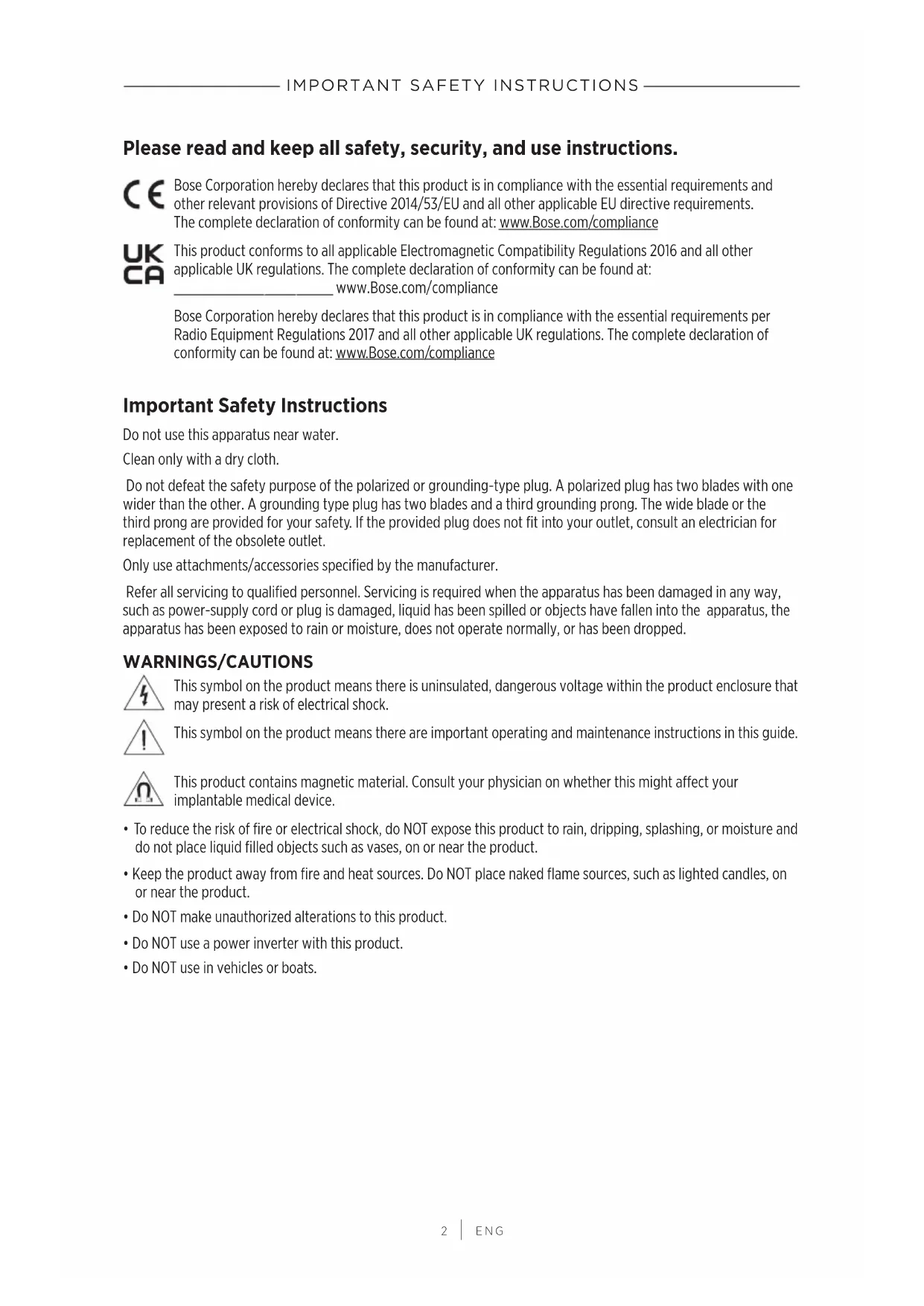
Please read and keep all safety, security, and use instructions.

Bose Corporation hereby declares that this product is in compliance with the essential requirements and other relevant provisions of Directive 2014/53/EU and all other applicable EU directive requirements. The complete declaration of conformity can be found at: www.Bose.com/compliance

This product conforms to all applicable Electromagnetic Compatibility Regulations 2016 and all other applicable UK regulations. The complete declaration of conformity can be found at: www.Bose.com/compliance
Bose Corporation hereby declares that this product is in compliance with the essential requirements per Radio Equipment Regulations 2017 and all other applicable UK regulations. The complete declaration of conformity can be found at: www.Bose.com/compliance
Important Safety Instructions
Do not use this apparatus near water.
Clean only with a dry cloth.
Do not defeat the safety purpose of the polarized or grounding-type plug. A polarized plug has two blades with one wider than the other. A grounding type plug has two blades and a third grounding prong. The wide blade or the third prong are provided for your safety. If the provided plug does not fit into your outlet, consult an electrician for replacement of the obsolete outlet.
Only use attachments/accessories specified by the manufacturer.
Refer all servicing to qualified personnel. Servicing is required when the apparatus has been damaged in any way, such as power-supply cord or plug is damaged, liquid has been spilled or objects have fallen into the apparatus, the apparatus has been exposed to rain or moisture, does not operate normally, or has been dropped.
WARNING/CAUTIONS

This symbol on the product means there is uninsulated, dangerous voltage within the product enclosure that may present a risk of electrical shock.

This symbol on the product means there are important operating and maintenance instructions in this guide.

This product contains magnetic material. Consult your physician on whether this might affect your implantable medical device.
- To reduce the risk of fire or electrical shock, do NOT expose this product to rain, dripping, splashing, or moisture and do not place liquid filled objects such as vases, on or near the product.
- Keep the product away from fire and heat sources. Do NOT place naked flame sources, such as lighted candles, on or near the product.
- Do NOT make unauthorized alterations to this product.
- Do NOT use a power inverter with this product.
-
Do NOT use in vehicles or boats.
-
Provide an earth connection or ensure the socket outlet incorporates a protective earthing connection before connecting the plug to the mains socket outlet.
-
Denmark: "Apparats stikprop skal tilsluttes en stikkontakt med jord, som giver forbindelse til stikproppens jord."
- Finland: "Laite on liettäva suojamaadoituskoskettimilla varustettuun pistorasiaan"
-
Norway: "Apparatet på tilkopies jordet stikkontakt"
-
Sweden: "Apparaten skull anslutas till jordat uttag"
-
Where the mains plug or an appliance coupler is used as the disconnect device, the disconnect device shall remain readily operable.

- The battery provided with this product may present a risk of fire, explosion or chemical burn if mishandled, incorrectly replaced or replaced with an incorrect type.
- Do not expose products containing batteries to excessive heat (e.g. from storage in direct sunlight, fire or the like).
- Only use genuine Bose batteries with this product. Contact Bose customer service for replacement batteries.
- Due to ventilation requirements, Bose does not recommend placing the product in a confined space such as in a wall cavity or in an enclosed cabinet.
- Do not place or install near any heat sources, such as fireplaces, radiators, heat registers, stoves or other apparatus (including amplifiers) that produce heat.
- Do not use the Bose S1 Pro+ Wireless PA System with a tripod/stand that is unstable. The speaker is only designed for use on a 35mm post, and the tripod/stand must be capable of supporting a speaker with a minimum weight of 15 lbs (6.8kg) and an overall size of 13.1× 9.4× 11 inches (332.6× 240× 279.8mm) . Using a tripod/stand that is not designed to support the size and mass of the Bose S1 Pro+ Wireless PA System may lead to an unstable and hazardous condition that could result in injury.
The product label is located on the bottom of the product.
NOTE: This equipment has been tested and found to comply with the limits for a Class B digital device, pursuant to Part 15 of the FCC Rules. These limits are designed to provide reasonable protection against harmful interference in a residential installation. This equipment generates, uses, and can radiate radio frequency energy and, if not installed and used in accordance with the instructions, may cause harmful interference to radio communications. However, there is no guarantee that interference will not occur in a particular installation. If this equipment does cause harmful interference to radio or television reception, which can be determined by turning the equipment off and on, the user is encouraged to try to correct the interference by one or more of the following measures:
- Reorient or relocate the receiving product or antenna.
- Increase the separation between the equipment and receiver.
- Connect the equipment into an outlet on a circuit different from that to which the receiver is connected.
- Consult the dealer or an experienced radio/TV technician for help.
Changes or modifications not expressly approved by Bose Corporation could void the user's authority to operate this equipment.
This device complies with part 15 of the FCC Rules and with ISED Canada license-exempt RSS standard(s). Operation is subject to the following two conditions: (1) This device may not cause harmful interference, and (2) this device must accept any interference received, including interference that may cause undesired operation.
This equipment should be installed and operated with a minimum distance of 20~cm between radiator and your body.
For Europe:
Bluetooth Module: Frequency band of operation 2400 to 2483.5 MHz.
Maximum transmit power less than 20 dBm EIRP.
2.4 GHz Module: Frequency band of operation 2402 to 2482 MHz.
Maximum transmit power less than 10 dBm (10mW) EIRP.
Maximum transmit power is below regulatory limits such that SAR testing is not necessary and exempt per applicable regulations.
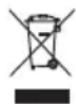
This symbol means the product must not be discarded as household waste, and should be delivered to an appropriate collection facility for recycling. Proper disposal and recycling helps protect natural resources, human health and the environment. For more information on disposal and recycling of this product, contact your local municipality, disposal service, or the shop where you bought this product.
Low-power Radio-frequency Devices Technical Regulations
Without permission granted by the NCC, any company, enterprise, or user is not allowed to change frequency, enhance transmitting power or alter original characteristic as well as performance to an approved low power radio-frequency devices. The low power radio-frequency devices shall not influence aircraft security and interfere legal communications; If found, the user shall cease operating immediately until no interference is achieved. The said legal communications means radio communications is operated in compliance with the Telecommunications Management Act. The low power radio-frequency devices must be susceptible with the interference from legal communications or ISM radio wave radiated devices.
Product Power State Table
The product, in accordance with the Ecodesign Requirements for Energy Related Products Directive 2009/125/EC and the Ecodesign for Energy-Related Products and Energy Information (Amendment) (EU Exit) Regulations 2020, is in compliance with the following norm(s) or document(s): Regulation (EC) No. 1275/2008, as amended by Regulation (EU) No. 801/2013.
| Required Power State Information | Power Modes | |
| Standby Networked Standby | ||
| Power consumption in specified power mode, at 230V/50Hz input | 0.4 W N/A | |
| Time after which equipment is automatically switched into mode | 4 hours N/A | |
| Power consumption in networked standby if all wired network ports are connected and all wireless network ports are activated, at 230V/50Hz input | N/A N/A | |
| Wireless network port deactivation/activation procedures. Deactivating all networks will enable standby mode. | N/A | |

电电池回收
Please dispose of used batteries properly, following local regulations. Do not incinerate.

Li- ion


China Restriction of Hazardous Substances Table
| Names and Contents of Toxic or Hazardous Substances or Elements | ||||||
| Toxic or Hazardous Substances and Elements | ||||||
| Part Name | Lead(Pb) | Mercury(Hg) | Cadmium(Cd) | Hexavalent(CR(VI)) | PolybrominatedBiphenyl(PBB) | Polybrominated diphenylether(PBDE) |
| PCBs X O O O O O | ||||||
| Metal Parts X O O O O | ||||||
| Plastic Parts O | O O O O | O | ||||
| Speakers | X O O | O O O | ||||
| Cables | X O O | O O O | ||||
| Battery | O | O O O O | O | |||
| This table is prepared in accordance with the provisions of SJ/T 11364. O: Indicates that this toxic or hazardous substance contained in all of the homogeneous materials for this part is below the limit requirement of GB/T 26572. | 5 | |||||
| X: Indicates that this toxic or hazardous substance contained in at least one of the homogeneous materials used for this part is above the limit requirement of GB/T 26572. | ||||||
Taiwan Restriction of Hazardous Substances Table
| Equipment name: Wireless PA System, Type designation: 436469 | ||||||
| Restricted substances and its chemical symbols | ||||||
| Unit | Lead(Pb) | Mercury (Hg) | Cadmium (Cd) | Hexavalent chromium(Cr+6) | Polybrominated biphenyls (PBB) | Polybrominated diphenylethers (PBDE) |
| PCBs | -0 | ○○○○ | ||||
| Metal Parts | -0 | ○○○○ | ||||
| Plastic Parts | ○○ | ○○○○ | ○ | |||
| Speakers | -0 | ○○○○ | ||||
| Cables | -0 | ○○○○ | ||||
| Battery | ○○ | ○○○○ | ○ | |||
| Note 1: “○” indicates that the percentage content of the restricted substance does not exceed the percentage of reference value of presence. Note 2: The “-” indicates that the restricted substance corresponds to the exemption. | ||||||
Date of Manufacture: The eighth digit in the serial number indicates the year of manufacture; "3" is 2013 or 2023.
China Importer: Bose Electronics (Shanghai) Company Limited, Level 6, Tower D, No. 2337 Gudai Rd. Minhang District, Shanghai 201100
EU Importer: Bose Products B.V., Gorslaan 60, 1441 RG Purmerend, The Netherlands
Mexico Importer: Bose de Mexico S. de R.L. de C.V., Avenida Prado Sur #150, Piso 2, Interior 222 y 223, Colonia Lomas de Chapultepec V Seccion, Miguel Hidalgo, Ciudad de Mexico, C.P. 11000 Phone Number: +5255 (5202) 3545
Taiwan Importer: Bose Limited Taiwan Branch (H.K.), 9F., No.10, Sec. 3, Minsheng E. Road, Zhongshan Dist. Taipei City 10480, Taiwan Phone Number: +886-2-2514 7676
UK Importer: Bose Limited, Bose House, Quayside Chatham Maritime, Chatham, Kent, ME4 4QZ, United Kingdom
Input Rating: 100 - 240V 50 / 60Hz, 1A
Output Ratings:
- USB POWER Charging Port: 5V --- 1.5A
Wireless Transmitter Charging Ports: 5V --- 0.3A
Battery Capacity: 5500 mAh
Charging Temperature Range: 32^ - 113^ (0^ - 45^)
Discharging Temperature Range: -4^ - 120^ (-20^ - 49^)
Dimensions (H× W× D) .. 13.1× 9.4× 11 in (332.6× 240× 279.8mm)
Net Weight: 14.4 lb (6.5 kg)
Initial turn on inrush current: 12.4A at 120V; 12.8A at 230V
Inrush current after AC mains interruption of 5 s: 2.5A at 120V; 3A at 230V
Model: 436469. The CMIIT ID is located on the bottom of the product.
Please complete and retain for your records
The serial and model numbers are located on the bottom of the product.
Serial number:
Model number: 436469
Please keep your receipt with your owner's guide. Now is a good time to register your Bose product.
You can easily do this by going to worldwide.Bose.com/ProductRegistration
Security Information

This product is capable of receiving security updates from Bose. To check for and install any security updates that Bose makes available, connect the product to a computer using a USB cable and visit _btu.Bose.com
Apple and the Apple logo are trademarks of Apple Inc., registered in the U.S. and other countries. App Store is a service mark of Apple Inc.
The Bluetooth® word mark and logos are registered trademarks owned by Bluetooth SIG, Inc. and any use of such marks by Bose Corporation is under license.
Google and Google Play are trademarks of Google LLC.
USB Type-C and USB-C are registered trademarks of USB Implementers Forum.
Bose, Bose Music, the Bose Music logo, L1, and ToneMatch are trademarks of Bose Corporation.
Bose Corporation Headquarters: 1-877-230-5639
©2023 Bose Corporation. No part of this work may be reproduced, modified, distributed, or otherwise used without prior written permission.
The following license disclosures apply to certain third-party software packages used as components in the product.
Package: FreeRTOS
Copyright © Amazon Web Services, Inc. or its affiliates. All rights reserved.
Package: LVGL - Light and Versatile Graphics Library
Copyright © 2021 LVGL Kft
The above is/are subject to the license terms reprinted below:
MIT License
Permission is hereby granted, free of charge, to any person obtaining a copy of this software and associated documentation files (the "Software"), to deal in the Software without restriction, including without limitation the rights to use, copy, modify, merge, publish, distribute, sublicense, and/or sell copies of the Software, and to permit persons to whom the Software is furnished to do so, subject to the following conditions:
The above copyright notice and this permission notice shall be included in all copies or substantial portions of the Software.
THE SOFTWARE IS PROVIDED "AS IS", WITHOUT WARRANTY OF ANY KIND, EXPRESS OR IMPLIED, INCLUDING BUT NOT LIMITED TO THE WARRANTY OF MERCHANTABILITY, FITNESS FOR A PARTICULAR PURPOSE AND NONINFRINGEMENT. IN NO EVENT SHALL THE AUTHORS OR COPYRIGHT HOLDERS BE LIABLE FOR ANY CLAIM, DAMAGES OR OTHER LIABILITY, WHETHER IN AN ACTION OF CONTRACT, TORT OR OTHERWISE, ARISING FROM, OUT OF OR IN CONNECTION WITH THE SOFTWARE OR THE USE OR OTHER DEALINGS IN THE SOFTWARE.
Packages: STM32CubeF4 HAL Driver MCU Component and STM32 LL - STM32 Low Layer API
Copyright 2017 STMicroelectronics. All rights reserved.
The above is/are subject to the license terms reprinted below:
3-Clause BSD License
(Also called "New BSD License" or "Modified BSD License")
Redistribution and use in source and binary forms, with or without modification, are permitted provided that the following conditions are met:
Redistributions of source code must retain the above copyright notice, this list of conditions and the following disclaimer.
Redistributions in binary form must reproduce the above copyright notice, this list of conditions and the following disclaimer in the documentation and/or other materials provided with the distribution.
Neither the name of the
THIS SOFTWARE IS PROVIDED BY THE COPYRIGHT HOLDERS AND COLNTRIBUTORS "AS IS" AND ANY EXPRESS OR IMPLIED WARRANTY, INCLUDING, BUT NOT LIMITED TO, THE IMPLIED WARRANTY OF MERCHANTABILITY AND FITNESS FOR A PARTICULAR PURPOSE ARE DISCLAIMED. IN NO EVENT SHALL
WHAT'S IN THE BOX
Contents 15
BOSE MUSIC APP SETUP
Download the Bose Music app 16
Add the system to an existing account. 16
CONTROL AND CONNECTION PANEL
Panel overview 17
POWER
Connect the system to power. 18
Power on/off 18
Auto-off timer 19
Disable the auto-off timer. 19
CONNECT SOURCES
Connect sources to Channel 1 and 2 20
Connect sources to Channel 3. 21
Connect a Bluetooth device 21
Connect to the TS/TRS line input 22
Connect to the AUX line input 22
ADJUST CHANNEL AUDIO
Adjust channel volume, treble, bass, and reverb 23
Adjust volume 23
Adjusttreble 24
Adjust bass 24
Adjustreverb(Channels1and2only) 25
CHANNEL AND SYSTEM SETTINGS
Access channel and system settings 26
ToneMatch preset settings 27
Select ToneMatch presets (Channels 1 and 2 only) 27
Customize ToneMatch presets using the Bose Music app 28
Clear a custom ToneMatch preset 28
Channel insert settings 29
Channel wireless settings 29
Channel Expanders settings 29
Live Stream mode settings 30
About Live Stream mode 30
Enable/Disable Live Stream mode 30
Connect the system to your computer 32
Adjust monitor volume in Live Stream mode 33
Sub EQ settings 34
Enable/Disable Sub EQ 34
BOSE MUSIC APP EXCLUSIVE FEATURES
Mute channels and channel reverb effects 36
Save Scenes 36
Enable/Disable Dual Wireless Streaming 36
Customize ToneMatch presets 36
WIRELESS TRANSMITTER CONTROLS
Compatible wireless transmitters 37
Pair a wireless transmitter to Channel 1 or 2. 37
Connect a paired wireless transmitter to an audio source 38
Power on/off a wireless transmitter 39
Auto-off timer 39
Mute/Unmute a wireless transmitter 39
Change between mic and line input. 40
Connect effects to a channel insert when using a wireless transmitter.... 40
Enable/Disable channel insert functionality 41
Enable/Disable wireless transmitter functionality 42
SPEAKER STAND
Connect a speaker stand 43
SYSTEM SETUP SCENARIOS
System configurations 44
Elevated surface 44
Tilt-back. 44
Monitor. 44
Speaker stand 44
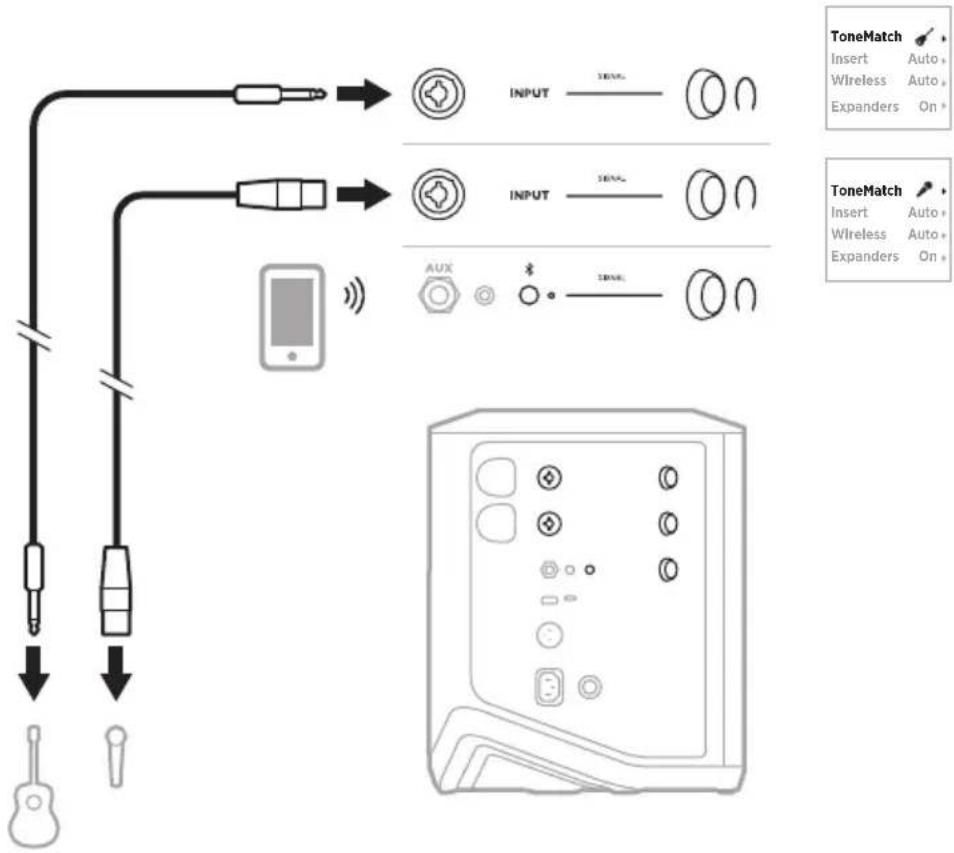
Musician with mobile device 45
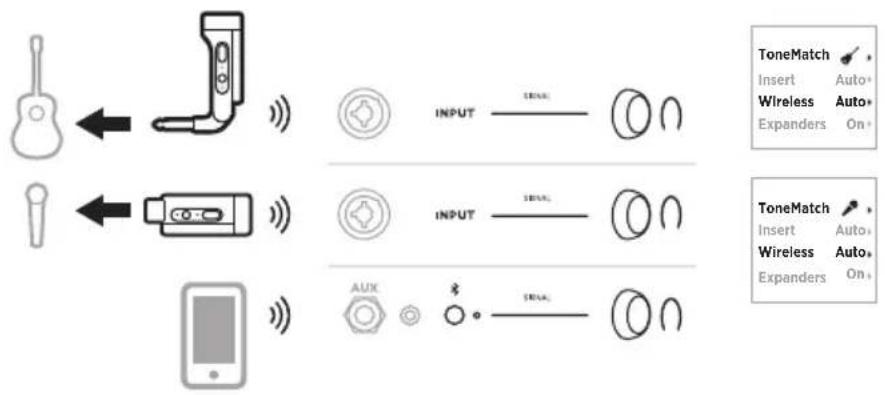
Musician with mobile device and wireless transmitters. 45
Multi-instrumentalist 46
Musician with effects mixer 46
Musician with wireless transmitters, effects pedal, and vocal processor 47
Guitarist with wireless transmitter and amp modeler pedal. 48
General-purpose PA 49
Stereo 49
Dual mono/daisy-chain 51
DJ with Bose Sub1 or Sub2 Powered Bass Module 52
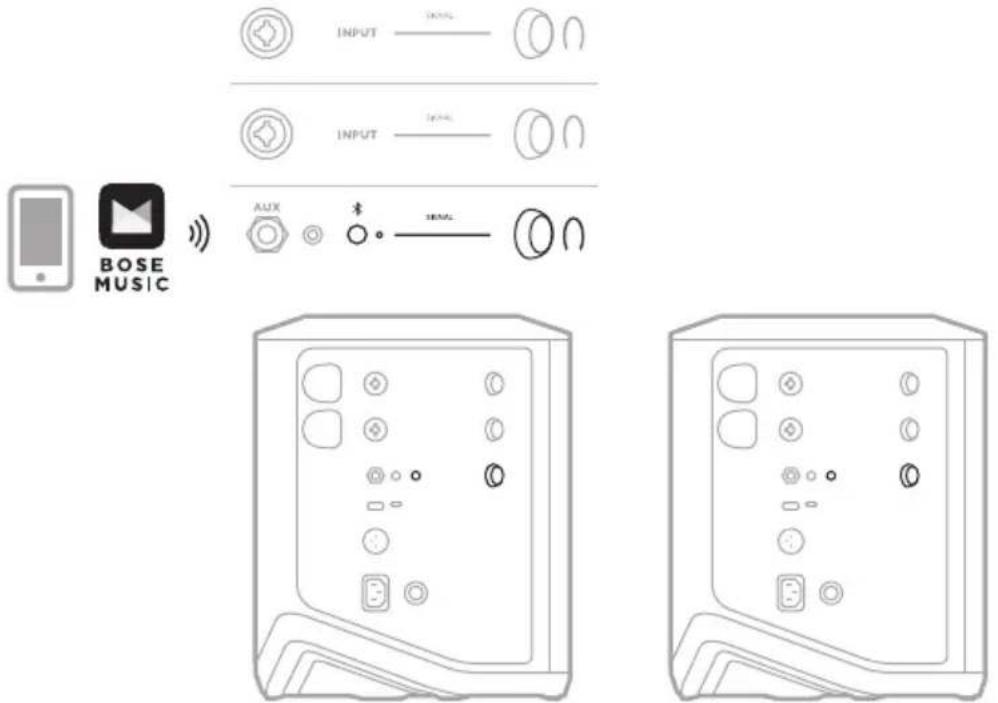
Dual Wireless Streaming with the Bose Music app 53
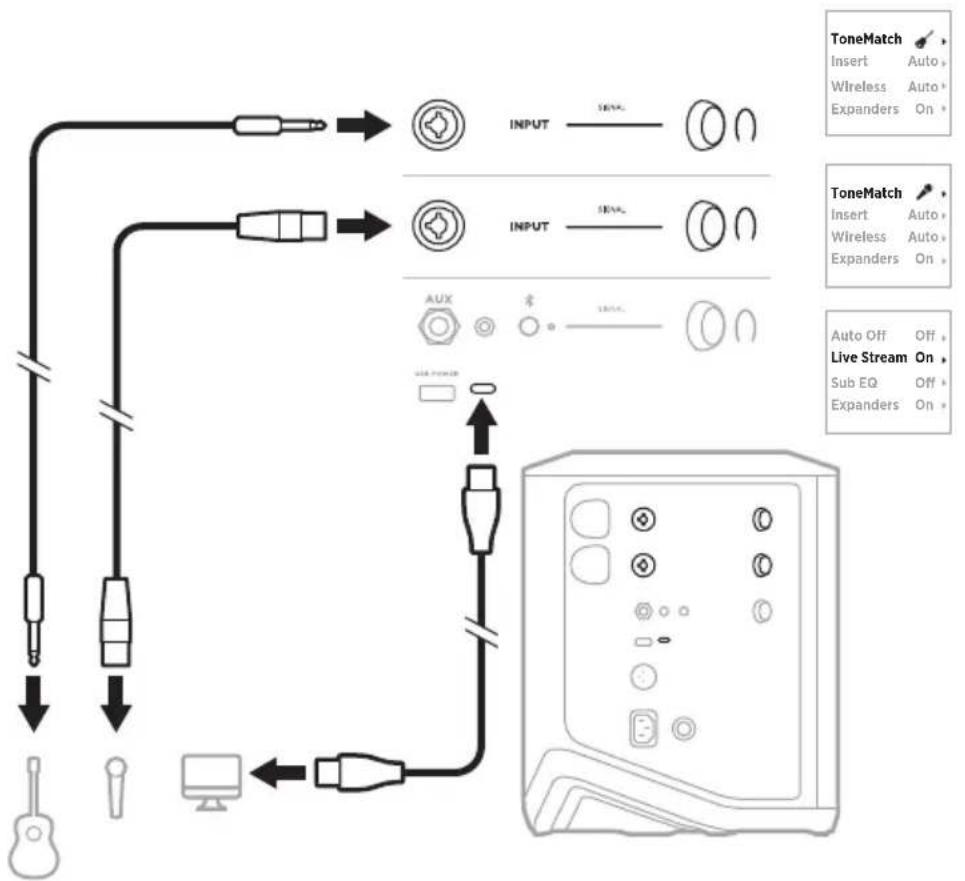
Musician recording or live streaming to computer 53
BATTERY
Charge the system battery. 54
Charging time. 54
Check the system battery level. 54
Charge a wireless transmitter 55
Using the charging ports 55
Using a wall charger or computer 55
Charging time. 56
Check the wireless transmitter battery level 56
Charge your mobile device using the USB charging port 56
SYSTEM STATUS
Signal/clip lights 57
Power light 58
Bluetooth light 58
Channel displays. 59
How to read the channel displays 59
Status icons 59
Battery icons 60
WIRELESS TRANSMITTER STATUS
Power light 62
Connection light 63
BLUETOOTH CONNECTIONS
Connect your mobile device 64
Disconnect a mobile device 64
Reconnect a mobile device 64
Clear the system device list 64
CARE AND MAINTENANCE
Replace the system battery 65
Update the system 67
Update a wireless transmitter 67
Clean the system 67
Transport and store the system 68
Replacement parts and accessories 68
Limited warranty 68
TROUBLESHOOTING
Try these solutions first 69
Other solutions 69
System 69
Wireless transmitter. 73
Enable/Disable the Expanders setting. 75
Reset the system. 77
Reset a wireless transmitter 77
CONTENTS
Confirm that the following parts are included:
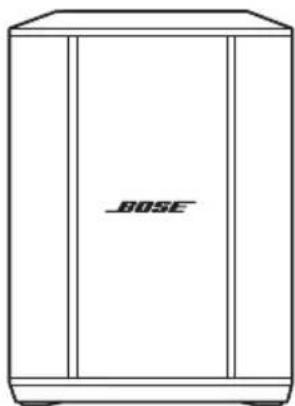
Bose S1 Pro+ Wireless PA System (with battery included)
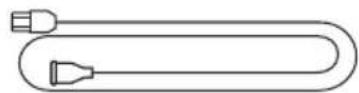
Power cord
NOTE: If any part of the product is damaged, don't use it. Contact your authorized Bose dealer or Bose customer service.
Visit: ______support.Bose.com/S1ProPlus
The Bose Music app lets you set up and control the system from any mobile device, such as a smartphone or tablet.
Using the app, you can control the system remotely, manage system settings, and access exclusive features like ToneMatch preset customization, channel and reverb mute, saved Scenes, and Dual Wireless Streaming (see page 36).
If you have already created a Bose Music account for another Bose product, see "Add the system to an existing account."
DOWNLOAD THE BOSE MUSIC APP
- On your mobile device, download the Bose Music app.
NOTE: If you're located in Mainland China, download the Bose音乐 app.

- Follow the app instructions.
ADD THE SYSTEM TO AN EXISTING ACCOUNT
To add your Bose S1 Pro+ Wireless PA System, open the Bose Music app and add your system.
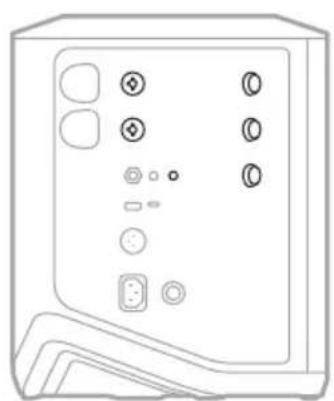
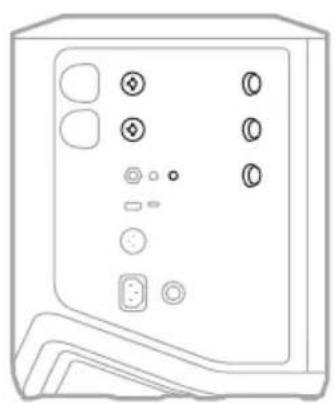
PANEL OVERVIEW
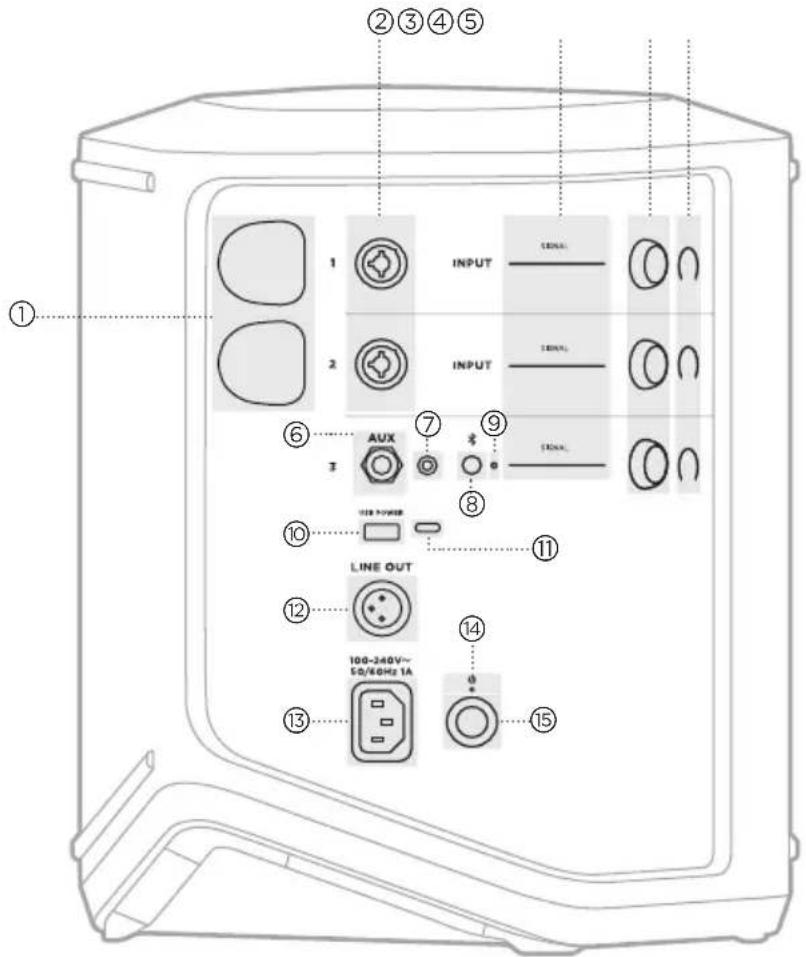
① Wireless transmitter charging ports. See page 55.
② ChannelInputs(balanced/unbalanced combined 1/4 or 6.35 ~mm TS/TRS and XLR). See page 20.
③ Signal/clip lights. See page 57.
④ Channel controls. See page 23.
⑤ Channel displays. See page 59.
TRS balanced mono line input (1/4" or 6.35 mm TS/TRS). See page 22.
AUX stereo line input (1/8" or 3.5 mm TRS). See page 22.
⑧ Bluetooth button. See page 21.
9 Bluetooth light. See page 58.
USB charging port (USB-A). See page 56.
USB Type-C* port. Use for Live Stream mode (see page 32) and system updates (see page 67).
Line out (XLR). Use an XLR cable to connect a post-mix line-level output to another system. This is a variable output that delivers full-spectrum audio. See page 51.
Power port. See page 18.
14 Power light. See page 58.
15 Power button. See page 18.
- Connect the power cord to the power port on the back of the system.
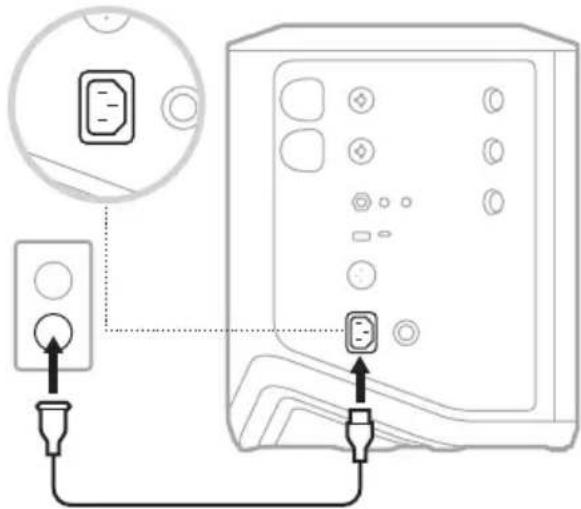
- Plug the other end of the power cord into an AC (mains) outlet.
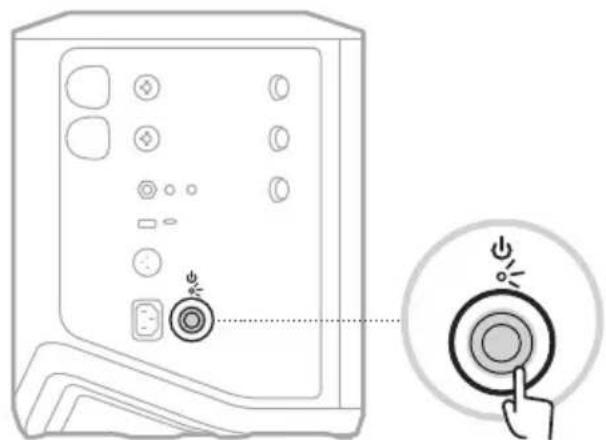
POWER ON/OFF
Press the Power button 山
The power light glows solid white.
AUTO-OFF TIMER
The auto-off timer conserves power when the system isn't in use. The system powers off when audio has stopped and you haven't adjusted any controls for 4 hours.
Disable the auto-off timer
- Press and hold the channel control for Channel 3 until the additional controls menu appears on the channel display.
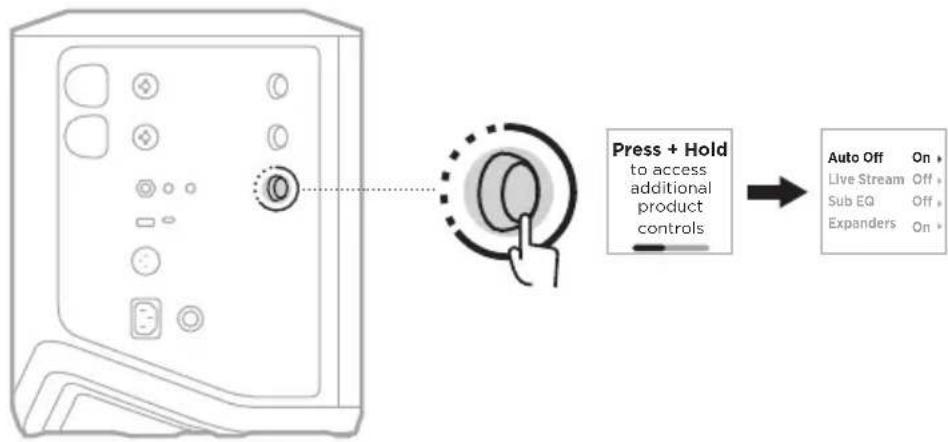
- Press the channel control to select Auto Off.
- Rotate the channel control to highlight Off, then press to select it.
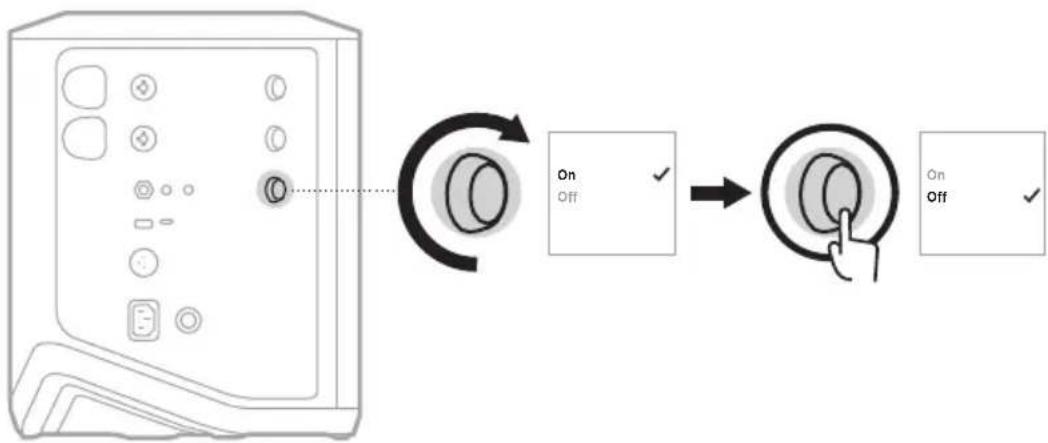
- Press and hold the channel control until the additional controls menu disappears.
TIP: You can also disable the auto-off timer using the Bose Music app. You can access this option from the Settings menu.
CONNECT SOURCES TO CHANNEL 1 AND 2
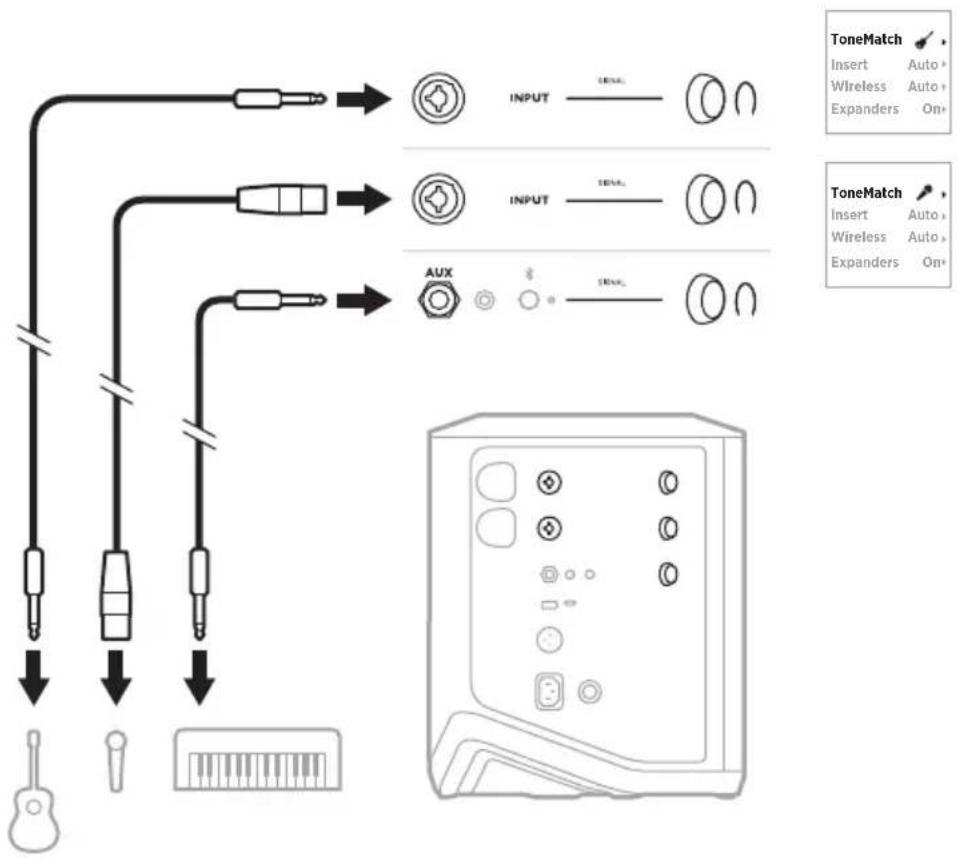
Channels 1 and 2 are for instruments and microphones. The channel inputs are suited for a wide range of input types and have the proper gain staging to minimize noise when channel volume is set for your desired output level.
- Connect your instrument or microphone to the channel input using the appropriate cable.
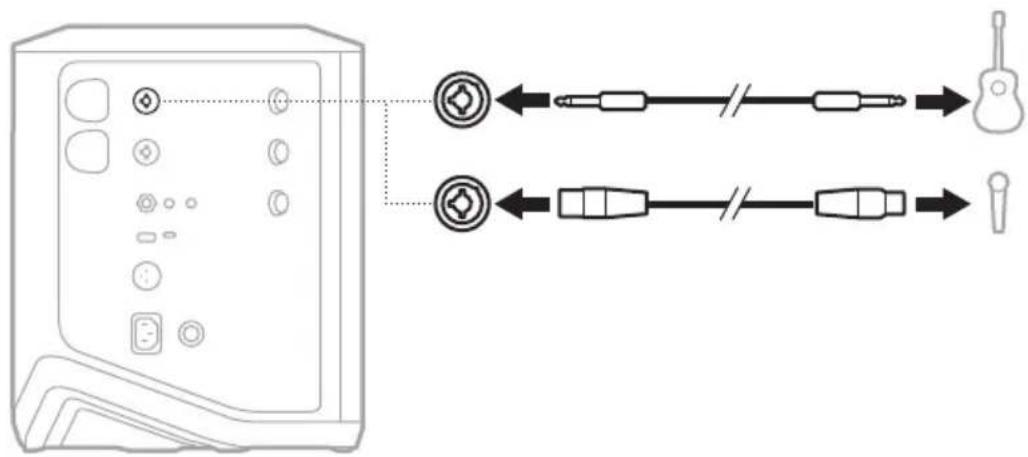
- Adjust channel volume, treble, bass, and reverb to your desired levels (see page 23).
- Optionally, you can also apply a ToneMatch preset to optimize the sound of your instrument or microphone (see page 27).
CONNECT SOURCES TO CHANNEL 3
Channel 3 is for Bluetooth devices and line-level audio sources.
NOTE: You can connect both your mobile device and a line-level audio source to Channel 3 at the same time. If you do, the system mixes the audio from each source, meaning that any adjustments you make to the channel volume, treble, or bass affect both sources. To adjust your mobile device volume independently, use your device controls.
Connect a Bluetooth device
You can connect and play audio from one Bluetooth device at a time.
- Press and hold the Bluetooth button × on Channel 3 until the Bluetooth light blinks blue.
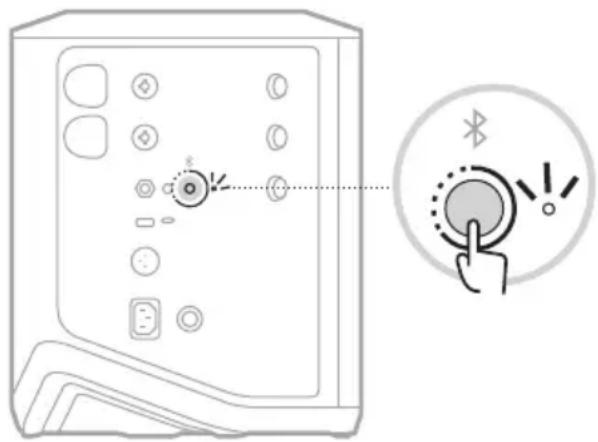
- On your device, turn on the Bluetooth feature.
NOTE: The Bluetooth menu is usually found in the Settings menu.
- Select your system from the device list.
NOTE: Look for the name you entered for your system in the Bose Music app. If you didn't name your system, the default name appears.
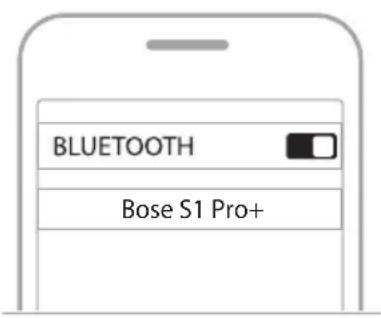
Once connected, the Bluetooth light glows solid white. Your system's name appears in the mobile device list.
Connect to the TS/TRS line input
A mono input. Use a 14'' (6.35 mm) TRS cable to connect a line-level audio source, such as a mixer or instrument effect.
Connect to the AUX line input
A stereo input. Use a 1/8'' (3.5 mm) TRS cable to connect a line-level audio source, such as a mobile device or laptop.
ADJUST CHANNEL VOLUME, TREBLE, BASS, AND REVERB
You can make real-time adjustments to channel volume, treble, bass, and reverb (Channel 1 and 2 only) using the channel controls located on the right side of the control panel.
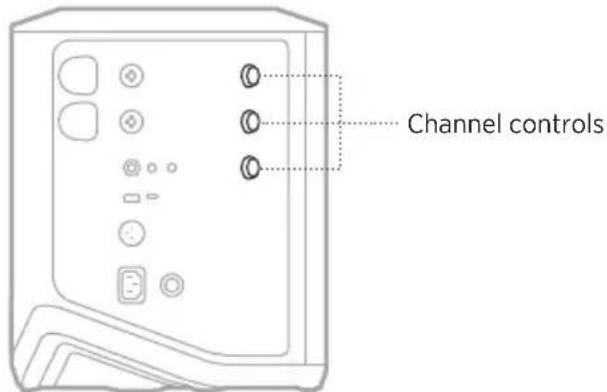
Adjust volume
Rotate the channel control to adjust channel volume.
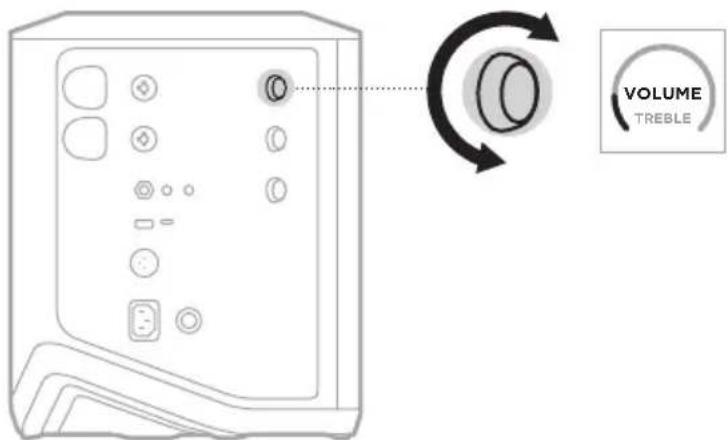
NOTE: You can also mute channels using the Bose Music app (see page 36).
Adjust treble
- Press and release the channel control until TREBLE appears on the channel display.
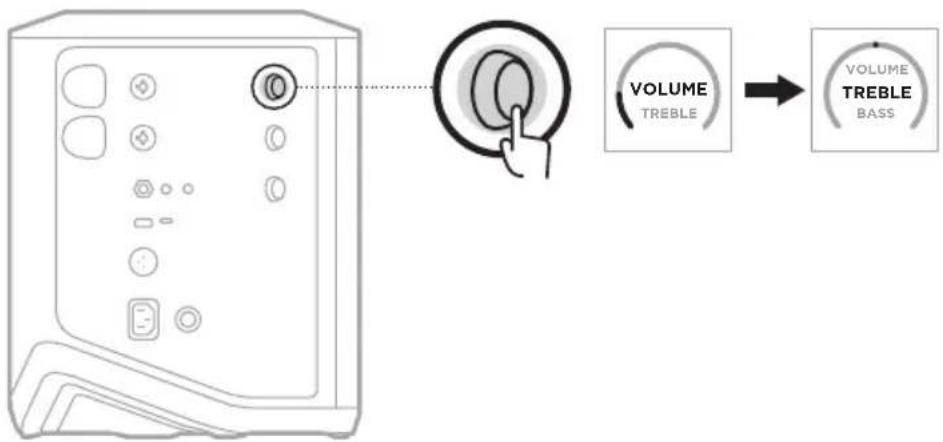
- Rotate the channel control to either boost or cut the high-frequency balance of the channel.
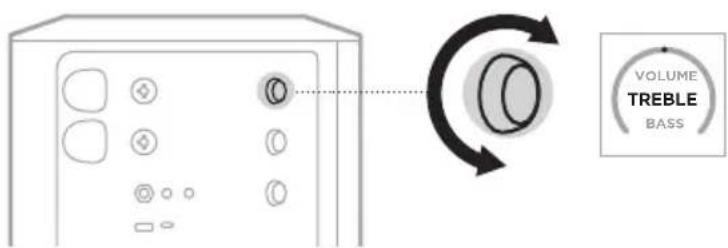
NOTE: After 10 seconds of inactivity, the channel display resets to VOLUME.
Adjust bass
- Press and release the channel control until BASS appears on the channel display.
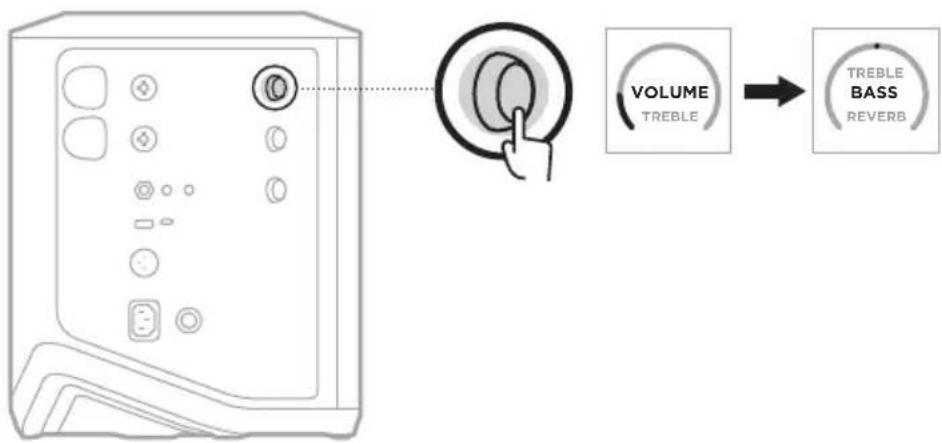
- Rotate the channel control to either boost or cut the low-frequency balance of the channel.
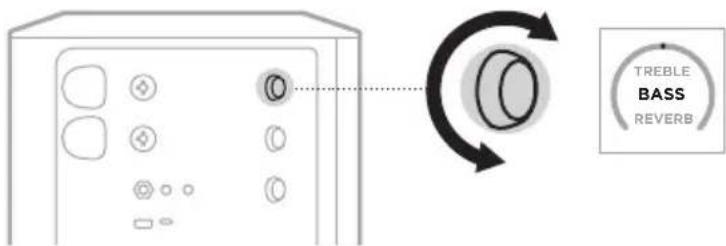
NOTE: After 10 seconds of inactivity, the channel display resets to VOLUME.
Adjust reverb (Channels 1 and 2 only)
- Press and release the channel control until REVERB appears on the channeldisplay.
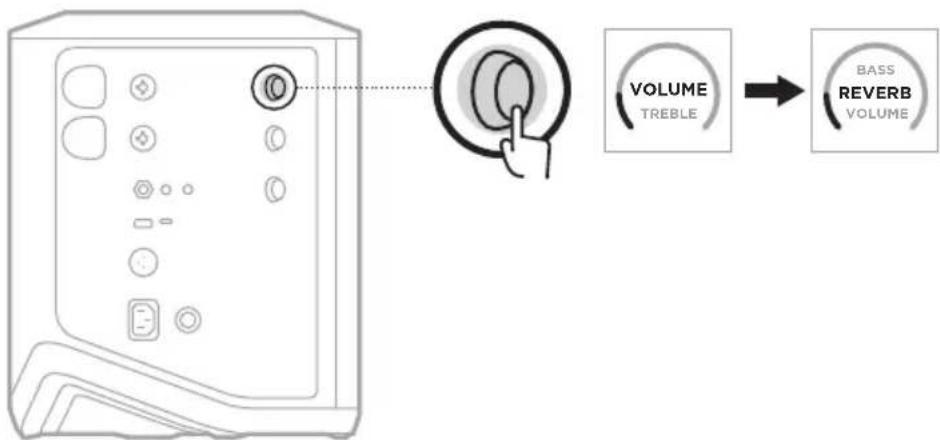
- Rotate the channel control to adjust the amount of reverb applied to the channel.
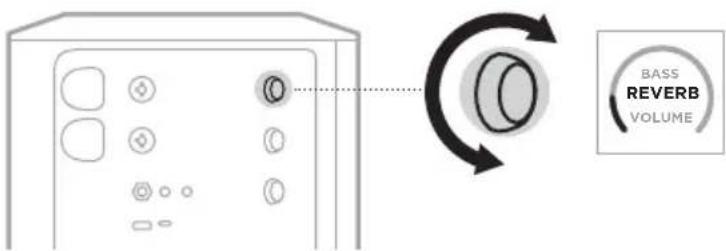
NOTES:
After 10 seconds of inactivity, the channel display resets to VOLUME.
- You can also mute reverb effects for a channel using the Bose Music app (see page 36).
ACCESS CHANNEL AND SYSTEM SETTINGS
You can adjust channel and system settings to best support your setup scenario.
To access channel and system settings, press and hold one of the channel controls until the additional controls menu appears on the channel display.
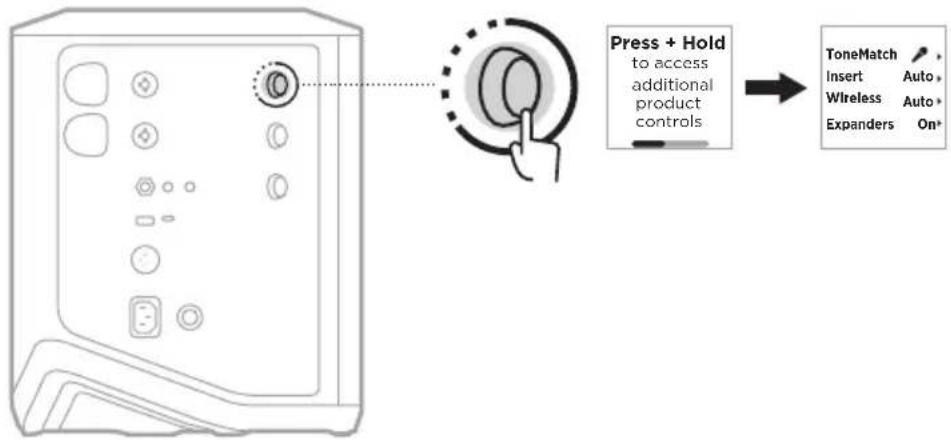
The settings in this menu vary depending on the channel.
CHANNEL MENU SETTINGS
| Channel 1 and 2 | The menu contains channel settings that only affect the selected channel. |
| Channel 3 | The menu contains system settings that change overall system behavior. |
TONEMATCH PRESET SETTINGS
ToneMatch resets optimize system EQ to preserve the natural sound of your instrument or microphone.
Select ToneMatch presets (Channels 1 and 2 only)
- Press and hold the channel control for either Channel 1 or 2 until the additional controls menu appears on the channel display.
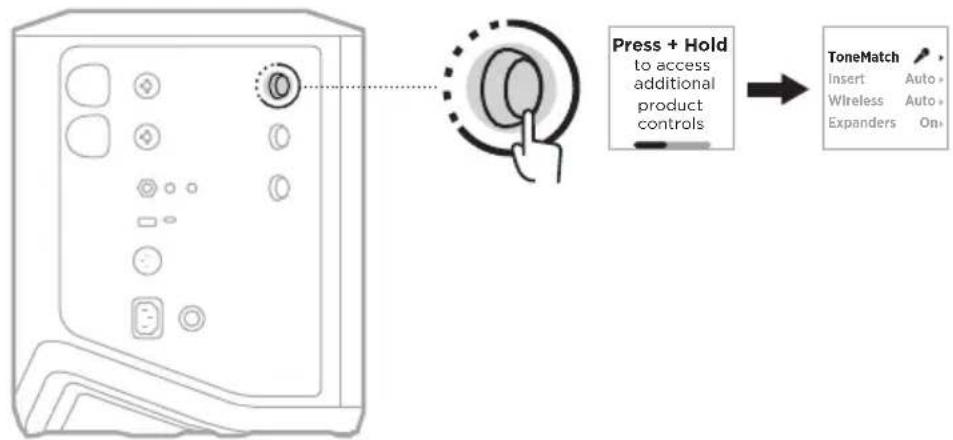
-
Press the channel control to select ToneMatch.
-
Rotate the channel control to highlight the appropriate preset for your source, then press to select it:
-
Microphone: By default, this preset adjusts the system EQ for a dynamic handheld microphone.
- Instrument: By default, this preset adjusts the system EQ for a steel string acoustic guitar with piezo pickups.
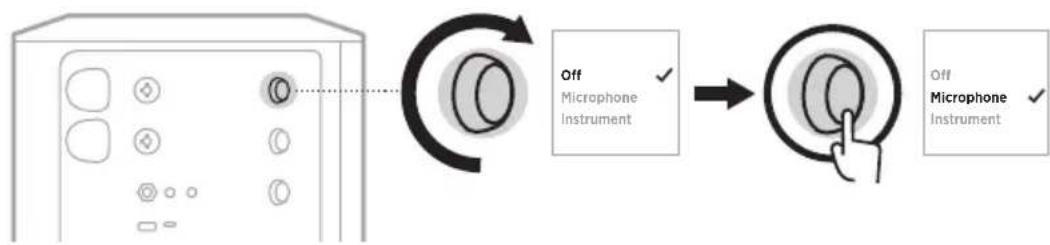
NOTES:
To customize these presets to match your specific microphone or instrument model or apply generic EQ filters, use the Bose Music app (see page 28).
- Selecting Off bypasses the ToneMatch preset for that channel.
- Press and hold the channel control until the additional controls menu disappears.
Customize ToneMatch presets using the Bose Music app
Using the Bose Music app, you can customize the default Microphone or Instrument Presets on Channels 1 and 2 to better optimize system EQ for your setup scenario. Select from a library of ToneMatch presets to match your specific microphone or instrument model, apply generic EQ filters, or get the best sound from a guitar amp modeler pedal. You can access this option from the Settings menu.
When you customize a ToneMatch preset on a channel, a + symbol appears next to the icon on the channel display.
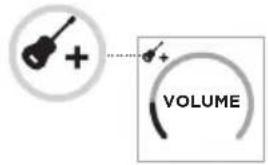
Your custom preset persists until you clear it or factory reset the system.
Clear a custom ToneMatch preset
Clearing a custom ToneMatch preset resets it to either the default Microphone or Instrument setting, depending on which preset you customized.
- Press and hold the channel control for either Channel 1 or 2 until the additional controls menu appears on the channel display.
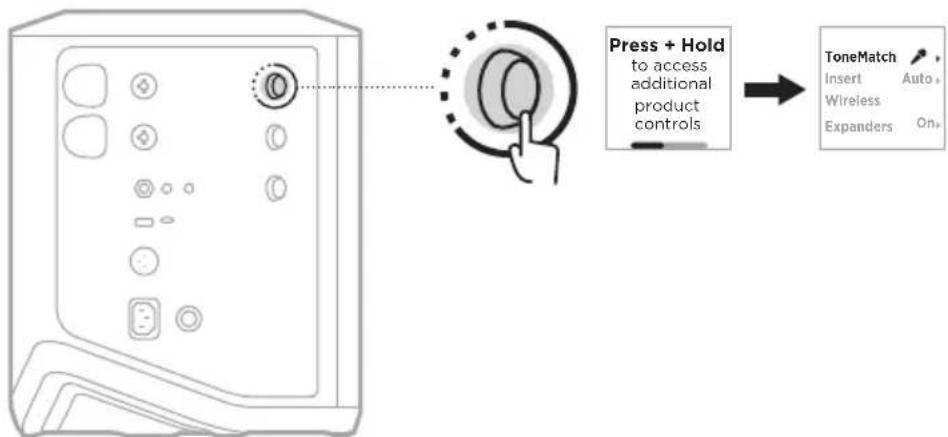
- With the ToneMatch option highlighted, press and hold the channel control until the ToneMatch setting changes to Off.
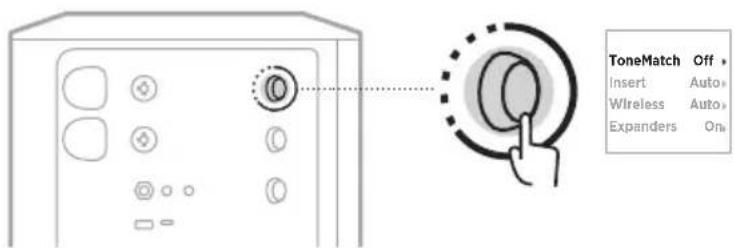
CHANNEL INSERT SETTINGS
Channel insert settings let you enable or disable the effects loop functionality for a channel. When enabled, you can connect your effects units or pedals to the channel input while using a wireless transmitter for your source.
For more information, see "Connect effects to a channel insert when using a wireless transmitter" on page 40.
CHANNEL WIRELESS SETTINGS
Channel wireless settings let you enable or disable wireless transmitter functionality for a channel.
For more information, see "Enable/Disable wireless transmitter functionality" on page 42.
CHANNEL EXPANDERS SETTINGS
The Expanders setting determines whether the system reduces the volume of low-level background noise for a channel.
For more information, see "Enable/Disable the Expanders setting" on page 75.
LIVE STREAM MODE SETTINGS
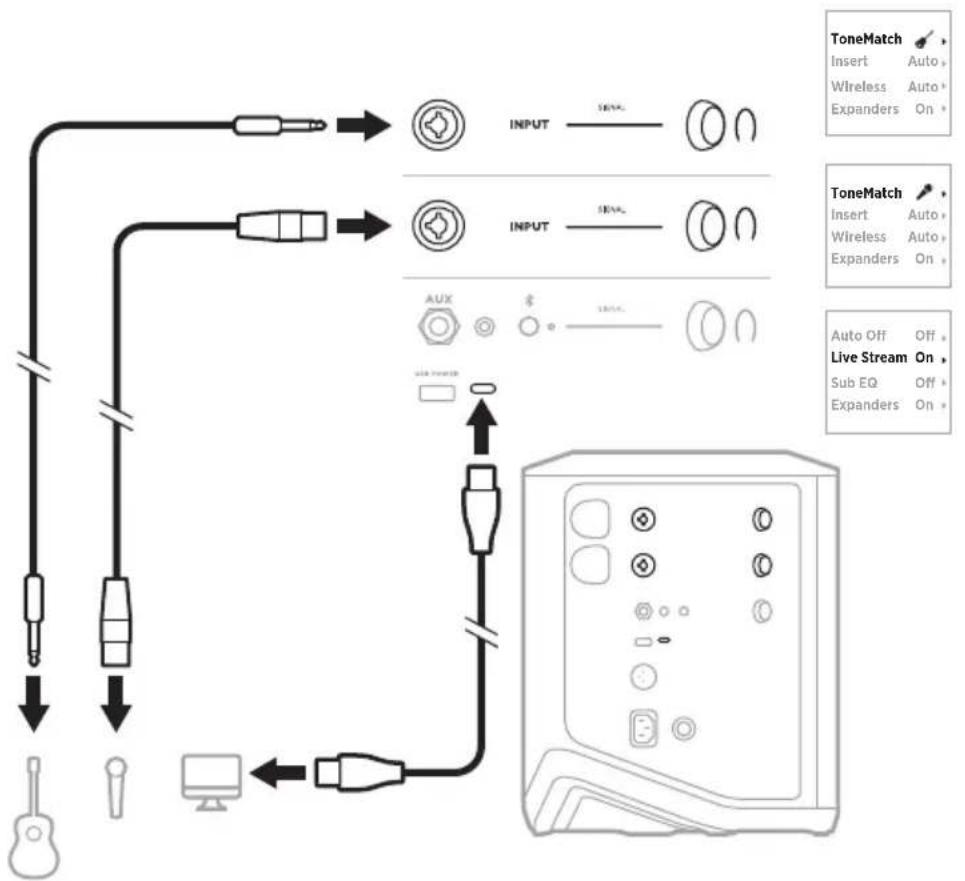
Live Stream mode allows the system to be recognized as an audio interface when you connect it to your computer using a USB-C® cable. This lets you perform live for an online audience or record audio directly to your computer's digital audio workstation (DAW).
For sample setup scenario images, see page 53.
NOTE: During Live Stream mode, the system can send audio to your computer, but it can't receive it. USB playback is not supported.
About Live Stream mode
When Live Stream mode is enabled, the system passes a dual mono mix of Channels 1, 2, and 3 to a connected computer.
In this mode, the channel volume controls behave like faders on a mixer. Adjusting channel volume using either the channel controls or the Bose Music app adjusts the level of that channel within the mix being sent to your computer.
A monitor volume control also appears on Channel 3, allowing you to adjust the master volume of the system speakers without affecting the computer mix (see page 33).
Once you enable Live Stream mode, it stays enabled until you disable it or the system powers off.
Enable/Disable Live Stream mode
- Press and hold the channel control for Channel 3 until the additional controls menu appears on the channel display.
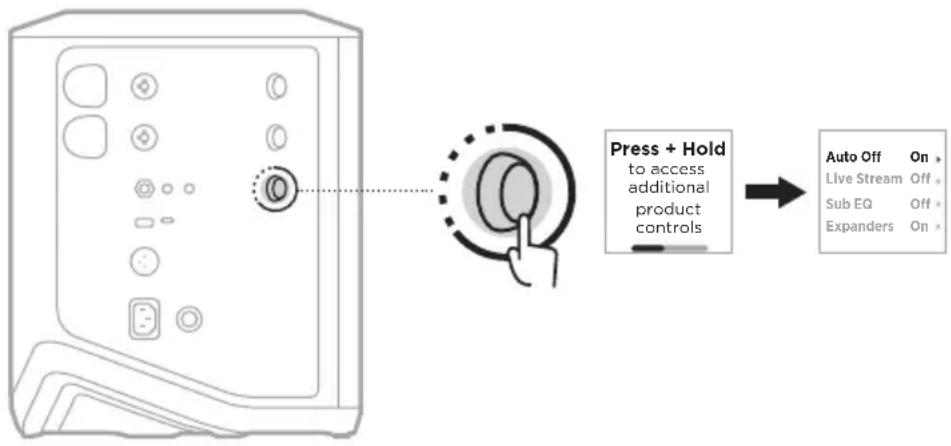
- Rotate the channel control to highlight Live Stream, then press to select it.
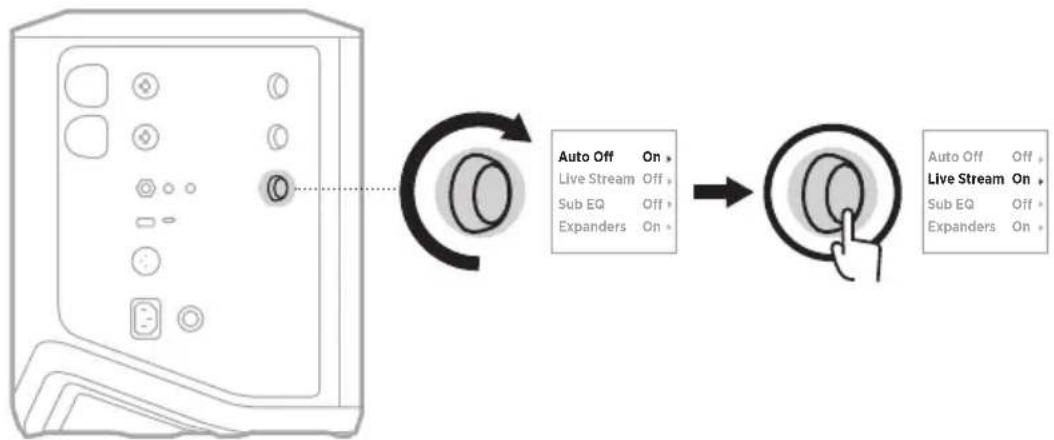
-
Rotate the channel control to highlight your preferred setting, then press to select it:
-
On: Enables Live Stream mode, allowing the system to be recognized as an audio interface when connected to your computer.
- Off (default): Enables Live Stream mode, preventing the system from being recognized as an audio interface when connected to your computer.
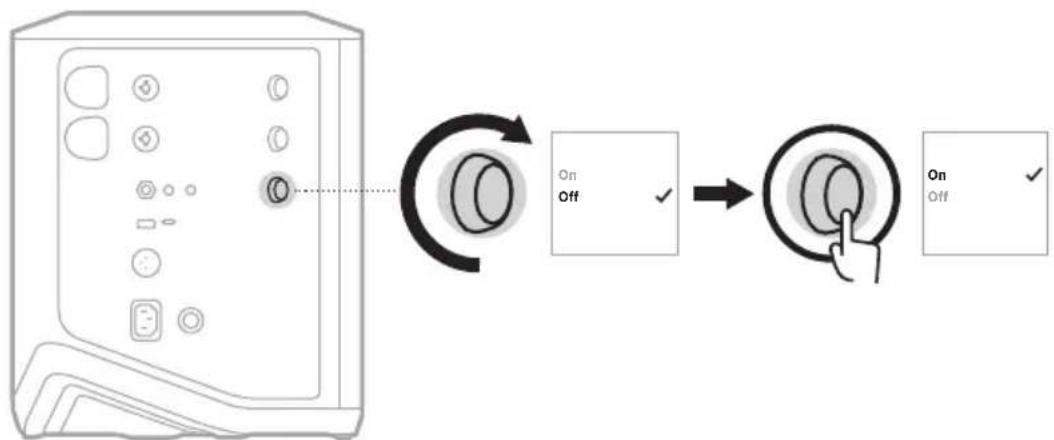
- Press and hold the channel control until the additional controls menu disappears.
Connect the system to your computer
- Connect one end of a USB-C cable (not provided) to the USB-C port on the system.
- Connect the other end to your computer.
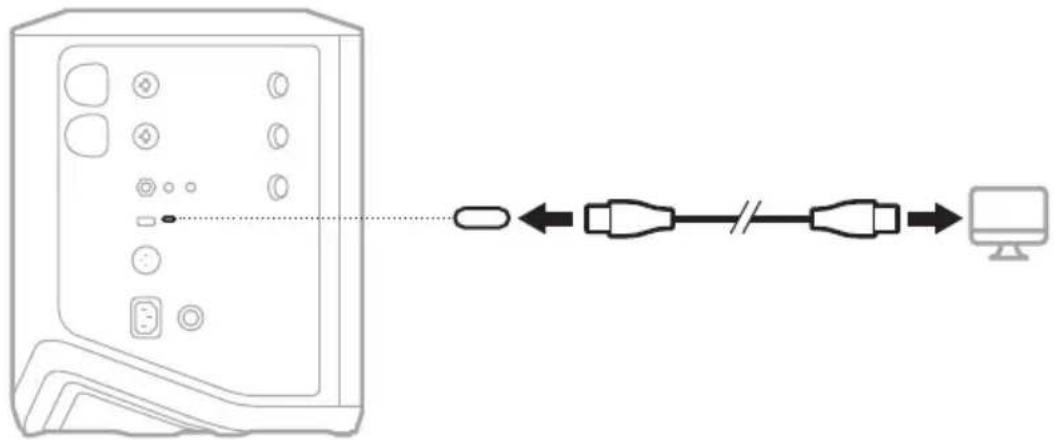
Adjust monitor volume in Live Stream mode
When Live Stream mode is enabled, you can use the channel control for Channel 3 to adjust the master volume of the system speakers without affecting the mix being sent to your computer.
NOTE: The monitor volume control isn't available in the Bose Music app.
- Press and release the channel control for Channel 3 until MONITOR VOLUME appears on the channel display.
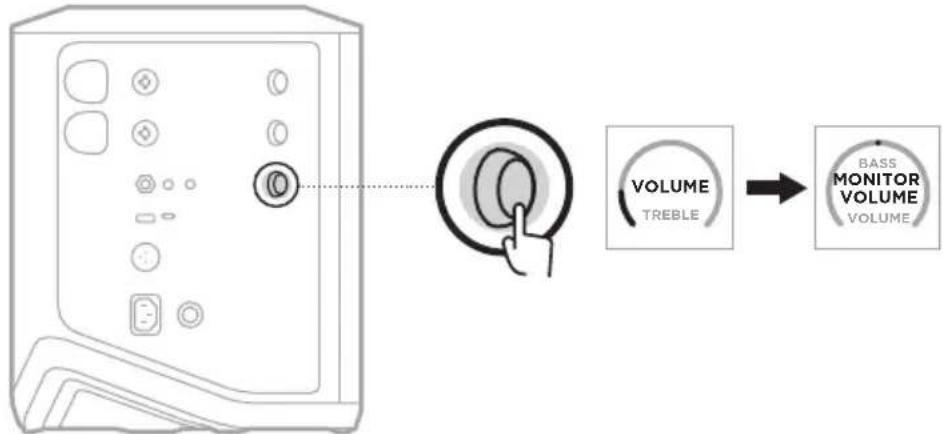
- Rotate the channel control to adjust the monitor volume.
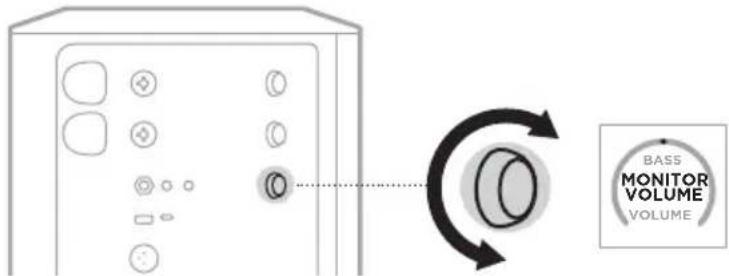
NOTE: After 10 seconds of inactivity, the channel display resets to VOLUME.
SUB EQ SETTINGS
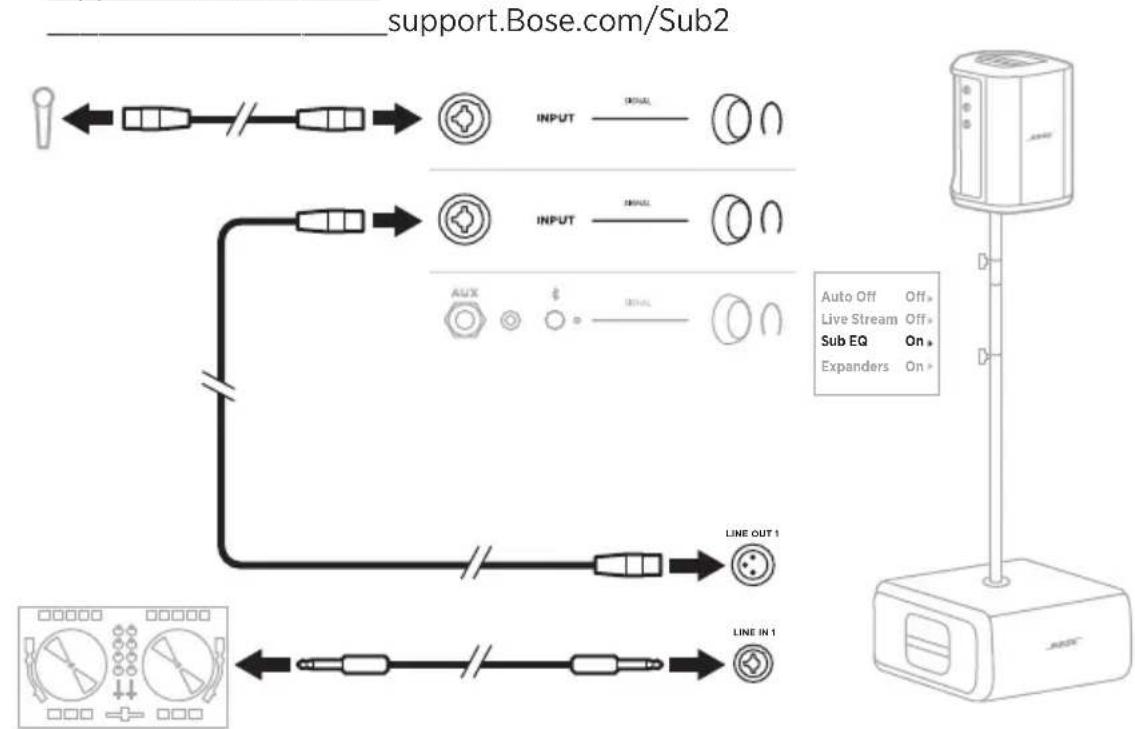
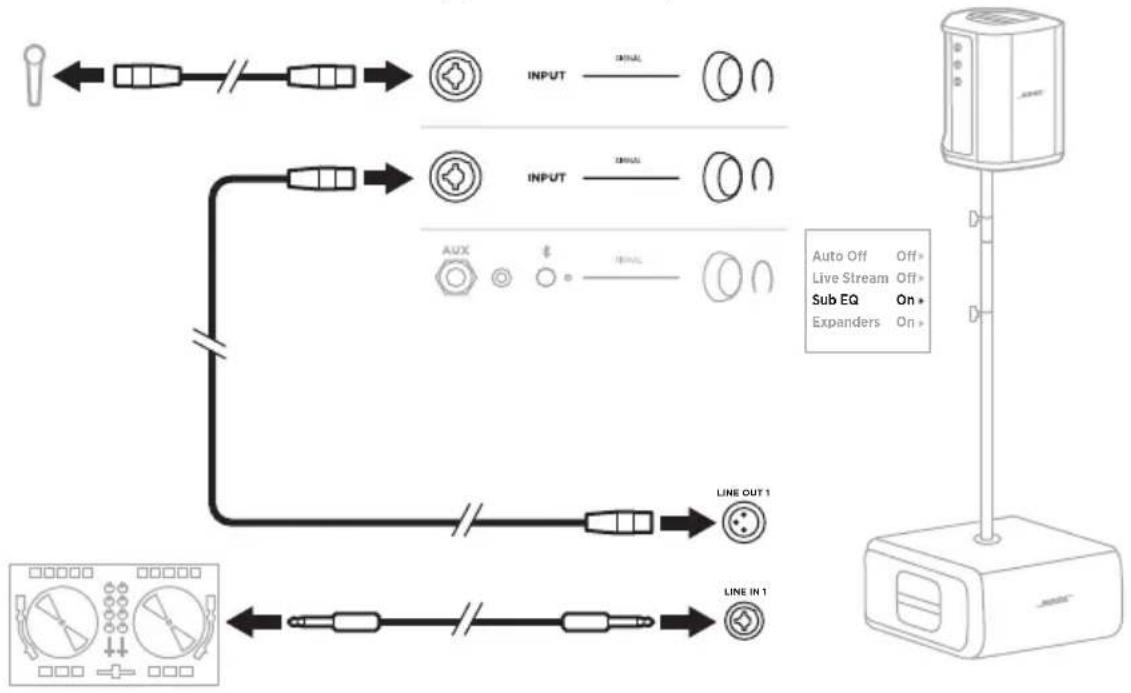
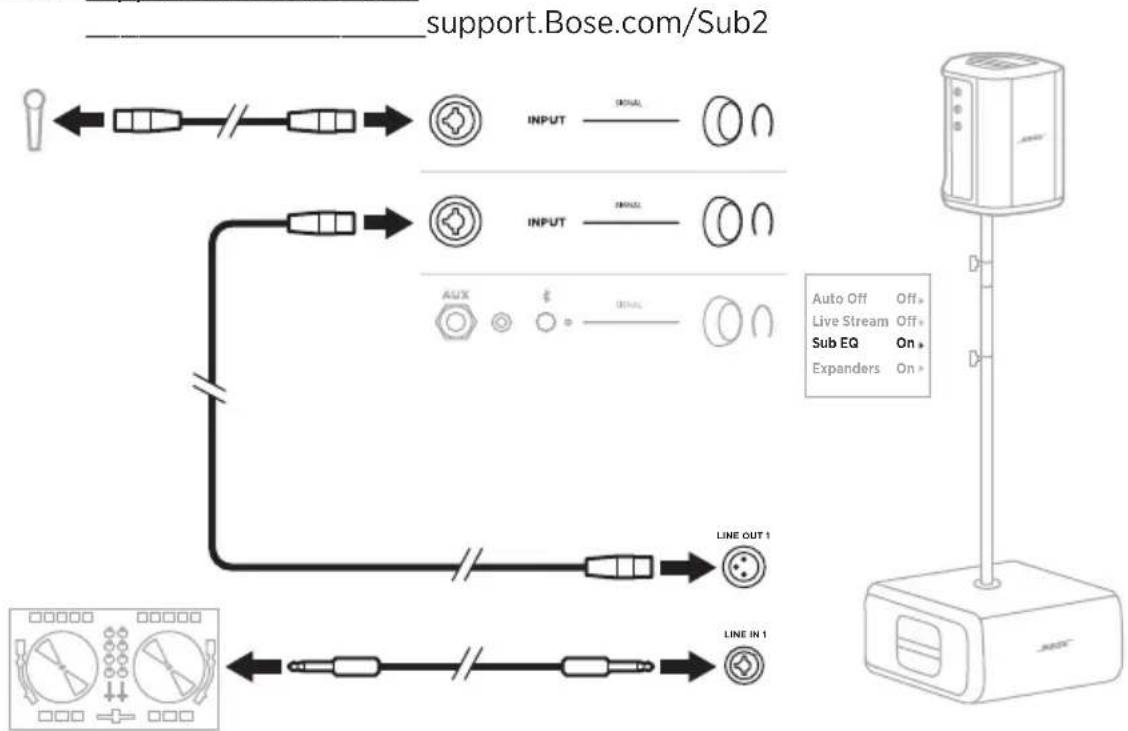
The Sub EQ setting is a crossover that optimizes system EQ for setup scenarios in which a powered subwoofer is connected to the system LINE OUT port.
You can use Sub EQ with any powered subwoofer, but for optimal performance, Bose recommends the Bose Sub1 or Sub2 Powered Bass Module.
Once you enable Sub EQ, it stays enabled until you disable it or the system powers off.
For sample setup scenario images, see page 52.
NOTES:
- For information on how to connect the system to a Bose Sub1 or Sub2 Powered Bass Module, refer to the Bose Sub1/Sub2 Powered Bass Module owner's guide. Visit: support.Bose.com/Sub1 or support.Bose.com/Sub2
- You can also enable/disable Sub EQ using the Bose Music app. You can access this option from the Settings menu.
Enable/Disable Sub EQ
- Press and hold the channel control for Channel 3 until the additional controls menu appears on the channel display.
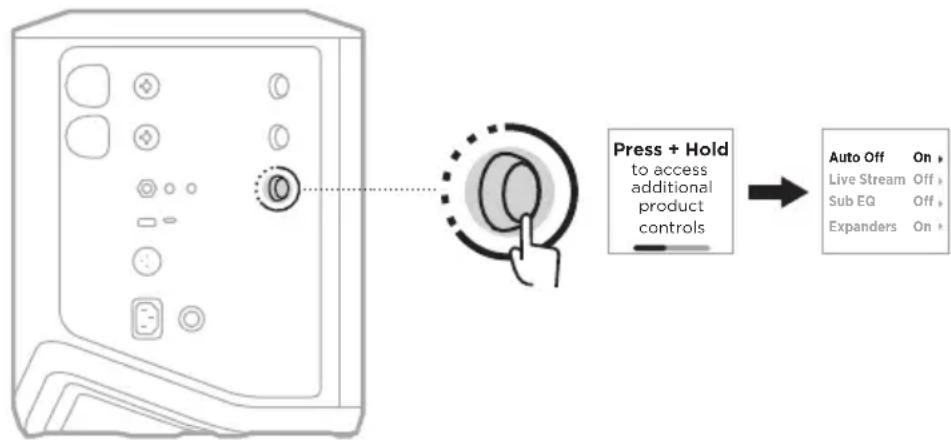
- Rotate the channel control to highlight Sub EQ, then press to select it.
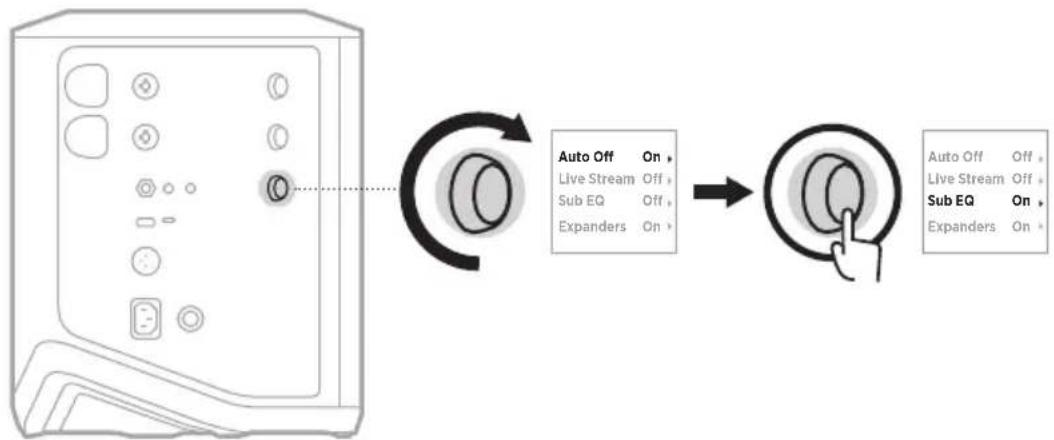
-
Rotate the channel control to highlight your preferred setting, then press to select it:
-
On: Enables the Sub EQ setting.
- Off (default): Enables the Sub EQ setting.
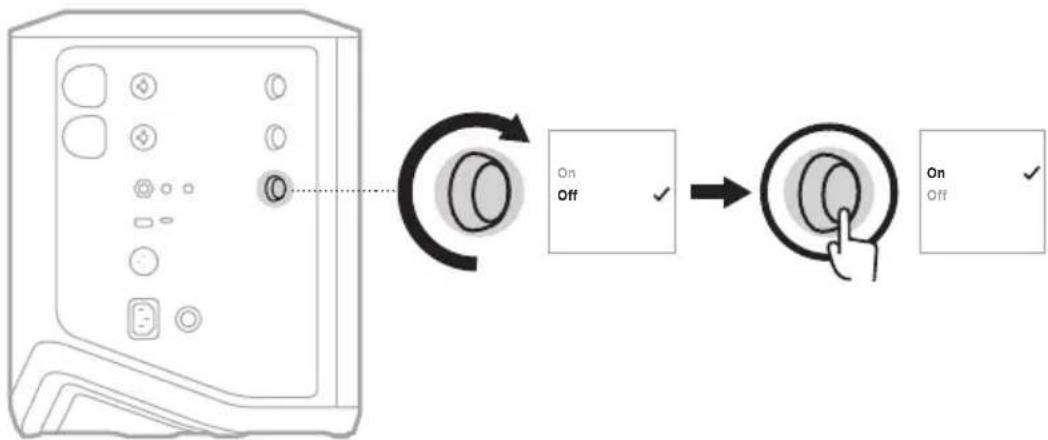
- Press and hold the channel control until the additional controls menu disappears.
MUTE CHANNELS AND CHANNEL REVERB EFFECTS
You can mute channels and mute reverb effects for a channel in the Bose Music app. You can access channel mute and reverb mute settings from the main screen.
NOTES:
- To unmute a channel, either use the Bose Music app or rotate the channel control.
- To unmute reverb settings for a channel, either use the Bose Music app or adjust reverb using the channel control (see page 25).
SAVE SCENES
You can save channel and system settings as Scenes in the Bose Music app, allowing you to easily access them again later. You can access this option from the main screen.
ENABLE/DISABLE DUAL WIRELESS STREAMING
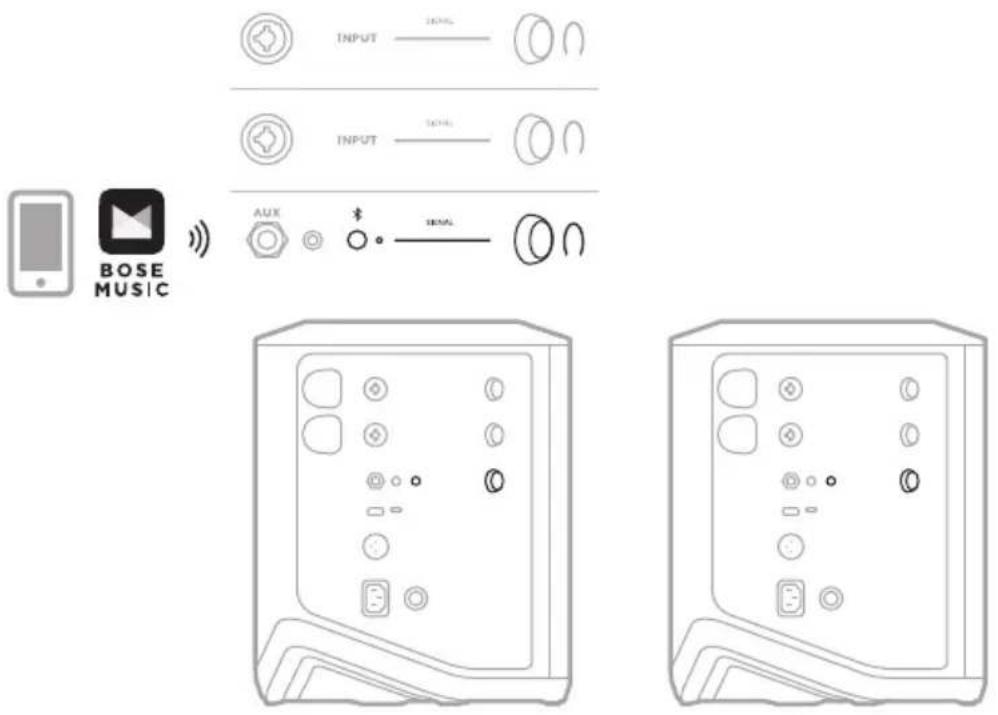
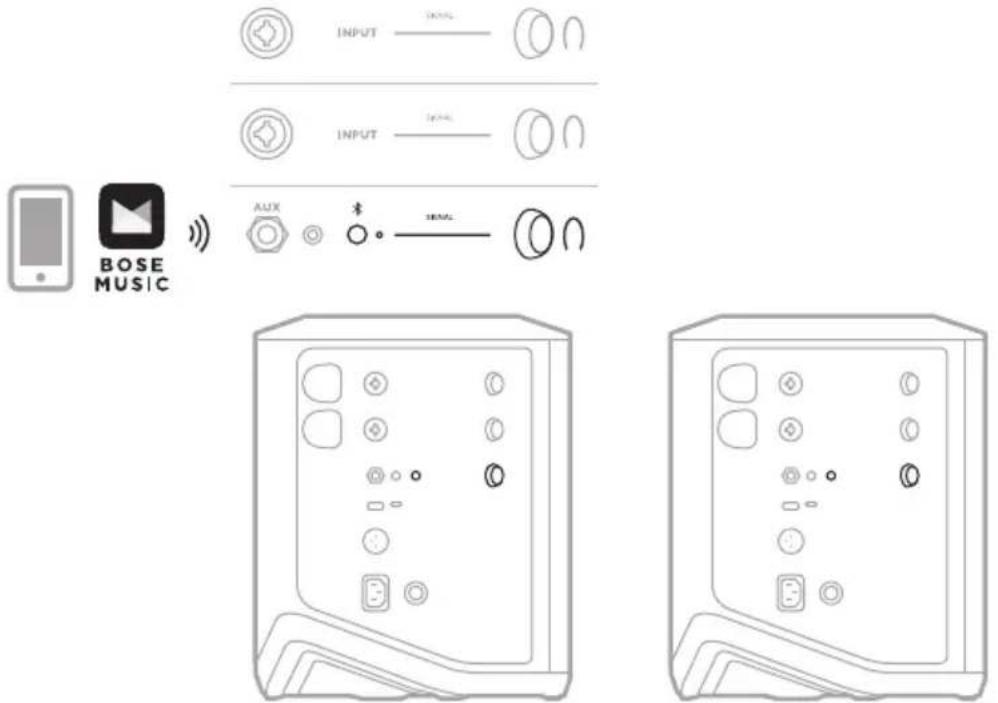
The Dual Wireless Streaming feature in the Bose Music app lets you play Bluetooth audio from both the system and another compatible Bose system at the same time in either dual mono or stereo. You can access this option from the Settings menu.
For sample setup scenario images, see page 53.
Compatible systems include:
- Bose S1 Pro+ Wireless PA System
- Bose L1 Pro8 & L1 Pro16 Portable Line Array System
- Bose L1 Pro32 Portable Line Array
More systems may be added periodically.
CUSTOMIZE TONEMATCH PRESETS
For information about customizing ToneMatch presets using the Bose Music app, see page 28.
COMPATIBLE WIRELESS TRANSMITTERS
With the optional Bose wireless transmitter accessories, you can wirelessly connect your instrument or microphone to the system through the wireless receivers built in to Channels 1 and 2.
The system is compatible with the following transmitter accessories:
- Bose Wireless Instrument Transmitter
- Bose Wireless Mic/Line Transmitter
To purchase these or other system accessories, visit: support.Bose.com/S1ProPlus
PAIR A WIRELESS TRANSMITTER TO CHANNEL 1 OR 2
- If the system battery level is depleted, connect the system to power (see page 18).
- Remove the cap from the wireless transmitter charging port for either Channel 1 or 2.
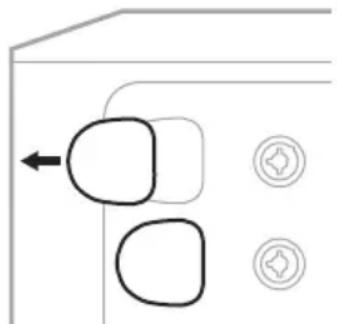
- Fully insert the transmitter into the charging port until you hear or feel a click, then wait 5 seconds for the transmitter to pair to that channel.
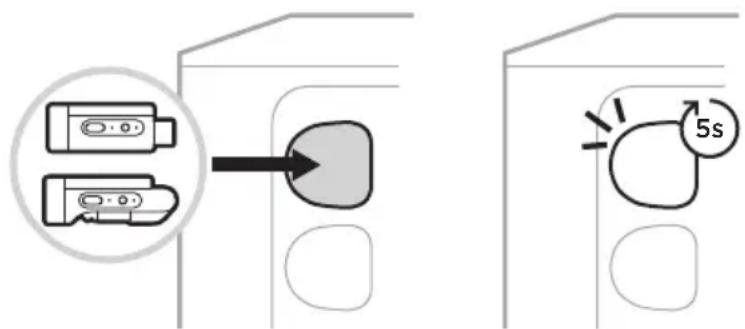
The transmitter begins to charge (see page 55).
NOTE: The transmitter can pair to only one channel at a time. To unpair the transmitter from the current channel and pair it to the other channel, insert it into the other channel's charging port.
CONNECT A PAIRED WIRELESS TRANSMITTER TO AN AUDIO SOURCE
- Power on the system (see page 18).
- Press the back of the wireless transmitter and release so that it slides out of the wireless transmitter charging port. Remove it from the charging port.
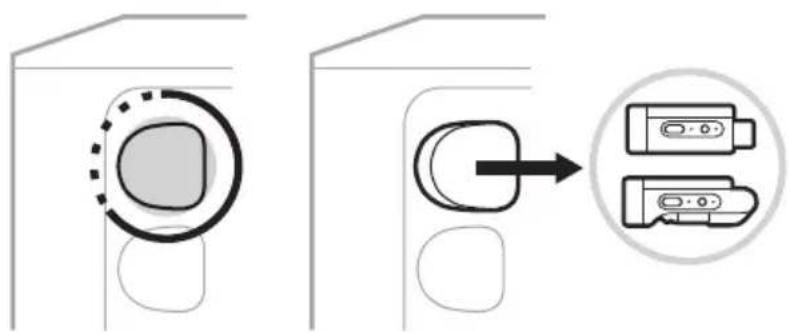
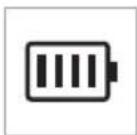
On the channel display, a battery icon briefly appears to indicate the transmitter battery level.
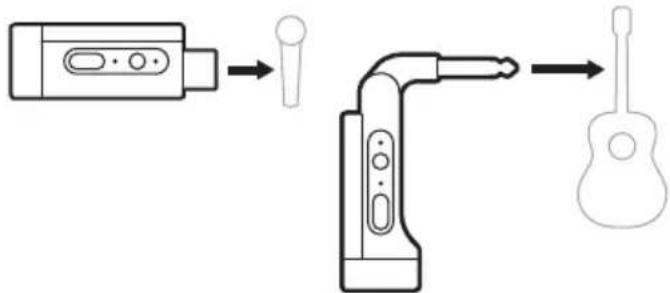
- Connect the transmitter to your audio source.
- Power on the transmitter (see page 39). After a few seconds, a transmitter icon appears on the channel display and the connection light on the transmitter glows solid blue to indicate that the transmitter is connected (see page 63).
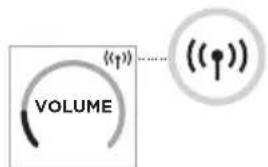
- If you're using the Bose Wireless Mic/Line Transmitter, change between mic and line input settings if necessary to match the input requirements of your source (see page 40).
POWER ON/OFF A WIRELESS TRANSMITTER
Press the Power button 山

When powered on, the power light glows solid white (see page 62).
Auto-off timer
The auto-off timer conserves power when the wireless transmitter isn't in use. The transmitter powers off when audio has stopped and you haven't pressed any buttons on the transmitter for 30 minutes.
MUTE/UNMUTE A WIRELESS TRANSMITTER
Press the MUTE button to mute/unmute channel audio.

When audio is muted, the connection light blinks blue (see page 62).
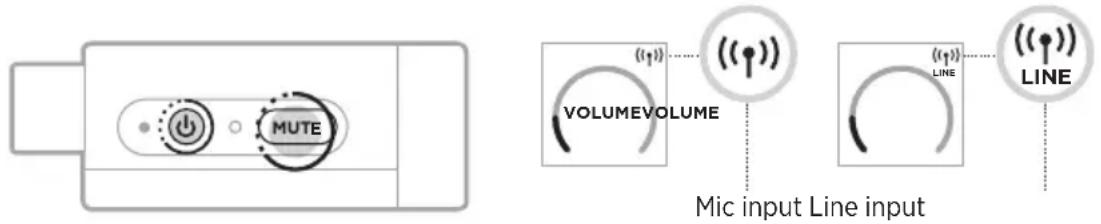
CHANGE BETWEEN MIC AND LINE INPUT
With the Bose Wireless Mic/Line Transmitter, you can change between mic and line input settings to match the input requirements of your source.
To do so, press and hold the Power button and MUTE button until the transmitter icon on the channel display changes to reflect the new input setting.
CONNECT EFFECTS TO A CHANNEL INSERT WHEN USING A WIRELESS TRANSMITTER
When you connect a wireless transmitter to a channel which has the Insert setting set to Auto (see page 41), the 14'' (6.35 mm) TRS channel input becomes a series channel insert (also known as an effects loop). You can connect effects units or pedals to the input using an insert cable, all while using your instrument or mic wirelessly.
For sample setup scenario images, see page 47.
NOTES:
- An insert cable ( 1/4'' or 6.35mm TRS to dual 1/4'' or 6.35mm TS) is required to connect an effects unit to a channel insert. You can purchase an insert cable at your local music retailer.
- Don't connect an instrument or other audio source to the input using a standard 1/4'' (6.35 mm) cable when a wireless transmitter is connected to the channel. This prevents audio from playing from both the wired and wireless source.
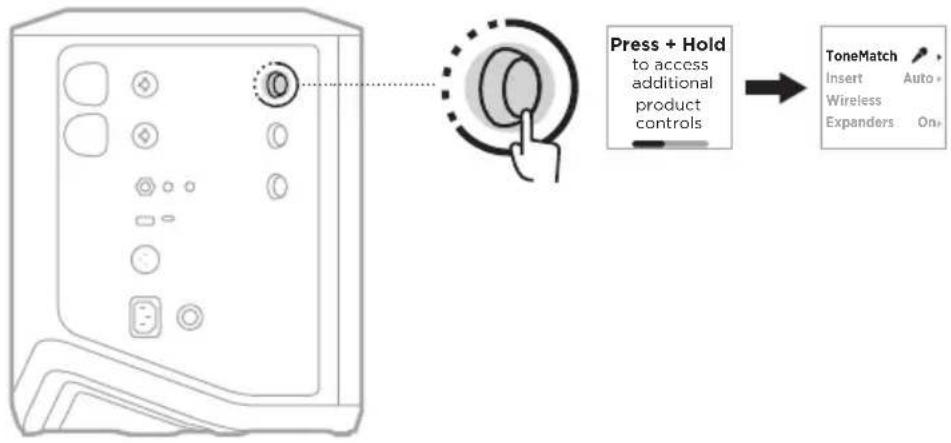
Enable/Disable channel insert functionality
- Press and hold the channel control for either Channel 1 or 2 until the additional controls menu appears on the channel display.
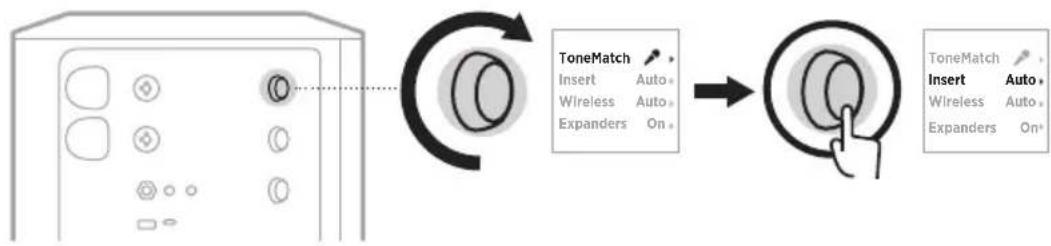
- Rotate the channel control to highlight Insert, then press to select it.
-
Rotate the channel control to highlight your preferred setting, then press to select it:
-
Auto (default): When a wireless transmitter is powered on and connected to this channel, the 14'' (6.35 mm) TRS channel input is converted into a series effects loop.
- Off: When a transmitter is powered on and connected to this channel, the system ignores signals from the channel input.
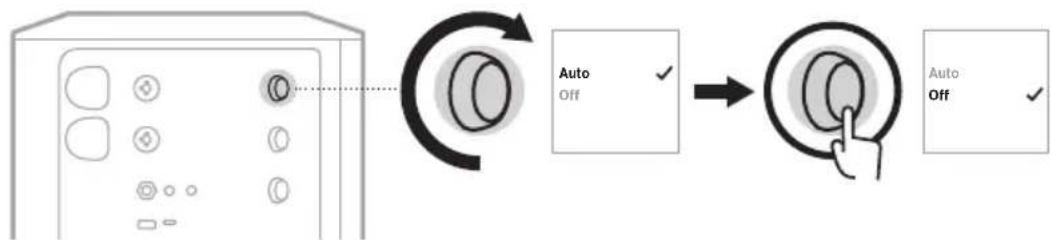
- Press and hold the channel control until the additional controls menu disappears.
ENABLE/DISABLE WIRELESS TRANSMITTER FUNCTIONALITY
NOTE: Regardless of a channel's wireless setting, the system still charges any wireless transmitter inserted into the wireless transmitter charging ports.
- Press and hold the channel control for either Channel 1 or 2 until the additional controls menu appears on the channel display.
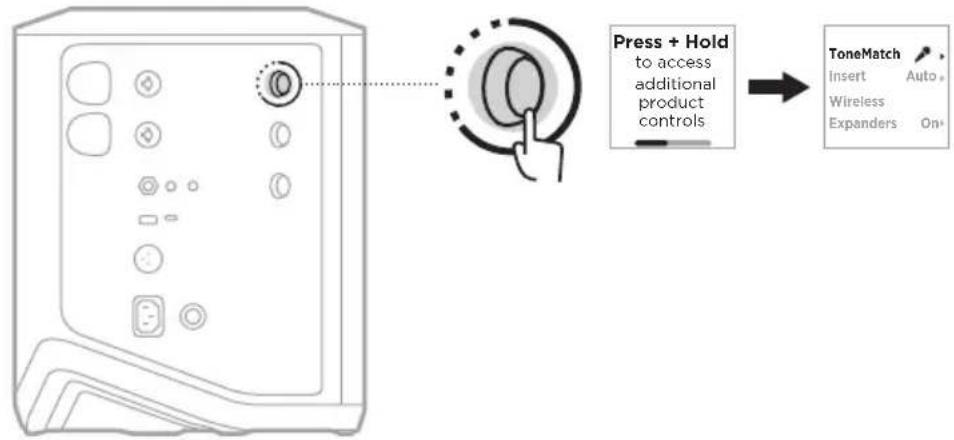
- Rotate the channel control to highlight Wireless, then press to select it.
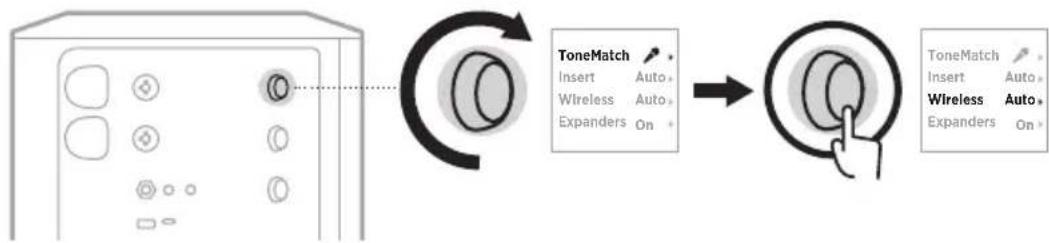
-
Rotate the channel control to highlight your preferred setting, then press to select it:
-
Auto (default): Enables channel wireless functions. Previously paired transmitters can connect to the channel, and new transmitters can pair to the channel when inserted into the wireless transmitter charging port.
- Off: Enables channel wireless functions for when you need to avoid wireless interference. Previously paired transmitters can't connect to the channel, and new transmitters can't pair to the channel.
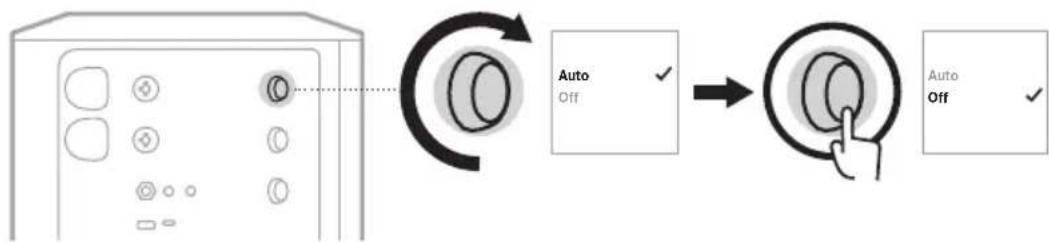
- Press and hold the channel control until the additional controls menu disappears.
CONNECT A SPEAKER STAND
The bottom of the system includes a pole cup for mounting the system on a speaker stand. The pole cup fits a standard 1.38 in (35 mm) post. When the system is placed on a speaker stand, the EQ automatically updates to maintain optimum tonal balance.
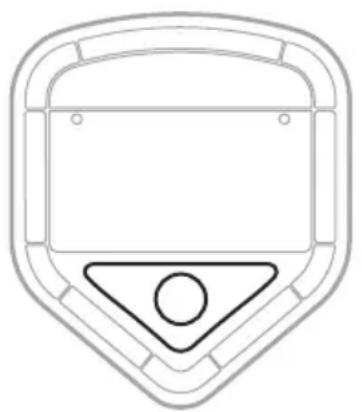
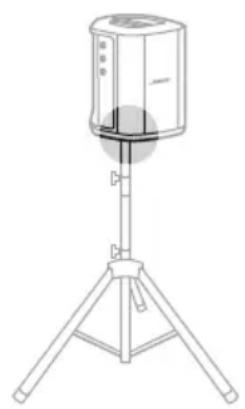
WARNING: Do NOT use the Bose S1 Pro+ Wireless PA System with a tripod/stand that is unstable. The loudspeaker is only designed for use on a 1.38 in (35 mm) post, and the tripod/stand must be capable of supporting a speaker with a minimum weight of 15 lbs (6.8 kg) and an overall size of 13.1 x 9.4 x 11 in (332.6 x 240 x 279.8 mm). Using a tripod/stand that is not designed to support the size and mass of the Bose S1 Pro+ Wireless PA System may lead to an unstable and hazardous condition that could result in injury.
SYSTEM CONFIGURATIONS
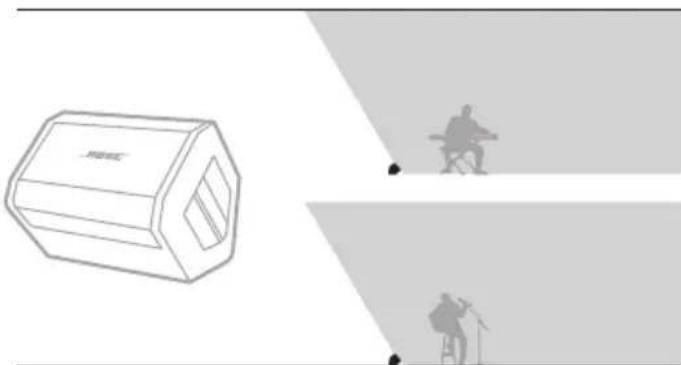
The Bose S1 Pro+ Wireless PA System can be used in four positions. With Auto EQ, the system EQ automatically updates to maintain optimal tonal balance for each position.
NOTE: You can also rotate the Bose logo on the system counterclockwise to match your position.
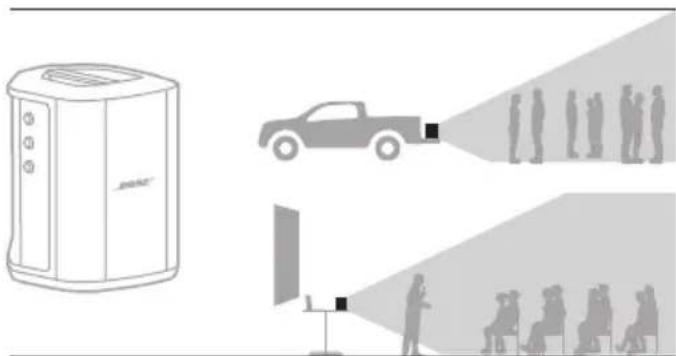
Elevated surface
Place the system on an elevated surface to project sound clearly and evenly throughout your audience.
Tilt-back
For performances where your audience is close to you, tilt the system onto its back edge.
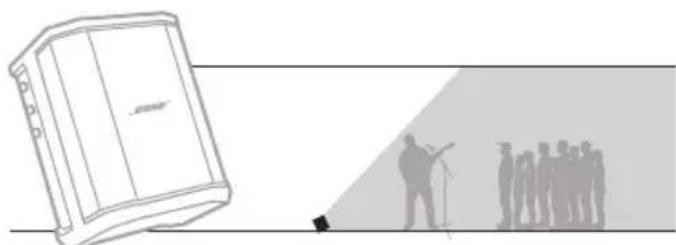
For best performance, stand or sit to the side of the system to avoid blocking sound.
Monitor
To use the system as a personal floor monitor, place it horizontally on the ground in front of you and tilt it onto its side edge.
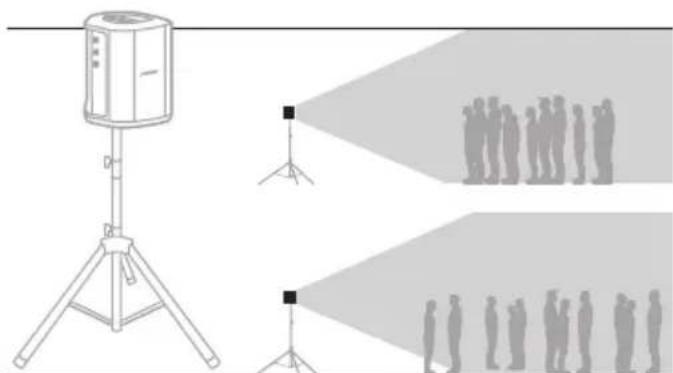
Speaker stand
Place one or more systems on a speaker stand (sold separately) for general sound reinforcement.
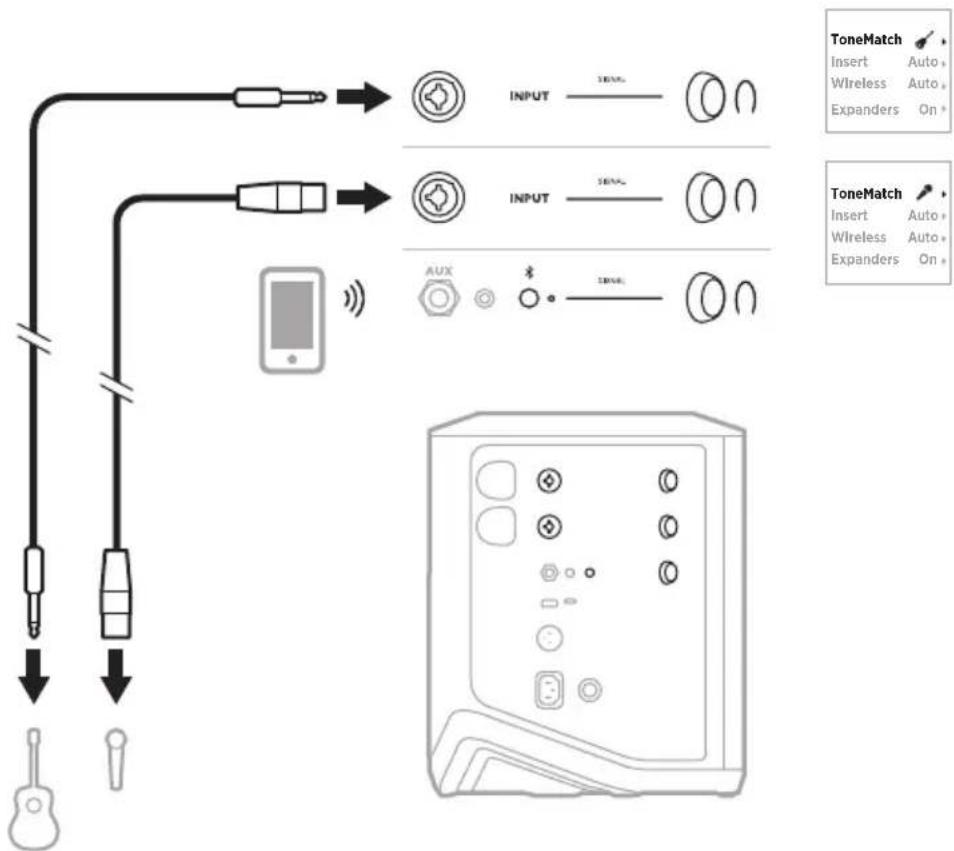
MUSICIAN WITH MOBILE DEVICE
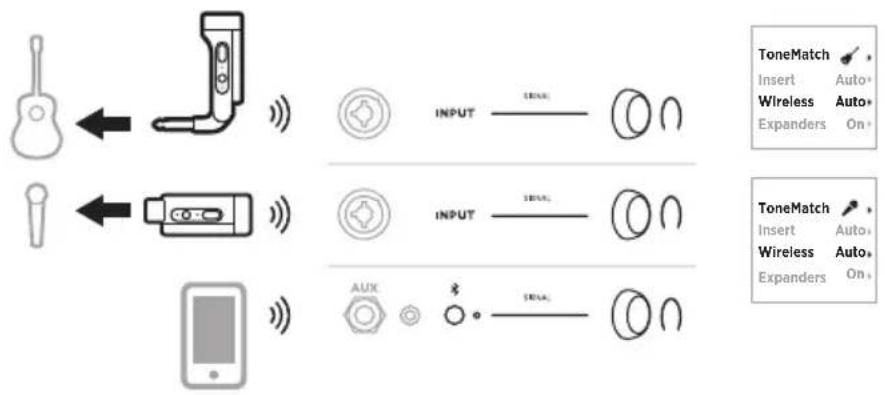
MUSICIAN WITH MOBILE DEVICE AND WIRELESS TRANSMITTERS
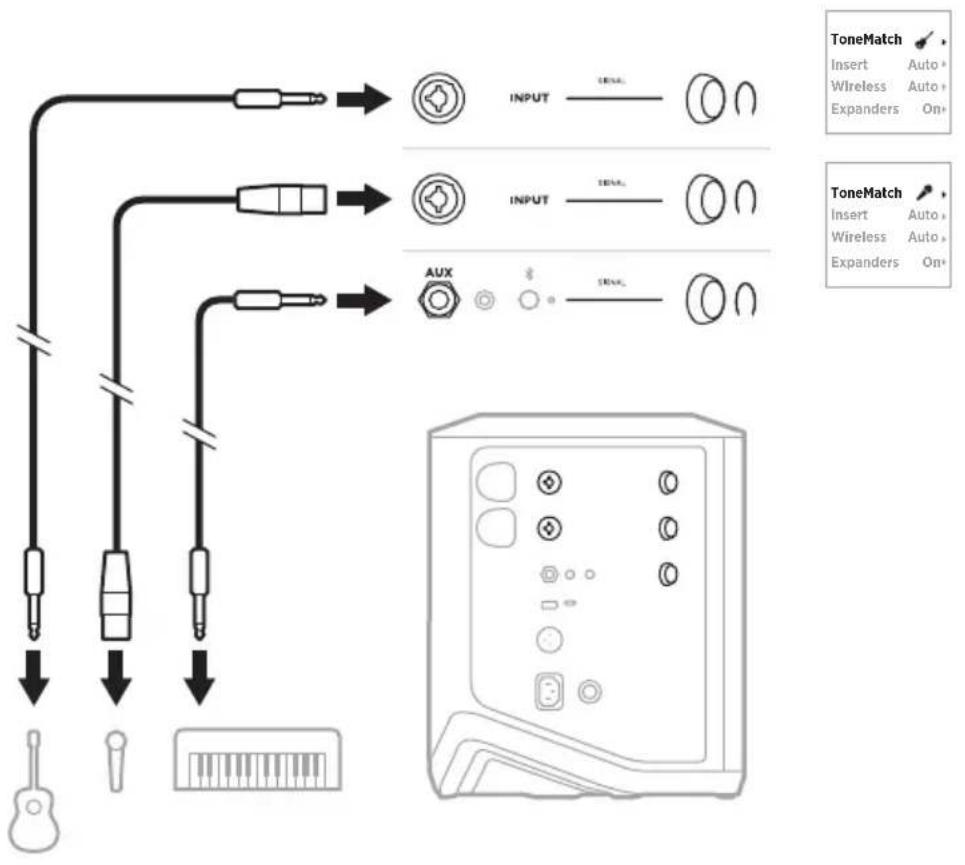
MULTI-INSTRUMENTALIST
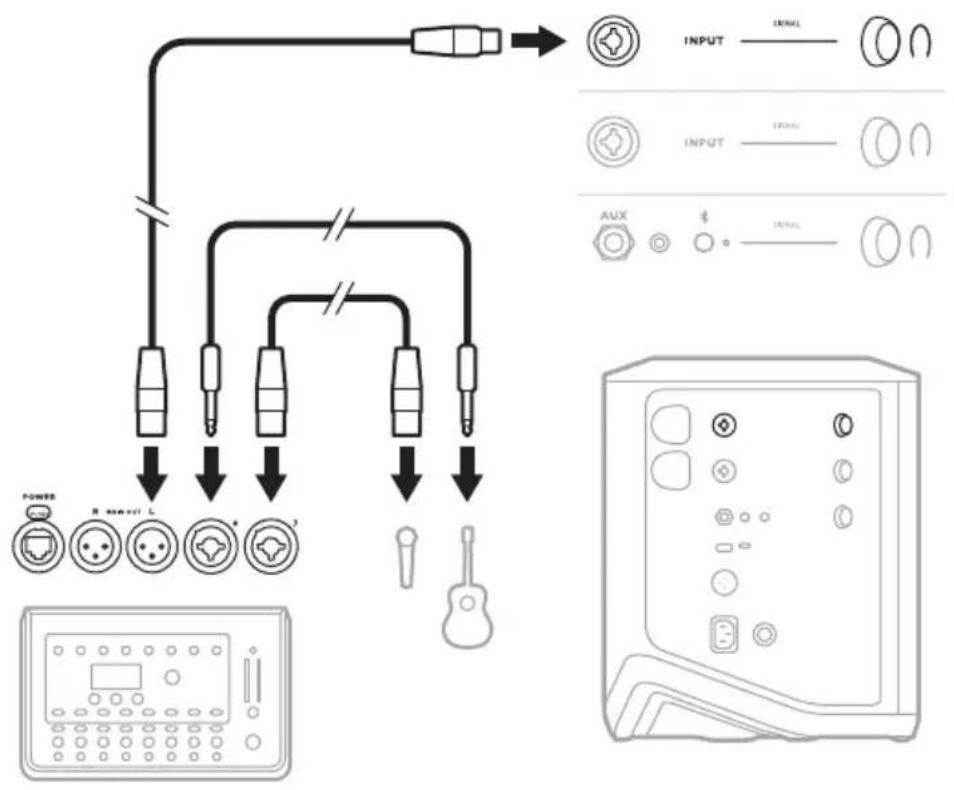
MUSICIAN WITH EFFECTS MIXER
MUSICIAN WITH WIRELESS TRANSMITTERS, EFFECTS PEDAL, AND VOCAL PROCESSOR
NOTE: When using AC (mains)-powered effects units, a hum eliminator may be required. You can purchase a hum eliminator at your local music retailer.
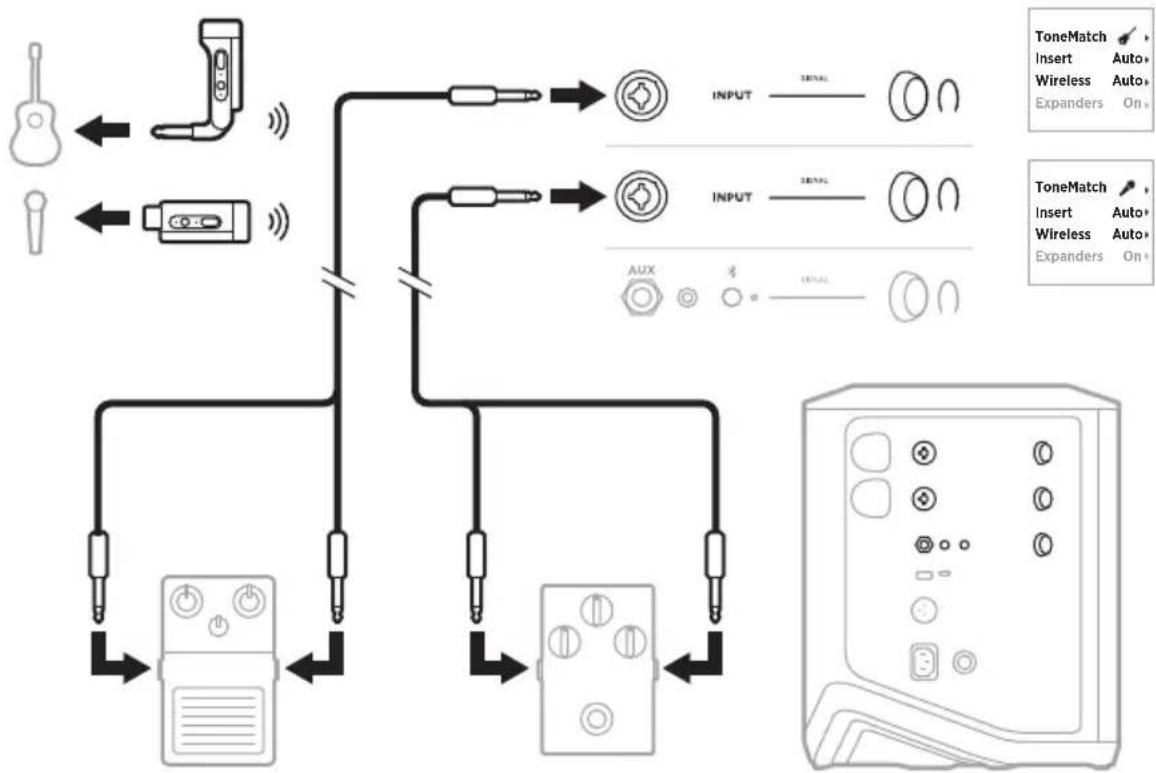
GUITARIST WITH WIRELESS TRANSMITTER AND AMP MODELER PEDAL
When using an amp modeler pedal, for best performance, use the Bose Music app to select the Full Range Flat Response (FRFR) ToneMatch preset for that channel.
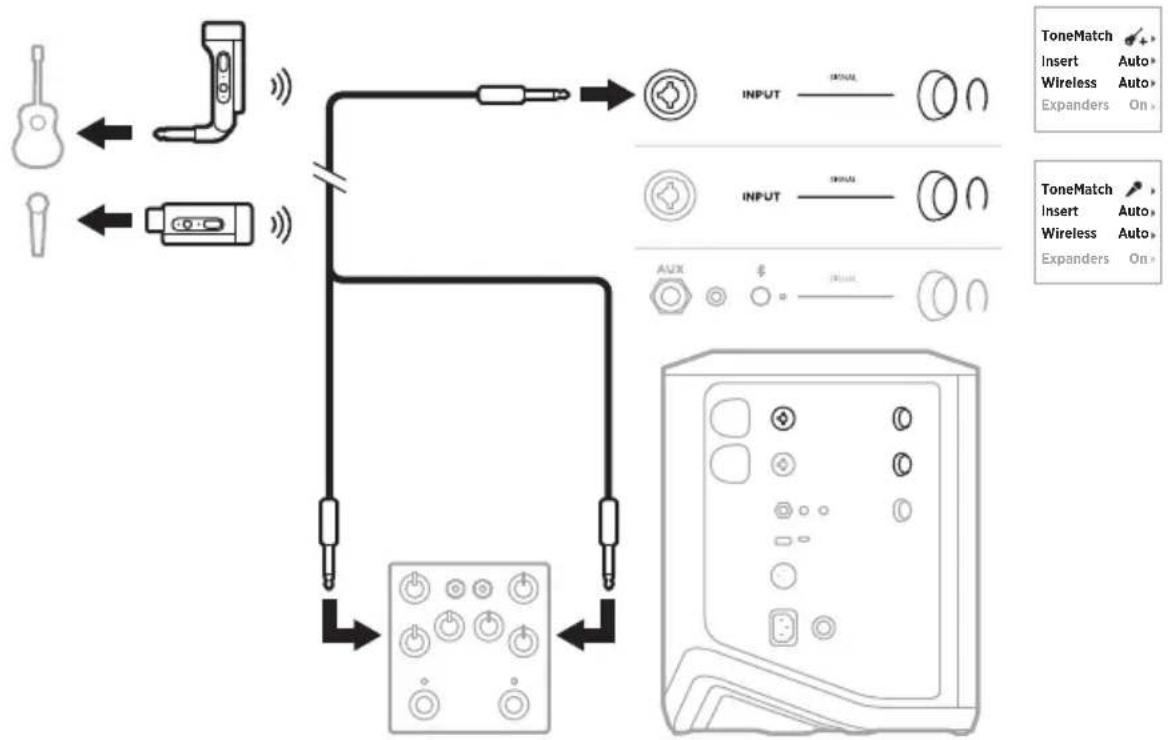
GENERAL-PURPOSE PA
You can connect two systems in either stereo or mono for use as a conventional PA system.
Stereo
When connecting systems in stereo through a mixer, on both systems, set reverb to the lowest setting and set ToneMatch to Off on the channel you're connecting the mixer line out to (see page 25 and page 27).
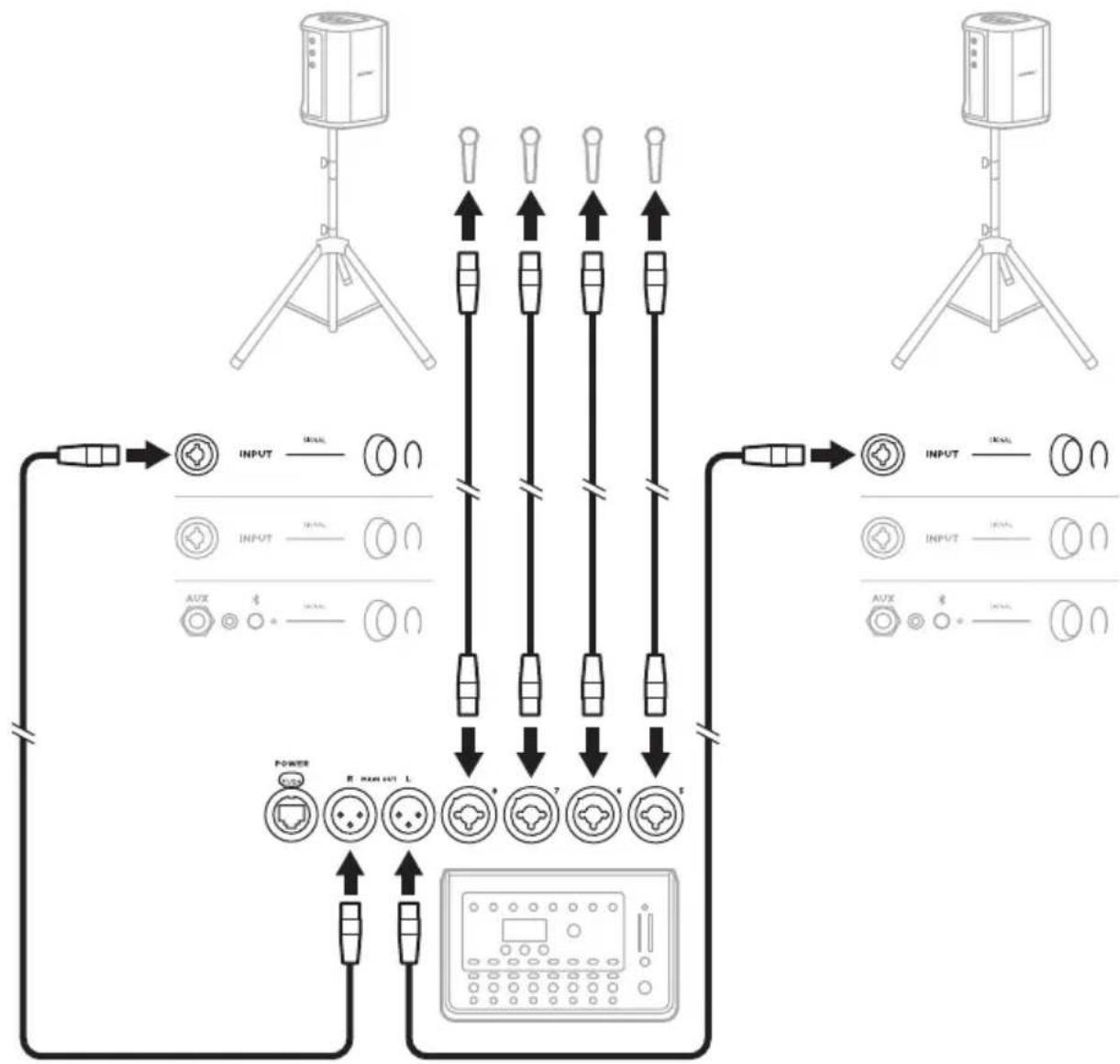
Stereo wired
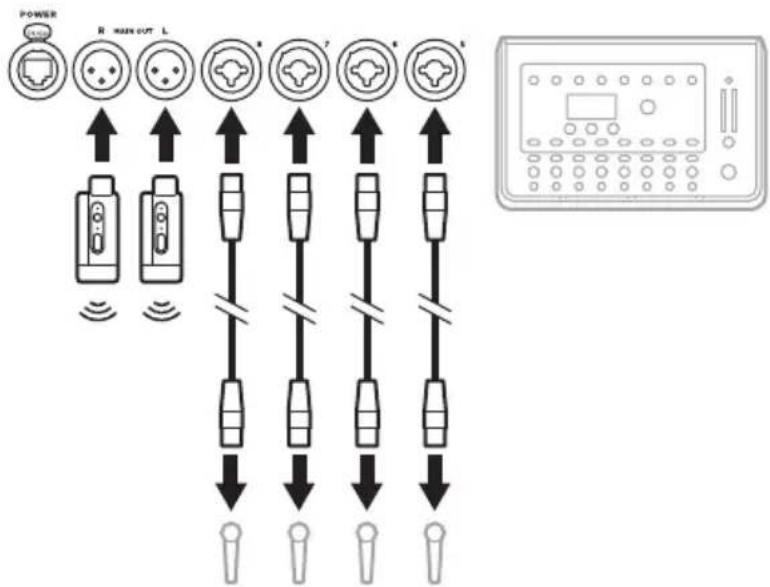
Stereo wireless
Before connecting Bose Wireless Mic/Line Transmitters to a mixer, make sure to set the transmitter input setting to line input for each transmitter (see page 40).
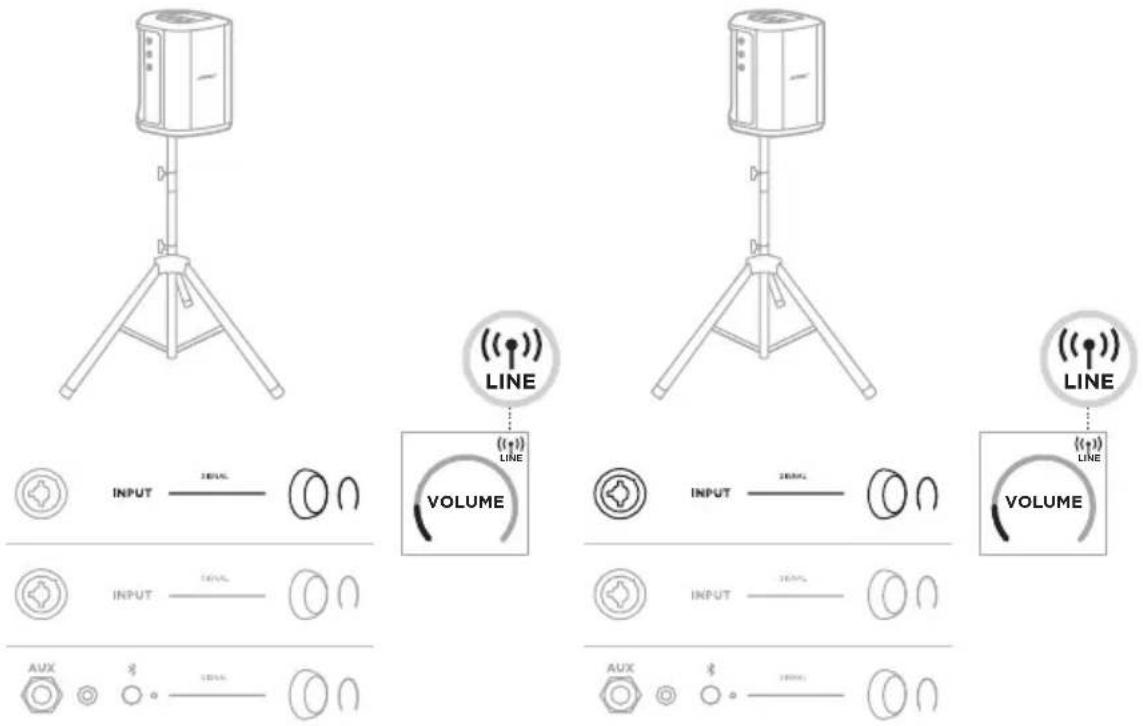
Dual mono/daisy-chain
When connecting systems in dual mono, on the secondary system(s), adjust the following settings on the channel you're connecting the primary system's line out to:
- Set reverb to the lowest setting (see page 25).
- Set ToneMatch to Off (see page 27).
- Set bass and treble to the neutral position (see page 24).
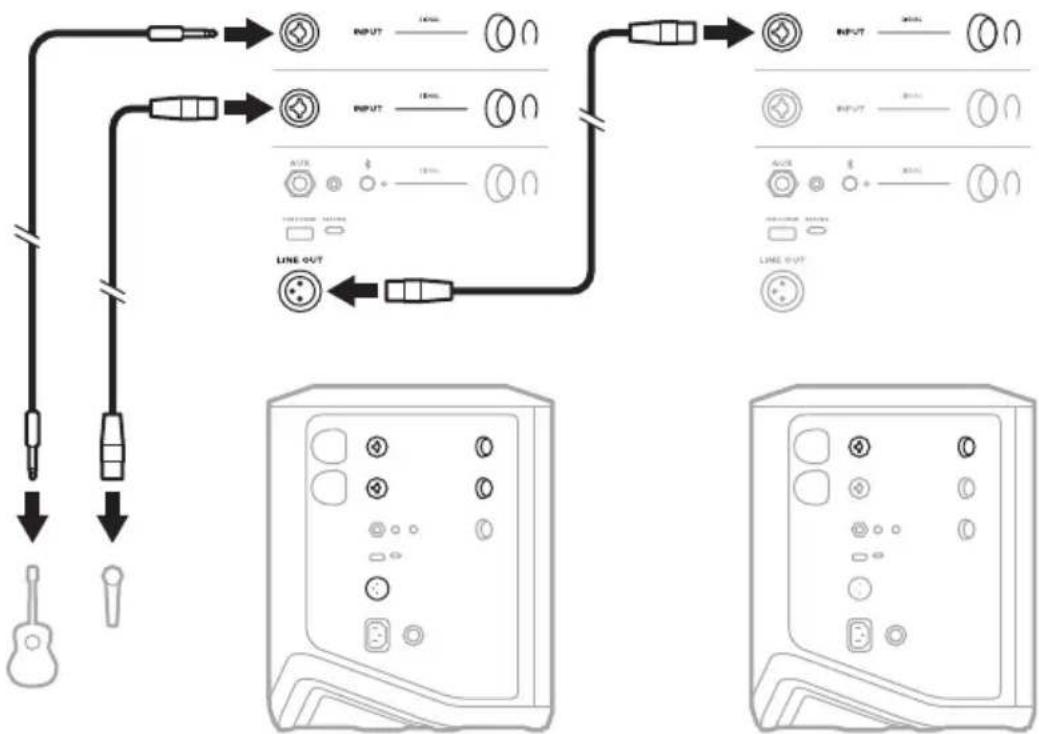
Dual mono wired
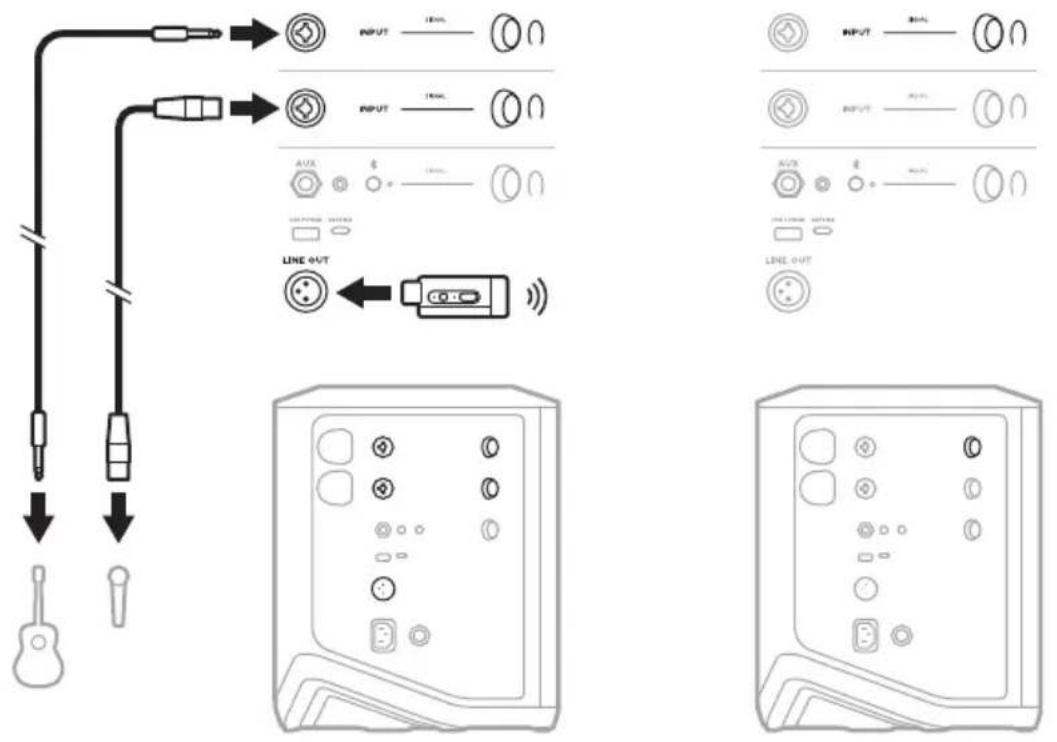
Dual mono wireless
DJ WITH BOSE SUB1 OR SUB2 POWERED BASS MODULE
For detailed connection instructions, refer to the Bose Sub1/Sub2 Powered Bass Module owner's guide.
Visit: support.Bose.com/Sub1
DUAL WIRELESS STREAMING WITH THE BOSE MUSIC APP
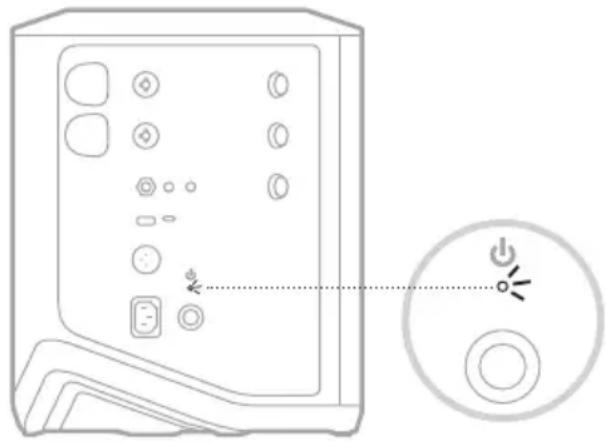
To charge the system battery, connect the system to power (see page 18).
If the system is powered off, the power light pulses white to indicate that the system battery is charging. When the battery is fully charged, the power light turns off.
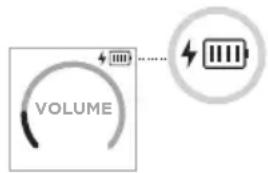
If the system is powered on, on the Channel 3 display, a lightning bolt icon appears next to the battery icon to indicate that the system battery is charging. When the battery is fully charged, the lightning bolt icon disappears (see page 61).
CAUTION: Do NOT attempt to charge the system while it is wet. Doing so may cause damage to the system.
Charging time
Allow up to 4 hours to fully charge the system battery.
With typical usage, the battery lasts up to 11 hours. Battery performance and charging time varies with the content played and volume at which it's played.
Check the system battery level
To check the system battery level and charging status, check the battery icon on the Channel 3 display (see page 61).
CHARGE A WIRELESS TRANSMITTER
Using the charging ports
Fully insert the wireless transmitter into the wireless transmitter charging port for either Channel 1 or 2 until you hear or feel a click.
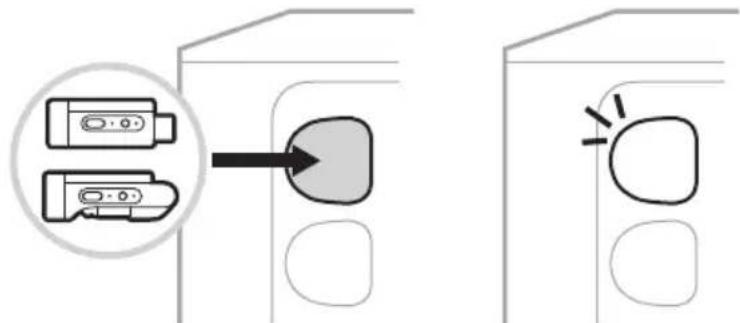
If the system is powered on, on the channel display, a battery icon with a lightning bolt next to it briefly appears to indicate that the transmitter battery is charging. A lightning bolt icon then appears in the upper-right corner of the display. When the transmitter is fully charged, the lightning bolt icon disappears (see page 60).
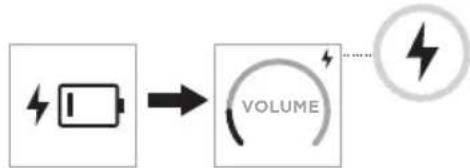
NOTE: If the system is connected to power, the AC (mains) power connection charges the transmitter. If the system is operating on battery power, the system battery charges the transmitter.
Using a wall charger or computer
NOTE: Use this product only with an agency-approved LPS power supply that meets local regulatory requirements (e.g., UL, CSA, VDE, CCC).
- Connect one end of a USB-C cable (not provided) to the USB-C port on the top of the wireless transmitter.
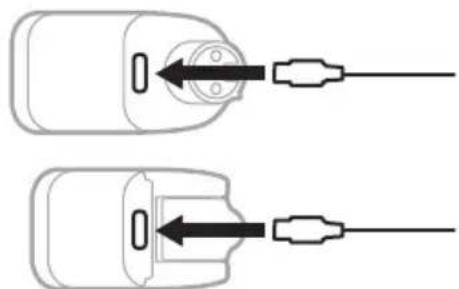
- Connect the other end to a USB-A wall charger or computer.
The power light glows solid white (see page 62). When the transmitter is fully charged, the power light turns off.
Charging time
Allow up to 2 hours to fully charge the wireless transmitter battery.
With typical usage, the battery lasts up to 5 hours.
Check the wireless transmitter battery level
To check the wireless transmitter battery level, remove the transmitter from the wireless transmitter charging port and check the battery icon on the channel display (see page 60).
If you don't have the system nearby, you can also check the transmitter battery level by powering the transmitter on and checking the state of the power light (see page 62).
CHARGE YOUR MOBILE DEVICE USING THE USB CHARGING PORT
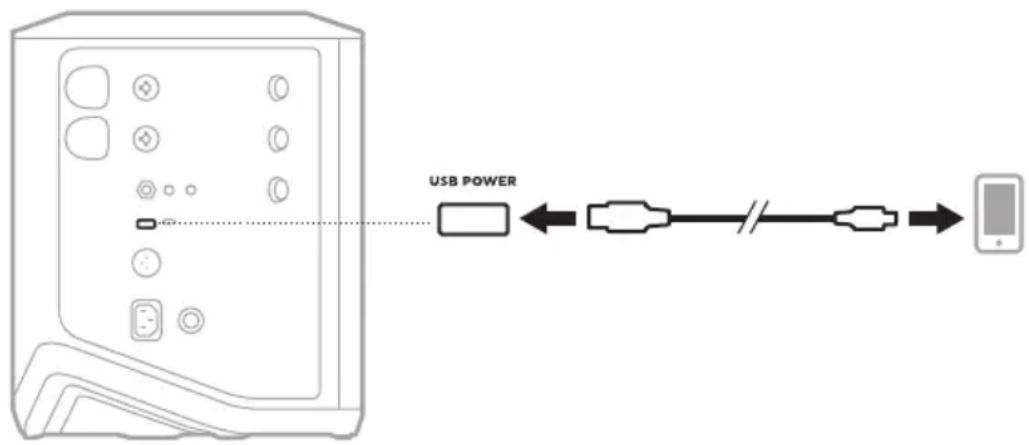
You can charge your mobile device using the system battery or AC (mains) power.
- Connect one end of a USB-A charging cable (not provided) to the USB POWER port on the system.
- Connect the other end to your mobile device.
The signal/clip lights, power light, Bluetooth light, and channel displays located on the side of the system show the system status.
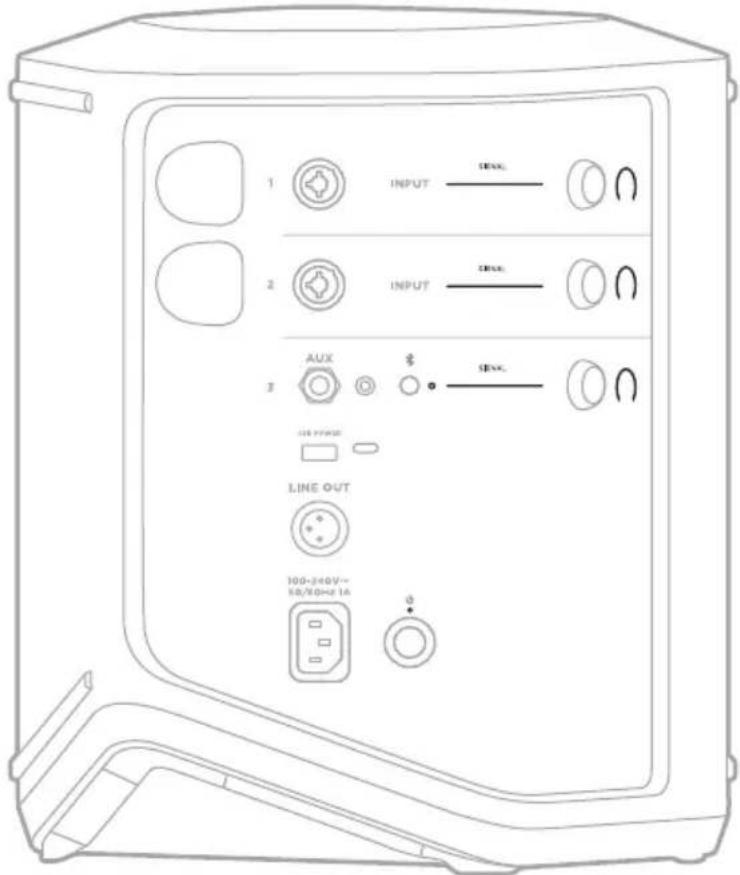
SIGNAL/CLIP LIGHTS
Shows the signal or clip status for Channels 1, 2, and 3.
LIGHT ACTIVITY SYSTEM STATE
| Solid green Signal is present. | |
| Solid red | Signal is clipping or system is limiting signal. NOTE: Reduce the channel or source volume to prevent clipping or limiting. |
POWER LIGHT
Shows the power and charging status of the system.
| LIGHT ACTIVITY | SYSTEM STATE |
| Solid white | Powered on. |
| Pulsing white while system is powered off and connected to power | Charging. |
| Solid red | System error. Power the system off and on again (see page 18). If the error persists, contact Bose customer service. |
| Slowly blinking red Thermal error. Let the system cool to a lower temperature. | |
| Quickly blinking red Battery error. Contact Bose customer service. | |
BLUETOOTH LIGHT
Shows the Bluetooth connection status.
| LIGHT ACTIVITY SYSTEM STATE |
| Blinking blue Ready to connect. |
| Solid white Connected. |
| Blinks white 3 times Cleared device list. |
CHANNEL DISPLAYS
Shows the status and settings of each channel, the system, and any connected wireless transmitters.
How to read the channel displays
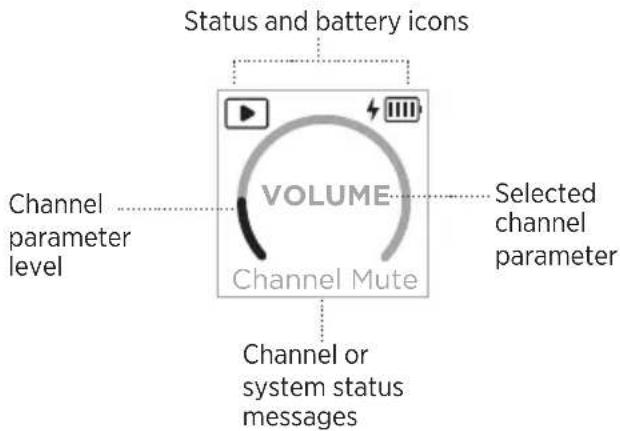
Status icons
The status icons show channel and system settings.
ICON MEANING
| The default Instrument ToneMatch preset is applied to the channel. | |
| A custom Instrument ToneMatch preset is applied to the channel. | |
| The default Microphone ToneMatch preset is applied to the channel. | |
| A custom Microphone ToneMatch preset is applied to the channel. | |
| Live Stream mode is enabled. | |
| A wireless transmitter is connected to the channel. NOTE: If the transmitter is a Bose Wireless Mic/Line Transmitter, this icon indicates that the transmitter input setting is set to mic input. | |
| A Bose Wireless Mic/Line Transmitter is connected to the channel, and the transmitter input setting is set to line input. |
Battery icons
The battery icons show the battery level and charging status of either the system or a paired wireless transmitter, depending on the channel display.
Channel 1 or 2 display
On the Channel 1 or 2 display, battery icons show the battery level and charging status of a paired wireless transmitter. They briefly appear as full-screen overlays, except for the lightning bolt icon, which appears in the upper-right corner of the display.
ICON WIRELESS TRANSMITTER BATTERY LEVEL
| 67% - 100% |
| 34% - 66% |
| 10% - 33% |
| 0% - 9% |
| 67% - 100% and charging |
| 34% - 66% and charging |
| 10% - 33% and charging |
| 0% - 9% and charging |
| Charging |
Channel 3 display
On the Channel 3 display, battery icons show the system battery level and charging status. They appear in the upper-right corner of the display.
ICON SYSTEM BATTERY LEVEL
| 67% - 100% |
| 34% - 66% |
| 10% - 33% |
| 0% - 9% |
| 67% - 100% and charging |
| 34% - 66% and charging |
| 10% - 33% and charging |
| 0% - 9% and charging |
The power light and connection light on the wireless transmitter show the transmitter status.
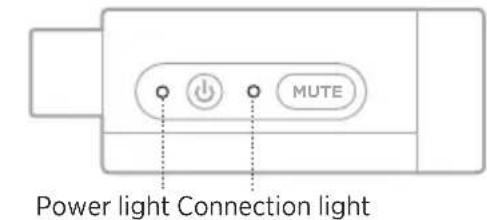
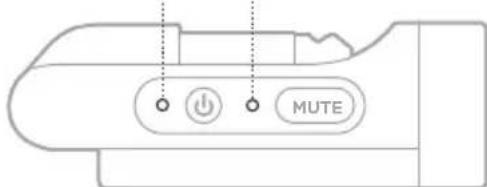
POWER LIGHT
Shows the power, battery level, charging, and error status of the transmitter.
LIGHT ACTIVITY SYSTEM STATE
| Blinks white 4 times (when powering on) | 75% - 100% battery level |
| Blinks white 3 times (when powering on) | 50% - 75% battery level |
| Blinks white 2 times (when powering on) | 25% - 50% battery level |
| Blinks white 1 time (when powering on) | 10% - 25% battery level |
| Solid white Powered on or charging | |
| Blinking red Transmitter battery low | |
| Solid red Error - contact Bose customer service | |
CONNECTION LIGHT
Shows the connection and mute status of the transmitter.
| LIGHT ACTIVITY | SYSTEM STATE |
| Solid blue | Connected |
| Blinking blue | Muted |
CONNECT YOUR MOBILE DEVICE
For connection instructions, see page 21.
DISCONNECT A MOBILE DEVICE
Disable the Bluetooth feature on your device.
NOTE: Disabling the Bluetooth feature disconnects all other devices.
RECONNECT A MOBILE DEVICE
When powered on, the system tries to reconnect with the most recently-connected device.
NOTES:
- The device must be within range (30 ft or 9 m) and powered on.
- Make sure the Bluetooth feature is enabled on your mobile device.
CLEAR THE SYSTEM DEVICE LIST
- Press and hold the Bluetooth button × for 10 seconds until the Bluetooth light blinks white 3 times.
- Delete the system from the Bluetooth list on your mobile device.
All devices are cleared, and the system is ready to connect (see page 64).
REPLACE THE SYSTEM BATTERY
- Press the Power button to power off the system, then disconnect the system from power.
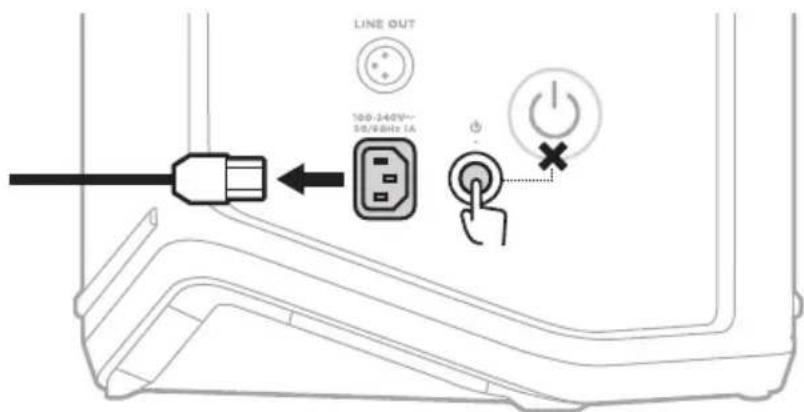
- Turn the system upside down. Loosen the two screws, then remove the bottom plate.
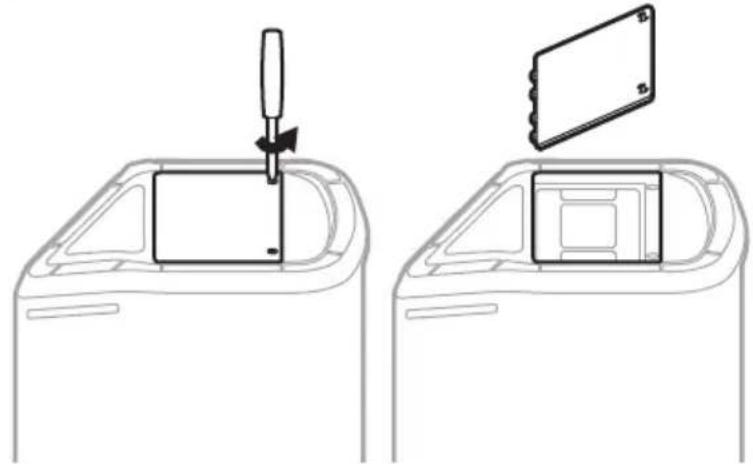
- Remove the old battery using the pull tabs.
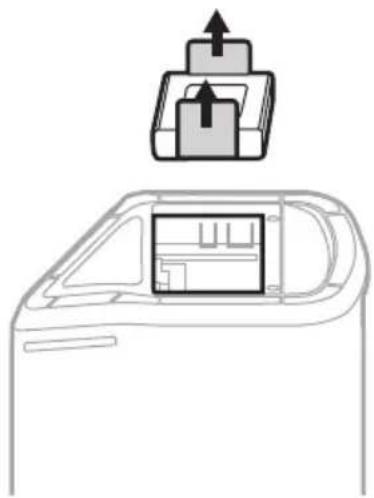
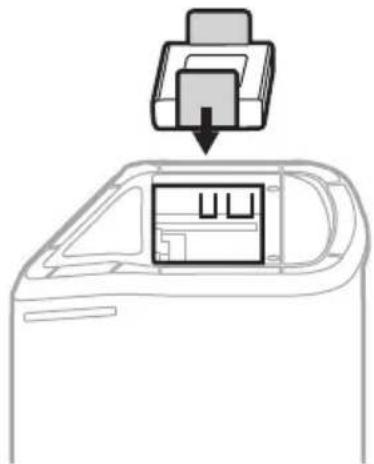
- Insert the new battery, ensuring the connector pins line up appropriately.
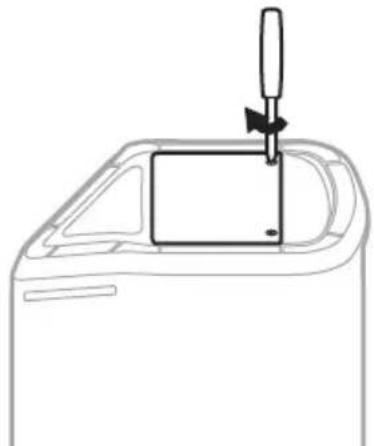
- Replace the bottom plate, then tighten the two screws until secure.
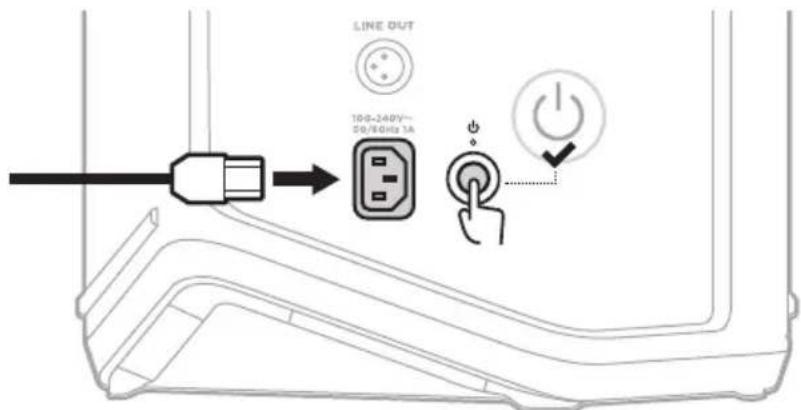
- Connect the system to power.
- Press the Power button to power on the system.
NOTE: The replacement battery remains in Sleep mode until the system is connected to AC (mains) power and powered on.
UPDATE THE SYSTEM
To check for and download system software updates, use your computer to visit the Bose updater website at: _____btu.Bose.com
For more detailed instructions, visit: support.Bose.com/S1ProPlusUpdate
NOTE: To update the system, you need to connect the system to your computer using a USB-C cable (not provided). For more information, see page 32.
UPDATE A WIRELESS TRANSMITTER
When you insert a wireless transmitter into either of the wireless transmitter charging ports, the system checks whether a software update is available. If it is, follow the instructions on the channel display to install the update.
CLEAN THE SYSTEM
Wipe the outside surface of the system with a soft, dry cloth. If necessary, carefully vacuum the grille of the system.
CAUTIONS:
- Do NOT use any sprays near the system.
- Do NOT use any solvents, chemicals, or cleaning solutions containing alcohol, ammonia, or abrasives.
- Do NOT allow liquids to spill into any openings.
- Do NOT allow objects to drop into any openings.
TRANSPORT AND STORE THE SYSTEM
When transporting or storing the system, place it in the upright or monitor position, not on its side.
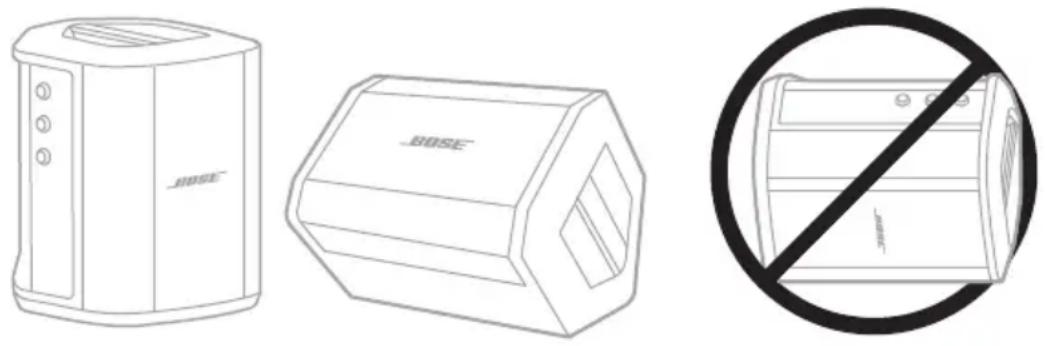
CAUTION: Storing the system on its side may cause damage under certain environmentalconditions.
NOTE: Before storing the system for more than a few months, make sure the system battery is fully charged.
REPLACEMENT PARTS AND ACCESSORIES
Replacement parts and accessories can be ordered through Bose customer service.
Visit: ______support.Bose.com/S1ProPlus
LIMITED WARRANTY
The system is covered by a limited warranty. Visit our website at worldwide.Bose.com/Warranty for details of the limited warrant
To register your product, visit worldwide.Bose.com/ProductRegistration for instructions. Failure to register will not affect your limited warranty rights.
TRY THESE SOLUTIONS FIRST
If you experience problems with the system:
- Make sure the system is connected to a live AC (mains) outlet (see page 18).
Power the system off and then on (see page 18). - Secure all cables.
- Check the state of the status lights (see page 57).
- Check for and download any available software updates (see page 67).
OTHER SOLUTIONS
If you couldn't resolve your issue, see the table below to identify symptoms and solutions to common problems. You can also access troubleshooting articles, videos, and other resources at: support.Bose.com/S1ProPlus
If you're unable to resolve your issue, contact Bose customer service.
Visit: worldwide.Bose.com/contact
System
SYMPTOM SOLUTION
| System doesn’t power on | System battery may be in protection mode or discharged. Connect the system to AC (mains) power. Plug the power cord into a different AC (mains) outlet. If the power cord is connected to a power strip or surge protector, try plugging it directly into the AC (mains) outlet. Unplug the power cord and remove the system battery (see page 65). Wait 30 seconds, then replace the battery and firmly plug the power cord back in to the AC (mains) outlet. Reset the system (see page 77). Power on again. |
SYMPTOM SOLUTION
| Intermittent or no audio from an instrument or audio source connected by an input cable | Make sure your instrument or audio source is firmly connected to the channel input. Increase the volume on the instrument or audio source and the system. Check that the signal/clip lights are lit to confirm that the system detects an audio signal from the source. Connect your instrument or audio source to a different amplifier to confirm the source is working. Connect a different instrument or audio source. Try using another input cable to connect the instrument or audio source to the system. If you’re using a condenser microphone, make sure to connect it to a phantom power supply (such as a preamplifier or mixing console) before connecting it to the system. Unplug the power cord and remove the system battery (see page 65). Wait 30 seconds, then replace the battery and firmly plug the power cord back in to the AC (mains) outlet. Reset the system (see page 77). |
| System doesn’t connect to Bluetooth device | On your device: • Turn the Bluetooth feature off and then on again. • Delete the system from the Bluetooth list on your device, including any duplicate listings labeled LE (Low Energy). Connect again (see page 64). Connect another mobile device (see page 64). Clear the system device list (see page 64). Connect again. |
| Intermittent or no audio from a Bluetooth device | Play audio from a different application or music service. Move your mobile device closer to the system (30 ft or 9 m) and away from any interference or obstructions. Stop other audio or video streaming applications. Make sure your mobile device supports Bluetooth connections. Restart your mobile device. Connect a different mobile device (see page 64). |
SYMPTOM SOLUTION
| Distorted audio from an instrument or audio source | Turn the volume down on the source. If your audio source volume can't be adjusted, you can purchase input pads from your local music retailer. Try a different source or instrument. If you're playing audio from a mobile device connected to the Channel 3 AUX input, make sure that the device isn't also connected to the USB POWER port for charging. This can create noise during audio playback. Make sure the Expanders setting for that channel is set to On, not Off (see page 75). |
| Humming or buzzing when nothing is plugged into the system | Using an AC (mains) outlet tester, test the outlet that the system is plugged into for any reversed or open (hot, neutral, and/or ground) contacts. If the system is plugged into an extension cord, plug the system directly into the AC (mains) wall outlet instead. |
| Feedback from a microphoneconnected to the system | Turn the channel volume down. Orient the microphone so that it's not pointing directly at the system. Try a different microphone. Try a different position for the system and/or vocalist. Increase the distance from the microphone to the system. If using a vocal effects processor, try bypassing it to determine if the processor settings are contributing to feedback. Make sure the Expanders setting for that channel is set to On, not Off (see page 75). |
| Excessive hum when daisy-chaining together multiple systems | Reduce the volume on the daisy-chained unit(s). |
SYMPTOM SOLUTION
| System battery doesn’t charge | Try not using the system while the system battery is charging. If the system has been exposed to high or low temperatures, let it return to room temperature and then try charging again. Disconnect the system from power, then remove the system battery (see page 65). Once the battery is cool to the touch, replace the battery and try charging again. If you’re using the system at a very high volume level, try turning the volume down. At very high volume levels, the system pauses charging the system battery and any connected wireless transmitters. |
| Bose Music app doesn’t work on mobile device | Make sure your mobile device is compatible with the Bose Music app and meets minimum system requirements. For more information, refer to the app store on your mobile device. Uninstall the Bose Music app on your mobile device, then reinstall the app (see page 16). |
Wireless transmitter
SYMPTOM SOLUTION
| Wireless transmitter doesn’t power on | Fully charge the transmitter (see page 55). Power on again. Reset the transmitter (see page 77). Power on again. |
| Wireless transmitter doesn’t charge | System battery may be in protection mode or discharged. Connect the system to AC (mains) power. If the transmitter has been exposed to high or low temperatures, let it return to room temperature and then try charging again. Charge the transmitter using a wall charger or computer (see page 55). If you’re using the system at a very high volume level, try turning the volume down. At very high volume levels, the system pauses charging the system battery and any connected wireless transmitters. |
| Wireless transmitter doesn’t connect to system | Check the power light to make sure the transmitter is powered on (see page 62). Check the connection light to confirm whether the transmitter is connected to the system or not (see page 63). If the light is turned off, try pairing the transmitter to the channel again (see page 37). Move the transmitter closer to the system (within 20 ft or 6 m) and away from any interference or obstructions. Make sure that the Wireless setting for that channel is set to Auto, not Off (see page 42). Reset the transmitter (see page 77). Pair the transmitter to the channel again (see page 37). |
SYMPTOM SOLUTION
| Make sure the transmitter is securely connected to the source. Check the connection light to make sure the transmitter is connected to the system (see page 63). If the light is turned off, see “Wireless transmitter doesn’t connect to system” on page 73. Check the power light to make sure the transmitter is powered on (see page 62). Check the connection light to make sure the transmitter isn’t muted (see page 63). If it is, unmute the transmitter (see page 39). Move the transmitter and source closer to the system (within 20 ft or 6 m) and away from any interference or obstructions. See “Intermittent or no audio from an instrument or audio source connected by an input cable” on page 70. Reset the transmitter (see page 77). Pair the transmitter to the channel again (see page 37). Power on and connect the transmitter to the source, then test for audio. | |
| Intermittent or no audio from a source connected to a wireless transmitter | |
| Unusually quiet or loud audio from a source connected to a Bose Wireless Mic/Line Transmitter | Make sure that the transmitter is set to the appropriate input setting for your source (mic or line input). See “Change between mic and line input” on page 40. |
| No audio from a source connected to a channel input with an insert cable while a wireless transmitterisconnected | Make sure that the Insert setting for that channel is set to Auto, not Off (see page 41). |
| Humming or feedback from an effects unit connected to a channel input with an insert cable | On the wireless transmitter for that channel, check the power light and connection light to make sure the transmitter is powered on and connected to the system (see page 62 and page 63). If it isn’t, the system treats the effects unit as an input, which can create humming or feedback. Make sure the Expanders setting for that channel is set to On, not Off (see page 75). Any remaining ground hum may be due to your effects unit. To help, you can purchase a hum eliminator at your local music retailer. |
ENABLE/DISABLE THE EXPANDERS SETTING
The Expanders setting determines whether the system reduces the volume of low-level background noise for a channel, such as noise caused by electrical feedback, radio frequency interference, or your environment. You can disable this feature for one or more channels if necessary for your setup scenario.
- Press and hold one of the channel controls until the additional controls menu appears on the channel display.
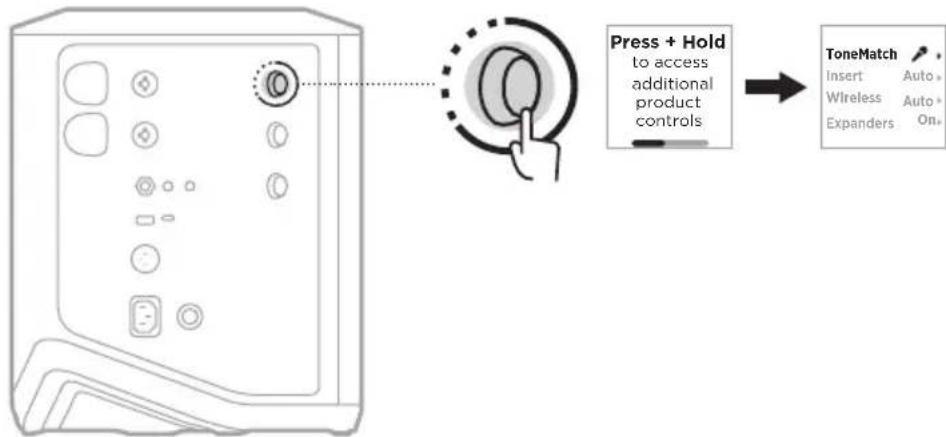
- Rotate the channel control to highlight Expanders, then press to select it.
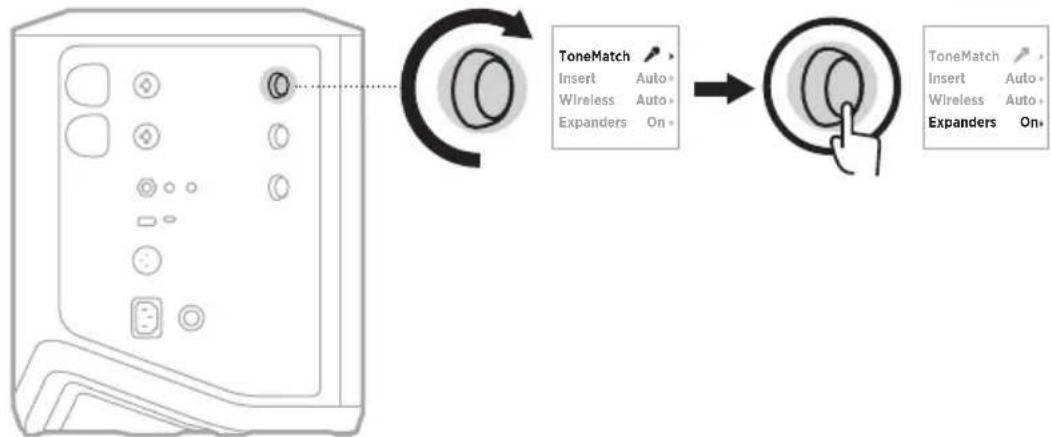
-
Rotate the channel control to highlight your preferred setting, then press to select it:
-
On (default): Enables the Expanders setting for this channel, causing the system to reduce the volume of low-level noise.
- Off: Disables the Expanders setting for this channel, preventing the system from reducing the volume of low-level noise.
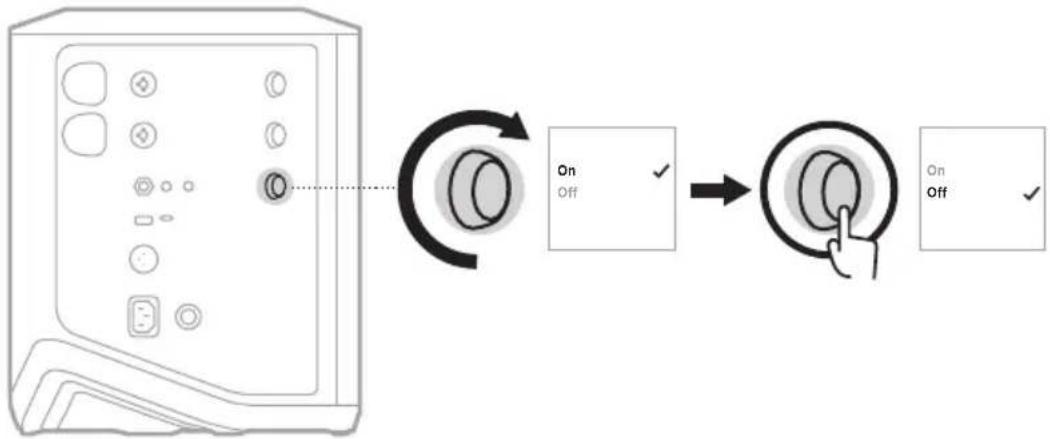
- Press and hold the channel control until the additional controls menu disappears.
RESET THE SYSTEM
Factory reset clears all channel and system settings, Bluetooth connections, and wireless transmitter connections from the system and returns it to original factory settings.
NOTE: You can easily restore your channel and system settings after a system reset using the Bose Music app. To do so, before you reset, save your current settings as a Scene in the app (see page 36). Once the reset is complete, select the Scene in the app to restore all settings except for Bluetooth and wireless transmitter connections.
Press and hold the Power button for 10 seconds until the power light turns off and a message appears on the channel displays.
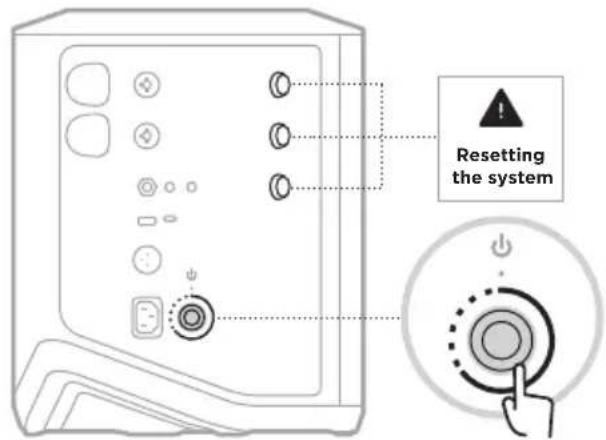
The system reboots. When the reset is complete, the power light glows solid white.
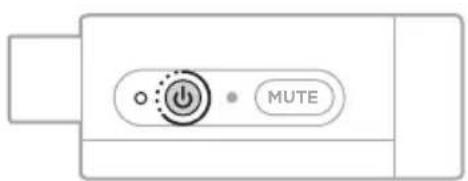
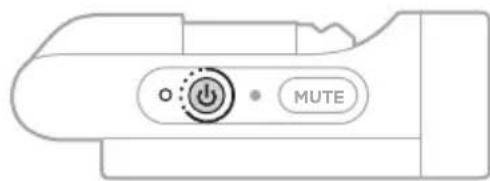
RESET A WIRELESS TRANSMITTER
Factory resetting a wireless transmitter clears all pairing information and returns it to original factory settings.
Press and hold the Power button for 10 seconds until the power light turns off.
Importar i Kina: Bose Electronics (Shanghai) Company Limited, Level 6, Tower D, No. 2337 Gudai Rd. Minhang District, Shanghai 201100
Importe i EU: Bose Products B.V., Gorslaan 60, 1441 RG Purmerend, Holland
Importar i Mexico: Bose de Mexico S. de R.L. de C.V., Avenida Prado Sur #150, Piso 2, Interior 222 y 223, Colonia Lomas de Chapultepec V Seccion, Miguel Hidalgo, Ciudad de Mexico, C.P. 11000 Telefonummer: +5255 (5202) 3545
Importor i Taiwan: Bose Limited Taiwan Branch (H.K.), 9F., No. 10, Sec. 3, Minsheng E. Road, Zhongshan Dist. Taipei City 10480, Taiwan Telefonummer: +886-2-2514 7676
Importor UK: Bose Limited, Bose House, Quayside Chatham Maritime, Chatham, Kent, ME4 4QZ, Storbritannien
Inputclassification: 100 - 240V 50 / 60Hz,1A
Outputdata:
- USB POWER-opladningsport: 5 V --- 1,5 A
- Opladningsportettil tradlssender:5V---0,3A
Batterikapacitet: 5500 mAh
Temperaturomrade for opladning: 0^ - 45^
Temperaturomrade for afladning: -20^ - 49^
Mai (H× B× D) :332,6x240x279,8mm
Nettoveegt: 6,5 kg
The following license disclosures apply to certain third-party software packages used as components in the product.
Package: FreeRTOS
Copyright © Amazon Web Services, Inc. or its affiliates. All rights reserved.
Package: LVGL - Light and Versatile Graphics Library
Copyright © 2021 LVGL Kft
The above is/are subject to the license terms reprinted below:
MIT License
Permission is hereby granted, free of charge, to any person obtaining a copy of this software and associated documentation files (the "Software"), to deal in the Software without restriction, including without limitation the rights to use, copy, modify, merge, publish, distribute, sublicense, and/or sell copies of the Software, and to permit persons to whom the Software is furnished to do so, subject to the following conditions:
The above copyright notice and this permission notice shall be included in all copies or substantial portions of the Software.
THE SOFTWARE IS PROVIDED "AS IS", WITHOUT WARRANTY OF ANY KIND, EXPRESS OR IMPLIED, INCLUDING BUT NOT LIMITED TO THE WARRANTY OF MERCHANTABILITY, FITNESS FOR A PARTICULAR PURPOSE AND NONINFRINGEMENT. IN NO EVENT SHALL THE AUTHORS OR COPYRIGHT HOLDERS BE LIABLE FOR ANY CLAIM, DAMAGES OR OTHER LIABILITY, WHETHER IN AN ACTION OF CONTRACT, TORT OR OTHERWISE, ARISING FROM, OUT OF OR IN CONNECTION WITH THE SOFTWARE OR THE USE OR OTHER DEALINGS IN THE SOFTWARE.
Packages: STM32CubeF4 HAL Driver MCU Component and STM32 LL - STM32 Low Layer API
Copyright 2017 STMicroelectronics. All rights reserved.
The above is/are subject to the license terms reprinted below:
3-Clause BSD License
(Also called "New BSD License" or "Modified BSD License")
Redistribution and use in source and binary forms, with or without modification, are permitted provided that the following conditions are met:
Redistributions of source code must retain the above copyright notice, this list of conditions and the following disclaimer.
Redistributions in binary form must reproduce the above copyright notice, this list of conditions and the following disclaimer in the documentation and/or other materials provided with the distribution.
Neither the name of the
THIS SOFTWARE IS PROVIDED BY THE COPYRIGHT HOLDERS AND COLNTRIBUTORS "AS IS" AND ANY EXPRESS OR IMPLIED WARRANTY, INCLUDING, BUT NOT LIMITED TO, THE IMPLIED WARRANTY OF MERCHANTABILITY AND FITNESS FOR A PARTICULAR PURPOSE ARE DISCLAIMED. IN NO EVENT SHALL
HVAD ER DER I AESKEN?
Indhold 15
OPSÄETNING AF BOSE MUSIC-APPEN
Download Bose Music-appen 16
Tilfoj systemet til en eksisterende konto 16
KONTROL-OG TILSLUTNINGSPANEL
Paneloversigt 17
TAEND/SLUK
Besog: support.Bose.com/Sub1 ______support.Bose.com/Sub2
DUAL WIRELESS STREAMING MED BOSE MUSIC-APPEN
MUSIKER, DER OPTAGER ELLER LIVESTREAMER TIL COMPUTER
OPLAD SYSTEMBATTERIET
Tilslut systemet til lysnettet for at oplade systembatteriet (se side 18).
AFBRYD TILSLUTNING AF EN MOBIL ENHED
Besog: worldwide.Bose.com/contact
System
SYMPTOM LØSNING
China-Import: Bose Electronics (Shanghai) Company Limited, Level 6, Tower D, No. 2337 Gudai Rd. Minhang District, Shanghai 201100
EU-Import: Bose Products B.V., Gorslaan 60, 1441 RG Purmerend, Niederlande
Mexico-Import: Bose de Mexico S. de R.L. de C.V., Avenida Prado Sur #150, Piso 2, Interior 222 y 223, Colonia Lomas de Chapultepec V Seccion, Miguel Hidalgo, Ciudad de Mexico, C.P. 11000 Telefonummer: +5255 (5202) 3545
Taiwan-Import: Bose Limited Taiwan Branch (H.K.), 9F., No. 10, Sec. 3, Minsheng E. Road, Zhongshan Dist.
Taipei City 10480, Taiwan Telefonummer: +886-2-2514 7676
The following license disclosures apply to certain third-party software packages used as components in the product.
Package: FreeRTOS
Copyright © Amazon Web Services, Inc. or its affiliates. All rights reserved.
Package: LVGL - Light and Versatile Graphics Library
Copyright © 2021 LVGL Kft
The above is/are subject to the license terms reprinted below:
MIT License
Permission is hereby granted, free of charge, to any person obtaining a copy of this software and associated documentation files (the "Software"), to deal in the Software without restriction, including without limitation the rights to use, copy, modify, merge, publish, distribute, sublicense, and/or sell copies of the Software, and to permit persons to whom the Software is furnished to do so, subject to the following conditions:
The above copyright notice and this permission notice shall be included in all copies or substantial portions of the Software.
THE SOFTWARE IS PROVIDED "AS IS", WITHOUT WARRANTY OF ANY KIND, EXPRESS OR IMPLIED, INCLUDING BUT NOT LIMITED TO THE WARRANTY OF MERCHANTABILITY, FITNESS FOR A PARTICULAR PURPOSE AND NONINFRINGEMENT. IN NO EVENT SHALL THE AUTHORS OR COPYRIGHT HOLDERS BE LIABLE FOR ANY CLAIM, DAMAGES OR OTHER LIABILITY, WHETHER IN AN ACTION OF CONTRACT, TORT OR OTHERWISE, ARISING FROM, OUT OF OR IN CONNECTION WITH THE SOFTWARE OR THE USE OR OTHER DEALINGS IN THE SOFTWARE.
Packages: STM32CubeF4 HAL Driver MCU Component and STM32 LL - STM32 Low Layer API
Copyright 2017 STMicroelectronics. All rights reserved.
The above is/are subject to the license terms reprinted below:
3-Clause BSD License
(Also called "New BSD License" or "Modified BSD License")
Redistribution and use in source and binary forms, with or without modification, are permitted provided that the following conditions are met:
Redistributions of source code must retain the above copyright notice, this list of conditions and the following disclaimer.
Redistributions in binary form must reproduce the above copyright notice, this list of conditions and the following disclaimer in the documentation and/or other materials provided with the distribution.
Neither the name of the
THIS SOFTWARE IS PROVIDED BY THE COPYRIGHT HOLDERS AND COLNTRIBUTORS "AS IS" AND ANY EXPRESS OR IMPLIED WARRANTY, INCLUDING, BUT NOT LIMITED TO, THE IMPLIED WARRANTY OF MERCHANTABILITY AND FITNESS FOR A PARTICULAR PURPOSE ARE DISCLAIMED. IN NO EVENT SHALL
LIEFERUMFANG
Inhalt 15
Importeur in China: Bose Electronics (Shanghai) Company Limited, Level 6, Tower D, No. 2337 Gudai Rd. Minhang District, Shanghai 201100
Importeur in de EU: Bose Products B.V., Gorslaan 60, 1441 RG Purmerend, Nederland
The following license disclosures apply to certain third-party software packages used as components in the product.
Package: FreeRTOS
Copyright © Amazon Web Services, Inc. or its affiliates. All rights reserved.
Package: LVGL - Light and Versatile Graphics Library
Copyright © 2021 LVGL Kft
The above is/are subject to the license terms reprinted below:
MIT License
Permission is hereby granted, free of charge, to any person obtaining a copy of this software and associated documentation files (the "Software"), to deal in the Software without restriction, including without limitation the rights to use, copy, modify, merge, publish, distribute, sublicense, and/or sell copies of the Software, and to permit persons to whom the Software is furnished to do so, subject to the following conditions:
The above copyright notice and this permission notice shall be included in all copies or substantial portions of the Software.
THE SOFTWARE IS PROVIDED "AS IS", WITHOUT WARRANTY OF ANY KIND, EXPRESS OR IMPLIED, INCLUDING BUT NOT LIMITED TO THE WARRANTY OF MERCHANTABILITY, FITNESS FOR A PARTICULAR PURPOSE AND NONINFRINGEMENT. IN NO EVENT SHALL THE AUTHORS OR COPYRIGHT HOLDERS BE LIABLE FOR ANY CLAIM, DAMAGES OR OTHER LIABILITY, WHETHER IN AN ACTION OF CONTRACT, TORT OR OTHERWISE, ARISING FROM, OUT OF OR IN CONNECTION WITH THE SOFTWARE OR THE USE OR OTHER DEALINGS IN THE SOFTWARE.
Packages: STM32CubeF4 HAL Driver MCU Component and STM32 LL - STM32 Low Layer API
Copyright 2017 STMicroelectronics. All rights reserved.
The above is/are subject to the license terms reprinted below:
3-Clause BSD License
(Also called "New BSD License" or "Modified BSD License")
Redistribution and use in source and binary forms, with or without modification, are permitted provided that the following conditions are met:
Redistributions of source code must retain the above copyright notice, this list of conditions and the following disclaimer.
Redistributions in binary form must reproduce the above copyright notice, this list of conditions and the following disclaimer in the documentation and/or other materials provided with the distribution.
Neither the name of the
THIS SOFTWARE IS PROVIDED BY THE COPYRIGHT HOLDERS AND Contributors "AS IS" AND ANY EXPRESS OR IMPLIED WARRANTY, INCLUDING, BUT NOT LIMITED TO, THE IMPLIED WARRANTY OF MERCHANTABILITY AND FITNESS FOR A PARTICULAR PURPOSE ARE DISCLAIMED. IN NO EVENT SHALL
WAT ZITER IN DE DOOS
Inhoud 15
INSTALLLEREN MET DE BOSE MUSIC-APP
De Bose Music-app downladesen 16
DJ met Bose Sub1 of Sub2 Powered Bass Module 52
GaNaar: support.Bose.com/S1ProPlus
MUZIKANT MET MOBIEL APPARAAT
MUZIKANT MET MOBIEL APPARAAT EN DRAADLOZE ZENDERS
MULTI-INSTRUMENTALIST

MUZIKANT MET EFFECTMIXER
MUZIKANT MET DRAADLOZE ZENDERS, EFFECTPEDAAL EN VOCAL PROCESSOR
DJ MET BOSE SUB1 OF SUB2 POWERED BASS MODULE
Gaaar: support.Bose.com/Sub1
DUAL WIRELESS STREAMING MET DE BOSE MUSIC-APP
MUZIKANT DIE OPNEEMT OP OF LIVESTREAMT NAAREN COMPUTER
DE SYSTEEMACCU OPLADEN
Gaanr: support.Bose.com/S1ProPlus
BEPERKTE GARANTIE
Gaanar: worldwide.Bose.com/contact
Systeem
SYMPTOOM OPLOSSING
Importador en China: Bose Electronics (Shanghai) Company Limited, Level 6, Tower D, No. 2337 Gudai Rd. Minhang District, Shanghai 201100, China
Importador en UE: Bose Products B.V., Gorslaan 60, 1441 RG Purmerend, Paises Bajos
Importador en Mexico: Bose de Mexico S. de R.L. de C.V., Avenida Prado Sur #150, Piso 2, Interior 222 y 223, Colonia Lomas de Chapultepec V Seccion, Miguel Hidalgo, Ciudad de Mexico, C.P. 11000 -Numero de téléphone: +5255 (5202) 3545
Importador en Taiwan: Bose Limited Taiwan Branch (H.K.), 9F., No. 10, Sec. 3, Minsheng E. Road, Zhongshan Dist. Taipei City 10480, Taiwan - Nível de téléphone: +886-2-2514 7676
Importador en el Reino Unido: Bose Limited, Bose House, Quayside Chatham Maritime, Chatham, Kent, ME4 4QZ, Reino Unido
Potencia de entrada: 100 - 240V 50 / 60Hz,1A
The following license disclosures apply to certain third-party software packages used as components in the product.
Package: FreeRTOS
Copyright © Amazon Web Services, Inc. or its affiliates. All rights reserved.
Package: LVGL - Light and Versatile Graphics Library
Copyright © 2021 LVGL Kft
The above is/are subject to the license terms reprinted below:
MIT License
Permission is hereby granted, free of charge, to any person obtaining a copy of this software and associated documentation files (the "Software"), to deal in the Software without restriction, including without limitation the rights to use, copy, modify, merge, publish, distribute, sublicense, and/or sell copies of the Software, and to permit persons to whom the Software is furnished to do so, subject to the following conditions:
The above copyright notice and this permission notice shall be included in all copies or substantial portions of the Software.
THE SOFTWARE IS PROVIDED "AS IS", WITHOUT WARRANTY OF ANY KIND, EXPRESS OR IMPLIED, INCLUDING BUT NOT LIMITED TO THE WARRANTY OF MERCHANTABILITY, FITNESS FOR A PARTICULAR PURPOSE AND NONINFRINGEMENT. IN NO EVENT SHALL THE AUTHORS OR COPYRIGHT HOLDERS BE LIABLE FOR ANY CLAIM, DAMAGES OR OTHER LIABILITY, WHETHER IN AN ACTION OF CONTRACT, TORT OR OTHERWISE, ARISING FROM, OUT OF OR IN CONNECTION WITH THE SOFTWARE OR THE USE OR OTHER DEALINGS IN THE SOFTWARE.
Packages: STM32CubeF4 HAL Driver MCU Component and STM32 LL - STM32 Low Layer API
Copyright 2017 STMicroelectronics. All rights reserved.
The above is/are subject to the license terms reprinted below:
3-Clause BSD License
(Also called "New BSD License" or "Modified BSD License")
Redistribution and use in source and binary forms, with or without modification, are permitted provided that the following conditions are met:
Redistributions of source code must retain the above copyright notice, this list of conditions and the following disclaimer.
Redistributions in binary form must reproduce the above copyright notice, this list of conditions and the following disclaimer in the documentation and/or other materials provided with the distribution.
Neither the name of the
THIS SOFTWARE IS PROVIDED BY THE COPYRIGHT HOLDERS AND COLNTRIBUTORS "AS IS" AND ANY EXPRESS OR IMPLIED WARRANTY, INCLUDING, BUT NOT LIMITED TO, THE IMPLIED WARRANTY OF MERCHANTABILITY AND FITNESS FOR A PARTICULAR PURPOSE ARE DISCLAIMED. IN NO EVENT SHALL
CONTENIDO DE LA CAJA
Contenido 15
CONFIGURAR LA APLICACION BOSE MUSIC
Visit: ______ support.Bose.com/S1ProPlus
- Bose S1 Pro+ Wireless PA System
- Bose L1 Pro8 & L1 Pro16 Portable Line Array System
- Bose L1 Pro32 Portable Line Array
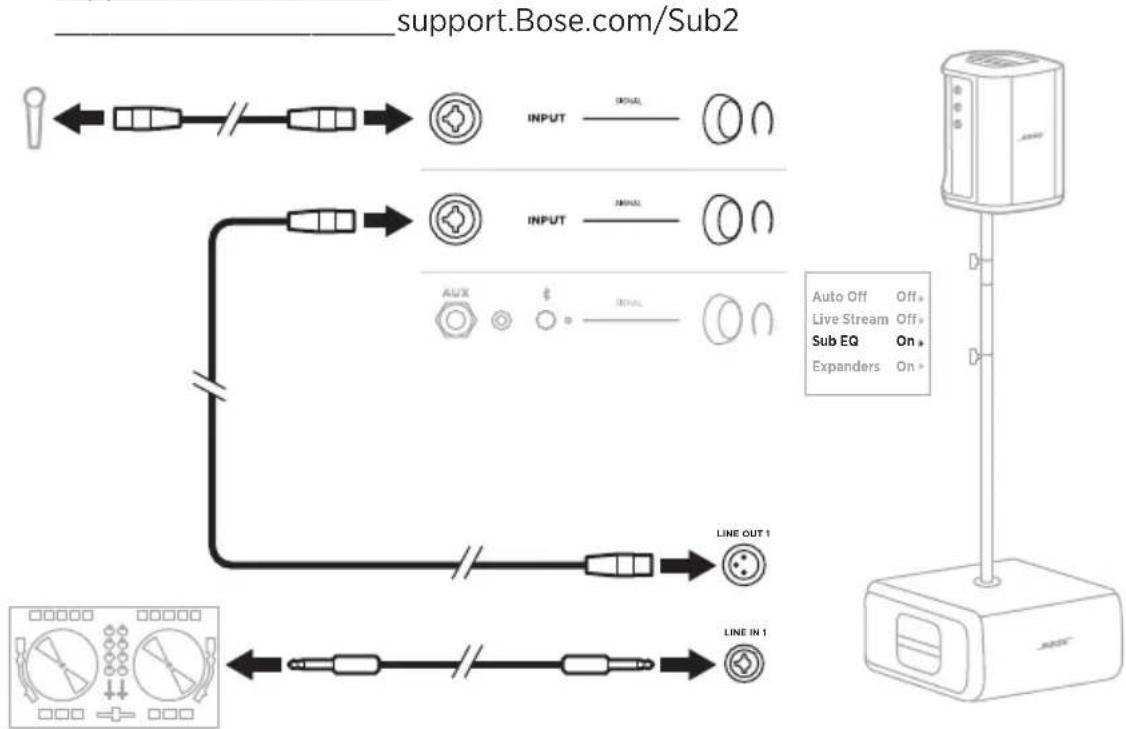
Visite: support.Bose.com/Sub1
Visite: worldwide.Bose.com/contact
Sistema
SINTOMA SOLUCIOn
Maahantuoja Kiinassa: Bose Electronics (Shanghai) Company Limited, Level 6, Tower D, No. 2337 Gudai Rd. Minhang District, Shanghai 201100
Maahantuoja EU:ssa: Bose Products B.V., Gorslaan 60, 1441 RG Purmerend, The Netherlands
Maahantuoja Meksikossa: Bose de Mexico S. de R.L. de C.V., Avenida Prado Sur #150, Piso 2, Interior 222 y 223, Colonia Lomas de Chapultepec V Seccion, Miguel Hidalgo, Ciudad de Mexico, C.P. 11000 Puhelinnummero: +5255 (5202) 3545
Maahantuoja Taiwanissa: Bose Limited Taiwan Branch (H.K.), 9F., No. 10, Sec. 3, Minsheng E. Road, Zhongshan Dist. Taipei City 10480, Taiwan Puhelinnumero: +886-2-2514 7676
The following license disclosures apply to certain third-party software packages used as components in the product.
Package: FreeRTOS
Copyright © Amazon Web Services, Inc. or its affiliates. All rights reserved.
Package: LVGL - Light and Versatile Graphics Library
Copyright © 2021 LVGL Kft
The above is/are subject to the license terms reprinted below:
MIT License
Permission is hereby granted, free of charge, to any person obtaining a copy of this software and associated documentation files (the "Software"), to deal in the Software without restriction, including without limitation the rights to use, copy, modify, merge, publish, distribute, sublicense, and/or sell copies of the Software, and to permit persons to whom the Software is furnished to do so, subject to the following conditions:
The above copyright notice and this permission notice shall be included in all copies or substantial portions of the Software.
THE SOFTWARE IS PROVIDED "AS IS", WITHOUT WARRANTY OF ANY KIND, EXPRESS OR IMPLIED, INCLUDING BUT NOT LIMITED TO THE WARRANTY OF MERCHANTABILITY, FITNESS FOR A PARTICULAR PURPOSE AND NONINFRINGEMENT. IN NO EVENT SHALL THE AUTHORS OR COPYRIGHT HOLDERS BE LIABLE FOR ANY CLAIM, DAMAGES OR OTHER LIABILITY, WHETHER IN AN ACTION OF CONTRACT, TORT OR OTHERWISE, ARISING FROM, OUT OF OR IN CONNECTION WITH THE SOFTWARE OR THE USE OR OTHER DEALINGS IN THE SOFTWARE.
Packages: STM32CubeF4 HAL Driver MCU Component and STM32 LL - STM32 Low Layer API
Copyright 2017 STMicroelectronics. All rights reserved.
The above is/are subject to the license terms reprinted below:
3-Clause BSD License
(Also called "New BSD License" or "Modified BSD License")
Redistribution and use in source and binary forms, with or without modification, are permitted provided that the following conditions are met:
Redistributions of source code must retain the above copyright notice, this list of conditions and the following disclaimer.
Redistributions in binary form must reproduce the above copyright notice, this list of conditions and the following disclaimer in the documentation and/or other materials provided with the distribution.
Neither the name of the
THIS SOFTWARE IS PROVIDED BY THE COPYRIGHT HOLDERS AND COLNTRIBUTORS "AS IS" AND ANY EXPRESS OR IMPLIED WARRANTY, INCLUDING, BUT NOT LIMITED TO, THE IMPLIED WARRANTY OF MERCHANTABILITY AND FITNESS FOR A PARTICULAR PURPOSE ARE DISCLAIMED. IN NO EVENT SHALL
PAKKAUKEN SISALTO
Sisaltö 15
BOSE MUSIC -SOVELLUKSEN ASETUKSET
support.Bose.com/Sub2.
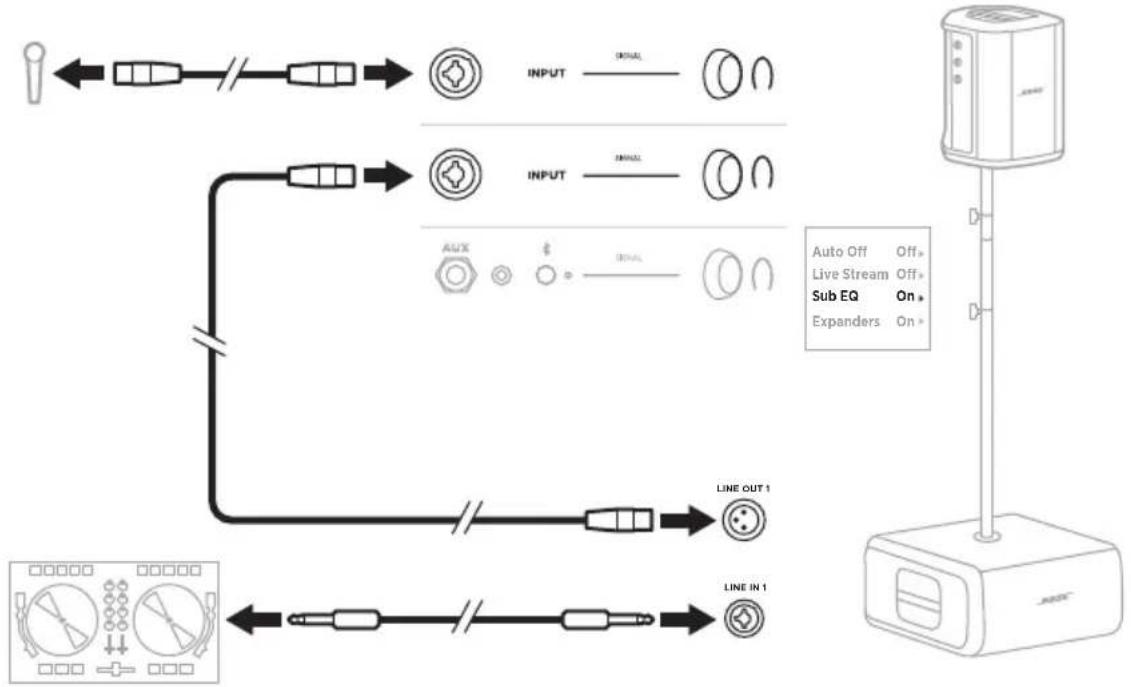
DUAL WIRELESS -SUORATOISTO BOSE MUSIC -SOVELLUKSELLA
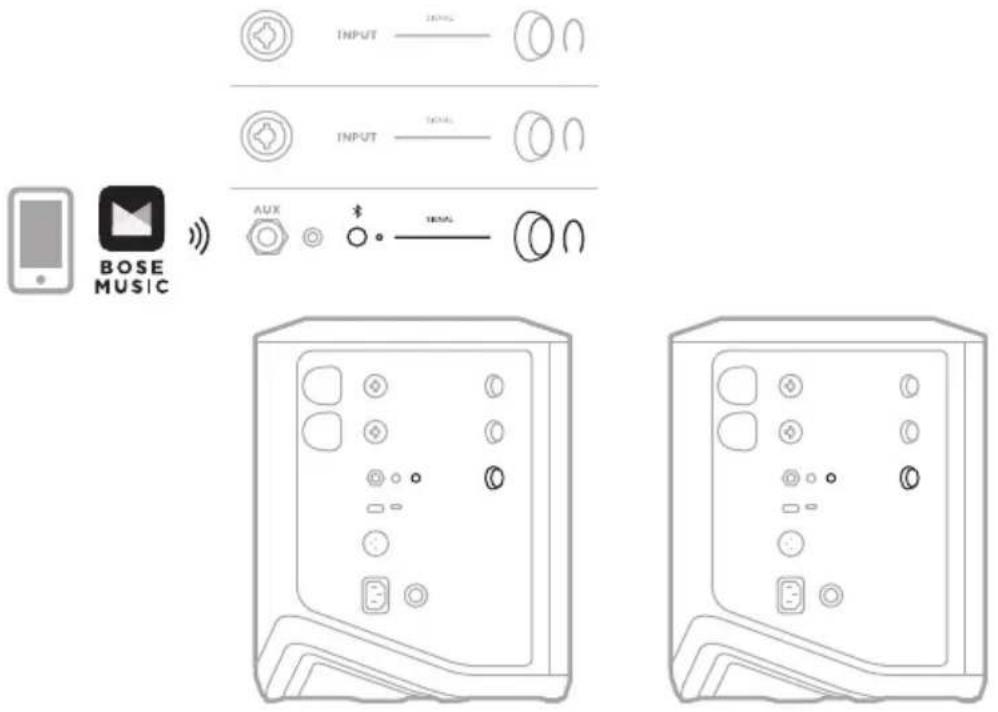
MUUSIKKO, JOKA AANITTA TAI LAHETTA SUORATOISTONA Tietokoneeseen
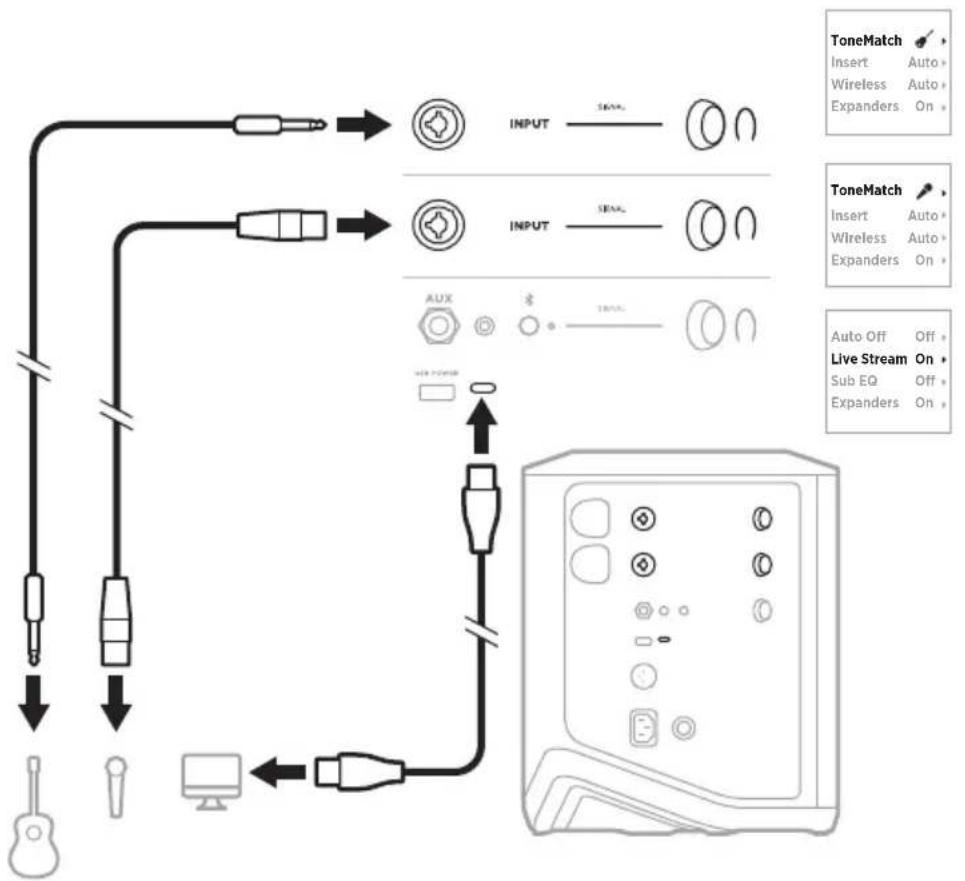
JÄRJESELMÄN AKUN LATAAMINEN
The following license disclosures apply to certain third-party software packages used as components in the product.
Package: FreeRTOS
Copyright © Amazon Web Services, Inc. or its affiliates. All rights reserved.
Package: LVGL - Light and Versatile Graphics Library
Copyright © 2021 LVGL Kft
The above is/are subject to the license terms reprinted below:
MIT License
Permission is hereby granted, free of charge, to any person obtaining a copy of this software and associated documentation files (the "Software"), to deal in the Software without restriction, including without limitation the rights to use, copy, modify, merge, publish, distribute, sublicense, and/or sell copies of the Software, and to permit persons to whom the Software is furnished to do so, subject to the following conditions:
The above copyright notice and this permission notice shall be included in all copies or substantial portions of the Software.
THE SOFTWARE IS PROVIDED "AS IS", WITHOUT WARRANTY OF ANY KIND, EXPRESS OR IMPLIED, INCLUDING BUT NOT LIMITED TO THE WARRANTY OF MERCHANTABILITY, FITNESS FOR A PARTICULAR PURPOSE AND NONINFRINGEMENT. IN NO EVENT SHALL THE AUTHORS OR COPYRIGHT HOLDERS BE LIABLE FOR ANY CLAIM, DAMAGES OR OTHER LIABILITY, WHETHER IN AN ACTION OF CONTRACT, TORT OR OTHERWISE, ARISING FROM, OUT OF OR IN CONNECTION WITH THE SOFTWARE OR THE USE OR OTHER DEALINGS IN THE SOFTWARE.
Packages: STM32CubeF4 HAL Driver MCU Component and STM32 LL - STM32 Low Layer API
Copyright 2017 STMicroelectronics. All rights reserved.
The above is/are subject to the license terms reprinted below:
3-Clause BSD License
(Also called "New BSD License" or "Modified BSD License")
Redistribution and use in source and binary forms, with or without modification, are permitted provided that the following conditions are met:
Redistributions of source code must retain the above copyright notice, this list of conditions and the following disclaimer.
Redistributions in binary form must reproduce the above copyright notice, this list of conditions and the following disclaimer in the documentation and/or other materials provided with the distribution.
Neither the name of the
THIS SOFTWARE IS PROVIDED BY THE COPYRIGHT HOLDERS AND COLNTRIBUTORS "AS IS" AND ANY EXPRESS OR IMPLIED WARRANTY, INCLUDING, BUT NOT LIMITED TO, THE IMPLIED WARRANTY OF MERCHANTABILITY AND FITNESS FOR A PARTICULAR PURPOSE ARE DISCLAIMED. IN NO EVENT SHALL
CONTENU DE L'EMBALLAGE
CONNEXIONS BLUETOOTH
MISE SOUS/HORS TENSION
RACCORDEMENT DE SOURCES AU CANAL 3
DJ AVEC MODULE DE GRAVES AMPLIFIÉ BOSE SUB1 OU SUB2
Consultez la page support.Bose.com/Sub1 support.Bose.com/Sub2
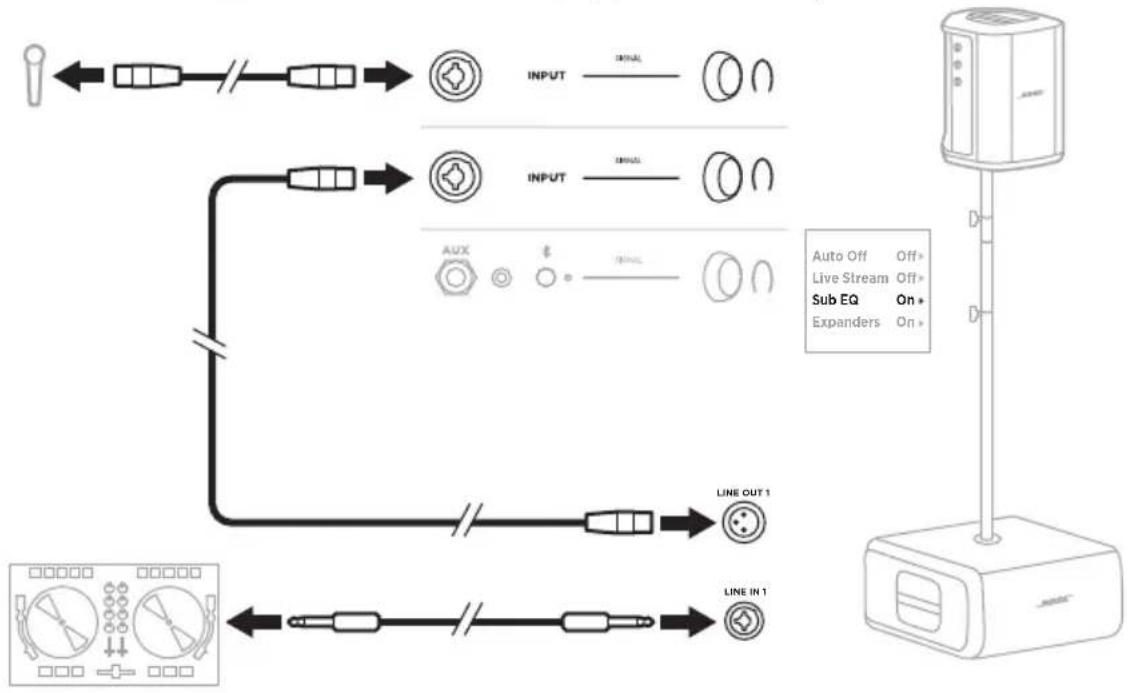
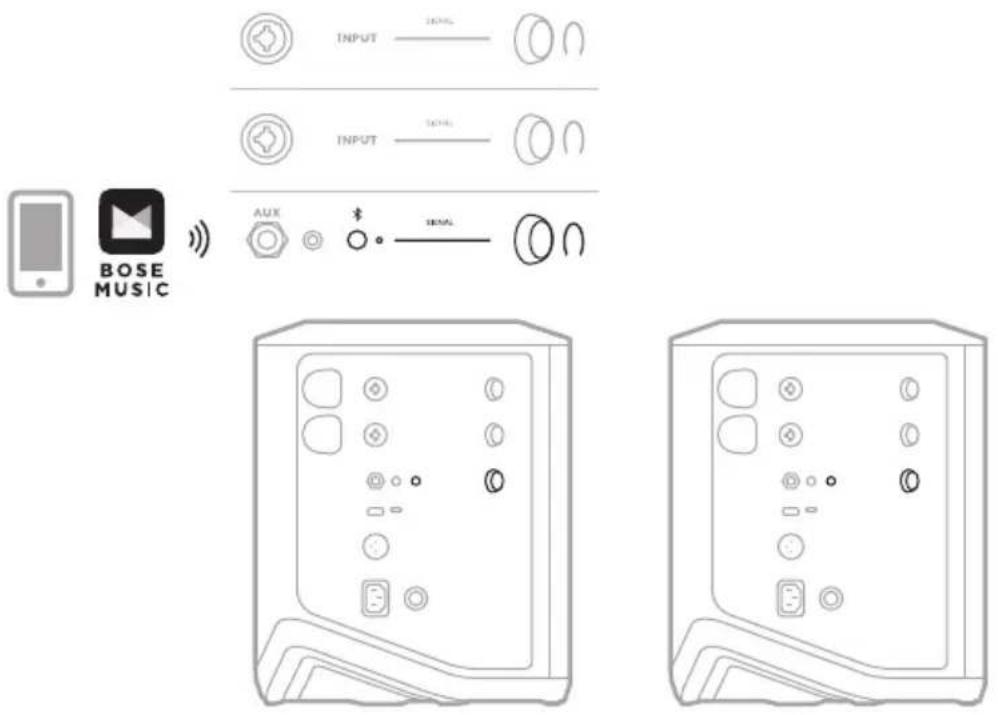
DOUBLE STREAMING SANS FIL AVEC L'APPLICATION BOSE MUSIC
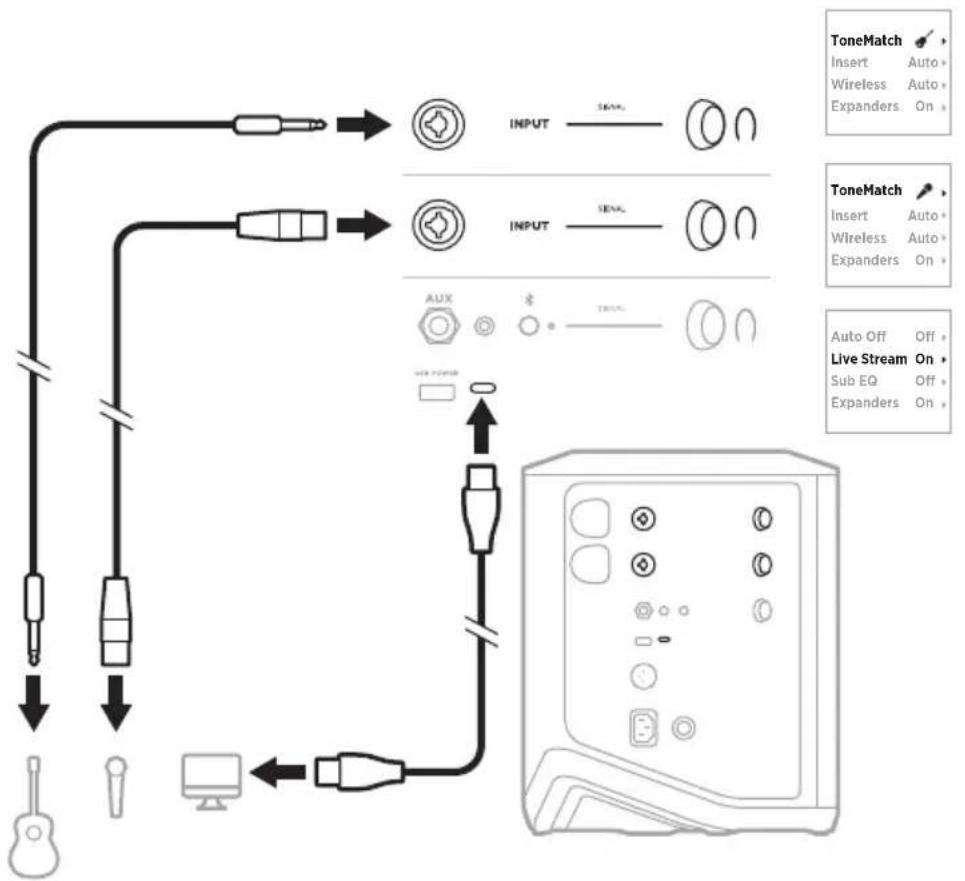
ENREGISTREMENT OU DIFFUSION EN DIRECT D'UN MUSICIEN SUR L'ORDINATEUR
CHARGE DE LA BATTERIE DU SYSTEME
Importatore per la Cina: Bose Electronics (Shanghai) Company Limited, Level 6, Tower D, No. 2337 Gudai Rd. Minhang District, Shanghai 201100
The following license disclosures apply to certain third-party software packages used as components in the product.
Package: FreeRTOS
Copyright © Amazon Web Services, Inc. or its affiliates. All rights reserved.
Package: LVGL - Light and Versatile Graphics Library
Copyright © 2021 LVGL Kft
The above is/are subject to the license terms reprinted below:
MIT License
Permission is hereby granted, free of charge, to any person obtaining a copy of this software and associated documentation files (the "Software"), to deal in the Software without restriction, including without limitation the rights to use, copy, modify, merge, publish, distribute, sublicense, and/or sell copies of the Software, and to permit persons to whom the Software is furnished to do so, subject to the following conditions:
The above copyright notice and this permission notice shall be included in all copies or substantial portions of the Software.
THE SOFTWARE IS PROVIDED "AS IS", WITHOUT WARRANTY OF ANY KIND, EXPRESS OR IMPLIED, INCLUDING BUT NOT LIMITED TO THE WARRANTY OF MERCHANTABILITY, FITNESS FOR A PARTICULAR PURPOSE AND NONINFRINGEMENT. IN NO EVENT SHALL THE AUTHORS OR COPYRIGHT HOLDERS BE LIABLE FOR ANY CLAIM, DAMAGES OR OTHER LIABILITY, WHETHER IN AN ACTION OF CONTRACT, TORT OR OTHERWISE, ARISING FROM, OUT OF OR IN CONNECTION WITH THE SOFTWARE OR THE USE OR OTHER DEALINGS IN THE SOFTWARE.
Packages: STM32CubeF4 HAL Driver MCU Component and STM32 LL - STM32 Low Layer API
Copyright 2017 STMicroelectronics. All rights reserved.
The above is/are subject to the license terms reprinted below:
3-Clause BSD License
(Also called "New BSD License" or "Modified BSD License")
Redistribution and use in source and binary forms, with or without modification, are permitted provided that the following conditions are met:
Redistributions of source code must retain the above copyright notice, this list of conditions and the following disclaimer.
Redistributions in binary form must reproduce the above copyright notice, this list of conditions and the following disclaimer in the documentation and/or other materials provided with the distribution.
Neither the name of the
THIS SOFTWARE IS PROVIDED BY THE COPYRIGHT HOLDERS AND Contributors "AS IS" AND ANY EXPRESS OR IMPLIED WARRANTY, INCLUDING, BUT NOT LIMITED TO, THE IMPLIED WARRANTY OF MERCHANTABILITY AND FITNESS FOR A PARTICULAR PURPOSE ARE DISCLAIMED. IN NO EVENT SHALL
Stereo 49
Dual mono/a in series 51
Visitare support.Bose.com/Sub1
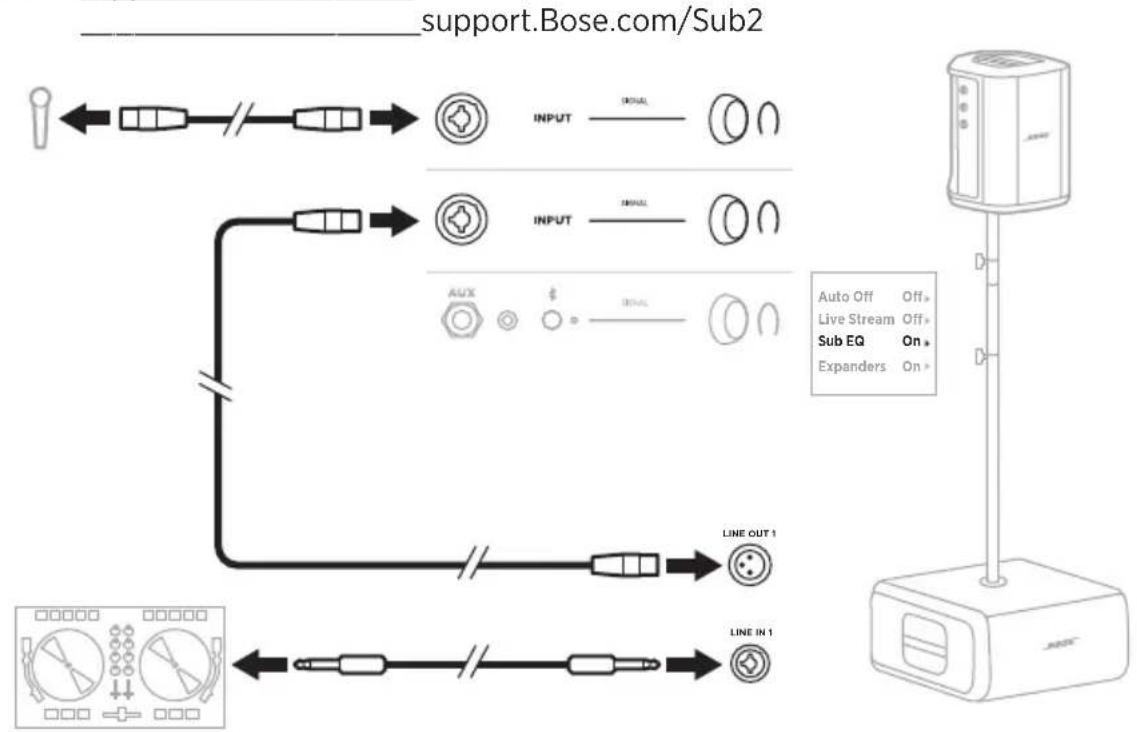
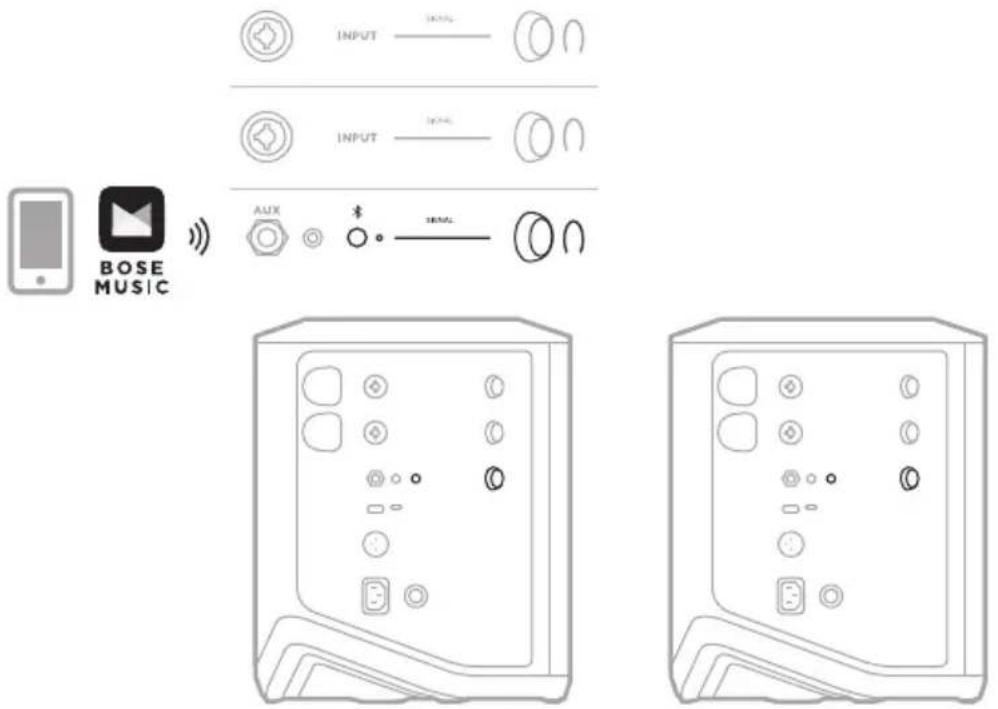
STREAMING DUAL WIRELESS CON L'APP BOSE MUSIC
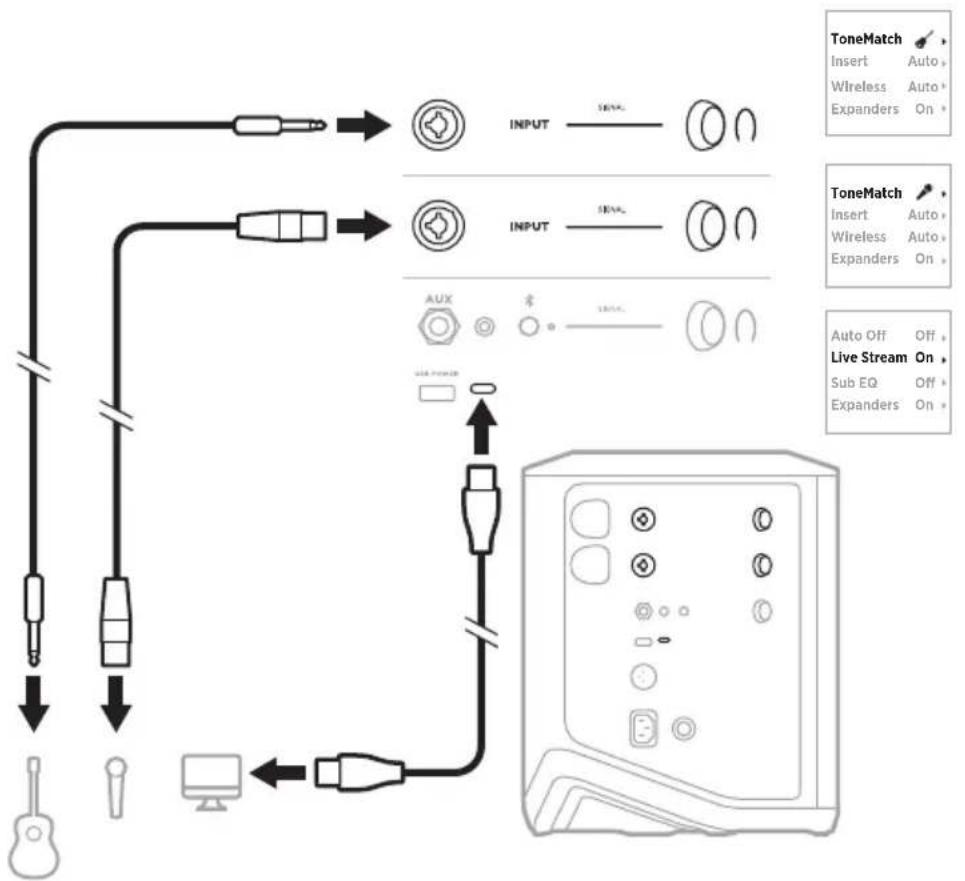
MUSICISTA CHE REGISTRA O SUONA IN STREAMING DAL VIVO SU COMPUTER
CARICARE LA BATTERIA DEL SISTEMA
Visitare: worldwide.Bose.com/contact
Sistema
SINTOMO SOLUZIONE
Kinai importor: Bose Electronics (Shanghai) Company Limited, Level 6, Tower D, No. 2337 Gudai Rd. Minhang District, Shanghai 201100
EU-importor: Bose Products B.V., Gorslaan 60, 1441 RG Purmerend, Hollandia
Mexikói importo: Bose de México S. de R.L. de C.V., Avenida Prado Sur #150, Piso 2, Interior 222 y 223, Colonia Lomas de Chapultepec V Seccion, Miguel Hidalgo, Ciudad de Mexico, C.P. 11000, Telefonzám: +5255 (5202) 3545
Tajvani importor: Bose Limited Taiwan Branch (H.K.), 9F., No. 10, Sec. 3, Minsheng E. Road, Zhongshan Dist. Taipei City 10480, tajvani telefonszam: +886-2-2514 7676
Egyesult kiralyssagbeli importor: Bose Limited, Bose House, Quayside Chatham Maritime, Chatham, Kent, ME4 4QZ, United Kingdom
Nevleges bemeneti ertekek: 100 - 240 V 50/60 Hz, 1 A
The following license disclosures apply to certain third-party software packages used as components in the product.
Package: FreeRTOS
Copyright © Amazon Web Services, Inc. or its affiliates. All rights reserved.
Package: LVGL - Light and Versatile Graphics Library
Copyright © 2021 LVGL Kft
The above is/are subject to the license terms reprinted below:
MIT License
Permission is hereby granted, free of charge, to any person obtaining a copy of this software and associated documentation files (the "Software"), to deal in the Software without restriction, including without limitation the rights to use, copy, modify, merge, publish, distribute, sublicense, and/or sell copies of the Software, and to permit persons to whom the Software is furnished to do so, subject to the following conditions:
The above copyright notice and this permission notice shall be included in all copies or substantial portions of the Software.
THE SOFTWARE IS PROVIDED "AS IS", WITHOUT WARRANTY OF ANY KIND, EXPRESS OR IMPLIED, INCLUDING BUT NOT LIMITED TO THE WARRANTY OF MERCHANTABILITY, FITNESS FOR A PARTICULAR PURPOSE AND NONINFRINGEMENT. IN NO EVENT SHALL THE AUTHORS OR COPYRIGHT HOLDERS BE LIABLE FOR ANY CLAIM, DAMAGES OR OTHER LIABILITY, WHETHER IN AN ACTION OF CONTRACT, TORT OR OTHERWISE, ARISING FROM, OUT OF OR IN CONNECTION WITH THE SOFTWARE OR THE USE OR OTHER DEALINGS IN THE SOFTWARE.
Packages: STM32CubeF4 HAL Driver MCU Component and STM32 LL - STM32 Low Layer API
Copyright 2017 STMicroelectronics. All rights reserved.
The above is/are subject to the license terms reprinted below:
3-Clause BSD License
(Also called "New BSD License" or "Modified BSD License")
Redistribution and use in source and binary forms, with or without modification, are permitted provided that the following conditions are met:
Redistributions of source code must retain the above copyright notice, this list of conditions and the following disclaimer.
Redistributions in binary form must reproduce the above copyright notice, this list of conditions and the following disclaimer in the documentation and/or other materials provided with the distribution.
Neither the name of the
THIS SOFTWARE IS PROVIDED BY THE COPYRIGHT HOLDERS AND COLNTRIBUTORS "AS IS" AND ANY EXPRESS OR IMPLIED WARRANTY, INCLUDING, BUT NOT LIMITED TO, THE IMPLIED WARRANTY OF MERCHANTABILITY AND FITNESS FOR A PARTICULAR PURPOSE ARE DISCLAIMED. IN NO EVENT SHALL
A DOBOZ TARTALMA
Tartalom 15
A BOSE MUSIC ALKALMAZÁS BEÁLLITÁSA
support.Bose.com/Sub2 cimre.
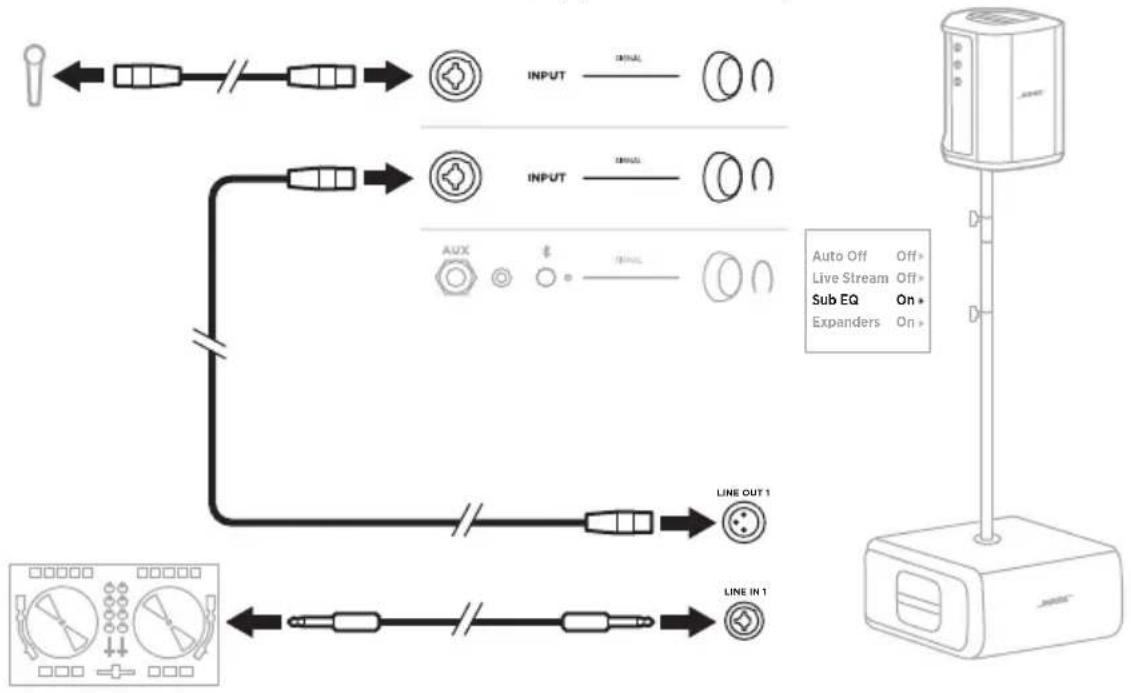
KETTÖS VEZETÉK NÉLKÜLISTREAMÉS A BOSE MUSIC ALKALMAZÁSSAL
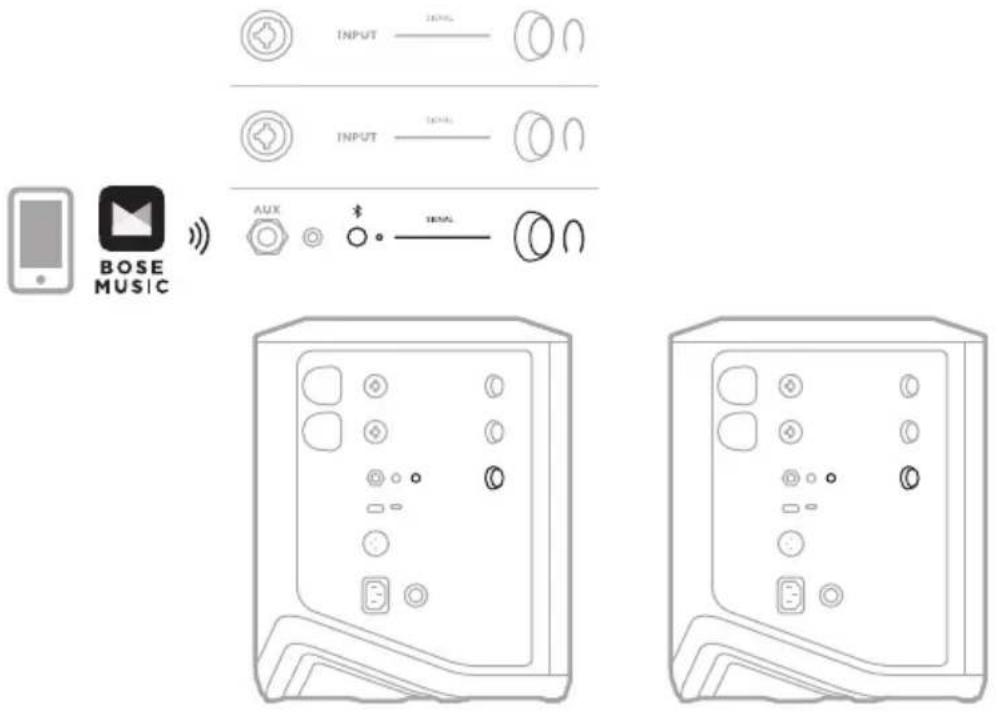
A HANGOT SZÁMÍTÓGÉPRE RÖGZÍTÖ VAGY ÉLÖBEN STREAMAMELO ZENÉSZ
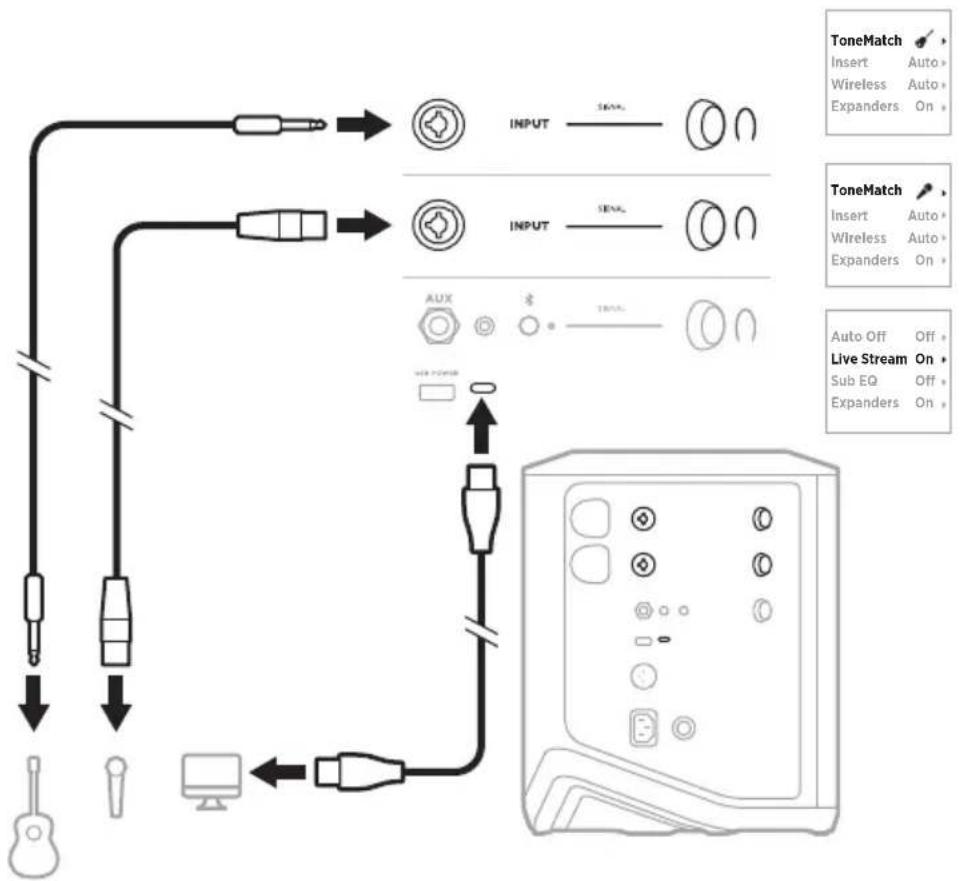
A RENDSZERAKKUMULÁTOR FELTÖLTÉSE
Importor for Kina: Bose Electronics (Shanghai) Company Limited, Level 6, Tower D, No. 2337 Gudai Rd. Minhang District, Shanghai 201100
Importor for EU: Bose Products B.V., Gorslaan 60, NL-1441 RG Purmerend, Nederland
Importar for Mexico: Bose de Mexico S. de R.L. de C.V., Avenida Prado Sur #150, Piso 2, Interior 222 y 223, Colonia Lomas de Chapultepec V Seccion, Miguel Hidalgo, Ciudad de Mexico, C.P. 11000 Telefonummer: +5255 (5202) 3545
Importor for Taiwan: Bose Limited Taiwan Branch (H.K.), 9F., No. 10, Sec. 3, Minsheng E. Road, Zhongshan Dist. Taipei City 10480, Taiwan Telefonummer: +886-2-2514 7676
Importor for Storbritannia: Bose Limited, Bose House, Quayside Chatham Maritime, Chatham, Kent, ME4 4QZ, Storbritannia
Strøminngang: 100-240 V 50/60 Hz, 1 A
Utgangseffekt
Ladeport for USB-strøm: 5 V ---1,5 A
Ladeporter for tradløs sender: 5 V --- 0,3 A
Batterikapasitet: 5 500 mAh
Ladetemperatur: 0^ til 45^ (32°F til 113°F)
The following license disclosures apply to certain third-party software packages used as components in the product.
Package: FreeRTOS
Copyright © Amazon Web Services, Inc. or its affiliates. All rights reserved.
Package: LVGL - Light and Versatile Graphics Library
Copyright © 2021 LVGL Kft
The above is/are subject to the license terms reprinted below:
MIT License
Permission is hereby granted, free of charge, to any person obtaining a copy of this software and associated documentation files (the "Software"), to deal in the Software without restriction, including without limitation the rights to use, copy, modify, merge, publish, distribute, sublicense, and/or sell copies of the Software, and to permit persons to whom the Software is furnished to do so, subject to the following conditions:
The above copyright notice and this permission notice shall be included in all copies or substantial portions of the Software.
THE SOFTWARE IS PROVIDED "AS IS", WITHOUT WARRANTY OF ANY KIND, EXPRESS OR IMPLIED, INCLUDING BUT NOT LIMITED TO THE WARRANTY OF MERCHANTABILITY, FITNESS FOR A PARTICULAR PURPOSE AND NONINFRINGEMENT. IN NO EVENT SHALL THE AUTHORS OR COPYRIGHT HOLDERS BE LIABLE FOR ANY CLAIM, DAMAGES OR OTHER LIABILITY, WHETHER IN AN ACTION OF CONTRACT, TORT OR OTHERWISE, ARISING FROM, OUT OF OR IN CONNECTION WITH THE SOFTWARE OR THE USE OR OTHER DEALINGS IN THE SOFTWARE.
Packages: STM32CubeF4 HAL Driver MCU Component and STM32 LL - STM32 Low Layer API
Copyright 2017 STMicroelectronics. All rights reserved.
The above is/are subject to the license terms reprinted below:
3-Clause BSD License
(Also called "New BSD License" or "Modified BSD License")
Redistribution and use in source and binary forms, with or without modification, are permitted provided that the following conditions are met:
Redistributions of source code must retain the above copyright notice, this list of conditions and the following disclaimer.
Redistributions in binary form must reproduce the above copyright notice, this list of conditions and the following disclaimer in the documentation and/or other materials provided with the distribution.
Neither the name of the
THIS SOFTWARE IS PROVIDED BY THE COPYRIGHT HOLDERS AND Contributors "AS IS" AND ANY EXPRESS OR IMPLIED WARRANTY, INCLUDING, BUT NOT LIMITED TO, THE IMPLIED WARRANTY OF MERCHANTABILITY AND FITNESS FOR A PARTICULAR PURPOSE ARE DISCLAIMED. IN NO EVENT SHALL
INNHOLDET I ESKEN
Innhold 15
KONFIGURE BOSE MUSIC-APPEN
Laste nd Bose Music-appen 16
Leggetil systemet i en eksisterende konto 16
KONTROLL- OG TILKOBLINGSPANEL
Paneloversikt 17
STRØM
KANAL-OG SYSTEMMINNSTILLINGER
STELL OG VEDLIKEHOLD
Importer — Chiny: Bose Electronics (Shanghai) Company Limited, Level 6, Tower D, No. 2337 Gudai Rd. Minhang District, Shanghai 201100
Importer - UE: Bose Products B.V., Gorslaan 60, 1441 RG Purmerend, The Netherlands
Importer — Tajwan: Bose Limited Taiwan Branch (H.K.), 9F., No. 10, Sec. 3, Minsheng E. Road, Zhongshan Dist. Taipei City 10480, Taiwan Numer Telefonu: +886-2-2514 7676
Importer — Wielka Brytania: Bose Limited, Bose House, Quayside Chatham Maritime, Chatham, Kent, ME4 4QZ, United Kingdom
Zasilanie: 100-240 V 50/60 Hz, 1A
The following license disclosures apply to certain third-party software packages used as components in the product.
Package: FreeRTOS
Copyright © Amazon Web Services, Inc. or its affiliates. All rights reserved.
Package: LVGL - Light and Versatile Graphics Library
Copyright © 2021 LVGL Kft
The above is/are subject to the license terms reprinted below:
MIT License
Permission is hereby granted, free of charge, to any person obtaining a copy of this software and associated documentation files (the "Software"), to deal in the Software without restriction, including without limitation the rights to use, copy, modify, merge, publish, distribute, sublicense, and/or sell copies of the Software, and to permit persons to whom the Software is furnished to do so, subject to the following conditions:
The above copyright notice and this permission notice shall be included in all copies or substantial portions of the Software.
THE SOFTWARE IS PROVIDED "AS IS", WITHOUT WARRANTY OF ANY KIND, EXPRESS OR IMPLIED, INCLUDING BUT NOT LIMITED TO THE WARRANTY OF MERCHANTABILITY, FITNESS FOR A PARTICULAR PURPOSE AND NONINFRINGEMENT. IN NO EVENT SHALL THE AUTHORS OR COPYRIGHT HOLDERS BE LIABLE FOR ANY CLAIM, DAMAGES OR OTHER LIABILITY, WHETHER IN AN ACTION OF CONTRACT, TORT OR OTHERWISE, ARISING FROM, OUT OF OR IN CONNECTION WITH THE SOFTWARE OR THE USE OR OTHER DEALINGS IN THE SOFTWARE.
Packages: STM32CubeF4 HAL Driver MCU Component and STM32 LL - STM32 Low Layer API
Copyright 2017 STMicroelectronics. All rights reserved.
The above is/are subject to the license terms reprinted below:
3-Clause BSD License
(Also called "New BSD License" or "Modified BSD License")
Redistribution and use in source and binary forms, with or without modification, are permitted provided that the following conditions are met:
Redistributions of source code must retain the above copyright notice, this list of conditions and the following disclaimer.
Redistributions in binary form must reproduce the above copyright notice, this list of conditions and the following disclaimer in the documentation and/or other materials provided with the distribution.
Neither the name of the
THIS SOFTWARE IS PROVIDED BY THE COPYRIGHT HOLDERS AND Contributors "AS IS" AND ANY EXPRESS OR IMPLIED WARRANTY, INCLUDING, BUT NOT LIMITED TO, THE IMPLIED WARRANTY OF MERCHANTABILITY AND FITNESS FOR A PARTICULAR PURPOSE ARE DISCLAIMED. IN NO EVENT SHALL
ZAWARTOĆ PAKIETU Z PRODUKTEM
Importador na China: Bose Electronics (Shanghai) Company Limited, Level 6, Tower D, No. 2337 Gudai Rd. Minhang District, Shanghai 201100
Importador na CE: Bose Products B.V., Gorslaan 60, 1441 RG Purmerend, The Netherlands
Importador no Mexico: Bose de Mexico S. de R.L. de C.V., Avenida Prado Sur #150, Piso 2, Interior 222 y 223, Colonia Lomas de Chapultepec V Seccion, Miguel Hidalgo, Ciudad de Mexico, C.P. 11000 Numberto de téléphone: +5255 (5202) 3545
Importador em Taiwan: Bose Limited Taiwan Branch (H.K.), 9F., No. 10, Sec. 3, Minsheng E. Road, Zhongshan Dist. Taipei City 10480, Taiwan Nstreamo de telephone: +886-2-2514 7676
Importador no Reino Unido: Bose Limited, Bose House, Quayside Chatham Maritime, Chatham, Kent, ME4 4QZ, United Kingdom
Entrada nominal: 100 - 240V 50 / 60Hz,1A
The following license disclosures apply to certain third-party software packages used as components in the product.
Package: FreeRTOS
Copyright © Amazon Web Services, Inc. or its affiliates. All rights reserved.
Package: LVGL - Light and Versatile Graphics Library
Copyright © 2021 LVGL Kft
The above is/are subject to the license terms reprinted below:
MIT License
Permission is hereby granted, free of charge, to any person obtaining a copy of this software and associated documentation files (the "Software"), to deal in the Software without restriction, including without limitation the rights to use, copy, modify, merge, publish, distribute, sublicense, and/or sell copies of the Software, and to permit persons to whom the Software is furnished to do so, subject to the following conditions:
The above copyright notice and this permission notice shall be included in all copies or substantial portions of the Software.
THE SOFTWARE IS PROVIDED "AS IS", WITHOUT WARRANTY OF ANY KIND, EXPRESS OR IMPLIED, INCLUDING BUT NOT LIMITED TO THE WARRANTY OF MERCHANTABILITY, FITNESS FOR A PARTICULAR PURPOSE AND NONINFRINGEMENT. IN NO EVENT SHALL THE AUTHORS OR COPYRIGHT HOLDERS BE LIABLE FOR ANY CLAIM, DAMAGES OR OTHER LIABILITY, WHETHER IN AN ACTION OF CONTRACT, TORT OR OTHERWISE, ARISING FROM, OUT OF OR IN CONNECTION WITH THE SOFTWARE OR THE USE OR OTHER DEALINGS IN THE SOFTWARE.
Packages: STM32CubeF4 HAL Driver MCU Component and STM32 LL - STM32 Low Layer API
Copyright 2017 STMicroelectronics. All rights reserved.
The above is/are subject to the license terms reprinted below:
3-Clause BSD License
(Also called "New BSD License" or "Modified BSD License")
Redistribution and use in source and binary forms, with or without modification, are permitted provided that the following conditions are met:
Redistributions of source code must retain the above copyright notice, this list of conditions and the following disclaimer.
Redistributions in binary form must reproduce the above copyright notice, this list of conditions and the following disclaimer in the documentation and/or other materials provided with the distribution.
Neither the name of the
THIS SOFTWARE IS PROVIDED BY THE COPYRIGHT HOLDERS AND COLNTRIBUTORS "AS IS" AND ANY EXPRESS OR IMPLIED WARRANTY, INCLUDING, BUT NOT LIMITED TO, THE IMPLIED WARRANTY OF MERCHANTABILITY AND FITNESS FOR A PARTICULAR PURPOSE ARE DISCLAIMED. IN NO EVENT SHALL
O QUE HÁ NA CAIXA
Conteudo 15
Visite: ______support.Bose.com/S1ProPlus
support.Bose.com/S1ProPlus
EMPARELHAR UM TRANSMISSOR SEM FIO AO CANAL 1 OU 2
DJ COM O BOSE SUB1/SUB2 POWERED BASS MODULE
Visite: support.Bose.com/Sub1
support.Bose.com/Sub2
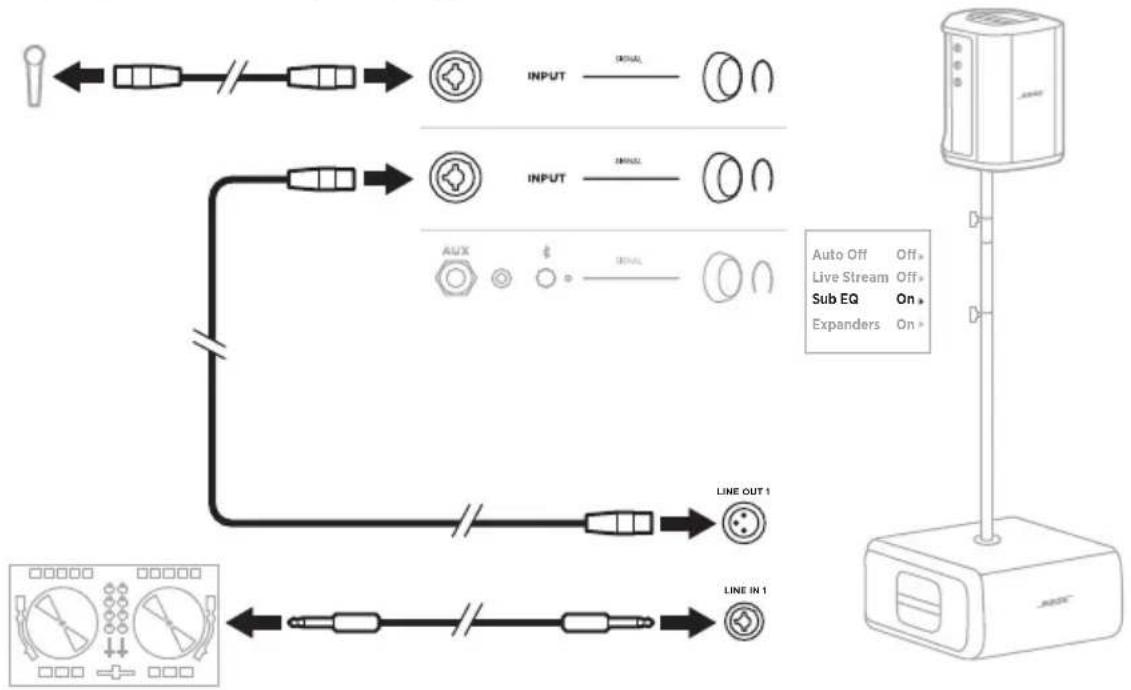
TRANSMISSÂO SEM FIO DUPLA COM O APLICATIVO BOSE MUSIC
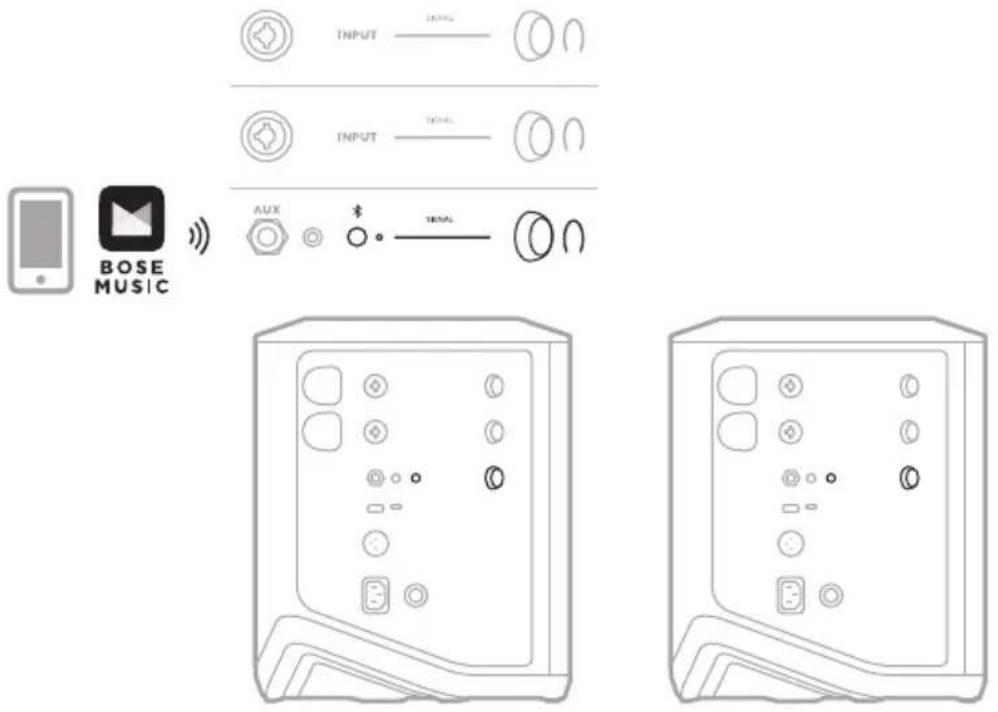
MUSICO GRAVANDO OU TRANSMITINDO AO VIVO PARA O COMPUTADOR
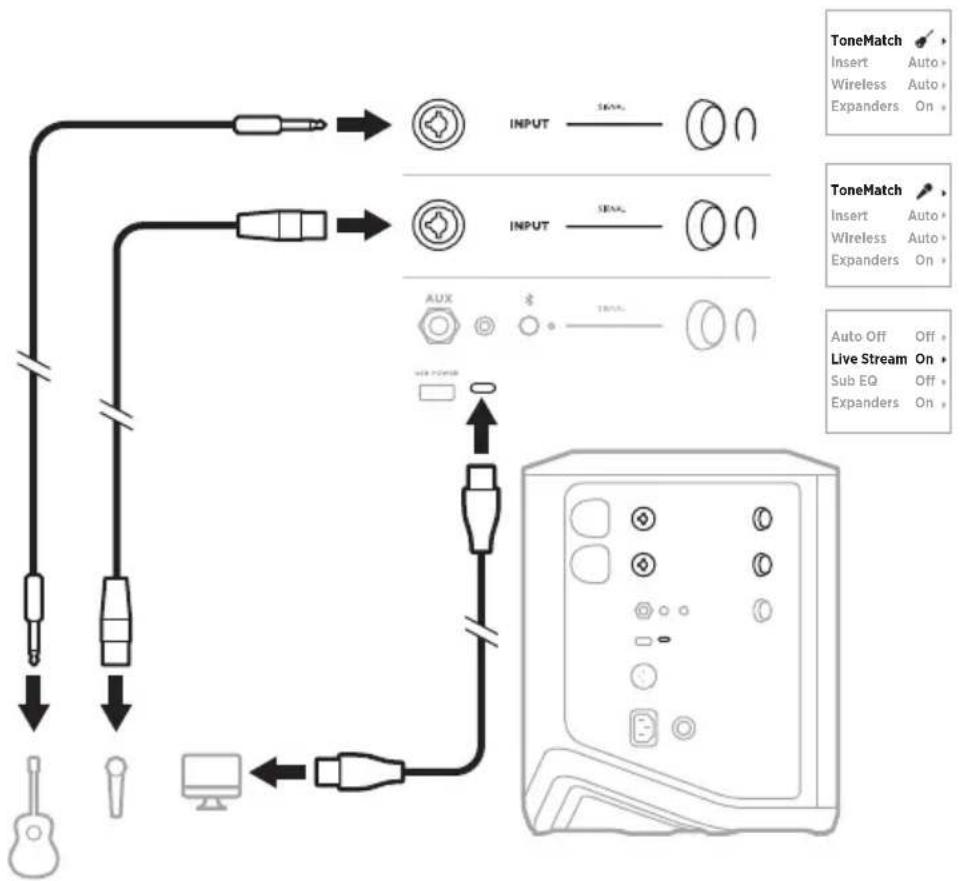
CARREGAR A BATERIA DO SISTEMA
Para trocar a bateria doSYSTEMa,conecte oSYSTEMA alimentacao (consulte a pagina 18).
Como ler as telas de canais
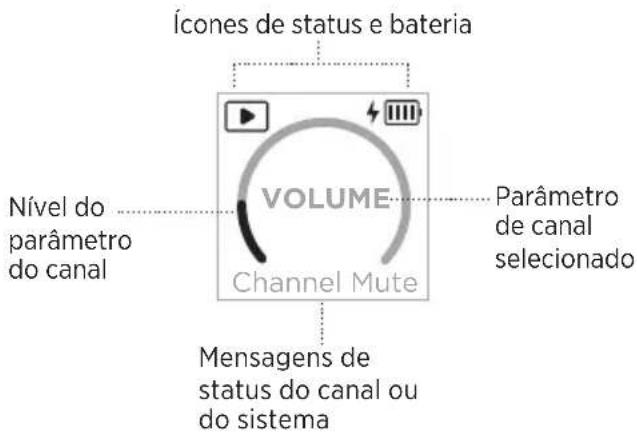
Icones de status
Visite worldwide.Bose.com/contact
Sistema
SINTOMA SOLUÇAO
Kinainportor: Bose Electronics (Shanghai) Company Limited, Level 6, Tower D, No. 2337 Gudai Rd. Minhang District, Shanghai 201100
EU-importor: Bose Products B.V., Gorslaan 60, 1441 RG Purmerend, Nederländerna
Mexikoimportor: Bose de Mexico S. de R.L. de C.V., Avenida Prado Sur #150, Piso 2, Interior 222 y 223, Colonia Lomas de Chapultepec V Seccion, Miguel Hidalgo, Ciudad de Mexico, C.P. 11000 Telefonummer: +5255 (5202) 3545
Taiwanimportor: Bose Limited Taiwan Branch (H.K.), 9F., No. 10, Sec. 3, Minsheng E. Road, Zhongshan Dist. Taipei City 10480, Taiwan Telefonummer: +886-2-2514 7676
UK-importor: Bose Limited, Bose House, Quayside Chatham Maritime, Chatham, Kent, ME4 4QZ, Storbritannien
Märkspanning: 100 - 240V 50 / 60Hz,1A
Uteffekt:
The following license disclosures apply to certain third-party software packages used as components in the product.
Package: FreeRTOS
Copyright © Amazon Web Services, Inc. or its affiliates. All rights reserved.
Package: LVGL - Light and Versatile Graphics Library
Copyright © 2021 LVGL Kft
The above is/are subject to the license terms reprinted below:
MIT License
Permission is hereby granted, free of charge, to any person obtaining a copy of this software and associated documentation files (the "Software"), to deal in the Software without restriction, including without limitation the rights to use, copy, modify, merge, publish, distribute, sublicense, and/or sell copies of the Software, and to permit persons to whom the Software is furnished to do so, subject to the following conditions:
The above copyright notice and this permission notice shall be included in all copies or substantial portions of the Software.
THE SOFTWARE IS PROVIDED "AS IS", WITHOUT WARRANTY OF ANY KIND, EXPRESS OR IMPLIED, INCLUDING BUT NOT LIMITED TO THE WARRANTY OF MERCHANTABILITY, FITNESS FOR A PARTICULAR PURPOSE AND NONINFRINGEMENT. IN NO EVENT SHALL THE AUTHORS OR COPYRIGHT HOLDERS BE LIABLE FOR ANY CLAIM, DAMAGES OR OTHER LIABILITY, WHETHER IN AN ACTION OF CONTRACT, TORT OR OTHERWISE, ARISING FROM, OUT OF OR IN CONNECTION WITH THE SOFTWARE OR THE USE OR OTHER DEALINGS IN THE SOFTWARE.
Packages: STM32CubeF4 HAL Driver MCU Component and STM32 LL - STM32 Low Layer API
Copyright 2017 STMicroelectronics. All rights reserved.
The above is/are subject to the license terms reprinted below:
3-Clause BSD License
(Also called "New BSD License" or "Modified BSD License")
Redistribution and use in source and binary forms, with or without modification, are permitted provided that the following conditions are met:
Redistributions of source code must retain the above copyright notice, this list of conditions and the following disclaimer.
Redistributions in binary form must reproduce the above copyright notice, this list of conditions and the following disclaimer in the documentation and/or other materials provided with the distribution.
Neither the name of the
THIS SOFTWARE IS PROVIDED BY THE COPYRIGHT HOLDERS AND COLNTRIBUTORS "AS IS" AND ANY EXPRESS OR IMPLIED WARRANTY, INCLUDING, BUT NOT LIMITED TO, THE IMPLIED WARRANTY OF MERCHANTABILITY AND FITNESS FOR A PARTICULAR PURPOSE ARE DISCLAIMED. IN NO EVENT SHALL
INNEHÄLL I FÖRPACKNINGEN
Innehall 15
INSTALLATION AV BOSE MUSIC-APPEN
ANSLUT ETT HÖGTALARSTATIV
Jnnaaannnnnnaanennnnaananaananaananaananaananaananaananaananaananaananaananaananaananaananaananaananaananaananaananaananaananaananaananaananaananaananaananaananaananaananaananaananaananaananaananaananaananaananaananaananaananaananaananaananaananaananaananaananaananaananaan ana

Bose Corporation 2014/53/EU Directive 2014/53/EU Directive 2014/53/EU Directive 2014/53/EU Directive 2014/53/EU Directive 2014/53/EU Directive 2014/53/EU Directive 2014/53/EU Directive 2014/53/EU Directive 2014/53/EU Directive

Nnnnne nnnnne nnnnne nnnnne nnnnne nnnnne nnnnne nnnnne nnnnne nnnnne nnnnne nnnnne nnnnne nnnnne nnnnne nnnnne nnnnne nnnnne nnnnne nnnnne nnnnne nnnnne nnnnne nnnnne nnnnne nnnnne
Bose Corporation 2017 2017 UK www.Bose.com/compliance
aannnnnnaaannnnn
aunnnnnae
777777777777777777
ywnnnn nn nnnnnnnnnnnnnnnnnnnnnnnnnnnnnnnnnnnnnnnnnnnnnnnnnnnnnnnnnnnnnnnnnnnnnnnnnnnnnnnnnnnnnnnnnnnnnnnnnnnnnnnnnnnnnnnnnnnnnnnnnnnnnnnnnnnnnnnnnnnnnnnnnnnnnnnnn
14
nnnnnnnnnnnnnnnnnnnnnnnnnnnnnnnnnnnnnnnnnnnnnnnnnnnnnnnnnnnnnnnnnnnnnnnnnnnnnnnnnnnnnnnnnnnnnnnnnnnnnnnnnnnnnnnnnnn
7

nwnnnn nnnnnnnnnnnnnnnnnnnnnnnnnnnnnnnnnnnnnnnnnnnnnnnnnnnnnnnnnnnnnnnnnnnnnnnnnnnnnnnnnnnnnnnnnnn

aayanuunnnaanannnnn nnrnnnnnnnnnnnnnnnnnnnnnnnnnnnnnnnnnnnnnnnnnnnnnnnnnnnnnnnnnnnnnnnnnnnnnnnnnnnnnnnnnnnnnnnnnnnnnnnnnnnnnnnnnnnnnn

nannnnn nnnnnnnnnnnnnnnnnnnnnnnnnnnnnnnnnnnnnnnnnnnnnnnnnnnnnnnnnnnnnnnnnnnnnnnnnnnnnnnnnnnnnnnnnnnnnnnnnnnnnnnnnnnnnnnnnnnnn
-
Wnwnnnn nn nnnn nn nnnnnnnnnnnnnnnnnnnnnnnnnnnnnnnnnnnnnnnnnnnnnnnnnnnnnnnnnnnnnnnnnnnnnnnnnnnnnnnnnnnnnnnnnnnnnnnnnnnnnnnnnnnnnnnnnnn
a
·
· -
Apparatets stikprop skal tilsluttes en stikkontakt med jord, som giver forbindelse til stikproppens jord." Laite on lietettäva suojamaadoituskoskettimilla varustettuun pistorasiaan" Apparatet mà tilkopies jordet stikkontakt" Apparaten skull anslutas till jordat uttag
- lnnnnaaannnnaananaananaananaananaananaananaananaananaananaananaananaananaananaananaananaananaananaananaananaananaananaananaananaananaananaananaananaananaananaananaananaananaananaananaananaananaananaananaananaananaananaananaananaananaananaananaananaananaananaananaan ana an

仅适用于2000m以下地区安全使用
- a
Bose yauuunnnaaannnnnne Bae wuuuuaa
Bose laaunnnaanannnnnauan anananaan annan anan anan anan anan anan anan anan - 1
PA 50 PA Bose S1 Pro+ nunn/nu nnnn nn nwnn 35 wu. uanw/wnnnaaannnnae anananaan anananaan anananaan anananaan anananaan anananaan anananaan anananaan anananaan anananaan anananaan anananaan anananaan anananaan anananaan anananaan anananaan anananaan anananaan anananaan anananaan anananaan anananaan anananaan anananaan ananana anananaan anananaan anananaan anananaan anananaan anananaan anananaan anananaan anananaan anananaan anananaan anananaan anananaan anananaan anananaan anananaan an
·
FCC 15 15
- ·
· - 150000000000000000000000000000000000000000000000000000000000000000000000000
20 2
Bluetooth: 2400 2483.5 MHz
nnnnnnnnnnnnnnnnnn 20 dBm EIRP
2.4 GHz: 2402MHz
mnnn nnnn 10 dBm (10mW) EIRP
SAR
yan[7nwnnnnaaayaaanssnnn]
Bose Electronics (Shanghai) Company Limited, Level 6, Tower D, No. 2337 Gudai Rd. Minhang District, Shanghai 201100
EU: Bose Products B.V., Gorslaan 60, 1441 RG Purmerend, The Netherlands
Bose de Mexico S. de R.L. de C.V., Avenida Prado Sur #150, Piso 2, Interior 222 y 223, Colonia Lomas de Chapultepec V Seccion, Miguel Hidalgo, Ciudad de Mexico, C.P. 11000 wnnw: +5255 (5202) 3545
Bose Limited Taiwan Branch (H.K.), 9F., No.10, Sec. 3, Minsheng E. Road, Zhongshan Dist. Taipei City 10480, www.bosongw.net +886-2-25147676
UK: Bose Limited, Bose House, Quayside Chatham Maritime, Chatham, Kent, ME4 4QZ, United Kingdom
wunwnnwn: 100 - 240V ~ 50/60Hz, 1A
wnannwoon:
USB POWER: 5V --- 1.5A
·:5V-0.3A
5500mAh
27yueunnnnynzyns0°C-45°C
20°C-49°C
():32.6×240×279.8
wnnnn:6.5nn
n 12.4A n 120V; 12.8A n 230V
nssuansnnnnnnnnnnnwnwWAC(annu)5:2.5A1 120V;3A1230V
436469 CMIT ID
yannan yaaaunuynnnnny
y
NNTU6
nunueu:436469
Bose y
worldwide.Bose.com/ProductRegistration
20

Bose 10000000000000000000000000000000000000000000000000000000000000000000000000000
Apple uau la Apple uunuunnuunnuu Apple Inc. uanuunuunuunu uauuunuunu App Store uunuunuunu unuunu uapple Inc.
Bose, Bose Music, Lai Bose Music, L1 ToneMatch 10000000000000000000000000000000000000000000000000000000000000000
Bose Corporation: 1-877-230-5639
2023 Bose Corporation wannun unu uwww wunwnnnaan ananr nnnnnuuauu
The following license disclosures apply to certain third-party software packages used as components in the product.
Package: FreeRTOS
Copyright © Amazon Web Services, Inc. or its affiliates. All rights reserved.
Package: LVGL - Light and Versatile Graphics Library
Copyright © 2021 LVGL Kft
The above is/are subject to the license terms reprinted below:
MIT License
Permission is hereby granted, free of charge, to any person obtaining a copy of this software and associated documentation files (the "Software"), to deal in the Software without restriction, including without limitation the rights to use, copy, modify, merge, publish, distribute, sublicense, and/or sell copies of the Software, and to permit persons to whom the Software is furnished to do so, subject to the following conditions:
The above copyright notice and this permission notice shall be included in all copies or substantial portions of the Software.
THE SOFTWARE IS PROVIDED "AS IS", WITHOUT WARRANTY OF ANY KIND, EXPRESS OR IMPLIED, INCLUDING BUT NOT LIMITED TO THE WARRANTY OF MERCHANTABILITY, FITNESS FOR A PARTICULAR PURPOSE AND NONINFRINGEMENT. IN NO EVENT SHALL THE AUTHORS OR COPYRIGHT HOLDERS BE LIABLE FOR ANY CLAIM, DAMAGES OR OTHER LIABILITY, WHETHER IN AN ACTION OF CONTRACT, TORT OR OTHERWISE, ARISING FROM, OUT OF OR IN CONNECTION WITH THE SOFTWARE OR THE USE OR OTHER DEALINGS IN THE SOFTWARE.
Packages: STM32CubeF4 HAL Driver MCU Component and STM32 LL - STM32 Low Layer API
Copyright 2017 STMicroelectronics. All rights reserved.
The above is/are subject to the license terms reprinted below:
3-Clause BSD License
(Also called "New BSD License" or "Modified BSD License")
Redistribution and use in source and binary forms, with or without modification, are permitted provided that the following conditions are met:
Redistributions of source code must retain the above copyright notice, this list of conditions and the following disclaimer.
Redistributions in binary form must reproduce the above copyright notice, this list of conditions and the following disclaimer in the documentation and/or other materials provided with the distribution.
Neither the name of the
THIS SOFTWARE IS PROVIDED BY THE COPYRIGHT HOLDERS AND COLNTRIBUTORS "AS IS" AND ANY EXPRESS OR IMPLIED WARRANTY, INCLUDING, BUT NOT LIMITED TO, THE IMPLIED WARRANTY OF MERCHANTABILITY AND FITNESS FOR A PARTICULAR PURPOSE ARE DISCLAIMED. IN NO EVENT SHALL
a
15
MnRnnaaNNnBose MUSIC
Bose Music 16
wssuuiuiuuiuiuiui 16
111111111111111
17
mua/
18
18
19
19
mnnnnaaannn
1 2. 20
21
Dawonnwnnblueth 21
TS/TRS Line 22
AUX 22
mssuueeuaaoyouy
23
23
24
24
25
y
26
ToneMatch 27
ToneMatch (120 2) 27
ToneMatch 28
ToneMatch 28