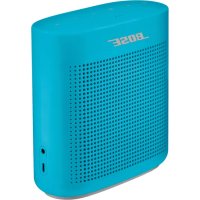
USER MANUAL SoundLink Color II BOSE
Please read and keep all safety and use instructions.
Important Safety Instructions
- Read these instructions.
- Keep these instructions.
- Heed all warnings.
- Follow all instructions.
- Do not install near any heat sources such as radiators, heat registers, stoves, or other apparatus (including amplifiers) that produce heat.
- Only use attachments/accessories specified by the manufacturer.
- Unplug this apparatus during lightning storms or when unused for long periods of time.
- Refer all servicing to qualified personnel. Servicing is required when the apparatus has been damaged in any way.
WARNING/CAUTIONS

This symbol means there are important operating and maintenance instructions in this guide.
- Use this product only with an agency approved power supply which meets local regulatory requirements (e.g., UL, CSA, VDE, CCC) in accordance with the manufacturer's specifications.
- The product markings are located on the bottom and inside foot of the product.
- Do NOT place naked flame sources, such as lighted candles, on or near the product.
- Do NOT make unauthorized alterations to this product.
- If the battery leaks, do not allow the liquid to come in contact with the skin or eyes. If contact is made, seek medical advice.
- Do not expose products containing batteries to excessive heat (e.g. from storage in direct sunlight, fire or the like).
NOTE: This equipment has been tested and found to comply with the limits for a Class B digital device, pursuant to Part 15 of the FCC Rules. These limits are designed to provide reasonable protection against harmful interference in a residential installation. This equipment generates, uses, and can radiate radio frequency energy and, if not installed and used in accordance with the instructions, may cause harmful interference to radio communications. However, there is no guarantee that interference will not occur in a particular installation. If this equipment does cause harmful interference to radio or television reception, which can be determined by turning the equipment off and on, the user is encouraged to try to correct the interference by one or more of the following measures:
- Reorient or relocate the receiving antenna.
- Increase the separation between the equipment and receiver.
- Connect the equipment into an outlet on a circuit different from that to which the receiver is connected.
- Consult the dealer or an experienced radio/TV technician for help.
Changes or modifications not expressly approved by Bose Corporation could void the user's authority to operate this equipment.
This device complies with part 15 of the FCC Rules and with Industry Canada license-exempt RSS standard(s). Operation is subject to the following two conditions: (1) This device may not cause harmful interference, and (2) this device must accept any interference received, including interference that may cause undesired operation.
This device complies with FCC and Industry Canada radiation exposure limits set forth for general population. It must not be co-located or be operating in conjunction with any other antennas or transmitters.
This equipment should be installed and operated with a minimum distance of 8 inches (20 cm) between radiator and your body.
Meets IDA Requirements.
CANICES-3(B)/NMB-3(B)
Management Regulation for Low-power Radio-frequency Devices
Article XII
According to "Management Regulation for Low-power Radio-frequency Devices" without permission granted by the NCC, any company, enterprise, or user is not allowed to change frequency, enhance transmitting power or alter original characteristic as well as performance to an approved low power radio-frequency devices.
Article XIV
The low power radio-frequency devices shall not influence aircraft security and interfere legal communications; If found, the user shall cease operating immediately until no interference is achieved. The said legal communications means radio communications operated in compliance with the Telecommunications Act.
The low power radio-frequency devices must be susceptible with the interference from legal communications or ISM radio wave radiated devices.
DON'T attempt to remove the rechargeable lithium-ion battery from this product. Contact your local Bose retailer or other qualified professional for removal.

Bose Corporation hereby declares that this product is in compliance with the essential requirements and other relevant provisions of Directive 1999/5/EC and all other EU directive requirements. The complete declaration of conformity can be found at: www.Bose.com/compliance

Please dispose of used batteries properly, following local regulations. Do not incinerate.
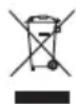
This symbol means the product must not be discarded as household waste, and should be delivered to an appropriate collection facility for recycling. Proper disposal and recycling helps protect natural resources, human health and the environment. For more information on disposal and recycling of this product, contact your local municipality, disposal service, or the shop where you bought this product.

| Names and Contents of Toxic or Hazardous Substances or Elements |
| Toxic or Hazardous Substances and Elements |
| Part Name | Lead(Pb) | Mercury(Hg) | Cadmium(Cd) | Hexavalent(CR(VI)) | PolybrominatedBiphenyl(PBB) | Polybrominateddiphenylether(PBDE) |
| PCBs X 0 0 0 0 0 | | | | | | |
| Metal Parts X 0 0 0 0 0 | | | | | | |
| Plastic Parts 0 0 0 0 0 | 0 | | | | | |
| Speakers X 0 0 0 0 0 | | | | | | |
| Cables X 0 0 0 0 0 | | | | | | |
| This table is prepared in accordance with the provisions of SJ/T 11364. O: Indicates that this toxic or hazardous substance contained in all of the homogeneous materials for this part is below the limit requirement of GB/T 26572. | 15 |
| X: Indicates that this toxic or hazardous substance contained in at least one of the homogeneous materials used for this part is above the limit requirement of GB/T 26572. |
Please complete and retain for your records
The serial and model numbers are located on the bottom and inside foot of the product.
Serial number:
Model number:
Please keep your receipt with your owner's guide. Now is a good time to register your Bose product. You can easily do this by going to http://global.Bose.com/register
Date of Manufacture: The eighth digit in the serial number indicates the year of manufacture; "6" is 2006 or 2016.
China Importer: Bose Electronics (Shanghai) C company Limited, Part C, Plan 9, No. 353 North Riying Road, China (Shanghai) Pilot Free Trade Zone
EU Importer: Bose GP, Castleblayney Road, Carrickmacross, County Monaghan, Ireland
Taiwan Importer: Bose Taiwan Branch, 9F-A1, No.10, Section 3, Minsheng East Road, Taipei City 104, Taiwan. Phone Number: 886 2 2514 7977.
Mexico Importer: Bose de Mexico, S. de R.L. de C.V., Paseo de las Palmas 405-204, Lomas de Chapultepec, 11000 Mexico, D.F. Phone Number: 001 800 900 2673
Apple, the Apple logo, and Siri are trademarks of Apple Inc., registered in the U.S. and other countries. App Store is a service mark of Apple Inc.
Android, Google Play and the Google Play logo are trademarks of Google Inc.
The Bluetooth word mark and logos are registered trademarks owned by Bluetooth SIG, Inc. and any use of such marks by Bose Corporation is under license.
Google Now is a trademark of Google, Inc.
The N-Mark is a trademark or registered trademark of NFC Forum, Inc. in the United States and in other countries.
Siri is a trademark of Apple Inc., registered in the U.S. and other countries.
©2016 Bose Corporation. No part of this work may be reproduced, modified, distributed or otherwise used without prior written permission.
The Bose Connect App
Features 7
Getting Started
Unpacking 8
Placement guidelines 9
Connecting to power 10
Powering on your speaker. 10
Control buttons. 11
Using the Multi-function button 12
Playback controls. 12
Speakerphone controls. 12
Accessing voice control on your mobile device through your speaker 13
Voice alerts. 13
Setting up voice prompts
Pre-installed languages 14
Selecting a language 14
Disabling voice prompts 14
Changing the language 14
Bluetooth Technology
Choosing your pairing method 15
Pairing your mobile device. 16
Pairing a mobile device with NFC 17
Pairing another mobile device 18
Disconnecting a mobile device 18
Reconnecting a mobile device. 18
Managing multiple connections
Identifying the connected mobile devices 19
Switching between two connected mobile devices 19
Connecting to a mobile device stored in your speaker's pairing list. 19
Clearing your speaker's pairing list. 19
Using the Bose Connect app. 19
connecting a cabled device
Using a cable to connect a mobile device 20
Operating on battery power
Battery protection mode 21
Auto-off setting 21
Disabling auto-off 21
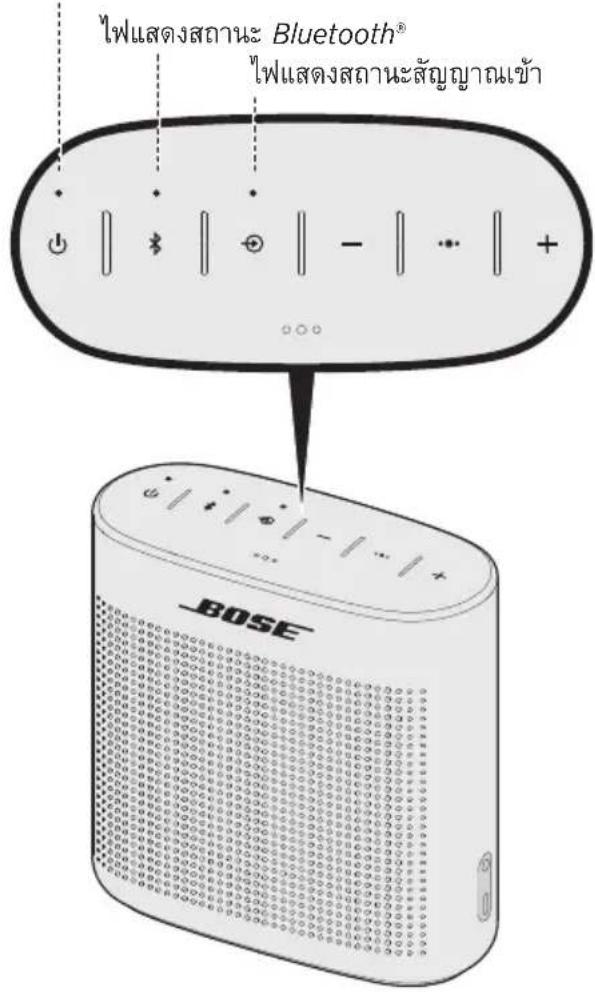
Status indicators. 22
Battery indicator 23
Bluetooth indicator 23
Input indicator 23
Care and maintenance
Cleaning 24
Customer service 24
Limited warranty 24
Technical information 24
Troubleshooting
Common solutions 25
Resetting your speaker 27
Download Bose® Connect to easily manage Bluetooth® connections, unlock features and access future updates.
Features
- Unlock the full potential of your speaker.
Free app compatible with most Apple and Android™ systems.
- Easily connect to and switch between multiple mobile devices with a single swipe.
- Disable voice prompts.
- Keep your speaker up-to-date with the latest software.
- Customize speaker settings, like voice prompt language.

Unpacking
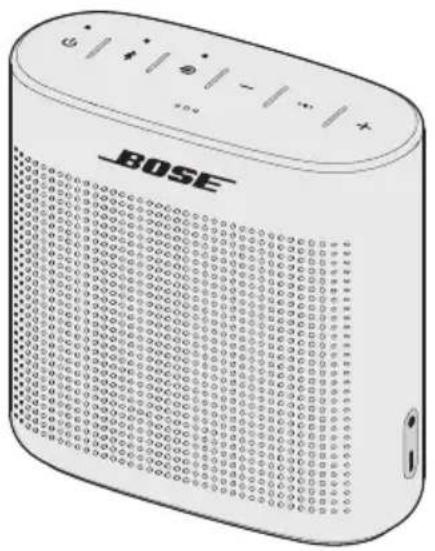
Carefully unpack the carton and confirm that the following parts are included:
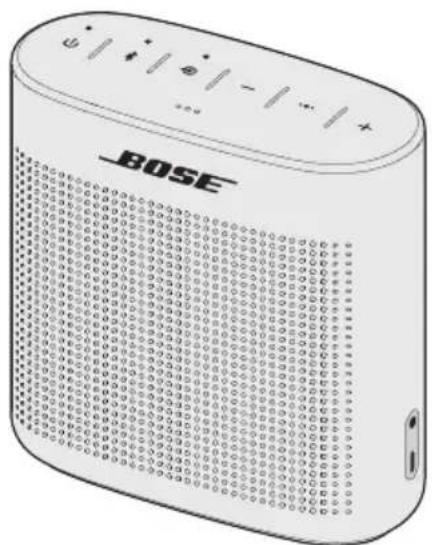
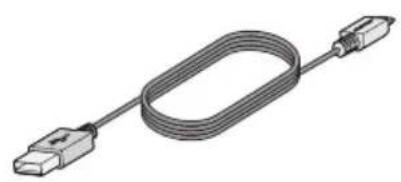
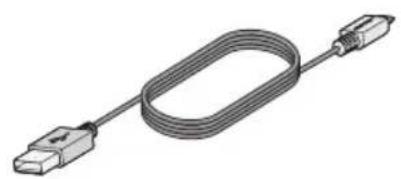
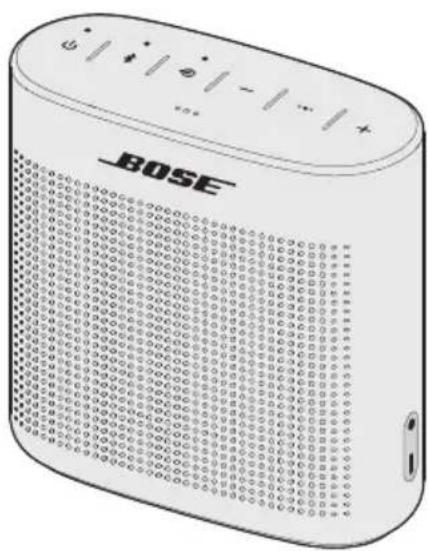
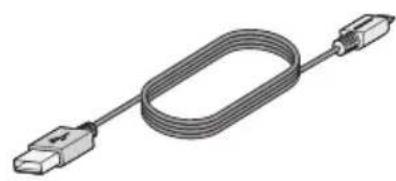
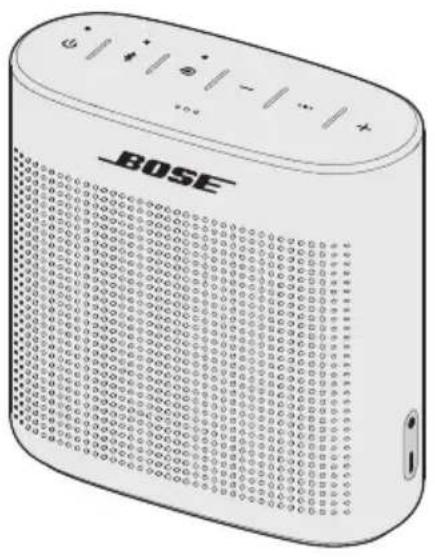
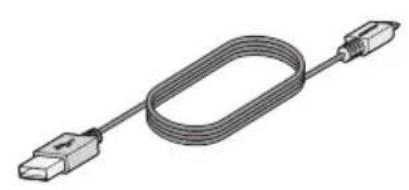
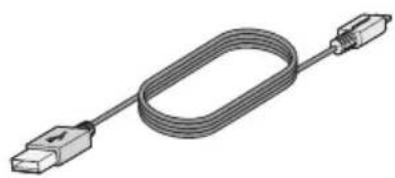
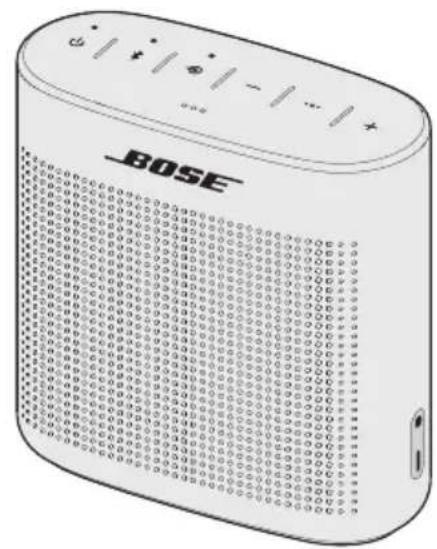
SoundLink Color Bluetooth® speaker II USB charging cable
If part of the speaker is damaged, do not use it. Contact your authorized Bose dealer or Bose customer service. Refer to the contact sheet in the carton.
Placement guidelines
- For best Bluetooth® performance place your mobile device within 33 ft. (10 m) of your speaker, and make sure there is a clear line of sight between you and your speaker. Moving your mobile device further away, or not having a clear line of sight, may impact sound quality, and your mobile device may disconnect from your speaker.
- For optimal performance, place the back of your speaker near, but not directly against a wall. Bass response decreases as you move your speaker away from a wall.
- Keep other wireless equipment at least 3 ft. (1 m) away from your speaker.
- Place your speaker and your mobile device outside of and away from metal cabinets, other audio/video components and direct heat sources.
CAUTION: Stand your speaker on its base. Standing your speaker on any other side may cause damage to your speaker and affect sound quality.
Connecting to power
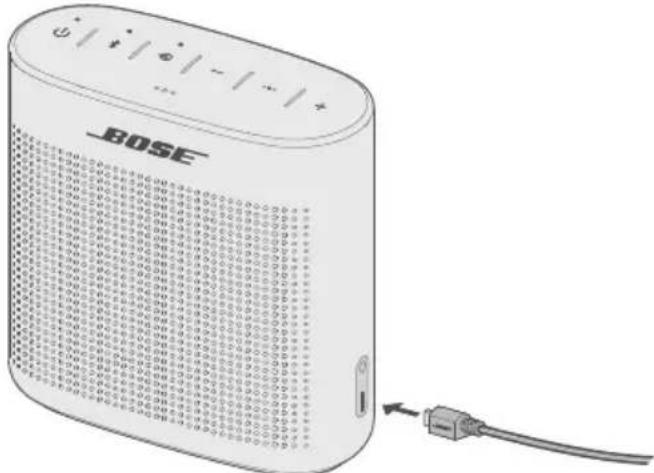
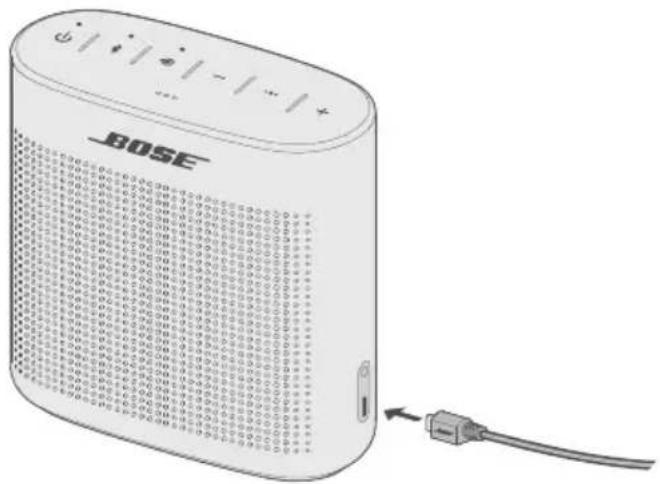
Your speaker ships with a partial charge. Before using your speaker for the first time, connect it to a USB wall charger or computer that is powered on. Your speaker does not need to be fully charged, but it does require the initial connection to activate the battery.
Note: Use a 1000 mA power source for the best speaker charging experience. Using a power source with less than 1000 mA may result in a slower charging time or your speaker may not be able to charge while playing audio.
- Plug the small end of the USB charging cable into the micro-B USB connector on your speaker.
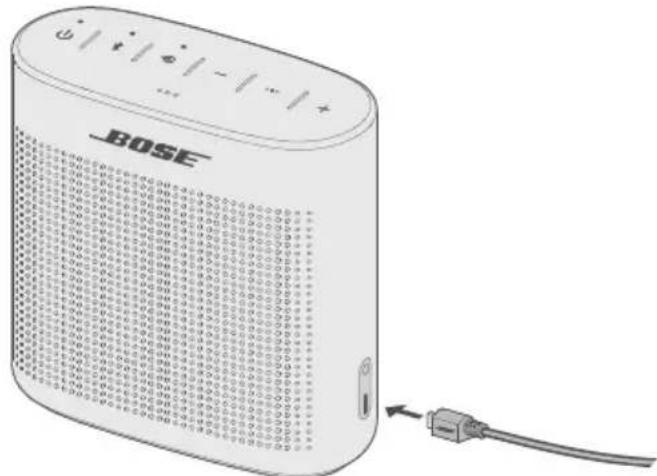
- Plug the other end into a USB wall charger or computer that is powered on.
The battery indicator blinks amber, and your speaker emits a tone. When fully charged, the battery indicator glows green.
Powering on your speaker
On the button pad, press the Power button
-
The first time the speaker is powered on, the Bluetooth® indicator blinks blue, and you hear a voice prompt to select a language (see page 14).
-
When the speaker has been powered on previously and at least one mobile device has been paired, the Bluetooth® indicator blinks white and the speaker connects to the last two mobile devices.
You hear "Battery . Connected to . The Bluetooth indicator glows solid white.
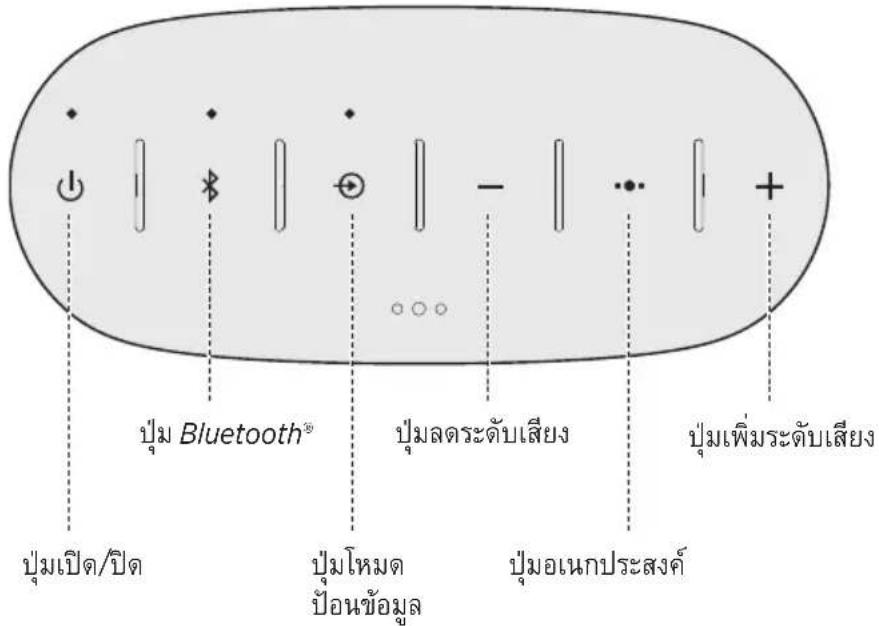
The button pad enables you to power on your speaker and control your speaker's playback, volume and speakerphone.
Note: Certain mobile devices may not support these functions.
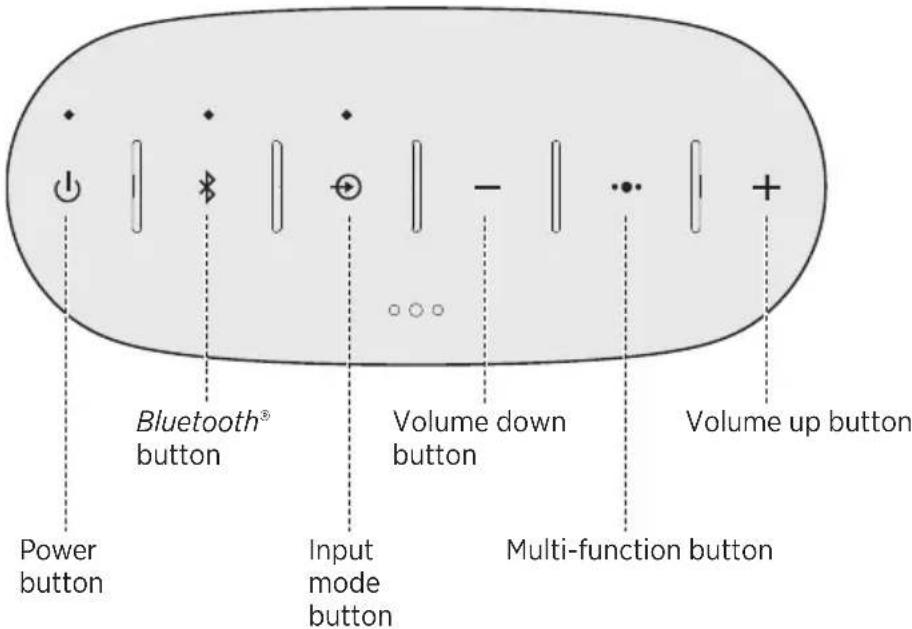
This button controls music sources and speakerphone calls on your mobile device from your speaker.
Playback controls
| Play Press . | ●●● |
| Pause | Press●●●.
Note: In Input mode, pressing●mutes the audio
(see page 20). |
| Skip forward to the next track Press | ●●● twice. |
| Skip backward to the previous track Press | three●imes. |
Speakerphone controls
| Make a call | Press and hold • ● • to access voice control on your mobile device.
Note: See page 13 for more information. |
| Switch a call from speakerphone to your mobile device, while on a call | Press and hold • ● • . |
| Answer a call Press . | • ● • |
| Reject a call Press and hold . | • ● • |
| End a call Press . | • ● • |
| Mute a call | Press and hold + and - simultaneously.
Press and hold again to unmute. |
| Switch between calls | While on a call, press • ● • to answer a second call.
Press • ● twice to switch between the calls. |
Accessing voice control on your mobile device through your speaker
The speaker microphone acts as an extension of the microphone in your smartphone. Using the Multi-function button , you can access the voice control capabilities on your mobile device to make/take calls or ask Siri® or Google Now™ to play music, tell you the weather, give you the score of a game, and more.
Press and hold to access voice control on your mobile device.
Voice alerts
Your speaker identifies incoming callers (when applicable). To disable this feature, see "Disabling voice prompts" on page 14.
Voice prompts guide you through the Bluetooth® pairing and connecting processes.
Pre-installed languages
- English - Mandarin - Italian - Dutch
- Spanish - Japanese - Portuguese - Russian
- French - Korean - Swedish - Polish
- German
To check for additional languages
Visit: global.Bose.com/Support/SLCII
You can also use the Bose Connect app (see page 7).
If your language preference is not available, see "Disabling voice prompts."
Selecting a language
- Press + or - to scroll through the languages.
- When you hear your language, press and hold the Multi-function button to select it.
You hear a beep and "Ready to pair."
Disabling voice prompts
Press and hold + and - simultaneously until you hear "Voice prompts off."
Note: Repeat to re-enable voice prompts.
Changing the language
- Press and hold and + simultaneously until you hear the voice prompt for the first language option.
- Press + or - to scroll through the languages.
- When you hear your language preference press and hold until you hear a beep and "Connected to ."
Bluetooth® wireless technology lets you stream music from Bluetooth smartphones, tablets, computers or other devices to your speaker. Before you can stream music from a mobile device, you must pair the device with your speaker.
Choosing your pairing method
You can pair your mobile device with your speaker using Bluetooth wireless technology or Near Field Communication (NFC).
You can also use the Bose Connect app to pair your mobile device (see page 7).
What is NFC?
NFC is a technology that enables mobile devices to establish wireless communication with each other by simply tapping the mobile devices together. Refer to your mobile device owner's guide to see if your model supports NFC.
| If your mobile device does not supportBluetooth pairing via NFC or if you are unsure: | Follow the instructions for “Pairing your mobile device” on page 16. |
| If your mobile device supportsBluetooth pairing using NFC: | Follow the instructions for “Pairing a mobile device with NFC” on page 17. |
Note: If your mobile device supports Bluetooth pairing via NFC, you can use either pairing method.
Pairing your mobile device
When you power your speaker on for the first time, the speaker automatically searches for your mobile device.
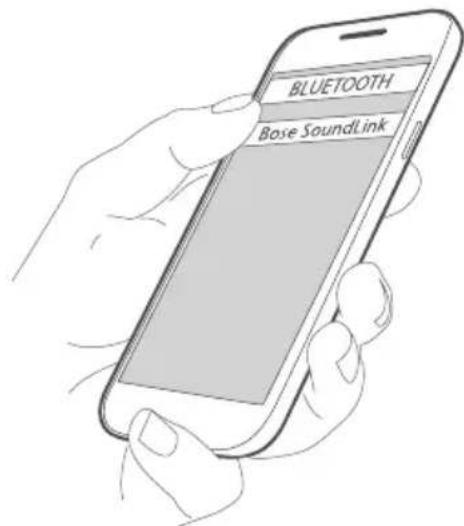
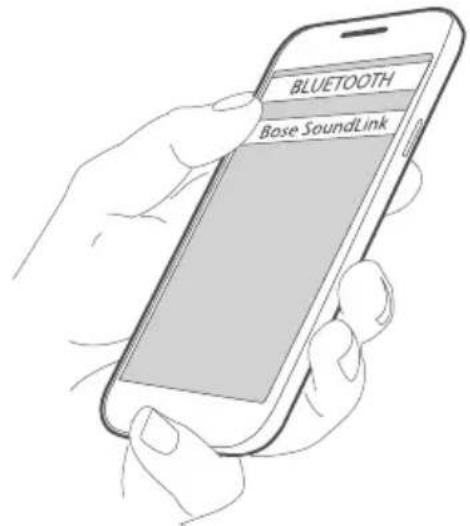
- On your mobile device, turn on the Bluetooth® feature.
Tip: The Bluetooth feature is usually found in the Settings menu.
- Select your Bose® SoundLink® speaker from the device list.
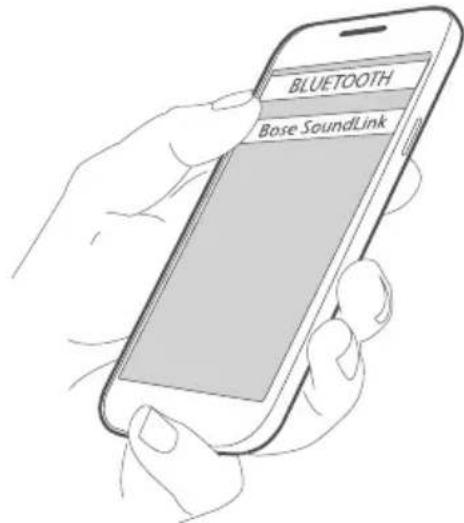
Once paired, you hear "Connected to ," and the Bluetooth indicator glows solid white.
Note: To pair another mobile device, see page 18.
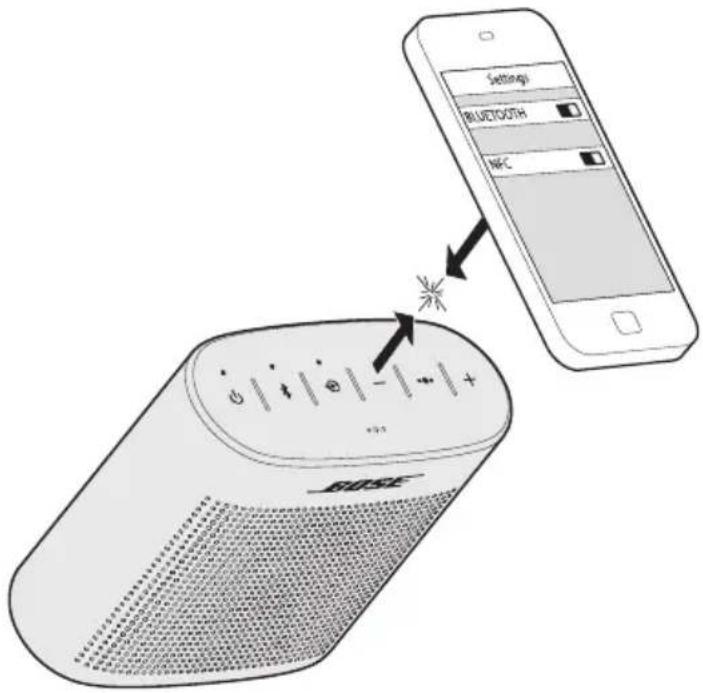
Pairing a mobile device with NFC
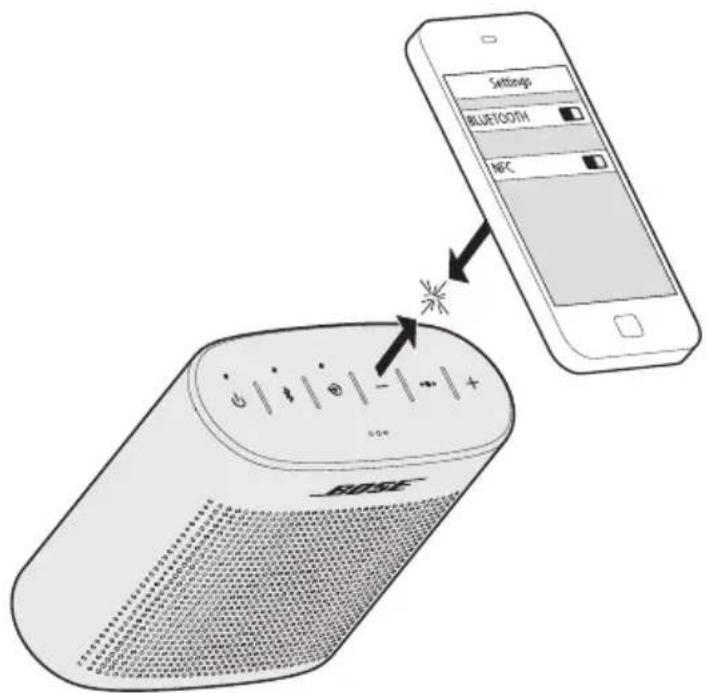
- Unlock your mobile device and turn on the Bluetooth® and NFC features.
Refer to your mobile device owner's guide to learn more about these features.
- Tap the NFC touchpoint on your mobile device to the top of your speaker.
Your device may prompt you to accept pairing.
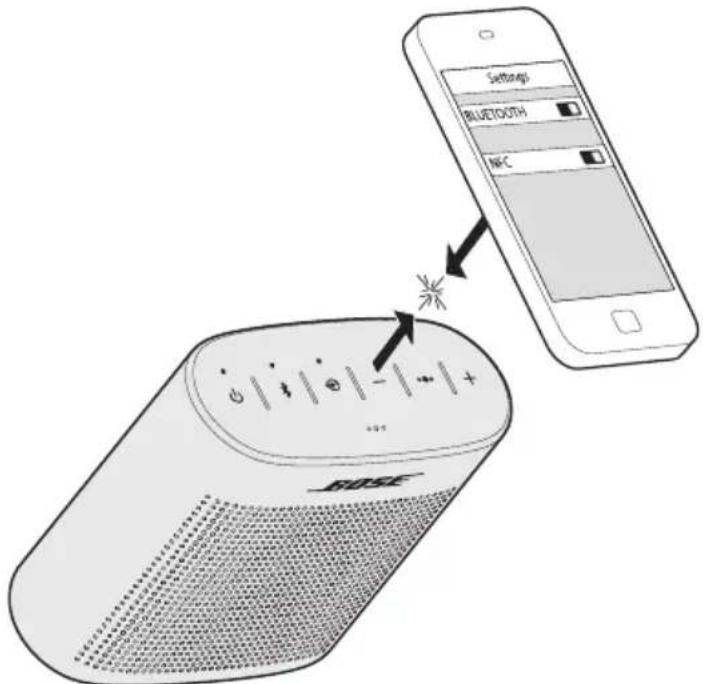
Once paired, you hear "Connected to ," and the Bluetooth indicator glows solid white.
Pairing another mobile device
You can store up to eight paired mobile devices in the speaker pairing list.
- Press and hold the Bluetooth® button until the Bluetooth indicator blinks blue, and you hear, "Ready to pair another device." Pair your mobile device to the speaker (see page 16).
- If your mobile device supports pairing via NFC, see page 17.
Disconnecting a mobile device
- Turn off the Bluetooth feature on your mobile device.
- If your mobile device supports pairing via NFC, tap and hold the NFC touchpoint on your mobile device to the top center of your speaker.
Reconnecting a mobile device
When powered on, your speaker tries to reconnect with the two most recently connected mobile devices.
Note: The mobile devices must be within range and powered on.
If your mobile device supports pairing via NFC, tap the NFC touchpoint on your mobile device to the top of your speaker.
You can store up to eight paired mobile devices in the speaker pairing list and your speaker can be actively connected to two mobile devices at a time.
Note: You can only play audio from one mobile device at a time.
Identifying the connected mobile devices
Press to hear which mobile devices are currently connected.
Switching between two connected mobile devices
- Pause audio on your first mobile device.
- Play audio on your second mobile device.
Connecting to a mobile device stored in your speaker's pairing list
- Press to hear which mobile device is currently connected.
- Press within two seconds to connect to the next mobile device in your speaker's pairing list.
- Repeat until you hear the desired mobile device name.
- Play audio on the connected device.
Clearing your speaker's pairing list
- Press and hold for 10 seconds, until you hear "Bluetooth" device list cleared. Ready to pair."
All mobile devices are cleared and your speaker is ready to pair a new mobile device.
- Delete your Bose® SoundLink® speaker from the Bluetooth list on your device.
Using the Bose Connect app
You can also easily manage multiple connected mobile devices using the Bose Connect app. For more information, see page 7.
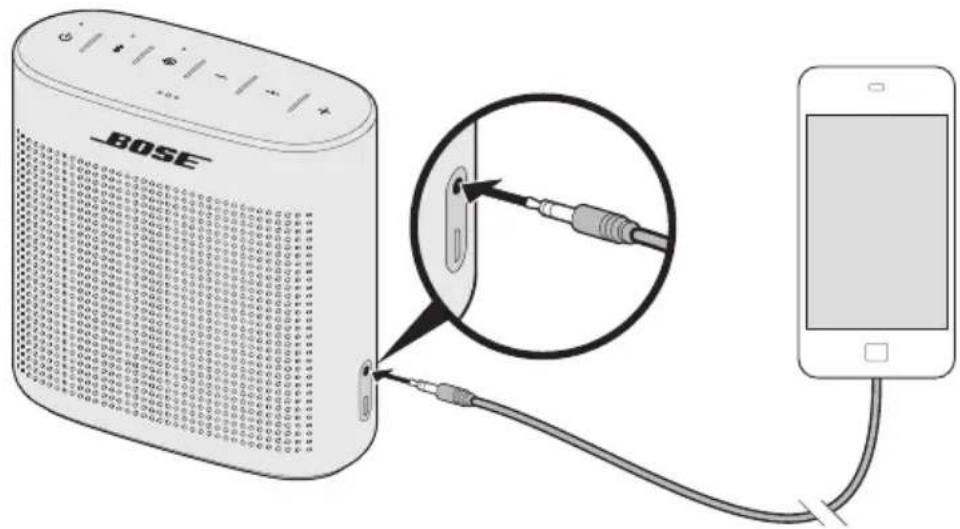
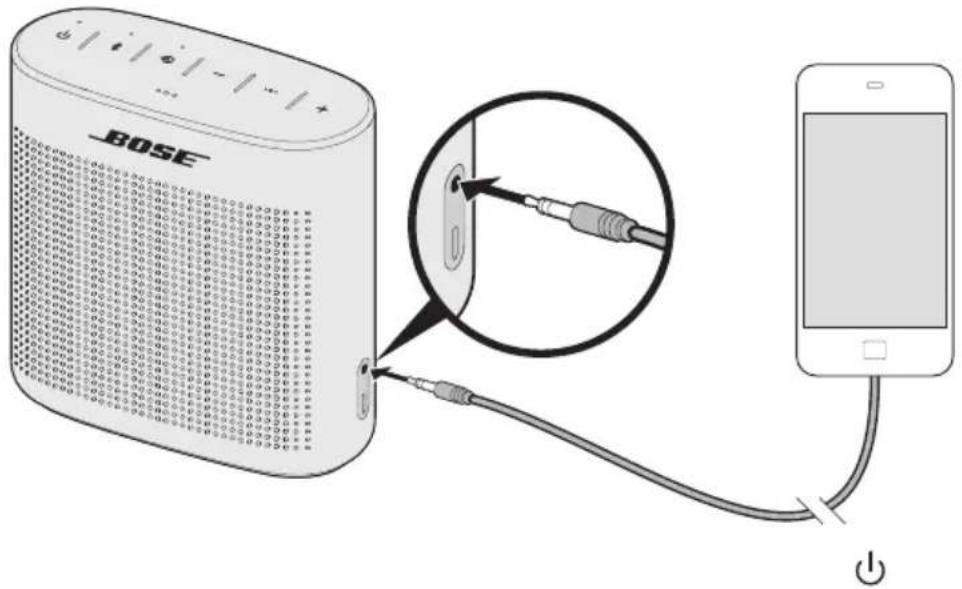
You can connect the audio output of a smartphone, tablet, computer or other type of mobile device to the speaker's AUX connector.
Using a cable to connect a mobile device
The AUX connector accepts a 3.5mm stereo cable plug (not provided).
- Using a 3.5mm stereo cable, connect your mobile device to the AUX connector on your speaker.
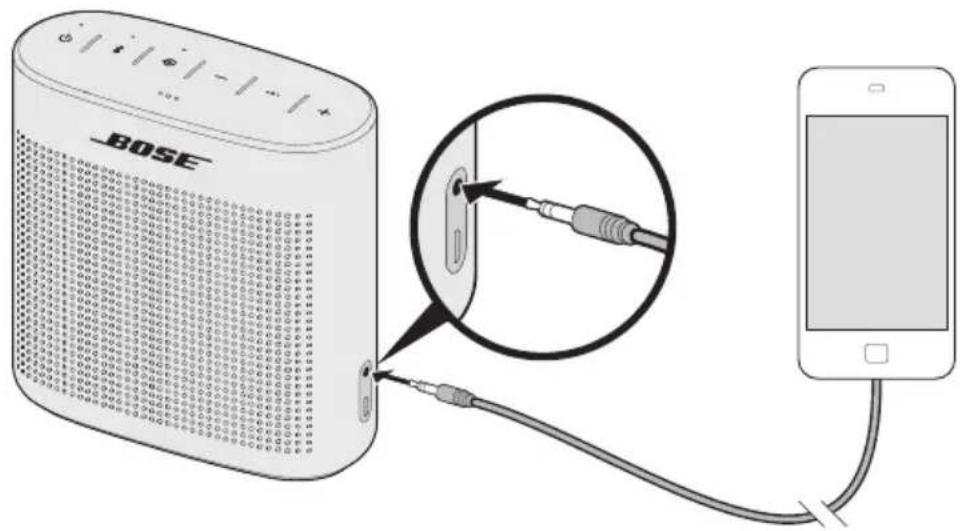
- Press on your speaker.
- Press
The Input indicator glows white.
Battery protection mode
When your speaker is unplugged and unused for more than three days with a remaining charge of less than 10 percent, it enters battery protection mode to preserve battery power. To reactivate your speaker, connect it to a USB wall charger or computer that is powered on.
When not in use, store your speaker in a cool place.
Note: Do not store your speaker for extended periods when fully charged or when the battery indicator blinks red.
Auto-off setting
Your speaker powers off after 30 minutes of inactivity (no sound coming from your speaker) while operating on battery power.
Disabling auto-off
- Press and hold + and simultaneously.
You hear "Auto-off disabled."
- Repeat to re-enable the auto-off feature.
Status indicators
The top of the system has a series of indicators that glow according to system state. Battery indicator
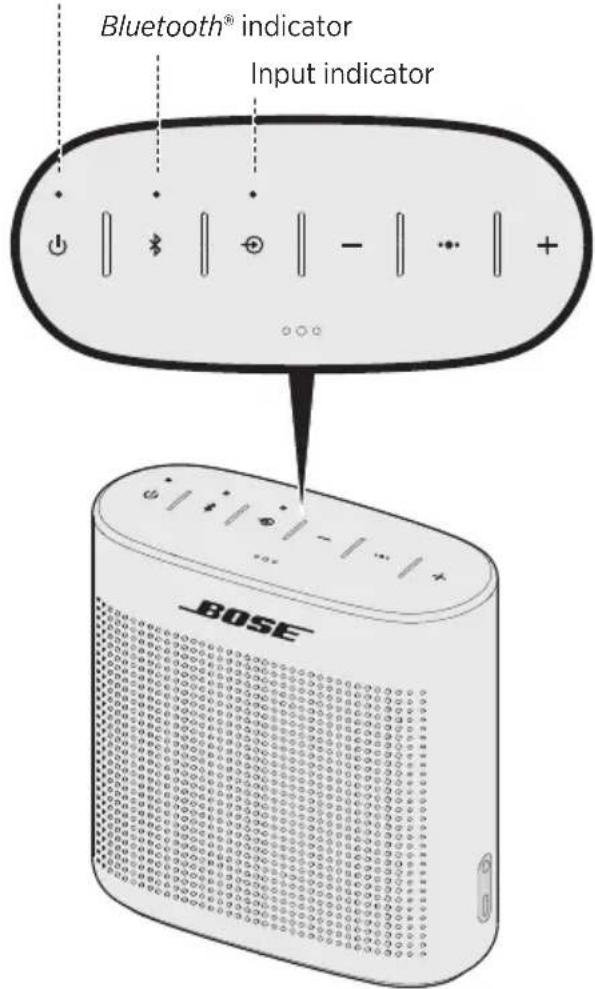
Battery indicator
Shows the battery charge level. Each time you power on your speaker, the battery indicator displays the battery charge level for two seconds and a voice prompt announces the battery charge level.
To check the battery charge level, press and hold while checking the battery indicator.
Note: Battery performance varies with the content played and the volume level at which it is played. In typical use, the speaker battery lasts up to eight hours.
| Indicator activity System | State |
| Solid green Charged / medium to full charge |
| Blinking amber Charging | |
| Solid amber Medium charge | |
| Blinking red Need to charge | |
Bluetooth® indicator
Shows the connection status of a mobile device.
| Indicator activity System | state |
| Blinking blue Ready to pair | |
| Blinking white Connecting | |
| Solid white Connected | |
Shows the connection status of a mobile device connected with an AUX cable.
| Indicator activity System | state |
| Solid white System is ready to play content from a device |
For more information on using a cable to connect a mobile device, see page 20.
Cleaning
- Clean the surface of the speaker with a soft, damp cloth (water only).
- Do not use any sprays near the speaker. Do not use any solvents, chemicals, or cleaning solutions containing alcohol, ammonia or abrasives.
- Do not allow liquids to spill into any openings.
Customer service
For additional help, contact Bose customer service. Refer to the contact sheet in the carton.
Limited warranty
Your speaker is covered by a limited warranty. Details of the limited warranty are provided on the warranty card in the carton. Please refer to the warranty card for instructions on how to register. Failure to register will not affect your limited warranty rights.
The warranty information provided with this product does not apply in Australia or New Zealand. See our website at www.bose.com.au/warranty or www.bose.co.nz/warranty for details of the Australia and New Zealand warranty.
Input Voltage: 5V
Input Current: 1A
If you experience problems with your Bluetooth® speaker:
- Check the battery indicator (see page 23). Charge your speaker if necessary.
- Make sure all cables are securely attached.
- Check the state of status indicators (see page 22).
- Place your speaker according to placement guidelines (see page 9).
- Make sure your mobile device supports Bluetooth® or Bluetooth pairing via NFC technology (see page 15).
If you could not resolve your issue, see the table below to identify symptoms and solutions to common problems. If you are unable to resolve your issue, contact Bose® customer service.
Common solutions
The following table lists symptoms and possible solutions to common problems.
| Problem What to do |
| Battery won't charge | ·Battery may be in protection mode or discharged. Plug the USB charging cable into a USB wall charger or computer that is powered on. |
| No power (battery) | ·Connect the USB charging cable to a different USB port.
·Use a different USB cable.
·Use a different wall charger.
·Connect to a different AC (mains) power source. |
| Speaker won't pair with mobile device | ·On your mobile device, turn the Bluetooth® feature off and then on.
Remove your speaker from the Bluetooth list on your mobile device. Pair your mobile device again.
·Clear your speaker's pairing list: Press and hold for 10 seconds.
Delete your Bose SoundLink speaker from the Bluetooth list on your device. Pair again.
·Pair a different device (see page 15).
·Reset your speaker (see page 27). |
| Speaker won't pair with NFC | ·Unlock your device and turn on the Bluetooth and NFC features.
·Tap the NFC touchpoint on the back of your device to the top of your speaker.
·Use Bluetooth to pair your device (see page 16). |
| Problem What | to do |
| No sound | • On your mobile device, turn the Bluetooth® feature off and then on. Remove your Bose SoundLink speaker from the Bluetooth list on your mobile device. Pair your mobile device again.• Increase the volume on your speaker, your mobile device and music source.• Verify voice prompts are on. Press to hear the connected mobile device. Make sure you are using the correct mobile device.• Use a different music source.• Pair a different mobile device (see page 15).If two mobile devices are connected, pause your other mobile device first.Clear your speaker's pairing list: Press and hold for 10 seconds. Delete your Bose SoundLink speaker from the Bluetooth list on your device. Pair again. |
| No sound from a cabled mobile device | • Power on the mobile device and play music.• Increase the volume on your speaker and mobile device.• Press and release until the Input indicator glows white.• Use a different AUX cable.• Increase the volume on the mobile device.• Connect a different mobile device. |
| Poor sound quality | • Use a different music source.• Pair a different mobile device.• Disconnect the second device.• Increase the volume on your mobile device and music source. |
| Poor sound quality from a cabled mobile device | • Increase the volume on your speaker and mobile device.• Use a different AUX cable.• Connect a different mobile device. |
| Audio plays from the wrong mobile device (when two mobile devices are connected) | • Press to hear the connected mobile device(s). Make sure you are using the correct mobile device.• Pause or quit the music source on the device playing music.• Disconnect the second device. |
| Speaker powers off | • If using a cabled mobile device, increase the volume on your mobile device.• Disable auto-off (see page 21). |
Resetting your speaker
Factory reset clears paired devices and language settings from your speaker and returns it to original factory settings.
- Power on your speaker.
- Press and hold for 10 seconds until the Bluetooth® indicator blinks blue, and you hear a voice prompt to select a language (see page 14).
Management Regulation for Low-power Radio-frequency Devices
ArticleXII
I henhold til "Management Regulation for Low-power Radio-frequency Devices" ma ingen virksomhed, organisation erer bruger uten tilladelse fra NCC aendre frekvensen, oge transmissonseffekten ell erandre de oprindelige egenskaber ell ydeevnen for godkende laveeffektradiofrevensenheder.
ArticleXIV
Importor i Kina: Bose Electronics (Shanghai) Company Limited, Part C, Plan 9, No. 353 North Riying Road, China (Shanghai) Pilot Free Trade Zone
Importor i EU: Bose GP, Castleblayney Road, Carrickmacross County, Monaghan, Irland
Importar i Taiwan: Bose Taiwan Branch, 9F-A1, No.10, Section 3, Minsheng East Road, Taipei City 104, Taiwan.
Telefonummer: 886 2 2514 7977.
Importar Mexico: Bose de Mexico, S. de R.L. de C.V., Paseo de las Palmas 405-204, Lomas de Chapultepec, 11000 Mexico, D.F. Telefonummer: 001 800 900 2673
Begr oneself garanti
China-Import: Bose Electronics (Shanghai) Company Limited, Part C, Plan 9, No. 353 North Riying Road, China (Shanghai) Pilot Free Trade Zone
EU-Import: Bose GP, Castleblayney Road, Carrickmacross, County Monaghan, Irland
Taiwan-Import: Bose Taiwan Branch, 9F-A1, No.10, Section 3, Minsheng East Road, Taipei City 104, Taiwan.
Telefonnummer: 886 2 2514 7977.
Mexiko-Import: Bose de Mexico, S. de R.L. de C.V., Paseo de las Palmas 405-204, Lomas de Chapultepec, 11000 Mexico, D.F. Telefonummer: 001 800 900 2673
Importeur in China: Bose Electronics (Shanghai) Company Limited, Part C, Plan 9, No. 353 North Riying Road, China (Shanghai) Pilot Free Trade Zone
Importeur in de EU: Bose GP, Castleblayney Road, Carrickmacross, County Monaghan, Ierland
Importeur in Taiwan: Bose Taiwan Branch, 9F-A1, No.10, Section 3, Minsheng East Road, Taipei City 104, Taiwan. Telefoonnummer: 886 2 2514 7977.
Importeur in Mexico: Bose de Mexico, S. de R.L. de C.V., Paseo de las Palmas 405-204, Lomas de Chapultepec, 11000 Mexico, D.F. Telefoonnummer: 001 800 900 2673
Gaaar: global.Bose.com/Support/SLCII
Importador en China: Bose Electronics (Shanghai) Company Limited, Part C, Plan 9, No. 353 North Riying Road, China (Shanghai) Pilot Free Trade Zone
Importador en UE: Bose GP, Castleblayney Road, Carrickmacross, County Monaghan, Irlanda
Importador en Taiwan: Bose Taiwan Branch, 9F-A1, No.10, Section 3, Minsheng East Road, Taipei City 104, Taiwan. Nstreamo de tefono: 886 2 2514 7977.
Importador en Mexico: Bose de Mexico, S. de R.L. de C.V., Paseo de las Palmas 405-204, Lomas de Chapultepec, 11000 Mexico, D.F.Numero de téléphone: 001 800 900 2673
Visite: global.Bose.com/Support/SLCII
Alternatively, you can use the application Bose Connect (vea la page 7).
Application Bose Connect
7
Prise en main
Consultez la page global.Bose.com/Support/SLCII.
Importatore per la Cina: Bose Electronics (Shanghai) Company Limited, Part C, Plan 9, No. 353 North Riying Road, China (Shanghai) Pilot Free Trade Zone
Importatore per I'UE: Bose GP, Castleblayney Road, Carrickmacross, County Monaghan, Irlanda
Importatore per Taiwan: Bose Taiwan Branch, 9F-A1, No.10, Section 3, Minsheng East Road, Taipei City 104, Taiwan.
Numero di telefon: 886 2 2514 7977.
Importatore per il Messico: Bose de Mexico, S. de R.L. de C.V., Paseo de las Palmas 405-204, Lomas de Chapultepec, 11000 Mexico, D.F.Numero di telefono: 001 800 900 2673
Controllivavocate 12
Visitare: global.Bose.com/Support/SLCII
Kinai importor: Bose Electronics (Shanghai) Company Limited, Part C, Plan 9, No. 353 North Riying Road, Kina (Shanghai) Pilot Free Trade Zone
EU-importor: Bose GP, Castleblayney Road, Carrickmacross, County Monaghan, Irorszag
Tajvani importor: Bose Taiwan Branch, 9F-A1, No.10, Section 3, Minsheng East Road, Taipei City 104, Tajvan. Telefonszam: 886 2 2514 7977.
Mexikói importo: Bose de México, S. de R.L. de C.V., Paseo de las Palmas 405-204, Lomas de Chapultepec, 11000 Mexico, D.F. Telefonszám: 001 800 900 2673
A Bluetooth technology
Management Regulation for Low-power Radio-frequency Devices
Artikkel XII
Importor for Kina: Bose Electronics (Shanghai) Company Limited, Part C, Plan 9, No. 353 North Riying Road, Kina (Shanghai) Pilot Free Trade Zone
Importor for EU: Bose GP, Castleblayney Road, Carrickmacross, County Monaghan, Irland
Importor for Taiwan: Bose Taiwan Branch, 9F-A1, No.10, Section 3, Minsheng East Road, Taipei City 104, Taiwan. Telefonnummer: 886 2 2514 7977.
Importor for Mexico: Bose de Mexico, S. de R.L. de C.V., Paseo de las Palmas 405-204, Lomas de Chapultepec, 11000 Mexico, D.F. Telefonummer: 001 800 900 2673
Gà til: global.Bose.com/Support/SLCII
Importer — Chiny: Bose Electronics (Shanghai) Company Limited, Part C, Plan 9, No. 353 North Riying Road, China (Shanghai) Pilot Free Trade Zone
Importer - UE: Bose GP, Castleblayney Road, Carrickmacross, County Monaghan, Ireland
Importer — Tajwan: Bose Taiwan Branch, 9F-A1, No.10, Section 3, Minsheng East Road, Taipei City 104, Taiwan. Numer telefonu: 886 2 2514 7977.
Importer - Meksyk: Bose de Mexico, S. de R.L. de C.V., Paseo de las Palmas 405-204, Lomas de Chapultepec, 11000 Mexico, D.F. Numer Telefonu: 001 800 900 2673
Importador na China: Bose Electronics (Shanghai) Company Limited, Part C, Plan 9, No. 353 North Riying Road, China (Shanghai) Pilot Free Trade Zone
Importador na CE: Bose GP, Castleblayney Road, Carrickmacross, County Monaghan, Ireland
Importador de Taiwan: Bose Taiwan Branch, 9F-A1, No.10, Section 3, Minsheng East Road, Taipei City 104, Taiwan.
Número de téléphone: 886 2 2514 7977.
Importador no Mexico: Bose de Mexico, S. de R.L. de C.V., Paseo de las Palmas 405-204, Lomas de Chapultepec, 11000 Mexico, D.F.Numero de téléphone: 001 800 900 2673
Visite: global.Bose.com/Support/SLCII
Kinainportor: Bose Electronics (Shanghai) Company Limited, Part C, Plan 9, No. 353 North Riying Road, Kina (Shanghai) Pilot Free Trade Zone
EU-importor: Bose GP, Castleblayney Road, Carrickmacross, County Monaghan, Irland
Taiwanimportor: Bose Taiwan Branch, 9F-A1, No.10, Section 3, Minsheng East Road, Taipei City 104, Taiwan.
Telefonnummer: 886 2 2514 7977.
Mexikoimportor: Bose de Mexico, S. de R.L. de C.V., Paseo de las Palmas 405-204, Lomas de Chapultepec, 11000 Mexico, D.F. Telefonummer: 001 800 900 2673
FCC 15 wuueuuu uuuuauu uuuuuaa uuuuuaa uuuuuaa uuuuuaa uuuuuaa uuuuuaa uuuuuaa uuuuuaa uuuuuaa uuuuuaa uuuuuaa uuuuuaa uuuuuaa uuuuuaa uuuuuaa uuuuuaa uuuuuaa uuuuuaa uuuuuaa uuuuuaa uuuuua a
·山
·
·
- 1500000000000000000000000000000000000000000000000000000000000000000000000000000000000000000000
CANICES-3 (B)/NMB-3(B)
nssuunnnnnnnnnnnnnnnnnnnnnnnnnnnnnnnnnnnnnnnnnnnnnnnnnnnnnnnnnnnnnnnnnnnnnnnnnnnnnnnnnnnnnnnnnnnnnnn
12
C Bose Corporation 1999/5/EC 40278360000000000000000000000000000000000000000000000000000000000 www.Bose.com/compliance

粤雪湘牌回收
y

|
| |
| (Pb) | (Pb) | (Hg) | (Cd) | (CR(VI)) | (PBB) |
| PCB | X | 0 | 0 | 0 | 0 | 0 |
| X | 0 | 0 | 0 | 0 | 0 |
| 0 | 0 | 0 | 0 | 0 | 0 |
| X | 0 | 0 | 0 | 0 | 0 |
| X | 0 | 0 | 0 | 0 | 0 |
|
| 15 |
| X: |
Jusansannaaannnnu
y
HJ1
N27EEL
Bose y
http://global.Bose.com/register
Bose Electronics (Shanghai) Company Limited, Part C, Plan 9, No. 353 North Riying Road,
China (Shanghai) Pilot Free Trade Zone
EU: Bose GP, Castleblayney Road, Carrickmacross, County Monaghan, Ireland
Bose Taiwan Branch, 9F-A1, No.10, Section 3, Minsheng East Road, Taipei City 104, Taiwan
nuiu 886225147977
Bose de Mexico, S. de R.L. de C.V., Paseo de las Palmas 405-204, Lomas de Chapultepec, 11000
Mexico, D.F. wuyuoyu: 0018009002673
WuBraaBnBnBnBnBnBnBnBnBnBnBnBnBnBnBnBnBnBnBnBnBnBnBnBnBnBnBnBnBnBnBnBnBnBnBnBnBnBnBnBnBnBnBnBnBnBnBnBnBnBnB
WwBaaanrnnnnaaennnnn 23
nnae
mnnnnnnaa 24
wunmnnn 24
muaaunnnn 24
24
nunnn
25
m 27
Bose Connect Wawannnnae Bluetooth 10000000000000000000000000000000000000000000000
#
Jn
Apple Appd Android
·
·
·WJWJUJUHJUJUJUJUJUJUJUJU
·

Download on the
App Store
at 0
Google play
#
1
SoundLink Color Bluetooth II
USB
Bose
A
Wauanwnnwnnnaa n 10 w. uauananaunuunnnnunwauanununununununununununununununununununununununununununununununununununununununununun
·Wauuunnwnnnnnaaannnnnnnnnnnnnnnnnnnnnnnnnnnnnnnnnnnnnnnnnnnnnnnnnnnnnnnnnnnnnnnnnnnnnnnnnnnnnnnnnnnnnnnnnnnnnnnnnnnnnnnnnnnnnnnnnn
1.
WwWwWwWwWwWwWwWwWwWwWwWwWwWwWwWwWwWwWwWwWwWwWwWwWwWwWwWwWwWwWwWwWwWwWwWwWwWwWwWwWwWwWwWw
2007年1月2日:
W
WwWwWwWwWwWwWwWwWwWwWwWwWwWwWwWwWwWwWwWwWwWwWwWwWwWwWwWwWwWwWwWwWwWwWwWwWwWwWwWwWwWwWwWwWwWwWwWwWwWwW
1000 mA
- 1
- 1
nnaa
ywnnnaa/
WuWu
N
W
HJ719H: 2
n
| 汶� ng | ●●● |
| 汶� ng | ●●●●
汶� ng: 汶� ng'la'ayya mnp●●la'ayya
(汶� ng'20) |
| 汶� ng'la'ayya mnp●● | ●●● |
| 汶� ng'la'ayya mnp●● | ●●●● |
nnaa n wlnnn
- English - Mandarin - Italian - Dutch
- Spanish - Japanese - Portuguese - Pycckn
- French - Korean - Swedish - Polish
- German
H
global.Bose.com/Support/SLCII
Bose Connect (5)
nnnnnnnnnnnnnnnnnnnnnnnnnnnnnnnnnnnnnnnnnnnnnnnnnnnnnnnnnnnnnnnnnnnnnnnnnnnnnnnnnnnnnnnnnnnnnnnnnnnnnnnnnnnnnnnnn
n
- n+na=waan
- 1
nun n 27777777777
n+6n-7yWwHuaNn
n7y19: 777777777777777777
n
- nna +nnaaannnnnnaanennnnnnnnnnnnnnnnnnnnnnnnnnnnnnnnnnnnnnnnnnnnnnnnnnnnnnnnnnnnnnnnnnnnnnnnnnnnnnnnnnnnnnnnnnnnnnnnnnnnnnnnnn
- n+na-wwan
- “”
nblnblnblnblnblnblnblnblnblnblnblnblnblnblnblnblnblnblnblnblnblnblnblnblnblnblnblnblnblnblnblnblnblnblnblnblnblnblnblnblnblnblnblnblnblnblnblnblnblnbln
nraanrnnnnaa
Neanwnnnnne nnnnnnnnnnnnnnnnnnnnnnnnnnnnnnnnnnnnnnnnnnnnnnnnnnnnnnnnnnnnnnnnnnnnnnnnnnnnnnnnnnnnnnnnnnnnnnnnnnnnnnnnnnnnnnnnnnnnnnnnnnnnnnnnnnnnnnnnnnnnnnnnnn nn
anannnnnnaaennnnnnaawwwnnaeBose Connect waaanrnnnnaaee (5)
NFC
NFC 1
| Bluetooth
Bluetooth
Bluetooth
Bluetooth | Bluetooth
Bluetooth
Bluetooth
Bluetooth
Bluetooth
Bluetooth
Bluetooth
Bluetooth
Bluetooth
Bluetooth
Bluetooth
Bluetooth
Bluetooth
Bluetooth
Bluetooth
Bluetooth
Bluetooth
Bluetooth
Bluetooth
Bluetooth
Bluetooth
Bluetooth
Bluetooth
Bluetooth
Bluetooth
Bluetooth
Bluetooth
Bluetooth
Bluetooth
Bluetooth
Bluetooth
Bluetooth
Bluetooth
Bluetooth
Bluetooth
Bluetooth
Bluetooth
Bluetooth
Bluetooth
Bluetooth
Bluetooth
Bluetooth
Bluetooth
Bluetooth
Bluetooth
Bluetooth
Bluetooth
Bluetooth
Bluetooth
Bluetooth
Bluetooth | Bluetooth
Bluetooth
Bluetooth
Bluetooth
Bluetooth
Bluetooth
Bluetooth
Bluetooth
Bluetooth
Bluetooth
Bluetooth
Bluetooth
Bluetooth
Bluetooth
Bluetooth
Bluetooth
Bluetooth
Bluetooth
Bluetooth
Bluetooth
Bluetooth
Bluetooth
Bluetooth
Bluetooth
Bluetooth
Bluetooth
Bluetooth
Bluetooth
Bluetooth
Bluetooth
Bluetooth
Bluetooth
Bluetooth
Bluetooth
Bluetooth
Bluetooth
Bluetooth
Bluetooth
Bluetooth
Bluetooth
Bluetooth
Bluetooth
Bluetooth
Bluetooth
Bluetooth
Bluetooth |
nannnnn: nnnnnnnnnnnnnnnnnnnnnnnnnnnnnnnnnnnnnnnnnnnnnnnnnnnnnnnnnnnnnnnnnnnnnnnnnnnnnnnnnnnnnnnnnnnnnnnnnnnnnnnnnnnnnnn
n
1
- Bluetooth®
山
nauu: nuaauiueeoth awwu uuuuun
- Bose SoundLink
"
nannn: nnnnnaaunnnn nnnean ane annnne aen
NFC
- Jauananaunnnnnaaennnnnnnnnnnnnnnnnnnnnnnnnnnnnnnnnnnnnnnnnnnnnnnnnnnnnnnnnnnnnnnnnnnnnnnnnnnnnnnnnnnnnnnnnnnnnnnnnnnnnnnnnnnnnnnnnnnnnnnnnnnnnnnnnnnnnnnnnnnnnn
山
- 1
1
"
n
nnaananaananaananaananaananaananaananaananaananaananaananaananaananaananaananaananaananaananaananaananaananaananaananaananaananaananaananaananaananaananaananaananaananaananaananaananaananaananaananaananaananaananaananaananaananaananaananaananaananaananaanaraannaa
WuHuaHuaHuaHuaHuaHuaHuaHuaHuaHuaHuaHuaHuaHuaHuaHuaHuaHuaHuaHuaHuaHuaHuaHuaHuaHuaHuaHuaHuaHuaHuaHuaHuaHuaHuaHuaHuaHuaHuaHuaHuaHuaHuaHuaHuaHuaHuaHuaHuaHuaHUA
nannnnnaaennnne
10 1
yovn bnnnnaa nwnnnaunnne 1sB nnnnnnnnnnnnnnnnnnnnnnnnnnnnnnnnnnnnnnnnnnnnnnnnnnnnnnnnnnnnnnnnnnnnnnnnnnnnnnnnnnnnnnnnnnnnnnnn
y
:
nWw
n
waaananaananaananaananaananaananaananaananaananaananaananaananaananaananaananaananaananaananaananaananaananaananaananaananaananaananaananaananaananaananaananaananaananaananaananaananaananaananaananaananaananaananaananaananaananaananaananaananaananaananaanara
nraa
- n+ua 1
“
- nwnnnae nnne
Wwuaan
7777777777777777777777777777
WuWuWuWuWuWuWuWuWuWuWu
Wwuaanuuee
H 2 H
nnaananaananaananaananaananaananaananaananaananaananaananaananaananaananaananaananaananaananaananaananaananaananaananaananaananaananaananaananaananaananaananaananaananaananaananaananaananaananaananaananaananaananaananaananaananaananaananaananaananaananaan
: 1234567890123456789012345678901234567890123456789012345678901234567890123456789012345678901234567890123456789
中國國社:Bose Electronics (Shanghai) Company Limited, Part C, Plan 9, No. 353 North Riying Road, China (Shanghai) Pilot Free Trade Zone
EU Suilel erer: Bose GP, Castleblayney Road, Carrickmacross, County Monaghan, Ireland
[Baidu] global.Bose.com/Support/SLCII
Bose Connect 安全的使用
鍵鍙鍙鍙鍙鍙鍙鍙鍙鍙鍙鍙鍙鍙鍙鍙鍙鍙鍙鍙鍙鍙鍙鍙鍙鍙鍙鍙鍙鍙鍙鍙鍙鍙鍙鍙鍙鍙鍙鍙鍙鍙鍙鍙鍙鍙鍙鍙鍙鍙鍙鍫鍚鍚鍚鍚鍚鍚鍚鍚鍚鍚鍚鍚鍚鍚鍚鍚鍚鍚鍚鍚鍚鍚鍚鍚鍚鍚鍚鍚鍚鍚鍚鍚鍚鍚鍚鍚鍚鍚鍚鍚鍚鍚鍚鍚鍚鍚鍚鍚鍚鍚鍗鍚鍚鍚鍚鍚鍚鍚鍚鍚鍚鍚鍚鍚鍚鍚鍚鍚鍚鍚鍚鍚鍚鍚鍚鍚
Bose Connect Cameroon
i.
www.bose.com.au/warranty .wwww.bose.co.nz/warranty to camto hse si.
吉舍 佳
日
日
Bluetooth® 所用的工具
欧洲进口商:Bose GP, Castleblayney Road, Carrickmacross, County Monaghan, Ireland
歐洲進口商:Bose GP, Castleblayney Road, Carrickmacross, County Monaghan, Ireland
到訪:global.Bose.com/Support/SLCII
Note: This equipment has been tested and found to comply with the limits for a Class B digital device, pursuant to Part 15 of the FCC Rules. These limits are designed to provide reasonable protection against harmful interference in a residential installation. This equipment generates, uses, and can radiate radio frequency energy and, if not installed and used in accordance with the instructions, may cause harmful interference to radio communications. However, there is no guarantee that interference will not occur in a particular installation. If this equipment does cause harmful interference to radio or television reception, which can be determined by turning the equipment off and on, the user is encouraged to try to correct the interference by one or more of the following measures:
- Reorient or relocate the receiving antenna.
- Increase the separation between the equipment and receiver.
- Connect the equipment into an outlet on a circuit different from that to which the receiver is connected.
- Consult the dealer or an experienced radio/TV technician for help.
Changes or modifications not expressly approved by Bose Corporation could void the user's authority to operate this equipment.
This device complies with part 15 of the FCC Rules and with Industry Canada license-exempt RSS standard(s). Operation is subject to the following two conditions: (1) This device may not cause harmful interference, and (2) this device must accept any interference received, including interference that may cause undesired operation.
This device complies with FCC and Industry Canada radiation exposure limits set forth for general population. It must not be co-located or be operating in conjunction with any other antennas or transmitters.
This equipment should be installed and operated with a minimum distance of 8 inches (20 cm) between radiator and your body.
Meets IDA Requirements.
CANICES-3 (B)/NMB-3(B)
Management Regulation for Low-power Radio-frequency Devices
Article XII
According to "Management Regulation for Low-power Radio-frequency Devices" without permission granted by the NCC, any company, enterprise, or user is not allowed to change frequency, enhance transmitting power or alter original characteristic as well as performance to an approved low power radio-frequency devices.
Article XIV
The low power radio-frequency devices shall not influence aircraft security and interfere legal communications; If found, the user shall cease operating immediately until no interference is achieved. The said legal communications means radio communications operated in compliance with the Telecommunications Act.
The low power radio-frequency devices must be susceptible with the interference from legal communications or ISM radio wave radiated devices.
Bose Corporation hereby declares that this product is in compliance with the essential requirements and other relevant provisions of Directive 1999/5/EC and all other EU directive requirements. The complete declaration of conformity can be found at: www.Bose.com/compliance

This symbol means the product must not be discarded as household waste, and should be delivered to an appropriate collection facility for recycling. Proper disposal and recycling helps protect natural resources, human health and the environment. For more information on disposal and recycling of this product, contact your local municipality, disposal service, or the shop where you bought this product.

| Names and Contents of Toxic or Hazardous Substances or Elements |
| Toxic or Hazardous Substances and Elements |
| Part Name | Lead(Pb) | Mercury(Hg) | Cadmium(Cd) | Hexavalent(CR(VI)) | PolybrominatedBiphenyl(PBB) | Polybrominated diphenylether(PBDE) |
| PCBs X 0 0 0 0 0 | | | | | | |
| Metal Parts X 0 0 0 0 0 | | | | | | |
| Plastic Parts 0 0 0 0 0 | 0 | | | | | |
| Speakers X 0 0 0 0 0 | | | | | | |
| Cables X 0 0 0 0 0 | | | | | | |
| This table is prepared in accordance with the provisions of SJ/T 11364.O: Indicates that this toxic or hazardous substance contained in all of the homogeneous materials for this part is below the limit requirement of GB/T 26572. | 15 |
| X: Indicates that this toxic or hazardous substance contained in at least one of the homogeneous materials used for this part is above the limit requirement of GB/T 26572. |
製品情報の控元
中国におけの輸入元:Bose Electronics (Shanghai) Company Limited, Part C, Plan 9, No. 353 North Riying Road, China (Shanghai) Pilot Free Trade Zone
EUにおた輸入元:BoseGP,CastleblayneyRoad,Carrickmacross,CountyMonaghan,Ireland
台湾におけの輸入元:Bose Taiwan Branch, 9F-A1, No.10, Section 3, Minsheng East Road, Taipei City 104, Taiwan. Phone Number: 886 2 2514 7977
Mekshon 11000 Mexico, D.F. Phone Number: 001 800 900 2673
global.Bose.com/Support/SLCII
Choi Jin Ke Aayak: Bose Electronics (Shanghai) Company Limited, Part C, Plan 9, No. 353 North Riying Road, China (Shanghai) Pilot Free Trade Zone
Bose GP, Castleblayney Road, Carrickmacross, County Monaghan, Ireland
Laiyao: Bose Taiwan Branch, 9F-A1, No.10, Section 3, Minsheng East Road, Taipei City 104, Taiwan
fao@taiwan.net/886225147977|
Méneikisakó Aayalok: Bose de México, S. de R.L. de C.V., Paseo de las Palmas 405-204, Lomas de Chapultepec, 11000 México, D.F. faoonl nol 001 800 900 2673
Eepu, Eepu, oag, Siri snyk t a y Ameirik k a thy Ayny dsh i pijekn Eepu, ic k. teodmakrse K Eepu rtoepu eepu lck. ka eek saovla chinh h
Ee 1
Buluty shld v chin h eav lao gao klt sy SIG ke Apanne pajojikat teodmaekr s, ick. y a ense hia anny cihoh
Download on the App Store
Google play
Shamaln Bar
Kafotn Kefahvghanipovk Oalr Eevy Hsiniyat kre Kniagnolilikit Puyj shaimel
saiiiee k eelr cty ruiu I USB chai jg a
yadide kupakkr kpa pui jk aiklglarst t, toe uakka oksloemal n hi kare | apn e Aichoknt boas vikke tataa bokgahk sereva s mapokk kokoton me saopk k 0t ke d
Janae: global.Bose.com/Support/SLCII
Aap 7
yadit 3aepkfo haoi prayamikelta upelegh nhi ho, to deey "vayasn pramcctuak o kshm k
Kikshi Bhayat k a chayon kran
- 1
- Jzab Aapok 3Aponi Bapaa Suanae de, to Usska Chayn KcRn Heu- -KpAatmak Bctn kof dahar r
Aap Eek 1ep Aev “peyar ke liee teayar" aatte
Vahayas Praeputkai Kaiksham Karan
- Eev - ddoon k eek saoth dabar rghj Jb tck ke Aap "vayasn pramptus aak" nhi sunnte h!
Tepy: vayasn praemtus k o pun: sahkm knrno he t dohrae
Bhata PariRivatn K
- 1e + d0an' k e efak sAgh dabag rayjz jz tck k AAp Pahelio haoa a Vekkpeh T U
- 2
- Jab 3 Aap 3 Apn 3 Aap 3 Prayamikel a k o m t o . - k o dabakr 3 Ame r k jab 5 k 3 Aap 4 Eek 3 Bap 4 Ead " nH> s e knonokcted" nH
尔 尔 尔 尔 尔 尔 尔 尔 尔 尔 尔 尔 尔 尔 尔 尔 尔 尔 尔 尔 尔 1 贝达阿普贝达阿普贝达阿普贝达阿普贝达阿普贝达阿普贝达阿普贝达阿普贝达阿普贝达阿普贝达阿普贝达阿普贝达阿普贝达阿普贝达阿普贝达阿普贝达阿普贝达阿普贝达阿普贝达阿普贝达阿普贝达阿普贝达阿普贝达阿普贝达阿普贝达阿普
Aapnepayarigvichkay
Lefu 2000 10000000000000000000000000000000000000000000000000000000000000
Aap Apanne mabaiagul 7) k o pnyar kranne h t bosaknokr a
NFC khya ?
NFC Eek Praduyogikai He Jia Mabala Uppkargoi Ka OApasat Me Bss Tep Kkrnse Vayaralekakmnyinke shan rshayapit kare ng Mmabala Uppkargoi Ka SsHbM bnaTie | yh jalnne hetl kiahApka Mabala Uppkarg NFC sMaoyit He ya nhi, Aupn e npkarg ka Rvammi Maagadrioka de
Kishni MolaBala UppkRup Ka kneKcT KcRnKe LlE
AUX kanneneketr 3.5 mmo sntotirey o kabal pclg a r krtla h (doy a nhi gay)
- 3.5 mmi o r tio r y o kbal k uayog aol uapkra k a uux kneokr s e kneokr
- 3
3.
E
EeK e E a a a a a a a a a a a a a a a a a a a a a a a a a a a a a a a a a a a a a a a a a a a
www.bose.com.au/warranty or www.bose.co.nz/warrantyI
तक्लिकी जान्दरी
伊尼普瓦拉: 5V
201A
yadit 3apke cTey Rpokr me kaoe ghi saMkayaa Ucpn nohotei h:
AaHnoye cTpoiCTBO COOTBeTcByeT ORpaHnueHnM NO 3AekTpMaHnTHOMy N3AuyehnIO FCC n Industry Canada, yCTaHOBaeHHbIM dAA Bcero HaceAEHnE. Ero He CLeayet YcTaHaBAuBaTb PRAOM IAN COBMeCTHO ICNoAb3OBAt b C apyHMn aHTeHHAMn IAN nepeDaTuHKAMN.
AaHHO 6OpUyOBAHHe OAnKHO yCTaHaBANBaTbCn NcNIOAb30BaTbCn Ha MNHIMaABHom pacCToHHn 8 HOM (20 cm) MEXdy paDnATOPOM n NOAb30BaTeAEM.
COOTBETCTByeT Tpe6oBaHnIaMIDA.
CTaHApT CAN ICES-3(B)/NMB-3(B)
Tpe6obHnA MaAMoUHbIX paAnOuactOThBix yCTPOIcTB
CtatbXII
B COOTBETCBN C «Tpe6oBaHnRA MAn MaLOMOUHbIX paADNoOAcT0THbIX yCTpOcTB» KOMNaHnA, PpeApnTnM IAN IIOa3OBaTeAAM 3aIpeuaeTcR N3MeHrTb YAcTOTy, YBeAunBaTb MOUHOCTb IpePaTuKaN Man MeHrTa NCxOAdhie XapakTePncTnK pa3peuHbIX MaLOMOUHbIX paADNoAcT0THbIX yCTpOcTB 6e3 pa3peuHenN NCC.
CTaTbXIV
MaOMOUsHbpeaOnactOTbIe yCTPOBCTBa He OAnXhbl BANrTa Ha 6e30nacHOCTb ABnAIOAETOB HAn CO3aBaTb
PomExn AAR 3aKOHbIX CpeACTCB BAY; B CAYae 06HApXeHn IoO6hBx NOMex IIOAB3OBaTeAb DOAXeH HEmeDAEHH
PpeKpaTb EKCnAYatau. IOB BblweynOMaHyTBIMN 3aKOHbIMn CpeCTBaMn CB3N IOHMAOTc CpeCTBa
paDIOBCB3N, EKCNAYATnpyembe B COOTBcTBN C AKTom 06 ObecneHm TeLekOMmyNaCun.
MaAOMOHbIe paAnOuaCTOBHe yCTpOInCTBa DOAnKbI 6bITb BOCnPmMnBbl K NOMExaM OT 3aKOHbIX CpeAcTB CBa3N IAN yCTpOInCTB, IN3AUYaUoXx paAnIOBOAHbI ISM.
HE nbITaeTecb N3BKeTa b AHTN-NOHHbI aKKMyAaTOP n3 DaHHO yCTpOcTba. AAn I3BaeueHn aKKMyAaTopa 6paTntecb K MeCTHOMy npoabuCy Bose an dpyrOmy KBaAMnIpOBaHHOMy CneuaAaCTy.

Kompania Bose Corporation Hactoam 3aBareT, YTO daHbI npOyKT COOTBeCTByET OCHOBhIM Tpe6obAHm IN dpYrIM BaxhbIM IIOAOKeHNsM AnpeKTHBbl 1999/5/EC IN dpYrIM Tpe6obAHm AnpeKTHB EC. PAnh TeKT DeKaapuCIN COOTBeCTBn CM. Ha caTe www.Bose.com/compliance

YTHAN3NpyIte HcnoA3OBaHHbIe 6aTapeKn HaAeKaUIM 06pa3OM, co6AIOaJ MeCTHbIe HopMaTHBbIe Tpe6oBaHH. He cKuratb!
3TOT CMMBOU O3Haayet, YTOYCTPOINCTBO 3aIpeuaeTc8YTHAN3HPOBaTB C6bITOBbIMN OTXoAMn, aHEOxOAnMO AOCTABNTB COOTBE TcBYUOuN C6bOpOHbI NyHKT AIA nepepa60TK. HAdLeKaaJyTtAN3auN I nepepa60TKa NOMORAOHT 3aUHTNB TpnpOAnHbIe PecypcbI, 3dOpOBBe AIODeI N OkpyKaUOuyCpey. DOnOAHInTeAhbIe CBedeHnO6 yTNAN3aUN INpepa60TKe DAHNHO YCTPOINCTBa MOXHO NOAYHTB MMeCTHO aDMNHnCTpaUN, CAYKBe yTNAN3aUN IN B MaRa3HNe, rDe YCTPOINCTBO 6bIao npno6peTeHO.

| Ha3BaHnIи coAePjxHnE ToKcNHyBIX IAN ONaChbIX BeIeCTB И 3AeMeHToB |
| ToKcNHyBIE IAN ONaChbIX BeIeCTBa I 3AeMeHtbl |
| Ha3BaHnIe | СВиес (Pb) | Ртут (Hg) | Кадун (Cd) | ШебраLEHTь XpOM (CR(VI)) | ПОлбрOMAnФeHnA (ПБД) | ПОлбрOMИСТьМ ДIFeHnA3ФИР (ПБДЗ) |
| ПОлхлорpoBaHnBie IINΦeHnIbl | X O O | O O O | | | | |
| MetaaIIMeCKne DeTaII X | O O O O O | | | | | |
| ПаСТмССоВьсд eTeaII O | O O O O O | | | | | |
| ДИнamIKI X O O O O O | | | | | | |
| КабeI N X O O O O O | | | | | | |
| Даннaya TaБицЯ ПОД�TOВALEHa B COOTBETCTBIM C ПОLOжЕHIMM SЛ/T 11364. O: указыВаET, чТо coeрЖАнE ToKcNHyBIX I ONaChbIX BeIeCTB BO BCEX ODAHOPaHbIX MaTePnaIaX ДЯ 3ToI DeTaII HIXE ПeDEIbHOrO 3HaueHInY, ONpeIeIeHnHO B Tpe6oBaHnIX GB/T 26572. | 15 |
| X: укazыВаET, чТо coeрЖАнE ToKcNHyBIX I ONaChbIX BeIeCTB BO BCEX ODAHOPaHbIX MaTePnaIaX ДЯ 3ToI DeTaII BByIe ПeDEIbHOrO 3HaueHInY, ONpeIeIeHnHO B Tpe6oBaHnIX GB/T 26572. |
3aNoAHnTe m coXpaHnTe
CepinHbHOMep HOMep MoeAn HaxoTcHa HxKHe NaHeN Ha BHyTpEHHe NOBepXHOCTN HOKKyCTpOJCTBa.
CepnHbI Homep:
HomepMoJeA:
XpaHInTe Yek BmecTe c pyKOBoAcTBOM BAaDeAeBua. CeYac camoe BpeM 3apeRnCTpnpoBaTb BaIe ycTpoiCtBO Bose. 3To AeKo CdeAaTb Ha caIte http://global.Bose.com/register
Adata n3rotobLeHn: BocbMaI cIpHOro Homepa 03Haayet rN3rTOBAAeHn: 6 03Haayet 2006 nn 2016.
Mnoptep B Kntae: Bose Electronics (Shanghai) Company Limited, Part C, Plan 9, No. 353 North Riying Road, China (Shanghai) Pilot Free Trade Zone
Mnoptep B EC: Bose GP Castleblayney Road, Carrickmacross County, Monaghan, Ireland
Мирорв Б Тайва: Bose Taiwan Branch, 9F-A1, No.10, Section 3, Minsheng East Road, Taipei City 104, Taiwan. Home联系电话:886225147977.
Mmnpotep B MeKncke: Bose de Mexico, S. de R.L. de C.V., Paseo de las Palmas 405-204, Lomas de Chapultepec, 11000 Mexico, D.F. Homep Teaepoha: 001 800 900 2673
Apple, Lorotin Apple n Siri yBAAHTcTOBAPHbIMn 3HaKaAMn KOMpaHm Apple, Inc., 3apeRncTpnpoBaHHbIMn B CLIIA n Dpynx CTpaHax. App Store yBAAETc 3HaKOM o6CaykBaHm KOpnpaun Apple.
Android, Google Play and Google Play are a top Toc Tobap hIMn Kaing Google Inc.
CIOBecHb3nK Bleetoth* n AOTINbI yABHOCTc 3apeNCTpnpoBaHHbIMTOBapHBIM 3HaKaMn, pInHaAeKaUHMKOMNaHnblteoth Sg, Inc., n cnoAo3yOToC kOpnpaueNe Bose no AnueH3nn.
Google Now RAABAE TOBAPHbIM 3HaKOM Google, Inc.
MeTka «N»ЯВЯETcTOBapHbIM 3HaKOM nAN 3apeRnCTpnpOBaHHbIM TOBapHbIM 3HaKOM KOMnAHm NFC Forum, Inc., BCLIA nApynx cTpaHax.
Siri 1aBaeTcTobapHbIM 3HaKOM KOMnAHnApple Inc.,3apeRncTpnpoBaHHbIM B CUSA n npyrrnx cTpaHax.
Bose Corporation, 2016. 3aPpeuaeTcB BOCPON3BOAnTb, INMeHrTb, paCpOcTpHaTb HN NcNoA3OBaTb INbIM cnocobom AIO6ble Yactn 3ToJ pa6oTb6e IpeABapnteAho TncbMeHHoro pa3peJeHra.
ПрилaxeseHne Bose Connect
Функци.. 7
HauaLo nCnOaB3OBaHnA
PacnaKobka 8
Ihctpykunno pa3MeueHIO 9
IopKluoyeHne K nCTouHnky nITaHna 10
BkIoueHne nITaHnAHaMnKa 10
KhoNkynpapBaeHn 11
IcnoaB3OBAHHe MHOrOoYHKUHOHaBHOKHOPIKn 12
3AeMeHTbI ynpaBHeHn BocpOn3BeDeHnEm 12
3AeMeHTbI ynpaBHeHnRACBra3bIO 12
AocTyI K rOLOCOBOMy ynpaBHeHIO Ha MObHOM yCTpoiCTBe C NOMouIbO dHaMnKa 13
Toaoocobie npdeynpeKdEHHa 13
HactpoKa roLoocobbIX nOaCKa3OK
PpeBaPnteAho yCTaHOBaeHHbIe a3bIKn 14
Bb6op y3bika 14
OTKIAUOHeHne rAOOCBbIX NOAACKa3OK 14
I3MeHeHne y3bika 14
TexhOaOrnay Bluetooth
BbI6op MeToDa coPraJKeHn. 15
CoprajkeHne c Mo6nAbHbIM ycTpoiCTBOM. 16
CopjxHeMo6HbHoro yctpoiCtBa c nmoosbu NFC. 17
CoprajkeHne c apyHM Mo6nAhbHbIM yCTpoiCTBOM 18
OTKIAUOHeHne Mo6NAbHO yCTpoiCtBa 18
IobtopHoe noKluueHne Mo6nAbhoro yCTpoiCTBa 18
YnpaBHeHne HeCKoAbKIMN IOAKIAOueHnraMn
OnpedeAeHne IoakaueyHHbIX MObNbHbIX yCTpoiCTB. 19
Ipeekluoyene Mejdy AByMa IODKAIOUeyHHbIMM MOBnAbHbIMN yctpoiCTBaMn 19
IopKaIOUeHne K MObMbHOMy yCTpoiCTBy n3 CnNcKa cOpJKeHHbIX yCTpoiCTB Ha dINHaMnke. 19
OuNcTka cnncka copjxHnAHaMnKa 19
IcnoAboBaHne npAnOxKeHna Bose Connect. 19
IopKluoyehne yctpoiCTBa c nOMoUIO Ka6eLa
IcnoB3OBaHnE Ka6eA Iy IIOKIAUChnMo6NbHO yCTpoiCTBa.....20
Pa6ota ot 6atapen
PexkIM 3aunTbI aKKymyATopa. 21
Hactpoika aBTOMaTnueckoro OTKluoyehnra 21
OTMeHa 0yHKunn aBToMaTnueckoro OTKluoyehnra 21
PoiyuHne cBeaHnO cnCTeMe
INHAnKaToPbI COCTOaHHa 22
INHAnkaTOp 6aTapei 23
INHAnKaTOp Bluetooth 23
INHAnKaTOp BXOda 23
O6cayxkBaHne n yXoA
OuIncTa 24
C LyjK6a no pa6oTe c KAneHTaMn 24
OrpaHnueHHa rapaHTna 24
Texnueckne cBeDeHna 24
Понск и устараенье несправност
Oepeene 25
C6poc HacTpoeK AnHaMnKa 27
3aRpy3nte npnIoJxHne Bose Connect, yTo6bI oBeCneuNTb npocToe ynpaBLeHne nOdkAIOUeHnMaNn Bluetooth, pa36AoKInPoBaTb fYHKcUN N NOyUHTb DOCTyN K 6yDyUIM O6HOBAEHNAM.
Функцин
- PackpoTe BeCb NToEHcuaA BaUe My3bIkaA bHOcNCTEmbl.
- BeçnPàTHeO npIaOxKeHne COBmecTmO c 6oʌbʌnHCTBOM cncTeM Apple n AndroidTM.
- Постота поддючени и посяклочени мжду HeckoьКIMM MO6nAbHbIMN yctpoiCTBaMn OdHm DBnJkeHnem NaIbua NO ceHCOPHOMy эКpaHy.
- OTKAHOUHeHne rOAnOCBbIX IOAChKa3OK.
- 06HOBaHHe My3bIkaIbHOcNCTeMbIC NOMOuIO NocAeHne BepCnN npoRpaMMHOro oBeceueHn.
- HactpoNka npaMeTpoB dHAmNka, HaPpIMep 3bIka rOLOCOBbIX NOcKa3OK.

PacnaKobka
AkkypaTHO BCKpoTe Kopo6ky u y6eAnTeCb B Haaunu CaeDyUoUx KOMNoHETOB:
Динамп Soundlink Color Bluetooth II Ka6eIb USB 3apЯк
B clyuae noBpeKdEHHa KOMNoHEnTa dHaMnKa He nCnoAbyTe erO. O6paTntecb KaBtOpN3OBaHHOMy dAepy Bose nn No3BOHnTe B cayk6y no pa6oTe c KAneHTamn KomnaHn Bose. Cm. cnncok KOHTAKTOB b Kopo6ke.
Посети Te Be6-caT: global.Bose.com/Support/SLCII
BbI6Op MeToDa copjxKeHnA
NFC 1500000000000000000000000000000000000000000000000000000
.(15 a
1 1
.Bose 1
auii jgl
aaiiie 1
| العربيةالله |
| USB ب晗ساني USB ب晗ساني USB ب晗ساني USB ب晗ساني USB b晗ساني USB b晗ساني USB b晗ساني USB b晗ساني USB b晗ساني USB b晗ساني USB b晗ساني USB b晗ساني USB b晗ساني USB b晗ساني USB b晗ساني USB b晗ساني USB b晗ساني USB b晗ساني USB b晗ساني USB b晗ساني USB b晗ساني USB b晗ساني USB b晗ساني USB b晗ساني USBb晗ساني USB b晗ساني USB b晗ساني USB b晗ساني USB b晗ساني USB b晗ساني USB b晗ساني USB b晗ساني USB b晗ساني USB b晗ساني USB b晗ساني USB b晗ساني USB b晗ساني USB b晗ساني USB b晗ساني USB b晗ساني USB b晗ساني USB b晗ساني USB b晗ساني USB b晗ساني USB ahl | العربيةالله |
| .العربيةالله USB b晗ساني USB b晗ساني USB b晗ساني USB b晗ساني USB b晗ساني USB b晗ساني USB b晗ساني USB b晗ساني USB b晗ساني USB b晗ساني USB b晗ساني USB b晗ساني USB b晗ساني USB b晗ساني USB b晗ساني USB b晗ساني USB b晗ساني USB b晗ساني USB b晗ساني USB b晗س迴 USB b晗س迴 USB b晗س迴 USB b晗س迴 USB b晗س迴 USB b晗س迴 USB b晗س迴 USB b晗س迴 USB b晗س迴 USB b晗س迴 USB b晗س迴 USB b晗س迴 USB b晗س迴 USB b晗س迴 USB b晗س迴 USB b晗س迴 USB b晗س迴 USB b晗س迴 USB b晗س迴 USB b晗س迴 USB b晗س退回USB b晗س退回USB b晗س退回USB b晗س退回USB b晗س退回USB b晗س退回USB b晗س退回USB b晗س退回USB b晗س退回USB b晗س退回USB b晗س退回USB b晗س退回USB b晗س退回USB b晗س退回USB b晗s退回USB b晗s退回USB b晗s退回USB b晗s退回USB b晗s退回USB b晗s退回USB b晗s退回USB b晗s退回USB b晗s退回USB b晗s退回USB b晗s退回USB b晗s退回USB b晗s退回USB b晗s退回USB b晗s退回USB b晗s退回USB b晗s退回USB b晗s退回USB b晗s退回USB b晗s退回USB b晗S退回USB b晗S退回USB b晗S退回USB b晗S退回USB b晗S退回USB b晗S退回USB b晗S退回USB b晗S退回USB b晗S退回USB b晗S退回USB b晗S退回USB b晗S退回USB b晗S退回USB b晗S退回USB b晗S退回USB b晗S退回USB b晗S退回USB b晗S退回USB b晗S退回USB b晗S退回USB b晗s退回USB b晗s退回USB b晗s退回USB b晗s退回USB b晗s退回USB b晗s退回USB b晗s退回USB b晗s退回USB b晗s退回USB b晗s退回USB b晗s退回USB b晗s退回USB b晗s退回USB b晗s退回USB b晗s退回USB b晗s退回USB b晗s退回USB b晗s退回USB b晗s退回USB b晗 s退回USB b晗 s退回USB b晗 s退回USB b晗 s退回USB b晗 s退回USB b晗 s退回USB b晗 s退回USB b晗 s退回USB b晗 s退回USB b晗 s退回USB b晗 s退回USB b晗 s退回USB b晗 s退回USB b晗 s退回USB b晗 s退回USB b晗 s退回USB b晗 s退回USB b晗 s退回USB b晗 s退回USB b晗 s退回USB b晗 S退回USB b晗 S退回USB b晗 S退回USB b晗 S退回USB b晗 S退回USB b晗 S退回USB b晗 S退回USB b晗 S退回USB b晗 S退回USB b晗 S退回USB b晗 S退回USB b晗 S退回USB b晗 S退回USB b晗 S退回USB b晗 S退回USB b晗 S退回USB b晗 S退回USB b晗 S退回USB b晗 S退回USB b晗 S退回USB b晗 s退回USB b晗 s退回USB b晗 s退回USB b晗 s退回USB b晗 s退回USB b晗 s退回USB b晗 s退回USB b晗 s退回USB b晗 s退回USB b晗 s退回USB b晗 s退回USB b晗 s退回USB b晗 s退回USB b晗 s退回USB b晗 s退回USB b晗 s退回USB b晗 s退回USB b晗 s退回USB b晗 s退回USB b晗 1000 | العربيةالله |
| .العربيةالله USB b晗ساني USB b晗ساني USB b晗ساني USB b晗ساني USB b晗ساني USB b晗ساني USB b晗ساني USB b晗ساني USB b晗ساني USB b晗س迴 USB b晗س迴 USB b晗س迴 USB b晗س迴 USB b晗س迴 USB b晗س迴 USB b晗s退回USB b晗s退回USB b晗s退回USB b晗s退回USB b晗s退回USB b晗s退回USB b晗s退回USB b晗s退回USB b晗s退回USB b晗s退回USB b晗s退回USB b晗s退回USB b晗s退回USB b晗s退回USB b晗s退回USB b晗s退回USB b晗s退回USB b晗s退回USB b晗s退回USB b晗s退回 USB b晗s退回USB b晗s退回USB b晗s退回USB b晗s退回USB b晗s退回USB b晗s退回USB b晗s退回USB b晗s退回USB b晗s退回USB b晗s退回USB b晗s退回USB b晗s退回USB b晗s退回USB b晗s退回USB b晗s退回USB b晗s退回USB b晗s退回USB b晗s退回USB b晗s退回USB b晗s | |
| .黄F C & Bluetooth &Bluetooth &Bluetooth &Bluetooth &Bluetooth &Bluetooth &Bluetooth &Bluetooth &Bluetooth &Bluetooth &Bluetooth &Bluetooth &Bluetooth &Bluetooth &Bluetooth &Bluetooth &Bluetooth &Bluetooth &Bluetooth &Bluetooth &Bluetooth &Bluetooth &Bluetooth &Bluetooth &Bluetooth &Bluetooth &Bluetooth &Bluetooth &Bluetooth &Bluetooth &Bluetooth &Bluetooth &Bluetooth &Bluetooth &Bluetooth &Bluetooth &Bluetooth &Bluetooth &Bluetooth &Bluetooth &Bluetooth &Bluetooth &Bluetooth &Bluetooth &Bluetooth &Bluetooth &Bluetooth &Bluetooth &Bluetooth &Bluetooth &Bluetooth &蓝牙&蓝牙&蓝牙&蓝牙&蓝牙&蓝牙&蓝牙&蓝牙&蓝牙&蓝牙&蓝牙&蓝牙&蓝牙&蓝牙&蓝牙&蓝牙&蓝牙&蓝牙&蓝牙&蓝牙&蓝牙&蓝牙&蓝牙&蓝牙&蓝牙&蓝牙&蓝牙&蓝牙&蓝牙&蓝牙&蓝牙&蓝牙&蓝牙&蓝牙&蓝牙&蓝牙&蓝牙&蓝牙&蓝牙&蓝牙&蓝牙&蓝牙&蓝牙&蓝牙&蓝牙&蓝牙&蓝牙&蓝牙&蓝牙&蓝牙&蓝牙 | .黄F C &Bluetooth &Bluetooth &Bluetooth &Bluetooth &Bluetooth &Bluetooth &Bluetooth &Bluetooth &Bluetooth &Bluetooth &Bluetooth &Bluetooth &Bluetooth &Bluetooth &Bluetooth &Bluetooth &Bluetooth &Bluetooth &Bluetooth &Bluetooth &Bluetooth &Bluetooth &Bluetooth &Bluetooth &Bluetooth &Bluetooth &Bluetooth &Bluetooth &Bluetooth &Bluetooth &Bluetooth &Bluetooth &Bluetooth &Bluetooth &Bluetooth &Bluetooth &Bluetooth &Bluetooth &Bluetooth &Bluetooth &Bluetooth &Bluetooth &Bluetooth &Bluetooth &Bluetooth &Bluetooth &Bluetooth &Bluetooth &Bluetooth &WNFC |
#
.(b)
A
xaleil aol
. Bose .
#
aal aal alal aal alal alal alal alal alal alal alal alal alal alal alal
a 1111111111111111111111
yjll 10
yjbgsyaleaiee yiygall ggiagaiy jyblal
baill 1iin 8 1e 8
a a a a a a a a a a a a a a a a a a a a a a a a a a a a a a a a
Jg jgs Jg 5
3.5 AUX
AUX JgJgJgJgJgJgJgJgJgJgJgJgJgJgJgJgJgJgJgJgJgJgJgJgJgJgJgJgJgJgJgJgJgJgJgJgJgJgJgJgJgJgJgJgJgJgJgJgJgJgJg

- = ( x1,y1) , = ( x2,y2)
3.
J 1
Jauu jie laowll jay,dy aulal l ae laowll jir jai gajao zjzai Jau la jy jia dki
aaiy aaiy aaii i 1000000000
J 10
aaii aal gaoa o jg 1c
i 1
Jn nn nnnnnnnnnnnnnnnnnnnnnnnnnnnnnnnnnnnnnnnnnnnnnnnnnnnnnnnnnnnnnnnnnnnnnnnnnnnnnnnnnnnnnnnnnnnnnnnnnnnnnnnnnnnnn
1.
2.
iI aai i 1
JlJaiall jaoall jalell eaw 5le biial 1..i
-
a < 1 ;
-
2|l 个
Aidai ji
aclall jil aila 2
8 jiejiai 10 1 .
Jg jj J 100000000000000000000000000000000000000
SoundLink.2j
Bose Connect
Cloogolal. Bose Connect 1a aaiy bai yaaia aao oae oj
.5 1
jglg jglj
Aclawly aalal jyaiia gaijia algao o jaiilai jyjai
Bluethoob
"Ready to pair another device"
(16 2018)
.17aNFCJgJgJgJgJgJgJgJg
Jg jgs J
.
NFC 150
aclawjbaowg2c jall gao
JgJgJuaa 1
alai jilj 1i jilj jilj lill i jilj i jilj i jilj i jilj i jilj i jilj i jilj i jilj i jilj i jilj i jilj i jilj i jilj i jilj i jilj i jilj i jilj i jilj i jilj i jilj i jilj i jilj i jilj i jilj i jilj i jil
:ab
e jally lglal all jlg g fag NFC uad aabn .NFC uan jn jn
iell
NFC
NFC,Bluetooth 1
i 1
2.4clawll
iJyI JgJgJgJgJgJg
J 1
Jgaaal jgsj
Jlalil Jglll jjegn e aclawll gss s y Jy Aclll l
⑧ S ACD = S COD + S DCE - S CDE
SoundLink 2j
Blteo 100000000000000000000000000000000000000000000
ab = 18.
J 1 J 1 1 1 1 1 1 1 1 1 1 1 1 1 1 1 1 1 1 1 1 1 1 1 1
Jlllblnblnblnblnblnblnblnblnblnblnblnblnblnblnblnblnblnblnblnblnblnblnblnblnblnblnblnblnblnblnblnblnbln
.(NFC)
global.Bose.com/Support/SLCII
.(5)Bose Connect
"aaal lalbll 1aai" jilie o jgio jia aal al 1iS 1
1
20_2^2 = 21
"J J J J J J J J J J J J J J J J J J J J J J
aigall llllal jbei
(ay) "voice prompts off" gss n jg w g -g +g
y
1
1
.1iill 1x jyail - 1c + 1c biol .2
a" aii i 1i j 1 1 1 1 1 1 1 1 1 1 1 1 1 1 1 1 1 1 1 3
.
aLwlll jn Jgauuuljge g uagauu a
Multi-function jyblly. ydl lgl gall n g glll aclll blln ll lal lal lall lall y 1y y 1y 1y 1y 1y 1y 1y 1y 1y 1y 1y 1y 1y 1y 1y 1y 1y 1y 1y 1y 1y 1y 1y 1y 1y 1y 1y 1y 1y 1y 1y 1y 1y 1y 1y
Jgall jgl gll gll lgl 1gll
aaii
"4yall lllal jbi jil aaiia oj jbiil .(pjjll iic) 2g jgl cllls all ie cclll 14
Multi-function
Jgall jie aclll lalS g gall Jlss
J
aoclllll micro-B 1n USB USB 1s
J 2
J 1
aclawl
Power jj
a 14
@
"." Jaiy1j. >ailll" aillb i 8i
jglgagd
33 33 33 33 33 33 33 33 33 33 33 33 33 33 33 33 33 33 33 33 33 33 33 33 33 33 33 33 33 33 33 33 33 33 00000000000000000000000000000000000000000000000000000000000000000000000000000000
a 1 a 1 1 1 1 1 1 1 1 1 1 1 1 1 1 1 1 1 1 1 1
(1)3aLwBbAolalclawllj
aJrall Jgssy /slll cglkag yddal lil jz Jgass all jgsall aclawll
legic 1234567890
j 1 j 1 j 1 j 1 j 1 j 1 j 1 j 1 j 1 j 1 j 1 j 1 j 1 j 1 j 1 j 1 j 1 j 1 j 1 j 1 j 1 j 1 j 1 j 1 j 1 j 1 j 1 j 1 j 1 j 1 j 1 j 1 j 1 j 1 j
aill 1 j21 2 g j 251 g aai yjg jll aai
Soundlink Color/Bluetooth speaker IIUSB
Bose 1ac aod jai g daizall Bose 8g y gaiy iiaaill jz jaiy
Bleoth Bose Connect Jb
#
S ACD = S COD + S CDA
Android
S OBC = S COD + S BOC
A
.
.
Jus Jus Jus Jus
20 1
i
21
21 21
21
pblil jcclgge Jgall
22
23
23
23
ailllgl lll
24 1
24 25
24 25
24 24
LgXla! g lbs 1
25 1
27 1
Bose Connect
7 1
p1
8
9 1
10 2
10 2
11
12 Multi-function
12
12
13 1
13
aagall lalboll 15c!
14
14
14
14
Bluetooth
15
16
17 NFC
18
18 1
18 1
aaaai 1yagill jdl
19 1
19 1
19 1
19 1
19 Bose Connect
Bose Electronics (Shanghai) Company Limited, Part C, Plan 9, :
No. 353 North Riying Road, China (Shanghai) Pilot Free Trade Zone
Bose GP, Castleblayney Road, Carrickmacross,
County Monaghan, Ireland
Bose Taiwan Branch, 9F-A1, No.10, Section 3, Minsheng East Road,
Taipei City 104, Taiwan.
.886 2 2514 7977:
Apple Inc as a result of
Google Play Google Play Android
bln 10
. Bose Corporation is a 1
. Google Inc is a 1234567890 Google Now
NFC Forum 25
. 5 Apple Inc 45
J Bose Corporation 2016@
a
B 10000000000000000000000000000000000000000000000000000000000000
4a + 3 = 0
.
J 1