SDMS53 - Monitor SONY - Free user manual and instructions
Find the device manual for free SDMS53 SONY in PDF.


User questions about SDMS53 SONY
0 question about this device. Answer the ones you know or ask your own.
Ask a new question about this device
Download the instructions for your Monitor in PDF format for free! Find your manual SDMS53 - SONY and take your electronic device back in hand. On this page are published all the documents necessary for the use of your device. SDMS53 by SONY.
USER MANUAL SDMS53 SONY
text_image
ECOLOGY ENERGY EMISSIONS SCIMICS TCO 99This monitor complies with the TCO'99 guidelines.
目次
使用上のご注意 4
各部の名前とはたらき……5
接続と設定....6
準備1:ビデオ信号ケーブルをつなぐ 6
準備2:電源コードをつなぐ....7
TCO'99 Eco-document ....i
使用上のご注意
電源について
text_image
MAIN POWER I O 6natural_image
Line drawing of a computer monitor with a stand and labeled component (no text or symbols beyond the number 7)7 バックカバー8ページ)
natural_image
Diagram of a computer monitor with an upward arrow indicating motion (no text or symbols present)text_image
Diagram showing three icons (up, down, left) pointing at a finger and then to an 'OK' button with a hand icon.3 調整する。
text_image
Diagram showing finger pressing and clicking a button labeled 'OK' with directional arrow4 メニューを消す。
text_image
Surface BBS → Surface BBS8 OKボタンを押す。
画調整メニューに戻ります。
natural_image
Two-panel image showing a grid of vertical lines on the left and a striped pattern on the right, both without any text or symbols.text_image
INFORMATION CABLE DISCONNECTED本機の症状と対処のしかた
This display is designed for use in Japan only and cannot be used in any other country.
主な仕様
SDM-S53
You have just purchased a TCO'99 approved and labelled product! Your choice has provided you with a product developed for professional use. Your purchase has also contributed to reducing the burden on the environment and also to the further development of environmentally adapted electronics products.
■Why do we have environmentally labelled computers?
In many countries, environmental labelling has become an established method for encouraging the adaptation of goods and services to the environment. The main problem, as far as computers and other electronics equipment are concerned, is that environmentally harmful substances are used both in the products and during their manufacture. Since it is not so far possible to satisfactorily recycle the majority of electronics equipment, most of these potentially damaging substances sooner or later enter nature.
There are also other characteristics of a computer, such as energy consumption levels, that are important from the viewpoints of both the work (internal) and natural (external) environments. Since all methods of electricity generation have a negative effect on the environment (e.g. acidic and climate-influencing emissions, radioactive waste), it is vital to save energy. Electronics equipment in offices is often left running continuously and thereby consumes a lot of energy.
■What does labelling involve?
This product meets the requirements for the TCO'99 scheme which provides for international and environmental labelling of personal computers. The labelling scheme was developed as a joint effort by the TCO (The Swedish Confederation of Professional Employees), Svenska Naturskyddsforeningen (The Swedish Society for Nature Conservation) and Statens Energimydighet (The Swedish National Energy Administration).
Approval requirements cover a wide range of issues: environment, ergonomics, usability, emission of electric and magnetic fields, energy consumption and electrical and fire safety.
The environmental demands impose restrictions on the presence and use of heavy metals, brominated and chlorinated flame retardants, CFCs (frecons) and chlorinated solvents, among other things. The product must be prepared for recycling and the manufacturer is obliged to have an environmental policy which must be adhered to in each country where the company implements its operational policy.
The energy requirements include a demand that the computer and/or display, after a certain period of inactivity, shall reduce its power consumption to a lower level in one or more stages. The length of time to reactivate the computer shall be reasonable for the user.
Labelled products must meet strict environmental demands, for example, in respect of the reduction of electric and magnetic fields, physical and visual ergonomics and good usability.
Below you will find a brief summary of the environmental requirements met by this product. The complete environmental criteria document may be ordered from:
TCO Development
SE-114 94 Stockholm, Sweden
Fax: +46 8 782 92 07
Email (Internet): development@tco.se
Current information regarding TCO'99 approved and labelled
products may also be obtained via the Internet, using the address: http://www.tco-info.com/
■Environmental requirements
Flame retardants
Flame retardants are present in printed circuit boards, cables, wires, casings and housings. Their purpose is to prevent, or at least to delay the spread of fire. Up to 30% of the plastic in a computer casing can consist of flame retardant substances. Most flame retardants contain bromine or chloride, and those flame retardants are chemically related to another group of environmental toxins, PCBs. Both the flame retardants containing bromine or chloride and the PCBs are suspected of giving rise to severe health effects, including reproductive damage in fish-eating birds and mammals, due to the bio-accumulative* processes. Flame retardants have been found in human blood and researchers fear that disturbances in foetus development may occur.
The relevant TCO'99 demand requires that plastic components weighing more than 25 grams must not contain flame retardants with organically bound bromine or chlorine. Flame retardants are allowed in the printed circuit boards since no substitutes are available.
Cadmium\*\*
Cadmium is present in rechargeable batteries and in the colour-generating layers of certain computer displays. Cadmium damages the nervous system and is toxic in high doses. The relevant TCO'99 requirement states that batteries, the colour-generating layers of display screens and the electrical or electronics components must not contain any cadmium.
Mercury\*\*
Mercury is sometimes found in batteries, relays and switches. It damages the nervous system and is toxic in high doses. The relevant TCO'99 requirement states that batteries may not contain any mercury. It also demands that mercury is not present in any of the electrical or electronics components associated with the labelled unit.
CFCs (freons)
The relevant TCO'99 requirement states that neither CFCs nor HCFCs may be used during the manufacture and assembly of the product. CFCs (freons) are sometimes used for washing printed circuit boards. CFCs break down ozone and thereby damage the ozone layer in the stratosphere, causing increased reception on earth of ultraviolet light with e.g. increased risks of skin cancer (malignant melanoma) as a consequence.
Lead\*\*
Lead can be found in picture tubes, display screens, solders and capacitors. Lead damages the nervous system and in higher doses, causes lead poisoning. The relevant TCO'99 requirement permits the inclusion of lead since no replacement has yet been developed.
* Bio-accumulative is defined as substances which accumulate within living organisms.
** Lead, Cadmium and Mercury are heavy metals which are Bio-accumulative.
TFT LCD Color Computer Display
SDM-S53
SDM-S73
SDM-S93
Owner's Record
The model and serial numbers are located at the rear of the unit. Record these numbers in the spaces provided below. Refer to them whenever you call upon your dealer regarding this product. Model No. ____ Serial No. ____
WARNING
To prevent fire or shock hazard, do not expose the unit to rain or moisture.
Dangerously high voltages are present inside the unit. Do not open the cabinet. Refer servicing to qualified personnel only.
FCC Notice
This equipment has been tested and found to comply with the limits for a Class B digital device, pursuant to Part 15 of the FCC Rules. These limits are designed to provide reasonable protection against harmful interference in a residential installation. This equipment generates, uses, and can radiate radio frequency energy and, if not installed and used in accordance with the instructions, may cause harmful interference to radio communications. However, there is no guarantee that interference will not occur in a particular installation. If this equipment does cause harmful interference to radio or television reception, which can be determined by turning the equipment off and on, the user is encouraged to try to correct the interference by one or more of the following measures:
- Reorient or relocate the receiving antenna.
– Increase the separation between the equipment and receiver. - Connect the equipment into an outlet on a circuit different from that to which the receiver is connected.
- Consult the dealer or an experienced radio/TV technician for help. You are cautioned that any changes or modifications not expressly approved in this manual could void your authority to operate this equipment.
IMPORTANTE
If you have any questions about this product, you may call; Sony Customer Information Services Center 1-800-222-7669 or http://www.sony.com/
Declaration of Conformity
Trade Name: SONY
Model: SDM-S53/S73/S93
Responsible Party: Sony Electronics Inc.
Address: 16530 Via Esprillo,
San Diego, CA 92127 U.S.A.
Telephone Number: 858-942-2230
This device complies with part 15 of the FCC rules. Operation is subject to the following two conditions: (1) This device may not cause harmful interference, and (2) this device must accept any interference received, including interference that may cause undesired operation.

BZ03
NOTICE
This notice is applicable for USA/Canada only. If shipped to USA/Canada, install only a UL LISTED/CSA LABELLED power supply cord meeting the following specifications:
SPECIFICATIONS
Plug Type Nema-Plug 5-15p
Cord Type SVT or SJT, minimum 3 × 18 AWG
Length Maximum 15 feet
Rating Minimum 7 A, 125 V
NOTICE
As an ENERGY STAR Partner, Sony Corporation has determined that this product meets the ENERGY STAR guidelines for energy efficiency.

text_image
ECOLOGY ENERGY EMISSIONS SCIENCE TCO 99 ERGONOMICSThis monitor complies with the TCO'99 guidelines.
Table of Contents
Precautions....4
Identifying parts and controls 5
Setup....6
Setup 1: Connect the video signal cables ..... 6
Setup 2: Connect the power cord .....7
Setup 3: Secure the cords and close the back cover.....8
Setup 4: Turn on the monitor and computer ..... 8
Setup 5: Adjusting the tilt ..... 9
Customizing Your Monitor ....10
Navigating the menu....10
Adjusting the backlight (BACKLIGHT) 11
Adjusting the contrast (CONTRAST) 11
Adjusting the black level of an image (BRIGHTNESS)....11
Adjusting the picture's sharpness and centering (SCREEN) 12
Adjusting the color temperature (COLOR) 13
Changing the gamma setting (GAMMA). 14
Changing the menu's position (MENU POSITION) ..... 14
A Selecting the on-screen menu language (LANGUAGE).....14
→← Resetting the adjustment data to the defaults (RESET) ..... 14
Locking the menus and controls (MENU LOCK) ..... 14
Technical Features ....15
Power saving function....15
Reducing the power consumption (ECO mode) 15
Automatic picture quality adjustment function 15
Troubleshooting....16
On-screen messages 16
Trouble symptoms and remedies 18
Self-diagnosis function 20
Specifications....21
TCO'99 Eco-document....i
Precautions
Warning on power connections
- Use the supplied power cord. If you use a different power cord, be sure that it is compatible with your local power supply.
For the customers in the U.S.A.
If you do not use the appropriate cord, this monitor will not conform to mandatory FCC standards.
For the customers in the UK
If you use the monitor in the UK, be sure to use the appropriate UK power cord.
Example of plug types

natural_image
Three line drawings of different types of electrical plugs (no text or symbols)for 100 to 120 V AC for 200 to 240 V AC for 240 V AC only
The equipment should be installed near an easily accessible outlet.
Installation
Do not install or leave the monitor:
- In places subject to extreme temperatures, for example near a radiator, heating vent, or in direct sunlight. Subjecting the monitor to extreme temperatures, such as in an automobile parked in direct sunlight or near a heating vent, could cause deformations of the casing or malfunctions.
- In places subject to mechanical vibration or shock.
- Near any equipment that generates a strong magnetic field, such as a TV or various other household appliances.
- In places subject to inordinate amounts of dust, dirt, or sand, for example near an open window or an outdoor exit. If setting up temporarily in an outdoor environment, be sure to take adequate precautions against airborne dust and dirt. Otherwise irreparable malfunctions could occur.
Handling the LCD screen
- Do not leave the LCD screen facing the sun as it can damage the LCD screen. Take care when you place the monitor by a window.
- Do not push on or scratch the LCD screen. Do not place a heavy object on the LCD screen. This may cause the screen to lose uniformity or cause LCD panel malfunctions.
- If the monitor is used in a cold place, a residual image may appear on the screen. This is not a malfunction. The screen returns to normal as the temperature rises to a normal operating level.
- If a still picture is displayed for a long time, a residual image may appear for a while. The residual image will eventually disappear.
- The LCD panel becomes warm during operation. This is not a malfunction.
Note on the LCD (Liquid Crystal Display)
Please note that the LCD screen is made with high-precision technology. However, black points or bright points of light (red, blue, or green) may appear constantly on the LCD screen, and irregular colored stripes or brightness may appear on the LCD screen. This is not malfunction.
(Effective dots: more than 99.99%)
Maintenance
- Be sure to unplug the power cord from the power outlet before cleaning your monitor.
- Clean the LCD screen with a soft cloth. If you use a glass cleaning liquid, do not use any type of cleaner containing an anti-static solution or similar additive as this may scratch the LCD screen's coating.
- Clean the cabinet, panel, and controls with a soft cloth lightly moistened with a mild detergent solution. Do not use any type of abrasive pad, scouring powder, or solvent, such as alcohol or benzine.
- Do not rub, touch, or tap the surface of the screen with sharp or abrasive items such as a ballpoint pen or screwdriver. This type of contact may result in a scratched picture tube.
- Note that material deterioration or LCD screen coating degradation may occur if the monitor is exposed to volatile solvents such as insecticide, or if prolonged contact is maintained with rubber or vinyl materials.
Transportation
- Disconnect all cables from the monitor and grasp both side of the LCD display firmly taking care not to scratch the screen when transporting. If you drop the monitor, you may be injured or the monitor may be damaged.
- When you transport this monitor for repair or shipment, use the original carton and packing materials.
Disposal of the monitor
- Do not dispose of this monitor with general household waste.
- The fluorescent tube used in this monitor contains mercury. Disposal of this monitor must be carried out in accordance to the regulations of your local sanitation authority.
Identifying parts and controls
See the pages in parentheses for further details.
Front of the LCD display
text_image
SONY MENU 1 2 3 OK 4 ECO 5Side view of the LCD display
text_image
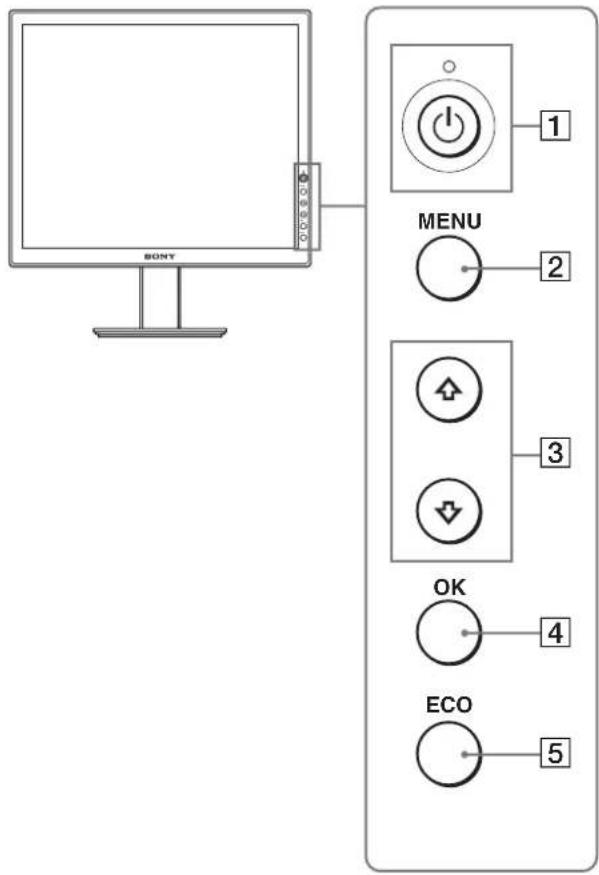
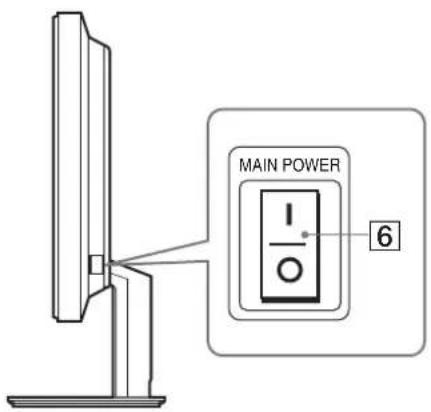
MAIN POWER I O 6① ⏻ (Power) switch and ⏻ (power) indicator (pages 8, 15, 20) This switch turns the monitor on when the ⏻ (power) indicator lights up in red. To turn the monitor off, press this switch again. If the ⏻ (power) indicator does not light up, press the MAIN POWER switch ( 6 ).
2 MENU button (pages 10, 11) This button turns the menu screen on and off.
3 ↓/↑ buttons (page 11) These buttons are used to select the menu items and make adjustments.
④ OK button (page 11) This button activates the selected menu item and adjustments made using the ↓/↑ buttons (3).
⑤ ECO button (page 15) This button is used to reduce the power consumption.
6 MAIN POWER switch (page 8) This switch turns the monitor's main power on and off.
Rear of the LCD display
natural_image
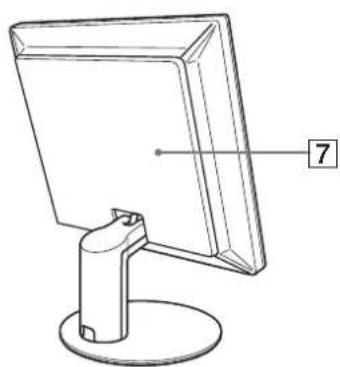
Line drawing of a computer monitor with a stand and labeled point 7 (no text or symbols on the device itself)7 Back cover (page 8) Remove this cover when you connect cables or cords.
(continued)
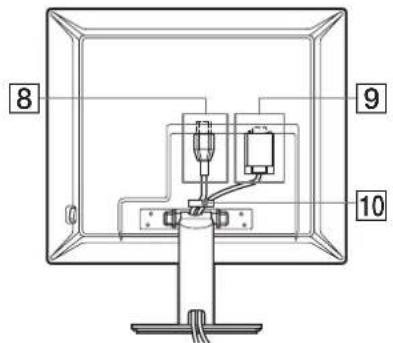
SDM-S53/S73
text_image
8 9 10The illustration of the back of the monitor show here is the SDM-S53.
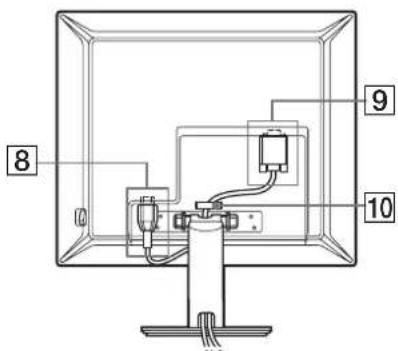
SDM-S93
text_image
8 9 108 AC IN connector (page 7)
This connector connects the power cord (supplied).
9 HD15 (RGB) input connector
This connector inputs analog RGB video signals (0.700 Vp-p, positive) and sync signals.
10 Cable holder (page 8)
This part secures cables and cords to the monitor.
Setup
Before using your monitor, check that the following items are included in your carton:
- LCD display
- Power cord
• HD15-HD15 video signal cable - CD-ROM (utility software for Windows/Macintosh, Operating Instructions, etc.)
- Warranty card
- Quick Setup Guide
Setup 1: Connect the video signal cables
Turn off the monitor and computer before connecting.
Notes
- Do not touch the pins of the video signal cable connector as this might bend the pins.
- Check the alignment of the HD15 connector to prevent bending the pins of the video signal cable connector.
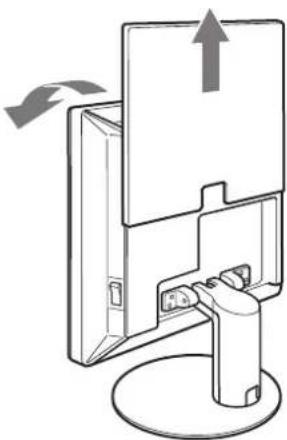
1 Slide up the back cover.
2 Tilt the display forward.
natural_image
Diagram of a mechanical device with an upward arrow indicating motion, mounted on a base (no text or symbols present)Connect a computer equipped with an HD15 output connector (analog RGB)
Using the supplied HD15-HD15 video signal cable (analog RGB), connect the computer to the monitor's HD 15 input connector (analog RGB).
Connect the computer according to the following illustrations.
■ Connecting to an IBM PC/AT or compatible computerp
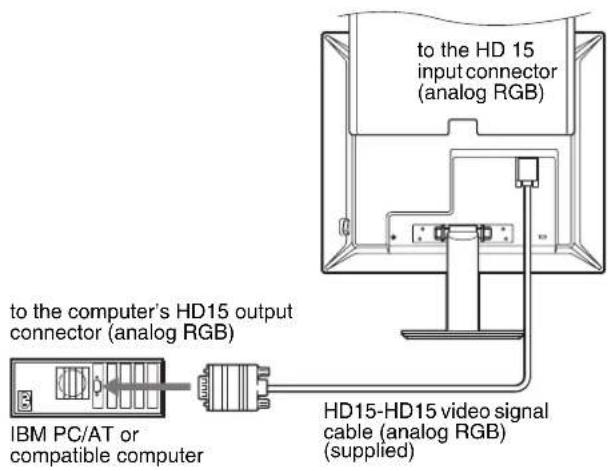
text_image
to the HD 15 input connector (analog RGB) to the computer's HD15 output connector (analog RGB) IBM PC/AT or compatible computer HD15-HD15 video signal cable (analog RGB) (supplied)■ Connecting to a Macintosh computer
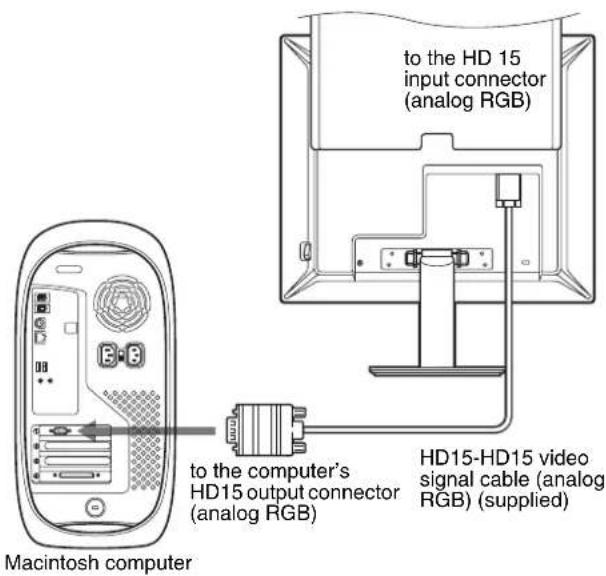
text_image
to the HD 15 input connector (analog RGB) to the computer's HD15 output connector (analog RGB) HD15-HD15 video signal cable (analog RGB) (supplied) Macintosh computerWhen connecting a Macintosh computer, use an adapter (not supplied), if necessary. Connect the adapter to the computer before connecting the video signal cable.
Setup 2: Connect the power cord
1 Connect the supplied power cord securely to the monitor's AC IN connector.
2 Connect the other end securely to a power outlet.
SDM-S53/S73
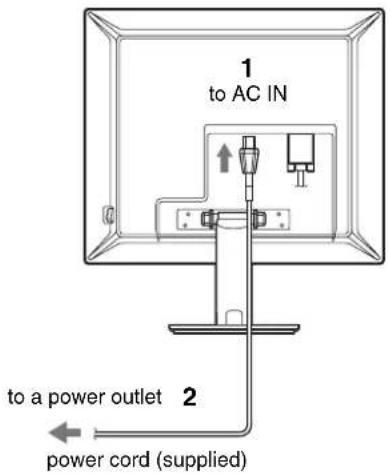
text_image
1 to AC IN 2 to a power outlet power cord (supplied)The illustration of the back of the monitor show here is that of the SDM-S53. The same applies for the SDM-S73 model.
SDM-S93
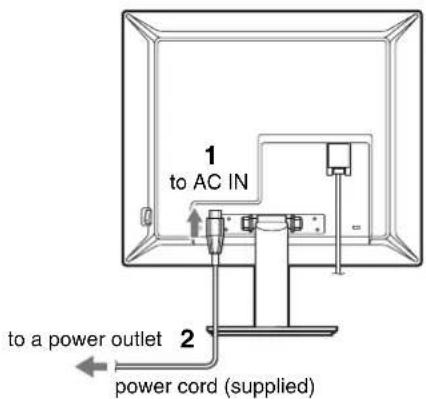
text_image
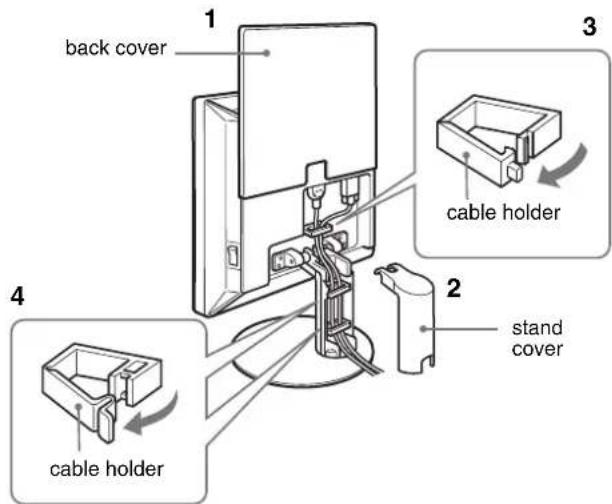
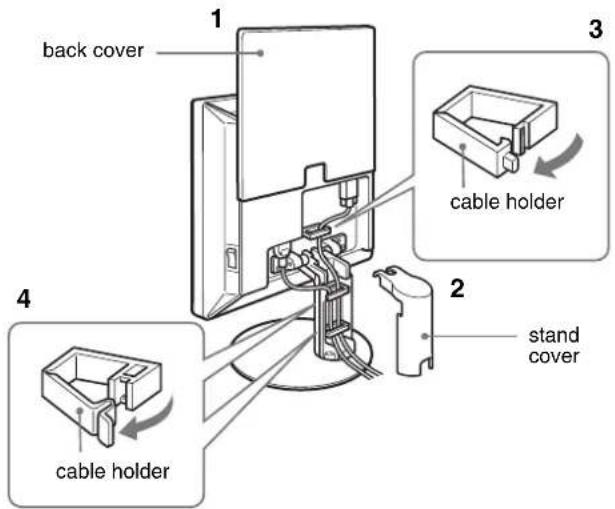
1 to AC IN 2 to a power outlet power cord (supplied)Setup 3: Secure the cords and close the back cover
1 Slide up the back cover.
2 Remove the stand cover.
3 Secure the power cord and video signal cable using the cable holder on the cabinet (SDM-S53/S73). Secure the video signal cable using the cable holder on the cabinet (SDM-S93).
4 Feed the power cord and the video signal cable into the stand, and secure them using the cable holder (SDM-S53/S73).
Feed the power cord through the hole on the left of the stand and secure the power cord and video signal cable using the cable holder inside (SDM-S93).
5 Replace the stand cover and then slide down the back cover.
Please be sure that cords come out through the opening at the bottom of the stand cover, for proper placement of the stand cover.
SDM-S53/S73
text_image
back cover cable holder stand cover cable holderIllustrations of monitor rear are the SDM-S53. The same applies for the SDM-S73 model.
SDM-S93
text_image
back cover cable holder stand cover cable holderSetup 4: Turn on the monitor and computer
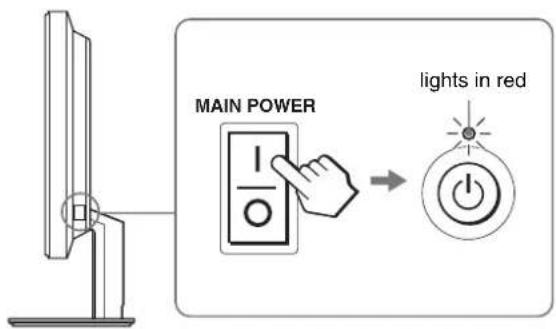
1 Press the MAIN POWER switch located on the right side of the monitor in the direction of the I, if it is not already pressed. Make sure the ⏻ (power) indicator is lit in red.
Note
The monitor is factory shipped with the MAIN POWER switch set to on (1).
text_image
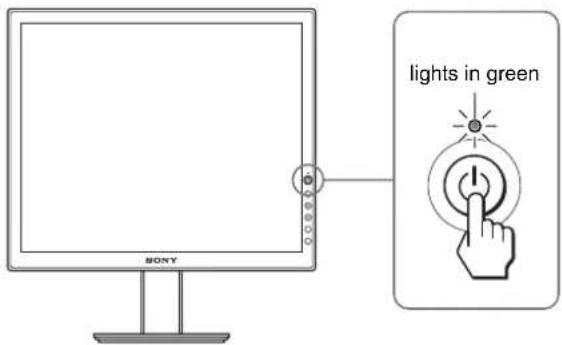
MAIN POWER lights in red2 Press the ⏻ (power) switch on the front right of the monitor.
The ⏻ (power) indicator lights up in green.
text_image
lights in green SONY3 Turn on the computer.
The installation of your monitor is complete. If necessary, use the monitor's controls to adjust the picture (page 10).
If no picture appears on your screen
- Check that the power cord and the video signal cable are properly connected.
- If "NO INPUT SIGNAL" appears on the screen:
The computer is in the power saving mode. Try pressing any key on the keyboard or moving the mouse.
- If "CABLE DISCONNECTED" appears on the screen:
Check that the video signal cable is properly connected.
- If "OUT OF RANGE" appears on the screen:
Reconnect the old monitor. Then adjust the computer's graphics board within the following ranges.
| SDM-S53 SDM-S73/S93 | ||
| Horizontal frequency | 28–61 kHz 28–80 kHz | |
| Vertical frequency | 48–75 Hz 48–75 Hz | |
| Resolution | 1024 × 768 or less | 1280 × 1024 or less |
For more information about the on-screen messages, see "Trouble symptoms and remedies" on page 18.
No need for specific drivers
The monitor complies with the "DDC" Plug & Play standard and automatically detects all the monitor's information. No specific driver needs to be installed to the computer.
The first time you turn on your computer after connecting the monitor, the setup Wizard may appear on the screen. In this case, follow the on-screen instructions. The Plug & Play monitor is automatically selected so that you can use this monitor.
The vertical frequency turns to 60 Hz.
Since flickers are unobtrusive on the monitor, you can use it as it is. You do not need to set the vertical frequency to any particular high value.
Setup 5:Adjusting the tilt
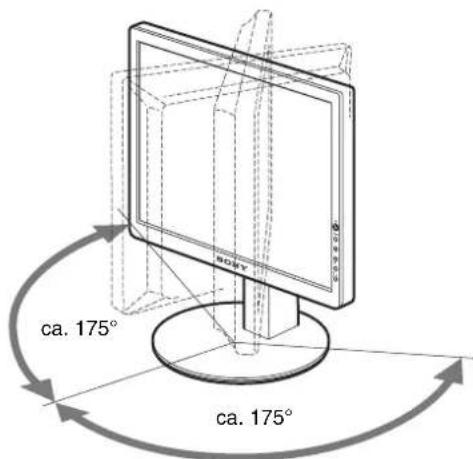
This display can be adjusted within the angles shown below.
Grasp the sides of the LCD panel, then adjust screen angles.
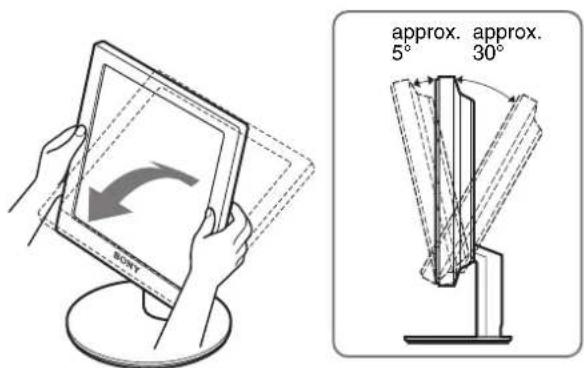
text_image
approx. approx. 5° 30° SONYSDM-S93 only
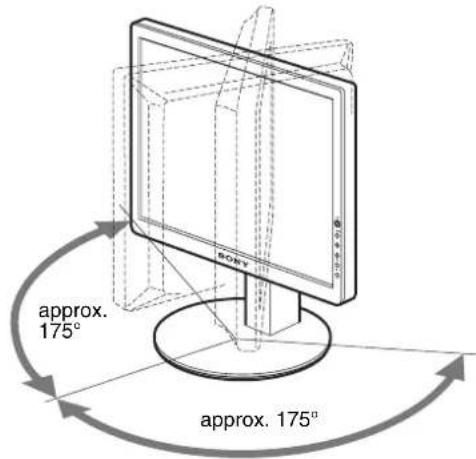
text_image
approx. 175° approx. 175°To use the monitor comfortably
Adjust the viewing angle of your monitor according to the height of your desk and chair, and so that light is not reflected from the screen to your eyes.
Note
When adjusting the screen tilt and height, proceed slowly and carefully, being sure not to hit the monitor against the desk.
Customizing Your Monitor
Before making adjustments
Connect the monitor and the computer, and turn them on. For the best results, wait for at least 30 minutes before making adjustments.
You can make numerous adjustments to your monitor using the on-screen menu.
Navigating the menu
Press the MENU button to display the main menu on your screen. See page 11 for more information on using the MENU button.
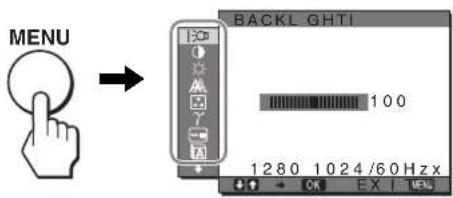
text_image
MENU BACKL GHTI 100 1280 1024/60Hz x EX I UsUse the ↓/↑ and OK buttons to select the icons in the above main menu illustration. The following 1\~9 menu appears. Keep pressing ↓ to scroll down until the icons in menu 9 appear. See page 11 for more information on using the ↓/↑ and OK buttons.
1 BACKLIGHT :0 (page 11)
Select the BACKLIGHT menu to adjust the brightness of the backlight.
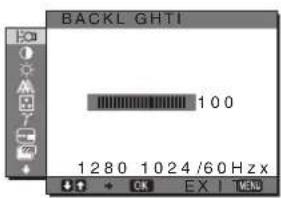
text_image
BACKL GHTI 100 1280 1024/60 Hzx2 CONTRAST Ⓞ (page 11)
Select the CONTRAST menu to adjust the picture contrast.
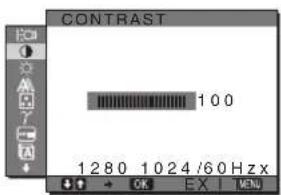
text_image
CONTRAST 100 1280 1024/60Hz3 BRIGHTNESS (page 11)
Select the BRIGHTNESS menu to adjust the picture brightness (black level).
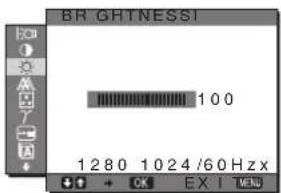
text_image
BR GHTNESSI 100 1280 1024/60Hz EX I MENU4 SCREEN A (page
Select the SCREEN menu to adjust the picture's sharpness (phase/pitch) or its centering (horizontal/vertical position).
12)
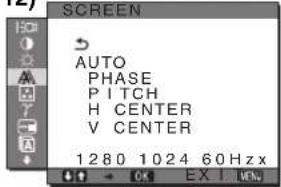
text_image
SCREEN AUTO PHASE PITCH H CENTER V CENTER 1280 1024 60 Hzx5 COLOR (page 13)
Select the COLOR menu to adjust the color temperature of the picture. This adjusts the tone of the screen.
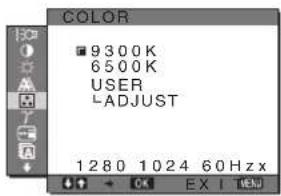
text_image
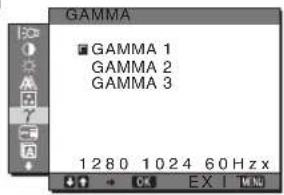
COLOR 9300K 6500K USER LADJUST 1280 1024 60Hz x6GAMMA γ (page 14)
Select the GAMMA menu to change the picture's color shade setting.
text_image
GAMMA ■ GAMMA 1 GAMMA 2 GAMMA 3 1 2 8 0 1 0 2 4 6 0 Hz x + - + OK EX | MIN7 MENU POSITION (page 14)
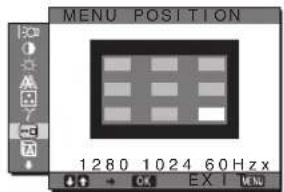
Select the MENU POSITION to change the on- screen menu position.
text_image
MENU POSITION 1280 1024 60 Hzx OK EX I MENU8 LANGUAGE A (page
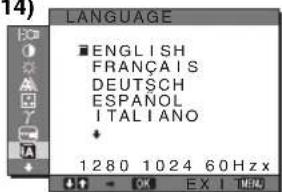
Select LANGUAGE to change the language used on menus or messages.
14)
text_image
LANGUAGE ■ ENGLISH FRANÇAIS DEUTSCH ESPAÑOL ITALIANO 1280 1024 60Hz x9 RESET →← (page 14)
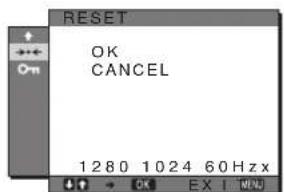
Reset the adjustments to the default settings.
text_image
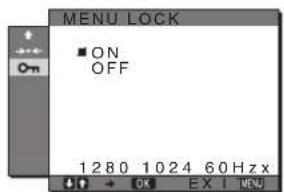
RESET OK CANCEL 1280 1024 60 Hz x10 MENU LOCK (page 14)
Lock the control of buttons to prevent accidental adjustments or resetting.
text_image
MENU LOCK ■ ON OFF 1280 1024 60Hz x■ Using the MENU, ↓/↑, and OK buttons
1 Display the main menu.
Press the MENU button to display the main menu on your screen.

2 Select the menu you want to adjust.
Press the ↓/↑ buttons to display the desired menu. Press the OK button to select the menu item.

text_image
Diagram showing hand cursor clicking a circle with OK button, indicating press or navigation instruction3 Adjust the menu.
Press the ↓/↑ buttons to make the adjustment, then press the OK button.
When you press the OK button, the setting is stored, then the display returns to the previous menu.

text_image
Diagram showing finger pressing and clicking a circle with 'OK' button, alongside two circular icons with diamond symbols.4 Close the menu.
Press the MENU button once to return to normal viewing. If no buttons are pressed, the menu closes automatically after about 30 seconds.

■ Resetting the adjustments to the default settings
You can reset the adjustments using the RESET menu. For more information about resetting the adjustments, see (RESET) on page 14.
Adjusting the backlight (BACKLIGHT)
If the screen is too bright, adjust the backlight and make the screen easier to see.
Note
The backlight cannot be adjusted when the ECO mode is set to HIGH, MIDDLE, or LOW (page 15).
1 Press the MENU button.
The main menu appears on the screen.
2 Press the ↓/↑ buttons to select |○ (BACKLIGHT) and press the OK button.
The BACKLIGHT menu appears on the screen.
3 Press the ↓/↑ buttons to adjust the light level and press the OK button.
- Adjusting the contrast (CONTRAST)
Adjust the picture contrast.
Note
The contrast cannot be adjusted when the ECO mode is set to HIGH, MIDDLE, or LOW (page 15).
1 Press the MENU button.
The main menu appears on the screen.
2 Press the ↓/↑ buttons to select ⬆ (CONTRAST) and press the OK button.
The CONTRAST menu appears on the screen.
3 Press the ↓/↑ buttons to adjust the contrast and press the OK button.
Adjusting the black level of an image (BRIGHTNESS)
Adjust the picture brightness (black level).
Note
The brightness cannot be adjusted when the ECO mode is set to HIGH, MIDDLE, or LOW (page 15).
1 Press the MENU button.
The main menu appears on the screen.
2 Press the ↓/↑ buttons to select ⚙ (BRIGHTNESS) and press the OK button.
The BRIGHTNESS menu appears on the screen.
3 Press the ↓/↑ buttons to adjust the brightness and press the OK button.
Adjusting the picture's sharpness and centering (SCREEN)
■ Automatic picture quality adjustment function
When the monitor receives an input signal, it automatically adjusts the picture's position and sharpness (phase/pitch), and ensures that a clear picture appears on the screen (page 15).
Note
While the automatic picture quality adjustment function is activated, only the ⏻ (power) switch will operate.
The picture may flicker during this time, but this is not a malfunction.
Simply wait a few moments until the adjustment completes.
If the automatic picture quality adjustment function of this monitor seems to not completely adjust the picture
You can make further automatic adjustment of the picture quality for the current input signal. (See AUTO below.)
If you still need to make further adjustments to the picture quality
You can manually adjust the picture's sharpness (phase/pitch) and position (horizontal/vertical position).
These adjustments are stored in memory and automatically recalled when the display receives the same input signal.
These settings may have to be repeated if you change the input signal after reconnecting your computer.
■ Make further automatic adjustments to the picture quality for the current input signal (AUTO)
1 Press the MENU button.
The main menu appears on the screen.
2 Press the ↓/↑ buttons to select ⚪ (SCREEN) and press the OK button.
The SCREEN menu appears on the screen.
3 Press the ↓/↑ buttons to select AUTO and press the OK button.
Make the appropriate adjustments of the screen's phase, pitch and horizontal/vertical position for the current input signal and store them.
4 Press the ↓/↑ buttons to select ↩ and press the OK button.
Return to the menu screen.
- Adjust the picture's sharpness manually (PHASE/PITCH)
You can adjust the picture's sharpness as follows.
1 Set the resolution to 1024 × 768 (SDM-S53) 1280 × 1024 (SDM-S73/S93) on the computer.
2 Load the CD-ROM.
3 Start the CD-ROM, select the area and model, and display the test pattern.
For Windows
Click [Utility] [Windows]/[Win Utility.exe].
For Macintosh
Click [Utility] → [Mac]/[Mac Utility].
4 Press the MENU button.
The main menu appears on the screen.
5 Press the ↓/↑ buttons to select ⚪ (SCREEN) and press the OK button.
The SCREEN menu appears on the screen.
6 Press the ↓/↑ buttons to select PHASE and press the OK button.
The PHASE menu appears on the screen.
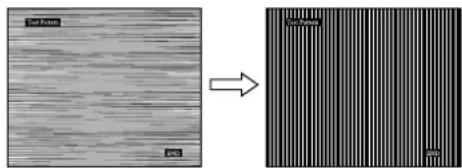
7 Press the ↓/↑ buttons until the horizontal stripes are at a minimum.
Adjust so that the horizontal stripes are at a minimum.
text_image
Soil White PVC Soil White PVC8 Press the OK button.
The main menu appears on the screen.
If vertical stripes are observed over the entire screen, adjust pitch by the following steps.
9 Press the ↓/↑ buttons to select PITCH and press the OK button.
The PITCH menu appears on the screen.
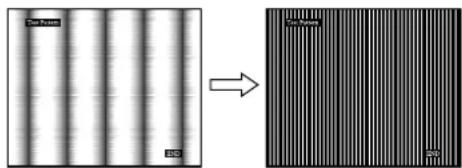
10 Press the ↓/↑ buttons until the vertical stripes disappear.
Adjust so that the vertical stripes disappear.
natural_image
Two-panel image showing vertical striped patterns on the left and a close-up of a textured surface with horizontal striations on the right (no text or symbols)11 Click END on the screen to turn off the test pattern.
12 Press the OK button.
Return to the SCREEN menu.
13 Press the ↓/↑ buttons to select ↩ and press the OK button.
Return to the menu screen.
x Adjust the picture's position manually (H CENTER/V CENTER)
If the picture is not in the center of the screen, adjust the picture's centering as follows.
1 Set the resolution to 1024 × 768 (SDM-S53) 1280 × 1024 (SDM-S73/S93) on the computer.
2 Load the CD-ROM.
3 Start the CD-ROM, select the area and model, and display the test pattern.
For Windows
Click [Utility] → [Windows]/[Win Utility.exe].
For Macintosh
Click [Utility] → [Mac]/[Mac Utility].
4 Press the MENU button.
The main menu appears on the screen.
5 Press the ↓/↑ buttons to select ⚪ (SCREEN) and press the OK button.
The SCREEN menu appears on the screen.
6 Press the ↓/↑ buttons to select H CENTER or V CENTER and press the OK button.
The H CENTER or V CENTER menu appears on the screen.
7 Press the ↓/↑ buttons to center the test pattern in the screen.
8 Click END on the screen to turn off the test pattern.
9 Press the OK button.
Return to the SCREEN menu.
10 Press the ↓/↑ buttons to select ↩ and press the OK button.
Return to the menu screen.
Adjusting the color temperature (COLOR)
You can select the color level of the picture's white color field from the default color temperature settings.
Also, if necessary, you can fine tune the color temperature.
1 Press the MENU button.
The main menu appears on the screen.
2 Press the ↓/↑ buttons to select ☐ (COLOR) and press the OK button.
The COLOR menu appears on the screen.
3 Press the ↓/↑ buttons to select the desired color temperature and press the OK button.
Whites will change from a bluish hue to reddish hue as the temperature is lowered from 9300K to 6500K.
x Fine tuning the color temperature (USER ADJUSTMENT)
1 Press the MENU button.
The main menu appears on the screen.
2 Press the ↓/↑ buttons to select ☐ (COLOR) and press the OK button.
The COLOR menu appears on the screen.
3 Press the ↓/↑ buttons to select "ADJUST" and press the OK button.
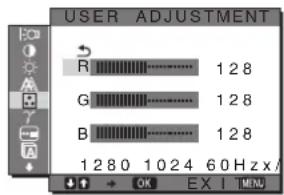
The fine tuning menu for color temperature appears on the screen.
text_image
USER ADJUSTMENT R 128 G 128 B 128 1 280 1024 60 Hz x / OK EX I MIN4 Press the ↓/↑ buttons to select R (Red) or B (Blue) and press the OK button. Then press the ↓/↑ buttons to adjust the color temperature and press the OK button.
Since this adjustment changes the color temperature by increasing or decreasing the R and B components with respect to G (green), the G component is fixed.
5 Press the ↓/↑ buttons to select ↗, then press the OK button.
The new color setting is stored in memory for USER ADJUSTMENT and automatically recalled whenever USER is selected.
The main menu appears on the screen.
γ Changing the gamma setting (GAMMA)
You can associate the picture's color shade on the screen with the picture's original color shade.
1 Press the MENU button.
The main menu appears on the screen.
2 Press the ↓/↑ buttons to select γ (GAMMA) and press the OK button.
The GAMMA menu appears on the screen.
3 Press the ↓/↑ buttons to select the desired mode and press the OK button.
Changing the menu's position (MENU POSITION)
You can change the menu position if it is blocking an image on the screen.
1 Press the MENU button.
The main menu appears on the screen.
2 Press the ↓/↑ buttons to select ☐ (MENU POSITION) and press the OK button.
The MENU POSITION menu appears on the screen.
3 Press the ↓/↑ buttons to select the desired position and press the OK button.
You can choose one of 9 positions where the menu will appear.
A Selecting the on-screen menu language (LANGUAGE)
You can change the language used on menus or messages displayed on this monitor.
1 Press the MENU button.
The main menu appears on the screen.
2 Press the ↓/↑ buttons to select ☐ (LANGUAGE) and press the OK button.
The LANGUAGE menu appears on the screen.
3 Press the ↓/↑ buttons to select a language and press the OK button.
• ENGLISH
• FRANÇAIS: French
• DEUTSCH: German
- ESPAÑOL: Spanish
• ITALIANO: Italian
• NEDERLANDS: Dutch
• SVENSKA: Swedish
• : Россий
• : 田本語ese
- 中文: C h i n e s e
→← Resetting the adjustment data to the defaults (RESET)
Reset the adjustments to the default settings.
1 Press the MENU button.
The main menu appears on the screen.
2 Press the ↓/↑ buttons to select →← (RESET) and press the OK button.
The RESET menu appears on the screen.
3 Press the ↓/↑ buttons to select the desired mode and press the OK button.
- OK: To reset all of the adjustment data to the default settings. Note that the LANGUAGE) setting is not reset by this method.
- CANCEL: To cancel resetting and return to the menu screen.
On Locking the menus and controls (MENU LOCK)
Lock the control of buttons to prevent accidental adjustments or resetting.
1 Press the MENU button.
The main menu appears on the screen.
2 Press the ↓/↑ buttons to select O _π (MENU LOCK) and press the OK button.
The MENU LOCK menu appears on the screen.
3 Press the ↓/↑ buttons to select ON or OFF and press the OK button.
- ON: Only the ⏻ (power) switch will operate. If you attempt any other operation, the ⓄMENU LOCK) icon appears on the screen.
- OFF:Set ⬆MENU LOCK) to off. If (MENU LOCK) has been set to ON, when you press the MENU button, ⬆MENU LOCK) is automatically selected.
Technical Features
Power saving function
This monitor meets the power-saving guidelines set by VESA, ENERGY STAR, and NUTEK. If the monitor is connected to a computer or video graphics board that is DPMS (Display Power Management Signaling) compliant, the monitor will automatically reduce power consumption as shown below.
SDM-S53
| Power mode | Power consumption | (power) indicator |
| normal operation | 25 W (max.) green | |
| active off*(deep sleep)** | 1 W (max.) orange | |
| power off 1 W (max.) red | ||
| main power off 0 W off | ||
SDM-S73
| Power mode | Power consumption | (power) indicator |
| normal operation | 45 W (max.) green | |
| active off*(deep sleep)** | 1 W (max.) orange | |
| power off 1 W (max.) red | ||
| main power off 0 W off | ||
SDM-S93
| Power mode | Power consumption | (power) indicator |
| normal operation | 50 W (max.) green | |
| active off*(deep sleep)** | 1 W (max.) orange | |
| power off 1 W (max.) red | ||
| main power off 0 W off | ||
* When your computer enters the "active off" mode, the input signal is cut and NO INPUT SIGNAL appears on the screen. After 5 seconds, the monitor enters the power saving mode.
**“deep sleep” is the power saving mode defined by the Environmental Protection Agency.
Reducing the power consumption (ECO mode)
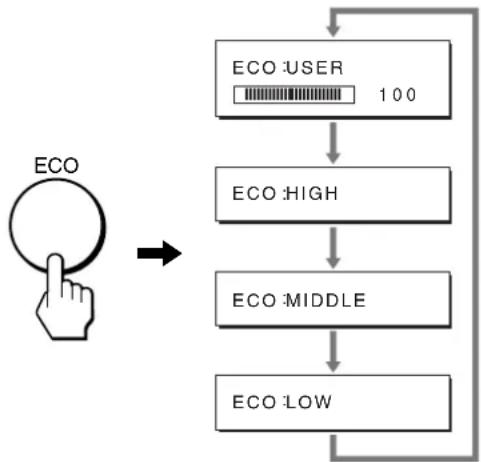
If you press the ECO button on the front of the monitor repeatedly, you can select the screen brightness.
flowchart
graph TD
    A["ECO"] --> B["ECO HIGH"]
    B --> C["ECO MIDDLE"]
    C --> D["ECO LOW"]
    D --> E["ECO USER 100"]
Each mode appears on the screen and the screen brightness is reduced according to the mode. The menu automatically disappears after about 5 seconds.
Screen brightness and power consumption are reduced as the mode changes from HIGH to MIDDLE to LOW.
The default setting of the screen brightness is set to "USER". If you select "USER", you can adjust the backlight level by pressing the ↓/↑ buttons, the same as when you select BACKLIGHT using the menu.
NOTE
Only while the ECO mode is set to "USER", are the BACKLIGHT, CONTRAST, and BRIGHTNESS items of the menu available (page 11).
Automatic picture quality adjustment function
When the monitor receives an input signal, it automatically adjusts the picture's position and sharpness (phase/pitch), and ensures that a clear picture appears on the screen.
The factory preset mode
When the monitor receives an input signal, it automatically matches the signal to one of the factory preset modes stored in the monitor's memory to provide a high quality picture at the center of the screen. If the input signal matches the factory preset mode, the picture appears on the screen automatically with the appropriate default adjustments.
If input signals do not match one of the factory preset modes
When the monitor receives an input signal that does not match one of the factory preset modes, the automatic picture quality adjustment function of this monitor is activated to ensure that a clear picture always appears on the screen (within the following monitor frequency ranges):
(continued)
Horizontal frequency: 28–61 kHz (SDM-S53)
28–80 kHz (SDM-S73/S93)
Vertical frequency: 48–75 Hz
Consequently, the first time the monitor receives input signals that do not match one of the factory preset modes, the monitor may take a longer time than normal to display the picture on the screen. This adjustment data is automatically stored in memory so that next time, the monitor will function in the same way as when the monitor receives the signals that match one of the factory preset modes.
If you adjust the phase, pitch, and picture position manually
For some input signals, the automatic picture quality adjustment function of this monitor may not completely adjust the picture position, phase, and pitch. In this case, you can set these adjustments manually (page 12). If you set these adjustments manually, they are stored in memory as user modes and automatically recalled whenever the monitor receives the same input signals.
Note
While the automatic picture quality adjustment function is activated, only the ⏻ (power) switch will operate.
The picture may flicker during this time, but this is not a malfunction.
Simply wait a few moments until the adjustment completes.
Troubleshooting
Before contacting technical support, refer to this section.
On-screen messages
If there is something wrong with the input signal, one of the following messages appears on the screen. To solve the problem, see “Trouble symptoms and remedies” on page 18.
If "OUT OF RANGE" appears on the screen
This indicates that the input signal is not supported by the monitor's specifications. Check the following items.
For more information about on-screen messages, see “Trouble symptoms and remedies” on page 18.
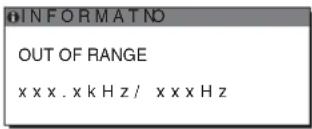
If "xxx.x kHz/xxx Hz" is displayed
This indicates that either the horizontal or vertical frequency is not supported by the monitor's specifications.
The figures indicate the horizontal and vertical frequencies of the current input signal.
text_image
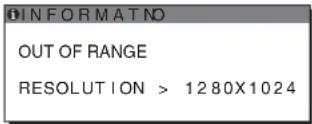
INFORMATNO OUT OF RANGE xxxx.xkHz/xxxxzIf "RESOLUTION > 1024 × 768" is displayed (SDM-S53)
This indicates that the resolution is not supported by the monitor's specifications (1024 × 768 or less).
If "RESOLUTION > 1280 × 1024" is displayed (SDM-S73/S93)
This indicates that the resolution is not supported by the monitor's specifications (1280 × 1024 or less).
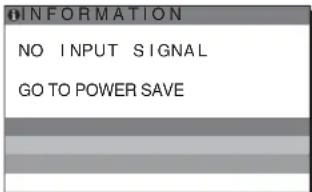
If "NO INPUT SIGNAL" appears on the screen
This indicates that no signal is being input.
text_image
INFORMATION NO INPUT SIGNAL GO TO POWER SAVE"GO TO POWER SAVE"
The monitor will enter the power saving mode after about 5 seconds from the time the message is displayed.
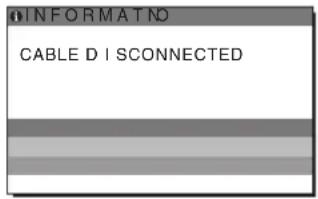
If "CABLE DISCONNECTED" appears on the screen
This indicates that the video signal cable has been disconnected.
text_image
INFORMAT NO CABLE D I S CONNECTEDGB
Trouble symptoms and remedies
If a problem occurs as a result of a connected computer or other equipment, refer to the connected computer/equipment's instruction manual. Use the self-diagnosis function (page 20) if the following recommendations do not resolve the problem.
| Symptom Check these items | |
| No picture | |
| If the ⏻ (power) indicator is not lit,or if the ⏻ (power) indicator will notlight up when the ⏻ (power) switchis pressed, | Check that the power cord is properly connected.Check that the monitor's MAIN POWER switch is on (page 8). |
| If the ⏻ (power) indicator turns onin red, | Check that the ⏻ (power) switch is on. |
| If the ⏻ (power) indicator is greenor flashing orange, | Use the self-diagnosis function (page 20). |
| If CABLE DISCONNECTEDappears on the screen, | Check that the video signal cable is properly connected and all plugs are firmly seated intheir sockets (page 6).Check that the video input connector's pins are not bent or pushed in.A non-supplied video signal cable is connected. If you connect a non-supplied videosignal cable, CABLE DISCONNECTED may appear on the screen. This is not amalfunction. |
| If NO INPUT SIGNAL appears onthe screen, or the ⏻ (power)indicator is either orange oralternating between green andorange, | Check that the video signal cable is properly connected and all plugs are firmly seated intheir sockets (page 6).Check that the video input connector's pins are not bent or pushed in.Problems caused by a computer or other equipment connected, and notcaused by the monitorThe computer is in the power saving mode. Try pressing any key on the keyboard ormoving the mouse.Check that your graphics board is installed properly.Check that the computer's power is on.Restart the computer. |
| If OUT OF RANGE appears on thescreen (page 16), | Problems caused by a computer or other equipment connected, and notcaused by the monitorCheck that the video frequency range is within that specified for the monitor. If youreplaced an old monitor with this monitor, reconnect the old monitor and adjust thecomputer's graphics board within the following ranges:Horizontal: 28 – 61 kHz (SDM-S53), 28 – 80 kHz (SDM-S73/S93)Vertical: 48 – 75 HzResolution: 1024 × 768 or less (SDM-S53), 1280 × 1024 or less (SDM-S73/S93) |
| If using Windows, | If you replaced an old monitor with this monitor, reconnect the old monitor and do thefollowing. Select “SONY” from the “Manufacturers” list and select “SDM-S53,” “SDMS73” or “SDM-S93” from the “Models” list in the Windows device selection screen. If themodel name of this monitor does not appear in the “Models” list, try “Plug & Play.” |
| If using a Macintosh system, | When connecting a Macintosh computer, use an adapter (not supplied) if necessary.Connect the adapter to the computer before connecting the video signal cable. |
| Picture flickers, bounces,oscillates, or is scrambled | Adjust the pitch and phase (page 12).Isolate and eliminate any potential sources of electric or magnetic fields such as othermonitors, laser printers, electric fans, fluorescent lighting, or televisions.Try plugging the monitor into a different AC outlet, preferably on a different circuit.Problems caused by a computer or other equipment connected, and notcaused by the monitorCheck your graphics board manual for the proper monitor setting.Confirm that the graphics mode (VESA, Macintosh 19" Color, etc.) and the frequency ofthe input signal are supported by this monitor. Even if the frequency is within the properrange, some graphics boards may have a sync pulse that is too narrow for the monitor tosync correctly.Adjust the computer's refresh rate (vertical frequency) to obtain the best possible picture. |
| Picture is fuzzy • Adjust the brightness and contrast (page 11).• Adjust the pitch and phase (page 12).■ Problems caused by a computer or other equipment connected, and not caused by the monitor• Set the resolution to 1024 × 768 (SDM-S53), 1280 × 1024 (SDM-S73/S93) on your computer. | |
| Picture is ghosting | • Eliminate the use of video cable extensions and/or video switch boxes.• Check that all plugs are firmly seated in their sockets. |
| Picture is not centered or sized properly | • Adjust the pitch and phase (page 12).• Adjust the picture position (page 13). Note that some video modes do not fill the screen to the edges. |
| Picture is too small | ■ Problems caused by a computer or other equipment connected, and not caused by the monitor• Set the resolution to 1024 × 768 (SDM-S53), 1280 × 1024 (SDM-S73/S93) on your computer. |
| Picture is dark • Adjust the backlight (page 11).• Adjust the brightness (page 11).• Adjust the gamma using “Gamma” (page 14).• It takes a few minutes for the display to become bright after turning on the monitor.• The screen might turn darker, depends on ECO mode you selected. | |
| Wavy or elliptical pattern (moire) is visible | • Adjust the pitch and phase (page 12). |
| Color is not uniform • Adjust the pitch and phase (page 12). | |
| White does not look white | • Adjust the color temperature (page 13). |
| Monitor buttons do not operate (appears on the screen) | • If “MENU LOCK” is set to ON, set it to OFF (page 14). |
| The monitor turns off after a while | ■ Problems caused by the connected computer or other equipment• Set the computer’s power saving setting to off. |
| After turnig off the main power, the (power) indicator stays bright for a while | • When the main power is on but the (power) switch is not pressed, or when the monitor is in the power saving mode, if you turn the MAIN POWER switch off, the (power) indicator may not turn off right away. This is not a malfunction. |
(continued)
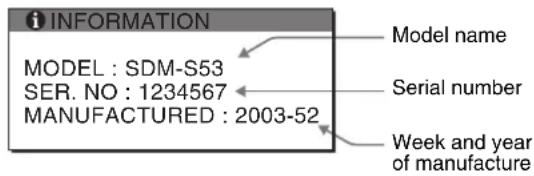
Displaying this monitor's information
While the monitor is receiving a video signal, press and hold the MENU button for more than 5 seconds until the information box appears.
Press the MENU button again to make the box disappear.
MENU

Example
text_image
i INFORMATION MODEL : SDM-S53 SER. NO : 1234567 MANUFACTURED : 2003-52 Model name Serial number Week and year of manufactureIf any problem persists, call your authorized Sony dealer and give the following information:
- Model name: SDM-S53 or SDM-S73 or SDM-S93
- Serial number
• Detailed description of the problem - Date of purchase
- Name and specifications of your computer and graphics board
Self-diagnosis function
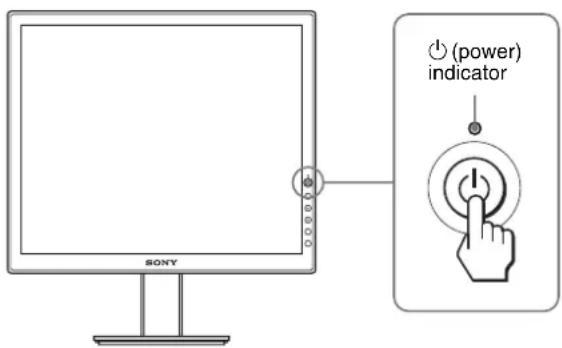
This monitor is equipped with a self-diagnosis function. If there is a problem with your monitor or computer(s), the screen will go blank and the ⏻ (power) indicator will either light up in green or flash orange. If the ⏻ (power) indicator is lit in orange, the computer is in power saving mode. Try pressing any key on the keyboard or moving the mouse.
text_image
SONY (power) indicatorIf the picture disappears from the screen and the ⏻ (power) indicator is green
1 Turn off the ⏻ (power) switch and disconnect the video signal cables from the monitor.
2 Turn the monitor on by pressing the ⏻ (power) switch.
If all four color bars appear (white, red, green, blue), the monitor is working properly. Reconnect the video signal cables and check the condition of your computer(s).
If the color bars do not appear, there is a potential monitor failure. Inform your authorized Sony dealer of the monitor's condition.
If the picture disappears from the screen and the ⏻ (power) indicator is flashing orange
Press the ⏻ (power) switch twice to turn the monitor off and then on.
If the ⏻ (power) indicator lights up in green, the monitor is working properly.
If the ⏻ (power) indicator is still flashing, there is a potential monitor failure. Count the number of seconds between orange flashes of the ⏻ (power) indicator and inform your authorized Sony dealer of the monitor's condition. Be sure to note the model name and serial number of your monitor. Also note the make and model of your computer and graphics board.
Specifications
SDM-S53
LCD panel Panel type: a-Si TFT Active Matrix
Picture size: 15.0 inch
Input signal format RGB operating frequency*
Horizontal: 28 – 61 kHz
Vertical: 48 - 75 Hz
Resolution Horizontal: Max.1024 dots
Vertical: Max.768 lines
Input signal levels RGB video signal
0.7 Vp-p, 75 Ω, positive
SYNC signal
TTL level, 2.2 kΩ,
positive or negative
(Separate horizontal and vertical,
or composite sync)
0.3 Vp-p, 75Ω, negative
(Sync on green)
Power requirements 100 – 240 V, 50 – 60 Hz,
Max. 0.6 A
Power consumption Max. 25 W
Operating temperature 5 – 35 °C
Dimensions (width/height/depth)
Display (upright):
Approx. 339 × 370 × 186 mm
(13^3/8× 14^5/8× 7^3/8 inches)
(with stand)
Approx. 339 × 275 × 53 mm
(13^3/8× 10^7/8× 2^1/8 inches)
(without stand)
Mass Approx. 3.7 kg (8 lb 2 oz)
(with stand)
Approx. 2.7 kg (5 lb 15 oz)
(without stand)
Plug & Play DDC2B
Accessories See page 6.
SDM-S73/S93
LCD panel Panel type: a-Si TFT Active Matrix
Picture size: 17.0 inch (SDM-S73)
Picture size: 19.0 inch (SDM-S93)
Input signal format RGB operating frequency*
Horizontal: 28 - 80 kHz
Vertical: 48 – 75 Hz
Resolution Horizontal: Max.1280 dots
Vertical: Max.1024 lines
Input signal levels RGB video signal
0.7 Vp-p, 75 Ω, positive
SYNC signal
TTL level, 2.2 kΩ,
positive or negative
(Separate horizontal and vertical,
or composite sync)
0.3 Vp-p, 75Ω, negative
(Sync on green)
Power requirements 100 - 240 V, 50 - 60 Hz,
Max. 1.0 A
Power consumption Max. 45 W (SDM-S73)
Max. 50 W (SDM-S93)
Operating temperature 5 – 35 °C
Dimensions (width/height/depth)
Display (upright):
Approx. 367 × 411 × 215 mm
(14^1/2 × 16^1/4 × 8^1/2 inches)
(with stand) (SDM-S73)
Approx. 412 × 445 × 234 mm
(16^1/4 × 17^5/8 × 9^1/4 inches)
(with stand) (SDM-S93)
Approx. 367 × 315 × 60 mm
(14 1/2 × 12 1/2 × 2 3/8 inches)
(without stand) (SDM-S73)
Approx. 412 × 350 × 64 mm
(16 ^1 /4 × 13 ^7 /8 × 2 ^5 /8 inches)
(without stand) (SDM-S93)
Mass Approx. 5.4 kg (11 lb 14 oz)
(with stand) (SDM-S73)
Approx. 6.6 kg (14 lb 8 oz)
(with stand) (SDM-S93)
Approx. 4.1 kg (9 lb)
(without stand) (SDM-S73)
Approx. 5.2 kg (11 lb 7 oz)
(without stand) (SDM-S93)
Plug & Play DDC2B
Accessories See page 6.
* Recommended horizontal and vertical timing condition
- Horizontal sync width duty should be more than 4.8% of total horizontal time or 0.8~ s , whichever is larger.
• Horizontal blanking width should be more than 2.5 μsec.
• Vertical blanking width should be more than 450 μsec.
Design and specifications are subject to change without notice.
TCO'99 Eco-document

text_image
ECOLOGY ENERGY EMISSIONS ECONOMICS TCO 99■Congratulations!
You have just purchased a TCO'99 approved and labelled product! Your choice has provided you with a product developed for professional use. Your purchase has also contributed to reducing the burden on the environment and also to the further development of environmentally adapted electronics products.
■Why do we have environmentally labelled computers?
In many countries, environmental labelling has become an established method for encouraging the adaptation of goods and services to the environment. The main problem, as far as computers and other electronics equipment are concerned, is that environmentally harmful substances are used both in the products and during their manufacture. Since it is not so far possible to satisfactorily recycle the majority of electronics equipment, most of these potentially damaging substances sooner or later enter nature.
There are also other characteristics of a computer, such as energy consumption levels, that are important from the viewpoints of both the work (internal) and natural (external) environments. Since all methods of electricity generation have a negative effect on the environment (e.g. acidic and climate-influencing emissions, radioactive waste), it is vital to save energy. Electronics equipment in offices is often left running continuously and thereby consumes a lot of energy.
■What does labelling involve?
This product meets the requirements for the TCO'99 scheme which provides for international and environmental labelling of personal computers. The labelling scheme was developed as a joint effort by the TCO (The Swedish Confederation of Professional Employees), Svenska Naturskyddsforeningen (The Swedish Society for Nature Conservation) and Statens Energimydighet (The Swedish National Energy Administration).
Approval requirements cover a wide range of issues: environment, ergonomics, usability, emission of electric and magnetic fields, energy consumption and electrical and fire safety.
The environmental demands impose restrictions on the presence and use of heavy metals, brominated and chlorinated flame retardants, CFCs (freons) and chlorinated solvents, among other things. The product must be prepared for recycling and the manufacturer is obliged to have an environmental policy which must be adhered to in each country where the company implements its operational policy.
The energy requirements include a demand that the computer and/or display, after a certain period of inactivity, shall reduce its power consumption to a lower level in one or more stages. The length of time to reactivate the computer shall be reasonable for the user.
Labelled products must meet strict environmental demands, for example, in respect of the reduction of electric and magnetic fields, physical and visual ergonomics and good usability.
Below you will find a brief summary of the environmental requirements met by this product. The complete environmental criteria document may be ordered from:
TCO Development
SE-114 94 Stockholm, Sweden
Fax: +46 8 782 92 07
Email (Internet): development@tco.se
Current information regarding TCO'99 approved and labelled products may also be obtained via the Internet, using the address: http://www.tco-info.com/
■Environmental requirements
Flame retardants
Flame retardants are present in printed circuit boards, cables, wires, casings and housings. Their purpose is to prevent, or at least to delay the spread of fire. Up to 30% of the plastic in a computer casing can consist of flame retardant substances. Most flame retardants contain bromine or chloride, and those flame retardants are chemically related to another group of environmental toxins, PCBs. Both the flame retardants containing bromine or chloride and the PCBs are suspected of giving rise to severe health effects, including reproductive damage in fish-eating birds and mammals, due to the bio-accumulative* processes. Flame retardants have been found in human blood and researchers fear that disturbances in foetus development may occur.
The relevant TCO'99 demand requires that plastic components weighing more than 25 grams must not contain flame retardants with organically bound bromine or chlorine. Flame retardants are allowed in the printed circuit boards since no substitutes are available.
Cadmium\*\*
Cadmium is present in rechargeable batteries and in the colour-generating layers of certain computer displays. Cadmium damages the nervous system and is toxic in high doses. The relevant TCO'99 requirement states that batteries, the colour-generating layers of display screens and the electrical or electronics components must not contain any cadmium.
Mercury\*\*
Mercury is sometimes found in batteries, relays and switches. It damages the nervous system and is toxic in high doses. The relevant TCO'99 requirement states that batteries may not contain any mercury. It also demands that mercury is not present in any of the electrical or electronics components associated with the labelled unit.
CFCs (freons)
The relevant TCO'99 requirement states that neither CFCs nor HCFCs may be used during the manufacture and assembly of the product. CFCs (freons) are sometimes used for washing printed circuit boards. CFCs break down ozone and thereby damage the ozone layer in the stratosphere, causing increased reception on earth of ultraviolet light with e.g. increased risks of skin cancer (malignant melanoma) as a consequence.
Lead\*\*
Lead can be found in picture tubes, display screens, solders and capacitors. Lead damages the nervous system and in higher doses, causes lead poisoning. The relevant TCO'99 requirement permits the inclusion of lead since no replacement has yet been developed.
* Bio-accumulative is defined as substances which accumulate within living organisms.
** Lead, Cadmium and Mercury are heavy metals which are Bio-accumulative.
TFT LCD Color Computer Display
SDM-S53
SDM-S73
SDM-S93
Owner's Record
The model and serial numbers are located at the rear of the unit. Record these numbers in the spaces provided below. Refer to them whenever you call upon your dealer regarding this product. Model No. ____ Serial No. ____
WARNING
To prevent fire or shock hazard, do not expose the unit to rain or moisture.
Dangerously high voltages are present inside the unit. Do not open the cabinet. Refer servicing to qualified personnel only.
FCC Notice
This equipment has been tested and found to comply with the limits for a Class B digital device, pursuant to Part 15 of the FCC Rules. These limits are designed to provide reasonable protection against harmful interference in a residential installation. This equipment generates, uses, and can radiate radio frequency energy and, if not installed and used in accordance with the instructions, may cause harmful interference to radio communications. However, there is no guarantee that interference will not occur in a particular installation. If this equipment does cause harmful interference to radio or television reception, which can be determined by turning the equipment off and on, the user is encouraged to try to correct the interference by one or more of the following measures:
- Reorient or relocate the receiving antenna.
– Increase the separation between the equipment and receiver. - Connect the equipment into an outlet on a circuit different from that to which the receiver is connected.
- Consult the dealer or an experienced radio/TV technician for help. You are cautioned that any changes or modifications not expressly approved in this manual could void your authority to operate this equipment.
IMPORTANTE
If you have any questions about this product, you may call; Sony Customer Information Services Center 1-800-222-7669 or http://www.sony.com/
Declaration of Conformity
Trade Name: SONY
Model: SDM-S53/S73/S93
Responsible Party: Sony Electronics Inc.
Address: 16530 Via Esprillo,
San Diego, CA 92127 U.S.A.
Telephone Number: 858-942-2230
This device complies with part 15 of the FCC rules. Operation is subject to the following two conditions: (1) This device may not cause harmful interference, and (2) this device must accept any interference received, including interference that may cause undesired operation.

BZ03
NOTICE
This notice is applicable for USA/Canada only. If shipped to USA/Canada, install only a UL LISTED/CSA LABELLED power supply cord meeting the following specifications:
SPECIFICATIONS
Plug Type Nema-Plug 5-15p
Cord Type SVT or SJT, minimum 3 × 18 AWG
Length Maximum 15 feet
Rating Minimum 7 A, 125 V
NOTICE
As an ENERGY STAR Partner, Sony Corporation has determined that this product meets the ENERGY STAR guidelines for energy efficiency.

text_image
ECOLOGY ENERGY EMISSIONS SCIENCE TCO 99 ERGONOMICSThis monitor complies with the TCO'99 guidelines.
Table des matières
Précautions....4
TCO'99 Eco-document ....i
Précautions
text_image
MAIN POWER I O 6natural_image
Line drawing of a computer monitor with a stand and labeled point 7 (no text or symbols on the device itself)natural_image
Diagram of a mechanical device with an upward arrow indicating motion, no text or symbols presenttext_image
Diagram showing finger pressing a circle with OK button, accompanied by three directional icons for visibility and action.3 Ajustez le menu.
text_image
Diagram showing finger pressing and clicking a button labeled 'OK' with three directional icons4 Refermez le menu.
text_image
Soil Pores Soil Pores Soil Pores Soil Poresnatural_image
Two-panel image showing a vertical striped pattern on the left and a textured black-and-white striped pattern on the right, with no visible text or symbols.Cliquez sur [Utility] → [Windows]/[Win Utility.exe].
Pour Macintosh
Cliquez sur [Utility] → [Mac]/[Mac Utility].
28–80 kHz (SDM-S73/S93)
(sans support) (SDM-S73)
environ. 412 × 350 × 64 mm
(16 ^1 /4 × 13 ^1 /8 × 2 ^5 /8 pouces)
(sans support) (SDM-S93)
(sans support) (SDM-S73)
environ. 5,2 kg (11 lb 7 oz)
(sans support) (SDM-S93)
Plug & Play DDC2B
text_image
ECOLOGY ENERGY EMISSIONS EMISSIONS TCO 99 ECONOMICS■ Congratulations!
You have just purchased a TCO'99 approved and labelled product! Your choice has provided you with a product developed for professional use. Your purchase has also contributed to reducing the burden on the environment and also to the further development of environmentally adapted electronics products.
■ Why do we have environmentally labelled computers?
In many countries, environmental labelling has become an established method for encouraging the adaptation of goods and services to the environment. The main problem, as far as computers and other electronics equipment are concerned, is that environmentally harmful substances are used both in the products and during their manufacture. Since it is not so far possible to satisfactorily recycle the majority of electronics equipment, most of these potentially damaging substances sooner or later enter nature.
There are also other characteristics of a computer, such as energy consumption levels, that are important from the viewpoints of both the work (internal) and natural (external) environments. Since all methods of electricity generation have a negative effect on the environment (e.g. acidic and climate-influencing emissions, radioactive waste), it is vital to save energy. Electronics equipment in offices is often left running continuously and thereby consumes a lot of energy.
■ What does labelling involve?
This product meets the requirements for the TCO'99 scheme which provides for international and environmental labelling of personal computers. The labelling scheme was developed as a joint effort by the TCO (The Swedish Confederation of Professional Employees), Svenska Naturskyddsforeningen (The Swedish Society for Nature Conservation) and Statens Energimydighet (The Swedish National Energy Administration).
Approval requirements cover a wide range of issues: environment, ergonomics, usability, emission of electric and magnetic fields, energy consumption and electrical and fire safety.
The environmental demands impose restrictions on the presence and use of heavy metals, brominated and chlorinated flame retardants, CFCs (freons) and chlorinated solvents, among other things. The product must be prepared for recycling and the manufacturer is obliged to have an environmental policy which must be adhered to in each country where the company implements its operational policy.
The energy requirements include a demand that the computer and/or display, after a certain period of inactivity, shall reduce its power consumption to a lower level in one or more stages. The length of time to reactivate the computer shall be reasonable for the user.
Labelled products must meet strict environmental demands, for example, in respect of the reduction of electric and magnetic fields, physical and visual ergonomics and good usability.
Below you will find a brief summary of the environmental requirements met by this product. The complete environmental criteria document may be ordered from:
TCO Development
SE-114 94 Stockholm, Sweden
Fax: +46 8 782 92 07
Email (Internet): development@tco.se
Current information regarding TCO'99 approved and labelled products may also be obtained via the Internet, using the address: http://www.tco-info.com/
■ Environmental requirements
Flame retardants
Flame retardants are present in printed circuit boards, cables, wires, casings and housings. Their purpose is to prevent, or at least to delay the spread of fire. Up to 30% of the plastic in a computer casing can consist of flame retardant substances. Most flame retardants contain bromine or chloride, and those flame retardants are chemically related to another group of environmental toxins. PCBs. Both the flame retardants containing bromine or chloride and the PCBs are suspected of giving rise to severe health effects, including reproductive damage in fish-eating birds and mammals, due to the bio-accumulative* processes. Flame retardants have been found in human blood and researchers fear that disturbances in foetus development may occur.
The relevant TCO'99 demand requires that plastic components weighing more than 25 grams must not contain flame retardants with organically bound bromine or chlorine. Flame retardants are allowed in the printed circuit boards since no substitutes are available.
Cadmium\*\*
Cadmium is present in rechargeable batteries and in the colour-generating layers of certain computer displays. Cadmium damages the nervous system and is toxic in high doses. The relevant TCO'99 requirement states that batteries, the colour-generating layers of display screens and the electrical or electronics components must not contain any cadmium.
Mercury\*\*
Mercury is sometimes found in batteries, relays and switches. It damages the nervous system and is toxic in high doses. The relevant TCO'99 requirement states that batteries may not contain any mercury. It also demands that mercury is not present in any of the electrical or electronics components associated with the labelled unit.
CFCs (freons)
The relevant TCO'99 requirement states that neither CFCs nor HCFCs may be used during the manufacture and assembly of the product. CFCs (freons) are sometimes used for washing printed circuit boards. CFCs break down ozone and thereby damage the ozone layer in the stratosphere, causing increased reception on earth of ultraviolet light with e.g. increased risks of skin cancer (malignant melanoma) as a consequence.
Lead\*\*
Lead can be found in picture tubes, display screens, solders and capacitors. Lead damages the nervous system and in higher doses, causes lead poisoning. The relevant TCO'99 requirement permits the inclusion of lead since no replacement has yet been developed.
* Bio-accumulative is defined as substances which accumulate within living organisms.
** Lead, Cadmium and Mercury are heavy metals which are Bio-accumulative.
TFT LCD Color Computer Display
SDM-S53
SDM-S73
SDM-S93
Owner's Record
The model and serial numbers are located at the rear of the unit. Record these numbers in the spaces provided below. Refer to them whenever you call upon your dealer regarding this product. Model No. ____ Serial No. ____
WARNING
To prevent fire or shock hazard, do not expose the unit to rain or moisture.
Dangerously high voltages are present inside the unit. Do not open the cabinet. Refer servicing to qualified personnel only.
FCC Notice
This equipment has been tested and found to comply with the limits for a Class B digital device, pursuant to Part 15 of the FCC Rules. These limits are designed to provide reasonable protection against harmful interference in a residential installation. This equipment generates, uses, and can radiate radio frequency energy and, if not installed and used in accordance with the instructions, may cause harmful interference to radio communications. However, there is no guarantee that interference will not occur in a particular installation. If this equipment does cause harmful interference to radio or television reception, which can be determined by turning the equipment off and on, the user is encouraged to try to correct the interference by one or more of the following measures:
- Reorient or relocate the receiving antenna.
– Increase the separation between the equipment and receiver. - Connect the equipment into an outlet on a circuit different from that to which the receiver is connected.
- Consult the dealer or an experienced radio/TV technician for help. You are cautioned that any changes or modifications not expressly approved in this manual could void your authority to operate this equipment.
IMPORTANTE
If you have any questions about this product, you may call; Sony Customer Information Services Center 1-800-222-7669 or http://www.sony.com/
Declaration of Conformity
Trade Name: SONY
Model: SDM-S53/S73/S93
Responsible Party: Sony Electronics Inc.
Address: 16530 Via Esprillo,
San Diego, CA 92127 U.S.A.
Telephone Number: 858-942-2230
This device complies with part 15 of the FCC rules. Operation is subject to the following two conditions: (1) This device may not cause harmful interference, and (2) this device must accept any interference received, including interference that may cause undesired operation.

BZ03
NOTICE
This notice is applicable for USA/Canada only. If shipped to USA/Canada, install only a UL LISTED/CSA LABELLED power supply cord meeting the following specifications:
SPECIFICATIONS
Plug Type Nema-Plug 5-15p
Cord Type SVT or SJT, minimum 3 × 18 AWG
Length Maximum 15 feet
Rating Minimum 7 A, 125 V
NOTICE
As an ENERGY STAR Partner, Sony Corporation has determined that this product meets the ENERGY STAR guidelines for energy efficiency.

text_image
ECOLOGY ENERGY EMISSIONS SCIENCE TCO 99 ERGONOMICSThis monitor complies with the TCO'99 guidelines.
Inhalt
TCO'99 Eco-document ....i
natural_image
Line drawing of a computer monitor with a stand and labeled point 7 (no text or symbols on the device itself)natural_image
Diagram of a device with an upward arrow indicating motion, showing a mechanical assembly (no text or symbols present)text_image
ca. 5° ca. 30°Nur SDM-S93
text_image
ca. 175° ca. 175°text_image
Diagram showing finger pressing and clicking a circle with 'OK' button, alongside two circular icons with directional arrows.text_image
Diagram showing finger pressing and clicking a circle with 'OK' button, alongside two circular icons with directional arrows.natural_image
Two-panel image showing a textured surface before and after transformation, with no visible text or symbols.natural_image
Two-panel image showing a vertical striped pattern on the left and a textured black-and-white striped pattern on the right, with no visible text or symbols.28–80 kHz (SDM-S73/S93)
Vertikalfrequenz: 48–75 Hz
Horizontal: 28 – 80 kHz
Vertikal: 48 – 75 Hz
text_image
ECOLOGY ENERGY EMISSIONS ECONOMICS TCO 99■Congratulations!
You have just purchased a TCO'99 approved and labelled product! Your choice has provided you with a product developed for professional use. Your purchase has also contributed to reducing the burden on the environment and also to the further development of environmentally adapted electronics products.
■Why do we have environmentally labelled computers?
In many countries, environmental labelling has become an established method for encouraging the adaptation of goods and services to the environment. The main problem, as far as computers and other electronics equipment are concerned, is that environmentally harmful substances are used both in the products and during their manufacture. Since it is not so far possible to satisfactorily recycle the majority of electronics equipment, most of these potentially damaging substances sooner or later enter nature.
There are also other characteristics of a computer, such as energy consumption levels, that are important from the viewpoints of both the work (internal) and natural (external) environments. Since all methods of electricity generation have a negative effect on the environment (e.g. acidic and climate-influencing emissions, radioactive waste), it is vital to save energy. Electronics equipment in offices is often left running continuously and thereby consumes a lot of energy.
■What does labelling involve?
This product meets the requirements for the TCO'99 scheme which provides for international and environmental labelling of personal computers. The labelling scheme was developed as a joint effort by the TCO (The Swedish Confederation of Professional Employees), Svenska Naturskyddsforeningen (The Swedish Society for Nature Conservation) and Statens Energimydighet (The Swedish National Energy Administration).
Approval requirements cover a wide range of issues: environment, ergonomics, usability, emission of electric and magnetic fields, energy consumption and electrical and fire safety.
The environmental demands impose restrictions on the presence and use of heavy metals, brominated and chlorinated flame retardants, CFCs (freons) and chlorinated solvents, among other things. The product must be prepared for recycling and the manufacturer is obliged to have an environmental policy which must be adhered to in each country where the company implements its operational policy.
The energy requirements include a demand that the computer and/or display, after a certain period of inactivity, shall reduce its power consumption to a lower level in one or more stages. The length of time to reactivate the computer shall be reasonable for the user.
Labelled products must meet strict environmental demands, for example, in respect of the reduction of electric and magnetic fields, physical and visual ergonomics and good usability.
Below you will find a brief summary of the environmental requirements met by this product. The complete environmental criteria document may be ordered from:
TCO Development
SE-114 94 Stockholm, Sweden
Fax: +46 8 782 92 07
Email (Internet): development@tco.se
Current information regarding TCO'99 approved and labelled products may also be obtained via the Internet, using the address: http://www.tco-info.com/
■Environmental requirements
Flame retardants
Flame retardants are present in printed circuit boards, cables, wires, casings and housings. Their purpose is to prevent, or at least to delay the spread of fire. Up to 30% of the plastic in a computer casing can consist of flame retardant substances. Most flame retardants contain bromine or chloride, and those flame retardants are chemically related to another group of environmental toxins. PCBs. Both the flame retardants containing bromine or chloride and the PCBs are suspected of giving rise to severe health effects, including reproductive damage in fish-eating birds and mammals, due to the bio-accumulative* processes. Flame retardants have been found in human blood and researchers fear that disturbances in foetus development may occur.
The relevant TCO'99 demand requires that plastic components weighing more than 25 grams must not contain flame retardants with organically bound bromine or chlorine. Flame retardants are allowed in the printed circuit boards since no substitutes are available.
Cadmium\*\*
Cadmium is present in rechargeable batteries and in the colour-generating layers of certain computer displays. Cadmium damages the nervous system and is toxic in high doses. The relevant TCO'99 requirement states that batteries, the colour-generating layers of display screens and the electrical or electronics components must not contain any cadmium.
Mercury\*\*
Mercury is sometimes found in batteries, relays and switches. It damages the nervous system and is toxic in high doses. The relevant TCO'99 requirement states that batteries may not contain any mercury. It also demands that mercury is not present in any of the electrical or electronics components associated with the labelled unit.
CFCs (freons)
The relevant TCO'99 requirement states that neither CFCs nor HCFCs may be used during the manufacture and assembly of the product. CFCs (freons) are sometimes used for washing printed circuit boards. CFCs break down ozone and thereby damage the ozone layer in the stratosphere, causing increased reception on earth of ultraviolet light with c.g. increased risks of skin cancer (malignant melanoma) as a consequence.
Lead\*\*
Lead can be found in picture tubes, display screens, solders and capacitors. Lead damages the nervous system and in higher doses, causes lead poisoning. The relevant TCO'99 requirement permits the inclusion of lead since no replacement has yet been developed.
* Bio-accumulative is defined as substances which accumulate within living organisms.
** Lead, Cadmium and Mercury are heavy metals which are Bio-accumulative.
TFT LCD Color Computer Display
SDM-S53
SDM-S73
SDM-S93
Owner's Record
The model and serial numbers are located at the rear of the unit. Record these numbers in the spaces provided below. Refer to them whenever you call upon your dealer regarding this product. Model No. ____ Serial No. ____
WARNING
To prevent fire or shock hazard, do not expose the unit to rain or moisture.
Dangerously high voltages are present inside the unit. Do not open the cabinet. Refer servicing to qualified personnel only.
FCC Notice
This equipment has been tested and found to comply with the limits for a Class B digital device, pursuant to Part 15 of the FCC Rules. These limits are designed to provide reasonable protection against harmful interference in a residential installation. This equipment generates, uses, and can radiate radio frequency energy and, if not installed and used in accordance with the instructions, may cause harmful interference to radio communications. However, there is no guarantee that interference will not occur in a particular installation. If this equipment does cause harmful interference to radio or television reception, which can be determined by turning the equipment off and on, the user is encouraged to try to correct the interference by one or more of the following measures:
- Reorient or relocate the receiving antenna.
– Increase the separation between the equipment and receiver. - Connect the equipment into an outlet on a circuit different from that to which the receiver is connected.
- Consult the dealer or an experienced radio/TV technician for help. You are cautioned that any changes or modifications not expressly approved in this manual could void your authority to operate this equipment.
IMPORTANTE
If you have any questions about this product, you may call; Sony Customer Information Services Center 1-800-222-7669 or http://www.sony.com/
Declaration of Conformity
Trade Name: SONY
Model: SDM-S53/S73/S93
Responsible Party: Sony Electronics Inc.
Address: 16530 Via Esprillo,
San Diego, CA 92127 U.S.A.
Telephone Number: 858-942-2230
This device complies with part 15 of the FCC rules. Operation is subject to the following two conditions: (1) This device may not cause harmful interference, and (2) this device must accept any interference received, including interference that may cause undesired operation.

BZ03
NOTICE
This notice is applicable for USA/Canada only. If shipped to USA/Canada, install only a UL LISTED/CSA LABELLED power supply cord meeting the following specifications:
SPECIFICATIONS
Plug Type Nema-Plug 5-15p
Cord Type SVT or SJT, minimum 3 × 18 AWG
Length Maximum 15 feet
Rating Minimum 7 A, 125 V
NOTICE
As an ENERGY STAR Partner, Sony Corporation has determined that this product meets the ENERGY STAR guidelines for energy efficiency.

text_image
ECOLOGY ENERGY EMISSIONS SCIENCE TCO 99 ERGONOMICSThis monitor complies with the TCO'99 guidelines.
Índice
Precauciones 4
TCO'99 Eco-document....i
Precauciones
text_image
MAIN POWER I O 6natural_image
Line drawing of a computer monitor with a stand and labeled point 7 (no text or symbols on the device itself)natural_image
Diagram of a mechanical device with an upward arrow indicating motion, mounted on a stand (no text or symbols present)text_image
Diagram showing finger pressing and clicking a button labeled 'OK' with directional arrows3 Ajuste el menú.
text_image
Diagram showing finger pressing a button labeled 'OK' with three circular icons below, indicating action or confirmation.4 Cierre el menú.
natural_image
Two-panel image showing a textured surface before and after transformation: left panel shows horizontal striations, right panel shows vertical striped patterns (no text or symbols)natural_image
Two-panel image showing a vertical striped pattern on the left and a striped pattern on the right, both without any text or symbols.28–80 kHz (SDM-S73/S93)
"IR A AHORRO ENERGÍA"
(Horizontal y vertical
Horizontal: 28 - 80 kHz
Vertical: 48 – 75 Hz
(Horizontal y vertical
text_image
ECOLOGY ENERGY EMISSIONS ECONOMICS TCO 99■ Congratulations!
You have just purchased a TCO'99 approved and labelled product! Your choice has provided you with a product developed for professional use. Your purchase has also contributed to reducing the burden on the environment and also to the further development of environmentally adapted electronics products.
■ Why do we have environmentally labelled computers?
In many countries, environmental labelling has become an established method for encouraging the adaptation of goods and services to the environment. The main problem, as far as computers and other electronics equipment are concerned, is that environmentally harmful substances are used both in the products and during their manufacture. Since it is not so far possible to satisfactorily recycle the majority of electronics equipment, most of these potentially damaging substances sooner or later enter nature.
There are also other characteristics of a computer, such as energy consumption levels, that are important from the viewpoints of both the work (internal) and natural (external) environments. Since all methods of electricity generation have a negative effect on the environment (e.g. acidic and climate-influencing emissions, radioactive waste), it is vital to save energy. Electronics equipment in offices is often left running continuously and thereby consumes a lot of energy.
■ What does labelling involve?
This product meets the requirements for the TCO'99 scheme which provides for international and environmental labelling of personal computers. The labelling scheme was developed as a joint effort by the TCO (The Swedish Confederation of Professional Employees), Svenska Naturskyddsforeningen (The Swedish Society for Nature Conservation) and Statens Energimydighet (The Swedish National Energy Administration).
Approval requirements cover a wide range of issues: environment, ergonomics, usability, emission of electric and magnetic fields, energy consumption and electrical and fire safety.
The environmental demands impose restrictions on the presence and use of heavy metals, brominated and chlorinated flame retardants, CFCs (freons) and chlorinated solvents, among other things. The product must be prepared for recycling and the manufacturer is obliged to have an environmental policy which must be adhered to in each country where the company implements its operational policy.
The energy requirements include a demand that the computer and/or display, after a certain period of inactivity, shall reduce its power consumption to a lower level in one or more stages. The length of time to reactivate the computer shall be reasonable for the user.
Labelled products must meet strict environmental demands, for example, in respect of the reduction of electric and magnetic fields, physical and visual ergonomics and good usability.
Below you will find a brief summary of the environmental requirements met by this product. The complete environmental criteria document may be ordered from:
TCO Development
SE-114 94 Stockholm, Sweden
Fax: +46 8 782 92 07
Email (Internet): development@tco.se
Current information regarding TCO'99 approved and labelled products may also be obtained via the Internet, using the address: http://www.tco-info.com/
■ Environmental requirements
Flame retardants
Flame retardants are present in printed circuit boards, cables, wires, casings and housings. Their purpose is to prevent, or at least to delay the spread of fire. Up to 30% of the plastic in a computer casing can consist of flame retardant substances. Most flame retardants contain bromine or chloride, and those flame retardants are chemically related to another group of environmental toxins. PCBs. Both the flame retardants containing bromine or chloride and the PCBs are suspected of giving rise to severe health effects, including reproductive damage in fish-eating birds and mammals, due to the bio-accumulative* processes. Flame retardants have been found in human blood and researchers fear that disturbances in foetus development may occur.
The relevant TCO'99 demand requires that plastic components weighing more than 25 grams must not contain flame retardants with organically bound bromine or chlorine. Flame retardants are allowed in the printed circuit boards since no substitutes are available.
Cadmium\*\*
Cadmium is present in rechargeable batteries and in the colour-generating layers of certain computer displays. Cadmium damages the nervous system and is toxic in high doses. The relevant TCO'99 requirement states that batteries, the colour-generating layers of display screens and the electrical or electronics components must not contain any cadmium.
Mercury\*\*
Mercury is sometimes found in batteries, relays and switches. It damages the nervous system and is toxic in high doses. The relevant TCO'99 requirement states that batteries may not contain any mercury. It also demands that mercury is not present in any of the electrical or electronics components associated with the labelled unit.
CFCs (freons)
The relevant TCO'99 requirement states that neither CFCs nor HCFCs may be used during the manufacture and assembly of the product. CFCs (freons) are sometimes used for washing printed circuit boards. CFCs break down ozone and thereby damage the ozone layer in the stratosphere, causing increased reception on earth of ultraviolet light with c.g. increased risks of skin cancer (malignant melanoma) as a consequence.
Lead\*\*
Lead can be found in picture tubes, display screens, solders and capacitors. Lead damages the nervous system and in higher doses, causes lead poisoning. The relevant TCO'99 requirement permits the inclusion of lead since no replacement has yet been developed.
* Bio-accumulative is defined as substances which accumulate within living organisms.
** Lead, Cadmium and Mercury are heavy metals which are Bio-accumulative.
TFT LCD Color Computer Display
SDM-S53
SDM-S73
SDM-S93
Owner's Record
The model and serial numbers are located at the rear of the unit. Record these numbers in the spaces provided below. Refer to them whenever you call upon your dealer regarding this product. Model No. ____ Serial No. ____
WARNING
To prevent fire or shock hazard, do not expose the unit to rain or moisture.
Dangerously high voltages are present inside the unit. Do not open the cabinet. Refer servicing to qualified personnel only.
FCC Notice
This equipment has been tested and found to comply with the limits for a Class B digital device, pursuant to Part 15 of the FCC Rules. These limits are designed to provide reasonable protection against harmful interference in a residential installation. This equipment generates, uses, and can radiate radio frequency energy and, if not installed and used in accordance with the instructions, may cause harmful interference to radio communications. However, there is no guarantee that interference will not occur in a particular installation. If this equipment does cause harmful interference to radio or television reception, which can be determined by turning the equipment off and on, the user is encouraged to try to correct the interference by one or more of the following measures:
- Reorient or relocate the receiving antenna.
– Increase the separation between the equipment and receiver. - Connect the equipment into an outlet on a circuit different from that to which the receiver is connected.
- Consult the dealer or an experienced radio/TV technician for help. You are cautioned that any changes or modifications not expressly approved in this manual could void your authority to operate this equipment.
IMPORTANTE
If you have any questions about this product, you may call; Sony Customer Information Services Center 1-800-222-7669 or http://www.sony.com/
Declaration of Conformity
Trade Name: SONY
Model: SDM-S53/S73/S93
Responsible Party: Sony Electronics Inc.
Address: 16530 Via Esprillo,
San Diego, CA 92127 U.S.A.
Telephone Number: 858-942-2230
This device complies with part 15 of the FCC rules. Operation is subject to the following two conditions: (1) This device may not cause harmful interference, and (2) this device must accept any interference received, including interference that may cause undesired operation.

BZ03
NOTICE
This notice is applicable for USA/Canada only. If shipped to USA/Canada, install only a UL LISTED/CSA LABELLED power supply cord meeting the following specifications:
SPECIFICATIONS
Plug Type Nema-Plug 5-15p
Cord Type SVT or SJT, minimum 3 × 18 AWG
Length Maximum 15 feet
Rating Minimum 7 A, 125 V
NOTICE
As an ENERGY STAR Partner, Sony Corporation has determined that this product meets the ENERGY STAR guidelines for energy efficiency.

text_image
ECOLOGY ENERGY EMISSIONS SCIENCE TCO 99 ERGONOMICSThis monitor complies with the TCO'99 guidelines.
Indice
Precauzioni....4
TCO'99 Eco-document .....i
Precauzioni
natural_image
Three line drawings of different types of electrical plugs (no text or symbols)da 100 a 120 V CA da 200 a 240 V CA solo 240 V CA
text_image
MAIN POWER I 6natural_image
Line drawing of a computer monitor with a stand and labeled point 7 (no text or symbols on the device itself)natural_image
Diagram of a mechanical device with an upward arrow indicating motion or force, no text or symbols presenttext_image
MAIN POWER rossotext_image
SORRY circa 5° circa 30°Solo SDM-S93
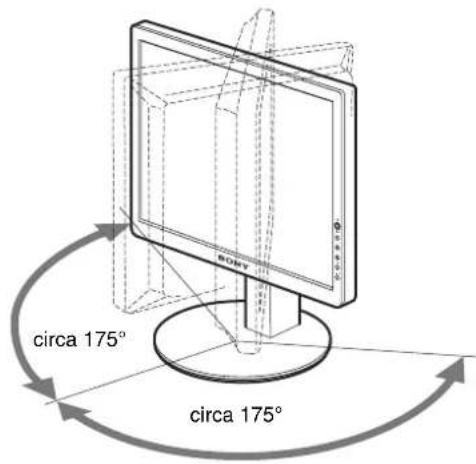
text_image
circa 175° circa 175°text_image
Diagram showing finger pressing a button with OK indicator, alongside two circular icons with diamond symbols and arrows indicating action.text_image
Diagram showing finger pressing a button labeled 'OK' with three circular icons below, indicating action or confirmation.4 Chiusura del menu.
natural_image
Two-panel image showing a textured surface before and after transformation, with no visible text or symbols.natural_image
Two-panel image showing a striped pattern on the left and a striped pattern on the right, both without any text or symbols.28–80 kHz (SDM-S73/S93)
text_image
O IN F O R M A Z I O N I N O S E G N A L E I N I G N R E O S S V A I A R I S P A R M I O E N E G R"VAI A RISPARMIO ENERG"
17,0 pollici (SDM-S73)
19,0 pollici (SDM-S93)
You have just purchased a TCO'99 approved and labelled product! Your choice has provided you with a product developed for professional use. Your purchase has also contributed to reducing the burden on the environment and also to the further development of environmentally adapted electronics products.
■Why do we have environmentally labelled computers?
In many countries, environmental labelling has become an established method for encouraging the adaptation of goods and services to the environment. The main problem, as far as computers and other electronics equipment are concerned, is that environmentally harmful substances are used both in the products and during their manufacture. Since it is not so far possible to satisfactorily recycle the majority of electronics equipment, most of these potentially damaging substances sooner or later enter nature.
There are also other characteristics of a computer, such as energy consumption levels, that are important from the viewpoints of both the work (internal) and natural (external) environments. Since all methods of electricity generation have a negative effect on the environment (e.g. acidic and climate-influencing emissions, radioactive waste), it is vital to save energy. Electronics equipment in offices is often left running continuously and thereby consumes a lot of energy.
■What does labelling involve?
This product meets the requirements for the TCO'99 scheme which provides for international and environmental labelling of personal computers. The labelling scheme was developed as a joint effort by the TCO (The Swedish Confederation of Professional Employees), Svenska Naturskyddsforeningen (The Swedish Society for Nature Conservation) and Statens Energimydighet (The Swedish National Energy Administration).
Approval requirements cover a wide range of issues: environment, ergonomics, usability, emission of electric and magnetic fields, energy consumption and electrical and fire safety.
The environmental demands impose restrictions on the presence and use of heavy metals, brominated and chlorinated flame retardants, CFCs (freons) and chlorinated solvents, among other things. The product must be prepared for recycling and the manufacturer is obliged to have an environmental policy which must be adhered to in each country where the company implements its operational policy.
The energy requirements include a demand that the computer and/or display, after a certain period of inactivity, shall reduce its power consumption to a lower level in one or more stages. The length of time to reactivate the computer shall be reasonable for the user.
Labelled products must meet strict environmental demands, for example, in respect of the reduction of electric and magnetic fields, physical and visual ergonomics and good usability.
Below you will find a brief summary of the environmental requirements met by this product. The complete environmental criteria document may be ordered from:
TCO Development
SE-114 94 Stockholm, Sweden
Fax: +46 8 782 92 07
Email (Internet): development@tco.se
Current information regarding TCO'99 approved and labelled
products may also be obtained via the Internet, using the address: http://www.tco-info.com/
■Environmental requirements
Flame retardants
Flame retardants are present in printed circuit boards, cables, wires, casings and housings. Their purpose is to prevent, or at least to delay the spread of fire. Up to 30% of the plastic in a computer casing can consist of flame retardant substances. Most flame retardants contain bromine or chloride, and those flame retardants are chemically related to another group of environmental toxins, PCBs. Both the flame retardants containing bromine or chloride and the PCBs are suspected of giving rise to severe health effects, including reproductive damage in fish-eating birds and mammals, due to the bio-accumulative * processes. Flame retardants have been found in human blood and researchers fear that disturbances in foetus development may occur.
The relevant TCO'99 demand requires that plastic components weighing more than 25 grams must not contain flame retardants with organically bound bromine or chlorine. Flame retardants are allowed in the printed circuit boards since no substitutes are available.
Cadmium\*\*
Cadmium is present in rechargeable batteries and in the colour-generating layers of certain computer displays. Cadmium damages the nervous system and is toxic in high doses. The relevant TCO'99 requirement states that batteries, the colour-generating layers of display screens and the electrical or electronics components must not contain any cadmium.
Mercury\*\*
Mercury is sometimes found in batteries, relays and switches. It damages the nervous system and is toxic in high doses. The relevant TCO'99 requirement states that batteries may not contain any mercury. It also demands that mercury is not present in any of the electrical or electronics components associated with the labelled unit.
CFCs (freons)
The relevant TCO'99 requirement states that neither CFCs nor HCFCs may be used during the manufacture and assembly of the product. CFCs (freons) are sometimes used for washing printed circuit boards. CFCs break down ozone and thereby damage the ozone layer in the stratosphere, causing increased reception on earth of ultraviolet light with e.g. increased risks of skin cancer (malignant melanoma) as a consequence.
Lead\*\*
Lead can be found in picture tubes, display screens, solders and capacitors. Lead damages the nervous system and in higher doses, causes lead poisoning. The relevant TCO'99 requirement permits the inclusion of lead since no replacement has yet been developed.
* Bio-accumulative is defined as substances which accumulate within living organisms.
** Lead, Cadmium and Mercury are heavy metals which are Bio-accumulative.
TFT LCD Color Computer Display
SDM-S53
SDM-S73
SDM-S93
Owner's Record
The model and serial numbers are located at the rear of the unit. Record these numbers in the spaces provided below. Refer to them whenever you call upon your dealer regarding this product. Model No. ____ Serial No. ____
WARNING
To prevent fire or shock hazard, do not expose the unit to rain or moisture.
Dangerously high voltages are present inside the unit. Do not open the cabinet. Refer servicing to qualified personnel only.
FCC Notice
This equipment has been tested and found to comply with the limits for a Class B digital device, pursuant to Part 15 of the FCC Rules. These limits are designed to provide reasonable protection against harmful interference in a residential installation. This equipment generates, uses, and can radiate radio frequency energy and, if not installed and used in accordance with the instructions, may cause harmful interference to radio communications. However, there is no guarantee that interference will not occur in a particular installation. If this equipment does cause harmful interference to radio or television reception, which can be determined by turning the equipment off and on, the user is encouraged to try to correct the interference by one or more of the following measures:
- Reorient or relocate the receiving antenna.
– Increase the separation between the equipment and receiver. - Connect the equipment into an outlet on a circuit different from that to which the receiver is connected.
- Consult the dealer or an experienced radio/TV technician for help. You are cautioned that any changes or modifications not expressly approved in this manual could void your authority to operate this equipment.
IMPORTANTE
If you have any questions about this product, you may call; Sony Customer Information Services Center 1-800-222-7669 or http://www.sony.com/
Declaration of Conformity
Trade Name: SONY
Model: SDM-S53/S73/S93
Responsible Party: Sony Electronics Inc.
Address: 16530 Via Esprillo,
San Diego, CA 92127 U.S.A.
Telephone Number: 858-942-2230
This device complies with part 15 of the FCC rules. Operation is subject to the following two conditions: (1) This device may not cause harmful interference, and (2) this device must accept any interference received, including interference that may cause undesired operation.

BZ03
NOTICE
This notice is applicable for USA/Canada only. If shipped to USA/Canada, install only a UL LISTED/CSA LABELLED power supply cord meeting the following specifications:
SPECIFICATIONS
Plug Type Nema-Plug 5-15p
Cord Type SVT or SJT, minimum 3 × 18 AWG
Length Maximum 15 feet
Rating Minimum 7 A, 125 V
NOTICE
As an ENERGY STAR Partner, Sony Corporation has determined that this product meets the ENERGY STAR guidelines for energy efficiency.

text_image
ECOLOGY ENERGY EMISSIONS SCIENCE TCO 99 ERGONOMICSThis monitor complies with the TCO'99 guidelines.
Содержание
text_image
MAIN POWER I O 6natural_image
Line drawing of a computer monitor with a stand and labeled point 7 (no text or symbols on the device itself)natural_image
Diagram of a mechanical device with an upward arrow indicating motion, mounted on a base (no text or symbols present)text_image
Diagram showing hand cursor clicking and clicking a circle with 'OK' button, indicating press or action instructiontext_image
Diagram showing three hand icons pointing to a circle with 'OK' label, indicating action or status change.4 Закройте меню.
natural_image
Two-panel image showing a textured surface before and after transformation: left panel with grid lines, right panel with vertical striped pattern (no text or symbols)natural_image
Two-panel image showing a striped pattern on the left and a striped pattern on the right, both without any text or symbols.text_image
ECOLOGY ENERGY TCO 99 EMISSIONS ERGONOMICS■ Congratulations!
You have just purchased a TCO'99 approved and labelled product! Your choice has provided you with a product developed for professional use. Your purchase has also contributed to reducing the burden on the environment and also to the further development of environmentally adapted electronics products.
■ Why do we have environmentally labelled computers?
In many countries, environmental labelling has become an established method for encouraging the adaptation of goods and services to the environment. The main problem, as far as computers and other electronics equipment are concerned, is that environmentally harmful substances are used both in the products and during their manufacture. Since it is not so far possible to satisfactorily recycle the majority of electronics equipment, most of these potentially damaging substances sooner or later enter nature.
There are also other characteristics of a computer, such as energy consumption levels, that are important from the viewpoints of both the work (internal) and natural (external) environments. Since all methods of electricity generation have a negative effect on the environment (e.g. acidic and climate-influencing emissions, radioactive waste), it is vital to save energy. Electronics equipment in offices is often left running continuously and thereby consumes a lot of energy.
■ What does labelling involve?
This product meets the requirements for the TCO'99 scheme which provides for international and environmental labelling of personal computers. The labelling scheme was developed as a joint effort by the TCO (The Swedish Confederation of Professional Employees), Svenska Naturskyddsforeningen (The Swedish Society for Nature Conservation) and Statens Energimydighet (The Swedish National Energy Administration).
Approval requirements cover a wide range of issues: environment, ergonomics, usability, emission of electric and magnetic fields, energy consumption and electrical and fire safety.
The environmental demands impose restrictions on the presence and use of heavy metals, brominated and chlorinated flame retardants, CFCs (freons) and chlorinated solvents, among other things. The product must be prepared for recycling and the manufacturer is obliged to have an environmental policy which must be adhered to in each country where the company implements its operational policy.
The energy requirements include a demand that the computer and/or display, after a certain period of inactivity, shall reduce its power consumption to a lower level in one or more stages. The length of time to reactivate the computer shall be reasonable for the user.
Labelled products must meet strict environmental demands, for example, in respect of the reduction of electric and magnetic fields, physical and visual ergonomics and good usability.
Below you will find a brief summary of the environmental requirements met by this product. The complete environmental criteria document may be ordered from:
TCO Development
SE-114 94 Stockholm, Sweden
Fax: +46 8 782 92 07
Email (Internet): development@tco.se
Current information regarding TCO'99 approved and labelled products may also be obtained via the Internet, using the address: http://www.tco-info.com/
■ Environmental requirements
Flame retardants
Flame retardants are present in printed circuit boards, cables, wires, casings and housings. Their purpose is to prevent, or at least to delay the spread of fire. Up to 30% of the plastic in a computer casing can consist of flame retardant substances. Most flame retardants contain bromine or chloride, and those flame retardants are chemically related to another group of environmental toxins, PCBs. Both the flame retardants containing bromine or chloride and the PCBs are suspected of giving rise to severe health effects, including reproductive damage in fish-eating birds and mammals, due to the bio-accumulative* processes. Flame retardants have been found in human blood and researchers fear that disturbances in foetus development may occur.
The relevant TCO'99 demand requires that plastic components weighing more than 25 grams must not contain flame retardants with organically bound bromine or chlorine. Flame retardants are allowed in the printed circuit boards since no substitutes are available.
Cadmium\*\*
Cadmium is present in rechargeable batteries and in the colour-generating layers of certain computer displays. Cadmium damages the nervous system and is toxic in high doses. The relevant TCO'99 requirement states that batteries, the colour-generating layers of display screens and the electrical or electronics components must not contain any cadmium.
Mercury\*\*
Mercury is sometimes found in batteries, relays and switches. It damages the nervous system and is toxic in high doses. The relevant TCO'99 requirement states that batteries may not contain any mercury. It also demands that mercury is not present in any of the electrical or electronics components associated with the labelled unit.
CFCs (freons)
The relevant TCO'99 requirement states that neither CFCs nor HCFCs may be used during the manufacture and assembly of the product. CFCs (freons) are sometimes used for washing printed circuit boards. CFCs break down ozone and thereby damage the ozone layer in the stratosphere, causing increased reception on earth of ultraviolet light with e.g. increased risks of skin cancer (malignant melanoma) as a consequence.
Lead\*\*
Lead can be found in picture tubes, display screens, solders and capacitors. Lead damages the nervous system and in higher doses, causes lead poisoning. The relevant TCO'99 requirement permits the inclusion of lead since no replacement has yet been developed.
* Bio-accumulative is defined as substances which accumulate within living organisms.
** Lead, Cadmium and Mercury are heavy metals which are Bio-accumulative.
TFT LCD Color Computer Display
SDM-S53
SDM-S73
SDM-S93
Owner's Record
The model and serial numbers are located at the rear of the unit. Record these numbers in the spaces provided below. Refer to them whenever you call upon your dealer regarding this product. Model No. ____ Serial No. ____
WARNING
To prevent fire or shock hazard, do not expose the unit to rain or moisture.
Dangerously high voltages are present inside the unit. Do not open the cabinet. Refer servicing to qualified personnel only.
FCC Notice
This equipment has been tested and found to comply with the limits for a Class B digital device, pursuant to Part 15 of the FCC Rules. These limits are designed to provide reasonable protection against harmful interference in a residential installation. This equipment generates, uses, and can radiate radio frequency energy and, if not installed and used in accordance with the instructions, may cause harmful interference to radio communications. However, there is no guarantee that interference will not occur in a particular installation. If this equipment does cause harmful interference to radio or television reception, which can be determined by turning the equipment off and on, the user is encouraged to try to correct the interference by one or more of the following measures:
- Reorient or relocate the receiving antenna.
– Increase the separation between the equipment and receiver. - Connect the equipment into an outlet on a circuit different from that to which the receiver is connected.
- Consult the dealer or an experienced radio/TV technician for help. You are cautioned that any changes or modifications not expressly approved in this manual could void your authority to operate this equipment.
IMPORTANTE
If you have any questions about this product, you may call; Sony Customer Information Services Center 1-800-222-7669 or http://www.sony.com/
Declaration of Conformity
Trade Name: SONY
Model: SDM-S53/S73/S93
Responsible Party: Sony Electronics Inc.
Address: 16530 Via Esprillo,
San Diego, CA 92127 U.S.A.
Telephone Number: 858-942-2230
This device complies with part 15 of the FCC rules. Operation is subject to the following two conditions: (1) This device may not cause harmful interference, and (2) this device must accept any interference received, including interference that may cause undesired operation.

BZ03
NOTICE
This notice is applicable for USA/Canada only. If shipped to USA/Canada, install only a UL LISTED/CSA LABELLED power supply cord meeting the following specifications:
SPECIFICATIONS
Plug Type Nema-Plug 5-15p
Cord Type SVT or SJT, minimum 3 × 18 AWG
Length Maximum 15 feet
Rating Minimum 7 A, 125 V
NOTICE
As an ENERGY STAR Partner, Sony Corporation has determined that this product meets the ENERGY STAR guidelines for energy efficiency.

text_image
ECOLOGY ENERGY EMISSIONS SCIENCE TCO 99 ERGONOMICSThis monitor complies with the TCO'99 guidelines.
TCO'99 Eco-document....i
natural_image
Line drawing of a computer monitor with a stand and labeled point 7 (no text or symbols on the device itself)7 Bakre panel (sid. 8)
natural_image
Diagram of a device with an upward arrow and directional arrows indicating movement or force (no text or symbols present)text_image
Diagram showing finger pressing and clicking a circle with 'OK' button, alongside two circular icons with diamond symbols.text_image
Diagram showing finger pressing and clicking a button with 'OK' label, alongside three directional icons for navigation or interaction.4 Stäng menyn.
natural_image
Two-panel image showing a textured surface before and after transformation, with no visible text or symbols.natural_image
Two-panel image showing a vertical striped pattern on the left and a textured striped pattern on the right, both without any text or symbols.28–80 kHz (SDM-S73/S93)
Vertikal frekvens: 48–75 Hz
text_image
ECOLOGY ENERGY EMISSIONS EMISSIONS TCO 99 ECONOMICS■Congratulations!
You have just purchased a TCO'99 approved and labelled product! Your choice has provided you with a product developed for professional use. Your purchase has also contributed to reducing the burden on the environment and also to the further development of environmentally adapted electronics products.
■Why do we have environmentally labelled computers?
In many countries, environmental labelling has become an established method for encouraging the adaptation of goods and services to the environment. The main problem, as far as computers and other electronics equipment are concerned, is that environmentally harmful substances are used both in the products and during their manufacture. Since it is not so far possible to satisfactorily recycle the majority of electronics equipment, most of these potentially damaging substances sooner or later enter nature.
There are also other characteristics of a computer, such as energy consumption levels, that are important from the viewpoints of both the work (internal) and natural (external) environments. Since all methods of electricity generation have a negative effect on the environment (e.g. acidic and climate-influencing emissions, radioactive waste), it is vital to save energy. Electronics equipment in offices is often left running continuously and thereby consumes a lot of energy.
■What does labelling involve?
This product meets the requirements for the TCO'99 scheme which provides for international and environmental labelling of personal computers. The labelling scheme was developed as a joint effort by the TCO (The Swedish Confederation of Professional Employees), Svenska Naturskyddsforeningen (The Swedish Society for Nature Conservation) and Statens Energimydighet (The Swedish National Energy Administration).
Approval requirements cover a wide range of issues: environment, ergonomics, usability, emission of electric and magnetic fields, energy consumption and electrical and fire safety.
The environmental demands impose restrictions on the presence and use of heavy metals, brominated and chlorinated flame retardants, CFCs (freons) and chlorinated solvents, among other things. The product must be prepared for recycling and the manufacturer is obliged to have an environmental policy which must be adhered to in each country where the company implements its operational policy.
The energy requirements include a demand that the computer and/or display, after a certain period of inactivity, shall reduce its power consumption to a lower level in one or more stages. The length of time to reactivate the computer shall be reasonable for the user.
Labelled products must meet strict environmental demands, for example, in respect of the reduction of electric and magnetic fields, physical and visual ergonomics and good usability.
Below you will find a brief summary of the environmental requirements met by this product. The complete environmental criteria document may be ordered from:
TCO Development
SE-114 94 Stockholm, Sweden
Fax: +46 8 782 92 07
Email (Internet): development@tco.se
Current information regarding TCO'99 approved and labelled products may also be obtained via the Internet, using the address: http://www.tco-info.com/
■Environmental requirements
Flame retardants
Flame retardants are present in printed circuit boards, cables, wires, casings and housings. Their purpose is to prevent, or at least to delay the spread of fire. Up to 30% of the plastic in a computer casing can consist of flame retardant substances. Most flame retardants contain bromine or chloride, and those flame retardants are chemically related to another group of environmental toxins. PCBs. Both the flame retardants containing bromine or chloride and the PCBs are suspected of giving rise to severe health effects, including reproductive damage in fish-eating birds and mammals, due to the bio-accumulative* processes. Flame retardants have been found in human blood and researchers fear that disturbances in foetus development may occur.
The relevant TCO'99 demand requires that plastic components weighing more than 25 grams must not contain flame retardants with organically bound bromine or chlorine. Flame retardants are allowed in the printed circuit boards since no substitutes are available.
Cadmium\*\*
Cadmium is present in rechargeable batteries and in the colour-generating layers of certain computer displays. Cadmium damages the nervous system and is toxic in high doses. The relevant TCO'99 requirement states that batteries, the colour-generating layers of display screens and the electrical or electronics components must not contain any cadmium.
Mercury\*\*
Mercury is sometimes found in batteries, relays and switches. It damages the nervous system and is toxic in high doses. The relevant TCO'99 requirement states that batteries may not contain any mercury. It also demands that mercury is not present in any of the electrical or electronics components associated with the labelled unit.
CFCs (freons)
The relevant TCO'99 requirement states that neither CFCs nor HCFCs may be used during the manufacture and assembly of the product. CFCs (freons) are sometimes used for washing printed circuit boards. CFCs break down ozone and thereby damage the ozone layer in the stratosphere, causing increased reception on earth of ultraviolet light with c.g. increased risks of skin cancer (malignant melanoma) as a consequence.
Lead\*\*
Lead can be found in picture tubes, display screens, solders and capacitors. Lead damages the nervous system and in higher doses, causes lead poisoning. The relevant TCO'99 requirement permits the inclusion of lead since no replacement has yet been developed.
* Bio-accumulative is defined as substances which accumulate within living organisms.
** Lead, Cadmium and Mercury are heavy metals which are Bio-accumulative.
TFT LCD Color Computer Display
SDM-S53
SDM-S73
SDM-S93
Owner's Record
The model and serial numbers are located at the rear of the unit. Record these numbers in the spaces provided below. Refer to them whenever you call upon your dealer regarding this product. Model No. ____ Serial No. ____
WARNING
To prevent fire or shock hazard, do not expose the unit to rain or moisture.
Dangerously high voltages are present inside the unit. Do not open the cabinet. Refer servicing to qualified personnel only.
FCC Notice
This equipment has been tested and found to comply with the limits for a Class B digital device, pursuant to Part 15 of the FCC Rules. These limits are designed to provide reasonable protection against harmful interference in a residential installation. This equipment generates, uses, and can radiate radio frequency energy and, if not installed and used in accordance with the instructions, may cause harmful interference to radio communications. However, there is no guarantee that interference will not occur in a particular installation. If this equipment does cause harmful interference to radio or television reception, which can be determined by turning the equipment off and on, the user is encouraged to try to correct the interference by one or more of the following measures:
- Reorient or relocate the receiving antenna.
– Increase the separation between the equipment and receiver. - Connect the equipment into an outlet on a circuit different from that to which the receiver is connected.
- Consult the dealer or an experienced radio/TV technician for help. You are cautioned that any changes or modifications not expressly approved in this manual could void your authority to operate this equipment.
IMPORTANTE
If you have any questions about this product, you may call; Sony Customer Information Services Center 1-800-222-7669 or http://www.sony.com/
Declaration of Conformity
Trade Name: SONY
Model: SDM-S53/S73/S93
Responsible Party: Sony Electronics Inc.
Address: 16530 Via Esprillo,
San Diego, CA 92127 U.S.A.
Telephone Number: 858-942-2230
This device complies with part 15 of the FCC rules. Operation is subject to the following two conditions: (1) This device may not cause harmful interference, and (2) this device must accept any interference received, including interference that may cause undesired operation.

BZ03
NOTICE
This notice is applicable for USA/Canada only. If shipped to USA/Canada, install only a UL LISTED/CSA LABELLED power supply cord meeting the following specifications:
SPECIFICATIONS
Plug Type Nema-Plug 5-15p
Cord Type SVT or SJT, minimum 3 × 18 AWG
Length Maximum 15 feet
Rating Minimum 7 A, 125 V
NOTICE
As an ENERGY STAR Partner, Sony Corporation has determined that this product meets the ENERGY STAR guidelines for energy efficiency.

text_image
ECOLOGY ENERGY EMISSIONS SCIENCE TCO 99 ERGONOMICSThis monitor complies with the TCO'99 guidelines.
Inhoudsopgave
TCO'99 Eco-document....i
natural_image
Line drawing of a computer monitor with a stand and labeled point 7 (no text or symbols on the device itself)7 Achterklep (pagina 8)
natural_image
Diagram of a mechanical device with an upward arrow and rotating arrow, no text or symbols presenttext_image
ca. 5° ca. 30°Alleen voor SDM-S93
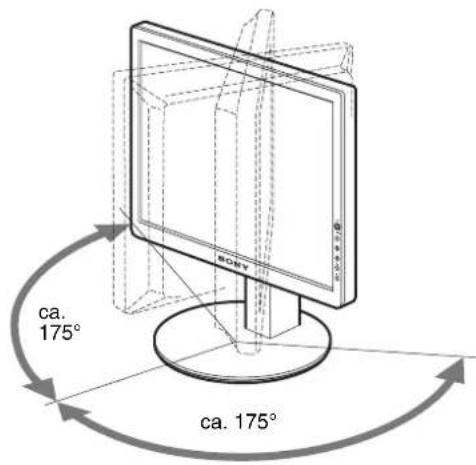
text_image
ca. 175° ca. 175°text_image
Diagram showing hand cursor clicking and clicking a circle with OK button, alongside two circular icons with diamond symbols.3 Pas het menu aan.
text_image
Diagram showing hand cursor clicking and clicking a circle with 'OK' button, alongside two circular icons with arrows pointing to the circle.4 Sluit het menu.
Klik op [Utility] → [Windows]/[Win Utility.exe]. Voor Macintosh
Klik op [Utility] → [Mac]/[Mac Utility].
natural_image
Two-panel image showing a textured surface before and after transformation: left panel with '300 Poles' label, right panel with '300 Poles' label, both without any readable text or symbols.natural_image
Two-panel image showing a vertical striped pattern on the left and a grayscale striped pattern on the right, both without any text or symbols.Klik op [Utility] → [Windows]/[Win Utility.exe]. Voor Macintosh
Klik op [Utility] → [Mac]/[Mac Utility].
28–80 kHz (SDM-S73/S93)
Verticale frequentie: 48–75 Hz
text_image
B I N F O R M A T I E B U I T E N B E R E I K x x x . x k H z / x x x H ztext_image
INFORMATB BUITEN BEREIK RESOLUT I E > .21 8 0 X 1 240"GA NAAR STROOMSPAAR"
text_image
ECOLOGY ENERGY EMISSIONS ECONOMICS TCO 99■ Congratulations!
You have just purchased a TCO'99 approved and labelled product! Your choice has provided you with a product developed for professional use. Your purchase has also contributed to reducing the burden on the environment and also to the further development of environmentally adapted electronics products.
■ Why do we have environmentally labelled computers?
In many countries, environmental labelling has become an established method for encouraging the adaptation of goods and services to the environment. The main problem, as far as computers and other electronics equipment are concerned, is that environmentally harmful substances are used both in the products and during their manufacture. Since it is not so far possible to satisfactorily recycle the majority of electronics equipment, most of these potentially damaging substances sooner or later enter nature.
There are also other characteristics of a computer, such as energy consumption levels, that are important from the viewpoints of both the work (internal) and natural (external) environments. Since all methods of electricity generation have a negative effect on the environment (e.g. acidic and climate-influencing emissions, radioactive waste), it is vital to save energy. Electronics equipment in offices is often left running continuously and thereby consumes a lot of energy.
■ What does labelling involve?
This product meets the requirements for the TCO'99 scheme which provides for international and environmental labelling of personal computers. The labelling scheme was developed as a joint effort by the TCO (The Swedish Confederation of Professional Employees), Svenska Naturskyddsforeningen (The Swedish Society for Nature Conservation) and Statens Energimydighet (The Swedish National Energy Administration).
Approval requirements cover a wide range of issues: environment, ergonomics, usability, emission of electric and magnetic fields, energy consumption and electrical and fire safety.
The environmental demands impose restrictions on the presence and use of heavy metals, brominated and chlorinated flame retardants, CFCs (freons) and chlorinated solvents, among other things. The product must be prepared for recycling and the manufacturer is obliged to have an environmental policy which must be adhered to in each country where the company implements its operational policy.
The energy requirements include a demand that the computer and/or display, after a certain period of inactivity, shall reduce its power consumption to a lower level in one or more stages. The length of time to reactivate the computer shall be reasonable for the user.
Labelled products must meet strict environmental demands, for example, in respect of the reduction of electric and magnetic fields, physical and visual ergonomics and good usability.
Below you will find a brief summary of the environmental requirements met by this product. The complete environmental criteria document may be ordered from:
TCO Development
SE-114 94 Stockholm, Sweden
Fax: +46 8 782 92 07
Email (Internet): development@tco.se
Current information regarding TCO'99 approved and labelled products may also be obtained via the Internet, using the address: http://www.tco-info.com/
■ Environmental requirements
Flame retardants
Flame retardants are present in printed circuit boards, cables, wires, casings and housings. Their purpose is to prevent, or at least to delay the spread of fire. Up to 30% of the plastic in a computer casing can consist of flame retardant substances. Most flame retardants contain bromine or chloride, and those flame retardants are chemically related to another group of environmental toxins, PCBs. Both the flame retardants containing bromine or chloride and the PCBs are suspected of giving rise to severe health effects, including reproductive damage in fish-eating birds and mammals, due to the bio-accumulative* processes. Flame retardants have been found in human blood and researchers fear that disturbances in foetus development may occur.
The relevant TCO'99 demand requires that plastic components weighing more than 25 grams must not contain flame retardants with organically bound bromine or chlorine. Flame retardants are allowed in the printed circuit boards since no substitutes are available.
Cadmium\*\*
Cadmium is present in rechargeable batteries and in the colour-generating layers of certain computer displays. Cadmium damages the nervous system and is toxic in high doses. The relevant TCO'99 requirement states that batteries, the colour-generating layers of display screens and the electrical or electronics components must not contain any cadmium.
Mercury\*\*
Mercury is sometimes found in batteries, relays and switches. It damages the nervous system and is toxic in high doses. The relevant TCO'99 requirement states that batteries may not contain any mercury. It also demands that mercury is not present in any of the electrical or electronics components associated with the labelled unit.
CFCs (freons)
The relevant TCO'99 requirement states that neither CFCs nor HCFCs may be used during the manufacture and assembly of the product. CFCs (freons) are sometimes used for washing printed circuit boards. CFCs break down ozone and thereby damage the ozone layer in the stratosphere, causing increased reception on earth of ultraviolet light with e.g. increased risks of skin cancer (malignant melanoma) as a consequence.
Lead\*\*
Lead can be found in picture tubes, display screens, solders and capacitors. Lead damages the nervous system and in higher doses, causes lead poisoning. The relevant TCO'99 requirement permits the inclusion of lead since no replacement has yet been developed.
* Bio-accumulative is defined as substances which accumulate within living organisms.
** Lead, Cadmium and Mercury are heavy metals which are Bio-accumulative.
TFT LCD Color Computer Display
SDM-S53
SDM-S73
SDM-S93
Owner's Record
The model and serial numbers are located at the rear of the unit. Record these numbers in the spaces provided below. Refer to them whenever you call upon your dealer regarding this product. Model No. ____ Serial No. ____
WARNING
To prevent fire or shock hazard, do not expose the unit to rain or moisture.
Dangerously high voltages are present inside the unit. Do not open the cabinet. Refer servicing to qualified personnel only.
FCC Notice
This equipment has been tested and found to comply with the limits for a Class B digital device, pursuant to Part 15 of the FCC Rules. These limits are designed to provide reasonable protection against harmful interference in a residential installation. This equipment generates, uses, and can radiate radio frequency energy and, if not installed and used in accordance with the instructions, may cause harmful interference to radio communications. However, there is no guarantee that interference will not occur in a particular installation. If this equipment does cause harmful interference to radio or television reception, which can be determined by turning the equipment off and on, the user is encouraged to try to correct the interference by one or more of the following measures: - Reorient or relocate the receiving antenna. - Increase the separation between the equipment and receiver. - Connect the equipment into an outlet on a circuit different from that to which the receiver is connected. - Consult the dealer or an experienced radio/TV technician for help. You are cautioned that any changes or modifications not expressly approved in this manual could void your authority to operate this equipment.
IMPORTANTE
If you have any questions about this product, you may call; Sony Customer Information Services Center 1-800-222-7669 or http://www.sony.com/
Declaration of Conformity
Trade Name: SONY
Model: SDM-S53/S73/S93
Responsible Party: Sony Electronics Inc.
Address: 16530 Via Esprillo.
San Diego, CA 92127 U.S.A.
Telephone Number: 858-942-2230
This device complies with part 15 of the FCC rules. Operation is subject to the following two conditions: (1) This device may not cause harmful interference, and (2) this device must accept any interference received, including interference that may cause undesired operation.

BZ03
NOTICE
This notice is applicable for USA/Canada only.
If shipped to USA/Canada, install only a UL LISTED/CSA
LABELLED power supply cord meeting the following specifications:
SPECIFICATIONS
Plug Type Nema-Plug 5-15p
Cord Type SVT or SJT, minimum 3 × 18 AWG
Length Maximum 15 feet
Rating Minimum 7 A, 125 V
NOTICE
As an ENERGY STAR Partner, Sony Corporation has determined that this product meets the ENERGY STAR guidelines for energy efficiency.

text_image
ECOLOGY ENERGY EMISSIONS SCIMES TCO 99 ERGONOMICSThis monitor complies with the TCO'99 guidelines.
目录
使用前须知注意事项 4
识别部件和控制钮 5
安装 6
安装 1: 连接视频信号电缆 6
安装 2: 连接电源线 7
安装 3:固定电线并关闭后盖 8
安装 4:打开监视器和计算机电源 8
安装 5:调整倾斜 9
设定监视器 …… 10
导航菜单 10
调整背光(背光).... 11
① 调整对比度 对比度 ) 11
调整图像的黑色电平(亮度)……11
调整图像锐度和居中(屏幕效果)……12
调整色温(色温)……13
γ 改变伽马设定(GAMMA)…… 14
改变菜单位置(菜单位置)……14
TCO'99 Eco-document ....i
natural_image
Three line drawings of different types of electrical plugs (no text or symbols)text_image
MAIN POWER I 6natural_image
Line drawing of a computer monitor with a stand and labeled point 7 (no text or symbols on the device itself)natural_image
Diagram of a mechanical device with an upward arrow and directional arrows indicating motion (no text or symbols)text_image
Diagram showing hand cursor clicking a circle with 'OK' button, indicating press or action instruction3 调整菜单
text_image
Diagram showing hand cursor clicking a circle with 'OK' button, indicating press operation or navigation4 关闭菜单。
natural_image
Two-panel image showing a textured surface before and after transformation: left panel with grid pattern, right panel with vertical striped pattern (no text or symbols)8按 OK 按钮。
主菜单出现在屏幕上。
natural_image
Two-panel image showing a vertical striped pattern on the left and a textured black-and-white striped pattern on the right, with no visible text or symbols.text_image
ECOLOGY ENERGY EMISSIONS ECONOMICS TCO 99x Congratulations!
You have just purchased a TCO'99 approved and labelled product! Your choice has provided you with a product developed for professional use. Your purchase has also contributed to reducing the burden on the environment and also to the further development of environmentally adapted electronics products.
x Why do we have environmentally labelled computers?
In many countries, environmental labelling has become an established method for encouraging the adaptation of goods and services to the environment. The main problem, as far as computers and other electronics equipment are concerned, is that environmentally harmful substances are used both in the products and during their manufacture. Since it is not so far possible to satisfactorily recycle the majority of electronics equipment, most of these potentially damaging substances sooner or later enter nature.
There are also other characteristics of a computer, such as energy consumption levels, that are important from the viewpoints of both the work (internal) and natural (external) environments. Since all methods of electricity generation have a negative effect on the environment (e.g. acidic and climate-influencing emissions, radioactive waste), it is vital to save energy. Electronics equipment in offices is often left running continuously and thereby consumes a lot of energy.
x What does labelling involve?
This product meets the requirements for the TCO'99 scheme which provides for international and environmental labelling of personal computers. The labelling scheme was developed as a joint effort by the TCO (The Swedish Confederation of Professional Employees), Svenska Naturskyddsforeningen (The Swedish Society for Nature Conservation) and Statens Energimyndighet (The Swedish National Energy Administration).
Approval requirements cover a wide range of issues: environment, ergonomics, usability, emission of electric and magnetic fields, energy consumption and electrical and fire safety.
The environmental demands impose restrictions on the presence and use of heavy metals, brominated and chlorinated flame retardants, CFCs (freons) and chlorinated solvents, among other things. The product must be prepared for recycling and the manufacturer is obliged to have an environmental policy which must be adhered to in each country where the company implements its operational policy.
The energy requirements include a demand that the computer and/or display, after a certain period of inactivity, shall reduce its power consumption to a lower level in one or more stages. The length of time to reactivate the computer shall be reasonable for the user.
Labelled products must meet strict environmental demands, for example, in respect of the reduction of electric and magnetic fields, physical and visual ergonomics and good usability.
Below you will find a brief summary of the environmental requirements met by this product. The complete environmental criteria document may be ordered from:
TCO Development
SE-114 94 Stockholm, Sweden
Fax: +46 8 782 92 07
Email (Internet): development@tco.se
Current information regarding TCO'99 approved and labelled products may also be obtained via the Internet, using the address: http://www.tco-info.com/
x Environmental requirements
Flame retardants
Flame retardants are present in printed circuit boards, cables, wires, casings and housings. Their purpose is to prevent, or at least to delay the spread of fire. Up to 30% of the plastic in a computer casing can consist of flame retardant substances. Most flame retardants contain bromine or chloride, and those flame retardants are chemically related to another group of environmental toxins, PCBs. Both the flame retardants containing bromine or chloride and the PCBs are suspected of giving rise to severe health effects, including reproductive damage in fish-eating birds and mammals, due to the bio-accumulative* processes. Flame retardants have been found in human blood and researchers fear that disturbances in foetus development may occur.
The relevant TCO'99 demand requires that plastic components weighing more than 25 grams must not contain flame retardants with organically bound bromine or chlorine. Flame retardants are allowed in the printed circuit boards since no substitutes are available.
Cadmium\*\*
Cadmium is present in rechargeable batteries and in the colour-generating layers of certain computer displays. Cadmium damages the nervous system and is toxic in high doses. The relevant TCO'99 requirement states that batteries, the colour-generating layers of display screens and the electrical or electronics components must not contain any cadmium.
Mercury\*\*
Mercury is sometimes found in batteries, relays and switches. It damages the nervous system and is toxic in high doses. The relevant TCO'99 requirement states that batteries may not contain any mercury. It also demands that mercury is not present in any of the electrical or electronics components associated with the labelled unit.
CFCs (freons)
The relevant TCO'99 requirement states that neither CFCs nor HCFCs may be used during the manufacture and assembly of the product. CFCs (freons) are sometimes used for washing printed circuit boards. CFCs break down ozone and thereby damage the ozone layer in the stratosphere, causing increased reception on earth of ultraviolet light with e.g. increased risks of skin cancer (malignant melanoma) as a consequence.
Lead\*\*
Lead can be found in picture tubes, display screens, solders and capacitors. Lead damages the nervous system and in higher doses, causes lead poisoning. The relevant TCO'99 requirement permits the inclusion of lead since no replacement has yet been developed.
* Bio-accumulative is defined as substances which accumulate within living organisms.
** Lead, Cadmium and Mercury are heavy metals which are Bio-accumulative.
TFT LCD Color Computer Display
SDM-S53
SDM-S73
SDM-S93
Owner's Record
The model and serial numbers are located at the rear of the unit. Record these numbers in the spaces provided below. Refer to them whenever you call upon your dealer regarding this product. Model No. ____ Serial No. ____
WARNING
To prevent fire or shock hazard, do not expose the unit to rain or moisture.
Dangerously high voltages are present inside the unit. Do not open the cabinet. Refer servicing to qualified personnel only.
FCC Notice
This equipment has been tested and found to comply with the limits for a Class B digital device, pursuant to Part 15 of the FCC Rules. These limits are designed to provide reasonable protection against harmful interference in a residential installation. This equipment generates, uses, and can radiate radio frequency energy and, if not installed and used in accordance with the instructions, may cause harmful interference to radio communications. However, there is no guarantee that interference will not occur in a particular installation. If this equipment does cause harmful interference to radio or television reception, which can be determined by turning the equipment off and on, the user is encouraged to try to correct the interference by one or more of the following measures:
- Reorient or relocate the receiving antenna.
– Increase the separation between the equipment and receiver. - Connect the equipment into an outlet on a circuit different from that to which the receiver is connected.
- Consult the dealer or an experienced radio/TV technician for help. You are cautioned that any changes or modifications not expressly approved in this manual could void your authority to operate this equipment.
IMPORTANTE
If you have any questions about this product, you may call; Sony Customer Information Services Center 1-800-222-7669 or http://www.sony.com/
Declaration of Conformity
Trade Name: SONY
Model: SDM-S53/S73/S93
Responsible Party: Sony Electronics Inc.
Address: 16530 Via Esprillo,
San Diego, CA 92127 U.S.A.
Telephone Number: 858-942-2230
This device complies with part 15 of the FCC rules. Operation is subject to the following two conditions: (1) This device may not cause harmful interference, and (2) this device must accept any interference received, including interference that may cause undesired operation.

BZ03
NOTICE
This notice is applicable for USA/Canada only. If shipped to USA/Canada, install only a UL LISTED/CSA LABELLED power supply cord meeting the following specifications:
SPECIFICATIONS
Plug Type Nema-Plug 5-15p
Cord Type SVT or SJT, minimum 3 × 18 AWG
Length Maximum 15 feet
Rating Minimum 7 A, 125 V
NOTICE
As an ENERGY STAR Partner, Sony Corporation has determined that this product meets the ENERGY STAR guidelines for energy efficiency.

text_image
ECOLOGY ENERGY EMISSIONS SCIENCE TCO 99 ERGONOMICSThis monitor complies with the TCO'99 guidelines.
Obsah
TCO'99 Eco-document....i
natural_image
Three line drawings of different types of electrical plugs (no text or symbols)text_image
MAIN POWER I O 6natural_image
Line drawing of a computer monitor with a stand and labeled point 7 (no text or symbols on the device itself)natural_image
Diagram of a mechanical device with an upward arrow indicating motion, mounted on a stand (no text or symbols present)text_image
Diagram showing finger pressing and clicking a button labeled 'OK', with three circular icons below indicating action buttons.text_image
Diagram showing hand cursor clicking and clicking a circle with 'OK' button, indicating press operation or navigation4 Zavřete nabídku.
natural_image
Two-panel image showing a textured surface before and after transformation, with no visible text or symbols.natural_image
Two-panel image showing a vertical striped pattern on the left and a textured striped pattern on the right, both without any text or symbols.28–80 kHz (SDM-S73/S93)
text_image
INFORMAT NO CABLE D I S CONNECTEDCZ
You have just purchased a TCO'99 approved and labelled product! Your choice has provided you with a product developed for professional use. Your purchase has also contributed to reducing the burden on the environment and also to the further development of environmentally adapted electronics products.
■ Why do we have environmentally labelled computers?
In many countries, environmental labelling has become an established method for encouraging the adaptation of goods and services to the environment. The main problem, as far as computers and other electronics equipment are concerned, is that environmentally harmful substances are used both in the products and during their manufacture. Since it is not so far possible to satisfactorily recycle the majority of electronics equipment, most of these potentially damaging substances sooner or later enter nature.
There are also other characteristics of a computer, such as energy consumption levels, that are important from the viewpoints of both the work (internal) and natural (external) environments. Since all methods of electricity generation have a negative effect on the environment (e.g. acidic and climate-influencing emissions, radioactive waste), it is vital to save energy. Electronics equipment in offices is often left running continuously and thereby consumes a lot of energy.
■ What does labelling involve?
This product meets the requirements for the TCO'99 scheme which provides for international and environmental labelling of personal computers. The labelling scheme was developed as a joint effort by the TCO (The Swedish Confederation of Professional Employees), Svenska Naturskyddsforeningen (The Swedish Society for Nature Conservation) and Statens Energimydighet (The Swedish National Energy Administration).
Approval requirements cover a wide range of issues: environment, ergonomics, usability, emission of electric and magnetic fields, energy consumption and electrical and fire safety.
The environmental demands impose restrictions on the presence and use of heavy metals, brominated and chlorinated flame retardants, CFCs (freons) and chlorinated solvents, among other things. The product must be prepared for recycling and the manufacturer is obliged to have an environmental policy which must be adhered to in each country where the company implements its operational policy.
The energy requirements include a demand that the computer and/or display, after a certain period of inactivity, shall reduce its power consumption to a lower level in one or more stages. The length of time to reactivate the computer shall be reasonable for the user.
Labelled products must meet strict environmental demands, for example, in respect of the reduction of electric and magnetic fields, physical and visual ergonomics and good usability.
Below you will find a brief summary of the environmental requirements met by this product. The complete environmental criteria document may be ordered from:
TCO Development
SE-114 94 Stockholm, Sweden
Fax: +46 8 782 92 07
Email (Internet): development@tco.se
Current information regarding TCO'99 approved and labelled
products may also be obtained via the Internet, using the address: http://www.tco-info.com/
■ Environmental requirements
Flame retardants
Flame retardants are present in printed circuit boards, cables, wires, casings and housings. Their purpose is to prevent, or at least to delay the spread of fire. Up to 30% of the plastic in a computer casing can consist of flame retardant substances. Most flame retardants contain bromine or chloride, and those flame retardants are chemically related to another group of environmental toxins, PCBs. Both the flame retardants containing bromine or chloride and the PCBs are suspected of giving rise to severe health effects, including reproductive damage in fish-eating birds and mammals, due to the bio-accumulative * processes. Flame retardants have been found in human blood and researchers fear that disturbances in foetus development may occur.
The relevant TCO'99 demand requires that plastic components weighing more than 25 grams must not contain flame retardants with organically bound bromine or chlorine. Flame retardants are allowed in the printed circuit boards since no substitutes are available.
Cadmium\*\*
Cadmium is present in rechargeable batteries and in the colour-generating layers of certain computer displays. Cadmium damages the nervous system and is toxic in high doses. The relevant TCO'99 requirement states that batteries, the colour-generating layers of display screens and the electrical or electronics components must not contain any cadmium.
Mercury\*\*
Mercury is sometimes found in batteries, relays and switches. It damages the nervous system and is toxic in high doses. The relevant TCO'99 requirement states that batteries may not contain any mercury. It also demands that mercury is not present in any of the electrical or electronics components associated with the labelled unit.
CFCs (freons)
The relevant TCO'99 requirement states that neither CFCs nor HCFCs may be used during the manufacture and assembly of the product. CFCs (freons) are sometimes used for washing printed circuit boards. CFCs break down ozone and thereby damage the ozone layer in the stratosphere, causing increased reception on earth of ultraviolet light with e.g. increased risks of skin cancer (malignant melanoma) as a consequence.
Lead\*\*
Lead can be found in picture tubes, display screens, solders and capacitors. Lead damages the nervous system and in higher doses, causes lead poisoning. The relevant TCO'99 requirement permits the inclusion of lead since no replacement has yet been developed.
* Bio-accumulative is defined as substances which accumulate within living organisms.
** Lead, Cadmium and Mercury are heavy metals which are Bio-accumulative.
TFT LCD Color Computer Display
SDM-S53
SDM-S73
SDM-S93
Owner's Record
The model and serial numbers are located at the rear of the unit. Record these numbers in the spaces provided below. Refer to them whenever you call upon your dealer regarding this product. Model No. ____ Serial No. ____
WARNING
To prevent fire or shock hazard, do not expose the unit to rain or moisture.
Dangerously high voltages are present inside the unit. Do not open the cabinet. Refer servicing to qualified personnel only.
FCC Notice
This equipment has been tested and found to comply with the limits for a Class B digital device, pursuant to Part 15 of the FCC Rules. These limits are designed to provide reasonable protection against harmful interference in a residential installation. This equipment generates, uses, and can radiate radio frequency energy and, if not installed and used in accordance with the instructions, may cause harmful interference to radio communications. However, there is no guarantee that interference will not occur in a particular installation. If this equipment does cause harmful interference to radio or television reception, which can be determined by turning the equipment off and on, the user is encouraged to try to correct the interference by one or more of the following measures: - Reorient or relocate the receiving antenna. - Increase the separation between the equipment and receiver. - Connect the equipment into an outlet on a circuit different from that to which the receiver is connected. - Consult the dealer or an experienced radio/TV technician for help. You are cautioned that any changes or modifications not expressly approved in this manual could void your authority to operate this equipment.
IMPORTANTE
If you have any questions about this product, you may call; Sony Customer Information Services Center 1-800-222-7669 or http://www.sony.com/
Declaration of Conformity
Trade Name: SONY
Model: SDM-S53/S73/S93
Responsible Party: Sony Electronics Inc.
Address: 16530 Via Esprillo.
San Diego, CA 92127 U.S.A.
Telephone Number: 858-942-2230
This device complies with part 15 of the FCC rules. Operation is subject to the following two conditions: (1) This device may not cause harmful interference, and (2) this device must accept any interference received, including interference that may cause undesired operation.

BZ03
NOTICE
This notice is applicable for USA/Canada only.
If shipped to USA/Canada, install only a UL LISTED/CSA
LABELLED power supply cord meeting the following specifications:
SPECIFICATIONS
Plug Type Nema-Plug 5-15p
Cord Type SVT or SJT, minimum 3 × 18 AWG
Length Maximum 15 feet
Rating Minimum 7 A, 125 V
NOTICE
As an ENERGY STAR Partner, Sony Corporation has determined that this product meets the ENERGY STAR guidelines for energy efficiency.

text_image
ECOLOGY ENERGY EMISSIONS 99 TCO 99 ERGONOMICSThis monitor complies with the TCO'99 guidelines.
Tartalomjegyzék
Óvintézkedések 4
TCO'99 Eco-document .....i
Óvintézkedések
text_image
MAIN POWER I O 6natural_image
Line drawing of a computer monitor with a stand and labeled component '7' (no text or symbols beyond the number)natural_image
Diagram of a computer monitor with an upward arrow indicating motion, mounted on a stand (no text or symbols present)text_image
Diagram showing hand cursor clicking a circle with 'OK' button, indicating press or action instructiontext_image
Diagram showing three hand icons pointing at a circle with 'OK' label, indicating action or status change.4 Lépjen ki a menüböl.
natural_image
Two-panel image showing a textured surface before and after transformation, with no visible text or symbols.natural_image
Two-panel image showing a striped pattern on the left and a striped pattern on the right, both without any text or symbols.text_image
INFORMATNO CABLE D I S CONNECTEDHU
Függöleges: 48–75 Hz
text_image
ECOLOGY ENERGY TCO 99 EMISSIONS ERGONOMICS■ Congratulations!
You have just purchased a TCO'99 approved and labelled product! Your choice has provided you with a product developed for professional use. Your purchase has also contributed to reducing the burden on the environment and also to the further development of environmentally adapted electronics products.
■ Why do we have environmentally labelled computers?
In many countries, environmental labelling has become an established method for encouraging the adaptation of goods and services to the environment. The main problem, as far as computers and other electronics equipment are concerned, is that environmentally harmful substances are used both in the products and during their manufacture. Since it is not so far possible to satisfactorily recycle the majority of electronics equipment, most of these potentially damaging substances sooner or later enter nature.
There are also other characteristics of a computer, such as energy consumption levels, that are important from the viewpoints of both the work (internal) and natural (external) environments. Since all methods of electricity generation have a negative effect on the environment (e.g. acidic and climate-influencing emissions, radioactive waste), it is vital to save energy. Electronics equipment in offices is often left running continuously and thereby consumes a lot of energy.
■ What does labelling involve?
This product meets the requirements for the TCO'99 scheme which provides for international and environmental labelling of personal computers. The labelling scheme was developed as a joint effort by the TCO (The Swedish Confederation of Professional Employees), Svenska Naturskyddsforeningen (The Swedish Society for Nature Conservation) and Statens Energimydighet (The Swedish National Energy Administration).
Approval requirements cover a wide range of issues: environment, ergonomics, usability, emission of electric and magnetic fields, energy consumption and electrical and fire safety.
The environmental demands impose restrictions on the presence and use of heavy metals, brominated and chlorinated flame retardants, CFCs (freons) and chlorinated solvents, among other things. The product must be prepared for recycling and the manufacturer is obliged to have an environmental policy which must be adhered to in each country where the company implements its operational policy.
The energy requirements include a demand that the computer and/or display, after a certain period of inactivity, shall reduce its power consumption to a lower level in one or more stages. The length of time to reactivate the computer shall be reasonable for the user.
Labelled products must meet strict environmental demands, for example, in respect of the reduction of electric and magnetic fields, physical and visual ergonomics and good usability.
Below you will find a brief summary of the environmental requirements met by this product. The complete environmental criteria document may be ordered from:
TCO Development
SE-114 94 Stockholm, Sweden
Fax: +46 8 782 92 07
Email (Internet): development@tco.se
Current information regarding TCO'99 approved and labelled products may also be obtained via the Internet, using the address: http://www.tco-info.com/
■ Environmental requirements
Flame retardants
Flame retardants are present in printed circuit boards, cables, wires, casings and housings. Their purpose is to prevent, or at least to delay the spread of fire. Up to 30% of the plastic in a computer casing can consist of flame retardant substances. Most flame retardants contain bromine or chloride, and those flame retardants are chemically related to another group of environmental toxins, PCBs. Both the flame retardants containing bromine or chloride and the PCBs are suspected of giving rise to severe health effects, including reproductive damage in fish-eating birds and mammals, due to the bio-accumulative* processes. Flame retardants have been found in human blood and researchers fear that disturbances in foetus development may occur.
The relevant TCO'99 demand requires that plastic components weighing more than 25 grams must not contain flame retardants with organically bound bromine or chlorine. Flame retardants are allowed in the printed circuit boards since no substitutes are available.
Cadmium\*\*
Cadmium is present in rechargeable batteries and in the colour-generating layers of certain computer displays. Cadmium damages the nervous system and is toxic in high doses. The relevant TCO'99 requirement states that batteries, the colour-generating layers of display screens and the electrical or electronics components must not contain any cadmium.
Mercury\*\*
Mercury is sometimes found in batteries, relays and switches. It damages the nervous system and is toxic in high doses. The relevant TCO'99 requirement states that batteries may not contain any mercury. It also demands that mercury is not present in any of the electrical or electronics components associated with the labelled unit.
CFCs (freons)
The relevant TCO'99 requirement states that neither CFCs nor HCFCs may be used during the manufacture and assembly of the product. CFCs (freons) are sometimes used for washing printed circuit boards. CFCs break down ozone and thereby damage the ozone layer in the stratosphere, causing increased reception on earth of ultraviolet light with e.g. increased risks of skin cancer (malignant melanoma) as a consequence.
Lead\*\*
Lead can be found in picture tubes, display screens, solders and capacitors. Lead damages the nervous system and in higher doses, causes lead poisoning. The relevant TCO'99 requirement permits the inclusion of lead since no replacement has yet been developed.
* Bio-accumulative is defined as substances which accumulate within living organisms.
** Lead, Cadmium and Mercury are heavy metals which are Bio-accumulative.
TFT LCD Color Computer Display
SDM-S53
SDM-S73
SDM-S93
Owner's Record
The model and serial numbers are located at the rear of the unit. Record these numbers in the spaces provided below. Refer to them whenever you call upon your dealer regarding this product. Model No. ____ Serial No. ____
WARNING
To prevent fire or shock hazard, do not expose the unit to rain or moisture.
Dangerously high voltages are present inside the unit. Do not open the cabinet. Refer servicing to qualified personnel only.
FCC Notice
This equipment has been tested and found to comply with the limits for a Class B digital device, pursuant to Part 15 of the FCC Rules. These limits are designed to provide reasonable protection against harmful interference in a residential installation. This equipment generates, uses, and can radiate radio frequency energy and, if not installed and used in accordance with the instructions, may cause harmful interference to radio communications. However, there is no guarantee that interference will not occur in a particular installation. If this equipment does cause harmful interference to radio or television reception, which can be determined by turning the equipment off and on, the user is encouraged to try to correct the interference by one or more of the following measures:
- Reorient or relocate the receiving antenna.
– Increase the separation between the equipment and receiver. - Connect the equipment into an outlet on a circuit different from that to which the receiver is connected.
- Consult the dealer or an experienced radio/TV technician for help. You are cautioned that any changes or modifications not expressly approved in this manual could void your authority to operate this equipment.
IMPORTANTE
If you have any questions about this product, you may call; Sony Customer Information Services Center 1-800-222-7669 or http://www.sony.com/
Declaration of Conformity
Trade Name: SONY
Model: SDM-S53/S73/S93
Responsible Party: Sony Electronics Inc.
Address: 16530 Via Esprillo,
San Diego, CA 92127 U.S.A.
Telephone Number: 858-942-2230
This device complies with part 15 of the FCC rules. Operation is subject to the following two conditions: (1) This device may not cause harmful interference, and (2) this device must accept any interference received, including interference that may cause undesired operation.

BZ03
NOTICE
This notice is applicable for USA/Canada only. If shipped to USA/Canada, install only a UL LISTED/CSA LABELLED power supply cord meeting the following specifications:
SPECIFICATIONS
Plug Type Nema-Plug 5-15p
Cord Type SVT or SJT, minimum 3 × 18 AWG
Length Maximum 15 feet
Rating Minimum 7 A, 125 V
NOTICE
As an ENERGY STAR Partner, Sony Corporation has determined that this product meets the ENERGY STAR guidelines for energy efficiency.

text_image
ECOLOGY ENERGY EMISSIONS SCIENCE TCO 99 ERGONOMICSThis monitor complies with the TCO'99 guidelines.
Spis treści
TCO'99 Eco-document....i
Środki ostrożności
natural_image
Three line drawings of different types of electrical plugs (no text or symbols)natural_image
Line drawing of a computer monitor with a stand and labeled point 7 (no text or symbols on the device itself)natural_image
Diagram of a mechanical device with an upward arrow indicating motion, mounted on a base (no text or symbols present)text_image
Diagram showing three hand icons pointing to a circle with 'OK' label, indicating action or status change.text_image
Diagram showing three hand icons pointing to a circle with 'OK' label, indicating action or status change.4 Zamykanie menu.
natural_image
Two-panel image showing a striped pattern on the left and a grayscale striped pattern on the right, both without any text or symbols.text_image
INFORMATNO CABLE D I S CONNECTEDPL
text_image
ECOLOGY ENERGY TCO 99 EMISSIONS ERGONOMICS■ Congratulations!
You have just purchased a TCO'99 approved and labelled product! Your choice has provided you with a product developed for professional use. Your purchase has also contributed to reducing the burden on the environment and also to the further development of environmentally adapted electronics products.
■ Why do we have environmentally labelled computers?
In many countries, environmental labelling has become an established method for encouraging the adaptation of goods and services to the environment. The main problem, as far as computers and other electronics equipment are concerned, is that environmentally harmful substances are used both in the products and during their manufacture. Since it is not so far possible to satisfactorily recycle the majority of electronics equipment, most of these potentially damaging substances sooner or later enter nature.
There are also other characteristics of a computer, such as energy consumption levels, that are important from the viewpoints of both the work (internal) and natural (external) environments. Since all methods of electricity generation have a negative effect on the environment (e.g. acidic and climate-influencing emissions, radioactive waste), it is vital to save energy. Electronics equipment in offices is often left running continuously and thereby consumes a lot of energy.
■ What does labelling involve?
This product meets the requirements for the TCO'99 scheme which provides for international and environmental labelling of personal computers. The labelling scheme was developed as a joint effort by the TCO (The Swedish Confederation of Professional Employees), Svenska Naturskyddsforeningen (The Swedish Society for Nature Conservation) and Statens Energimydighet (The Swedish National Energy Administration).
Approval requirements cover a wide range of issues: environment, ergonomics, usability, emission of electric and magnetic fields, energy consumption and electrical and fire safety.
The environmental demands impose restrictions on the presence and use of heavy metals, brominated and chlorinated flame retardants, CFCs (freons) and chlorinated solvents, among other things. The product must be prepared for recycling and the manufacturer is obliged to have an environmental policy which must be adhered to in each country where the company implements its operational policy.
The energy requirements include a demand that the computer and/or display, after a certain period of inactivity, shall reduce its power consumption to a lower level in one or more stages. The length of time to reactivate the computer shall be reasonable for the user.
Labelled products must meet strict environmental demands, for example, in respect of the reduction of electric and magnetic fields, physical and visual ergonomics and good usability.
Below you will find a brief summary of the environmental requirements met by this product. The complete environmental criteria document may be ordered from:
TCO Development
SE-114 94 Stockholm, Sweden
Fax: +46 8 782 92 07
Email (Internet): development@tco.se
Current information regarding TCO'99 approved and labelled products may also be obtained via the Internet, using the address: http://www.tco-info.com/
■ Environmental requirements
Flame retardants
Flame retardants are present in printed circuit boards, cables, wires, casings and housings. Their purpose is to prevent, or at least to delay the spread of fire. Up to 30% of the plastic in a computer casing can consist of flame retardant substances. Most flame retardants contain bromine or chloride, and those flame retardants are chemically related to another group of environmental toxins, PCBs. Both the flame retardants containing bromine or chloride and the PCBs are suspected of giving rise to severe health effects, including reproductive damage in fish-eating birds and mammals, due to the bio-accumulative* processes. Flame retardants have been found in human blood and researchers fear that disturbances in foetus development may occur.
The relevant TCO'99 demand requires that plastic components weighing more than 25 grams must not contain flame retardants with organically bound bromine or chlorine. Flame retardants are allowed in the printed circuit boards since no substitutes are available.
Cadmium\*\*
Cadmium is present in rechargeable batteries and in the colour-generating layers of certain computer displays. Cadmium damages the nervous system and is toxic in high doses. The relevant TCO'99 requirement states that batteries, the colour-generating layers of display screens and the electrical or electronics components must not contain any cadmium.
Mercury\*\*
Mercury is sometimes found in batteries, relays and switches. It damages the nervous system and is toxic in high doses. The relevant TCO'99 requirement states that batteries may not contain any mercury. It also demands that mercury is not present in any of the electrical or electronics components associated with the labelled unit.
CFCs (freons)
The relevant TCO'99 requirement states that neither CFCs nor HCFCs may be used during the manufacture and assembly of the product. CFCs (freons) are sometimes used for washing printed circuit boards. CFCs break down ozone and thereby damage the ozone layer in the stratosphere, causing increased reception on earth of ultraviolet light with e.g. increased risks of skin cancer (malignant melanoma) as a consequence.
Lead\*\*
Lead can be found in picture tubes, display screens, solders and capacitors. Lead damages the nervous system and in higher doses, causes lead poisoning. The relevant TCO'99 requirement permits the inclusion of lead since no replacement has yet been developed.
* Bio-accumulative is defined as substances which accumulate within living organisms.
** Lead, Cadmium and Mercury are heavy metals which are Bio-accumulative.
TFT LCD Color Computer Display
SDM-S53
SDM-S73
SDM-S93
Owner's Record
The model and serial numbers are located at the rear of the unit. Record these numbers in the spaces provided below. Refer to them whenever you call upon your dealer regarding this product. Model No. ____ Serial No. ____
WARNING
To prevent fire or shock hazard, do not expose the unit to rain or moisture.
Dangerously high voltages are present inside the unit. Do not open the cabinet. Refer servicing to qualified personnel only.
FCC Notice
This equipment has been tested and found to comply with the limits for a Class B digital device, pursuant to Part 15 of the FCC Rules. These limits are designed to provide reasonable protection against harmful interference in a residential installation. This equipment generates, uses, and can radiate radio frequency energy and, if not installed and used in accordance with the instructions, may cause harmful interference to radio communications. However, there is no guarantee that interference will not occur in a particular installation. If this equipment does cause harmful interference to radio or television reception, which can be determined by turning the equipment off and on, the user is encouraged to try to correct the interference by one or more of the following measures: - Reorient or relocate the receiving antenna. - Increase the separation between the equipment and receiver. - Connect the equipment into an outlet on a circuit different from that to which the receiver is connected. - Consult the dealer or an experienced radio/TV technician for help. You are cautioned that any changes or modifications not expressly approved in this manual could void your authority to operate this equipment.
IMPORTANTE
If you have any questions about this product, you may call; Sony Customer Information Services Center 1-800-222-7669 or http://www.sony.com/
Declaration of Conformity
Trade Name: SONY
Model: SDM-S53/S73/S93
Responsible Party: Sony Electronics Inc.
Address: 16530 Via Esprillo.
San Diego, CA 92127 U.S.A.
Telephone Number: 858-942-2230
This device complies with part 15 of the FCC rules. Operation is subject to the following two conditions: (1) This device may not cause harmful interference, and (2) this device must accept any interference received, including interference that may cause undesired operation.

BZ03
NOTICE
This notice is applicable for USA/Canada only.
If shipped to USA/Canada, install only a UL LISTED/CSA
LABELLED power supply cord meeting the following specifications:
SPECIFICATIONS
Plug Type Nema-Plug 5-15p
Cord Type SVT or SJT, minimum 3 × 18 AWG
Length Maximum 15 feet
Rating Minimum 7 A, 125 V
NOTICE
As an ENERGY STAR Partner, Sony Corporation has determined that this product meets the ENERGY STAR guidelines for energy efficiency.

text_image
ECOLOGY ENERGY EMISSIONS 99 TCO 99 ERGONOMICSThis monitor complies with the TCO'99 guidelines.
Kazalo
Pozor 4
Deli monitorja in elementi za nastavljanje. 5
Nastavitev....6
TCO'99 Eco-document....i
natural_image
Three line drawings of different types of electrical plugs (no text or symbols)natural_image
Line drawing of a computer monitor with a stand and labeled component '7' (no text or symbols beyond the label)7 Hrbtna stran (stran 8) Odstranite ta pokrov kadar priklopite kable.
(nadaljevanje)
SDM-S53/S73
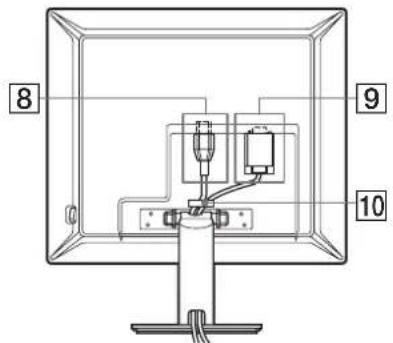
text_image
8 9 10Ta ilustracija hrbtne strani monitorja velja za SDM-S53.
SDM-S93
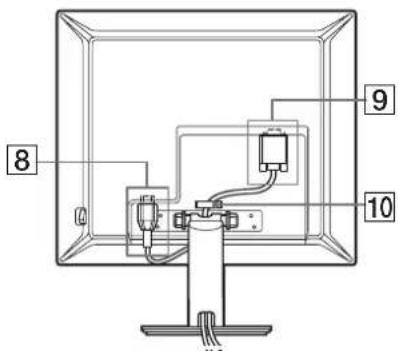
text_image
8 9 108 Konektor AC IN (stran 7)
Ta konektor priključi napajalni kabel (dobavljen).
natural_image
Diagram of a mechanical device with an upward arrow and rotating arrows, no text or symbols presenttext_image
ca. 5° ca. 30°samo SDM-S93
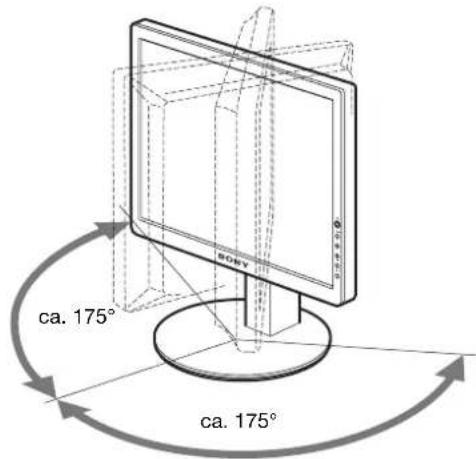
text_image
ca. 175° ca. 175°text_image
Diagram showing hand cursor clicking a circle with 'OK' button, indicating press or navigation instruction3 Urejanje menijev.
Pritiskajte gumba ↓/↑ za urejanje menijev, nato pritisnite gumb OK. Ko pritisnete gumb OK, se shrani nastavitev, nato se prikaže prejšnji meni.

text_image
Diagram showing hand cursor clicking a circle with 'OK' button, indicating press operation or navigation4 Zaprite meni.
Z enkratnim pritiskom na gumb MENU se vrnite v normalni prikaz. Če gumba ne pritisnete, se meni po cca. 30. sekundah zapre sam

Kliknite [Utility] → [Windows]/[Win Utility.exe].
Za Macintosh
Kliknite [Utility] [Mac]/[Mac Utility].
4 Pritisnite gumb MENU.
Na zaslonu se prikaže glavni meni.
5 Pritiskajte gumba ↓/↑ za izbiro Ⓐ (SCREEN) ter pritisnite gumb OK.
Na zaslonu se prikaže meni SCREEN.
6 Pritiskajte gumba ↓/↑ za izbiro PHASE ter pritisnite gumb OK.
Na zaslonu se prikaže meni PHASE.
natural_image
Two-panel image showing a textured surface before and after transformation, with no visible text or symbols.8 Pritisnite gumb OK.
Na zaslonu se prikaže glavni meni.
natural_image
Two-panel image showing a striped pattern on the left and a textured pattern on the right, both without any visible text or symbols.Kliknite [Utility] → [Windows]/[Win Utility.exe].
Za Macintosh
Kliknite [Utility] → [Mac]/[Mac Utility].
4 Pritisnite gumb MENU.
Na zaslonu se prikaže glavni meni.
5 Pritiskajte gumba ↓/↑ za izbiro Ⓐ (SCREEN) ter pritisnite gumb OK.
Na zaslonu se prikaže meni SCREEN.
6 Pritiskajte gumba ↓/↑ za izbiro H CENTER ali V CENTER ter pritisnite gumb OK.
Na zaslonu se pojavi meni H CENTER ali meni V CENTER.
28–80 kHz (SDM-S73/S93)
Vertikalna frekvenca: 48–75 Hz
text_image
INFORMAT NO CABLE D I S CONNECTEDVelikost slike: 15,0 "
Pribl. 339 × 370 × 186 mm
(13 ^3 /8 × 14 ^5 /8 × 7 ^3 /8 " )
(s podstavkom)
Pribl. 339×275×53 mm
(13 ^3 /8 × 10 ^7 /8 × 2 ^1 /8 " )
(brez podstavka)
Masa Pribl. 3,7 kg (8 lb 2 oz)
(s podstavkom)
Pribl. 2,7 kg (5 lb 15 oz)
(brez podstavka)
Plug & Play DDC2B
Dodatki Glej stran 6.
SDM-S73/S93
LCD panel Vrsta panela: a-Si TFT z aktivno
matriko
Velikost slike: 17,0 " (SDM-S73)
Velikost slike: 19,0 " (SDM-S93)
Pribl. 367 × 411 × 215 mm
(14^1/2 × 16^1/4 × 8^1/2)
(s podstavkom) (SDM-S73)
Pribl. 412 × 445 × 234 mm
(16^1/4 × 17^5/8 × 9^1/4)
(s podstavkom) (SDM-S93)
Pribl. 367 × 315 × 60 mm
(14 1/2 × 12 1/2 × 2 3/8")
(brez podstavka) (SDM-S73)
Pribl. 412 × 350 × 64 mm
(16 ^1/4 × 13 ^7/8 × 2 ^5/_8 " )
(brez podstavka) (SDM-S93)
Masa Pribl. 5,4 kg (11 lb 14 oz)
(s podstavkom) (SDM-S73)
Pribl. 6,6 kg (14 lb 8 oz)
(s podstavkom) (SDM-S93)
Pribl. 4,1 kg (9 lb)
(brez podstavka) (SDM-S73)
Pribl. 5,2 kg (11 lb 7 oz)
(brez podstavka) (SDM-S93)
Plug & Play DDC2B
Dodatki Glej stran 6.
text_image
ECOLOGY ENERGY EMISSIONS ECONOMICS TCO 99■ Congratulations!
You have just purchased a TCO'99 approved and labelled product! Your choice has provided you with a product developed for professional use. Your purchase has also contributed to reducing the burden on the environment and also to the further development of environmentally adapted electronics products.
■ Why do we have environmentally labelled computers?
In many countries, environmental labelling has become an established method for encouraging the adaptation of goods and services to the environment. The main problem, as far as computers and other electronics equipment are concerned, is that environmentally harmful substances are used both in the products and during their manufacture. Since it is not so far possible to satisfactorily recycle the majority of electronics equipment, most of these potentially damaging substances sooner or later enter nature.
There are also other characteristics of a computer, such as energy consumption levels, that are important from the viewpoints of both the work (internal) and natural (external) environments. Since all methods of electricity generation have a negative effect on the environment (e.g. acidic and climate-influencing emissions, radioactive waste), it is vital to save energy. Electronics equipment in offices is often left running continuously and thereby consumes a lot of energy.
■ What does labelling involve?
This product meets the requirements for the TCO'99 scheme which provides for international and environmental labelling of personal computers. The labelling scheme was developed as a joint effort by the TCO (The Swedish Confederation of Professional Employees), Svenska Naturskyddsforeningen (The Swedish Society for Nature Conservation) and Statens Energimydighet (The Swedish National Energy Administration).
Approval requirements cover a wide range of issues: environment, ergonomics, usability, emission of electric and magnetic fields, energy consumption and electrical and fire safety.
The environmental demands impose restrictions on the presence and use of heavy metals, brominated and chlorinated flame retardants, CFCs (freons) and chlorinated solvents, among other things. The product must be prepared for recycling and the manufacturer is obliged to have an environmental policy which must be adhered to in each country where the company implements its operational policy.
The energy requirements include a demand that the computer and/or display, after a certain period of inactivity, shall reduce its power consumption to a lower level in one or more stages. The length of time to reactivate the computer shall be reasonable for the user.
Labelled products must meet strict environmental demands, for example, in respect of the reduction of electric and magnetic fields, physical and visual ergonomics and good usability.
Below you will find a brief summary of the environmental requirements met by this product. The complete environmental criteria document may be ordered from:
TCO Development
SE-114 94 Stockholm, Sweden
Fax: +46 8 782 92 07
Email (Internet): development@tco.se
Current information regarding TCO'99 approved and labelled products may also be obtained via the Internet, using the address: http://www.tco-info.com/
■ Environmental requirements
Flame retardants
Flame retardants are present in printed circuit boards, cables, wires, casings and housings. Their purpose is to prevent, or at least to delay the spread of fire. Up to 30% of the plastic in a computer casing can consist of flame retardant substances. Most flame retardants contain bromine or chloride, and those flame retardants are chemically related to another group of environmental toxins, PCBs. Both the flame retardants containing bromine or chloride and the PCBs are suspected of giving rise to severe health effects, including reproductive damage in fish-eating birds and mammals, due to the bio-accumulative* processes. Flame retardants have been found in human blood and researchers fear that disturbances in foetus development may occur.
The relevant TCO'99 demand requires that plastic components weighing more than 25 grams must not contain flame retardants with organically bound bromine or chlorine. Flame retardants are allowed in the printed circuit boards since no substitutes are available.
Cadmium\*\*
Cadmium is present in rechargeable batteries and in the colour-generating layers of certain computer displays. Cadmium damages the nervous system and is toxic in high doses. The relevant TCO'99 requirement states that batteries, the colour-generating layers of display screens and the electrical or electronics components must not contain any cadmium.
Mercury\*\*
Mercury is sometimes found in batteries, relays and switches. It damages the nervous system and is toxic in high doses. The relevant TCO'99 requirement states that batteries may not contain any mercury. It also demands that mercury is not present in any of the electrical or electronics components associated with the labelled unit.
CFCs (freons)
The relevant TCO'99 requirement states that neither CFCs nor HCFCs may be used during the manufacture and assembly of the product. CFCs (freons) are sometimes used for washing printed circuit boards. CFCs break down ozone and thereby damage the ozone layer in the stratosphere, causing increased reception on earth of ultraviolet light with e.g. increased risks of skin cancer (malignant melanoma) as a consequence.
Lead\*\*
Lead can be found in picture tubes, display screens, solders and capacitors. Lead damages the nervous system and in higher doses, causes lead poisoning. The relevant TCO'99 requirement permits the inclusion of lead since no replacement has yet been developed.
* Bio-accumulative is defined as substances which accumulate within living organisms.
** Lead, Cadmium and Mercury are heavy metals which are Bio-accumulative.
TFT LCD Color Computer Display
SDM-S53
SDM-S73
SDM-S93
Owner's Record
The model and serial numbers are located at the rear of the unit. Record these numbers in the spaces provided below. Refer to them whenever you call upon your dealer regarding this product. Model No. ____ Serial No. ____
WARNING
To prevent fire or shock hazard, do not expose the unit to rain or moisture.
Dangerously high voltages are present inside the unit. Do not open the cabinet. Refer servicing to qualified personnel only.
FCC Notice
This equipment has been tested and found to comply with the limits for a Class B digital device, pursuant to Part 15 of the FCC Rules. These limits are designed to provide reasonable protection against harmful interference in a residential installation. This equipment generates, uses, and can radiate radio frequency energy and, if not installed and used in accordance with the instructions, may cause harmful interference to radio communications. However, there is no guarantee that interference will not occur in a particular installation. If this equipment does cause harmful interference to radio or television reception, which can be determined by turning the equipment off and on, the user is encouraged to try to correct the interference by one or more of the following measures:
- Reorient or relocate the receiving antenna.
– Increase the separation between the equipment and receiver. - Connect the equipment into an outlet on a circuit different from that to which the receiver is connected.
- Consult the dealer or an experienced radio/TV technician for help. You are cautioned that any changes or modifications not expressly approved in this manual could void your authority to operate this equipment.
IMPORTANTE
If you have any questions about this product, you may call; Sony Customer Information Services Center 1-800-222-7669 or http://www.sony.com/
Declaration of Conformity
Trade Name: SONY
Model: SDM-S53/S73/S93
Responsible Party: Sony Electronics Inc.
Address: 16530 Via Esprillo,
San Diego, CA 92127 U.S.A.
Telephone Number: 858-942-2230
This device complies with part 15 of the FCC rules. Operation is subject to the following two conditions: (1) This device may not cause harmful interference, and (2) this device must accept any interference received, including interference that may cause undesired operation.

BZ 03
NOTICE
This notice is applicable for USA/Canada only. If shipped to USA/Canada, install only a UL LISTED/CSA LABELLED power supply cord meeting the following specifications:
SPECIFICATIONS
Plug Type Nema-Plug 5-15p
Cord Type SVT or SJT, minimum 3 × 18 AWG
Length Maximum 15 feet
Rating Minimum 7 A, 125 V
NOTICE
As an ENERGY STAR Partner, Sony Corporation has determined that this product meets the ENERGY STAR guidelines for energy efficiency.

text_image
ECOLOGY ENERGY EMISSIONS SCIENCE TCO 99 ERGONOMICSThis monitor complies with the TCO'99 guidelines.
İçindekiler
Uyarılar....4
TCO'99 Eco-document....i
natural_image
Three line drawings of different types of electrical plugs (no text or symbols)natural_image
Line drawing of a computer monitor with a stand and labeled point 7 (no text or symbols on the device itself)natural_image
Diagram of a mechanical device with an upward arrow indicating motion, mounted on a base (no text or symbols present)text_image
MAIN POWER kirmizi yanartext_image
SONY yeşil yanar3 Bilgisayarı açın.
text_image
GAMMA ■GAMMA 1 GAMMA 2 GAMMA 3 1 2 8 0 1 0 2 4 6 0 Hz x / EX I new7 MENU POSITION (MENÜ KONUMU (sayfa 14)
text_image
Diagram showing hand cursor clicking and clicking a circle with 'OK' button, indicating OK function3 Menü ayarlama.
text_image
Diagram showing three hand icons pointing at a circle with an 'OK' button, indicating a confirmation or action.4 Menüyü kapatma.
text_image
Sun Ray SUNnatural_image
Two-panel image showing a vertical striped pattern on the left and a striped pattern on the right, with no visible text or symbols.text_image
INFORMATNO CABLE D I S CONNECTED(14 1/2 × 12 1/2 × 2 3/8 inç)
(ayaksız) (SDM-S73)
Yaklaşık 412×350×64 mm
(16 ^1/4 × 13 ^7/8 × 2 ^5/_8 inc)
(ayaksız) (SDM-S93)
text_image
ECOLOGY ENERGY EMISSIONS ECONOMICS TCO 99■ Congratulations!
You have just purchased a TCO'99 approved and labelled product! Your choice has provided you with a product developed for professional use. Your purchase has also contributed to reducing the burden on the environment and also to the further development of environmentally adapted electronics products.
■ Why do we have environmentally labelled computers?
In many countries, environmental labelling has become an established method for encouraging the adaptation of goods and services to the environment. The main problem, as far as computers and other electronics equipment are concerned, is that environmentally harmful substances are used both in the products and during their manufacture. Since it is not so far possible to satisfactorily recycle the majority of electronics equipment, most of these potentially damaging substances sooner or later enter nature.
There are also other characteristics of a computer, such as energy consumption levels, that are important from the viewpoints of both the work (internal) and natural (external) environments. Since all methods of electricity generation have a negative effect on the environment (e.g. acidic and climate-influencing emissions, radioactive waste), it is vital to save energy. Electronics equipment in offices is often left running continuously and thereby consumes a lot of energy.
■ What does labelling involve?
This product meets the requirements for the TCO'99 scheme which provides for international and environmental labelling of personal computers. The labelling scheme was developed as a joint effort by the TCO (The Swedish Confederation of Professional Employees), Svenska Naturskyddsforeningen (The Swedish Society for Nature Conservation) and Statens Energimyndighet (The Swedish National Energy Administration).
Approval requirements cover a wide range of issues: environment, ergonomics, usability, emission of electric and magnetic fields, energy consumption and electrical and fire safety.
The environmental demands impose restrictions on the presence and use of heavy metals, brominated and chlorinated flame retardants, CFCs (freons) and chlorinated solvents, among other things. The product must be prepared for recycling and the manufacturer is obliged to have an environmental policy which must be adhered to in each country where the company implements its operational policy.
The energy requirements include a demand that the computer and/or display, after a certain period of inactivity, shall reduce its power consumption to a lower level in one or more stages. The length of time to reactivate the computer shall be reasonable for the user.
Labelled products must meet strict environmental demands, for example, in respect of the reduction of electric and magnetic fields, physical and visual ergonomics and good usability.
Below you will find a brief summary of the environmental requirements met by this product. The complete environmental criteria document may be ordered from:
TCO Development
SE-114 94 Stockholm, Sweden
Fax: +46 8 782 92 07
Email (Internet): development@tco.se
Current information regarding TCO'99 approved and labelled
products may also be obtained via the Internet, using the address: http://www.tco-info.com/
■ Environmental requirements
Flame retardants
Flame retardants are present in printed circuit boards, cables, wires, casings and housings. Their purpose is to prevent, or at least to delay the spread of fire. Up to 30% of the plastic in a computer casing can consist of flame retardant substances. Most flame retardants contain bromine or chloride, and those flame retardants are chemically related to another group of environmental toxins, PCBs. Both the flame retardants containing bromine or chloride and the PCBs are suspected of giving rise to severe health effects, including reproductive damage in fish-eating birds and mammals, due to the bio-accumulative* processes. Flame retardants have been found in human blood and researchers fear that disturbances in foetus development may occur.
The relevant TCO'99 demand requires that plastic components weighing more than 25 grams must not contain flame retardants with organically bound bromine or chlorine. Flame retardants are allowed in the printed circuit boards since no substitutes are available.
Cadmium\*\*
Cadmium is present in rechargeable batteries and in the colour-generating layers of certain computer displays. Cadmium damages the nervous system and is toxic in high doses. The relevant TCO'99 requirement states that batteries, the colour-generating layers of display screens and the electrical or electronics components must not contain any cadmium.
Mercury\*\*
Mercury is sometimes found in batteries, relays and switches. It damages the nervous system and is toxic in high doses. The relevant TCO'99 requirement states that batteries may not contain any mercury. It also demands that mercury is not present in any of the electrical or electronics components associated with the labelled unit.
CFCs (freons)
The relevant TCO'99 requirement states that neither CFCs nor HCFCs may be used during the manufacture and assembly of the product. CFCs (frecons) are sometimes used for washing printed circuit boards. CFCs break down ozone and thereby damage the ozone layer in the stratosphere, causing increased reception on earth of ultraviolet light with e.g. increased risks of skin cancer (malignant melanoma) as a consequence.
Lead\*\*
Lead can be found in picture tubes, display screens, solders and capacitors. Lead damages the nervous system and in higher doses, causes lead poisoning. The relevant TCO'99 requirement permits the inclusion of lead since no replacement has yet been developed.
* Bio-accumulative is defined as substances which accumulate within living organisms.
** Lead, Cadmium and Mercury are heavy metals which are Bio-accumulative.