
RAS4M23SAVE - Air conditioner TOSHIBA - Free user manual and instructions
Find the device manual for free RAS4M23SAVE TOSHIBA in PDF.
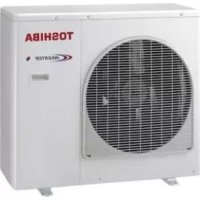



| Product type | Split air conditioner |
| Brand | Toshiba |
| Model | RAS4M23SAVE |
| Power supply | 220-240 V ~ 50 Hz (standard deduction) |
| Operating modes | Auto, Cooling, Heating, Dehumidification, Hi-POWER, ECO, Quiet, Night Comfort |
| Remote control | Wireless (wired possible with optional cable) |
| Special functions | One-Touch, Preset, Timer (on/off, daily), Auto restart, Auto clean |
| Refrigerant | Not specified (likely R32 or R410A type) |
| Temperature range | Heating: -15°C to 24°C outdoor; Cooling: -10°C to 46°C outdoor |
| Maintenance | Clean air filters every 2 weeks; clean exterior with damp cloth |
| Safety | 3-minute protection, automatic defrost, emergency stop, mandatory grounding |
| Indoor unit dimensions | Not specified |
| Outdoor unit dimensions | Not specified |
| Weight | Not specified |
| Repairability index | Not specified |
| Included accessories | Remote control, batteries, filters |
Frequently Asked Questions - RAS4M23SAVE TOSHIBA
User questions about RAS4M23SAVE TOSHIBA
0 question about this device. Answer the ones you know or ask your own.
Ask a new question about this device
Download the instructions for your Air conditioner in PDF format for free! Find your manual RAS4M23SAVE - TOSHIBA and take your electronic device back in hand. On this page are published all the documents necessary for the use of your device. RAS4M23SAVE by TOSHIBA.
USER MANUAL RAS4M23SAVE TOSHIBA
For general public use
Indoor unit
RAS-B10, 13, 16, 22N3KV2 Series
RAS-M07, 24N3KV2 Series
Outdoor unit
RAS-10, 13, 16, 22N3AV2 Series
RAS-M14GAV-E
RAS-M18UAV-E
RAS-3M18SAV-E
RAS-4M23SAV-E
RAS-3M26UAV-E
RAS-4M27UAV-E
RAS-5M34UAV-E1
ENGLISH
SPANISH
FRENCH
ITALIAN
GERMAN
PORTUGUESE
POLISH
CZECH
RUSSIAN
CROATIAN
HUNGARIAN
TURKISH
DUTCH
GREEK
SWEDISH
FINNISH
NORWEGIAN
DANISH
ROMANIAN
BULGARIAN
ESTONIAN
LATVIAN
SLOVAK
SLOVENIAN
LITHUANIAN
The manufacturer shall not assume any liability for the damage caused by not observing the description of this manual. Store this owner's manual in a location where it can be easily accessed when needed.
Be sure to read this owner's manual carefully before operating.
It is recommended that maintenance be performed by a specialist when the unit has been operated for a long time.
This appliance is not intended for use by person (including children) with reduced physical, sensory or mental capabilities, or lack of experience and knowledge, unless they have been given supervision or instruction concerning use of the appliance by a person responsible for their safety.
Children should be supervised to ensure that they do not play with the appliance.
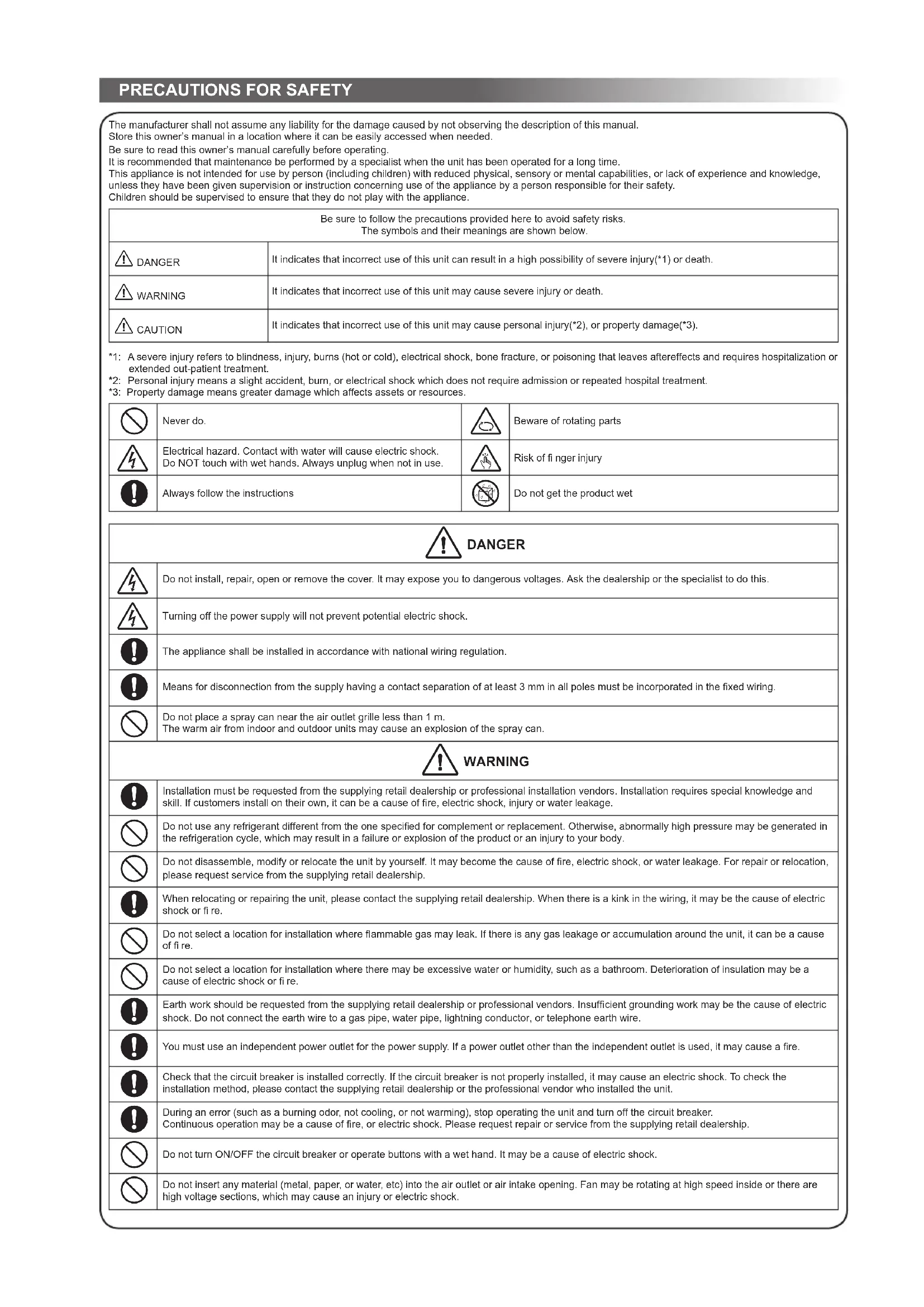
| Be sure to follow the precautions provided here to avoid safety risks. The symbols and their meanings are shown below. | |
| DANGER | It indicates that incorrect use of this unit can result in a high possibility of severe injury(*1) or death. |
| WARNING | It indicates that incorrect use of this unit may cause severe injury or death. |
| CAUTION | It indicates that incorrect use of this unit may cause personal injury(*2), or property damage(*3). |
1: A severe injury refers to blindness, injury, burns (hot or cold), electrical shock, bone fracture, or poisoning that leaves aftereffects and requires hospitalization or extended out-patient treatment. 2: Personal injury means a slight accident, burn, or electrical shock which does not require admission or repeated hospital treatment. *3: Property damage means greater damage which affects assets or resources.
| Never do. | Beware of rotating parts |
| Electrical hazard. Contact with water will cause electric shock. Do NOT touch with wet hands. Always unplug when not in use. | Risk of fi nger injury |
| Always follow the instructions | Do not get the product wet |

DANGER
| 4 | Do not install, repair, open or remove the cover. It may expose you to dangerous voltages. Ask the dealership or the specialist to do this. |
| 5 | Turning off the power supply will not prevent potential electric shock. |
| 6 | The appliance shall be installed in accordance with national wiring regulation. |
| 7 | Means for disconnection from the supply having a contact separation of at least 3 mm in all poles must be incorporated in the fixed wiring. |
| 8 | Do not place a spray can near the air outlet grille less than 1 m. The warm air from indoor and outdoor units may cause an explosion of the spray can. |

WARNING
| Installation must be requested from the supplying retail dealership or professional installation vendors. Installation requires special knowledge and skill. If customers install on their own, it can be a cause of fire, electric shock, injury or water leakage. | |
| Do not use any refrigerant different from the one specified for complement or replacement. Otherwise, abnormally high pressure may be generated in the refrigeration cycle, which may result in a failure or explosion of the product or an injury to your body. | |
| Do not disassemble, modify or relocate the unit by yourself. It may become the cause of fire, electric shock, or water leakage. For repair or relocation, please request service from the supplying retail dealership. | |
| When relocating or repairing the unit, please contact the supplying retail dealership. When there is a kink in the wiring, it may be the cause of electric shock or fire. | |
| Do not select a location for installation where flammable gas may leak. If there is any gas leakage or accumulation around the unit, it can be a cause of fire. | |
| Do not select a location for installation where there may be excessive water or humidity, such as a bathroom. Deterioration of insulation may be a cause of electric shock or fire. | |
| Earth work should be requested from the supplying retail dealership or professional vendors. Insufficient grounding work may be the cause of electric shock. Do not connect the earth wire to a gas pipe, water pipe, lightning conductor, or telephone earth wire. | |
| You must use an independent power outlet for the power supply. If a power outlet other than the independent outlet is used, it may cause a fire. | |
| Check that the circuit breaker is installed correctly. If the circuit breaker is not properly installed, it may cause an electric shock. To check the installation method, please contact the supplying retail dealership or the professional vendor who installed the unit. | |
| During an error (such as a burning odor, not cooling, or not warming), stop operating the unit and turn off the circuit breaker. Continuous operation may be a cause of fire, or electric shock. Please request repair or service from the supplying retail dealership. | |
| Do not turn ON/OFF the circuit breaker or operate buttons with a wet hand. It may be a cause of electric shock. | |
| Do not insert any material (metal, paper, or water, etc) into the air outlet or air intake opening. Fan may be rotating at high speed inside or there are high voltage sections, which may cause an injury or electric shock. | |
| When the air-conditioning unit does not cool or warm, there may be a leakage of refrigerant. Please consult the supplying retail dealership. The refrigerant used in the air-conditioning unit is safe. It will not leak under normal operating conditions but if it leaks into the room and contacts a heat source such as a heater, or stove, it may cause a harmful reaction. | |
| When water or other foreign substances enter the internal parts, stop operating the unit immediately and turn off the circuit breaker. Operating the unit continuously may cause fire or electric shock. Please contact the supplying retail dealership for repair. | |
| Do not clean the inside of the air-conditioning unit yourself. Please request internal cleaning of the air-conditioning unit from the supplying retail dealership. Incorrect cleaning may cause breakage of resin parts or insulation defects of electrical parts, causing water leakage, electric shock or fire. | |
| Do not damage or modify the power cable. Do not connect the cable midway, or use a multiple outlet extension cord that is shared by other devices. Failure to do so may cause fire. | |
| Do not place heavy objects on the power cable, expose it to heat, or pull it. To do so may cause electrical shock or fire. | |
| Do not expose your body directly to cool air for a long time. | |
| Do not insert your finger or any article into the air inlet/outlet. | |
| CAUTION | |
| Ensure that drained water is discharged. When the discharging water process is not sufficient, water may leak, causing water damage to furniture. To check that the installation method used is correct, please contact the supplying retail dealership or the professional vendor who installed the unit. | |
| If the indoor unit piping outlet is exposed due to relocation, close the opening, Touching internal electrical parts may cause injury or electric shock. | |
| Do not wash the main air-conditioning unit with water. It may cause an electric shock. | |
| Do not place any containers such as a vase containing fluid on the unit. It might cause water to enter the unit and deteriorate the electrical insulation, causing an electric shock. | |
| When using the unit in a closed room, or operating with other combustion appliances, make sure to open a window occasionally for ventilation. Insufficient ventilation may cause suffocation due to a lack of oxygen. | |
| Do not use combustion appliances in the direct flow of the air from the air-conditioning unit. Poor combustion of a combustion appliance may cause suffocation. | |
| Avoid operating for long periods in a high humidity environment (over 80%) such as with the windows or doors open. There may be condensation on the indoor unit and droplets may fall onto the furniture. | |
| When the unit won't be used for a long time, turn off the main switch or the circuit breaker. | |
| At least once a year check if the mounting table of the outdoor unit is damaged or not. If a damaged state is ignored, the unit may fall or over-turn, causing an injury. | |
| Stand on a sturdy ladder when attaching/detaching the front panel/air filter/air cleaning filter. Failure to do so may cause a fall or injury. | |
| Do not stand on the outdoor unit or place anything on the unit. It may be the cause of injury due to falling or over-turning. Any damage to the unit may cause an electric shock or fire. | |
| Do not place anything around the outdoor unit or allow fallen leaves to accumulate around it. If there are fallen leaves, small animals could enter and contact internal electrical parts, causing a failure or fire. | |
| Do not place animals and plants in places where wind from the air-conditioning unit flows directly. It may have a negative influence on the animal or plant. | |
| Do not use for special applications such as storage of food or animals, or to display plants, precision devices, or art objects. Do not use on ships or in other vehicles. It may cause a failure in the air-conditioning unit. In addition, it may damage these items. | |
| Do not place other electrical appliances or furniture under the unit. Water droplets might fall, causing damage or failure. | |
| When performing maintenance, you must stop operating the unit and turn off the circuit breaker. Since the fan inside may be rotating at high speed, it may cause an injury. | |
| After the front panel/air filter is cleaned, wipe away any water and allow to dry. If water remains, it may cause an electric shock. | |
| Once the front panel is removed, do not touch the metal parts (aluminum fins, etc.) of the unit. It may cause an injury. | |
| When you hear thunder and there might be a lightning strike, stop operating the unit and disconnect the circuit breaker. If lightning strikes, it may cause a failure. | |
- Batteries for remote control unit:
- Should be inserted with correct polarity (+) and (-).
- Should not be recharged.
- Do not use batteries for which the "Recommended usage period" has expired.
- Do not keep used batteries inside the remote control unit.
- Do not mix different types of batteries, or mix new batteries with old ones.
- Do not directly solder the batteries.
- Do not short-circuit, disassemble, heat, or throw batteries into a fire. If batteries are not disposed of correctly, they may burst or be the cause of fluid leakage, resulting in burns or injuries. If touching the fluid, wash thoroughly with water. If it touches devices, wipe off to avoid direct contact.
- Do not place within reach of small children. If a battery is swallowed, consult a doctor immediately.
- When you press CLOCK · CHECK · FILTER · and RESET · button, do not let any foreign substances enter and remain inside of the remote control.
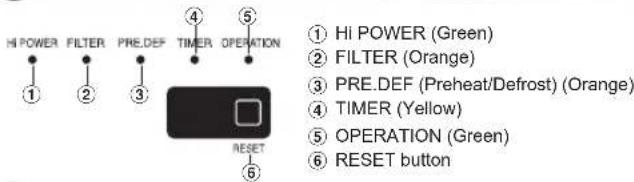
1INDOOR UNIT DISPLAY
2 PREPARATION BEFORE USE
Preparing Filters
- Open the air inlet grille and remove the air filters.
- Attach the filters. (See detail in the accessory sheet.)
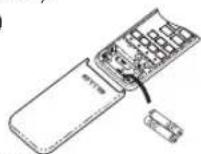
Loading Batteries (when using wireless operation)
- Remove the slide cover.
- Insert 2 new batteries (AAA type) following the (+) and (-) positions.
Clock Setup
- Push [AOX] with the tip of a pencil. If the timer indication is flashing, go to the next step 2.
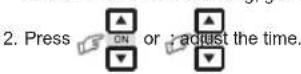
- Press [SET] to set the time.
Remote Control Reset
Push [RESET] with the tip of a pencil, or 1. Remove the batteries. 2. Press [RESET]. 3. Insert the batteries.
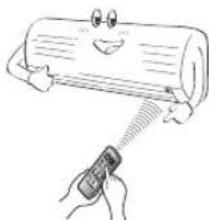
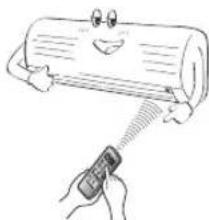
3 AIR FLOW DIRECTION
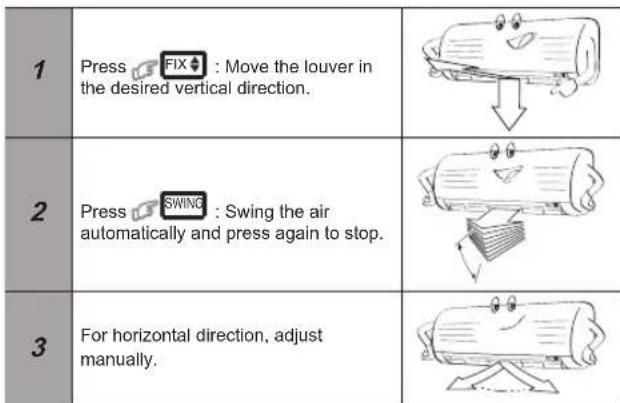
Note:
- Do not move the louver manually. The louver may automatically position depending on the operation mode.
4 REMOTE CONTROL
(1) Infrared signal emitter (2) Start/Stop button (3) Mode select button (MODE) (4) Temperature button (TEMP) (5) Fan speed button (FAN) (6) Swing louver button (SWING) (7) Set louver button (FIX) (8) On timer button (ON) (9) Off timer button (OFF) (10) Setup button (SET) (11) Clear button (CLR) (12) Memory and Preset button (PRESET) (13) One-Touch button (ONE-TOUCH) (14) High power button (HI-POWER) (15) Economy button (ECO) (16) Quiet button (QUIET) (17) Comfort sleep button (COMFORT SLEEP) (18) Filter reset button (FILTER) (19) Set clock button (CLOCK) (20) Check button (CHECK) (21) Reset button (RESET)
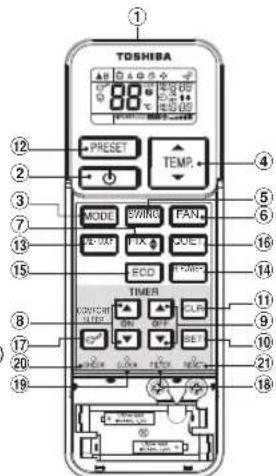
Note:
- The provided Remote Controller is a wireless type, which also can be used as a wired one. Please see "How to Connect The Remote Controller for Wired Operation", located in the installation instruction, in case wired control is required.
- In wired operation, the remote controller will return to its initial condition (PRESET, TIMER and CLOCK will return to initial condition) when the user shuts down the power supply of the air conditioner.
5 ONE-TOUCH
Press the "ONE-TOUCH" button for fully automated operation that is customized to the typical consumer preferences in your region of the world. The customized settings control temperature, air flow strength, air flow direction, and other settings to provide you with alternate contact with "ONE-TOUCH" of the button. If you prefer other settings, you can select from the many other operating functions of your Toshiba unit.
Press 1 to start the operation.
To automatically select cooling or heating operation
- Press MODE: Select A.
- Press TEMP.
- Press FAN: Select AUTO, LOW, LOW+
- Press MODE: Select Cool or Heat.
- Press TEMP: Set the desired temperature.
Cooling: Min. 17°C, Heating: Max. 30°C
- Press FAN: Select AUTO, LOW, LOW+, MED, MED+, or HIGH
8 DRY OPERATION
For dehumidification, a moderate cooling performance is controlled automatically.
- Press MODE: Select Dry
- Press to set the desired temperature.
To automatically control room temperature and airflow for faster cooling or heating operation (except in DRY mode)
Press ON/OFF: Start and stop the operation.
10 ECO OPERATION
To automatically control the room to save energy (except in DRY mode)
Press ECO: Start and stop the operation.
Note: In cooling operation, the set temperature will increase automatically by 1 degree per hour for 2 hours (maximum 2 degrees increase).
For heating operation, the set temperature will decrease.
11 TEMPORARY OPERATION
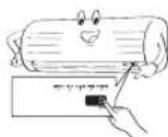
In case of a misplaced or discharged remote control, pressing the RESET button can start or stop the unit without using the remote control.
Operation mode is set to AUTOMATIC operation, preset temperature is 25°C, and fan operation is automatic speed.
12 TIMER OPERATION
Set the timer when the air conditioner is operating.
| Setting the ON Timer | Setting the OFF Timer | |
| 1 | Press SET : Set the desired ON timer. | Press Setthe desired OFF timer. |
| 2 | Press SET : Set the timer. | Press SET : Set the timer. |
| 3 | Press CLR : Cancel the timer. | Press CLR : Cancel the timer. |
Daily timer allows the user to set both the ON and OFF timers and will be activated on a daily basis.
| 1 | Press Setthe ON timer. | 3 | Press SET |
| 2 | Press Setthe OFF timer. | 4 | Press SET button during the (or) mark flashing. |
- During the everyday timer activation, both arrows ( ) are indicated.
Note:
- Keep the remote control within accessible transmission range of the indoor unit; otherwise, a time lag of up to 15 minutes may occur. The setting will be saved for the next same operation.
13 PRESET OPERATION
Set your preferred operation for future use. The setting will be memorized by the unit for future operation (except airflow direction).
- Select your preferred operation.
- Press and hold PRESET for 3 seconds to memorize the setting. The P mark displays.
- Press PRESET: Operate the preset operation.
To automatically restart the air conditioner after a power failure (Power of the unit must be on.)
Setting
- Press and hold the RESET button on the indoor unit for 3 seconds to set the operation. (3 beep sound and OPERATION lamp blinks 5 times per second for 5 seconds)
- Press and hold the RESET button on the indoor unit for 3 seconds to cancel the operation. (3 beep sound but OPERATION lamp does not blink)
- In case ON timer or OFF timer are set, AUTO RESTART OPERATION does not activate.
QUIET OPERATION
To operate at super low fan speed for quiet operation (except in DRY mode)
Press: Start and stop the operation.
Note: Under certain conditions, QUIET operation may not provide adequate cooling due to low sound features.
For comfortable sleep, automatically control air flow and automatically turn OFF.
Press: Select 1, 3, 5 or 9 hrs for OFF timer operation.
Note: In cooling operation, the set temperature will increase automatically 1 degree/hour for 2 hours (maximum 2 degrees increase). For heating operation, the set temperature will decrease.
MAINTENANCE
Firstly, turn off the circuit breaker.
Filter Reset
FILTER lamp lights on; the filter must be cleaned.
To turn off the lamp, push the RESET button on the indoor unit or the FILTER button on the remote control.
Indoor Unit and Remote Control
- Clean the indoor unit and the remote control with a wet cloth when needed.
- No benzine, thinner, polishing powder or chemically-treated duster.
To protect against bad smell caused by the humidity in the indoor unit.
- If the button is pressed once during "Cool" or "Dry" mode, the fan will continue to run for another 30 minutes, then it will turn off automatically. This will reduce the moisture in the indoor unit.
- To stop the unit immediately, press the button more than 2 times within 30 seconds.
- Three-minute protection feature: To prevent the unit from being activated for 3 minutes when suddenly restarted or switched to ON.
- Preheating operation: Warm up the unit for 5 minutes before blowing warm air.
- Warm air control: When the room temperature reaches the set temperature, the fan speed is automatically reduced and the outdoor unit will stop.
- Automatic defrosting: Fans will stop during defrost operation.
- Heating capacity: Heat is absorbed from outdoor and released into the room. When the outdoor temperature is too low, use another recommended heating apparatus in combination with the air conditioner.
- Consideration for accumulated snow: Select the position for outdoor unit where it will not be subjected to snow drifts, accumulation of leaves or other seasonal debris.
- Some minor cracking sound may occur when unit operating. This is normal because the cracking sound may be caused by expansion/contraction of plastic.
Note: Items 2 to 6 are for Heating model.
Air conditioner operating conditions
| Temp. Operation | Outdoor Temperature Room Temperature | |
| Heating -15°C ~ 24°C Less | than 28°C | |
| Cooling -10°C ~ 46°C | 21°C ~ 32°C | |
| Dry | -10°C ~ 46°C | 17°C ~ 32°C |
20 TROUBLESHOOTING (CHECK POINT)
| The unit does not operate. | Cooling or Heating is abnormally low. |
| · The power main switch is turned off. · The circuit breaker is activated to cut off the power supply. · Stoppage of electric current ON timer is set. | · The fi iters are blocked with dust. · The temperature has been set improperly. · The windows or doors are opened. · The air inlet or outlet of the outdoor unit is blocked. · The fan speed is too low. · The operation mode is DRY. |
21 REMOTE CONTROL A-B SELECTION
To separate using of remote control for each indoor unit in case of 2 air conditioners are installed nearly.
Remote Control B Setup.
- Press RESET button on the indoor unit to turn the air conditioner ON.
- Point the remote control at the indoor unit.
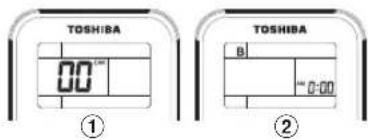
- Push and hold check button on the Remote Control by the tip of the pencil. "00" will be shown on the display.
- Press MODE during pushing B will show on the display and "00" will disappear and the air conditioner will turn OFF. The Remote Control B is memorized.
Note: 1. Repeat above step to reset Remote Control to be A.
- Remote Control A has not "A" display
- Default setting of Remote Control from factory is A.
10 ENERGY SAVING MODE (ECO)
Sticknote: 1. Event MED+ , HIGH , neto Quiet
B. LOW
7 COOLING / HEATING OPERATION
11 OPERATION IN TEMPORARY MODE
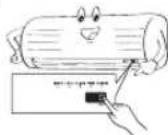
In case of loss of remote control or battery discharge in the remote control
Press RESET button, you can operate the unit without the remote control. The unit will operate automatically, preset temperature is 25°C, and the fan operates in automatic mode.
12 TIMER OPERATION
The timer should be set while the compressor is operating.
| Hасторікta таймера влкноуенners (ON) | Hасторікta таймера влкноуенners (OFF) | |
| 1 | Hаши're коньу | Hаши're коньу |
| ON | OFF | |
| aусян'tе hyхhoe aprem'taаймера влкноуенners (ON). | bveя'mа таймера bvlknoуенners (OFF). | |
| 2 | Hаши're коньу | Hаши're коньу |
| SET | NET | |
| dду установ таймера. | dду установ таймера. | |
| 3 | Hаши're коньу | Hаши're коньу |
| SLR | SLR | |
| dду ot themselves peshmna таймера. | dду ot themselves peshmna таймера. | |
The daily timer allows the user to set both timer on and timer off times. It is activated daily.
Setting the daily timer
| 1 | Hа KMЛТЕ КНУК Tаймера akilichev. ON - устаньerte вору 2 | 3 | Hа KMЛТЕ KНУК SET |
| 2 | Hа KMЛТЕ KНУК Tаймера bukluyног OFF - устаньerte вору 4 | 4 | Hа KMЛТЕ KНУК SET orda hydret MHTATb CHMBOT ( MNT ) . |
When the daily timer is activated, the display shows the clock (1).
Note:
The clock must be at a distance that allows signal transmission to the indoor unit; otherwise, there may be a delay in operation of up to 15 minutes. - This setting will be retained for the next similar operation.
13 OPERATION IN PRESET MODE
Set the desired mode, which can be used later. The setting will be saved in the device memory for subsequent use (except for the airflow direction).
- Select the desired mode. 2. Press and hold the PRESET button for 3 seconds to save the setting. The symbol appears. 3. Press the PRESET button to start operation in the preset mode.
14 AUTOMATIC RESTART
For automatic restart of the compressor after a power interruption (the device power must be on).
Setting
1. Press and hold the RESET button on the indoor unit for 3 seconds to set the operation mode. (The device emits a beep, and the OPERATION indicator flashes at a rate of 5 times per second for 5 seconds). 2. Press and hold the RESET button on the indoor unit for 3 seconds to cancel the operation mode. (The device emits a beep, and the OPERATION indicator does not flash). If the timer on/off is set, the automatic restart mode is not activated.
15 OPERATION IN QUIET MODE (SILENT)
During the low-speed fan mode (except DRY mode),
Press the QUIET button to start the operation.
Note: In some conditions, operation in QUIET mode may not provide sufficient cooling due to low sound characteristics.
16 OPERATION IN COMFORT SLEEP MODE
In low power mode, the automatic airflow control is automatically disabled.
COMFORT
Press the button to select 1, 3, 5, or 9 hours as the timer setting for operation, and the temperature setting will be turned off (OFF).
Note: During operation, the temperature setting will be automatically increased by 1 degree per hour over 2 hours (maximum increase of 2 degrees). For heating mode, the temperature setting will be decreased.
17 MAINTENANCE
First turn off the automatic switches.
Cleaning the filter
If the filter indicator lights up, it is necessary to clean the filter. To remove the filter, press the RESET button on the indoor unit and pull the filter.
Indoor unit and remote control
When necessary, clean the indoor unit and remote control with a damp cloth.
Do not use gasoline, thinner, polishing powder, or chemical cleaning agents for cleaning.
Dehumidification to eliminate musty odors caused by moisture inside the indoor unit.
- If the button is pressed once in "Cooling" or "Dry" mode, the fan will continue to operate for the next 30 minutes and then automatically turn off. This ensures air circulation inside the indoor unit.
2. To stop the unit completely, press the button more than 2 times within 30 seconds.
19 FUNCTIONS AND OPERATION
1. Timer function: Delayed start/stop of the device. 2. Preheating: Heats the device for 5 minutes before supplying warm air. 3. Temperature control: When the room temperature reaches the set temperature, the fan speed automatically decreases and the outdoor unit stops. 4. Automatic defrosting: During defrosting operation, the fan stops. 5. Heating capacity: Heat is extracted from the outside air and released into the room. If the outdoor temperature is too low, use additional recommended heating equipment. 6. Snow accumulation: For the outdoor unit, choose a position where it is not directly exposed to snow, ice, or other debris. 7. The unit may emit a cracking sound during operation. This is normal, as the sound may be caused by the expansion/contraction of plastic parts.
Application: Use 2 units for heating capacity
Operating conditions of the unit
| Temnepatypa pexim | Hapuykhaj Temnepatypa | KoMHaTHaY Temnepatypa |
| Harpovahme | -15°C ~ 24°C | Hnke 28°C |
| Oxnajdkhme | -10°C ~ 46°C | 21°C ~ 32°C |
| Cuzka | -10°C ~ 46°C | 17°C ~ 32°C |
20 TROUBLESHOOTING (GUIDE)
7 COOLING / HEATING OPERATION
- Press the MODE button: Select Cooling or Heating
- Press the Temp button: Set the desired temperature. Cooling: Min. 17°C, Heating: Max. 30°C
- Press the FAN button: Select AUTO, LOW, LOW+, MED, MED+, or HIGH
8 DRY COOLING
For dehumidification, moderate cooling power is automatically controlled.
- Press the MODE button: Select Dry operation
- Press the button: Set the desired temperature.
9 HIGH POWER OPERATION
For automatic control of room temperature and air flow for rapid cooling or heating (except in DRY mode)
7 AUTO/UP/DOWN MODE
- Press the

9 HIGH POWER OPERATION
11 PARTIAL OPERATION
SUPPLY AIR TEMPERATURE AND AIRFLOW
18 SELF-CLEANING (ONLY FOR DRY AND COOL OPERATION)
Press the button on the remote control
1. Remove the battery 2. Press 3. Insert the battery.
3 AIRFLOW DIRECTION
15 TURBO MODE
To operate the fan at high speed in turbo mode (with a slight increase in noise level).
Press QUIET: starts and stops the mode.
Note: Under certain conditions, the turbo mode may not provide adequate cooling of the battery or the active sound system.
16 COMFORT SLEEP MODE
To save energy while you sleep, automatically control the airflow and automatically adjust the climate.
Press COMFORT SLEEP: select 1, 3, 5, or 9 hours of the sleep timer for automatic shutdown.
Note: In cooling mode, the set temperature will automatically increase by 1 degree per hour for 2 hours (maximum 2 degrees increase). In heating mode, the set temperature will decrease.
17 MAINTENANCE
Disconnect the automatic fuse.
Cleaning the filters
The filter indicator light will turn on. To remove the grille, press the SET button on the indoor unit, then press the FILTER button to release the filter.
Indoor unit and remote control
- If necessary, clean the indoor unit and remote control with a soft, dry cloth. Do not use benzene, thinner, or abrasive cleaners.
18 SELF-CLEANING MODE (ONLY FOR COOLING AND DRYING MODES)
The device is designed for indoor use only.
1. If the device is turned on in cooling or dehumidifying mode, the ventilator will operate for about 30 minutes, after which it will switch off automatically. This is normal for indoor use. 2. For the same reason, press the button for 2 to 5 seconds within 30 seconds.
19 OPERATING MODES AND PERFORMANCE
- Thermal protection: The device will automatically shut down if it overheats for 3 minutes. In case of sudden restart or shutdown.
- Preheating: The device will not start for 5 minutes before the hot air is released.
- Air temperature control: When the temperature in the room reaches the preset temperature, the fan speed will automatically decrease and the compressor will stop working.
- Automatic defrosting: The ventilator will operate during the defrosting process.
- Heating power: The heating is turned on and distributed evenly. If the room temperature is too high, use another heater or adjust the thermostat.
- Natural air intake: The intake is mounted on the wall, which allows natural air circulation. It can be opened or closed during operation. This is normal and due to the expansion/contraction of the plastic parts.
Warning: Distance of 2 to 6 meters for heating models
Operating conditions of the air conditioner
20 CHECK POINT
21 REMOTE CONTROL A-B
20 TROUBLESHOOTING (CHECK POINT)
| Zarladenie nefunguje. | Ochladzovanie alebo ohrlevanje je mlimorladne slabé. |
| • Hlavný vypínač je vypnutý. • Istić je v polohe, y ktrej je prerusená dodávka prudu. • Vypadok elektrickoj energia • Casovač je nastavený na ON. | • Filtre su upchaté prachom. • Teplota bola nastavená nosprávné. • Su otvorené dvere alebo okná. • Privod alebo odvod vžduchu na vonkajśom zariadění su zablokované. • Rychlost ventilatóra je prilíš nizka. • Prevádzkový režim je DRY (Suženie). |
21 REMOTE CONTROL SELECTION A-B
For the remote control usage section, for each indoor unit, if two air conditioning units are placed close to each other.
| Information according to EMC Directive 2004/108/EC | |
| (Name of the manufacturer) TOSHIBA CARRIER (THAILAND) CO., LTD. | |
| (Address, city, country) 144/9 MOO 5, BANGKADI INDUSTRIAL PARK, TIVANON ROAD, TAMBOL BANGKADI, AMPHUR MUANG, PATHUMTHANI 12000, THAILAND. | |
| (Name of the Importer/Distributor in EU) TOSHIBA CARRIER UK LTD. | |
| (Address, city, country) Porsham Close, Belliver Industrial Estate, PLYMOUTH, Devon, PL6 7DB. United Kingdom |
- DANGER
- WARNING
- INDOOR UNIT DISPLAY
- PREPARATION BEFORE USE
- PREPARING FILTERS
- LOADING BATTERIES (WHEN USING WIRELESS OPERATION)
- CLOCK SETUP
- REMOTE CONTROL RESET
- AIR FLOW DIRECTION
- NOTE
- REMOTE CONTROL
- ONE-TOUCH
- DRY OPERATION
- ECO OPERATION
- TEMPORARY OPERATION
- TIMER OPERATION
- PRESET OPERATION
- SETTING
- QUIET OPERATION
- MAINTENANCE
- FILTER RESET
- INDOOR UNIT AND REMOTE CONTROL
- TROUBLESHOOTING (CHECK POINT)
- REMOTE CONTROL A-B SELECTION
- REMOTE CONTROL B SETUP
- ENERGY SAVING MODE (ECO)
- COOLING / HEATING OPERATION
- OPERATION IN TEMPORARY MODE
- SETTING THE DAILY TIMER
- OPERATION IN PRESET MODE
- AUTOMATIC RESTART
- OPERATION IN QUIET MODE (SILENT)
- OPERATION IN COMFORT SLEEP MODE
- CLEANING THE FILTER
- FUNCTIONS AND OPERATION
- OPERATING CONDITIONS OF THE UNIT
- TROUBLESHOOTING (GUIDE)
- DRY COOLING
- HIGH POWER OPERATION
- AUTO/UP/DOWN MODE
- PARTIAL OPERATION
- SELF-CLEANING (ONLY FOR DRY AND COOL OPERATION)
- AIRFLOW DIRECTION
- TURBO MODE
- COMFORT SLEEP MODE
- CLEANING THE FILTERS
- SELF-CLEANING MODE (ONLY FOR COOLING AND DRYING MODES)
- OPERATING MODES AND PERFORMANCE
- CHECK POINT
- REMOTE CONTROL A-B
- REMOTE CONTROL SELECTION A-B
Brand : TOSHIBA
Model : RAS4M23SAVE
Category : Air conditioner