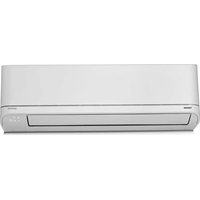
RAS-H13B2KCV2G-M - Air Conditioning TOSHIBA - Free user manual and instructions
Find the device manual for free RAS-H13B2KCV2G-M TOSHIBA in PDF.


Pick your language and provide your email: we'll send you a specifically translated version.
| Product Type | Split System Air Conditioner |
| Brand | Toshiba |
| Model | RAS-H13B2KCV2G-M |
| Cooling Capacity | 13,000 BTU/h (approx. 3.8 kW) |
| Power Supply | 230V / 50Hz |
| Refrigerant | R32 |
| Compressor Type | Inverter |
| Indoor Unit Dimensions (W x H x D) | 820 x 300 x 230 mm |
| Outdoor Unit Dimensions (W x H x D) | 810 x 600 x 330 mm |
| Indoor Unit Weight | 12 kg |
| Outdoor Unit Weight | 35 kg |
| Airflow Rate | 600 m³/h |
| Indoor Noise Level | 35 dB(A) |
| Outdoor Noise Level | 50 dB(A) |
| Energy Efficiency Rating | A++ |
| Operating Modes | Auto, Cool, Dry, Fan, Heat |
| Remote Control | Yes |
| Timer Function | 24-hour programmable timer |
| Sleep Mode | Yes |
| Filter Type | Washable anti-bacterial filter |
| Maintenance | Clean or replace filters every 2 weeks |
| Safety Features | Overheat protection, auto restart |
| Spare Parts Availability | Standard spare parts for 10 years |
| Documentation | Free PDF manual available online |
Frequently Asked Questions - RAS-H13B2KCV2G-M TOSHIBA
How do I clean the air filter?
To clean the filter, turn off the unit and open the front panel. Remove the filter, vacuum or wash it with water, let it dry completely, and reinstall it. Clean the air filter every two weeks for optimal performance.
What does error code E1 mean?
Error code E1 typically indicates a communication error between the indoor and outdoor units. Check the wiring connections and restart the unit. If it persists, contact a professional technician.
Can the unit provide heating during winter?
Yes, this model is equipped with a heat pump function, allowing it to both cool and heat your space. Use the remote control to switch to Heat mode.
How do I reset the remote control?
Remove the batteries from the remote, press and hold the reset button (if available) or wait a few minutes, then reinsert the batteries. This usually resets the remote.
What is the recommended maintenance schedule?
Clean the air filter every two weeks, check the condensate drain monthly, and schedule a professional inspection before each cooling season. Regular maintenance ensures efficiency.
How can I save energy while using the air conditioner?
Use the eco/sleep mode, set the thermostat to a moderate temperature (24-26°C for cooling), close windows and doors, and use curtains to block sunlight.
The unit is not blowing cold air. What should I check?
Check if the filter is dirty, the thermostat settings are correct, and the outdoor unit has sufficient clearance. If the problem continues, inspect refrigerant levels via a technician.
How do I set the 24-hour timer?
Use the timer buttons on the remote control. Press the timer ON or OFF button, then set the desired time using the + or - buttons. Confirm with the SET button.
Is the installation process complicated?
Installation should be performed by a certified professional to ensure proper refrigerant handling and electrical connections. The indoor unit mounts on a wall, while the outdoor unit is placed outside.
Where can I find spare parts for this model?
Spare parts are available through authorized Toshiba service centers. Standard parts such as filters and remote controls are often in stock. For other components, contact your local distributor.
User questions about RAS-H13B2KCV2G-M TOSHIBA
0 question about this device. Answer the ones you know or ask your own.
Ask a new question about this device
No questions yet. Be the first to ask one.
Download the instructions for your Air Conditioning in PDF format for free! Find your manual RAS-H13B2KCV2G-M - TOSHIBA and take your electronic device back in hand. On this page are published all the documents necessary for the use of your device. RAS-H13B2KCV2G-M by TOSHIBA.
USER MANUAL RAS-H13B2KCV2G-M TOSHIBA
Manual assistant
Powered by Anthropic
Waiting for your message
Product information
Brand : TOSHIBA
Model : RAS-H13B2KCV2G-M
Category : Air Conditioning