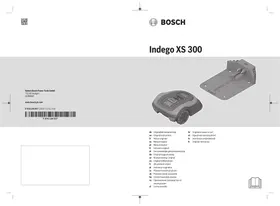
INDEGO XS 300 - Lawn mower BOSCH - Free user manual and instructions
Find the device manual for free INDEGO XS 300 BOSCH in PDF.



User questions about INDEGO XS 300 BOSCH
0 question about this device. Answer the ones you know or ask your own.
Ask a new question about this device
Download the instructions for your Lawn mower in PDF format for free! Find your manual INDEGO XS 300 - BOSCH and take your electronic device back in hand. On this page are published all the documents necessary for the use of your device. INDEGO XS 300 by BOSCH.
USER MANUAL INDEGO XS 300 BOSCH
www.bosch-garden.com
for purchasing the Indego Robotic Mower.
Please read the safety instructions provided below before installing the Indego.
Safety Notes
Warning! Read all safety warnings and all instructions. Make yourself familiar with the controls and the proper use of the machine. Please keep the instructions safe for later use!
Explanation of symbols on the machine

General hazard safety alert.
Ensure no exits are blocked or obstructed by the machine.

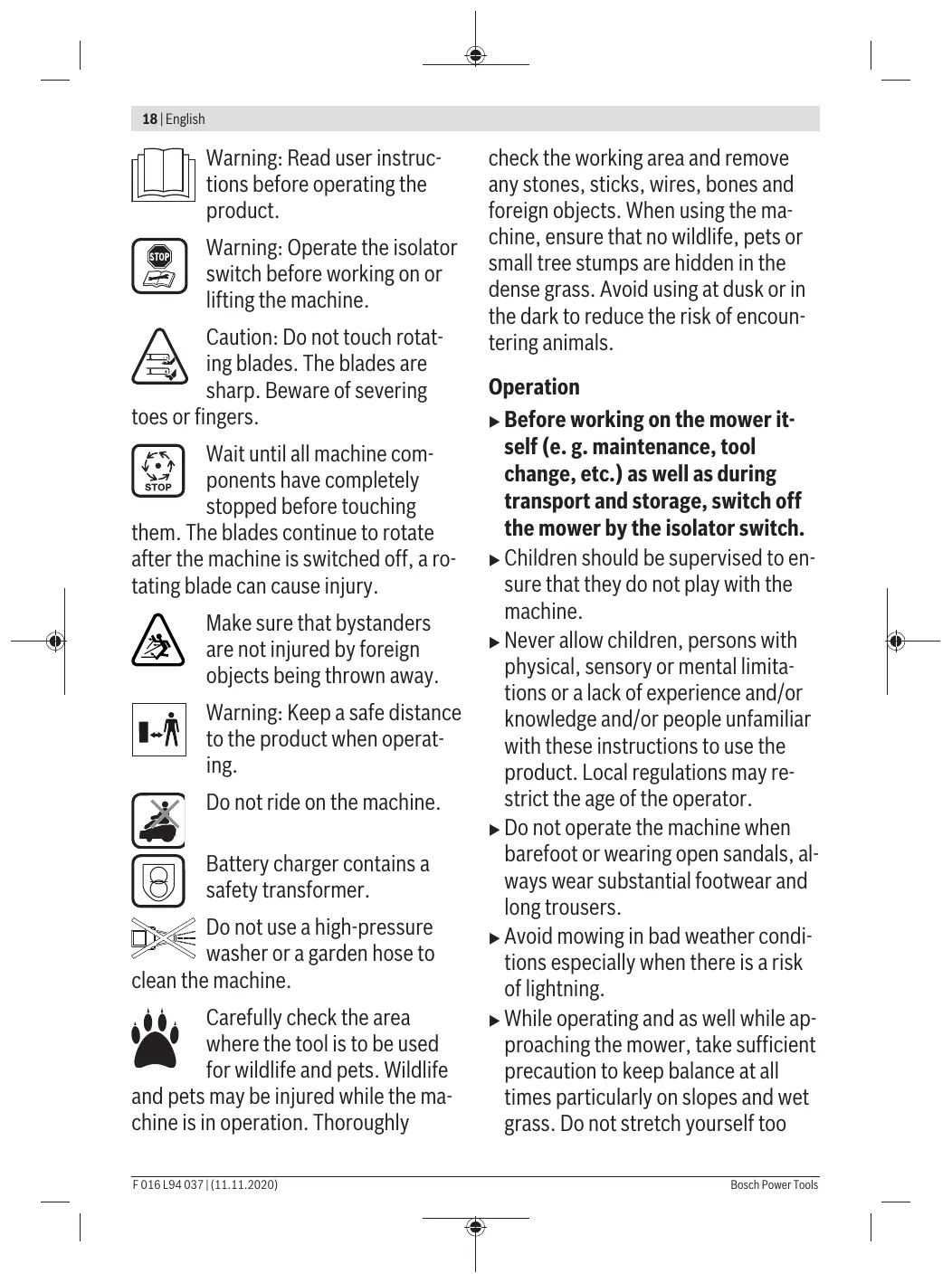
Warning: Read user instructions before operating the product.

Warning: Operate the isolator switch before working on or lifting the machine.

Caution: Do not touch rotating blades. The blades are sharp. Beware of severing
toes or fingers.

Wait until all machine components have completely stopped before touching
them. The blades continue to rotate after the machine is switched off, a rotating blade can cause injury.

Make sure that bystanders are not injured by foreign objects being thrown away.

Warning: Keep a safe distance to the product when operat ing.

Do not ride on the machine.

Battery charger contains a safety transformer.
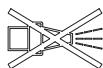
Do not use a high-pressure washer or a garden hose to
clean the machine.

Carefully check the area where the tool is to be used for wildlife and pets. Wildlife
and pets may be injured while the machine is in operation. Thoroughly
check the working area and remove any stones, sticks, wires, bones and foreign objects. When using the machine, ensure that no wildlife, pets or small tree stumps are hidden in the dense grass. Avoid using at dusk or in the dark to reduce the risk of encountering animals.
Operation
Before working on the mower itself (e.g. maintenance, tool change, etc.) as well as during transport and storage, switch off the mower by the isolator switch.
Children should be supervised to ensure that they do not play with the machine.
- Never allow children, persons with physical, sensory or mental limitations or a lack of experience and/or knowledge and/or people unfamiliar with these instructions to use the product. Local regulations may restrict the age of the operator.
Do not operate the machine when barefoot or wearing open sandals, always wear substantial footwear and long trousers.
Avoid mowing in bad weather conditions especially when there is a risk of lightning.
While operating and as well while approaching the mower, take sufficient precaution to keep balance at all times particularly on slopes and wet grass. Do not stretch yourself too
much forwards. Do not operate the mower in a rush.
The user is responsible for accidents or hazards occurring to other people or their property.
If any hazard occurs whilst the machine is operating immediately press the red STOP button.
Ensure correct installation of the perimeter wire as instructed in the installation guide.

For complete instructions on the Indego installation, please refer to the Installation Guide
provided with the product.
Periodically inspect the area where the mower is used and remove all stones, sticks, wires and other foreign objects.
Do not run any live mains cables in the working area. If a mains cable becomes entangled in the robotic mower it must be isolated before any attempt to remove it.
Periodically inspect to see that the blades, blade bolts and cutter assembly are not worn or damaged. Replace worn or damaged blades and bolts in sets to preserve balance.
- Never operate the machine with defective guards or without safety devices.
Do not put hands or feet near or under rotating parts.
- Never pick up or carry the machine while the motor is running.
Do not leave the machine to operate unattended if you know that there are pets, children or people in the immediate vicinity.
- Start the machine according to the instructions standing well away from rotating parts.
Do not use the product at the same time as a sprinkler or use the schedule to ensure that the two systems never run simultaneously.
If for any reason the product is submerged, take it away from water and turn it off using the isolator switch. Do not attempt to switch the product on but contact your Bosch Service Centre.
Do not modify this product. Unauthorized modifications may impair the safety of your product and may result in increased noise and vibration.
Turn off the product using the isolator switch:
- before clearing a blockage,
- before checking, cleaning or working on the machine,
- before storage
- if the machine vibrates abnormally (stop and check immediately),
- after striking a foreign object, inspect the machine for damage and get advice on necessary repairs from your Bosch Service Centre.
Maintenance
Always wear gardening gloves when handling or working near the sharp blades.
Before working on the mower, turn it off using the isolator switch.
Before working on the docking station or power supply, remove plug from mains.
Clean the exterior of the machine thoroughly using a soft brush and cloth. Do not use water, solvents or polishes.
Remove all grass and debris, especially from the ventilation slots.
Turn the mower upside down and clean the blade area and the swivel castors regularly. Use a stiff brush or scraper to remove compacted grass clippings (see figure I).
Blades are reversible.
Make sure all nuts, bolts and screws are tight to ensure safe working with the garden tool. (see figure J)
Periodically visually inspect the machine and replace worn or damaged parts for safety.
Ensure that only official Bosch replacement parts are used.
Replace all blades and bolts as a set as required.
Storage in winter
Turn off the mower using the isolator switch.
The mower will operate between 5^ and 45^ . During the winter season once the temperature in the garden is consistently below 5^ store the mower and the docking station in a secure, dry place, out of the reach of children.
Do not place other objects on the mower or docking station.
It is recommended to use the original packaging when transporting the Indego over long distances.
- Store the mower only within a temperature range between -20^ and 50^ . As an example, do not leave the mower in the car in summer.
USB
The mower has a USB interface which is to be used exclusively for software updates. Use only approved USB.org sticks (formatted to FAT 32) and approved USB.org OTG cables.
For more information on software updates, please refer to www.bosch-diy.com/indego-help.
- Do not use the USB interface for any additional purposes. Do not plug any external devices. Do not operate the machine with the cover of the USB port open.
Battery Hazards
This appliance contains batteries that are only replaceable by a qualified Bosch technician.
Recharge only in the Bosch approved docking station.
The Indego will operate between 5^ and 45^ . If the battery temperature is outside this range, the Indego will display a message and will not leave the docking station. If operating, the Indego will return to the docking station or stay in place.
If the battery becomes defective, liquid can escape and come into contact with adjacent components. Check any parts concerned and contact the Bosch Service Centre.
In the unlikely event of liquid being ejected from the battery avoid all contact with the machine. If contact with the liquid occurs, seek medical advice.
If used incorrectly or if the battery is damaged, flammable liquid may be ejected from the battery. Contact with this liquid should be avoided. If contact accidentally occurs, rinse off with water. If the liquid comes into contact with your eyes, seek additional medical attention. Liquid ejected from the battery may cause irritation or burns.
Do not open the machine or battery. Danger of short circuit and electric shock.
Protect the machine against fire. Danger of battery explosion. In case of fire or battery explosion contact the emergency services.
In case of damage and improper use of the machine, vapours may be emitted from the battery. Provide for fresh air and seek medical attention in case of complaints. The vapours can irritate the respiratory system.
SafetyWarnings for Docking Station and Power Supply
Only use the original Bosch docking station and power cord to charge the mower. Otherwise there is danger of fire and explosion.
- Check the docking station, power supply unit, cables and plugs periodically. If damage or ageing is detected, isolate from the docking station or power supply and do not use them. Never open the docking station or power supply yourself. Have repairs performed only by a qualified Bosch technician and only using original spare parts. A damaged docking station, power supply, cable or plug increases the risk of an electric shock.
Do not operate the docking station and power supply on easily flammable surfaces (e.g., paper, textiles, etc.) or surroundings. The heating of the docking station and power supply during the charging process can pose a fire hazard.
Supervise children at all times. This will ensure that children do not
22 | English
play with the docking station, power supply or the machine.
The voltage indicated on the power supply must correspond to the voltage of the power source.
We recommend that the power supply is only connected into a socket which is protected by a circuit-breaker that would be actuated by a 30mA residual current. Check your Residual Current Device (RCD) at regular intervals.
The supply cord must be inspected for signs of damage at regular intervals.
In the event of flooding of the docking station turn off power supply at mains and contact Bosch Service Centre.
- Never touch the mains plug or any other plugs with wet hands.
- Do not run over, crush or pull the cables. Protect the cables from heat, oil and sharp edges.
The power supply is double insulated for safety and requires no earth con
nction. The operating voltage is 230 V AC, 50 Hz (for non-EU countries 220 V, 240 V as applicable). Contact your Bosch Service Centre for details. If in doubt contact a qualified electrician or the nearest Bosch Service Centre.
Symbols
The following symbols are important for reading and understanding the operating instructions especially the diagrams. Take note of the symbols and their meaning. The correct interpretation of the symbols will help you to use the garden product in a better and safer manner.
| Symbol | Meaning |
| Wear protective gloves | |
| √ | Permitted action |
| × | Prohibited action |
| Accessories/Spare Parts |
Intended Use
The mower is intended for domestic lawn mowing.
Do not operate the mower indoors.
Do not use the mower for any other purpose because of the increased risk of accidents and damage to the mower. Never attempt to modify the mower in any way since this may result in accidents or damage to the mower.
Technical Data
| Robotic Lawnmower | SI Unit | Indego XS 300 |
| Article number | 3600HB0004 | |
| Cutting width | cm | 19 |
| Height of cut | mm | 30-50 |
| Slope angle (max.) | °/% | 15/27 |
| Size of lawn area | ||
| - maximal | m² | 300 |
| - per charge up toA) | m² | 45 |
| Operating frequency range (Inductive sensor) | kHz | - |
| max. magnetic field strength (Inductive sensor) (at 10 m) | dBμA/m | - |
| Operating frequency range (GSM) | MHz | - |
| Max. transmit power (GSM) | dBm | - |
| Weight according to EPTA-Procedure 01:2014 | kg | 8.0 |
| Protection type | IPX4 | |
| Serial number | see type plate on garden tool | |
| Battery | Li-Ion | |
| Rated voltage | VDC | 18 |
| Capacity | Ah | 2.5 |
| Number of battery cells | 5 | |
| Operating time, averageA) | min | 45 |
| Charging period (max.) | min | 45 |
| Perimeter wire | ||
| - wire supplied | m | 100 |
| - minimum required length | m | 20 |
| - maximum permissible length | m | 250 |
| Docking station | ||
| Article number | 1 600 A02 546 | |
| Input voltage | VDC | 24 |
| Power consumption charging/ perimeter wire switched on | W | 55/12 |
| Charging current (up to) | A | 2.3 |
| Allowable charging temperature rangeB) | °C | 5-45 |
| Weight according to EPTA-Procedure 01:2014 | kg | 1.65 |
| Protection type | IPX4 | |
| Power supply unit | ||
| Article number | ||
| Switzerland | F 016 L69 439 | |
| United Kingdom | F 016 L69 437 | |
| Rest of Europe | F 016 L69 170 | |
| Input voltage (AC) | V | 220-240 |
| Protection class | ☐/ ☑ | |
| Frequency | Hz | 50-60 |
| Output voltage (DC) | V | 24 |
| Protection type | IPX7 | |
| Weight | kg | 0.8 |
A) Depends on cutting height, grass conditions and moisture
B) Internal battery temperature
The specifications apply to a rated voltage [U] of 230 V. These specifications may vary at different voltages and in country-specific models.
Noise/Vibration Information
Noise emission values determined according to EN 50636-2-107.
Typically the A-weighted noise levels of the product are: Sound power level 61 dB(A). Uncertainty K = 2 dB.
Explanation of Figures
| Action | Figure | Page |
| Accessories | A | 302 |
| Delivery scope/unpacking the mower | B | 303 |
| Laying out perimeter wire | C | 303 |
| Extending perimeter wire | D | 304 |
24 | English
| Action | Figure | Page |
| Laying perimeter wire around new in-ner object | E | 304 |
| Lifting up and carrying the mower | F | 305 |
| Setting the height of cut | G | 305 |
| Adding a further lawn area | H | 306 |
| - with additional docking station (right) | ||
| - without additional docking station (top left) | ||
| Cleaning | I | 307 |
| Maintenance | J | 307 |
| Software update | K | 308 |
Installation
With the following QR code, you can view a video on how to install the mower under www.bosch-diy.com/indego-help. Alternatively, follow the Installation Guide delivered with the product.



Check if the perimeter wire is fully pegged to the ground avoiding any slack lengths of wire. Any loose wire can be a trip hazard.
Remove stones, loose pieces of wood, wire, live mains cables and other foreign objects from the cutting area.
Make sure that the cutting area is even and has no ditches, grooves and steep slopes above 15% of 27% that are clear obstructions for the mower.
The docking station must be positioned on the wire at an outer edge of the cutting area. It may not be positioned on the side of a tool or garden shed standing as an island within the lawn to be mowed.
It is recommended that you mow your lawn once with a conventional lawnmower before installing and before the first mowing of the new season and whenever the grass clippings would be longer than 5mm
The mower's cutting system is designed to cut small lengths of grass (30 - 50mm) . The clippings can remain as mulch to fertilize the lawn. The height of cut for mower can be adjusted to 30,40 and 50~mm
It is recommended to start with a higher setting and then gradually decrease the height of cut as the wire disappears under the grass. This prevents your Indego from cutting the wire.
Additional perimeter wire can be added using a wire connector (see figures D-E).
The perimeter wire can be extended up to a maximum length of 250m .
The perimeter wire can be buried up to 5cm under the ground (or under non-metallic slabs).
To avoid causing damage to the perimeter wire, do not vertically cut or rake the area where it is positioned.
When laying out the wire avoid angles of less than 45^ . This can affect the performance.
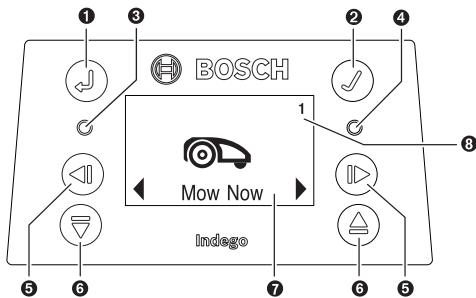
Display
| Symbol | Meaning | |
| 1 | Back button | |
| 2 | Confirm button | |
| If the confirm button is pressed whilst mowing, the mower will return to the docking station | ||
| 3 | ○ | Red LED on: mower error |
| 4 | ○ | Green LED on: mower is switched on Green LED off: The mower is inactive and your four-digit PIN code is required for activation. Or the mower is shut off, the isolator switch must be turned on and your four digit PIN code must be entered to activate the mower. Note: during a software update, the green LED and red LED will be on. |
| 5 | Left/right button | |
| 6 | Down/up button | |
| 7 | Display with dialog screen | |
| 8 | Garden number (shown when more than one garden map in the mower memory) | |
The display switches into sleep mode, if no input is made for 10 minutes.
Adding a further Lawn Area (see figure H)
To install the Indego to an additional lawn area, please follow the instructions in the Installation Guide.
Separate lawn area with separate docking station (see
figure H, right side): The mower can be used on up to three different lawn areas. For an additional lawn area, a separate docking station (see figure A) and the necessary perimeter wire and pegs are required. If a schedule or the „Bosch
AUTO" calendar function is selected it will cut the grass of the area is it in, within the time slots.
Switch off the mower when transporting it between different lawn areas.
Note: software updates have to be carried out on the mower in every docking station.
To help remember which docking station belongs to which garden, it is recommended to label the docking stations with the lawn area number and description when storing them for winter.
Without separate docking station: It is possible to connect the lawn areas by placing the perimeter wire between the two lawn areas parallel to each other as close as possible (see figure H, top left). The additional lawn area without docking station is not recorded in the map memory and the mower will not use the LogiCut cutting strategy in this lawn area without the docking station. The maximum recommended lawn area without a docking station is 40m^2 . The mower will mow until it runs out of battery and will need to be carried back to the docking station for charging.
Mowing
Do not let children ride the mower.
Press the stop button on top of the mower before lifting. Always lift the mower by its handle. (see figure F)
Make sure the cutting area is free of small animals such as hedgehogs or tortoises.
After successful installation you can either immediately begin to mow by confirming „Mow now“ on the display, or wait for the next scheduled cutting period, as programmed by the Bosch AUTO Calendar Function (previous setting required).
A mowing schedule can also be set up according to your needs.
The mower must mow a lawn area 3 times completely (do 3 full cuts) to learn the lawn area. During the learning phase, the visual result may not be optimal.
Approximate runtimes for complete lawn coverage using LogiCut are listed below. Please note that the runtimes will vary depending on the lawn complexity and number of objects within the garden.
100m^2
4h
300m^2
11h
Set a schedule with frequent repetitions. This achieves good mowing results, the battery charge will last longer and you avoid debris on the lawn.
When the mower is mowing
In "manual" mode, the mower works until the lawn is mowed. Mowing is interrupted only for charging the battery. When the lawn area is mowed, the mower returns to the docking station.
In the programmable „Schedule“ mode or with the „Bosch AUTO“ calendar function, the mower operates continuously for a set period of time. Mowing is interrupted only for charging the battery. If the lawn area is mowed before the time period expires, the mower returns to the dock.
To stop mowing prematurely, press the Stop button or send the mower back to the docking station pressing the confirm button
Energy saving mode
The mower reduces its energy consumption by automatically switching off the power in the perimeter wire when it is not mowing and not being charged.
To wake up the mower manually from the energy saving mode, press the confirm button and afterwards select either "Mow now" or another "Mowing mode", while the mower is in the docking station.
When the "Schedule" mode or the "Bosch AUTO" calendar function becomes active, the signal to the perimeter wire is automatically started.
Sensors
The mower is equipped with the following sensors:
- The lift-up sensor is activated when the mower is lifted.
- The rollover sensor detects when the mower tips over.
- The tilt sensor is activated when the mower reaches a slope angle of 32^ .
When one of the sensors is activated, e.g. the lift-up sensor, the drive motors and cutting blades are stopped. A message is indicated in the display, e.g. "lift-up".
- The obstacle sensor detects objects/obstacles alongside the entire front edge of the mower and causes a change of direction.
Battery charging
The battery is equipped with temperature monitoring that allows charging only if the battery internal temperature is in the range between 5^ and 45^ .
The lithium-ion battery is supplied partially charged. It is recommended to charge the mower during installation of the perimeter wire in the docking station.
The lithium-ion battery can be charged at any time without reducing its service life. Interrupting the charging procedure does not damage the battery.
When the battery is run flat or discharged, the mower is shut off by means of a protective circuit: the blades no longer move.
Updating the Software (see figure K)
To update the software, you need a USB.org stick (FAT 32 formatted) and a USB OTG cable.
When a new software version is available, you can find it on the Internet under "www.bosch-diy.com/indego-help". Load the "IN7xxxx.bin" file onto the USB.org stick.
Turn the mower over and remove the cover from the USB port. Connect the USB OTG cable with the USB.org stick.
26 | English
Place the mower in the docking station and make sure that the docking station is connected to mains (LED on docking station is on). The mower must be switched on, the display alight and the battery must be at least 70% charged.
When the update starts, the following message appears in the display "Do you want to update from version x to version y?"
Confirm by pressing the confirm button .During the update, both LEDs in the mower will flash.
At the end of the update, the mower restarts.
Remove the USB OTG cable and the USB.org stick. Close the cover of the USB port.
Menu Navigation
The table below explains the various menu items.
| Main Menu | Sub-menu 1 | Sub-menu 2 | Explanation |
| Mow now | Pressing the confirm button will send the mower to mow. In "Off/ Manual", the mower works until the display shows "garden complete". | ||
| In "Schedule" mode or with the "Bosch AUTO" calendar function, the mower will operate until the end of the time period or until the display shows "lawn complete" (whichever comes first). | |||
| Calendar | Bosch AUTO | The "Bosch AUTO" calendar function is optimised based on the size of the lawn area.In the default setting, the mower does two full cuts a week and starts at 8 am.The following settings are possible: | |
| Number of complete mowing cycles per week | 1 to 3 | ||
| Weekday | Days on which mowing is allowed (e.g. to exclude Sundays). | ||
| Start time | Only possible for the first time slot (applies to all active days). | ||
| Schedule | Edit (selected day) | Program a mowing schedule by setting individual mowing days and slots (up to 2 per day). | |
| Don't mow/Delete slot | This will delete the corresponding slot for the selected day.The number of full cuts per week for the actual schedule are shown at the bottom of the display. | ||
| Off/Manual | Choose this option when no schedule should be used. The mower starts mowing only by activating "Mow now". | ||
| Settings | Mowing mode | Mow without docking station | Mower will mow in the additional lawn area without docking station in random mode until it runs out of battery.The mower mows more thoroughly, returns to possible unmown areas and mows on shorter tracks. The mower needs considerably longer for a full cut. |
| Auto Lock | If buttons are not pressed for 3 min. they will be automatically locked.Recommended for safety reasons and protection against theft. | ||
| Security | - On | PIN code is required for reactivation after Auto Lock. | |
| - Off | The buttons are always ready for input. | ||
| Change PIN | Changing of a PIN code requires entering of existing PIN code first. | ||
| Alarm | |||
| - On | Alarm is activated. | ||
| - Off | Alarm is deactivated. | ||
| Date & Time | Change the date and time. | ||
| Change the display language. | |||
| Set Language | |||
| I | System status | Information on battery charge, system information and operating and charging time for the mower. | |
| Info | |||
| Advanced | Wire ID | Change the perimeter wire ID when possible interferences are nearby. | |
| Sensor setting/Lawn condition | Select between Low (uneven ground), Normal and High (slippery ground). Mower bump sensor will become more or less sensitive depending on lawn condition selected. | ||
| Remap | Deletes the current map of the lawn area. | ||
| Factory reset | Reset the mower to factory settings will delete all personal settings (not PIN).After a factory reset, the mower will need to remap the lawn area. | ||
| Garden overview | Displays the number of mapped lawn areas, their size, their wire ID and the date of the last time the lawn area was cut. | ||
| Delete garden | Delete one specific lawn area map or select to delete all maps at once. | ||
| Tools | Level check | Information about the ground angle of the mower. If the mower is in the docking station and the dot on the display is not within the indicated circle, the docking station must be mounted at a new, more level location. | |
| Wire signal | Detects the wire signal received from the perimeter wire, indicating its strength (for Service Agent).The mower will not receive a wire signal while in the docking station. |
Troubleshooting
Online Support

http://www.bosch-diy.com/indego-help


| Problem | Possible Cause | Corrective Measure |
| The LED on the dock-ing station flashes | The perimeter wire is cutt, too long or too short. Wire not connected and mower not in the docking station. | Check that the perimeter wire is not interrupted and is between 20 and 250 meters in length. Then switch power supply off and then on again.Follow instructions in Installation Guide to install the mower. |
| Excessive vibrations/noise | Blade bolt loose | Tighten blade bolt to torque of 2.5 Nm. |
| Cutting blade damaged/bent | Replace cutting blade (see figure J). | |
| Mower not docking reliably | Perimeter wire not properly layed out around docking station | Follow instructions in Installation Guide on layout of peri-meter wire. |
| Perimeter wire close to a source of interfer-ence | Remove any excess (e.g. coiled up) perimeter wire around the docking station.Change perimeter wire ID in the menu. | |
| Mower fails to operate | Isolator switch not turned on | Remove mower out of docking station, turn isolator switch on and place mower back into docking station (ensure docking station is on - LED lights up green). |
| Possible clogging | Always turn isolator switch off first, then check under-neath the mower. Clear out as necessary (always wear protective gloves). | |
| Battery not fully charged | Place mower in the docking station to allow to charge. Docking station must be on. | |
| Grass too long | Mow lawn with conventional lawnmower to its lowest height-of-cut setting before using the mower. | |
| Battery too hot/cold | The mower operates when the battery internal battery temperature is between 5 °C - 45 °C. Allow mower to cool down/warm up. If the error occurs frequently, the docking station should be positioned in the shade. | |
| Mower standing on lawn with the display switched off | Operational problems | Press confirm button for screen to light up, or place mower in docking station. |
| Mower does not charge | Battery too hot/cold | The mower operates when the battery internal temperat-ure is between 5 °C - 45 °C. Allow mower to cool down/ warm up. If the error occurs frequently, the docking sta-tion should be positioned in the shade. |
| Docking station not switched on | Switch on power supply to docking station. If docking station does not start, contact your Bosch Service Centre. | |
| Charging pins corroded | Clean the charging pins. | |
| Mower out of peri-meter wire | Perimeter wire on a slope | Leave 30 cm between the perimeter wire and the slope. |
| Obstacle near perimeter wire | Remove obstacle. | |
| Parts of the lawn area left uncut | Mower requires more cuts to finish garden | Allow mower to run for 3 full cuts to cover whole lawn area. |
| Time slot not long enough for garden size | Increase mowing time slot or use "Bosch AUTO" calen-dar function. | |
| Distance between perimeter wires too small | Increase distance between the perimeter wires to a min-imum of 75 cm. | |
| Rough mowing conditions | Select "uneven ground/low sensitivity" option from menu item "lawn condition/bump sensor". Flatten garden/remove/bumps/mark out unsuitable areas with the perimeter wire - Please follow the instructions in the Installation Guide. | |
| Grass too long | Select "uneven ground/low sensitivity" option from menu item "lawn condition/bump sensor". | |
| Slopes in garden too steep | Ensure mower only operates on slopes of 15 degrees or less and full garden is not on a slope. | |
| Mower gets stuck in garden | Objects/obstacles not marked out | Use the perimeter wire to mark off obstacles where the mower often gets stuck. |
| Newly laid turf | Allow a few weeks for the soil to settle before using the mower. Change setting in menu item "lawn condition / bump sensor" to low sensitivity / uneven. After watering, wait as long as possible until you start the mower. | |
| Mower unintentionally cuts flowers, etc. or runs over certain obstacles | Objects/obstacles below 5 cm not marked out | Mark obstacle using perimeter wire leaving 30 cm from object or remove objects/obstacles. |
| Mower does not appear to cut logically | LogiCut system depends on the garden conditions. Mower does not necessarily have to continue in the next uncut area. | Further information can be found on the Installation Guide. If behaviour re-occurs often, remap lawn area. |
| Mower does not always go in a straight line when travelling between areas | No corrective action needed. | |
| Mower frequently does not find right position or turns on the spot | Change wire ID. | |
| Wire crossed while marking an object | Follow instructions in the Installation Guide. | |
| Mower runs in random paths in an additional lawn without docking station. | Normal behaviour. The LogiCut system only works in areas with docking station. | |
| Perimeter wire keeps being cut | Wire is not taut between pegs Distance between pegs is more than 75 cm | Make wire taut and ensure distance between pegs is maximum 75 cm. Use the wire connectors to repair the cut. Avoid using a verticutter, scarifier, etc. over the perimeter wire. |
| Mower leaves ragged finish/poor quality of cut | The mower does not mow often enough | Mow more frequently for a good result (e.g. by means of more/longer slots in schedule). |
| Cutting blades blunt | Reverse or replace cutting blades (see figure J). | |
| Possible clogging | Always turn isolator switch off first, then check underneath the mower. Clear out as necessary (always wear protective gloves). | |
| Perimeter wire not detected | No power at the docking station | Check if the docking station is powered up (LED is on). |
| Perimeter wire damaged/cut | Check perimeter wire for damage. | |
| Wrong installation (e.g. not enough distance between wires) | Follow instructions in the Installation Guide. | |
| Perimeter wire close to a source of interference | Remove any excess (e.g. coiled up) perimeter wire around the docking station. Change perimeter wire ID in the menu. | |
| Height-of-cut button stuck | Possible clogging | Always turn isolator switch off first, then check underneath the mower. Clear out as necessary (always wear protective gloves). |
After-sales Service and Application Service
www.bosch-garden.com
In all correspondence and spare parts orders, please always include the 10-digit article number given on the type plate of the mower.
It is possible, that the software version of your mower is required (see „Menu > Settings > Info“).
If the mower is requested to be sent to the service centre, the mower and docking station must always be sent together. Do not remove the battery.
Before sending in, remove any personalised top cover that may have been fitted and any accessory cover.
Great Britain
Robert Bosch Ltd. (B.S.C.)
P.O.Box 98
Broadwater Park
North Orbital Road
Denham Uxbridge
UB95HJ
At www.bosch-pt.co.uk you can order spare parts or arrange the collection of a product in need of servicing or repair.
Tel. Service: (0344) 7360109
E-Mail: boschservicecentre@bosch.com
Ireland
Origo Ltd.
Unit 23 Magna Drive
Magna Business Park
City West
Dublin 24
Tel. Service: (01) 4666700
Fax: (01) 4666888
Australia, New Zealand and Pacific Islands
Robert Bosch Australia Pty. Ltd.
Power Tools
Locked Bag 66
Clayton South VIC 3169
Customer Contact Center
Inside Australia:
Phone: (01300) 307044
Fax: (01300) 307045
Inside New Zealand:
Phone: (0800) 543353
Fax: (0800) 428570
Outside AU and NZ:
Phone: +61 3 95415555
www.bosch-pt.com.au
www.bosch-pt.co.nz
Republic of South Africa
Customer service
Hotline: (011) 6519600
Gauteng - BSC Service Centre
35 Roper Street, New Centre
Johannesburg
Tel.: (011) 4939375
Fax: (011) 4930126
E-Mail: bsctools@icon.co.za
KZN - BSC Service Centre
Unit E, Almar Centre
143 Crompton Street
Pinetown
Tel.: (031) 7012120
Fax: (031) 7012446
E-Mail: bsc.dur@za.bosch.com
Western Cape - BSC Service Centre
Democracy Way, Prosperity Park
Milnerton
Tel.: (021) 5512577
Fax: (021) 5513223
E-Mail: bsc@zsd.co.za
Bosch Headquarters
Midrand, Gauteng
Tel.: (011) 6519600
Fax: (011) 6519880
E-Mail: rbsa-hq.pts@za.bosch.com
Transport
The contained lithium-ion batteries are subject to the Dangerous Goods Legislation requirements. The batteries are suitable for road-transport by the user without further restrictions.
When shipping through third parties (e.g.: by air transport or forwarding agency), special requirements on packaging and labelling must be observed. For preparation of the item being shipped, consulting an expert for hazardous material is required.
Disposal

The garden product, batteries, accessories and packaging should be sorted for environmental-friendly recycling.
Do not dispose of garden products and batteries/rechargeable batteries into household waste!
Only for EC countries:
According to the European law 2012/19/EU, electrical and electronic equipments that are no longer usable, and according to the European law 2006/66/EC, defective or used battery packs/batteries, must be collected separately and disposed of in an environmentally correct manner.
Battery packs/batteries:
Li-ion:
Please observe the notes in the section on transport Transport.
Integrated batteries may only be removed for disposal by a qualified repair person. Opening the housing shell can damage or destroy the machine.
UK Importer:
Robert Bosch Ltd.
Broadwater Park
North Orbital Road
UxbridgeUB95HJ
François
Merci
www.bosch-garden.com
Robert Bosch (France) S.A.S.
www.bosch-garden.com
Robert Bosch Argentina Industrial S.A.
Calle Blanco Encalada 250 - San Isidro
B1642AMQ
www.bosch-garden.com
www.bosch-garden.com
www.bosch-garden.com
www.bosch-garden.com
Bosch Service Center
Telegrafvej 3
2750 Ballerup
På www.bosch-pt.dkk kan der online bestilles Reservedele el-ler oprettes en reparations ordre.
TIf. Service Center: 44898855
Fax: 44898755
E-Mail: vaerktoej@dk.bosch.com
Transport
www.bosch-garden.com
Bosch Service Center
Telegrafvej 3
2750 Ballerup
Danmark
Tel.: (08) 7501820 (inom Sverige)
Fax: (011) 187691
Transport
De litiumjonbatterier som ingar ar underkastade kraven for farligt gods. Anvandaren kan utan ytterligare forpliktelser transportera batterierna pa allman vag.
Endast for EU-lander:
www.bosch-garden.com
Oppgi alltid det 10-sifrede saksummeret ifolge typeskiltet på klipperen ved alle sporsmal og bestillinger av resvedeler.
www.bosch-garden.com
www.bosch-garden.com
Robert Bosch Sp. z o.o.
www.bosch-garden.com
Bosch Service Center PT
K Vapence 1621/16
692 01 Mikulov
Na www.bosch-pt.cz si si muzete objednat opravu Vasheho stroje nebo nahradni dily online.
www.bosch-garden.com
V pripe akychkol'vek otazok a objednavok nahrdnych suciastok uvdzajte bezpodmienecne 10-miestne vecné cislo uvedené na typovom stitku kosacky.
www.bosch-garden.com
IaTa I3rOToBHeHn yKa3aHa Ha nocJeHc CTpaHnCe oIoJKN PyKOBoDCTBa.
IaTn3rOToBnEHHa3apAnHOrOyCTpOiCTBaYka3aHaHaKOpnyceN3dEInna.
KoTHaTHa HINΦopMaζη OTHocHTbHo NmnpTepa coepKHTcHa ynaKOBKe.
Cpok cnyx6bH3dennn
Cpok cnjxkbH3dennncoctabnre7 let. H pekomehnyet cK3cknpaataunno nO hcteehnn 5 let xpaehnna C daTbI n3rotoblenHH63 npedbarntelho npOBepkn (aty n3rotoblenm CM. Ha 3tHKeTke).
Yka3aHbI cPOK CnyKbI DeIeCTBnTeHEN pN Co6JIuDeHNi nOTpe6HTenEM Tpe6OBaHNI HactoIeero pykoOBDCTBA.
He HcPbIb3OBAbT PnI NOBJIeHIN DbIMa HeNOCpeICTBeHHO 3 KOpNyCa N3dEInia
Bo3moXhIe oHn6OuHbIe DeIeCTBnI nepcoHaIa
HeHcIIOb3OBAbTCIOBpeXeJeHHoIpyKoAToKoIINIOBpeXeJeHHbIM3aUHTbIMKOxOyXOM
- He HcIOpJIb3OBAbT Ha OTKpbITOM IpocTpHaCTBe BO BpeMdoXJa
- He BkIIOuATb npn nonaDaHH BOIb B KOpNyc
Kpntepnn npedeBbIx COCTOHN
- nepetepn nnoBpeKdEh 3JeKtpnueckn Ka6eIb
IOBpeJdeH Kopnyc n3dEInna
TnH n nepnounduhoctb texnueckoro o6cnyXHBaHHN
- Pekomehnyetcra ONUCTHTb HNCTpymeT OT PbIIN Iocne KaJdoTO NcPONb3OBAHnR.
Xpahenne
Heo6xOJIMO XpaHntB CyXOM MeCTe
Heo6xOJIMNO XpaHnTb BdaJIOT NCTOCHNKOB NOBblIeH HbIX TEMpePaTpy IN BO3JeCTBna COJHeuHbIX Lyuei
- pnp xpaHEnH Heo6xOdHMo H36eRaTb pe3KOro IpePnada TempePaTyp
-xpaheHne 6e3 ynaKOBKn He IOnyckaetc
- noDpo6HbIe Tpe6OBaHHa K YcNObHbM XpaHeHHa CMOtpnTe B FOCT 15150-69 (YcNoBne 1)
XpaHbByaKOBKe npednpnTna -H3rOToBtEnBaCKlaDcKHX nOmeuenx npi Tempepatye OkpykaIoueCpeblOT +5 do +40^. OTHocHTenbHaBnAxAHOCTb BO3-Dyxa He dOnJkHa pRebIaTaB 80 %.
TpaHcnpTnpoBka
Kateropnueckn He donyckaetcnaeHne HIObIe MekaHne B03dEChTBnHa ypaKOBky pnp TpaHCnOpTnPOBKe
- npn pa3rpy3ke/nporpy3ke He donyckaetcnaCnoIb30BaHne IIO6oBVAndaTexnKn,pa6otaioeNo npHHunny 3aJkMa yNAKOBKN
- noDpO6HbIe Tpe6oBaHnK yCNoBnAM TpaHCnpTnPoBKn CMOTpHTe B FOCT 15150-69 (YcNoBne 5)
- TpaHcnpTnpoBaT npi TempeNaTyOkpyaIoSe cpeBly O1T -50°C Do +50°C. OTHocnteNbHa BnaXHoCTb Bo3-Dyxa He doJxHa npeBbIaTb 100 %.
Благоарим за то,
yTO Bbl cdeIann BbI6Op B noIb3y po- 60tN3npoBaHHo ra3OHOKocnIKn Indego.
Ipoptyte, noxayuicta, HnXeCneyuOuNe yka3aHnNo texHnke 6e3-OnaCHOCTn nepeD Tem, KaK yCTaHaBJIHBaTb Indego.
Yka3aHnI NO TexHnke 6e3OpacHOCTN BHNMaHHe! BHNMaTeNbHo npouHa- TaIte cIeDyUoIne yKa3aHnI. O3NaKOMbTecb C 3IeMeHTAmN ynpaBVeHnI INpaBnIbHbIM N0Ib3OBaHHem caIOBOrO HnCTpymEHTa. CoXpaHnI Te pyKOBODCTBO I0 3KcPnyatauIN DIA DaIbHeNeHWeRo HcNoJIb3OBAHnI.
Y6eHNTecbBTOM,HTOcaIOBbINHCTpyMeHT He 6IOKnpyET He 3aIpaJXdaET BblXOdbI.

He cTaBbTe dpyrHe npeMeTbI Ha ra3oHOKOcNkU nIi Ha 3apdHyIO CTaH-
PnpeBo3Ke Indego Ha daIbHne paCCToHHNcNoIb3yIteOpuHaJIbHyU yNaKOBky.
XpaHnTe Ra3OHOKOCnky TOnbKO npH TeMnepaType oT-20°C Do 50°C. HAp., He octabnIte caoBbIn NHCTpyMeHT IeTOM B MaunHe.
USB
Fa3OHOKOCnIka OChaSeHa INHTep-phiEcom USB, KOTOpbI npeHa3Ha-ueH NCKIIOUHTeBHo DnIe O6HOBLeHnI IIO. NcNoJIb3yIe TOnbKO DoNy-1eHHbIe 0JIeW-HaKoNITeHN USB.org (OTfOpMaTHpOBaHNbIe IOnFAT 32) IdoNyIeHNbIe Ka6eIN OTG USB.org.
Длл полуеня болee поробнй
инфорmaци об обновлених рограимного обеспeyеня см.
www.bosch-diy.com/indego-help.
He nCpOJIb3yIte HHTepΦeIc USB dЯ ИньIX ueIe. He nOdkIIOUaJIte HnKaKHe BHeUHNe yCTpoIcTba. He 3KcPnIyATnpuIte N3dEJIne c OTKpbI- ToJ KpbIshKO rHe3da USB.
Onachoctb, nCXoJaIaIOT aKKymJIaTOPHO6aTapeH
Даньи злктонструмент сдерхпт akумлгторы,замену KOTopbIX MOryT BblOnHЯТь TOnlbKO KBaHnФицрваньIBLE cneuaHn-ctы Bosch.
3apJaKa DOnJxHa OcyuEcTBnTbC TaBko B DoNyueHHo fHpMoB Bosch 3apJHo CTaHcN.
Indego pa6oTaET B dHaana3OHe OT 5 ^ C do 45^ .EcnI TemnepaTpya AkKymyTAToPA hXoDITc8 3a npedeMaM NTOrO dHaana3OHa, Indego oTo6paJxAeT COo6UeHne H He NOKndaet 3apRdHyIO CTaHcHIO. B npOceCE 3KcPnyatauN Indego BO3BpaUaTeC8 Ha 3apRdHyIO CTaHcHIO HIn OCTaETCSTOrTb Ha MeCTe.
Пи NOВрждени akКуМУЛТОпа BO3MOЖHO BыTEKaHne XДКOSTИ И NOПаданHe Na COseДнHe DeTaII. ПюВерьTe DeTaN, Ha KOTOpbl e NO-палa XnДКOSTb, И оБразнТecь В серВиСнHyЮ MaCTeРсkyЮ Bosch.
H36eAte KOHTaKTa C CaIOBbIM HNCTpyMeHToM,ecIN B Upe3BbIaH- HOcTyaUHN 3 aKKyMylrTOpHO 6aTaPeIN BBITEKaET XnIDKOcTB. B cny- yae KOHTaTc A TOJ XnIDKOcTBIO 6paTInTEcb K BpaUy.
Pn HneppaBnHOM nCnoB3OBAHHn n3 aKKymJITopa MoKet noTeyb KndKocTb. N36eAaTe cOpnKoCHOBENHc Hei. Pn cnyaHOM KOHTaKTpe npomoyTe COOTBeCTByIOUee MeCTo BODo. Ecn 3Ta
JNdkocTb NonaTeB rna3a,TO do- nOJIHTeIbHO 6paTHteCb 3a NOMOsbIO K BpaCy. BItKeaIoUaAkkymyIaTOPHaJ XnDKoCTb MOXET npIBeCTN K pa3dpaXeHIO KOxN IIN K OXKOram.
He BCKpbIBaIte caIObI INHCTpyMeHT HaxOJaUcB BHyTpN erO aKKymyIaTOpHyo 6aTapeIo. CyueCTByET ONaCHOCTb KOpOTKOrO 3aMbI KaHnI N nopajEHHa 3JIeKTPnueCKM TOKOM.
3aunuaite caoobbIM HnctpymeT OOrH.AKKyMylrTop MoKeT B3OpBaTbcI.PnB03rOpaHnn Hnnpn B3pBe aKKyMylrTopo o6paTntEcB aBapnHyIO cnjx6y.
PnIOBpeJdeHnn HHeaJIexKaIeM NcNoIb3OBAHH CaIOBOrO INHCTpyMeHTa BO3MOxHO BbIeJIeHne napOB n3 aKKyMylTOpHoi 6aTapeN.ObecneYbTe npITOK CBExKe-TO BO3dUxa H npn BO3HNKHOBeHNN KaIo6 o6patntEc b K BpaCy.Γa3bl MOryT BbI3BaTb pa3IpaXeHne DblxATeNbHbIX nyTei.
Yka3aHnnoTexHnke 6e3oNaChocThdIy 3apArdHoro yctpoiCTBa n 6IokaIHTaHH
Длязарядкг ra30HOKOcHKn Hc- noIb3yIte TOnbKO opnHnaIbHyIO 3apdHyIO CTaHcIIO n OpnHnaIbHbIe CeTeBOJ shHyp Bosch.В proTIBHom Clyuae BO3HnKaeT ONaC-HOCTb B3PbIBa N BO3rOpaHnI.
PeryIaRHO npOBepaIte 3apAHyO CTaHcNIO,6LOK nHTaHn,ShHyp N uTencB. B clyuae nobpejdeHn Hn H3MeHEnr OTKIOUHTe 3apAHyO CTaHcNIO Hn 6Lok nTaHn OT cETn H He NCpONb3yIte nx.He BCKpbIbAIte 3apAHyO CTaHcNIO Hn 6Lok nHTaHn camoCToTeJIbHO.PeMOHTbIe pa60tbl pa3pe7aetcBbINOnHrToTB ToMbKO KBaHnΦHcnpOBaHHOM npecOHany Bosch n TOnbKO c HCpONb3OBaHNemOpHnHaIbHbIX 3anacte.NoBpeJdeHn 3apAHyO CTaHcNIO,6LOK nHTaHn,ShHypPa nHTaHn Hn IITeCSeI NaBbIshaOT pNCK npaKeHn EJIeKTPueckIM TOKOM.
He nCnoIb3yIte 3apAHyIO CTaH- uo H6loK PHTAHnHa JERKO- BOCPnAmEHaIOSeiCn IOBepxHOCTN (HaNP., Ha 6ymare, TkaHax N T. d.) HnB6nn3n rOpOuHX MaTepeHAnOB. B CBy3n c HArpeBaHNem 3aprHON CTaHCnN H6LOKa PHTAHn BOBpeMg 3apAKn BO3HnKaET ONaHOCtB BO3rOpAHn.
He octabnIte dete6e3 npncmotpa. He noJxHbI ng- paTbcra 3apdHoi cTaHcnei, bIOKOM PHTAHN HIN caObIM HNCTpyMeHTOM.
HapjEne HCTOHNKa NtAHnJaONKHO COOTBETCTBOBaTb DaHHbIMHa 6IOKe NtAHnI.
PeKOMeHnyetcI NOdklHuayt b 3TOT 6JOK NITaHnT OJbKO K pO3eTKe, OCHaUeHHoY cTPOiCTBOM 3aUHTHO-
ro OTKIIOUeHnA C TOKOM cpa6aTbIBaHN 30 mA.PeryJnRHO IPOBeprTe cyHKnOHaJIbHyIO CNOCo6HoCTb yCTpOJCTBa 3aIHTHOrO OTKIOUeHnA.
CeTeBOI shHyp Heo6xOdImo peryIaRpHO npOBepaTb Ha HaNuYe NOBpeXdEHN.
Bcnyae 3aToPJIeHnI 3apJHoi CTaHcNt OTKJIouHte 6bIOK PNTaHnO T cETn I o6paTntEcB B cepBnCHyO Ma- cTeprckyU Bosch.
HnKoTda He kacaTecb cTeBOro 1TeNcEJI nn Dpynx WTeNceJe MOKpbIMn pykam.
He nepee3xajTe uepe3 shhyp nHTaHn, He cdaBnBaIte erO n He TAHnTe 3a Hero, nockoJbky Bbl MoKeTe erO NOBpeNTb. 3aunuae Te shyp OT BbICOKHX Tempeatyp, Macen n OCTpbIX KpaEB.
I3 coo6paKeHn 6e3OpacHocTn 6Iok nHTaHn HMeET 3aUHTHyU H3OJaU O He hJxJaTeC B 3a3EmLeHn. Pa6Ouee HanpKaHe cOCTaBnE T 230 B ~, 50 Tc (dIy CTpaH, He BVxoJaux B EC: 220 B, 240 B B 3aBnCmOCTn OT nC- pONHeHn). INΦopMaUmoKHO IO
IyuHTb B aBTOpH3OBaHHoN cepBnCHoM MacTepeckoB Bosch.
B comHnteIbHbIX clyuayx o6paTnteCb K npoPecCnHOHaIbHOMy 3JeKtpNky HnB 6bnJaaMuy oepBnchNy MaCTepcKyU qnpMb Bosch.
CNMBOJIbI
Cnedyuohne CmBBOJI NOMOryt Bam npH uTeHHN HOnHHMaHny pyKoBOdCTBA NO EKCIpyaTauN,OC6eBHO INJIOCTpaI.3aOpNMHTe CmBOJIu Hx 3HaueHHe. PpaBInbHaNHTeppetaua CmBBOB nOMOxet Bam ppaBInbHee NHaDEXHoe pa60tAb c aDObbIM HcTpyMeHOr.
UymoBaJ 3MnCCn, ONpeJeHnA B COOTBETCTBnC EN 50636-2-107.
A-B3BeWeHHbIyPoBeHbIyMaOT3JIeKtpOnHCTpyMenta CoCTaBnIeO6bIuHO: yPoBeHb 3ByKOBoM MoUHocTb 61d6(A).IporpeWHoCTb K=2d5.
3haueHne pncyHKOB
YdaiHte C o6pa6aTbIbAemrO yuactKa r3oHa KaMHN, BcTKN, npBOBOKy, HaxoJaIeNecn oN hAprrKeHEm Kabei N npOue NoCTOpOHHe PpeMTebl.
Y6eHTEcB B TOM,уO obpaBaTbIaBEmbl yuactOK rA30HaPOBbHn Ha HEM Het cyuaceTBHeBHX npenrTCTBn DnCaDOBORo HNCTpymeta, Hanp., yrny6beHn, KaHbOk n KpyTbIXOTKOCOB C yrnom haknoha 6oone 15%/27%.
3aapnna CTanu ndoJha haoonbTa H BHeWhem Kpae ra0Ha Ha orpaTneBHO npBONoke. Ee HeB3paacnonaRaTb y capa nnDOMKAc INCTpyMeHTaMn, OKpyKeHHoro CO BCex CTOPOH Ra0HOM.
Ipeed yctaHOBKO nped nepBbIM KOseHHeM B HOBOM ce-0He H BCERda, KOrDa BBICota TpaBbI ppeBbIIaet 5 MM, peKoMeHNyETc OIN PA3 CKOCHTb Ra3OH ObbHNO Ra3OHOKOcNkoi.
CnCTema HoKejra3oHOKocNkn npedHa3haueHa dIy cKaaHbAHHa KOPOTKO TpaBbl (30-50 MM). CkOuEHnHa TRaba MoKeT octaBaTcBA Ha 3eMn B KaueCTBe MyJbN Iy du yObopeHna Ra3oHa. BbCOTy cKaaHbAHn Ra3oHOKocNkn MOxHO HaCTponTh ha 30,40 n 50 MM.
PekomeHnyetc HauHaTb C 60lee BbICOKn HactpoKn, a 3aTEM NOCTeNEHHO CHNkAaTb yPOBeHb, KOrDa npBOONoka CKpoETc NpI TpaBOi. TaKIM OpbazOM PpeoTbpaUaTeCn nepepezAHne npBOLOKN Ra3OHOKocNIko Indego.
ДонолнельнуоOrpaДитELынуПpoBOLOKyМоЖHо ПОД-КИЧHTbпгппOMOшиKaбELhORo COeDINHTeY(cM.pnC.D-E).
OrpaHntelbHyIOIPOBOLOKyMOxHO yDInHrTaMaKChMymDo 250 M.
IpoknablyaBaireOrpaHnteBHyIO npBOLOKy B 3emne (nnoi HEmetanlluecko nnlntko) Ha rny6hne do 5 cm.
Bo n36exaHne noBpeXeHnO orpaTnteHbHO npBOLOKn He pa3pe7aetc B paHOe ee pacnoJoxHeN BepTKyInpoBaTa raoH nnO sbapabTaB erO rpaJIamn.
Пиnpokладke orpaNTeHbHoi npBOJIoKo nCTapaIteCb He co3daBaTb yIb MeHee 45°.3To MoXet heraTHBHO OTPa3NtBcHa npOn3BOJNTeHbHOCTN.
Инданкатор

Cnmbon
3nayenne

KhoNka《Ha3aM》

KhoNka noDTBpeJxDeHnA
Cnmbol 3haueHne
| EcnH naJatb Ha KNHOKy noqTBePjckDeHn BO BpeMc cKaaunBaHnra, ra3OHOKOCINka Bo3- Bpaaetca H a3apdNHyo CTanuH |
| 3 0 KpacHbI CBTeODHOD CBETNTC8: oUH6ka ra- 3OHOKOCINKN |
| 4 0 3eNeHbI CBTeODHOD CBETNTC8: ra3OHOKOCINka BkJIouHeHa 3eNeHbI CBTeODHOD He CBETNTC8: Ra3OHOKOCINka HeAKTINbHa I dJa eae AKTINbAaHn Tpe6ByeTc YteBipex3NauchHbI PIN-KoJ. TakKe Bo3MOKHO, YTO ra3OHOKOCINka Bbl- KIOUHeHa, N03TOMy Heo6XoDmBO BkJIouHTb pa3BeDuHHTeB bVBECTt YteBipex3NauchHbI PIN-KoJ dJa AKTINbAaHn ra3OHOKOCINKn. Yka3AHne: Bo BpeMc obHOBLeHn pjo- rpaMMHOro oBeCNEueHn CBETNTC 3eJe- HbI n KpacHbI CBTeODHObI. |
| 5 1 KhoIKN «BVeBO», «BnPaBO» |
| 6 2 KhoIKN «BHN3», «BBePx» |
| 7 3 DincJIeN C dIaNLOrOvBlm OKHOM |
| 8 123 Homep caJa (OTobpaXaETcR, ecN In pAmTn ra3OHOKOCINkn ImMeTcR 6OJeE odHNo Kap- TbI caJa) |
EcnHa npotraeHHN 10 MmHyT He BBOyTcH NkKaHe daHbIe, DnCnIeN nepeKJIouaTcR B COToAHne POKO.
www.bosch-garden.com
BoBcex 3a npocax n 3aka3ax 3aunacte Te obra3atelbno yka3blBaIte 10-3haHbI TOBAPbI HOpE p No 3aBODckO Ta6nUKe ra3OHOKoNkN.
He bbl6paacbIbaiTe caOIOBIE HNCTpyMeHtBI n AKKyMylTOpHbIe 6batapeH/6batapeKIN B bblTOBOI MycOP!
TolbkoДЯСТРАн-ЧЕнов EC:
B cootbetctbnn c ebponeeckoienpekeTboi 2012/19/EC oTcnykmbuie 3neKtpnuueckne n 3neKtpoHHbe pnp6obn B cootbetCTbnn c ebponeeckoienpekeTboi 2006/66/EC noBpeXdennbIoo TpaobtoHHbe aKKymyTOpbl/batapeHn HkyHO co6bpabToDJIbHo N cdaBaTb Ha 3KOLOrHueeCKN uChTyIO peKynepaunio.
AkkymyIaTOpbl/6aTapeH:
JIITHN-HOHhbie:
IpoKanyIcTa, yUHTbIaBte yKa3aHne B pa3dene TpaHCnoptnPobKa TpaHCnoptnpOBka.
HHTerhpnoBaHHbIe AKKMyIaTOpHbIe 6aTApen pa3pe- WaaTeCn H3BNeKaTb TOnbKO cneHaNtCTam. BcKpbITHe KOpNyCa UpeBaTo pa3pyUeHNHeM 3NeKTpOHHCTpyMeHTa.
Slovenscina
www.bosch-garden.com
www.bosch-garden.com
Prilikom narucivanja rezervnih dijelova i kod svih upita svakako navedite 10-znamenkasti broj articla prema označnoj pločici kosilice.
Mozda ce biti potrebna verzija softvera kosilice (vidi „Izbornik > Postavke > Informacije".
www.bosch-garden.com
Palume tingimata markida paringutele ja varuosatellimumstele
www.bosch-garden.com
Pieprasot konsultacijas un pasutot rezerves dalas, noteiktipazinojiet 10 zimju izstradajuma numuru, kas noradits uzzaliena plaveja markejuma plaksites.
www.bosch-garden.com
Conformity assessment procedure in accordance with annex VI. Product category: 32
Notified body: Dekra Certification B.V., Meander 1051 / P.O. Box 5185, 6825 MJ Arnhem, 6802 ED Arnhem, Netherlands. Nr. 0344
2014/53/EU: EU type examination no. ATCBO25979 by notified body no. 1588., ACB, Inc., 6731 Whittier Avenue, Suite C110, Mc-Lean, Virginia 22101, United States
Technical file at:
Whittier Avenue, Suite C110, Mc-Lean, Virginia 22101, United States
Whittier Avenue, Suite C110, Mc-Lean, Virginia 22101, United States
TexnueckaДokymentauЯхpaHNTcY:*
uk 2000/14/EC: BmipraHa 3BykoBa noTyKHeCTb 61 dA), noxHbKa K = 2 dB, rapaHTOBaHa 3BykoBa noTyKHeCTb 63 dA)
Ipoceypa ouiHKn BiINOBiHocTi BiINOBiHNo do daTky VI. Kateropia npodykty: 32
Призанный орган: Dekra Certification B.V., Meander 1051 / P.O. Box 5185, 6825 MJ Arnhem, 6802 ED Arnhem, Netherlands. Nr. 0344
2014/53/EC: BnnpobuyanHry Tnya HopMaMn EC No ATCB025979 ynoBHOBAxHeHM opraHOM No 1588., ACB, Inc., 6731 Whittier Avenue, Suite C110, Mc-Lean, Virginia 22101, United States
C
VII
| Texhінчă dokuměntaúžá 3bepiráčtbcya y:* | |
| kk | 2000/14/EC: Θошелген дыбьс ка ttlbьfы 61 d(B), дэлсizдik K = 2 dБ, кенинген дыбьс ка ttlbьfы 63 d(B)Саікесітіа anьктуадici VI tipkeлцic 6оьинда. Θиім санаты: 32Atалган жій: Dekra Certification B.V., Meander 1051 / P.O. Box 5185, 6825 MJ Arnhem, 6802 ED Arnhem, Nether-lands. Nr. 03442014/53/EU: EU type examination no. ATCB025979 by notified body no. 1588., ACB, Inc., 6731 Whittier Avenue, Suite C110, Mc-Lean, Virginia 22101, United StatesTexhіньік kужатар:* |
| ro | 2000/14/CE: Nivel mâsurat al puteriì sonore 61 dB(A), incertitudine K = 2 dB, nivel garantat al puteriì sonore 63 dB(A)Procedură de evaluare a conformității potrivit Anexei VI. Categorie produse: 32Organism notificat: Dekra Certification B.V., Meander 1051 / P.O. Box 5185, 6825 MJ Arnhem, 6802 ED Arnhem, Netherlands. Nr. 03442014/53/UE: Număr certificat examinare UE de tip ATCB025979 al organismului notificat nr. 1588., ACB, Inc., 6731 Whittier Avenue, Suite C110, Mc-Lean, Virginia 22101, United StatesDocumentătie tehnică la:* |
| bg | 2000/14/EO: Измерedoно НИВо на звуховата мошноct 61 dB(A), Heoppelelenocst K = 2 dB, rapaHTIpaHO nИВо на мошноста на звуха 63 dB(A)MeτοД за оменka на сьотевстенeto сьлално prinloженье VI. Katerogря поюк't: 32CertrɪФицрац opran: Dekra Certification B.V., Meander 1051 / P.O. Box 5185, 6825 MJ Arnhem, 6802 ED Arnhem, Netherlands. Nr. 03442014/53/EC: EC №За Изптваце на образец ATCB025979 ot seriptфццрана lápopatория № 1588., ACB, Inc., 6731 Whittier Avenue, Suite C110, Mc-Lean, Virginia 22101, United StatesTexhічесka dokumentацій піn:* |
| mk | 2000/14/EC: Измерedoно НИВо на звуха щачиna 61 dB(A), Heesnyprnoct K = 2 dB, zarapantyracoH NO bo na звуха щачиna 63 dB(A)Посталka за роцета на соobrasnoctа сpoons prinlor Vl. Katerogря на роцьвod: 32Haznaчeo telо: Dekra Certification B.V., Meander 1051 / P.O. Box 5185, 6825 MJ Arnhem, 6802 ED Arnhem, Nether-lands. Nr. 03442014/53/EU: EU type examination no. ATCB025979 by notified body no. 1588., ACB, Inc., 67 31 Whittier Avenue, Suite C110, Mc-Lean, Virginia 22101, United StatesTexhічесka dokumentацій кaj:* |
| sr | 2000/14/EC: izmereni nivo ostvarene buke 61 dB(A), nepouzdanost K = 2 dB, garantovani nivo ostvarene buke 63 dB(A)Postupak ocenjivanja usaglašenosti prema prilogu VI. Kategorija proizvoda: 32nadležna instanca: Dekra Certification B.V., Meander 1051 / P.O. Box 5185, 6825 MJ Arnhem, 6802 ED Arnhem, Nether-lands. Nr. 03442014/53/EU: Broj EU ispitivanja prototipa ATCB025979 kod zvaničnog mesta br. 1588., ACB, Inc., 6731 Whittier Avenue, Suite C110, Mc-Lean, Virginia 22101, United StatesTehnička dokumentacija kod:* |
| sl | 2000/14/ES: Izmerjena raven zvočne moci 61 dB(A), negotovost K = 2 dB, zagotovljena raven zvočne moci 63 dB(A)Postopek za presojo skladnosti v skladu s prilogo VI. Kategorija izdelka: 32Pristojni organ: Dekra Certification B.V., Meander 1051 / P.O. Box 5185, 6825 MJ Arnhem, 6802 ED Arnhem, Nether-lands. Nr. 03442014/53/ES: Št. ES preizkusa tipa ATCB025979 pri pristojnem organu Št. 1588., ACB, Inc., 6731 Whittier Avenue, Suite C110, Mc-Lean, Virginia 22101, United StatesTehnična dokumentacija pri:* |
| hr | 2000/14/EZ: Izmjerena razina učinka buke 61 dB(A), nesigurnost K = 2 dB, zajamčena razina učinka buke 63 dB(A) |
VIII
C
Postupak ocjenjivanja sukladnosti prema dodatku VI. Kategorija proizvoda: 32
Tijelo za ocjenijvanje sukladnosti: Dekra Certification B.V., Meander 1051 / P.O. Box 5185, 6825 MJ Arnhem, 6802 ED Arnhem, Netherlands. Nr. 0344
2014/53/EU: Broj EU ispitivanja prototipa ATCBO25979 od imenovanog tjela br. 1588., ACB, Inc., 6731 Whittier Avenue, Suite C110, Mc-Lean, Virginia 22101, United States
Chairman of Executive
Head of Product Certification
Management

Robert Bosch Power Tools GmbH, 70538 Stuttgart, GERMANY
Stuttgart, 02.11.2020