EasyManual
MR-16SB2 - TV SAMSUNG - Free user manual and instructions
Find the device manual for free MR-16SB2 SAMSUNG in PDF.



Download the instructions for your TV in PDF format for free! Find your manual MR-16SB2 - SAMSUNG and take your electronic device back in hand. On this page are published all the documents necessary for the use of your device. MR-16SB2 by SAMSUNG.
USER MANUAL MR-16SB2 SAMSUNG
Owner’s Instructions Before operating the unit, please read this manual thoroughly, and retain it for future reference. 5 HDMI ports with 5 HDMI cables (3m 1ea, 5m 2ea, 7m 2ea)
SPDIF support for 5.1ch sound
Easy update of contents via USB slave and USB host
JPEG slide show (up to 1920x1080)
Smooth moving of screen banner MD68-00300A-01 Warning! Important Safety Instructions (Please read the appropriate section that corresponds to the marking on your Samsung product before attempting to install the product.) English CAUTION RISK OF ELECTRIC SHOCK DO NOT OPEN CAUTION: TO REDUCE THE RISK OF ELECTRIC SHOCK, DO NOT REMOVE COVER (OR BACK). THERE ARE NO USER SERVICEABLE PARTS INSIDE. REFER ALL SERVICING TO QUALIFIED PERSONNEL.
This symbol indicates that high voltage is present inside. It is dangerous to make any kind of contact with any internal part of this product. This symbol alerts you that important literature concerning operation and maintenance has been included with this product. Insert the power plug firmly into the wall outlet to avoid risk of fire. Do not use a damaged power cord, power plug or loose outlet. There is a danger of electric shock or fire. Do not touch the power cord with wet hands, as there is a risk of electric shock. Do not connect more than one electric appliance to a single power outlet. There may be risk of fire. Do not bend or pull the power cord excessively and do not place a heavy object over the power cord. There may be risk of fire. Do not place candles, mosquito-repellent or cigarettes over the product. There may be risk of fire. Do not install the product on a shelf or a cabinet so that the front end of the product extends out of the shelf or cabinet. A falling product may cause injury or damage the product. Keep the product away from any heating devices. There may be a danger of electric shock or fire. Do not install the product in a location exposed to oil, smoke, water (such as rain drops), dust or moisture, or in a vehicle. There is a danger of electric shock and fire. Do not install the product in a badly ventilated place such as a bookshelf or closet. There may be a danger of fire. Do not install to an unstable place such as a stand which is smaller than the product. Children playing may cause the product to fall and may cause injury. Before moving the product, make sure to turn the power off and disconnect the power cord from the wall outlet. In addition, make sure to disconnect the aerial and connection cables from the other devices before moving the product. There may be a danger of electric shock and fire if moving the product with the power cord connected to the wall outlet. This product is guaranteed for the contents provided by Samsung only. FCC Class A Notice This device complies with part 15 of the FCC Rules. Operation is subject to the following two conditions:
1. This device may not cause harmful interference, and
2. This device must accept any interference received, including interference that may cause undesired operation.
NOTE: This equipment has been tested and found to comply with the limits for a Class A digital device, pursuant to Part 15 of the FCC Rules. These limits are designed to provide reasonable protection against harmful interference when the equipment is operated in a commercial environment. This equipment generates, uses, and can radiate radio frequency energy and, if not installed and used in accordance with the instruction manual, may cause harmful interference to radio communications. Operation of this equipment in a residential area is likely to cause harmful interference in which case the user will be required to correct the interference at his own expense. User Information Changes or modifications not expressly approved by the party responsible for compliance could void the user's authority to operate the equipment. If necessary, consult with your dealer or an experienced radio/television technician for additiona suggestions. You may find the booklet called How to Identify and Resolve Radio/TV Interference Problems helpful. This booklet was prepared by the Federal Communications Commission. It is available from the U.S. Government Printing Office. Washington, DC 20402, Stock Number 004-000-00345-4. The party responsible for product compliance: SAMSUNG ELECTRONICS CO., LTD. America QA Lab of Samsung 3351 Michelson Drive Suite #290, Irvine, CA92612 USA Warning User must use shielded signal interface cables to maintain FCC compliance for the product. Provided with this monitor is a detachable power supply cord with IEC320 style terminations. It may be suitable for connection to any UL Listed personal computer with similar configuration. Before making the connection, make sure the voltage rating of the computer convenience outlet is the same as the monitor and that the ampere rating of the computer convenience outlet is equal or exceeds the monitor voltage rating. For 120 Volt applications, use only UL Listed detachable power cord with NEMA configuration 5-15P type(parallel blades) plug cap. For 240 Volt applications use only UL Listed detachable power supply cord with NEMA configuration 6015P type (tandem blades) plug cap. This television receiver provides display of television closed captioning in accordance with Section 15.119 of the FCC rules. (TV broadcast receivers with picture screens 13 inches or larger in diameter models only) English - 2 MPEG2 Transport Stream/H.264/VC-1 Audio USB 2.0(host and slave) Dimension (W x H x D) 430 x 322 x 67 mm Weight 3.3kg Accessories
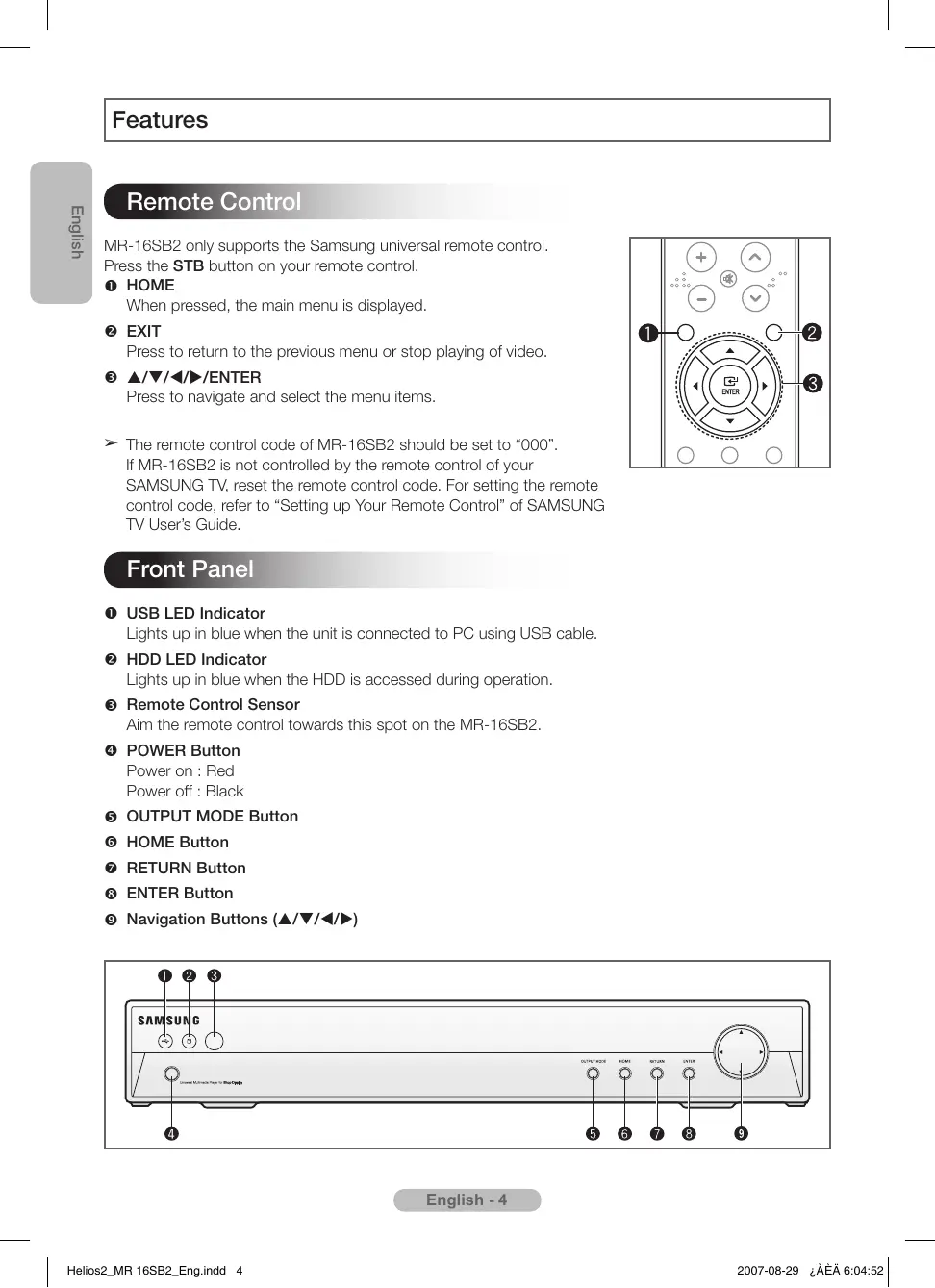
Owner’s Instructions Adapter Power Cord (110V) Power Cord (220V) USB Cable Remote Control MR-16SB2 only supports the Samsung universal remote control. Press the STB button on your remote control. HOME When pressed, the main menu is displayed. EXIT Press to return to the previous menu or stop playing of video. ////ENTER Press to navigate and select the menu items. ➢ The remote control code of MR-16SB2 should be set to “000”. If MR-16SB2 is not controlled by the remote control of your SAMSUNG TV, reset the remote control code. For setting the remote control code, refer to “Setting up Your Remote Control” of SAMSUNG TV User’s Guide. Front Panel USB LED Indicator Lights up in blue when the unit is connected to PC using USB cable. HDD LED Indicator Lights up in blue when the HDD is accessed during operation. Remote Control Sensor Aim the remote control towards this spot on the MR-16SB2. POWER Button Power on : Red Power off : Black OUTPUT MODE Button HOME Button RETURN Button ENTER Button Navigation Buttons (///) English - 4 ➢ Be sure to turn the power on after connecting external devices.
1) Connecting to the HDMI
Connect the HDMI cable between the HDMI OUT jack on the MR-16SB2 and the HDMI IN jack on the TV. ➢ This product does not support connecting a HDMI splitter to the HDMI port.
2) Connecting to the Component
Connect the component cables between the COMPONENT OUT jacks on the MR-16SB2 and the COMPONENT IN jacks on the TV. Supply power to the MR-16SB2 and TV after making all the connections. Please be sure to match the color coded terminals and cable jacks.
3) Connecting to the Optical
Connect an Optical Cable between the “DIGITAL AUDIO OUT (OPTICAL)” jacks on the MR-16SB2 and the Digital Audio Input jacks on the Digital Audio System. When a Digital Audio System is connected to the “DIGITAL AUDIO OUT (OPTICAL)” terminal: Adjust the volume level with the system’ s volume control. Updating Contents
1) Connecting to a USB Memory Device
- Connect a USB memory device to USB host before power on.
- Select the Copy in the Home menu.
- Select the file or folder to be copied.
- The selected list is not kept when the directory is changed.
- The selected files are copied to the HDD when Play Selected is selected.
- Avoid shock to the unit or do not disconnect a power cord until copy is complete.
2) Connecting to a PC
- Connect the USB cable between the USB jack on the MR-16SB2 and USB jack of PC to copy the video files from your PC.
- MR-16SB2 is compatible only with Windows XP.
- When the unit’s HDD is identified on your PC, you may copy or delete the video files in the unit’s HDD in the same manner as you would operate on your PC.
- Copy commercial images (png) into the “banner” folder. Otherwise, you cannot play the banner files using MR-16SB2.
- When you are done copying or deleting the files, it is recommended to safely remove the unit’s HDD. English - 5 1 Press the HOME button. Result: The main menu is displayed. 2 Press the or button to select Movie or Photo, press the ENTER button. Result: The movie or photo list is displayed. 3 Press the /// button to move to the file to be played, press the ENTER button. 4 Press the HOME or RETURN button to exit. Setup Video Out: Component/HDMI You can select video output. Resolution: 480p 60Hz / 576p 50Hz / 720p 60Hz / 1080i 50Hz/ 1080i 60Hz / 1080p 60Hz Aspect Ratio: 16:9 / 4:3 You can choose the screen size to match your TV screen format. Digital Audio (On / Off) You can turn on and off digital audio output. When it is on, the raw Dolby Digital signal will be sent out on optical output. Auto Start (On / Off) If Auto Start option is set to On, the MR-16SB2 will automatically play the first video programmed play list. If off, the main menu is displayed when the unit is turned on. Banner (On / Off) If this option is on, the banner folder is searched on HDD and the banner is performed automatically during Play. HDD Format If HDD is formatted, the deleted data cannot be recovered. SW Update SW Update is activated if a USB memory device which has system software is connected to USB Host. English - 6 MPEG2 Transport Stream/H.264/VC-1
MPEG2 Transport Stream/H.264/VC-1 Audio MPEG2 Transport Stream/H.264/VC-1 Audio Helios2_MP 16SB2_s_Spa.indd 1 2007-08-29 ¿ÀÈÄ 5:35:23 Helios2_MP 16SB2_s_Spa.indd 2 2007-08-29 ¿ÀÈÄ 5:35:24 Helios2_MP 16SB2_s_Spa.indd 3 2007-08-29 ¿ÀÈÄ 5:35:24 Helios2_MP 16SB2_s_Spa.indd 4 2007-08-29 ¿ÀÈÄ 5:35:24 Helios2_MP 16SB2_s_Spa.indd 5 2007-08-29 ¿ÀÈÄ 5:35:26 Helios2_MP 16SB2_s_Spa.indd 6 2007-08-29 ¿ÀÈÄ 5:35:28 MR-16SB2 MPEG2 Transport Stream/H.264/VC-1
Dimensions (l x H x P) 430 x 322 x 67mm Poids 3.3kg MPEG2 Transport Stream/H.264/VC-1 Audio MPEG2 Transport Stream/H.264/VC-1 Audio USB 2.0 (host e slave) Dimensioni (L x A x P) 430 x 322 x 67mm Peso 3.3kg Accessori
MPEG2 Transport Stream/H.264/VC-1 Audio USB 2.0 (Host i Slave) MPEG2 Transport Stream/H.264/VC-1 Áudio MPEG2 Transport Stream/H.264/VC-1
MPEG2 Transport Stream/H.264/VC-1 Audio AC 100–240V (DC 14V), 50–60Hz Trdi disk 160GB Video MPEG2 Transport Stream/H.264/VC-1 Avdio Manufacturer: SAMSUNG ELECTRONICS CO., LTD 12th FL., Samsung Main Bldg., 250, 2-Ka Taepyung-Ro, Seoul, Korea Tel: +82 2 727 7114 LVD : KTL (Korea Testing Laboratory) 222-13, Kuro-Dong, Kuro-Gu, Seoul, Korea 152-848 Tel: +82 2 860 1493, Fax: +82 2 860 1482 EMC : Samsung Electronics Co., Ltd. EMC Test Laboratory 416 Maetan-3 Dong, Yeongtong-Gu, Suwon City, Kyungki-Do, Korea, 443-742 Tel: +82 31 200 2185, Fax: +82 31 200 2189
- KULLANIM OMRU 10 YILDIR MPEG2 Transport Stream/H.264/VC-1
USB 2.0 (host and slave) MPEG2 Transport Stream/H.264/VC-1 Audio MPEG2 Transport Stream/H.264/VC-1
Helios2_MP 16SB2_s_TC.indd 1 2007-08-29 ¿ÀÈÄ 4:54:06 Helios2_MP 16SB2_s_TC.indd 2 2007-08-29 ¿ÀÈÄ 4:54:07 Helios2_MP 16SB2_s_TC.indd 3 2007-08-29 ¿ÀÈÄ 4:54:07 Helios2_MP 16SB2_s_TC.indd 4 2007-08-29 ¿ÀÈÄ 4:54:08 Helios2_MP 16SB2_s_TC.indd 5 2007-08-29 ¿ÀÈÄ 4:54:10 Helios2_MP 16SB2_s_TC.indd 6 2007-08-29 ¿ÀÈÄ 4:54:12 MPEG2 Transport Stream/H.264/VC-1