
SPIDER 2,0 TRACKER M613 - Vacuum Cleaner DIRT DEVIL - Free user manual and instructions
Find the device manual for free SPIDER 2,0 TRACKER M613 DIRT DEVIL in PDF.



| Product type | Robotic vacuum cleaner |
| Brand | DIRT DEVIL |
| Model | Spider 2.0 Tracker M613 |
| Power supply | Power adapter: input 100-240 V~, 50/60 Hz; output 19 V, 600 mA |
| Battery type | Ni-MH, 14.4 V, 1,400 mAh |
| Maximum runtime | Approximately 90 minutes |
| Maximum charging time | Approximately 4 hours |
| Dustbin capacity | Approximately 270 ml |
| Weight (with battery) | Approximately 1.5 kg |
| Anti-drop sensors | 3 sensors with sensitivity adjustment (4 positions according to floor color and step height) |
| Cleaning modes | Random, Spiral, Along walls |
| Compatible surfaces | Flat, normally soiled hard floors; short-pile carpet without side brushes |
| LED indicators | Blue charging indicator, red cleaning indicator, red battery indicator |
| Maintenance and cleaning | Dustbin and filter washable with water, dry 24 hours before reassembly |
| Included accessories | Side brushes (x2), filter, battery, power adapter |
| Usage | Household use only |
| Legal warranty | According to EU Directive 2011/83/EU (EU); outside EU, local legislation |
| Availability of spare parts | Spare parts available through Dirt Devil after-sales service |
Frequently Asked Questions - SPIDER 2,0 TRACKER M613 DIRT DEVIL
User questions about SPIDER 2,0 TRACKER M613 DIRT DEVIL
0 question about this device. Answer the ones you know or ask your own.
Ask a new question about this device
Download the instructions for your Vacuum Cleaner in PDF format for free! Find your manual SPIDER 2,0 TRACKER M613 - DIRT DEVIL and take your electronic device back in hand. On this page are published all the documents necessary for the use of your device. SPIDER 2,0 TRACKER M613 by DIRT DEVIL.
USER MANUAL SPIDER 2,0 TRACKER M613 DIRT DEVIL
EN Instruction Manual | Robot vacuum cleaner | 13
International Services
DE
Royal Appliance International GmbH
Abt. Kundenservice
Jagenbergstraße 19
41468 Neuss
DEUTSCHLAND

de@dirtdevil-service.eu
www.dirtdevil.de

0049(0)180-5015050*

0049 (0) 2131 - 60906095
AT

at@dirtdevil-service.eu
0043-720-884954**
CH

ch@dirtdevil-service.eu
0041-31-5280557**
BE

be@dirtdevil-service.eu
0032-2-8085065**
LU

lu@dirtdevil-service.eu
00352-2-0880506**
FR

fr@dirtdevil-service.eu
0033-9-75183017**
ES

es@dirtdevil-service.eu
0034-91-1982787**
IT

it@dirtdevil-service.eu
0039-06-94801618**
PT

pt@dirtdevil-service.eu
00351-21-1141327**
NL

nl@dirtdevi-service.eu
0031-20-8085408**
PL

pl@dirtdevil-service.eu
0048-22-3970223**
CZ

cz@dirtdevil-service.eu
00420-2-46019541**
HU

hu@dirtdevil-service.eu
0036-1-8480686**
TR

tr@dirtdevil-service.eu
0090-85 03 90 1980**
FI

fi@dirtdevil-service.eu
00358-9-42450412**
SE

se@dirtdevil-service.eu
0046-844682150**
DK

dk@dirtdevil-service.eu
0045-78-77 44 95**
SK

sk@dirtdevil-service.eu
0042-1232784549**
NO

no@dirtdevil-service.eu
0047-21999489**
GR

gr@dirtdevil-service.eu
0030-2-111981203**
RO

ro@dirtdevil-service.eu
0040-316303651**
BG

bg@dirtdevil-service.eu
00359-2-4925116**
HR

hr@dirtdevil-service.eu
00385-1-6666441**
LT

li@dirtdevil-service.eu
00370-52141798**
LV

lv@dirtdevil-service.eu
00371-66090470**
EE

ee@dirtdevil-service.eu
00372-8801167**
SI

si@dirtdevil-service.eu
00386-18888074**
DE
**Charges for calls from abroad depend on the current charges imposed by the respective foreign telephone company and the respective rates.
AT,CH
We are pleased that you decided to purchase a Dirt Devil product. We hope you enjoy using your appliance and we would like to thank you for your purchase.
You will find further information on your product in this operating manual and at our website www.dirtdevil.de. To contact our service team, refer to the contact details on page 2.
Technical data
| Type of appliance: | Robot vacuum cleaner |
| Model name, model: | Spider 2.0, M612 (-0/-1/../-8/-9) |
| Rechargeable battery: | Ni-MH, 14.4 V DC, 1400 mAh, recyclable |
| max. operating duration: | approx. 90 minutes |
| max. charging duration: | approx. 4 hours |
| Mains adapter: | Input: 100 ... 240 V~, 50/60 Hz Output: DC 19 V, 600 mA |
| Dust bin capacity: | approx. 270 ml |
| Weight (with battery pack inserted): | approx. 1.5 kg |
Environmental protection and disposal
If you wish to dispose of the appliance, remove the battery pack, > "Removing the battery pack" on page 18, and dispose of the battery pack and the appliance separately.
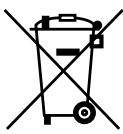
Do not dispose of the appliance, battery pack or mains adapter with the domestic waste.
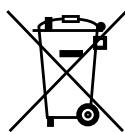
Dispose of the appliance, charger and the battery pack separately by handing them over at the appropriate collection points.
Warranty
If you have purchased the appliance as a consumer within the European Union, the respective national legislation implemented as per EU Directive 2011/83/EU applies as the minimum warranty standard. In non-EU countries the minimum warranty requirements in the respective country apply. This does not apply to batteries or rechargeable batteries which have become faulty or have a reduced service life as a result of normal wear or improper handling.
SAFETY INSTRUCTIONS
About the operating manual
Read this operating manual completely before using the appliance. Keep the operating manual for reference. If you pass the appliance on to third parties, it must be accompanied with the operating manual. Failure to adhere to this operating manual can lead to serious injuries or damage to the appliance. We assume no liability for damage caused as a result of failure to adhere to this operating manual.
Important information not included in this chapter is indicated as follows:
WARNING!
Warns of health hazards and identifies possible risks of injury.
CAUTION!
Indicates possible dangers to the appliance or other objects.
NOTE
Highlights tips and information.
You can also download this operating manual at any time from out website:
www.dirtdevil.de
Concerning certain groups of persons
These appliances can be used by children of 8 years and persons with impaired physical, sensory or mental abilities, or insufficient experience or knowledge, providing they are supervised or have been instructed in the proper use of the appliance and understand the risks involved.
Children must not perform cleaning or user maintenance tasks without supervision. Children must not play with the appliance.
Packing material ad small parts must not be used as toys. There is risk of asphyxiation.
Children under the age of 8 years old should be kept away from the appliance, the mains adapter and the mains adapter cord whilst they are switched on, plugged in at the socket or are cooling down.
INFORMATION ON THE POWER SUPPLY
The appliance is charged with electrical current. Thus there is always risk of electrical shock.
You must therefore observe the following:
- Never touch the rechargeable battery or mains adapter with wet hands. Never immerse the appliance, the rechargeable battery or the mains adapter in water or other liquids.
Always take hold of the mains adapter when you wish to disconnect the mains adapter from the mains socket. Never pull on the mains adapter's cord.
Ensure that the mains adapter cord is not bent, pinched, rolled over and that it does not come into contact with heat sources.
Only use the mains adapter included in the scope of supply to charge the rechargeable battery.
Always check the mains adapter cord for possible damage before using the appliance. Do not use a mains adapter with a damaged cord or plug. Only ever connect the mains adapter to sockets which carry the voltage indicated on the mains adapter.
Before cleaning or performing maintenance on the appliance, ensure that the appliance is switched off and that the mains adapter is not connected.
Information on the battery pack
There is a risk of injury if rechargeable batteries are handled incorrectly.
Only use the charger included in the scope of supply to charge the battery pack.
Never short-circuit the battery pack, i.e. never touch both poles simultaneously, especially with electrically conductive objects.
It is necessary to replace the battery pack, contact a specialist dealer or the Dirt Devil customer service department, > "International Services" on page 2. Never replace the battery pack yourself. Do not under any circumstances replace the battery pack with other batteries, rechargeable or otherwise.
Never take the battery pack apart and never expose it to high temperatures.
- Improper handling can cause liquid to leak from the battery pack. Avoid any contact with such liquid.
If you have come into contact with liquid, rinse it off with copious amounts of water and consult a doctor.
After its service life, dispose of the appliance and the battery pack in an environmentally friendly manner, as described, > "Environmental protection and disposal" on page 13.
If the appliance is faulty
If the appliance, the mains adapter or the mains adapter cord are damaged, they will need to be replaced by the manufacturer, the manufacturer's customer service department or a similarly qualified person in order to prevent hazards.
Hand over a faulty appliance to an authorised dealer or send it to the Dirt Devil customer service department for repairs, > "International Services" on page 2.
- Never use a faulty appliance, mains adapter, mains adapter cord or rechargeable battery!
Information on proper use
This appliance must only be used for domestic use. It is not suitable for industrial or commercial use. The appliance must only be used to clean on level hard floors with normal dirt and accumulation. If the round brooms are not installed, the appliance can also be used on short pile carpet.
The following in particular is prohibited:
Vacuuming:
- People, animals, plants or items of clothing on the body High risk of injury!
Hot ash, burning cigarettes, matches and highly flammable substances Risk of fire!
Water and other liquids Risk of short circuit!
- Toner (for laser printers, copying machines, etc.) Risk of fire and explosion!
Use
in the vicinity of explosive or highly flammable substances Risk of fire and explosion!
outdoors Risk of damage due to rain and dirt!
of non-original accessories. This can impair appliance safety.
on long-pile carpets and on damp floors.
- Carrying out repairs yourself
→ Risk of injury and loss of entitlement to free replacement!
Preparatory work
Getting to know the appliance
Fig. 1: (1) Charging indicator light; (2) Cleaning indicator; (3) Battery indicator; (4) Recessed grip to release dust bin compartment cover; (5) Mains adapter; (6) Mains adapter cord; (7) Mains adapter plug; (8) Battery compartment cover; (9) Battery pack; (10) Battery compartment; (11) Rubber-coated drive wheels; (12) Slide controller to set sensitivity of anti-fall sensors; (13) Round brooms; (14) Mount for round brooms; (15) Suction inlet; (16) Charging socket on appliance; (17) ON/OFF switch
Fig. 7: ① Dust bin compartment cover; ② Dust bin cover; ③ Filter; ④ Dust bin; ⑤ Recessed grip to release dust bin compartment cover; ⑥ Dust bin compartment
Introducing displays
Fig.1:
① Chargingindicatorlight
- Flashes blue, when the battery pack is charging
- Lights up with constant blue light when the battery pack is fully charged
- Flashes alternately with battery indicator during operation
② Cleaning indicator
- Lights up red when dust bin must be emptied
③ Battery indicator
- Lights up red when battery pack must be charged or appliance has no contact to floor
- Flashes alternately with charging indicator light during operation
Unpacking and preparing
1 Check that the unpackaged contents are complete (Fig. 1). If you notice any transport damage or if anything is missing, contact your dealer immediately. 2 When using the appliance on hard floors, attach the round brooms one after the other as shown (Fig. 1/13).
NOTE:
If you want to remove the round brooms, grab the bristles and pull the round brooms away from the appliance (Fig. 13/8).
Inserting the battery pack
1 Firmly remove cover from battery compartment (Fig. 5/OPEN). 2 Insert the provided battery pack. Ensure that the sticker with the words "This side up" is facing up and the contacts in the battery compartment are able to engage in the apertures in the insulation of the battery pack. For this purpose, let the battery pack first slide into the battery compartment on the side with the contacts (Fig. 6) and then press the battery pack into the battery compartment on the other side (Fig. 8). The battery pack must rest evenly on the bottom of the battery compartment. 3 Reattach the cover of the battery compartment and slide it firmly into its bracket until you hear and feel it click into place.
Charging the battery pack

WARNING!
Risk of fire or explosion! Only use the mains adapter included in the scope of supply to charge the battery pack.
1 Ensure that the ON/OFF switch is in position 0 (Fig. 11/8). 2 Connect the plug of the mains adapter cable to the charging socket on the appliance (Fig. 9).
3 Connect the mains adapter to a socket (Fig. 10). The charging indicator light (Fig. 1/1) lights up blue to indicate the charging process. After a maximum of 4 hours, the charging indicator light remains blue. The rechargeable battery is then charged.
Disconnect the mains adapter from the socket (to save electricity) and disconnect the plug of the mains adapter cable from the appliance.
NOTE:
Recharge the appliance when the battery indicator (Fig. 1/3) on the appliance lights up with constant red light.
Setting the anti-fall sensors
Your robot vacuum cleaner automatically detects dropoffs in front of it by means of 3 anti-fall sensors (Fig. 2). As a result, it changes its direction of travel and continues to clean in the opposite direction. Lower-level surfaces, such as stairs are detected and thus omitted from the cleaning.
You can adjust the sensitivity of the anti-fall sensors as follows:

WARNING!
Test the correct settings repeatedly while you are present to avoid damage by incorrect settings.
1 Ensure that the ON/OFF switch is in position 0 (Fig. 11/8). Adjust the position of the slide controllers to set the sensitivity of the anti-fall sensors at the bottom of the appliance (Fig. 1/12):
- Position 0 (smallest opening) for light floors and low steps
- Position 1 (Fig. 12(B)) for light floors and slightly higher steps
- Position 2 for dark floors and even higher steps
- Position 3 (largest opening, Fig. 12 / ) for dark floors and high steps
NOTE:
All 3 slide controllers have to be set to the same setting. If your robot constantly travels backward on dark floors, you must select position 3 (largest opening).
Cleaning floors
NOTE:
To clean short pile carpets, remove the round brooms first. To do so, grab the bristles and firmly pull the round brooms upwards (Fig. 13/8). Do not use the appliance on long pile carpets.
To switch on the appliance, place it on the floor and set the ON/OFF switch to position I (Fig. 11/(A)).
Both external LEDs flash alternately. After approx. 8 seconds the appliance will start to move in "random mode" (Fig. 3/⑧). After approx. 3 minutes the appliance changes to "gyro mode", moving in ever increasing circles (Fig. 3/⑧). As soon as the appliance encounters an obstacle in this mode, it changes to "edge mode" (Fig. 4/⑧), traversing the edges of the room to be cleaned for approx. 3 minutes. Then the cycle starts all over again with "random mode" (Fig. 4/⑧).
NOTE:
If the appliance has become stuck on an obstacle, give it a gentle push with your hand.
NOTE:
When the performance of the battery pack diminishes, the battery indicator (Fig. 1/3) remains red and the appliance stops soon afterwards. If this is the case, the appliance will beep every 60 seconds to make it easier to locate it. (If the battery pack is completely flat, the beep function will stop.) Then switch off the appliance and charge the battery pack > "Charging the battery pack" on page 17.
NOTE:
If you lift the appliance while it is in operation, the motors switch off automatically after approximately 1 second without floor contact. However, the appliance is not switched off (the blue LED is still lit) and starts up again as soon as it makes contact with a surface.
To switch off the appliance, set ON/OFF switch to position 0 (Fig. 11/8). The LEDs go out.
Emptying the dust bin
1 Ensure that the ON/OFF switch is in position 0 (Fig. 11/8). 2 Reach into the recessed grip (Fig. 7/5) and unlock the cover of the dust bin (Fig. 7/1). 3 Remove the dust bin comportment cover (Fig. 7/1) from the appliance (Fig. 14).
4 Remove (Fig. 15) the dust bin cover (Fig. 7/②).
Carefully pull dust bin with the attached filter from the appliance (Fig. 16). Place dust bin with attached filter above a waste bin and then separate dust bin from filter. Tap both parts lightly and remove coarser debris with a dry cloth.
Cleaning the dust bin and the filter
1 Remove and empty the dust bin > "Emptying the dust bin" on page 18. 2 Thoroughly rinse dust bin by hand under running cold water or lukewarm water. 3 Thoroughly rinse filter by hand under running cold water or lukewarm water. 4 Allow both elements to dry at room temperature for at least 24 hours. 5 Reinsert filter into dust bin in such a way that the plastic grid of the filter is visible. Firmly push filter into place (Fig. 17). 6 Reinsert dust bin with filter into the appliance > "Inserting dust bin and filter" on page 18.
Inserting dust bin and filter
1 Reinsert dust bin with attached filter into dust bin compartment (Fig. 17). 2 Put dust bin cover firmly in place until you feel it engage (Fig. 18). 3 First, put the dust bin compartment cover in place at the front so that the 3 tabs on the cover engage in the 3 slots provided in the dust bin compartment. Now press against the dust bin compartment cover in the rear until you hear and feel it click in place (Fig. 19).
NOTE:
The appliance can only be switched on again if the cover is positioned correctly.
Removing the battery pack
1 Operate the appliance until the battery pack is completely empty and the motor of the appliance stops. 2 Place the ON/OFF switch to position 0 (Fig. 11/8). 3 Firmly remove cover from battery compartment (Fig. 5/OPEN). 4 Remove the battery pack.
Accessories
- Round brush (2x) - 0606001 (Fig. 20/A)
Filter - 0606002 (Fig. 20/B) - Rechargeable battery - 607004 (Fig. 20/C)
- Mains adapter - 0606003 (Fig. 20/D)
Troubleshooting
Before you contact our customer service department or send the appliance to the Dirt Devil customer service department, you will find a lot of additional information in the service area of our website which will help you solve problems.
Switch off the appliance before you start troubleshooting. Never use a faulty appliance, charger or rechargeable battery.
Merci beaucoup!
Still inn fallsensorene
I ca pa36paII npOn3TuauuTe OT Hero ONaCHOCTN.
I OuHcTBaHeTo N PoiDpBxKkTa OT nOtpe6nTeJI He 6nBa Da ce N3BbPbBAT OT De-za 6e3 Na3Op. Deuata He 6nBa Da nIgpaTc ypeJa.
OnapobuHnTe MaepnAnI n Ipe6HnTe
caCTn He 6nBa Da ce n3noJ3BaT 3a ngpa. Cb-
IeCTByBa ONaCHOCT O T 3aDyUbaHe.
Deuata no8-roiHa Bb3pact Tpa6Ba da ce na3rT OT ypea n MpeKOBn aanTep, KaTO n OT Ka6ena Ha MpeKOBn aanTep, OkaTo Te ca BkIoueHn, ca CbP3aHn cKOHTaKaTa nn Ce OxJaXDaT.
3A EJIEKTP03AXPAHBAHETO
UpeTc ce 3apeKda c eIeKtpueeckn TOK. Pnp TOBa nO pInHcNt CbIeCTByBa ONaCHOCT OT TOKOB ydap.
3aToBa 06bPHeTe OcObeHo BHMaHne Ha CJIeIHOTo:
Hnkora He xbaaate 6atepyta mpexobna aanterc mokpnpbue. Hnkora He notanayte ypeda, 6atepyta mpexobna aanterp bB B ODA nI npytn TeuhoCTn.
Korato nCKaTe Da u3DbpNaTe MpeXOBnA aanTep OT KOHTaKaTa, BUNaR N3DbpNBaI- Te dIpeKTHO MpeXOBnA aanTep. Hnkora He dBpaTe MpeXOBnA aanTep 3a Ka6ena.
BnMaBaIte Ka6eIbT Ha MpeXOBnAaIantep Da He ce IpeUynBa, Da He ce npITcKa NII INpeRa3Ba NII Da He BIn3a B KOHTaKT Cn3ToHnCn Ha ropeuHa.
3a 3apekdahe ha 6atepna Ta n3noI3BaTe caMo DOCTaBeHn C He MpeKOB aanTep.
Ipeyn ynoTppe6a npoBepraBaiTe Ka6eJaHa MpeXOBnA aDAnTep 3a eBEHTyaJIHnNoBpei. Hnkora He n3noJ3BaIte MpeXOBnA aDAnTep, YmTo UcenSe IINK Ka6eIeNoBpeJe.CbP3BaIte MpeXOBnA aDAnTepcAmO C KONTAKTI, B KOnTO mMa eNeKTPnueCKO HaNPeJKeHne, KoETo CbOTBeTCTBa Ha NocOueHOTO BbPxY MpeXOBnA aDAnTep.
Ipden cTaptnaHepnouctBaHe nIi texnuecka IopdpbJxka Ha ypea ce ybepeTe,ye ypeBt e N3KlOyen MpeXOBnA aDantep He e BkIoUen.
3a akymylaTopHna naKet
IpiHnHe npBnHa ynoTpe6a Ha 6aTeepnTe CbueCTByBa ONaCHOCT OT HapaHyaHe.
3a 3apexdahe Ha akymylaTopnna naket nI3noI3BaIte cAmO dOCTaBeHTo C Hero 3a-paIHO yCTPOIcTB0.
Hikora He cBbp3BaIte aKymylaTopnnaKaKeT HaKbCo, T. e. Hikora He pNpaTe Dba-Ta POnlOca eDHOBpeMeHHo, Na-Beue He cEeKTPoPpOBOdIMn IpeDMeTn.
Ako e Heo6xOJIMO akymlyaTopHnT naKeT da ce cMeHn, ce o6bPheTe KbM OTOpN3npaHa cpeuHaN3npaHa fIpMa nnKbM cepBn3a 3a Dirt Devil, International Services" Ha cTpaHnca 2. Hnkora He cMeHnIte akymlyaTopHnI naKeT camn. He cMeHnIte akymlyaTopHnI naKeT c npyIn akyMylaTopn nn6atepn.
HnKora He pa3rno6BaIte akymylaTopnHa nakET HnKora He ro n3naRaIte Ha BNcOKu TempeaTyPi.
■Пи He npabnHa ynoTppe6a ot akymylaTOpHnaPakET MoKe Ja n3Je3e TeuHocT.И3-6ЯВaIte KOHTAKT C TeuHOCTTa.
Ako Bbnpekn TOBa CTe Bne3nB KOHTaKT c n3nn3aaa TeuHocT, a n3nnakHeTe 06nHcC BODa n Ce 06bpHeTe KbM JeKap.
Cpea n aKymnaTopnnaKaTe cmo eKoIoguHn KaKTo e OncaHo, _^* 3aunTa Ha OKoJIHaTa Cpea N I3XBbPnHe" Ha CTpaHn- 115.
PnDaekeKTeH ypeI
Ako ypeDbT, MpeXOBnT aadantep nn Ka- 6eNbT ha MpeXOBnA aadantep e nobpeDen, TOn Tp8Ba Da ce CMeHn OT npOn3BODnteJn HrOBnA cepBn3 nn OT nIuce C pOio6Ha KBaIINΦnKaaun, 3a Da ce N36erHaT PnCKOBe.
■Празаite DepeekTHnya ypei 3a peMOHT Ha OToPn3npaHa CneuNaI3npaHa Фирma nIHa cepBn3a 3a Dirt Devil, >"International Services" Ha cTpaHnca 2.
Hikora He n3noI3BaIte DeΦeKTeH ypeI, DeΦeKTeH MpeXOB aIaIaTep, DeΦeKTeH Ka-6eI Ha MpeXOB aIaIaTep IINI DeΦeKTHa 6aTePnI!
3a npabunHaTa ynoTpe6a
UpeT MoKeJa Ce n3NoJ3Ba cAmo B 6nTa. ToH He e noJxOJaI 3a cToJAncKa yNOrpe6a. UpeT MoKeJa Ce n3NoJ3Ba cAmo 3a no- qntBaHe Ha paBn, HopMaJIHo 3aMbPceHn TBpNi PoIOBe. Ako o6nIte MeTIn He ca MOHTuPAHn, MoKeTe Da ro n3NoJ3BaTe Cb- Ioo N Bbpxy KbCOKOCMeCTn KINIMn.
3a6paheNo e NaB-Beue:
PpaxocMyueHeTo Ha
Xopa, XINBOTHN, pactehnHa Ha Dpe-XN Bbpxu TAnTo
→Bucok puck OT hapaHbaHe!
TJIeEaIeIeI,3aIaIeHnZIgrapu,KI- 6pnteHNI KLeUKN IeCHO 3aIaIIMM BeIecTBa
0nacnoctOTnokap!
BODaNdpyTNeTeuHocTN
OnacHOCTOTKbCOcBeiHHeHHe!
TOHeP (3a Ia3epHn npHTepn, KOINPHN MaunHn n T. H.)
→OnacnoctOT noxkapn ekcnlo3nla!
ynoptpe6ata
B6n30CTdoekpno3NBHnIJIneCHO 3aapanmMaTepnan
→Onacnoct ot noxap n ekcnlo3nla!
HaOTKpntO
→Onapnoct ot pa3pyuwaBaHe npaDnDbXd N 3ambpcraBHaH!
Ha HeopnHnHaJIHn npnHaJIeJXHOCTn. Toba moKe Ja hapuSh 6e3oNaChocT Ta Ha ypeJa.
Bbpxy IbIIOKOCMeCTN KINIMN IN BnaJH NIOOBe.
CamopbUHN INHTepBHeuIN 3a peMOHT OnacHocT OT HapaHraBe N n3rapAHe Ha npaBOTo Ha 6e3PJIaTHa 3aMaHa!
Ioprotobka
3an03Habane cypeea
Φnrg.1:① KOHTPOJHa JAMMnUka 3a 3apejdaHeTo; ② INHnKaTOp 3a NOuchTbaHe; ③ INHnKaTOp 3a 6aTepeRnTa; ④ BdNb6HaNTHa 3a OTdEnIe Ha KaNakHa MAnCTOTO 3a pe3epBoapa 3a npax; ⑤ MPeKOB aadanTep; ⑥ Ka6eHa MPeKOBIA aadantPep; ⑦ Ka6eHa UKepe Ha MPeKOBIA aadantPep; ⑧ KanaK Ha rHe3doTO 3a 6aTepeRnTE; ⑨ AkymyIaTopen NaKeT; ⑩ THe3-DO 3a 6aTepeRnTE; ⑪ rYmnpAHH KOnela 3a DbNIXeHHe; ⑫ NpB3rau peryNaTOp 3a peryIuipaHe Ha YCbCTBnTeHNocTTHa CeH3Opnte pOtnIB naJaHe; ⑬ KpbTna Metnla; ⑭ DbPckau 3a KpbTna Metnla; ⑮ ZacMyKBaUx BXOD; ⑯ 3apJHa 6yKcHa Ha ypeDa; ⑰ npeBKnIOuBaTeAN-/AUS (BKJI/N3KJI)
Φnrg.7:①KaapanHaMaCTOTO3ape3epBoapa 3a npax;②KanapHa pe3epBoapa 3a npax;③Фntbpy; 4pe3epBoap3a npax;⑤BnIb6HaTHInHa 3a OTdJIHe Ha KaapanHa MCTOTO 3a pe3epBoapa 3a npax; 6MRCTO 3a pe3epBoapa 3a npax
3an03HbAHe CnHnKaunTe
ΦnΓ.1:
①J lamnnuka 3a KOHTpOlnpaHe Ha 3apeXdaHTo
- MГа синьо, KOraTo akymylatopHЯТ пakET ce 3apeжда
- CBETI NOCTOARHNO CINHbO, KOraTO akymylaTOPHnA T NaKeTe 3apeDeH
-При рабotingа мга на смени с ИнданkaTopa за бate-pnraTa
② UNДиКaTOp 3a NOUcTbAne
CBeTn YepBHeO, KOraTo pe3epeBoapbT 3a npax Tp6Ba Da Ce N3npa3Hn
③ UNHnkaaun 3a 6aTeepnte
CBeTu CepBeHo, KOraTo AkymyIaTOPHnT NaKet Tp6Ba Da Ce 3apeu nnu ypeBt Hma KOHTaKT C nOda
-при работа мига на смени с контулна за Лампунka заразекданeto
Pa3oNaKOBaHe H noTROTBaHc
1 PnOBepeTe ueNoCTTa Ha pa3OnaKOBaHOTo CbIbPkaHne (ΦnR. 1).Ako 3a6eJeknte Μεta OT TpaHcnpTnPaHETo nnn aKO HeUo JInCBA,He3a6abHO Ce CBpKjete C Ba7nra TbproBec.2 PocTabeTe KpbIgnte MetnE enHa cIeD npyra,KakTo e NOKa3aHo (ΦnR. 1/13),Korato ypeBt Μe ce n3NON3Ba BbPx TYBpDn noIOBE.
YKA3AHHE:
Korato nCKaTe da cBaJIte KpbIInTe MeTn, XBaHHe Te KpbIInTe MeTn 3a KOCMInTe I nI3DbPnaTe ot ypeDa (fng.13/8).
IocTaBHe Ha akymyataopnna naket
1Дрьнгete cилно Кала NaHa rHe3doto 3a 6aTepeInne (ФИ.5/OPEN).ПпoctabeTe IOCTabeHnna AkymyIaTopeH naket.BHIMMabai Te CTnkebpTc HaNINc.This side up"da coOnHarope N KOHTaKTIte B rHe3doto 3a 6aTePnInTe da MoRat da 3axBaauT B OTbOpNTe B INOlaunraTa H a KymyIaTOpHnna naket.3a ceNtA octabeTe akymyIaTOpHnna naket Da CE pLb3Ne B rHe3doto 3a 6aTePnInTe PbBO OTKbM CTpaHata C KOHTaKTIte (ФИr.6) uCNE ToBa HATNCHEte AkymyIaTOpHnna naket B rHe3doto 3a 6aTePnInTe ot dpyrata CTpaHa (ФИr.8).Cera AkymyIaTOpHnna naket TpRbGa Da lexN pLbTHo BVbpxu DbHOTo Ha rHe3doto 3a 6aTepeInte.ПпoctabeTe OTHOBO KanaKa Na H rHe3doto 3a 6aTepeInte N Iro pIb3Hete cNHO B HerOBaTa KOH3Ola,doKaTOce ue N ycetNa KaK Toi ceФиксupa.
3apekdahe na akymylaTopnna naket

PENyPENKDEHNEI
Опасноct ot пожар и ekсплози! 3a захедане на akymуларони пaket Изолзbaite само доставеня с Hero Мржовадпет.
1 Ybepete ce, ye npeBkIIOUbaTeIaT AN-/AUS (BKJI/ N3KJI) e b noJIoKeHne 0 (fInr. 11/(8). 2 BkIIOUeTe Ka6eHNHa Iekep Ha mpeXOBnA aadantep B zapArHnna H3BOd Ha ypeDa (fInr. 9). 3 BkIIOUeTe mpeXOBnA aadantep B KOtAKT (fInr. 10). KoHTpolHaTa lamnUka 3a zapeJdaHTo (fInr. 1/(1)) Mra cHbO n CnHaNImura npoueca Ha zapeKdaHe. 4 Cnei MaKcIMyM 4 yaca KOHTpolHaTaNAMnUka 3a zapeKdaHTo CBETn NoCToHnHO CnHbO. Cera 6aTePnTa e zapeDeHa. 5 N3dbPnaIte mpeXOBnA aadantep OT KONTaTa (necTu CE ToK), a Ka6eHNHa Iekep Ha mpeXOBnA aadantep OT ypeDa.
YKA3AHNE:
3apeTe ypea oTHOBO, KOraTo INnKAtOpbT 3a 6aTePnra (fHg.1/③)Ha ypea CBETn NOCToHN Ho cepBeHo.
PerynipaneHa ceh3OpTe npTbN paaHe
Bawuym noucmbau pobom camocmoenho pa3- no3Haba c nomouma Ha 3 ceh0pa npomue naDAhe pa3noJoxHe npe Heo B63MoJxHocmua 3a nponaDAhe (phi. 2). B om2oBop Ha moBa moj npomeHa noCokama cu H daBuxKeHue u npOdbIxaDa noucmba CpeuynolXnHa nocoka. Po-Hucko pa3noJoxHe moe NobpXHoMcU, kamo Hanpumep cmbnana Ha cmbIb6u, bEdHa2a 6bubam pa3no3Hamu u u3KnloyuH em noucmbaHemo.
YbCTBnTeJIHOctTaHaCeH3OpNTeIpoTnB NaaHe MoKeTe Da HAcTPOnte No CLeHnHaunH:

IPEUYIPEXKDEHNEI
IIO Bpeme Ha BaueTo npncbctBne npobepe TnKoNko NtN npabunHnte HacptoiKn, 3a da n36erHeTe Nobpeu nopadn HenpaunHn HacptoiKn.
1 YbepeTe ce, Ye npBeknIouBaTeJIaT AN-/AUS (BKJI/ N3KJI) e b noJooKeHne 0 (ΦnR. 11/8). 2 CbO6pa3eTe noJooKeHneTo Ha nIb3raunia peryIaTOp 3a NaCTpOka Ha yUbCTBnTEJIHOCTTa Ha cEh3OpNTe npOTNB naJaHe OT dONHaTa CTpaHa Ha ypeDa (ΦnR. 1/12):
OtctpaHbAhe Ha akymylaToPnHa naket
1 N3non3baIte ypeDa,doKaTo akymyataOpHnT naKet ce 3TOUHnBnHO n DBnGaTeJrHa ypeDa cnpe.
10ctabeTe npBeknHouBaTeI AN-/AUS (BKJI/N3KJI) B noJoxHeN e 0 (ΦnR.11/8). 3 DpbHneTe cInHO Ka- napa Ka hre3doTo 3a 6aTepeHnTe (ΦnR.5/OPEN).
4 13BaTe aKymyIaTOpHnI naKeT.
PpHnHaJnxKHOCTn
- 06na metna (2 6p.) - 0606001 (Фиг. 20/A)
ΦnntbP-0606002 (Φn.r.20/B) - BaTepeRy - 607004 (ФИ. 20/C)
- Мөрөковадампэр - 0606003 (фиг. 20/D)
OCTpaHbAhe Ha npo6IeMn
Ipei Da ce CbpxKeTe c HauincaepBn3 nIn da n3- npatnte ypeHa hcepBn3a 3a Dirt Devil, ue HamePNTe MHORO dONbJIHnTEJIn yka3aHnBa B cepBn3HaTa ceKzna Ha Hauata INHTepHET CTpaHnCa 3a peuabaHe nOTcpanhaBeHa Ipo6JIemnte:
- International Services
- DE
- AT
- CH
- BE
- LU
- FR
- ES
- IT
- PT
- NL
- PL
- CZ
- HU
- TR
- FI
- SE
- DK
- SK
- NO
- GR
- RO
- BG
- HR
- LT
- LV
- EE
- SI
- AT,CH
- Technical data
- Environmental protection and disposal
- Warranty
- SAFETY INSTRUCTIONS
- About the operating manual
- WARNING!
- CAUTION!
- NOTE
- www.dirtdevil.de
- Concerning certain groups of persons
- INFORMATION ON THE POWER SUPPLY
- Information on the battery pack
- If the appliance is faulty
- Information on proper use
- The following in particular is prohibited:
- Preparatory work
- Getting to know the appliance
- Introducing displays
- Unpacking and preparing
- NOTE:
- Inserting the battery pack
- Charging the battery pack
- Setting the anti-fall sensors
- Cleaning floors
- Emptying the dust bin
- Cleaning the dust bin and the filter
- Inserting dust bin and filter
- Removing the battery pack
- Accessories
- Troubleshooting
- Merci beaucoup!
- Still inn fallsensorene
- 3A EJIEKTP03AXPAHBAHETO
- 3a akymylaTopHna naKet
- PnDaekeKTeH ypeI
- 3a npabunHaTa ynoTpe6a
- 3a6paheNo e NaB-Beue:
- Ioprotobka
- 3an03Habane cypeea
- 3an03HbAHe CnHnKaunTe
- Pa3oNaKOBaHe H noTROTBaHc
- YKA3AHHE:
- IocTaBHe Ha akymyataopnna naket
- 3apekdahe na akymylaTopnna naket
- PENyPENKDEHNEI
- YKA3AHNE:
- PerynipaneHa ceh3OpTe npTbN paaHe
- IPEUYIPEXKDEHNEI
- OtctpaHbAhe Ha akymylaToPnHa naket
- PpHnHaJnxKHOCTn
- OCTpaHbAhe Ha npo6IeMn
Brand : DIRT DEVIL
Model : SPIDER 2,0 TRACKER M613
Category : Vacuum Cleaner