SP200 - Hands-free kit JABRA - Free user manual and instructions
Find the device manual for free SP200 JABRA in PDF.



User questions about SP200 JABRA
0 question about this device. Answer the ones you know or ask your own.
Ask a new question about this device
Download the instructions for your Hands-free kit in PDF format for free! Find your manual SP200 - JABRA and take your electronic device back in hand. On this page are published all the documents necessary for the use of your device. SP200 by JABRA.
USER MANUAL SP200 JABRA
Thank you for purchasing the Jabra SP200 Bluetooth® wireless technology speakerphone. We hope you enjoy it! This instruction manual will get you started and ready to make the most of your speakerphone.
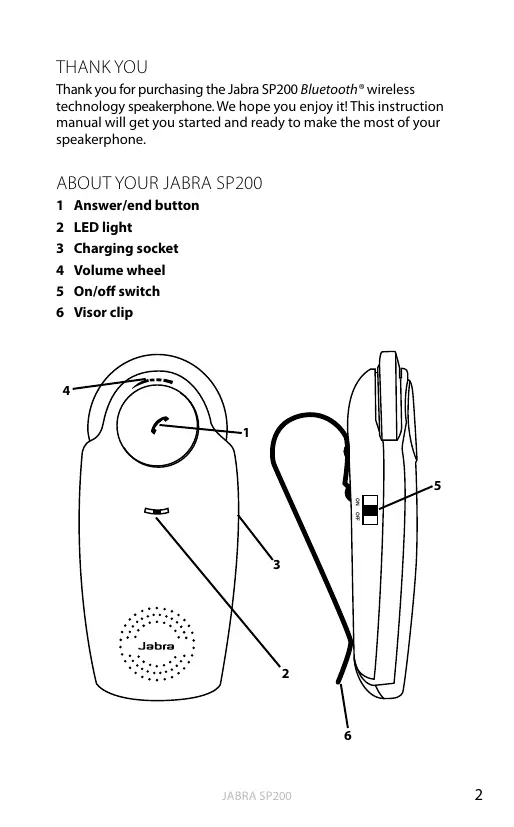
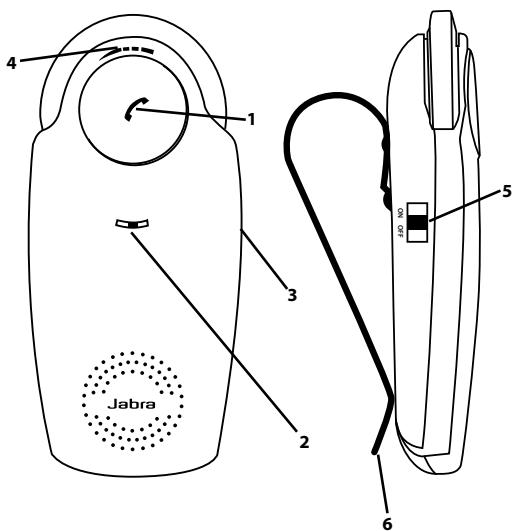
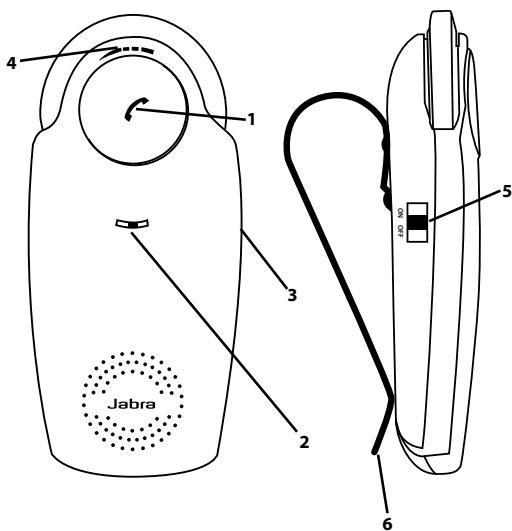
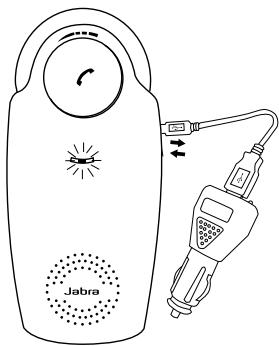
ABOUT YOUR JABRA SP200
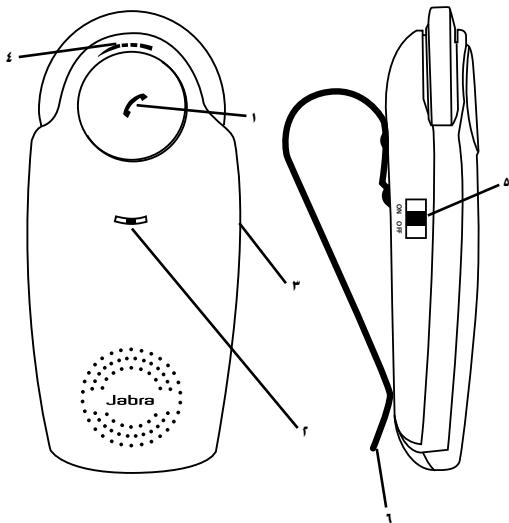
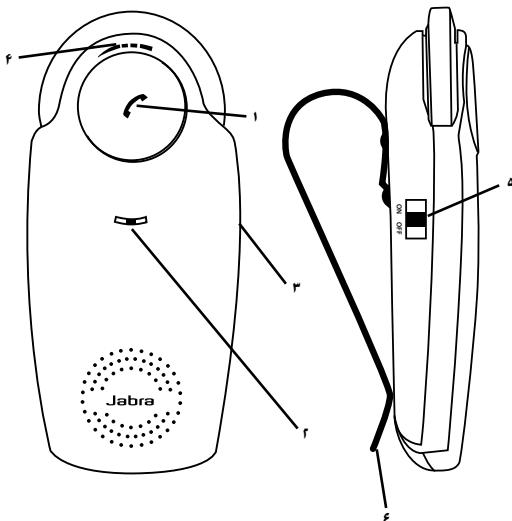
1 Answer/end button
2 LED light
3 Charging socket
4 Volume wheel
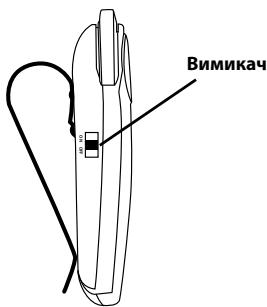
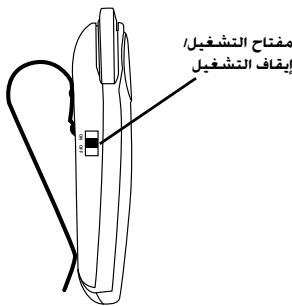
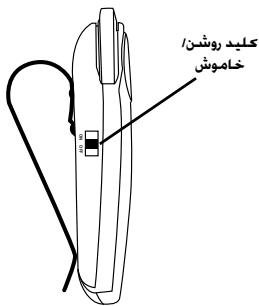
5 On/off switch
6 Visor clip

WHAT YOUR SPEAKERPHONE CAN DO
Your Jabra SP200 lets you do all this:
- Answer calls
- End calls
Reject calls*
Voice dialing* - Last number redial*
- Mute
- Transfer Calls
- Adjust volume
- MultiUse™ - connect two Bluetooth® devices at the same time
Specifications
- Talk time up to 10 hours / Standby time up to 550 hours (23 days)
- Rechargeable battery with charging option from car charger or via USB cable.
- Sleep mode automatically turns the speakerphone off after 15 minutes if not connected to your phone
- Noise reduction & Echo cancellation via DSP technology
Size:L 124mm× W56mm× H16mm
Weight 84 grams - Operating range up to 10 meters (approximately 33 feet)
Supported Bluetooth® profiles: HFP, HSP - Bluetooth® specification (see glossary) version 2.0
- e-SCO for enhanced audio quality
GETTING STARTED
You should follow three steps before using your speakerphone
1) Charge your speakerphone
2) Activate Bluetooth® on your mobile phone (refer to the manual for your Mobile phone)
3) Pair your speakerphone with your mobile phone
The Jabra SP200 is easy to operate. The answer/end button on the speakerphone performs different functions depending on how long you press it.
| Instruction | Duration of press |
| Tap | Press briefly |
| Double tap | 2 quickly repeated taps |
| Press | Approximately 1 second |
| Press and hold | Approximately 5 seconds |
CHARGING YOUR SPEAKERPHONE
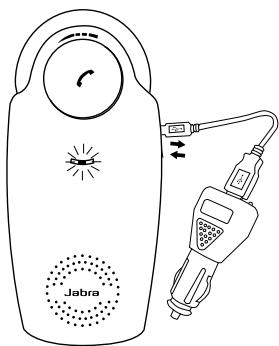
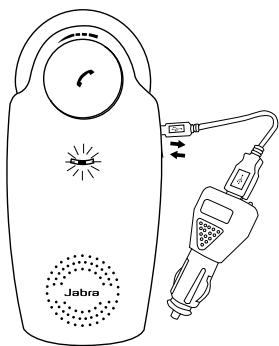
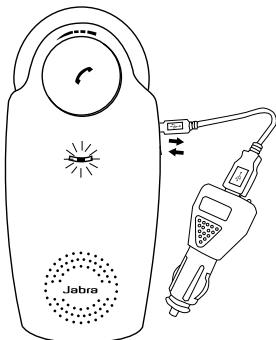
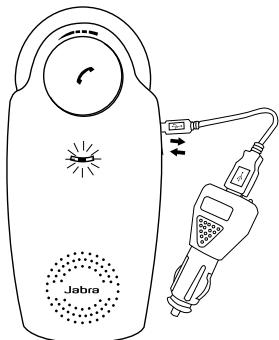
Make sure that your speakerphone is fully charged for two hours before you start using it. Use the car charger or the USB cable to charge. When the light indicator (LED) has a solid red light, your speakerphone is charging. When the light turns green, it is fully charged.
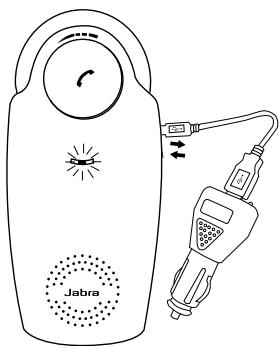
Use only the charger provided in the box - do not use chargers from any other devices as this may damage your speakerphone.
Please note: The lifetime of the battery will be significantly reduced if your device is left uncharged for a long period. We therefore recommend that you recharge your device at least once a month.
TURNING YOUR JABRA SP200 ON AND OFF
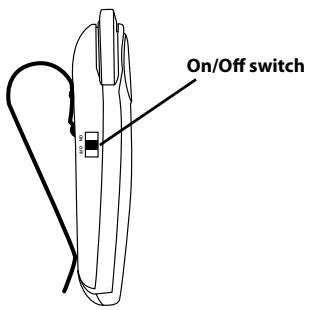
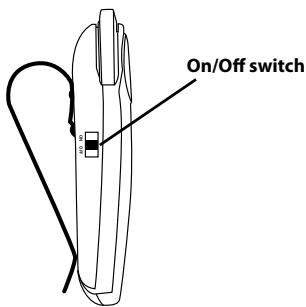
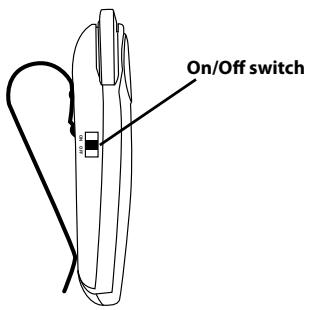
- Slide the on/off switch forward on the side of the speakerphone to turn on the speakerphone.
- Slide the on/off switch backward to turn off the speakerphone.
Sleep Mode
When not connected to a phone, the speakerphone turns off automatically after 15 minutes. Tap the answer/end button to turn the speakerphone on again.
PAIRING YOUR JABRA SP200 WITH
YOUR MOBILE PHONE
The Speakerphone can be connected to a mobile phone using a procedure called 'pairing'. By following a few simple steps, a phone can be paired with the speakerphone in a matter of minutes.
1 Put the speakerphone in pairing mode
- When you turn on your Jabra SP200 for the first time, the speakerphone will automatically start up in pairing mode - i.e. it can be detected by your phone. When the speakerphone is in pairing mode the blue LED will flash rapidly.
2 Set your Bluetooth® phone to 'search' for the Jabra SP200
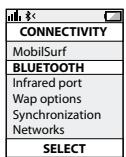
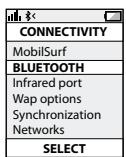
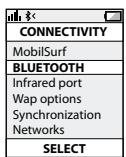
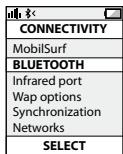
- Follow your phone's instruction guide. First make sure that Bluetooth® is activated on your mobile phone. Then set your phone to search for devices. This usually involves going to a 'setup,' 'connect' or 'Bluetooth®' menu on your phone and selecting the option to 'search' or 'add' a Bluetooth® device.*
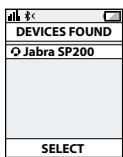
3 Your phone will find the Jabra SP200
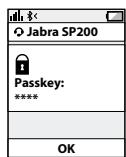
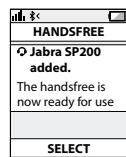
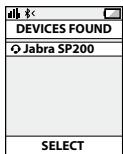
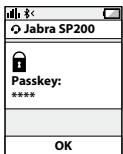
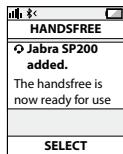
- Your phone will find the speakerphone under the name "Jabra SP200". Your phone then asks if you want to pair with the Jabra SP200. Accept by pressing 'Yes' or 'OK' on the phone and confirm with the passkey or PIN = 0000 (4 zeros). Your phone will confirm when pairing is complete.
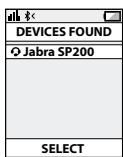
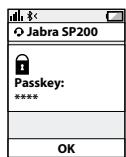
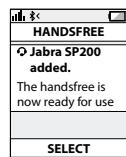
Manual pairing mode
If you wish to use the speakerphone with a different phone, or if the pairing process was interrupted, you can manually set the speakerphone to pairing mode.
Turn the speakerphone on. Press and hold the answer/end button for approximately 5 seconds until the blue LED light stars blinking rapidly. Then repeat steps 2. and 3. in the above pairing guide.
CONNECTING WITH YOUR PHONE
Pairing is only needed the first time a speakerphone and phone are used together. When the speakerphone and phone have been paired once, they will automatically connect when the speakerphone is on and Bluetooth® is activated on the phone. The speakerphone can be used when it is "connected" to the phone. If the devices are paired, but do not immediately connect, tap the answer/end button.
PLACING THE SPEAKERPHONE IN YOUR VEHICLE
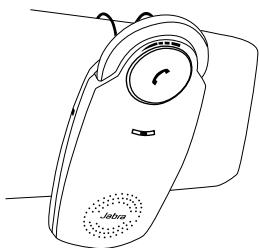
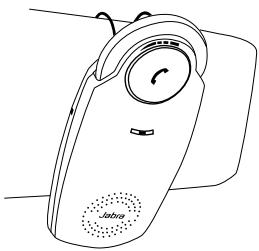
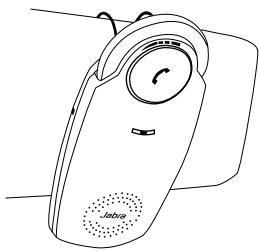
The Jabra SP200 sits discreetly and conveniently on the sun visor using the attached clip.
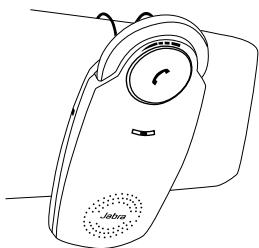
HOW TO
Answer a call
- Tap the answer/end button on your speakerphone to answer a call.
End a call
- Tap the answer/end button on your speakerphone to end an active call.
Make a call
- The call will automatically transfer to your speakerphone*. If not tap the answer/end button.
Reject a call*
- Press the answer/end button.
Activate voice dialing*
- Press the answer/end button. For best results, record the voice-dialing tag through your speakerphone.
Redial last number\*
- Double tap the answer/end button when the speakerphone is on and not in use.
Mute/un-mute
- Press and hold the answer/end button to mute an active call. A beep tone plays during the muted call.
- Press and hold the answer/end button to un-mute.
Transfer Calls
- Press the answer/end button to transfer a call from the speakerphone to the mobile phone.
- Press the answer/end button to transfer a call from the mobile phone to the speakerpone.
Adjust sound and volume*
- Scroll the volume wheel to the left or right to adjust the volume.
WHAT THE LIGHTS MEAN
| What you see | What it means |
| Flashing blue light | Speakerphone is on but not connected |
| Solid blue | Connected to phone |
| Flashing blue light rapidly | Pairing mode |
| Flashing blue light | Incoming call |
| Solid green light | Active call |
| Flashing red light | Running low on battery |
| Solid green light when charging | Charging level between 70% and fully charged |
| Solid red light when charging | Charging level less than 70% |
USING YOUR JABRA SP200 WITH TWO MOBILE DEVICES
The Jabra SP200 is capable of having two mobile phones (or other Bluetooth® devices) connected to the speakerphone at the same time. This will give you the freedom of having only one speakerphone to operate both of your mobile phones. Please note that Last Number redial will dial the number from the last outgoing call independent of the mobile phone.
How to pair your Jabra SP200 with 2 Bluetooth® devices:
1 Pair device number 1 with your speakerphone using the pairing instruction above for re-pairing your speakerphone (if device 1 is paired to your speakerphone already go to step 2)
2 Press the Answer/End button for 4-5 seconds
3 Pair device number 2 with your speakerphone using the same pairing instruction again
4 Connect to device 1 again
Please note that it is important to connect to device 1 again after pairing device 2 to ensure connection to both devices.
TROUBLESHOOTING & FAQ
I hear crackling noises
- Bluetooth® is a radio technology, which means it is sensitive to objects between the speakerphone and the connected device. It is designed for the speakerphone and the connected device to be used within 33 feet (10 meters) of each other, with no major objects in the way (walls, etc.).
I cannot hear anything in my speakerphone
- Increase the volume in the speakerphone
- Ensure that the speakerphone is paired to a device that is playing
- Make sure your phone is connected to the speakerphone by tapping the Answer/End button.
I am having pairing problems
- You may have deleted your speakerphone pairing connection in your mobile phone. Follow the pairing instructions.
I want to reset the pairing list in my speakerphone
- It is possible to reset the pairing list in the speakerphone. First go into pairing mode. When you have released the Answer/End button and speakerphone is in pairing mode you press Answer/End button again for 5 sec. When pairing list is empty you hear a beep. The next time you power on, the speakerphone will automatically go into pairing mode.
Will the Jabra SP200 work with other Bluetooth® equipment?
- The Jabra SP200 is designed to work with Bluetooth® mobile phones. It can also work with other Bluetooth® devices that are compliant with Bluetooth® version 1.1 or higher and support a headset and/or hands-free profile.
I cannot use reject call, redial or voice dialling
- These features are dependent on the ability of your phone to support a hands-free profile. Even if the handsfree profile is implemented reject call, call hold and voice dialing are optional features which are not supported by all devices. Please consult your device manual for details.
NEED MORE HELP?
1. Web: www.jabra.com
(for the latest support info and online User Manuals)
2. E-mail:
Deutsch support.de@jabra.com
English support.uk@jabra.com
Espanol support.es@jabra.com
François support.fr@jabra.com
Italiano support.it@jabra.com
Always store the Jabra SP200 with the power off and safely protected
- Avoid storage at extreme temperatures (above 45^ / 113^ - including direct sunlight - or below -10^ / 14^ ). This can shorten battery life and may affect operation. High temperatures may also degrade performance.
- Do not expose the Jabra SP200 to rain or other liquids.
GLOSSARY
1 Bluetooth® is a radio technology that connects devices, such as mobile phones and headsets, without wires or cords over a short distance (approx. 10 meters/33 feet). Bluetooth® is safe to use. It is secure too, so once a connection has been made no-one can listen in and there is no interference from other Bluetooth® devices either. Get more information at www.bluetooth.com.
2 Bluetooth® profiles are the different ways that Bluetooth® devices communicate with other devices. Bluetooth® phones support the headset profile, the hands-free profile or both. In order to support a certain profile, a phone manufacturer must implement certain mandatory features within the phone's software.
3 Pairing creates a unique and encrypted link between two Bluetooth® devices and lets them communicate with each other. Bluetooth® devices will not work if the devices have not been paired.
4 Passkey or PIN is a code that you enter on your Bluetooth® enabled device (e.g. a mobile phone) to pair it with your Jabra SP200. This makes your device and the Jabra SP200 recognize each other and automatically work together.
5 Standby mode is when the Jabra SP200 is passively waiting for a call. When you 'end' a call on your mobile phone, the speakerphone goes into standby mode.

Dispose of the product according to local standards and regulations.
www.jabra.com/wee
CONTENTS
THANK YOU. 2
ABOUT YOUR JABRA SP200 2
WHAT YOUR SPEAKERPHONE CAN DO 3
GETTING STARTED 3
CHARGING YOUR SPEAKERPHONE 4
TURING YOUR JABRA SP200 ON AND OFF 5
PAIRING YOUR JABRA SP200 WITH YOUR MOBILE PHONE .......6
CONNECTING WITH YOUR PHONE 7
PLACING THE SPEAKERPHONE IN YOUR VEHICLE 7
HOW TO 8
WHAT THE LIGHTS MEAN 9
USING YOUR JABRA SP200 WITH TWO MOBILE DEVICES. 9
TROUBLESHOOTING & FAQ 10
NEED MORE HELP? 11
TAKING CARE OF YOUR SPEAKERPHONE 11
GLOSSARY 11
THANK YOU
Thank you for purchasing the Jabra SP200 Bluetooth® wireless technology speakerphone. We hope you enjoy it! This instruction manual will get you started and ready to make the most of your speakerphone.
ABOUT YOUR JABRA SP200
1 Answer/end button
2 LED light
3 Charging socket
4 Volume wheel
5 On/off switch
6 Visor clip
WHAT YOUR SPEAKERPHONE CAN DO
Your Jabra SP200 lets you do all this:
- Answer calls
- End calls
Reject calls*
Voice dialing* - Last number redial*
- Mute
- Transfer Calls
- Adjust volume
- MultiUse™ - connect two Bluetooth® devices at the same time
Specifications
- Talk time up to 10 hours / Standby time up to 550 hours (23 days)
- Rechargeable battery with charging option from car charger or via USB cable.
- Sleep mode automatically turns the speakerphone off after 15 minutes if not connected to your phone
- Noise reduction & Echo cancellation via DSP technology
Size:L4.8inxW2.2inxD0.9in - Weighs 3oz.
- Operating range up to 10 meters (approximately 33 feet)
Supported Bluetooth® profiles: HFP, HSP - Bluetooth® specification (see glossary) version 2.0
- e-SCO for enhanced audio quality
GETTING STARTED
You should follow three steps before using your speakerphone
1) Charge your speakerphone
2) Activate Bluetooth® on your mobile phone (refer to the manual for your Mobile phone)
3) Pair your speakerphone with your mobile phone
The Jabra SP200 is easy to operate. The answer/end button on the speakerphone performs different functions depending on how long you press it.
| Instruction | Duration of press |
| Tap | Press briefly |
| Double tap | 2 quickly repeated taps |
| Press | Approximately 1 second |
| Press and hold | Approximately 5 seconds |
CHARGING YOUR SPEAKERPHONE
Make sure that your speakerphone is fully charged for two hours before you start using it. Use the car charger or the USB cable to charge. When the light indicator (LED) has a solid red light, your speakerphone is charging. When the light turns green, it is fully charged.
Use only the charger provided in the box - do not use chargers from any other devices as this may damage your speakerphone.
Please note: The lifetime of the battery will be significantly reduced if your device is left uncharged for a long period. We therefore recommend that you recharge your device at least once a month.
TURNING YOUR JABRA SP200 ON AND OFF
- Slide the on/off switch forward on the side of the speakerphone to turn on the speakerphone.
- Slide the on/off switch backward to turn off the speakerphone.
Sleep Mode
When not connected to a phone, the speakerphone turns off automatically after 15 minutes. Tap the answer/end button to turn the speakerphone on again.
PAIRING YOUR JABRA SP200 WITH
YOUR MOBILE PHONE
The Speakerphone can be connected to a mobile phone using a procedure called 'pairing'. By following a few simple steps, a phone can be paired with the speakerphone in a matter of minutes.
1 Put the speakerphone in pairing mode
- When you turn on your Jabra SP200 for the first time, the speakerphone will automatically start up in pairing mode - i.e. it can be detected by your phone. When the speakerphone is in pairing mode the blue LED will flash rapidly.
2 Set your Bluetooth® phone to 'search' for the Jabra SP200
- Follow your phone's instruction guide. First make sure that Bluetooth® is activated on your mobile phone. Then set your phone to search for devices. This usually involves going to a 'setup,' 'connect' or 'Bluetooth®' menu on your phone and selecting the option to 'search' or 'add' a Bluetooth® device.*
3 Your phone will find the Jabra SP200
- Your phone will find the speakerphone under the name "Jabra SP200". Your phone then asks if you want to pair with the Jabra SP200. Accept by pressing 'Yes' or 'OK' on the phone and confirm with the passkey or PIN = 0000 (4 zeros). Your phone will confirm when pairing is complete.
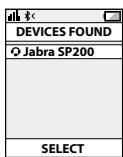
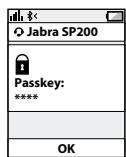
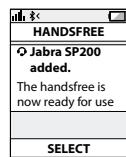
Manual pairing mode
If you wish to use the speakerphone with a different phone, or if the pairing process was interrupted, you can manually set the speakerphone to pairing mode.
Turn the speakerphone on. Press and hold the answer/end button for approximately 5 seconds until the blue LED light stars blinking rapidly. Then repeat steps 2. and 3. in the above pairing guide.
CONNECTING WITH YOUR PHONE
Pairing is only needed the first time a speakerphone and phone are used together. When the speakerphone and phone have been paired once, they will automatically connect when the speakerphone is on and Bluetooth® is activated on the phone. The speakerphone can be used when it is "connected" to the phone. If the devices are paired, but do not immediately connect, tap the answer/end button.
PLACING THE SPEAKERPHONE IN YOUR VEHICLE
The Jabra SP200 sits discreetly and conveniently on the sun visor using the attached clip.
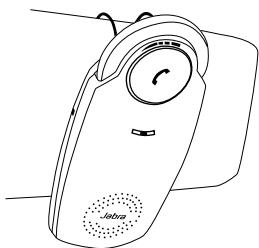
HOW TO
Answer a call
- Tap the answer/end button on your speakerphone to answer a call.
End a call
- Tap the answer/end button on your speakerphone to end an active call.
Make a call
- The call will automatically transfer to your speakerphone*. If not tap the answer/end button.
Reject a call*
- Press the answer/end button.
Activate voice dialing*
- Press the answer/end button. For best results, record the voice-dialing tag through your speakerphone.
Redial last number*
- Double tap the answer/end button when the speakerphone is on and not in use.
Mute/un-mute
- Press and hold the answer/end button to mute an active call. A beep tone plays during the muted call.
- Press and hold the answer/end button to un-mute.
Transfer Calls
- Press the answer/end button to transfer a call from the speakerphone to the mobile phone.
- Press the answer/end button to transfer a call from the mobile phone to the speakerpone.
Adjust sound and volume*
- Scroll the volume wheel to the left or right to adjust the volume.
WHAT THE LIGHTS MEAN
| What you see | What it means |
| Flashing blue light | Speakerphone is on but not connected |
| Solid blue | Connected to phone |
| Flashing blue light rapidly | Pairing mode |
| Flashing blue light | Incoming call |
| Solid green light | Active call |
| Flashing red light | Running low on battery |
| Solid green light when charging | Charging level between 70% and fully charged |
| Solid red light when charging | Charging level less than 70% |
USING YOUR JABRA SP200 WITH TWO MOBILE DEVICES
The Jabra SP200 is capable of having two mobile phones (or other Bluetooth® devices) connected to the speakerphone at the same time. This will give you the freedom of having only one speakerphone to operate both of your mobile phones. Please note that Last Number redial will dial the number from the last outgoing call independent of the mobile phone.
How to pair your Jabra SP200 with 2 Bluetooth® devices:
1 Pair device number 1 with your speakerphone using the pairing instruction above for re-pairing your speakerphone (if device 1 is paired to your speakerphone already go to step 2)
2 Press the Answer/End button for 4-5 seconds
3 Pair device number 2 with your speakerphone using the same pairing instruction again
4 Connect to device 1 again
Please note that it is important to connect to device 1 again after pairing device 2 to ensure connection to both devices.
TROUBLESHOOTING & FAQ
I hear crackling noises
- Bluetooth® is a radio technology, which means it is sensitive to objects between the speakerphone and the connected device. It is designed for the speakerphone and the connected device to be used within 33 feet (10 meters) of each other, with no major objects in the way (walls, etc.).
I cannot hear anything in my speakerphone
- Increase the volume in the speakerphone
- Ensure that the speakerphone is paired to a device that is playing
- Make sure your phone is connected to the speakerphone by tapping the Answer/End button.
I am having pairing problems
- You may have deleted your speakerphone pairing connection in your mobile phone. Follow the pairing instructions.
I want to reset the pairing list in my speakerphone
- It is possible to reset the pairing list in the speakerphone. First go into pairing mode. When you have released the Answer/End button and speakerphone is in pairing mode you press Answer/End button again for 5 sec. When pairing list is empty you hear a beep. The next time you power on, the speakerphone will automatically go into pairing mode.
Will the Jabra SP200 work with other Bluetooth® equipment?
- The Jabra SP200 is designed to work with Bluetooth® mobile phones. It can also work with other Bluetooth® devices that are compliant with Bluetooth® version 1.1 or higher and support a headset and/or hands-free profile.
I cannot use reject call, redial or voice dialling
- These features are dependent on the ability of your phone to support a hands-free profile. Even if the handsfree profile is implemented reject call, call hold and voice dialing are optional features which are not supported by all devices. Please consult your device manual for details.
NEED MORE HELP?
1 Web: www.jabra.com/nasupport (for the latest support info and online User Manuals)
2 Phone:
1 (800) 327-2230 (U.S)
1 (800) 489-4199 (Canada)
TAKING CARE OF YOUR SPEAKERPHONE
Always store the Jabra SP200 with the power off and safely protected
- Avoid storage at extreme temperatures (above 45^ / 113^ including direct sunlight - or below -10^ / 14^ ). This can shorten battery life and may affect operation. High temperatures may also degrade performance.
- Do not expose the Jabra SP200 to rain or other liquids.
GLOSSARY
- Bluetooth® is a radio technology that connects devices, such as mobile phones and headsets, without wires or cords over a short distance approx. 33 feet (10 meters). Get more information at www/bluetooth.com
-
Bluetooth® profiles are the different ways that Bluetooth® devices communicate with other devices. Bluetooth® phones support either the headset profile, the hands-free profile or both. In order to support a certain profile, a phone manufacturer must implement certain mandatory features within the phone's software.
-
Pairing creates a unique and encrypted link between two Bluetooth® devices and lets them communicate with each other. Bluetooth® devices will not work if the devices have not been paired.
- Passkey or PIN is a code that you enter on your mobile phone to pair it with your Jabra SP200. This makes your phone and the Jabra SP200 recognize each other and automatically work together.
- Standby mode is when the Jabra SP200 is passively waiting for a call. When you 'end' a call on your mobile phone, the speakerphone goes into standby mode.
CONTENTS
THANK YOU. 2
ABOUT YOUR JABRA SP200 2
WHAT YOUR SPEAKERPHONE CAN DO 3
GETTING STARTED 3
CHARGING YOUR SPEAKERPHONE 4
TURING YOUR JABRA SP200 ON AND OFF 5
PAIRING YOUR JABRA SP200 WITH YOUR MOBILE PHONE .......6
CONNECTING WITH YOUR PHONE 7
PLACING THE SPEAKERPHONE IN YOUR VEHICLE. 7
HOW TO 8
WHAT THE LIGHTS MEAN 9
USING YOUR JABRA SP200 WITH TWO MOBILE DEVICES. 9
TROUBLESHOOTING & FAQ 10
NEED MORE HELP? 11
TAKING CARE OF YOUR SPEAKERPHONE 11
GLOSSARY 11
THANK YOU
Thank you for purchasing the Jabra SP200 Bluetooth® wireless technology speakerphone. We hope you enjoy it! This instruction manual will get you started and ready to make the most of your speakerphone.
ABOUT YOUR JABRA SP200
1 Answer/end button
2 LED light
3 Charging socket
4 Volume wheel
5 On/off switch
6 Visor clip
WHAT YOUR SPEAKERPHONE CAN DO
Your Jabra SP200 lets you do all this:
- Answer calls
- End calls
Reject calls*
Voice dialing* - Last number redial*
- Mute
- Transfer Calls
- Adjust volume
- MultiUse™ - connect two Bluetooth® devices at the same time
Specifications
- Talk time up to 10 hours / Standby time up to 550 hours (23 days)
- Rechargeable battery with charging option from car charger or via USB cable.
- Sleep mode automatically turns the speakerphone off after 15 minutes if not connected to your phone
- Noise reduction & Echo cancellation via DSP technology
Size:L 124mm× W56mm× H16mm
Weight 84 grams - Operating range up to 10 meters (approximately 33 feet)
Supported Bluetooth® profiles: HFP, HSP - Bluetooth® specification (see glossary) version 2.0
- e-SCO for enhanced audio quality
GETTING STARTED
You should follow three steps before using your speakerphone
1) Charge your speakerphone
2) Activate Bluetooth® on your mobile phone (refer to the manual for your Mobile phone)
3) Pair your speakerphone with your mobile phone
The Jabra SP200 is easy to operate. The answer/end button on the speakerphone performs different functions depending on how long you press it.
| Instruction | Duration of press |
| Tap | Press briefly |
| Double tap | 2 quickly repeated taps |
| Press | Approximately 1 second |
| Press and hold | Approximately 5 seconds |
CHARGING YOUR SPEAKERPHONE
Make sure that your speakerphone is fully charged for two hours before you start using it. Use the car charger or the USB cable to charge. When the light indicator (LED) has a solid red light, your speakerphone is charging. When the light turns green, it is fully charged.
Use only the charger provided in the box - do not use chargers from any other devices as this may damage your speakerphone.
Please note: The lifetime of the battery will be significantly reduced if your device is left uncharged for a long period. We therefore recommend that you recharge your device at least once a month.
TURNING YOUR JABRA SP200 ON AND OFF
- Slide the on/off switch forward on the side of the speakerphone to turn on the speakerphone.
- Slide the on/off switch backward to turn off the speakerphone.
Sleep Mode
When not connected to a phone, the speakerphone turns off automatically after 15 minutes. Tap the answer/end button to turn the speakerphone on again.
PAIRING YOUR JABRA SP200 WITH
YOUR MOBILE PHONE
The Speakerphone can be connected to a mobile phone using a procedure called 'pairing'. By following a few simple steps, a phone can be paired with the speakerphone in a matter of minutes.
1 Put the speakerphone in pairing mode
- When you turn on your Jabra SP200 for the first time, the speakerphone will automatically start up in pairing mode - i.e. it can be detected by your phone. When the speakerphone is in pairing mode the blue LED will flash rapidly.
2 Set your Bluetooth® phone to 'search' for the Jabra SP200
- Follow your phone's instruction guide. First make sure that Bluetooth® is activated on your mobile phone. Then set your phone to search for devices. This usually involves going to a 'setup,' 'connect' or 'Bluetooth®' menu on your phone and selecting the option to 'search' or 'add' a Bluetooth® device.*
3 Your phone will find the Jabra SP200
- Your phone will find the speakerphone under the name "Jabra SP200". Your phone then asks if you want to pair with the Jabra SP200. Accept by pressing 'Yes' or 'OK' on the phone and confirm with the passkey or PIN = 0000 (4 zeros). Your phone will confirm when pairing is complete.
Manual pairing mode
If you wish to use the speakerphone with a different phone, or if the pairing process was interrupted, you can manually set the speakerphone to pairing mode.
Turn the speakerphone on. Press and hold the answer/end button for approximately 5 seconds until the blue LED light stars blinking rapidly. Then repeat steps 2. and 3. in the above pairing guide.
CONNECTING WITH YOUR PHONE
Pairing is only needed the first time a speakerphone and phone are used together. When the speakerphone and phone have been paired once, they will automatically connect when the speakerphone is on and Bluetooth® is activated on the phone. The speakerphone can be used when it is "connected" to the phone. If the devices are paired, but do not immediately connect, tap the answer/end button.
PLACING THE SPEAKERPHONE IN YOUR VEHICLE
The Jabra SP200 sits discreetly and conveniently on the sun visor using the attached clip.
HOW TO
Answer a call
- Tap the answer/end button on your speakerphone to answer a call.
End a call
- Tap the answer/end button on your speakerphone to end an active call.
Make a call
- The call will automatically transfer to your speakerphone*. If not tap the answer/end button.
Reject a call*
- Press the answer/end button.
Activate voice dialing*
- Press the answer/end button. For best results, record the voice-dialing tag through your speakerphone.
Redial last number\*
- Double tap the answer/end button when the speakerphone is on and not in use.
Mute/un-mute
- Press and hold the answer/end button to mute an active call. A beep tone plays during the muted call.
- Press and hold the answer/end button to un-mute.
Transfer Calls
- Press the answer/end button to transfer a call from the speakerphone to the mobile phone.
- Press the answer/end button to transfer a call from the mobile phone to the speakerpone.
Adjust sound and volume*
- Scroll the volume wheel to the left or right to adjust the volume.
WHAT THE LIGHTS MEAN
| What you see | What it means |
| Flashing blue light | Speakerphone is on but not connected |
| Solid blue | Connected to phone |
| Flashing blue light rapidly | Pairing mode |
| Flashing blue light | Incoming call |
| Solid green light | Active call |
| Flashing red light | Running low on battery |
| Solid green light when charging | Charging level between 70% and fully charged |
| Solid red light when charging | Charging level less than 70% |
USING YOUR JABRA SP200 WITH TWO MOBILE DEVICES
The Jabra SP200 is capable of having two mobile phones (or other Bluetooth® devices) connected to the speakerphone at the same time. This will give you the freedom of having only one speakerphone to operate both of your mobile phones. Please note that Last Number redial will dial the number from the last outgoing call independent of the mobile phone.
How to pair your Jabra SP200 with 2 Bluetooth® devices:
1 Pair device number 1 with your speakerphone using the pairing instruction above for re-pairing your speakerphone (if device 1 is paired to your speakerphone already go to step 2)
2 Press the Answer/End button for 4-5 seconds
3 Pair device number 2 with your speakerphone using the same pairing instruction again
4 Connect to device 1 again
Please note that it is important to connect to device 1 again after pairing device 2 to ensure connection to both devices.
TROUBLESHOOTING & FAQ
I hear crackling noises
- Bluetooth® is a radio technology, which means it is sensitive to objects between the speakerphone and the connected device. It is designed for the speakerphone and the connected device to be used within 33 feet (10 meters) of each other, with no major objects in the way (walls, etc.).
I cannot hear anything in my speakerphone
- Increase the volume in the speakerphone
- Ensure that the speakerphone is paired to a device that is playing
- Make sure your phone is connected to the speakerphone by tapping the Answer/End button.
I am having pairing problems
- You may have deleted your speakerphone pairing connection in your mobile phone. Follow the pairing instructions.
I want to reset the pairing list in my speakerphone
- It is possible to reset the pairing list in the speakerphone. First go into pairing mode. When you have released the Answer/End button and speakerphone is in pairing mode you press Answer/End button again for 5 sec. When pairing list is empty you hear a beep. The next time you power on, the speakerphone will automatically go into pairing mode.
Will the Jabra SP200 work with other Bluetooth® equipment?
- The Jabra SP200 is designed to work with Bluetooth® mobile phones. It can also work with other Bluetooth® devices that are compliant with Bluetooth® version 1.1 or higher and support a headset and/or hands-free profile.
I cannot use reject call, redial or voice dialling
- These features are dependent on the ability of your phone to support a hands-free profile. Even if the handsfree profile is implemented reject call, call hold and voice dialing are optional features which are not supported by all devices. Please consult your device manual for details.
NEED MORE HELP?
- Web: http://www.jabra.com (for the latest support info and online User Manuals)
2. E-mail:
Australia support.au@jabra.com
China support.cn@jabra.com
Japan support.jp@jabra.com
Singapore support.sg@jabra.com
Information: info@jabra.com
3. Phone:
Australia 1-800-738-521
China 800-858-0789
Japan 03-3242-8722
Singapore 800-101-2329
TAKING CARE OF YOUR SPEAKERPHONE
Always store the Jabra SP200 with the power off and safely protected
- Avoid storage at extreme temperatures (above 45^ / 113^ including direct sunlight - or below -10^ / 14^ ). This can shorten battery life and may affect operation. High temperatures may also degrade performance.
- Do not expose the Jabra SP200 to rain or other liquids.
GLOSSARY
-
Bluetooth® is a radio technology that connects devices, such as mobile phones and headsets, without wires or cords over a short distance (approx. 10 meters/33 feet). Bluetooth® is safe to use. It is secure too, so once a connection has been made no-one can listen in and there is no interference from other Bluetooth® devices either. Get more information at www.bluetooth.com.
-
Bluetooth® profiles are the different ways that Bluetooth® devices communicate with other devices. Bluetooth® phones support the headset profile, the hands-free profile or both. In order to support a certain profile, a phone manufacturer must implement certain mandatory features within the phone's software.
- Pairing creates a unique and encrypted link between two Bluetooth® devices and lets them communicate with each other. Bluetooth® devices will not work if the devices have not been paired.
- Passkey or PIN is a code that you enter on your Bluetooth® enabled device (e.g. a mobile phone) to pair it with your Jabra SP200. This makes your device and the Jabra SP200 recognize each other and automatically work together.
- Standby mode is when the Jabra SP200 is passively waiting for a call. When you 'end' a call on your mobile phone, the speakerphone goes into standby mode.
INDHOLDSFORTEGNELSE
TAK 2
OM DIN JABRA SP200. 2
DET KAN DIN HØJTALARTELEFON 3
KOM GODT I GANG. 3
OPLADNING AF HØJTTALERTELEFONEN. 4
T/END/SLUK FOR DIN JABRA SP200 5
PARRING AF DIN JABRA SP200 MED DIN MOBILTELEFON 6
OPRETTESE AF FORBINDELS TIL DIN TELEFON 7
PLACERING AF HJTTALERTELEFONEN DIN BIL. 7
SADAN GOR DU 8
HVAD BETYDER LYSINDIKATORNE 9
BRUG AF DIN JABRA SP200 MED TO MOBILENHEDER 9
FEJL FINDING OG OFTE STILLDE SPORGSMÄL 10
BRUG FOR MERE HJELP? 11
PLEJE AF DIN HØJTALAIRELEFON 12
ORDLISTE 12
TAK
| HANSDFREE |
| Ø Jabra SP200 added. The handsfree is now ready for use |
| SELECT |
Manuel parringstilstand
| HANSDFREE |
| Jabra SP200 added. |
| The handfree is now ready for use |
| SELECT |
Italian support.it@jabra.com
| HANSDFREE |
| Ø Jabra SP200 added. |
| The handsfree is now ready for use |
| SELECT |
Spanish support.es@jabra.com
Informationen: info@jabra.com
3. Telefon:
He cTaHET NOdaBaTb NylbcnpyUoIcM CnHm CnHan. 3aTeM
BbIOpHnTe DeiCTBnA, ONuCAHhBle B nyHKtax 2 n 3 ONuCAHHoN
BbIe npoueypbocnpjKeHn.
IODKIIOUEHNE K TENEFOH
CoprajxHeH Tepe6yeTc TolbKO pR np nepBOM nOdkluoyenH
cniKepfoHa K TelefoHy. Iocne BbIOnHeHn 3Toi npOeDpybl
BKJIUOeHHbI CNIKepeOH CMOKeT aBOMaTHueCKN O6HApyXnBaTb
pa6oTaUOuN MoUyNb Bluetooth® 3TOro TeneΦoHa N
yctaHaBnBaTb C Hm CoeHHeHne. CnKepfoH roTOB K pa6Ote
cTeIefoHOM cpa3y nocIe yctaHOBJIeHnI coeunHeHn. EcnI o6a
yctpoiCTBa 6bln COpnjKeHbI, OHaKO He yCTaHOBUNCB3b
dpyc npyrom aBtOMaTnueckn, cneJeT 6bICTpo HaxaTb KHONKy
«OTBeT/3aBepweHne».
PACNOJIOXHEHIE CNIKEPOHOBA ABTOMOBJIPE
Cnikepfoh Jabra SP200 Hnpimetno u ydo6ho KpeinTcra Ha
COJHue3aUHTbI KO3bIpeK npn NMOU3aXIma.

PEXIMBI IN OIPEALINI
OTBET Ha BXOJaIcN Bbl3OB
- YtO6bI npINHArTb Bbl3OB, CnERKa HaxMMTe Ha cnIKePfoHe KhONKy «OTBET/3aBepSeHne».
MOXJIINBOCTI INPICTPOIO IyHOrO 3B'R3KY
Pnpctpi ryuHoro 3b'3ky jabra sp200 niDtpmmye taki yHKuii:
BipnoibHa BnKnKn
- 3aBepWeHH BnKnKIB
-BiDxIneHHBnKnKiB
- Tolocobn ha6ip
- Повторний habip octaHbOro Homepa
BIMKHeHH3Byky
- PpebeeHnBnKnKIB
- PerylIOBaHnryuHoNcti
- MultiUse™ - Ondohuache niiKKnoueHnB DBOx npCtpoIB Bluetooth®
Texhi xapaKtepncTnK
- TpBaniCt bpo6TuB pEeMnPi po3MoBNo 10 roDnH, y pEeMnI OHoyBuHnHO 550 roDnH (23 dH).
- AkymyIANTop 3 moXJIbICtIO nepe3aApIKn BiI abTOMo6IbHoro 3apIHO rnpIcPoIO a6O uee3 USB-Ka6eIb.
- Pekkim ehepro36epekeHHA ABTOMaTHUHO BIMNKae npncptpi ryHoro 38'34ky uepe3 15 xBUNIN, JAKIO NOrO He nipI'cHaHo do Teneohy.
3MeHneHHaPbHnIyMaTyIyHn3aDOnOMoIOTexHOJIITUΦpOBoIobp6Kn3BykyDSP. - Po3mipn:ДовжИнHa 124 MM x uHpiHa 56 MM x Bucota 16 MM.
- Bara 84 rpaMn.
Padiyciio10MeTpib (npn6bn3Ho 33 yTuN).
-Плдтумваши рpoфini Bluetooth®:HFP, HSP. - Bepcie Bluetooth® 2.0 (ДиВ. Словник).
-Плдтумka texhONorii e-SCO дя поКрашенЯ Коcti 3Byuahna.
IIOYATOKPOBOTN
Ipeed BnKOpNCTaHnM npiCtpoH rUHOro 3B'3kU BnKoHaTe Tpr HxJyHeAbeHei di.
1) 3apädɪtB npɪcτpiɪ rǔyHOrO 3b'æzky.
2)YbIMKhitbyfHKuioBluetooth*yMo6InbHomyTenefohi (dN.B.noci6nHK 3ekcnnyataui cBOrO mo6InbHoro tenefohy).
3) 3'εηнaite npicrtpi ruyhoro 3B'ra3ky 3 Mo6ilbHM TelefoHOM.
PnctpiyHOrO 3bAky Jabra SP200 yNepeoctny BVKOpNCTaHHi. KOnkpaBidNoBI/3aBepeHennBAKInKY BKNOKHy EekJIbKa yHKuI, 3aHexXHbIOB tPrNbaIOCTI II haTtCKAHN.
3APJIXAHHHI PIPNCTPOIO TUYHOTO 3B'R3KY
Ipeed noaTkom BnKOpNCTaHHa NOBHCtIO 3apraIb npncptpi yHrOHO 38'3kU npotraOM dBOX rOdn. JIra bOro BnKOpNCTOBuYte ABTOmobIbHN 3apraHn npcptpi aO6 BOU-Kabeb. KOni CBITIOJIOHN iNDkaTOp 6beIpePBHO cBITNbca YepBOHM, npcptriy rHyOro 3B'3kYo 3apraJaTaCBA. JaIO nIDKaTOp 3MInHB KONIP Ha 3eHEn, npncptpi NOBHCtIO 3apraJeHo.
Bukoprictobyte tInbKn ToT 3apRdHn pncStpI, kkn NoctaAeTbCBA KOMNLeKTI. He Bukoprictobyte 3apRdHn npcStpoi BiD INhuxnpnaindiB, OckInbKn BOHMOKByt noWKOJNTBaaw npcStpiRyuHoro 3B'3kQy.
PnmuTka. TepMih Cny6bn akymyIaTopa 3NaHcO CKOpOyETbCBA, RAKIO npNCTpi He 3apJXATn npOTrOM TpMbAnoro Yacy. TOMy peKOMeHdYETCBnpeZaRJaXaTn npNCTpi ryHOrO 3B'3Aky pInHaMHPi pa3 Ha McaIb.
YBIMKHEHHA TATBIMKHEHHI INPNCPOIO IYHORO 3B'3KY JABRA SP200
- Ipeceynbte BmMkaH na60kOBi nahanI npnctpoI rHyNoro 38'3ky Bnpeid, uio6 yBIMKHTn npnctpii.
- PeneCyHbTe BmMkaU Ha3aI, 106 BmMKHyTu npncpti ryHoro 3B'3Ky.
Pexmm ehepro36epexeHHa
JaKIO npICrpiI rUHOrO 3B'J3Ky He nIiE'EnHaHO Do TeneoHoy, Upe3 15 XbIMIn BIN abTOMaTHUO BMnKaEcTBc. Ioo6 3HOy JnoO yBMKnHTu,JeRKO HATNCiTB KHONKY BiDnOBiDi/3aBepWeHHN BIKNIky.
3'ΕΤΗΑΝΗΠ ΠΡΙΝΥΝΟ 3B'Α3KY JABRA SP200 3 MOΒΙΝΗΜ TΕΝΕΦΟΗΜ
Pnctpi ryHoro 38'3ky MoXHa niiKJIOUHTn Do MO6IbHoro TeneoHOy 3a donOMorOIO npOeUpyi, KaHa 3BaAetcBcA 3^ EHaHHa. BIKoHabSi KInkba npocTnx di, TepeOH MoXHa 3'EhNaTn 3 npCtpoem ryHoro 38'3ky 3a KInkba XbINHn.
1 Ipebeiditb npicptpi ryuHoro 3B'3kY B pexm 3'eHaHHa.
IiD yac nepuoro yBIMKHeHn npucTpi ryUHOro 3B'3ky Jabra SP200 abOTMATUHO nepexOxDytb y pexM 3'EDHaHH, to6To Telefoh moKe IORO BNAHTN. KoN IpncTpi ryUHO 3B'3ky nepe6yBaE b PEXMI 3'EDHaHH, 6laKaTHN CBITIOIOHDn IHdkatop 5BvDKO 6NMAe.
2 YctahOBiB TeneoH3 NiItpmKIO Bluteoth® pexHM nowky npicptpoI ruyhoro 38'3kY Jabra SP200.
BVKOHyIe IHcTpykui, 10oMiCTaTbC B Noc6Hmky 3 ekCnnyatauii Tepeohy. CnoayTu nepeKoHaTece, 10oB tenefohi yBIMKHyTO fHyKluio Bluetooth. PToTIm yCTaHObity y Tenefohi pexMnPoKy npCtpoiB. 1e Za3BnuA moKha 3pObntu 3aOnOMOrIO npKHTB «UctahOBKa», «3'EDHAHn» a6o «Bluetooth»» B MEHO TeneFOhy, De nptPi6No B6paTin napamTp «POnyK» abo «DOnaTI»ДЯ npCtpoiB Bluetooth.
3 Tenefoh BnAIBuBtp npctpi ryHoro 3b'3ky Jabra SP200.
TeneoH BnBnB npncpi ryHoro 3b'3ky niD ha3BOU «Jabra SP200》.PiCraIbO B TepeoHi 3'ABiTbCzAnIT Ha 3'EHNHn3 pNcIeOm ryHoro 3b'3ky Jabra SP200. NiTBePdITb 3aNIT, HATNCyBUn H a TeneoHi KhoNkYu «Tak» abO «OK» i BKA3abUn napOl bAO PIN-KoD «000» (4 hynA). Ha TeneoHi 3'ABiTbCnTiTBePdKeHHN 3'eHNHn.
Pexm3'εdHaHnBpyuHy
UO6 nID'EDnATn PnCRPII RyHOrO 3B'3kY Do iHOrO TeneD0Hy, aOa KJIO npOec 3'EDHaNHbYo nepepBaHO, MoKHa BpyHy npeBeCTn PnCRPII y PekHM 3'EDHaHHa.
YbIMKnHb npriptiy ruyhoro 38'3ky. HaTncHt b i ytpmmyTe KhoNky BiINoBidi/3aBePseHHe BKNJInky npOTROM npBnI3HO 5 cekynd,doK6bnkTHn iHdkaTOP He noChue wBnKO 6nImatn. Pnicla IbOro nobToRbI 2-3 3 BnuEheDeHoi npOeDpyn 3'EnHaHHa
ПДКЛЮЧЕНДОТELFOHNY
3'EdnHnBn BnKoHyETbC JnIe OdnH pa3, KOnI npNCTpiR yUHOrO 3B'JkTy Ta TeJeFOH BnepHe BnKOpNCTOBYOTbC Pa3OM. JAnIO 3'EdnHnBnpNCTPOg RyHOrO 3B'J3kTy 3TeEOHOm BxE 6JyO BnKOHAnO, NIDKNLOeHHN BiDjyBATmETbC ABOTMnTHO Bpa3i YbIMKnHENH npNCTPOg RyHOrO 3B'J3kTy Ta fynKcIIi Bluetooth Ha TeneOHi. PnCtPrIyRyHOrO 3B'J3kKy MOXHa BnKOpNCTOBYBatn, JAnIO NIOrE nIDKnIOeHO To TeJeOHy. JAnIO 3'EdnHnBnpNCTpOIB 6JyBO NkOHAnO, Ane iNkLNIOeHHNe He BiDjyBaTcBc, IerKO HATNCITb KHONKy BiDnOBiDi/3aBepeHHe BnKIny.
YCTAHOBJIIEHHI IPINCTPOIO IYUHOFO 3B'83KY B ABTOMOJIJI
Pnictpi ryuHoro 38'3ky Jabra SP200 moKHa hadiiHo ta 3pyHOno pO3aUyBaTu Ha coHcze3axChOMy Ko3NpKy 3a DOnOMorO klinCn.

IOPRAOK BIKOPNCTAHNNF YHKLII
BidiobHa BnKlnK
-Ⅲo6 BiNIOBICTn Ha BKNIik, NERKO HaTNCiTb KHONKy BiNOBi/3aBepueHHBa BKNIky Ha npriCTpoI rHyHOrO 3B'3Ky.
3aBepueHHn BnKnky
- Ⅲo63aBepwnTPO3MOy,HaTncHtB KHONky BiNObi/3aBepuen HbKNkNy Ha npntpoI rHyHOrO 3b'3Ky.
3dijcHennBnKnky
BKNKIN ABOTMAtNUHO nepeBODHTBC HA pNCTpiRyHORO 38a3KY*.A KIOU CE He Ib6yIocNA,nerKO HATNCHTB KHONKY BIDNOBID/3ABePeUHeHBAKNKNUK.
BixxuHHeHH BnKlnky*
- HatncHtB KHONKy BiNObiDi/3aBepWeHHn BVKNIky.
YbIMKHeHHra ronocoboro Ha60py\*
- Hatnichitb KhoNk BiNIOBii/3aBePmeHHa BNIKNIky.Ду OTPmHaHna Kpaunx peyIbTaTIB 3aIIuIb MiTKI rONOCOBOro Habopy chepe npiCTpr I yUHORO 38'3Aky.
TobtopnHa6ip octaHboro Homepa\*
-Дич_HATNCHITb KONKY BIDNOJBI/3ABePeUHHB NIKNky, KOJI npCtIpyrHyoro 3B'3Ky yBmKHyTO i BIN He BVKOPiCTOBYETCB.
BumKHeHHy/YbimKHeHHy 3Byky
IIO6 BMKNHYTN 3BYK NOTOCHORO BKNKNIky, HATNICHTb Ta YTpyMnye KHOKNy BiNObiIDa/3aBepewHHe NIKNKly. Pid qac BKNKNIky 3BMKKHNEM 3BYKOM LyHATIMME 3BYKOBNI CIRHJAL.
- Uio6 yBimKHyTu 3ByK, HATNCiTb Ta yTpmyTe KHOIky BiIDNoBiDi/3aBepeHHe BKNIky.
IpepeBeeHnBnKnKIB
BVKOPNCTAHHII PIPNCPOIIO TUYHOrO
3B'3KY JABRA SP200 I3 JBOMA MOBJbHIMMI
IPNCTPORM
| HANSDFREE |
| O.Jabra SP200 added. The handsfree is now ready for use |
| SELECT |
| HANDSFREE |
| Jabra SP200 added. |
| The handsfree is now ready for use |
| SELECT |
MERKKIVALOJEN MERKITYS
| HANDSFREE |
| O Jabra SP200 added. |
| The handsfree is now ready for use |
| SELECT |
| HANDSFREE |
| Jabra SP200 added. |
| The handsfree is now ready for use |
| SELECT |
Modo de synchronization manual
TI MNOPEI NA KANEI TO HXEIO ZA
To Jabra SP200 oac enitpenei va kavet e ola ta napakatw:
- Anavtnon klnoεωv
- Tepaioo knaoeov
Aπóρpiη κλησεωv* - i k ^*
- Enavakλησιτελευταιού αριθμού*
- Σiyaon
-Metaφρα κλησεων
Pouion evtaoncxou
MultiUseTM -tauovpnouvδεηδooukeuovBluetooth
Texivka xapaktnpiotiká
| HANDSFREE |
| Jabra SP200 added. |
| The handsfree is now ready for use |
| SELECT |
Aetoupyia xipokivntnc oueueNC
EAV emioueite va xonoiouoinoae to nxeio me diaopopetiko tnAeWvO, n ev diakotnke ni adiaokaia oucEnc, mopoitee va oEeio to nexEIO ce leitoupya oucEnc xepokivnta.
Evepyoioane To nxeio. Iieote napatetaeva To nIaNktpo atanvtnoc/tepuiaou knaeewy via nepinou 5 deutepolnta, mepi va apxoei va avoaBojnevi ynpovapn uIae pweivn evSeIg LED. ENavaAbetaTe otuovexia ta bmuata 2 ka3 twv npapanavw odyiw ouzenuc.
SYNDEESH MTO THAEQNO
H ouceun anareitai mvo nT npwtn pop aou xpoaonoiouvtai ano kovou eva nxieo kai eva nIeepwo. OtaV to nxieo kai to nIeepwo ouexfou via qop, ta ouvdeovtai autouma t otav eivai evpyoioinevo to nxieo kai to Bluetooth 念 0To nIeepwo. To nxieo unoei va xpoiaomointhetai otav eivai dauve6epevo to nIeepwo.Eav oi ouakeuec exouv ouceuxei, aAla dev ouvdeovtai aoeoc,piote to nnktpo anavtnoc/termuatioou knoewv.
TOPIOEETHSHOY HXEIOY ΣTO AYTOKINHTO ΣA
| HANDSFREE |
| Jabra SP200 added. |
| The handsfree is now ready for use |
| SELECT |
Modul de cuplare manuale
jig Jabra SP200 aLwUI Bluetooth LgJgS; acLo sI j
j
L aalstl SP200 no slaol JgJg
JABRA SP200 J
Ljj1
(LED)egjJg
jui juo
aagg ggiuee
Jz
g 1
Lc all JABRA SP200
LcPJIJabraSP200acLaw
JUUL
111111
心U1S1
-
a+1b
Q
S_ OBC = 12 · CO · BC = 12 × CD × 3
all
JgJgJgJgJgJgJgJgJgJgJgJgJgJgJgJgJgJgJgJgJgJgJgJgJgJgJgJgJgJgJgJgJgJgJgJgJgJgJgJgJgJgJgJgJgJgJgJgJgJgJ
1
(p)JbIaclgSaclw00·gacLw1J!Jau
jol jlll jL plu wU uU U 1
.USBJ
SP200JjLJIJJlJI J 1
jLJLJLdJI
DSP aaiia plaii jLj no gaiil gaii gaii
1.3,5 17 × 20
A 1
(p)gjgl)jla1·J!JzjjlljLai
HFP.HSP:accllglg
- jao! (cllalall 200 gj) iigjglll aolgo
aiuuaa aeg e-SCO
1 2
1SP200 1
L L 1 SP200
pluii jj1j 1j0d lclLa Lgigll aaiuie
S OBC = S COD + S BOC - S BOC
JgaiLiao SP200 aegjx
SP200 1c gglg jj j JJ J J J J J J J J J J J J J J J J J J
aLc blll jgjuiu jll lall JbI bc Iolci Iooia aillb
Lgolalssl w 1j jyIolLS gilw al 1u a uLI SP200 1u Jua51 1u SL
J (LED) 1u 1u 1u 1u 1u 1u 1u 1u 1u 1u 1u 1u 1u 1u 1u 1u 1u 1u 1u 1u 1u 1u 1u 1u 1u 1u 1u 1u 1u 1u 1u 1u 1u 1u
a j 1 y a 1 1 1 1 1 1 1 1 1 1 1 1 1 1 1 1 1 1 1 1 1 1 1 1 1 1 1 1 1 1 1 1 1
j 1 j 1 j 1 j 1 j 1 j 1 j 1 j 1 j 1 j 1 j 1 j 1 j 1 j 1 j 1 j 1 j 1 j 1 j 1 j 1 j 1 j 1 j 1 j 1 j 1 j 1 j 1 j 1 j 1 j 1 j 1 j 1 j 1 j 1 j
JABRA SP200
pLSP200 111111111111111111
.SP200 J
SP200 JxJxJxJxJxJxJxJxJxJx
J
10 1920 SP200 Jg jglj
SP200 jj jjj
Jgol JABRA SP200
"gljlllgljIgJlplssuJgJgJgJgJgJgJgJgJgJgJgJgJgJgJgJgJgJgJgJgJgJgJgJgJgJgJgJgJgJgJgJgJgJgJgJgJgJgJgJgJgJgJgJgJgJgJgJgJgJgJ
Jabra SP200
JSCSP200 JcJyjzJyJyJabra SP200 JzJzJzJzJzJzJzJzJzJzJzJzJzJzJzJzJzJzJzJzJzJzJzJzJzJzJzJzJzJzJzJzJzJzJzJzJzJzJzJzJzJzJzJzJzJzJzJzJzJzJz
Jabra SP200 jc"
laie glaagglal baaaiy yg 1s iatgaly gals lalil jyj
Jl Jaiaii lii siae ayg 1a a daiy Iaay jyaj
Jaiy jaiy laie gao aygai "gaiy"gi"Jaiy
.1gj jgj"aaLJ"g"JJ"J
Jabra SP200 1claw Llae
| HANDSFREE |
| O Jabra SP200 added. |
| The handsfree is now ready for use |
| SELECT |
gglgglg
aLac aeblao allg jai lao SP200 pssu w g cci ci 1i
Lg2SP200 a>glz gao gao glc. c>gljll
j j j j j j j j j j j j j j j j j j j j j j j j j j j j j j j j j j j j j j j j j j j j j j j j j j j j j j
aJgll Jg aJgSall gT gabla 10. aCg
JyJLJI
gSP200 plaslgl gaiy jll lal ydl ayagall aal al 1o k
Loaic Liayi agalai aiw. dai ydl ayagll SP200 ayagai aiia oia
Lioic SP200 plaslui scl ayagll acgagll Jauagg SP200 ayagai ai
Ic laaol gaiy agalai pao ayagll ao ai "alaa
JABRA SP200
plauuui yuaai iiaoi ou gai jgai uio Jxjabra SP200 icawai
$$ - \rho g \ddot {a} _ {1} - \dot {a} _ {2} S $$
$$ \therefore \text {i} \leqslant 0 \leqslant j \leqslant $$
$$ . \quad a l l S o \quad s c \quad s d \quad s f \quad s h \quad s i \quad s t \quad s p 2 0 0 \quad g \quad g \quad g \quad g \quad g \quad g \quad g \quad g \quad g \quad g \quad g \quad g \quad g \quad g \quad g \quad g \quad g \quad g \quad g \quad g \quad g \quad g \quad g \quad g \quad g \quad g \quad g \quad g \quad g \quad g \quad g \quad g \quad g \quad g $$
$$ a l l S _ {0} = {g, j } $$
$$ \therefore a b \cdot a b \cdot a b \cdot a b \cdot a b \cdot a b \cdot a b \cdot a b \cdot a b \cdot a b \cdot a b \cdot a b \cdot a b \cdot a b \cdot a b \cdot a b \cdot a b \cdot a b \cdot a b \cdot a b \cdot a b \cdot a b \cdot a b \cdot a b \cdot a b \cdot a b \dots $$
$$ \therefore \angle A C E = 1 8 0 ^ {\circ} $$
$$ \left. \int_ {0} ^ {1} \frac {\mathrm {d} x}{x - 1} \int_ {0} ^ {1} \frac {\mathrm {d} y}{y - 1} \int_ {0} ^ {1} \frac {\mathrm {d} z}{z - 1}\right) = \int_ {0} ^ {1} \frac {\mathrm {d} x}{x - 1} \int_ {0} ^ {1} \frac {\mathrm {d} y}{y - 1} \int_ {0} ^ {1} \frac {\mathrm {d} z}{z - 1} $$
$$ \angle L + \angle Y I / \angle S J j $$
$$ \therefore a l l \leqslant 0 $$
$$ \cdot \frac {1}{2} \frac {1}{2} \frac {1}{2} \frac {1}{2} \frac {1}{2} \frac {1}{2} \frac {1}{2} \frac {1}{2} \frac {1}{2} \frac {1}{2} \frac {1}{2} \frac {1}{2} \frac {1}{2} $$
$$ \cdot \text {g i g a l l} \text {a l l} \text {a l o l s} \text {b a i l i} $$
$$ a o l c J _ {j} \text {s i n s i g m a} \text {p a t h e r} \text {c i t i l l} J _ {j} \text {s i n s i g m a} \text {p a t h e r} \text {c i t i l l} J _ {j} \text {s i n s i g m a} \text {p a t h e r} \dots $$
$$ \therefore a _ {i} = \frac {1}{2} a _ {j} + b _ {i j} $$
$$ \because \Delta J L A X Y \neq \Delta \text {的} \Delta J L A X Y \Delta \text {的} $$
$$ \cdot \text {a d o s i s u m e r g y} \text {j} \text {j} \text {j} \text {j} \text {j} \text {j} \text {j} \text {j} \text {j} \text {j} \text {j} \text {j} \text {j} \text {j} \text {j} \text {j} \text {j} \text {j} \text {j} \text {j} \text {i n c} \text {L o a d i c} \text {j} \text {j} \text {j} \text {j} \text {j} \text {j} \text {j} \text {j} \text {j} \text {j} \text {j} \text {j} \text {j} \text {j} \text {j} \text {j} \text {j} \text {j} \text {j} $$
$$ \text {i g a l l} \quad \text {a s} \quad \text {c l i f} \quad \text {i o s} $$
$$ j _ {i} \omega_ {i} \omega_ {i} \omega_ {i} \omega_ {i} \omega_ {i} \omega_ {i} \omega_ {i} \omega_ {i} \omega_ {i} \omega_ {i} \omega_ {i} \omega_ {i} \omega_ {i} \omega_ {i} \omega_ {i} \omega_ {i} \omega_ {i} $$
$$ \therefore \mathrm {a s} \mathrm {s} \mathrm {i} \mathrm {s} \mathrm {i} \mathrm {i} \mathrm {i} \mathrm {i} \mathrm {i} \mathrm {i} \mathrm {i} \mathrm {i} \mathrm {i} \mathrm {i} \mathrm {i} \mathrm {i} \mathrm {i} $$
$$ \dots \dots \dots \dots \dots \dots \dots \dots \dots \dots \dots \dots \dots \dots \dots \dots \dots $$
$$ \cup \cup \subseteq \cup \cup \widehat {s} $$
$$ J g a l l l l l l l l l l l l l l l l l l l l l l l l l l l l l l l l l l l l l l l l l l l l l l l l l l l l l l l l l l l l l l l l l l l l l l l l l l l l l l l l l l l l l l l $$
$$ j _ {i} ^ {s} \text {a c l o w} j _ {i} ^ {s} \text {a d} j _ {i} ^ {s} \text {a d} j _ {i} ^ {s} \text {a d} j _ {i} ^ {s} \text {a d} j _ {i} ^ {s} \text {a d} j _ {i} ^ {s} \text {a d} j _ {i} ^ {s} \text {a d} j _ {i} ^ {s}. $$
$$ \therefore $$
$$ ^ {\prime \prime} o l g i m o g c i g a l b $$
$$ \therefore \text {g a l l} g g i w o \text {l a n d} j y _ {a} g _ {j} \text {l a n d} j y _ {i} g _ {i} \text {l a n d} g g i w o \text {l a n d} g g i w o \text {l a n d} g g i w o $$
glg21 jle0
jglg 0 jll 1 2 0 0 0 0 0 0 0 0 0 0 0 0 0 0 0
Jabra SP200
g
1 2
aagjg 100 1 a j gJLL Jaa 1 aagll aai
jLgJlJai jSllf 3jLgJI
aLiulil alwglg Lxuol g 1cL
Lgus Lgus gue
111111111111111111111
jlg1g SP200 piai i jaiil jgl jglg SP200
gSsLilIs 2gog poc .(jio1) )piae i aieae ae JcJaiill
.(LJJ Log JJI)
Jabra SP200 8g
SP200 1
1j+1111g+11 jglsl SP200 a+glso 5t
12jX/2j j 100 SP200 -Jaoia Joo
jgljll jlai jLslno no jilci
Jgla Jc Jc Jc Jc Jc Jc Jc Jc Jc Jc Jc Jc Jc Jc Jc Jc Jc Jc Jc Jc Jc Jc
aJgJLdAaJbIaJbIaJbIa
Jabra SP200 1
aagjglg jll Jlalil. lai aal1 SP200 aagjglalaoe 1
1/2J" jj Lc JbIa. aJgJbIg g sp200 JL2oJg "sLgJzJ1/2JJ" jj Jy Jy
aJg. aJiau uua gauu aagjll aoil eolig jg 0 aal g
jll jll jll SP200 Jaiw JiaiJgaiy jll
gJabra SP200 4C
gglll g aolis gill algfo JaaJbra SP200 a
1.1 Jauu 10 go aaijgio gaiiigui jgiy ioo Laiji Ia
jglg1l jg 1g jg jg g jg g jg
gajlllglalbdoIgaiSll
pLJIaIyUcIcIeIaill 8JuaI sI, eI I aI
j 1 j 1 j 1 j 1 j 1 j 1 j 1 j 1 j 1 j 1 j 1 j 1 j 1 j 1 j 1 j 1 j 1 j 1 j 1 j 1 j 1 j 1 j 1 j 1 j 1 j 1 j 1 j 1 j 1 j 1 j 1 j 1 j 1 j 1 j
. www.bluetooth.com 1011
a>2L a ggl; a>1 LgJx no Jauu jll aal bll aaglgjL
aIgU aieal 4511100000000000000000000000000000000000000
-
-
-
-
-
-
-
-
-
-
-
-
-
-
-
-
-
-
-
-
-
-
-
-
-
-
-
-
-
-
-
-
-
- 2000 Jaaai Jaaai Jaaai Jaaai Jaaai Jaaai Jaaai Jaaai Jaaai Jaaai Jaaai Jaaai Jaaai Jaaai Jaaai Jaaai Jaaai Jaaai
-
-
-
-
-
-
-
-
-
-
-
-
-
-
-
-
-
-
-
-
-
-
-
-
-
-
-
-
-
-
-
-
aaii iiaii
www.jabra.com/wee

1goo
1
JABRA SP200
1
01
9 2g>0g<1
JABRA SP200 g
J JABRA SP200 1
V 2g
V
= p1,p2,
9 1
9 JlgolgolgJABRA SP200 jj
1.
11 5
3^x - 2 = 0 或 3^x + 2 = 0
15 4oLi aJg
$$ (a) j \xi_ {w} L _ {- w} $$
j1 j2j3j4wJ JABA SP200 8gJgJgJgJgJg
j g jg jg jg jg jg jg jg jg jg jg jg jg jg jg jg jg jg jg jg jg jg jg jg jg jg jg jg jg jg jg jg jg jg jg jg jg jg jg jg jg jg
jg jg jg jg jg jg jg jg o0o
LJABRA SP200
$$ w l t \int_ {0} ^ {1} \frac {1}{x} \frac {1}{2 x + 1} \frac {1}{3 x + 2} \dots \frac {1}{2 0 1 9} $$
$$ \begin{array}{c} \text {L E D} \ \dot {\xi} \end{array} $$
$$ j _ {i} \dot {L} \dot {w} \dot {c} s g w $$
$$ 1 2 0 g u l l a b i l i t y $$
$$ \dot {a} \dot {b} a \dot {c} b \dot {c} c $$
$$ \begin{array}{c} \text {y} \leqslant \text {l i s t} \text {l} \text {l} \text {l} \text {l} \end{array} $$
Lgjy
LqJgjzJgJgJgJgJgJgJgJgJgJgJgJgJgJgJgJgJgJgJgJgJgJgJgJgJgJgJgJgJgJgJgJgJgJgJgJgJgJgJgJgJgJgJgJgJgJgJgJg
LwLd ydu CwL
LwLdJyLz
*LwL2jS 2
·gaggrs
0JLa+JzJzJzJzJzJzJz
120
LwLJ
100 gili jyopai
LgjIolcfoJLoaJLJauJ - MultiUseTM
cLw 00·jsl>Li j≤a oLoj cJU> JLoj / cLw1·jsl>Li alls>Jo
(jg)
.USBJLs jI LjL JwJjL WJl
Jauo Lao g 1jg jy Jg Jg Jg
j
10
DSPgglgjgglgjg
jio 1F eLai x jio 0f jx jao 15g Jg:
A
2g 1Lg0 g85 Lg0g0g0g0g0g0g0g0g0g0
Awwj gSsw Lc Jy/ Cw 40s2. dJy go Jawa SP200 j oLai
100 p11, g 100 s100 s100 a 100 g 100 d
cui 10000000000000000000000000000000000000000000000000000000000000000000000000
gljyjLj jnsolalwjl- yslalwl alf 10000000000000000000000000000000000000000000000000000000000000000000000000000000000
JABRA SP200 gj<swj< g
41jgogg
aacawd jwololjwol .gjwqswjw
山
a 10j jwJgJgJgJgJgJgJgJgJgJgJgJgJgJgJgJgJgJgJgJgJgJgJgJgJgJgJgJgJgJgJgJgJgJgJgJgJgJgJgJgJgJgJgJg
Lolg
JU Lg 5 JABRA SP200 g
JUgOg 100000000000000000000000000000000000000000000000000000000000000
.3s 2g
1
Jabra SP200 1j jg Jg
1
Jgjgjg 45 golg jgsa
jLED j"
j 5 jilol Jabra SP200 "gga" g1y1 ygiggl
jlll l 1 jlll jg g gglal aag
gJL8eLoLgog 5g, gglg4s
jolologac jolldaii laolssgns
"Bluetooth" 山 "L" L"(connect) Jlal"."(setup) gJd al"
S"1000 11111111111111111
.
Jabra SP200 Jg
g Jabra SP200"Li 1 L
Jabra SP200 Ljg
(OK)“(Yes)
| HANDSFREE |
| O Jabra SP200 added. |
| The handsfree is now ready for use |
| SELECT |
gws"ss
jss aegs s 1g gss oaiw gss s gss L jgsseas aolgs
"J" J 10000000000000000000000000000000000000000000
1 2
aL 10
$$ \left. \right.\left. \right.\left. \right.\left. \right.\left. \right.\left. \right.\left. \right.\left. \right.\left. \right.\left. \right.\left. \right.\left. \right.\left.\left.\left.\left.\left.\left.\left.\left.\left.\left.\left.\left.\left.\left.\left.\left.\left.\left.\left.\left.\left.\left. \text {的} \right]\right]\right]\right]\right]\right]\right]\right]\right]\right]\right]\right]\right]\right]\right]\right]\right]\right]\right]\right]\right]\right] $$
$$ \therefore \angle A O B = 1 8 0 ^ {\circ} $$
$$ \omega \omega = \frac {1}{2} \rho L _ {1} $$
$$ \Delta \omega \dot {g} \left[ J a i z o L a \dot {w} \omega g \dot {g} \leqslant m u w \right] d \geqslant 1. 5 g \omega \dot {g} \left[ \right. J a i z o J a i z o J a i z o J a i z o J a i z o J a i z o J a i z o J a i z o J a i z o J a i z o J a i z o J a i z o J a i z o J a i z o J a i z o J a i z o J a i z o J a i z o J a i z o J a i z o J a i z O J a i z O J a i z O J a i z O J a i z O J a i z O J a i z O J a i z O J a i z O J a i z O J a i z O J a i z O J a i z O J a i z O J a i z O J a i z O J a i z O J a i z O J a i z O J a i z O J a i zO J a i z O J a i z O J a i z O J a i z O J a i z O J a i z O J a i z O J a i z O J a i z O J a i z O J a i z O J a i z O J a i z O J a i z O J a i z O J a i z O J a i z O J a i z O J $$
$$ \dot {m} \dot {u} _ {i} \dot {m} \dot {u} _ {j} \dot {m} (\text {m u t e}) | \text {d} \quad \text {d} \quad \text {d} \quad \text {d} \quad \text {d} \quad \text {d} \quad \text {d} \quad \text {d} \quad \text {d} \quad \text {d} \quad \text {d} \quad \text {d} \quad \text {d} \quad \text {d} \quad \text {d} \quad \tag {m} $$
$$ \therefore \dot {\dot {w}} = \dot {w} g $$
$$ \therefore \Delta_ {i j} = \frac {1}{2} \Delta_ {i j} + \frac {1}{2} \Delta_ {i j} + \frac {1}{2} \Delta_ {i j} + \frac {1}{2} \Delta_ {i j} + \frac {1}{2} \Delta_ {i j} + \frac {1}{2} \Delta_ {i j} + \frac {1}{2} \Delta_ {i j} + \frac {1}{2} \Delta^ {2} $$
$$ L a \leq L J L i j $$
$$ j l u _ {i} / g g \leq a o s _ {2}, j l u g o \leq g g \leq a g g \leq c w l j l w L \leq J l a i l c g g - $$
$$ \therefore \lim _ {x \rightarrow - \infty} \frac {1}{x ^ {2}} $$
$$ j \cup_ {2} / g _ {2} \in \omega , a 0. 5, j g _ {2} \leq_ {2} w l, a, j \cup_ {2} g _ {2} = g _ {2} g _ {2} ^ {\prime} j \cup_ {2} L e \leq_ {2} J i a i l c g _ {2}. $$
$$ \therefore \lim _ {w \rightarrow + \infty} \frac {1}{w ^ {2}} $$
LfJgLaow (pairing) JLaJSLaJGLgiw jLaJSLaIw L
(pair)Jwai g
Jug Jwog 10e Ww 40jg 9
olw g o 1000 Jnio j IjiooJgwaag a 45 aaiy aaiy aaiy Jalal
Jogw J og W o LgW Jolw (pairing) Juai j 45 waiu waiu Jil
Jgio 21jw g c jLaiol
gjg jg jg 1
SSFJFJFJFJFJFJFJFJFJFJFJFJFJFJFJFJFJFJFJFJFJFJFJFJFJFJFJFJFJFJFJFJFJFJFJFJFJFJFJFJFJFJFJFJFJFJFJFJFJFJF
SS 53 273
洪大成说,要解决好这个问题。
MENGHIDUPKAN ATAU MEMATIKAN JABRA SP200 ANDA
JABRA SP200 nIINNNIINNNNIN
1 1
| $ |
| HANDSFREE |
| Jabra SP200 added. |
| The handsfree is now ready for use |
| SELECT |
n
wnnnnne nnnnnnnnnnnnnnnnnnnnnnnnnnnnnnnnnnnnnnnnnnnnnnnnnnnnnnnnnnnnnnnnnnnnnnnnnnnnnnnnnnnnnnnnnnnnnnnnnnnnnnnnnnnnnnnnnnnnn
Iooonnnoo 100000000000000000000000000000000000000000000000000
mnnnne
nuuuee eae aee nuaaenrnnnnae enne ane aeaae ennnnne nee annnne nnnnne nnnnne nnnnne nnnnne nnnnne nnnnne nnnnne nnnnne nnnnne nnnnne nnnnne nnnnne nnnnne nnnnne nnnnne nnnnne nnnnne nnnnne nnnnne nnnnne nnnnne nnnnne nnnnne nnnnne nnnnne nannnee
mnnnnaaunwulus
Jabra SP200 mwnnnnneennnnnnnnnnnnnnnnnnnnnnnnnnnnnnnnnnnnnnnnnnnnnnnnnnnnnnnnnnnnnnnn
m
山
wunwnnnnneannnnnnnnnnnnnnnnnnnnnnnnnnnnnnnnnnnnnnnnnnnnnnnnnnnnnnnnnnnnnnnnnnnnnnnnnnnnnnnnnnnnnn
Insoan
aannnnaeennnnnneanen aen nnnnnaeennnne ane annnne
Jnns
- 1
10
nwnnnn nn nnnnnnnnnnnnnnnnnnnnnnnnnnnnnnnnnnnnnnnnnnnnnnnnnnnnnnnnnnnnnnnnnnnnnnnnnnnnnnnnnnnnnnnnnnnnnnn
nannnnnnnnnnnnn
aannnnnnae annnne nnnnnnne aennnnnne
Jauaataa
nnaaannnnnnnnnnnnnnnnnnnnnnnnnnnnnnnnnnnnnnnnnnnnnnnnnnnnnnnnnnnnnnnnnnnnnnnnnnnnnnnnnnnnnnnnnnnnnnnnnnnnnnnn
- nnnnnaaennnnae
m
- naiuunwauanwauanwnnnnnaa
nuiuunuuaaowauanwninnswaaonluyanwn
山
15
y
Jabra SP200 anananaananaananaananaananaananaananaananaananaananaananaananaananaananaananaananaananaananaananaananaananaananaananaananaananaananaananaananaananaananaananaananaananaananaananaananaananaananaananaananaananaananaananaananaananaananaananaananaananaananaan ana
Jabra SP200 nuiuNnue Bluetooth 2
1 wngnun 1 nwnnnnnae nnneennnnnneennnnnneennnnnneennnnnneennnnnneennnnnneennnnnneennnnnneennnnnneennnnnneennnnnneennnnnneennnnnneennnnnneennnnnneennnnnneennnnnneennnnnneennnnnneennnnnneennnnnneennnnnneennnnnneennnnnneennnnnneennnnnnnneennnnnneennnnnneennnnnneennnnnneennnnnneennnnnneennnnnneennnnnneennnnnneennnnnneennnnnneennnnnneennnnnneennnnnneennnnnneennnnnneennnnnneannnnnnee
2 nuiuun 4-5
3 1nunnnnnae 2 nnnnnnnnnnnnnnnnnnnnnnnnnnnnnnnnnnnnnnnnnnnnnnnnnnn
4 1
nennnnnnnnnnnnnnnnnnnnnnnnnnnnnnnnnnnnnnnnnnnnnnnnnnnnnnnnnnnnnnnnnnnnnnnnnnnnnnnnnnnnnnnnnnnnnnnnnnnnnnnnnnnnnnnnnnnnnnnnnnnnnnnnnn
mssunuaym & mnnnnuwou
Jnnaaann
Bluetooth"uunmuaaumnnae nnnnne nnnnne nnnnne nnnnne nnnnne nnnnne nnnnne nnnnne nnnnne nnnnne nnnnne nnnnne nnnnne nnnnne nnnnne nnnnne nnnnne nnnnne nnnnne nnnnne nnnnne nnnnne nnnnne nnnnne nnnnne nnnnnee nnnnne nnnnne nnnnne nnnnne nnnnne nnnnne nnnnne nnnnne nnnnne nnnnne nnnnne nnnnne nnnnne nnnnne nnnnne nnnnne nnnnne nnnnne nnnnne nnnnne nnnnne nnnnne nnnnne nnnnne nnnnae
Tulalubuusumnna
-
-
Jiunmnnnngns
- 1
aannnnnnae annnne aen nnnnne
aannnnnne nnnnnnnnnnnnnnnnnnnnnnnnnnnnnnnnnnnnnnnnnnnnnnnnnnnnnnnnnnnnnnnnnnnnnnnnnnnnnnnnnnnnnnnnnnnnnnnnnnnnnnnnnnnnnnnnnnnnnnnnnnnnnnnnnnnnnnnnnnnnnn nn nannn nannn nannn nannn nannn nannn nannn nannn nannn nannn nannn nannn nannn nannn nannn nannn nannn nannn nannn nannn nannn nannn nannn nannn nannn nannn nannn nannn nannn nannn nannn nannn nannn nannn nn ann aennn aennn aennn aennn aennn aennn aennn aennn aennn aennn aennn aennn aennn aennn aennn aennn aennn aennn aennn aennn aennn aennn aennn aennn aennn aennn aennn aennn aennn aennn aennn aennn aennn aennn
Jabra SP200 1nblnblnblnbln
Jabra SP200 1aannnnnnaanennnnnnnnnnnnnnnnnnnnnnnnnnnnnnnnnnnnnnnnnnnnnnnnnnnnnnnnnnnnnnnnnnnnnnnnnnnnnnnnnnnnnnnnnnnnnnnnnnnnnnnnnnnnnnnnnnnnnnnnnnnnnnnnnnnnnnnnnnnn
aannnnnnaeennnnne aen nnnnnnne
y
a
1.
http://www.jabra.com
(
2.
图
support.cn@jabra.com
yju
support.jp@jabra.com
n
support.sg@jabra.com
0
support.au@jabra.com
info@jabra.com
3. Insev:
800-858-0789
duu 03-3242-8722
800-101-2329
1-800-738-521
nnaaann
Jabra SP200 1
- 10°C) 10mm2m m m m m m m m m m m m m m m m m m m m m m m m m m m m m m m m m m m m m m m m m m m m m
Jabra SP200
aannnnn
- 100% (Bluetooth®) U2500U2500U2500U2500U2500U2500U2500U2500U2500U2500U2500U2500U2500U2500U2500U2500U2500U2500U2500U2500U2500
- LsWwauu uunununununununununununununun unnnnunununun unnnnnnnnnnnnnnnnnnnnnnnnnnnnnnnnnnnnnnnnnnnnnnnnnnnnnnnnnnnnnnnnnnnnnnnnnnnnnnnnnnnnnnnnnnnnnnnnnnnnnnnnnnnnnnnnnnnnnnnnnnnnnnnnnnnnnnnnnnnnnnnnnnnnnnnnn
- mnnnne nnnnnnnnnnnnnnnnnnnnnnnnnnnnnnnnnnnnnnnnnnnnnnnnnnnnnnnnnnnnnnnnnnnnnnnnnnnnnnnnnnnnnnnnnnnnnnnnnnnnnnnnnnnnnnnnnnnnn
- Pin PIN UwUwUwUwUwUwUwUwUwUwUwUwUwUwUwUwUwUwUwUwUwUwUwUwUwUwUwUwUwUwUwUwUwUwUwUwUwUwUwUwUwUwUwUwUwUwUwUwUwUwUw
- Innnnnaaannnnaa Jaba SP200 nnnnnae annnnnnaaennn nnannn nnnn
Jabra®
DISCOVER FREEDOM
ABRAND BY
CNNetcom
© 2009 GN Netcom US, Inc. All rights reserved. Jabra® is a registered trademark of GN Netcom A/S. All other trademarks included herein are the property of their respective owners. The Bluetooth® word mark and logos are owned by the Bluetooth SIG, Inc. and any use of such marks by GN Netcom A/S is under license. (Design and specifications subject to change without notice).
© 2009 GN Netcom A/S. All rights reserved. Jabra® is a registered trademark of GN Netcom A/S. All other trademarks included herein are the property of their respective owners. The Bluetooth® word mark and logos are owned by the Bluetooth SIG, Inc. and any use of such marks by GN Netcom A/S is under license. (Design and specifications subject to change without notice).
MADE IN KOREA
TYPE:SP200


Bluetooth