
XB271HK - Monitor ACER - Free user manual and instructions
Find the device manual for free XB271HK ACER in PDF.
 FR
FR
 AR
AR
 BG
BG
 CS
CS
 DA
DA
 DE
DE
 EL
EL
 EN
EN
 ES
ES
 ET
ET
 FI
FI
 HU
HU
 IT
IT
 JA
JA
 LT
LT
 LV
LV
 NL
NL
 NO
NO
 PL
PL
 PT
PT
 RO
RO
 RU
RU
 SK
SK
 SL
SL
 SV
SV
 TH
TH
 TR
TR
 UK
UK
 ZH
ZH
| Product Type | LCD Monitor |
| Brand | ACER |
| Model | XB271HK |
| Screen Size | 27 inches (69 cm) |
| Maximum Resolution | 3840 x 2160 at 60 Hz |
| Panel Technology | IPS (In‑Plane Switching) |
| Brightness | 300 cd/m² (typical) |
| Contrast Ratio | 1000:1 |
| Response Time | 4 ms (gray to gray) |
| Viewing Angle | 178° horizontal / 178° vertical |
| Number of Colors | 1.07 billion |
| Frequencies | Horizontal: 31-135 kHz, Vertical: 24-75 Hz |
| Connectors | HDMI 19-pin, DP 20-pin, USB 3.0 x 4 |
| Built-in Speakers | 2 W x 2 (optional) |
| Power Supply | 100-240 V, 50/60 Hz |
| Power Consumption (on) | 71.5 W (typical) |
| Power Consumption (standby) | 0.42 W (typical) |
| Energy Efficiency Class | C |
| Dimensions (W x H x D) | 614.0 x 401.4~551.4 x 268.4 mm |
| Net Weight | 7.0 kg |
| Height Adjustment | 0 to 150 mm |
| Tilt | -5° to +35° |
| Swivel | -30° to +30° |
| Pivot | -90° to 90° |
| Maintenance | Clean with a soft cloth and solvent-free solution; never spray liquid directly onto the screen. |
| Operating Temperature | 5 °C to 35 °C |
| Storage Temperature | -20 °C to 60 °C |
Frequently Asked Questions - XB271HK ACER
User questions about XB271HK ACER
0 question about this device. Answer the ones you know or ask your own.
Ask a new question about this device
Download the instructions for your Monitor in PDF format for free! Find your manual XB271HK - ACER and take your electronic device back in hand. On this page are published all the documents necessary for the use of your device. XB271HK by ACER.
USER MANUAL XB271HK ACER
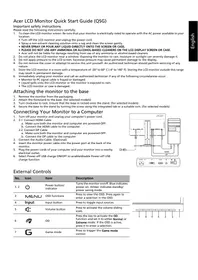
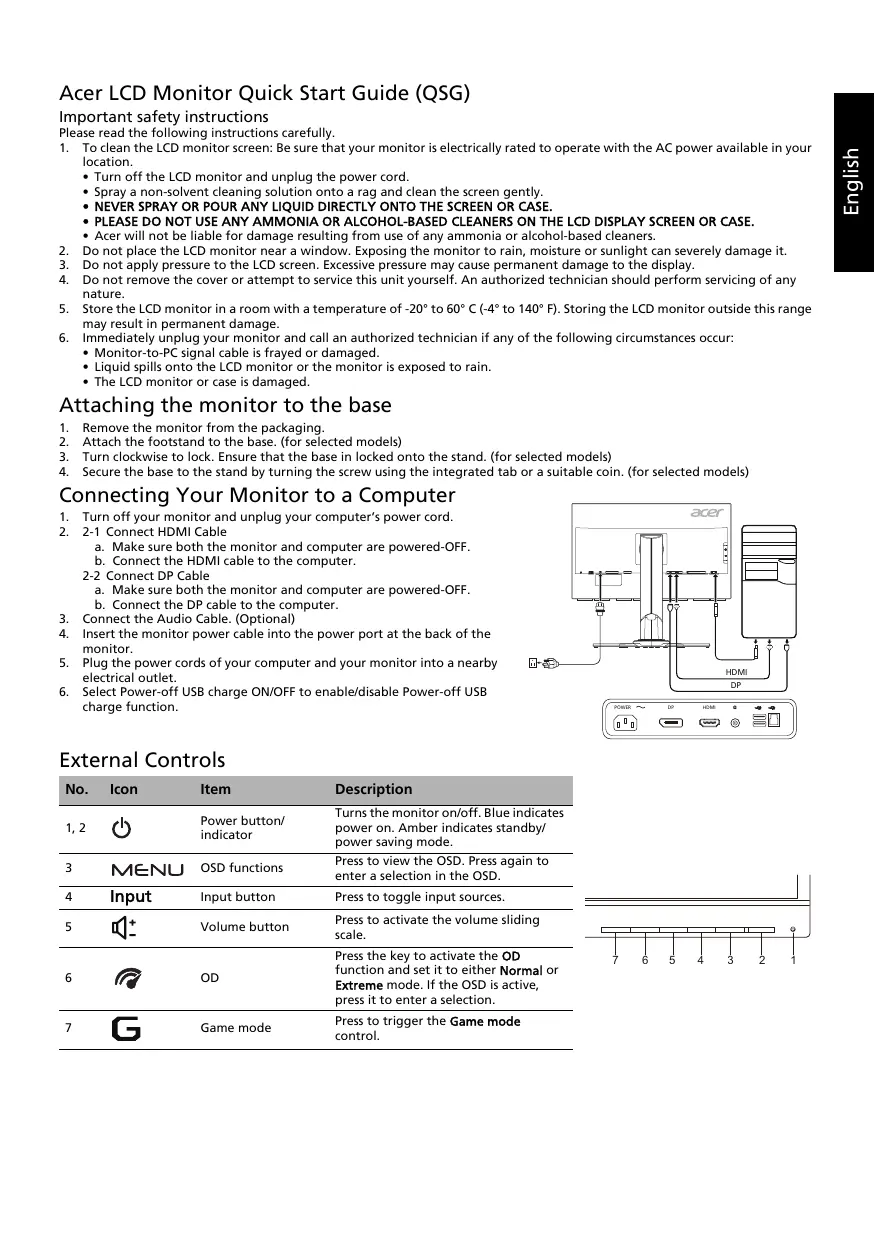
Acer LCD Monitor Quick Start Guide (QSG)
Important safety instructions
Please read the following instructions carefully.
- To clean the LCD monitor screen: Be sure that your monitor is electrically rated to operate with the AC power available in your location.
- Turn off the LCD monitor and unplug the power cord.
- Spray a non-solvent cleaning solution onto a rag and clean the screen gently.
- NEVER SPRAY OR POUR ANY LIQUID DIRECTLY ONTO THE SCREEN OR CASE.
- PLEASE DO NOT USE ANY AMMONIA OR ALCOHOL-BASED CLEANERS ON THE LCD DISPLAY SCREEN OR CASE.
- Acer will not be liable for damage resulting from use of any ammonia or alcohol-based cleaners.
- Do not place the LCD monitor near a window. Exposing the monitor to rain, moisture or sunlight can severely damage it.
- Do not apply pressure to the LCD screen. Excessive pressure may cause permanent damage to the display.
- Do not remove the cover or attempt to service this unit yourself. An authorized technician should perform servicing of any nature.
- Store the LCD monitor in a room with a temperature of -20°C to 60°C (-4°F to 140°F). Storing the LCD monitor outside this range may result in permanent damage.
- Immediately unplug your monitor and call an authorized technician if any of the following circumstances occur:
- Monitor-to-PC signal cable is frayed or damaged.
- Liquid spills onto the LCD monitor or the monitor is exposed to rain.
- The LCD monitor or case is damaged.
Attaching the monitor to the base
- Remove the monitor from the packaging.
- Attach the footstand to the base. (for selected models)
- Turn clockwise to lock. Ensure that the base is locked onto the stand. (for selected models)
- Secure the base to the stand by turning the screw using the integrated tab or a suitable coin. (for selected models)
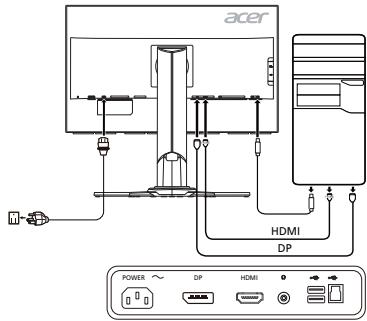
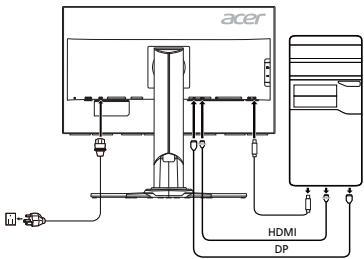
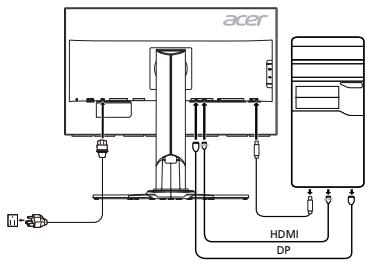
Connecting Your Monitor to a Computer
- Turn off your monitor and unplug your computer's power cord.
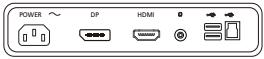
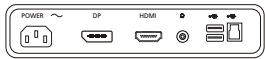
- 2-1 Connect HDMI Cable
a. Make sure both the monitor and computer are powered-OFF. b. Connect the HDMI cable to the computer.
2-2 Connect DP Cable a. Make sure both the monitor and computer are powered-OFF. b. Connect the DP cable to the computer.
- Connect the Audio Cable. (Optional)
- Insert the monitor power cable into the power port at the back of the monitor.
- Plug the power cords of your computer and your monitor into a nearby electrical outlet.
- Select Power-off USB charge ON/OFF to enable/disable Power-off USB charge function.
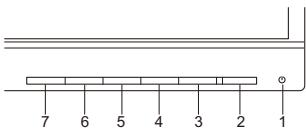
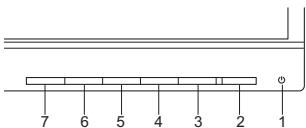
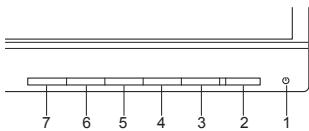
External Controls
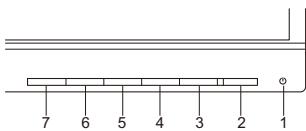
| No. | Icon | Item | Description |
| 1, 2 | ○ | Power button/indicator | Turns the monitor on/off. Blue indicates power on. Amber indicates standby/power saving mode. |
| 3 | MENU | OSD functions | Press to view the OSD. Press again to enter a selection in the OSD. |
| 4 | Input | Input button | Press to toggle input sources. |
| 5 | ○+ | Volume button | Press to activate the volume sliding scale. |
| 6 | ○ | OD | Press the key to activate the OD function and set it to either Normal or Extreme mode. If the OSD is active, press it to enter a selection. |
| 7 | ○ | Game mode | Press to trigger the Game mode control. |
Adjusting the OSD settings

NOTE: The following content is for general reference only. Actual product specifications may vary.
The OSD (on-screen display) can be used to adjust the settings of your LCD monitor. Press the MENU key to open the OSD. You can use the OSD to adjust the picture quality, OSD position and general settings. For advanced settings, please refer to the following pages:
Main page
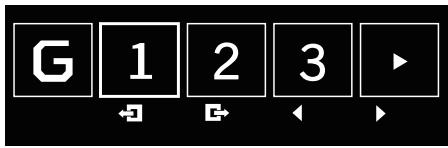
- Game mode
- OD (overdrive) options
- Volume
- Input selection
- Function menu
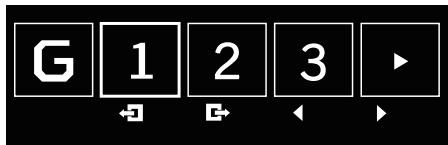
Turning Game mode on or off
Open the Game mode control and turn Game mode on or off using the arrows (OFF/ON), and select which user-defined profile to use (please see the OSD section for more information).
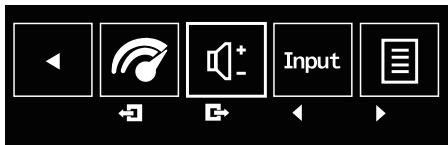
Adjusting the OD setting
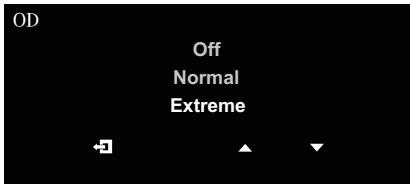
Open the OD control and select your preferred OD setting using the arrows. When you are done, use to go back one level.
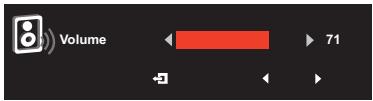
Adjusting the volume
Open the Volume control and set the Volume using the arrows. When you are done, use to go back one level.
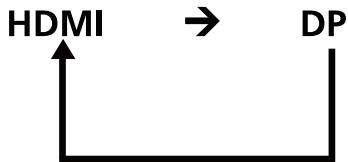
Selecting the input
Open the Input control and select HDMI or DP. When you are done, use to go back one level.
The Function page
Open the Function page to select Picture, Color, OSD or Setting functions, and adjust the settings which you want using the arrows. You can also view your monitor's system information from this page. When you are done, use to go back one level.
Picture
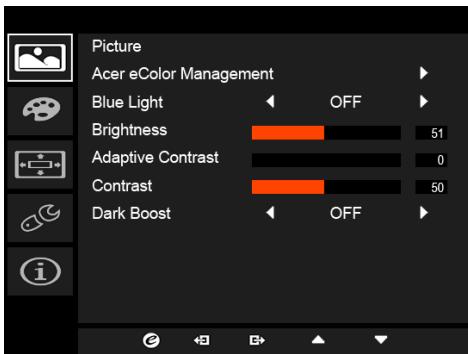
- Press the MENU key to open the OSD.
- Using the / keys, select Picture from the OSD. Then navigate to the picture element you wish to adjust.
- Use the / keys to adjust the sliding scales.
- The Picture menu can be used to adjust the Acer eColor, Brightness, Contrast, Blue Light, Dark boost and Adaptive contrast.
- Blue Light: Filters out blue light to protect your eyes by adjusting how much blue light is shown -- 80% , 70% , 60% , or 50% .

NOTE: Higher values allow more blue light through. For the best protection select a lower value.
- Brightness: Adjust the brightness from 0 to 100.

NOTE: Adjusts the balance between light and dark shades.
- Adaptive Contrast: This method usually increases the global contrast of many images, especially when the usable data of the image is represented by close contrast values. This allows for areas of lower local contrast to gain a higher contrast. The method is useful in images with backgrounds and foregrounds that are both bright or both dark. In particular, the method can lead to better views of bone structure in x-ray images, and to better detail in photographs that are over or under-exposed.
- Contrast: Adjust the contrast from 0 to 100.

NOTE: Sets the degree of difference between light and dark areas.
- Dark boost: This boosts the amplitude of the dark color levels of the display- blacks will be less black. The higher the level, the higher the boost.
Color
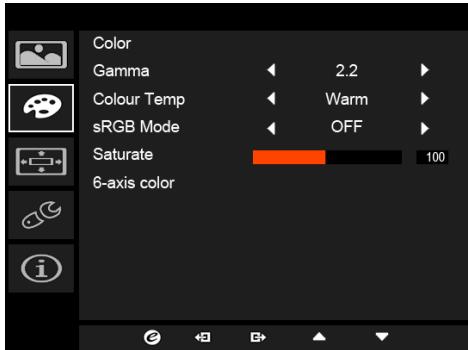
- Press the MENU key to open the OSD.
- Using the / keys, select Color from the OSD. Then navigate to the picture element you wish to adjust.
- Use the / keys to select the setting.
- Gamma mode allows you to adjust the luminance tone. The default value is 2.2 (standard value for Windows).
- Color temperature: Default is warm. You can choose Cool, Warm, Normal, Bluelight or User.
- Saturate: Color brightness can be changed by 0~200 adjustment.
- 6-axis color: The chroma of red, green, blue, cyan, yellow, and magenta can be independently adjusted from 0 to 155, changing the color quality of the image.
OSD
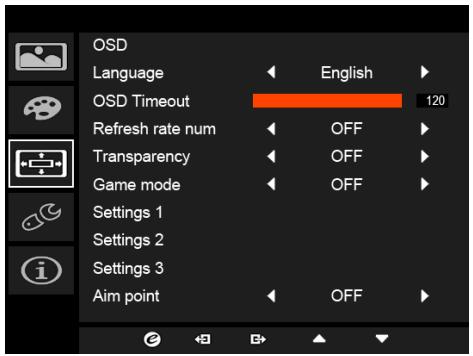
- Press the MENU key to open the OSD.
- Using the triangle/nabla keys, select OSD from the OSD. Then navigate to the setting you wish to change.
- Use the left/right keys to adjust any sliding scales.
- Language: Set the OSD menu language.
- OSD timeout: Adjust the delay before turning off the OSD menu.
- Refresh rate num: Display the panel's current refresh rate on the screen.
- Transparency: Select the transparency when using gaming mode. The transparency can be 0% (OFF), 20%, 40%, 60%, or 80%.
- Game mode: There are three user-defined profiles available. When you have decided what settings suit you, save them and the system will be able to recall the settings in the future when you turn on gaming mode and press 1, 2, or 3.
- Aim point: Show an aim point on the screen for shooting games.
Setting
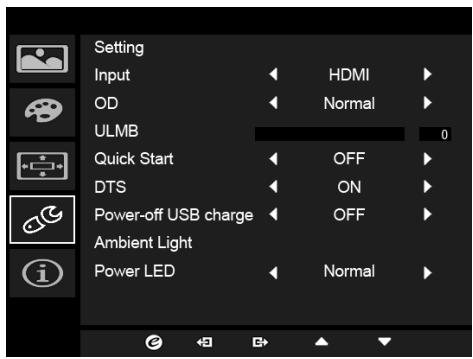
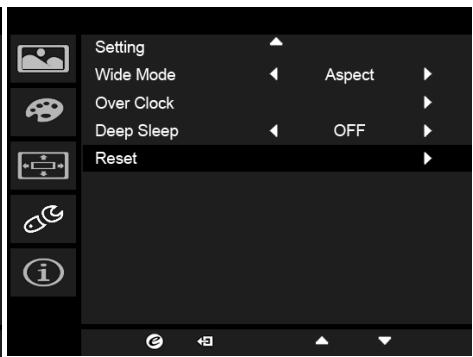
- The Setting menu can be used to select the screen menu language and other important settings, including input and OD level.
- Press the MENU key to open the OSD.
- Using the triangle/nabla keys, select Setting from the OSD. Then navigate to the setting you wish to adjust.
- Use the / keys to select the setting.
- Input: Select the source from DP In, HDMI.
- OD: Select Off, Normal, or Extreme.
- DTS (selective models): Turn DTS Sound On or Off. DTS Sound is stratified and creates a remarkable sonic flow.
- Power-off USB charge: Turn On or Off.
- Ambient light (selective models): Adjust the lighting effects, color, and style.
- Wide mode: You can select which screen aspect you are using. The options are Aspect and 1:1.
- Over Clock (selective models): The monitor can be overclocked (at the end user's risk) to a higher refresh rate than advertised by the panel specification. This function allows this behavior.
- After rebooting, use the NVIDIA Control Panel to set the maximum refresh rate. If nothing is displayed, disconnect the DisplayPort™ cable and use the monitor's on-screen display to select a default refresh rate.
- Reset: Resets the custom color settings to the factory defaults.
Product information
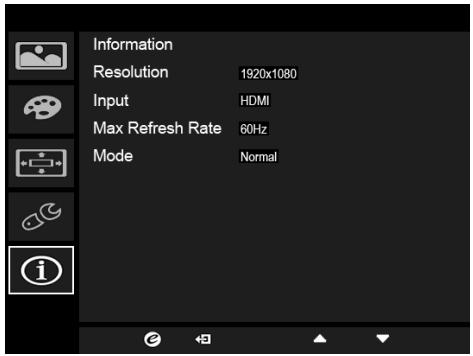
- Press the MENU key to open the OSD.
- Using the / keys, select Information to view the basic information for your monitor and current input.
Standard timing table
| Mode | Resolution | Remark | |
| 1 | 640 x 480 | 60 Hz | |
| 2 | 720 x 480 | 60 Hz | |
| 3 | 1280 x 720 | 60 Hz | |
| 4 | 720 x 576 | 50 Hz | |
| 5 | 1280 x 720 | 50 Hz | |
| 6 | 1920 x 1080 | 60 Hz | |
| 7 | 800 x 600 | 60 Hz | |
| 8 | 1024 x 768 | 60 Hz | |
| 9 | 3840 x 2160 | 24 Hz | |
| 10 | 3840 x 2160* | 60 Hz | default |
*Only for DP mode, not for HDMI mode.
Regulations and safety notices
FCC notice
This device has been tested and found to comply with the limits for a Class B digital device pursuant to Part 15 of the FCC rules. These limits are designed to provide reasonable protection against harmful interference in a residential installation. This device generates, uses, and can radiate radio frequency energy and, if not installed and used in accordance with the instructions, may cause harmful interference to radio communications.
However, there is no guarantee that interference will not occur in a particular installation. If this device does cause harmful interference to radio or television reception, which can be determined by turning the device off and on, the user is encouraged to try to correct the interference by one or more of the following measures:
Reorient or relocate the receiving antenna. - Increase the separation between the device and receiver. - Connect the device into an outlet on a circuit different from that to which the receiver is connected. - Consult the dealer or an experienced radio/television technician for help.
CE declaration of Conformity
Hereby, Acer Inc., declares that this LCD monitor is in compliance with the essential requirements and other relevant provisions of EMC Directive 2004/108/EC, Low Voltage Directive 2006/95/EC, and RoHS Directive 2011/65/EU and Directive 2009/125/EC with regard to establishing a framework for the setting of ecodesign requirements for energy-related product.
Notice:
In order to prevent damage to the monitor, do not lift the monitor by its base.
Notice: Shielded cables
All connections to other computing devices must be made using shielded cables to maintain compliance with EMC regulations.
Notice: Peripheral devices
Only peripherals (input/output devices, terminals, printers, etc.) certified to comply with the Class B limits may be attached to this equipment. Operation with non-certified peripherals is likely to result in interference to radio and TV reception.
Caution
Changes or modifications not expressly approved by the manufacturer could void the user authority, which is granted by the Federal Communications Commission, to operate this product.
Operation conditions
This device complies with Part 15 of the FCC Rules. Operation is subject to the following two conditions: (1) this device may not cause harmful interference, and (2) this device must accept any interference received, including interference that may cause undesired operation.
Notice: Canadian users
This Class B digital apparatus complies with Canadian ICES-003.
Disposal of Waste Equipment by Users in Private Household in the European Union

This symbol on the product or on its packaging indicates that this product must not be disposed of with your other household waste. Instead, it is your responsibility to dispose of your waste equipment by handing it over to a designated collection point for the recycling of waste electrical and electronic equipment. The separate collection and recycling of your waste equipment at the time of disposal will help to conserve natural resources and ensure that it is recycled in a manner that protects human health and the environment. For more information about where you can drop off your waste equipment for recycling, please contact your local city office, your household waste disposal service or the shop where you purchased the product.
SPECIFICATION
| LCD Panel | Driving System | TFT Color LCD |
| Size | 27"W (69 cm) | |
| Pixel Pitch | 0.1552 mm (H) x 0.1552 mm (V) | |
| Brightness | 300 cd/m2 (Typical) | |
| Contrast | 1000:1 | |
| Viewable Angle | 178° (H) 178° (V) (CR=10) | |
| Response Time | 4 ms (G to G) | |
| Panel Type | In-Plane Switching (IPS) | |
| Video | R, G, B Analog Interface | |
| H-Frequency | 31 kHz - 135 kHz | |
| V-Frequency | 24 - 75 Hz | |
| Display Colors | 1.07 billion | |
| Dot Clock | 594 MHz | |
| Maximum Resolution | 3840 x 2160 @ 60 Hz | |
| Plug & Play | VESA DDCCI/DDC2B | |
| Energy Efficiency Class | C | |
| *Annual Energy Consumption | 74 (kWh) (for HDMI-input Model) | |
| Power Consumption (at 200 nits) | On Mode | 71.5 W (Typical) |
| Sleep Mode | 0.42 W (Typical) | |
| Off Mode | 0.39 W (Typical) | |
| Input Connector | HDMI 19 pins DP 20 pins | |
| Input Video Signal | HDMI DP | |
| Speakers | 2 W x 2 (Only Audio-Input Model) (Optional) | |
| USB | USB 3.0 x 4 | |
| Maximum Screen Size | Horizontal: 596.16 mm Vertical: 335.34 mm | |
| Power Source | 100-240 V, 50/60 Hz | |
| Environmental Considerations | Operating Temp: 5° to 35°C Storage Temp: -20° to 60°C Operating Humidity: 10% to 85% | |
| Dimensions | 614.0 (W) x 401.4 ~ 551.4 (H) x 268.4 (D) mm | |
| Weight (N. W.) | 7.0 kg (net) | |
| Mechanism Specifications | Tilt: -5° to +35° (Only at the highest point can 35 degrees of recline be offered for the angle of elevation) Swivel: -30° to +30° Height adjustment: 0 mm to 150 mm Pivot: -90° to 90° Detachable foot stand: Yes (Detachable foot stand with screw release) | |
| External Controls | Switch/Buttons | Power Button Volume MENU/ENTER OD Input Game mode |
| Functions | Contrast Aim point Brightness OD 6-axis Saturate DTS (selective models) Color Temperature ULMB Blue Light Quick Start eColor Game mode Gamma Power-Off USB Charge Adaptive contrast Language Dark boost OSD Timeout sRGB Mode Input Signal Selection (only Dual input model) Saturate Display Information Refresh rate number Reset Transparency Exit | |
| All specifications are subject to change without notice. | ||
Find manuals and other documents for your Acer product on the official Acer support website.
*Annual energy consumption is calculated using the typical power consumption 4 hours per day, 365 days per year.
Acer LCD Monitor Quick Start Guide (QSG)
To avoid damaging the monitor, do not lift it by its base.
| 番号 | アイコン | アイテム | 説明 |
| 1、2 | 電源ボーニ/N インジロー | モニターをオローはります。青色は電源が 才上ごるとを示ります。才レncy色は、 StaIypan省電力モーネは示ります。 | |
| 3 | MENU | OSD 機能 | 押すと OSD が表示いたします。む一度押すと OSDの才予広を選択する这句话いたします。 |
| 4 | Input | 入力端子リフロー | 入力ソードを切り替补ます。 |
| 5 | + | 音量ローニン | 音量スライダをアクTIフにします。 |
| 6 | OD | This is the first time you've spoken in Korea. You're speaking to a Korean who speaks to you. You're speaking to a Korean who speaks to you. You're speaking to a Korean who speaks to you. You're speaking to a Korean who speaks to you. You're speaking to a Korean who speaks to you. You're speaking to a Korean who speaks to you. You're speaking to a Korean who speaks to you. You're speaking to a Korean who speaks to you. You're speaking to a Korean who speaks to you. You's speaking to a Korean who speaks to you. You're speaking to a Korean who speaks to you. You're speaking to a Korean who speaks to you. You're speaking to a Korean who speaks to you. You're speaking to a Korean who speaks to you. You're speaking to a Korean who speaks to you. You're speaking to a Korean who speaks to you. You're speaking to a Korean who speaks to you. You're speaking to a韩国語者請示。 You're speaking to a Korean语者請示。 You're speaking to a Korean语者請示。 You're speaking to a Korean语者請示。 You're speaking to a Korean语者請示。 You're speaking to a Korean语者請示。 You're speaking to a Korean语者請示。 You're speaking to a Korean语者請示。 You're speaking to a Korean语者請示。 You're speaking to a Korean语者請示。 You're speaking到此为止。 | |
| 7 | G | Gr-UMe-Id | Gr-UMe-IdCONTO-IL起動ります。 |
Regulatory and safety notices
FCC Notice
CE Declaration of Conformity
Hereby, Acer Inc., declares that this LCD monitor conforms to the essential requirements and other relevant provisions of the following directives: EMC Directive 2004/108/EC, Low Voltage Directive 2006/95/EC, and RoHS Directive 2011/65/EU, and Directive 2009/125/EC with regard to the establishment of a framework for the setting of ecodesign requirements for energy-related products.
Note:
To prevent damage to the monitor, do not lift it by the base.
Note: Shielded cables
All connections to other computing devices must be made using shielded cables to maintain compliance with EMC regulations.
Note: Peripheral devices
Only peripherals (input/output devices, terminals, printers, etc.) that are certified to comply with the Class B limits may be attached to this equipment. Operation with non-certified peripherals is likely to result in interference to radio and television reception.
Caution
Changes or modifications not expressly approved by the manufacturer could void the user's authority, which is granted by the Federal Communications Commission, to operate this product.
Safety Instructions
Read these instructions carefully. Save them for future reference.
- For LCD monitor: Do not place the monitor on unstable surfaces. Ensure that the monitor is properly installed according to the manufacturer's instructions.
- Disconnect the LCD monitor from the power outlet and refer servicing to qualified personnel if the power cord is damaged.
- Handle the device carefully. Do not place the device on unstable surfaces.
- Do not press or apply pressure directly to the screen or the cabinet. Do not use abrasive cleaners on the monitor or the plastic base. Any damage caused by improper use or cleaning will void the warranty.
- Do not place the LCD monitor near open windows. Exposure to wind, rain, or direct sunlight may cause damage.
- Do not apply pressure to the LCD screen. Excessive pressure may cause permanent damage to the display.
- Do not attempt to repair this device yourself. Qualified service personnel must perform all servicing.
- Store the LCD monitor in a place with temperatures between -20°C and 60°C (-4°F to 140°F). Storing the LCD monitor outside this range may cause permanent damage.
- If you notice any unusual behavior from the monitor, contact qualified service personnel to assess the situation.
- The signal cable from the monitor to the computer is damaged or broken.
- Spilling liquid on the LCD monitor or the monitor is exposed to moisture. The LCD monitor and the cabinet may be damaged.
Attaching the monitor to the base
- Remove the monitor from the packaging.
- Attach the stand to the base. (For selected models)
- Turn the screw clockwise to secure the stand. Make sure the base is securely attached to the stand. (For selected models)
- Secure the base to the stand by tightening the screw with a flat-head screwdriver or a suitable coin. (For selected models)
Connecting the monitor to the computer
Do not lift the monitor by its base.
Cable: Shielded cable
All cables used with this device must be shielded cables to comply with the electromagnetic compatibility (EMC) requirements.
Cable: Peripheral devices
Only peripherals (input/output devices, terminals, printers, etc.) that comply with the Class B requirements may be connected to this product. Operating unshielded peripheral devices may cause interference with radio and television reception.
Attention
Any modifications to this product that are not expressly approved by the manufacturer may void the user's authority to operate this equipment.
Operation
This device complies with Part 15 of the FCC Rules. Operation is subject to the following two conditions: (1) This device may not cause harmful interference, and (2) This device must accept any interference received, including interference that may cause undesired operation.
Cable: Canadian users
This digital device does not exceed the Class B limits for radio noise emissions from digital apparatus set out in the ICES-003 standard of Industry Canada.
Important safety instructions
| 1,2 | |||
| 3 | MENU | WEKAOSD | WEKAOSD OSD WEKAOSD NCSOOSD |
| 4 | Input | WEKAOSD | WEKAOSD OSD WEKAOSD NCSOOSD |
| 5 | + | WEKAOSD | WEKAOSD OSD WEKAOSD NCSOOSD |
| 6 | OD | WEKAOSD OSD WEKAOSD NCSOOSD | |
| 7 | G | WEKAOSD | WEKAOSD OSD WEKAOSD NCSOOSD |
FCC
i
Class B Canadian ICES-003
LCD
A. CD A. CD
1
HDMI 2-1 .2
HDMI
DP 2-2
().3
.5
| الإستعمال | الإستعمال | الإستعمال | الإستعمال |
| الإستعمال الحرفية الحرفية الحرفية الحرفية الحرفية الحرفية الحرفية الحرفية الحرفية الحرفية الحرفية الحرفية الحرفية الحرفية الحرفية الحرفية الحرفية الحرفية الحرفية الحرفية الحرفية الحرفية الحرفية الحرفية الحرفية الحرفية الحرفية الحرفية الحرفية الحرفية الحرفية الحرفية الحرفية الحرفية EXERCISES LE CANDIDATE OF THE EXERCISES OF THE EXERCISES OF THE EXERCISES OF THE EXERCISES OF THE EXERCISES OF THE EXERCISES OF THE EXERCISES OF THE EXERCISES OF THE EXERCISES OF THE EXERCISES OF THE EXERCISES OF THE EXERCISES OF THE EXERCISES OF THE EXERCISES OF THE EXERCISES OF THE EXERCISES OF THE EXERCISES OF THE EXERISES OF THE EXERCISES OF THE EXERCISES OF THE EXERCISES OF THE EXERCISES OF THE EXERCISES OF THE EXERCISES OF THE EXERCISES OF THE EXERCISES OF THE EXERCISES OF THE EXERCISES OF THE EXERCISES OF THE EXERCISES OF THE EXERCISES OF THE EXERCISES OF THE EXERCISES OF THE EXERCISES OF The ENGLISH PROJECI | الإستعمال | الإستعمال | الإستعمال |
| الإستعمال الحرفية الحرفية الحرفية الحرفية EXERCISES LE CANDIDATE OF THE EXERCISES OF THE EXERCISES OF THE EXERCISES OF THE EXERCISES OF THE EXERCISES OF THE EXERCISES OF THE EXERCISES OF THE EXERCISES OF THE EXERCISES OF THE EXERCISES OF THE EXERCISES OF THE EXERCISES OF THE EXERCISES | الإستعمال | الإستعمال | الإستUTION |
| الإستعمال الحرفية الحرفية الحرفية EXERCISES LE CANDIDATE OF THE EXERCISES OF THE EXERCISES OF THE EXERCISES OF THE EXERCISES OF THE EXERCISES OF THE EXERCISES OF THE EXERCISES OF THE EXERCISES OF THE EXERCISES OF THE EXERCISES OF THE EXERCISES OF THE EXERCISES OF THE EXERCISES OF THE EXERISES OF THE EXERCISES OF THE EXERCISES OF THE EXERISES OF THE EXERCISES OF THE EXERCISES OF THE EXERCISES OF THE EXERCISES OF THE EXERCISES OF THE EXERCISES OF THE EXERCISES OF THE EXERCISES OF THE EXERCISES OF THE EXERCISES OF THE EXERCISES OF THE EXERCISES OF THE EXERCISES OFTHE EXERCISES OF THE EXERCISES OF THE EXERCISES OF THE EXERCISES OF THE EXERCISES OF THE EXERCISES OF THE EXERCISES OF THE EXERCISES OF THE EXERCISES OF THE EXERCISES OF THE EXERCISES OF THE EXERCISES OF THE EXERCISES OF THE EXERCISES OF THE EXERCISES OF THE EXERCISES OF THE EXERCISE S | الإستUTION | الإستUTION | الإستUTION |
Declaration of Conformity
We,
Acer Incorporated
8F, 88, Sec. 1, Xintai 5th Rd., Xizhi, New Taipei City 221, Taiwan
Contact Person: Mr. RU Jan, e-mail:ru.jan@acer.com
And,
Acer Italy s.r.l
Via Lepetit, 40, 20020 Lainate (MI) Italy
Tel: +39-02-939-921, Fax: +39-02 9399-2913
www.acer.it
Declare under our own responsibility that the product:
Product: LCD Monitor
Trade Name: Acer
Model Number: XB271HK
SKU Number: XB271HK xxxxxx
x = 0 9 a Z A Z or blank)
To which this declaration refers conforms to the relevant standard or other standardizing documents:
EN55022:2010 Class B; EN55024:2010 EN 61000-3-2:2006+A1:2009+A2:2009, Class D EN61000-3-3:2008 EN60950-1:2006/A11:2009/A1:2010+A12:2011 Regulation (EC) No. 1275/ 2008; EN 50564:2011; IEC 62301:2011 EN50581:2012
We hereby declare above product is in compliance with the essential requirements and other relevant provisions of EMC Directive 2004/108/EC, Low Voltage Directive 2006/95/EC, and RoHS Directive 2011/65/EU and Directive 2009/125/EC with regard to establishing a framework for the setting of ecodesign requirements for energy-related product.
Year to begin affixing CE marking 2015.

RU Jan / Sr. Manager
Regulation, Acer Inc.
Sep. 10, 2015
Date
8F, 88, Sec. 1, Xintai 5th Rd., Xizhi, New Taipei City 221, Taiwan
Contact person: Mr. RU Jan, e-mail: ru.jan@acer.com
And,
Acer Italy s.r.l
Via Lepetit, 40, 20020 Lainate (MI) Italy
Tel: +39-02-939-921, Fax: +39-02 9399-2913
www.acer.it
8F, 88, Sec. 1, Xintai 5th Rd., Xizhi, New Taipei City 221, Taiwan
Contact person: Mr. RU Jan, e-mail: ru.jan@acer.com
And,
Acer Italy s.r.l
Via Lepetit, 40, 20020 Lainate (MI) Italy
Tel: +39-02-9399-2913
www.acer.it
RU Jan / Executive Director Regulatory, Acer Inc.
Sep. 10, 2015
Date
8F, 88, Sec. 1, Xintai 5th Rd., Xizhi, New Taipei City 221, Taiwan
Contact person: Mr. RU Jan, email: ru.jan@acer.com
And,
Acer Italy s.r.l
Via Lepetit, 40, 20020 Lainate (MI) Italy
Tel: +39-02-939-921, Fax: +39-02 9399-2913
www.acer.it
8F, 88, Sec. 1, Xintai 5th Rd., Xizhi, New Taipei City 221, Taiwan
Contact: Mr. RU Jan, e-mail: ru.jan@acer.com
E,
Acer Italy s.r.l
Via Lepetit, 40, 20020 Lainate (MI) Italy
Tel: +39-02-939-921, Fax: +39-02 9399-2913
www.acer.it
8F, 88, Sec. 1, Xintai 5th Rd., Xizhi, New Taipei City 221, Taiwan
Contact person: Mr. RU Jan, e-mail: ru.jan@acer.com
En,
Acer Italy s.r.l
Via Lepetit, 40, 20020 Lainate (MI) Italy
Tel: +39-02-9399-2913
www.acer.it
("x" = 0 9, a z, A Z or blue)
RU Jan / Sr. Manager Regulering, Acer Inc.
Sep. 10, 2015
Date
Declaration of Conformity
A.
Acer Incorporated
8F, 88, Sec. 1, Xintai 5th Rd., Xizhi, New Taipei City 221, Taiwan
Contact Person: Mr. RU Jan, e-mail: ru.jan@acer.com
Ea,
Acer Italy s.r.l
Via Lepetit, 40, 20020 Lainate (MI) Italy
Tel: +39-02-939-921, Fax: +39-02 9399-2913
www.acer.it
RU Jan / Sr. Manager
Regulation, Acer Inc.
Sep. 10, 2015
Date
ENERGY STAR®
Acer's ENERGY STAR qualified products save you money by reducing energy costs and help protect the environment without sacrificing features or performance. Acer is proud to offer our customers products with the ENERGY STAR mark.
What is ENERGY STAR?
Products that are ENERGY STAR qualified use less energy and prevent greenhouse gas emissions by meeting strict energy efficiency guidelines set by the U.S. Environmental Protection Agency. Acer is committed to offering products and services worldwide that help customers save money, conserve energy, and improve the quality of our environment. The more energy we can save through energy efficiency, the more we reduce greenhouse gases and the risks of climate change. More information is available at http://www.energystar.gov or http://www.energystar.gov/powermanagement
Acer ENERGY STAR qualified products:
- Produce less heat and reduce cooling loads, especially in warmer climates.
- Automatically go into "display sleep" and "computer sleep" mode after 15 and 30 minutes of inactivity, respectively.
- Wake the monitor when it is in Active Off mode by moving the mouse or pressing any keyboard key.
- Computers will save more than 80% energy at "sleep" mode. ENERGY STAR and the ENERGY STAR mark are registered U.S. marks.
Congratulations!
This product is TCO Certified – for Sustainable IT

TCO Certified is an international third-party sustainability certification for IT products. TCO Certified ensures that the manufacture, use, and recycling of IT products reflect environmental, social, and economic responsibility. Every TCO Certified product model is verified by an accredited independent test laboratory.
This product has been verified to meet all the criteria in TCO Certified, including:
Corporate Social Responsibility
Socially responsible production - working conditions and labor law in manufacturing country
Energy Efficiency
Energy efficiency of product and power supply. Energy Star compliant, where applicable.
Environmental Management System
Manufacturer must be certified according to either ISO 14001 or EMAS.
Minimization of Hazardous Substances
Limits on cadmium, mercury, lead & hexavalent chromium including requirements for mercury-free products, halogenated substances and hazardous flame retardants.
Design for Recycling
Coding of plastics for easy recycling. Limit on the number of different plastics used.
Product Lifetime, Product Take Back
Minimum one-year product warranty. Minimum three-year availability of spare parts. Product takeback.
Packaging
Limits on hazardous substances in product packaging. Packaging prepared for recycling.
Ergonomic, User-centered design
Visual ergonomics in products with a display. Adjustability for user comfort (displays, headsets).
Acoustic performance - protection against sound spikes (headsets) and fan noise (projectors, computers).
Ergonomically designed keyboard (notebooks)
Electrical Safety, minimal electro-magnetic Emissions
Third Party Testing
All certified product models have been tested in an independent, accredited laboratory.
A detailed criteria set is available for download at www.tcodevelopment.com, where you can also find a searchable database of all TCO Certified IT products.
TCO Development, the organization behind TCO Certified, has been an international driver in the field of Sustainable IT for 20 years. Criteria in TCO Certified are developed in collaboration with scientists, experts, users and manufacturers. Organizations around the world rely on TCO Certified as a tool to help them reach their sustainable IT goals. We are owned by TCO, a non-profit organization representing office workers. TCO Development is headquartered in Stockholm, Sweden, with regional presence in North America and Asia.
English
For customers who own the EPEAT registered-products 1 , Acer offers the following services at your costs 2 :
- Additional 3 years warranty
- For the product life extension 3 , through the use of compatible parts of after-market, or refurbished with equal or higher specification, we offer spare parts or replacement parts for 5 years after end of production
For those INSTITUTIONAL customers who own the EPEAT registered-products 1 , Acer offers following additional services at your costs 2 :
- Product take-back program of Notebooks, Desktops and Monitors
- Battery take-back program of Battery Pack of Notebooks
- Packaging take-back program for packaging which were shipped with EPEAT registered 1 Notebooks, Desktop and Monitor products
For more details of above services, please visit local Acer website
1 For EPEAT registered products, please visit http://www.epeat.net 2 Service availability and costs vary by country; for details, please refer to the local Acer website or contact local Acer representatives. 3 Service for product life extension is available in limited countries; please refer to the local Acer website or contact local Acer representatives for details. 4 Service for packaging take-back program is free of charge and available in limited countries; please refer to the local Acer website or contact local Acer representatives for details.
Traditional Chinese (for Taiwan)
Regulatory Compliance


www.lvt.com ID:1030005002
Barcode
MU.T4U00.001
4J.30J01.071 (xx)

- ACER LCD MONITOR QUICK START GUIDE (QSG)
- IMPORTANT SAFETY INSTRUCTIONS
- ATTACHING THE MONITOR TO THE BASE
- CONNECTING YOUR MONITOR TO A COMPUTER
- ADJUSTING THE OSD SETTINGS
- MAIN PAGE
- TURNING GAME MODE ON OR OFF
- ADJUSTING THE OD SETTING
- ADJUSTING THE VOLUME
- SELECTING THE INPUT
- THE FUNCTION PAGE
- PICTURE
- COLOR
- OSD
- SETTING
- PRODUCT INFORMATION
- STANDARD TIMING TABLE
- REGULATIONS AND SAFETY NOTICES
- FCC NOTICE
- CE DECLARATION OF CONFORMITY
- NOTICE
- NOTICE: SHIELDED CABLES
- NOTICE: PERIPHERAL DEVICES
- CAUTION
- OPERATION CONDITIONS
- NOTICE: CANADIAN USERS
- DISPOSAL OF WASTE EQUIPMENT BY USERS IN PRIVATE HOUSEHOLD IN THE EUROPEAN UNION
- REGULATORY AND SAFETY NOTICES
- NOTE
- NOTE: SHIELDED CABLES
- NOTE: PERIPHERAL DEVICES
- SAFETY INSTRUCTIONS
- CONNECTING THE MONITOR TO THE COMPUTER
- CABLE: SHIELDED CABLE
- CABLE: PERIPHERAL DEVICES
- ATTENTION
- OPERATION
- CABLE: CANADIAN USERS
- FCC
- I
- DECLARATION OF CONFORMITY
- ACER INCORPORATED
- ACER ITALY S.R.L
- ENERGY STAR®
- WHAT IS ENERGY STAR
- ACER ENERGY STAR QUALIFIED PRODUCTS
- CONGRATULATIONS
- THIS PRODUCT IS TCO CERTIFIED – FOR SUSTAINABLE IT
- CORPORATE SOCIAL RESPONSIBILITY
- ENERGY EFFICIENCY
- ENVIRONMENTAL MANAGEMENT SYSTEM
- MINIMIZATION OF HAZARDOUS SUBSTANCES
- DESIGN FOR RECYCLING
- PRODUCT LIFETIME, PRODUCT TAKE BACK
- PACKAGING
- ERGONOMIC, USER-CENTERED DESIGN
- ELECTRICAL SAFETY, MINIMAL ELECTRO-MAGNETIC EMISSIONS
- THIRD PARTY TESTING
- ENGLISH
- TRADITIONAL CHINESE (FOR TAIWAN)
Brand : ACER
Model : XB271HK
Category : Monitor