SGH2400BB Supreme - Iron GORENJE - Free user manual and instructions
Find the device manual for free SGH2400BB Supreme GORENJE in PDF.


| Product type | Steam generator iron (Steam station) |
| Model | SGH2400BB Supreme |
| Brand | Gorenje |
| Power consumption | 2400 W (estimated) |
| Water tank capacity | 1.5 L (estimated) |
| Water tank type | Detachable |
| Water type | Tap water (distilled recommended for hard water) |
| Steam technology | Optimal Temp (automatic temperature for all fabrics) |
| ECO mode | Yes (reduces steam output to save energy) |
| Safety auto-off | Yes, after 10 minutes of inactivity |
| Descaling system | Easy DeCalc knob for scale removal |
| Continuous steam | Yes (via steam trigger) |
| Steam boost | Yes (additional burst for stubborn creases) |
| Vertical ironing | Yes (for hanging fabrics) |
| Soleplate material | Stainless steel or ceramic (assumed) |
| Ready light indicator | Yes |
| Water tank empty indicator | Yes (flashing light) |
| Carry lock | Yes (iron locks onto base for storage) |
| Cord and hose storage | Integrated compartments |
| Weight | Approx. 4 kg (estimated) |
| Dimensions (approx.) | 30 x 25 x 35 cm (estimated) |
| Warranty | Refer to worldwide guarantee leaflet |
Frequently Asked Questions - SGH2400BB Supreme GORENJE
User questions about SGH2400BB Supreme GORENJE
0 question about this device. Answer the ones you know or ask your own.
Ask a new question about this device
Download the instructions for your Iron in PDF format for free! Find your manual SGH2400BB Supreme - GORENJE and take your electronic device back in hand. On this page are published all the documents necessary for the use of your device. SGH2400BB Supreme by GORENJE.
USER MANUAL SGH2400BB Supreme GORENJE
natural_image
Exterior view of a Gopmei steam iron with blue and white casing (no visible text or symbols)SGH2400BB SUPREME
| Parna likalna postaja | Navodila za uporabo | SI |
| Parna postaja za glačenje | Upute za uporabu | BIH HR |
| Parna stanica za peglanje | Uputstvo za upotrebu | BIH SRB MNE |
| Парен генератор | Упатства за употреба | MK |
| Steam Generator | Instruction manual | GB |
| Dampfbügelstation | Gebrauchsanweisung | D |
| Ютия с парогенератор | Инструкции за употреба | BG |
| Parní generátor | Návod na použití | CS |
| Parný generátor | Návod na obsluhu | SK |
| Gőzállomás | Használati utasítás | H |
| Stacja pary | Instrukcja obsługi | PL |
| Generator de aburi | Manual de utilizare | RO |
| ПАРОГЕНЕРАТОР | ництрукція з експлуатаціїл | UA |
| Утюг с парогенератором | Инструкция по эксплуатации | RUS |
| Dampstation | Brugsanvisning | DK |
| Dampgenerator | Bruksanvisning | NO |
| Ånggenerator | Bruksanvisning | SV |
| Höyrysilitysasema | Käyttöohje | FI |
| Parna likalna postaja | SI | 2 |
| Parna postaja za glačenje | BIH HR | 14 |
| Parna stanica za peglanje | BIH SRB MNE | 26 |
| Парен генератор | MK | 38 |
| Steam Generator | GB | 48 |
| Dampfbügelstation | D | 58 |
| Ютия с парогенератор | BG | 71 |
| Parní generátor | CS | 84 |
| Parný generátor | SK | 94 |
| Gőzállomás | H | 106 |
| Stacja pary | PL | 117 |
| Generator de aburi | RO | 130 |
| ПАРОГЕНЕРАТОР | UA | 141 |
| Утюг с парогенератором | RUS | 153 |
| Dampstation | DK | 162 |
| Dampgenerator | NO | 173 |
| Ånggenerator | SV | 184 |
| Höyrysilitysasema | FI | 194 |
Splošni opis
natural_image
Illustration of a hand using a device to interact with a blue device, showing motion lines and no text or symbols.- Potisnite rezervoar za vodo nazaj v parno likalno postajo, dokler se slišno ne zaskoči na svoje mesto.
natural_image
Illustration of a hand holding a padlock with a blue arrow indicating left motion (no text or symbols)- Pritisnite gumb za odklepanje, da odklenete likalnik s podstavka.
natural_image
Illustration of a hand using a power iron to clean or brush the air, with a blue arrow indicating the motion (no text or symbols present)natural_image
Illustration of a hand using a power iron to press down a pipe, with a blue arrow indicating the motion (no text or symbols present)Navpično likanje
natural_image
Illustration of a person using an iron on a bed, with a blue checkmark indicating the correct position (no text or symbols present)Odlaganje likalnika med likanjem
natural_image
Line drawing of a hair iron with a power button symbol (no text or labels)natural_image
Illustration of a hand pouring liquid into a blue bag on a table (no text or symbols)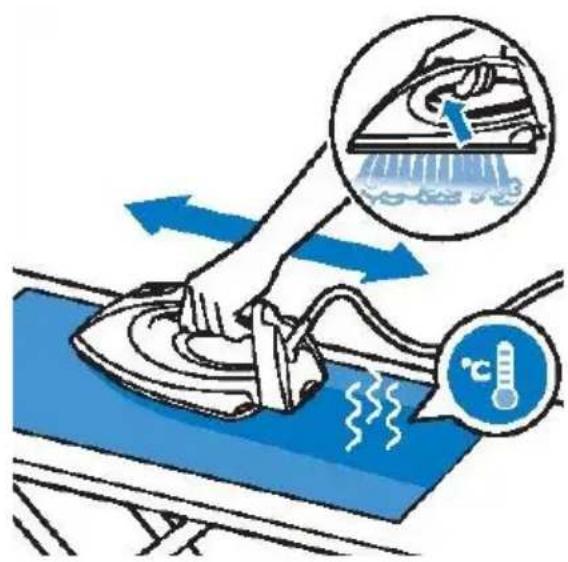
natural_image
Diagram of a car seatbelt mechanism with blue arrows indicating movement or force (no text or symbols present)Shranjevanje
Opći opis
- Dovodna cijev glačala (cijev za paru)
- Oslonac za odlaganje glačala
- Drška glačala
- Priključni kabel s utikačem
- Signalna lampica za prazan spremnik vode
- Gumb za uključenje/isključenje s ECO načinom
- Signalna lampica za jednostavno uklanjanje kamenca
- Nosač priključnog kabela
- Gumb za jednostavno uklanjanje kamenca
- Pokazivač razine vode
- Odstranjiv spremnik za vodu
- Gumb za otključavanje
- Signalna lampica za pripremljenost glačala
- Radna ploča za glačanje
- Obrub glačala
- Otvor za dolijevanje vode
- Vodilica gumba za paru
- Gumb za paru
- Signalna lampica za temperaturu
- Gumb za temperaturu glačala
Priprema za uporabu
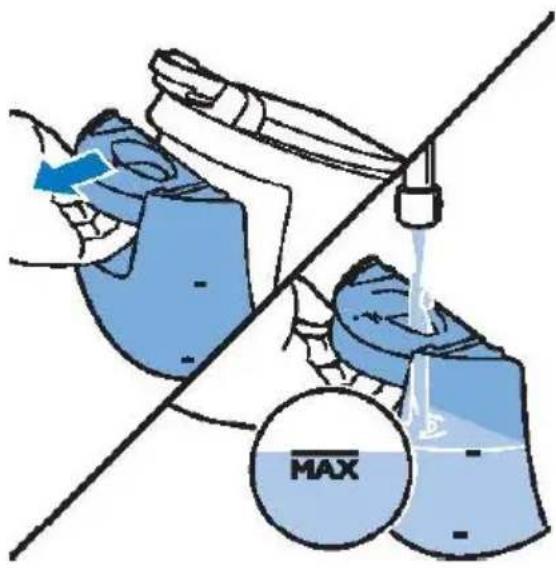
PUNJENJE UKLONJIVOG SPREMNIKA ZA VODU
natural_image
Illustration of a hand cleaning a car with a blue arrow indicating the process (no text or symbols present)Tehnologija optimalne temperature Ova parna postaja za glačanje opremljena je tehnologijom Optimal Temp (tehnologija optimalne temperature) koja vam omogućuje glačanje svih vrsta vlakana a da pri tome nije potrebno mijenjati podešene postavke temperature glačala ili podešenost pare.
Tkanine s ovim simbolima pogodne su za glačanje, primjerice lan, pamuk, poliester, svila, vuna, viskoza, i rayon.
VAŽNO: Prije početka glačanja pročitajte oznake na listiću s uputama za održavanje na odjeći, i pridržavajte se uputa proizvođača u vezi glačanja. Ove su upute često prikazane simbolima.
Glačanje
- Parnu postaju za glačanje postavite na stabilnu i ravnu podlogu.
- Provjerite ima li u spremniku dovoljno vode (pogledati poglavlje Punjenje uklonjivog spremnika za vodu).
- Stavite utikač u uzemljenu utičnicu i pritisnite gumb za uključenje/isključenje (6), čime uključujete parnu postaju za glačanje.
Signalna lampica za pripremljenost glačala (19) započne bljeskati, što znači da se parna postaja zagrijava. To će potrajati približno 2 minute.
Kada lampica za pripremljenost glačala zasvijetli konstantno, parna postaja za glačanje spremna je za uporabu.
natural_image
Illustration of a hand holding a padlock with a blue arrow indicating left motion (no text or symbols)- Pritisnite gumb za otključavanje, čime otpuštate glačalo sa postolja.
natural_image
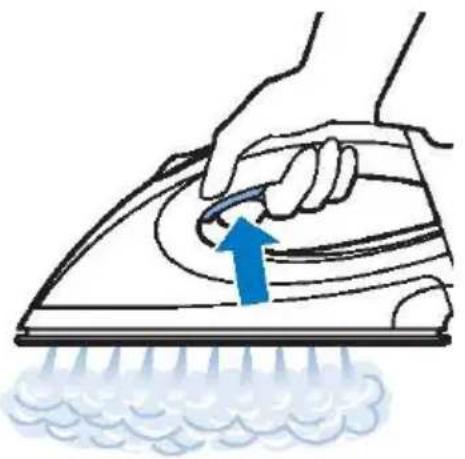
Illustration of a hand using a power iron to clean or brush the power of a surface, with a blue arrow indicating the motion (no text or symbols present)- Za početak glačanja pritisnite i držite pritisnut gumb za paru.
Kada glačalo pomičete preko tkanine, gumb za paru držite čitavo vrijeme pritisnut.
Funkcija intenzivnog ispuštanja pare
natural_image
Illustration of a hand using a power tool to clean or smoke from a surface, with no text or symbols present.natural_image
Illustration of a person using an iron on a bed, with a blue checkmark indicating the correct position (no text or symbols present)natural_image
Line drawing of a hair iron with a power button icon (no text or symbols)natural_image
Illustration of a hand pouring liquid into a blue industrial machine (no text or symbols)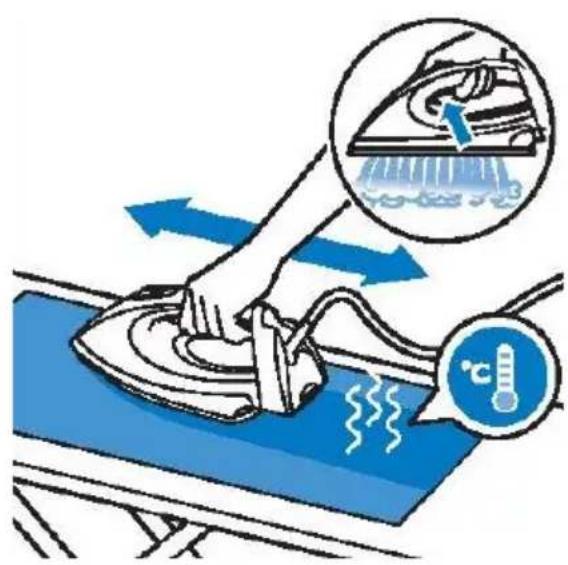
Čišćenje radne ploče za glačanje
Radnu ploču za glačanje redovito čistite da s nje odstranite mrlje.
Da bi sačuvali dobro klizanje radne ploče za glačanje, preporučujemo da je redovito čistite (jednom na 2 mjeseca). To možete učiniti tako da glačalo zagrijete, i radnu ploču pomičete preko vlažne tkanine.
natural_image
Diagram of a car seatbelt mechanism with blue arrows indicating movement or force (no text or symbols present)Spremanje
- Isključite parnu postaju za glačanje i iskopčajte je iz električne mreže.
- Odstranite spremnik s vodom i ispraznite ga.
- Glačalo stavite na postolje i pritisnite tipku za zaključavanje, čime pričvrstite odnosno zaključate glačalo na postolje.
- Smotajte dovodnu cijev glačala i priključni kabel. Spremite ih u za to namijenjen pretinac.
- Aparat možete prenositi jednom rukom, držeći ga za dršku glačala.
Opšti opis
- Dovodno crevo pegle (crevo za paru)
- Oslonac za odlaganje pegle
- Drška pegle
- Priključni kabl s utikačem
- Signalna lampica za prazan rezervoar vode
- Dugme za uključenje/isključenje sa ECO načinom
- Signalna lampica za jednostavno uklanjanje kamenca
- Nosač priključnog kabla
- Dugme za jednostavno uklanjanje kamenca
- Indikator nivoa vode
- Uklonjiv rezervoar za vodu
- Dugme za otključavanje
- Signalna lampica za pripremljenost pegle
- Radna ploča za peglanje
- Obrub pegle
- Otvor za sipanje vode
- Vodilica dugmeta za paru
- Dugme za paru
- Signalna lampica za temperaturu
- Dugme za temperaturu pegle
Priprema za upotrebu
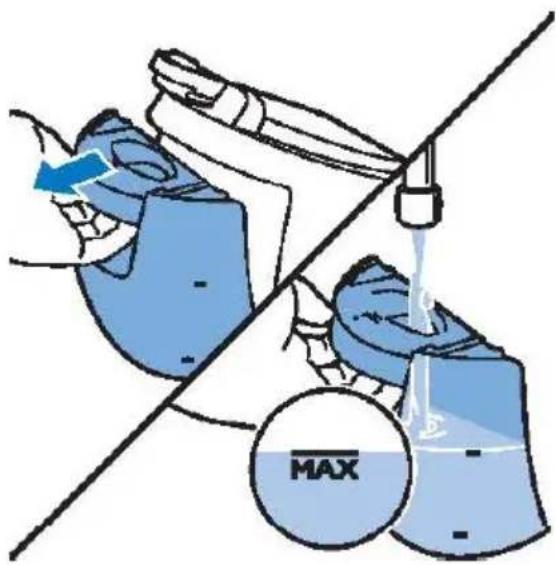
PUNJENJE UKLONJIVOG REZERVOARA ZA VODU
natural_image
Illustration of a hand cleaning a car with a blue arrow indicating the process (no text or symbols present)- Rezervoar za vodu gurnite nazad u parnu stanicu za peglanje, da čujno škljocne i sedne na svoje mesto.
Signalna lampica za prazan rezervoar vode
Kada je rezervoar za vodu skoro prazan, upali se signalna lampica za prazan rezervoar. Izvadite rezervoar i napunite ga vodom.
Rezervoar s vodom ponovno vratite na svoje mesto. Kada se lampica za prazan rezervoar vode ugasi, pegla će ponovno započeti da se zagreva i priprema za rad.
Rukovanje aparatom
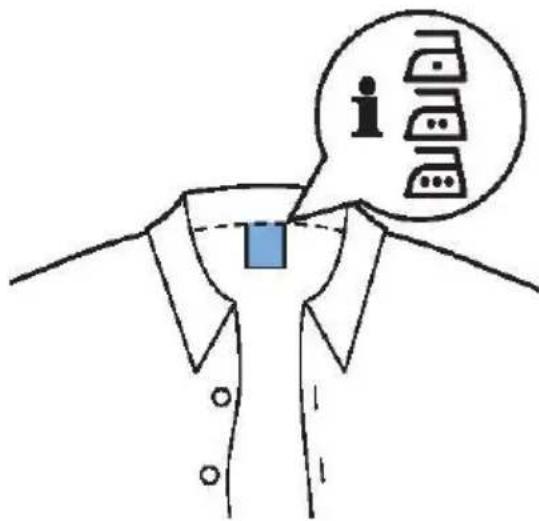
Tehnologija optimalne temperature Ova parna stanica za peglanje opremljena je tehnologijom Optimal Temp (tehnologija optimalne temperature) koja vam omogućuje peglanje svih vrsta vlakana a da pri tome nema potrebe da menjate već podešene postavke temperature pegle ili podešenost pare.
Tkanine s ovim simbolima primerene su za peglanje, kao na primer lan, pamuk, poliester, svila, vuna, viskoza, i rayon.
VAŽNO: Pre početka peglanja pročitajte oznake na cedulji s uputstvima za održavanje na odeći, i pridržavajte se uputstava proizvođača u vezi peglanja. Ova su uputstva često prikazana simbolima.
Peglanje
natural_image
Illustration of a hand holding a padlock with a blue arrow indicating left motion (no text or symbols)- Pritisnite dugme za otključavanje, čime otpuštate peglu sa postolja (oslonca).
natural_image
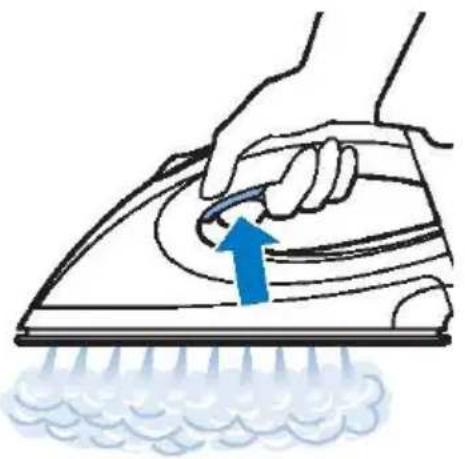
Illustration of a hand using a power iron to clean or brush the power of a surface, with a blue arrow indicating the motion (no text or symbols present)- Za početak peglanja pritisnite i držite pritisnuto dugme za paru.
Kada peglu pomerate preko tkanine, dugme za paru držite celo vreme pritisnuto.
Funkcija intenzivnog ispuštanja pare
Za ravnanje tvrdokornih nabora aparat raspolaže sa dve funkcije intenzivnog ispuštanja pare.
-
Pritisnite dugme za paru za jednokratan, naročito intenzivan mlaz ispuštanja pare.
-
Za neprekidan intenzivan mlaz pare dvaput na brzinu pritisnite dugme za ispuštanje pare. U tom slučaju dugme za paru nije potrebno držati neprekidno pritisnuto, zato je peglanje udobnije.
Vertikalno peglanje
natural_image
Illustration of a hand using a power tool to clean or exhaust air from a machine, with no text or symbols present.Peglu možete koristiti i u vertikalnom položaju, za ravnanje nabora sa visećih tkanina.
Peglu držite uspravno, pritisnite na dugme za paru i radnom pločom za peglanje lagano dodirnite tkaninu.
natural_image
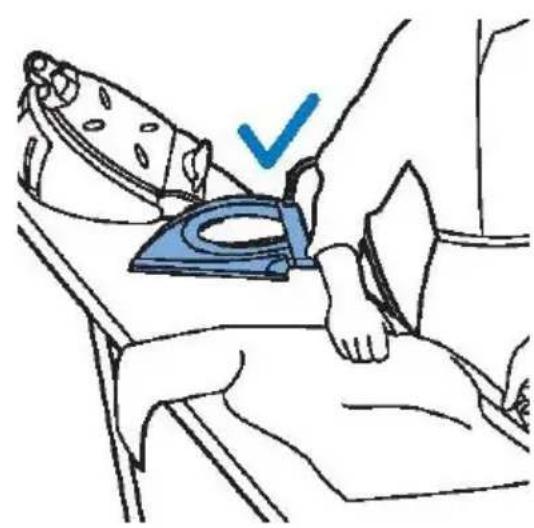
Illustration of a person using an iron on a bed, with a blue checkmark indicating the correct position (no text or symbols present)Odlaganje pegle tokom peglanja
Tokom peglanja peglu možete staviti bilo na njeno postolje (oslonac), bilo horizontalno na dasku za peglanje. Ako je na pegli izabrana funkcija optimalne temperature (Optimal Temp), radna ploča za peglanje neće oštetiti prevlaku daske za peglanje.
natural_image
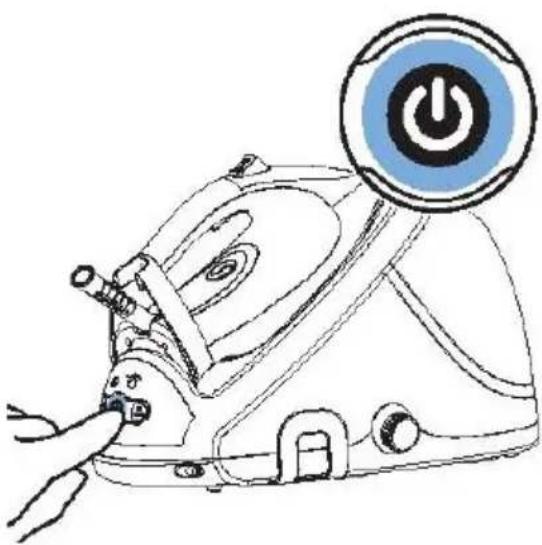
Line drawing of a hair iron with a power button symbol (no text or labels)Da bi vašoj parnoj stanici za peglanje omogućili što duži životni vek, veoma je važno da odmah nakon što se upali lampica za jednostavno uklanjanje kamenca, uradite i postupak za uklanjanje kamenca.
Signalna lampica za jednostavno uklanjanje kamenca počne da pulsira nakon ukupno 8 časova rada, i opominje vas da morate iz parne stanice za peglanje odstraniti kamenac. Kamenac uklanjate po sledećem postupku.
parna stanica za peglanje još vruća! U unutrašnjosti parne stanice je visoki pritisak i postoji opasnost od povreda!
- Pritiskom na dugme za uključenje/isključenje isključujete rad parne stanice, a zatim izvucite utikač iz utičnice.
- Pričekajte da se parna stanica do kraja ohladi.
- Skinite rezervoar za vodu sa parne stanice.
- Parnu stanicu za peglanje stavite na stabilan sto, a dugme za jednostavno uklanjanje kamenca neka bude okrenuto nadole i neka gleda preko ivice stola. Druga mogućnost je da parnu stanicu za peglanje držite iznad sudopera odnosno umivaonika.
VAŽNO: Ako iz parne stanice, nakon što ste obrnuli dugme u suprotnom smeru od kazaljki na satu, započne izlaziti para, parna stanica nije se još dovoljno ohladila.
Smesta ponovno zatvorite dugme tako da ga obrnete u smeru kazaljki na satu, i pričekajte da se parna stanica potpuno ohladi!
natural_image
Illustration of a hand pouring liquid into a blue bag on a table (no text or symbols)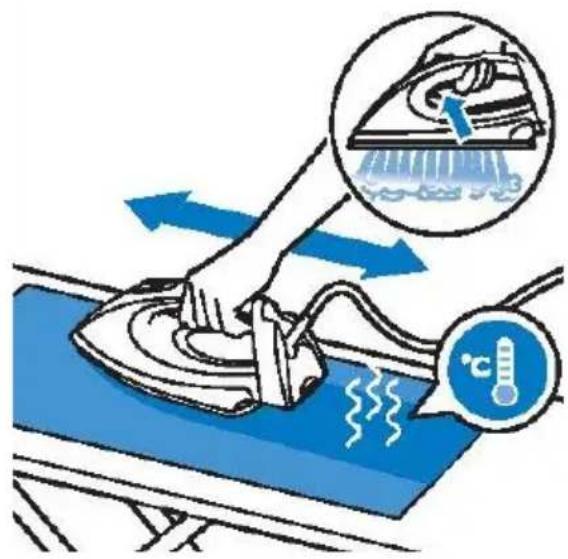
natural_image
Diagram of a car seatbelt mechanism with blue arrows indicating movement or force (no text or symbols present)Spremanje
- Isključite parnu stanicu za peglanje i izvucite utikač iz električne mreže.
- Odstranite rezervoar s vodom i ispraznite ga.
- Peglu stavite na postolje i pritisnite tipku za zaključavanje, čime ćete učvrstiti odnosno zaključati peglu na njen oslonac (postolje).
- Smotajte dovodno crevo pegle i priključni kabl. Spremite ih u za to namenjen pretinac.
- Aparat možete prenositi jednom rukom, držeći ga za dršku pegle.
natural_image
Illustration of a hand cleaning a blue object with spray and motion lines (no text or symbols)Fabrics with these symbols are ironable, for example, linen, cotton, polyester, silk, wool, viscose and rayon.
Steam boost функциja
natural_image
Illustration of a hand using a tool to clean or exhaust air from a surface, with a blue arrow indicating the process (no text or symbols present)Вертикално пеглање
natural_image
Illustration of a person lying in bed with a blue iron on their back, no text or symbols presentnatural_image
Line drawing of a hairless machine with a power button icon (no text or symbols)Чистење и одржување
natural_image
Illustration of a hand pouring liquid into a blue bag on a table (no text or symbols)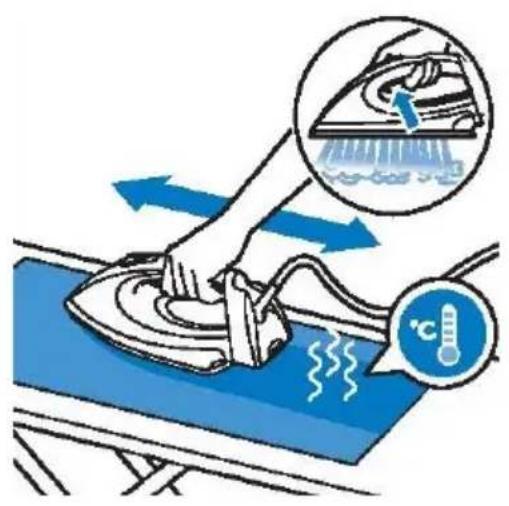
natural_image
Diagram of a car interior showing hand positioning and blue directional arrows indicating movement or force (no text or symbols)For your safety, please read the instructions carefully before using the appliance for the first time. Save the instructions for future reference.
The appliance is designed for domestic use and may only be operated in accordance with these instructions for use.
The appliance generates hot steam. Always handle with care and warn other users of potential danger.
DO'S
- Check if the mains voltage stated on the rating plate corresponds to the local electricity supply.
-
Unwind and straighten the power cord and steam hose before use.
-
Place the appliance on a firm and steady surface.
-
The iron must be used and rested on a stable surface.
-
Make sure the power cord or steam hose do not touch the soleplate.
-
Unplug the power cord from the socket before filling the water tank with water.
-
Keep the granules away from children at all times.
-
Keep electrical appliances out of reach of children or infirm persons. Do not let them use the appliances without supervision.
-
Ensure the base is placed on a stable surface before placing the iron on it.
-
If the power cord or steam hose are damaged, have them replaced by the manufacturer, a service agent or a similarly qualified person, in order to avoid hazard.
-
Empty the water tank after use.
-
Do not allow children to play with the appliance.
-
This appliance may be used by children aged 8 years and above, and by persons with reduced physical, sensory or mental capabilities or lack of experience and knowledge, if they are supervised or if they have been instructed on how to use the appliance in a safe way, and if they understand the hazards involved.
-
Keep the iron and its cord out of reach of children less than 8 years of age when it is energized or cooling down.
DO NOT'S
-
Do not allow children to touch the appliance when ironing.
-
Do not leave the appliance unattended when it is connected to a mains supply outlet.
-
Do not use an extension power cord unless a competent authority has approved it.
-
Do not add perfumed water, vinegar or other chemicals into the water tank as they can seriously damage the appliance.
-
Do not immerse the appliance in water or any other liquid.
-
Do not use the appliance when it is damaged or performs abnormally.
-
Do not use the iron if it has been dropped, if there are visible signs of damage on it, or if it is leaking.
-
Do not touch the iron rest during or just after ironing. It is hot!
-
Do not roll the power cord or steam hose around the iron unit or base for storage until the appliance has cooled down completely.
-
Do not attempt to open the cabinet or disassemble any parts from the appliance. There are no serviceable parts inside.
-
Do not open the water inlet cover during use. Instructions for safe refilling of the water tank are provided in this manual.
-
Do not allow children to perform cleaning and user maintenance tasks without supervision.
Do not touch the surfaces marked with symbol ▲ during or just after ironing. They are hot!
GET TO KNOW YOUR STEAM S TATION General description
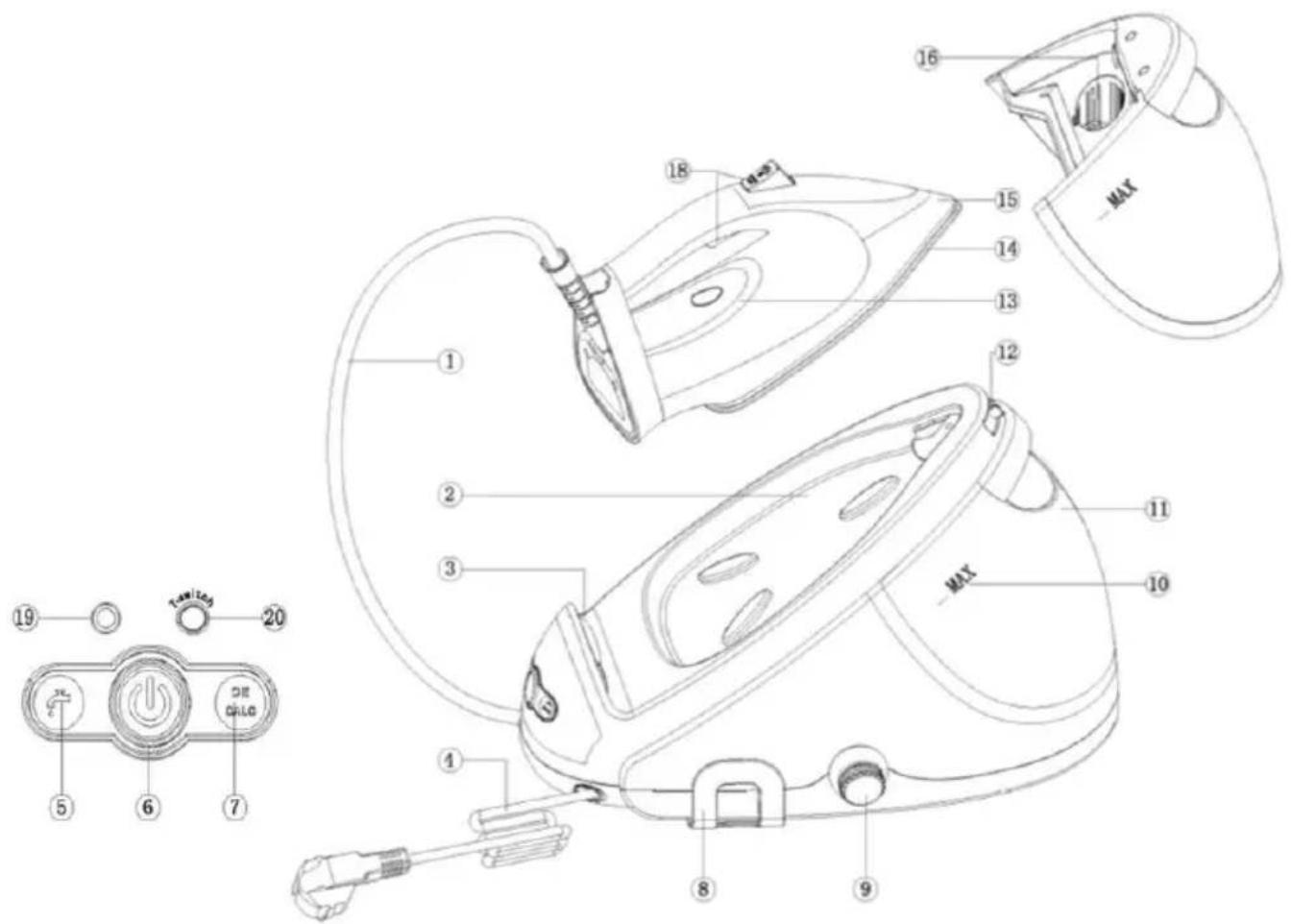
- Steam supply hose
- Iron platform
- Iron support
- Mains cord with plug
- Water tank empty light
- On/Off button with ECO mode
- Easy DECALC light
- Cord support bracket
- Easy DECALC knob
- Water level indication
- Detachable water tank
- Carry lock release button
- Iron ready light
- Soleplate
- Skirt
- Filling hole
- Steam boost button
- Steam button
- Temperature indicator light
- Iron temperature switch button
Preparing for use
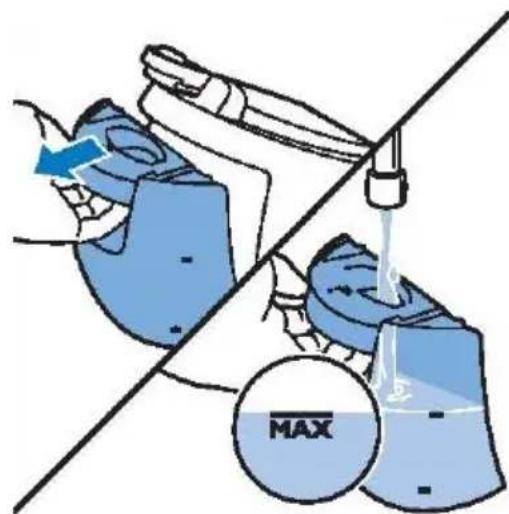
Filling the detachable water tank
Do not add hot water, perfume, vinegar, starch, descaling agents, ironing aids or other chemicals in the water tank.
Fill the detachable water tank with water as soon as the water tank empty light flashes.
- Remove the detachable water tank from the steam generator and fill the water tank with water.
Warning: Your appliance has been designed for use with tap water.
If you live in an area with hard water (over 7dH), scale and minerals build up will occur sooner. In such case, the use of distilled water is recommended to prolong the life of your appliance.
Appliance malfunctions associated with scale and minerals build up are not subject to warranty repairs or claims.
natural_image
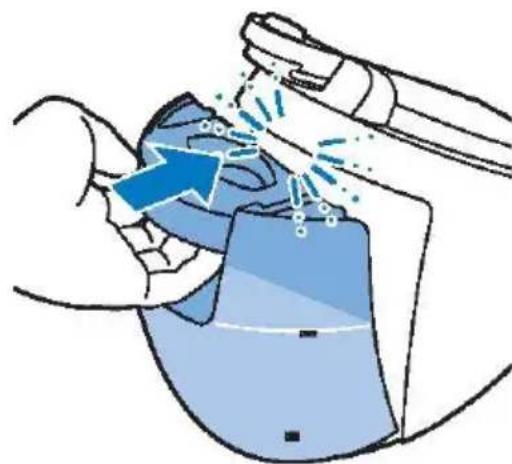
Illustration of a hand using a tool to interact with a device, showing motion lines and a blue arrow (no text or symbols)2.Slide the water tank back into the steam generator until it clicks into place.
Water tank empty light
When the water tank is almost empty, the water tank empty light goes on.
Pull the water tank out and fill the water tank.
Replace the water tank and when the water tank empty light goes off, the iron will continue to heat up for use.
Using the appliance
Optimal Temp technology
This steam generator is equipped with the Optimal Temp Technology that enables you to iron all types of ironable fabrics without adjusting the iron temperature or steam setting.
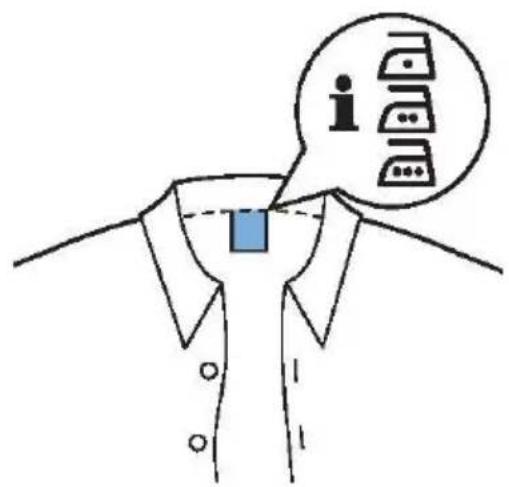
Fabrics with these symbols are ironable, for example, linen, cotton, polyester, silk, wool, viscose and rayon.
IMPORTANT: Before you start ironing, please read the garment labels and follow the
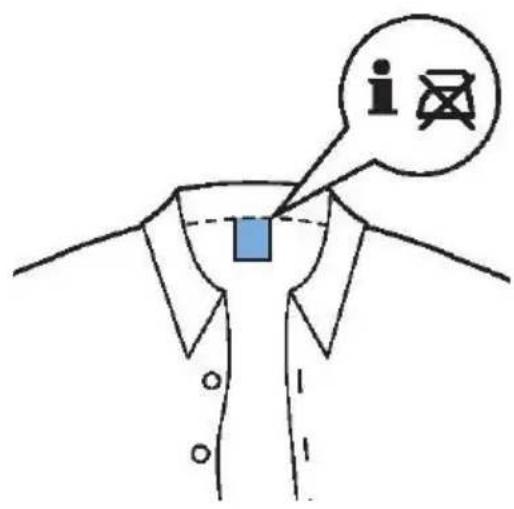
manufacturer's ironing instructions that are often indicated by symbols.
If you are not sure about what fabric your garment is made of, start ironing at a low temperature (Optimal Temp).
Do not iron non-ironable fabrics!
Fabrics with this symbol are not ironable.
These fabrics include synthetic fabric such as Spandex, elastane or polyolefins.
Ironing
- Place the steam generator on a stable and even surface.
- Make sure that there is enough water in the water tank (see section Filling the detachable water tank.
- Connect the mains plug to an earthed wall socket and press the On/Off button (pos. 6) to switch on the steam generator.
The iron ready light (pos. 19) starts to flash to indicate that the steam generator is heating up. This takes approx. 2 minutes.
When the iron ready light is continuously lit, the steam generator is ready for use.
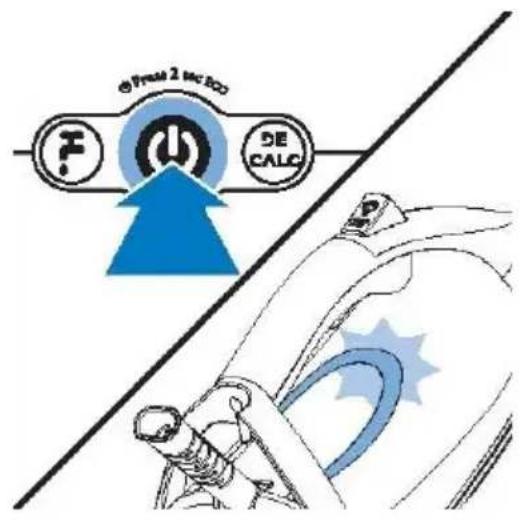
Iron soleplate temperature is on Level 1; the blue signal light (pos. 19) is continuously lit. If you require a higher temperature of iron soleplate, press the button T (pos. 20) for Level 2, and green color light lights (pos19).
-
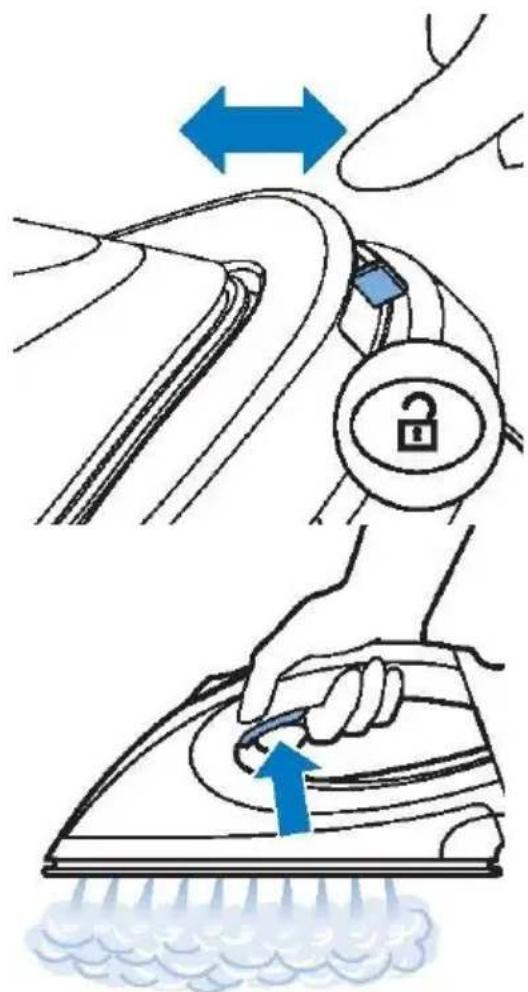
Press the carry lock release button to unlock the iron from the iron platform.
-
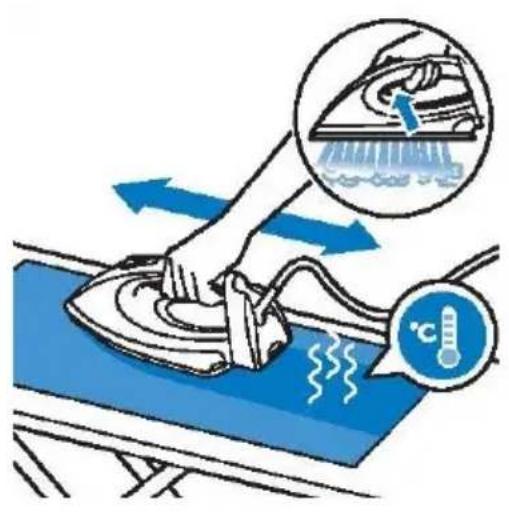
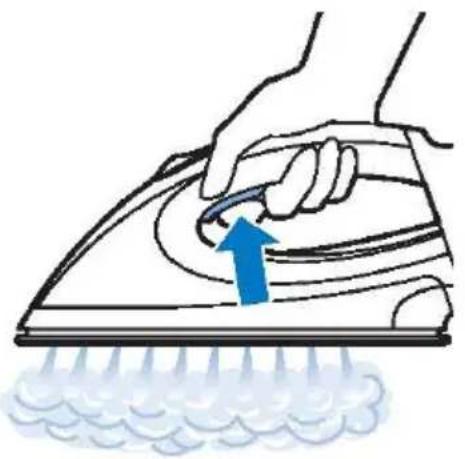
Pres and hold the steam trigger to start ironing.
Keep the steam trigger constantly pressed when you move the iron over the fabric.
IMPORTANT: Never direct steam at people!
Steam boost function
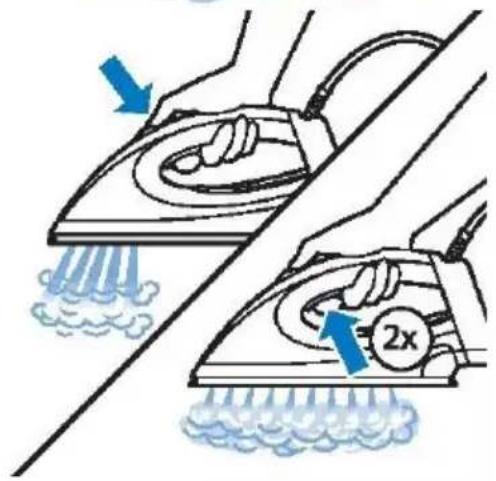
There are two steam boost functions for removing stubborn creases.
- Press the steam boost button for extra strong steam output.
- Press the steam trigger twice quickly for a continuous high steam output.
In this case, you do not have to hold the steam trigger continuously, which affords a more comfortable ironing experience.
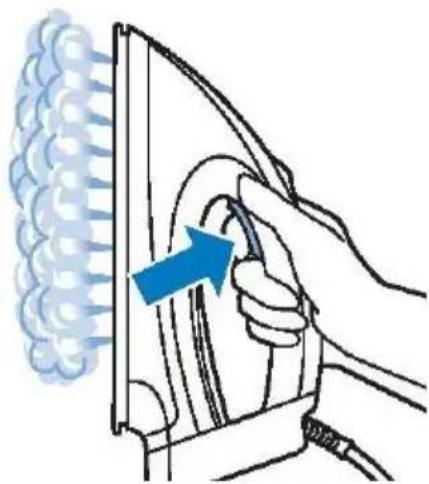
Vertical ironing
Hot steam is emitted from the iron.
natural_image
Illustration of a hand using a power tool to clean or exhaust air, with a blue arrow indicating the process (no text or symbols present)IMPORTANT: Never attempt to remove creases from a garment that someone is wearing!
Do not apply steam near your or someone else's hands!
You can use the iron in a vertical position to remove winkles from hanging fabrics.
Hold the iron in a vertical position, press the steam trigger and touch the garment lightly with the soleplate.
natural_image
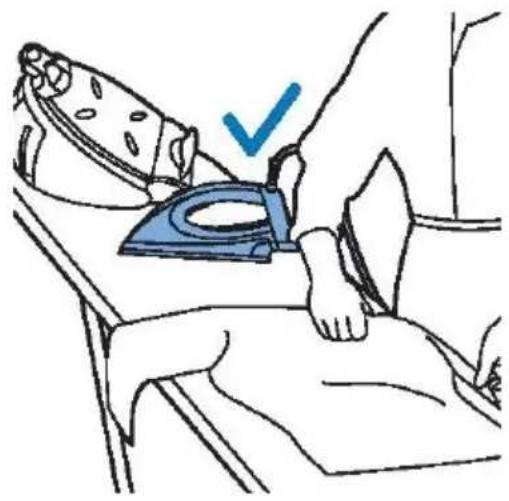
Illustration of a person using a blue iron on a bed, with a checkmark indicating the correct position (no text or symbols present)Putting down the iron during ironing
During ironing, you can place the iron either on the iron platform or horizontally on the ironing board. If your iron is set to Optimal Temp, the soleplate will not damage the ironing board cover.
natural_image
Line drawing of a hairless machine with a power button icon (no text or symbols)Energy saving / Safety Auto-off
ECO mode
If the ECO mode is activated, the amount of steam is reduced to save energy without compromising on the ironing result.
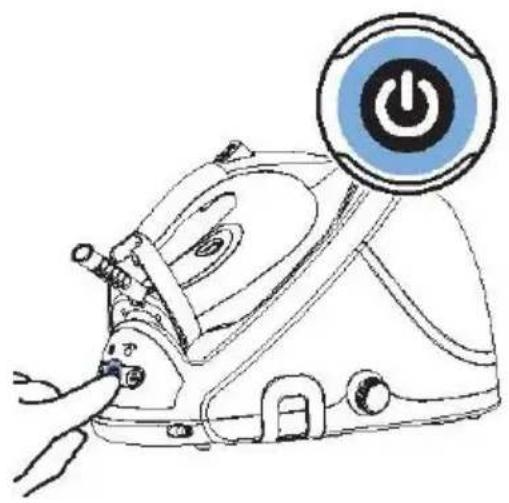
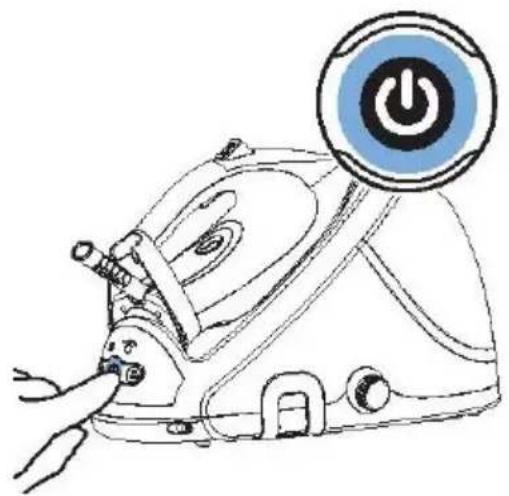
- To activate the ECO mode, press and hold the On/Off button for 2 seconds. The light turns from blue to green.
- To switch back to the Optimal Temp setting, switch the steam generator off and on again.
Safety Auto-off
The Safety Auto-off function automatically switches off the appliance if it has not been used for 10 minutes, to save energy.
Cleaning and maintenance
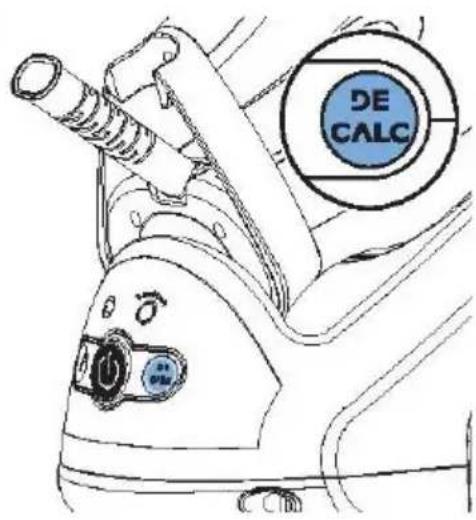
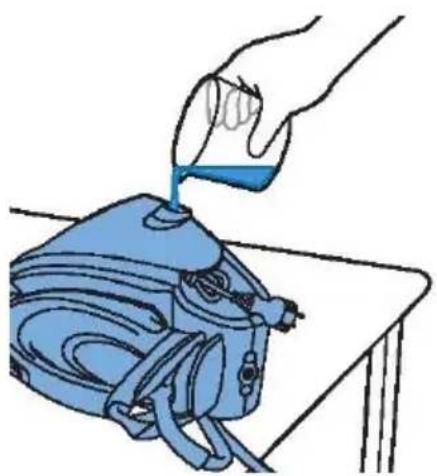
To ensure a long life for you steam generator, it is very important that you perform the descaling procedure when the EASY DECALC light starts to flash.
The Easy DeCalc light starts flashing after a total of 8 working hours to indicate that the steam generator need to be descaled. To descale the steam generator, perform the steps below.
IMPORTANT: Never remove the EASY DECALC knob when the steam generator is
natural_image
Illustration of a hand pouring liquid into a blue bag on a table (no text or symbols)hot! There is high pressure of steam in the boiler and it can hurt you!
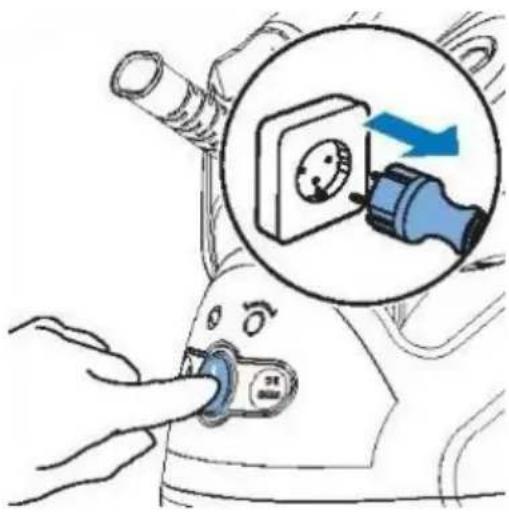
- Press the on/off button to switch off the steam generator and remove the plug from the wall socket.
- Wait until the steam generator cools down completely!
- Remove the water tank from the steam generator.
- Place the steam generator onto a stable table with the EASY DECALC knob pointing down and projecting beyond the edge of the table; alternatively, take the steam generator to a sink.
IMPORTANT: If the steam starts to emerge when you turn the knob anti-clockwise, this is an indication that the steam generator is not cooled enough. In such case, immediately tighten the knob back in the clockwise direction and wait until the generator cools down completely!
- Hold a cup under the EASY DECALC knob. Turn the EASY DECALC knob anti-clockwise and let the water with scale particles flow into the cup.
When no more water comes out of the steam generator, replace the EASY DECALC knob. Turn the knob clockwise to fasten it.
You can now prepare the steam generator for use again.
Cleaning the soleplate
Clean the soleplate regularly to remove stains from the soleplate.
To maintain smooth gliding of your soleplate, it is recommended to clean it regularly (once every 2 months). You can do so by heating up the iron and moving the soleplate over a moist fabric. Descaling the soleplate: if you do not descale your steam generator regularly, scale may build up upon the soleplate. To remove the scales, follow the instructions below:
-
Descale the steam generator before cleaning the soleplate (see EASY DECALC of steam generator).
-
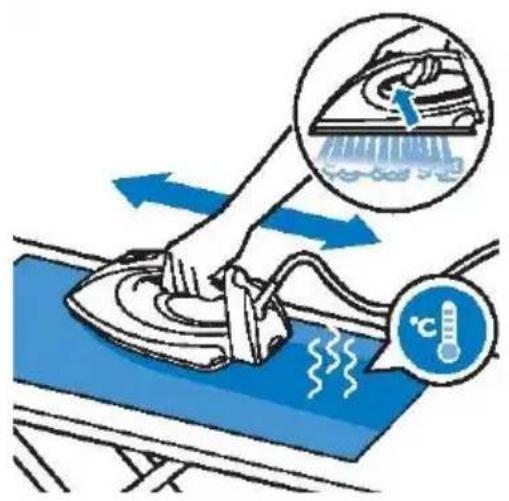
Tilt the steam generator and pour 500 ml distilled water into the opening. Reinsert the
natural_image
Diagram showing car interior components with blue arrows indicating movement or force (no text or symbols)EASY DECALC knob and turn the knob clockwise to fasten it.
- Press the on/off button and wait for 5 minutes.
-
Put a piece of thick cloth on your ironing board. Place your iron on the cloth, then press and hold the steam trigger. While keeping the steam trigger pressed, slowly move the iron back and forth across the cloth until no more water comes out from the soleplate or until steam starts to come out of it. Hot dirty water comes out of the soleplate.
-
Switch off the steam generator and let it cool down for 2 hours.
-
Remove the EASY DECALC knob and let the water flow into a cup. Reinsert the EASY DECALC knob and turn the knob clockwise to fasten it.
-
Repeat steps 2 to 6 of this cleaning procedure.
Storage
- Switch off the steam generator and unplug it.
- Remove the water tank and empty it.
- Put the iron on the iron platform and push the carry lock to lock the iron onto the platform.
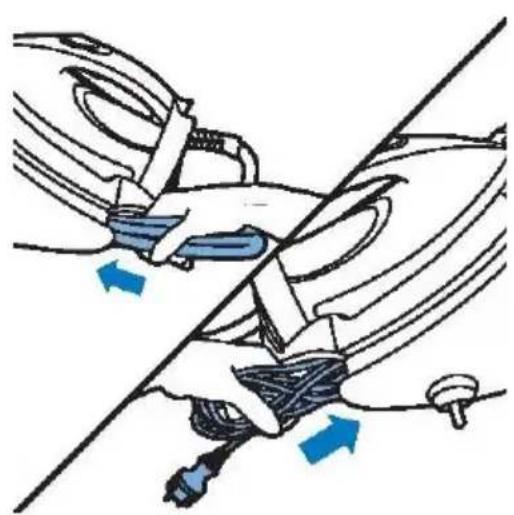
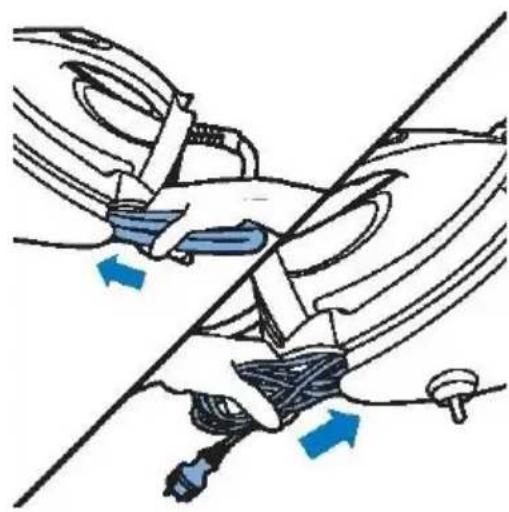
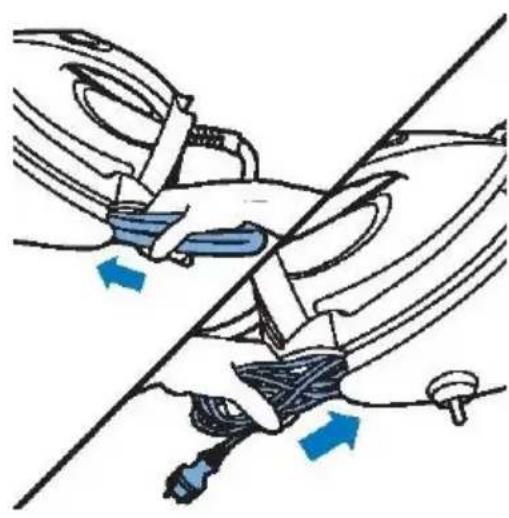
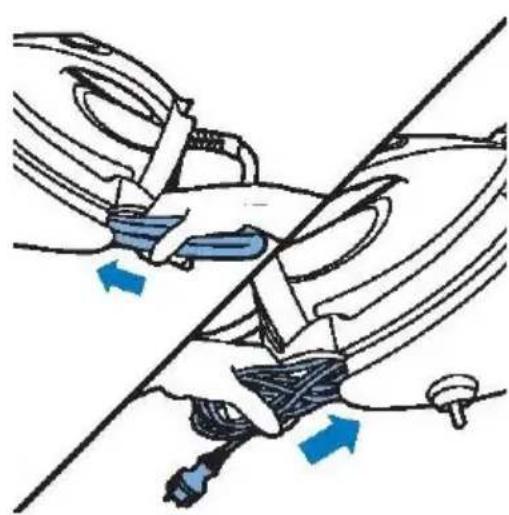
- Fold the supply hose and the mains cord. Put them in their respective storage compartments.
- You can carry the appliance with one hand by the handle of the iron.
Do not carry the appliance by holding the water tank release lever.
| PROBLEM | POSSIBLE CAUSE | SOLUTION |
| The ironing board cover becomes wet. | Steam has condensed on the ironing board cover after a long session. | Replace the ironing board cover if the foam material has worn out. You can also add an extra layer of material under the ironing board cover to prevent condensation on the ironing board. |
| Water droplets come out of the soleplate. | The steam that was still present in the hose has cooled down and condensed into water. | Point the iron away from the garment and let it produce steam for few seconds. |
| Steam and or water come out from under the EASY DECALC knob. | The EASY DECALC knob is not tightened properly. | Switch off the appliance and wait for two hours for the steam generator to cool down. Unscrew the EASY DECALC knob and reattach it properly. Note: When you remove the EASY DECALC knob, water comes out of the steam generator. If steam continues to escape, switch off the appliance and contact an authorised service centre. |
| Dirty water and impurities come out of the soleplate. | Impurities or chemicals present in the water have deposited in the steam vents and/or on the soleplate. | Descale the steam generator regularly. See section Cleaning the soleplate. |
| Too much scale and minerals have accumulated inside the steam generator. | Descale the steam generator regularly. See section Cleaning and maintenance. | |
| The iron leaves a shine or an imprint on the garment. | The surface to be ironed was uneven, for instance because you were ironing over a seam or a fold in the garment. | The shine or imprint is not permanent and will come off when you wash the garment. Avoid ironing over seams or folds, or place a cotton cloth over the area to be ironed to avoid imprints. |
| The steam generator does not produce any steam. | There is not enough water in the water tank (the water tank empty light flashes). | Fill the water tank and press the steam trigger to let the appliance heat up again. When the ironing light is lit continuously, you can continue with steam ironing. |
| The steam generator is not hot enough to produce steam. | Wait until the ironing light is lit continuously. | |
| You did not press the steam trigger. | Press the steam trigger and keep it pressed while you iron. | |
| The water tank is not placed properly in the steam generator. | Slide the water tank firmly back into the steam generator. | |
| The steam generator produces a | Water is pumped into the boiler inside the steam | If the pumping sound continues nonstop, switch off the steam generator and |
| pumping sound. | generator. This is normal. | remove the plug from the wall socket. Contact an authorised service centre. |
| The steam generator produces a loud pumping sound intermittently. | There is not enough water in the water tank (the water tank empty light flashes). | Fill the water tank and press the steam trigger to let the appliance heat up again. When the iron ready light is lit continuously, you can continue with steam ironing. |
Environment
Do not throw away the appliance with the normal household waste at the end of its life, but hand it in at an official collection point for recycling. By doing this, you help to preserve the environment.
Guarantee & service
If you need information or if you have a problem, please contact the Gorenje Customer Care Centre in your country (you find its phone number in the worldwide guarantee leaflet). If there is no Customer Care Centre in your country, go to your local Gorenje dealer or contact the Service department of Gorenje domestic appliances.
For personal use only!
GORENJE
WISHES YOU A LOT OF PLEASURE WHEN USING YOUR APPLIANCE
We reserve the right to any modifications!
Dampfbügelstation D
Gebrauchsanleitung
WICHTIG
Beschreibung
natural_image
Illustration of a hand cleaning a car with a blue arrow indicating the process (no text or symbols present)Bügeln
natural_image
Illustration of a hand holding a padlock with a blue arrow indicating bidirectional movement (no text or symbols)natural_image
Illustration of a hand using a power iron to clean or press air, with a blue arrow indicating the motion (no text or symbols present)natural_image
Illustration of a hand using a power iron to press down a fan, with a blue arrow indicating the motion (no text or symbols present)natural_image
Illustration of a person using an iron on a bed, with a blue checkmark indicating the correct position (no text or symbols present)natural_image
Line drawing of a hair iron with a power button icon (no text or symbols)natural_image
Illustration of a hand pouring liquid into a blue bag on a table (no text or symbols)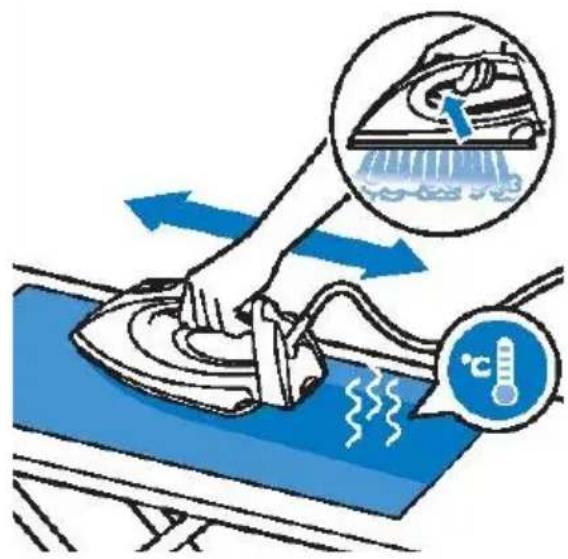
natural_image
Diagram of a car seatbelt mechanism with blue arrows indicating movement or force (no text or symbols present)natural_image
Illustration of a hand cleaning a garment with blue fabric and a tool, no text or symbols presentnatural_image
Illustration of a hand using a tool to clean or smoke from a wall-mounted device (no text or symbols)Вертикално гладене
natural_image
Illustration of a person lying in bed with a blue iron on their back, marked with a checkmark (no text or symbols present)natural_image
Line drawing of a steam iron with a power button and lever, no text or symbols presentnatural_image
Illustration of a hand pouring liquid into a blue washing machine on a table (no text or symbols)natural_image
Diagram showing car wheel assembly with blue arrows indicating movement or force (no text or symbols)natural_image
Illustration of a hand using a tool to interact with a device, showing motion lines and a blue arrow (no text or symbols)Žehlení
natural_image
Illustration of a hand using a tool to clean or exhaust air, with a blue arrow indicating the process (no text or symbols present)natural_image
Illustration of a person lying down with a blue iron on their back, marked with a checkmark (no text or symbols present)natural_image
Line drawing of a hair iron with a power button icon (no text or symbols)natural_image
Illustration of a hand pouring liquid into a blue washing machine on a table (no text or symbols)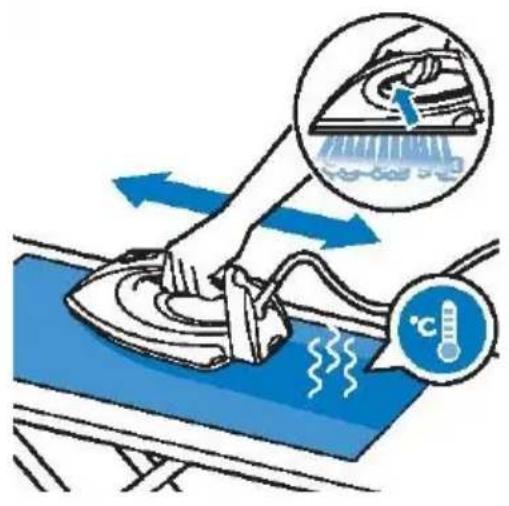
natural_image
Diagram showing car interior components with blue arrows indicating movement or force (no text or symbols present)- Hadica na prívod pary
- Plošina na žehličku
- Podpera žehličky
- Siet'ový kábel so zástrčkou
- Kontrolka prázdnej nádržky na vodu
- Tlačidlo zapnutia/vypnutia s režimom EKO
- Kontrolka l'ahkého odvápnenia DECALC
- Držiak na podporu kábla
- Otočný gombík l'ahkého odvápnenia DECALC
- Označenie úrovne vody
- Odnímatel'ná nádržka na vodu
- Tlačidlo uvoľnenia uzamknutia podpery
- Kontrolka pripravenosti žehličky
- Žehliaca plocha
- Obruba
- Plniaci otvor
- Tlačidlo na zvýšenie tlaku pary
- Tlačidlo naparovania
- Svetelný indikátor teploty
- Prepínač teploty žehličky
natural_image
Illustration of a hand using a tool to interact with a device, showing blue spray and motion lines (no text or symbols)Použitie spotrebiča
Žehlenie
natural_image
Illustration of a hand using a tool to clean or exhaust air from a surface, with a blue arrow indicating the process (no text or symbols present)Vertikálne žehlenie
natural_image
Illustration of a person lying in bed using an iron on a chair, with a blue checkmark indicating the correct position (no text or symbols present)Odloženie žehličky počas žehlenia
natural_image
Line drawing of a hairdryer with a power button icon (no text or symbols)natural_image
Illustration of a hand pouring liquid into a blue bag on a table (no text or symbols)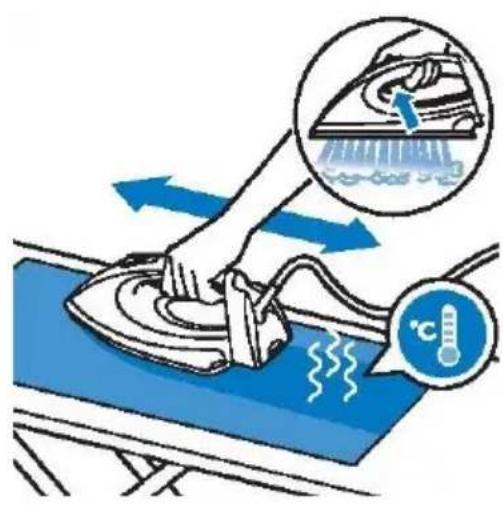
natural_image
Diagram showing car seatbelt and cable installation with blue directional arrows (no text or symbols)Uskladnenie
natural_image
Illustration of a hand cleaning a blue surface with spray and motion lines (no text or symbols)Vasalás
natural_image
Illustration of a hand using a tool to clean or exhaust air from a surface, with a blue arrow indicating the process (no text or symbols present)Függőleges vasalás
natural_image
Illustration of a person lying in bed using an iron on a chair, with a blue checkmark indicating the correct position (no text or symbols present)natural_image
Line drawing of a hairless machine with a power button icon (no text or symbols)natural_image
Illustration of a hand using a switch to adjust a device, with a magnified inset showing the switch being removed (no text or symbols present)natural_image
Illustration of a hand pouring liquid into a blue bag on a table (no text or symbols)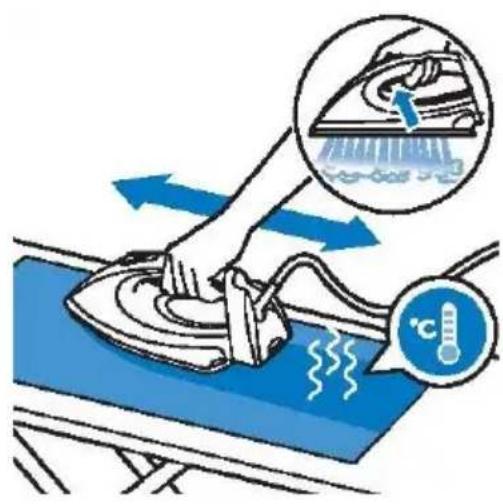
natural_image
Diagram showing a car interior with blue arrows indicating movement or force, no text or symbols presentTárolás
Opis ogólny
natural_image
Illustration of a hand cleaning a car interior with a blue arrow indicating the process (no text or symbols present)Prasowanie
natural_image
Illustration of a hand holding a padlock with a blue arrow indicating left motion (no text or symbols)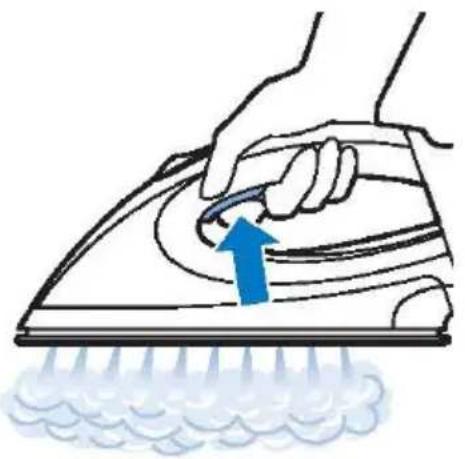
natural_image
Illustration of a hand using a power iron to clean or brush the power of a surface, with a blue arrow indicating the motion (no text or symbols present)natural_image
Illustration of a hand using a tool to clean or exhaust air from a machine, with no text or symbols present.natural_image
Illustration of a person using a blue iron on a bed, with a checkmark indicating the correct position (no text or symbols present)natural_image
Line drawing of a hair iron with a power button icon (no text or symbols)natural_image
Illustration of a hand pouring liquid into a blue bag on a table (no text or symbols)natural_image
Diagram showing a car interior with blue arrows indicating movement or force, no text or symbols presentnatural_image
Illustration of a hand using a tool to interact with a device, showing blue spray and motion lines (no text or symbols)natural_image
Illustration of a hand using a tool to clean or smoke from a wall-mounted device (no text or symbols)Călcare verticală
natural_image
Illustration of a person lying in bed with a blue iron on their back, marked with a checkmark (no text or symbols present)natural_image
Line drawing of a steam iron with a power button icon (no text or symbols)natural_image
Diagram showing hands connecting a car seatbelt to a vehicle, with blue arrows indicating movement or force (no text or symbols present)Depozitare
natural_image
Illustration of a hand holding a device with a blue arrow pointing to a component, emitting light rays (no text or symbols)natural_image
Illustration of a hand using a power tool to clean or exhaust air, with a blue arrow indicating airflow direction (no text or symbols)natural_image
Illustration of a person using a blue iron on a bed, with a checkmark indicating the correct position (no text or symbols present)natural_image
Line drawing of a hairless machine with a power button icon (no text or symbols)natural_image
Illustration of a hand inserting a device into a socket, with a magnified inset showing the socket being inserted (no text or symbols present)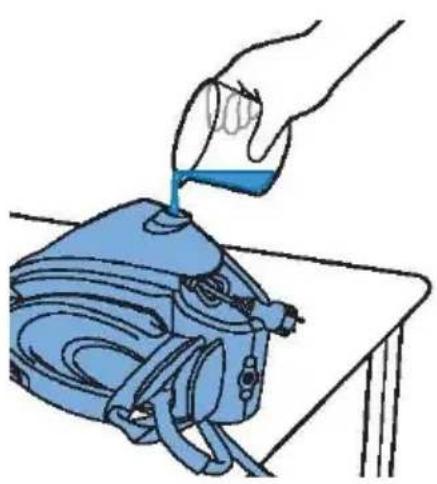
natural_image
Illustration of a hand pouring liquid into a blue industrial machine (no text or symbols)natural_image
Diagram showing a car interior with blue arrows indicating movement or force, no text or symbols presentnatural_image
Illustration of a hand holding a device with blue liquid and arrows indicating motion or force (no text or symbols)natural_image
Illustration of a hand using a power iron to clean or brush the power of a surface (no text or symbols)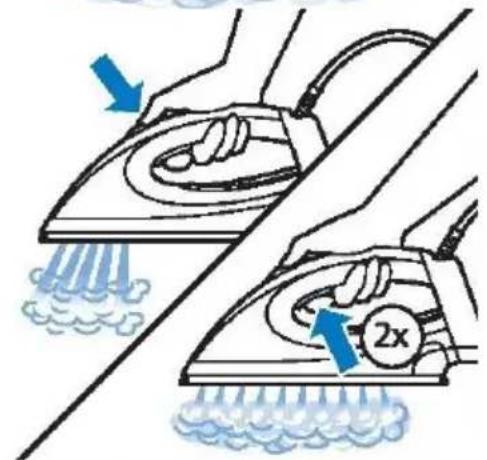
Функция СУПЕРПАР
natural_image
Line drawing of a hairless machine with a power button icon (no text or symbols)natural_image
Diagram showing car seatbelt fastening mechanism with blue arrows indicating movement (no text or symbols)natural_image
Illustration of a hand using a tool to clean or store items, with no visible text or symbols- Skub vandbeholderen fast på dampgeneratoren, til den klikker fast.
Kontrollampe for tom vandbeholder
Tekstiler med disse symboler kan stryges, f.eks. linned, bomuld, polyester, silke, uld, viskose og rayon.
Strygning
natural_image
Illustration of a hand using a power iron to clean or exhaust air, with a blue arrow indicating the process (no text or symbols present)Lodret strygning
natural_image
Illustration of a person using a blue iron on a bed, with a checkmark indicating the correct position (no text or symbols present)natural_image
Line drawing of a hairless machine with a power button icon (no text or symbols)natural_image
Illustration of a hand pouring liquid into a blue bag on a table (no text or symbols)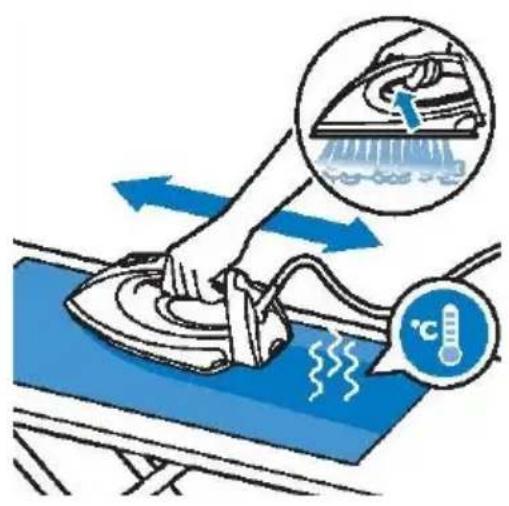
natural_image
Diagram of a car interior showing hand positioning and blue directional arrows indicating movement or force (no text or symbols)natural_image
Illustration of hands using a handheld device to interact with a blue device (no text or symbols visible)Bruke apparatet
Optimal Temp-teknologi
Stryking
natural_image
Illustration of a hand using a tool to clean or store air by using a fan (no text or symbols present)Loddrett stryking
natural_image
Illustration of a person lying in bed using an iron iron, with a blue checkmark indicating the correct position (no text or symbols present)natural_image
Line drawing of a hairless machine with a power button icon (no text or symbols)Energisparing / Automatisk sikkerhetsutkobling
ECO-modus
natural_image
Illustration of a hand pouring liquid into a blue bag on a table (no text or symbols)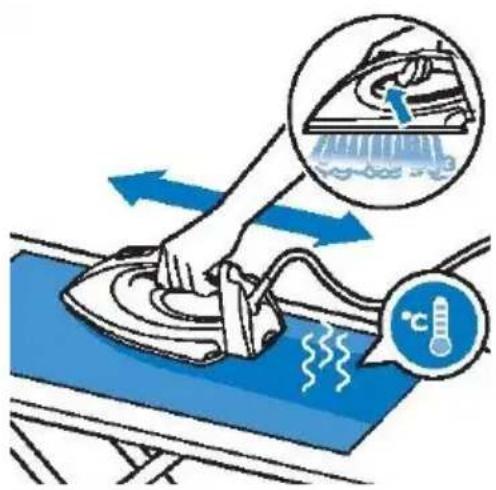
natural_image
Diagram of a car seatbelt with blue arrows indicating force or movement (no text or symbols present)Oppbevaring
GORENJE ∅NSKER DEG LYKKE TIL MED DET NYE APPARATET
natural_image
Illustration of a hand holding a device with a blue arrow pointing to a component, no text or symbols presentStrykning
Ångboost-funktion
natural_image
Illustration of a hand using a tool to clean or exhaust air, with a blue arrow indicating the process (no text or symbols present)Vertikal strykning
natural_image
Illustration of a person using an iron on a bed, with a blue checkmark indicating the correct position (no text or symbols present)natural_image
Line drawing of a steam iron with a power button icon (no text or symbols)natural_image
Illustration of a hand pouring liquid into a blue handheld device on a table (no text or symbols)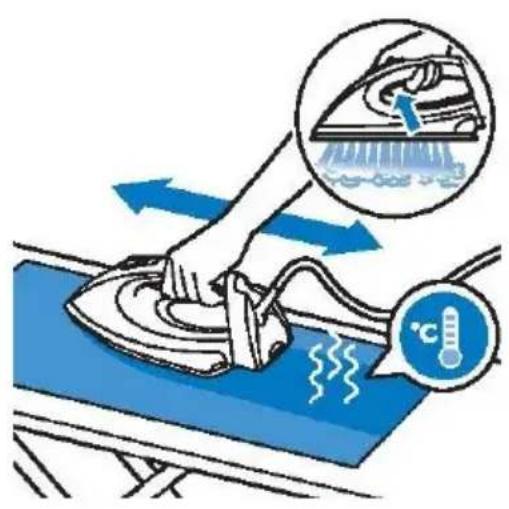
natural_image
Diagram showing car wheel assembly with blue arrows indicating force or movement (no text or symbols)natural_image
Illustration of a hand using a tool to clean or store items, with no visible text or symbolsnatural_image
Illustration of a hand using a tool to clean or exhaust air from a surface, with a blue arrow indicating the process (no text or symbols present)natural_image
Illustration of a person lying in bed using a blue iron outdoors, with a checkmark indicating the correct position (no text or symbols present)natural_image
Line drawing of a steam iron with a power button and screwdriver (no text or symbols)natural_image
Illustration of a hand pouring liquid into a blue handheld device on a table (no text or symbols)