
SGT2400B - Iron GORENJE - Free user manual and instructions
Find the device manual for free SGT2400B GORENJE in PDF.


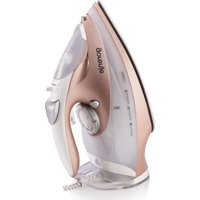
| Product Type | Iron |
| Brand | Gorenje |
| Model | SGT2400B |
| Dimensions (approx.) | 30 cm x 12 cm x 15 cm |
| Weight (approx.) | 1.2 kg |
| Power Supply | 220-240 V ~ 50/60 Hz |
| Power Consumption | 2400 W |
| Cord Length | 2.0 m |
| Water Tank Capacity | 300 ml |
| Soleplate Material | Ceramic |
| Steam Output (continuous) | 40 g/min |
| Steam Boost | 130 g/min |
| Spray Function | Yes |
| Vertical Steam | Yes |
| Anti-Drip System | Yes |
| Self-Cleaning Function | Yes |
| Auto Shut-Off | Yes (8 min vertical, 30 sec horizontal) |
| Indicator Lights | Power off, temperature ready, water level |
| Cleaning and Maintenance | Descale regularly using self-clean function; clean soleplate with damp cloth |
| Safety Features | Auto shut-off, thermal fuse |
| Spare Parts and Repairability | Soleplate, water tank, handle cover, power cord (contact service center) |
| Warranty | 2 years |
Frequently Asked Questions - SGT2400B GORENJE
User questions about SGT2400B GORENJE
0 question about this device. Answer the ones you know or ask your own.
Ask a new question about this device
Download the instructions for your Iron in PDF format for free! Find your manual SGT2400B - GORENJE and take your electronic device back in hand. On this page are published all the documents necessary for the use of your device. SGT2400B by GORENJE.
USER MANUAL SGT2400B GORENJE
EN Instructions for use 43
UPORABA NOSILCA KABLA
- Odvijte in izravnajte priključni kabel;
- Namestite nosilce kabla kot to prikazuje slika;
- Kabel obesite na kavelj kot to prikazuje slika;
natural_image
Line drawing of a robotic device with hands holding two vertical rods and a conical top, showing motion arrows (no text or symbols)skica A
POLNJENJE VODNEGA REZERVOARJA
natural_image
Line drawing of a steam iron with six blades (no text or symbols)
natural_image
Line drawing of a steam iron with cord and cable (no text or symbols)skica 2
NAVPIČNO LIKANJE S PARO

natural_image
Line drawing of an iron (£) with steam rising (no text or symbols)natural_image
Line drawing of a hand adjusting a car engine compartment with a handle (no text or symbols)skica 7

natural_image
Line drawing of a hand turning a component into a car body (no text or symbols)skica 8
natural_image
Line drawing of a hand pouring liquid into a car wheel (no text or symbols)skica 9

natural_image
Technical line drawing of a mechanical component with internal parts and a cylindrical shaft (no text or symbols)skica 10

natural_image
Line drawing of a hand turning a component into a device (no text or symbols)skica 11
Opozorilo:
natural_image
Line drawing of a hand holding a device next to a device with an arrow indicating motion (no text or symbols)skica 1
natural_image
Simple line drawing of a mechanical component with a base and pivot point (no text or symbols)skica 4
ČIŠČENJE IN VZDRŽEVANJE
A. Pokazatelj tvrdoće vode
B. Indikator za čišćenje kotla
C. Pokazatelj temperature podmetača
D. Parni kotao 1\~4 pokazatelj visine pritiska u kotlu
natural_image
Line drawing of a robotic device with hands holding two poles, showing motion arrows (no text or symbols)skica A
PUNJENJE SPREMNIKA ZA VODU
natural_image
Diagram showing a hand holding a container being inserted into a water dispenser, with an arrow indicating the process (no text or symbols present)skica 1
KAD GLAČATE PRVI PUTA...
natural_image
Line drawing of an iron (£) with steamers emitting smoke (no text or symbols)
natural_image
Line drawing of a steam iron with attached cable and clasp (no text or symbols)skica 2
OKOMITO PARENJE

natural_image
Line drawing of a steam iron with smoke plumes (no text or symbols)natural_image
Line drawing of a hand adjusting a car engine compartment with a handle (no text or symbols)skica 7

natural_image
Line drawing of a hand turning a component into a mechanical housing (no text or symbols)skica 8

natural_image
Line drawing of a car interior with a hand holding the engine, showing mechanical components and a base with liquid (no text or symbols)skica 9
natural_image
Technical line drawing of a mechanical component with internal parts and a cylindrical shaft (no text or symbols)skica 10
natural_image
Line drawing of a hand turning a component into a device (no text or symbols)skica 11
Upozorenje:
natural_image
Line drawing of a hand holding a device next to a device with an arrow indicating motion (no text or symbols)skica 1
natural_image
Simple line drawing of a mechanical component with a base and pivot point (no text or symbols)skica 4
ČIŠĆENJE I ODRŽAVANJE
- Odspojite mrežni kabel iz utičnice električne mreže.
- Upotrijebite navlaženu krpu ili neko sredstvo za čišćenje bez abraziva za uklanjanje nakupina s donje ploče ili kućišta.
- Nikada nemoje upotrijebiti grube predmete za uklanjanje nakupina s donje ploče.
- Nikada nemojte upotrijebiti bilo kakva abrazivna sredstva, ocat ili sredstva za skidanje kamenca za čišćenje glačala.
Okolina
A. Indikator tvrdoće vode
B. Indikator čišćenja kotla
C. Indikator temperature postolja
D. Parni kotao 1\~4 pokazatelj visine pritiska u kotlu
E. Indikator funkcije automatskog isključivanja
F. Indikator ponovnog punjenja vode
G. Indikator nivoa pare
H. Indikator opcije „bez pare”
SAVETI ZA PEGLANJE
natural_image
Line drawing of a robotic device with hands holding two poles, showing motion arrows (no text or symbols)slika A
PUNJENJE REZERVOARA ZA VODU
natural_image
Technical illustration showing a hand holding a container being inserted into a water-filled tank, with a faucet on the right (no text or symbols)slika 1
KAD PEGLATE PRVI PUT
natural_image
Line drawing of a steam iron with six flutes (no text or symbols)
natural_image
Line drawing of a steam iron with attached cable and clasp (no text or symbols)slika 2
VERTIKALNO PEGLANJE PAROM
natural_image
Line drawing of an iron (£) with steam rising, no text or symbols presentnatural_image
Line drawing of a hand adjusting a car engine compartment with no visible text or symbolsslika 7

natural_image
Line drawing of a hand inserting a component into a device (no text or symbols)slika 8
natural_image
Line drawing of a hand pouring liquid into a container (no text or symbols)slika 9
natural_image
Technical line drawing of a mechanical component with internal parts and a cylindrical shaft (no text or symbols)slika 10

natural_image
Line drawing of a hand turning a component into a device (no text or symbols)slika 11
Upozorenje:
natural_image
Line drawing of a hand holding a device with an arrow indicating movement, showing internal components and motion direction (no text or symbols)slika 1

natural_image
Simple line drawing of a container being poured into a stand (no text or symbols)slika 4
ČIŠĆENJE I ODRŽAVANJE
Izvucite priključni kabel iz doze u zidu. Vlažnom krpom ili mekšim suđerom obrišite radnu ploču i kućište aparata. Ne koristite oštre ili grube predmete za struganje ostataka s radne ploče. Aparat nikad ne čistite grubim sredstvima, ocatom ili sredstvima za uklanjanje kamenca.
Zaščita okoline
Simbol na proizvodu ili na njegovoj ambalaži označava, da se sa tim proizvodom ne sme postupati kao sa otpadom iz domaćinstva. Umesto toga, proizvod treba predati odgovarajućim sabirnim centrima za reciklažu elektronskih I električnih aparata. Ispravnim odvoženjem ovog proizvoda sprečićete potencijalne negativne posledice na životnu sredine I zdravlje ljudi, koji bi inače mogli biti ugroženi neodgovarajućim rukovanjem otpadom ovog proizvoda. Za dobijanje detaljnih informacija o tretmanu, odbacivanju I ponovnom korišćenju ovog proizvoda, stupite u kontakt sa prikladnim lokalnim ustanovama, službom za sakupljanje kućnog otpada ili sa prodavnicom u kojoj ste kupili ovaj proizvod.

Garancija i servis
Za informacije ili u slučaju problema obratite se Centru Gorenja za pomoć korisnicima u vašoj državi (telefonski broj naći ćete u međunarodnom garantnom listu). Ako u vašoj državi nema takvog centra, obratite se lokalnom prodavcu Gorenja, ili odelu Gorenja za male kućanske aparate.
Nije za komercialnu upotrebu!

natural_image
Line drawing of a robotic device with hands holding sensors and rotating arrows (no text or symbols)Сл. А
natural_image
Diagram showing a hand pressing down on a device into a container, with an arrow indicating the process (no text or symbols present)Сл. 1
ПРВО ПЕГЛАЊЕ
natural_image
Line drawing of an iron (£) with steamers emitting smoke (no text or symbols)natural_image
Line drawing of a steam iron with cord and cable (no text or symbols)Сп. 2
ВЕРТИКАЛНО ПЕГЛАЊЕ НА ПАРЕА
natural_image
Line drawing of an iron iron with steam rising, showing internal structure and smoke (no text or symbols)natural_image
Line drawing of a hand adjusting a car engine compartment with a valve (no text or symbols)Сл. 7

natural_image
Line drawing of a hand inserting a component into a device (no text or symbols)Сл. 8

natural_image
Line drawing of a car interior with a hand holding the wheel, connected to a base with a water-filled cylindrical object (no text or symbols)Сл. 9

natural_image
Line drawing of a mechanical device with internal components and a cylindrical shaft (no text or symbols)Сл. 10

natural_image
Line drawing of a hand turning a component into a device (no text or symbols)Сл. 11
Важно:
natural_image
Diagram showing a hand holding a device next to an open device with directional arrows indicating movement (no text or symbols present)Cπ.1
41

natural_image
Simple line drawing of a mechanical component with a base and pivot point (no text or symbols)Cn. 4
ЧИСТЕЊЕ И ОДРЖУВАЊЕ
For safety purpose you should read the instructions carefully before using the appliance for the first time. Save the instructions for future reference.
The appliance is designed for domestic use and may only be operated in accordance with these instructions for use.
The appliance generates high temperature steam. Always handle with care and warn other users of potential danger.
DO'S
- Check the mains voltage stated on the rating plate corresponds to the local electricity supply.
- Unwind and straighten the power cord and supply cord before use.
- Place the appliance on a firm and steady surface.
- The iron must be used and rested on a stable surface
- Avoid power cord or supply cord touches the soleplate.
- The plug of the supply cord must be removed from the socket-outlet before the water reservoir is filled with water
- Keep the anti-cal cartridge and granules away from children at all time.
- Keep electrical appliances out of reach from Children or infirm persons. Do not let them use the appliances without supervision.
- When placing the iron on its stand, ensure that the surface on which the stand is placed is stable.
- If the power cord or supply cord is damaged, the manufacturer or its service agent or similarly qualified person must replace it in order to avoid a hazard.
- Empty the water tank after use.
DO NOT'S
- Do not allow children touch the appliance when ironing.
- Do not leave the appliance unattended when it is connected to a mains supply outlet.
- Do not use an extension power cord set unless competent authority has approved it.
- The iron is not to be used if it has been dropped, if there are visible signs of damage or if it is leaking.
- Do not add perfumed, vinegar or other chemical liquids into the water tank; they can damage the appliance seriously.
- Do not immerse the appliance in water or any other liquid.
- Do not use the appliance when it is damaged or performs abnormally.
- Do not touch the iron rest during or just after ironing. It is hot!
- Do not roll the power cord or supply cord around the iron unit or base console for storage until it has cooled down completely.
- Do not attempt to open the cabinet or dismantle any parts from the appliance, there is no serviceable part inside.
- The filling aperture must not be opened during use. Instructions for the safe refilling of the water reservoir shall be given.
- This appliance is not intended for use by persons (including children) with reduced physical, sensory or mental capabilities, or lack of experience and knowledge, unless they have been given
supervision or instruction concerning use of the appliance by a person responsible for their safety. Children should be supervised to ensure that they do not play with the appliance.
- Never connect this appliance to an external timer switch or remote control system in order to avoid a hazardous situation.
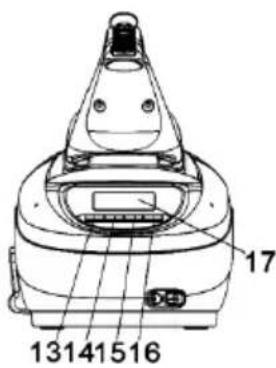
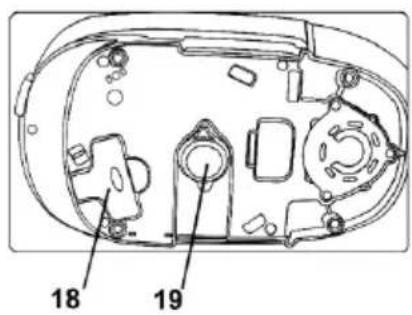
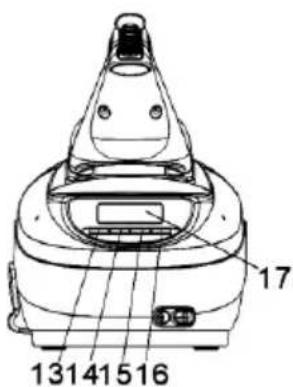
GET TO KNOW YOUR STEAM GENERATOR
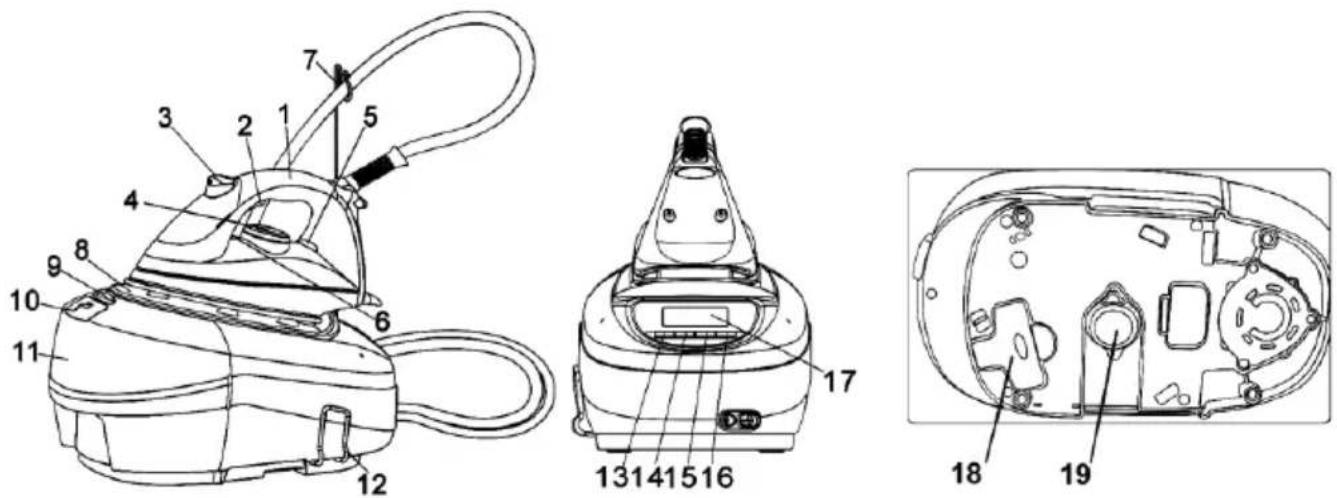
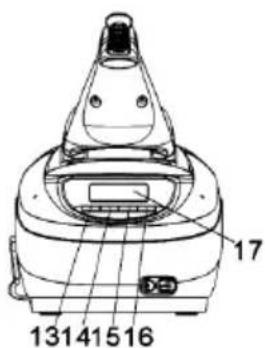
- Soft Grip Handle 11. Water Tank
- Steam Button 12. Cord Storage
- Spray Button 13. Power On/Off button
- Temperature Dial 14. Water Hardness Setting Button
- Pilot Light 15. “-” LCD Control Button
- Temperature Indicator 16. “+” LCD Control Button
- Cable Hook 17. LCD
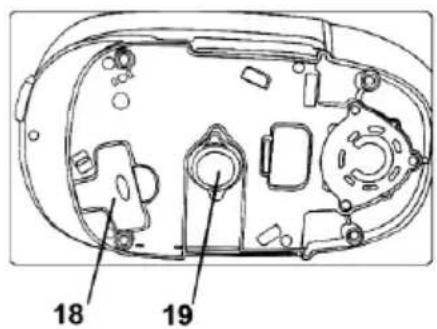
- Iron Rest 18. Boiler Key
- Water Tank Release Button 19. Boiler Cap Cover
- Water Inlet Cover
LCD

A. Water Hardness Level Indicators E. Auto Shut off indicator
B. Boiler Clean Indicator F. Water Refill Indicator
C. Base Unit Temperature Indicator G. Steam Level Indicators
D. Steam Generator 1\~4 Pressure Level Indicator H. Steam Off Mode Indicator
HINT FOR IRONING
- Sort out the articles to be ironed according to the type of fabric. This will minimize the frequency of temperature adjustment for different garment.
- Test ironing a small area on the backside or inside the garment if you are unsure about the type of fabric. Start with a low temperature and increase gradually.
- Wait for 2 minutes before ironing heat sensitive fabrics. Temperature adjustment needs certain time to reach the required level no matter it is higher or lower.
- Delicate fabrics such as silk, wool, velour, etc. are best ironed with an ironing cloth to prevent shine marks
READ THE GARMENT LABELS AND FOLLOW THE MANUFACTURER'S IRONING INSTRUCTIONS THAT ARE OFTEN SHOWN BY SYMBOLS SIMILIAR TO THE FOLLOWING.
| Temperature Control Setting | ||
 |  |  |
 |  |  |
| . Acetate | . Cupro | . Cotton |
| . Elastsne | . Polyester | . Linen |
| . Polyamide | . Protein | |
| . Polypropylene | . Silk | |
| . Triacetate | ||
| . Viscose | ||
| . Wool | ||
The appliance has a high technology low-pressure steam chamber that can be heated up in short time. Water is converted to steam vapor in the chamber and transported to the iron unit through the supply cord.
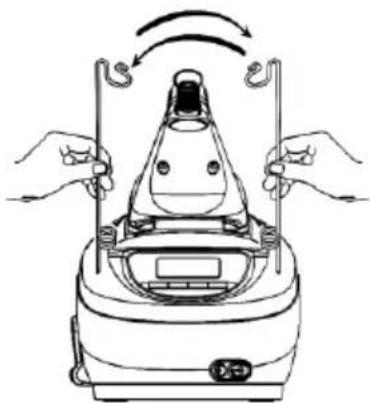
HOW TO USE THE CABLE SUPPORT
- Unwind and straighten the supply cord.
- Install the cable support showing.
- Place the supply cord onto the hook of the cable support showing.

natural_image
Line drawing of a robotic device with hands holding sensors and rotating arrows (no text or symbols)Fig A
HOW TO FILL WATER
The appliance has an electronic system to monitoring the water level. When the water level is lower than the pre-set value, the icon will blink with beep sound until the water is re-filled.
- Disconnect the power cord from mains supply outlet.
- Press the water tank release button and pull out the water tank, see Fig 1
- Open the water inlet cover
- Fill water through the water inlet hole up to MAX level marked on the side of water tank
- Close the water inlet cover
- Replace the water tank in its place.
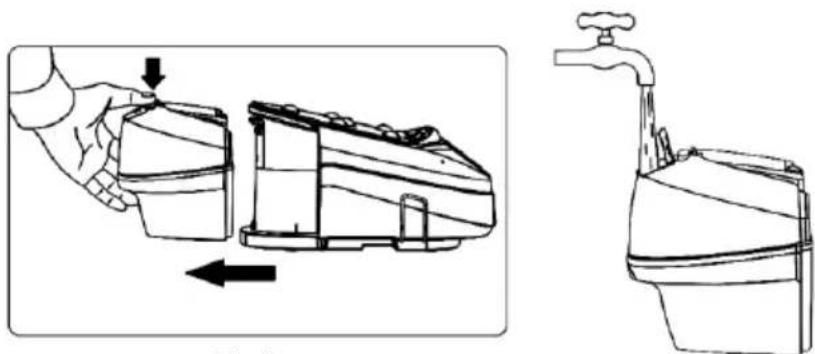
natural_image
Technical line drawing showing a hand operating a device with an arrow indicating left-hand movement, alongside a water tap (no text or symbols)Fig 1
FIRST TIME IRONING
- Remove any protective films or sticker from the soleplate and the cabinet, if any.
- Unwind and straighten the power cord and supply cord.
- Fill the water tank with tap water. (See HOW TO FILL WATER)
- Connect the appliance to a suitable mains supply outlet.
- "Beep" sound would be heard and the LCD would display all logos for a Second then turn off.
- Press the power On/Off button
- The medium steam level ( ) and medium hard water level ( ) indicators will display in the LCD with a beep sound.
- The ⚡ will blink to indicate; the steam generator is heating up or cooling down for the steam ironing.
- Select the Max steam level ( 5 ) indicator by press the “+” LCD control button, a beep sound would be heard.
- Turn the Temperature Dial on the Iron unit in clockwise direction to Maximum position, the Pilot Light will glow.
- The steam generator pressure will increase step by step as → → → →
- The Δβ will disappear from the LCD, when the steam generator reached the appropriate heat
- Wait until the LCD display the icon, its mean the steam generator reached the high pressure.
- Pilot Light goes off when the required temperature for the iron unit is reached.
- The appliance is ready to use.
- Depress the Steam Button for 1 minute to clean the steam generating system.
- Begin first time ironing with an old towel
Note:
- The steam never come out until the steam generator reached the required temperature
- It takes about one minutes to reach its required temperature.
STEAM IRONING
- Unwind and straighten the power cord and supply cord.
- Fill the water tank with tap water. (See HOW TO FILL WATER)
- Connect the appliance to a suitable mains supply outlet.
-
"Beep" sound would be heard and the LCD would display all logos for a Second then turn off.
-
Press the power On/Off button,
-
The medium steam level ( ) and hard water level indicator will display in the LCD with a beep sound.

natural_image
Line drawing of a steam iron with six blades (no text or symbols)-
The A will blink to indicate; the steam generator is heating up or cooling down for the steam ironing.
-
Turn the Temperature Dial in clockwise direction; select ‘•’ (1 dot), ‘••’ (2 dots) or ‘•••’ (3 dots) according to the recommendation of garment label.
-
Pilot Light glow until the required temperature for the iron unit is reached.
-
Select your required steam level by press the “+,-” LCD control buttons, Max steam level ( 1 ), medium steam level ( 2 ) and Low steam level ( ), a beep sound would be heard for each LCD control button pressing.
-
The steam generator pressure will increase step by step as → → → →
-
The will disappear in the LCD, when the steam generator reached the appropriate heat
-
Pilot Light goes off when the required temperature for the iron unit is reached.
-
The appliance is ready to use.
-
Press the Steam Button for steam ironing.
-
Turn the Temperature Dial on the iron unit in anti-clockwise direction to "Min" and the iron is switched off.
-
Press the Power On/Off switch, the base console will switch to "Standby mode" with a beep sound.
-
Disconnect the power cord from mains supply outlet.
When the appliance gets cool completely, store it in a safe place. For the power cord & steam supply cord storage see the Fig 2

natural_image
Line drawing of a steam iron with cord and cable (no text or symbols)Fig 2
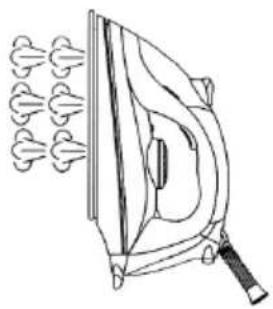
VERTICAL STEAMING

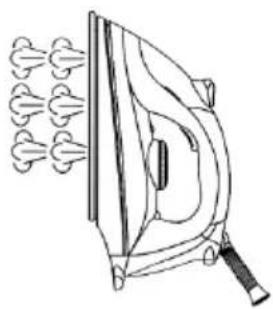
natural_image
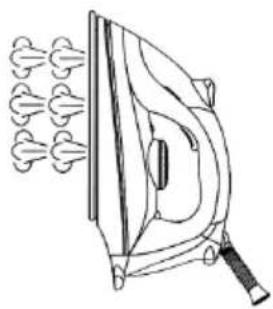
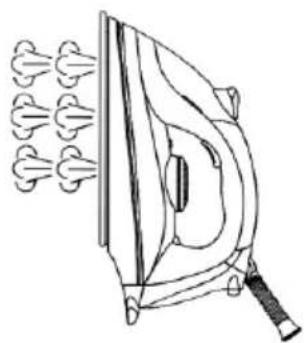
Line drawing of an iron (£) with steam rising, no text or symbols presentThis function provides steam to remove wrinkles on delicate garments in hanging position, hanging curtains or other hanging fabric as Fig 4
Note:
- Do not apply steam on any clothes or fabrics that are being worn by human or pets. Temperature of steam is very high.
- Maintain a distance of a few centimeters from delicate fabric (Synthetics, silk, velvet, etc.), otherwise the fabric could be damaged.
DRY IRONING
- Unwind and straighten the power cord and supply cord.
- Connect the appliance to a suitable mains supply outlet.
- "Beep" sound would be heard and the LCD would display all logos for a Second then turn off.
- Press the power On/Off button
-
The medium steam level ( ) and ( ) Medium hard water level indicator will display in the LCD with a beep sound.
-
The will blink to indicate; the base unit is heating up or cooling down.
-
Turn the Temperature Dial on the iron in clockwise direction; select ‘•’ (1 dot), ‘••’ (2 dots) or ‘•••’ (3 dots) according to the recommendation of garment label.
-
Pilot Light glow until the required temperature for the iron unit is reached.
-
Select the dry iron indicator ( ) by press the “-”LCD control button, a beep sound would be heard for each LCD control button pressing.
-
If the steam generator has the steam pressure, the pressure indicator will display in the LCD
-
Pilot Light goes off when the required temperature for the iron unit is reached.
-
The appliance is ready to use.
-
Turn the Temperature Dial on the iron unit in anti-clockwise direction to "Min" and the iron is switched off.
-
Press the Power On/Off switch, the base console will switch to "Standby mode" with a beep sound.
-
Disconnect the power cord from mains supply outlet.
-
When the appliance gets cool completely, store it in a safe place. For the power cord & steam supply cord storage see the Fig 2
AUTO SHUT-OFF
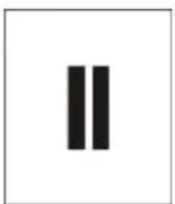
Auto shut off system will activate if appliance is not used over 10 minutes. LCD display back light goes off with a beep sound and the pause icon will blink. When this occurs, press the Power ON/OFF button once, the appliance will switch ON immediately. Wait about one and half minutes for the appliance to heat up to the temperature set before
WATER HARDNESS SETTING
- Unwind and straighten the power cord and supply cord.
- Connect the appliance to a suitable mains supply outlet.
- "Beep" sound would be heard and the LCD would display all logos for a Second then turn off.
- Press the power On/Off button
- The medium steam level ( ) and ( ) hard water level indicators will display in the LCD with a beep sound.
- The icon will blink to indicate; the steam generator is heating up or cooling down for the steam ironing.
- Press once the water hardness setting button, them icon will display in the LCD with a beep sound
-
Select your usage water hardness by press the “-, +” LCD control buttons; Soft water (LO) or Hard water ( ) or Very Hard water ( ), a beep sound would be heard for each pressing.
-
For the memory setting simply once press the water hardness setting button, the 🎨icon will disappear from the LCD with a beep sound.
SPRAYING
This function can be used any time and is not affect any setting.
- Remove the spray button as per fig 5
- Fill the water tank as per fig 6
- Replace the water tank in its place.
- Aim the nozzle to the garment. Press the Spray Button.
Note: It may be necessary to press the spray button a few times to start this function.

HOW TO CLEAN THE STEAM GENERATOR
To extend the life of your steam station and to avoid a build up of scale, it is essential that you rinse out the boiler, after the icon start the flashing in the LCD.
- The icon will blink to indicate you to clean the boiler.
- Press the Power On/off switch, the base console will switch to "Standby mode" with a beep sound.
- Disconnect the power cord from mains supply outlet.
- Allow the appliance cool down fully, overnight is advisable
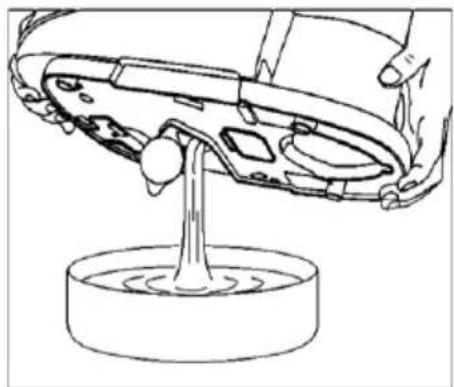
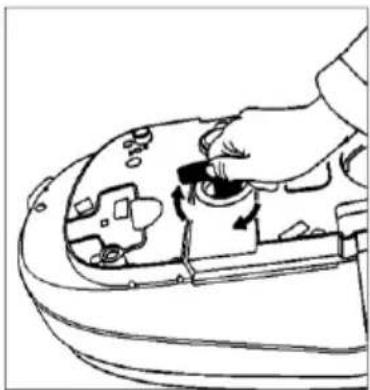
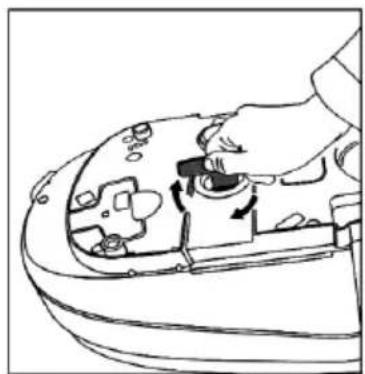
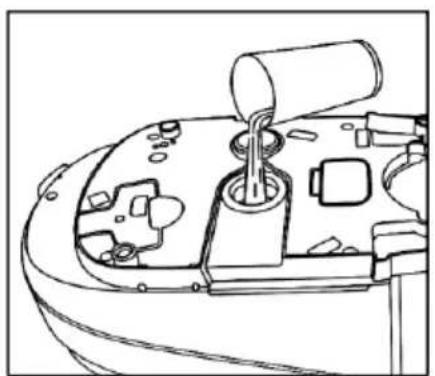
- Turn the steam station upside down and pull back the boiler cap cover as Fig 7.
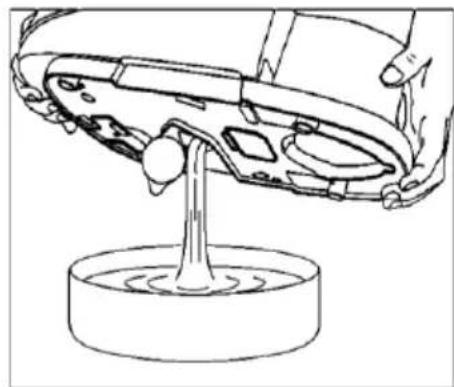
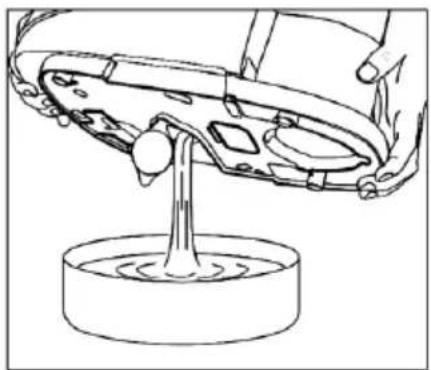
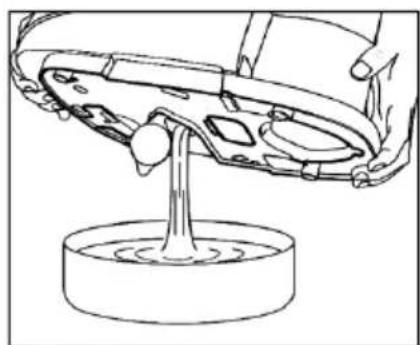
- Unscrew the boiler cap by using the provided key and empty out any water as fig 8 and Fig 9
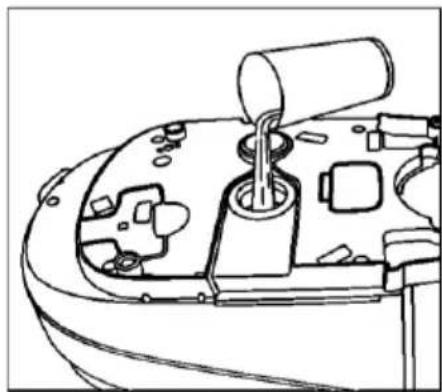
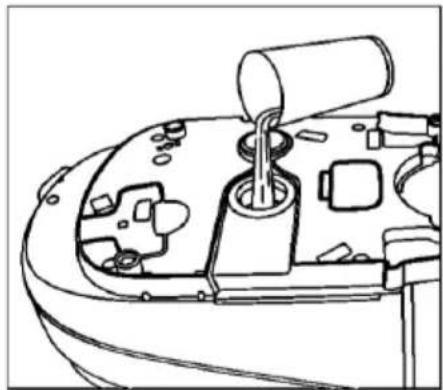
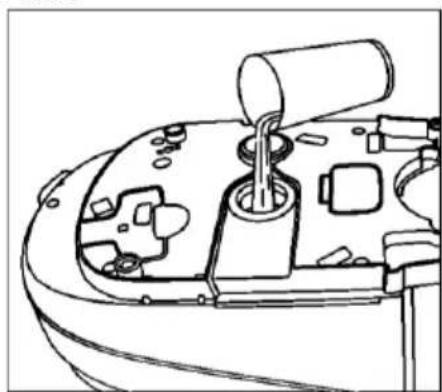
- Pour one cup of tap or filtered water through the boiler underneath hole as Fig 10
- Shake the appliance gently then empty out all the water as Fig 9
- Repeat this operation until the water from the boiler comes out clear and clean.
- When cleaning is finished pour 400ml fresh tap or filtered water into the boiler as Fig 10
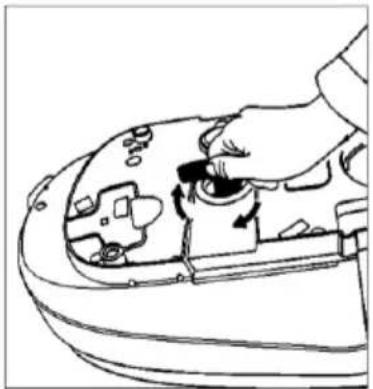
- Screw the boiler cap back on again without using excessive force as Fig 11
- Replace the cover.
- The unit is now ready to use.
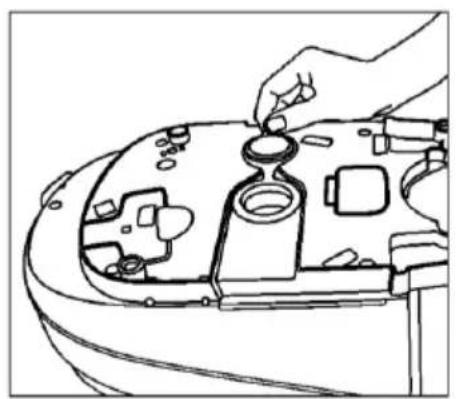
natural_image
Line drawing of a hand adjusting a car engine compartment with a knob (no text or symbols)Fig 7

natural_image
Line drawing of a hand operating a mechanical switch on a vehicle chassis (no text or symbols)Fig 8

natural_image
Line drawing of a car wheel assembly with a base mount (no text or symbols)Fig 9

natural_image
Technical line drawing of a mechanical component with internal parts (no text or symbols)Fig 10
natural_image
Line drawing of a hand turning a component into a device (no text or symbols)Fig 11
IMPORTANT:
Always add 400ml water direct to the boiler after cleaning to prevent damaging the steam station. When cleaning, never unscrew the boiler cap whilst the unit is pressurized. Steam will shoot out and burn you. Always switch off, unplug and leave overnight before commencing to clean the boiler. Do not use chemical descaling agents or vinegar as they may damage your appliance.
DRAINING THE WATER
- Disconnect the power cord from mains supply outlet.
- Press the water tank release button and pull out the water tank, see Fig 1
- Open the water inlet cover
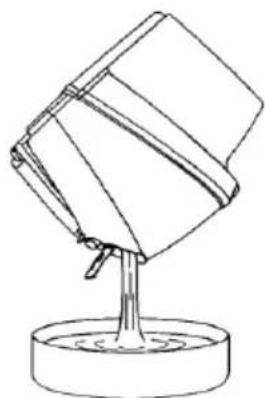
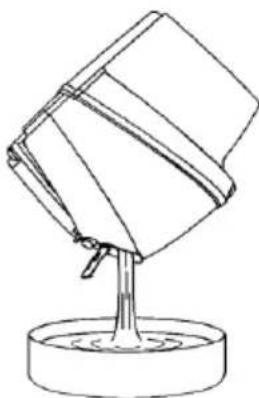
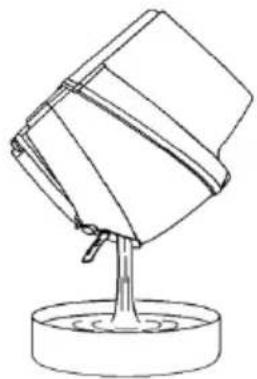
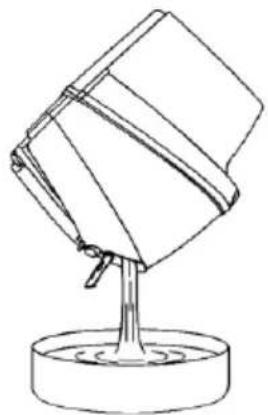
- Empty the water in the tank holding on it upside down as fig.4
- Close the water inlet cover
- Replace the water tank in its place.

natural_image
Diagram showing a hand holding a device next to an open device with directional arrows indicating movement (no text or symbols present)Fig 1

natural_image
Simple line drawing of a mechanical component with a base and central shaft (no text or symbols)Fig 4
CLEANING AND MAINTENANCE
- Disconnect the power cord from the mains supply outlet.
- Never use sharp or rough objects to remove the deposit on the soleplate.
-
Never use any abrasive, vinegar or descaling agents to clean the iron.
-
Use a damped cloth or non-scratching cleaner to remove any deposits on the soleplate or the cabinets.
This appliance is marked according to the European directive 2002/96/EC on Waste Electrical and Electronic Equipment (WEEE).
This guideline is the frame of a European-wide validity of return and recycling on Waste Electrical and Electronic Equipment.
Environment
Do not throw away the appliance with the normal household waste at the end of its life, but hand it in at an official collection point for recycling. By doing this, you help to preserve the environment.
Guarantee & service
If you need information or if you have a problem, please contact the Gorenje Customer Care Centre in your country (you find its phone number in the worldwide guarantee leaflet). If there is no Customer Care Centre in your country, go to your local Gorenje dealer or contact the Service department of Gorenje domestic appliances.
For personal use only!
We reserve the right to any modifications!
GORENJE
WISHES YOU A LOT OF PLEASURE WHEN USING YOUR APPLIANCE
DÔLEŽITÉ
natural_image
Line drawing of a robotic device with hands holding tools and rotating arrows (no text or symbols)Obr. A
AKO NAPLNIŤ VODU
natural_image
Diagram showing a hand holding a device with an arrow indicating force, alongside a water tap (no text or symbols present)obr. 1
PRVÉ ŽEHLENIE
natural_image
Line drawing of a steam iron with six flares (no text or symbols)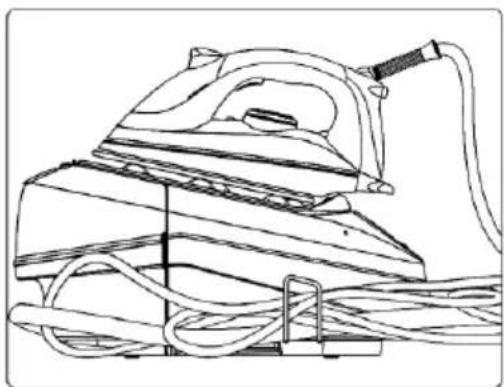
natural_image
Line drawing of a steam iron with attached cable and handle (no text or symbols)Obr. 2
KOLMÉ ŽEHLENIE
natural_image
Line drawing of an iron (£) with steam rising, no text or symbols presentnatural_image
Line drawing of a hand adjusting a car engine compartment with no visible text or symbolsObr. 7

natural_image
Line drawing of a hand adjusting a mechanical component with a knob (no text or symbols)Obr. 8
natural_image
Line drawing of a hand using a tool to lift a car body, with a circular base and water level indicator (no text or symbols)Obr. 9

natural_image
Line drawing of a mechanical device with internal components and a cylindrical shaft (no text or symbols)Obr. 10

natural_image
Line drawing of a hand turning a component into a car's seat (no text or symbols)Obr. 11
DÔLEŽITÉ:
natural_image
Line drawing of a hand holding a battery next to a device with an arrow indicating motion (no text or symbols)Obr. 1

natural_image
Line drawing of a mechanical component with a base and pivot point (no text or symbols)Obr. 4
ČISTENIE A ÚDRŽBA
natural_image
Line drawing of a robotic device with hands holding tools and rotating arrows (no text or symbols)figura A
UMPLEREA REZERVORULUI CU APĂ
natural_image
Illustration showing a hand holding a water dispenser with an arrow indicating left-hand rule, alongside a close-up of the water dispenser's faucet (no text or symbols present)figura 1
PRIMA CĂLCARE
natural_image
Line drawing of a steam iron with six flutes (no text or symbols)
natural_image
Line drawing of a steam iron with cord and clamped cable (no text or symbols)figura 2
CĂLCAREA VERTICALĂ CU ABURI

natural_image
Line drawing of an iron iron with steam rising (no text or symbols)SETAREA DURITĂȚII APEI
Fig 5
Fig 6
CURĂȚAREA STATIEI DE CĂLCAT
natural_image
Line drawing of a hand adjusting a car engine compartment with no visible text or symbolsFig 7

natural_image
Line drawing of a hand holding a small mechanical component, no text or symbols presentFig 8

natural_image
Line drawing of a hand pouring liquid into a container (no text or symbols)Fig 9

natural_image
Line drawing of a mechanical device with a cylindrical component inserted into a housing (no text or symbols)Fig 10
natural_image
Line drawing of a hand using a tool to adjust or install a mechanical component (no text or symbols visible)Fig 11
Important:
natural_image
Line drawing of a hand holding a device next to a device with an arrow indicating rotation (no text or symbols)Fig 1

natural_image
Simple line drawing of a mechanical component with a base and pivot point (no text or symbols)Fig 4
CURĂȚARE ȘI MENTENANTĂ

Rys. A
NAPEŁNIANIE ZBIORNIKA NA WODE
natural_image
Illustration showing a hand holding a container being inserted into a washing machine, and a water tap with a drain pouring liquid into a tank (no text or symbols present)PIERWSZE PRASOWANIE...
natural_image
Line drawing of a steam iron with six flutes (no text or symbols)natural_image
Line drawing of a steam iron with cord and cable (no text or symbols)Rys. 2
PRASOWANIE W POZYCJI PIONOWEJ

natural_image
Line drawing of an iron (£) with steam rising (no text or symbols)natural_image
Line drawing of a hand adjusting a mechanical component on a vehicle head (no text or symbols)Rys. 7

natural_image
Line drawing of a hand adjusting a mechanical component with a handle (no text or symbols)Rys. 8

natural_image
Line drawing of a hand using a tool to lift a car body, with a circular base and water level indicator (no text or symbols)Rys. 9
natural_image
Line drawing of a mechanical device with internal components and a cylindrical shaft (no text or symbols)Rys. 10

natural_image
Line drawing of a hand using a tool to adjust or install a mechanical component (no text or symbols visible)Rys. 11
Ostrzeżenie:
natural_image
Diagram showing a hand holding a device next to a device with an arrow indicating rotation (no text or symbols present)Rvs. 1

natural_image
Line drawing of a mechanical component with a base and pivot point (no text or symbols)Rvs. 4
CZYSZCZENIE I KONSERWACJA


natural_image
Line drawing of a portable air conditioner with hands holding test tubes and rotating buttons (no text or symbols)Abb. A
natural_image
Diagram showing a hand pressing down on a device into a container, and the water tap with a drop falling (no text or symbols present)DER ERSTE GEBRAUCH
natural_image
Line drawing of a steam iron with six flutes (no text or symbols)natural_image
Line drawing of a steam iron with cord and attached cable (no text or symbols)Abb. 2
SENKRECHTES BÜGELN
natural_image
Line drawing of an iron (£) with steam rising (no text or symbols)Abb. 5
Abb. 6
REINIGUNG DES DAMPFGENERATORS
natural_image
Line drawing of a hand installing or adjusting a mechanical component on a vehicle head (no text or symbols visible)Abb. 7

natural_image
Line drawing of a hand holding a small mechanical component, no text or symbols presentAbb. 8

natural_image
Line drawing of a mechanical component with a base and fluid, no text or symbols presentAbb. 9

natural_image
Technical line drawing of a mechanical component with internal parts (no text or symbols)Abb. 10

natural_image
Line drawing of a hand using a tool to adjust or install a component on a curved surface (no text or symbols visible)Abb. 11
Wichtig:
natural_image
Line drawing of a hand holding a container with an arrow indicating movement, showing internal components (no text or symbols)Abb. 1

natural_image
Simple line drawing of a mechanical component with a base and pivot point (no text or symbols)Abb. 4

- Puha markolat
11.Víztartály
natural_image
Line drawing of a robotic device with hands holding tools and rotating arrows (no text or symbols)Ábra. A
HOGYAN TÖLTSE FEL VÍZZEL
natural_image
Illustration showing a hand holding a container being inserted into a washing machine, and a water tap with a handle (no text or symbols present)AZ ELSŐ VASALÁS
natural_image
Line drawing of a steam iron with three flutes (no text or symbols)natural_image
Line drawing of a steam iron with cord and base, no text or symbols present- ábra
FÜGGÖLEGES GÖZÖLÉS

natural_image
Line drawing of an iron (£) with steam rising, no text or symbols presentnatural_image
Line drawing of a hand adjusting a mechanical component on a vehicle head (no text or symbols)- ábra

natural_image
Line drawing of a hand operating a mechanical switch on a device (no text or symbols)- ábra
natural_image
Technical line drawing of a mechanical component with a base and pivot point (no text or symbols)- ábra

natural_image
Line drawing of a mechanical component with internal parts and a cylindrical shaft (no text or symbols)- ábra

natural_image
Line drawing of a hand holding a small object with directional arrows indicating movement or operation (no text or symbols)- ábra
FONTOS:
natural_image
Line drawing of a hand holding a small container and a larger device with directional arrows indicating movement (no text or symbols)- ábra
natural_image
Simple line drawing of a mechanical component with a base and pivot point (no text or symbols)- ábra
natural_image
Line drawing of a device with hands holding vertical rods and rotating arrows (no text or symbols)Рис. А
НАПОВНЕННЯ ВОДОЮ
natural_image
Technical illustration showing a hand operating a water dispenser with an arrow indicating left-hand movement, alongside a close-up of the water dispenser's handle (no text or symbols present)Рис. 1
ПЕРШЕ ПРАСУВАННЯ
natural_image
Line drawing of an iron (£) with steamers emitting smoke (no text or symbols)
natural_image
Line drawing of a steam iron with coiled cable (no text or symbols)Рис. 2
natural_image
Line drawing of an iron (£) with steam rising from its side (no text or symbols)тканину.
Рис. 5
Рис. 6
natural_image
Line drawing of a hand adjusting a car engine compartment with a knob (no text or symbols)Рис. 7

natural_image
Line drawing of a hand inserting a component into a device (no text or symbols)Рис. 8

natural_image
Line drawing of a car interior with a hand pouring liquid into a cylindrical container (no text or symbols)Рис. 9
natural_image
Technical line drawing of a mechanical component with internal parts and a cylindrical shaft (no text or symbols)Рис. 10

natural_image
Line drawing of a hand turning a component into a device (no text or symbols)Рис. 11
ВАЖЛИВО:


natural_image
Line drawing of a mechanical device with hands holding two vertical rods and a central screen, showing rotational motion (no text or symbols)skica A
НАПОЛНЕНИЕ ВОДОЙ
natural_image
Line drawing of a steam iron with six blades (no text or symbols)
natural_image
Line drawing of a steam iron with attached cable and clamped components (no text or symbols)Рисунок 3
natural_image
Line drawing of an iron iron with steam rising (no text or symbols)natural_image
Line drawing of a hand adjusting a mechanical component with a knob (no text or symbols)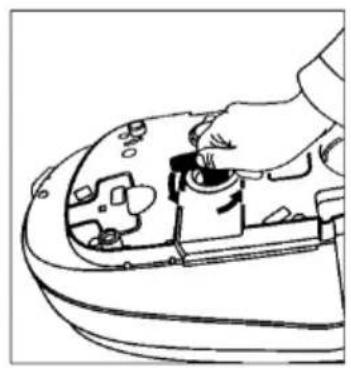
natural_image
Line drawing of a hand turning a component into a vehicle's head (no text or symbols)
natural_image
Line drawing of a hand pouring liquid into a car body, with a circular base and water level indicator (no text or symbols)
natural_image
Diagram showing a hand holding a device next to a device with an arrow indicating rotation (no text or symbols present)Рисунок 12
natural_image
Line drawing of a mechanical component with a base and pivot point (no text or symbols)Рисунок 13


- UPORABA NOSILCA KABLA
- POLNJENJE VODNEGA REZERVOARJA
- NAVPIČNO LIKANJE S PARO
- Opozorilo:
- ČIŠČENJE IN VZDRŽEVANJE
- PUNJENJE SPREMNIKA ZA VODU
- KAD GLAČATE PRVI PUTA...
- OKOMITO PARENJE
- Upozorenje:
- ČIŠĆENJE I ODRŽAVANJE
- Okolina
- SAVETI ZA PEGLANJE
- PUNJENJE REZERVOARA ZA VODU
- KAD PEGLATE PRVI PUT
- VERTIKALNO PEGLANJE PAROM
- Zaščita okoline
- Garancija i servis
- ПРВО ПЕГЛАЊЕ
- ВЕРТИКАЛНО ПЕГЛАЊЕ НА ПАРЕА
- Важно:
- ЧИСТЕЊЕ И ОДРЖУВАЊЕ
- DO'S
- DO NOT'S
- GET TO KNOW YOUR STEAM GENERATOR
- LCD
- HINT FOR IRONING
- HOW TO USE THE CABLE SUPPORT
- HOW TO FILL WATER
- FIRST TIME IRONING
- Note:
- STEAM IRONING
- VERTICAL STEAMING
- DRY IRONING
- AUTO SHUT-OFF
- WATER HARDNESS SETTING
- SPRAYING
- HOW TO CLEAN THE STEAM GENERATOR
- IMPORTANT:
- DRAINING THE WATER
- CLEANING AND MAINTENANCE
- Environment
- Guarantee & service
- GORENJE
- WISHES YOU A LOT OF PLEASURE WHEN USING YOUR APPLIANCE
- DÔLEŽITÉ
- AKO NAPLNIŤ VODU
- PRVÉ ŽEHLENIE
- KOLMÉ ŽEHLENIE
- DÔLEŽITÉ:
- ČISTENIE A ÚDRŽBA
- UMPLEREA REZERVORULUI CU APĂ
- PRIMA CĂLCARE
- CĂLCAREA VERTICALĂ CU ABURI
- SETAREA DURITĂȚII APEI
- CURĂȚAREA STATIEI DE CĂLCAT
- CURĂȚARE ȘI MENTENANTĂ
- NAPEŁNIANIE ZBIORNIKA NA WODE
- PIERWSZE PRASOWANIE...
- PRASOWANIE W POZYCJI PIONOWEJ
- Ostrzeżenie:
- CZYSZCZENIE I KONSERWACJA
- DER ERSTE GEBRAUCH
- SENKRECHTES BÜGELN
- REINIGUNG DES DAMPFGENERATORS
- Wichtig:
- HOGYAN TÖLTSE FEL VÍZZEL
- AZ ELSŐ VASALÁS
- FÜGGÖLEGES GÖZÖLÉS
- FONTOS:
- НАПОВНЕННЯ ВОДОЮ
- ПЕРШЕ ПРАСУВАННЯ
- ВАЖЛИВО:
- НАПОЛНЕНИЕ ВОДОЙ
Brand : GORENJE
Model : SGT2400B
Category : Iron