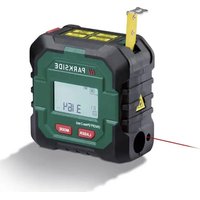
PLMB 4 C2 - Measuring equipment PARKSIDE - Free user manual and instructions
Find the device manual for free PLMB 4 C2 PARKSIDE in PDF.


| Product type | Wireless laser distance meter with tape measure |
| Brand | Parkside |
| Model | PLMB 4 C2 |
| Category | Measurement equipment |
| Power supply | Built-in lithium-ion battery 3.7 V, 0.3 Ah (300 mAh) |
| Charging | USB-C, 5 V, 1 A max. |
| Laser measuring range | 0.125 – 50 m |
| Laser accuracy | ± 2 mm |
| Laser class | 2 (λ 630–670 nm, < 1 mW) |
| Tape measure length | 3 m |
| Measurement modes | Distance, area, volume, single/double/triple Pythagoras, continuous distance |
| Measurement units | m, ft, in |
| Memory | Last 100 values |
| Display | Digital display |
| Battery life | Approximately 300 mAh (varies with use) |
| Auto power off | After approximately 3 minutes of inactivity |
| Protection rating | IP20 |
| Operating temperature | 0 °C to 40 °C |
| Operating humidity | max. 90% RH |
| Included accessories | USB-C charging cable, user manual |
| Maintenance | Clean with a dry cloth; do not immerse |
| Safety | Do not look into the laser beam; class 2 |
| Warranty | 3 years (according to conditions) |
Frequently Asked Questions - PLMB 4 C2 PARKSIDE
User questions about PLMB 4 C2 PARKSIDE
0 question about this device. Answer the ones you know or ask your own.
Ask a new question about this device
Download the instructions for your Measuring equipment in PDF format for free! Find your manual PLMB 4 C2 - PARKSIDE and take your electronic device back in hand. On this page are published all the documents necessary for the use of your device. PLMB 4 C2 by PARKSIDE.
USER MANUAL PLMB 4 C2 PARKSIDE
AKKU-LASER ENTFERNUNGS MESSER 50 M MIT MAßBAND 4 V/ CORDLESS 50M LASER DISTANCE MEASURER WITH TAPE MEASURE 4V/ TÉLÉMÈTRE LASER SANS FIL 50 M AVEC MÈTRE RUBAN 4 V PLMB 4 C2
DE AT CH
AKKU-LASER- ENTFERNUNGS- MESSER 50 M MIT MAßBAND 4 V
CORDLESS 50M LASER DISTANCE MEASURER WITH TAPE MEASURE 4V
Translation of the original instructions User manual
FR BE
TÉLÉMÈTRE LASER SANS FIL 50 M AVEC MÈTRE RUBAN 4 V
ACCU- LASERAFSTANDSMETER 50 M MET MEETLINT 4 V
GB/IE User manual Page 41
natural_image
Technical line drawing of a mechanical component with no visible text or symbols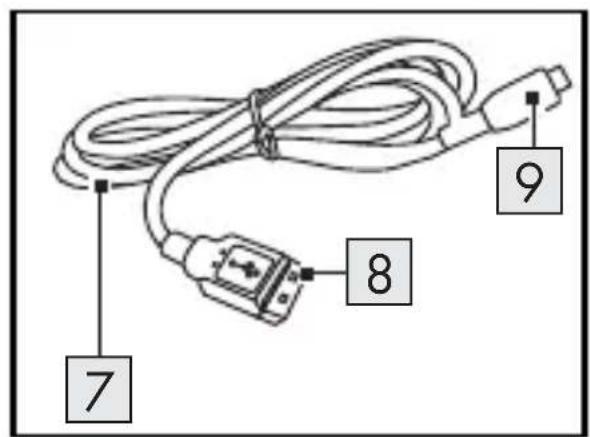
B
Intended use.... Page 47
Scope of delivery .... Page 48
Parts list .... Page 49
Technical data....Page 49
General safety notes.... Page 51
First set-up of the product ..... Page 57
Unpacking the product. . . . . . . . . . . . . . . . . . . . . . . . . . . . . . . . . . . . . . . . . . . . . . . . . . . . . . . . . . . . . . . . . . . . . . Page 57
Charging the battery . . . . . . . . . . . . . . . . . . . . . . . . . . . . . . . . . . . . . . . . . . . . . . . . . . . . . . . . . . . . . . . . . . . . . Page 58
Operation.... Page 59
Switching on/off Page 59
Extract/retract roller tape measure ..... Page 59
Changing the measuring unit . . . . . . . . . . . . . . . . . . . . . . . . . . . . . . . . . . . . . . . . . . . . . . . . . . . . . . . . . . . . . . . . 60
Selecting modes.... Page 60
Performing laser measurement....Page 63
Troubleshooting.... Page 64
Error codes.... Page 64
Cleaning and maintenance ..... Page 65
Cleaning.... Page 65
Maintenance....Page 66
Accessories Page 66
Storage Page 66
Disposal.... Page 67
Warranty Page 70
Warranty claim procedure. . . . . . . . . . . . . . . . . . . . . . . . . . . . . . . . . . . . . . . . . . . . . . . . . . . . . . . . . . . . . . . . . . . . . . 71
Service....Page 72
| List of pictograms used | |
 | Read the instruction manual. |
 | |
 | DANGER! - Designating a hazard with high risk, which will result in death or severe injury if not avoided (e.g. risk of suffocation) |
 | WARNING! - Designating a hazard with moderate risk, which can result in death or severe injury if not avoided (e.g. risk of electric shock) |
 | CAUTION! - Designating a hazard with low risk, which could result in minor or moderate injury if not avoided (e.g. risk of scalding) |
 | NOTICE! - Warns of possible damage to property/the product if not avoided (e.g. risk of short circuit) |
 | INFO: This symbol with the “Info” signal word offers additional useful information. |
 | USB port |
 | Protect yourself from laser radiation! |
 | Do not look into the beam! |
 | This mandatory sign indicates to wear suitable protective gloves! Follow the instructions of this warning to avoid hand injuries caused by objects or contact with hot or chemical materials. |
 | Starting point of the measurement at the rear edge of the product |
 | Laser beam active |
 | Battery level indicator |
 | Measure area |
 | Measure volume |
 | Measure simple Pythagoras |
 | Measure double Pythagoras |
 | Measure triple Pythagoras |
 | Measure continuous distance |
 | Save the last 100 measurements |
 | Direct current/voltage |
 | Use the product in dry indoor spaces only. |
 | Safety informationInstructions for use |
 | CE mark indicates conformity with relevant EU directives applicable for this product. |
CORDLESS 50M LASER DISTANCE MEASURER WITH TAPE MEASURE 4V
Introduction
We congratulate you on the purchase of your new product. You have chosen a high quality product. The instructions for use are part of the product. They contain important information concerning safety, use and disposal. Before using the product, please familiarise yourself with all of the safety information and instructions for use. Only use the product as described and for the specified applications. If you pass the product on to anyone else, please ensure that you also pass on all the documentation with it.
Intended use
This product is designed for measuring distances.
- Do not use this product for any other purpose.
This product is only intended for normal indoor use.
This product is only intended for private household use, not for commercial purposes.
The manufacturer accepts no liability for damages caused by improper use.
- Scope of delivery
After unpacking the product, check if the delivery is complete and if all parts are in good condition. Remove all packaging materials before use.
Please contact customer service if parts are missing or damaged.
1 Cordless 50m Laser distance measurer with tape measure 4V
1 USB-C charging cable
1 User manual
Parts list
Before reading, unfold the pages containing the illustrations and familiarise yourself with all the functions of the product.
(Fig. A)
1 Tip of the roller tape measure
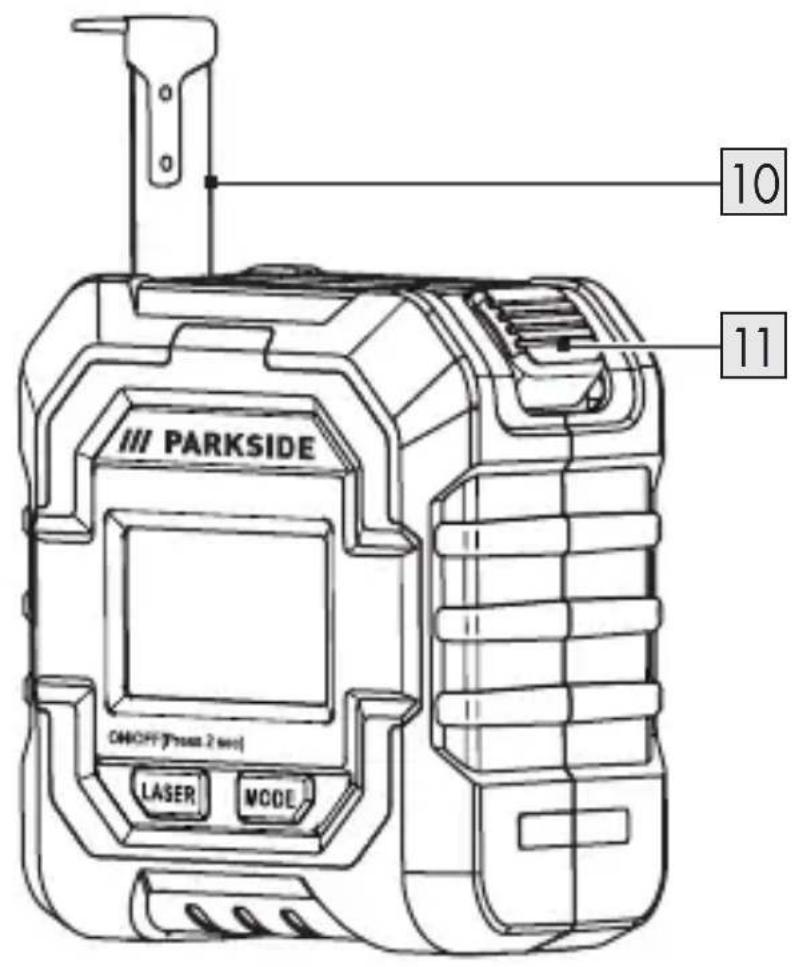
2 Display
3 Button Mode
4 Button Laser
5 Belt clip
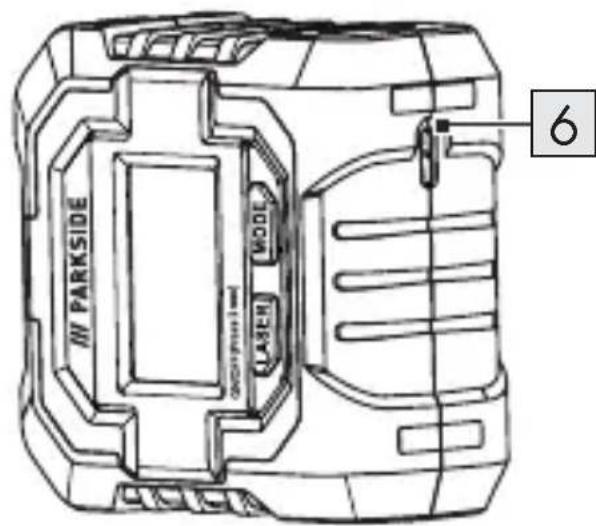
6 Charging socket
7 USB-C charging cable 8 USB plug 9 USB-C plug
(Fig. B)
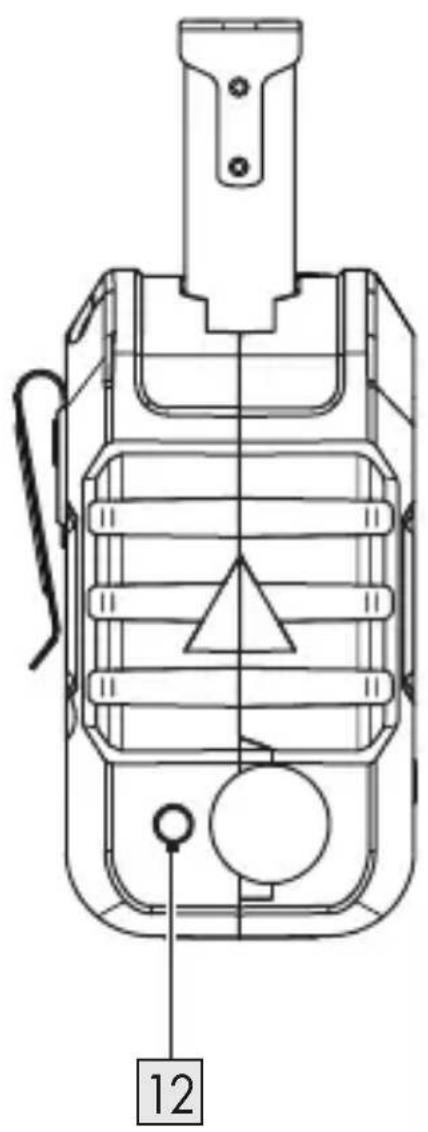
10 Roller tape measure 11 Release button 12 Laser aperture
- Technical data
| Cordless 50m Laser distance measurer with tape measure 4V: PLMB 4 C2 | |
| Operating voltage U: 3.7 V | --- |
| Capacity: 0.3 Ah | |
| Supply voltage/Charging voltage U_IN : 5 V | --- |
| Charging current: 1 A | |
| Battery capacity: 300 mAh | |
| Protection type: IP20 | |
| Roller tape measure length: 3 m |
| Laser: | |
| Laser class: 2 | |
| Wavelength λ: 630–670 nm | |
| Total radiant power P0: < 1 mW | |
| Accuracy: ± 2 mm | |
| Measuring range: 0.125–50 m | |
| Operating temperature: 0–40 °C | |
| Operating humidity: 90 % max. | |
| Operating altitude: 2000 m | |
| Storage temperature: 0–40 °C | |
| Storage humidity: max. 90 % | |

General safety notes
BEFORE USING THE PRODUCT, FAMILIARISE YOURSELF WITH ALL OF THE SAFETY INFORMATION AND INSTRUCTIONS FOR USE! WHEN PASSING THIS PRODUCT ON TO OTHERS, ALSO INCLUDE ALL THE DOCUMENTS!
In the case of damage resulting from non-compliance with these operating instructions the warranty claim becomes invalid!
No liability is accepted for consequential damage! In the case of material damage or personal injury caused by incorrect handling or non-compliance with the safety instructions, no liability is accepted!
Children and persons with disabilities
⚠ WARNING! RISK OF LOSS OF LIFE OR ACCIDENT TO INFANTS AND CHILDREN!
Never leave children unsupervised with the packaging material. The packaging material represents a danger of suffocation.
Children frequently underestimate the dangers. Always keep children away from the packaging material.
The product is to be used by adults only. Children under the age of 16 may not use the product except under supervision.
- Keep children away from the product.
General notes
- Observe the information on operation, cleaning, storage and disposal in the user manual.
- Check the product each time before using. If damaged, have the product repaired. Do not use the product if damaged.
■ Turn off the product when not in use. Do not leave the product unsupervised.
- Keep the product away from medical devices, magnetic data storage media and magnetically sensitive devices.
Handling the laser
⚠️ CAUTION! Laser beam – Do not look into the beam! Laser class 2. Danger of eye injury!
Do not aim the laser beam at people. Danger of eye injury!
■ Markings and warnings are located on the top and side of the product.

Safety instructions for batteries/rechargeable batteries
⚠️ DANGER TO LIFE! Keep batteries/rechargeable batteries out of reach of children. If accidentally swallowed seek immediate medical attention.

DANGER OF EXPLOSION! Never recharge non-rechargeable batteries. Do not short-circuit batteries/rechargeable batteries and/or open them. Overheating, fire or bursting can be the result.
- Never throw batteries/rechargeable batteries into fire or water.
- Do not exert mechanical loads to batteries/rechargeable batteries.
Risk of leakage of batteries/rechargeable batteries
- Avoid extreme environmental conditions and temperatures, which could affect batteries/rechargeable batteries, e.g. radiators/direct sunlight.
If batteries/rechargeable batteries have leaked, avoid contact with skin, eyes and mucous membranes with the chemicals! Flush immediately the affected areas with fresh water and seek medical attention!

WEAR PROTECTIVE GLOVES! Leaked or damaged batteries/rechargeable batteries can cause burns on contact with the skin. Wear suitable protective gloves at all times if such an event occurs.
This product has a built-in rechargeable battery which cannot be replaced by the user. The removal or replacement of the rechargeable battery may only be carried out by the manufacturer or his customer service or by a similarly qualified person in order to avoid hazards. When disposing of the product, it should be noted that this product contains a rechargeable battery.
In order to minimise the risk of electric shock, pull the charger plug out of the socket prior to cleaning it.
- Allow the battery to cool before charging.
Do not open the battery and avoid mechanical damage to the battery. There is a risk of a short circuit and vapours may leak out, causing irritation to the respiratory tract. Seek fresh air and medical assistance.
- First set-up of the product
- Unpacking the product
- Take the product out of the packaging and remove all packaging materials and plastic wrappings.
- Check to make sure that all listed parts are included (see "Scope of delivery").
- Check whether the product and all parts are in good condition, if any damage or defect is detected, do not use the product, but follow the procedure described in chapter "Warranty".
● Charging the battery
i NOTES:
The rechargeable battery is not replaceable. If you have any problems with the battery, please contact the service centre.
The supply voltage/charging voltage must not be more than 5 V, the charging current must not be more than 1.7 A.
☐ is shown on the display 2 once the battery is fully charged.
- Plug the USB-C plug 9 into the charging socket 6.
- Connect the USB plug 8 to a USB port.
- Once charging is complete, first remove the USB plug 8 from the USB port.
- Remove the USB-C plug 9 from the product.
Note: Product cannot be used while charging.
Operation
- Switching on/off
NOTE: The product switches off automatically after 3 minutes, if no button is pressed.
☐ Switch on: Press and hold the Laser button 4 for 2 seconds.
☐ Switch off: Press and hold the Laser button 4 for 2 seconds.
Extract/retract roller tape measure
☐ Extracting: Pull the tip of the roller tape measure 1 from the product. The roller tape measure 10 locks automatically.
Retracting: Press the locking button 11 to retract the roller tape measure.
● Changing the measuring unit
NOTE: You can display the measurements in metres (m), feet (ft) and inches (in).
☐ Press and hold the Mode button 3 for 2 seconds to change the measuring unit.
- Selecting modes
NOTE: On switching on, the product starts in "Measure distance" mode.
☐ Press the Mode button 3 to switch through the modes in the following order:
- Measure distance
- Measure area
- Measure volume
- Measure simple Pythagoras
- Measure double Pythagoras
- Measure triple Pythagoras
- Measure continuous distance
- Save the last 100 measurements
☐ Measure distance: The current measurement is always shown in the bottom line of the display 2. When the next measurement is taken, the previously measured value slides up one line.
☐ Measure area: Take 2 measurements. The individual measurements are displayed in the upper lines. The area is then calculated from the length and width and displayed in the bottom line. The perimeter is displayed on the third row.
☐ Measure volume: Take 3 measurements. The individual measurements are displayed in small font in the upper lines. The volume is then calculated from the length, width and height and is displayed in the bottom line.
☐ Simple Pythagoras/double Pythagoras/triple Pythagoras: For calculating the distance in a right-angled triangle. The value to be measured flashes on the small mode icon, as soon as you press the Laser button 4 to take the measurement.
| Mode pictogram Meaning | |
 | Measure simple Pythagoras |
 | Measure double Pythagoras |
 | Measure triple Pythagoras |
☐ Measure continuous distance: To record a maximum and minimum distance with continuous measurement. Press the Laser button 4 to record the maximum and minimum distance. Press the Laser button again to stop the measurement. Press the Laser button again to enter a new continuous measurement.
☐ Save the last 100 measurements: Press the Laser button 4 to go backwards through the stored values.

Performing laser measurement

CAUTION! Laser beam – Do not look into the beam! Turn your head away or close your eyes to prevent looking into the laser beam. Risk of eye injury!
NOTE: Measurements through plastic or glass panes distort the measurement result.
- Select the required mode.
- Press the Laser button 4 to measure.
- Aim the laser at the point to which you want to measure the distance.
- Press the Laser button 4 again.
- The measured value is shown on the display 2.
Troubleshooting
| Problem Possible cause Solution | ||
| Product does not function. | Battery is empty. | Charge the battery. |
| Product does not function and error code is shown on the display 2. | Error during the measurement process. | See „Error codes“. |
Error codes
If errors occur during the measuring process, they are indicated by the following error codes on the display 2:
| Error code Meaning | |
| Error 00 | Hardware error |
| Error 04 | ☐ Pythagorean theorem cannot be used☐ No right-angled triangle☐ Calculation error |
| Error 10 | Battery empty |
| Error 15 | Value is outside the measuring range |
| Error 16 | Received signal is too weak |
| Error 20 | Overheating protection |
| Error 44 | Distance to be measured is too close |
● Cleaning and maintenance
Cleaning
⚠ WARNING! Never submerge the product in water or other liquids.
WARNING! Do not use any abrasive cleaning agents or solvents. These could damage the device irreparably.
WARNING! Do not use water or metallic aids. There is a risk of a short circuit.
i NOTES:
■ Switch off the product before cleaning.
- Do not allow water to enter into the product during cleaning.
- Keep the product clean to ensure good, secure work.
☐ Use a soft, dry cloth to clean the product.
Maintenance
☐ The product is maintenance free.
Accessories
☐ Required accessories can be ordered via our service hotline or email address shown on the last page of this user manual. Mention the IAN number during the ordering process.
Storage
☐ During breaks in work, the product can be hung from a belt, using the integrated belt clip 5. Ensure that the product is switched off.
☐ If you will not be using the product for a prolonged period of time, store it in a clean, dry place that is not exposed to direct sunlight.
☐ Store the product out of reach of children.
● Disposal
The packaging is made entirely of recyclable materials, which you may dispose of at local recycling facilities.
Observe the marking of the packaging materials for waste separation, which are marked with abbreviations (a) and numbers (b) with following meaning: 1–7: plastics/20–22: paper and fibreboard/80–98: composite materials.
Product:
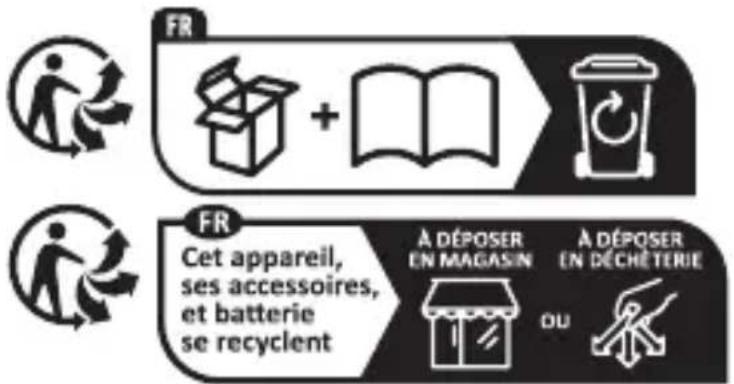
The product incl. accessories and packaging materials are recyclable and are subject to extended producer responsibility. Dispose them separately, following the illustrated Info-tri (sorting information), for better waste treatment.
The Triman logo is valid in France only.

Contact your local refuse disposal authority for more details of how to dispose of your worn-out product.

protect the environment, please dispose of the product properly when it has reached the end of its useful life and not in the household waste. Information on collection points and their opening hours can be obtained from your local authority.
Faulty or used batteries/rechargeable batteries must be recycled in accordance with Directive 2006/66/EC and its amendments. Please return the batteries/rechargeable batteries and/or the product to the available collection points.
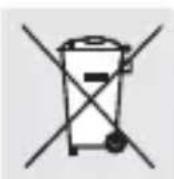
Environmental damage through incorrect disposal of the batteries/rechargeable batteries!
Batteries/rechargeable batteries may not be disposed of with the usual domestic waste. They may contain toxic heavy metals and are subject to hazardous waste treatment rules and regulations. The chemical symbols for heavy metals are as follows: Cd = cadmium, Hg = mercury, Pb = lead. That is why you should dispose of used batteries/rechargeable batteries at a local collection point.
Warranty
The product has been manufactured to strict quality guidelines and meticulously examined before delivery. In the event of material or manufacturing defects you have legal rights against the retailer of this product. Your legal rights are not limited in any way by our warranty detailed below.
The warranty for this product is 3 years from the date of purchase. The warranty period begins on the date of purchase. Keep the original sales receipt in a safe location as this document is required as proof of purchase.
Any damage or defects already present at the time of purchase must be reported without delay after unpacking the product.
Should the product show any fault in materials or manufacture within 3 years from the date of purchase, we will repair or replace it – at our choice – free of charge to you. The warranty period is not extended as a result of a claim being granted. This also applies to replaced and repaired parts.
This warranty becomes void if the product has been damaged, or used or maintained improperly.
The warranty covers material or manufacturing defects. This warranty does not cover product parts subject to normal wear and tear, thus considered consumables (e.g. batteries, rechargeable batteries, tubes, cartridges), nor damage to fragile parts, e.g. switches or glass parts.
● Warranty claim procedure
To ensure quick processing of your case, please observe the following instructions:
Please have the till receipt and the item number (IAN 446021_2307) available as proof of purchase.
You will find the item number on the rating plate, an engraving, on the front page of the instructions for use (bottom left), or as a sticker on the rear or bottom of the product.
If functional or other defects occur, please contact the service department listed either by telephone or by e-mail.
You can return a defective product to us free of charge to the service address that will be provided to you. Ensure that you enclose the proof of purchase (till receipt) and information about what the defect is and when it occurred.

Service

Service Great Britain
Tel.:08000569216
E-Mail:owim@lidl.co.uk

Service Ireland
Tel.:1800200736
E-Mail:owim@lidl.ie

Maintenance....Page 99