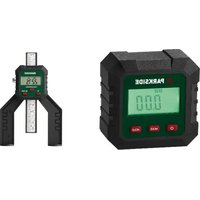
PTM 2 B1 - Measuring equipment PARKSIDE - Free user manual and instructions
Find the device manual for free PTM 2 B1 PARKSIDE in PDF.


| Brand | Parkside |
| Model | PTM 2 B1 |
| Category | Measuring equipment |
| Product type | Digital depth gauge |
| Power supply | 1 CR2032 button cell battery (3 V) |
| Measuring range (gap) | 0 - 80 mm (0 - 3⅛") |
| Measuring range (hole) | 0 - 50.8 mm (0 - 2") |
| Accuracy | ± 0.1 mm (± 0.004") |
| Repeatability | ± 0.1 mm (± 0.004") |
| Resolution | 0.05 mm (0.002") |
| Measuring modes | ABS (absolute value) and INC (relative value) |
| Measuring units | mm, inch (decimal), inch (fraction) |
| Display | LCD |
| Main functions | Depth measurement of bores, cuts, joints, tire treads; removable hole gauge |
| Materials | Plastic housing, metal graduated scale, magnet |
| Maintenance and cleaning | Clean with a soft, dry cloth; do not immerse in water; do not use solvents |
| Safety | Strong magnets – keep away from pacemakers, credit cards, etc.; do not expose to high temperatures |
| Batteries | Insert with correct polarity; remove during prolonged non-use; do not recharge non-rechargeable batteries |
| Auto-off | After 5 minutes of inactivity |
| Warranty | 3 years (France, Belgium, Switzerland) |
| After-sales service | 0800 907 612 (FR), 0800 12614 (BE), 0800 563 601 (CH) |
| Repairability | No user-serviceable parts; do not open the housing |
Frequently Asked Questions - PTM 2 B1 PARKSIDE
User questions about PTM 2 B1 PARKSIDE
0 question about this device. Answer the ones you know or ask your own.
Ask a new question about this device
Download the instructions for your Measuring equipment in PDF format for free! Find your manual PTM 2 B1 - PARKSIDE and take your electronic device back in hand. On this page are published all the documents necessary for the use of your device. PTM 2 B1 by PARKSIDE.
USER MANUAL PTM 2 B1 PARKSIDE
Original instructions
FR/BE/CH
JAUGE DE PROFONDEUR NUMÉRIQUE
Mode d'emploi
CZ
DIGITÁLNI HLOUBKOMÉR
Návod k obsluze
SK
DIGITÁLNY HLBKOMER
Návod na obsluhu
DK
DIGITAL DYBDEMÄLER
English Operating instructions Page 1
| Deutsch | Bedienungsanleitung | Seite | 19 | |
| François Mode d'emploi Page 37 | ||||
| Nederlandlands Gebruiksaanwijzing Pgana 59 | ||||
| Češky Námod k obsluze Strana 77 | ||||
| Polski Instrukcja obşugsi Strona 93 | ||||
| Slovenčina | Námod na obsluhu | Strana | 109 | |
| Espanol | Instrucciones de uso | Pgána | 125 | |
| Dansk | Betjeningsvejledning | Side 143 | ||
| Italiano Istruzioni per l'uso | Pgána 159 | |||
| Magyar | Használati utasítás | Oldal | 177 | |
Contents
1. Introduction 2
1.1. Information about these operating instructions 2
1.2. Proper use 2
1.3.Warnings and symbols used 2
2. Safety 5
2.1. Basic safety instructions 5
2.2. Safety instructions for handling batteries 6
3.Description of components 7
4. Getting started 8
4.1. Check package contents 8
4.2.Inserting/replacing the battery 8
5. Handling and operation 9
5.1. Using the device 9
5.2. Changing the measurement mode 10
5.3. Changing the unit of measurement 10
6. Troubleshooting 11
7. Cleaning 11
8. Storage 12
9. Disposal 12
9.1. Disposal of the device 12
9.2. Disposal of batteries 13
10. Appendix 13
10.1. Technical specifications 13
10.2. Kompernass Handels GmbH warranty 14
10.3. Service 17
10.4.Importer 17
1. Introduction
1.1. Information about these operating instructions
Congratulations on the purchase of your new device. You have selected a high-quality device. The operating instructions are part of this device. They contain important information about safety, usage and disposal. Before using the device, please familiarise yourself with all operating and safety instructions. Use this device only as described and for the areas of applications specified. Keep these operating instructions as a reference and store them near the device. Please pass on all documentation incl. these operating instructions to any future owner(s) if you sell this device or give it away.
1.2. Proper use
The device serves exclusively for measuring the depth of holes, milled grooves and saw cuts, gaps or tyre treads.
Commercial or industrial use is not permitted. No liability will be assumed in cases of improper use. No liability will be assumed for damage caused by misuse or improper handling, the use of force or unauthorised modification. The risk is borne solely by the user.
1.3.Warnings and symbols used
The following warnings and symbols are used in these operating instructions, on the packaging and on the device:
| ! | WARNING! A warning with this symbol and the signal word "WARNING", indicates a potentially hazardous situation which could result in death or serious injury if not avoided. |
| ! | ATTENTION! A warning with this symbol and the signal word "ATTENTION", indicates a potential situation which could result in property damage if not avoided. |
| i | Note: A note provides additional information that will assist you in using the device. |
| = = = | DC current/voltage |
| Read and observe the operating instructions! | |
| Keep batteries out of the reach of children. | |
| Note: Contains coin/bottom battery | |
| Do not dispose of electrical appliances in the household waste! | |
| Disposition of the packaging in an environmentally-responsible manner. | |
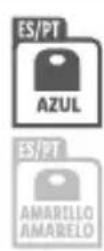
| The packaging is made of recyclable materials. Observe the labelling on the packaging material when sorting for disposal: The material is labelled with abbreviations (a) and numbers (b) with the following meanings: 1-7: plastics, 20-22: paper and cardboard, 80-98: composites. |
ES/PT
The packaging contains paper and/ or cardboard components.
The packaging contains plastic and/ or metal components.


FR:The product, its pack aging and the operating instructions are recyclable. They are subject to an extended manufacturer responsibility and will be collected separately.
2. Safety
This section contains important safety instructions for handling the device. This device complies with the statutory safety regulations. Improper use may result in personal injury and property damage.
2.1. Basic safety instructions
To ensure safe operation of the device, follow the safety guidelines set out below:
WARNING! Do not allow children to play with the packaging material! Keep all packaging materials away from children.
This device may be used by children aged 8 years and above and by persons with limited physical, sensory or mental capabilities or lack of experience and knowledge, provided that they are under supervision or have been told how to use the device safely and are aware of the potential risks. Do not allow children to use the device as a toy. Cleaning and user maintenance tasks may not be carried out by children unless they are supervised.
- Check the device before every use to make sure it is in perfect condition. Do not use the device if it is damaged in any way.
WARNING! The device contains powerful magnets. Keep the device away from pacemakers, magnetic strips (e.g. credit cards), mobile telephones, electrical devices and aircraft (observe the travel rules).
- Do not expose the device to high temperatures. Otherwise, it may become overheated and irreparably damaged.
- Never immerse the device in water or other liquids, and never expose the device to spraying or dripping water. Use the device only in dry indoor areas.
- Do not make any unauthorised modifications or alterations to the device.
- Never open the device housing. None of the components in the device can be serviced or replaced by the user.
WARNING! Switch the device off immediately and remove the batteries from the device if you notice unusual noises, a burning smell or smoke. Have the device checked by a qualified specialist before using it again.
2.2. Safety instructions for handling batteries
WARNING! Mishandling the batteries can cause fires, explosions, leakages or other hazards!
-
Keep batteries out of the reach of children.
Make sure that no one can swallow the batteries.
If a battery is swallowed, seek medical assistance immediately.
Always use the stated battery type.
Never try to recharge non-rechargeable batteries. -
Remove rechargeable batteries from the device before recharging them.
■ Do not throw batteries into a fire or water.
■ Never expose batteries to high temperatures or direct sunlight.
Never open or deform batteries.
■ Do not short-circuit the terminals.
- Remove depleted batteries from the device and dispose of them safely.
- Do not use different types of batteries together or mix new batteries with used batteries.
Always ensure that the batteries are installed in the device with the correctly aligned polarity.
If you do not intend to use the device for an extended period, remove the batteries.
- Check the condition of the batteries at regular intervals. Leaking batteries can cause injuries as well as damage to the device.
Always use protective gloves when handling leaking batteries! Clean the battery and device contacts with a dry cloth. Do not let the chemicals get into contact with your skin and mucous membranes, especially your eyes. In case of contact with chemicals, wash the affected area with plenty of water and immediately seek medical attention.
3. Description of components
(See fold-out page for illustrations)
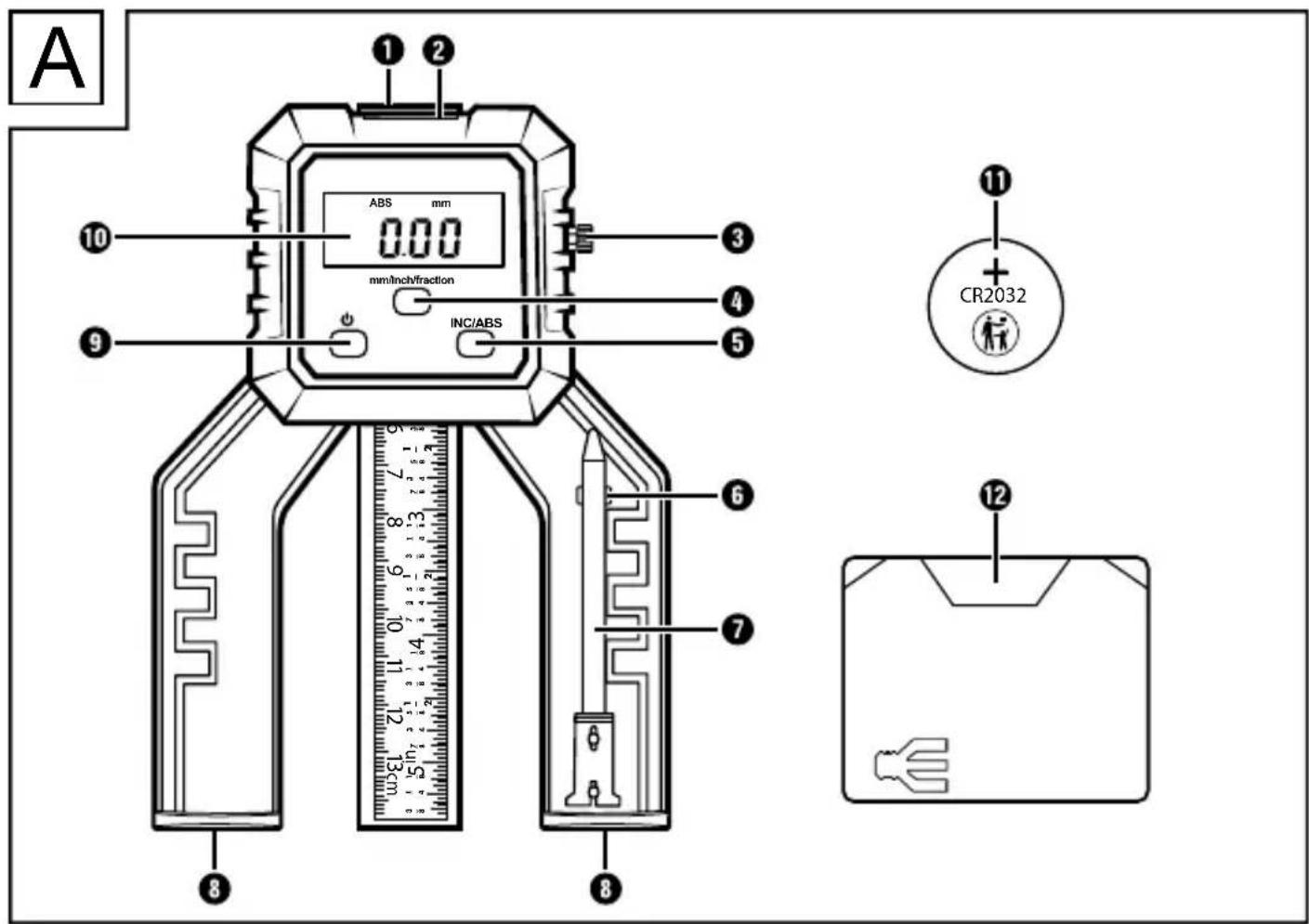
Scale
Battery holder
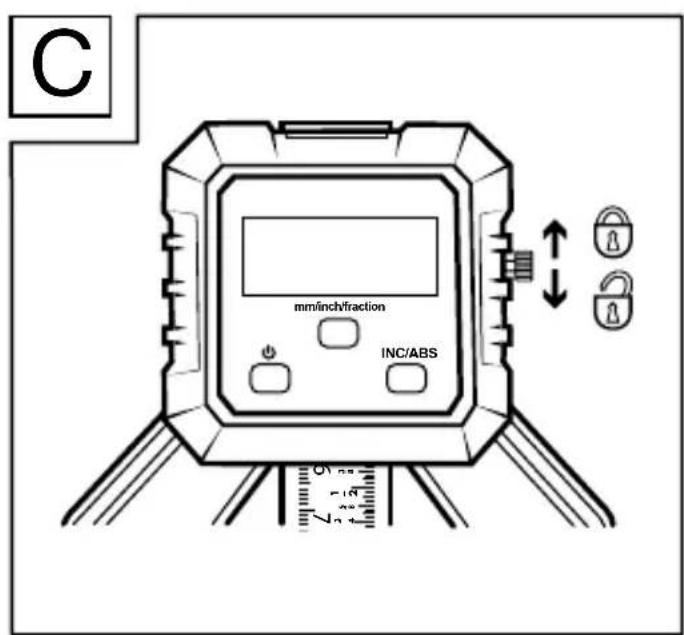
Locking screw
mm/inch/fraction button (change unit of measurement)
INC/ABS button (change measurement mode)
Holder for hole measuring stick
Hole measuring stick
Base with magnet
按钮
LCD display
Button cell
Storage box
4. Getting started
4.1. Check package contents
- 1 × Digital depth gauge
- 1 × Hole measuring stick
- 1 × 3 ~V = CR2032 button cell
- 1 × Storage box
These operating instructions
Remove all components from the packaging. Remove all packaging materials and the protective film from the LCD display ⑩.
Note: Check the package for completeness and signs of visible damage. If the delivery is incomplete or damage has occurred as a result of defective packaging or during transport, contact the service hotline (see section 10.3. Service).
4.2. Inserting/replacing the battery
The device is delivered and operated with one 3V = = CR2032 button cell 1.
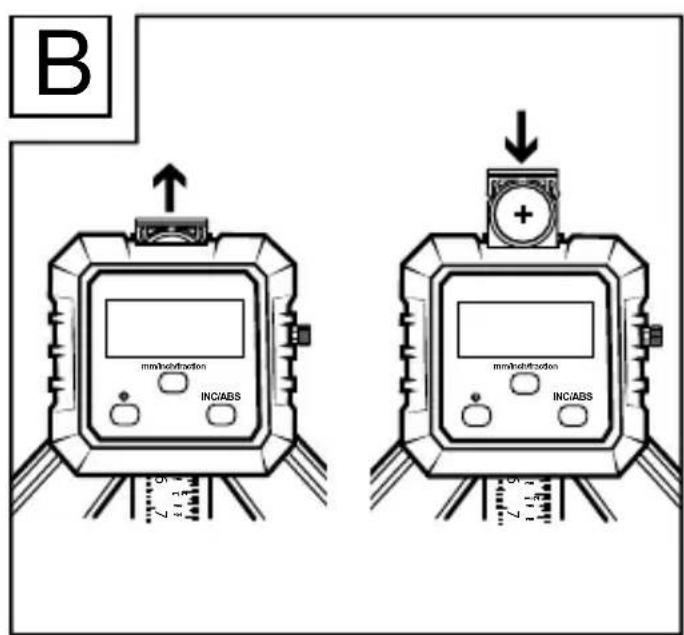
Pull on the tab to remove the battery holder 2 (see fig. B).
Remove the depleted battery (if present) and insert a new battery into the battery holder 2. Pay attention to the correct polarity. The positive pole must face upward (see fig. B).
Slide the battery holder 2 back into the device.
5. Handling and operation
5.1. Using the device
Turn the locking screw ③ anticlockwise to free up the scale ① to move (see fig. C).
Note: Only for measuring a drill hole!
Remove the hole measuring stick 7 from the holder 6 and insert it into the lower end of the scale 1, on the back side.
Clean the scale 1 and the hole measuring stick 7 with a dry cloth, if necessary, to prevent inaccurate measurements.
Press the button to switch on the device.
Set the base with magnet on a stable surface.
Slide the device down to the lower end of the scale ① or to the tip of the hole measuring stick ⑦.
Press the INC/ABS button ⑤ to select the desired measurement mode.
Perform your measurements, and read the values from the LCD display 10.
Hold down the button for two seconds to switch off the device.
① Note: The device has an automatic shutoff function. If you do not use the device for longer than five minutes, it will switch itself off.
5.2. Changing the measurement mode
Note: The indicated measurement value in ABS mode is the absolute measurement value. The indicated measurement value in INC mode is the relative measurement value.
Press the INC/ABS button 5 to select the desired measurement mode. The LCD display 10 shows INC or ABS, depending on the current mode. Each time you change the measurement mode from ABS to INC, the displayed measurement value is set to 0. The INC mode can be used for comparative measurements.
While in ABS mode, briefly press the button to set the absolute measurement value to 0.
5.3. Changing the unit of measurement
Press the mm/inch/fraction button 4 to select the desired unit of measurement. The selected unit of measurement is shown on the LCD display 10.
| Unit of measurement Description | |
| mm Millimetres | |
| inch Inches with decimal display | |
| fraction Inches with fraction display | |
① Note: If you have selected the unit of measurement fraction, in will flash in the LCD display ①. Measurement values within 132 ± 0.004 will be converted to inches with fractions.
6. Troubleshooting
| Fault Cause Remedy | ||
| The LCD display ⑩ is dim. | The battery voltage is too low. | Insert a new battery. |
| The LCD display ⑩ stops counting. | The wiring or circuit is disrupted. | Remove the battery, wait for 30 seconds, then reinsert it. |
| The LCD display ⑩ is blank. | The device is switched off. | Switch the device on. |
| The battery is insert- ed incorrectly. | Remove the battery and reinsert it with the correct polarity. | |
| The battery voltage is too low. | Insert a new battery. |
7. Cleaning
① ATTENTION! Damage to the device! The device is not waterproof. To avoid irreparable damage to the device, do not immerse the device in water and make sure that no moisture can get into it during cleaning. Do not use caustic, abrasive or solvent-based cleaning agents. They can damage the surfaces of the device.
Clean the surfaces of the device with a soft, dry cloth.
8. Storage
Store the hole measuring stick 7 in the holder 6.
Slide the scale 1 entirely into the device. Turn the locking screw 3 clockwise to lock the scale 1 in place (see fig. C).
Keep the device in the storage box 12.
Remove the battery and store the device and battery in a clean, dry location without exposure to direct sunlight.
9. Disposal
9.1. Disposal of the device

The symbol of the crossed-out wheelie bin means that this appliance may not be disposed of in regular household waste at the end of its service life. The appliance must be deposited at an established collection point, recycling centre or disposal company.
Please erase all personal data before returning an appliance.
Before returning an appliance, please remove any batteries that are not permanently enclosed within the old appliance as well as any light sources that can be removed without destroying the appliance.
The packaging is made from environmentally friendly material which can be disposed of at your local recycling plant.
Dispose of the packaging in an environmentally friendly manner.
9.2. Disposal of batteries

Batteries/rechargeable batteries must be treated as hazardous waste and must therefore be disposed of in an environmentally sound manner by appropriate bodies (dealers, specialist dealers, public municipal bodies, commercial disposal
companies). Batteries/rechargeable batteries may contain toxic heavy metals.
The heavy metals contained are identified by letters below the symbol: Cd= cadmium, Hg=mercury, Pb=lead.
For this reason, do not dispose of batteries/rechargeable batteries in domestic waste. Take them to a specialist collection point.
Only return batteries that are fully discharged.
10. Appendix
10.1. Technical specifications
| Operating voltage 1×3 V= CR2032 | button cell |
| Measurement range (gap) 0-80 mm (0-31⁄8") | |
| Measurement range (hole) 0-50.8 mm (0-2") | |
| Accuracy ± 0.1 mm (± 0.004") | |
| Repeatability ± 0.1 mm (± 0.004") | |
| Resolution 0.05 mm (0.002") |
This appliance has a 3-year warranty valid from the date of purchase. If included with the product on delivery, the battery packs of the X12V and X20V Team series also come with a 3-year warranty from the date of purchase. If this product has any faults, you, the buyer, have certain statutory rights. Your statutory rights are not restricted in any way by the warranty described below.
Warranty conditions
The warranty period starts on the date of purchase. Please keep your receipt in a safe place. This will be required as proof of purchase.
If any material or manufacturing fault occurs within three years of the date of purchase of the product, we will either repair or replace the product for you or refund the purchase price (at our discretion). This warranty service requires that you present the defective appliance and the proof of purchase (receipt) within the three-year warranty period, along with a brief written description of the fault and of when it occurred.
If the defect is covered by the warranty, your product will either be repaired or replaced by us. The repair or replacement of a product does not signify the beginning of a new warranty period.
Warranty period and statutory claims for defects
The warranty period is not prolonged by repairs effected under the warranty. This also applies to replaced and repaired components. Any damage and defects present at the time of purchase must be reported immediately after unpacking. Repairs carried out after expiry of the warranty period shall be subject to a fee.
Scope of the warranty
This appliance has been manufactured in accordance with strict quality guidelines and inspected meticulously prior to delivery.
The warranty covers material faults or production faults. The warranty does not cover product parts that are subject to normal wear and tear and can therefore be considered wearing parts, such as saw blades, replacement blades, abrasive papers, etc. or for damage to fragile parts, such as switches or parts made of glass.
The warranty does not apply if the product has been damaged, improperly used or improperly maintained. The directions in the operating instructions for the product regarding proper use of the product are to be strictly followed. Uses and actions that are discouraged in the operating instructions or which are warned against must be avoided.
This product is intended solely for private use and not for commercial purposes. The warranty shall be deemed void in cases of misuse or improper handling, use of force and modifications/repairs which have not been carried out by one of our authorised Service centres.
The warranty does not apply to
Normal reduction of the battery capacity over time
Commercial use of the product
Damage to or alteration of the product by the customer
Non-compliance with safety and maintenance instructions, operating errors
Damage caused by natural hazards
Warranty claim procedure
To ensure quick processing of your case, please observe the following instructions:
Please have the till receipt and the item number (IAN) 502552_2504 available as proof of purchase.
- You will find the item number on the type plate on the product, an engraving on the product, on the front page of the operating instructions (below left) or on the sticker on the rear or bottom of the product.
If functional faults or other defects occur, please first contact the service department listed below by telephone or use our contact form, which you can find on parkside-diy.com in the Service category.
- You can return a defective product to us free of charge to the service address that will be provided to you. Ensure that you enclose the proof of purchase (till receipt) and information about what the defect is and when it occurred.

You can view and download these instructions along with many other manuals at parkside-diy.com. This QR code will take you directly to parkside-diy.com. Select your country and use the search box to search for the operating instructions. Enter the article number (IAN) 502552_2504 to find the operating instructions for your article.
10.3. Service
GB Service Great Britain
Tel.: 0800 051 897 0
Contact form on parkside-diy.com
IE Service Ireland
Tel.: 1800 851251
Contact form on parkside-diy.com
NI Service Northireland
Tel.: 08081 013435
Contact form on parkside-diy.com
MT Service Malta
Tel.: 80065168
Contact form on parkside-diy.com
IAN 502552_2504
10.4. Importer
Please note that the following address is not the service address.
Please use the service address provided in the operating instructions.
KOMPERNASS HANDELS GMBH
BURGSTRASSE 21
44867 BOCHUM
GERMANY
www.kompernass.com
Inhaltsverzeichnis
1. Einführung 20
KOMPERNASS HANDELS GMBH
BURGSTRASSE 21
44867 BOCHUM
DEUTSCHLAND
www.kompernass.com
Table des matieres
1. Introduction 38
Chere cliente, cher client,
Chere cliente, cher client,
KOMPERNASS HANDELS GMBH
BURGSTRASSE 21
44867 BOCHUM
ALLEMAGNE
www.kompernass.com
Inhoud
1. Inleiding 60
Lever batterijen/accu's in ontladen toestand in.
10. Bijlage
KOMPERNASS HANDELS GMBH
BURGSTRASSE 21
44867 BOCHUM
DUITSLAND
www.kompernass.com
Obsah
1. Uvod 78
KOMPERNASS HANDELS GMBH
BURGSTRASSE 21
44867 BOCHUM
NÉMECKO
www.kompernass.com
Spis tresci
1. Wstep 94
KOMPERNASS HANDELS GMBH
BURGSTRASSE 21·44867 BOCHUM
NIEMCY·www.kompernass.com
Obsah
1. Uvod 110
1.1.Informaciaotomtonavode naobsluhu 110
1.2. Použivanie v sulade s učelom 1 1 0
1.3. Použité vystrážné upozornenia a symboly 1 1 1
2. Bezpečnost 113
KOMPERNASS HANDELS GMBH
BURGSTRASSE 21
44867 BOCHUM
NEMECKO
www.kompernass.com
Índice
1. Introduccion 126
3. 'HVFULSFLEQGHODVSLH]DV
&&RQVXOWHODVLOXVWUDFLRQHVGHODISuJLQDGHVSOHJDEOH
1 Escala
5%RWEQINC/ABSERWCEQGHFDPELRGHIPRGRGHHPGLFLQEI
6RSRUWHSDUDODYDULOODPHGLGRUDGHIRULnFLRV
79DULOODPHGLGRUDGHIRULnFLRV
83DWDVGHDSR\RIFRQILP\Q
91%RWCEO
0 Pantalla LCD
q3LODGHERWCEQ
w Estuche
KOMPERNASS HANDELS GMBH
BURGSTRASSE 21
44867 BOCHUM
ALEMANIA
www.kompernass.com
Indholdsfortegnelse
1. Introdktion 144
KOMPERNASS HANDELS GMBH
BURGSTRASSE 21
44867 BOCHUM
TYSKLAND
www.kompernass.com
Indice
1. Introduzione 160
KOMPERNASS HANDELS GMBH
BURGSTRASSE 21
44867 BOCHUM
GERMANIA
www.kompernass.com
Tartalomjegyzék
1. Bevezető 178
KOMPERNASS HANDELS GMBH
BURGSTRASSE 21
44867 BOCHUM
NÉMETORSZÁG
www.kompernass.com


KOMPERNASS HANDELS GMBH
BURGSTRASSE 21
44867 BOCHUM
GERMANY
www.kompernass.com