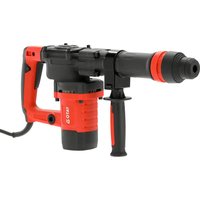
YT-82134 - Drill Yato - Free user manual and instructions
Find the device manual for free YT-82134 Yato in PDF.


User questions about YT-82134 Yato
0 question about this device. Answer the ones you know or ask your own.
Ask a new question about this device
Download the instructions for your Drill in PDF format for free! Find your manual YT-82134 - Yato and take your electronic device back in hand. On this page are published all the documents necessary for the use of your device. YT-82134 by Yato.
USER MANUAL YT-82134 Yato
natural_image
Exterior view of a Hitor excavator tool (no text or symbols visible)CE
PL EN DE RU UA LT LV CZ SK HU RO ES FR IT NL GR BG PT HR AR
text_image
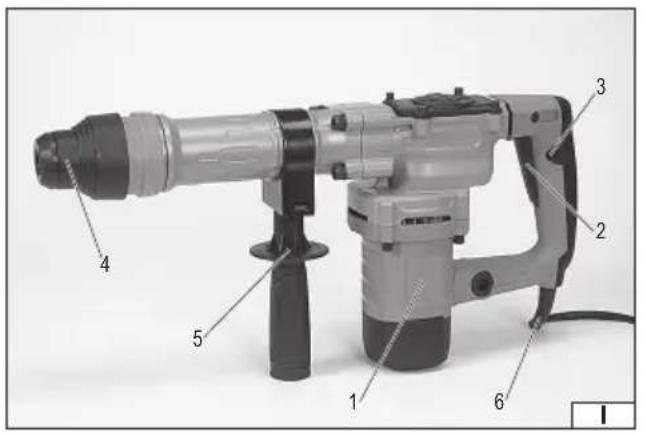
Labeled diagram of a mechanical drill press with numbered parts for identification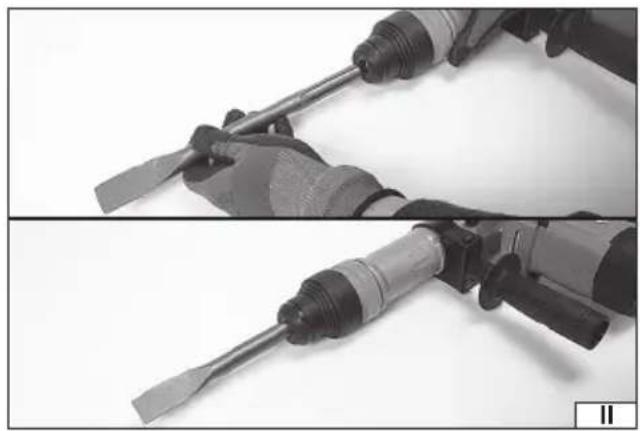
natural_image
Close-up of two hands using a screwdriver tool, showing blade and grip details (no text or symbols visible)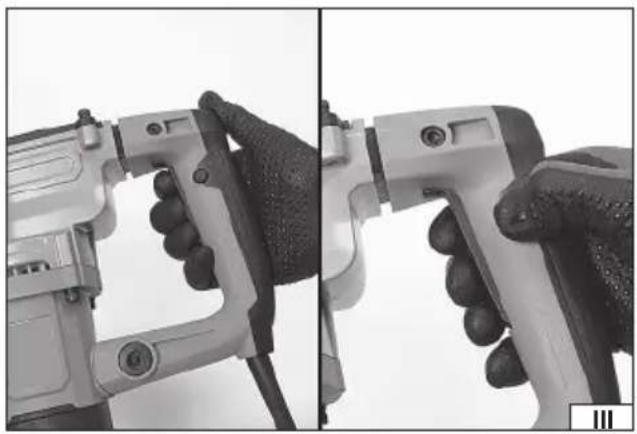
natural_image
Close-up of hands operating a handheld device with a tool, showing mechanical components and adjustment (no text or symbols visible)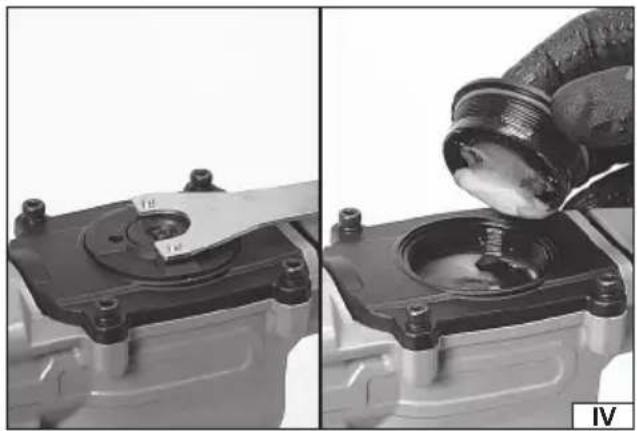
natural_image
Close-up of mechanical components with a gloved hand pouring liquid into a housing (no visible text or symbols)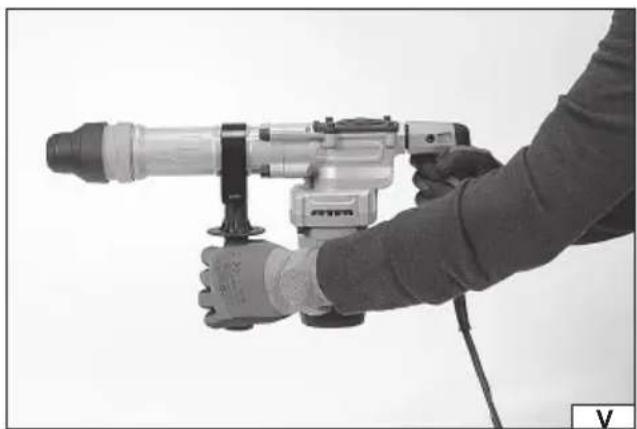
natural_image
Person using a precision drill press tool, no visible text or symbols on the device itself- body with main grip holder
- electric switch
- electric switch lock
- tool chuck
- auxiliary grip handle
- power cord with plug
DE
Read the operating instruction
Wear protective goggles
Wear hearing protectors
Second class of insulation
This symbol indicates that waste electrical and electronic equipment (including batteries and storage cells) cannot be disposed of with other types of waste. Waste equipment should be collected and handed over separately to a collection point for recycling and recovery, in order to reduce the amount of waste and the use of natural resources. Uncontrolled release of hazardous components contained in electrical and electronic equipment may pose a risk to human health and have adverse effects for the environment. The household plays an important role in contributing to reuse and recovery, including recycling of waste equipment. For more information about the appropriate recycling methods, contact your local authority or retailer.
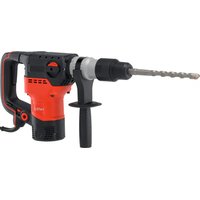
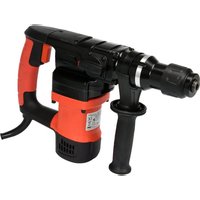
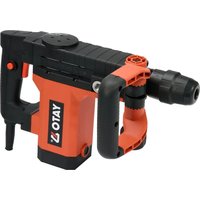
The chiselling hammer is an ordinary tool, Class II insulation, designed for demolition and chiselling work in natural and artificial stone, marble, etc., using working tools equipped with an SDS MAX handle. Proper, reliable and safe operation of the power tool depends on appropriate use, that is why you should:
Read the entire manual before the first use of the tool and keep it for future reference.
The supplier shall not be held liable for any damage resulting from failure to observe the safety regulations and recommendations specified in this manual.
PRODUCT CONTENTS
The product is supplied complete, the factory packaging should include:
- chiselling hammer,
- auxiliary handle.
SPECIFICATIONS
| Parameter Unit Value | ||
| Part No. YT-82134 | ||
| Rated voltage [V~] 220 - 240 | ||
| Rated frequency [Hz] 50 | ||
| Rated power [W] 1500 | ||
| Single stroke energy [J] 20 | ||
| Impact frequency [min] | ^-1 ] | 3900 |
| Weight | [kg] | 6,6 |
| Noise level | ||
| Sound pressure L_pA ± K | [dB(A)] | 90 ± 3,0 |
| Power L_ A ± K | [dB(A)] | 105 ± 3,0 |
| Vibration level a_t.Che ± K | [m/s2] | 18,53 ± 1,5 |
| Insulation class | II | |
| Protection rating | IPX0 | |
| Tool chuck | SDS MAX |
GENERAL SAFETY WARNINGS FOR POWER TOOLS
Warning! Read all safety warnings, illustrations and specifications supplied with this power tool. Failure to do so may result in electric shock, fi re, or serious injury.
Keep all warnings and instructions for future reference.
The term ‘power tool’ as used in the warnings refers to all power-driven tools both corded and cordless.
Workplace safety
Keep the workplace well lit and clean. Clutter and poor lighting can cause accidents.
Do not work with power tools in environments with an increased risk of explosion, containing flammable liquids, gases or vapours. Power tools generate sparks that can ignite dust or fumes.
Do not allow children and third persons to enter the workplace. Concentration loss can cause loss of control.
Electrical safety
The plug of the electrical cable must fit into the mains socket. The plug-in must not be modified in any way. Do not use any plug adapters with grounded power tools. Using an unmodified plug that matches the socket reduces the risk of electric shock.
Avoid contact with grounded surfaces such as pipes, radiators and refrigerators. Grounding of the body increases the risk of electric shock.
Power tools should not be exposed to precipitation or moisture. Water and moisture getting into the power tool increases the risk of electric shock.
Do not overload the power cord. Do not use the power cord to carry, pull or disconnect the plug from the mains socket. Avoid contact of the power cable with heat, oils, sharp edges and moving parts. A damaged or tangled power cable increases the risk of electric shock.
EN
Garden extension cables designed for use outside enclosed spaces should be used. Using an extension cable suitable for outdoor use reduces the risk of electric shock.
If the use of a power tool in a damp environment is unavoidable, a residual current device (RCD) should be used as protection against the supply voltage. The use of RCDs reduces the risk of electrocution.
Personal safety
Stay alert, pay attention to what you are doing and use common sense when working with a power tool. Do not use a power tool when tired or under the influence of drugs alcohol or medication. Even a moment's distraction while working can lead to serious personal injury.
Use personal protective equipment. Always wear eye protection. The use of personal protective equipment such as dust masks, slip-resistant safety shoes, helmets and hearing protectors reduce the risk of serious personal injuries.
Avoid accidental starting. Ensure that the electrical switch is in the ‘off’ position before connecting to power and/or battery, lifting or moving the power tool. Carrying a power tool with your finger on the switch or powering the power tool when the switch is in the “on” position can lead to serious injury.
Remove any spanners or other tools that have been used to adjust the power tool before switching it on. A spanner left on rotating tool components can lead to serious injury.
Do not reach or lean out too far. Maintain the right posture and balance at all times. This will allow for easier control of the power tool in the event of unexpected situations during operation.
Dress appropriately. Do not wear loose clothing or jewellery. Keep hair and clothing away from moving parts of the power tool. Loose clothing, jewellery or long hair may be caught by the moving parts.
If the device is suitable for connecting dust extractor or a device collecting dust, make sure that it is connected and used correctly. The use of dust extraction reduces the risk of hazards connected with dust.
Don't let the experience gained from frequent use of the tool result in carelessness and ignoring safety rules. The careless operation can cause serious injuries in a split second.
Use and care of the power tool
Do not overload the power tool. Use the correct power tool for the chosen application. The right power tool will ensure a better and safer job if used for the designed load.
Do not use the power tool if the electrical switch does not allow you to switch it on and off. A tool that cannot be controlled with the mains switch is unsafe and should be returned for repair.
Disconnect the plug from the power socket and/or remove the Battery pack if it is detachable from the power tool before adjusting, changing accessories or storing the tool. Such precautions will prevent the power tool from being accidentally switched on.
Keep the tool out of the reach of children and do not allow persons unfamiliar with the power tool or these instructions to handle the power tool. Power tools are dangerous in the hands of untrained users.
Maintain power tools and accessories. Inspect the tool for mismatches or jams in moving parts, damage to parts and any other conditions that may affect the performance of the power tool. Damage must be repaired before using the power tool. Many accidents are caused by improperly maintained tools.
Keep the cutting tools clean and sharp. Properly maintained cutting tools with sharp edges are less prone to jamming and are easier to control during operation.
Use power tools, accessories and insert tools etc. in accordance with these instructions, taking into account the type and conditions of work. Using the tools for works other than intended may lead to dangerous situations.
Keep handles and grip surfaces dry, clean and free of oil and grease. Slippery handles and gripping surfaces do not allow safe handling and control of the tool in dangerous situations.
Repairs
Repair your power tool only at authorised workshops using only original spare parts. This will ensure that the power tool is working in the correct safety.
ADDITIONAL SAFETY INSTRUCTIONS
Use hearing protectors. Exposure to noise can cause hearing loss.
Use the tool with the additional handles provided. Loss of control can cause personal injury to the operator.
Hold the power tool by the insulated handles to avoid the risk when the drill bit attached comes into contact with a live, concealed cable or power conductor when working. When the bit is in contact with a live wire it may cause the metal parts of the tool to become live, which may lead to electrocution of the tool operator.
Safety warnings for drilling with long bits
Always start drilling at low speed and make sure the end of the drill bit is in contact with the workpiece. At higher speeds, the drill might bend and cause injury if it is allowed to rotate freely without contact with the workpiece.
Apply pressure only in a straight line with the drill and do not press too hard. The drill can bend, causing breakage and loss of control which will result in injury.
EN
EQUIPMENT INSTALLATION
ATTENTION! Only install the accessories when the supply voltage is disconnected. Pull the tool power cord plug out of the mains socket!
The tool is supplied complete. After opening the factory packaging, check that all equipment items have been packed.
Assembly and adjustment of the auxiliary handle
To fit the auxiliary handle, put it in the desired position, clamp and tighten the handle grip. The auxiliary handle can be positioned for the safest, most ergonomic and efficient working. To do this, move the handle to the desired position and then lock the ability to change its position by tightening the lock knob firmly and securely. Due to the nature of the work, the tightness of the locking knob should be checked during use of the product.
PREPARING FOR WORK
Before starting work, make sure that the housing body and the connection cable with a plug are not damaged. It is forbidden to proceed with work in case of observing damage!
Insertion of SDS MAX working tools in the tool holder (II)
Clean the selected tool of dirt and rust and lubricate the SDS MAX handle with a thin layer of grease.
Pull the tool handle towards you and hold it in this position.
Insert the cleaned tool into the hole. If necessary, rotate the tool to make sure it fits in the chuck without any resistance.
Release the chuck ring. The tool should automatically lock inside the chuck.
Make sure the tool has been seated firmly. To do this, simply try pulling the tool out of the SDS MAX chuck. Repeat all installation steps, if the drill or chisel comes out of the chuck.
Preparing to work
Select the correct working tool: punch or chisel, then fit it into the tool holder.
Wear hearing protectors, eye protection, work gloves.
Insert the plug of the power cord into mains socket.
Starting and stopping the product
Assume a balanced position, grasp the implement with both hands and, making sure that the implement does not touch anything, start the product by pressing and holding the switch (III) with your finger.
Hold the tool in this state for several seconds to allow the lubricant to reach all parts of the drive mechanism. At the same time, check the product for signs of abnormal operation, such as too much noise, too much vibration, a suspicious smell or the appearance of smoke. If no signs of malfunction are observed, you can start using the product.
When finished working, switch off the tool by releasing pressure on the switch.
The switch has the ability to lock in the on position, which can be useful during prolonged operation. To lock the switch, press the lock button while the switch is depressed (III). The lock is released by pressing the switch.
Note In the event of suspicious rasps, clicks etc. Immediately disconnect the tool from the mains and hand it over to an authorised service company for inspection.
Product operation
It is recommended that during the initial period of use, the tool should not be worked too intensively, to allow the mechanical parts to reach their limits. It is also advisable to use longer breaks to cool down the tool. As the components inside the tool become lapped, the intensity of the work can be increased and the intervals needed for tool cooling can be shortened.
Note Sometimes it can happen that the hammer does not transmit the impact to the working tool, even though the engine is running. The cause of this condition is usually a lubricant that is too thick. If the product is used at a low temperature, let it run for about 5 minutes to warm up.
Lean the work tool against the surface to be worked on, grasp the hammer by both handles and operate the switch (V). If the working tool has not started the hammer should be pushed towards the surface to be worked on. This is not the result of a malfunction, but of protection against no-load operation.
When working, apply only the pressure necessary for the tool to work correctly. Applying too much pressure to the working tool can cause damage to the working tool and hammer mechanisms, and will result in a decrease in productivity.
If the product will be used to chisel a thick surface, chiselling should be carried out in layers. Forge a layer of small thickness each time.
Take regular breaks during work.
TOOL OPERATION
Caution! Wear ear protection when using the tool!
Additional remarks
When working, do not exert too much pressure on the workpiece and do not make sudden movements so as not to damage the work tool and hammer. Take regular breaks during work. Do not overload the tool, the temperature of the external surface must never exceed 60^ C. When work is complete, switch off the tool, unplug the tool's cord from the mains socket and then carry out maintenance and visual inspection.
The declared total vibration emission value has been measured using the standard test method and can be used to compare one tool to another. The declared total vibration value can be used in the preliminary exposure assessment.
Caution! The vibration emission during tool operation may differ from the declared value, depending on the manner the tool is used. Caution! Safety measures to protect the operator, which are based on an exposure assessment under actual conditions of use (including all parts of the work cycle, such as the time when the tool is turned off or idle and the activation time), must be specified.
Lubrication
Always clean the drills or chisels thoroughly before using them and lubricate the SDS MAX shank with a thin layer of grease. It is recommended to use a grease designed for SDS MAX drill chucks. It is recommended to use a grease designed for gears and crank gears (IV). It is recommended to have the grease refilled by an authorised service centre.
MAINTENANCE AND INSPECTIONS
CAUTION! Before carrying out any adjustment, servicing or maintenance work, unplug the tool from the mains socket. Having finished working, inspect the power tool for damage by visually checking the exterior and the body and the handles. Check the power cord with plug and its rubber gland, the action of the electric power switch, the ventilation openings for clogging, the motor brushes for sparking, the noise level of the bearings and the drive transmission, and how the power tool starts and runs. During the warranty period, the user is not allowed to install any power tools or replace any components or parts, as this will void the warranty rights. Any irregularities found during the inspection or the operation signal the need for repair to be done at the service centre. After finishing work, the housing, ventilation openings, switches, auxiliary handle and covers should be cleaned e.g. with an air jet (with a pressure not exceeding 0.3 MPa), paintbrush or dry cloth without the use of chemicals and cleaning agents. Clean the tools and handles with a clean and dry cloth.
GERÄTEBESCHREIBUNG
DODATNE SIGURNOSNE UPUTE
Nosite zaštitu za sluh. Izlaganje buci može uzrokovati gubitak sluha.
DEKLARACJA ZGODNOŚCI DECLARATION OF CONFORMITY DECLARATIE DE CONFORMITATE
1224/YT-82134/EC/2024
We declare and guarantee with full responsibility that the following products:
meet requirements of the following European Standards / Technical Specifications:
EN IEC 62841-2-6:2020 + A11:2020
EN IEC 55014-1:2021
EN IEC 55014-2:2021
EN IEC 61000-3-2:2019 + A1:2021
EN 61000-3-3:2013 + A1:2019
i spełniają wymagania dyrektyw: | and fulfill requirements of the following European Directives: | și satisfac cerințele Directivelor europene următoare:
2006/42/WE Machinery and safety elements
2014/30/UE Electromagnetic compatibility (EMC) Directive
Directiva privind compatibilitatea electromagnetică (EMC) (H.G. nr. 487/2016)
2011/65/UE Restriction of the Use of Certain Hazardous Substances
Manufacturer quality-control system, examination of the manufacturer's technical file and periodical inspection by notified body
Measured sound power level on an equipment representative for this type:
Guaranteed sound power level for this equipment: