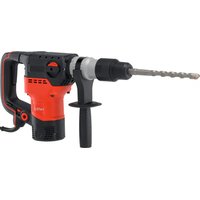
YT-82132 - Drill Yato - Free user manual and instructions
Find the device manual for free YT-82132 Yato in PDF.


| Product type | Rotary hammer (hammer drill) |
| Brand | Yato |
| Model | YT-82132 |
| Rated voltage | 220-240 V ~ |
| Rated frequency | 50-60 Hz |
| Rated power | 1600 W |
| No-load speed | 0 - 650 min⁻¹ |
| Max. drilling diameter (concrete) | 40 mm |
| Impact energy | 15 J |
| Impact frequency | 0 - 3900 min⁻¹ |
| Weight | 6.6 kg |
| Chuck type | SDS MAX |
| Sound pressure level | 97 dB(A) (K=3 dB) |
| Sound power level | 105 dB(A) (K=3 dB) |
| Vibration level (drilling) | 23.8 m/s² (K=1.5) |
| Vibration level (chiseling) | 20.6 m/s² (K=1.5) |
| Insulation class | II |
| Protection rating | IPX0 |
| Functions | Hammer drilling, chiseling, speed adjustment |
| Included accessories | Auxiliary handle, chuck cover |
| Maintenance | Cleaning with compressed air, lubrication of SDS MAX shank |
| Safety | Safety clutch, double insulation, recommended hearing protection |
Frequently Asked Questions - YT-82132 Yato
User questions about YT-82132 Yato
0 question about this device. Answer the ones you know or ask your own.
Ask a new question about this device
Download the instructions for your Drill in PDF format for free! Find your manual YT-82132 - Yato and take your electronic device back in hand. On this page are published all the documents necessary for the use of your device. YT-82132 by Yato.
USER MANUAL YT-82132 Yato
natural_image
Exterior view of a YATO drill press tool with threaded shaft and handle (no visible text or symbols)CE
PL EN DE RU UA LT LV CZ SK HU RO ES FR IT NL GR BG PT HR AR
natural_image
Close-up of two mechanical components with a coiled drill bit, showing structural details (no text or symbols visible)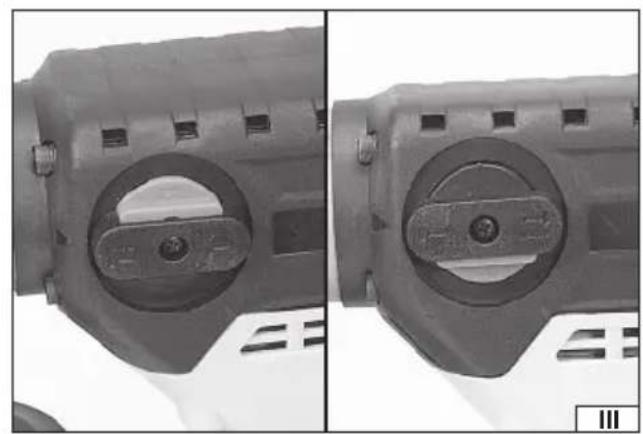
natural_image
Close-up of two mechanical components with circular cutouts and mounting holes, shown from side and top views (no text or symbols visible)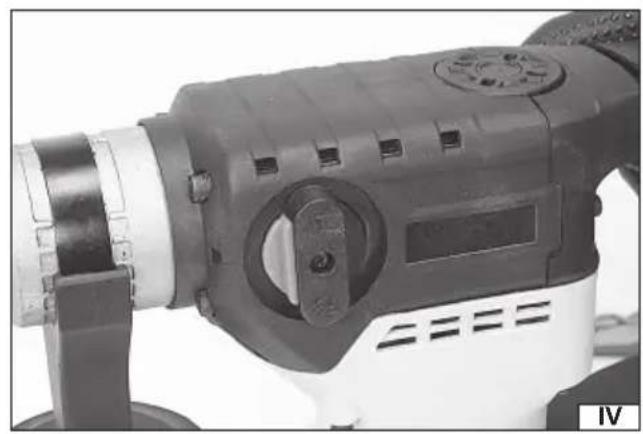
natural_image
Close-up of a drill bit with black and white tool, no visible text or symbols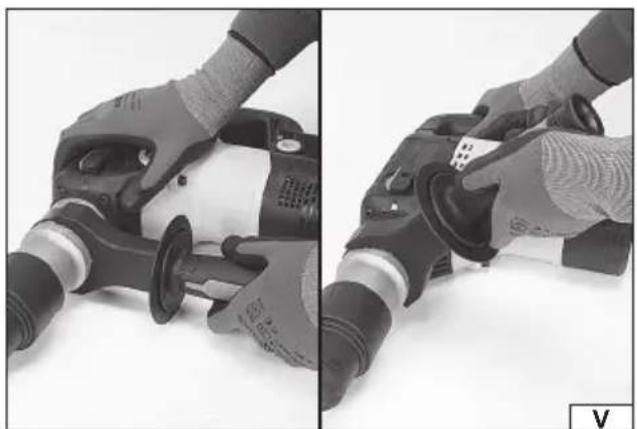
natural_image
Two-panel photo showing hands operating a power tool on a flat surface, no visible text or symbols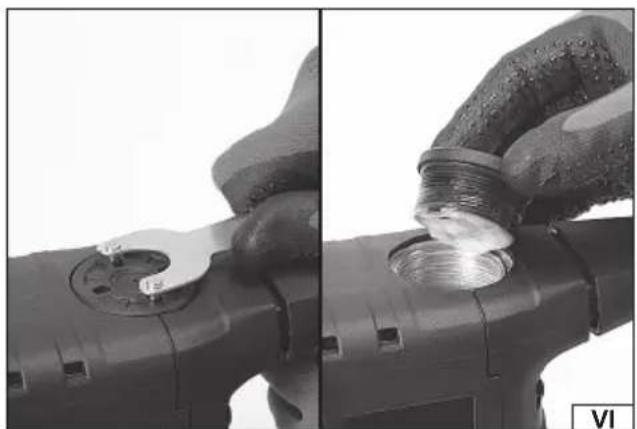
natural_image
Close-up of hands using a power tool to adjust a threaded component (no text or symbols visible)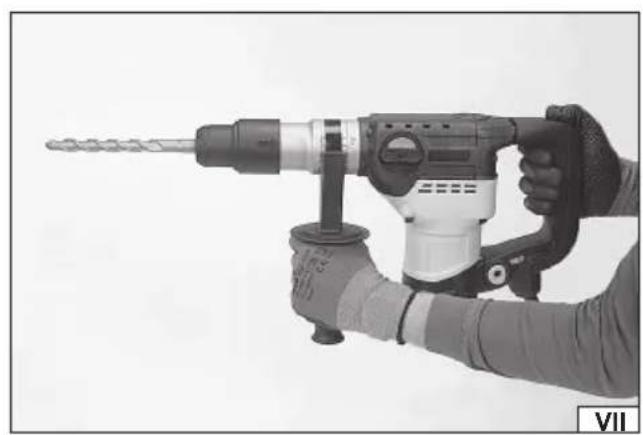
natural_image
Close-up of a hand holding a drill bit with a headlamp, no visible text or symbols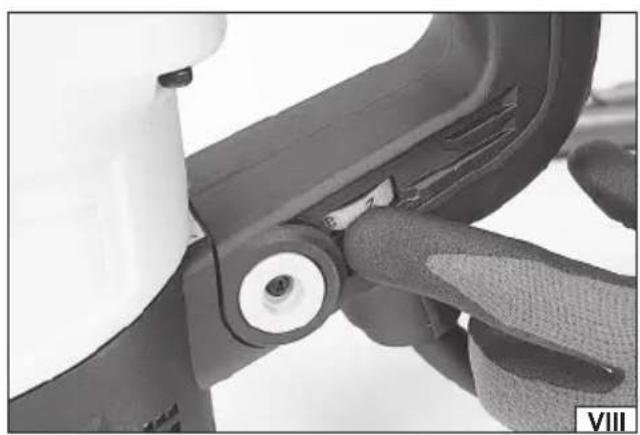
natural_image
Close-up of a mechanical component with a circular knob and textured base, no visible text or symbolsnatural_image
Close-up of hands gripping a mechanical device, showing two views (left and right) with no visible text or symbols.PL
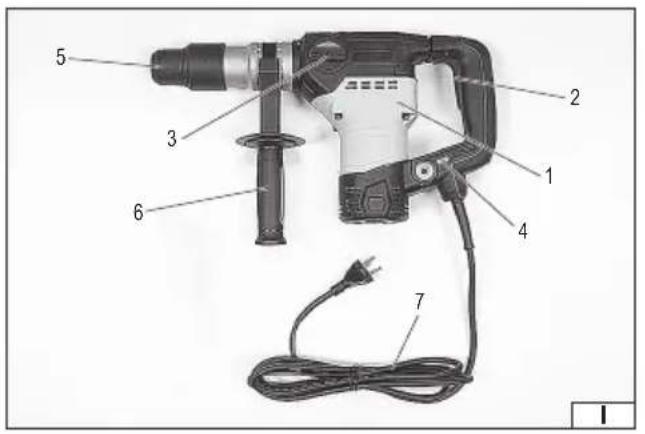
- body with the main handle
- electric power switch
- drilling mode switch
- impact mode switch
- drill chuck
- additional handle
- mains cable
DE
Wear hearing protectors
Second class of insulation
This symbol indicates that waste electrical and electronic equipment (including batteries and storage cells) cannot be disposed of with other types of waste. Waste equipment should be collected and handed over separately to a collection point for recycling and recovery, in order to reduce the amount of waste and the use of natural resources. Uncontrolled release of hazardous components contained in electrical and electronic equipment may pose a risk to human health and have adverse effects for the environment. The household plays an important role in contributing to reuse and recovery, including recycling of waste equipment. For more information about the appropriate recycling methods, contact your local authority or retailer.
The rotary hammer is a regular tool, class II insulation, designed for making holes and chiseling in concrete, natural and artificial stone, marble, etc. using working tools equipped with an SDS MAX grip. The correct, reliable and safe operation of the power tool depends on its proper use, therefore:
Before using the tool, read the entire manual and keep it.
The supplier is not liable for any damage resulting from failure to comply with the safety regulations and recommendations of this manual.
EQUIPMENT
The factory packaging should contain:
- rotary hammer
- additional handle.
TECHNICAL PARAMETERS
| Parameter Unit of measurement Value | ||
| Catalogue number YT-82132 | ||
| Nominal voltage [V~] 220 - 240 | ||
| Nominal frequency [Hz] 50 - 60 | ||
| Rated power [W] 1600 | ||
| Rated speed [min] | ^-1 0 - 650 | |
| Max. hole diameter (concrete) [mm] 40 | ||
| Impact energy | [J] | 15 |
| Stroke frequency | [min ^-1 ] | 0 - 3900 |
| Mass | [kg] | 6,6 |
| Handle type | SDS MAX | |
| Noise level | ||
| - Sound pressure L_pH ± K | [dB(A)] | 97,0 ± 3,0 |
| - Power L_wA ± K | [dB(A)] | 105,0 ± 3,0 |
| Vibration level a_hHD ± K / a_hCheq ± K | [m/s ^2 ] | 23,8 ± 1,5 / 20,6 ± 1,5 |
| Insulation class | II | |
| Degree of protection | IPX0 |
GENERAL POWER TOOL SAFETY WARNINGS
Warning! Please read all safety warnings, illustrations and specifications provided with this power tool. Failure to follow them may result in electric shock, fire or serious injury.
Save all warnings and instructions for future reference.
The term „power tool" used in the warnings refers to all corded and cordless electric power tools.
Workplace safety
Keep your work area clean and well lit. Clutter and poor lighting can cause accidents.
Do not operate power tools in explosive atmospheres, such as in the presence of flammable liquids, gases or fumes.
Power tools create sparks which may ignite the dust or fumes.
Do not allow children or bystanders into the work area. Loss of concentration can cause loss of control.
Electrical safety
The plug on the electric cord must match the outlet. Do not modify the plug in any way. Do not use any plug adapters with grounded power tools. An unmodified plug that matches the outlet reduces the risk of electric shock.
Avoid body contact with grounded surfaces such as pipes, radiators, and refrigerators. Grounding your body increases the risk of electric shock.
Do not expose power tools to precipitation or moisture. Water or moisture entering a power tool increases the risk of electric shock. Do not overload the power cord. Do not use the power cord to carry, pull, or disconnect the plug from the wall outlet. Keep the power cord away from heat, oil, sharp edges, and moving parts. A damaged or entangled power cord increases
EN
the risk of electric shock.
When working outdoors, use extension cords designed for outdoor use. Using an extension cord designed for outdoor use reduces the risk of electric shock.
If using a power tool in a damp environment is unavoidable, a residual current device (RCD) should be used as protection against supply voltage. The use of an RCD reduces the risk of electric shock.
Personal safety
Stay alert, watch what you are doing and use common sense when operating a power tool. Do not use a power tool while tired or under the influence of drugs, alcohol or medication. Even a moment of inattention while operating a power tool can result in serious personal injury.
Use personal protective equipment. Always wear eye protection. The use of personal protective equipment such as dust masks, non-skid safety shoes, hard hats, and hearing protection reduces the risk of serious personal injury.
Prevent accidental starting. Ensure that the power switch is in the “off” position before connecting to power source and/or battery pack, picking up or carrying the power tool. Carrying a power tool with your finger on the switch or energizing a power tool that has the switch in the “on” position can result in serious injury.
Remove any wrench or key that is used to adjust the power tool before turning it on. A wrench left attached to a rotating part of the power tool may result in serious injury.
Do not overreach or overextend. Maintain proper posture and balance at all times. This will make it easier to control the power tool in the event of unexpected situations while working.
Dress appropriately. Do not wear loose clothing or jewelry. Keep hair and clothing away from moving parts of the power tool. Loose clothing, jewelry, or long hair can be caught in moving parts.
If devices are provided for the connection of dust extraction or dust collection facilities, ensure that these are connected and used correctly. The use of dust extraction reduces the risk of dust-related hazards.
Don't let the experience gained from frequent use of the tool cause you to become careless and ignore safety rules.
Careless action can cause serious injuries in a split second.
Use and care of power tools
Do not overload the power tool. Use the correct power tool for the selected application. The correct power tool will provide better and safer work when used for the designed load.
Do not use a power tool if the power switch does not turn it on and off. A tool that cannot be controlled with the power switch is dangerous and must be repaired.
Disconnect the plug from the power outlet and/or remove the battery pack if detachable from the power tool before making any adjustments, changing accessories, or storing the tool. Such precautions will prevent the power tool from being switched on accidentally.
Store the tool out of the reach of children, do not allow persons unfamiliar with the power tool or these instructions to use the power tool. Power tools are dangerous in the hands of untrained users.
Maintain power tools and accessories. Check the tool for misalignment or binding of moving parts, breakage of parts and any other condition that may affect the power tool's operation. Any damage should be repaired before using the power tool. Many accidents are caused by poorly maintained tools.
Cutting tools should be kept clean and sharp. Properly maintained cutting tools with sharp edges are less likely to bind and are easier to control during operation.
Use power tools, accessories and attachments etc. in accordance with these instructions, taking into account the type and conditions of work. Using tools for work other than those designed may result in a hazardous situation.
Keep handles and gripping surfaces dry, clean and free from oil and grease. Slippery handles and gripping surfaces do not allow safe operation and control of the tool in hazardous situations.
Repairs
Have your power tool repaired only by authorized service centers, using only original spare parts. This will ensure proper safety of your power tool.
SAFETY INSTRUCTIONS FOR HAMMER DRILLS
Wear hearing protection. Exposure to noise can cause hearing loss.
Use the tool with the additional handles supplied with the tool. Loss of control can result in personal injury to the operator.
When performing an operation where the inserted tool may contact a hidden live wire or a power cord, hold the power tool by insulated gripping surfaces. An inserted tool contacting a live wire may cause metal parts of the tool to become live, which could cause an electric shock to the tool operator.
Warnings related to drilling with long drill bits
Always start drilling at a low speed and with the tip of the drill bit in contact with the workpiece. At higher speeds, the drill bit is likely to bend if allowed to spin freely without contacting the workpiece, resulting in injury.
EN
Apply pressure only in a straight line with the drill and do not apply excessive pressure. The drill may bend causing breakage and loss of control resulting in injury.
INSTALLATION OF EQUIPMENT ELEMENTS
CAUTION! Accessories may only be mounted when the power supply is disconnected. Disconnect the tool cable plug from the power socket!
The rotary hammer is delivered complete. After opening the factory packaging, check that all accessories have been packed.
Mounting and adjusting the additional handle (V)
To mount the additional handle, place it in the desired position, tighten and tighten the handle grip. The additional handle can be set to the position that provides the most safe, ergonomic and efficient work. To do this, set the handle in the desired position and then lock the possibility of changing its position by tightening it firmly and securely. Due to the nature of the work, the degree of tightening of the handle should be checked during use of the product.
PREPARING FOR WORK
Before starting work, check that the housing body and the connecting cable with the plug are not damaged. If any damage is found, further work is prohibited.
Attention! All activities related to changing working tools (drills and punches with SDS MAX grip), mounting covers and guides, adjustments, etc. should be carried out with the power supply voltage of the tool switched off, therefore before starting these activities: Unplug the tool cable from the mains socket!
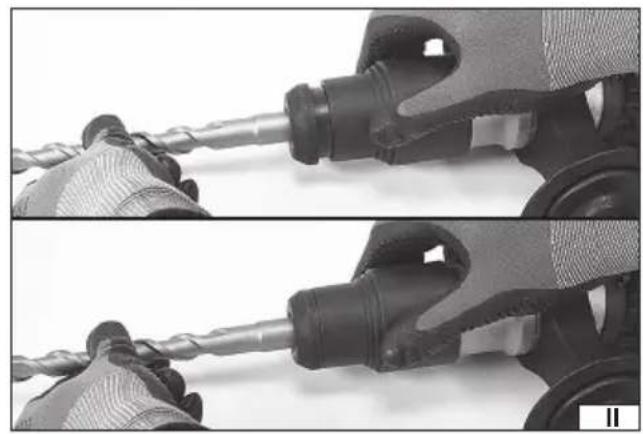
Installing SDS MAX working tools in the tool holder (II)
Clean the selected tool of dirt and rust and lubricate the SDS MAX chuck with a thin layer of grease.
Pull the tool handle toward you and hold it in this position.
Insert the cleaned tool into the hole. If necessary, turn the tool so that it enters the holder without resistance.
Release the handle and the tool should automatically lock into the holder.
Check whether the tool is securely seated. To do this, simply try to pull the tool out of the SDS MAX holder. If the drill or punch slides out of the holder, repeat the assembly steps.
Setting the operating mode (III)
The impact drilling function allows you to make holes in concrete, masonry and hard ceramic materials (hard bricks, stones, marble). To do this, set the mode switch to the position marked with the drill and hammer symbol.
It is also possible to set the hammer chisel function, in this mode the rotation is disconnected. To turn on the chisel function, set the mode switch to the position marked with the hammer symbol.
Speed control (VIII)
The hammer is equipped with smooth speed control. Adjustment is done by setting the knob. The higher the number visible on the knob, the higher the speed. Changing the speed of rotation entails changing the frequency of the impact and the energy of a single impact. Smooth adjustment is possible within the range listed in the table with technical data. A higher speed of rotation should be set for drilling in hard, compact materials and when drilling with small diameter drills. A lower speed of rotation is intended for drilling in ceramic materials and with larger diameter drills.
Preparatory activities
Select the correct working tool and mount it in the tool holder.
Set the operating mode switch to the appropriate position: hammer symbol – chiselling; hammer and drill symbol – impact drilling (III).
Wear hearing protection, eye protection, and work gloves.
Insert the plug into the electrical outlet.
Take a balanced position, hold the tool (VII) firmly with both hands and start it by pressing the electric switch (IX) with your finger.
Hold the tool in this state for a few minutes to allow the grease to reach all components of the drive mechanism.
Turn off the tool by releasing the pressure on the switch.
Note! If you notice any suspicious creaking, crackling, etc., immediately disconnect the tool from the power supply and have it inspected by an authorized service facility.
USING THE TOOL
Caution! Wear hearing protection when using the tool!
Drilling in ceramic materials
Drilling in hard, compact materials: concrete, hard brick, stone, marble, etc.
Disconnect the tool from the mains, then secure the insert tool (drill or punch) in the tool holder.
Use the mode switch to select hammer drilling or hammer chiselling.
Insert the plug into the electrical outlet, turn the tool on and start working.
Take regular breaks while working - never allow power tools and inserted tools to become excessively hot.
Hammer drilling is recommended only for compact ceramic materials such as concrete, hard brick, stone, etc. When drilling large diameter holes, it is recommended to make a preliminary hole of a smaller diameter and then use a drill with the target diameter. Drills designed for hammer drilling should be used.
It is not recommended to use impact drilling in the case of ceramic materials with a loose structure such as tiles, soft brick, plaster, etc. Impact drilling in such materials may lead to the destruction of the material.
The tool is equipped with a clutch to prevent overloading of the electric motor in the event that the insert tool is stopped as a result of work. For example, when it hits a reinforcing bar. In this case, the drill stops rotating, although the electric motor continues to run. Exerting too much pressure during operation can also cause the clutch to engage. In this case, withdraw the insert tool from the hole, check that the hammer is working properly, and then resume work applying only as much pressure as is necessary for proper operation. If you encounter rebar or other hidden metal obstacles, drill through them without impact using a metal drill bit of the same diameter as the impact drill bit, and then continue drilling into the ceramic material.
Setting the chisel position (IV)
Some insert tools designed for chiseling require a specific angle for safe and ergonomic work, such as chisels or chisels. You can use the appropriate operating mode for this purpose. Secure the insert tool in the holder according to the instructions in the manual. Set the switch to the hammer symbol with an arrow, then press the switch. The insert tool will slowly start to rotate. Release the pressure on the switch when the insert tool has reached the desired position. Set the operating mode switch to the chiseling position - hammer symbol, then start working.
Forging
Disconnect the tool from the mains and then attach the selected tool to the tool holder: punch or cutter.
Set the mode switch to the chiseling position. Insert the plug into the electrical outlet, turn on the hammer switch, wait until full speed is reached and start working.
When hammering, do not drive the inserted tool too deep into the material being hammered. Hammer the material in thin layers without exerting too much pressure on the hammer.
Drill chuck cover
If the tool is equipped with a rubber chuck cover, it is recommended to use it when drilling with the drill facing upwards, such as when drilling into a ceiling. After installing the drill in the chuck, the cover should be placed over it. Dust and debris generated during drilling will be collected in the cover, which will prevent contamination of the drill chuck. After finishing work, remove the cover from the drill, clean off the dust and debris, and then rinse under a stream of lukewarm water.
Additional notes
During work, do not exert too much pressure on the processed material and do not make sudden movements, so as not to damage the power tool and the working tool. Take regular breaks during work. Do not allow the tool to be overloaded, the temperature of the external surfaces must never exceed 60 °C . After finishing work, turn off the hammer, remove the tool's cable plug from the mains socket and perform visual inspection and maintenance.
The declared vibration total value has been measured using a standard test method and can be used to compare one tool with another. The declared vibration total value can be used in a preliminary assessment of exposure.
Note! Vibration emission during tool operation may differ from the declared value depending on how the tool is used.
Note! Safety measures to protect the operator must be defined that are based on an assessment of exposure in the actual conditions of use (including all parts of the operating cycle, such as times when the tool is switched off or idle and activation time).
Lubrication
Always clean drills or punches thoroughly before using them and apply a thin layer of grease to the SDS MAX chuck. It is recommended to use grease designed for SDS MAX drill chucks. If the impact mechanism does not work properly, one of the causes may be insufficient lubrication of the gear and the impact piston crank assembly (VI). It is recommended to use grease designed for gears and cranks. It is recommended to replenish the grease at an authorized service facility.
EN
MAINTENANCE AND INSPECTIONS
NOTE! Before starting any adjustments, maintenance or servicing, unplug the tool from the power outlet. After finishing work, check the technical condition of the power tool by visually inspecting it and assessing: the body and handle, the electric cable with the plug and bending protection, the operation of the electric switch, the patency of the ventilation slots, the sparking of the brushes, the noise level of the bearings and gears, the start-up and the smoothness of the operation. During the warranty period, the user may not disassemble the power tool or replace any components or parts, as this will void the warranty. Any irregularities observed during the inspection or during work are a signal to carry out repairs at a service point. After finishing work, the housing, ventilation slots, switches, additional handle and covers should be cleaned, for example, with an air jet (with a pressure of no more than 0,3 MPa), a brush or a dry cloth without using chemicals or cleaning fluids. Clean the tools and handles with a dry, clean cloth.
WERKZEUGMERKMALE
- boorhamer
- extra handgreep.
DEKLARACJA ZGODNOŚCI DECLARATION OF CONFORMITY DECLARATIE DE CONFORMITATE
0225/YT-82132/EC/2025
We declare and guarantee with full responsibility that the following products:
meet requirements of the following European Standards / Technical Specifications:
EN IEC 62841-2-6:2020 + A11:2020
EN IEC 55014-1:2021
EN IEC 55014-2:2021
EN IEC 61000-3-2:2019 + A1:2021
EN 61000-3-3:2013 + A1:2019 + A2:2021
and fulfill requirements of the following European Directives:
2006/42/WE Machinery and safety elements
2014/30/UE Electromagnetic compatibility (EMC) Directive
Directiva privind compatibilitatea electromagnetică (EMC) (H.G. nr. 487/2016)
2011/65/UE Restriction of the Use of Certain Hazardous Substances
Serial number: concern all serials numbers of item(s) mentioned in this declaration
The person authorized to compile the technical file: