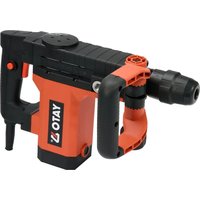
YT-82133 - Drill Yato - Free user manual and instructions
Find the device manual for free YT-82133 Yato in PDF.


| Product Type | Demolition hammer (breaker drill) |
| Catalog number | YT-82133 |
| Rated voltage | 220-240 V AC |
| Rated frequency | 50 Hz |
| Rated power | 1150 W |
| Impact frequency | 4850 min⁻¹ |
| Single impact energy | 15 J |
| Weight | 4.8 kg |
| Sound pressure level (K=3 dB) | 83.5 dB(A) |
| Sound power level (K=2.4 dB) | 97.5 dB(A) |
| Vibration level | 15.546 m/s² (K=1.5 m/s²) |
| Insulation class | II |
| Chuck type | SDS Max (hexagonal) |
| Included accessories | Adjustable auxiliary handle |
| Inspection and maintenance | Clean ventilation slots with compressed air (≤0.3 MPa) or dry brush; lubricate the working tool before each use |
| Safety instructions | Wear PPE (safety glasses, helmet, ear protection, dust mask); do not expose to moisture; use a residual current device outdoors |
Frequently Asked Questions - YT-82133 Yato
User questions about YT-82133 Yato
0 question about this device. Answer the ones you know or ask your own.
Ask a new question about this device
Download the instructions for your Drill in PDF format for free! Find your manual YT-82133 - Yato and take your electronic device back in hand. On this page are published all the documents necessary for the use of your device. YT-82133 by Yato.
USER MANUAL YT-82133 Yato
natural_image
Black and white photo of a YATO2 push-button press tool (no visible text or symbols on body)CE
PL EN DE RU UA LT LV CZ SK HU RO ES FR IT NL GR
natural_image
Close-up of a hand holding a black plastic tool, no visible text or symbols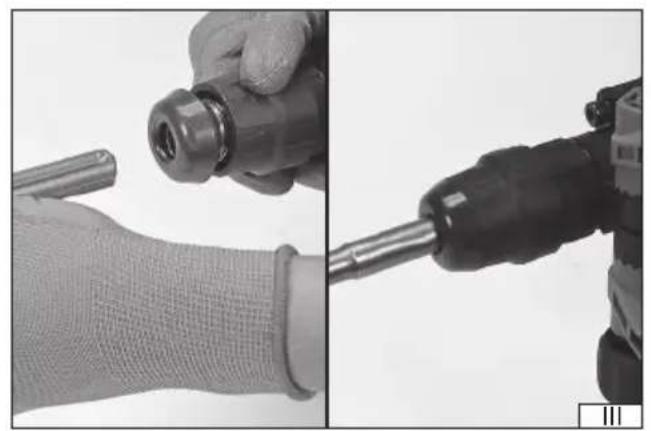
natural_image
Close-up of hands using a drill bit and a drill pen to handle a wrist (no text or symbols visible)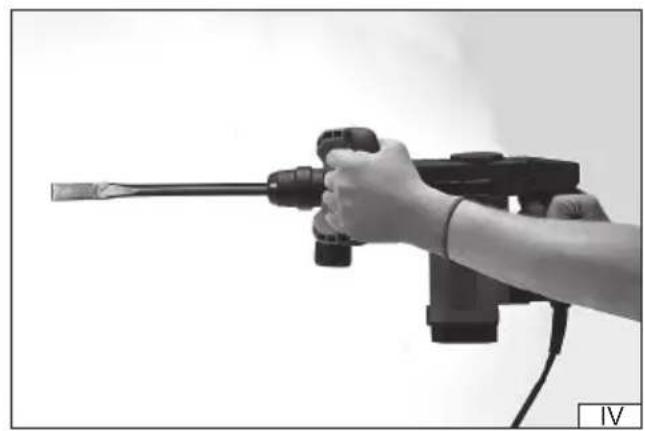
natural_image
Hand holding a handheld electric shock absorber gun, no visible text or symbolsRead the operating instruction
Wear protective goggles
Wear hearing protectors
Second class of insulation
This symbol indicates that waste electrical and electronic equipment (including batteries and storage cells) cannot be disposed of with other types of waste. Waste equipment should be collected and handed over separately to a collection point for recycling and recovery, in order to reduce the amount of waste and the use of natural resources. Uncontrolled release of hazardous components contained in electrical and electronic equipment may pose a risk to human health and have adverse effects for the environment. The household plays an important role in contributing to reuse and recovery, including recycling of waste equipment. For more information about the appropriate recycling methods, contact your local authority or retailer.
PRODUCT CHARACTERISTICS
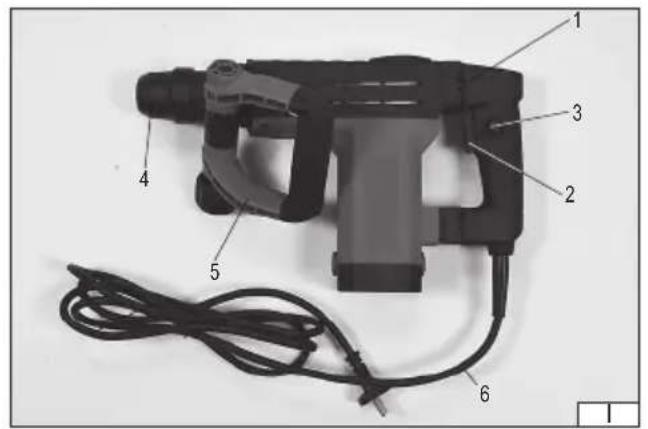
A demolition hammer is an ordinary power tool of II class of insulation, designed for demolition and chiselling works in natural stone, artificial stone, marble etc. using work tools fitted with a hexagonal grip. Correct, reliable and safe operation of this power tool depends on proper operation, therefore:
Before starting the work with this product, please read this manual and keep it properly.
The supplier does not assume any liability for damages resulting from failure to follow safety regulations and recommendations specified in this manual.
EQUIPMENT
The product is supplied as complete, the packaging should include:
- demolition hammer
- auxiliary grip handle
TECHNICAL PARAMETERS
| Parameter Measuring unit Value | ||
| Catalogue number YT-82133 | ||
| Rated voltage [V~] 220 - 240 | ||
| Rated frequency [Hz] 50 | ||
| Rated power [W] 1150 | ||
| Impact frequency [min] | ^-1 4850 | |
| Single impact energy [J] 15 | ||
| Weight | [kg] | 4,8 |
| Noise level | ||
| - acoustic pressure | [dB] | 83,5 ± 3,0 |
| - power | [dB] | 97,5 ± 2,4 |
| Vibration level | [m/s ^2 ] | 15,546 ± 1,5 |
| Insulation class | II | |
| Protection class | IPX0 | |
| Hexagonal tool chuck | [mm] | SDS MAX |
GENERAL WARNINGS FOR THE SAFETY OF POWER TOOLS
Warning! Read all safety warnings, illustrations and specifications provided with this power tool. Failure to do so may result in electric shock, fire or serious injury.
Keep all warnings and instructions for future reference.
The term “power tool” used in warnings applies to all tools driven by power both wired and wireless.
Workplace safety
Keep the workplace well-lit and clean. Disorder and poor lighting can be causes of accidents.
Do not work with power tools in an environment with an increased risk of explosion, containing flammable liquids, gases or vapors. Power tools generate sparks that can ignite dust or fumes.
Children and third persons should not be allowed to enter the workplace. Loss of concentration can result in loss of control.
Electrical safety
The plug of the electric cable must match the power socket. You must not modify the plug in any way. Do not use any plug adapters with earthed power tools. An unmodified plug that fits the outlet reduces the risk of electric shock.
Avoid contact with earthed surfaces such as pipes, radiators and coolers. Grounding the body increases the risk of electric shock.
Do not expose power tools to contact with atmospheric precipitation or moisture. Water and moisture that gets inside the power tool increases the risk of electric shock.
Do not overload the power cable. Do not use the power cord to carry, pull or unplug the power plug from the power outlet. Avoid contact of the power cable with heat, oils, sharp edges and moving parts. Damage or entanglement of the power cord increases the risk of electric shock.
In the case of working outside closed rooms, use extension cords intended for work outside closed rooms. The use of an extension cord adapted for outdoor use reduces the risk of electric shock.
When using a power tool in a humid environment is unavoidable as a protection against supply voltage use a residual
EN
current device (RCD). The use of RCD reduces the risk of electric shock.
Personal safety
Stay alert, pay attention to what you do and keep common sense while working with the power tool. Do not use a power tool when you are tired or under the influence of alcohol or medication. Even a moment of inattention while working can lead to serious personal injury.
Use personal protective equipment. Always wear eye protection. The use of personal protective equipment such as dust masks, anti-slip safety shoes, helmets and hearing protection reduce the risk of serious personal injury.
Prevent accidental operation. Make sure that the electric switch is in the “off” position before connecting to the power supply and / or battery, lifting or moving the power tool. Moving the power tool with the finger on the switch or powering the power tool, when the switch is in the “on” position can lead to serious injuries.
Before turning on the power tool remove any keys and other tools that were used to adjust it. The key left on the rotating parts of the power tool can lead to serious injuries.
Do not reach and do not lean too far. Keep the right attitude and balance all the time. This will allow easier control over the power tool in case of unexpected work situations.
Dress accordingly. Do not wear loose clothing or jewelry. Keep your hair and clothing away from moving parts of the power tool. Loose clothing, jewelry or long hair can be caught by moving parts.
If the devices are fitted for the connection of dust extraction or dust collection, make sure that they are connected and used properly. The use of dust extraction reduces the risk of dust hazards.
Do not let the experience acquired from frequent use of the tool resulted in carelessness and ignoring safety rules.
Carefree action can cause serious injuries in a fraction of a second.
Use and care of the power tool
Do not overload the power tool. Use the power tool appropriate for the selected application. The right power tool will provide a better and safer job if used according to the designed load.
Do not use the power tool, if the electric switch does not allow switching on and off. Power tool, which cannot be controlled by means of a power switch is dangerous and must be returned for repair.
Disconnect the plug from the power socket and / or remove the battery if it is detachable from the power tool before adjusting, changing accessories or storing the tool. Such preventive measures will allow you to avoid accidentally turning on the power tool.
Keep the tool out of the reach of children, do not let people who do not know how to operate the power tool or these instructions use a power tool. Power tools are dangerous in the hands of untrained users.
Maintain power tools and accessories. Check the tool for mismatches or jams of moving parts, damage to parts and any other conditions that may affect the operation of the power tool. Damage must be repaired before using the power tool. Many accidents are caused by incorrectly maintained tools.
Keep cutting tools sharp and clean. Properly maintained cutting tools with sharp edges are less prone to jamming and are easier to control when working.
Use power tools, accessories and inserted tools etc. in accordance with these instructions, taking into account the type and conditions of work. The use of tools for work other than designed is likely to result in a dangerous situation.
Handles and gripping surfaces must be dry, clean and free from oil and grease. Slippery handles and gripping surfaces do not allow for safe operation and control of the tool in dangerous situations.
Repairs
Repair the power tool only in authorized facilities using only original spare parts. This ensures proper operation safety of the power tool.
ADDITIONAL SAFETY CONDITIONS
Wear hearing protection. Exposure to sound may come from the auditory pathway.
Tools from molding and workmanship with handles from the assembly. Losing control can be the boss of the place.
Use dust masks. The use of dust masses reduces the risk of layer breakage.
While doing your job, for security advice, you may come across a hidden security feature that prevents you from monitoring or reviewing information about the security of an electronic device with technology. Restricting access to a tool that could be guided through the handling process could make the tool handling tools operable.
Warnings related to drilling with drill bits
It is always checked whether an equal limit is set to double check or check the date. At higher speed, the drill is likely to bend, if allowed to freely contact the rotary tool, it will accumulate trauma.
Apply only in-line with a drill and do not apply to the application. The drill bit may bend, causing it to break and lose control, resulting in injury.
EN
INSTALLATION OF ACCESSORIES
NOTE! Installation of accessories may be carried out only with the supply voltage disconnected. Pull out the plug of power cable from the mains socket!
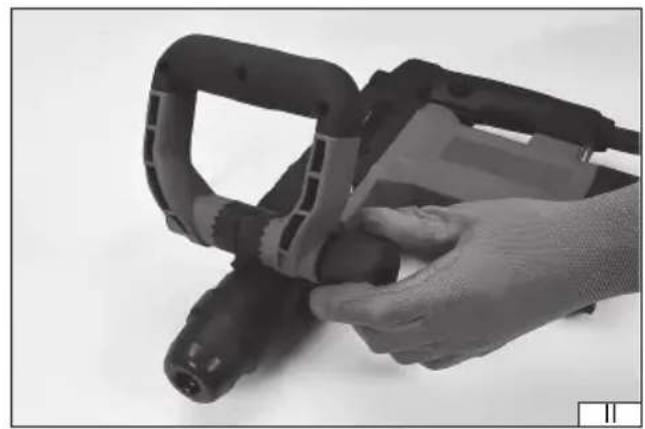
Setting of auxiliary grip handle (II)
An auxiliary grip handle can be set in a position that provides the most safe, ergonomic and efficient work.
Set the chuck in the desired position and then lock the possibility of any changes of its position by tightening the lock knob firmly and securely.
Due to the nature of work, check the degree of tightening the lock knob during the use of the product.
Assembly and disassembly of work tools (III)
Clean the selected tool of dirt and rust and lubricate The SDS MAX chuck with a thin layer of grease.
Tool the tool chuck towards you and maintain it in this position.
Insert a clean tool in the opening. If necessary, turn the tool, so that it enters the chuck without resistance.
Release the chuck; the tool should lock automatically in the chuck.
Make sure the tool is securely installed, trying to remove it from the SDS MAX chuck. If the drill or the cutter can be removed from the chuck, the installation procedure must be repeated.
PRODUCT USE
Before starting the work make sure that the housing and connecting cable with a plug are not damaged. If any damage is found, it is forbidden to continue the work!
Preparations
Select proper work tool: punch or chisel.
Clean the tool, apply a thin layer of grease on the chuck of selected tool.
Insert the work tool into the tool chuck of the product.
Insert the cable plug into the mains socket.
Put on hearing protectors, eye protection, work gloves.
Starting and stopping the product
Take a posture guaranteeing your balance, grab the hammer with both hands and having made sure that the work tool does not touch anything, start the product by pressing and holding down the switch with your finger.
Hold the tool in this position for several seconds to allow grease reaching all the elements of the drive mechanism and check at the same time whether the product shows any signs of abnormal operation. Too much noise, vibration level too high, suspicious odour or emergence of smoke. If no signs of abnormal operation are observed, the product may be used.
After completion of work, switch off the hammer by releasing the pressure on the switch.
The switch may be locked in the ON position, which may be useful during long-term operation. In order to lock the switch, press the lock button with the switch pressed. Lock is released by pressing the switch.
Working with product (IV)
It is recommended that in the initial period of use, operation of tool is not too intensive, it will allow mechanical parts to run-in. It is also recommended to use longer breaks in order to cool the hammer. As the elements inside the hammer run in, you can increase the intensity of operation and shorten the breaks needed for cooling the tool.
Note! Sometimes it may happen that the hammer fails to transfer impact to the work tool, even though the engine works. Usually this may be caused by too thick oil. If the product is used at low temperature, let it work for approx. 5 minutes to warm it up.
Lean the work tool against work surface, grab both grip handles of the hammer and start it with the switch. If the work tool has failed to start, push the hammer towards the work surface. This does not result from incorrect operation but the protection against operation with no load.
During the work, apply only pressure necessary for the correct operation of the tool. Applying too much pressure on the work tool may cause damage to the work tool and hammer drill mechanisms, and it will also reduce its efficiency.
If the product is used to remove large-thickness surfaces, this operation should be carried out by layers. Each time, remove a layer of small thickness.
Make regular breaks during the work.
Additional notes
Do not apply too much pressure on the processed material during operation and do not make sudden movements to prevent damage to the work tool and drill. Make regular breaks during the work. Do not overload the tool, temperature of outside surfaces can never exceed 60 °C. After completed work, turn off the drill, unplug the tool from the mains socket and carry out the maintenance
EN
and inspection operations.
Declared total value of vibration was measured by means of standardized test method and can be used to compare one tool with the other. Declared total value of vibration can be used in the initial exposure assessment.
Note! Emission of vibration when working with the tool may vary from the declared value, depending on how the tool is used.
Note! It is required to determine safety measures to protect the operator, which are based on the exposure assessment in real conditions of use (including all elements of work cycle, such as for example time when tool is switched off or idling and time of activation).
MAINTENANCE AND CHECKS
Lubrication
Always before using drill bits or chisels, clean them and apply a thin layer of grease onto the tool chuck.
ATTENTION! Before any adjustment, technical service or maintenance operations unplug the tool. Once the operations have been finished, the technical conditions of the tool must be assessed by means of external evaluation and inspection of the following elements: body and handle, conductor with a plug and deflection, functioning of the electric switch, patency of ventilation slots, sparking of brushes, noise level of functioning of bearings and gears, start-up and smoothness of operation. During the guarantee period, the user cannot dismantle the electric tools or change any sub-assemblies or elements, since it will cancel any guarantee rights. All irregularities detected at overhaul or during functioning of the tools are a signal to have the tool repaired at a service shop. Once the functioning has been concluded, the casing, ventilation slots, switches, additional handle and protections must be cleansed with a stream of air (at a pressure not exceeding 0.3 MPa), with a brush or a cloth without any chemical substances or cleaning liquids. Tools and handles must be cleansed with a clean cloth.
DE
PRODUKTBESCHREIBUNG
CARACTERISTIQUES DU PRODUIT
EN IEC 62841-2-6:2020 + A11:2020
EN 55014-1:2017 + A11:2020
EN ISO 55014-1:2021
EN 55014-2:2015
EN IEC 61000-3-2:2019
EN 61000-3-3:2013 + A1:2019
DECLARATION OF CONFORMITY
0425/YT-82133/EC/2025
We declare and guarantee with full responsibility that the following products:
Chiselling hammer 220 - 240 V\~; 50 Hz; 1150 W, 4850 min ^-1 ; item no. YT-82133
meet requirements of the following European Standards / Technical Specifications:
EN 62841-1:2015 + A11:2020
EN IEC 62841-2-6:2020 + A11:2020
EN 55014-1:2017 + A11:2020
EN ISO 55014-1:2021
EN 55014-2:2015
EN IEC 61000-3-2:2019
EN 61000-3-3:2013 + A1:2019
and fulfill requirements of the following European Directives:
2006/42/EC Machinery and safety elements
2014/30/EU Electromagnetic compatibility (EMC) Directive
2011/65/EU Restriction of the Use of Certain Hazardous Substances
Serial number: concern all serials numbers of item(s) mentioned in this declaration
The person authorized to compile the technical file:
Agnieszka Rędziak
(Place and date of issue)
V-CE PREZES ZARZADU
JAN SZMIDT
(Name and signature of authorized person)
TOYA S.A.
EN IEC 62841-2-6:2020 + A11:2020
EN 55014-1:2017 + A11:2020
EN ISO 55014-1:2021
EN 55014-2:2015
EN IEC 61000-3-2:2019
EN 61000-3-3:2013 + A1:2019