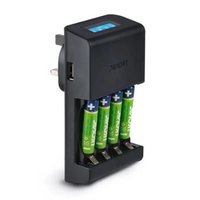
TRC 4 B2 - Battery charger TRONIC - Free user manual and instructions
Find the device manual for free TRC 4 B2 TRONIC in PDF.


| Product type | Battery charger |
| Brand | Tronic |
| Model | TRC 4 B2 |
| Compatible rechargeable batteries | Ni-MH AA and AAA |
| Number of charging compartments | 4 (independent) |
| Input voltage | 100-240 V~, 50-60 Hz |
| Power consumption | 14 W |
| Output voltage (compartments) | 4 x 1.5 V |
| Charging current (AA) | 4 x 450 mA |
| Charging current (AAA) | 4 x 200 mA |
| Maximum capacity of AA batteries | 2700 mAh |
| Maximum capacity of AAA batteries | 1000 mAh |
| USB output | 5.0 V ==, 1.0 A, 5.0 W |
| Display | LCD screen with CHARGE, FINISH, ERROR indicators |
| Protection | Short circuit, overcharge, end-of-charge detection (-ΔV) |
| Dimensions (L x W x H) | approx. 121.6 x 67.9 x 68.1 mm |
| Weight (without batteries) | 128 g |
| Operating temperature | 0 °C to 30 °C |
| Storage temperature | -20 °C to 40 °C |
| Air humidity (non-condensing) | 5-80% |
| Protection class | II (double insulation) |
| Package contents | 1 charger, 4 AA Ni-MH 2500 mAh batteries (model A) or 4 AAA Ni-MH 1000 mAh batteries (model B), 1 instruction manual |
| Warranty | 3 years |
| After-sales service France | Tel. 0800904879, owim@lidl.fr |
| After-sales service Belgium | Tel. 080071011, owim@lidl.be |
Frequently Asked Questions - TRC 4 B2 TRONIC
User questions about TRC 4 B2 TRONIC
0 question about this device. Answer the ones you know or ask your own.
Ask a new question about this device
Download the instructions for your Battery charger in PDF format for free! Find your manual TRC 4 B2 - TRONIC and take your electronic device back in hand. On this page are published all the documents necessary for the use of your device. TRC 4 B2 by TRONIC.
USER MANUAL TRC 4 B2 TRONIC
Operation and safety notes
NL DE
BATTERIJOPLADER
GB/IE Operation and safety notes Page 31
EXPLOSIONS- GEFAHR!
Intended use ......Page 33
Part description......Page 33
Technical data ......Page 33
Included items......Page 36
General safety instructions....Page 36
Safety instructions for rechargeable batteries....Page 39
Initial use......Page 43
Handling and operation......Page 43
Charging rechargeable batteries......Page 44
Charging your USB device......Page 45
Bad cell/Short circuit protection......Page 46
Cleaning and care......Page 48
Cleaning the housing ......Page 48
Troubleshooting......Page 49
Warranty claim procedure ......Page 52
Service......Page 53
| List of pictograms used | |
 | This symbol means that the operating instructions must be observed when using the product. |
 | Only use the product in dry indoor rooms. |
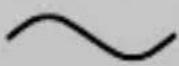 | Alternating current/voltage |
 | Protection class II. The power adaptor has a double insulation. |
 | Observe the warnings and safety instructions! |
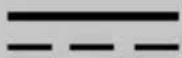 | Direct current/voltage |
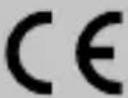 | CE mark indicates conformity with relevant EU directives applicable for this product. |
| [SZCZ] | Safety information Instructions for use |
Battery charger
- Introduction

We congratulate you on the purchase of your new product. You have chosen a high quality product. The
instructions for use are part of the product. They contain important information concerning safety, use and disposal. Before using the product,
please familiarise yourself with all of the safety information and instructions for use. Only use the product as described and for the specified applications. If you pass the product on to anyone else, please ensure that you also pass on all the documentation with it.
Intendeduse
This product is intended exclusively for non-commercial use in the charging of rechargeable Ni-MH batteries (AA/AAA) with standard rated capacities and charging of battery-operated products with a USB interface, such as MP3 Player or smart phone. Any other use or uses beyond those mentioned are considered to be unintended use. Claims of any kind for damage resulting from unintended use will not be accepted. The operator alone bears the liability.

Only use the product in dry indoor rooms.
Part description
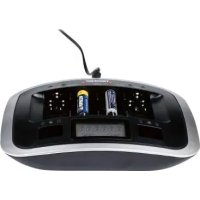
1 Loading slots for type AA/AAA
2 USB output
3 LC display
- Technical data
Input voltage: 100-240V\~ 50-60 Hz
Power
consumption: 14W
Protectionclass:II/

(The power adaptor
has a double insulation.)
Operating
temperature: 0° - 30°C
Storage
Temperature: -20 ° - 40 °C
Humidity
(no condensation): 5–80%
Output voltages: 4 x 1.5 V (Loading slots 1-4)
Charge currents: 4 x 450 mA (Type AA) or 4 x 200 mA (Type AAA)
Maximum
assessment
capacity: AAA: 1000 mAh AA:
2700 mAh
USBoutput:5.0V
= 1.0A,5.0W
| Information | Value Unit | |
| Manufacturer's name or trade mark, commercial registration number and address | OWIM GmbH & Co. KG HRA 721742 Stiftsbergstraße 1, 74167 Neckarsulm, GERMANY | |
| Model Identifier | HG08635A, HG08635B | |
| Input voltage | 100-240 V~ | |
| Input AC frequency | 50-60 Hz | |
| Output voltage | 5.0 V | --- |
| Output current | 1.0 A | |
| Output power | 5.0 W | |
| Average active efficiency | 80.0 % | |
| No-load power consumption | 0.08 W | |
| Measurements (W x H x D) | approx. 67.9 x 68.1 x 121.6 | mm |
| Weight (without rechargeable battery) | 128 g |
Included items
1 Battery charger
4 Ni-MH rechargeable batteries
(Type AA Mignon, Ni-MH, 1.2 V,
2500 mAh, HR6, HRMR 15/51, gastight)
for Model A
4 Ni-MH rechargeable batteries
(Type AAA Micro, Ni-MH, 1.2 V,
1000 mAh, HR03, HRMR 11/45, gastight)
for Model B
1 Operating manual

Generalsafety instructions
BEFORE USING THE PRODUCT, PLEASE FAMILIARISE YOUR- SELF WITH ALL OF THE SAFETY INFORMATION AND INSTRUCTIONS FOR USE! WHEN PASSING THIS PRODUCT ON TO OTHERS, PLEASE ALSO INCLUDE ALL THE DOCU- MENTS!
■ WARNING!Packaging material should not be used as a play thing. There is a risk of suffocation!
■ Before use check the product for visible external damage. Do not put into operation a product that is damaged or has been dropped.
If the power plug is damaged, it must be replaced by a qualified persons in order to avoid a hazard.
This product may be used by children aged 8 over and by persons with reduced physical, sensory or mental capabilities or lack of experience and knowledge, provided that they are under supervision or have been told how to use of the product safety and are
aware of the potential risks. Children must not play with the product. Cleaning and user maintenance tasks must not be carried out by children unless they are supervised.
- Do not make any changes or modifications to the product yourself.
- Protect the product from moisture and liquid penetration. Never submerge the product in water, do not place the product in the vicinity of water and do not stand any object filled with liquid (i.e. vases) on the product.
- Do not operate the product in the vicinity of open flames (e.g. candles).
■ Unplug this product from wall outlet when not in use.

Safety instructions for rechargeable batteries
■ DANGER TO LIFE! Keep rechargeable batteries out of reach of children. If accidentally swallowed seek immediate medical attention.
Swallowing may lead to burns, perforation of soft tissue, and death. Severe burns can occur within 2 hours of ingestion.
DANGER OF
EXPLOSION! Never
rechargenon-rechargeable batteries. Do not short-circuit rechargeable batteries and/or open them. Overheating, fire or bursting can be the result.
■ Never throw rechargeable batteries into fire or water.

Never burn or inciner- ate any battery/
Never pierce, attempt to disassemble or short-circuit/Always observe polarity (+/-) and charging times.
- Do not exert mechanical loads to rechargeable batteries.
Risk of leakage of rechargeable batteries
- Avoid extreme environmental conditions and temperatures, which could affect rechargeable batteries, e.g. radiators/direct sunlight.
If rechargeable batteries have leaked, avoid contact with skin, eyes and mucous membranes with the chemicals! Flush immediately the affected
areas with fresh water and seek medical attention!

WEAR PROTEC- TIVE GLOVES!
Leaked or damaged re- chargeable batteries can cause burns on contact with the skin. Wear suitable pro- tective gloves at all times if such an event occurs.
In the event of a leakage of rechargeable batteries, immediately remove them from the product to prevent damage.
Only use the same type of rechargeable batteries. Do not mix used and new rechargeable batteries.
■ Remove rechargeable batteries if the product will not be used for a longer period.
Risk of damage of the product
■ Only use the specified type of rechargeable batteries!
- Insert rechargeable batteries according to polarity marks (+) and (-) on the rechargeable battery and the product.
Use a dry lint-free cloth or cotton swab to clean the contacts on the rechargeable battery and in the rechargeable battery compartment before inserting!
■ Remove defective rechargeable batteries from the product immediately.
- Keep small cells and batteries which are considered swallowable out of the reach of children.
■ Swallowing may lead to burns, perforation of soft tissue, and death. Severe burns can occur within 2 hours of ingestion.
In case of ingestion of a cell or battery, seek medical assistance promptly.
- Initial use
Note: Remove all packaging materials from the product.
☐ Check the contents to make sure everything is there and for visible damage.
☐ Remove the product and the operating instructions from the packaging.
● Handling and operation
WARNING! Do not charge non-rechargeable batteries. Charge only Ni-MH rechargeable battery.
●Chargingrechargeable batteries
-
Insert 1–4 pieces of rechargeable Ni-MH batteries (AA/AAA) into the loading slots 1. Make correct contact for polarity (+ and -); according to the sign in the loading slots 1.
-
Plug the product into a correct household electric outlet.
Note: The LC display lights up for approx. 7 seconds when the product is connected to a socket but there are no rechargeable batteries in the product for charging.
- The LC display 3 will show the charging status of each rechargeable battery correspondingly and "CHARGE" icon is appeared to represent charging is in progress.
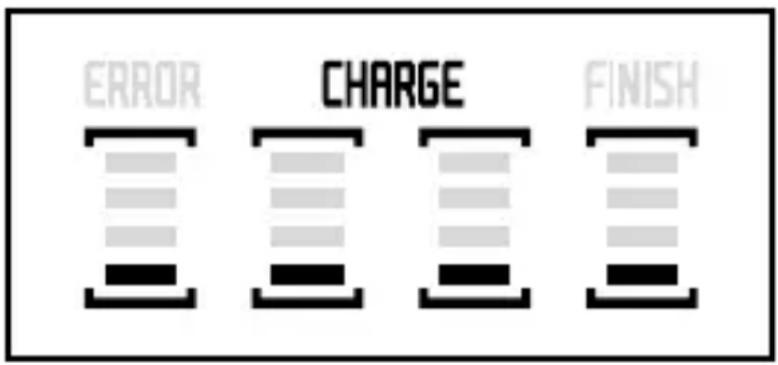
- The rechargeable battery is fully charged when all the bar inside the LC display 3 become solid.
- When charging is completed, the "FINISH" will be appeared on the LC display 3 screen. You can remove the charged batteries from the rechargeable battery compartment 1.
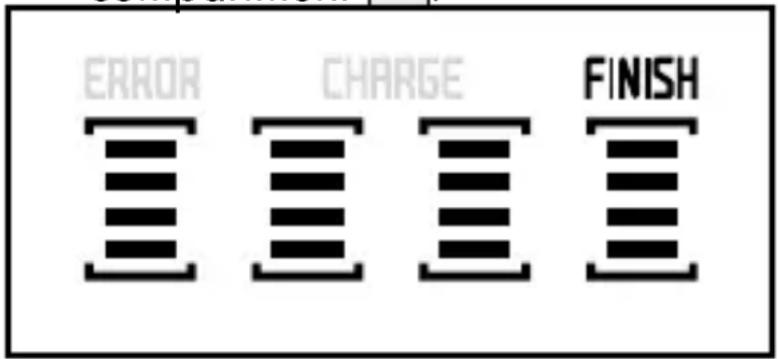
Note: After remove all charged batteries, LC display 3 will light for approx. 7 seconds and then switch off.
- Unplug and re-plug the product each time when you recharge the empty batteries.
- The product can simultaneously charge rechargeable batteries and one USB device.
- Charging your USB device
Important: Check for voltage compatibility with your USB device first.
- Before using, check your USB device's input voltage and this product's output voltage if they can match. Make sure the total loading does not exceed the rated output current of this product.
- Connect your USB device and the USB port of this product via a charging cable. (To ensure complete safety and best performance, we strongly recommend using the original charging cable of your product.)
- The USB device will start charging your product automatically.
- Your USB device should indicate it is now in charging mode.
- Please unplug this product from wall outlet when not in use.
Bad cell/Short circuit protection
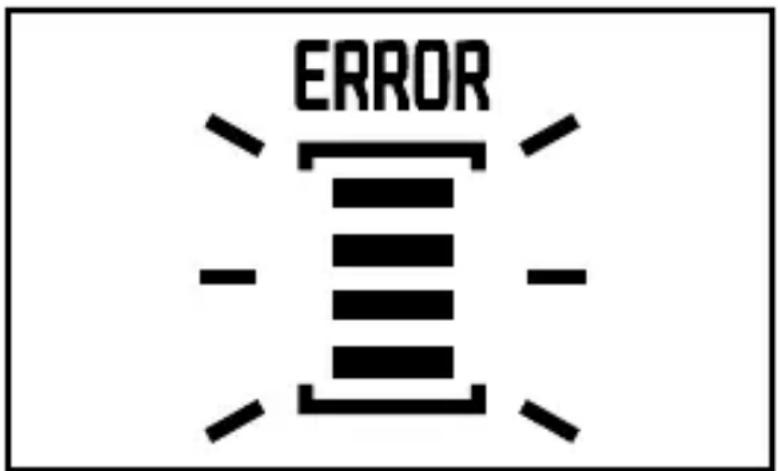
The "ERROR" icon is appeared with the corresponding flashing of LC display 3 to indicate the rechargeable battery is either alkaline rechargeable battery or the rechargeable battery is not suitable for charging.
Please remove the rechargeable battery from the loading slots 1.
Calculating the average charging time
Depending on the type, age and remaining charge in the batteries, the charging process can take various lengths of time. The average charge time can be calculated using the following formula. Take note however that the times given are only guiding values.
Charging Time (min) = Battery capacity (mAh) × 1.2 × 60: Charging current of the product (mA)
Automatic charging control/ Retention charging
This product controls the charging time for Ni-MH rechargeable batteries separately. This control is based on the -ΔV (“Minus Delta V”) calculation. In mathematics, with Delta Δ differences are indicated. In this case, “Minus Delta V” means a negative voltage difference. This charge identification makes itself useful in the following effects: Should a rechargeable battery be charged with a constant current, its voltage rises continuously. When a rechargeable battery is full, its voltage reaches a maximum but falls again slightly with further current flow. This light fall in voltage is recognised by the charging electronics and the charge process is terminated. The product automatically switches to “Retention charging”. This means that the batteries are no longer being loaded with constant current, instead, with short current pulses. This counteracts the selfdischarge and the batteries are kept in a state of full charge.
Timer control
In addition, this product has a timer control which automatically switches over to retention charging after 7 hours. This serves as an additional protection against overcharging should the charge termination not respond due to a possibly defective rechargeable battery.
- Cleaning and care
■ DANGER! Always remove the plug before cleaning the product. There is the risk of an electric shock!
- When you are cleaning the product ensure that no moisture gets inside it, so as to avoid irreparable damage to it.
IMPORTANT! Do not use aggressive or abrasive cleaning agents, as these can damage the upper surfaces.
- Cleaning the housing
☐ Clean the surfaces of the product with a soft, dry cloth. For stubborn soiling use a lightly moistened cloth.
■ Never clean the insides of the loading slots 1 with moist cloths. Instead, use a clean soft brush to clean them.
☐ If soiled, clean the charging contacts with a dry cloth.
- Troubleshooting
● = Problem
= Cause
O = Solution
● = The product is not functioning.
◎ = Mains power socket is not supplying power.
O = Check the circuit fuse.
● = The inserted rechargeable batteries are not being charged.
- = The rechargeable batteries are not inserted as per their polarity.
O = Insert the batteries as per their polarity (see marking in the charging slot).
- = The inserted rechargeable batteries are not suitable for charging.
O = Insert exclusively rechargeable Ni-MH rechargeable batteries of the types AA/AAA/batteries.
- Disposal
The packaging is made entirely of recyclable materials, which you may dispose of at local recycling facilities.
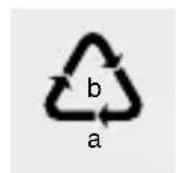
Observe the marking of the packaging materials for waste separation, which are marked with abbreviations
(a) and numbers (b) with following meaning: 1-7: plastics/20-22: paper and fibreboard/80-98: composite materials.

Contact your local refuse disposal authority for more details of how to dispose of your worn-out product.
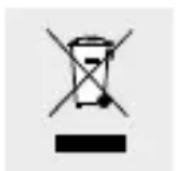
To help protect the environment, please dispose of the product properly when it has reached the end of its useful life and not in the household waste. Information on collection points and their opening hours can be obtained from your local authority.
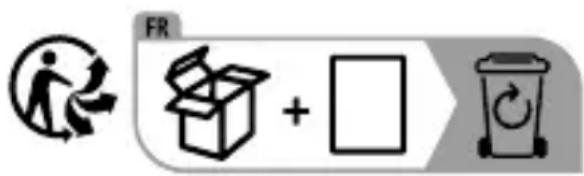
The product incl. accessories and packaging materials are recyclable and are subject to extended producer responsibility. Dispose them separately, following the illustrated Info-tri (sorting information), for better waste treatment. The Triman logo is valid in France only.
Faulty or used batteries/rechargeable batteries must be recycled in accordance with Directive 2006/66/EC and its amendments. Please re-
turn the batteries/rechargeable batteries and/or the product to the available collection points.
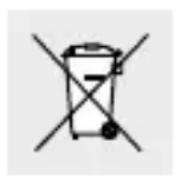
Environmental damage through incorrect disposal of thebatteries/rechargeable batteries!
Batteries/rechargeable batteries may not be disposed of with the usual domestic waste. They may contain toxic heavy metals and are subject to hazardous waste treatment rules and regulations. The chemical symbols for heavy metals are as follows: Cd = cadmium, Hg = mercury, Pb = lead. That is why you should dispose of used batteries/rechargeable batteries at a local collection point.
Warranty
The product has been manufactured to strict quality guidelines and meticulously examined before delivery. In the event of product defects you have legal rights against the retailer of this product. Your legal rights are not limited in any way by our warranty detailed below.
The warranty for this product is 3 years from the date of purchase. The warranty period begins on the date of purchase. Please keep the original
sales receipt in a safe location. This document is required as your proof of purchase.
Should this product show any fault in materials or manufacture within 3 years from the date of purchase, we will repair or replace it – at our choice – free of charge to you. This warranty becomes void if the product has been damaged, or used or maintained improperly.
The warranty applies to defects in material or manufacture. This warranty does not cover product parts subject to normal wear, thus possibly considered consumables (e.g. batteries) or for damage to fragile parts, e.g. switches, rechargeable batteries or glass parts.
Warranty claim procedure
To ensure quick processing of your case, please observe the following instructions:
Please have the till receipt and the item number (IAN 499839_2204) available as proof of purchase.
You will find the item number on the rating plate, an engraving on the front page of the instructions for use (bottom left), or as a sticker on the rear or bottom of the product.
If functional or other defects occur, please contact the service department listed either by telephone or by e-mail.
You can return a defective product to us free of charge to the service address that will be provided to you. Ensure that you enclose the proof of purchase (till receipt) and information about what the defect is and when it occurred.
Service
GB Service Great Britain
Tel.: 08000569216
E-Mail: owim@lidl.co.uk
IE Service Ireland
Tel.:1800200736
E-Mail: owim@lidl.ie
CE
● = Problème
● = Cause
O = Solution
Laadstroom: 4 x 450 mA (type AA) of
4 x 200 mA (type AAA)
Maximale nominale
EXPLOSIEGE- VAAR! Laad
Salida USB: 5,0 V=1,0A,5,0W
Uscita USB: 5,0 V=1,0A, 5,0W
NOSITE ZAŠČITNE ROKAVICE!
Pooblaščeni serviser:
OWIM GmbH & Co. KG
Stiftsbergstraße 1
74167 Neckarsulm
NEMČIJA
USB izlaz: 5,0 V ===, 1,0A, 5,0W
| Informa-cija | Vrijednost Jedinica | |
| Naziv ili zaštitni znak proizvođača, trgovački registarski broj i adresa | OWIM GmbH & Co. KG HRA 721742 Stiftsbergstraße 1, 74167 Neckarsulm, NJEMAČKA | |
| Broj modela | HG08635A, HG08635B | |
| Ulazni napon | 100-240 | V~ |
| Ulazna frekvencija (AC) | 50-60 Hz | |
| Izlazni napon | 5,0 V | --- |
| Izlazna struja | 1,0 A | |
| Izlazna snaga | 5,0 W | |
| Prosječna aktivna učinkovitost | 80,0 % | |
| Potrošnja struje u praznom hodu | 0,08 W | |
| Dimenzije (Š x V x D) | cca 67,9 x 68,1 x 121,6 | mm |
| Težina (bez punjive baterije) | 128 g |
•Opsegisporuke
1 punjač za punjive baterije
4 Ni-MH punjive baterije (tip AA Mignon, Ni-MH, 1,2 V, 2500 mAh, HR6, HRMR 15/51, nepropusne za plin) za model A
4 Ni-MH punjive baterije (tip AAA Micro, Ni-MH, 1,2 V, 1000 mAh, HR03, HRMR 11/45, nepropusne za plin) za model B 1 upute za uporabu

leşire USB: 5,0 V=1,0A, 5,0W
Priza nu are curent.


- BATTERIJOPLADER
- EXPLOSIONS- GEFAHR
- GENERAL SAFETY INSTRUCTIONS....PAGE 36
- INITIAL USE......PAGE 43
- HANDLING AND OPERATION......PAGE 43
- CLEANING AND CARE......PAGE 48
- TROUBLESHOOTING......PAGE 49
- BATTERY CHARGER
- INTRODUCTION
- INTENDEDUSE
- PART DESCRIPTION
- TECHNICAL DATA
- INCLUDED ITEMS
- GENERALSAFETY INSTRUCTIONS
- SAFETY INSTRUCTIONS FOR RECHARGEABLE BATTERIES
- RISK OF LEAKAGE OF RECHARGEABLE BATTERIES
- WEAR PROTEC- TIVE GLOVES
- RISK OF DAMAGE OF THE PRODUCT
- INITIAL USE
- ● HANDLING AND OPERATION
- ●CHARGINGRECHARGEABLE BATTERIES
- CHARGING YOUR USB DEVICE
- BAD CELL/SHORT CIRCUIT PROTECTION
- CALCULATING THE AVERAGE CHARGING TIME
- AUTOMATIC CHARGING CONTROL/ RETENTION CHARGING
- TIMER CONTROL
- CLEANING AND CARE
- CLEANING THE HOUSING
- TROUBLESHOOTING
- DISPOSAL
- ENVIRONMENTAL DAMAGE THROUGH INCORRECT DISPOSAL OF THEBATTERIES/RECHARGEABLE BATTERIES
- WARRANTY
- WARRANTY CLAIM PROCEDURE
- SERVICE
- GB SERVICE GREAT BRITAIN
- IE SERVICE IRELAND
- CE
- EXPLOSIEGE- VAAR! LAAD
- NOSITE ZAŠČITNE ROKAVICE
- POOBLAŠČENI SERVISER
- OPSEGISPORUKE
Brand : TRONIC
Model : TRC 4 B2
Category : Battery charger