
TLGL 1000 A1 - Battery charger TRONIC - Free user manual and instructions
Find the device manual for free TLGL 1000 A1 TRONIC in PDF.


| Product Type | Battery Charger |
| Brand | Tronic |
| Model | TLGL 1000 A1 |
| Input Voltage | 220–240 V AC, 50/60 Hz |
| Output Voltage | 6V / 12V DC (selectable) |
| Output Current | 1 A |
| Power Consumption | 30 W |
| Dimensions (L x W x H) | 150 x 80 x 50 mm |
| Weight | 300 g |
| Battery Types | Lead-acid (wet, gel, AGM) 1.2–120 Ah |
| Charging Modes | Trickle charge, float charge, maintenance |
| Protection Features | Reverse polarity, short circuit, overheat, overcharge |
| Indicators | LED for power, charging status, full charge |
| Microcontroller | Automatic charging with microcomputer control |
| Cable Length | Approx. 1.5 m |
| Operating Temperature | 0°C to 40°C |
| Storage Temperature | -20°C to 60°C |
| Cleaning | Wipe with a dry, soft cloth. Do not use cleaning agents. |
| Safety Notes | Read manual before use. Keep away from water. Do not charge non-rechargeable batteries. |
| Spare Parts / Repairability | No user-serviceable parts. Contact Tronic service for repairs. |
Frequently Asked Questions - TLGL 1000 A1 TRONIC
User questions about TLGL 1000 A1 TRONIC
0 question about this device. Answer the ones you know or ask your own.
Ask a new question about this device
Download the instructions for your Battery charger in PDF format for free! Find your manual TLGL 1000 A1 - TRONIC and take your electronic device back in hand. On this page are published all the documents necessary for the use of your device. TLGL 1000 A1 by TRONIC.
USER MANUAL TLGL 1000 A1 TRONIC
Operating instructions
SI
Before reading, unfold the page containing the illustrations and familiarise yourself with all functions of the device.
HU
GB Operating instructions Page 1
Information regarding these operating instructions....2
Copyright 2
Limited liability 2
Intended use....2
Warnings used....3
Safety 4
Basic Safety Instructions....4
Interaction with rechargeable batteries (cells) 5
Initial use....5
Items supplied and transport inspection....5
Disposal of the packaging 6
Operating components 6
Handling and operation ....6
Switching the appliance on/off 6
Charging Ni-MH/Ni-Cd batteries 7
Charging Li-ion batteries....7
Operating status displays....8
Calculating the average charging time 8
Timer control....9
Charging a USB device 9
Cleaning 9
Cleaning the housing 9
Troubleshooting....10
Malfunction causes and remedies ....10
Storage/Disposal....10
Storage....10
Disposal of the device 11
Disposal of batteries....11
Appendix 11
Information regarding the EC Declaration of Conformity....11
Importer 11
Technical data 12
Warranty 13
Service 13
Introduction
Information regarding these operating instructions
Congratulations on the purchase of your new device.
You have clearly decided in favour of a quality product. These operating instructions are a component of the Battery Charger (hereafter referred to as the device or product). They contain important information in regard to safety, use and disposal. Before using the product, familiarise yourself with all of these operating and safety instructions. Use the product only as described and only for the specified areas of application. In addition, pass these documents on, together with the product, to any future owner.
Copyright
This documentation is copyright protected. Any copying or reproduction, including as extracts, as well as the reproduction of images, also in an altered state, is not permitted without the express written consent of the manufacturer.
Limited liability
All technical information, data and instructions for the connection and operation contained in these operating instructions correspond to the latest available at the time of printing and, to the best of our knowledge, take into account our previous experience and know-how. No claims can be derived from the details, illustrations and descriptions in these instructions. The manufacturer assumes no responsibility for damage caused by failure to observe the instructions, improper use, inappropriate repairs, making unauthorised changes or for using unauthorised replacement parts.
Intended use
This device is intended exclusively for the non-commercial
- charging of rechargeable Ni-Cd and Ni-MH batteries (sizes AAA/AA/C/D) with standard-rated capacities,
— charging of fast-rechargeable as well as not-fast-rechargeable batteries, - charging of 3.6-3.7 V Li-ion batteries for digital cameras, camcorders and smartphones, and
- charging of battery-operated devices with a USB interface, such as MP3 players
only.
Any other use or uses beyond those mentioned are considered to be unintended use. Claims of any kind for damage resulting from unintended use will not be accepted. The operator alone bears the liability.
Warnings used
In these extant operating instructions the following warning notices are used:

DANGER
A warning at this risk level indicates a threatening dangerous situation.
In the event that the dangerous situation is not avoided it could lead to death or serious physical injury.
▶ Comply with the directives in this warning to avoid the risks of death or serious physical injury.
IMPOrTANT
A warning of this risk level indicates possible property damage.
If the situation is not avoided it could lead to property damage.
▶ Comply with the directives in this warning to avoid property damage.
NOTICE
▶ A notice indicates additional information that may assist you in the handling of the device.
Safety
In this section you will receive important safety information regarding the handling of the device. This device complies with the statutory safety regulations. Incorrect usage can lead to injuries and property damage.
Basic Safety Instructions
For safe handling of the device observe the following safety instructions:
■ Before use check the device for visible external damage. Do not put into operation a device that is damaged or has been dropped.
■ To avoid possible risks, arrange for damaged cables or connectors to be exchanged by an authorised specialist or the Customer Service Department.
■ This appliance may be used by children aged 8 over and by persons with reduced physical, sensory or mental capabilities or lack of experience and knowledge, provided that they are under supervision or have been told how to use of the appliance safely and are aware of the potential risks. Children must not play with the appliance. Cleaning and user maintenance tasks must not be carried out by children unless they are supervised.
■ A repair to the device during the warranty period may only be carried out by a customer service department authorised by the manufacturer, if it is not, additional warranty claims cannot be considered for subsequent defects.
■ Do not make any changes or modifications to the appliance yourself.
■ Protect the device from moisture and liquid penetration. Never submerge the device in water, do not place the device in the vicinity of water and do not stand any object filled with liquid (i.e. vases) on the device.
■ Do not operate the device in the vicinity of open flames (e.g. candles).
■ Avoid direct sunlight.
■ Charge exclusively rechargeable batteries of the types "Ni-Cd", "Ni-MH" and Li-ion.
■ NEVER recharge batteries of other types or non-rechargeable batteries. These are not suitable for recharging. Batteries not suitable for recharging can overheat and explode. It could irreparably damage the device and the inserted batteries.
This product is intended exclusively for indoor operation in dry and enclosed rooms.
Interaction with rechargeable batteries (cells)
- Do not use damaged or corroded rechargeable batteries in the device.
■ Rechargeable batteries (cells) can be fatal if swallowed. Therefore, always keep the device and the rechargeable batteries out of the reach of children!
■ If a rechargeable battery is swallowed medical assistance must be sought IMMEDIATELY.
■ Should a battery have leaked, you must avoid contact by the battery fluid with the skin! The battery liquid can cause acid burns on the skin!
■ Remove the leaked battery liquid with a dry, absorbent cloth and avoid contact by it with the skin by wearing, for example, a pair of gloves.
Initial use
Items supplied and transport inspection
The device is delivered with the following components as standard:
- Universal Charger
- This operating manual
NOTICE
▶ Check the contents to make sure everything is there and for visible damage.
▶ If the items supplied are incomplete, or damaged due to defective packaging or transportation, contact the Service Hotline (see section Service).
◆ Remove the device and the operating instructions from the carton.
◆ Remove all packing material.

DANGER
Packaging material should not be used as a play thing. There is a risk of suffocation!
Disposal of the packaging
The packaging protects the device from transport damage. The packaging materials are selected from the point of view of their environmental friendliness and disposal technology and are therefore recyclable.

The recirculation of packaging into the material circuit saves on raw material and reduces the amount of waste generated. Dispose of packaging material that is no longer needed as per the regionally established regulations.
NOTICE
▶ If possible preserve the device's original packaging during the warranty period so that, in the event of a warranty claim, you can package the device ideally for its return.
Operating components
1 Display
② Operating status display (charging slots 1 to 4)
③ USB Output
4 Operating status display (Li-ion batteries)
⑤ Charging contact for Li-ion batteries
6 Holder for Li-ion batteries
7 Charging slots for types AAA/AA/C/D (charging slots 1 to 4)
Handling and operation
In this chapter you will receive important information for the handling and operation of the device.
Switching the appliance on/off
◆ Place the appliance on a smooth, level and slip resistant surface.
◆ Compare the technical details with those of your power supplier. If they match, connect the mains cable to an easily accessible mains power socket. The LEDs light up red three times. The battery charger is now ready for use.
To switch off the battery charger, unplug the appliance from the mains socket.
NOTE
▶ Between 1 and 7 batteries can be charged individually:
- 4 x type C or type D batteries in the charging slots 1 to 4⑦, plus 1 x Li-ion battery (3.6-3.7 V) on the charging contacts ⑤
or
- 6 x type AA or AAA batteries in the charging slots 1 to 4⑦, plus 1 x Li-ion battery (3.6-3.7 V) on the charging contacts ⑤
Charging Ni-MH/Ni-Cd batteries
After you have connected the battery charger to mains power, you can now insert Ni-MH/Ni-Cd batteries in charging slots 1 to 4 and charge them.
The charging process starts automatically as soon as the batteries have been inserted. The battery charger has an operating status display ② for each compartment in the charging slot. The operating status display of the respective charging slots shows the current charge status of the individual batteries. The display ① also shows the current charge level of the batteries in percent.
- After you have connected the battery charger to mains power, you can now insert Ni-MH/Ni-Cd batteries in charging slots 1 to 4 ⑦ and charge them. - The charging process starts automatically as soon as the batteries have been inserted. The battery charger has an operating status display ② for each compartment in the charging slot. The operating status display of the respective charging slots shows the current charge status of the individual batteries. The display ① also shows the current charge level of the batteries in percent.
NOTE
▶ If one of the operating status displays flashes red for longer than 5 seconds, the battery is improperly inserted or defective.
Charging Li-ion batteries
- After you have connected the battery charger to mains power, you can now charge a Li-ion battery. Proceed as follows:
- Match the charging contacts 5 to the positions of the positive and negative terminals on your Li-ion battery, by sliding the charging contacts 5 into the corresponding positions.
◆ Insert the Li-ion battery with its charging contacts lined up with the charging contacts ⑤ of the battery charger.
CAUTION
▶ Ensure that the charging contact 5 are only in contact in the positive and negative terminals of your Li-ion battery. The polarity and voltage of the rechargeable battery catwalk are recognised automatically by the battery charger. Li-ion often have more than two contacts. Connecting the charging contacts 5 with the other contacts of your Li-ion battery could destroy your battery.
♦ Fix the Li-ion rechargeable battery in place using the holder 6 . To do this, pull the holder 6 backwards until the Li-ion battery fits in the slot and then let go of the holder 6 . The Li-ion battery is now fixed in place.
NOTE
The bowl of the holde 6 can be turned by 180irc to allow you to fix Li-ion batteries of different sizes.
The charging process starts automatically as soon as the batteries have been inserted. The operating status display 4 shows the current charge status of the battery. The display 1 also shows the current charge level of the batteries in percent.
Operating status displays
The various displays have the following meanings:
The LED flashes red and green once per second: The batteries are being alternately charged and discharged. (Refresh-Function: older or long stored batteries are being refreshed.)
■ The LED flashes green once per second: A deeply discharged battery is being gently recharged with a reduced current.
The LED glows constantly red: The batteries are being charged with the maximum charge current.
■ The LED glows constantly green: The batteries are fully charged and the battery charger has switched to trickle charge.
In addition, the current charge status of each battery is shown as a percentage on the display 1.
Calculating the average charging time
Depending on the type, age and remaining charge in the batteries, the charging process can take various lengths of time. The average charge time can be calculated using the following formula. Take note however that the times given are only guiding values.
Ni-MH/Ni-Cd batteries:
Charging time (min) = Battery capacity (mAh) × 1 . 4 × 6 0 Charging current of the device (mA) + 3 0
Li-ion batteries:
Charging time (min) = Battery capacity (mAh) × 1 . 4 × 6 0 Charging current of the device (mA) + 6 0
Timer control
This battery charger has a timer control which automatically switches over to retention charging after 17 hours. This serves as an additional protection against overcharging should the charge termination not respond due to a possibly defective battery.
Charging a USB device
IMPOrTANT
▶ Ensure that the power consumption of the USB device is not higher than 1000 mA. For more information, refer to the instruction manual of your USB device.
◆ Insert the USB connector of the USB device into the USB output 3 of the battery charger.
◆ If necessary, switch the USB device on.
NOTICE
▶ You can simultaneously charge batteries in the battery charger and a USB device at the USB output ③. Be aware that the charging current for the batteries is thereby halved and the charging process thus takes somewhat longer.
Cleaning

DANGER
▶ Always remove the plug before cleaning the device. There is the risk of an electric shock!.
- When you are cleaning the device ensure that no moisture gets inside it, so as to avoid irreparable damage to it.
IMPOrTANT
- Do not use aggressive or abrasive cleaning agents, as these can damage the upper surfaces.
Cleaning the housing
- Clean the surfaces of the device with a soft, dry cloth. For stubborn soiling use a lightly moistened cloth.
- Never clean the insides of the charging slots with moist cloths. Instead, use a clean soft brush to clean them.
- If soiled, clean the charging contacts with a dry cloth.
Troubleshooting
In this section you will receive important information for the localisation and remedying of malfunctions.
Malfunction causes and remedies
The following table will help with localising and remedying minor malfunctions:
| Defect Possible cause Solution | ||
| The battery charger is not functioning. | The power cable is not plugged in. | Insert the power cable into a mains power socket. |
| Mains power socket is not supplying power. | Check the circuit fuse. | |
| The inserted batteries are not being charged. | The batteries are not inserted as per their polarity. | Insert the batteries as per their polarity (see marking in the charging slot). Match the charging contacts to the positions of the positive and negative terminals on your Li-ion battery. Observe the labelling on the Li-ion battery. |
| The inserted batteries are not suitable for charging. | Insert only rechargeable Ni-Cd and Ni-MH batteries of the types AAA/AA/C/D and 3.6 - 3.7V Li-ion batteries. | |
| The temperature monitoring was initiated. | Disconnect the plug from the mains power socket and allow the device to cool down. | |
NOTICE
▶ If you cannot solve the problem with the aforementioned methods, please contact Customer Services.
Storage/Disposal
Storage
If you do not intend to use the device for a longer time, remove the batteries and store it in a clean, dry place away from direct sunlight.
Disposal of the device
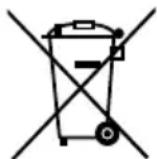
Do not dispose of the device in your normal domestic waste. This product is subject to the provisions of the European Directive 2012/19/EU WEEE (Waste Electrical and Electronic Equipment).
Dispose of the device through an approved disposal centre or at your community waste facility. Observe the currently applicable regulations. In case of doubt, please contact your waste disposal centre.
Disposal of batteries
Used batteries/cells may not be disposed of in household waste. All consumers are statutorily obliged to dispose of batteries at a collection site of his community/city district or at a retail store. The purpose of this obligation is to ensure that batteries are disposed of in a non-polluting manner. Only dispose of batteries/cells when they are fully discharged.
Appendix
Information regarding the EC Declaration of Conformity
With regard to conformity with essential requirements and other relevant provisions, this device complies with the guidelines of the Electromagnetic Compatibility Directive 2014/30/EU as well as the Directive for Low Voltage Devices 2014/35/EU.
The complete original Declaration of Conformity can be obtained from the importer.

Importer
KOMPERNASS HANDELS GMBH
BURGSTRASSE 21
44867 BOCHUM
GERMANY
www.kompernass.com
Technical data
| Input voltage 100-240 V ~ 50/60 Hz | |
| Current consumption 390 mA | |
| Protection class II / | 回 |
| Fuse | T1AL/250V |
| Operating temperature 5° - 35°C | |
| Storage Temperature -10° - 40°C | |
| Humidity (no condensation) ≤ 75% | |
| Output voltages | 6 x 1,4 V = (Loading slots 1 - 4)1 x 4,2 V = (ion) |
| Charge currents (without using the USB output) | 6 x 1000 mA (Type AA)6 x 500 mA (Type AAA)4 x 1000 mA (Type C or D)1 x 500 mA (Li-ion) |
| Charge currents (with use of the USB output) | 6 x 500 mA (Type AA)6 x 250 mA (Type AAA)4 x 500 mA (Type C or D)1 x 250 mA (Li-ion) |
| Maximum assessment capacity | AAA: 1100 mAhAA: 3000 mAhC: 6000 mAhD: 8000 mAhLi-ion: 3000 mAh |
| USB 2.0 Output 5 V | =, 1000 mA |
| Measurements (W x H x D): approx. 22.6 x 6.1 x 16 cm | |
| Weight approx. 660 g | |
Warranty
The warranty for this appliance is for 3 years from the date of purchase. The appliance has been manufactured with care and meticulously examined before delivery.
Please retain your receipt as proof of purchase. In the case of a warranty claim, please make contact by telephone with our Customer Service Department. Only in this way can a post-free despatch for your goods be assured.
NOTICE
The warranty covers only claims for material and manufacturing defects, but not for transport damage, wearing parts or for damage to fragile components, e.g. buttons or batteries.
This product is for domestic use only and is not intended for commercial use. The warranty is void in the case of abusive and improper handling, use of force and internal tampering not carried out by our authorised service branch.
Your statutory rights are not restricted in any way by this warranty. The warranty period is not extended by repairs made under the warranty. This applies also to replaced and repaired parts.
Damages and defects extant at the time of purchase must be reported immediately after unpacking, resp. no later than two days after the date of purchase.
Repairs made after the lapse of the warranty period are subject to charge.
Service

Service Great Britain
Tel.: 0871 5000 720 (£ 0.10/Min.)
E-Mail: kompernass@lidl.co.uk
IAN 274326
Tartalomjegyzék
Bevezetés 16
KOMPERNASS HANDELS GMBH
BURGSTRASSE 21
44867 BOCHUM
GERMANY
www.kompernass.com
Müszaki adatok
KOMPERNASS HANDELS GMBH
BURGSTRASSE 21
44867 BOCHUM
GERMANY/ NEMČIJA
www.kompernass.com
Servis
SI Servis Slovenija
Tel.: 080080917
E-Mail: kompernass@lidl.si
IAN 274326
garancijski list
KOMPERNASS HANDELS GMBH
BURGSTRASSE 21
44867 BOCHUM
GERMANY
www.kompernass.com
Technická data
KOMPERNASS HANDELS GMBH
BURGSTRASSE 21
44867 BOCHUM
GERMANY
www.kompernass.com
Technické údaje
KOMPERNASS HANDELS GMBH
BURGSTRASSE 21
44867 BOCHUM
DEUTSCHLAND
www.kompernass.com
Technische Daten

- HU
- Safety 4
- Initial use....5
- Operating components 6
- Handling and operation ....6
- Cleaning 9
- Troubleshooting....10
- Storage/Disposal....10
- Appendix 11
- Introduction
- Information regarding these operating instructions
- Copyright
- Limited liability
- Intended use
- Warnings used
- DANGER
- A warning at this risk level indicates a threatening dangerous situation.
- IMPOrTANT
- A warning of this risk level indicates possible property damage.
- NOTICE
- Safety
- Basic Safety Instructions
- Interaction with rechargeable batteries (cells)
- Initial use
- Items supplied and transport inspection
- Disposal of the packaging
- Operating components
- Handling and operation
- Switching the appliance on/off
- NOTE
- Charging Ni-MH/Ni-Cd batteries
- Charging Li-ion batteries
- CAUTION
- Operating status displays
- Calculating the average charging time
- Timer control
- Charging a USB device
- Cleaning
- Cleaning the housing
- Troubleshooting
- Malfunction causes and remedies
- Storage/Disposal
- Storage
- Disposal of the device
- Disposal of batteries
- Appendix
- Information regarding the EC Declaration of Conformity
- Importer
- Warranty
- Service
- Service Great Britain
- Tartalomjegyzék
- Bevezetés 16
- Servis
- garancijski list
Brand : TRONIC
Model : TLGL 1000 A1
Category : Battery charger