AD 6317 - Deep fryer ADLER - Free user manual and instructions
Find the device manual for free AD 6317 ADLER in PDF.

 FR
FR
 AZ
AZ
 BG
BG
 CS
CS
 DA
DA
 DE
DE
 EL
EL
 EN
EN
 ES
ES
 ET
ET
 FI
FI
 HU
HU
 IT
IT
 KA
KA
 LT
LT
 LV
LV
 MK
MK
 NL
NL
 PL
PL
 PT
PT
 RO
RO
 RU
RU
 SK
SK
 SL
SL
 SQ
SQ
 SR
SR
 SV
SV
 UK
UK
| Product Type | Oil-free fryer (Air fryer) |
| Brand | Adler |
| Model | AD 6317 |
| Capacity | 5.5 L |
| Supply Voltage | 220-240 V ~ 50/60 Hz |
| Rated Power | 1800 W |
| Maximum Power | 2500 W |
| Standby Consumption | 0.16 W |
| Number of Programs | 12 |
| Preset Programs | Fish, Muffins, Chicken Thighs, Fries, Bacon, Ribs, Chicken, Steak, Shrimp, Bread (frozen), Vegetables, Keep Warm |
| Temperature Range | 80°C to 200°C (depending on program) |
| Timer | 10 to 30 minutes (adjustable, depending on program) |
| Basket Material | Steel with non-stick coating |
| Container Material | Steel with non-stick coating |
| Included Accessories | Basket, container, rack |
| Safety | Lock button, auto shut-off, overheat protection, hot surface warning |
| Cleaning | Hand wash, soft sponge, no abrasive products, do not immerse |
| Repairs | By authorized service center only |
| Usage | Household use only |
| Warranty | Contact seller for claims |
Frequently Asked Questions - AD 6317 ADLER
User questions about AD 6317 ADLER
0 question about this device. Answer the ones you know or ask your own.
Ask a new question about this device
Download the instructions for your Deep fryer in PDF format for free! Find your manual AD 6317 - ADLER and take your electronic device back in hand. On this page are published all the documents necessary for the use of your device. AD 6317 by ADLER.
USER MANUAL AD 6317 ADLER
natural_image
Black air fryer with digital display and control buttons (no visible text or symbols)| AD 6317 | |||||
| EN | User Manual | 3 | PL | Instrukcja obsługi | 119 |
| DE | Bedienungsanleitung | 10 | IT | Manuale d'uso | 127 |
| FR | Mode d'emploi | 17 | SV | Bruksanvisning | 134 |
| ES | Manual de usuario | 25 | BG | Ръководство за употреба | 141 |
| PT | Manual de Instruções | 33 | DA | Brugsanvisning | 149 |
| LT | Naudojimo instrukcija | 40 | SK | Používatel'ská príručka | 156 |
| LV | Lietošanas instrukcija | 47 | BS | Korisnički priručnik | 163 |
| ET | Kasutusjuhend | 54 | MK | Упатство за употреба | 169 |
| HU | Használati útmutató | 60 | HR | Korisnički priručnik | 177 |
| RO | Manual de utilizare | 68 | UK | Керівництво користувача | 184 |
| CS | Návod k použití | 75 | SR | Упутство за употребу | 192 |
| RU | Руководство пользователя | 82 | AR | دليل المستخدم | 199 |
| EL | Еүхειρίδιο хрήσης | 90 | AZ | İstifadəçi tõlimatı | 205 |
| NL | Gebruikershandleiding | 98 | SQ | Manuali i përdorimit | 212 |
| SL | Navodila za uporabo | 105 | KA | Общёمّزجنس | 219 |
| FI | Käyttöohje | 112 | |||
User Manual (EN)
GENERAL SAFETY CONDITIONS IMPORTANT SAFETY INSTRUCTIONS FOR USE READ CAREFULLY AND KEEP FOR FUTURE REFERENCE
- Before using the device, read the user manual and follow the instructions contained therein. The manufacturer is not responsible for damage caused by using the device contrary to its intended use or improper operation.
- The device is for home use only. Do not use for other purposes than its intended use.
- The device must only be connected to a grounded socket 220-240V \~ 50/60 Hz.
In order to increase operational safety, do not connect multiple electrical devices to one circuit at the same time.
-
Be especially careful when using the device when children are nearby. Do not allow children to play with the device. Do not allow children or people who are not familiar with the device to use it.
-
WARNING: This equipment may be used by children over 8 years of age and by persons with limited physical, sensory or mental capabilities, or persons who have no experience or knowledge of the equipment, if this is done under the supervision of a person responsible for their safety or if they have been given instructions on how to use the device safely and are aware of the dangers associated with its use.
Children should not play with the equipment. Cleaning and maintenance of the device should not be performed by children, unless they are over 8 years of age and these activities are performed under supervision.
- WARNING: Do not leave the appliance plugged in
unattended.
-
WARNING: Never move the appliance while it is switched on or when it is hot.
-
WARNING: The temperature of accessible surfaces of the operating device may be high when the equipment is operating.
-
WARNING: Keep the device and its cable out of the reach of children under 8 years of age.
-
WARNING: Always remove the plug from the power socket after use by holding the socket with your hand. DO NOT pull on the power cord.
-
WARNING: Do not use the device near flammable materials.
-
WARNING: Do not place cardboard, paper, plastic or other flammable or fusible items in the appliance.
-
Do not immerse the cable, plug or the entire device in water or any other liquid. Do not expose the device to weather conditions (rain, sun, etc.) or use in conditions of increased humidity (bathrooms, damp camping houses).
-
Periodically check the condition of the power cord. If the power cord is damaged, the equipment must not be used. A damaged cord should be replaced by a specialist repair shop in order to avoid a hazard.
-
Do not use the device with a damaged power cord or if it has been dropped or damaged in any other way or does not work properly. Do not repair the device yourself, as this may cause electric shock. Return the damaged device to an appropriate service center for examination or repair. All repairs may be performed only by authorized service centers. Improperly performed repairs may cause serious danger to the user.
-
Place the device on a cool, stable, even surface, away from hot kitchen appliances such as: electric stove, gas
burner, etc.
-
The power cord must not hang over the edge of a table or touch hot surfaces.
-
To provide additional protection, it is advisable to install a residual current device (RCD) in the electrical circuit with a rated residual current not exceeding 30 mA. In this regard, contact a specialist electrician.
-
If it is necessary to use an extension cord, use only a model with a grounding pin that is rated for at least 10 A. Extension cords that do not meet this requirement may overheat. The cord should be arranged so as to avoid accidental pulling or tripping over it.
-
Do not allow the motor part of the appliance to get wet.
-
The device should be placed on a flat, heat-resistant surface, away from flammable materials (curtains, drapes, wallpaper, etc.). To ensure proper air circulation, leave at least 10 cm of free space on all sides of the device and at least 30 cm above it. Do not cover the device's ventilation holes, as this may cause overheating and damage to the product.
-
Do not touch the hot surfaces of the appliance (door, top or bottom wall, and side walls). Use protective gloves when removing or touching any hot elements.
-
The power cord must not be placed above the device and must not touch or lie near hot surfaces. Do not place the device under an electrical socket.
-
Do not insert portions into the appliance that take up its entire volume, as this may cause fire and destruction of the product.
-
After baking or before cleaning the appliance, unplug the power cord from the socket and leave it to cool down. Wait a sufficiently long time, as the heated appliance cools down very slowly.
-
The device should be cleaned after each use.
- Do not use aggressive detergents in the form of emulsions, milks, pastes, etc. to clean the housing, because they may, among other things, remove any graphic information symbols such as scales, markings, warning signs, etc.
- Do not use metal scourers for cleaning. Broken pieces of scourers may come into contact with electrical parts, creating a risk of electric shock.
- The equipment is not intended to be operated using external time switches or a separate remote control system.
- Due to the high temperature, special care should be taken when removing baked foods, removing hot fat or other hot liquids.
- The appliance should not be placed under kitchen cabinets due to rising heat and steam.
- Metal parts should not be washed in dishwashers, because the aggressive agents used in these devices cause the aforementioned parts to darken. It is recommended to wash them by hand, using traditional dishwashing liquids.
- To avoid overheating of the device, do not cover the device.
- Do not store anything in the device other than its accessories.
- Do not use the device with an open container.
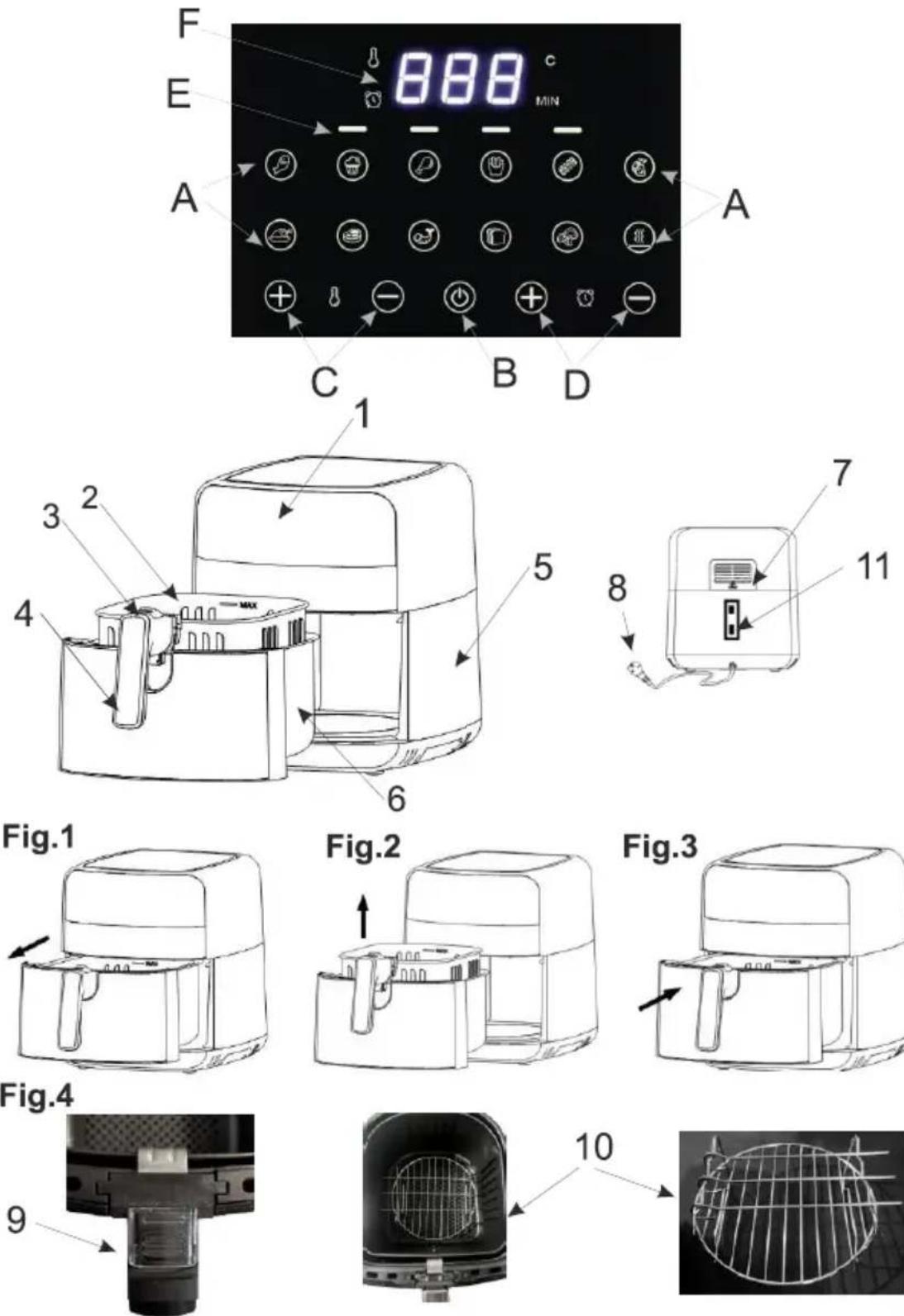
Device description:
- Control panel
- Basket
- Release button
- Handle
- Corps
- Container
- Air outlet
- Power cord
- Safety button
- Grate
- Cable space
Control panel:
A: Program selection buttons
B: On/Off button
C: Temperature control buttons
D: Time adjustment buttons
E: Device operation indicator
F: Temperature and time display
Programs:
- Fish
- Muffins
- Chicken legs
- French fries
- Bacon
- Ribs
- Chicken
- Steak
- Shrimps
10.Bread (frozen) -
Vegetables
-
Maintaining the temperature
Before first use.
- Remove the packaging and any stickers and accessories from the outside and inside of the device.
- Clean the basket (2) and container (6) thoroughly with hot water, a small amount of washing-up liquid and a sponge, then wipe them with a clean, soft cloth.
Do not clean the appliance with abrasive cloths or sponges or use cleaning powders as they may damage the smooth, non-stick surface of the basket (2) and the container (6). - Place the oven body (5) on a stable, horizontal, heat-resistant surface, connect the power cord (8).
- To remove factory odors from the device, turn on the device by pressing the (B) button on the additional panel, then press the (B) button again and the device will turn on the default program.
- Once the program is complete, unplug the power cord and repeat step 2 to clean it again after it has cooled down completely.
Do not wash the basket (2) and container (6) in the dishwasher.
Use of the device:
- Holding the handle (4), pull the container (6) together with the basket (2) out of the body (5) (fig.1) and place it on a stable surface. Note: Do not press the release button (3) during this operation.
- The basket (2) can be removed from the container (6) by pressing the button (3) and first sliding the button lock (9) (fig. 4)
- Place the previously prepared products in the basket (2) and insert it into the body (5) (fig.3). When filling the basket, do not exceed the MAX level placed inside it. To prepare food, e.g. steak or bacon, you can use the included grate (10) by placing it on the bottom of the basket (2).
- Connect the closed device to a grounded mains socket.
- The device will turn on, emit a beep and go into standby mode.
- Press the on/off button (B). Then use the program selection buttons (A) to select the desired program (see below, program description). Once the program has been selected, you can change the temperature and time by pressing the temperature adjustment selection button (C) +/- and the time adjustment button (D) +/- . It is recommended to add 3 minutes to the cooking time, in relation to the programmed program, if the appliance is cold.
- After selecting the appropriate program and adjusting the time, press the button (B), the machine will start working. The indicator light (E) will start flashing.
- After finishing work, the device will cool the heater for 20 seconds, after which it will beep 5 times.
- To end the device early, press the (B) button, after 20 seconds the device will turn off.
It is possible to turn on the device without selecting a program, to do this, after turning on the device, press
the (B) button, the device will turn on with the default set time and temperature parameters.
Tips:
Arrange the food pieces so that hot air can flow freely between them.
The device has a program memory, after removing the container (6) during the program the device will stop, after replacing the container (6) it will continue working.
If the time or temperature is not sufficient, you can always adjust the time or temperature by pressing the time (D) / temperature (C) adjustment button to finish cooking the food.
It is recommended to turn or stir the products at least once during the selected program.
!!WARNING!! The inside of the device is very hot
Description of programs:
Fish (1): Program most often used for frozen processed fish or fresh fish.
The device will automatically heat at 160^ C for 20 minutes
If the time or temperature is not sufficient, you can always change the time or temperature by pressing the time (D) / temperature (C) adjustment button.
Muffins (2): Program used mainly for baking cakes and muffins
The device will automatically heat at 160^ C for 15 minutes
If the time or temperature is not sufficient, you can always change the time or temperature by pressing the time (D) / temperature (C) adjustment button.
Chicken legs (3): Program used to prepare raw chicken legs.
The device will automatically heat at 200^ C for 20 minutes
If the time or temperature is not sufficient, you can always change the time or temperature by pressing the time (D) / temperature (C) adjustment button.
French Fries (4): Program mainly used for frozen French fries.
The device will automatically heat at 200^ C for 20 minutes
If the time or temperature is not sufficient, you can always change the time or temperature by pressing the time (D) / temperature (C) adjustment button.
Bacon (5): Program mainly used for thin pieces of bacon.
The device will automatically heat at 200^ C for 10 minutes
If the time or temperature is not sufficient, you can always change the time or temperature by pressing the time (D) / temperature (C) adjustment button.
Ribs (6): This program is mainly used for thicker cuts of red meat.
The device will automatically heat at 185^ C for 15 minutes
If the time or temperature is not sufficient, you can always change the time or temperature by pressing the time (D) / temperature (C) adjustment button.
Chicken (7): Program used to prepare raw chicken meat.
The device will automatically heat at 200^ C for 30 minutes
If the time or temperature is not sufficient, you can always change the time or temperature by pressing the time (D) / temperature (C) adjustment button.
Steak (8): This program is mainly used for thicker cuts of white or red meat.
The device will automatically heat at 180^ C for 15 minutes
If the time or temperature is not sufficient, you can always change the time or temperature by pressing the time (D) / temperature (C) adjustment button.
Shrimp (9): Best for small seafood like shrimp.
The device will automatically heat at 160^ C for 20 minutes
If the time or temperature is not sufficient, you can always change the time or temperature by pressing the time (D) / temperature (C) adjustment button.
Bread (10): Program most often used to warm frozen bread.
The device will automatically heat at 160^ C for 10 minutes
If the time or temperature is not sufficient, you can always change the time or temperature by pressing the time (D) / temperature (C) adjustment button.
Vegetables (11): Program mainly used for frozen vegetables.
The device will automatically heat at 160^ C for 15 minutes
If the time or temperature is not sufficient, you can always change the time or temperature by pressing the time (D) / temperature (C) adjustment button.
Keep warm program (12). It allows to keep the temperature of previously prepared food. The device will automatically heat at 80^ C and for 30 minutes
If the time or temperature is not sufficient, you can always change the time or temperature by pressing the time (D) / temperature (C) adjustment button.
CLEANING THE DEVICE
- Before cleaning the appliance, unplug it from the wall outlet and wait until it cools down.
- Clean with a damp cloth and then a dry one (or paper towel).
- Apply a small amount of cooking oil to the more difficult residues and after a few minutes, gently remove them with a wooden spatula.
- Do not clean with harsh, abrasive cloths or sponges or use scouring powders as they can damage the smooth, non-stick coating of the basket and container.
- Do not immerse the device in water.
Technical data:
Capacity 5.5 L Voltage: 220-240V \~50/60Hz
Nominal power: 1800W
Maximum power: 2500W
Power consumption in off state: 0.16W
Caution hot surface:
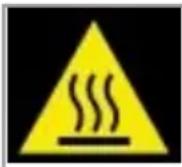
The temperature of accessible surfaces of the device may be high when it is in operation. Do not touch hot surfaces of the device.
In the interest of the environment. Information on used electrical and electronic equipment In accordance with art. 13 sec. 1 and sec. 2 of the Act of 11 September 2015 on used electrical and electronic equipment, we inform you about the correct handling of waste electrical and electronic equipment:
- It is prohibited to place used electrical and electronic equipment together with other waste – this is confirmed by the marking in the form of a "crossed-out bin", which requires selective collection of this type of waste.
- Electrical and electronic devices may contain hazardous substances, mixtures and components which, when released into the environment, may pose a serious threat to the health and life of humans and living organisms. They may lead to numerous health ailments, such as: vision, hearing and speech disorders, and may also damage the kidneys, liver and heart, and cause skin diseases. Harmful substances may also have an adverse effect on the respiratory and reproductive systems and lead to cancerous changes. Consumption of plants growing in contaminated soils, and products made from them, may pose a risk of the above health effects.
- Used electrical and electronic equipment should only be delivered to authorised collection points, a list of which should be available on the website of each Municipal Office.
- The household plays an important role in contributing to the reuse and recovery, including recycling, of used equipment. It also plays a key role in the waste management system for used electrical and electronic equipment due to the possibility of direct transfer to authorized collection points and the elimination of undesirable social habits resulting in leaving waste equipment in places not intended for this purpose.
In addition, Return used electrical and electronic equipment to the place of delivery. The distributor, when delivering equipment intended for households to the purchaser, is obliged to collect used equipment from households free of charge at the place of delivery of such equipment, provided that the used equipment is of the same type and performed the same functions as the equipment delivered.
Cardboard packaging and polyethylene (PE) bags should be disposed of in appropriate containers for selective collection of municipal waste according to their description. If there are batteries in the device, they should be removed and taken to a separate collection and storage point.
Do not throw the device into municipal waste!!
Service If you wish to purchase spare parts or make any complaints, please contact the seller who issued the receipt directly.
(D) / temperature (C).