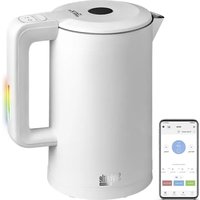
RK-M216S-E - Kettle Redmond - Free user manual and instructions
Find the device manual for free RK-M216S-E Redmond in PDF.


| Product type | Electric kettle |
| Brand | Redmond |
| Model | RK-M216S-E |
| Power | 1850-2200 W |
| Supply voltage | 220-240 V, 50/60 Hz |
| Capacity | 1.7 L |
| Body material | Plastic and stainless steel |
| Dimensions (L × D × H) | 250 × 230 × 150 mm |
| Net weight | 1.1 kg |
| Power cord length | 0.7 m |
| Control type | Electronic with Bluetooth remote control (Ready for Sky) |
| Adjustable temperatures | 40, 55, 70, 85, 100 °C |
| Keep warm | Up to 12 hours |
| Automatic shut-off | On boil, when water runs out, when removed from base |
| Overheat protection | Yes |
| Rotation on base | 360° |
| Cord storage compartment | Yes |
| Operation indicator | LED and sound |
| Compatible mobile app | Ready for Sky (iOS and Android) |
| Bluetooth protocol | Bluetooth v4.0 |
| Package contents | Kettle, base, user manual, service booklet |
| Care and cleaning | Wipe with a damp cloth; do not immerse |
Frequently Asked Questions - RK-M216S-E Redmond
User questions about RK-M216S-E Redmond
0 question about this device. Answer the ones you know or ask your own.
Ask a new question about this device
Download the instructions for your Kettle in PDF format for free! Find your manual RK-M216S-E - Redmond and take your electronic device back in hand. On this page are published all the documents necessary for the use of your device. RK-M216S-E by Redmond.
USER MANUAL RK-M216S-E Redmond
natural_image
White modern water heater with a digital display and color gradient (no visible text or symbols)User Manual
GBR 5
FRA 11
DEU 17
ITA 23
ESP 29
PRT 35
DNK 41
NOR 47
SWE 53
FIN 59
LTU 65
LVA 71
EST 77
ROU 83
HUN 89
BGR 95
HRV 102
SVK 108
SVN 114
CZE 120
POL 126
SRB 133
GRC 139
RUS 146
UKR 153
KAZ 160
Appliance control via the wireless network. Instruction on the R4S Gateway application installation is available through the link
A1
REDMOND
A2

Carefully read all instructions before operating the appliance and save them for future reference. By carefully following these instructions you can considerably prolong the service life of your appliance.
The safety measures and instructions contained in this manual do not cover all possible situations that may arise during the operation of the appliance. When operating the device the user should be guided by common sense, be cautious and attentive.
IMPORTANT SAFEGUARDS
- The manufacturer is not responsible for injuries caused by failure to comply with the safety requirements and operation rules of the appliance.
- This appliance is intended to be used for nonindustrial use in house hold and similar spheres of application. Industrial application or any other misuse will be regarded as violation of proper service conditions. Should this happen, manufacturer is not responsible for possible consequences.
-
Before plugging in the appliance ensure that the circuit voltage matches operating voltage of the appliance (see technical specifications or manufacturer's plate on the appliance).
-
Use an extension cord designed for the power consumption of the appliance as the parameter mismatch may result in a short circuit or fire outbreak.
- Use only earthed electric sockets as this is an obligatory safety requirement. Use an earthed extension cord as well.
- Unplug the appliance after use, while cleaning or moving. Remove the power cord with dry hands holding it by the plug, not cord.
CAUTION! Appliance runs hot while operating. Do not touch the housing while the kettle is operating. Do not lean over the appliance when the lid is on to avoid scalds. - Use the appliance for its intended purpose only. Otherwise it will be considered as misuse.
- Kettle may be used only with a specially designed base (included).
- Do not place the cord in doorframes or by heat sources. Do not twist or bend the power cord, en-
STOP
REDMOND
sure that it is not in contact with sharp objects, corners and edges of furniture.
STOP
Accidental damage to the power cord may cause electric shock or breakdown not covered by the terms of warranty. Promptly contact the service centre to have the damaged power cord replaced. Do not place the appliance on soft, unstable surface.
- Do not put the kettle on temperature-sensitive surface, do not cover the appliance while it is in operation as it may result in a fault or breakdown of the appliance.
- Do not use the appliance outdoors as ingress of moisture or foreign objects inside the housing can result in damage.
- Before cleaning the appliance ensure that it is unplugged and has cooled down. Follow the instructions while cleaning the device.
STOP
DO NOT immerse the appliance in water or keep in running water!
- Do not spill liquid on the connector.
- This appliance can be used by children aged from 8 years and above and persons with reduced physical, sensory or mental capabilities or lack of experience and knowledge if they have been given supervision or instruction concerning use of the appliance in a safe way and understand the hazards involved. Children shall not play with the appliance. Keep the appliance and its cord out of reach of children aged less than 8 years. Cleaning and user maintenance shall not be made by children without supervision.
- Keep the packaging (film, foam plastic and other) out of reach of children as they may choke on them.
- No modifications or adjustments to the product are allowed. All service and repair works should be carried out by an authorized service centre. Failure to do so may result in device and property damage or injury.
CAUTION! Do not use the appliance in case any breakdown has been noticed.
STOP
Specification
Model....SkyKettle RK-M216S-E
Power....1850-2200 W
Voltage 220-240 V, 50/60 Hz
Electrical safety......class I
Capacity 1.7 L
Body material....plastic, stainless steel Auto shut-off:
- upon boiling
- when empty
- when removed from the base
Type of control......electronic, remote (Ready for Sky)
Data transmission protocol......Bluetooth v4.0
Supported operating systems....iOS, Android
Heating temperature selection....40,55,70,85,100°C
Temperature maintenance....available
Operation indication......LED, audible
Heating element....enclosed
Rotation on base 360°
Control circuitry and temperature sensor....STRIX®
Power cord storage compartment......available
Dimensions....250 × 230 × 150 mm
Net weight 1.1 kg
Power cord length 0.7 m
Package Includes
Electric kettle 1 pc
Electric kettle base....1 pc.
User manual 1 pc.
Service booklet....1 pc.
In accordance with the policy of continuous improvement, the manufacturer reserves the right to make any modifications to design, configuration, or specification of the product without prior notice. The specification allows an error of ±10% .
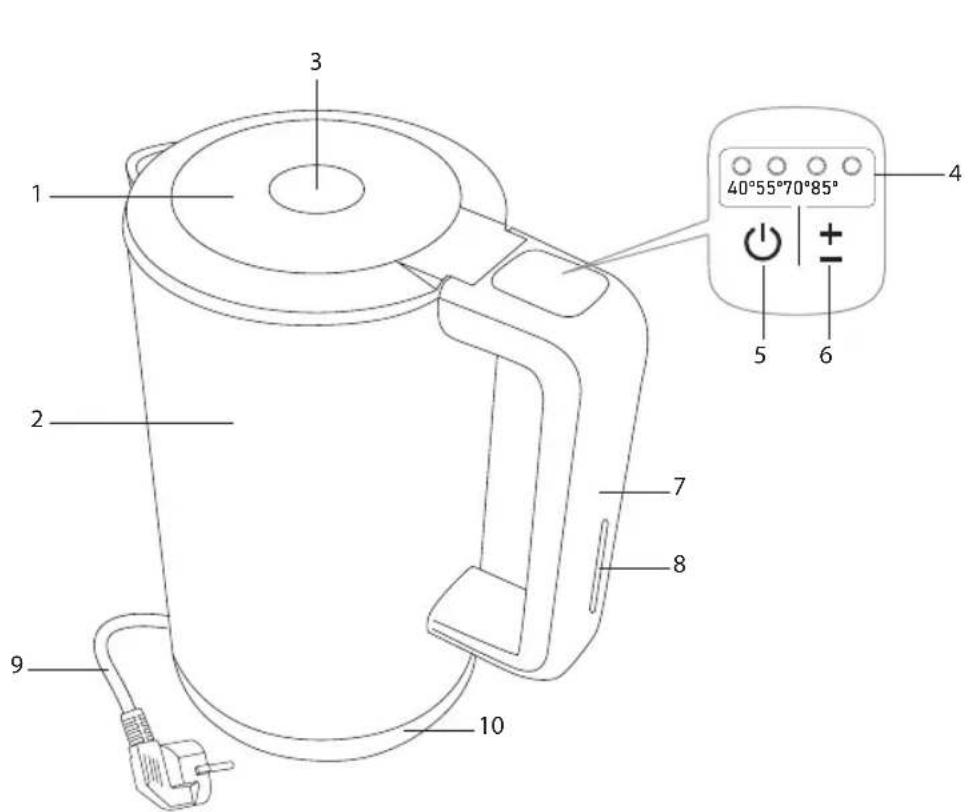
Parts list (scheme A1, page 3)
-
Kettle Lid
-
Kettle body
- Lid release button
- Heating temperature indicators
- Button -to switch on / off the device
- Button — to select the heating temperature
- Handle
- Operation status indicator
- Power cord
- Base with power cord storage compartment
I. PRIOR TO THE FIRST USE
Carefully take the appliance and its detachable parts out of the package.

Remove all wrapping materials and stickers except for the serial number identification sticker!
After the appliance transportation or storage at low temperature keep it at room temperature for at least two hours before plugging in.
Wipe the base of the appliance with a damp cloth, then let it dry. You may notice foreign smell when using the appliance for the first time. This does not mean its malfunction.

You are advised to boil water in the kettle a few times before the first use to get foreign smell out and disinfect the appliance.
II. OPERATION OF THE APPLIANCE
Fix the kettle with the base to the dry, solid, horizontal surface. Ensure the escaping steam does not fall on wallpaper, decorative coats, electric units and other items, which can be damaged by steam and high temperature.
Unwind the power cord to the desired length. Put the excessive part into the compartment located on the base bottom. If necessary use the extender of a suitable power (no less than 2.5 kW).
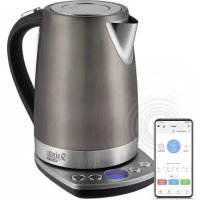
Remote control of the appliance via the Ready for Sky application
The Ready for Sky application allows you to control the appliance remotely in the near area using your smartphone or tablet.
- Turn on the Bluetooth function on the electric kettle (see the "Bluetooth Function" section).
REDMOND

Remote control of the RK-M216S-E kettle is only possible if the Bluetooth function is enabled.
- Download the Ready for Sky application from the App Store or Google Play (depending on the operating system of your device) to your smartphone or tablet.

Check the minimum supported version of the operating system on the official website of www.redmond.company or in the description of the application in the App Store and Google Play.
-
Start the Ready for Sky application, create an account, and follow the on-screen prompts.
-
In the standby mode, press and hold down the button for a few seconds, the appliance will produce three short beeps. During the connection, the temperature indicators will come on alternately. Once the connection is established, the appliance will produce three short beeps.

If the Bluetooth function is disabled or the connection is not established within 30 seconds, the appliance will produce two short beeps and enter the standby mode.
- To disable remote control, press and hold down the button until a long beep is produced. When the connection fails, the temperature indicators will blink.

To ensure stable communication, the mobile device should be no more than 15 meters away from the appliance.
Appliance control via the wireless network. Instruction on the R4S Gateway application installation is available through the link: www.readyforsky.com/r4sgoteway
Bluetooth function
To enable Bluetooth:
- Remove the kettle from the base.
- Press and hold down the buttons and to place the kettle back on the base.
- The heating temperature indicators will come on for a few seconds and go off.
To disable Bluetooth:
- Remove the kettle from the base.
- Press and hold down the buttons and to place the kettle back on the base.
- The heating temperature indicators will blink three times and go off.
Water Boiling
-
Remove the kettle from the base. Press the lid release button.
-
Pour water into the kettle, water level should be between the MIN and MAX points on the scale. If water level is higher than MAX point, the boiling water may be splashed. In case of water undersupply the appliance may be switched off in advance.

ATTENTION! The unit is intended only for water heating and boiling.
- Close the kettle lid and set the kettle to the base. The appliance will be operated only if it is properly fixed.
- Plug in the appliance. The heating temperature indicators will flash, the appliance will switch to the standby mode.
- Press the button ☑The appliance will produce a beep, the operation status indicator will come on, the boiling process will start.

During the heating process, the operation status indicator will change its color.
- At the end of the water heating, the appliance will produce three short beeps, the heating indicator will turn off and the appliance will enter the standby mode (no indication).
- To interrupt the water heating process, press again or remove the kettle from the base.

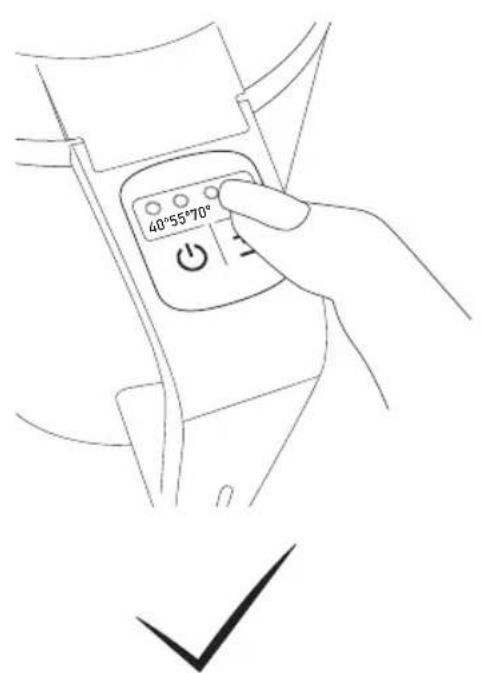
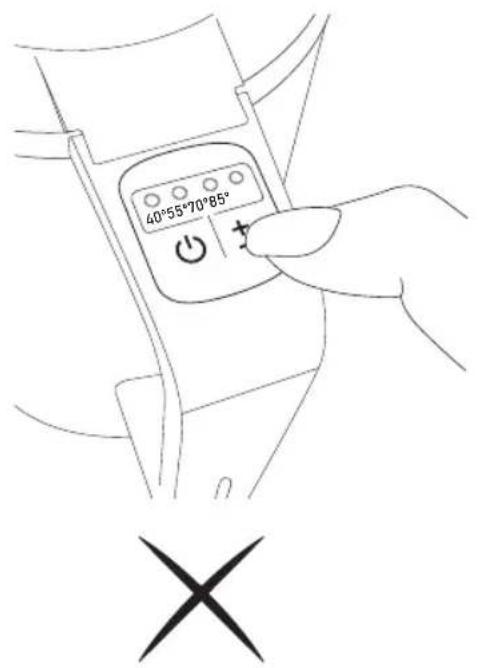
Press the buttons on the control panel only with your fingertips, as shown in figure A2 (page 4). Pressing with your nails can damage the buttons!
Water Heating Without Boiling
- To heat water without boiling to 40, 55, 70, 85°C in the standby mode, select the necessary temperature using (the indicator will come on next to the selected value), press

If the temperature in the kettle is higher than the adjusted heating temperature, three audible signals will be heard after pressing (the appliance will switch to the Keep Warm mode.
- At the end of the water heating, the appliance will produce three short beeps and switch to the Keep Warm mode (Keep Warm value indicator and operation status indicator are on).
- To interrupt the Keep Warm mode, press or remove the kettle from the base.
Temperature maintenance mode
This mode provides maintenance of the selected temperature 40, 55, 70, 85°C for 12 hours. If the temperature drops lower than the selected value, the heating element will
be automatically enabled. Water is not re-boiled. At the end of the process, the appliance switches to the standby mode.
To enable the Keep Warm mode during boiling, select the necessary temperature using + (the indicator will come on next to the selected value). To disable the mode during boiling, press + until the temperature indication goes off.
Disabling audible signals
To disable and re-enable audible signals in the standby mode, press and hold down for ± several seconds.

When re-enabling the audible signals the appliance will produce a beep.
Safety Systems
- The kettle is equipped with the system of auto shut-off upon boiling or removing from the base.
- In case of water shortage the automatic overheat protection turns off the kettle. Let the appliance cool down, thereafter it will be ready for operation.
III. CLEANING AND MAINTENANCE
Before cleaning unplug the appliance and let it cool down. Regularly wipe the kettle housing and base with a damp cloth. Let the kettle and base dry thoroughly before use.

DO NOT immerse the appliance, its base, plug, or power cord in water or wash it under running water!
DO NOT use a sponge or tissue with hard or abrasive surface, any chemically aggressive substances, or any other agents which are not recommended for cleaning items that come into contact with food.
While in operation scale deposits may form on both the heating element and the housing inner walls of the appliance depending on water type being used. Use special nonabrasive cleaning substances for kitchen utensils and appliances. Follow the product application instructions. Thoroughly wash the appliance with water after cleaning and wipe with a damp cloth.

ATTENTION! Before use the appliance, please, make sure that its electric contacts are dry.
Transportation and Storage
Before repeated operation or storage completely dry all parts of the appliance. Store the assembled appliance in a dry, ventilated place away from heating appliances and direct sunlight.
During transportation and storage, do not expose the device to mechanical stress, that may lead to damage of the device and/or violation of the package integrity. Keep the device package away from water and other liquids..
IV. BEFORE CONTACTING SERVICE CENTRE
| Problem Possible cause Solution | ||
| The appliance does not switch on | No power supply | Connect the appliance to a properly working electric socket |
| Early switch-off | There are scale deposits on the heating element | Descale the heating element (see "Cleaning and Maintenance") |
| Kettle switches off in a few seconds | There is no water in the kettle, boil-dry protection system has gone off | Unplug the appliance, let it cool down. Fill the kettle up above MIN mark |
| Plastic smell during use | Appliance is new, the smell is coming from protective cover | The smell will disappear after few uses |
| Synchronization attempt failed | Bluetooth function on the mobile device is disabled | Enable Bluetooth function on the mobile device |
| Ready for Sky app on the mobile device is deactivated | Run the Ready for Sky app on the mobile device | |
| Sync devices are too far | Ensure devices are located within 15 meters from each other | |
| Operation status indicator is not on | You should reset the settings | Press and hold down the button until the second beep is produced |
| The kettle does not boil or the boiling time is too long | Boiling time is not set correctly | Adjust the boiling time in the Ready for Sky mobile application |

NOTE! In case any failure occur in the operation of the Ready for Sky app, it is not obligatory to apply to the service centre. Apply to REDMOND technical support service and obtain the consultation of our specialists on error elimination and/or failure in Ready for
REDMOND
Sky operation. Your comments and suggestions concerning application operation will be taken into account upon successive update. Contact data of user support service of REDMOND appliances can be found in your country on the website www.redmond.company. You may also obtain the help, filling the contact form provided on the website. In case you didn't manage to eliminate the defects, please, refer to the authorized service centre.
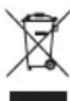
Environmentally friendly disposal (WEEE)
The packaging, user manual and the device itself shall be taken to the applicable collection point for the recycling of electrical and electronic equipment. Do not throw away the electronic waste to help protect the environment
Old appliances must not be disposed with other household waste but must be collected separately. Municipal disposal of recyclable wastes is free of charge. The owners of old appliances are required to bring it to a waste facility centre. With this little extra effort, you can help to ensure that valuable raw materials are recycled and pollutants are treated as appropriate.
This appliance is labelled in accordance with European Directive 2012/19/EU — concerning used electrical and electronic appliances (waste electrical and electronic equipment WEEE). The guideline determines the framework for the return and recycling of used appliances as applicable throughout the EU.
Bluetooth is the registered trademark of Bluetooth SIG, Inc.
App Store is the service mark of Apple Inc., registered in the USA and other countries. Google Play is the registered trademark of Google Inc.

NOTE! In case any failure occur in the operation of the Ready for Sky app, it is not obligatory to apply to the service centre. Apply to REDMOND technical support service and obtain the consultation of our specialists on error elimination and/or failure in Ready for Sky operation. Your comments and suggestions concerning application operation will be taken into account upon successive update. Contact data of user support service of REDMOND appliances can be found in your country on the website www.redmond.company. You may also obtain the help, filling the contact form provided on the website. In case you didn't manage to eliminate the defects, please, refer to the authorized service centre.

Environmentally friendly disposal (WEEE)
The packaging, user manual and the device itself shall be taken to the applicable collection point for the recycling of electrical and electronic equipment. Do not throw away the electronic waste to help protect the environment. Old appliances must not be disposed with other household waste but must
be collected separately. Municipal disposal of recyclable wastes is free of charge. The owners of old appliances are required to bring it to a waste facility centre. With this little extra effort, you can help to ensure that valuable raw materials are recycled and pollutants are treated as appropriate.
This appliance is labelled in accordance with European Directive 2012/19/EU – concerning used electrical and electronic appliances (waste electrical and electronic equipment WEEE). The guideline determines the framework for the return and recycling of used appliances as applicable throughout the EU.
Bluetooth is the registered trademark of Bluetooth SIG, Inc.
App Store is the service mark of Apple Inc., registered in the USA and other countries.
Google Play is the registered trademark of Google Inc.

Snaga....1850-2200 W
Zatezna 220-240 V, 50/60 Hz
Elektroaktuelna zaštita .... klasa I
Zapremina....1,7 Litara
Telesni materijal....plastika, nerđajući čelik
Automatski prekid veze:
Manufacturer: "Power Point Inc Limited" N°1202 Hai Yun Ge (B1) Lin Hai Shan Zhuang Xiameilin Futian Shenzhen. China. 518049. Under license of REDMOND®
- REDMOND
- IMPORTANT SAFEGUARDS
- STOP
- Specification
- Package Includes
- Parts list (scheme A1, page 3)
- PRIOR TO THE FIRST USE
- OPERATION OF THE APPLIANCE
- Remote control of the appliance via the Ready for Sky application
- Bluetooth function
- Water Boiling
- Water Heating Without Boiling
- Temperature maintenance mode
- Disabling audible signals
- Safety Systems
- CLEANING AND MAINTENANCE
- Transportation and Storage
- Environmentally friendly disposal (WEEE)
Brand : Redmond
Model : RK-M216S-E
Category : Kettle