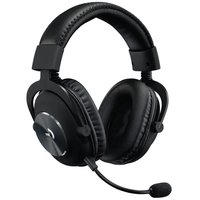
USER MANUAL Zone Vibe Wireless LOGITECH
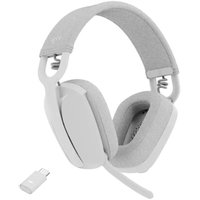
- Zone Vibe Wireless headphones
- Charging cable
- USB-C receiver
- USB-A adapter
- Travel bag
- User documentation

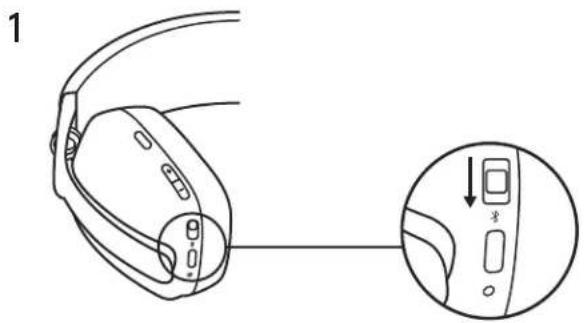
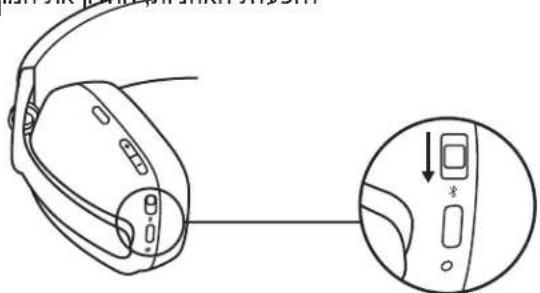
POWER ON / OFF
- Slide the switch in the arrow's direction to the middle to power on the headphones.
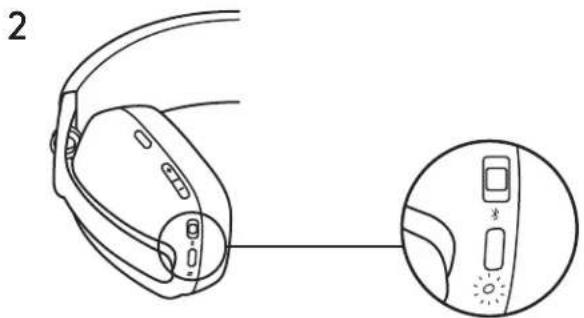
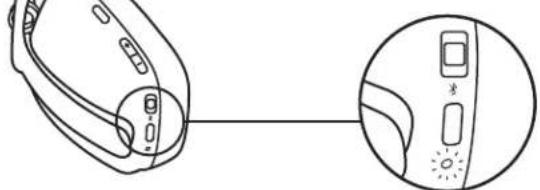
- Once powered on, the LED light will slightly turn white.
- There will be a voice prompt that tells you the battery status.
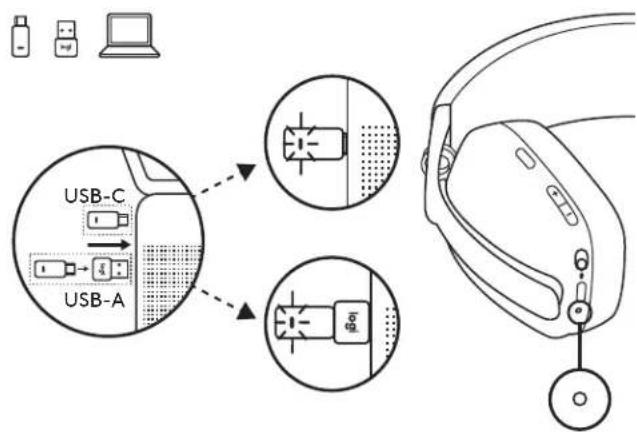
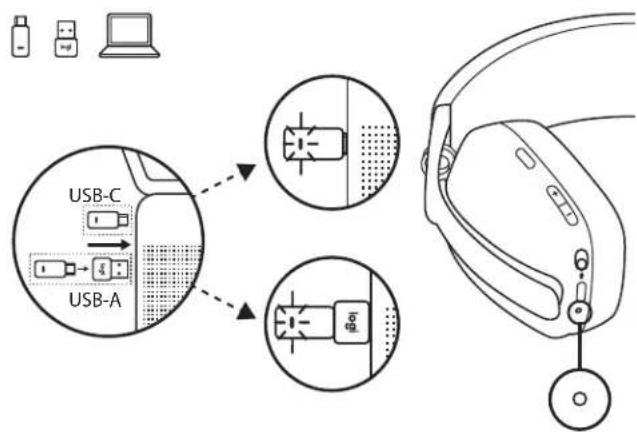
a. Connect via USB-C receiver
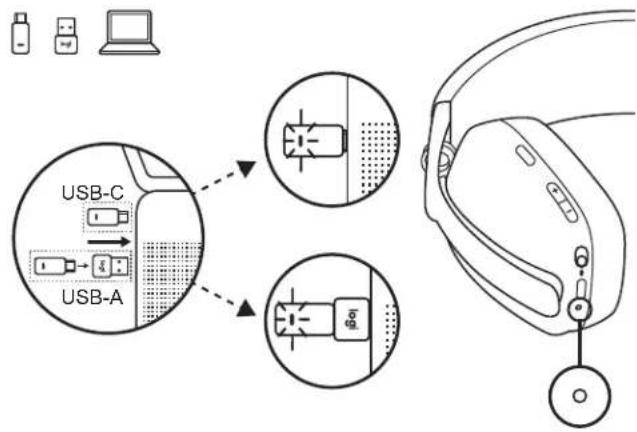
- Insert the receiver into the computer USB-C port. Or insert the USB-C receiver with the USB-A adapter to the USB-A port.
- Zone Vibe Wireless is already paired to the receiver it ships with.
- Once successfully paired, the LED light on the receiver will turn solid white then dim.
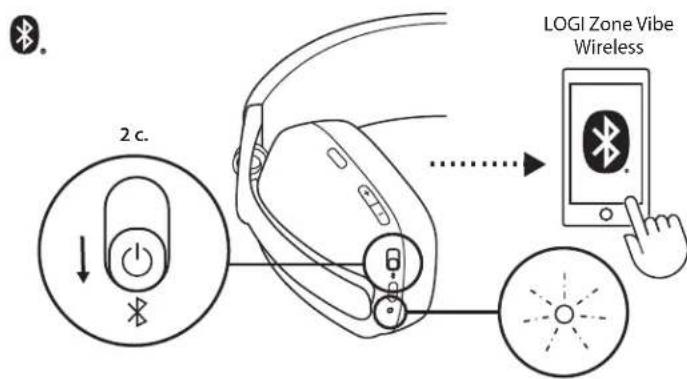
b. Connect via BLUETOOTH
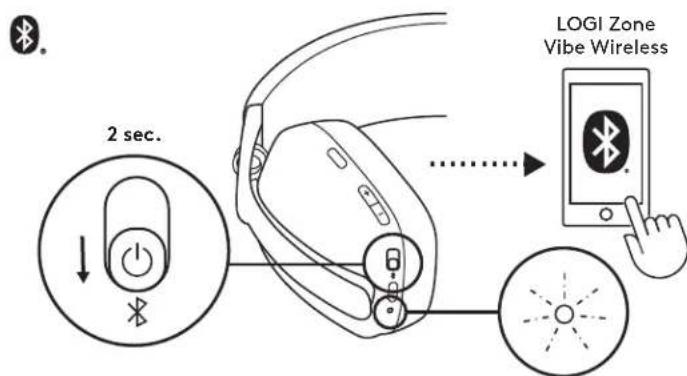
- Slide the switch to the bottom in the arrow's direction for 2 seconds to initiate pairing.
- The LED light will flash white rapidly.
- Open Bluetooth® settings on your device.
- Select Logi Zone Vibe Wireless in discoverable devices.
- Once successfully paired, the LED light will turn solid white.
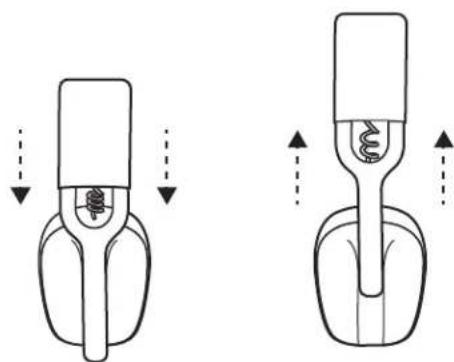
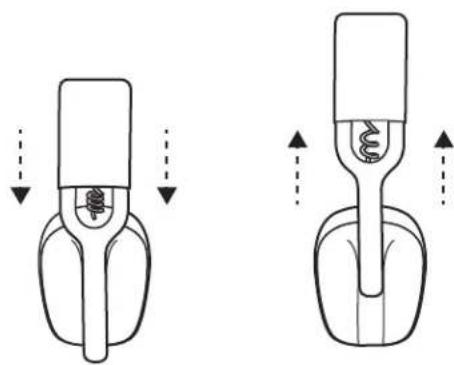
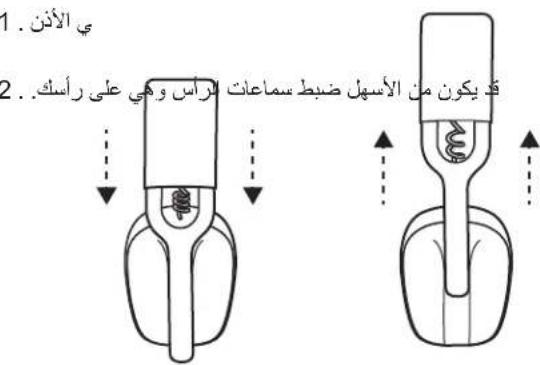
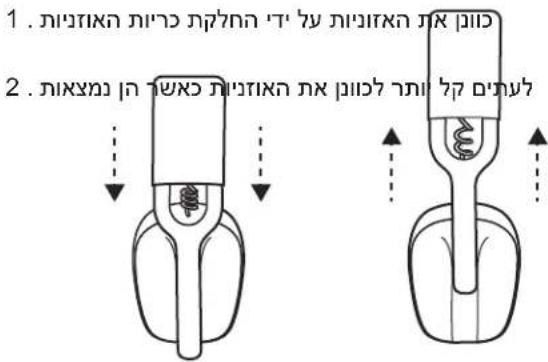
- Adjust the headphones by sliding earcups up and down the extended part of the headband.
- It may be easier to adjust the headphones on your head. Slide the earcups up and down the headband until they sit comfortably on your ears.
HEADPHONES CONTROLS
| MSFT Teams: |
| Usage Button Action | | |
| Call controls | Answer / End call | Call button | Short press |
| Reject call 1.5 sec. press | |
| Resume call | Short press |
| Transfer active call to other device |
| Team activities | Invoke Teams | Call button | Short press |
| Music controls | Play / Pause | Music control button | Short press |
| Track forward | Double press |
| Volume | Volume up "+" | | Short press |
| Volume down "-" | |
| Connectivity | Bluetooth pairing | Power button | 2 sec. press |
| UC version: |
| Usage Button Action | | |
| Call controls | Answer / End call | Call button | Short press |
| Reject call 1.5 sec. press | |
| Music controls | Play / Pause | Music control button | Short press |
| Track forward Double press | |
| Volume | Volume up "+" | | Short press |
| Volume down "-" | |
| Connectivity Blue | tooth pairing 3-position switch 2 sec. press | | |
Note:
- Teams activities are only functional when Teams is running on an unlocked computer.
- Media control functionality depends on the type of application.
- Call activities are always the first priority. When two devices are connected, the Bluetooth connection will be prioritized over the receiver. When two Bluetooth devices are connected, the last active device will override the other.
Tip: Music EQ controls available on Logi Tune.
MUTE
There are 2 ways to mute your microphone.
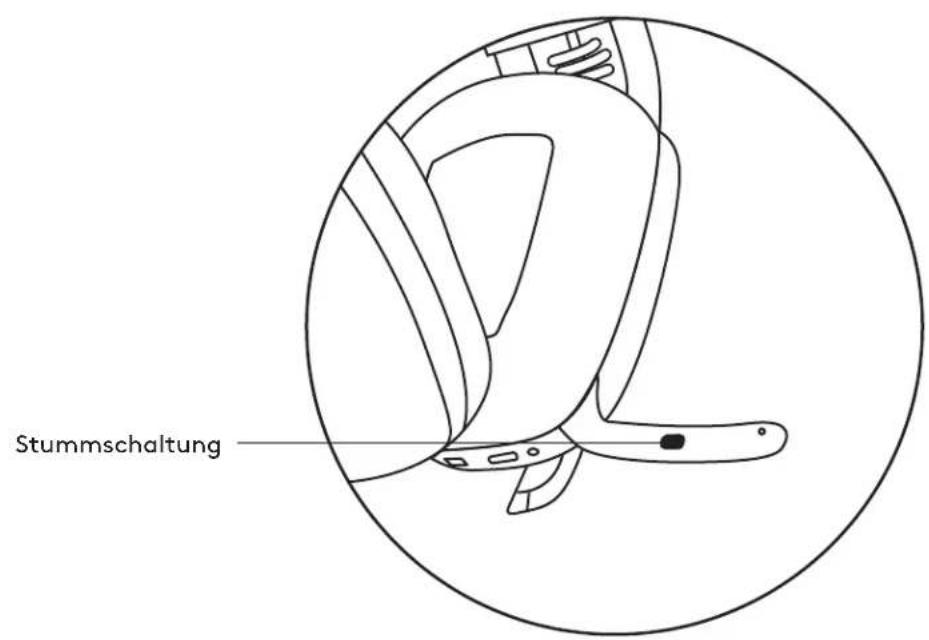
Press the button to mute.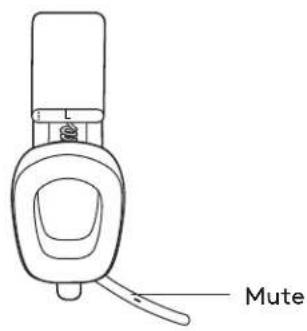
Flip up or down the mic boom to mute or unmute.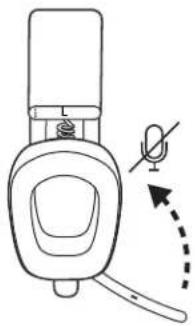
Voice notifications indicate when the microphone is on/off mute.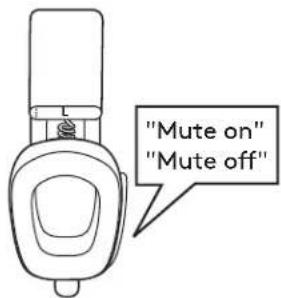
HEADPHONES LIGHT INDICATOR
| Category Status | Light | |
| White | Power | Power ON Turn solid white and then dim |
| Battery charging Breathing | |
| Battery fully charged Solid | |
| Connectivity | Bluetooth pairing Fast blinking |
| Bluetooth / receiver connected Turn solid white and then dim |
| Link lost Dim white | |
| Calls | Active call Solid | |
| Incoming call Slow blinking |
| Red | Calls Mute Solid | |
| Power | Low battery (< 10%) | Slow blinking |
| Factory reset | Fast blink from red to white for three times then LED turn off |
Note:
- User-triggered behaviors, such as Bluetooth pairing or link lost, will be prioritized then revert back to its previous status once the behavior is completed.
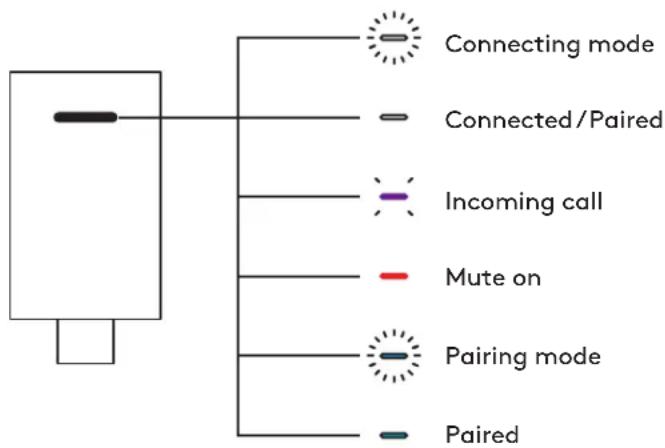
RECEIVER LIGHT INDICATOR
| MSFT Teams: |
| Category Status | Light | |
| White Connectivity | | Receiver connecting Off | |
| Receiver connectedNew device paired | Turn solid white and then dim |
| Receiver disconnected Off | |
| Purple | Connectivity | Connecting to Teams | Breathing |
| Solid |
| First time failed connecting to Teams | Fast blinking for 10 seconds and then off |
| Failed connecting to Teams | Fast blinking 3 times then LED off |
| Calls | Active call Solid | |
| Incoming call Repeat | "fast blinking 3 times then LED off" |
| Red Calls Mute | Solid | | |
| Blue | Connectivity | New device pairing | Fast blinking |
| UC version |
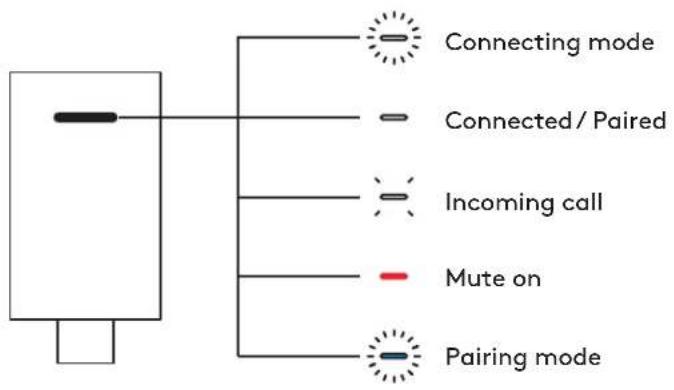
| Category Status | Light | |
| White | Connectivity | Receiver connecting Off | |
| Receiver connectedNew device paired | Turn solid white and then dim |
| Receiver disconnected Off | |
| Calls | Active call Solid | |
| Incoming call | Repeat "fast blinking 3 times then LED off" |
| Red Calls Mute | Solid | | |
| Blue Connectivity | New device pairing | Fast blinking | |
CHARGING
To conserve battery life, headphones automatically power off after 30 minutes without usage.
Sleep timer can be adjusted in Logi Tune.
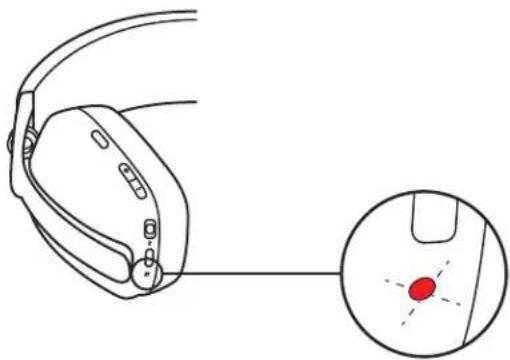
The LED light on the headphones will blink slowly in RED when the battery is lower than 10%.
Charging via USB cable
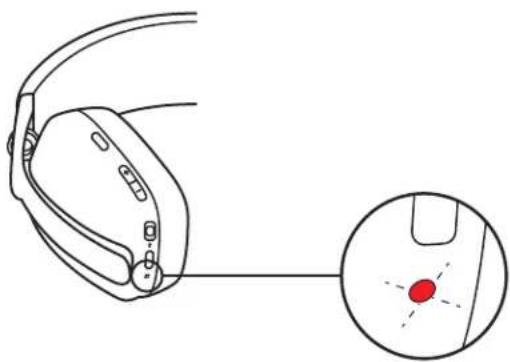
- Plug one end of the cable to the USB-C port on the bottom of the earcup and the other end into the USB-C charging port on your computer.
- The LED light will start breathing white when charging.
- The LED light will turn solid white when fully charged.
- 2 hours will fully charge the battery.
- 5 minutes will give you 1 hour of playback.
Note:
Battery life may vary based on user, environment, and computing conditions.
- The headphones can be used with the receiver and Bluetooth paired while charging.
LOGITUNE
Logi Tune helps boost your headphones performance with periodic software and firmware updates.
It is recommended to update both your headphones and receiver. To do so, download Logi Tune from www.logitech.com/tune

Logi Tune
Download on the App Store
www.logitech.com/tune
GETTON Google Play
ADJUSTING SIDETONE
Sidetone lets you hear your own voice during conversations so you are aware of how loud you are talking. In Logi Tune, select the sidetone feature, and adjust the dial accordingly.
-A higher number means you hear more external sound. -A lower number means you hear less external sound.
AUTO SLEEP TIMER
By default, your headphones will automatically power off when not in use for 30 minutes. Adjust the sleep timer in Logi Tune. To wake up your headphones, try sliding off/on the power switch again.
- Power the headphones on.
- Press and hold the call button and volume - button for 5 seconds.
- The LED light will quickly blink from red to white for 3 times and then turns off when your headphones are successfully reset.
- The headphones will turn off after reset.
DIMENSIONS
Headphones:
Height × Width × Depth: 183.03× 169.68× 73mm
Weight: 0.185 Kg
Earpad:
Height x Width x Depth: 98.6 x 75.44 x 19.3 mm
Receiver:
Height × Width × Depth: 26.8 × 12.4 × 6.2 mm
Adapter:
Height × Width × Depth: 24.5 × 15.4 × 8.7 mm
SYSTEM REQUIREMENTS
Works with common calling applications across almost all platforms and operating systems.
Works with Windows®, Mac, or Chrome™ based computer via USB-C, USB-A, Bluetooth® and iOS or Android™ Bluetooth® enabled devices.
TECHNICAL SPECIFICATIONS
Microphone Type: Dual omni-directional MEMS mics with directional beamforming and DSP
Frequency response (Speaker): 20-20kHz (music mode), 100-8kHz (talk mode)
Frequency response (Microphone): 100-8kHz
Talk time up to 18 hrs
Listen time up to 20 hrs
Bluetooth version (headset): 5.2
Bluetooth version (receiver): 5.2
Wireless range: Up to 30 m / 100 ft (open field line of sight)
Cable length (USB C to C charging cable): 4.9 ft (1.5 m)
www.logitech.com/support/zonevibewireless
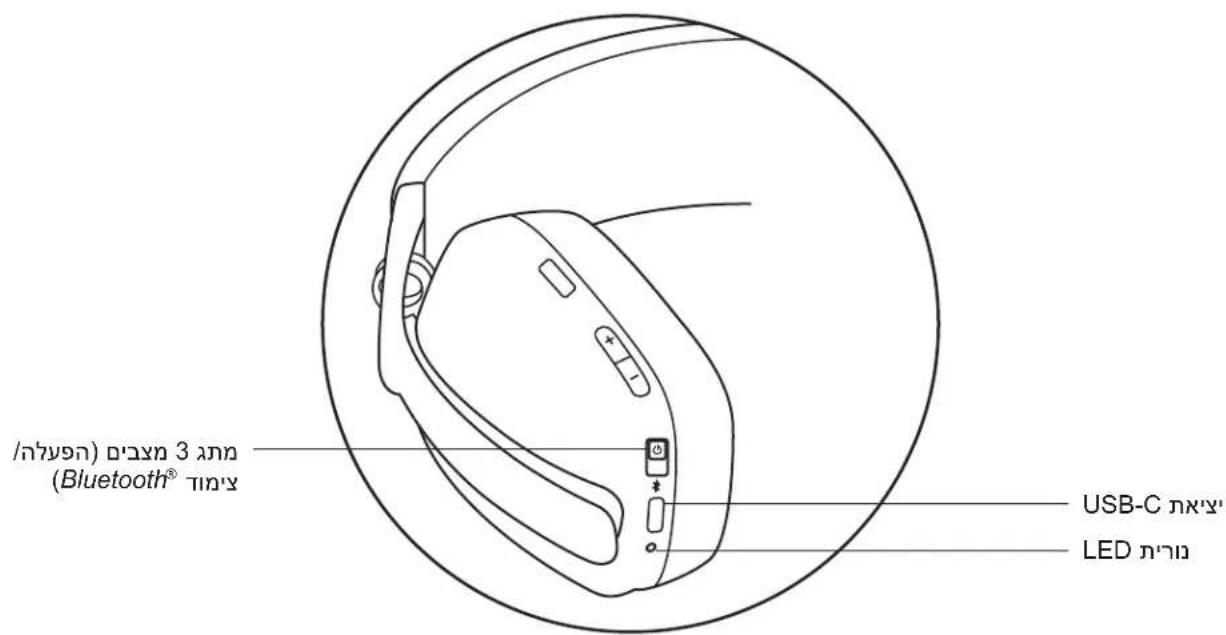
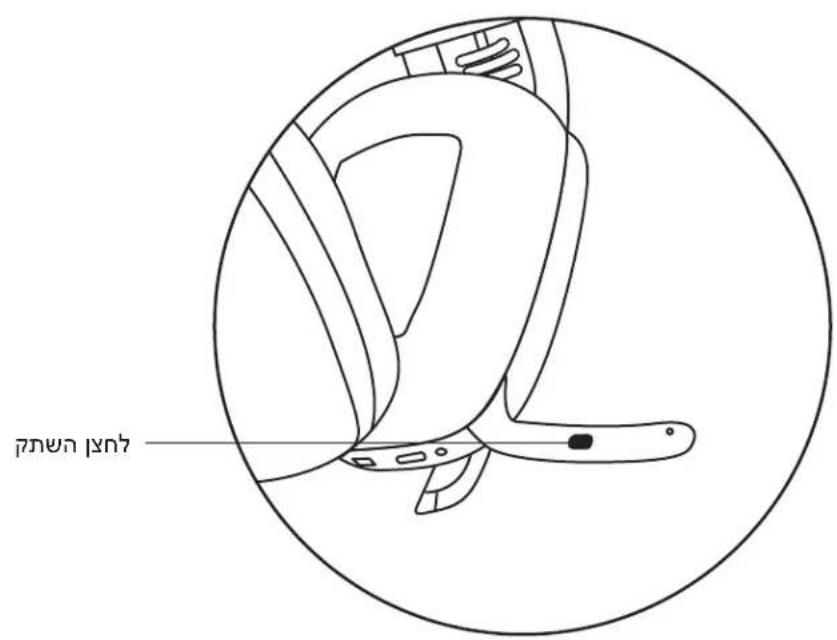
PRODUCT AT A GLANCE
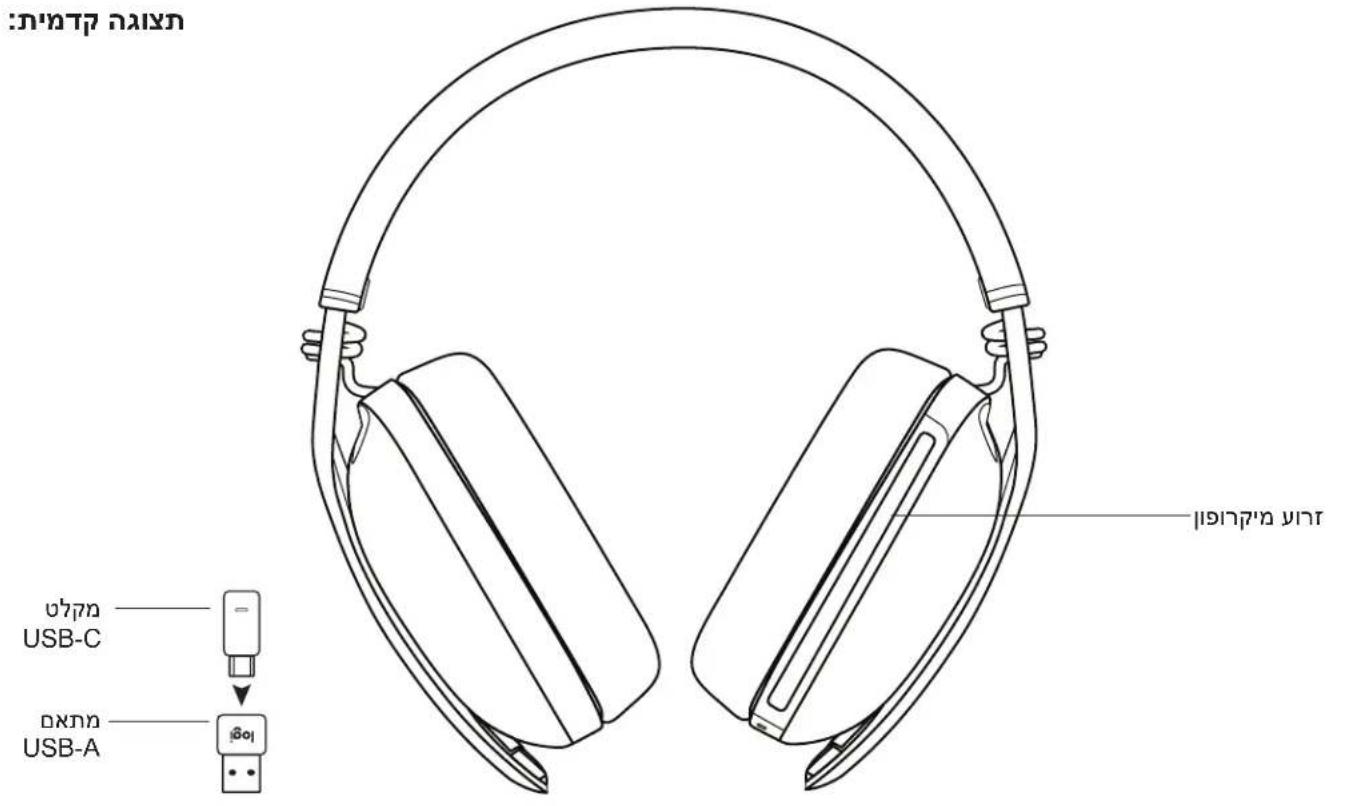
Front view: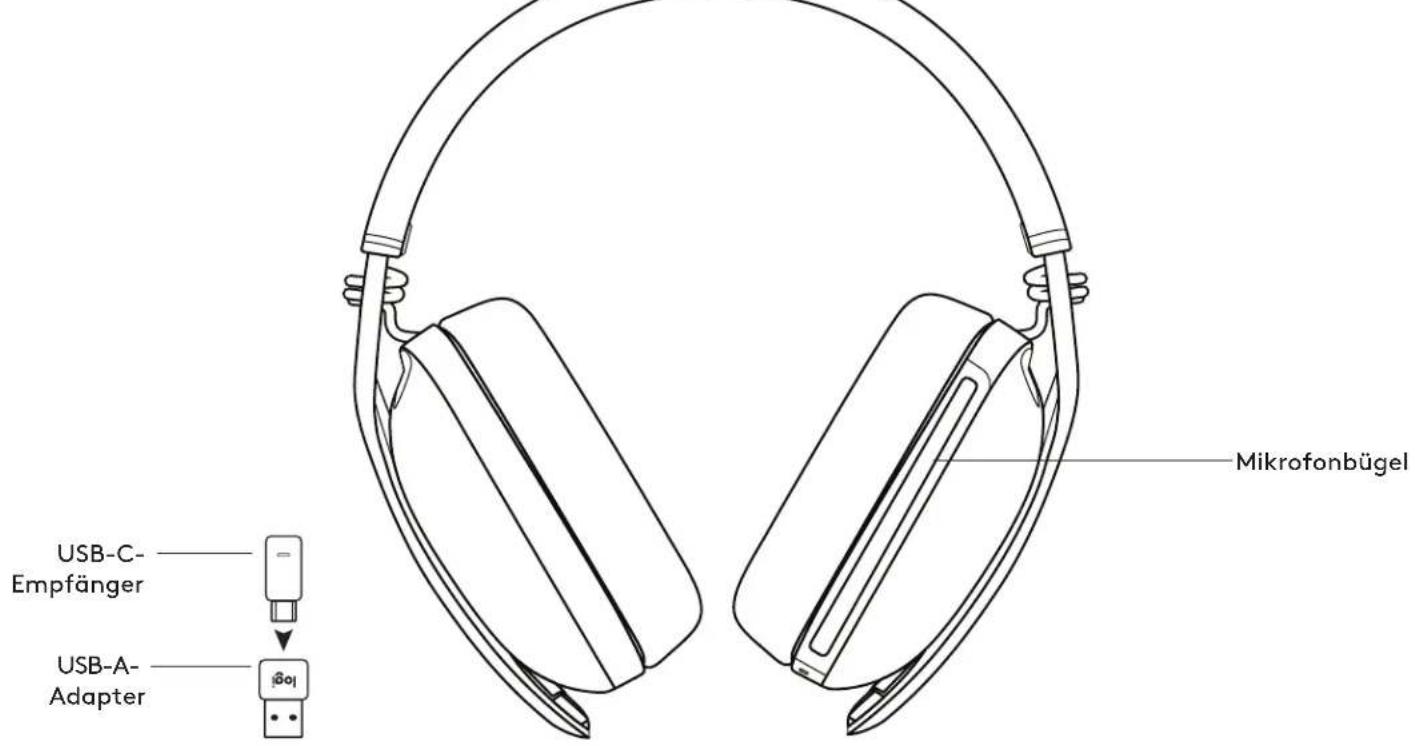
Rear view: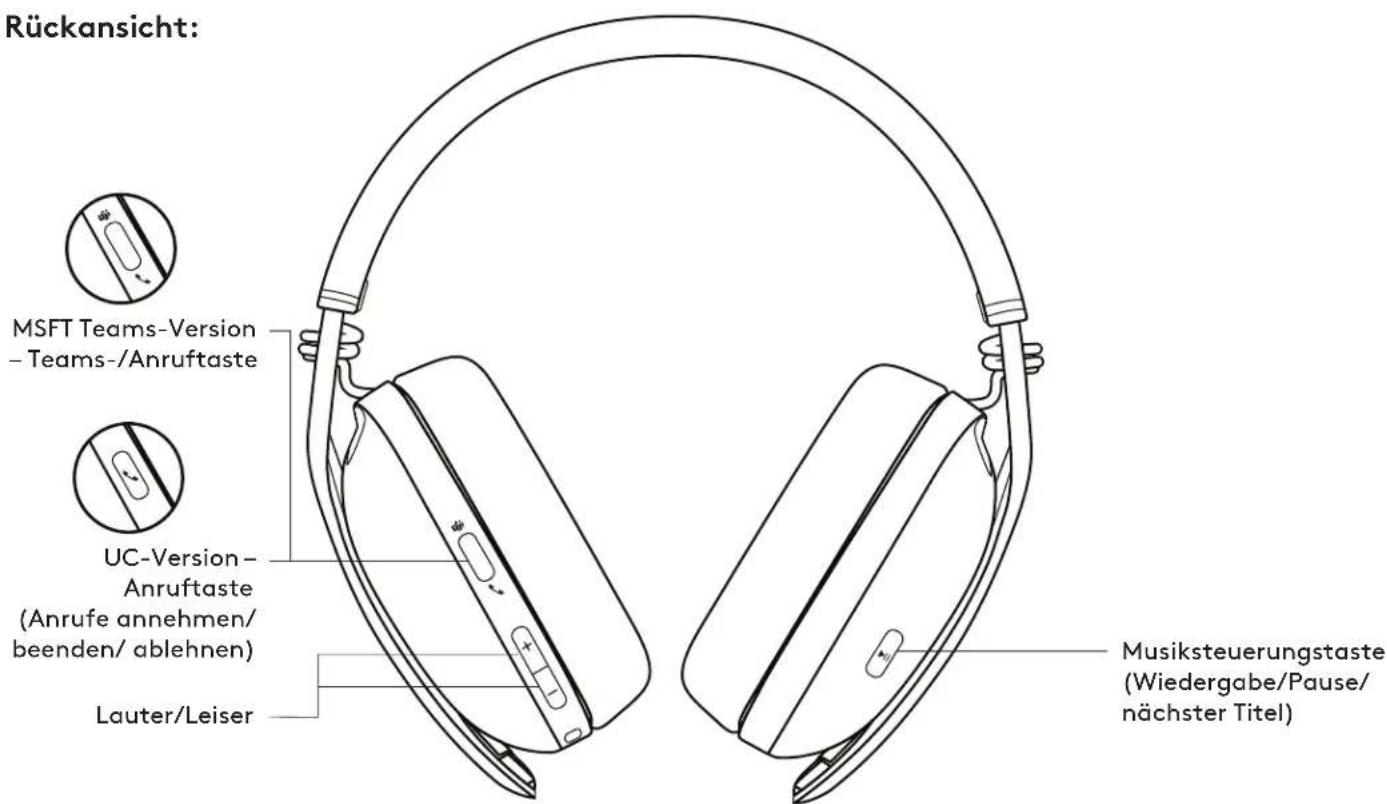
Bottom view: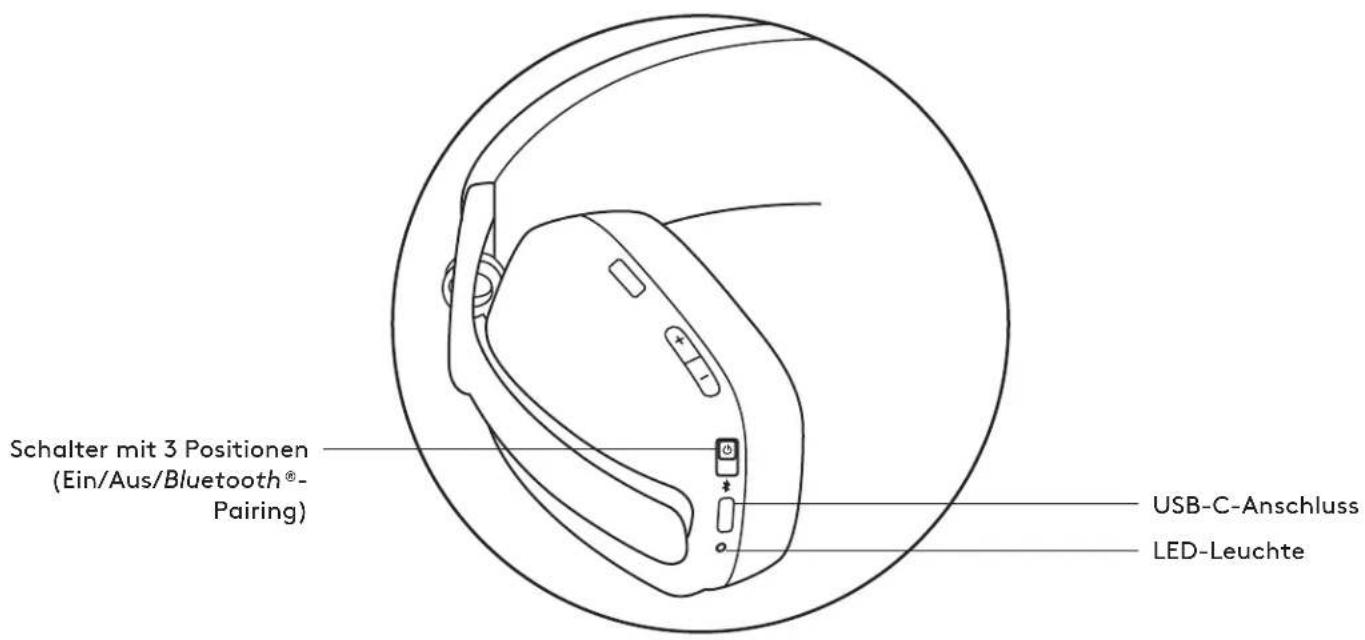
PACKAGE CONTENTS
Download on the App Store
www.logitech.com/tune
GET IT ON Google Play
ADJUSTING SIDETONE
Download on the App Store

www.logitech.com/tune

GET IT ON Google Play
ADJUSTING THE TONE
Download on the App Store
www.logitech.com/tune
GETION Google Play
REVERB ADJUSTMENT
Download on the App Store

www.logitech.com/tune

GETION Google Play
ADJUST SIDETONE
Download on the App Store

www.logitech.com/tune

GETION Google Play
ADJUST SIDETONE
Download on the App Store

www.logitech.com/tune

GETITION Google Play
ADJUST SIDETONE
Download on the App Store

www.logitech.com/tune

GET IT ON Google Play
ADJUST CAR AUDIO
b. Establish binding via BLUETOOTH
Download on the App Store
www.logitech.com/tune
GET IT ON Google Play
ADJUST SIDETONE
GET TO KNOW THE PRODUCT
Front view: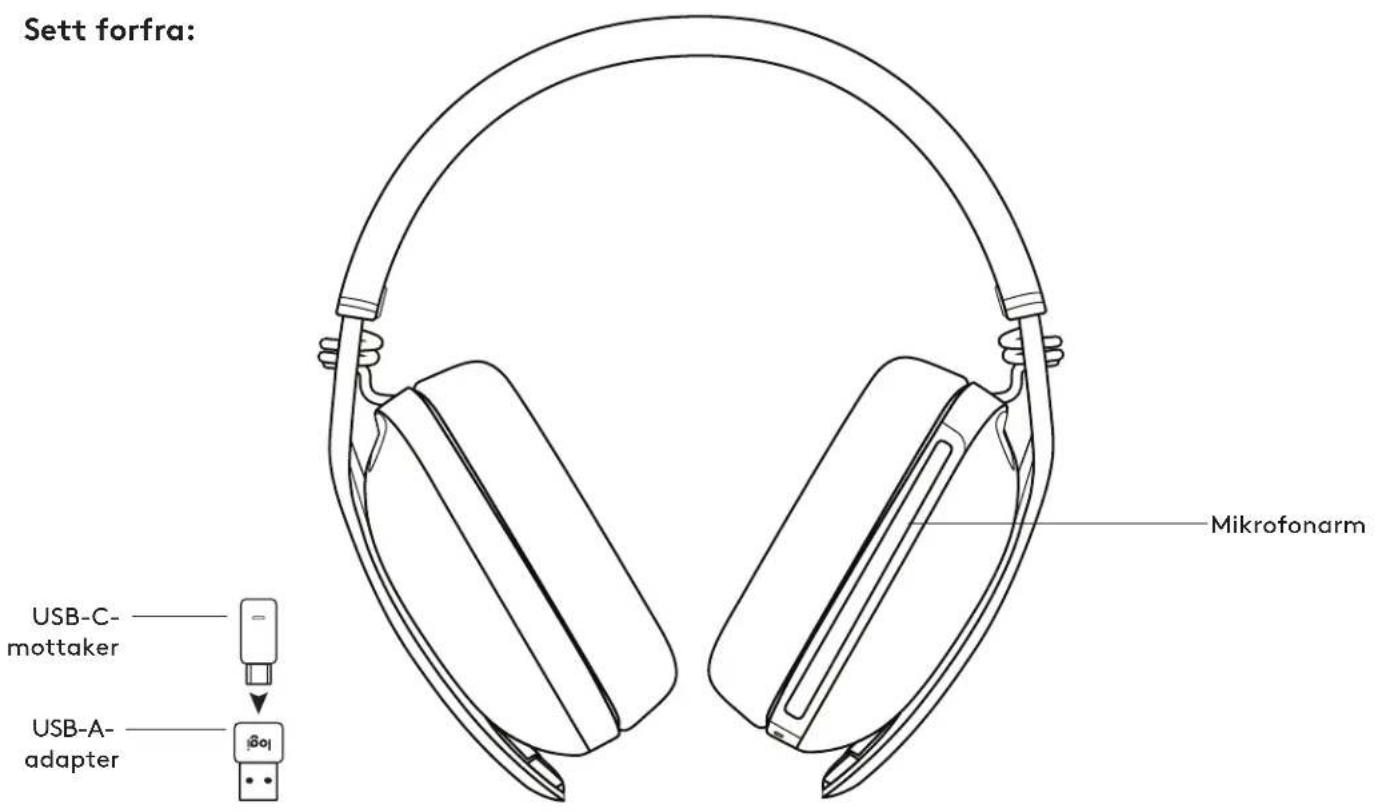
Back view:
Download on the App Store

www.logitech.com/tune

GETION Google Play
JUSTERE SIDETONE
Download on the App Store
www.logitech.com/tune
GETION Google Play
SIVUÄENNAATAMINEN
Download on the App Store

www.logitech.com/tune

GETITION Google Play
PPOZAPMOH HXOY ΩNH
Me tn λ eitoupyia hxou oovn c npoeite kat a th diapkeia piac auvouiac va akoute kal n dikn oac oovn, wote va yywpicete noo duvata akouyeote otav male. Tto Logi Tune, enilEte tn λ eitoupyia hxou oovn c kai npoapuodote avaloya tov eniloyea.
Yyoc x PAtoc x BbOoc: 26,8x12,4x6,2mm
PpOaPouyEaC:
YyocxPiataocxCbOoc:24,5x15,4x8,7mm
ANAITHEEIS YYETHMATO
It operates with almost all applications and operating systems.
It operates with Windows, Mac, or ChromeTM computers via USB-C, USB-A, Bluetooth*, and with iOS or Android devices that support Bluetooth.
TECHNICAL SPECIFICATIONS
Microphone type: Two unidirectional MEMS microphones with directional beamforming and DSP
Frequency response (music): 20-20 kHz (music mode), 100-8 kHz (speech mode)
Frequency response (microphone): 100-8 kHz
Battery life: up to 18 hours
Listening time: up to 20 hours
Bluetooth version (audio): 5.2
Bluetooth version (dongle): 5.2
Wireless range: Up to 30 m / 100 ft (line of sight)
Cable length (USB-C to USB-C charging cable): 1.5 m (4.9 ft)
www.logitech.com/support/zonevibewireless
PRODUCT OVERVIEW
In the box: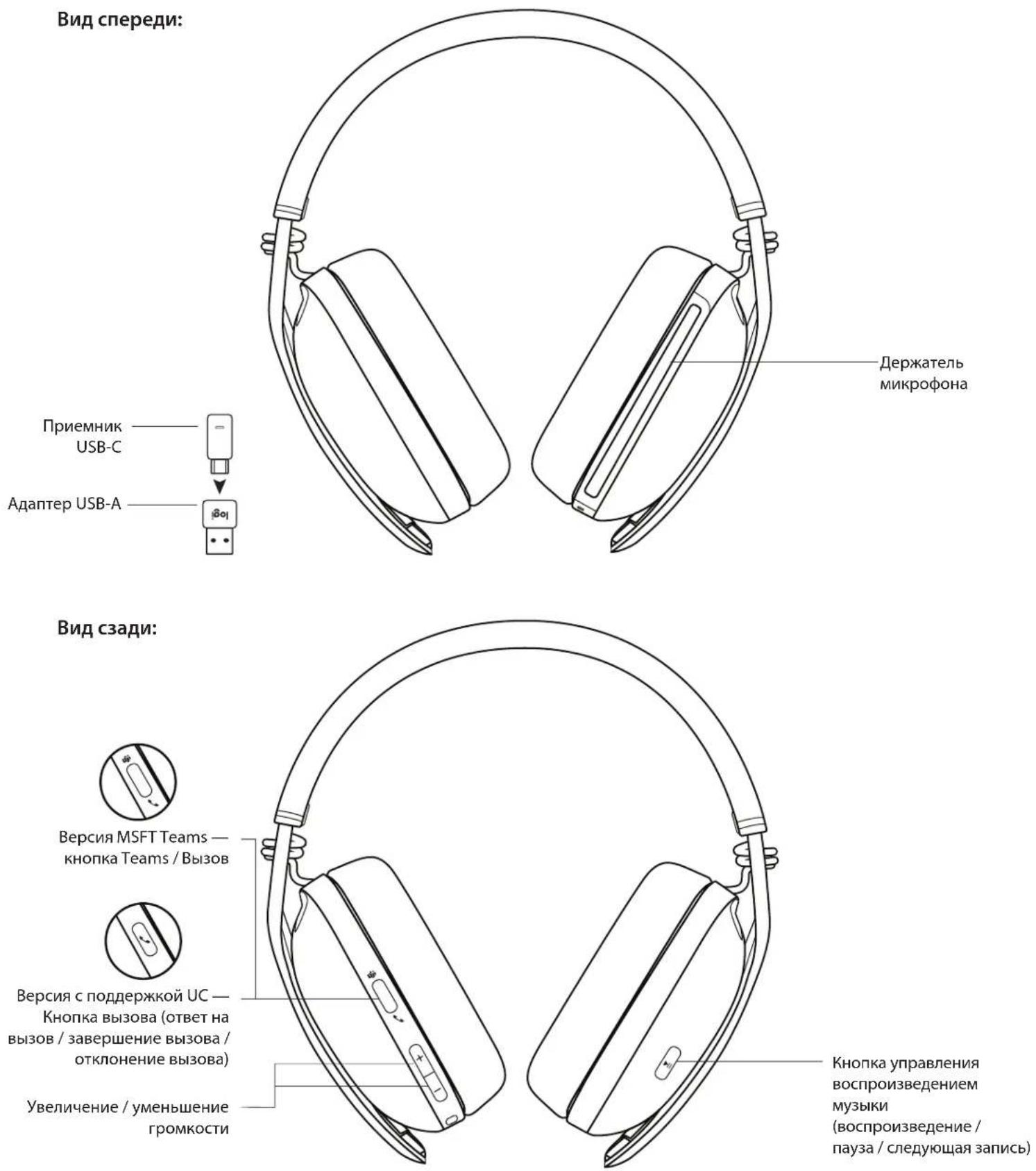
- Wireless Zone Vibe headphones
- Cable USB-C 3. USB-C receiver 4. USB-A adapter 5. Travel case
- User documentation

Turning on and off
- Slide the switch in the direction of the arrow until it clicks.
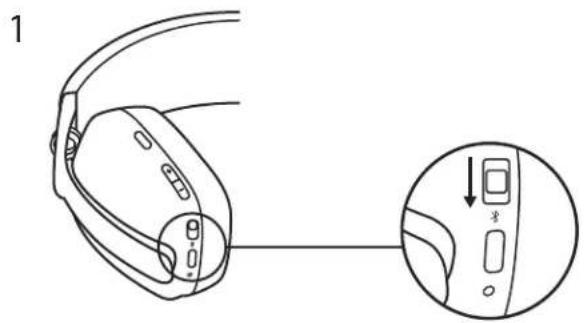
- After turning on, the LED indicator will smoothly change its light to white.
- A voice prompt will inform you about the battery status.
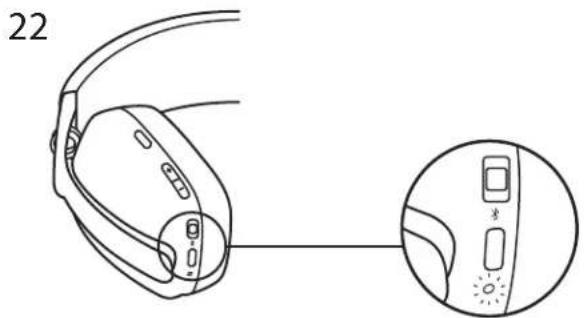
Connecting the headphones
a) Connection using the USB-C receiver
- Insert the receiver into the USB-C port of your computer, or use the USB-A adapter to insert the USB-C receiver into a USB-A port.
- The pairing of the Zone Vibe Wireless headphones and the receiver included in the delivery package has been done beforehand.
- When the connection is established, the LED indicator on the receiver will blink white and then turn off.
b) Connecting via BLUETOOTH
- Move the switch down in the direction of the arrow and hold it in this position for 2 seconds to start the pairing process. 2. The LED indicator will start blinking blue.
- Place the headphones on your device.
- Select Logi Zone Vibe Wireless in the list of available devices.
- When the pairing is complete, the LED indicator will start glowing solid blue.
ADJUSTING THE HEADPHONES
- Adjust the fit of the headphones by moving the earcups up or down along the extended part of the headband.
- Adjusting the fit of the headphones will be easier if you put them on your head. Move the earcups up or down along the headband until you feel they fit comfortably around your ears.
CONTROL ELEMENTS USED IN THE HEADPHONES
Download on the App Store

www.logitech.com/tune

GETION Google Play
ADJUSTING SIDE-TONE
The side-tone function allows the user
to hear their own voice during calls and control its volume. To adjust it, open the corresponding Logi Tune program and use the circular control.
- The higher the value, the louder your own voice will be. The lower the value, the quieter your own voice will be.
AUTOMATIC SLEEP MODE TRANSITION TIMER
The hearing aids automatically turn off if they are not used for 30 minutes. The sleep mode transition timer can be configured in the Logi Tune app. To wake the hearing aids from sleep mode, move the power switch to the "Off" or "On" position again.
RESETTING HEARING AID SETTINGS
- Turn on the hearing aid.
- Press and hold the call and volume buttons (1-8) for 5 seconds. 3. The LED indicator will blink red three times quickly, then white, and then turn off. This indicates that the hearing aid settings reset was successful.
- After resetting the settings, the hearing aids themselves will also turn off.
DIMENSIONS
Hearing aid:
Height x width x depth: 183.03 x 169.68 x 73 mm
Weight: 0.185 kg
Chargers:
Height x width x depth: 98.6 x 75.44 x 19.3 mm
Receiver
Length x width x depth: 26.8 x 12.4 x 6.2 mm
Adapter
Type: Wireless headset with two directional MEMS microphones with digital signal processing (DSP).
Frequency range (speakers): 20 Hz – 20 kHz (music listening mode), 100 Hz – 8 kHz (speech mode).
Frequency range (microphone): 100 Hz – 8 kHz.
Talk time: up to 18 hours.
Listening time: up to 20 hours.
Bluetooth version (headset): 5.2
Bluetooth version (receiver): 5.2
Wireless range: up to 30 m in line of sight.
Cable length (charging cable with two USB-C connectors): 1.5 m (4.9 ft).
www.logitech.com/support/zonevibewireless
DEVICE DESCRIPTION
Front of device: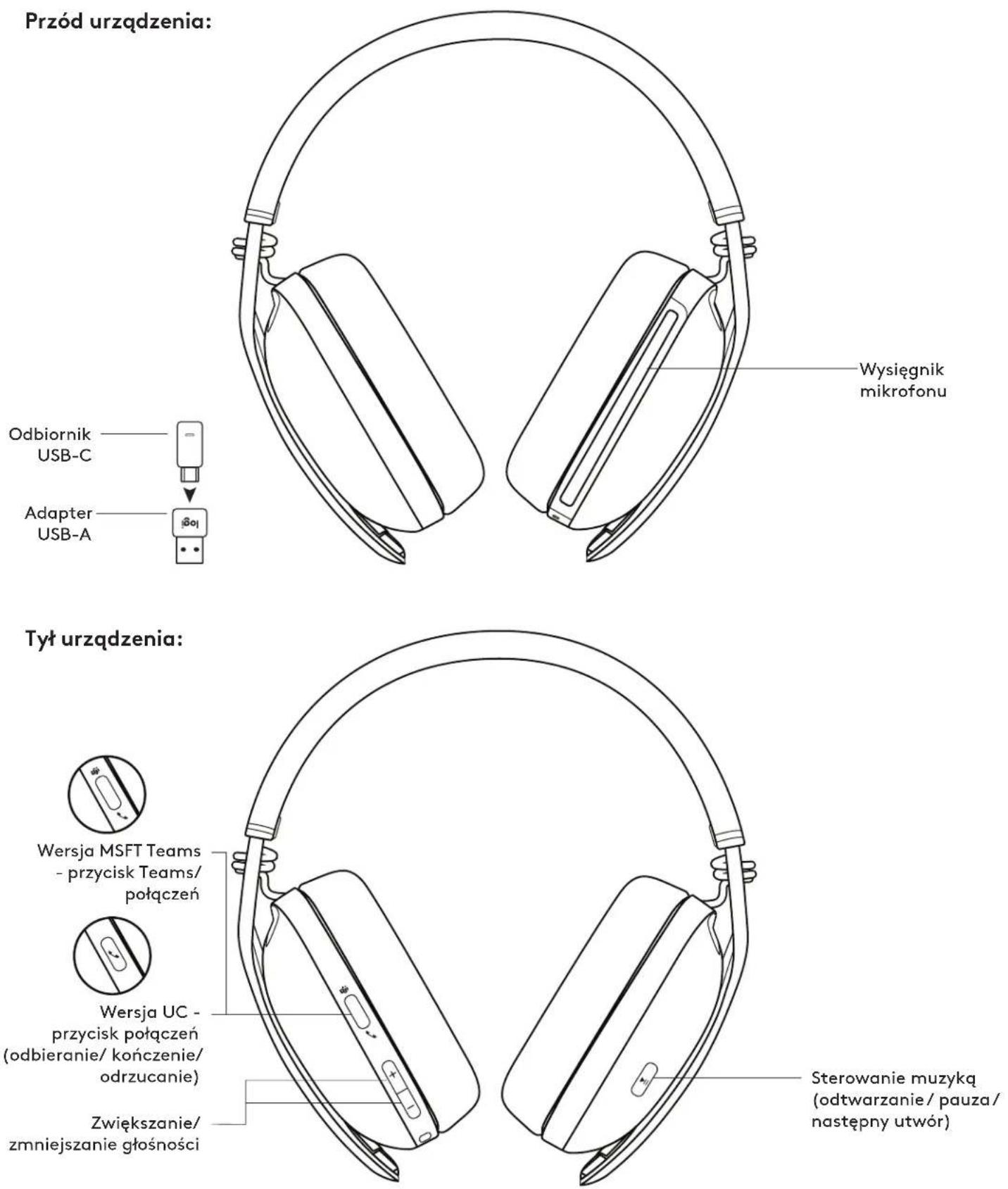
Bottom of device: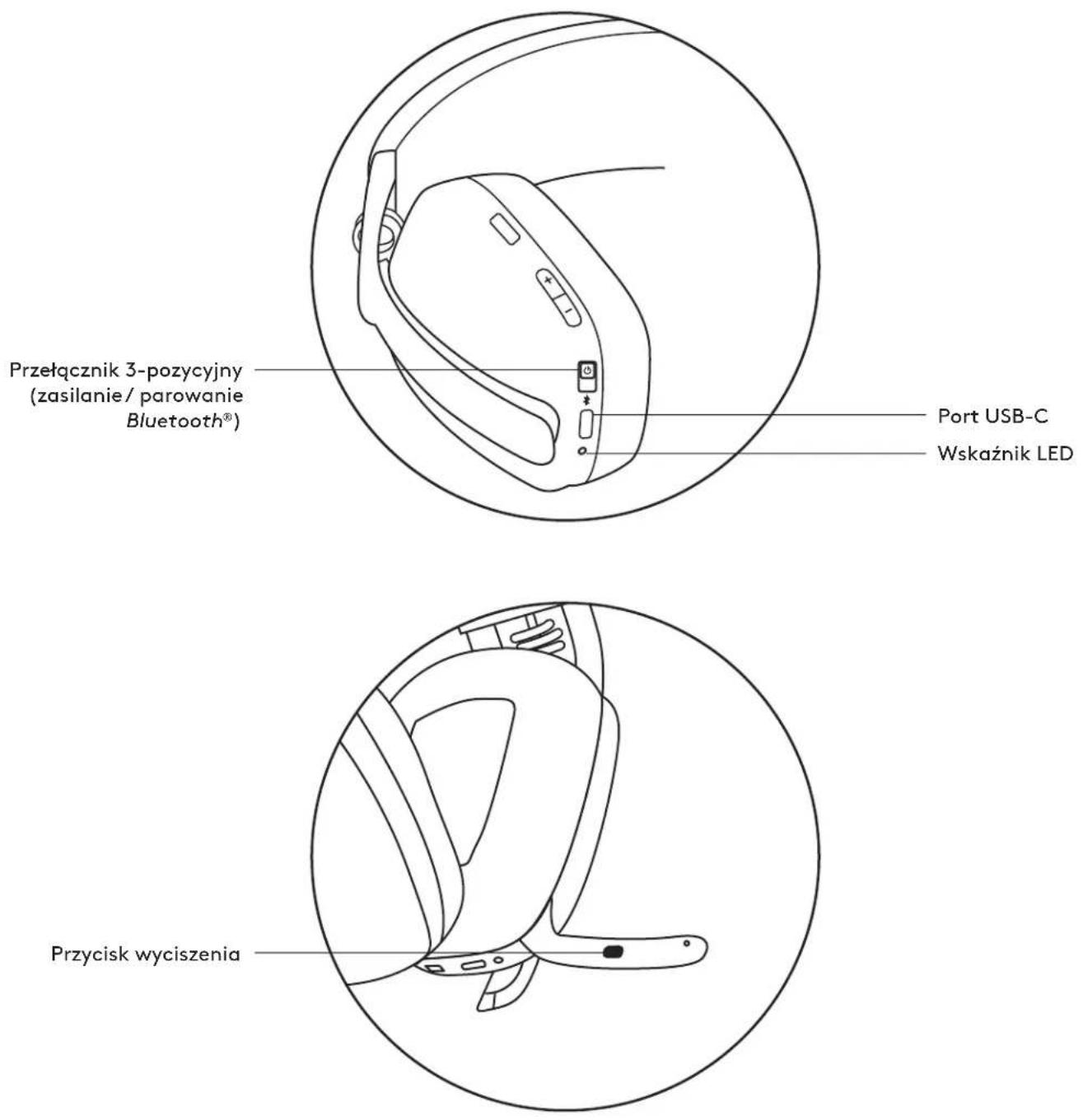
PACKAGE CONTENTS
Download on the App Store

www.logitech.com/tune

GETION Google Play
SIDETONE ADJUSTMENT
Download on the App Store
www.logitech.com/tune
GETION Google Play
SIDETONE ADJUSTMENT
Download on the App Store
www.logitech.com/tune
GETION Google Play
SIDETONE ADJUSTMENT
Download on the App Store

www.logitech.com/tune

GETION Google Play
LISTENING SETUP
Listening lets you hear your own voice during conversations, so you can keep track of how loudly you are speaking.
Press the button to turn the sound on or off.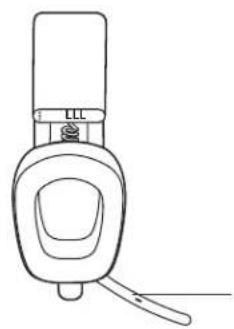
Turn the sound on
Rotate the microphone boom up or down to turn the sound on or off.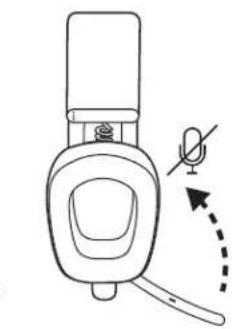
When the microphone sound is turned on or off, the corresponding voice prompt will be announced.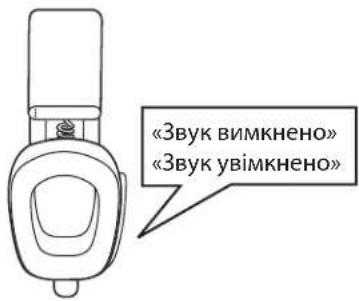
INDICATOR LIGHTS ON THE HEADSET
| Kateropión Stán Pechim poBOTN | |
| БИПМ | ЖИПЕСНУ | ЖИПЕСНУ BBIMK, 63nepeBnO CBiTbCS BIIIM, a notIM aracAE |
| Тупьас зарджань Баразе ITIbocyc |
| Баразец повистю зарджени СытчБSCepeBnO |
| Способи пійслоченny | Спolyчнaya чресBluetooth IIbIMko 6blIMae |
| Пійслочenvо чресBluetooth/приимач |
| З\'эднгя пereperbaHo Cna6ko CBiTbCS BIIIM, a notIM aracAE |
| ВИКПИК | АктуНь ВИКПИК CBiTbCS CBepeBnO |
| ВхIDнь ВИКПИК ПOBЛbHo CBIMae |
| Червони | ВИКПИК ВИМКенny | Зуку CBiTbCS 63nepeBpHo |
| ЖИПЕСНY | Нizький ріевь зарду БaразeITC |
| ПОвільно CBIMae |
| Пoveрснаяdoes zavodsckines NaiaшtuBaHb 63nepeBpHo |
Microphone
If another user (e.g., a phone call or an audio interruption) is active, the first press will return to the previous state.
INDICATOR LIGHTS ON THE RECEIVER
Download on the App Store

www.logitech.com/tune

GET IT ON Google Play
ADJUSTING SIDETONE
The sidetone function allows the user to hear their own voice during calls and control its volume. To adjust the operation of this function, open the corresponding section of the Logi Tune program and use the control dial.
Low battery indicator sounds a warning tone. When the battery is low, the tone sounds intermittently.
TIMER FOR AUTOMATIC SWITCH TO SLEEP MODE
When the button is pressed, the device automatically turns off if it is not used for 30 minutes. The timer for automatic switch to sleep mode can be set in the Logi Tune program. To exit sleep mode, you need to switch the power switch to "ON" or "OFF" again.
CHARGING THE HEADSET
- Turn on the headset.
- Press and hold the power button and the "-" button for 5 seconds.
- The LED indicator flashes red, then blinks twice, and then turns off. This indicates that the headset charging is complete. 4. After charging, turn off the headset.
DIMENSIONS
Headset:
Height x Width x Thickness: 183.03 x 169.68 x 73 mm
Weight: 0.185 kg
Charging case:
Height x Width x Thickness: 98.6 x 75.44 x 19.3 mm
Weight:
Length x Width x Thickness: 26.8 x 12.4 x 6.2 mm
Dimensions: 24.5 x 15.4 x 8.7 mm
Compatible with standard programs and most platforms and operating systems.
Compatible with computers running Windows, Mac, and ChromeTM. Connection is made via USB-C or USB-A, or via Bluetooth technology. In addition, the ability to connect to devices running iOS or Android with Bluetooth technology is provided.
TECHNICAL SPECIFICATIONS
Microphone type: two MEMS microphones, 10 dB in noisy environments, with beamforming and digital signal processing.
Frequency range (dynamic): 20 Hz - 20 kHz (music mode); 100 Hz - 8 kHz (speech mode).
Frequency range (microphone): up to 100 Hz - 8 kHz
Battery life (talk time): up to 18 hours.
Battery life (listening time): up to 20 hours.
Bluetooth version (headset): 5.2
Bluetooth version (receiver): 5.2
Wireless range: up to 30 m (100 ft) in open area. Cable length (charging cable with USB-C connector): 1.5 m (4.9 ft)
www.logitech.com/support/zonevibewireless
PRODUCT OVERVIEW
Front view: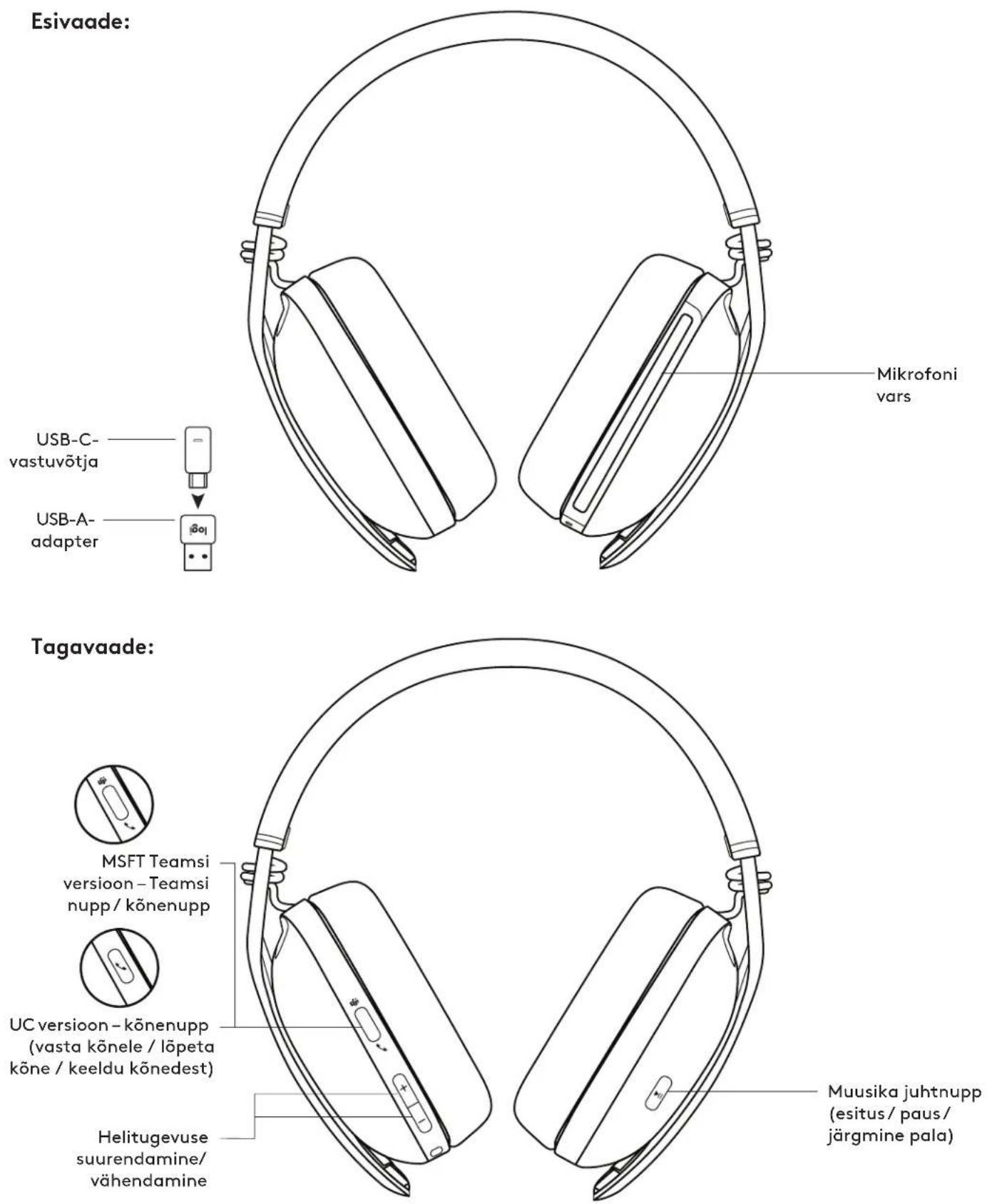
Bottom view:
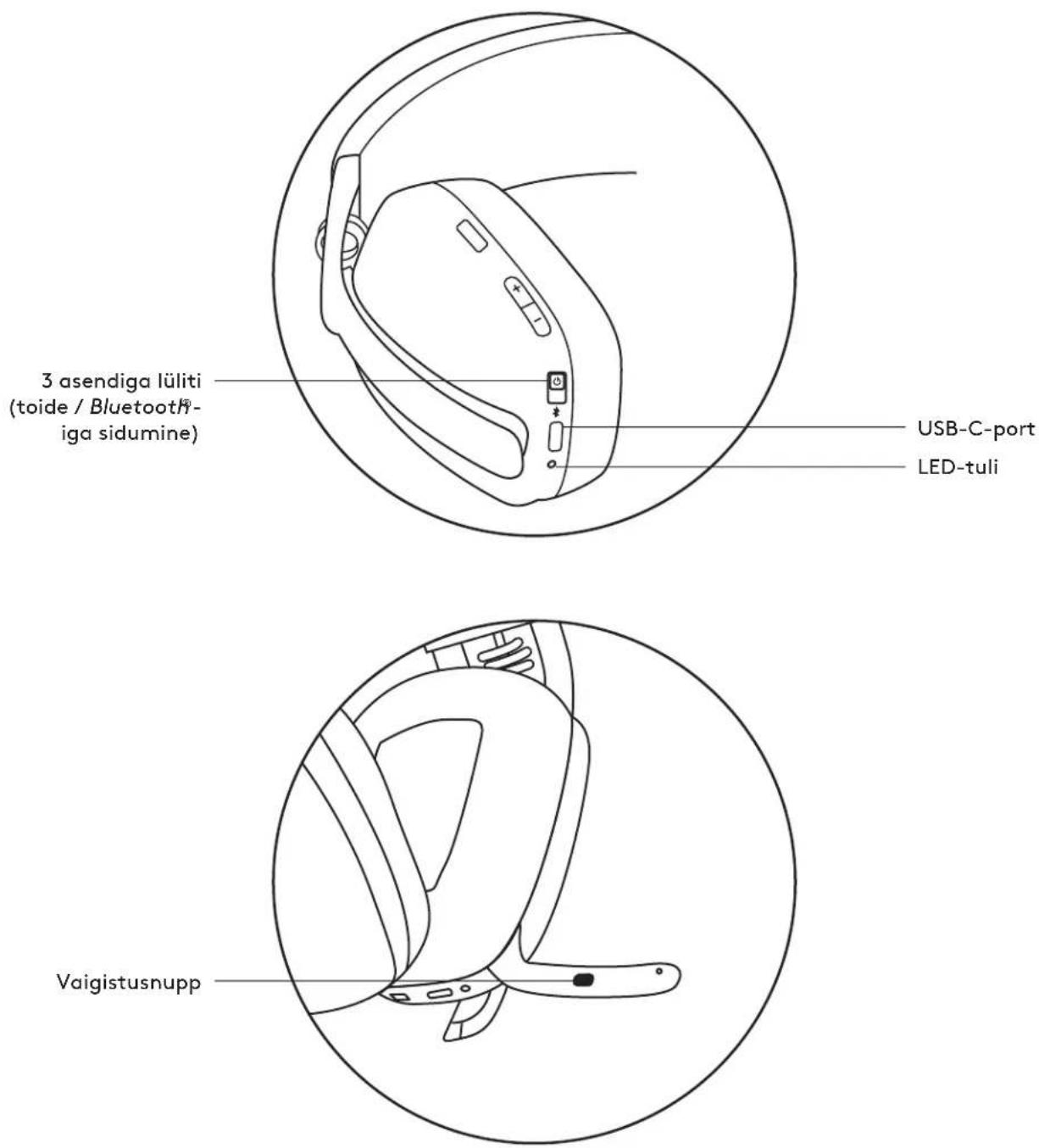
PACKAGE CONTENTS
Download on the App Store
www.logitech.com/tune
GET IT ON Google Play
ADJUSTING YOUR VOICE FEEDBACK
Download on the App Store

www.logitech.com/tune

GET IT ON Google Play
ADJUSTING YOUR VOICE FEEDBACK
Your voice feedback allows you to hear your own voice during conversations, so you can tell how loudly you are speaking. In the Logi Tune app, select the voice feedback function and adjust the volume.
A higher value means you will hear more external sounds. - A lower number means you will hear less external sounds.
AUTOMATIC SLEEP TIMER
Your headphones will automatically turn off if they are not used for 30 minutes. Adjust the sleep timer in the "Logi Tune" app. To activate the headphones, try moving the on/off switch again.
RESETTING THE HEADPHONES
- Turn on the headphones.
- Press the call button and the volume "-" button and hold them for 5 seconds.
- The LED indicator will blink rapidly three times from red to white and then turn off when the headphones have been successfully reset.
- The headphones will turn off after the reset.
DIMENSIONS
Headphones:
Height x width x depth: 183.03 x 169.68 x 73 mm
Weight: 0.185 kg
Ear cushion part:
Height x width x depth: 98.6 x 75.44 x 19.3 mm
Receiver:
Height x width x depth: 26.8 x 12.4 x 6.2 mm
Adapter:
Height x width x depth: 24.5 x 15.4 x 8.7 mm
SYSTEM REQUIREMENTS
Compatible with standard calling apps on almost all platforms and operating systems.
Compatible with Windows®, Mac, or Chrome™ computers using USB-C, USB-A, Bluetooth® connection, as well as with iOS or Android™ devices with Bluetooth® enabled.
TECHNICAL SPECIFICATIONS
Microphone type: Two omnidirectional MEMS microphones with beamforming and DSP.
Frequency range (speaker): 20-20 kHz (music mode), 100-8 kHz (speech mode)
Frequency range (microphone): 100-8 kHz
Talk time up to 18 hours
Listen time up to 20 hours
Bluetooth version (headset): 5.2
Bluetooth version (dongle): 5.2
Wireless range: up to 30 m (line of sight)
Cable length (USB-C to USB-C charging cable): 1.5 m (4.9 ft)
www.logitech.com/support/zonevibewireless
GET TO KNOW YOUR PRODUCT
Front view: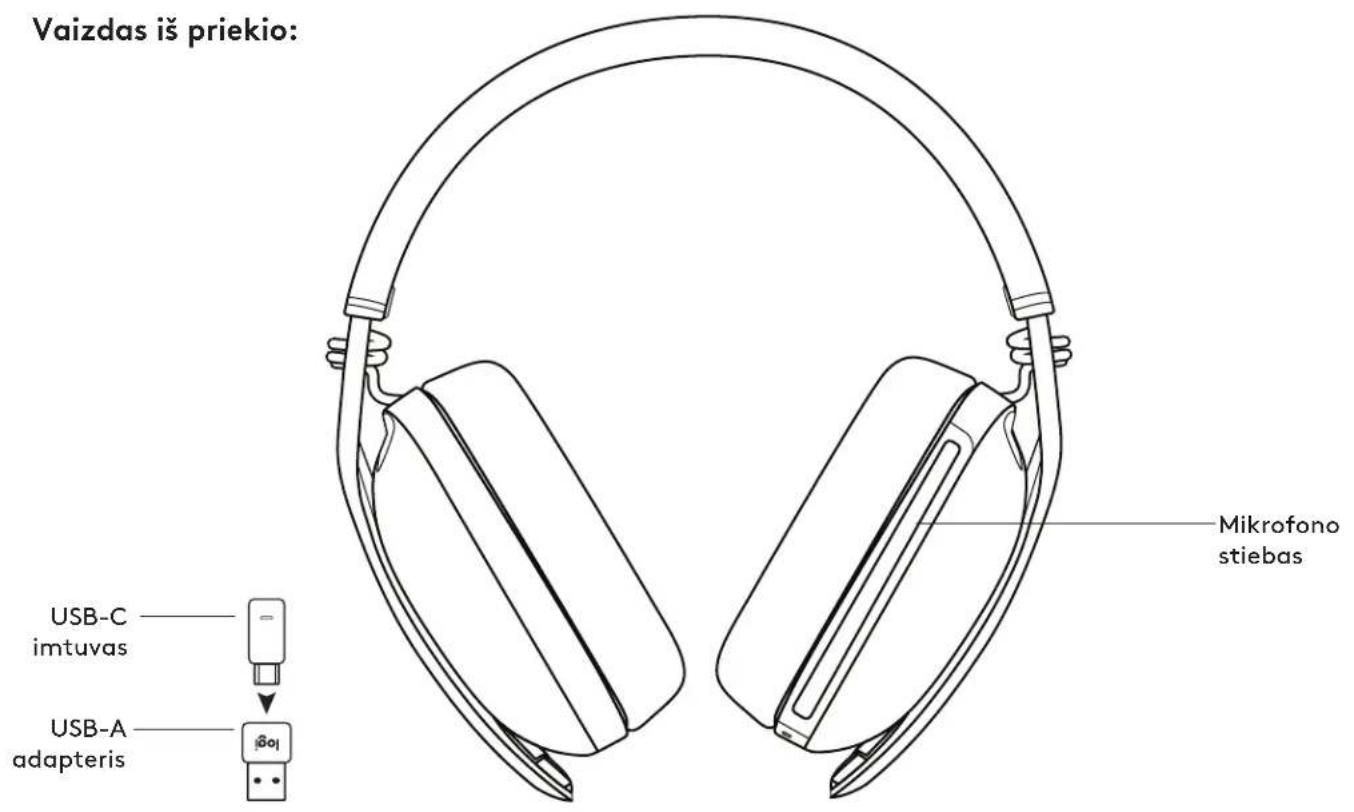
Back view: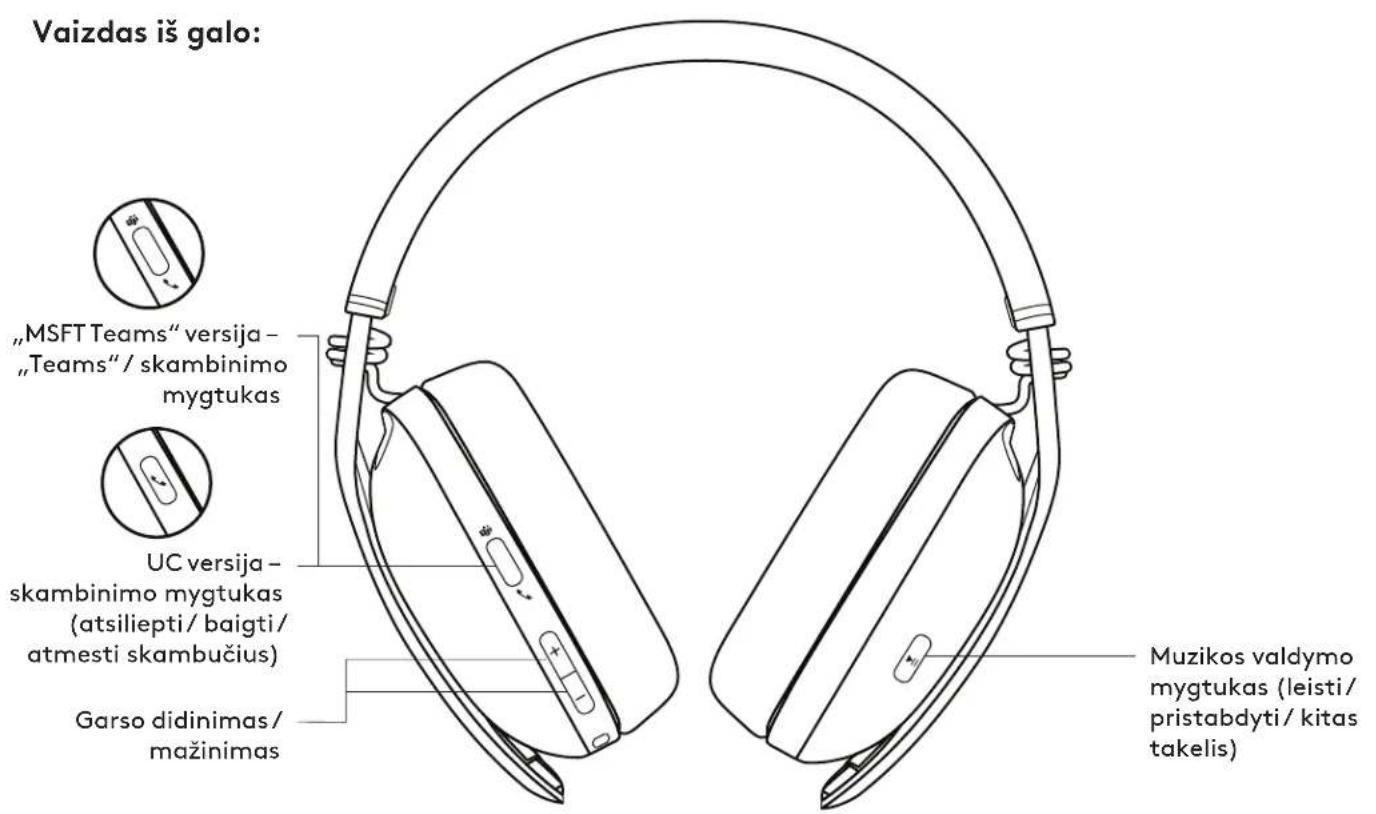
Bottom view: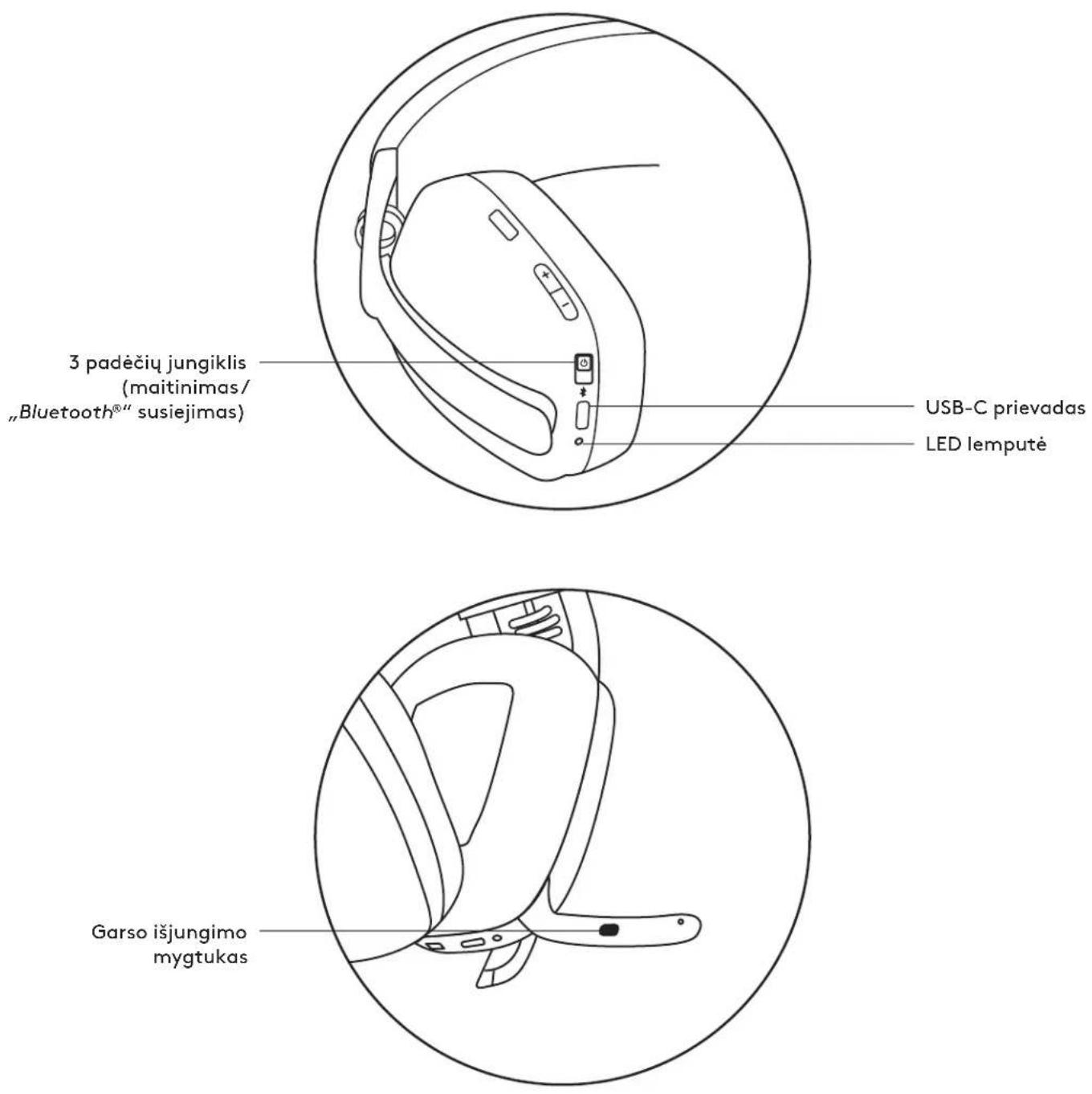
PACKAGE CONTENTS
- "Zone Vibe Wireless" headphones
- Charging cable
- USB-C receiver
- USB-A adapter
- Travel pouch
- User documentation

POWER ON / OFF
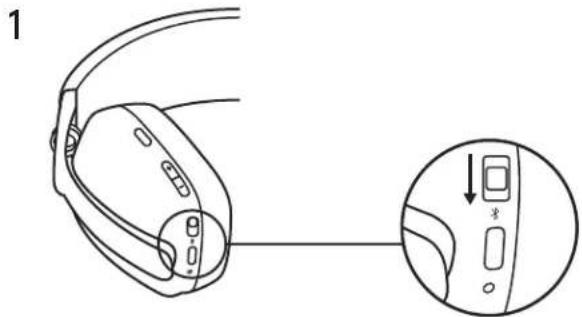
- Slide the switch in the direction of the arrow to the middle to turn on the headphones.
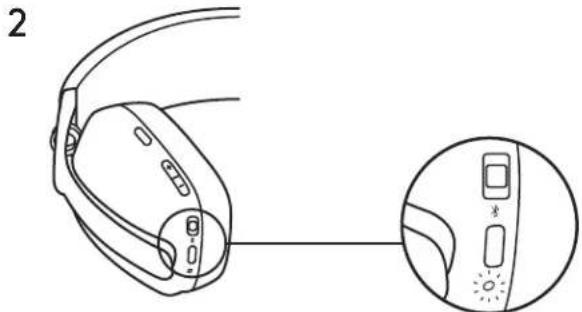
- The LED light will briefly flash white when turned on.
Download on the App Store
www.logitech.com/tune
GET IT ON Google Play
BATTERY REGULATION
The battery is charged via the USB connection.
Battery:
The battery life may vary depending on usage and conditions.
4. The headset can be used with the receiver via Bluetooth connection, while charging.
LOGITUNE
Logi Tune helps to increase the efficiency of the headset and to update the software firmware.
It is recommended to update both the headset and the receiver. To do this, download Logi Tune from www.logitech.com/tune

LogiTune

Download on the App Store

www.logitech.com/tune

GET IT ON Google Play
ADJUSTING THE SELF-VOICE
The camouflage feature allows you to hear the other party during a conversation, to determine how strong the signal is.
In Logi Tune, select the camouflage function and adjust the volume accordingly.
-Low volume means you hear a quieter sound. -High volume means you hear a louder sound.
SLEEP TIMER
The earbuds will automatically turn off when they are not used for 30 minutes. Adjust the sleep timer in Logi Tune. To activate the earbuds, simply put them back in the on/off position. The power saving feature is enabled.
CONTROLLING YOUR EARBUDS
- Turn on the earbuds.
- Press and hold the volume up and volume down buttons for 5 seconds.
- The LED indicator will blink rapidly from red to blue and then turn off, once the earbuds have been successfully controlled. 4. The earbuds will turn off.
DIMENSIONS
Earbuds:
Height x Width x Depth: 183.03 x 169.68 x 73 mm
Weight: 0.185 kg
Charging case:
Height x Width x Depth: 98.6 x 75.44 x 19.3 mm
Height x Width x Depth: 26.8 x 12.4 x 6.2 mm
Diameter:
Height x Width x Depth: 24.5 x 15.4 x 8.7 mm
SYSTEM REQUIREMENTS
Works with standard headset for calls on all major platforms of operating systems.
Works with computers based on Windows, Mac, and ChromeTM via USB-C, USB-A, Bluetooth, and devices with iOS or AndroidTM Bluetooth.
TECHNICAL SPECIFICATIONS
Microphone type: Dual omnidirectional MEMS microphone with built-in DSP
Frequency response (speaker): 20-20 kHz (music mode), 100-8 kHz (speech mode)
Frequency response (microphone): 100-8 kHz
Talk time up to 18 hours
Playback time up to 20 hours
Bluetooth version (speaker): 5.2
Bluetooth version (receiver): 5.2
B3KHeO6XBaT:06XBaTdo 30 M/100 days (at full volume)
Battery life (with charging case): up to 4.9 ft (1.5 m)
www.logitech.com/support/zonevibewireless
GET TO KNOW YOUR DEVICE
Front view: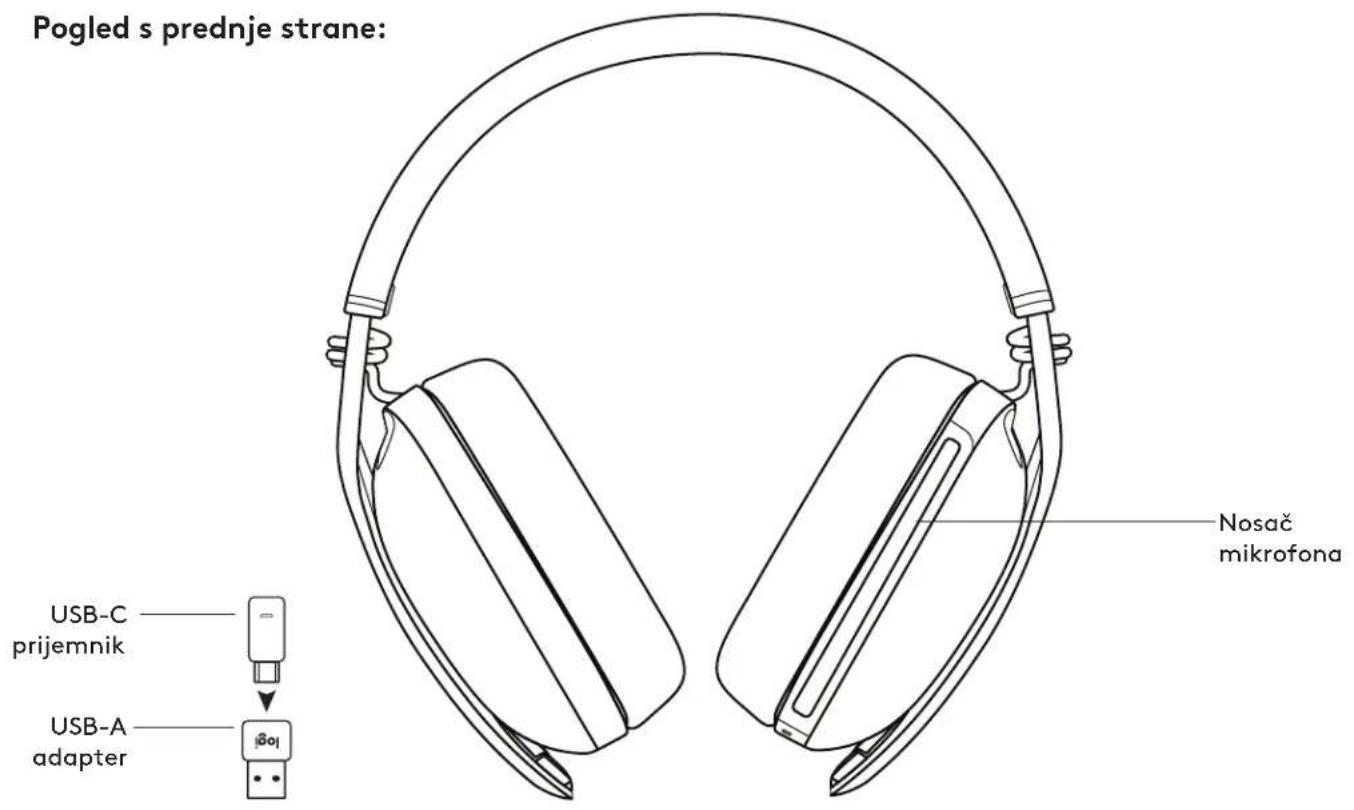
Download on the App Store

www.logitech.com/tune

GET IT ON Google Play
ADJUSTING SIDETONE
Download on the App Store

www.logitech.com/tune

GET IT ON Google Play
ADJUSTING SIDETONE
Sidetone allows you to hear your own voice during calls, giving you insight into how loud you are speaking. In the Logi Tune app, select the sidetone feature and adjust it to your preference.
- A higher number means you will hear more of your own voice. - A lower number means you will hear less of your own voice.
SLEEP TIMER
The headphones will automatically turn off by default if not used for 30 minutes. Adjust the sleep timer in the Logi Tune app. To activate the headphones, try moving the power switch again.
RESETTING THE HEADPHONES
- Turn on the power to the headphones.
- Press and hold the call button and the "-" volume button for 5 seconds.
- The LED light will blink rapidly 3 times from red to white, and then turn off when the headphones are successfully reset.
- The headphones will turn off after resetting.
DIMENSIONS
Headphones:
Height x width x depth: 183.03 x 169.68 x 73 mm
Weight: 0.185 kg
Ear cushion:
Height x width x depth: 98.6 x 75.44 x 19.3 mm
Receiver:
Height x width x depth: 26.8 x 12.4 x 6.2 mm
Adapter:
Height × width × depth: 24.5 × 15.4 × 8.7 mm
SYSTEM REQUIREMENTS
Works with common calling applications on almost any platform and operating system.
Works with Windows®, Mac, or Chrome™ computers via USB-C, USB-A, Bluetooth® connection, as well as with iOS or Android Bluetooth® devices.
TECHNICAL SPECIFICATIONS
Microphone type: Dual omnidirectional MEMS microphones with directional beamforming and DSP system
Frequency response (speaker): 20–20 kHz (music mode), 100–8 kHz (speech mode)
Frequency response (microphone): 100–8 kHz
Download on the App Store
www.logitech.com/tune
GETON Google Play
ADJUSTING THE SIDETONE FUNCTION
The Sidetone function allows you to hear your own voice during conversations, so you are aware of how loudly you speak. In Logi Tune, select the Sidetone function and adjust the number accordingly.
- A higher number means you hear more external sound.
- The number means that you hear less external sound.
TIMER FOR AUTOMATIC STANDBY
Download on the App Store
www.logitech.com/tune
GETION Google Play
SIDETONE ADJUSTMENT
Sidetone allows you to hear your own voice during conversations, so you know how loud you are speaking. In Logi Tune, select the sidetone function, then adjust the dial accordingly.
Download on the App Store

www.logitech.com/tune

GETION Google Play
VOICE ADJUSTMENT
USB
J 1
1
LLED 2
Jck
5d 5d
a 1
Bluetooth, jaiuail jil gaii cielauai sao.4
.
LOGITUNE
aaii
www.logitech.com/tune Tune

Logi Tune

Download on the
App Store

www.logitech.com/tune

GET IT ON Google Play
(DSP)
8-100 Hz, 20-20 kHz
j8888-100:(g,g,all)22 jill 2
18 1
a 20 a
5.2: (jralaw) Bluetooth
5.2: Bluetooth
100/30
(1.5) C): 4.9 USB-C
www.logitech.com/support/zonevibewireless
Logitech 2022 @ App, Apple, Logitech Europe S.A. 1558888888 App Store, Apple, iRobot, iRobot, iRobot, iRobot, iRobot, iRobot, iRobot, iRobot, iRobot, iRobot, iRobot, iRobot, iRobot, iRobot, iRobot, iRobot, iRobot, iRobot, iRobot, iRobot, iRobot, iRobot, iRobot, iRobot, iRobot, iRobot, iRobot, iRobot, iRobot, iRobot, iRobot, iRobot, iRobot, iRobot
:
:INXnN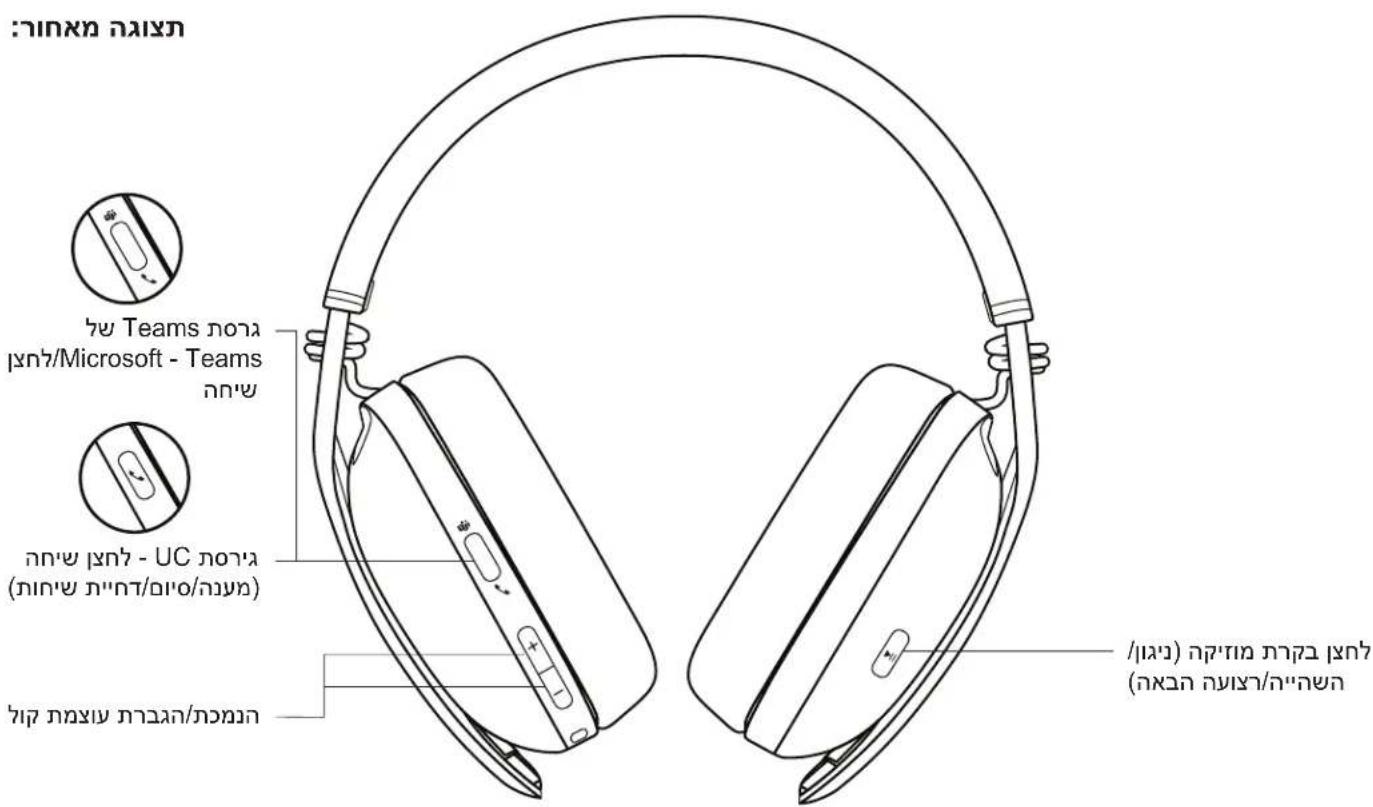
nnnn nn
- Zone Vibe Wireless
- mny USB-C USB-C 3. USB-C 07m 4. USB-A 5. niohn
- unnnn nn

USB-A USBFC



y
- vann nx x n nn nx pnn n nn
.

USB-C
USB-A port and USB-C port
USB-A
Zone Vibe Wireless
LED indicator
*BLUETOOTH
.2

9
TINIX72
| :Microsoft Teams |
| | ### | |
| ### | ### | ### | ### |
| ### | ### |
| ### | ### |
| ### |
| ### | ### | Teams | ### |
| ### | ### | ### | ### |
| ### | ### |
| ### | | ###" " | ###" |
| ###" " |
| ###" " | ###" | Bluetooth-7 | ###" |
| UC non |
| | ### | |
| ### | ### | ### | ### |
| ### | ### |
| ### | ### | ### | ### |
| ### | ### |
| ### | | ###" " | ### |
| " " | " " |
| | | ###"Bluetooth |
:
Logi Tune-2
Bluetooth-07nDy nnnnynn .4
LOGITUNE
y.07n nn nn nn nnn nn nn nn nn
nannnn Logi Tune nTn, nTn niuy
www.logitech.com/tune

Logi Tune

Download on the App Store

www.logitech.com/tune

GETION Google Play
UNION 1
8.7x15.4x24.5 cm
Bluetooth USB-A, USB-C Chrome OS Mac Windows
Android Bluetooth® iOS
10079
DSP-1
(100-8kHz, (typ) 20-20kHz: (max) min
100-8kHz: (typ) min
18 mm
20 Tn mm
5.2: (nirix) Bluetooth no
5.2: (07n) Bluetooth no7