CON.LED-106 - Lighting Singercon - Free user manual and instructions
Find the device manual for free CON.LED-106 Singercon in PDF.


User questions about CON.LED-106 Singercon
0 question about this device. Answer the ones you know or ask your own.
Ask a new question about this device
Download the instructions for your Lighting in PDF format for free! Find your manual CON.LED-106 - Singercon and take your electronic device back in hand. On this page are published all the documents necessary for the use of your device. CON.LED-106 by Singercon.
USER MANUAL CON.LED-106 Singercon
text_image
Diagram showing fire safety symbols and a house silhouette, likely illustrating fire resistance or hazard prevention.natural_image
Black Sincercon control unit with LED display and red indicator lights (no readable text or symbols)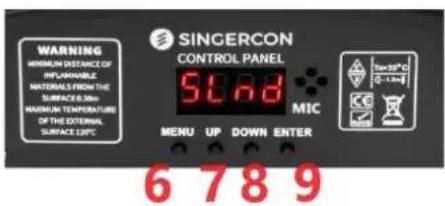
text_image
WARNING MINIMUM DISTANCE OF REPLAINABLE MATERIALS FROM THE SURFACE 0.30m MAXIMUM TEMPERATURE OF THE EXTERNAL SURFACE 0.5°C SINGERCON CONTROL PANEL 5°C MIC 70-15°C 0 - 1 m 6 7 8 9
text_image
3 4 DMX INPUT DMX OUTPUT POWER1 - LED-Kopf
2 - Bedienfeld
3 - DMX-Eingang
4 - DMX-Ausgang
natural_image
Black SINCERCON 2008 SLnd display device with red number 1 and 'HARD OF BROWN FORUM' branding (no readable text beyond branding)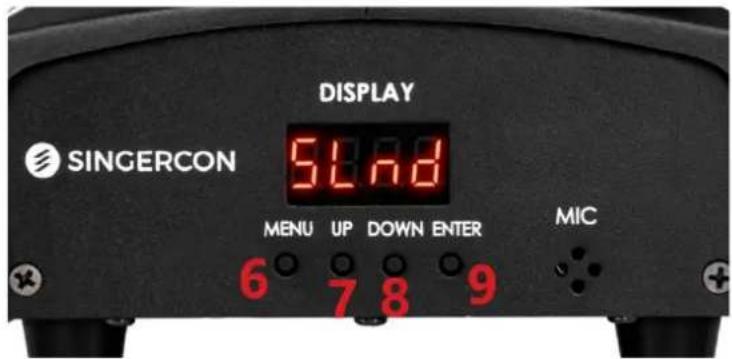
text_image
DISPLAY SINGERCON 54.8 MENU UP DOWN ENTER MIC 6 7 8 9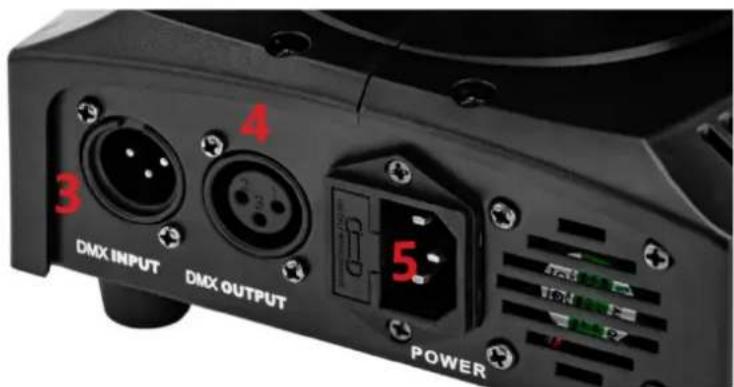
text_image
4 3 DMX INPUT DMX OUTPUT 5. POWER1 - LED-Kopf
2 - Bedienfeld
3 - DMX-Eingang
4 - DMX-Ausgang
natural_image
Black industrial lighting fixture with a circular light source and digital display (no visible text or symbols)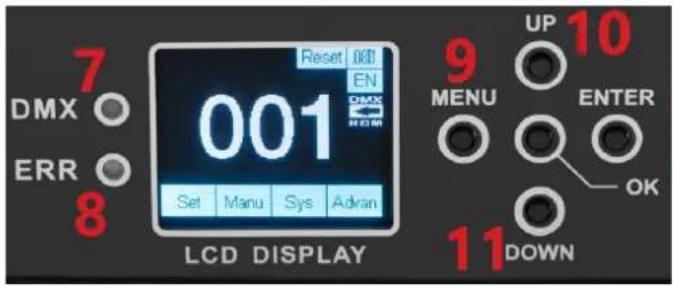
text_image
7 DMX ○ ERR ○ 8 Reset 001 EN 001 Set Manu Sys Adran LCD DISPLAY 9 UP 10 MENU ENTER OK 11 DOWN12 13
text_image
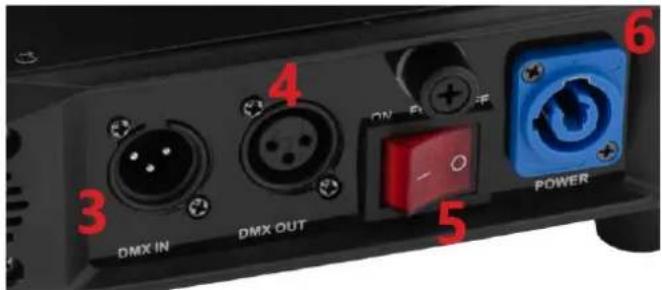
DMX IN DMX OUT 4 ON Power 5 61 - LED-Kopf
2 - Bedienfeld
3 - DMX-Eingang
4 - DMX-Ausgang
5 - Netzschalter
natural_image
Black handheld photo of a retro lighting fixture with red LED display and orange buttons (no readable text or symbols)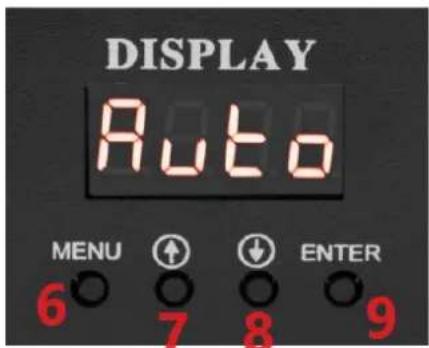
text_image
DISPLAY Auto MENU ↑ ↓ ENTER 6 7 8 9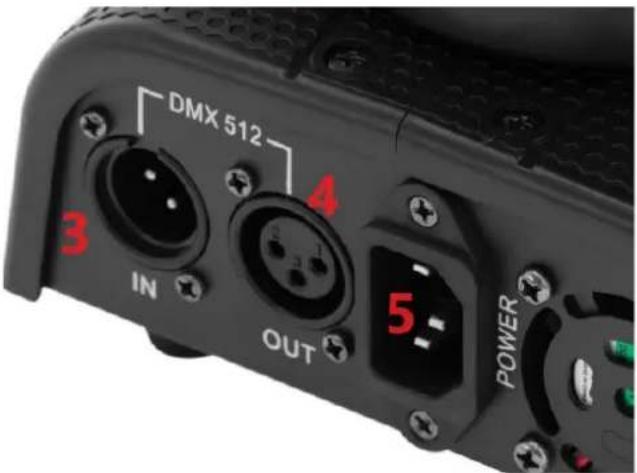
text_image
DMX 512 3 IN OUT 4 5 POWER1 - LED-Kopf
2 - Bedienfeld
3 - DMX-Eingang
4 - DMX-Ausgang
This User Manual has been translated for your convenience using machine translation. Reasonable efforts have been made to provide an accurate translation; however, no automated translation is perfect nor is it intended to replace human translators. The official User Manual is the English version. Any discrepancies or differences created in the translation are not binding and have no legal effect for compliance or enforcement purposes. If any questions arise related to the accuracy of the information contained in the User Manual, please refer to the English version of those contents which is the official version.
Technical data
| Parameter description | Parameter value | |||
| Product name | Beam Moving Head | Spot Moving Head | Moving Head Light | |
| Model | CON.LED-106 | CON.LED-107 | CON.LED-108 | CON.LED-111 |
| Rated voltage [V~] / frequency [Hz] | 230/50 | |||
| Rated power [W] | 60 | 55 | 105 | 90 |
| Light source | 1x40W RGBW 4-in-1 | 1x60W White LED | 1x80W White LED | 1x35W LED; 6x4W LED |
| Dimensions [width x depth x height; mm] | 310 x 250 x 220 | 300 x 200 x 200 | 200 x 250 x 350 | 200 x 160 x 220 |
| Weight [kg] | 3 | 3.1 | 6.35 | 2.25 |
1. General description
The user manual is designed to assist in the safe and trouble-free use of the device. The product is designed and manufactured in accordance with strict technical guidelines, using state-of-the-art technologies and components. Additionally, it is produced in compliance with the most stringent quality standards.
DO NOT USE THE DEVICE UNLESS YOU HAVE THOROUGHLY READ AND UNDERSTOOD THIS USER MANUAL.
To increase the product life of the device and to ensure trouble-free operation, use it in accordance with this user manual and regularly perform maintenance tasks. The technical data and specifications in this user manual are up to date. The manufacturer reserves the right to make changes associated with quality improvement. The device is designed to reduce noise emission risks to a minimum, taking into account technological progress and noise reduction opportunities.
Legend



The product satisfies the relevant safety standards.
Read instructions before use.
The product must be recycled.
WARNING! or CAUTION! or REMEMBER! Applicable to the given situation.
(general warning sign)
ATTENTION! Electric shock warning!
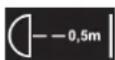
Min 0.5 m distance from flammable materials to all exterior surfaces of the luminaire.
Luminaries not suitable for direct mounting on normally flammable surfaces.

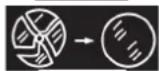

Caution, very bright light.
Replace any damaged or cracked protection screen shields.
Only use indoors.

PLEASE NOTE! Drawings in this manual are for illustration purposes only and in some details may differ from the actual product.
2. Usage safety

ATTENTION! Read all safety warnings and all instructions. Failure to follow the warnings and instructions may result in electric shock, fire and/or serious injury or even death.
The terms "device" or "product" are used in the warnings and instructions to refer to:
Beam Moving Head
Spot Moving Head
Moving Head Light
2.1. Electrical safety
a) The plug must fit the socket. Do not modify the plug in any way. Using original plugs and matching sockets reduces the risk of electric shock.
b) Avoid touching earthed elements such as pipes, heaters, boilers and refrigerators. There is an increased risk of electric shock if the earthed device is exposed to rain, comes into direct contact with a wet surface or is operating in a damp environment. Water getting into the device increases the risk of damage to the device and of electric shock.
c) Do not touch the device with wet or damp hands.
d) Use the cable only for its designated use. Never use it to carry the device or to pull the plug out of a socket. Keep the cable away from heat sources, oil, sharp edges or moving parts. Damaged or tangled cables increase the risk of electric shock.
e) If using the device in a damp environment cannot be avoided, a residual current device (RCD) should be applied. The use of an RCD reduces the risk of electric shock.
f) Do not use the device if the power cord is damaged or shows obvious signs of wear. A damaged power cord should be replaced by a qualified electrician or the manufacturer's service centre.
g) To avoid electric shock, do not immerse the cord, plug or device in water or other liquids. Do not use the device on wet surfaces.
2.2. Safety in the workplace
a) If there are any doubts as to the correct operation of the device, contact the manufacturer's support service.
b) Only the manufacturer's service point may repair the device. Do not attempt any repairs independently!
c) In case of fire, use a powder or carbon dioxide (CO _2 ) fire extinguisher (one intended for use on live electrical devices) to put it out.
d) Please keep this manual available for future reference. If this device is passed on to a third party, the manual must be passed on with it.
e) Keep packaging elements and small assembly parts in a place not available to children.
f) Keep the device away from children and animals.
g) If this device is used together with another equipment, the remaining instructions for use shall also be followed.

Remember! When using the device, protect children and other bystanders.
2.3. Personal safety
a) The device is not designed to be handled by persons (including children) with limited mental and sensory functions or persons lacking relevant experience and/or knowledge unless they are supervised by a person responsible for their safety or they have received instruction on how to operate the device.
b) The device is not a toy. Children must be supervised to ensure that they do not play with the device.
2.4. Safe device use
a) When not in use, store in a safe place, away from children and people not familiar with the device who have not read the user manual.
b) Keep the device in perfect technical condition.
c) Keep the device out of the reach of children.
d) Device repair or maintenance should be carried out by qualified persons, only using original spare parts. This will ensure safe use.
e) To ensure the operational integrity of the device, do not remove factory-fitted guards and do not loosen any screws.
f) It is forbidden to interfere with the structure of the device in order to change its parameters or construction.
g) Keep the device away from sources of fire and heat.

ATTENTION! Despite the safe design of the device and its protective features, and despite the use of additional elements protecting the operator, there is still a slight risk of accident or injury when using the device. Stay alert and use common sense when using the device.
3. Use guidelines
The product is a lighting device intended for entertainment, exhibition, and architectural purposes only. It is not suitable for domestic lighting.
The user is liable for any damage resulting from unintended use of the device.
3.1. Device description
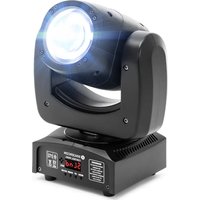
3.1.1. CON.LED-106
natural_image
Black Sincercon control unit with LED display and red indicator lights (no readable text or symbols)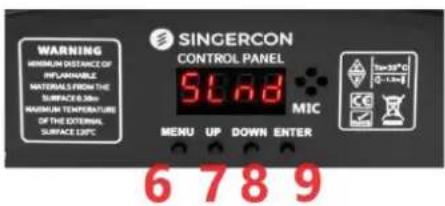
text_image
WARNING MINIMUM DISTANCE OF REPLAINABLE MATERIALS FROM THE SURFACE 0.30m MAXIMUM TEMPERATURE OF THE EXTERNAL SURFACE 0.5°C SINGERCON CONTROL PANEL 5°C MIC 70-15°C 0 - 1 m 6 7 8 9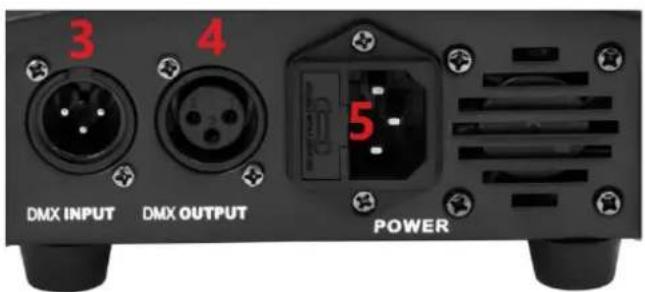
text_image
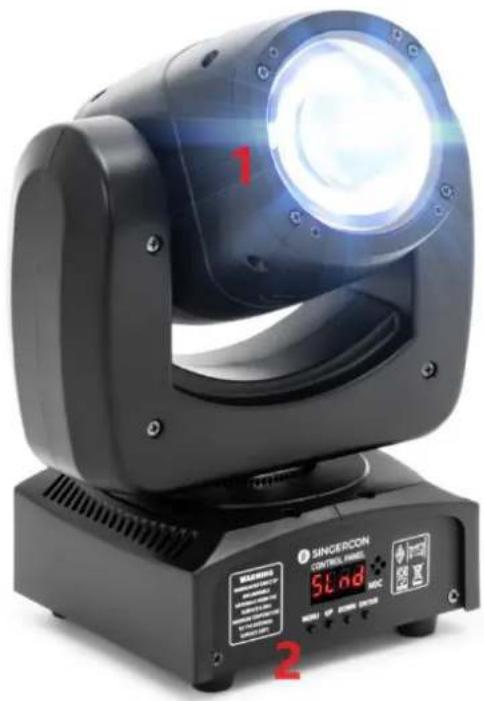
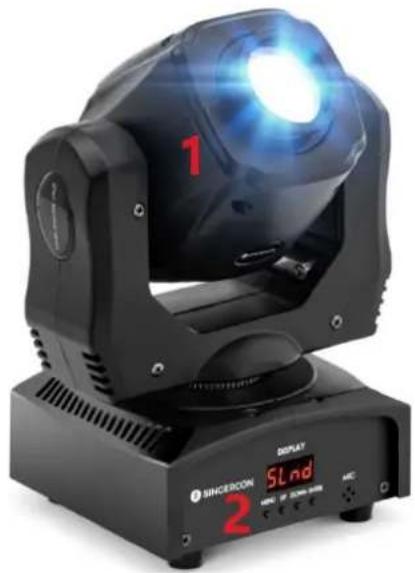
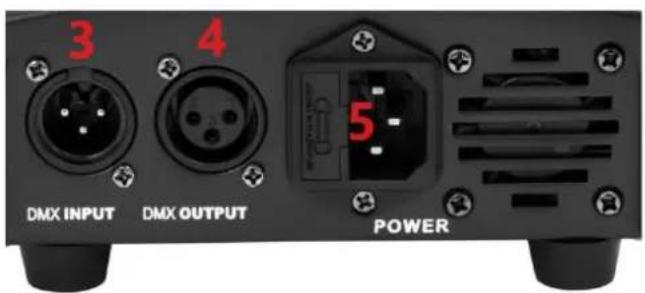
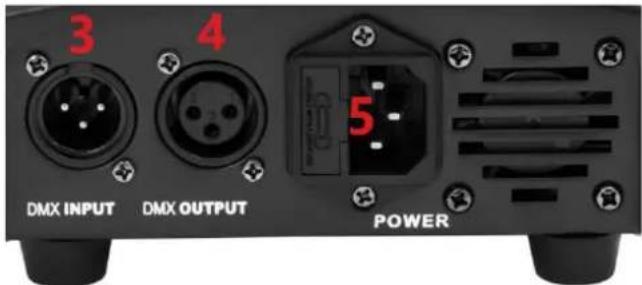
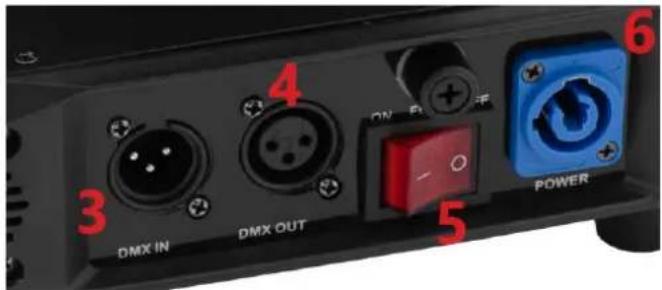
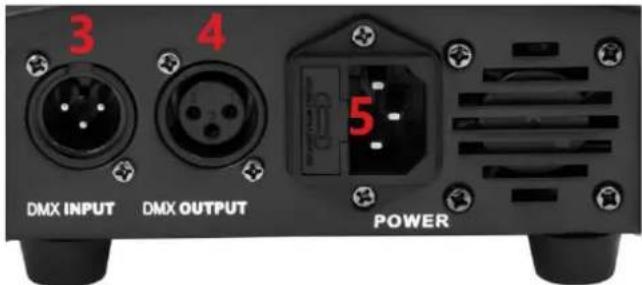
3 4 DMX INPUT DMX OUTPUT POWER1 - LED Head
2 - Control panel
3 - DMX Input
4 - DMX Output
5 - Power cord socket
6 - MENU button
7-UP button
8 - DOWN button
9 - ENTER button
3.1.2. CON.LED-107
natural_image
Black SINCERCON 2008 SLnd display device with red number 1 and 'HARD OF BROWN FORUM' branding (no readable text beyond branding)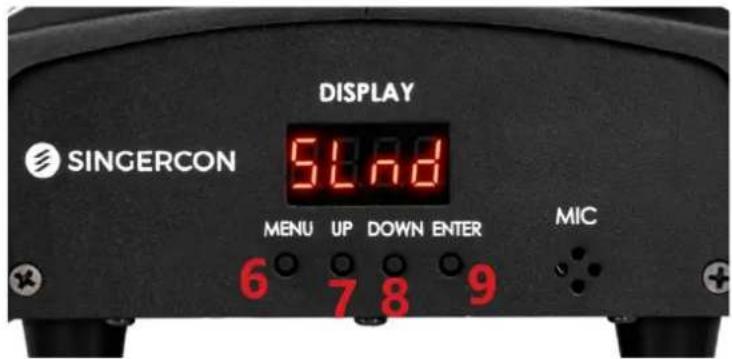
text_image
DISPLAY SINGERCON 54.8 MENU UP DOWN ENTER MIC 6 7 8 9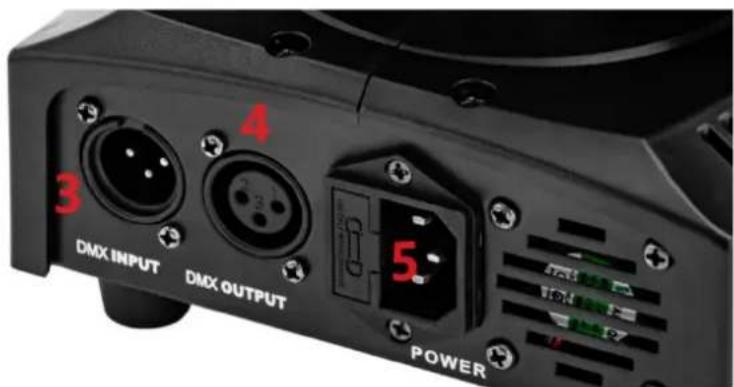
text_image
4 3 DMX INPUT DMX OUTPUT 5 POWER1 - LED Head
2 - Control panel
3 - DMX Input
4 - DMX Output
5 - Power cord socket
6 - MENU button
7 - UP button
8 - DOWN button
9 - ENTER button
3.1.3. CON.LED-108
natural_image
Black industrial lighting fixture with a circular light source and digital display (no visible text or symbols)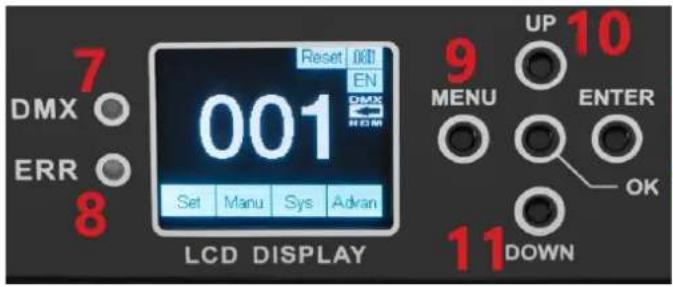
text_image
7 DMX ○ ERR ○ 8 Reset 001 EN 001 Set Manu Sys Adran LCD DISPLAY 9 UP 10 MENU ENTER OK 11 DOWN12 13
text_image
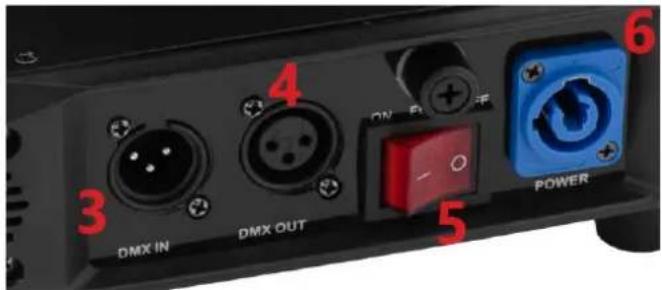
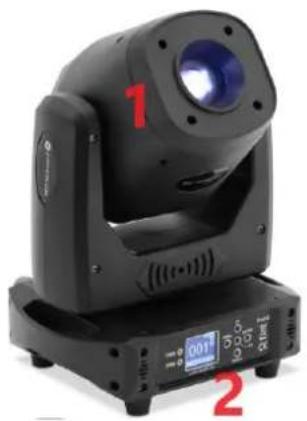
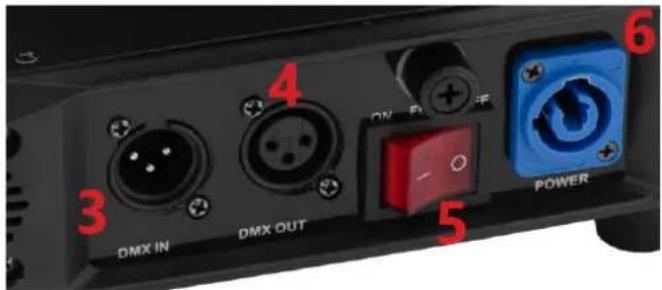
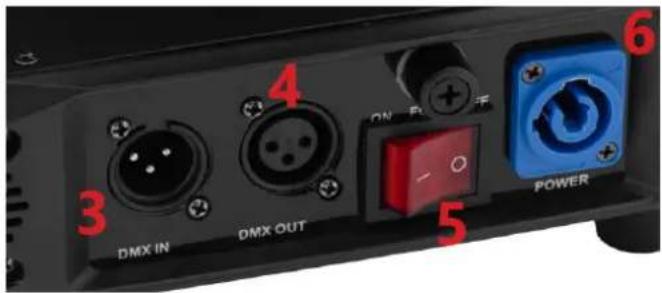
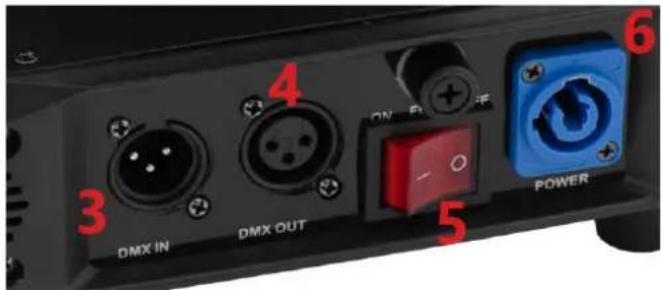
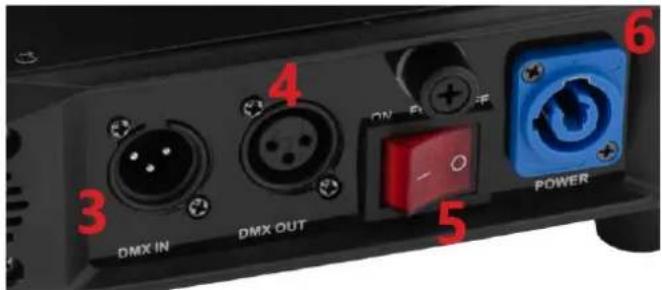
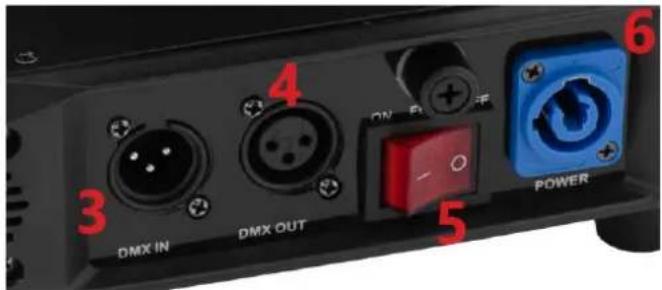
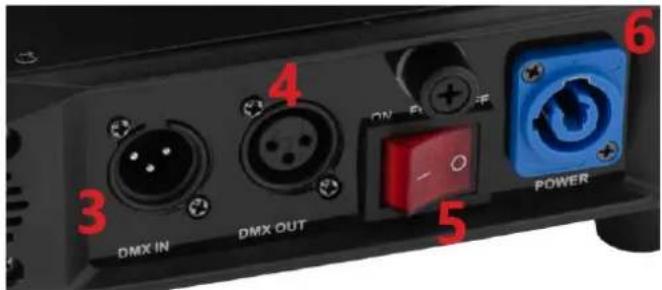
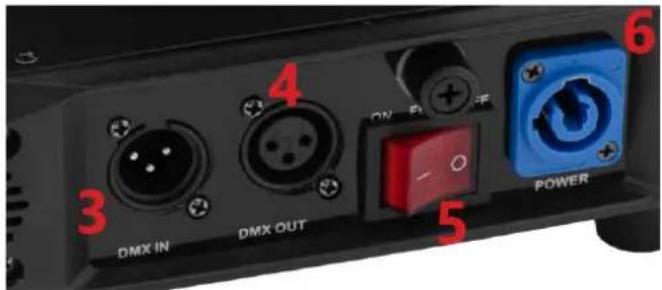
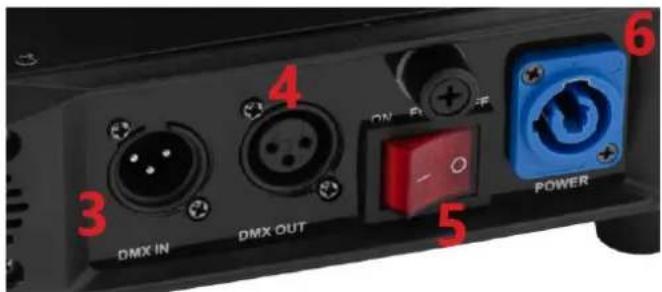
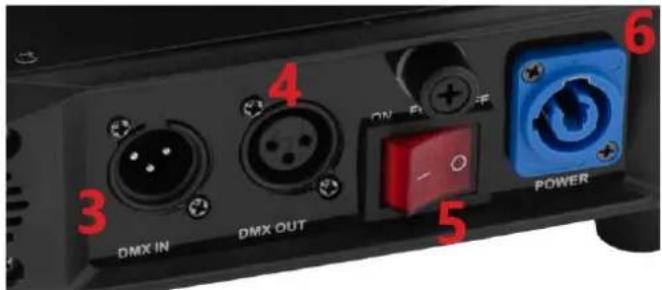
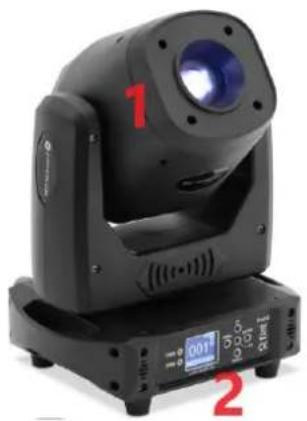
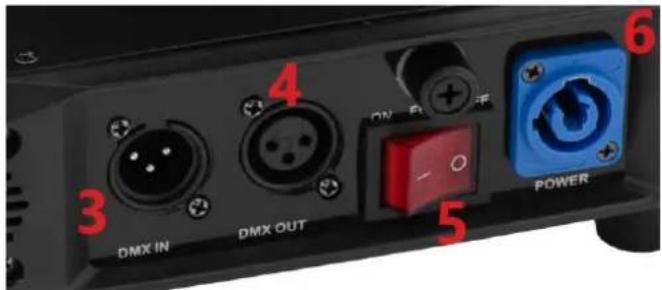
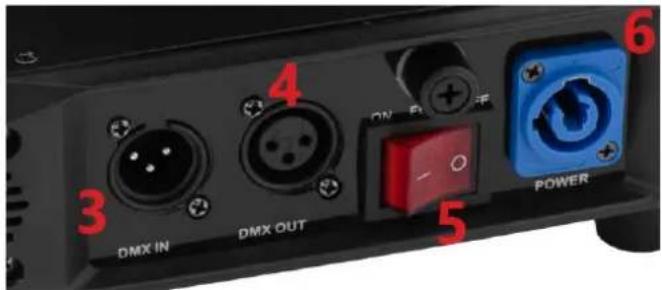
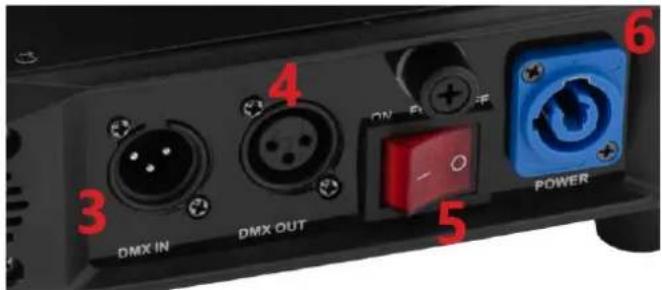
DMX IN DMX OUT 4 ON Power 5 61 - LED Head
2 - Control panel
3 - DMX Input
4 - DMX Output
5 - Power switch
6 - Power cord socket
7 - DMX control light
8 - ERROR control light
9-MENU button
10 - UP button
11 - DOWN button
12 - ENTER button
13 - OK button
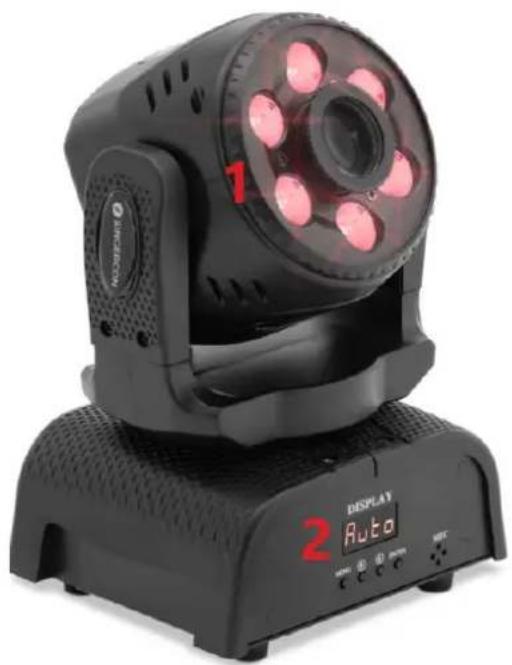
3.1.4. CON.LED-111
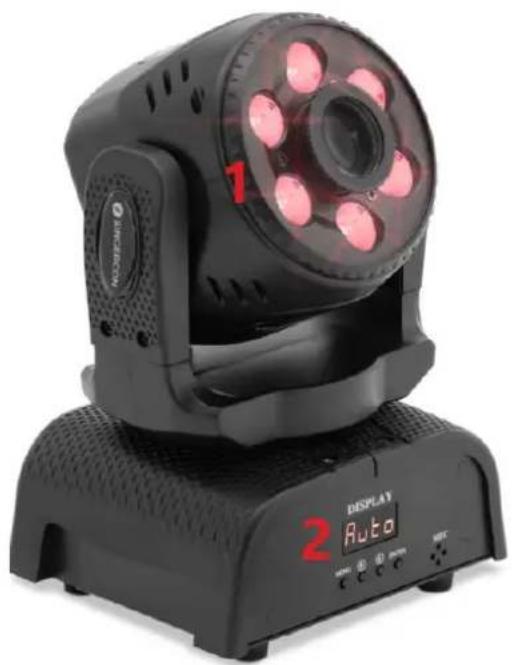
natural_image
Black handheld photo of a retro lighting fixture with red LED display and orange buttons (no readable text or symbols)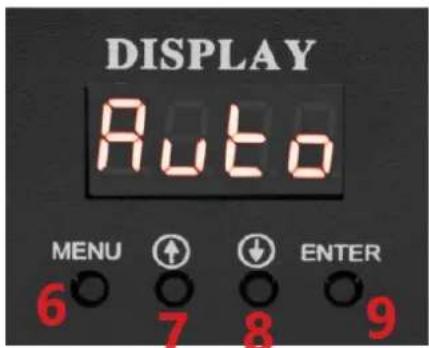
text_image
DISPLAY Auto MENU ↑ ↓ ENTER 6 7 8 9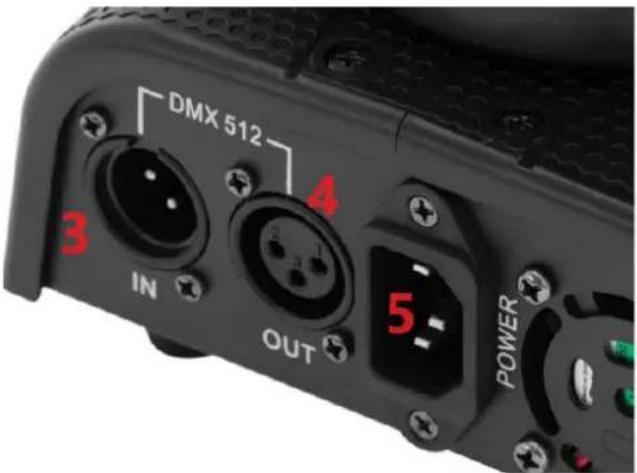
text_image
DMX 512 3 IN 4 OUT 5 POWER1 - LED Head
2 - Control panel
3 - DMX Input
4 - DMX Output
5 - Power cord socket
6 - MENU button
7 - UP button
8 - DOWN button
9 - ENTER button
3.2. Preparing for use
APPLIANCE LOCATION
The temperature of environment must not be higher than 40^ C and the relative humidity should be less than 85%. Ensure good ventilation in the room in which the device is being used. There should be at least 10 cm distance between each side of the device and the wall or other objects. The device should always be used when positioned on an even, stable, clean, fireproof and dry surface, and be out of the reach of children and persons with limited mental and sensory functions. Position the device such that you always have access to the power plug. The power cord connected to the appliance must be properly grounded and correspond to the technical details on the product label.
3.3. Device use
The MENU, UP, DOWN and ENTER buttons are used to set the operating modes.
- MENU: selection of main menu items / return to main menu level.
• UP and DOWN: move up one menu level / change settings.
• ENTER / OK: select option / confirm setting.
Overview of setting options for operation mode
3.3.1. CON.LED-106
| Serial Number/Main Menu | Description |
| Addr | A001-A512 DMX add code |
| CHnd | 13Channel Set |
| SLnd | Operation mode selection (DMX / Auto / voice control) |
| Pan | YES, NO Motor X forward and reverse settings |
| Tilt | YES, NO Motor Y forward and reverse settings |
| SEne | Voice control sensitivity adjustment (0-100) |
| LED | ON,OFF screen always on setting |
| DISP | YES, NO display, forward and reverse settings |
| Ver | V100 Software version number |
| Faet | YES, NO Reset |
13 channel DMX mode:
| 13-CH Mode | Function | DMX Value | Description |
| 1 | Pan | 0-255 | |
| 2 | Pan Fine | 0-255 | |
| 3 | Tilt | 0-255 | |
| 4 | Tilt Fine | 0-255 | |
| 5 | Pan&Tilt Speed | 0-255 | From fast to slow |
| 6 | Dimmer | 0-255 | Linear dimming from dark to bright |
| 7 Strobe | 0 | No Function | |
| 1-255 | Synchronous strobe speed from slow to fast (1HZ-25HZ) | ||
| 8 | Red | 0-255 | Red dimming from dark to bright |
| 9 | Green | 0-255 | Green dimming from dark to bright |
| 10 | Blue | 0-255 | Blue dimming from dark to bright |
| 11 White 0-255 | White dimming from dark to bright | ||
| 12 | Macro function | 0-49 | CH1 to CH13 effectAutoVoice control |
| 50-200 | |||
| 201-255 | |||
| 13 Reset | 0-240 | No Function | |
| 241-255 | Light body reset, effective for 5s | ||
3.3.2. CON.LED-107
| Addr | A001-A512 | 512 Address Set |
| CHnd | 11CH | 11Channel Set |
| 9CH | 9Channel Set | |
| SLnd | MAST | Master Mode |
| SL 1 | DMX512 Mode | |
| SL 2 | Slave Mode | |
| SHnd SH 0 Effect0 (Recommend) | ||
| SH 1 | Effect1 | |
| SH 2 | Effect2 | |
| SH 3 | Effect3 | |
| Soud | on | Open the sound control mode |
| oFF | Close the sound control mode | |
| SEnS | 0-99 | Adjust the sensitivity of sound |
| bLAnd | bLAc | Without the 512 signal, return to zero |
| HoLd | Auto | Without the 512 signal, Auto |
| Soun | Without the 512 signal, Sound | |
| Without the 512 signal, keep last state of controller | ||
| LED | OFF | Close the screen after 5 seconds |
| ON | Screen open all the time | |
| dISP | no | Display reverse |
| YES | Display forward | |
| rPAN | no | X motor forward |
| YES | X motor reverse | |
| rTiL | no | Y motor forward |
| YES | Y motor reverse | |
| REST | YES | System Reset |
9-Channel Mode:
| Channel | Function | Introduction |
| 1 | Pan Running | 0-255 |
| 2 | Tilt Running | 0-255 |
| 3 | Color | |
| 0-139 | Choose color | |
| 140-255 | Change the color automatically, from slow to fast | |
| 4 | Gobo | |
| 0-63 | Fixed Gobo | |
| 64-127 | Pattern dither | |
| 128-255 | Change the pattern automatically, from slow to fast | |
| 5 | Strobe | 0-255 |
| 6 | Dimming | 0-255 |
| 7 | Running in Pan/Tilt | 0-255 |
| 8 | Auto Mode | 0-255 Up-regulation for rotation, Down-regulation for reverse rotation |
| 9 | Reset | 250-255(5 seconds) |
11-Channel mode:
| Channel | Function | Introduction |
| 1 | Pan Running | 0-255 |
| 2 | Pan Fine | 0-255 |
| 3 | Tilt Running | 0-255 |
| 4 | Tilt Fine | 0-255 |
| 5 | Color | |
| 0-139 | Choose color | |
| 140-255 | Change the color automatically, from slow to fast | |
| 6 | Gobo | |
| 0-63 | Fixed gobo | |
| 64-127 | Pattern dither | |
| 128-255 | Change the pattern automatically, from slow to fast | |
| 7 | Strobe | 0-255 |
| 8 | Dimming | 0-255 |
| 9 | Running Speed in Pan/Tilt | 0-255 |
| 10 | Auto Mode | |
| 0-59 | Function of Other Channel | |
| 60-84 | Auto Mode3 | |
| 85-109 | Auto Mode2 | |
| 110-134 | Auto Mode1 | |
| 135-159 | Auto Mode0 | |
| 160-184 | Sound Mode3 | |
| 185-209 | Sound Mode2 | |
| 210-234 | Sound Mode1 | |
| 235-255 | Sound Mode0 | |
| 11 | Resst | 250-255(5 seconds) |
3.3.3. CON.LED-108
CHANNEL MODE: Std.14CH
| 1 | DIMMER |
| 2 | STOP/STROBE |
| 3 | PAN |
| 4 | TILT |
| 5 | PAN-TILT TIME |
| 6 | PRISM RT COLOUR |
| 7 | GOBO |
| 8 | GOBO1 |
| 9 | GOBO1_RT |
| 10 | PRISM |
| 11 | FOCUS |
| 12 | PAN FINE |
| 13 | TILT FINE |
| 14 | RESET |
COLOR
| BIT | EFFECT |
| 255 | FAST ROTATION |
| ...... | ...... |
| 80 | SLOW ROTATION |
| 75-79 | PINK+ WHITE |
| 70 | LAVENDER+ PINK |
| 65 | LIGHT GREEN+ LAVENDER |
| 60 | GREEN+ LIGHT GREEN |
| 55 | AQUAMARINE+ GREEN |
| 50 | ORANGE+ AQUAMARINE |
| 45 | RED+ ORANGE |
| 40 | WHITE+ RED |
| 35-39 | PINK |
| 30 | LAVENDER |
| 25 | LIGHT GREEN |
| 20 | GREEN |
| 15 | AQUAMARINE |
| 10 | ORANGE |
| 5 | RED |
| 0 | WHITE |
STOP/STOBE
| BIT | EFFECT | Remarks |
| 252-255 | UNUSED | Controlled by dimming channel |
| 251 | FAST STROBE | |
| ...... | ...... | |
| 4 | SLOW STROBE | |
| 0-3 UNUSED | Controlled by dimming channel |
DIMMER
| BIT | EFFECT |
| 255 | 100% |
| ...... | ...... |
| 0 | 0% |
PRISM
| BIT | EFFECT |
| 255 | PRISM FAST ROTATION |
| ...... | ...... |
| 15 | PRISM SLOW ROTATION |
| 10-14 | PRISM INSERTED |
| 0-9 | PRISM EXCLUDED |
GOBO1
| BIT | EFFECT |
| 226-230 | GOBO6 SHAKE, SLOW to FAST |
| ...... | ...... |
| 226-230 | GOBO1 SHAKE, SLOW to FAST |
| 225 | FAST ROTATION |
| ...... | ...... |
| 135 | SLOW ROTATION |
| 130-134 | STOP |
| 129 | SLOW ROTATION |
| ...... | ...... |
| 70 | FAST ROTATION |
| 60-69 | GOBO 6 |
| 50 | GOBO 5 |
| 40 | GOBO 4 |
| 30 | GOBO 3 |
| 20 | GOBO 2 |
| 10 | GOBO 1 |
| 0 | WHITE |
FOCUS
| BIT | EFFECT |
| 255 | 100% |
| ...... | ...... |
| 0 | 0% |
GOBO1 ROTATION
| BIT | EFFECT |
| 255 | FAST ROTATION |
| ...... | ...... |
| 193 | SLOW ROTATION |
| 191-192 | STOP |
| 190 | SLOW ROTATION |
| ...... | ...... |
| 128 | FAST ROTATION |
| 127 | SLOW ROTATION |
| ...... | ...... |
| 64 | FAST ROTATION |
| 0-63 | POSITION |
RESET
| BIT | EFFECT | Remarks |
| 255-255 | COMPLETE RESET | Reset is activated passing through the unused range and staying 5 seconds. |
| 0-254 | UNUSED RANGE |
PAN-TILT TIME
| Timing Channel | Channel function | Remark | |
| 0-255 | Pan-Tilt time | Pan-Tilt- (Pan fine-Tilt fine) | 255 SLOW SPEED...... ......0 FAST SPEED |
3.3.4. CON.LED-111
| Addr | d001-d512 | 512 Address Settings | |
| SLnd | Auto | Host auto mode | |
| Soun | Host sound mode | ||
| Set | CHnd | 18CH | 18 Channel Settings |
| 13CH | 13 Channel Settings | ||
| SHnd | SH 0 | Effect 0(Recommendation) | |
| SH 1 | Effect 1 | ||
| SH 2 | Effect 2 | ||
| SH 3 | Effect 3 | ||
| SEnS | 0-99 | Sound sensitivity adjusting | |
| rPAn | no | X motor is transferred | |
| YES | X motor inversion | ||
| rtiL | no | Y motor forward rotation | |
| YES | Y motor inversion | ||
| LED | OFF | After 5 seconds, the screen is off | |
| ON | The screen keeps on | ||
| dISP | no | Display reverse | |
| YES | Display positive | ||
| Load | no | ||
| YES | Restore factory settings | ||
| REST | YES | System reset |
13 Channel mode
| Channel | Function | Description |
| 1 | Horizontal operation | 0-255 |
| 2 | Vertical operation | 0-255 |
| 3 | Horizontal and Vertical Running Speed Regulation | 0-255 |
| 4 | Total dimming | 0-255 |
| 5 | Pattern Dimming | 0-255 |
| 6 | single color selection | 0-127 |
| Automatic color jump from slow to fast | 128-255 | |
| 7 | Pattern selection | 0-63 |
| Patterns beat from fast to slow | 64-127 | |
| Automatic patterns jump from slow to fast | 128-255 | |
| 8 | Dyed red light | 0-255 |
| 9 | Dyed green light | 0-255 |
| 10 | Dyed blue light | 0-255 |
| 11 | Dyed white light | 0-255 |
| 12 | Strobe from slow to fast | 0-255 |
| 13 | none | 0-249 |
| reset | 250-255 |
18 Channel mode
| Channel | Function | Description |
| 1 | Horizontal operation | 0-255 |
| 2 | pan fine | 0-255 |
| 3 | Vertical operation | 0-255 |
| 4 | Tilt Fine | 0-255 |
| 5 | Horizontal and Vertical Running Speed Regulation | 0-255 |
| 6 | Total Dimming | 0-255 |
| 7 | Flash from slow to fast | 0-255 |
| 8 | Pattern dimming | 0-255 |
| 9 | Pattern selection | 0-63 |
| Patterns beat from fast to slow | 64-127 | |
| Automatic patterns jump from slow to fast | 128-255 | |
| 10 | Dyed red light | 0-255 |
| 11 | Dyed green light | 0-255 |
| 12 | Dyed blue d light | 0-255 |
| 13 | Dyed white light | 0-255 |
| 14 | Strobe from fast to slow | 0-255 |
| 15 | Dyeing built-in effect | 0-255 |
| 16 | Quick Self-Walking and Voice Control | 0-127 |
| Slow Self-Walking, Sound-Controlled Opening | 128-255 | |
| 17 | Sound sensitivity adjustment | 0-255 |
| 18 | none | 0-20 |
| X-axis operation | 21-100 | |
| Y-axis operation | 101-200 | |
| XY operation | 201-249 | |
| Reset | 250-255 |
3.4. Cleaning and maintenance
a) Unplug the mains plug and allow the device to cool completely before each cleaning, adjustment or replacement of accessories, or if the device is not being used.
b) Use only non-corrosive cleaners to clean the surface.
c) After cleaning the device, all parts should be dried completely before using it again.
d) Store the unit in a dry, cool place, free from moisture and direct exposure to sunlight.
e) Do not spray the device with a water jet or submerge it in water.
f) Do not allow water to get inside the device through vents in the housing of the device.
g) Clean the vents with a brush and compressed air.
h) The device must be regularly inspected to check its technical efficiency and spot any damage.
i) Use a soft cloth for cleaning.
j) Do not use sharp and/or metal objects for cleaning (e.g. a wire brush or a metal spatula) because they may damage the surface material of the appliance.
k) Do not clean the device with an acidic substance, agents of medical purposes, thinners, fuel, oils or other chemical substances because it may damage the device.
DISPOSING OF USED DEVICES:
Do not dispose of this device in municipal waste systems. Hand it over to an electric and electrical device recycling and collection point. Check the symbol on the product, instruction manual and packaging. The plastics used to construct the device can be recycled in accordance with their markings. By choosing to recycle you are making a significant contribution to the protection of our environment.
Contact local authorities for information on your local recycling facility.

natural_image
Black SINGERCON control panel with LED display and indicator lights (no readable text or symbols)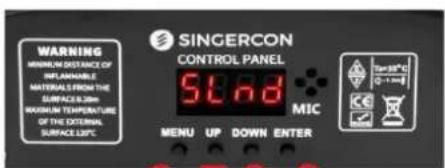
text_image
WARNING MINIMUM DISTANCE OF INFLAMABLE MATERIALS FROM THE SURFACE 100mm MAXIMUM TEMPERATURE OF THE EXTERNAL SURFACE 150°C SINGERCON CONTROL PANEL 9.68 MIC MENU UP DOWN ENTER 30-20°C 0-1 mm6 7 8 9
text_image
3 4 DMX INPUT DMX OUTPUT POWER1 - Głowica LED
natural_image
Black industrial lighting fixture with a circular light source and digital display (no visible text or symbols)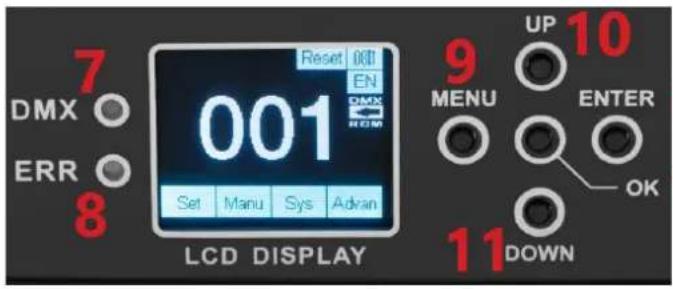
text_image
7 DMX ○ ERR ○ 8 Reset OKT EN DMX ROM 001 Set Manu Sys Adran LCD DISPLAY 9 UP 10 MENU ENTER OK 11 DOWN12 13
text_image
DMX IN DMX OUT ON OFF POWER 3 4 5 61 - Głowica LED
natural_image
Black SINGERCON angular light fixture with LED display and control panel (no readable text or symbols)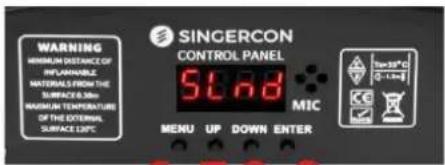
text_image
WARNING MINIMUM DISTANCE OF REFLAINABLE NATIONAL FROM THE SURFACE 0-100 MAGNUM TEMPERATURE OF THE EXTERNAL SURFACE 120°C SINGERCON CONTROL PANEL 5.68 MIC MENU UP DOWN ENTER Low 30°C 0-1.5m KC ✓6 7 8 9
text_image
3 4 DMX INPUT DMX OUTPUT POWER1 - Hlava LED
2 - Ovládací panel
3 - DMX vstup
4 - DMX výstup
natural_image
Black SINCERCON 2008 SLnd display device with red number 1 and 'HARD OF BROWN FORUM' branding (no readable text beyond branding)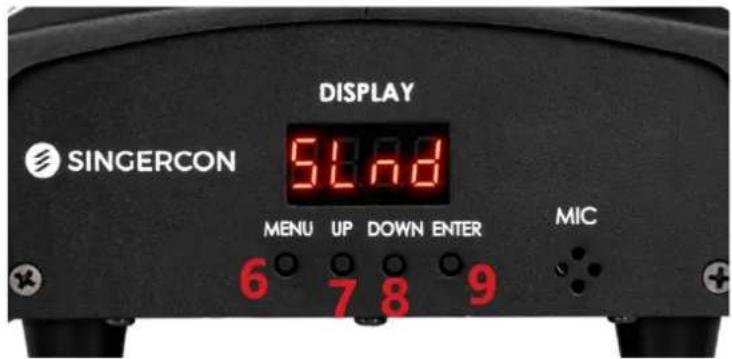
text_image
DISPLAY SINGERCON 51.78 MENU UP DOWN ENTER MIC 6 7 8 9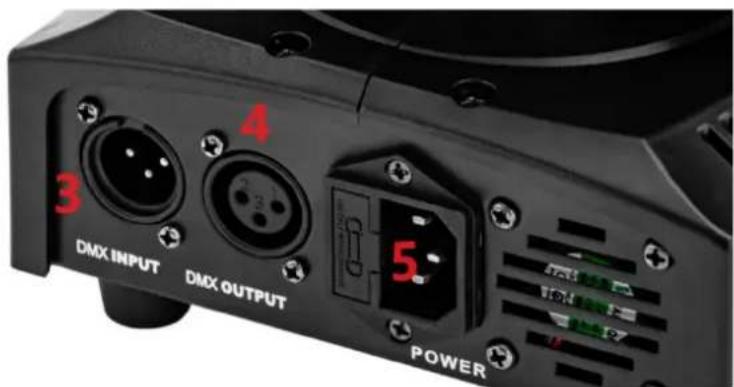
text_image
4 3 DMX INPUT DMX OUTPUT 5. POWER1 - Hlava LED
2 - Ovládací panel
3 - DMX vstup
4 - DMX výstup
natural_image
Black industrial lighting fixture with a circular light source and digital display (no visible text or symbols)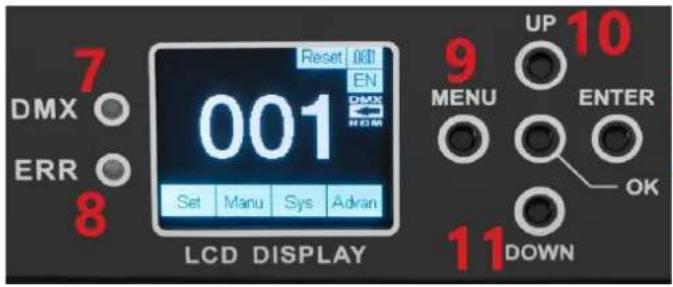
text_image
7 DMX ○ ERR ○ 8 Reset 001 EN 001 Set Manu Sys Adran LCD DISPLAY 9 UP 10 MENU ENTER OK 11 DOWN12 13
text_image
DMX IN DMX OUT ON OFF POWER 3 4 5 61 - Hlava LED
2 - Ovládací panel
3 - DMX vstup
4 - DMX výstup
5 – Vypínač
text_image
Diagram showing fire safety symbols and a house silhouette, likely illustrating fire resistance or hazard prevention.natural_image
Black SINGERCON control unit with LED display and red indicator lights (no readable text or symbols)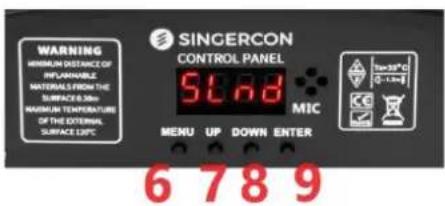
text_image
WARNING MINIMUM DISTANCE OF REPLAINABLE MATERIALS FROM THE SURFACE 0.30m MAXIMUM TEMPERATURE OF THE EXTERNAL SURFACE 0.5°C SINGERCON CONTROL PANEL 5°C MIC 70-15°C 0 - 1 m 6 7 8 9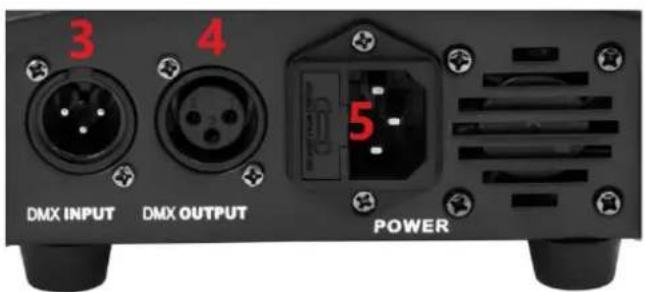
text_image
3 4 DMX INPUT DMX OUTPUT POWERnatural_image
Black SINCERCON 2008 SLnd display device with red number 1 and 'HARD OF BROWN FORUM' branding (no readable text beyond branding)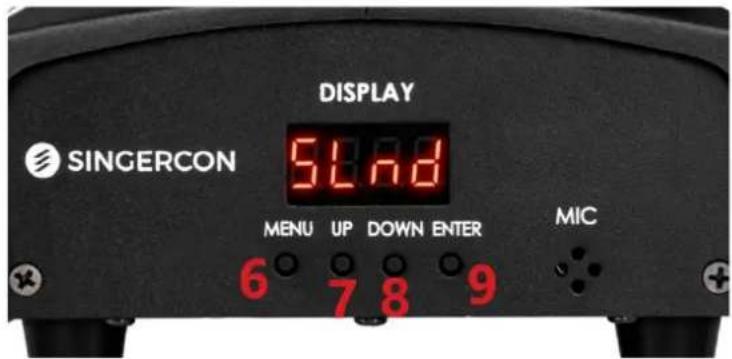
text_image
DISPLAY SINGERCON 54.8 MENU UP DOWN ENTER MIC 6 7 8 9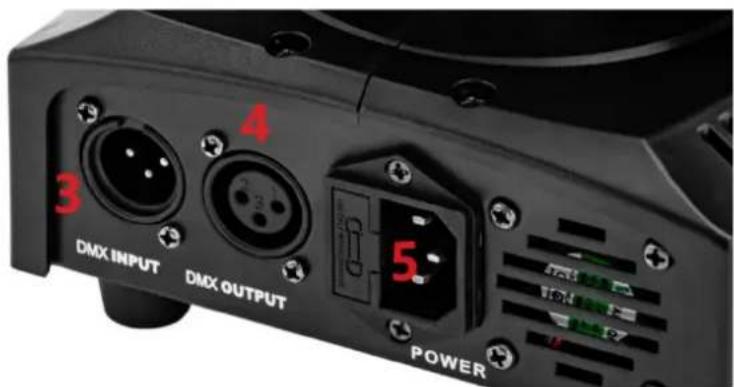
text_image
4 3 DMX INPUT DMX OUTPUT 5 POWER1 - Tête LED
natural_image
Black industrial lighting fixture with a blue light source and digital display (no visible text or symbols)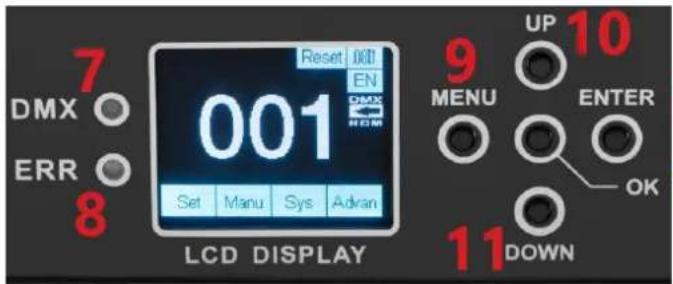
text_image
7 DMX ○ ERR ○ 8 Reset 001 EN DMX ROM 001 Set Manu Sys Adran LCD DISPLAY 9 UP 10 MENU ENTER OK 11 DOWN12 13
text_image
DMX IN DMX OUT ON OFF POWER 3 4 5 61 – Tête LED
natural_image
Black handheld photo of a retro lighting fixture with red LED display and orange buttons (no readable text or symbols)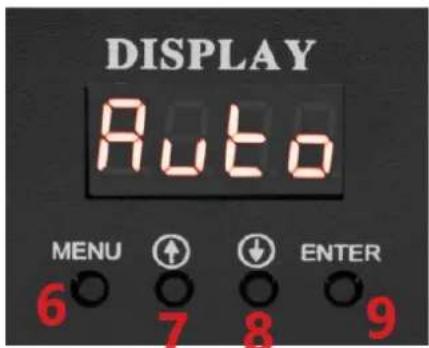
text_image
DISPLAY Auto MENU ↑ ↓ ENTER 6 7 8 9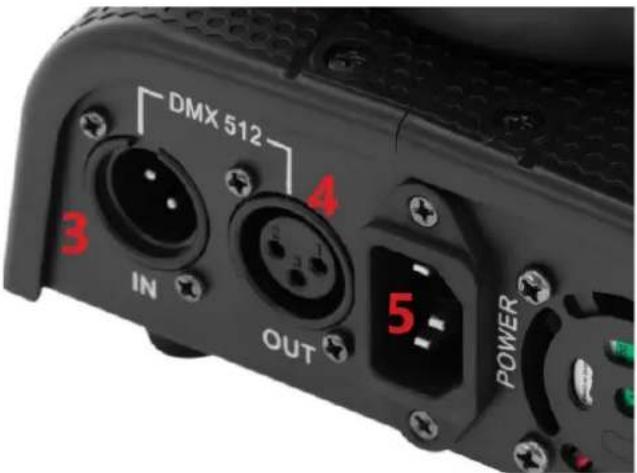
text_image
DMX 512 3 IN OUT 4 5 POWER1 - Tête LED
natural_image
Black SINCERCON 2008 stage light fixture with LED display and red number 1 (no text or symbols on device body)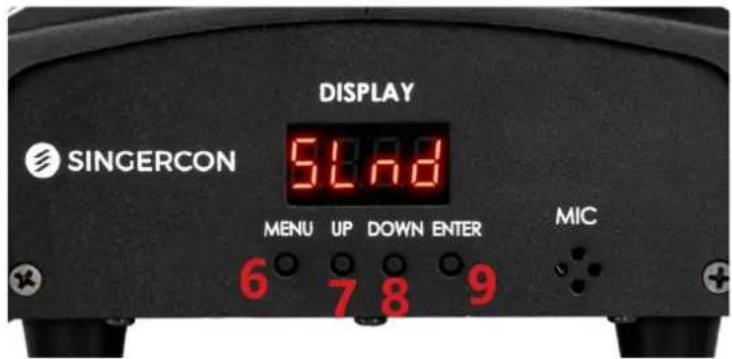
text_image
DISPLAY SINGERCON 51.78 MENU UP DOWN ENTER MIC 6 7 8 9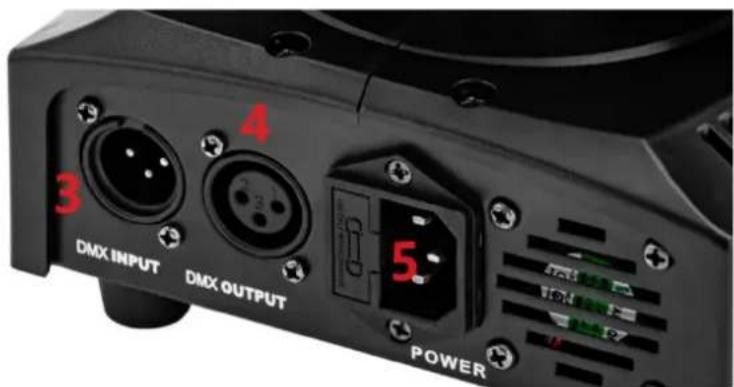
text_image
4 3 DMX INPUT DMX OUTPUT 5 POWERnatural_image
Black industrial lighting fixture with a central lens and digital display (no visible text or symbols)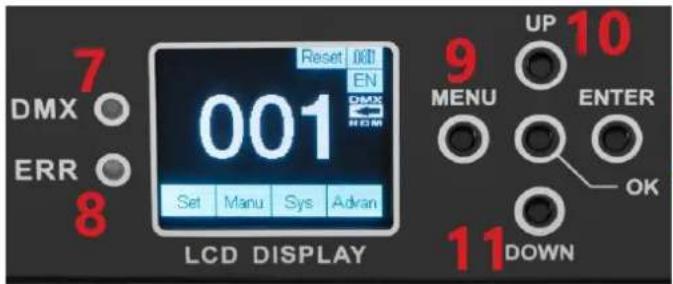
text_image
7 DMX ○ ERR ○ 8 Reset 001 EN 001 Set Manu Sys Adran LCD DISPLAY 9 UP 10 MENU ENTER OK 11 DOWN12 13
text_image
DMX IN DMX OUT ON OFF POWER 3 4 5 61 - Testa LED
natural_image
Black handheld photo of a retro lighting fixture with red LED display and orange buttons (no readable text or symbols)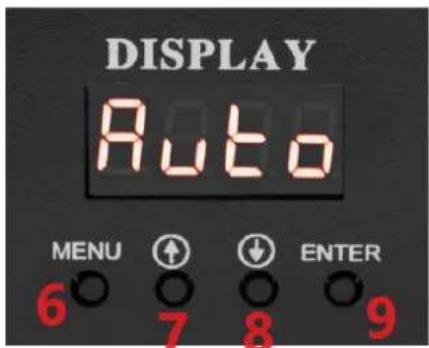
text_image
DISPLAY Auto MENU ↑ ↓ ENTER 6 7 8 9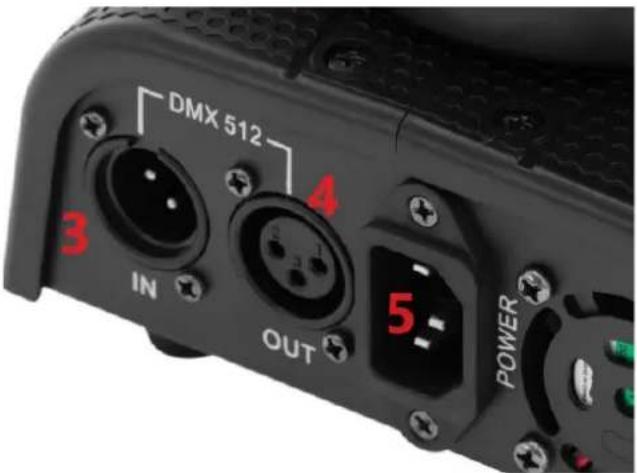
text_image
DMX 512 3 IN OUT 4 5 POWER1 - Testa LED
MODALITÀ CANALE: Std.14CH
| 1 | DIMENSIONATORE |
| 2 | STOP/STROBO |
| 3 | PADELLA |
| 4 | INCLINARE |
| 5 | TEMPO DI PAN-TILT |
| 6 | PRISMA RT COLORE |
| 7 | GOBO |
| 8 | GOBO1 |
| 9 | GOBO1_RT |
| 10 | PRISMA |
| 11 | MESSA A FUOCO |
| 12 | PAN FINE |
| 13 | INCLINAZIONE FINE |
| 14 | RESET |
COLORE
| MORSO | EFFETTO |
| 255 | ROTAZIONE VELOCE |
| ...... | ...... |
| 80 | ROTAZIONE LENTA |
| 75-79 | ROSA+BIANCO |
| 70 | LAVANDA+ ROSA |
| 65 | VERDE CHIARO+LAVANDA |
| 60 | VERDE+VERDE CHIARO |
| 55 | ACQUAMARINA+VERDE |
| 50 | ARANCIO+ACQUAMARINA |
| 45 | ROSSO+ ARANCIONE |
| 40 | BIANCO+ROSSO |
| 35-39 | ROSA |
| 30 | LAVANDA |
| 25 | VERDE CHIARO |
| 20 | VERDE |
| 15 | ACQUAMARINA |
| 10 | ARANCIONE |
| 5 | ROSSO |
| 0 | BIANCO |
STOP/STOBE
text_image
Diagram showing fire safety symbols and a house silhouette, likely illustrating fire resistance or hazard prevention.natural_image
Black SINGERCON control unit with LED display and red indicator lights (no readable text or symbols)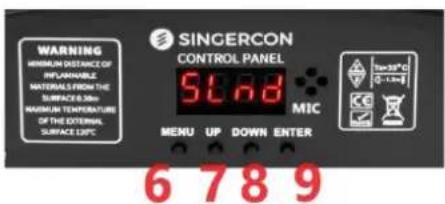
text_image
WARNING MINIMUM DISTANCE OF INFLAMMABLE MATERIALS FROM THE SURFACE 0.30m MAXIMUM TEMPERATURE OF THE EXTERNAL SURFACE 0.5°C SINGERCON CONTROL PANEL 5°C MIC MENU UP DOWN ENTER 6 7 8 9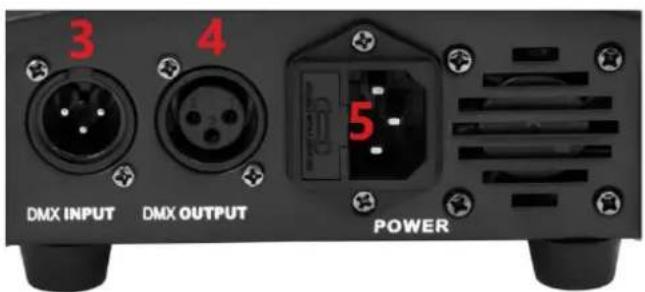
text_image
3 4 DMX INPUT DMX OUTPUT POWER1 - Cabezal LED
2 - Panel de control
3 - Entrada DMX
4 - Salida DMX
natural_image
Black SHCERCON 2008 SLnd display with LED and red indicator lights (no text or symbols on device body)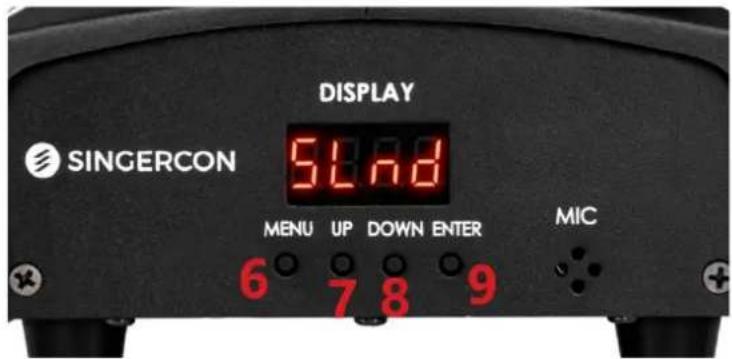
text_image
DISPLAY SINGERCON 51.78 MENU UP DOWN ENTER MIC 6 7 8 9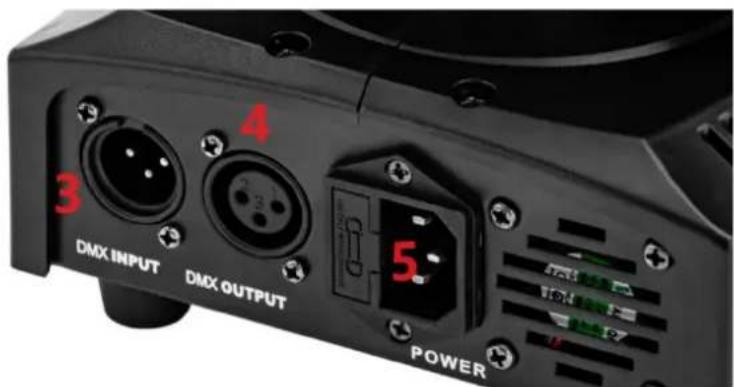
text_image
4 3 DMX INPUT DMX OUTPUT 5. POWER1 - Cabezal LED
2 - Panel de control
3 - Entrada DMX
4 - Salida DMX
natural_image
Black industrial lighting fixture with a blue light source and digital display (no visible text or symbols)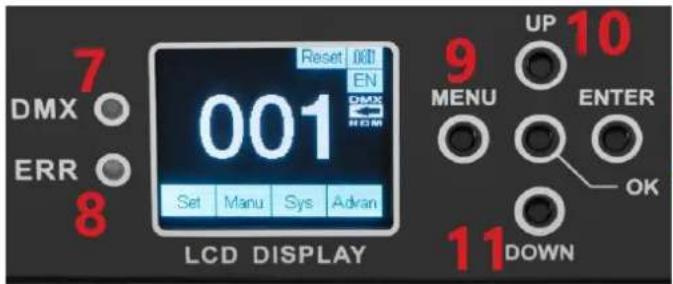
text_image
7 DMX ○ ERR ○ 8 Reset 001 EN 001 Set Manu Sys Adran LCD DISPLAY 9 UP 10 MENU ENTER OK 11 DOWN12 13
text_image
DMX IN DMX OUT ON OFF POWER 3 4 5 61 - Cabezal LED
2 - Panel de control
3 - Entrada DMX
4 - Salida DMX
natural_image
Black handheld photo of a retro lighting fixture with red LED display and orange buttons (no visible text or symbols on the device itself)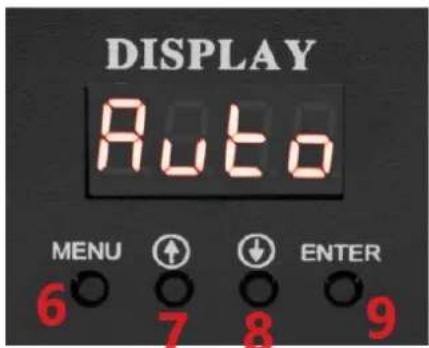
text_image
DISPLAY Auto MENU ↑ ↓ ENTER 6 7 8 9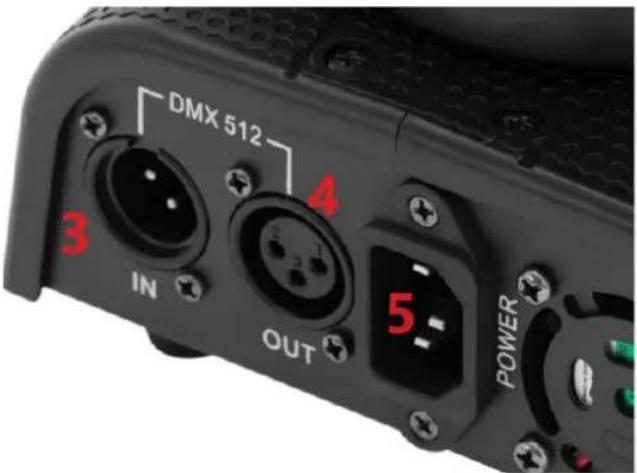
text_image
DMX 512 3 IN 4 OUT 5 POWER1 - Cabezal LED
2 - Panel de control
3 - Entrada DMX
4 - Salida DMX
text_image
Diagram showing fire safety symbols and a house silhouette, likely illustrating fire resistance or hazard prevention.natural_image
Black SINCERCON 2008 SLnd display device with red number 1 and 'HARD OF BROWN FORUM' branding (no readable text beyond branding)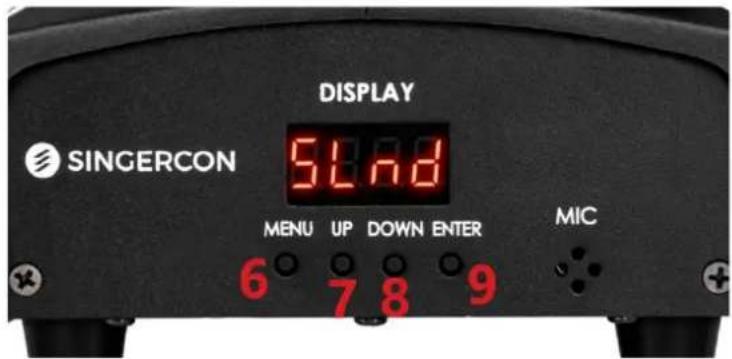
text_image
DISPLAY SINGERCON 51.78 MENU UP DOWN ENTER MIC 6 7 8 9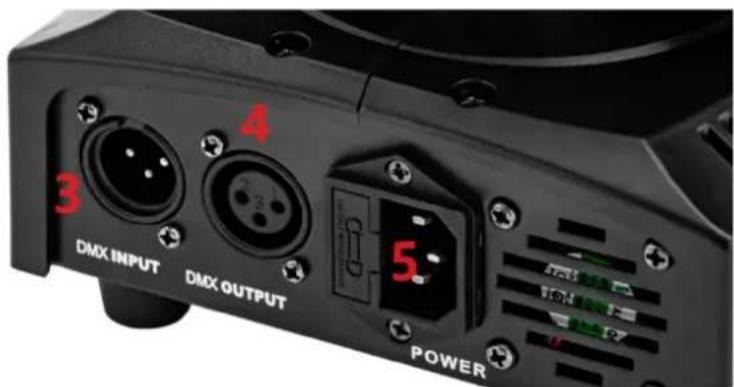
text_image
4 3 DMX INPUT DMX OUTPUT 5 POWER1 - LED fej
2 - Vezérlőpanel
3 - DMX bemenet
4 - DMX kimenet
natural_image
Black industrial lighting fixture with a blue light source and digital display (no visible text or symbols)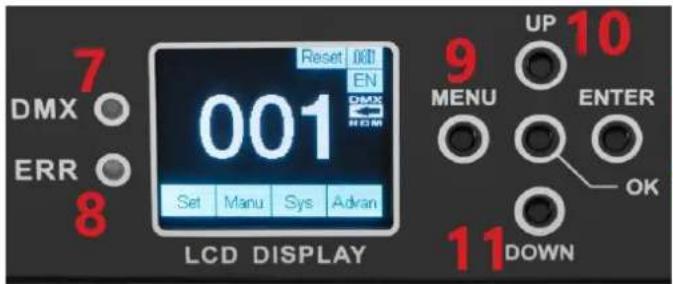
text_image
7 DMX ○ ERR ○ 8 Reset 001 EN 001 Set Manu Sys Adran LCD DISPLAY 9 UP 10 MENU ENTER OK 11 DOWN12 13
text_image
DMX IN DMX OUT 4 ON + - 5 POWER 61 - LED fej
2 - Vezérlőpanel
3 - DMX bemenet
4 - DMX kimenet
5 - Tápkapcsoló
6 - Tápkábel aljzat
7 - DMX vezérlőfény
natural_image
Black handheld photo of a retro lighting fixture with red LED display and orange buttons (no visible text or symbols on the device itself)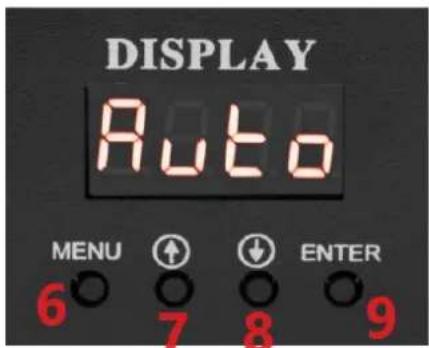
text_image
DISPLAY Auto MENU ↑ ↓ ENTER 6 7 8 9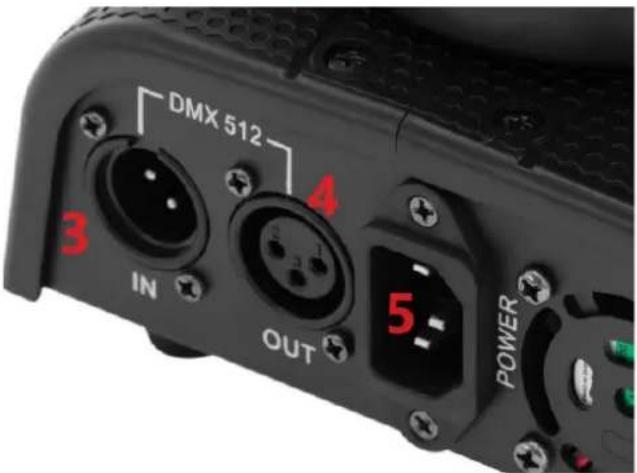
text_image
DMX 512 3 IN OUT 4 5 POWER1 - LED fej
2 - Vezérlőpanel
3 - DMX bemenet
4 - DMX kimenet
natural_image
Black Sincercon control unit with LED display and red indicator lights (no readable text or symbols)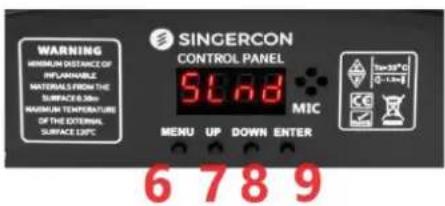
text_image
WARNING MINIMUM DISTANCE OF REPLAINABLE MATERIALS FROM THE SURFACE 0.30m MAXIMUM TEMPERATURE OF THE EXTERNAL SURFACE 0.5°C SINGERCON CONTROL PANEL 5°C MIC 70-15°C 0 - 1 m 6 7 8 9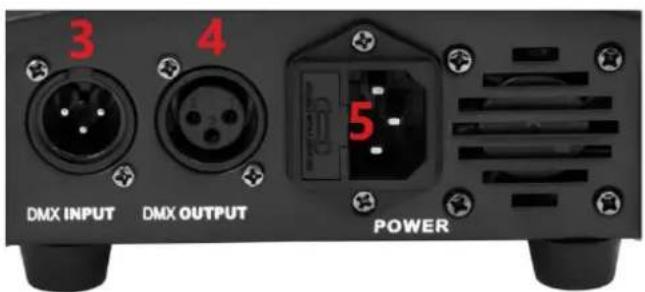
text_image
3 4 DMX INPUT DMX OUTPUT POWER1 - LED-hoved
2 - Kontrolpanel
3 - DMX-indgang
4 - DMX-udgang
natural_image
Black SINCERCON 2008 SLnd display device with red number 1 and 'HARD OF BROWN FORUM' branding (no readable text beyond branding)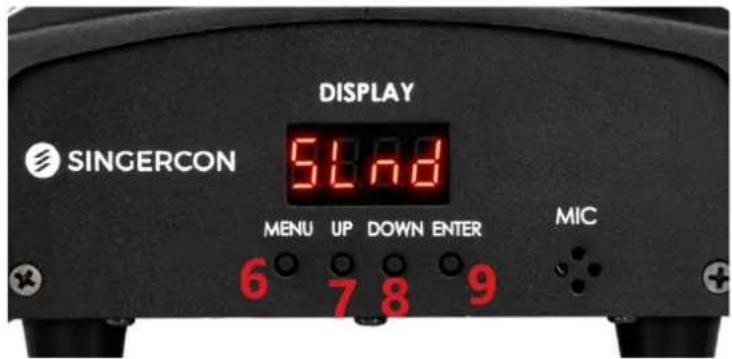
text_image
DISPLAY SINGERCON 51.78 MENU UP DOWN ENTER MIC 6 7 8 9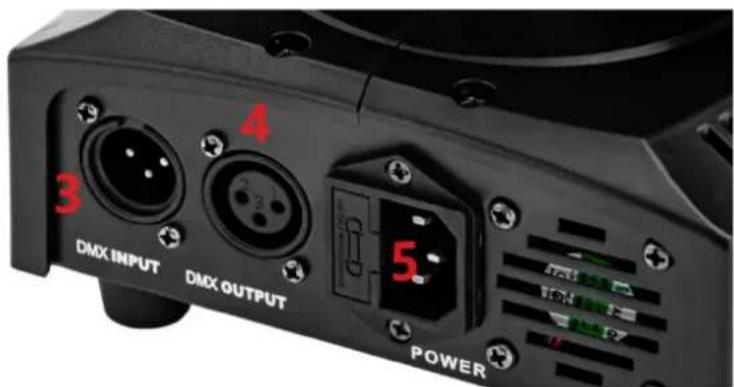
text_image
4 3 DMX INPUT DMX OUTPUT 5 POWER1 - LED-hoved
2 - Kontrolpanel
3 - DMX-indgang
4 - DMX-udgang
natural_image
Black industrial lighting fixture with a circular light source and digital display (no visible text or symbols)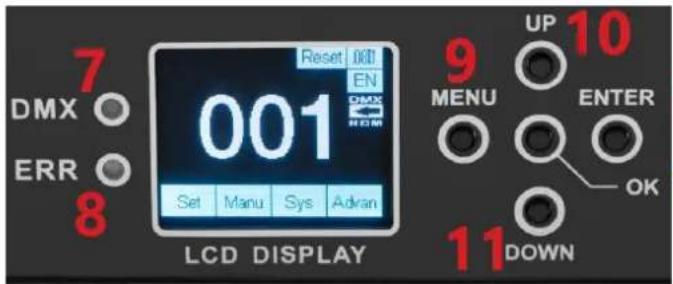
text_image
7 DMX ○ ERR ○ 8 Reset 001 EN 001 Set Manu Sys Adran LCD DISPLAY 9 UP 10 MENU ENTER OK 11 DOWN12 13
text_image
DMX IN DMX OUT ON OFF POWER 3 4 5 61 - LED-hoved
2 - Kontrolpanel
3 - DMX-indgang
4 - DMX-udgang
5 - Strømkontakt
natural_image
Black handheld photo of a retro lighting fixture with red LED display and orange buttons (no readable text or symbols)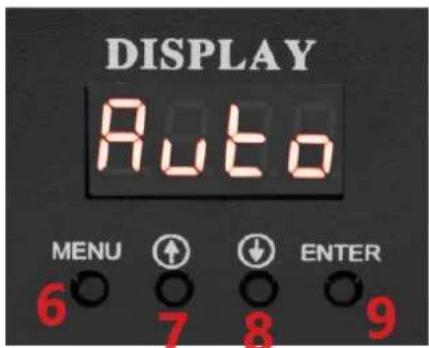
text_image
DISPLAY Auto MENU ↑ ↓ ENTER 6 7 8 9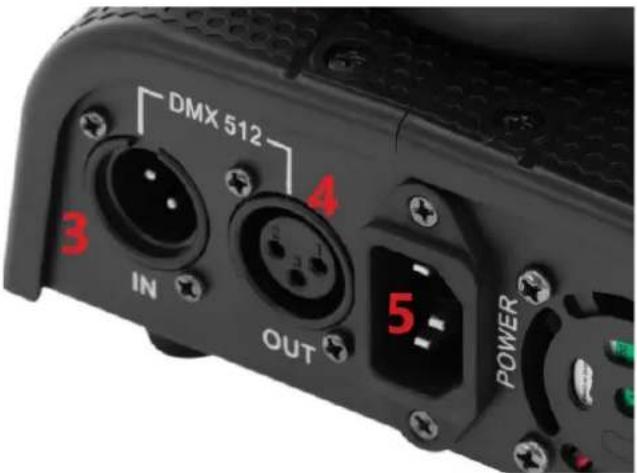
text_image
DMX 512 3 IN 4 OUT 5 POWER1 - LED-hoved
2 - Kontrolpanel
3 - DMX-indgang
4 - DMX-udgang
APPARATETS PLACERING
natural_image
Black SINGERCON control unit with LED display and red indicator lights (no readable text or symbols)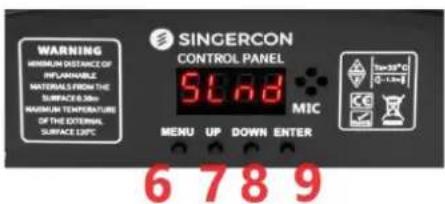
text_image
WARNING MINIMUM DISTANCE OF INFLAMMABLE MATERIALS FROM THE SURFACE 0.30m MAXIMUM TEMPERATURE OF THE EXTERNAL SURFACE 0.5°C SINGERCON CONTROL PANEL 5°C MIC MENU UP DOWN ENTER 6 7 8 9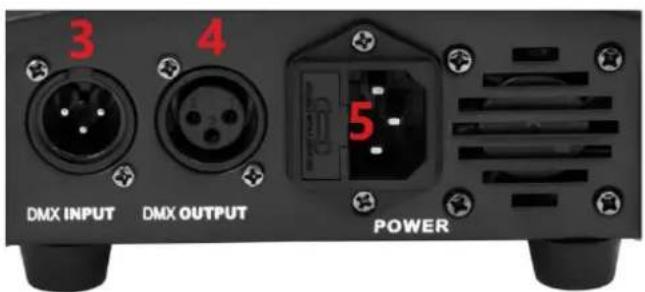
text_image
3 4 DMX INPUT DMX OUTPUT POWER1 - LED-pää
2 - Ohjauspaneeli
3 - DMX-tulo
4 - DMX-lähtö
natural_image
Black SINCERCON 2008 SLnd display device with red number 1 and 'HARD OF BROWN FORUM' branding (no readable text beyond branding)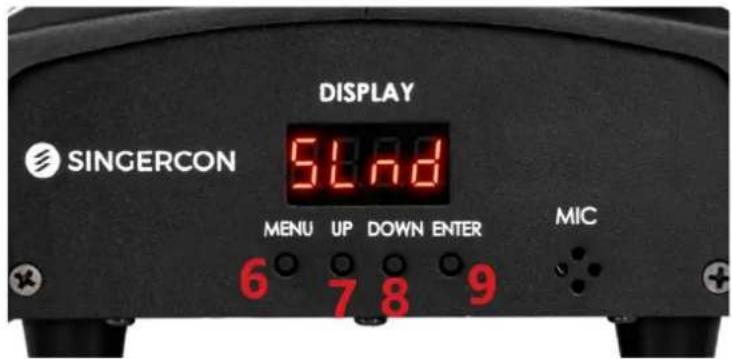
text_image
DISPLAY SINGERCON 54.8 MENU UP DOWN ENTER MIC 6 7 8 9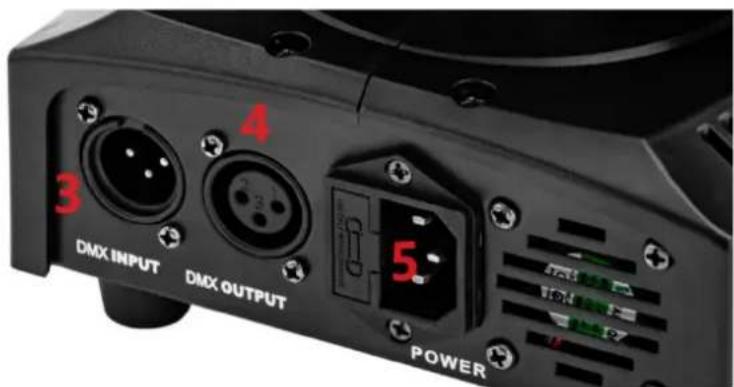
text_image
4 3 DMX INPUT DMX OUTPUT 5. POWER1 - LED-pää
2 - Ohjauspaneeli
3 - DMX-tulo
4 - DMX-lähtö
natural_image
Black industrial lighting fixture with a circular light source and digital display (no visible text or symbols)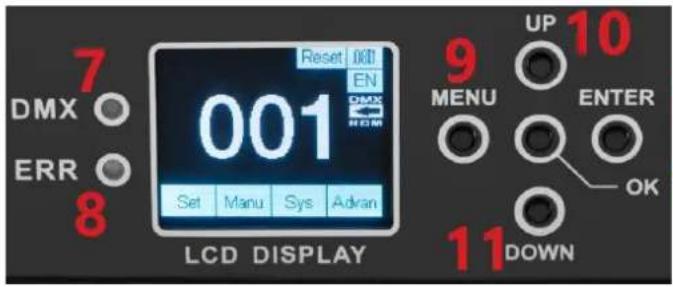
text_image
7 DMX ○ ERR ○ 8 Reset 001 EN 001 Set Manu Sys Adran LCD DISPLAY 9 UP 10 MENU ENTER OK 11 DOWN12 13
text_image
DMX IN DMX OUT 4 ON + - 5 POWER 61 - LED-pää
2 - Ohjauspaneeli
3 - DMX-tulo
4 - DMX-lähtö
5 – Virtakytkin
natural_image
Black handheld photo of a retro lighting fixture with red LED display and orange buttons (no readable text or symbols)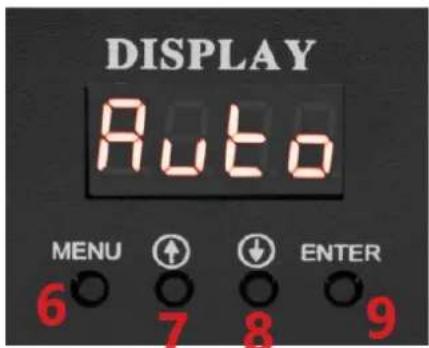
text_image
DISPLAY Auto MENU ↑ ↓ ENTER 6 7 8 9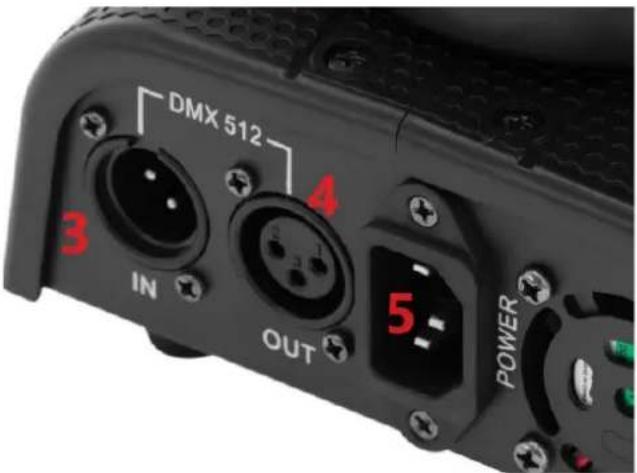
text_image
DMX 512 3 IN OUT 4 5 POWER1 - LED-pää
2 - Ohjauspaneeli
3 - DMX-tulo
4 - DMX-lähtö
text_image
Diagram showing fire safety symbols and a house silhouette, likely illustrating fire resistance or hazard prevention.natural_image
Black SINGERCON control unit with LED display and red indicator lights (no readable text or symbols)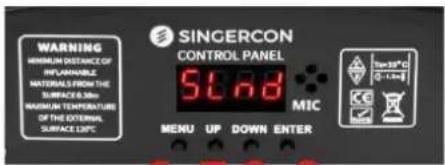
text_image
WARNING MINIMUM DISTANCE OF REFLAINABLE NATIONAL FROM THE SURFACE 0-100 MAGNUM TEMPERATURE OF THE EXTERNAL SURFACE 120°C SINGERCON CONTROL PANEL 5.68 MIC MENU UP DOWN ENTER 100-30°C 0-1.5m6 7 8 9
text_image
3 4 DMX INPUT DMX OUTPUT POWER1 - LED-kop
natural_image
Black SINCERCON 2008 SLnd display device with red number 1 and 'HARD OF BROWN FORUM' branding (no readable text beyond branding)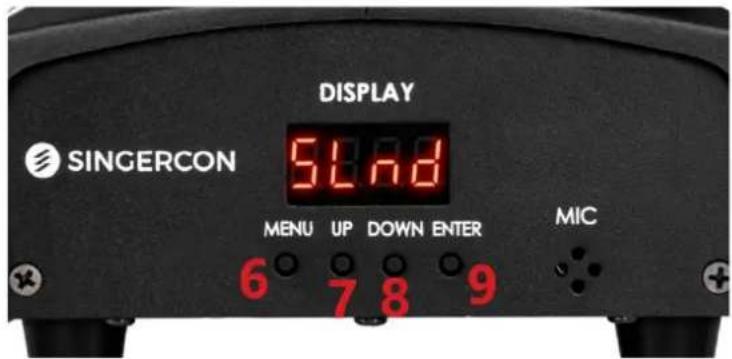
text_image
DISPLAY SINGERCON 54.8 MENU UP DOWN ENTER MIC 6 7 8 9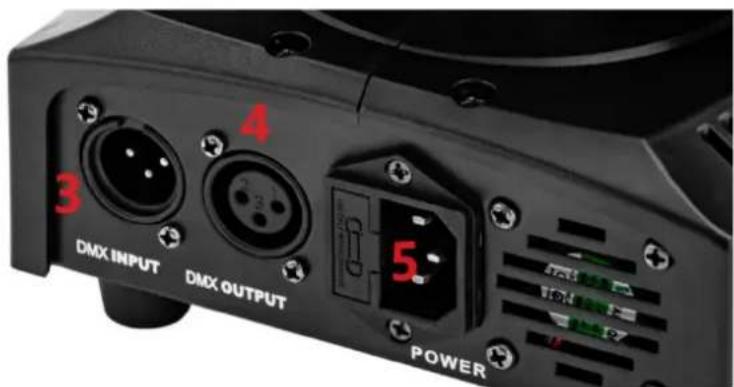
text_image
4 3 DMX INPUT DMX OUTPUT 5. POWER1 - LED-kop
natural_image
Black industrial lighting fixture with a central lens and control panel (no visible text or symbols)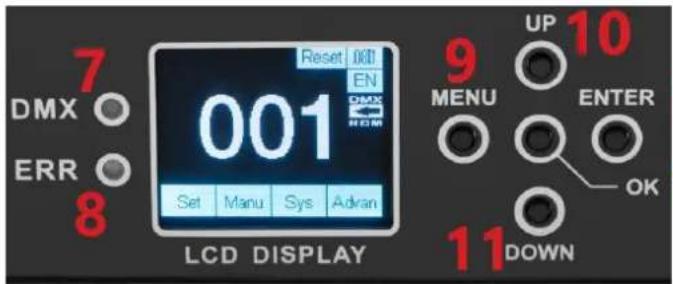
text_image
7 DMX ○ ERR ○ 8 Reset 001 EN 001 Set Manu Sys Adran LCD DISPLAY 9 UP 10 MENU ENTER OK 11 DOWN12 13
text_image
DMX IN DMX OUT ON OFF POWER 3 4 5 61 - LED-kop
natural_image
Black handheld photo of a retro lighting fixture with red LED display and orange buttons (no readable text or symbols)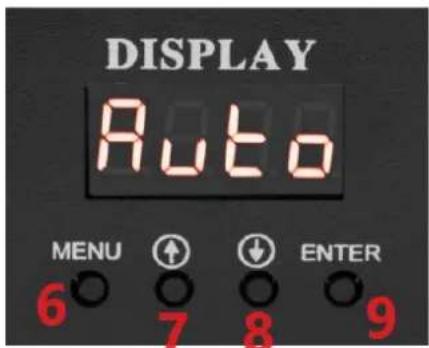
text_image
DISPLAY Auto MENU ↑ ↓ ENTER 6 7 8 9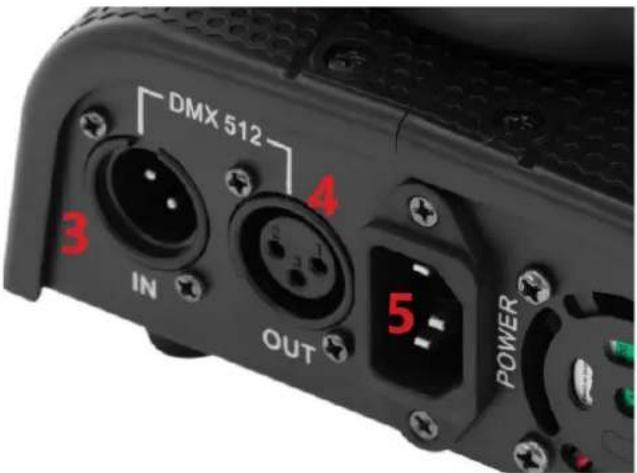
text_image
DMX 512 3 IN OUT 4 5 POWER1 - LED-kop
PLAATS VAN HET APPARAAT
text_image
Diagram showing fire safety symbols and a house silhouette, likely illustrating fire resistance or hazard prevention.Armaturer er ikke egnet for direkte montering på normalt brennbare overflater.
natural_image
Black SINGERCON control unit with LED display and red indicator lights (no readable text or symbols)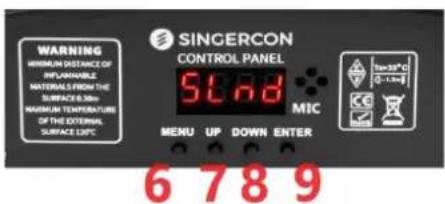
text_image
WARNING MINIMUM DISTANCE OF INFLAMMABLE MATERIALS FROM THE SURFACE 0.30m MAXIMUM TEMPERATURE OF THE EXTERNAL SURFACE 0.5°C SINGERCON CONTROL PANEL 5°C MIC MENU UP DOWN ENTER 6 7 8 9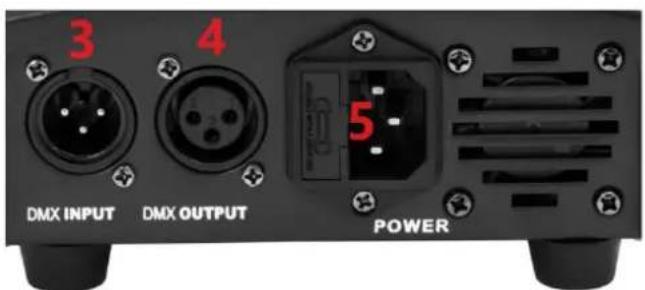
text_image
3 4 DMX INPUT DMX OUTPUT POWER1 - LED-hode
2 - Kontrollpanel
3 - DMX-inngang
4 - DMX-utgang
natural_image
Black SINCERCON 2008 SLnd display device with red number 1 and 'HARD OF BROWN FORUM' branding (no readable text beyond branding)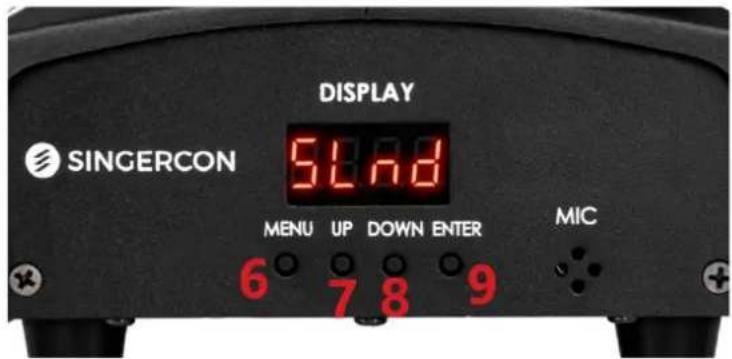
text_image
DISPLAY SINGERCON 54.8 MENU UP DOWN ENTER MIC 6 7 8 9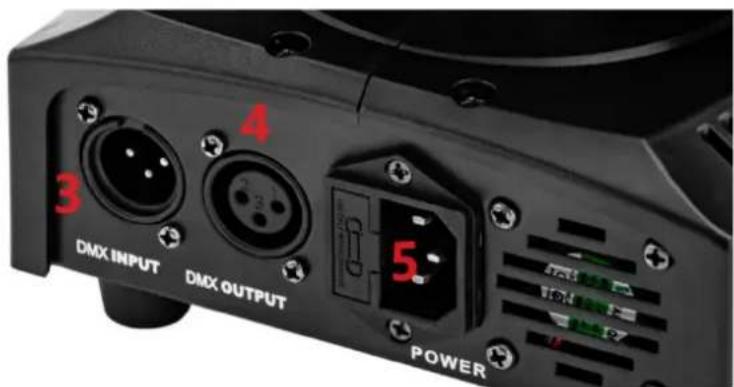
text_image
4 3 DMX INPUT DMX OUTPUT 5. POWER1 - LED-hode
2 - Kontrollpanel
3 - DMX-inngang
4 - DMX-utgang
natural_image
Black industrial lighting fixture with a circular light source and digital display (no visible text or symbols)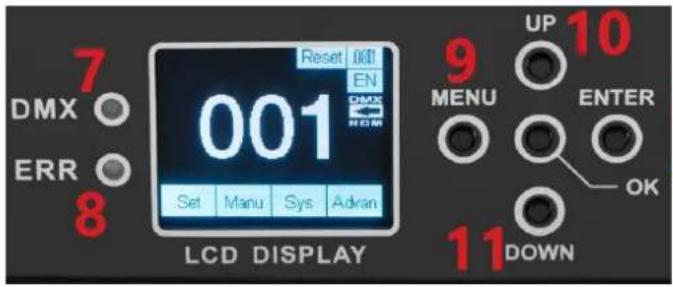
text_image
7 DMX ○ ERR ○ 8 Reset 001 EN 001 Set Manu Sys Adran LCD DISPLAY 9 UP 10 MENU ENTER OK 11 DOWN12 13
text_image
DMX IN DMX OUT 4 ON + - 5 POWER 61 - LED-hode
2 - Kontrollpanel
3 - DMX-inngang
4 - DMX-utgang
5 – Strømbryter
natural_image
Black handheld photo of a retro lighting fixture with red LED display and orange buttons (no readable text or symbols)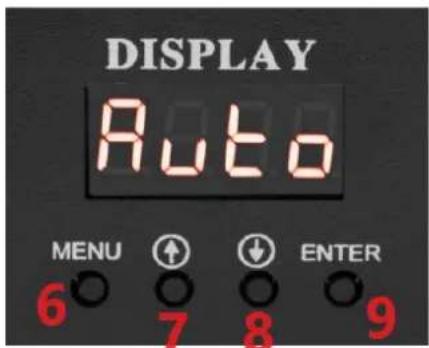
text_image
DISPLAY Auto MENU ↑ ↓ ENTER 6 7 8 9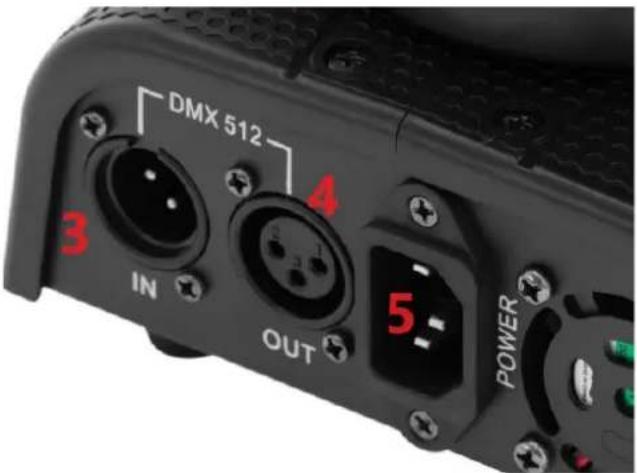
text_image
DMX 512 3 IN 4 OUT 5 POWER1 - LED-hode
2 - Kontrollpanel
3 - DMX-inngang
4 - DMX-utgang
natural_image
Black SINGERCON control unit with LED display and red indicator lights (no readable text or symbols)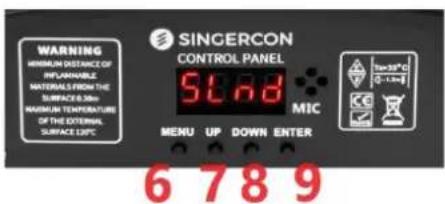
text_image
WARNING MINIMUM DISTANCE OF INFLAMMABLE MATERIALS FROM THE SURFACE 0.30m MAXIMUM TEMPERATURE OF THE EXTERNAL SURFACE 0.5°C SINGERCON CONTROL PANEL 5°C MIC MENU UP DOWN ENTER 6 7 8 9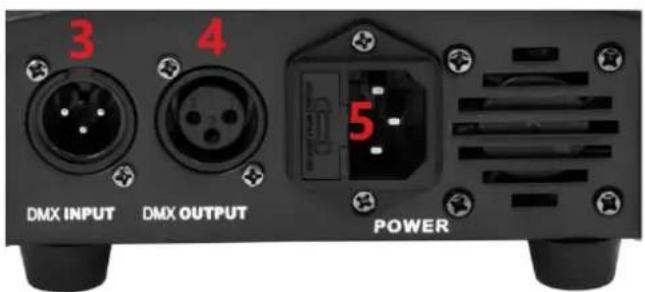
text_image
3 4 DMX INPUT DMX OUTPUT POWERnatural_image
Black SHROOM 2023 stage light fixture with LED display and red number 1 (no text or symbols on device body)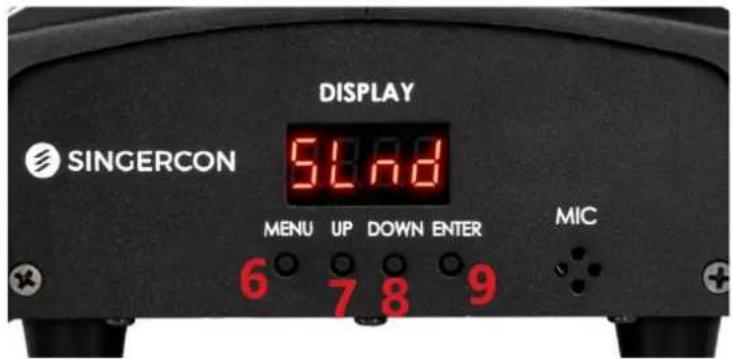
text_image
DISPLAY SINGERCON 51.78 MENU UP DOWN ENTER MIC 6 7 8 9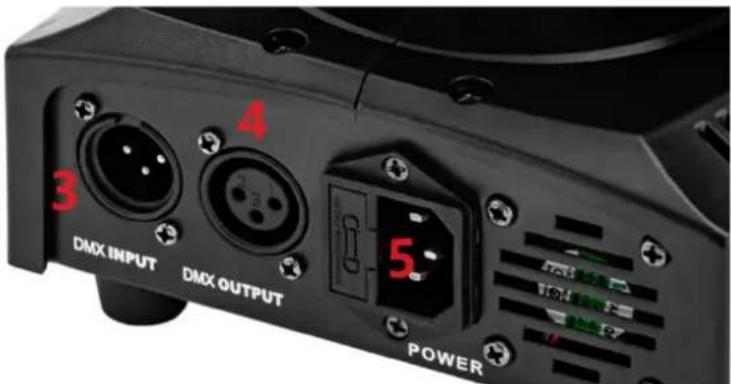
text_image
DMX INPUT DMX OUTPUT POWER 3 4 51 - LED-huvud
2 - Kontrollpanel
3 - DMX-ingång
4 - DMX-utgång
5 – Nätsladdsuttag
6-MENU-knapp
7 - UPP-knapp
8-NED-knapp
9 - ENTER-knapp
3.1.3. CON.LED-108
natural_image
Black industrial lighting fixture with a circular light source and digital display (no visible text or symbols)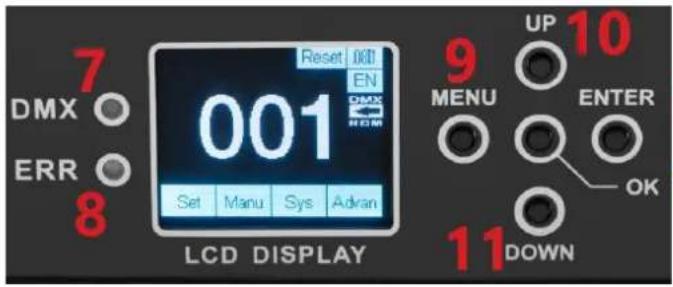
text_image
7 DMX ○ ERR ○ 8 Reset 001 EN 001 Set Manu Sys Adran LCD DISPLAY 9 UP 10 MENU ENTER OK 11 DOWN12 13
text_image
DMX IN DMX OUT 4 ON Power 5 61 - LED-huvud
2 - Kontrollpanel
3 - DMX-ingång
4 - DMX-utgång
5 – Strömbrytare
6 – Nätsladdsuttag
7 - DMX kontrollampa
8 - ERROR kontrollampa
9-MENU-knapp
10 - UPP-knapp
11 - DOWN-knapp
12-ENTER-knapp
13 - OK-knapp
3.1.4. CON.LED-111
natural_image
Black handheld photo of a retro lighting fixture with red LED display and orange buttons (no readable text or symbols)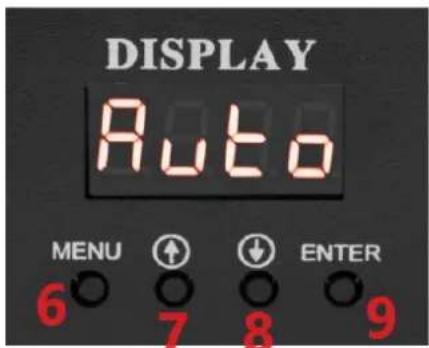
text_image
DISPLAY Auto MENU ↑ ↓ ENTER 6 7 8 9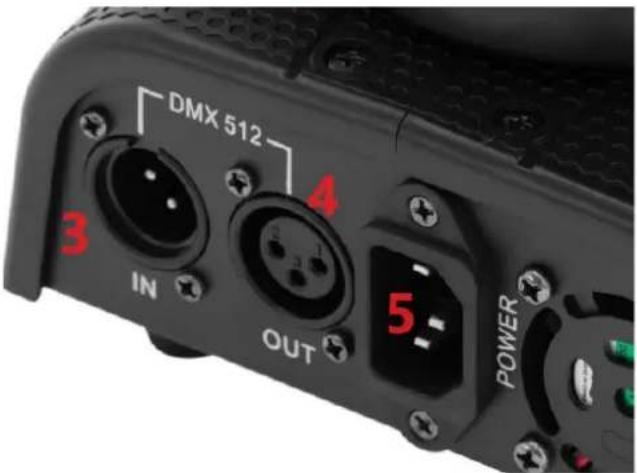
text_image
DMX 512 3 IN 4 OUT 5 POWER1 - LED-huvud
2 - Kontrollpanel
3 - DMX-ingång
4 - DMX-utgång
5 – Nätsladdsuttag
6-MENU-knapp
7 - UPP-knapp
8 - NED-knapp
9 - ENTER-knapp
APPARATENS PLACERING
natural_image
Black SINGERCON control panel with LED display and red warning labels (no readable text beyond branding)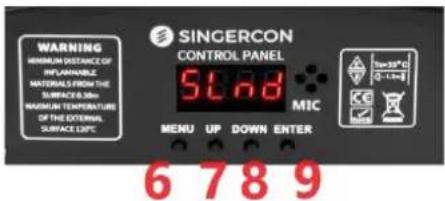
text_image
WARNING MINIMUM DISTANCE OF INFLUENTIAL MATERIALS FROM THE SURFACE 0.30m MAXIMUM TEMPERATURE OF THE EXTERNAL SURFACE 0.5°C SINGERCON CONTROL PANEL 5.78 MIC MENU UP DOWN ENTER 6 7 8 9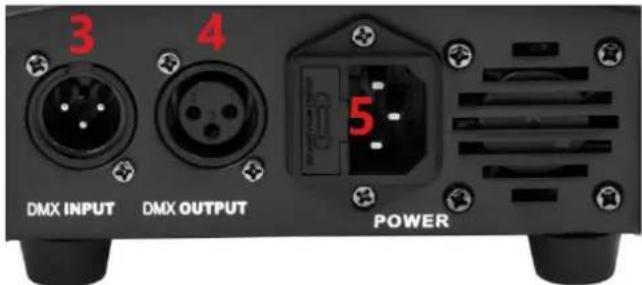
text_image
3 4 DMX INPUT DMX OUTPUT POWER1 - Cabeça LED
2 - Painel de controle
3 - Entrada DMX
4 - Saída DMX
natural_image
Black industrial lighting fixture with a blue light source and digital display (no visible text or symbols)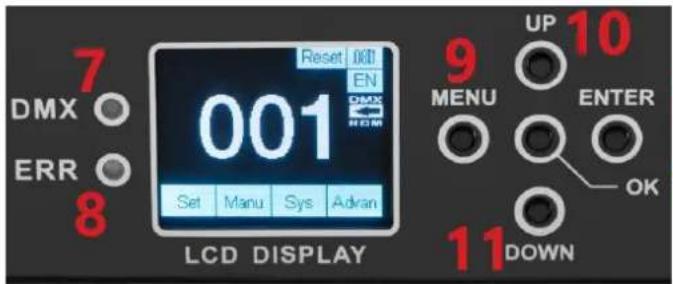
text_image
7 DMX ○ ERR ○ 8 Reset 001 EN 001 Set Manu Sys Adran LCD DISPLAY 9 UP 10 MENU ENTER OK 11 DOWN12 13
text_image
DMX IN DMX OUT ON OFF POWER 3 4 5 61 - Cabeça LED
2 - Painel de controle
3 - Entrada DMX
4 - Saída DMX
5 - Interruptor liga/desliga
natural_image
Black handheld photo of a retro lighting fixture with red LED display and orange buttons (no readable text or symbols)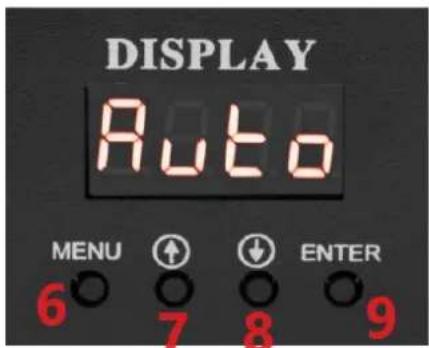
text_image
DISPLAY Auto MENU ↑ ↓ ENTER 6 7 8 9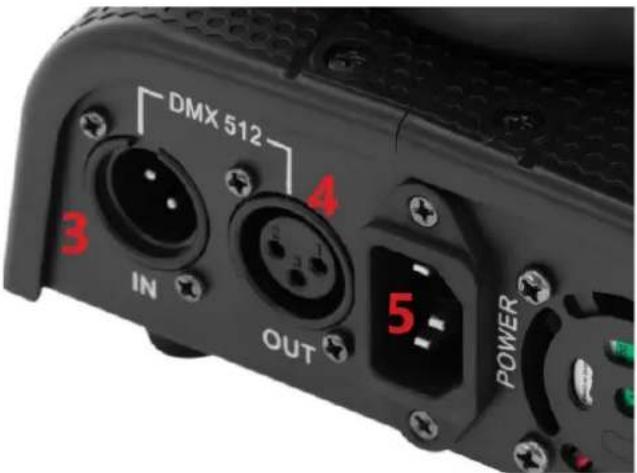
text_image
DMX 512 3 IN 4 OUT 5 POWER1 - Cabeça LED
2 - Painel de controle
3 - Entrada DMX
4 - Saída DMX
natural_image
Black SINGERCON control unit with LED display and red indicator lights (no readable text or symbols)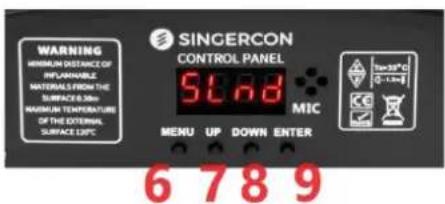
text_image
WARNING MINIMUM DISTANCE OF INFLAMMABLE MATERIALS FROM THE SURFACE 0.30m MAXIMUM TEMPERATURE OF THE EXTERNAL SURFACE 0.5°C SINGERCON CONTROL PANEL 5°C MIC MENU UP DOWN ENTER 6 7 8 9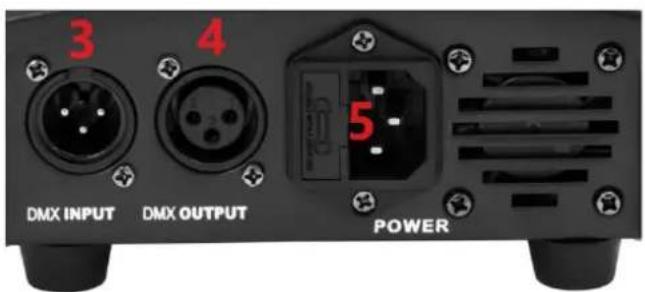
text_image
3 4 DMX INPUT DMX OUTPUT POWER1 - LED hlava
2 - Ovládací panel
3 - DMX vstup
4 - DMX výstup
natural_image
Black SINCERCON 2008 SLnd display device with red number 1 and LED display (no text or symbols on device body)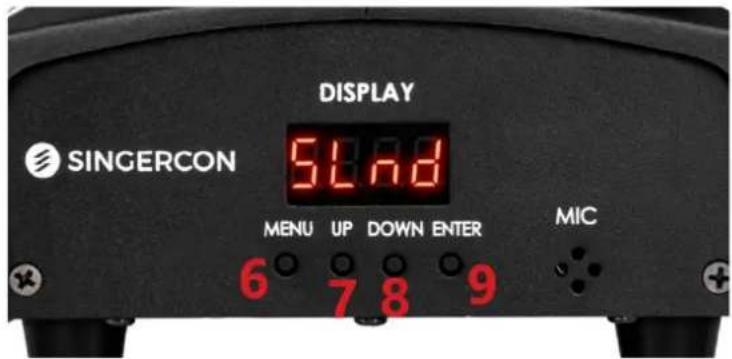
text_image
DISPLAY SINGERCON 51.78 MENU UP DOWN ENTER MIC 6 7 8 9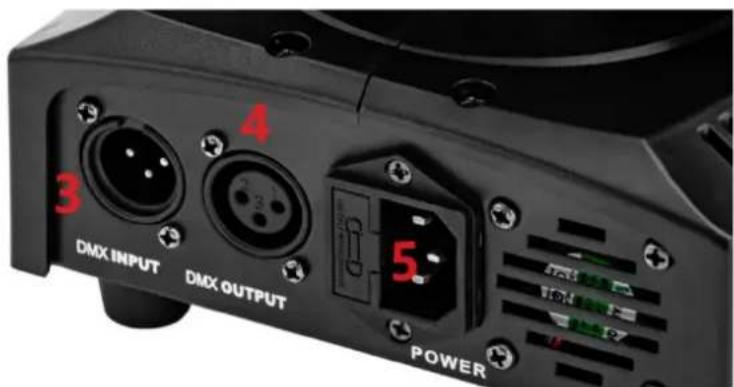
text_image
4 3 DMX INPUT DMX OUTPUT 5 POWER1 - LED hlava
2 – Ovládací panel
3 - DMX vstup
4 - DMX výstup
natural_image
Black industrial lighting fixture with a blue light source and digital display (no visible text or symbols)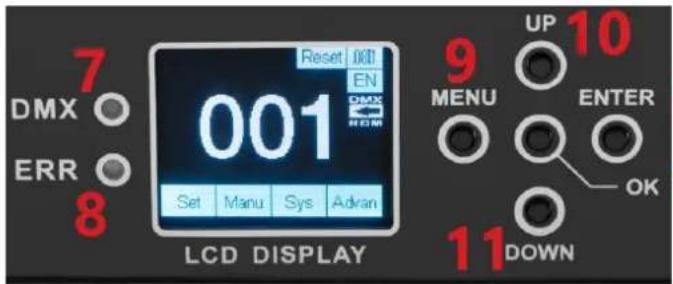
text_image
7 DMX ○ ERR ○ 8 Reset 001 EN 001 Set Manu Sys Adran LCD DISPLAY 9 UP 10 MENU ENTER OK 11 DOWN12 13
text_image
DMX IN DMX OUT ON OFF POWER 3 4 5 61 - LED hlava
2 - Ovládací panel
3 - DMX vstup
4 - DMX výstup
5 – Vypínač
natural_image
Black handheld photo of a retro lighting fixture with red LED display and orange buttons (no readable text or symbols)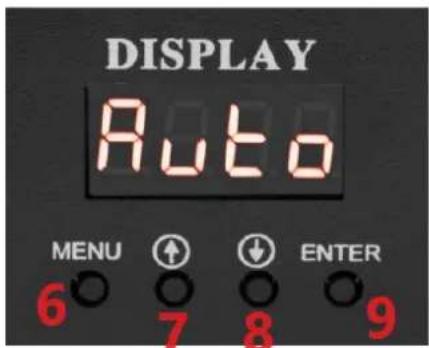
text_image
DISPLAY Auto MENU ↑ ↓ ENTER 6 7 8 9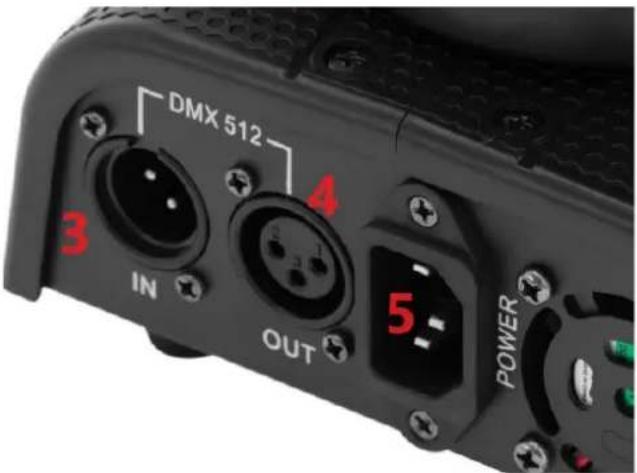
text_image
DMX 512 3 IN 4 OUT 5 POWER1 - LED hlava
2 - Ovládací panel
3 - DMX vstup
4 - DMX výstup
For the disposal of the device please consider and act according to the national and local rules and regulations.
CONTACT
expondo Polska sp. z o.o. sp. k.