
ES-WM31 - Epilator PANASONIC - Free user manual and instructions
Find the device manual for free ES-WM31 PANASONIC in PDF.
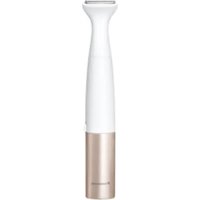


| Brand | Panasonic |
| Model | ES-WM31 |
| Product type | Multi-use trimmer for body and bikini |
| Power source | 1 LR6 (AA) alkaline battery 1.5V (not included) |
| Approximate battery life | About 1 month (use 5 min, 2 times/week) |
| Main functions | Trimming, close shaving and hair grooming |
| Interchangeable heads | Bikini trimmer head, bikini shaver head, body trimmer head |
| Included accessories | Skin protector, bikini comb (6 mm), bikini shaver cap, body trimmer cap, cleaning brush |
| Usage | Dry shaving only |
| Areas of use | Bikini area, groin, buttocks, armpits, arms, hands/fingers, bikini line, body |
| Safety | Use by children aged 8 and above under supervision; skin protector mandatory for groin/buttocks; do not use on face, lesions, etc. |
| Care and cleaning | Clean under running water; use cleaning brush; avoid alcohol and solvent |
| Blade lifespan (recommended replacement) | Bikini shaver outer foil: 1 year; Bikini shaver inner blade: 2 years; Bikini cutter head: 3 years; Body shaver head: 1.5 years |
| Sound level | 62 dB(A) |
| Use | Household use only |
Frequently Asked Questions - ES-WM31 PANASONIC
User questions about ES-WM31 PANASONIC
0 question about this device. Answer the ones you know or ask your own.
Ask a new question about this device
Download the instructions for your Epilator in PDF format for free! Find your manual ES-WM31 - PANASONIC and take your electronic device back in hand. On this page are published all the documents necessary for the use of your device. ES-WM31 by PANASONIC.
USER MANUAL ES-WM31 PANASONIC
Operating Instructions
(Household use) Multi-trimmer kit
Model No. ES-WM31

| English | 3 | Português | 88 | Česky | 172 |
| Deutsch | 17 | Svenska | 102 | Slovensky | 186 |
| Français | 32 | Dansk | 116 | Magyar | 200 |
| Italiano | 46 | Norsk | 130 | Română | 214 |
| Español | 60 | Suomi | 144 | Türkçe | 228 |
| Nederlands | 74 | Polski | 158 |
Panasonic
Operating Instructions
(Household use) Multi-trimmer kit
Model No. ES-WM31
Contents
Safety precautions ..... 4
Important information ...... 6
Parts identification ..... 7
Before use 7
Instructions......9
Replacing 12
Cleaning 14
Troubleshooting 15
Specifications ...... 16
Thank you for purchasing this Panasonic product.
Before operating this unit, please read these instructions completely and save them for future use.
WARNING
- This appliance can be used by children aged from 8 years and above and persons with reduced physical, sensory or mental capabilities or lack of experience and knowledge if they have been given supervision or instruction concerning use of the appliance in a safe way and understand the hazards involved. Children shall not play with the appliance. Cleaning and user maintenance shall not be made by children without supervision.
Safety precautions
Make sure to follow these instructions.
- To prevent accidents, injuries or damage to property, please follow the instructions below.

WARNING
Indicates potential hazard that could result in serious injury or death.

CAUTION
Indicates potential hazard that could result in minor injury or property damage.
Some parts of the safety precaution illustrations differ from the actual product.

WARNING
▶ This product
- Do not place within reach of children or infants. Do not let them use it. Doing so may cause injury or accidental ingestion of the accessories or removable small parts.
- Immediately stop using if there is an abnormality or malfunction. Failure to do so may cause fire or injury.

CAUTION
▶ To protect your skin - The following persons should not use this appliance:
- Persons with sensitive or delicate skin and persons with allergies
- Bikini trimmer head and shaver head is only for the bikini area/crotch/buttocks. (Do not use for genitals other than the outer lips of the vulva, anus, and associated mucous membranes.)
- Body trimmer head is only for the body hair. (Do not use for bikini area/crotch/buttocks.)
Failure to do so may cause injury to the skin.
- Do not use in the following body areas:
- Face
- Pre-existing injuries, rashes, moles, bruises, warts, pimples or any other protrusions, along with the surrounding areas of each
- Skin which is flaccid, limp, sagging, crepey, etc.

CAUTION
- Do not apply strong pressure to the skin or move repeatedly over the same area.
- Do not use with a jabbing motion.
Doing so may result in skin inflammation, abrasions, bleeding or even more serious injury.
- Pull the skin taut with your free hand whilst shaving.
- When using on hard-to-reach areas, please use a mirror or change position so that it is easier to see.
Failure to do so may result in skin inflammation, abrasions and/or bleeding.
- If skin problems appear after use, stop using the appliance and contact a dermatologist. Failure to do so may cause symptoms to worsen.
- When storing or carrying, always attach the attachment or the cap.
Failure to do so may cause injury to the skin or reduce the life of the outer foil.
- Check the outer foil for cracks or deformations before use.
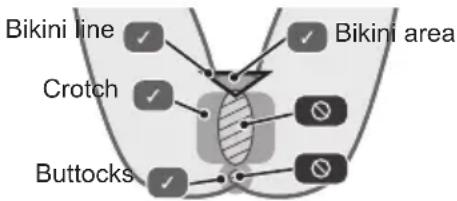
- Be sure to use the provided skin guard when applying the bikini trimmer head to your crotch or buttocks.
Failure to do so may cause injury to the skin.
▶ This product
- Do not forcefully press the outer foil. Do not touch the outer foil with fingers or nails when in use.
Doing so may cause injury to the skin or reduce the life of the outer foil.
- Do not touch the blade section (metallic section) of the inner blade. Doing so may cause injury to your hands.
- Do not share with your family or others. Doing so may cause infection or inflammation.
- Do not modify, disassemble or repair. Doing so may cause an accident or injury. → Contact an authorized service center for repair. ▶ The battery
- Do not throw the battery into fire or disassemble.
- The supply terminals are not to be short-circuited. Doing so may cause a burn or injury. • Always follow the cautions printed on the battery.
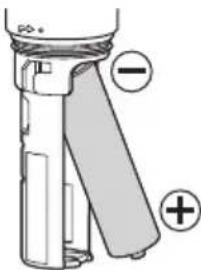
- Check the polarity of the battery (+ and -) and install it correctly.
- Remove the battery immediately and dispose of it safely when it is discharged.
- Remove the battery when not using the appliance for an extended period of time.
- Use the battery by the recommended use-by date. • Non-rechargeable batteries are not to be recharged.
Failure to do so may cause overheating or explosion of the battery, injury or contamination of surroundings due to leakage.
Important information
- Store the appliance in a place with low humidity after use.
Leaving the appliance in a bathroom or similar area may cause a malfunction due to condensation or rust.
- Do not drop or hit against other objects.
Parts identification![graph TD A["Step 1: Top bristles"] --> B["Step 2: Bristles with handles"] B --> C["Step 3: Top bristles with handles"] C --> D["Step 4: Top bristles with handles"] D --> E["Step 5: Top bristles with handles"] E --> F["Step 6: Top bristles with handles a, b, c"] F --> G["Step 7: Top bristles with han…](/content/2026/04/699349/images/8b13032758e1244f9aebe6f71ca0a2d657f110636372316a087be8f37aaac895.jpg)
A Attachment
① Skin guard ② Bikini comb ③ Bikini shaver cap ④ Body trimmer cap
B Head
⑤ Bikini trimmer head ⑥ Bikini shaver head
a Outer foil b Outer foil frame c Inner blade
⑦ Body trimmer head
d Blade e Blade release button
⑧ Power switch
[○/1]
⑨ Battery cover
Accessory
© Cleaning brush
A battery is not supplied. Please purchase it separately
Before use
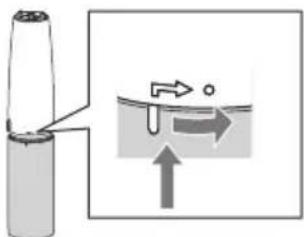
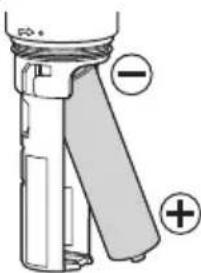
Installing the battery
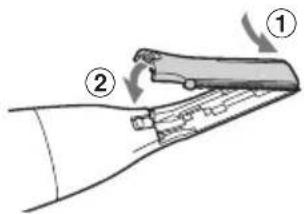
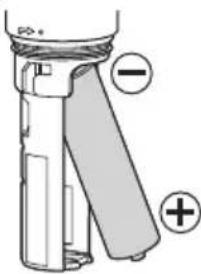
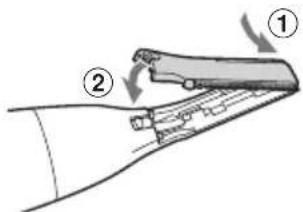
- Turn the battery cover in the direction of the arrow and remove it.
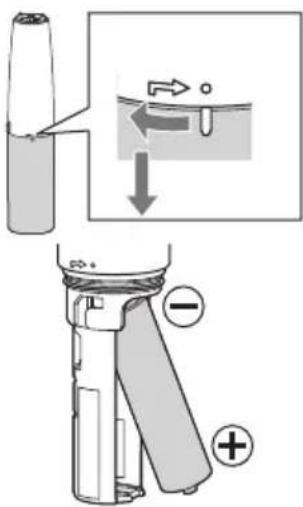
- Check the polarities of the battery, and install it.
- Attach the battery cover back on, aligning it with the mark on the main body, and turning it in the direction of the arrow.
Notes
- You can use the appliance for approximately 1 month with one Panasonic LR6 (AA alkaline battery). (When used for approx. 5 minutes at one time, twice a week in a room temperature of 20°C.)
- Thoroughly wipe the main body to prevent water droplets from getting inside when installing the battery.
- Use only LR6 (AA alkaline battery). Manganese batteries significantly degrade performance.
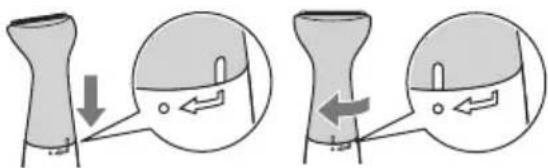
Installing the head
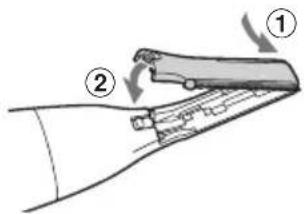
To attach the head to the main body, align it to the mark on the main body and turn it in the direction of the arrow. To remove it, take the steps in the reverse order. • The illustration shows the bikini trimmer head.
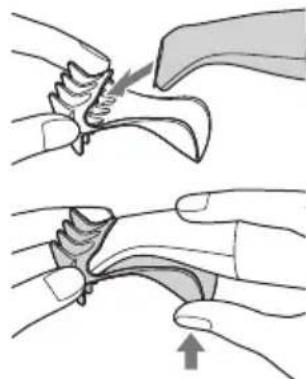
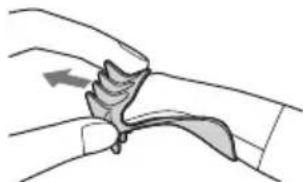
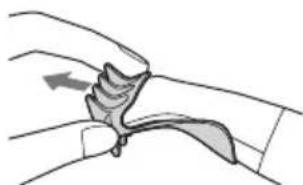
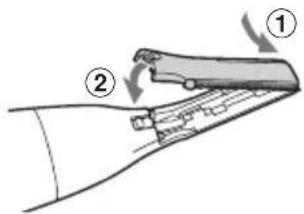
Installing the attachment
▶ Attaching
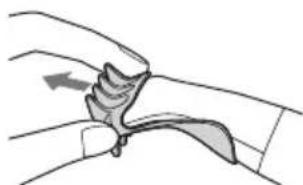
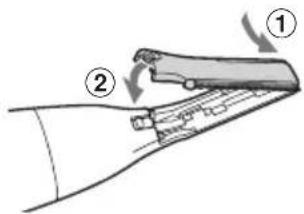
- Insert the head into the attachment until the edge of blade stops.
- While securing the attachment, push it into the head firmly with your fingers until it clicks.
• Make sure that the attachment does not come off.
▶ Removing
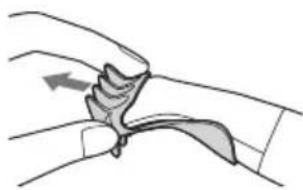
Pull out the attachment.
• The illustration shows the bikini comb.
Instructions
Dry shaving is recommended. If the hair is wet, it may be difficult to shave or trim to a uniform length as the hair sticks to the skin or tangles together.
1. Attach the head and attachment suitable for your purpose. 2. Turn the power switch to "I". 3. Turn the power switch to "O" after use.
- Clean the appliance after use.
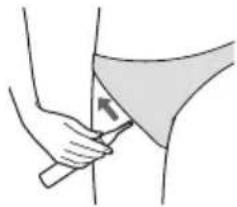
On your bikini area, crotch and buttocks
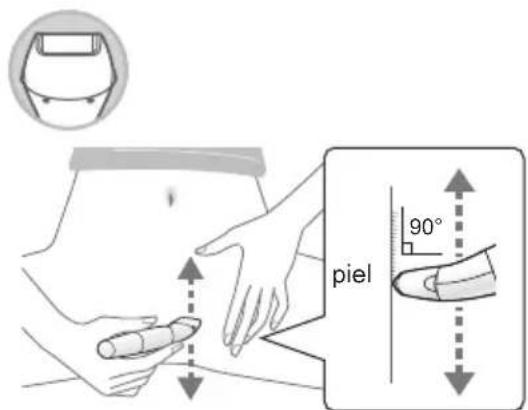
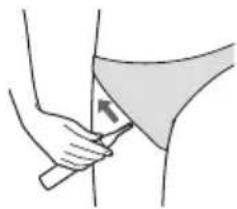
• To use the bikini trimmer head on your crotch or buttocks, be sure to use the provided skin guard. - When you apply the appliance to areas that you cannot see, use a mirror to avoid damaging the skin.
Tips
• To get a better shave, stretch the skin with your free hand, apply the head or attachment to the skin firmly and move the appliance gently and slowly. - If your hair lies flat on the skin, stroke the hair against the flow to make it stand while shaving.
Close shaving
Bikini area (not including crotch and buttocks area)

1 Trim the hair to 1.5 mm or less with the bikini trimmer head.
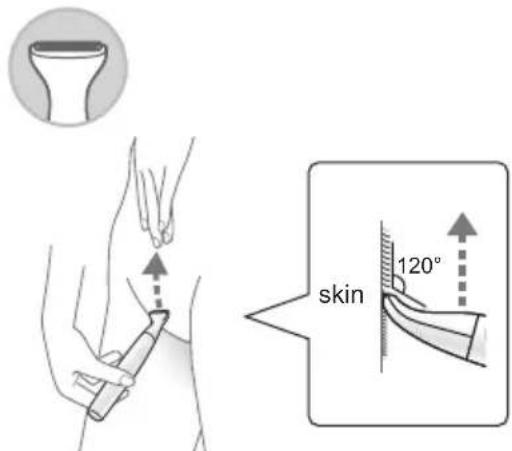
- Apply the bikini trimmer head to the skin firmly and trim upwards using slow and gentle strokes.
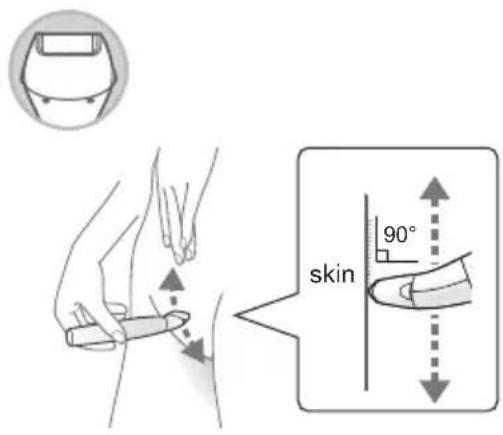
2 Shave completely with the bikini shaver head.
Crotch and buttocks
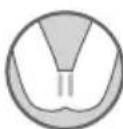
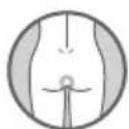
1 Attach the provided skin guard to the bikini trimmer head and trim the hair to 1.5 mm or less.
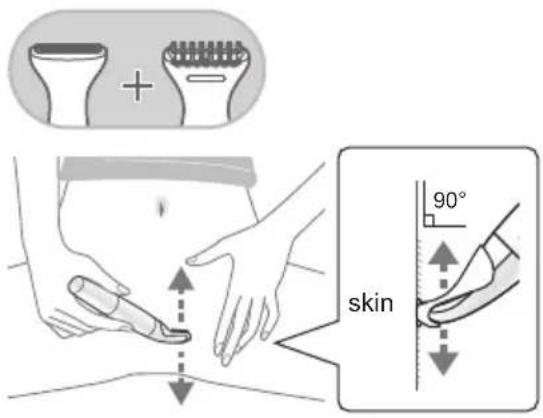
2 Shave completely with the bikini shaver head.
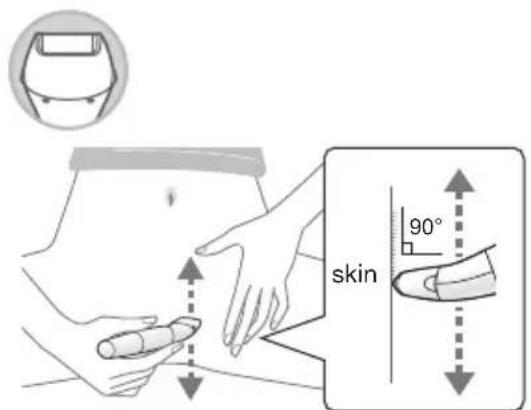
Note
- An injury may result even with the skin guard attached.
- Be careful not to allow the appliance to make contact with the prohibited area. (See figure on page 5.)
- Do not press the appliance strongly against the soft area.
- If the hair is not trimmed short enough with the bikini trimmer head, it may be difficult to get a close shave with the bikini shaver head.
Trimming
Only for bikini area

1 Set the provided bikini comb to the bikini trimmer head and trim.
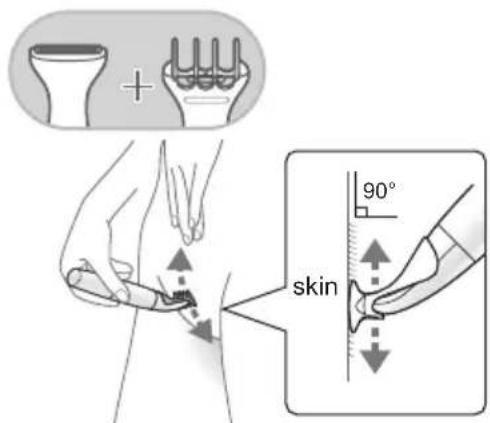
• The finished length is approximately 6 mm.
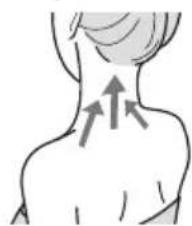
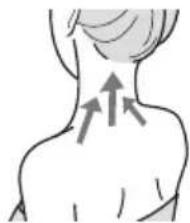
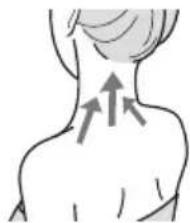
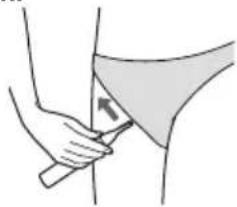
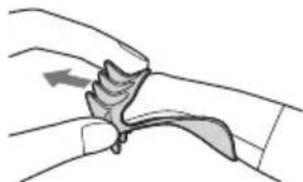
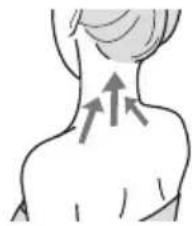
On your body
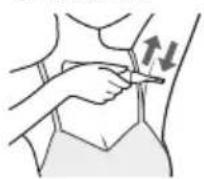
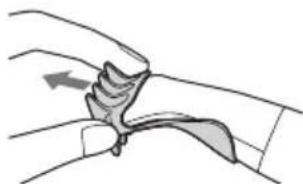
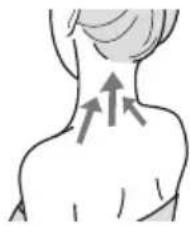
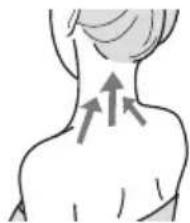
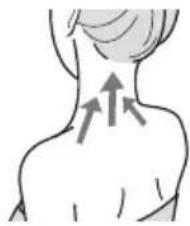
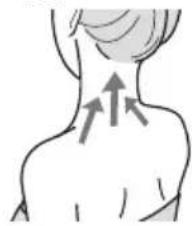
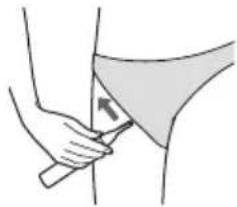
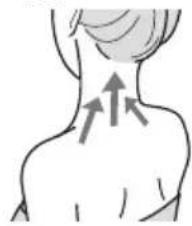
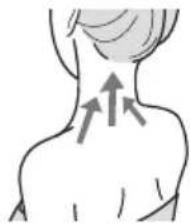
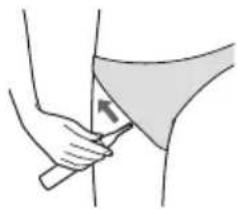
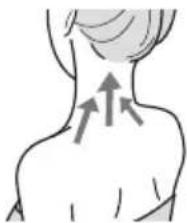
1 Set the body trimmer head and trim.
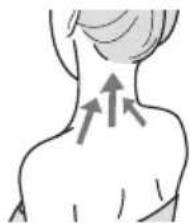
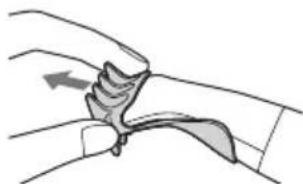
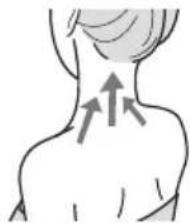
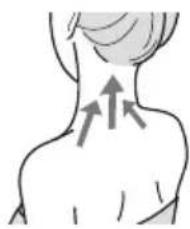
- Move the appliance toward the direction indicated by an arrow slowly against the hair flow.
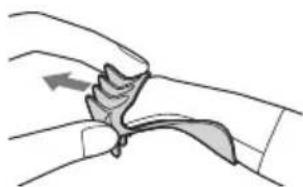
Underarms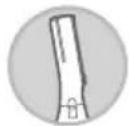
Arms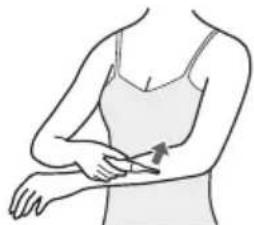
Legs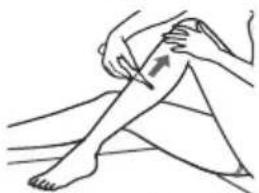
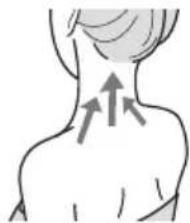
Nape of the neck/back
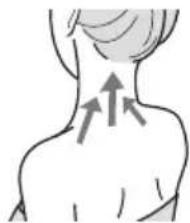
Hands/fingers Bikini line
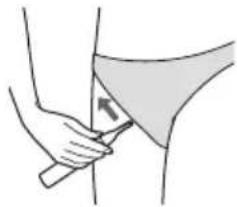
Replacing
Make sure the power switch is in the "O" position.
Removing and attaching the bikini shaver head
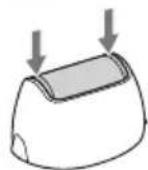
- Remove the outer foil from the outer foil frame only when replacing it.
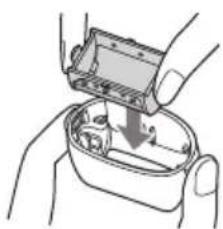
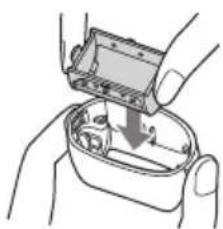
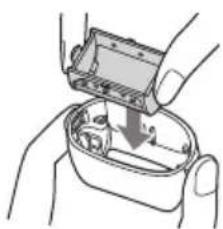
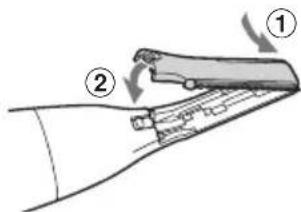
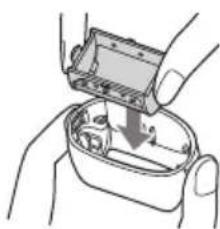
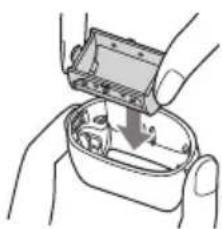
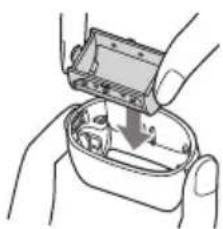
Removing the outer foil frame
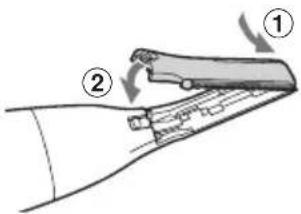
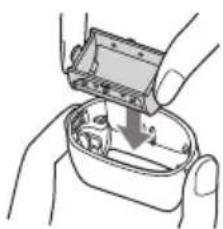
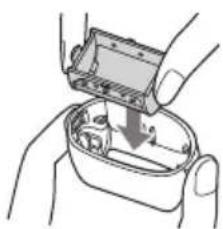
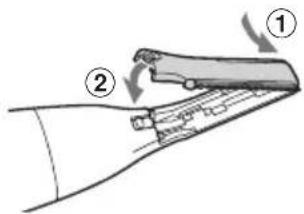
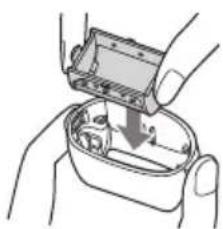
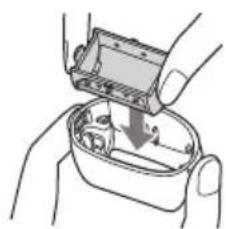
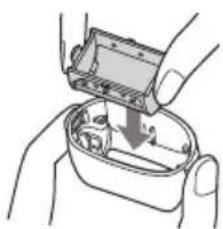
Lift the outer foil frame upwards.
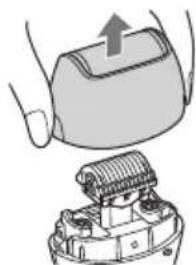
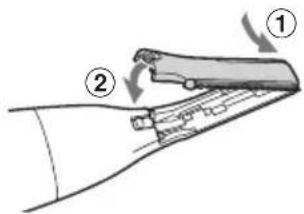
Attaching the outer foil frame Attach the outer foil frame evenly until it clicks.
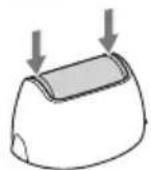
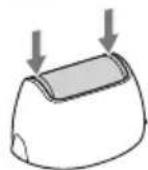
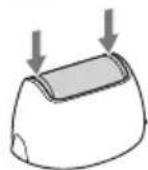
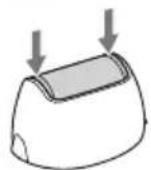
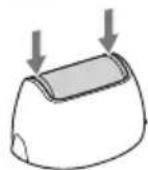
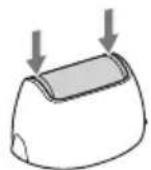
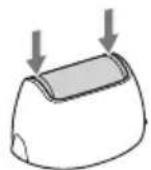
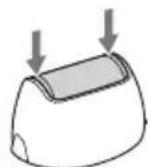
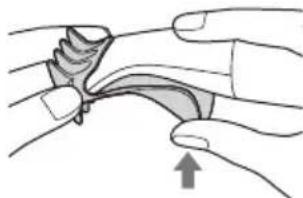
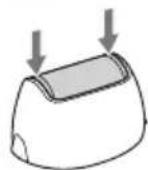
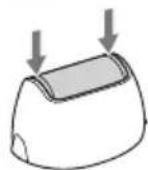
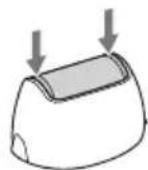
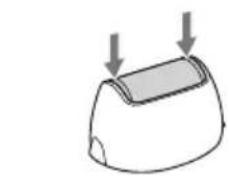
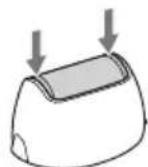
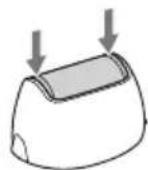
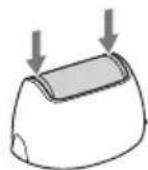
Removing the outer foil Push both ends of the outer foil in.
Attaching the outer foil Securely attach the outer foil until it clicks.
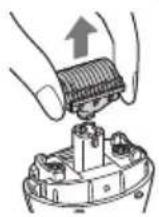
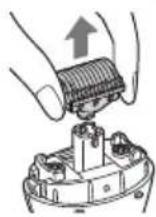
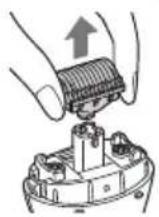
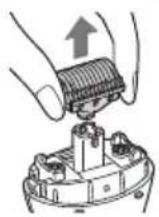
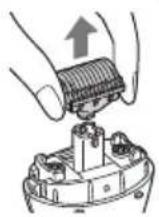
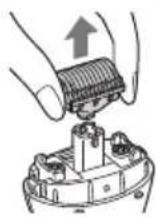
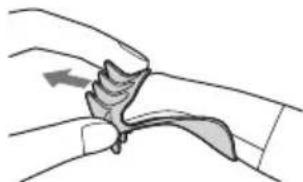
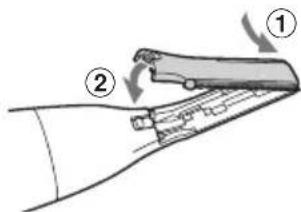
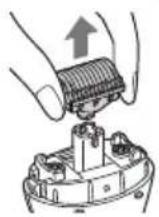
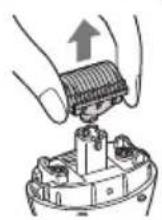
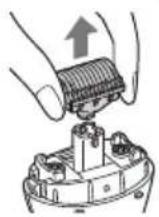
Removing the inner blade Pull the inner blade straight out.
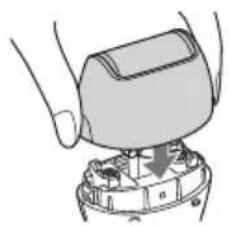
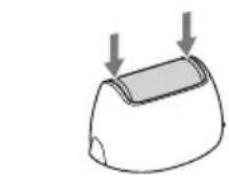
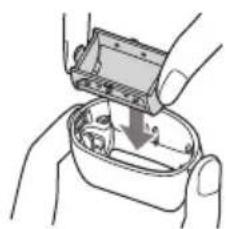
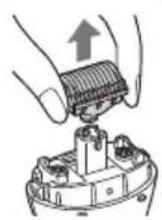
Attaching the inner blade Securely attach the outer foil until it clicks.
Removing and attaching the body trimmer head
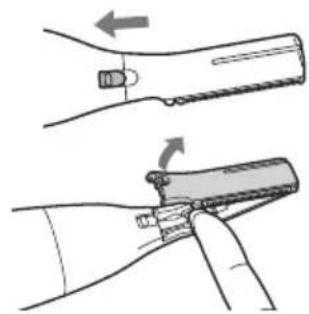
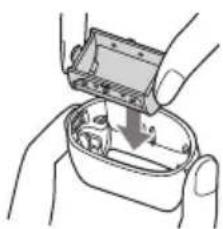
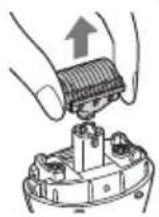
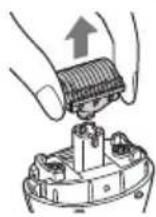
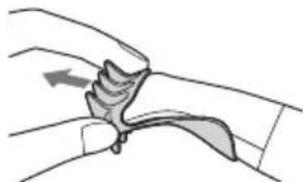
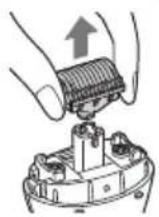
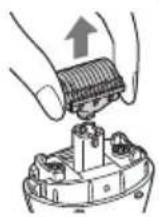
Removing the blade
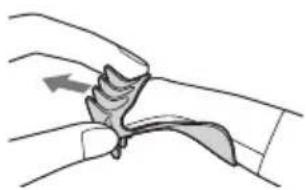
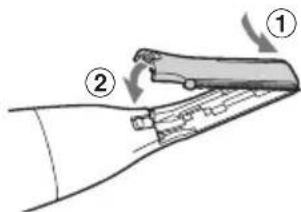
- Slide the blade release button.
- It is easier to slide the blade release button using your fingernail.
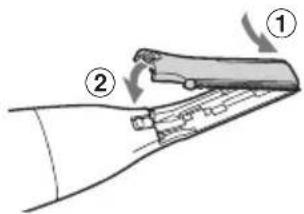
- Remove the blade.
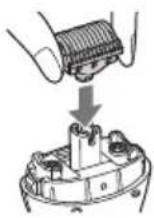
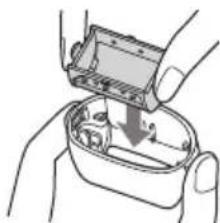
Attaching the blade
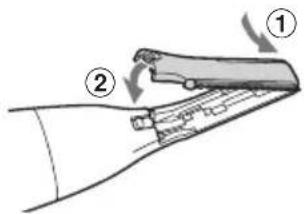
- Insert the hook at the end of the head into the hole on the blade to attach it.
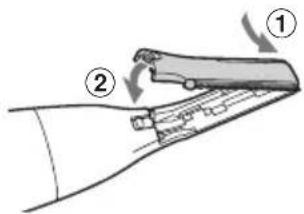
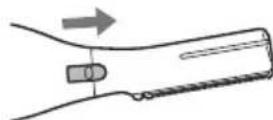
- Slide the blade release button.
- It is easier to slide the blade release button using your fingernail.
Cleaning
- Clean the appliance after use, otherwise it might affect the cutting performance.
- Remove the attachment and the head when cleaning. Remove the outer foil frame when cleaning the bikini shaver head.
- Be careful not to hit the main body on the sink or any other object while draining the water. Failure to do so may cause malfunction.
- Do not wipe with alcohol or nail polish remover. Doing so may cause malfunction, cracking of the parts or discoloration.
Wet cleaning
Clean the main body, the attachment and the head with running water.
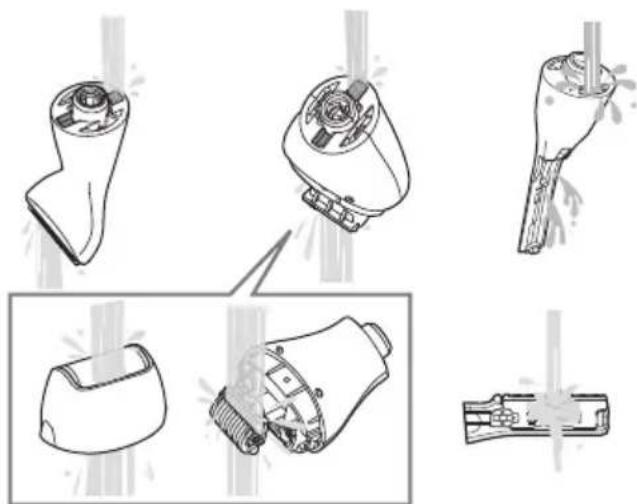
▶ After wiping off water drops with a towel
Let them dry naturally.
Remove the head to dry it quicker.
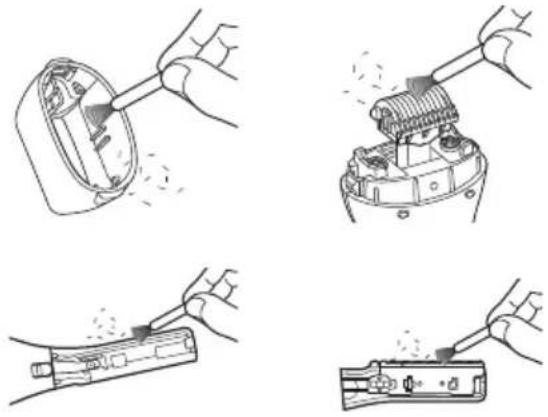
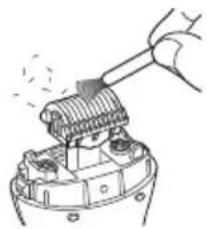
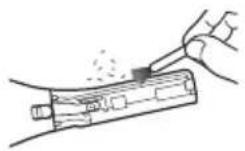
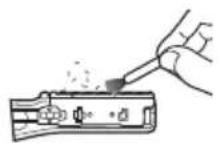
Brush cleaning
Clean the hair dust with the cleaning brush.
Storing
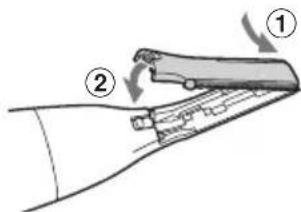
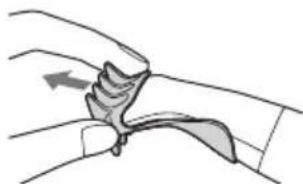
Attach the attachment or the cap to the head.
Troubleshooting
If the problems still cannot be solved, contact the store where you purchased the appliance or a service center authorized by Panasonic for repair.
The appliance is not cutting as well as before.
- Replace the blade. ■ Guidelines for replacement
| Bikini shaver head | Outer foil Approximately 1 year |
| Inner blade Approximately 2 years | |
| Bikini trimmer head Approximately 3 years | |
| Body trimmer head Approximately 1.5 years | |
- Replace with a new battery.
- Clean the hair dust.
The appliance is not working.
- Make sure the battery is installed correctly.
- Replace with a new battery.
- Clean the hair dust.
Specifications
| Power supply Dry-cell battery | |
| Battery type | One LR6 (AA) alkaline battery• Sold separately |
| Airborne Acoustical Noise | 62 (dB(A) re 1 pW) |
This product is intended for household use only.
Disposal of Old Equipment Only for European Union and countries with recycling systems
This symbol on the products, packaging, and/or accompanying documents means that used electrical and electronic products must not be mixed with general household waste. For proper treatment, recovery and recycling of old products, please take them to applicable collection points in accordance with your national legislation.
By disposing of them correctly, you will help to save valuable resources and prevent any potential negative effects on human health and the environment. For more information about collection and recycling, please contact your local authority.
Penalties may be applicable for incorrect disposal of this waste, in accordance with national legislation.
Authorized Representative in EU:
Panasonic Marketing Europe GmbH
Panasonic Testing Centre
Winsbergring 15, 22525 Hamburg, Germany
Importer:
Panasonic Marketing Europe GmbH
Hagenauer Strasse 43, 65203 Wiesbaden, Germany
Manufactured by:
Panasonic Corporation
1006, Oaza Kadoma, Kadoma City, Osaka, Japan
Panasonic
Operating Instructions
Notes
Instructions

Legs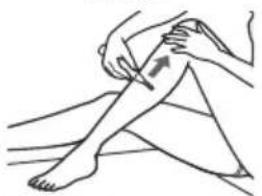
Neck/Back
Attaching the
outer film frame
Place the
Panasonic Testing Centre
Winsbergring 15, 22525 Hamburg, Germany
Importer:
Panasonic Marketing Europe GmbH
Hagenauer Strasse 43, 65203 Wiesbaden, Germany
Manufactured by:
Panasonic Corporation
1006, Oaza Kadoma, Kadoma City, Osaka, Japan
Panasonic
User Manual
Instructions......38
Replacement......41
Cleaning 43
Troubleshooting 44
Specifications 45
Notes
Instructions
Legs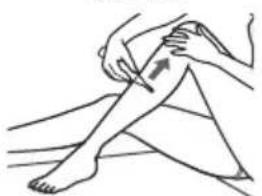
Neck/back
Replacement
Panasonic Testing Centre
Winsbergring 15, 22525 Hamburg, Germany
Importer:
Panasonic Marketing Europe GmbH
Hagenauer Strasse 43, 65203 Wiesbaden, Germany
Manufactured by:
Panasonic Corporation
1006, Oaza Kadoma, Kadoma City, Osaka, Japan
WARNING
Note
Instructions

Legs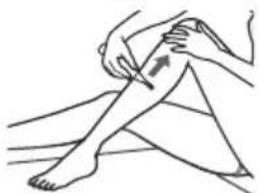
Neck/back
Replacement
Panasonic Testing Centre
Winsbergring 15, 22525 Hamburg, Germany
Importer:
Panasonic Marketing Europe GmbH
Hagenauer Strasse 43, 65203 Wiesbaden, Germany
Manufactured by:
Panasonic Corporation
Notes
Instructions
2 Shave completely with the bikini shaver head.
Note
Legs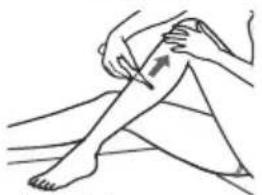
Neck/back
Replacement
Panasonic Testing Centre
Winsbergring 15, 22525 Hamburg, Germany
Importer:
Panasonic Marketing Europe GmbH
Hagenauer Strasse 43, 65203 Wiesbaden, Germany
Manufactured by:
Panasonic Corporation
Notes

Instructions
Legs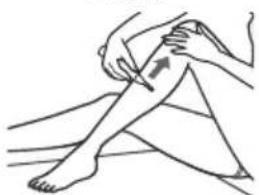
Neck/back
Replace

- Slide the blade release button.
Panasonic Testing Centre
Winsbergring 15, 22525 Hamburg, Germany
Importer:
Panasonic Marketing Europe GmbH
Hagenauer Strasse 43, 65203 Wiesbaden, Germany
Produced by:
Panasonic Corporation
1006, Oaza Kadoma, Kadoma-shi, Osaka, Japan
Panasonic
Observations
Install accessory
Installation

Instructions
Legs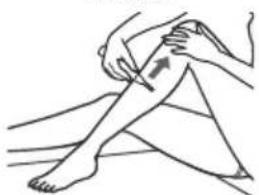
Neck/back
Replacement
Panasonic Testing Centre
Winsbergring 15, 22525 Hamburg, Germany
Importer:
Panasonic Marketing Europe GmbH
Hagenauer Strasse 43, 65203 Wiesbaden, Germany
Manufactured by:
Panasonic Corporation
Accessories
Comments

Instructions

Ben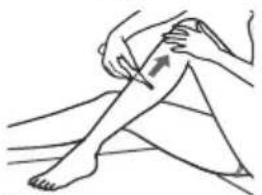
Back/neck
Hands/fingers Bikini line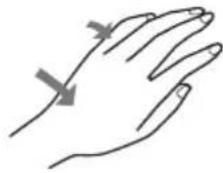
Replace
Panasonic Testing Centre
Winsbergring 15, 22525 Hamburg, Germany
Importer:
Panasonic Marketing Europe GmbH
Hagenauer Strasse 43, 65203 Wiesbaden, Germany
Manufactured by:
Panasonic Corporation
1006, Oaza Kadoma, Kadoma City, Osaka, Japan
Panasonic
User Manual
Note
Instructions
Legs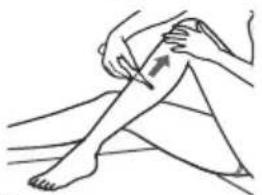
Neck
Replacement
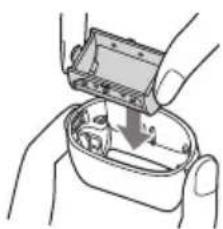
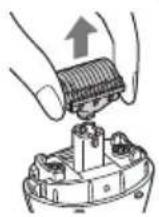
- Press the button to release the blade.
Panasonic Testing Centre
Winsbergring 15, 22525 Hamburg, Germany
Importer:
Panasonic Marketing Europe GmbH
Hagenauer Strasse 43, 65203 Wiesbaden, Germany
Manufactured by:
Panasonic Corporation
1006, Oaza Kadoma, Kadoma, Osaka, Japan
Panasonic
User Manuals
(Home use) Multitrimmer set
Model No. ES-WM31
Table of contents
Notes
Instructions
Legs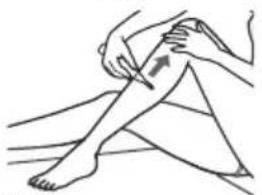
Neck/back
Hands/fingers Bikini line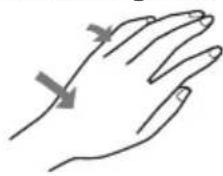
Replacement
Attaching the outer foil frame

Attaching the inner blade
Panasonic Testing Centre
Winsbergring 15, 22525 Hamburg, Germany
Importer:
Panasonic Marketing Europe GmbH
Hagenauer Strasse 43, 65203 Wiesbaden, Germany
Produced by:
Panasonic Corporation
1006, Oaza Kadoma, Kadoma, Osaka, Japan
Panasonic
Instructions for Use
Notes

Instructions

Legs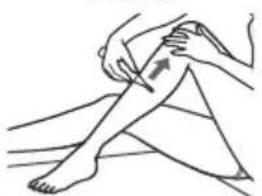
Neck/Back
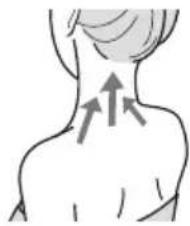
Hands/Fingers Bikini line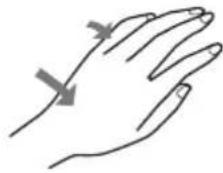
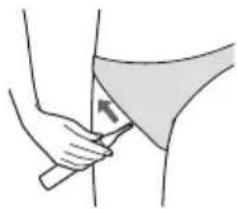
Replacing Parts

Panasonic Testing Centre
Winsbergring 15, 22525 Hamburg, Germany
Importer:
Panasonic Marketing Europe GmbH
Hagenauer Strasse 43, 65203 Wiesbaden, Germany
Manufacturer:
Panasonic Corporation
1006, Oaza Kadoma, Kadoma-ku, Osaka, Japan

Panasonic
Instruction Manual
Notes
Attachment Installation
Attaching
Instructions
Legs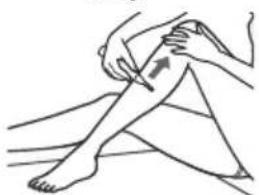
Neck/Back
Arms/Fingers Bikini line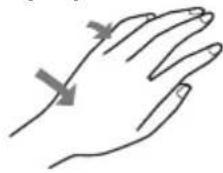
Replacement
Panasonic Testing Centre
Winsbergring 15, 22525 Hamburg, Germany
Importer:
Panasonic Marketing Europe GmbH
Hagenauer Strasse 43, 65203 Wiesbaden, Germany
Notes
Installing the attachment
▶ Attachment
Instructions
Legs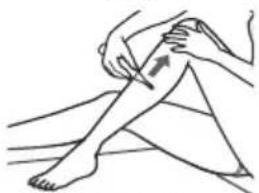
Neck/back
Replacement
Czech
Panasonic Testing Centre
1006, Oaza Kadoma, Kadoma City, Osaka,
Japan

Panasonic
Operating Instructions
Notes

Instructions
Legs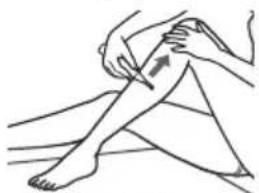
Neck/back
Arms/fingers Bikini line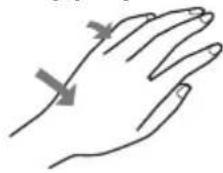
Replacement
▶ After wiping off water droplets with a towel
Panasonic Testing Centre
Winsbergring 15, 22525 Hamburg, Germany
Importer:
Panasonic Marketing Europe GmbH
Hagenauer Strasse 43, 65203 Wiesbaden, Germany
Manufacturer:
Panasonic Corporation
1006, Oaza Kadoma, Kadoma City, Osaka,
Japan
Panasonic
Operating Instructions
Notes

Instructions
Legs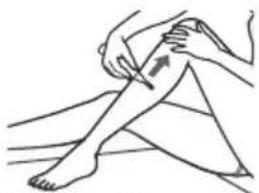
Neck
Replacement
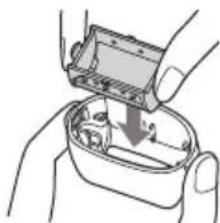
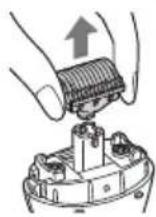
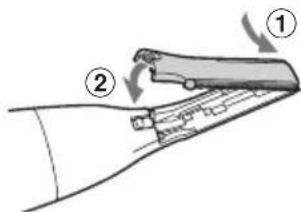
- Slide the blade release button.
Storage
Panasonic Testing Centre
Observations

Instructions
Legs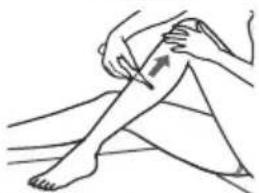
Neck/back
Hands/fingers Bikini line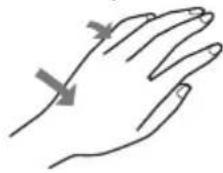
Replacement
Attaching the inner blade
Panasonic Testing Centre
Winsbergring 15, 22525 Hamburg, Germany
Importer:
Panasonic Marketing Europe GmbH
Hagenauer Strasse 43, 65203 Wiesbaden, Germany
Manufactured by:
Panasonic Corporation
1006, Oaza Kadoma, Kadoma City, Osaka, Japan
Panasonic
User Manual
Notes

Instructions
Legs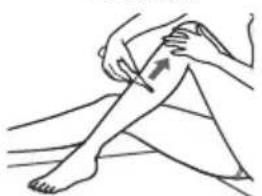
Neck/back area
Replacement
Panasonic Testing Centre
Winsbergring 15, 22525 Hamburg, Germany
© Panasonic Corporation 2024
⑤ EN, DE, FR, IT, SP, NL, PT, SV, DA, NB, FI, PL, CS, SK, HU, RO, TR
Printed in Thailand
SESWM3130103W A0424-0


- PANASONIC
- CONTENTS
- WARNING
- SAFETY PRECAUTIONS
- CAUTION
- IMPORTANT INFORMATION
- A ATTACHMENT
- B HEAD
- ACCESSORY
- BEFORE USE
- INSTALLING THE BATTERY
- NOTES
- INSTALLING THE HEAD
- INSTALLING THE ATTACHMENT
- ATTACHING
- REMOVING
- INSTRUCTIONS
- TIPS
- CLOSE SHAVING
- SHAVE COMPLETELY WITH THE BIKINI SHAVER HEAD
- ATTACH THE PROVIDED SKIN GUARD TO THE BIKINI TRIMMER HEAD AND TRIM THE HAIR TO 1.5 MM OR LESS
- NOTE
- TRIMMING
- SET THE PROVIDED BIKINI COMB TO THE BIKINI TRIMMER HEAD AND TRIM
- ON YOUR BODY
- SET THE BODY TRIMMER HEAD AND TRIM
- REPLACING
- REMOVING AND ATTACHING THE BIKINI SHAVER HEAD
- REMOVING AND ATTACHING THE BODY TRIMMER HEAD
- REMOVING THE BLADE
- ATTACHING THE BLADE
- CLEANING
- WET CLEANING
- BRUSH CLEANING
- STORING
- TROUBLESHOOTING
- THE APPLIANCE IS NOT CUTTING AS WELL AS BEFORE
- THE APPLIANCE IS NOT WORKING
- DISPOSAL OF OLD EQUIPMENT ONLY FOR EUROPEAN UNION AND COUNTRIES WITH RECYCLING SYSTEMS
- ATTACHING THE
- OUTER FILM FRAME
- IMPORTER
- MANUFACTURED BY
- REPLACEMENT
- REPLACE
- PRODUCED BY
- OBSERVATIONS
- INSTALL ACCESSORY
- INSTALLATION
- ACCESSORIES
- COMMENTS
- TABLE OF CONTENTS
- ATTACHING THE OUTER FOIL FRAME
- ATTACHING THE INNER BLADE
- REPLACING PARTS
- ATTACHMENT INSTALLATION
- ATTACHMENT
- MANUFACTURER
- STORAGE
Brand : PANASONIC
Model : ES-WM31
Category : Epilator