HYPERX Cloud Orbit Software - Helmet

Cloud Orbit Software - Helmet HYPERX - Free user manual and instructions

Find the device manual for free Cloud Orbit Software HYPERX in PDF.
📄 210 pages English EN Download 💬 AI Question
Notice HYPERX Cloud Orbit Software - page 7
Pick your language and provide your email: we'll send you a specifically translated version.

User questions about Cloud Orbit Software HYPERX

0 question about this device. Answer the ones you know or ask your own.

Ask a new question about this device

The email remains private: it is only used to notify you if someone responds to your question.

No questions yet. Be the first to ask one.

Download the instructions for your Helmet in PDF format for free! Find your manual Cloud Orbit Software - HYPERX and take your electronic device back in hand. On this page are published all the documents necessary for the use of your device. Cloud Orbit Software by HYPERX.

USER MANUAL Cloud Orbit Software HYPERX

HyperX Cloud Orbit Software

Find the language and latest documentation for your HyperX Cloud Orbit Software here.

HyperX Cloud Orbit Software Guide

For instructions in English
Para instrucciones en Español
Für Anleitungen in Deutsch
Pour des instructions en Français
...... Per le istruzioni in Italiano
Por as instruções em Português
Instrukcje w języku Polskim
Для инструкции на Русском
Turkce talimatlar icin
日本語マニュアル用
한국어 안내
......คำแนะนำภาษาไทย
Đế xem hướng dẫn bằng tiếng Việt

Simplified Chinese ..... 简体中文说明书

Traditional Chinese ....繁體中文說明

HyperX Cloud Orbit Software

Part Numbers

HX-HSCO-GM/WW

HX-HSCOS-GM/WW

TABLE OF CONTENTS

Main Page....3

HRTF Personalization 4

Head Gestures ....5

Adding a Gesture Profile....6

Deleting a Gesture Profile....6

Binding a Press and Hold Key Function to a Head Gesture....7

Binding a Press and Release Key Function to a Head Gesture 8

Changing the Head Gesture Sensitivity....9

Binding a Key Function to a Twitch Mode Head Gesture 10

Sound Profiles....11

Device Info 12

Firmware 13

Main Page
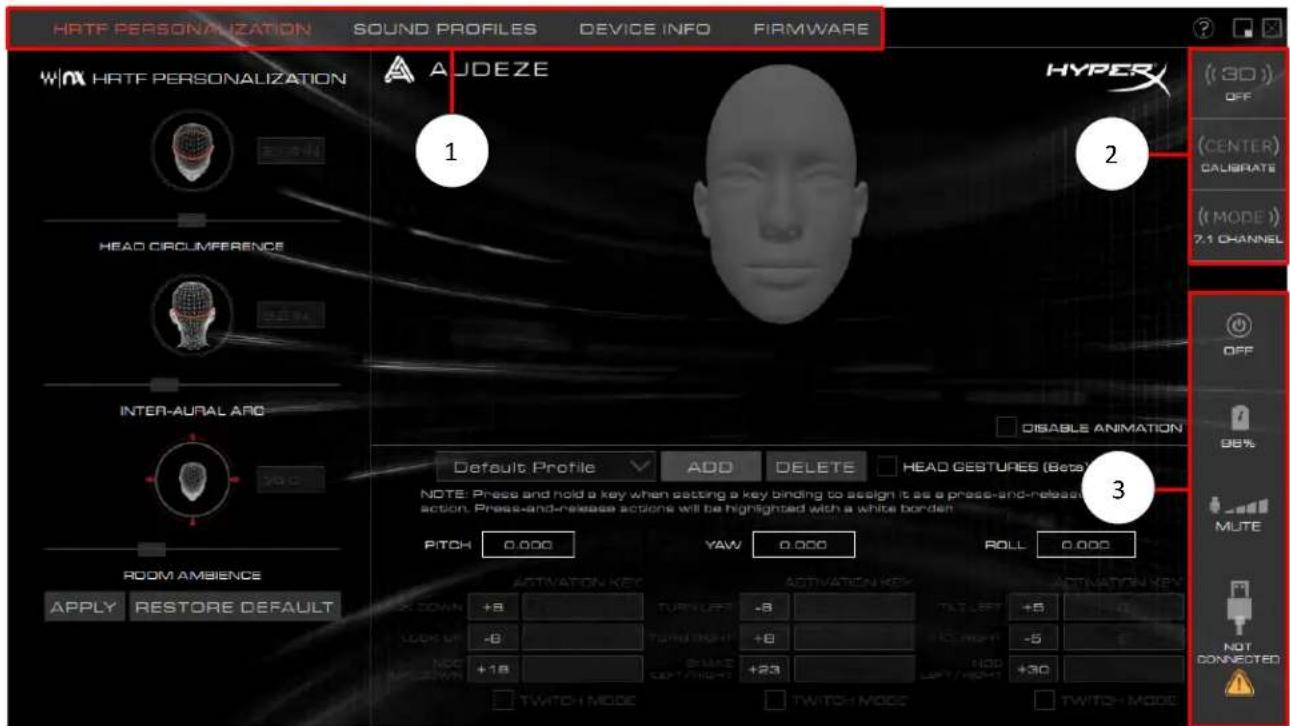
HYPERX Cloud Orbit Software - Main Page - 1

text_image HRTF PERSONALIZATION SOUND PROFILES DEVICE INFO FIRMWARE WIN HRTF PERSONALIZATION AUDEZE HYPER (3D) OFF (CENTER) CALIBRATE (MODE) 7.1 CHANNEL HEAD CIRCUMFERENCE INTER-AURAL ARC DISABLE ANIMATION Default Profile ADD DELETE HEAD GESTURES (Beta) NOTE: Press and hold a key when setting a key binding to assign it as a press-and-release action. Press-and-release actions will be highlighted with a white border PITCH 0.000 YAW 0.000 ROLL 0.000 ROOM AMBIENCE APPLY RESTORE DEFAULT ACTIVATION KEY TURRI LEFT +8 TORTI RIGHT +8 NOC +18 2-MATE DEPT/HIGHT +23 TNTCH MODE TNTCH MODE SWITCH MODE TNTCH MODE ROLL 0.000 NOT CONNECTED

1. Menu tabs

  • HRTF Personalization: customize 3D sound to personal preferences and configure gesture controls
    • Sound Profiles: change EQ settings
    • Device Info: general headset information
    • Firmware: update headset firmware

2. Headset controls

• 3D mode: change between 3D Manual*, 3D Auto*, 3D On, and 3D Off
- Center button: center the headset when using 3D Manual* or 3D Auto* modes
• Audio mode: change between 7.1 channel, 2 channel, and Hi-Res 2 channel modes

3. Headset states

- Headset on/off, battery level, microphone level, USB connection

*Available only on Orbit S

HRTF Personalization
HYPERX Cloud Orbit Software - HRTF Personalization - 1

text_image HRTF PERSONALIZATION W\X HRTF PERSONALIZATION 21.7 IN HEAD CIRCUMFERENCE 9.8 IN INTER-AURAL ARC 35.0 ROOM AMBENCE APPLY RESTORE DEFAULT 1 2 3

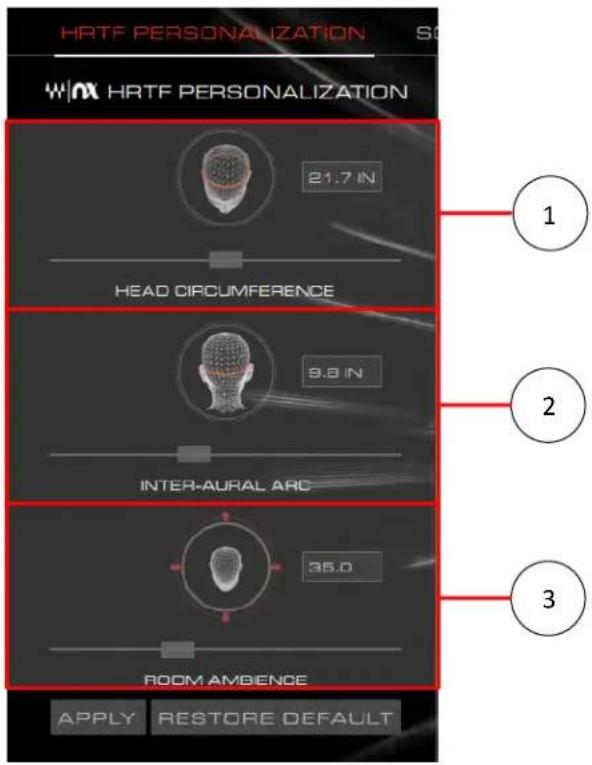
This page allows you to adjust the HRTF settings to fine tune the 3D sound to your personal preferences.

1. Head Circumference

- Adjust slider to match the circumference of your head in inches.

2. Inter-aural Arc

- Adjust slider to match the circumference of one ear canal to the other, measured around the back of your head, in inches.

3. Room Ambience

- Adjust slider to control the amount of reverb in the 3D audio.

Head Gestures
HYPERX Cloud Orbit Software - Head Gestures - 1

text_image Default Profile ADD DELETE HEAD GESTURES (Beta) NOTE: Press and hold a key when setting a key binding to assign it as a press-and-release action. Press-and-release actions will be highlighted with a white border. PITCH -0.067 YAW -0.290 ROLL 0.109 ACTIVATION KEY TURN LEFT -8 TURN RIGHT +8 BRAKE +23 TITCH MODE TWITCH MODE ACTIVATION KEY TILT LEFT +5 Q TILT RIGHT -5 E NOD +30 TITCH MODE TWITCH MODE 4 5 6

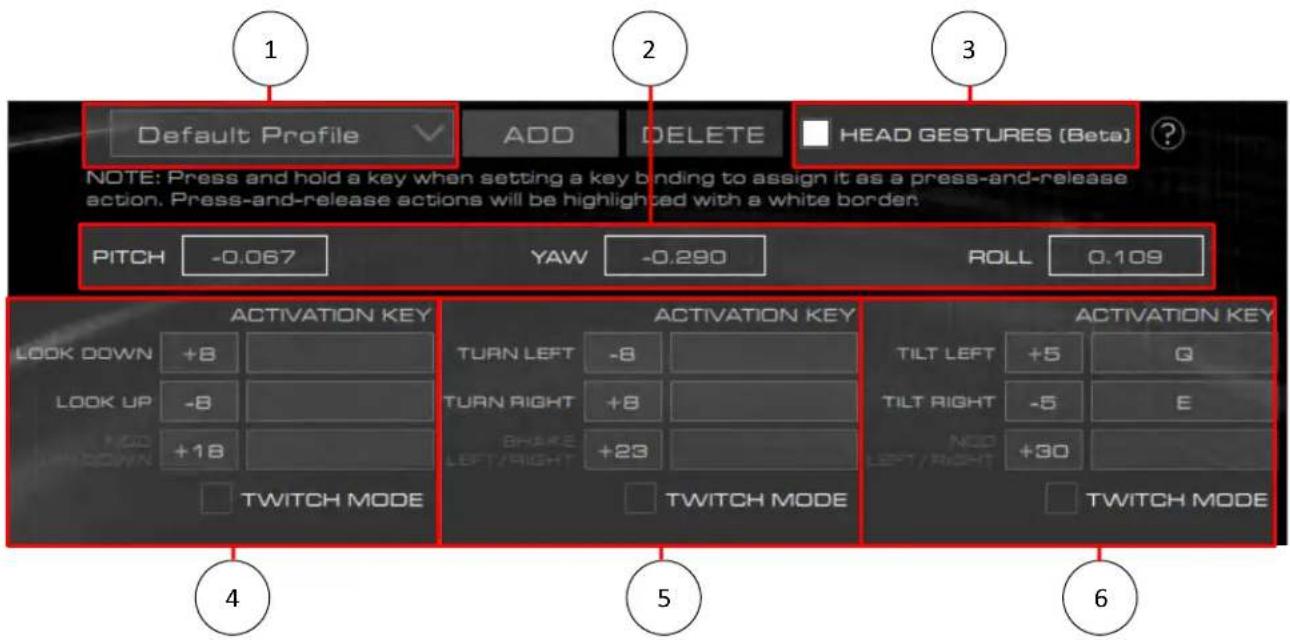
This page allows you to configure head gesture controls and profiles for the headset*. Headset must be set to 3D Manual mode for correct behavior.

  1. Profile Selection
  2. Head gestures on/off toggle
  3. Pitch, yaw, and roll sensor values
  4. Pitch gesture controls
    a. Look down, look up, nod up/down

  5. Yaw gesture controls
    a. Turn left, turn right, shake left/right

  6. Roll gesture controls
    a. Tilt left, tilt right, nod left/right

*Available only on Orbit S

Adding a Gesture Profile

  1. Click on the "Add" button to add a new gesture profile.

HYPERX Cloud Orbit Software - Adding a Gesture Profile - 1

text_image Default Profile ADD DELETE HEAD GESTURES (Beta)
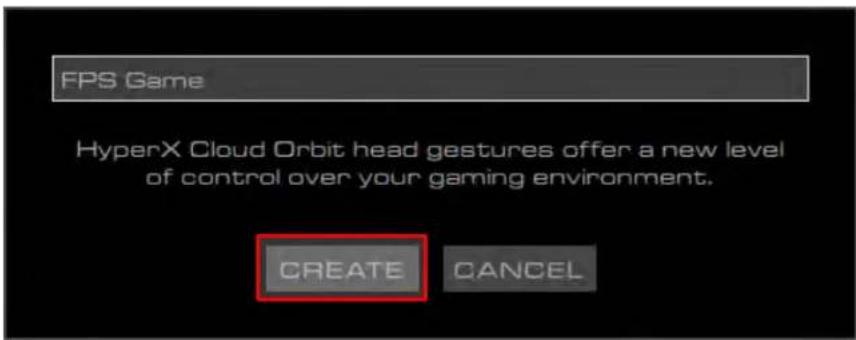
  1. Type in a name for the profile and click on the "Create" button.
HYPERX Cloud Orbit Software - Adding a Gesture Profile - 2

text_image FPS Game HyperX Cloud Orbit head gestures offer a new level of control over your gaming environment. CREATE CANCEL
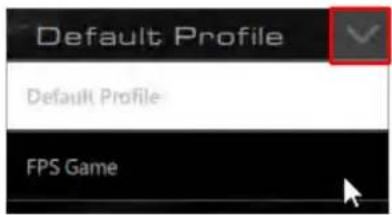
  1. Select the new profile by clicking on the down arrow next to the profile name.
HYPERX Cloud Orbit Software - Adding a Gesture Profile - 3

text_image Default Profile Default Profile FPS Game

Deleting a Gesture Profile

  1. Select the gesture profile to be deleted from the profile dropdown menu.
  2. Click on the "Delete" button to delete the selected profile.

HYPERX Cloud Orbit Software - Deleting a Gesture Profile - 1

text_image Default Profile ADD DELETE HEAD GESTURES (Beta)

Binding a Press and Hold Key Function to a Head Gesture

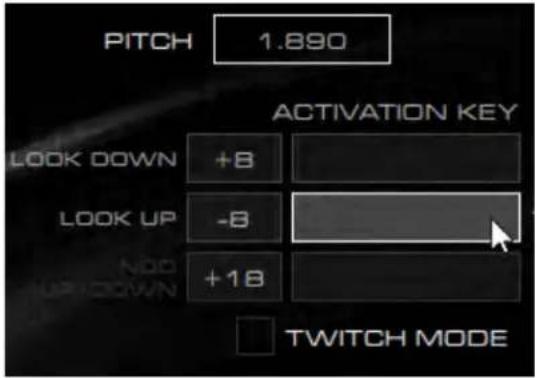
  1. Click on the right box next to the desired head gesture to set a key function to.
HYPERX Cloud Orbit Software - Binding a Press and Hold Key Function to a Head Gesture - 1

text_image PITCH 1.890 ACTIVATION KEY LOOK DOWN +8 LOOK UP -8 +18 Twitch MODE
  1. Press up to two key buttons to bind them as a press and hold function.

a. Alphanumeric characters, Shift, Alt, Ctrl, F1-F12, and top row numbers are supported key functions. Numpad keys are not supported.

  1. Activate the function by moving the headset to the matching motion. The function will be held while the head gesture motion is held.

a. Example: Move headset pitch up -8 degrees to press and hold "R" key.

HYPERX Cloud Orbit Software - Binding a Press and Hold Key Function to a Head Gesture - 2

Binding a Press and Release Key Function to a Head Gesture

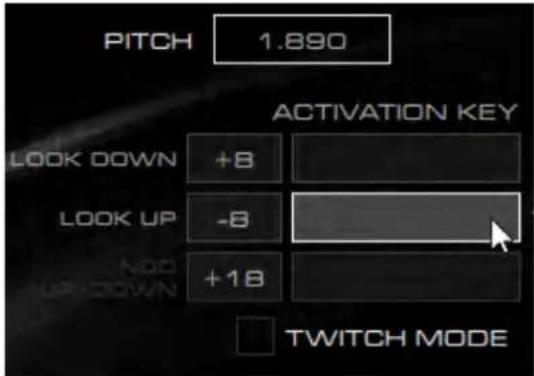
  1. Click on the right box next to the desired head gesture to set a key function to.
HYPERX Cloud Orbit Software - Binding a Press and Release Key Function to a Head Gesture - 1

text_image PITCH 1.890 ACTIVATION KEY LOOK DOWN +8 LOOK UP -8 +18 Twitch MODE
  1. Press and hold up to two key buttons to bind them as a press and release function. A white border will appear around the key function box.

a. Alphanumeric characters, Shift, Alt, Ctrl, F1-F12, and top row numbers are supported key functions. Numpad is not supported.

  1. Activate the function by moving the headset to the matching motion. The function will be pressed and released when performing the head gesture.

a. Example: Move headset pitch up -8 degrees to press and release "R" key.

HYPERX Cloud Orbit Software - Binding a Press and Release Key Function to a Head Gesture - 2

Changing the Head Gesture Sensitivity

  1. Click on the left box next to the desired head gesture.

HYPERX Cloud Orbit Software - Changing the Head Gesture Sensitivity - 1

  1. Increase/decrease the value to make the head gesture control more/less sensitive.

a. Example: Increase the "look up" gesture sensitivity by changing from -8 degrees to -10 degrees.

HYPERX Cloud Orbit Software - Changing the Head Gesture Sensitivity - 2

Binding a Key Function to a Twitch Mode Head Gesture

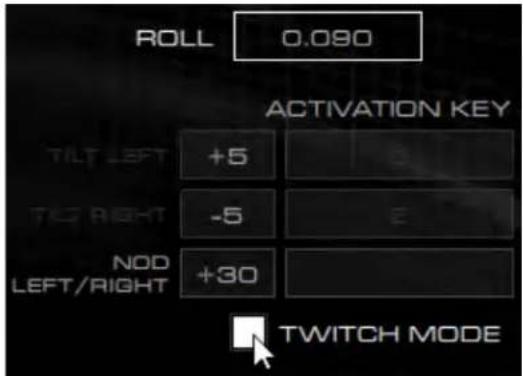
  1. Click on the box next to "Twitch Mode" to enable the twitch gesture for the desired head gesture.

a. Enabling "Twitch Mode" will disable the independent gesture actions from the gesture category (i.e. Enabling nod left/right twitch gesture will disable tilt left and tilt right).
HYPERX Cloud Orbit Software - Binding a Key Function to a Twitch Mode Head Gesture - 1

text_image ROLL 0.090 ACTIVATION KEY TILT LEFT +5 TILT RIGHT -5 NOD LEFT/RIGHT +30 Twitch MODE
  1. Click on the right box next to the twitch gesture

  2. Press up to two key buttons to bind them to the gesture.

  3. Activate the function by moving the headset to the matching motion. The function action will follow the binding type (press and hold, press and release).

a. Example: Tilt headset to the left above +30 degrees, then tilt headset to the right below +30 degrees to press and hold "M" key.

HYPERX Cloud Orbit Software - Binding a Key Function to a Twitch Mode Head Gesture - 2

Sound Profiles

HYPERX Cloud Orbit Software - Sound Profiles - 1

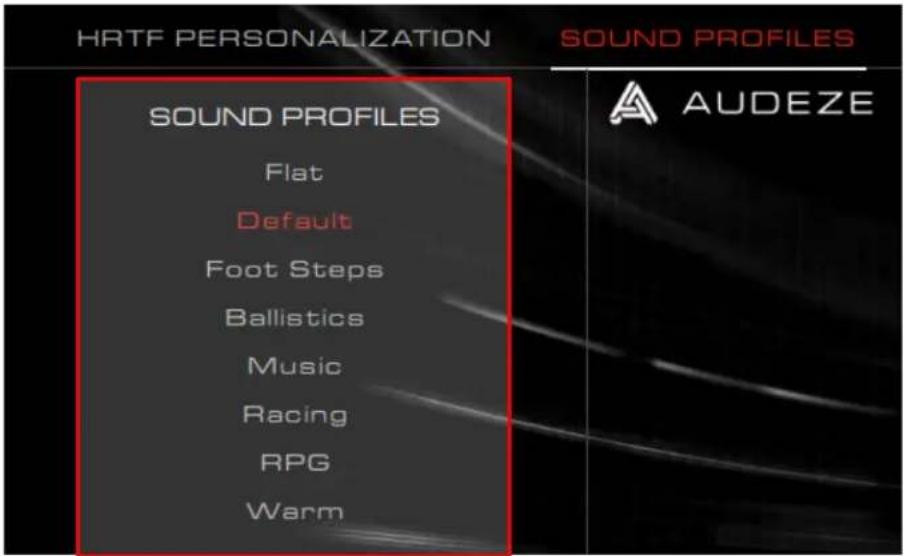
text_image HRTF PERSONALIZATION SOUND PROFILES Sound PROFILES Flat Default Foot Steps Ballistics Music Racing RPG Warm A A UDEZE

This page allows you to select your desired EQ preset to change the sound profile of the headset.

EQ PresetDescription
FlatNo EQ applied.
DefaultTuned to the Audeze House curve.
Foot StepsEnhances sounds of foot steps.
BallisticsEnhances gunshots and other ballistic sounds in FPS games.
MusicOptimized for listening to music.
RacingOptimized for racing games.
RPGOptimized for RPGs and immersive games.
WarmTreble is cut and bass is boosted slightly.

Device Info

HYPERX Cloud Orbit Software - Device Info - 1

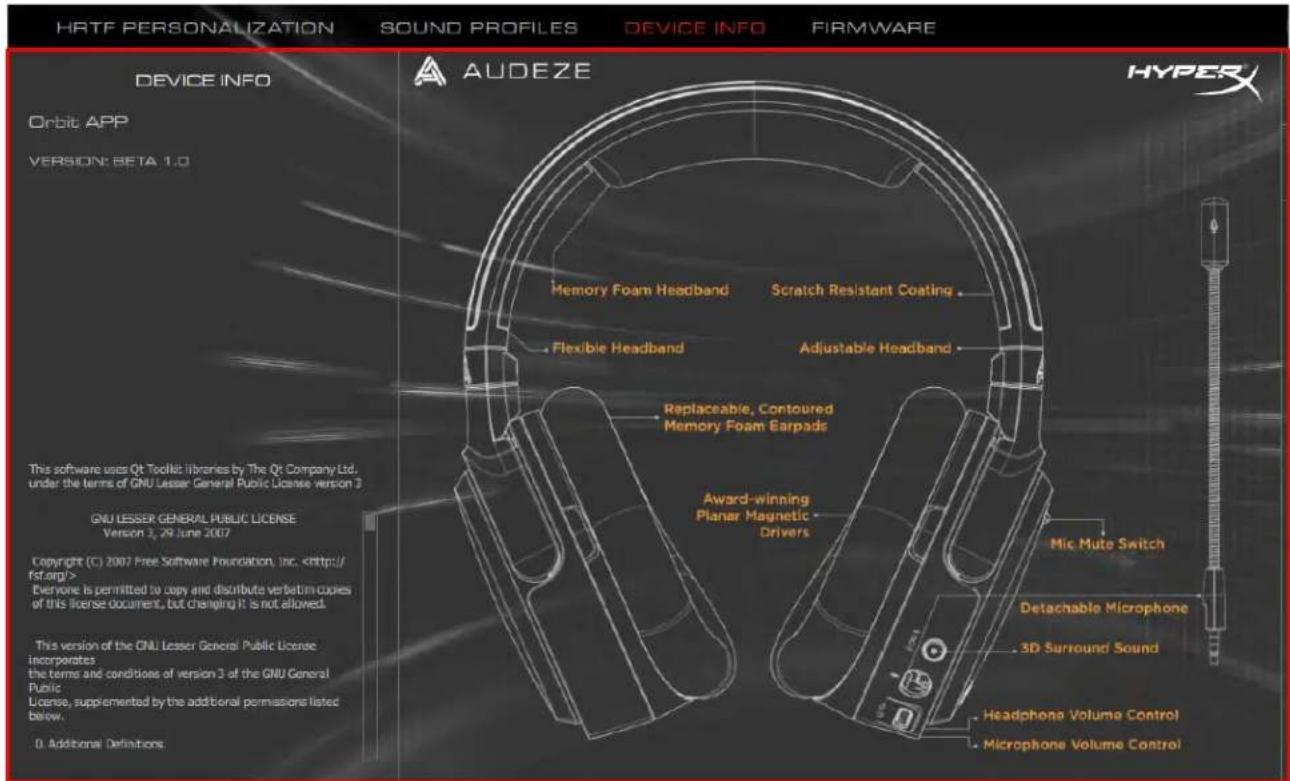
text_image HRTF PERSONALIZATION SOUND PROFILES DEVICE INFO FIRMWARE DEVICE INFO A UADEZE HyperX Orbit APP VERSION: BETA 1.0 This software uses Qt Toolkit libraries by The Qt Company Ltd. under the terms of GNU Lesser General Public License version 3 GNU LESSER GENERAL PUBLIC LICENSE Version 3, 29 June 2007 Copyright (C) 2007 Free Software Foundation, Inc. Everyone is permitted to copy and distribute verbatim copies of this license document, but changing it is not allowed. This version of the GNU Lesser General Public License incorporates the terms and conditions of version 3 of the GNU General Public License, supplemented by the additional permissions listed below. 0. Additional Definitions Memory Foam Headband Flexible Headband Scratch Resistant Coating Adjustable Headband Replaceable, Contoured Memory Foam Earpads Award-winning Planar Magnetic Drivers Mic Mute Switch Detachable Microphone 3D Surround Sound Headphone Volume Control Microphone Volume Control

This page provides general information on the Orbit / Orbit S headset.

Firmware
HYPERX Cloud Orbit Software - Firmware - 1

text_image HRTF PERSONALIZATION SOUND PROFILES DEVICE INFO FIRMWARE FIRMWARE USB FW version: 1.15 MCU FW version: 1.0 DSP FW version: 25 Update FW A UDEZE

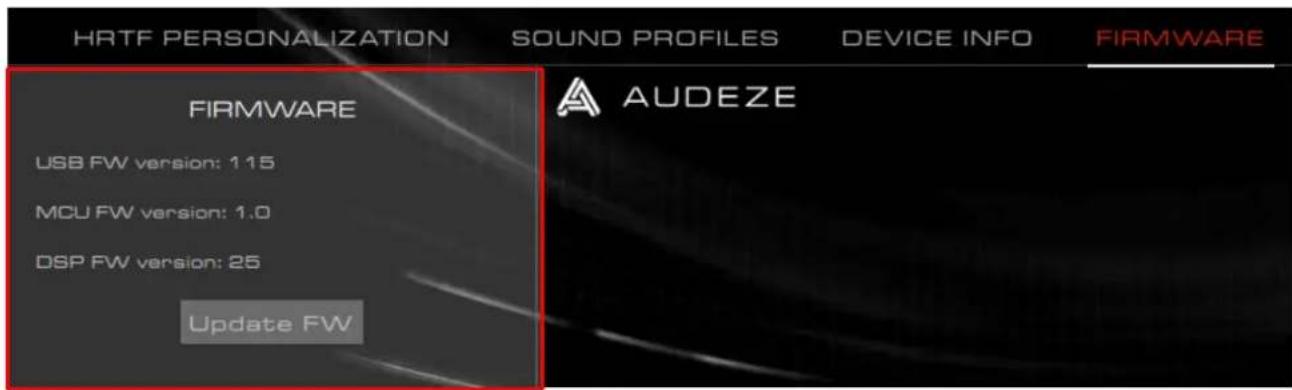
This page provides the firmware versions on Orbit / Orbit S and the ability to update the headset firmware.

Questions or Setup Issues?

Contact the HyperX support team at: hyperxgaming.com/support/

Software HyperX Cloud Orbit

text_image HRTF PERSONALIZATION SOUND PROFILES DEVICE INFO FIRMWARE WIN HRTF PERSONALIZATION AUDEZE HYPER (3D) OFF (CENTER) CALIBRATE (MODE) 1 CHANNEL HEAD CIRCUMFERENCE INTER-ALURAL ARC DISASLE ANIMATION Default Profile ADD DELETE HEAD GESTURES (Beta) NOTE: Press and hold a key when setting a key binding to assign it as a press-and-release action. Press-and-release actions will be highlighted with a white border. PITCH 0.000 YAW 0.000 ROLL 0.000 ROOM AMBIENCE APPLY RESTORE DEFAULT ACTIVATION KEY TURG LEFT +8 TURG RIGHT +8 TURG LEFT +80 TURG RIGHT +80 TUTCH MODE SWITCH MODE TUTCH MODE NOT CONNECTED

1. Pestañas de menú

text_image Default Profile ADD DELETE HEAD GESTURES (Beta) PITCH -0.067 YAW -0.290 ROLL 0.109 ACTIVATION KEY LOOK DOWN +8 LOOK UP -8 +18 TNTCH MODE TURN LEFT -8 TURN RIGHT +8 +23 TNTCH MODE ACTIVATION KEY TILT LEFT +5 TILT RIGHT -5 NOD +30 TNTCH MODE ACTIVATION KEY NOTE: Press and hold a key when setting a key binding to assign it as a press-and-release action. Press-and-release actions will be highlighted with a white border. 4 5 6
text_image FPS Game HyperX Cloud Orbit head gestures offer a new level of control over your gaming environment. CREATE CANCEL
text_image HRTF PERSONALIZATION SOUND PROFILES DEVICE INFO FIRMWARE DEVICE INFO A UDEZE HYPER Orbit APP VERSION: BETA 1.0 Memory Foam Headband Scratch Resistant Coating Flexible Headband Adjustable Headband Replaceable, Contoured Memory Foam Earpads Award-winning Planar Magnetic Drivers This software uses Qt Toolkit libraries by The Qt Company Ltd. under the terms of GNU Lesser General Public License version 3 GNU LESSER GENERAL PUBLIC LICENSE Version 3, 29 June 2007 Copyright (C) 2007 Free Software Foundation, Inc. Everyone is permitted to copy and distribute verbatim copies of this license document, but changing it is not allowed. This version of the GNU Lesser General Public License Incorporates the terms and conditions of version 3 of the GNU General Public License, supplemented by the additional permissions listed below. 0. Additional Definitions.
text_image Default Profile ADD DELETE HEAD GESTURES (Beta) PITCH -0.067 YAW -0.290 ROLL 0.109 ACTIVATION KEY LOOK DOWN +8 LOOK UP -8 +18 TNTCH MODE TURN LEFT -8 TURN RIGHT +8 +23 TNTCH MODE ACTIVATION KEY TILT LEFT +5 TILT RIGHT -5 NOD +30 TNTCH MODE ACTIVATION KEY NOTE: Press and hold a key when setting a key binding to assign it as a press-and-release action. Press-and-release actions will be highlighted with a white border. 4 5 6
text_image FPS Game HyperX Cloud Orbit head gestures offer a new level of control over your gaming environment. CREATE CANCEL
text_image HRTF PERSONALIZATION SOUND PROFILES DEVICE INFO FIRMWARE DEVICE INFO A UDEZE HYPER Orbit APP VERSION: BETA 1.0 Memory Foam Headband Scratch Resistant Coating Flexible Headband Adjustable Headband Replaceable, Contoured Memory Foam Earpads Award-winning Planar Magnetic Drivers This software uses Qt Toolkit libraries by The Qt Company Ltd, under the terms of GNU Lesser General Public License version 3 GNU LESSER GENERAL PUBLIC LICENSE Version 3, 29 June 2007 Copyright (C) 2007 Free Software Foundation, Inc. Everyone is permitted to copy and distribute verbatim copies of this license document, but changing it is not allowed. This version of the GNU Lesser General Public License Incorporates the terms and conditions of version 3 of the GNU General Public License, supplemented by the additional permissions listed below. 0. Additional Definitions.
text_image HRTF PERSONALIZATION SOUND PROFILES DEVICE INFO FIRMWARE WIN HRTF PERSONALIZATION AUDEZE HYPER (3D) OFF (CENTER) CALIBRATE (MODE) 1 CHANNEL HEAD CIRCUMFERENCE INTER-ALURAL ARC DISASLE ANIMATION Default Profile ADD DELETE HEAD GESTURES (Beta) NOTE: Press and hold a key when setting a key binding to assign it as a press-and-release action. Press-and-release actions will be highlighted with a white border. PITCH 0.000 YAW 0.000 ROLL 0.000 ROOM AMBIENCE APPLY RESTORE DEFAULT ACTIVATION KEY TURG LEFT +8 TURG RIGHT +8 TURG LEFT +80 TURG RIGHT +80 TUTCH MODE SWITCH MODE TUTCH MODE NOT CONNECTED

1. Menü-Tabs

text_image Default Profile ADD DELETE HEAD GESTURES (Beta) PITCH -0.067 YAW -0.290 ROLL 0.109 ACTIVATION KEY LOOK DOWN +8 LOOK UP -8 +18 TNTCH MODE TURN LEFT -8 TURN RIGHT +8 +23 TNTCH MODE ACTIVATION KEY TILT LEFT +5 TILT RIGHT -5 NOD +30 TNTCH MODE ACTIVATION KEY 4 5 6 NOTE: Press and hold a key when setting a key binding to assign it as a press-and-release action. Press-and-release actions will be highlighted with a white border.
text_image FPS Game HyperX Cloud Orbit head gestures offer a new level of control over your gaming environment. CREATE CANCEL
text_image HRTE PERSONALIZATION SOUND PROFILES DEVICE INFO FIRMWARE DEVICE INFO A UDEZE HYPER Orbit APP VERSION: BETA 1.0 Memory Foam Headband Scratch Resistant Coating Flexible Headband Adjustable Headband Replaceable, Contoured Memory Foam Earpads Award-winning Planar Magnetic Drivers MIC Mute Switch Detachable Microphone 3D Surround Sound Headphone Volume Control Microphone Volume Control This software uses Qt Toolkit libraries by The Qt Company Ltd. under the terms of GNU Lesser General Public License version 3 GNU LESSER GENERAL PUBLIC LICENSE Version 3, 29 June 2007 Copyright (C), 2007 Free Software Foundation, Inc. Everyone is permitted to copy and distribute verbatim copies of this license document, but changing it is not allowed. This version of the GNU Lesser General Public License Incorporates the terms and conditions of version 3 of the GNU General Public License, supplemented by the additional permissions listed below. 0. Additional Definitions.
text_image HRTF PERSONALIZATION SOUND PROFILES DEVICE INFO FIRMWARE WIN HRTF PERSONALIZATION AUDEZE HYPER (3D) OFF (CENTER) CALIBRATE (MODE) 1 CHANNEL HEAD CIRCUMFERENCE INTER-ALURAL ARC DISASLE ANIMATION Default Profile ADD DELETE HEAD GESTURES (Beta) NOTE: Press and hold a key when setting a key binding to assign it as a press-and-release action. Press-and-release actions will be highlighted with a white border. PITCH 0.000 YAW 0.000 ROLL 0.000 ROOM AMBIENCE APPLY RESTORE DEFAULT ACTIVATION KEY TURG LEFT +8 TURG RIGHT +8 TURG LEFT +80 TURG RIGHT +80 TUTCH MODE SWITCH MODE TUTCH MODE NOT CONNECTED

1. Onglets du menu

text_image Default Profile ADD DELETE HEAD GESTURES (Beta) NOTE: Press and hold a key when setting a key binding to assign it as a press-and-release action. Press-and-release actions will be highlighted with a white border. PITCH -0.067 YAW -0.290 ROLL 0.109 ACTIVATION KEY LOOK DOWN +8 LOOK UP -8 +18 TNTCH MODE TURN LEFT -8 TURN RIGHT +8 +23 TNTCH MODE ACTIVATION KEY TILT LEFT +5 Q TILT RIGHT -5 E +30 TNTCH MODE ACTIVATION KEY 4 5 6
text_image FPS Game HyperX Cloud Orbit head gestures offer a new level of control over your gaming environment. CREATE CANCEL
text_image HRTF PERSONALIZATION SOUND PROFILES DEVICE INFO FIRMWARE DEVICE INFO A UDEZE HYPER Orbit APP VERSION: BETA 1.0 Memory Foam Headband Scratch Resistant Coating Flexible Headband Adjustable Headband Replaceable, Contoured Memory Foam Earpads Award-winning Planar Magnetic Drivers This software uses Qt Toolkit libraries by The Qt Company Ltd, under the terms of GNU Lesser General Public License version 3 GNU LESSER GENERAL PUBLIC LICENSE Version 3, 29 June 2007 Copyright (C) 2007 Free Software Foundation, Inc. Everyone is permitted to copy and distribute verbatim copies of this license document, but changing it is not allowed. This version of the GNU Lesser General Public License Incorporates the terms and conditions of version 3 of the GNU General Public License, supplemented by the additional permissions listed below. 0. Additional Definitions.
text_image HRTF PERSONALIZATION SOUND PROFILES DEVICE INFO FIRMWARE WIN HRTF PERSONALIZATION AUDEZE HYPER (3D) OFF (CENTER) CALIBRATE (MODE) 1 CHANNEL HEAD CIRCUMFERENCE INTER-ALURAL ARC DISASLE ANIMATION Default Profile ADD DELETE HEAD GESTURES (Beta) NOTE: Press and hold a key when setting a key binding to assign it as a press-and-release action. Press-and-release actions will be highlighted with a white border. PITCH 0.000 YAW 0.000 ROLL 0.000 ROOM AMBIENCE APPLY RESTORE DEFAULT ACTIVATION KEY TURG LEFT +8 TURG RIGHT +8 TURG LEFT +80 TURG RIGHT +80 TUTCH MODE SWITCH MODE TUTCH MODE NOT CONNECTED

1. Schede del menu

text_image Default Profile ADD DELETE HEAD GESTURES (Beta) PITCH -0.067 YAW -0.290 ROLL 0.109 ACTIVATION KEY LOOK DOWN +8 LOOK UP -8 +18 TNTCH MODE TURN LEFT -8 TURN RIGHT +8 +23 TNTCH MODE ACTIVATION KEY TILT LEFT +5 TILT RIGHT -5 NOD +30 TNTCH MODE ACTIVATION KEY NOTE: Press and hold a key when setting a key binding to assign it as a press-and-release action. Press-and-release actions will be highlighted with a white border. 4 5 6
text_image FPS Game HyperX Cloud Orbit head gestures offer a new level of control over your gaming environment. CREATE CANCEL
text_image HRTF PERSONALIZATION SOUND PROFILES DEVICE INFO FIRMWARE DEVICE INFO A UDEZE HYPER Orbit APP VERSION: BETA 1.0 Memory Foam Headband Scratch Resistant Coating Flexible Headband Adjustable Headband Replaceable, Contoured Memory Foam Earpads Award-winning Planar Magnetic Drivers This software uses Qt Toolkit libraries by The Qt Company Ltd, under the terms of GNU Lesser General Public License version 3 GNU LESSER GENERAL PUBLIC LICENSE Version 3, 29 June 2007 Copyright (C) 2007 Free Software Foundation, Inc. Everyone is permitted to copy and distribute verbatim copies of this license document, but changing it is not allowed. This version of the GNU Lesser General Public License Incorporates the terms and conditions of version 3 of the GNU General Public License, supplemented by the additional permissions listed below. 0. Additional Definitions.
text_image HRTF PERSONALIZATION SOUND PROFILES DEVICE INFO FIRMWARE WIN HRTF PERSONALIZATION AUDEZE HYPER (3D) OFF (CENTER) CALIBRATE (MODE) 1 CHANNEL HEAD CIRCUMFERENCE INTER-ALURAL ARC DISASLE ANIMATION Default Profile ADD DELETE HEAD GESTURES (Beta) NOTE: Press and hold a key when setting a key binding to assign it as a press-and-release action. Press-and-release actions will be highlighted with a white border. PITCH 0.000 YAW 0.000 ROLL 0.000 ROOM AMBIENCE APPLY RESTORE DEFAULT ACTIVATION KEY TURG LEFT +8 TURG RIGHT +8 TURG LEFT +80 TURG RIGHT +80 TUTCH MODE SWITCH MODE TUTCH MODE NOT CONNECTED

1. Guias do Menu

text_image Default Profile ADD DELETE HEAD GESTURES (Beta) PITCH -0.067 YAW -0.290 ROLL 0.109 ACTIVATION KEY LOOK DOWN +8 LOOK UP -8 +18 TNTCH MODE TURN LEFT -8 TURN RIGHT +8 +23 TNTCH MODE ACTIVATION KEY TILT LEFT +5 TILT RIGHT -5 NOD +30 TNTCH MODE ACTIVATION KEY NOTE: Press and hold a key when setting a key binding to assign it as a press-and-release action. Press-and-release actions will be highlighted with a white border. 4 5 6
text_image FPS Game HyperX Cloud Orbit head gestures offer a new level of control over your gaming environment. CREATE CANCEL
text_image HRTF PERSONALIZATION SOUND PROFILES DEVICE INFO FIRMWARE DEVICE INFO A UDEZE HYPER Orbit APP VERSION: BETA 1.0 Memory Foam Headband Scratch Resistant Coating Flexible Headband Adjustable Headband Replaceable, Contoured Memory Foam Earpads Award-winning Planar Magnetic Drivers This software uses Qt Toolkit libraries by The Qt Company Ltd. under the terms of GNU Lesser General Public License version 3 GNU LESSER GENERAL PUBLIC LICENSE Version 3, 29 June 2007 Copyright (C) 2007 Free Software Foundation, Inc. Everyone is permitted to copy and distribute verbatim copies of this license document, but changing it is not allowed. This version of the GNU Lesser General Public License Incorporates the terms and conditions of version 3 of the GNU General Public License, supplemented by the additional permissions listed below. 0. Additional Definitions.
text_image HRTF PERSONALIZATION SOUND PROFILES DEVICE INFO FIRMWARE WIN HRTF PERSONALIZATION AUDEZE HYPER (3D) OFF (CENTER) CALIBRATE (MODE) 1 CHANNEL HEAD CIRCUMFERENCE INTER-ALURAL ARC DISASLE ANIMATION Default Profile ADD DELETE HEAD GESTURES (Beta) NOTE: Press and hold a key when setting a key binding to assign it as a press-and-release action. Press-and-release actions will be highlighted with a white border. PITCH 0.000 YAW 0.000 ROLL 0.000 ROOM AMBIENCE APPLY RESTORE DEFAULT ACTIVATION KEY TURG LEFT +8 TURG RIGHT +8 TURG LEFT +80 TURG RIGHT +80 TUTCH MODE SWITCH MODE TUTCH MODE NOT CONNECTED

1. Karty menu

text_image Default Profile ADD DELETE HEAD GESTURES (Beta) NOTE: Press and hold a key when setting a key binding to assign it as a press-and-release action. Press-and-release actions will be highlighted with a white border. PITCH -0.067 YAW -0.290 ROLL 0.109 ACTIVATION KEY LOOK DOWN +8 LOOK UP -8 +18 TNTCH MODE TURN LEFT -8 TURN RIGHT +8 +23 TNTCH MODE ACTIVATION KEY TILT LEFT +5 Q TILT RIGHT -5 E +30 TNTCH MODE 4 5 6
text_image FPS Game HyperX Cloud Orbit head gestures offer a new level of control over your gaming environment. CREATE CANCEL
text_image HRTF PERSONALIZATION SOUND PROFILES DEVICE INFO FIRMWARE DEVICE INFO A UDEZE HYPER Orbit APP VERSION: BETA 1.0 Memory Foam Headband Scratch Resistant Coating Flexible Headband Adjustable Headband Replaceable, Contoured Memory Foam Earpads Award-winning Planar Magnetic Drivers This software uses Qt Toolkit libraries by The Qt Company Ltd. under the terms of GNU Lesser General Public License version 3 GNU LESSER GENERAL PUBLIC LICENSE Version 3, 29 June 2007 Copyright (C) 2007 Free Software Foundation, Inc. Everyone is permitted to copy and distribute verbatim copies of this license document, but changing it is not allowed. This version of the GNU Lesser General Public License Incorporates the terms and conditions of version 3 of the GNU General Public License, supplemented by the additional permissions listed below. 0. Additional Definitions.
text_image HRTF PERSONALIZATION SOUND PROFILES DEVICE INFO FIRMWARE WIN HRTF PERSONALIZATION AUDEZE HYPER (3D) OFF (CENTER) CALIBRATE (MODE) 1 CHANNEL HEAD CIRCUMFERENCE INTER-ALURAL ARC DISABLE ANIMATION Default Profile ADD DELETE HEAD GESTURES (Beta) NOTE: Press and hold a key when setting a key binding to assign it as a press-and-release action. Press-and-release actions will be highlighted with a white border. PITCH 0.000 YAW 0.000 ROLL 0.000 ROOM AMBIENCE APPLY RESTORE DEFAULT ACTIVATION KEY TURG LEFT -8 TUS LEFT +5 +8 TURN RIGHT +8 TUT RIGHT -5 +1B LEFT RIGHT +88 LEFT RIGHT +80 TWOCH MODE SWITCH MODE TOWCH MODE NOT CONNECTED

1. Вкладки меню

text_image Default Profile ADD DELETE HEAD GESTURES (Beta) PITCH -0.067 YAW -0.290 ROLL 0.109 ACTIVATION KEY LOOK DOWN +8 LOOK UP -8 +18 TNTCH MODE TURN LEFT -8 TURN RIGHT +8 +23 TNTCH MODE ACTIVATION KEY TILT LEFT +5 TILT RIGHT -5 NOD +30 TNTCH MODE 4 5 6 NOTE: Press and hold a key when setting a key binding to assign it as a press-and-release action. Press-and-release actions will be highlighted with a white border.
text_image FPS Game HyperX Cloud Orbit head gestures offer a new level of control over your gaming environment. CREATE CANCEL
text_image HRTF PERSONALIZATION SOUND PROFILES DEVICE INFO FIRMWARE DEVICE INFO A UDEZE HYPER Orbit APP VERSION: BETA 1.0 This software uses Qt Toolkit libraries by The Qt Company Ltd. under the terms of GNU Lesser General Public License version 3 GNU LESSER GENERAL PUBLIC LICENSE Version 3, 29 June 2007 Copyright (C) 2007 Free Software Foundation, Inc. Everyone is permitted to copy and distribute verbatim copies of this license document, but changing it is not allowed. This version of the GNU Lesser General Public License Incorporates the terms and conditions of version 3 of the GNU General Public License, supplemented by the additional permissions listed below. 0. Additional Definitions:

2. Interaural Mesafe

text_image Default Profile ADD DELETE HEAD GESTURES (Beta) PITCH -0.067 YAW -0.290 ROLL 0.109 ACTIVATION KEY LOOK DOWN +8 LOOK UP -8 +18 TNTCH MODE TURN LEFT -8 TURN RIGHT +8 +23 TNTCH MODE ACTIVATION KEY TILT LEFT +5 TILT RIGHT -5 NOD +30 TNTCH MODE ACTIVATION KEY NOTE: Press and hold a key when setting a key binding to assign it as a press-and-release action. Press-and-release actions will be highlighted with a white border. 4 5 6
text_image FPS Game HyperX Cloud Orbit head gestures offer a new level of control over your gaming environment. CREATE CANCEL
text_image HRTF PERSONALIZATION SOUND PROFILES DEVICE INFO FIRMWARE DEVICE INFO A UDEZE HYPER Orbit APP VERSION: BETA 1.0 Memory Foam Headband Scratch Resistant Coating Flexible Headband Adjustable Headband Replaceable, Contoured Memory Foam Earpads Award-winning Planar Magnetic Drivers This software uses Qt Toolkit libraries by The Qt Company Ltd, under the terms of GNU Lesser General Public License version 3 GNU LESSER GENERAL PUBLIC LICENSE Version 3, 29 June 2007 Copyright (C) 2007 Free Software Foundation, Inc. Everyone is permitted to copy and distribute verbatim copies of this license document, but changing it is not allowed. This version of the GNU Lesser General Public License Incorporates the terms and conditions of version 3 of the GNU General Public License, supplemented by the additional permissions listed below. 0. Additional Definitions.
text_image Default Profile ADD DELETE HEAD GESTURES (Beta) NOTE: Press and hold a key when setting a key binding to assign it as a press-and-release action. Press-and-release actions will be highlighted with a white border. PITCH -0.067 YAW -0.290 ROLL 0.109 ACTIVATION KEY LOOK DOWN +8 LOOK UP -8 +18 TNTCH MODE TURN LEFT -8 TURN RIGHT +8 +23 TNTCH MODE ACTIVATION KEY TILT LEFT +5 Q TILT RIGHT -5 E +30 TNTCH MODE ACTIVATION KEY 4 5 6
text_image FPS Game HyperX Cloud Orbit head gestures offer a new level of control over your gaming environment. CREATE CANCEL
text_image HRTF PERSONALIZATION SOUND PROFILES DEVICE INFO FIRMWARE DEVICE INFO A UDEZE HYPER Orbit: APP VERSION: BETA 1.0 This software uses Qt Toolkit libraries by The Qt Company Ltd. under the terms of GNU Lesser General Public License version 2 GNU LESSER GENERAL PUBLIC LICENSE Version 3, 29 June 2007 Copyright (C) 2007 Free Software Foundation, Inc. Everyone is permitted to copy and distribute verbatim copies of this license document, but changing it is not allowed. This version of the GNU Lesser General Public License Incorporates the terms and conditions of version 3 of the GNU General Public License, supplemented by the additional permissions listed below. 0. Additional Definitions. Memory Foam Headband Flexible Headband Scratch Resistant Coating Adjustable Headband Replaceable, Contoured Memory Foam Earpads Award-winning Planar Magnetic - Drivers Mic Mute Switch Detachable Microphone 3D Surround Sound Headphone Volume Control - Microphone Volume Control
text_image HRTF PERSONALIZATION SOUND PROFILES DEVICE INFO FIRMWARE FIRMWARE USB FW version: 1.15 MCU FW version: 1.0 DSP FW version: 25 Update FW A UADEZE
text_image Default Profile ADD DELETE HEAD GESTURES (Beta) NOTE: Press and hold a key when setting a key binding to assign it as a press-and-release action. Press-and-release actions will be highlighted with a white border. PITCH -0.067 YAW -0.290 ROLL 0.109 ACTIVATION KEY LOOK DOWN +8 LOOK UP -8 +18 TNTCH MODE TURN LEFT -8 TURN RIGHT +8 +23 TNTCH MODE ACTIVATION KEY TILT LEFT +5 Q TILT RIGHT -5 E +30 TNTCH MODE ACTIVATION KEY 4 5 6
text_image FPS Game HyperX Cloud Orbit head gestures offer a new level of control over your gaming environment. CREATE CANCEL
text_image HRTF PERSONALIZATION SOUND PROFILES DEVICE INFO FIRMWARE DEVICE INFO A UDEZE HYPER Orbit: APP VERSION: BETA 1.0 This software uses Qt Toolkit libraries by The Qt Company Ltd. under the terms of GNU Lesser General Public License version 2 GNU LESSER GENERAL PUBLIC LICENSE Version 3, 29 June 2007 Copyright (C) 2007 Free Software Foundation, Inc. Everyone is permitted to copy and distribute verbatim copies of this license document, but changing it is not allowed. This version of the GNU Lesser General Public License Incorporates the terms and conditions of version 3 of the GNU General Public License, supplemented by the additional permissions listed below. 0. Additional Definitions. Memory Foam Headband Flexible Headband Scratch Resistant Coating Adjustable Headband Replaceable, Contoured Memory Foam Earpads Award-winning Planar Magnetic - Drivers Mic Mute Switch Detachable Microphone 3D Surround Sound Headphone Volume Control - Microphone Volume Control
text_image HRTF PERSONALIZATION SOUND PROFILES DEVICE INFO FIRMWARE FIRMWARE USB FW version: 1.15 MCU FW version: 1.0 DSP FW version: 25 Update FW A UADEZE
text_image HRTF PERSONALIZATION SOUND PROFILES DEVICE INFO FIRMWARE WIN HRTF PERSONALIZATION AUDEZE HYPER (3D) OFF (CENTER) CALIBRATE (MODE) 1 CHANNEL HEAD CIRCUMPERENCE INTER-ALURAL ARC DISABLE ANIMATION Default Profile ADD DELETE HEAD GESTURES (Beta) NOTE: Press and hold a key when setting a key binding to assign it as a press-and-release action. Press-and-release actions will be highlighted with a white bondon PITCH 0.000 YAW 0.000 ROLL 0.000 ROOM AMBIENCE APPLY RESTORE DEFAULT ACTIVATION KEY +8 +6 +18 TWOCH MODE SWITCH MODE 98% MUTE NOT CONNECTED

1. แท็บเมน

text_image Default Profile ADD DELETE HEAD GESTURES (Beta) NOTE: Press and hold a key when setting a key binding to assign it as a press-and-release action. Press-and-release actions will be highlighted with a white border. PITCH -0.087 YAW -0.290 ROLL 0.109 ACTIVATION KEY LOOK DOWN +B LOOK UP -B +18 Twitch MODE TURN LEFT -8 TURN RIGHT +8 +23 Twitch MODE ACTIVATION KEY TILT LEFT +5 Q TILT RIGHT -5 E +30 Twitch MODE 4 5 6
text_image FPS Game HyperX Cloud Orbit head gestures offer a new level of control over your gaming environment. CREATE CANCEL
text_image HRTF PERSONALIZATION SOUND PROFILES DEVICE INFO FIRMWARE DEVICE INFO A UDEZE HYPER Orbit: APP VERSION: BETA 1.0 Memory Foam Headband Scratch Resistant Coating Flexible Headband Adjustable Headband Replaceable, Contoured Memory Foam Earpads Award-winning Planar Magnetic Drivers This software uses Qt Toolkit libraries by The Qt Company Ltd. under the terms of GNU Lesser General Public License version 3 GNU LESSER GENERAL PUBLIC LICENSE Version 3, 29 June 2007 Copyright (C) 2007 Free Software Foundation, Inc. Everyone is permitted to copy and distribute verbatim copies of this license document, but changing it is not allowed. This version of the GNU Lesser General Public License Incorporates the terms and conditions of version 3 of the GNU General Public License, supplemented by the additional permissions listed below. G. Additional Definitions.
text_image HRTF PERSONALIZATION SOUND PROFILES DEVICE INFO FIRMWARE FIRMWARE USB FW version: 1.15 MCU FW version: 1.0 DSP FW version: 25 Update FW A UADEZE
text_image Default Profile ADD DELETE HEAD GESTURES (Beta) PITCH -0.067 YAW -0.290 ROLL 0.109 ACTIVATION KEY LOOK DOWN +8 LOOK UP -8 +18 TNTCH MODE TURN LEFT -8 TURN RIGHT +8 +23 TNTCH MODE ACTIVATION KEY TILT LEFT +5 TILT RIGHT -5 NOD +30 TNTCH MODE ACTIVATION KEY NOTE: Press and hold a key when setting a key binding to assign it as a press-and-release action. Press-and-release actions will be highlighted with a white border. 4 5 6
text_image FPS Game HyperX Cloud Orbit head gestures offer a new level of control over your gaming environment. CREATE CANCEL
text_image HRTF PERSONALIZATION SOUND PROFILES DEVICE INFO FIRMWARE DEVICE INFO A UDEZE HYPER Orbit APP VERSION: BETA 1.0 Memory Foam Headband Scratch Resistant Coating Flexible Headband Adjustable Headband Replaceable, Contoured Memory Foam Earpads Award-winning Planar Magnetic Drivers This software uses Qt Toolkit libraries by The Qt Company Ltd, under the terms of GNU Lesser General Public License version 3 GNU LESSER GENERAL PUBLIC LICENSE Version 3, 29 June 2007 Copyright (C) 2007 Free Software Foundation, Inc. Everyone is permitted to copy and distribute verbatim copies of this license document, but changing it is not allowed. This version of the GNU Lesser General Public License Incorporates the terms and conditions of version 3 of the GNU General Public License, supplemented by the additional permissions listed below. 0. Additional Definitions.
text_image Default Profile ADD DELETE HEAD GESTURES (Beta) NOTE: Press and hold a key when setting a key binding to assign it as a press-and-release action. Press-and-release actions will be highlighted with a white border. PITCH -0.067 YAW -0.290 ROLL 0.109 ACTIVATION KEY LOOK DOWN +8 LOOK UP -8 +18 TNTCH MODE TURN LEFT -8 TURN RIGHT +8 +23 TNTCH MODE ACTIVATION KEY TILT LEFT +5 Q TILT RIGHT -5 E +30 TNTCH MODE ACTIVATION KEY 4 5 6
text_image FPS Game HyperX Cloud Orbit head gestures offer a new level of control over your gaming environment. CREATE CANCEL
text_image HRTF PERSONALIZATION SOUND PROFILES DEVICE INFO FIRMWARE DEVICE INFO A UDEZE HYPER Orbit: APP VERSION: BETA 1.0 This software uses Qt Toolkit libraries by The Qt Company Ltd. under the terms of GNU Lesser General Public License version 2 GNU LESSER GENERAL PUBLIC LICENSE Version 3, 29 June 2007 Copyright (C) 2007 Free Software Foundation, Inc. Everyone is permitted to copy and distribute verbatim copies of this license document, but changing it is not allowed. This version of the GNU Lesser General Public License Incorporates the terms and conditions of version 3 of the GNU General Public License, supplemented by the additional permissions listed below. 0. Additional Definitions. Memory Foam Headband Flexible Headband Scratch Resistant Coating Adjustable Headband Replaceable, Contoured Memory Foam Earpads Award-winning Planar Magnetic - Drivers Mic Mute Switch Detachable Microphone 3D Surround Sound Headphone Volume Control - Microphone Volume Control
text_image HRTF PERSONALIZATION SOUND PROFILES DEVICE INFO FIRMWARE FIRMWARE USB FW version: 1.15 MCU FW version: 1.0 DSP FW version: 25 Update FW A UADEZE
text_image HRTF PERSONALIZATION SOUND PROFILES DEVICE INFO FIRMWARE WIN HRTF PERSONALIZATION AUDEZE HYPER 1 2 (O D) OFF (C E N T E R) CALIBRATE (M O D E ) T1 CHANNEL HEAD CIRCUMFERENCE INTER-ALRAL ARC DISABLE ANIMATION Default Profile ADD DELETE HEAD GESTUREB (Beta) NOTE: Press and hold a key when setting a key binding to assign it as a press-and-release action. Press-and-release actions will be highlighted with a white border. PITCH 0.000 YAW 0.000 ROLL 0.000 ROOM AMBIENCE APPLY RESTORE DEFAULT ACTIVATION KEY TURRI LEFT +8 TILE LAST +5 +8 +8 +5 +18 +28 +30 TUTCH MODE TUTCH MODE TUTCH MODE

1. 選單分頁

text_image Default Profile ADD DELETE HEAD GESTURES (Beta) NOTE: Press and hold a key when setting a key binding to assign it as a press-and-release action. Press-and-release actions will be highlighted with a white border. PITCH -0.067 YAW -0.290 ROLL 0.109 ACTIVATION KEY LOOK DOWN +8 LOOK UP -8 +18 TNTCH MODE TURN LEFT -8 TURN RIGHT +8 +23 TNTCH MODE ACTIVATION KEY TILT LEFT +5 Q TILT RIGHT -5 E +30 TNTCH MODE ACTIVATION KEY 4 5 6
text_image FPS Game HyperX Cloud Orbit head gestures offer a new level of control over your gaming environment. CREATE CANCEL
text_image HRTF PERSONALIZATION SOUND PROFILES DEVICE INFO FIRMWARE DEVICE INFO A UDEZE HYPER Orbit: APP VERSION: BETA 1.0 Memory Foam Headband Scratch Resistant Coating Flexible Headband Adjustable Headband Replaceable, Contoured Memory Foam Earpads Award-winning Planar Magnetic Drivers MIC Mute Switch Detachable Microphone 3D Surround Sound Headphone Volume Control Microphone Volume Control This software uses Qt Toolkit libraries by The Qt Company Ltd. under the terms of GNU Lesser General Public License version 3 GNU LESSER GENERAL PUBLIC LICENSE Version 3, 29 June 2007 Copyright (C) 2007 Free Software Foundation, Inc. Everyone is permitted to copy and distribute verbatim copies of this license document, but changing it is not allowed. This version of the GNU Lesser General Public License Incorporates the terms and conditions of version 3 of the GNU General Public License, supplemented by the additional permissions listed below. 0. Additional Definitions.
text_image HRTF PERSONALIZATION SOUND PROFILES DEVICE INFO FIRMWARE FIRMWARE USB FW version: 1.15 MCU FW version: 1.0 DSP FW version: 25 Update FW A UADEZE
Manual assistant
Powered by Anthropic
Waiting for your message
Product information

Brand : HYPERX

Model : Cloud Orbit Software

Category : Helmet