
Cloud Gaming - Headphones HYPERX - Free user manual and instructions
Find the device manual for free Cloud Gaming HYPERX in PDF.


Pick your language and provide your email: we'll send you a specifically translated version.
| Product Type | Over-ear gaming headset |
| Brand | HyperX |
| Model | Cloud Gaming |
| Connectivity | Wired 3.5 mm audio jack |
| Audio Drivers | 53 mm dynamic drivers |
| Frequency Response | 15 Hz - 25 kHz |
| Impedance | 60 Ω |
| Sensitivity | 98 dB SPL/mW |
| Microphone | Detachable noise-cancelling electret condenser mic |
| Microphone Frequency Response | 50 Hz - 18 kHz |
| Ear Cushions | Memory foam with leatherette covering |
| Headband | Stainless steel slider with suspension |
| Cable Length | 1.3 m braided cable + 2 m extension |
| Weight | Approximately 300 g (without cable) |
| Compatibility | PC, PS4, PS5, Xbox One/Series X|S, Nintendo Switch, mobile devices |
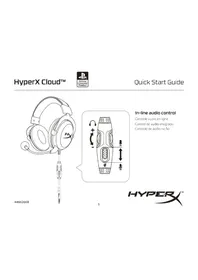
| Controls | In-line audio control for volume and mute |
| Care Instructions | Wipe with a soft dry cloth; detachable parts can be cleaned separately |
| Safety Warnings | Keep away from liquids and extreme heat; do not disassemble |
| Replacement Parts | Ear cushions, cable, microphone, and headband available |
| General Features | Immersive sound, designed for long gaming sessions |
Frequently Asked Questions - Cloud Gaming HYPERX
How do I connect the HyperX Cloud Gaming headset to my PC?
Connect the 3.5 mm jack directly to your PC's audio port. If your PC has separate microphone and headphone ports, use the included splitter cable. Then select the headset as playback and recording device in your sound settings.
Can I use this headset with my Xbox One?
Yes, plug the 3.5 mm cable into the controller's audio jack. For older Xbox One controllers without a 3.5 mm jack, you'll need an adapter (sold separately).
How do I adjust the flexible microphone?
Rotate the flexible mic arm to position it near your mouth for optimal voice pickup. The mic can be detached from the headset when not in use.
How to mute the microphone while gaming?
Use the in-line mute switch on the audio cable. Flicking the switch will mute/unmute the microphone without interrupting gameplay.
How do I clean the ear cushions?
Gently wipe the leatherette surface with a soft, dry cloth. For deeper cleaning, detach the ear cushions from the earcups and clean them separately, then let them dry completely before reattaching.
Is the headset compatible with Nintendo Switch?
Yes, it works in handheld mode with the 3.5 mm jack. In docked mode, you can plug it into the TV or controller if supported.
What is the best way to store the headset?
Store it flat in a cool, dry place. Avoid hanging it by the headband as this can stretch it. Use the included carrying pouch if available.
Can I replace the ear cushions if they wear out?
Absolutely. The ear cushions are detachable and replacement cushions are available for purchase. Simply pull off the old cushions and snap on new ones.
Does the headset have noise cancellation for the microphone?
The microphone features noise-cancelling technology to reduce background noise, ensuring your voice is clear during team communications.
How long is the cable, and is there an extension?
The braided cable is approximately 1.3 m long and includes a 2 m extension cable for added reach. Combined, you get up to 3.3 m of freedom.
User questions about Cloud Gaming HYPERX
0 question about this device. Answer the ones you know or ask your own.
Ask a new question about this device
No questions yet. Be the first to ask one.
Download the instructions for your Headphones in PDF format for free! Find your manual Cloud Gaming - HYPERX and take your electronic device back in hand. On this page are published all the documents necessary for the use of your device. Cloud Gaming by HYPERX.
USER MANUAL Cloud Gaming HYPERX

Manual assistant
Powered by Anthropic
Waiting for your message
Product information
Brand : HYPERX
Model : Cloud Gaming
Category : Headphones