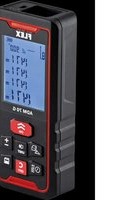
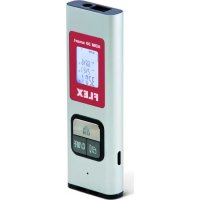
ADM 70 G - Rangefinder Flex - Free user manual and instructions
Find the device manual for free ADM 70 G Flex in PDF.


| Product type | Laser distance meter |
| Brand | Flex |
| Model | ADM 70 G |
| Laser class | 2 |
| Wavelength | 500-535 nm |
| Maximum power | ≤ 1 mW |
| Measuring range | 0.05 to 70 m |
| Accuracy | ± 3 mm |
| Power supply | Li-polymer battery 850 mAh or 3 AAA 1.5 V batteries |
| Battery life | Up to 8,000 individual measurements |
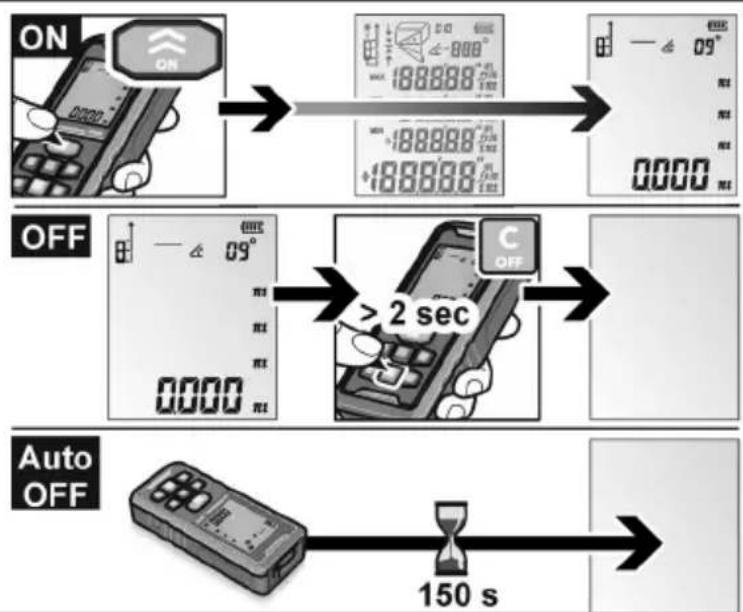
| Auto shut-off | Laser: 20 s, Device: 150 s |
| Operating temperature | 0 °C to 40 °C |
| Storage temperature | -20 °C to 60 °C |
| Weight | 0.147 kg (batteries included) |
| Tripod thread | ¼ inch |
| Measuring functions | Length, area, volume, simple/double Pythagoras, addition/subtraction, continuous/min/max measurement |
| Display | Integrated |
| USB connection | Yes (cable included) |
| Cleaning | Soft, dry cloth |
| Safety | Laser class 2 - Do not look into the beam |
| Spare parts and repairability | Use original parts, repair by qualified personnel |
| Recycling | Compliant with WEEE Directive 2012/19/EU |
Frequently Asked Questions - ADM 70 G Flex
User questions about ADM 70 G Flex
0 question about this device. Answer the ones you know or ask your own.
Ask a new question about this device
Download the instructions for your Rangefinder in PDF format for free! Find your manual ADM 70 G - Flex and take your electronic device back in hand. On this page are published all the documents necessary for the use of your device. ADM 70 G by Flex.
USER MANUAL ADM 70 G Flex
natural_image
Illustration of a handheld electronic device with a digital display showing '0000' and control buttons (no readable text or symbols)
Original operating instructions 9
natural_image
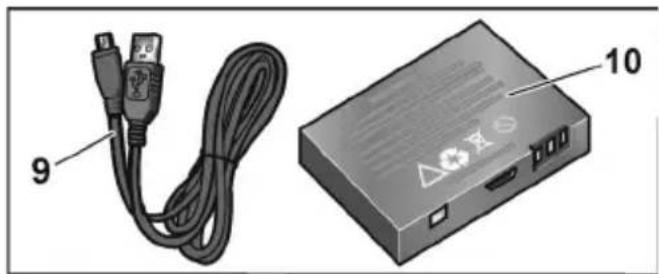
Illustration of a USB cable and an electronic device labeled 9 and 10 (no text or symbols on the devices themselves)Identification on the device 9
For your safety 10
Overview 11
Control panel 12
Technical specifications 12
Instructions for use 13
Maintenance and care 13
Disposal information 14
Exemption from liability 14
Identification on the device
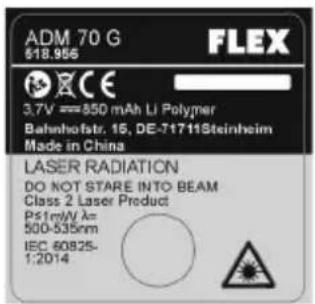
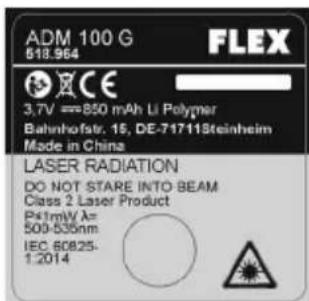
Laser radiation
Do not stare into beam.
Product of laser class 2
Maximum output power ≤ 1 mW
Wave length 500-535 nm
IEC 60825-1:2014
Laser classification
The device complies with laser class 2, based on the standard IEC 825-1/EN 60825. The eye is protected by the lid closure reflex if somebody accidentally glances into the laser beam. However, this lid protection reflex may be impaired by medication, alcohol or drugs. These devices may be used without further protective measures if it can be ensured that no optical instruments reduce the cross-section of the beam. Do not aim laser beam at people.
Electromagnetic compatibility
Even though the device satisfies the strict requirements of the relevant directives, the possibility cannot be excluded that the device
- will disrupt other devices (e.g. aircraft navigation systems) or
- will be disrupted by powerful radiation, possibly resulting in a wrong operation.
In these cases or other uncertainties, check measurements should be carried out.
For your safety
Intended use
This measuring instrument is designed for commercial use in industry and trade. The laser range finder is designed for measuring lengths, heights and distances as well as for determining distances, areas and volumes.
Safety instructions
WARNING!
Read all safety instructions and other instruc-tions to be able to work safely and securely with the measuring instrument. Keep all safety instructions and other instruc-tions in a safe place for the future. Improper operations without complying with this manual could cause damage to the device, influence on the measurement result or physical injury to the user.
— Do not point the laser beam at people or animals and do not look into the laser beam. This measuring instrument generates laser radiation which may cause blindness.
— It is strictly prohibited to aim the laser at eyes or other parts of the body. It is also not permitted to point the laser at heavily reflective surfaces.
— Due to electromagnetic radiation interference to other devices, please do not use the test instrument in aeroplanes or in the vicinity of medical equipment. It must also not been used in a flammable or explosive atmosphere.
— Have the measuring instrument repaired by qualified technicians and with original spare parts only. This ensures that the safety of the measuring instrument is maintained.
— Do not let children use the measuring instrument unsupervised.
They could accidentally blind people.
— Do not use the measuring instrument in a potentially explosive environment which contains flammable liquids, gases or dust. The measuring instrument may generate sparks which will ignite the dust or the vapours.
- If devices other than the operating and adjusting devices specified here are used or if different procedures are implemented, this may result in a hazardous exposure to radiation.
Do not disable any safety devices and do not remove any information or warning signs.
— Before switching on the device, check for visible damage. Do not switch on damaged devices.
— When using the measuring instrument on ladders, avoid an abnormal body posture. Ensure that you have a secure footing and keep your balance at all times.
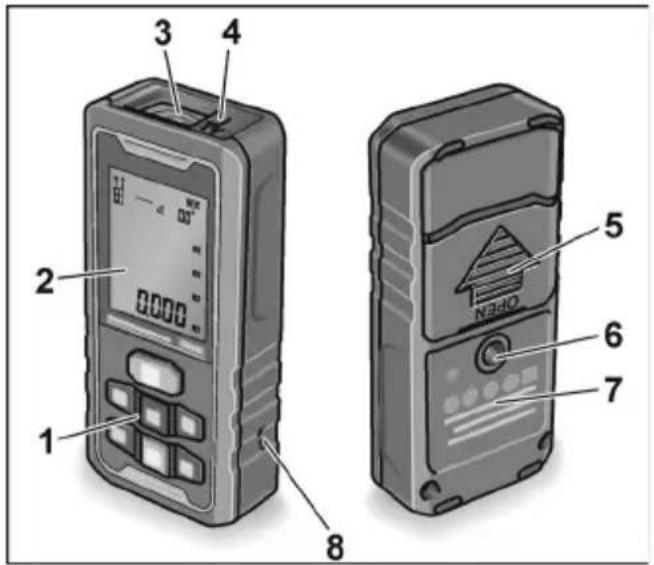
Overview
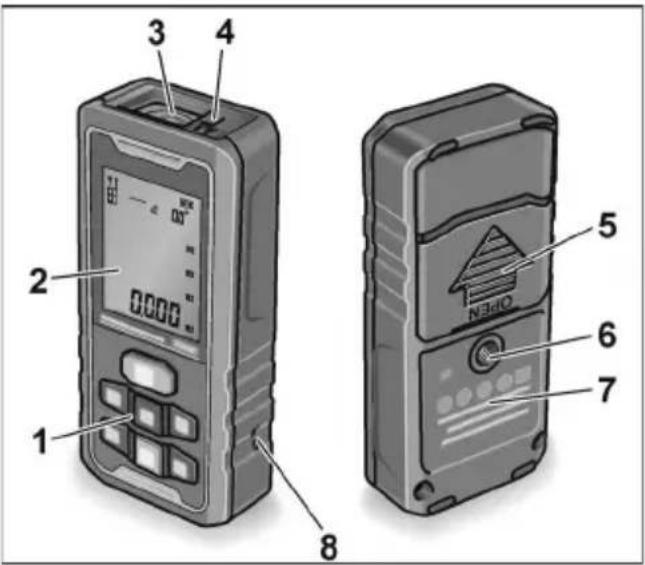
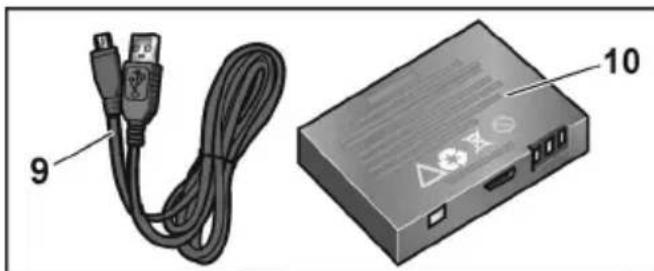
natural_image
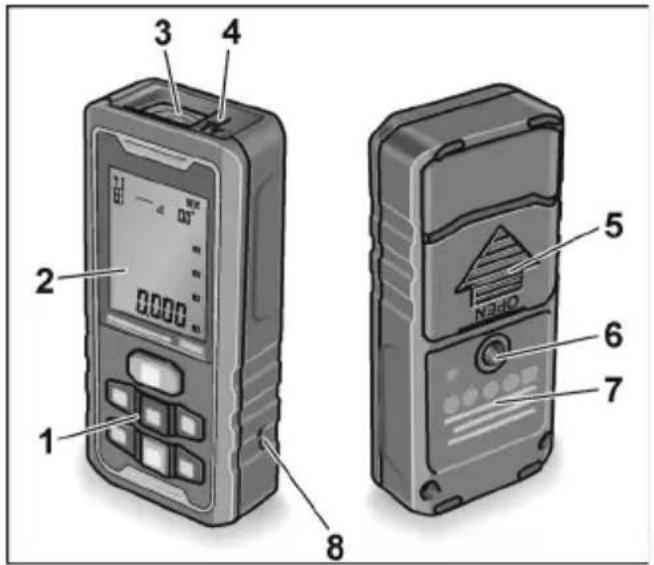
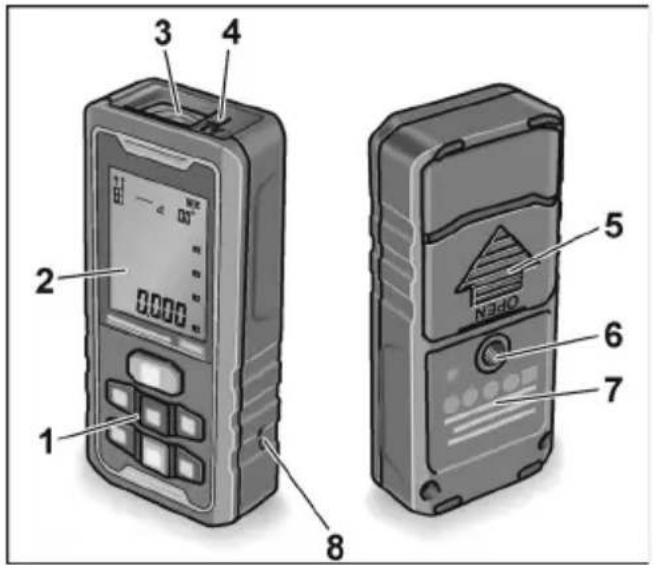
Illustration of a USB cable and an electronic device labeled 9 and 10 (no text or symbols on the devices themselves)1 Control panel
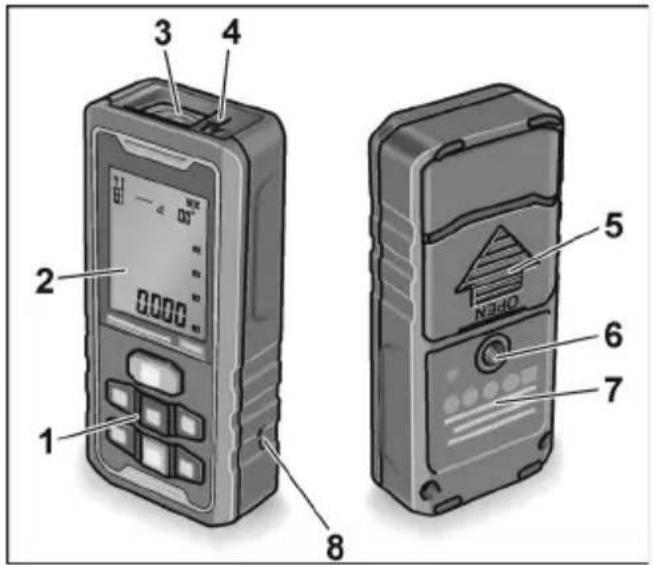
2 D i s p l a y
3 Receiver lens
4 Laser discharge window
5 Battery compartment cover
6 ¼" tripod thread
7 Laser warning sign
8 Wrist strap holder
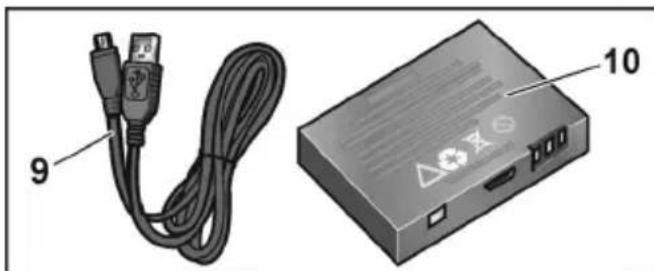
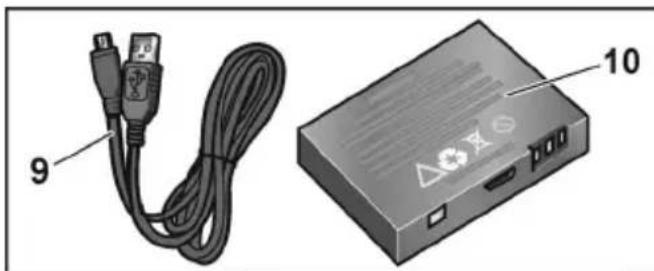
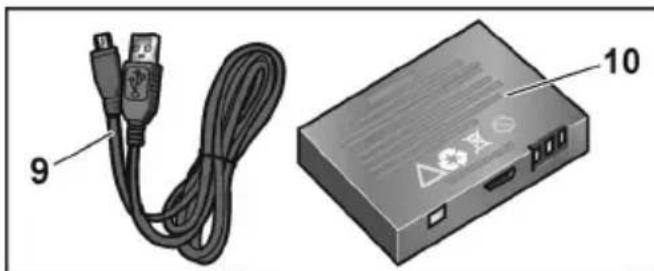
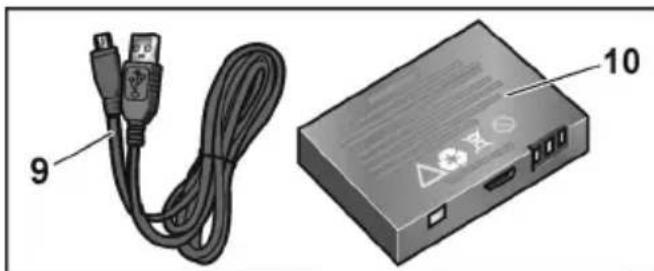
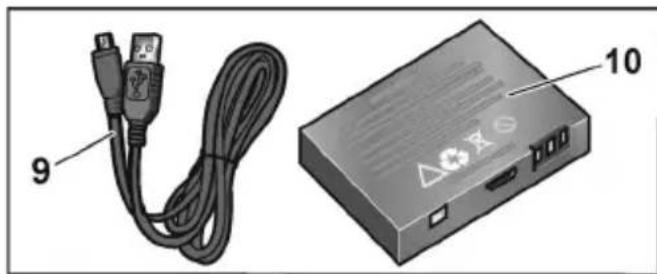
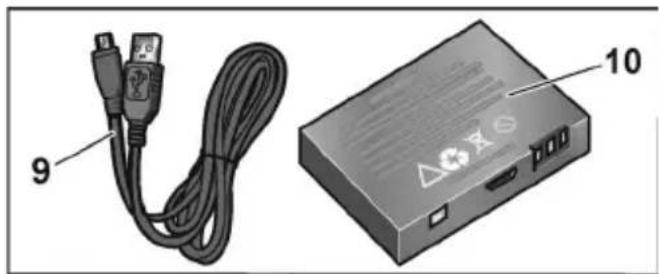
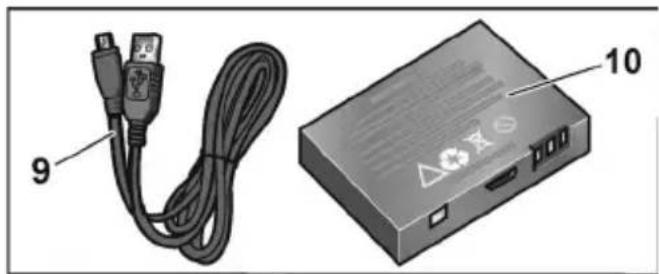
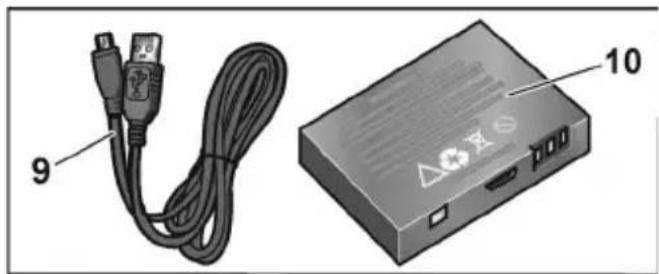
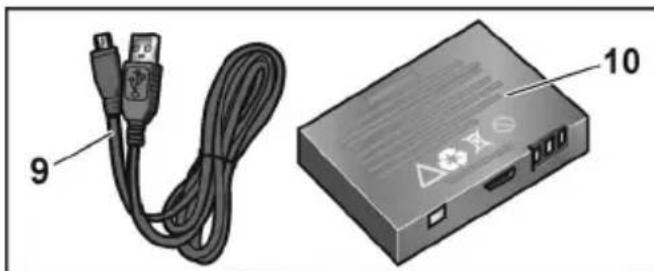
9 USB charge cable
10 Battery
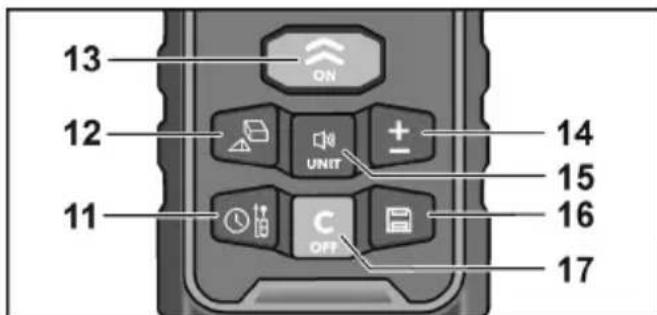
Control panel
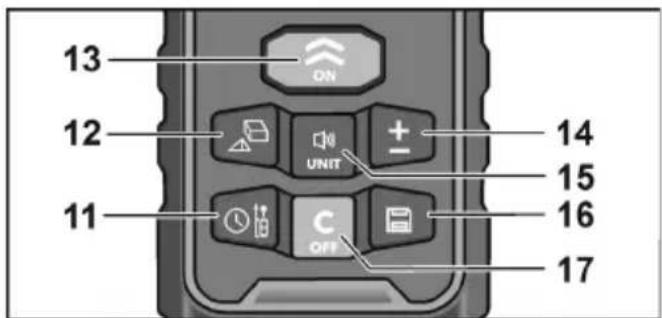
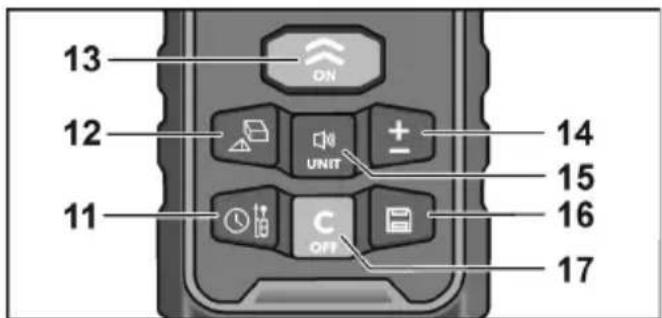
11 Reference Point/Delay measurement
12 Area/Volume/Pythagorean measurement
13 Turn on/Measurement
Selector button for different procedures
14 Addition/Subtraction
15 Unit/Audio signal
16 Save button
17 Off button/Delete
Technical specifications
| Laser range finder ADM70 G / ADM100 G | |
| Visible laser diode 500~535 nm | |
| Laser class 2 | |
| Measurement range * 0,05-70 m / 0,05-100 m | |
| Precision * ± 3 mm | |
| Lithium polymer battery 1x850 mAh / 3xAAA 1,5 V | |
| Operating duration | |
| Individual measurements (number) ≤ 8000 | |
| Automatic switch-off | |
| – Laser beam | 20 s |
| – Measuring instrument | 150 s |
| Temperature range | |
| – for operation | 0 °C ... 40 °C |
| – for storage | -20 °C ... 60 °C |
| Weight 0,147 kg | |
* The measurement range may be less under unfavourable conditions (bright sunlight, reflective surfaces). It is recommended to use a laser target plate. Deviations above and below the specified temperature ranges are also deemed to be unfavourable conditions and can falsify the measurements.
Instructions for use

WARNING!
Do not point the laser beam at people or animals.
— Do not look into the laser beam.
— Do not put any optical instruments in the path of the beam.
This measuring instrument generates laser radiation which may cause blindness.

CAUTION!
— Do not use the measuring instrument in a damp, dusty or sandy environment. Device components may be damaged.
- If the device is brought from a very cold to a warmer environment or vice versa, you should allow the device to acclimatise before using it.
— If using adapters and tripods, ensure that the device is screwed on tightly.
The most important operating steps are explained at the end of these instructions on the illustrated pages.
See from page 125.
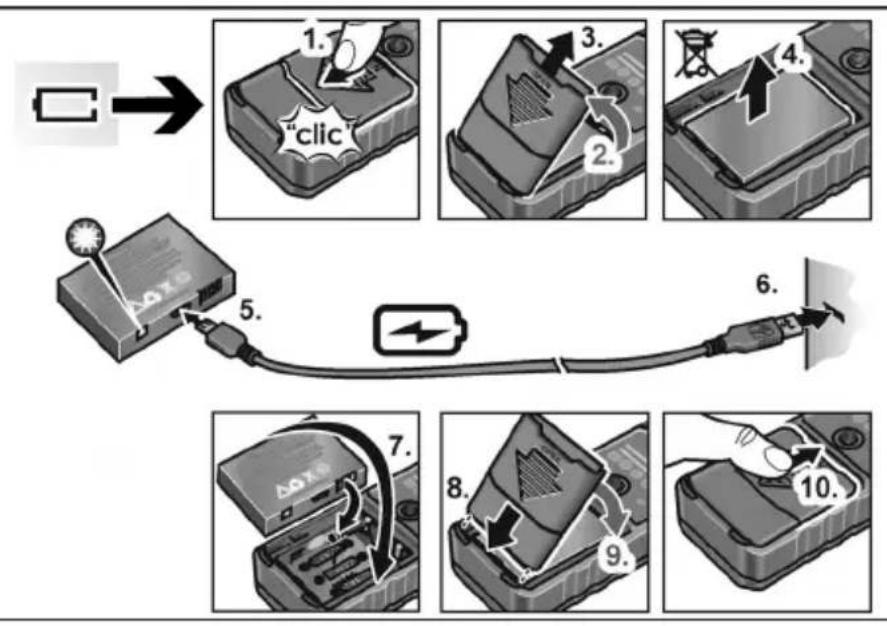
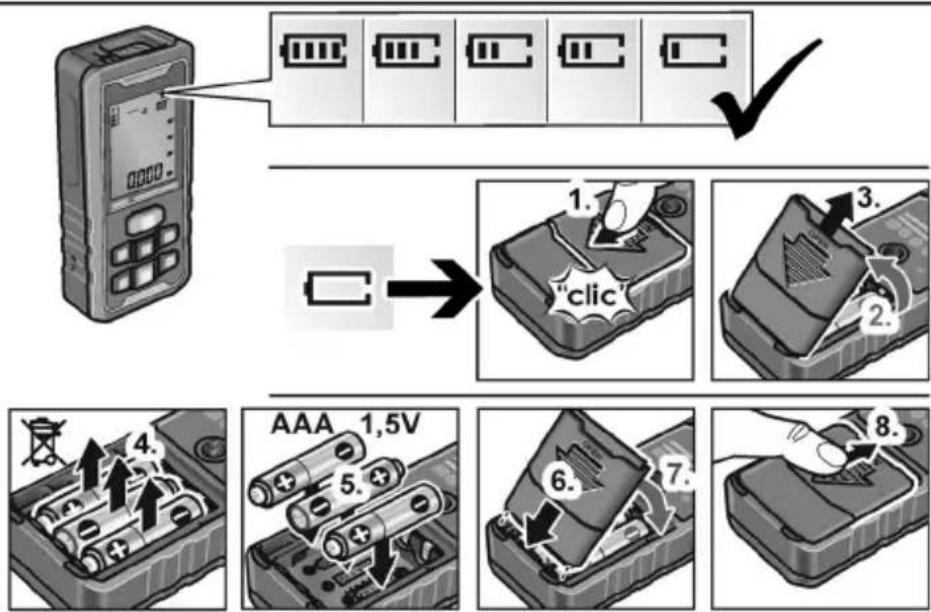
Charge battery with USB cable or insert batteries....125
Switching the device on and off 128
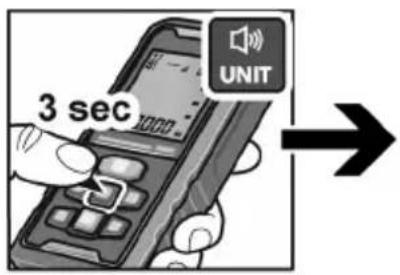
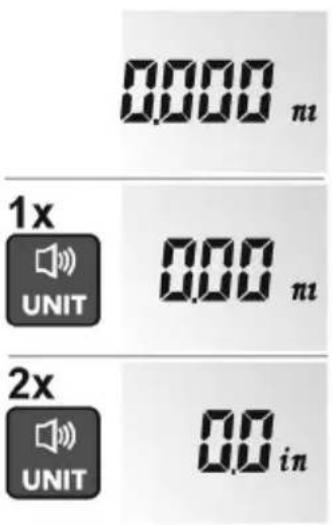
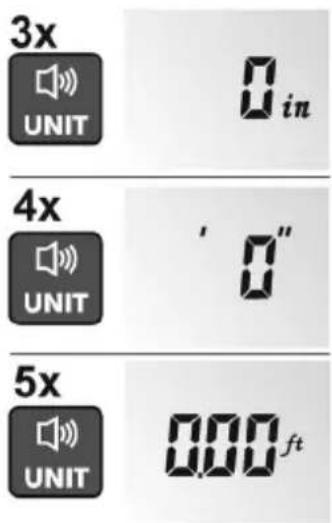
Setting unit of measurement 130
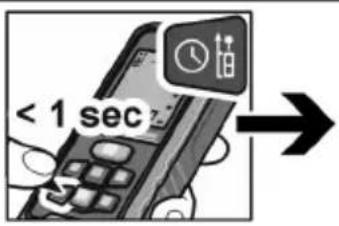
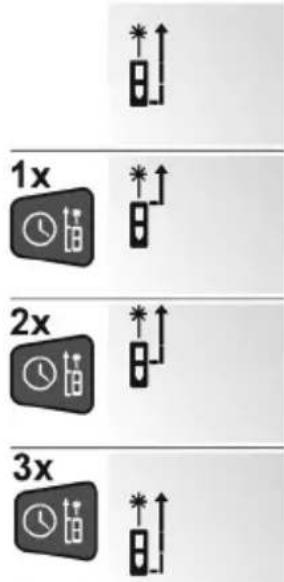
Selecting reference point 132
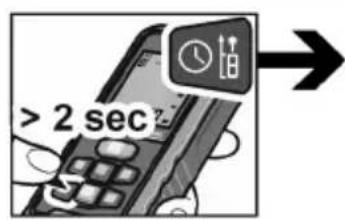
Setting measuring mode ....135
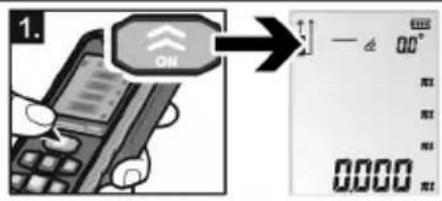
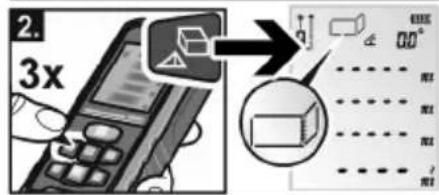
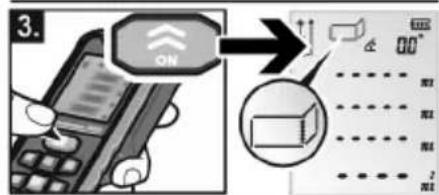
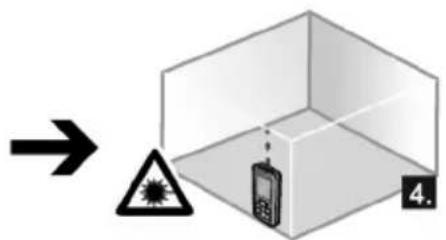
Linear measurement 138
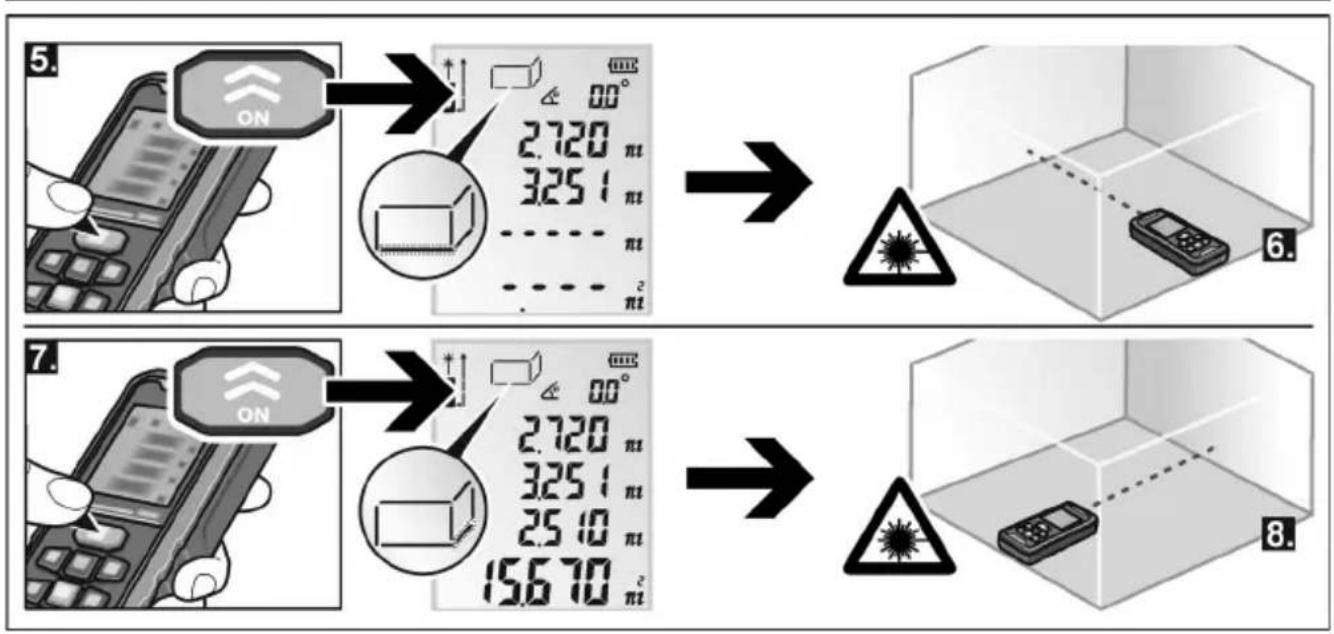
Area measurement 140
Volume and wall surface measurement 142
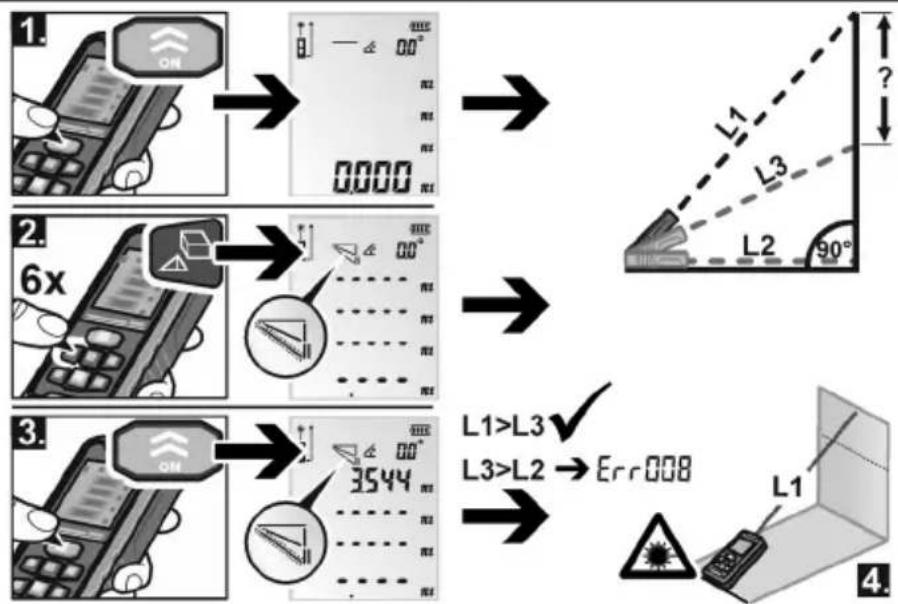
Single Pythagorean 149
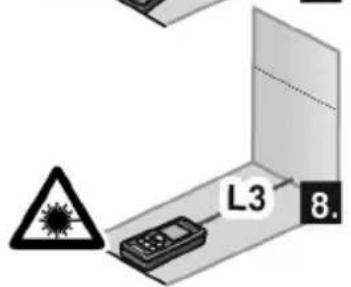
Double Pythagorean 152
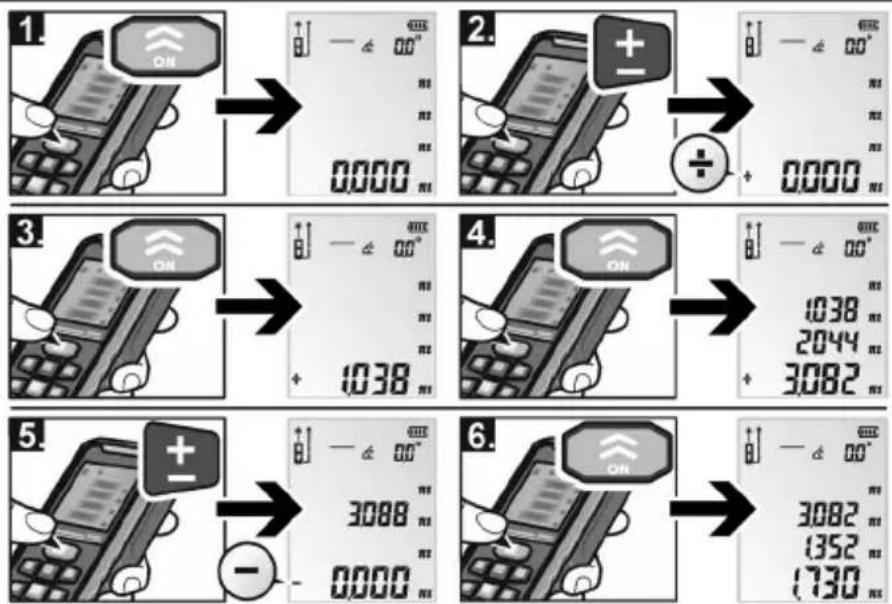
Continuous measurement / Maximum/minimum measurement 156
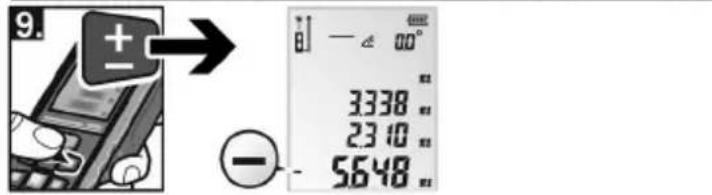
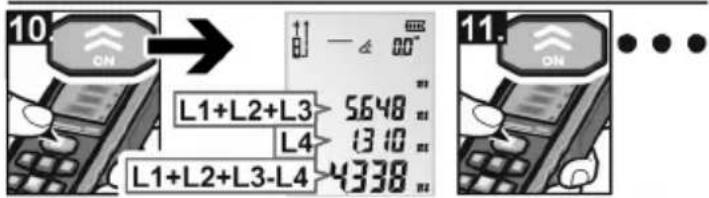
Addition and subtraction 158
Checking precision 161
Maintenance and care
Observe the following instructions:
- Handle the measuring instrument with care and protect it from impacts, vibrations and extreme temperatures.
- Do not touch the receiver lens with your fingers.
- Clean the lens with a soft, dry cloth only
- When the measuring instrument is not in use, keep it in the belt pouch.
- Have the measuring instrument repaired by qualified technicians and with original spare parts only. This ensures that the safety of the measu-ring instrument is maintained.
Disposal information
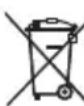
EU countries only:
Do not throw electric power tools into the household waste!
In accordance with the European Directive 2012/19/EU on Waste Electrical and Electronic Equipment and
transposition into national law used electric power tools must be collected separately and recycled in an environmentally friendly manner.

Recycling raw materials instead of waste disposal.
Device, accessories and packaging should be recycled in an environmentally friendly manner. Plastic parts are
identified for recycling according to material type.

NOTE
Please ask your dealer about disposal options!
Exemption from liability
The user of this product is obliged to follow the operating instructions exactly.
All devices have been checked meticulously before delivery. However, the user should always verify the precision of the device before using it.
The manufacturer and his representative are not liable for erroneous or wilfully incorrect use or for any consequential damage or loss of profit.
The manufacturer and his representative are not liable for any consequential damage or loss of profit due to natural catastrophes, e.g. earthquakes, storms, floods, etc. or due to fire, accidents, tampering by third parties or use outside the usual application areas.
The manufacturer and his representative are not liable for any damage or loss of profit due to changed or lost data, business interruption, etc. caused by the product or by an unusable product.
The manufacturer and his representative are not liable for any damage or loss of profit due to the device not being operated according to the instructions.
The manufacturer and his representative are not liable for any damage which was caused by improper use of the power tool or by use of the power tool with products from other manufacturers.
Table des matières
Classification laser
ADM 70 G / ADM 100 G
Pour votre sécurité
natural_image
Illustration of a USB cable and an electronic device labeled 9 and 10 (no text or symbols on the devices themselves)ADM 70 G / ADM 100 G
Bandeau de commande
ADM 70 G / ADM 100 G
ADM 70 G / ADM 100 G
natural_image
Illustration of a USB cable and an electronic device labeled 9 and 10 (no text or symbols on the devices themselves)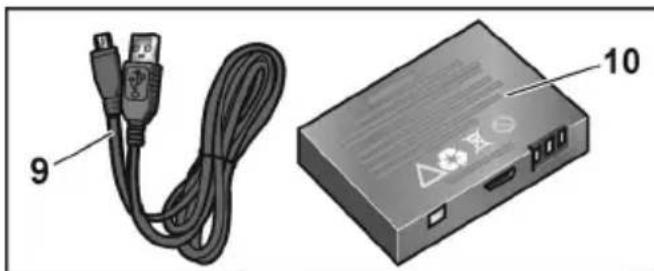
natural_image
Illustration of a USB cable and an electronic device labeled 9 and 10 (no text or symbols on the devices themselves)
natural_image
Illustration of a USB cable and an electronic device labeled 9 and 10 (no text or symbols on the devices themselves)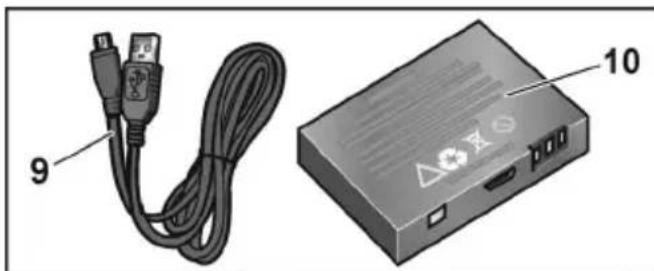
natural_image
Illustration of a USB cable and an electronic device labeled 9 and 10 (no text or symbols on the devices themselves)ADM 70 G / ADM 100 G
Bedieningsveld
natural_image
Illustration of a USB cable and an electronic device labeled 9 and 10 (no text or symbols on the devices themselves)no
ADM 70 G / ADM 100 G
natural_image
Illustration of a USB cable and an electronic device labeled 9 and 10 (no text or symbols on the devices themselves)1 Betjeningspanel
2 D i s p l a y
3 Mottakerlinse
4 Laseråpning
5 Deksel for batterirom
6 ¼" stativgjenger
7 Laservarselskilt
8 Feste for bærestropp
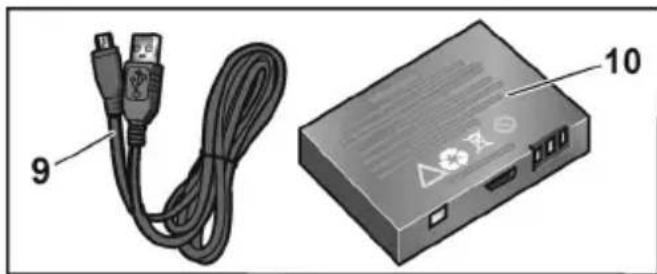
9 USB-ladekabel
10 Batteri
Betjeningsfelt
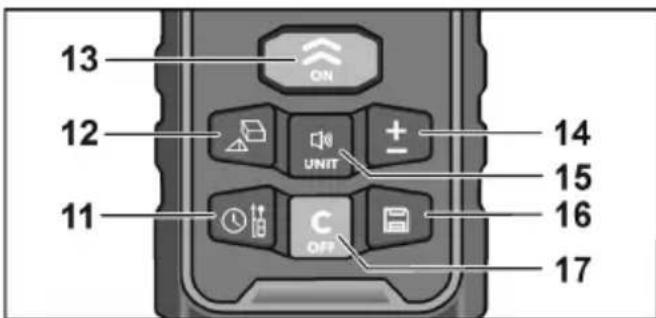
11 Referansepunkt / forsinket måling
12 Arealmåling / volummåling / pytagoreisk måling
13 Innkobling/måling
ADM 70 G / ADM 100 G
ADM 70 G / ADM 100 G
Innehåll
natural_image
Illustration of a USB cable and a device labeled 9 and 10, showing no text or symbols beyond labels.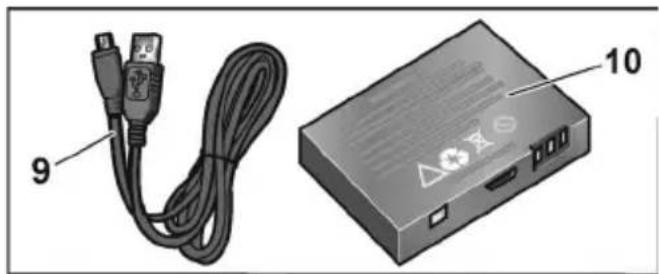
natural_image
Illustration of a USB cable and an electronic device labeled 9 and 10 (no text or symbols on the devices themselves)ADM 70 G / ADM 100 G
Περιεχόμενα
ADM 70 G / ADM 100 G
Με μια ματιά
natural_image
Illustration of a USB cable and an electronic device labeled 9 and 10 (no text or symbols on the devices themselves)1 Π ε δ í o χ ε i ρ i σ μ o ú
2 O θ ó v η
ADM 70 G / ADM 100 G
Spis treści
ADM 70 G / ADM 100 G
Opis urządzenia
natural_image
Illustration of a USB cable and a device labeled 9 and 10, showing no text or symbols beyond labels.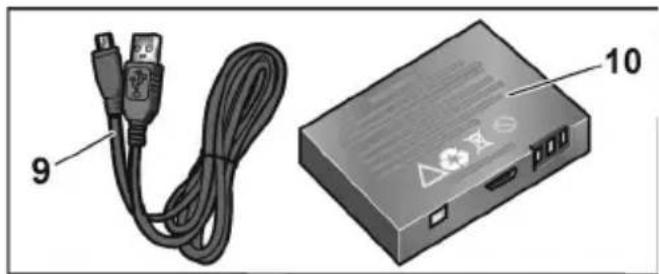
natural_image
Illustration of a USB cable and an electronic device labeled 9 and 10 (no text or symbols on the devices themselves)ADM 70 G / ADM 100 G
Obsah
ADM 70 G / ADM 100 G
Na první pohled
natural_image
Illustration of a USB cable and an electronic device labeled 9 and 10 (no text or symbols on the devices themselves)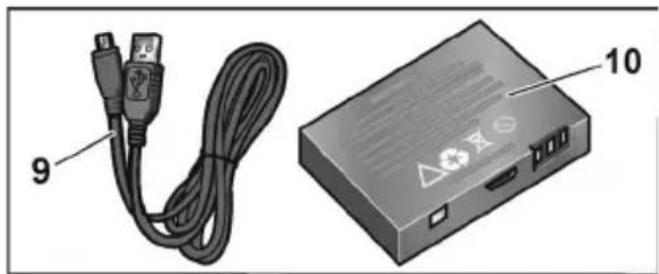
natural_image
Illustration of a USB cable and an electronic device labeled 9 and 10 (no text or symbols on the devices themselves)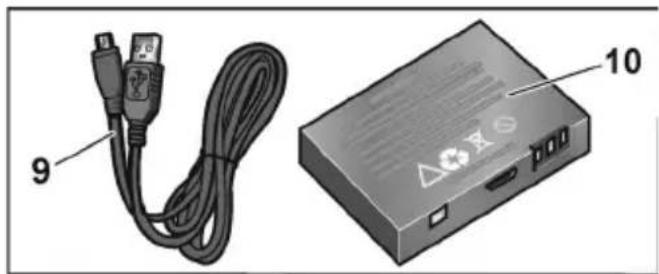
natural_image
Illustration of a USB cable and a device labeled 9 and 10, showing no text or symbols beyond labels.1 Juhtpaneel
2 E k r a a n
3 V a s t u v ö t u l ä ä t s
4 Laseri väljumisaken
5 Patareipesa kate
6 1/4" statiivikeere
7 Laseri hoiatussilt
8 Kandeaasa kinnituskoht
9 USB laadimiskaabel
10 Aku
Juhtpaneel

ADM 70 G / ADM 100 G
Turinys
ADM 70 G / ADM 100 G
natural_image
Illustration of a USB cable and a CD-ROM drive unit (no text or symbols visible)ADM 70 G / ADM 100 G
Naudojimo instrukcija

ISPÉJIMAS!
ADM 70 G / ADM 100 G
Saturs
ADM 70 G / ADM 100 G
Iss apskats
natural_image
Illustration of a USB cable and an electronic device labeled 9 and 10 (no text or symbols on the devices themselves)ADM 70 G / ADM 100 G
Содержание
ADM 70 G / ADM 100 G
natural_image
Illustration of a USB cable and an electronic device labeled 9 and 10 (no text or symbols on the devices themselves)ADM 70 G / ADM 100 G
ADM 70 G / ADM 100 G
| de | Gerät ein- und ausschalten |
| en | Switching the device on and off |
| fr | Allumer et éteindre l'appareil |
| it | Accendere e spegnere l'apparecchio |
| es | Encendido y apagado del equipo |
| pt | Ligar e desligar aparelho |
| nl | Gereedschap in- en uitschakelen |
| da | Tænd og sluk for apparatet |
| no | Inn- og utkopling av apparatet |
| sv | Till- och frånslagning |
| fi | Laitteen päälle- ja poiskytkentä |
| el | Evéryopontoinη και απενεργοποίηση της συσκευής |
| pl | Włączanie i wyłączanie urządzenia |
| hu | A készülék be- és kikapcsolása |
| cs | Zapnutí a vypnutí prístroje |
| sk | Zapnutie a vypnutie prístroja |
| et | Seadme sisse- ja väljalülitamine |
| lt | Prietaiso jungimas ir išjungimas |
| lv | lerīces ieslēgšana un izslēgšana |
| ru | Включение и выключение прибора |
flowchart
graph TD
    A["ON"] --> B["OFF"]
    B --> C["Auto OFF"]
    subgraph Time_Low
        D["188888° ON"] --> E["188888° OFF"]
        F["0000"] --> G["0000"]
        H[">2 sec"] --> I["OFF"]
        J["150 s"] --> K["Auto OFF"]
    end
ADM 70 G / ADM 100 G
| de | Maßeinheit einstellen |
| en | Setting unit of measurement |
| fr | Régler l'unité de mesure |
| it | Impostare l'unità di misura |
| es | Ajuste de la unidad de medición |
| pt | Definir a unidade de medida |
| nl | Maateenheid instellen |
| da | Indstilling af måleenhed |
| no | Innstilling av måleenhet |
| sv | Inställning av måttenhet |
| fi | Mittayksikön valinta |
| el | Púθμιση μονάδας μέτρησης |
| pl | Nastawianie jednostki pomiarowej |
| hu | Mértékegység beállítása |
| cs | Nastavení měrné jednotky |
| sk | Nastavenie mernej jednotky |
| et | Mõõtühikute seadistamine |
| lt | Matavimo vienetų nustatymas |
| lv | Mērvienības iestatīšana |
| ru | Установка единиц измерения |
ADM 70 G / ADM 100 G
| de | Bezugspunkt auswählen / Verzögerte Messung |
| en | Selecting reference point |
| fr | Choisir un point de référence |
| it | Selezionare il punto di riferimento |
| es | Selección del punto de referencia |
| pt | Seleccionar ponto de referência |
| nl | Referentiepunt kiezen |
| da | Valg af referencepunkt |
| no | Valg av referansepunkt |
| sv | Val av referenspunkt |
| fi | Vertailupisteen valinta |
| el | Επιλογή σημείου αναφοράς |
| pl | Wybór punktu odniesienia |
| hu | Vonatkoztatási pont választása |
| cs | Volba vztažného bodu |
| sk | Výber referenčného bodu |
| et | Lähtepunkti valimine |
| lt | Atskaitos taško parinkimas |
| lv | Atsauces punkta izvēle |
| ru | Выбор исходной точки |
ADM 70 G / ADM 100 G
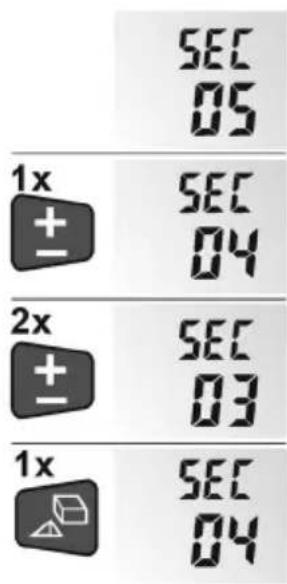
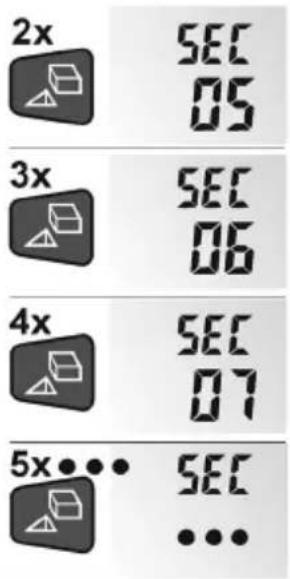
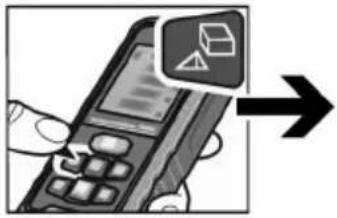
| de | Messmodus einstellen |
| en | Setting measuring mode |
| fr | Régler le mode de mesure |
| it | Impostare la modalità di misura |
| es | Ajuste del modo de medición |
| pt | Definir modo de medição |
| nl | Meetmodus instellen |
| da | Indstilling af måle-mode |
| no | Innstilling av målemodus |
| sv | Inställning av mätsätt |
| fi | Mittaustilan valinta |
| el | Púθμιση τρόπου μέτρησης |
| pl | Nastawianie modusu pomiarowego |
| hu | Mérési mód beállítása |
| cs | Nastavení režimu měření |
| sk | Nastavenie režimu merania |
| et | Mõõterežiimi seadistamine |
| lt | Matavimo režimo nustatymas |
| lv | Mērīšanas režīma iestatīšana |
| ru | Установка функции измерения |
ADM 70 G / ADM 100 G
1x

—

2x

3x

4x


1°
5x


6x


7x


ADM 70 G / ADM 100 G
| de | Längenmessung |
| en | Linear measurement |
| fr | Mesure de longueurs |
| it | Misurazione della lunghezza |
| es | Medición de longitudes |
| pt | Medição de comprimentos |
| nl | Lengtemeting |
| da | Længdemåling |
| no | Lengdemåling |
| sv | Längdmätning |
| fi | Pituusmittaus |
| el | Μέτρηση μήκους |
| pl | Pomiar długości |
| hu | Hosszmérés |
| cs | Měření délky |
| sk | Meranie dížky |
| et | Pikkuse mōōtmine |
| lt | Ilgio matavimas |
| lv | Garuma mērīšana |
| ru | Измерение длины |
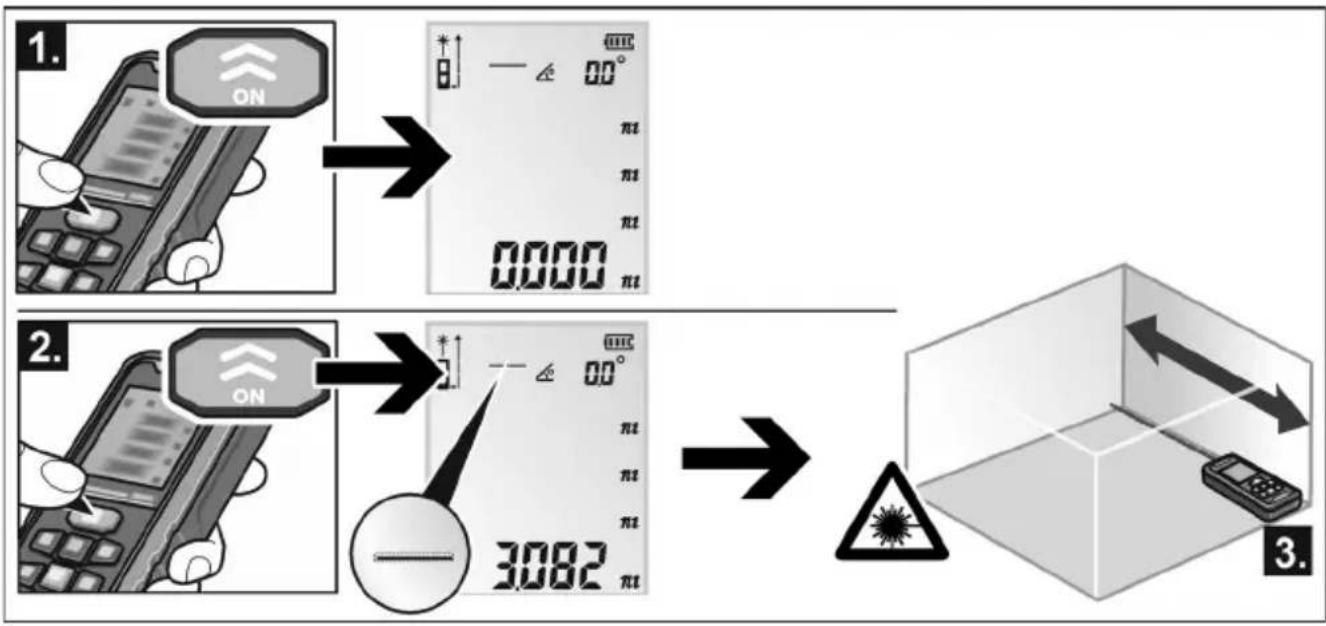
flowchart
graph LR
    A["1. ON"] --> B["2. ON"]
    B --> C["3. Box with warning symbol and directional arrows"]
ADM 70 G / ADM 100 G
| de | Flächenmessung |
| en | Area measurement |
| fr | Mesure de surfaces |
| it | Misurazione della superficie |
| es | Medición de superficies |
| pt | Medição de áreas |
| nl | Oppervlaktemeting |
| da | Arealmåling |
| no | Flatemåling |
| sv | Ytmätning |
| fi | Pinta-alamittaus |
| el | Μέτρηση επιφάνειας |
| pl | Pomiar powierzchni |
| hu | Felületmérés |
| cs | Měření plochy |
| sk | Meranie plochy |
| et | Pindala mõõtmine |
| lt | Ploto matavimas |
| lv | Virsmas mērīšana |
| ru | Измерение площади |
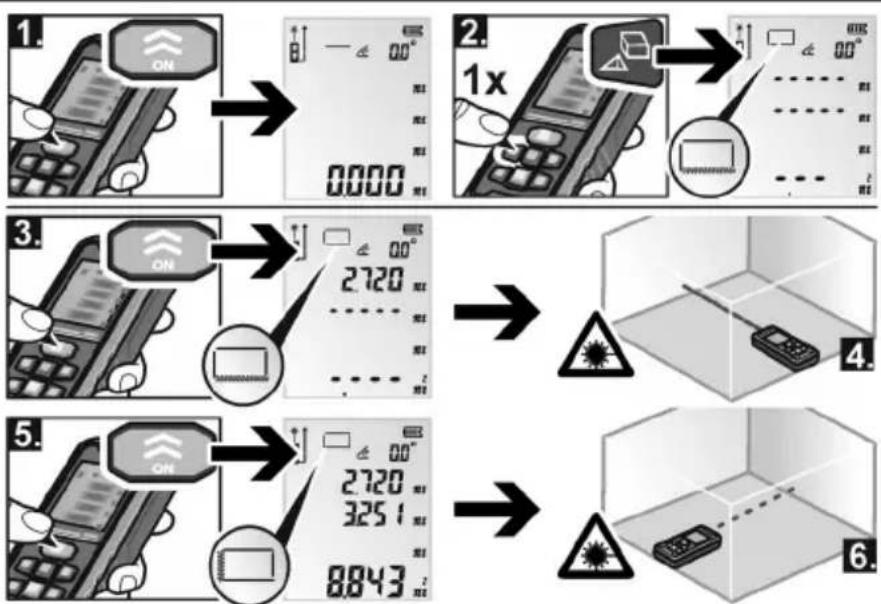
ADM 70 G / ADM 100 G
| de | Volumenmessung und Wandflächenmessung |
| en | Volume and wall surface measurement |
| fr | Mesure du volume et de la surface des murs |
| it | Misurazione del volume e dell'area della parete |
| es | Medición del volumen y de la superficie de la pared |
| pt | Medição de volume e áreas de parede |
| nl | Meting van volume en muuropervlak |
| da | Måling af volumen og vægarealer |
| no | Volum- og veggarealmåling |
| sv | Mätning av volym och väggyta |
| fi | Tilavuuden ja seinäpinta-alan mittaus |
| el | Μέτρηση όγκου και επιφάνειας τοίχων |
| pl | Pomiar objętości lub powierzchni ścian |
| hu | Térfogat- és falfelületmérés |
| cs | Měření objemu a plochy stěny |
| sk | Meranie objemu a plochy steny |
| et | Ruumala ja seinapinna mõõtmine |
| lt | Tūrio ir sienelès ploto matavimas |
| lv | Tilpuma un sienas platības mērījums |
| ru | Измерение объема и площади стены |
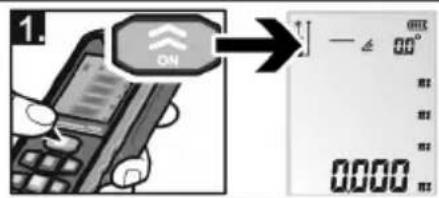
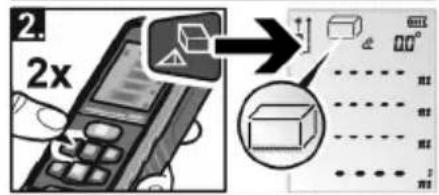
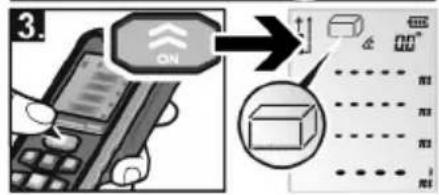
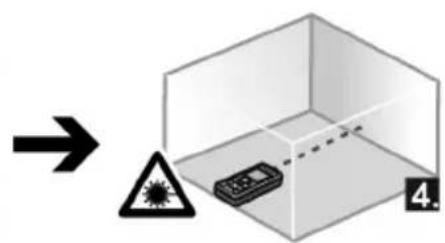
ADM 70 G / ADM 100 G
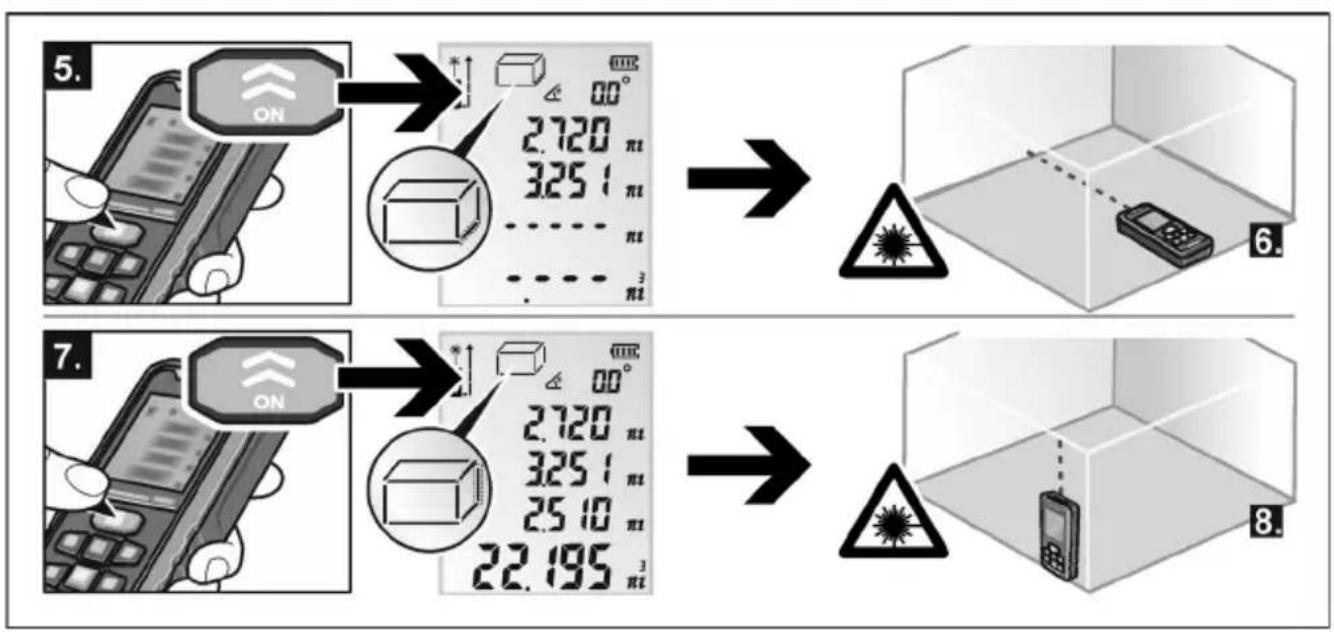
flowchart
graph LR
    A["5. ON"] --> B["2.720 pi"]
    B --> C["3.251 pi"]
    C --> D["..."]
    D --> E["3 pi"]
    E --> F["6. Phone with warning symbol"]
    G["7. ON"] --> H["2.720 pi"]
    H --> I["3.251 pi"]
    I --> J["2.510 pi"]
    J --> K["..."]
    K --> L["22.195 pi"]
    L --> M["8. Phone with warning symbol"]
ADM 70 G / ADM 100 G
flowchart
graph TD
    A["5. ON"] --> B["2.720/3.251/πt"]
    B --> C["→"]
    C --> D["6. Mobile phone"]
    D --> E["7. ON"]
    E --> F["2.720/3.251/πt"]
    F --> G["→"]
    G --> H["8. Mobile phone"]
ADM 70 G / ADM 100 G
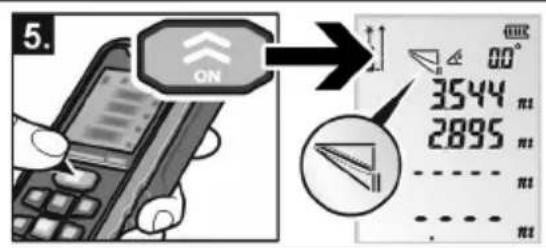
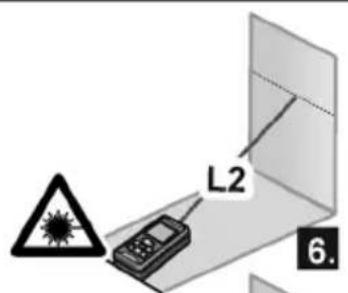
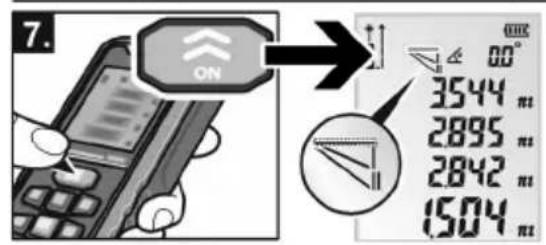
| de | Einfacher Pythagoras |
| en | Single Pythagorean |
| fr | Pythagore simple entrée |
| it | Pitagora semplice |
| es | Pitágoras simple |
| pt | Pitágoras simples |
| nl | Enkele Pythagoras |
| da | Enkelt Pythagoras |
| no | Enkel Pythagoras |
| sv | Enkel Pythagoras |
| fi | Yksinkertainen pythagoras |
| el | Атлó Пиθαγόρειο θεώρημα |
| pl | Prosty Pitagoras |
| hu | Egyszerű Pitagorasz |
| cs | Jednoduché měření podle Pythagorovy věty |
| sk | Jednoduché meranie podľa Pytagorovej vety |
| et | Ühekordne Pythagoras |
| lt | Paprasta Pitagoro funkcija |
| lv | Vienkāršais Pitagors |
| ru | Простая функция Пифагора |
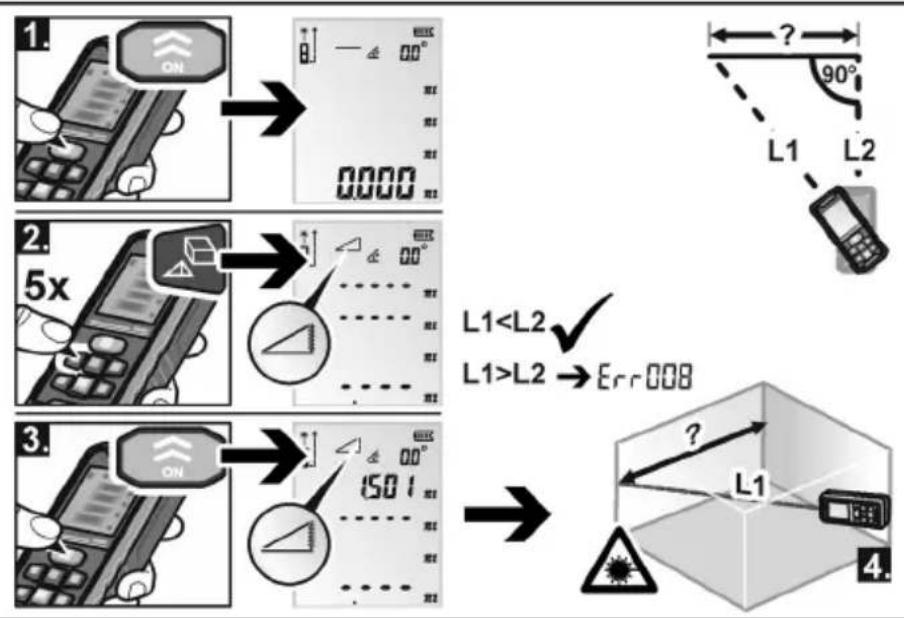
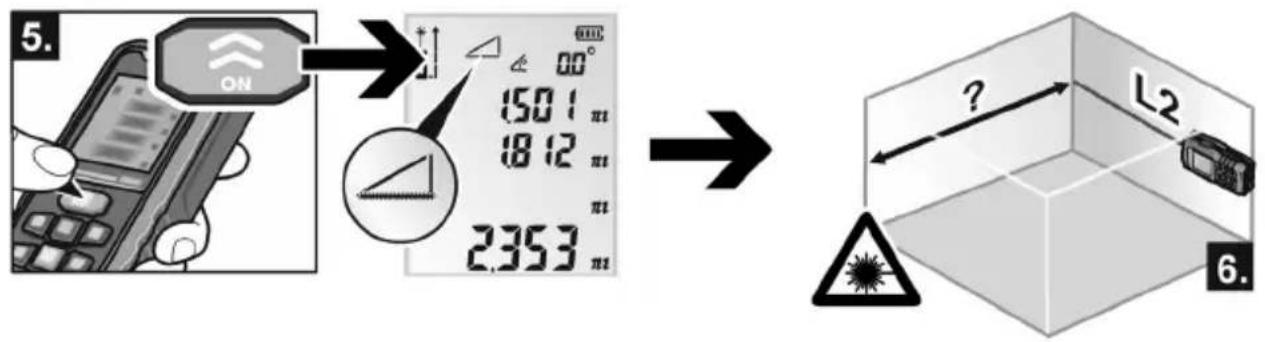
$$ \begin{array}{l}\text {L1 < L2}\\text {L1 > L2} \rightarrow \text {Err008}\end{array} $$
ADM 70 G / ADM 100 G
| de | Doppelter Pythagoras |
| en | Double Pythagorean |
| fr | Pythagore double entrée |
| it | Pitagora doppio |
| es | Pitágoras doble |
| pt | Pitágoras duplo |
| nl | Dubbele Pythagoras |
| da | Dobbelt Pythagoras |
| no | Dobbel Pythagoras |
| sv | Dubbel Pythagoras |
| fi | Kaksoispythagoras |
| el | Διπλό Πυθαγόρειο θεώρημα |
| pl | Podwójny Pitagoras |
| hu | Dupla Pitagorasz |
| cs | Dvojité měření podle Pythagorovy věty |
| sk | Dvojité meranie podľa Pytagorovej vety |
| et | Kahekordne Pythagoras |
| lt | Dviguba Pitagoro funkcija |
| lv | Dubultais Pitagors |
| ru | Двойная функция Пифагора |
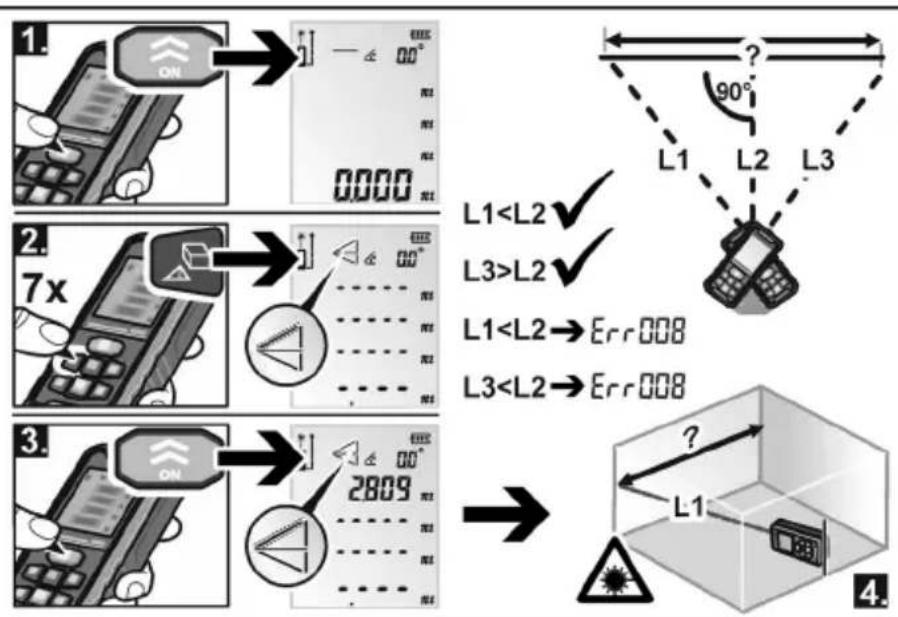
L1<L2→Err008
L3<L2→Err008
ADM 70 G / ADM 100 G
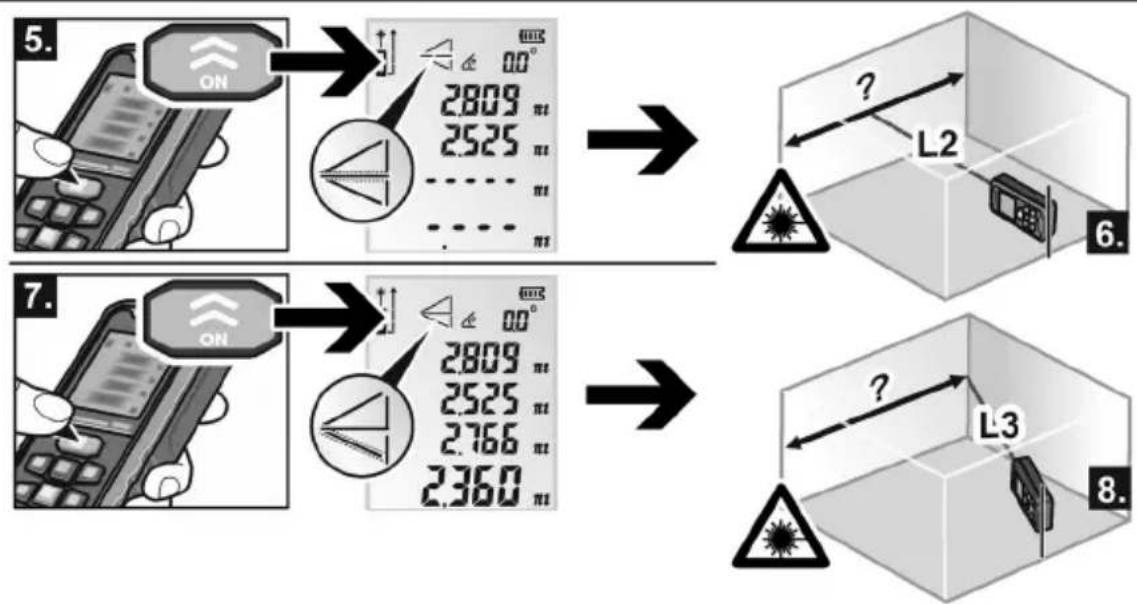
flowchart
graph TD
    A["5. ON"] --> B["2809"]
    B --> C["2525"]
    C --> D["..."]
    D --> E["7. ON"]
    E --> F["2809"]
    F --> G["2525"]
    G --> H["2766"]
    H --> I["2360"]
    I --> J["6. L2"]
    J --> K["?"]
    K --> L["L3"]
    L --> M["8. Unknown icon"]
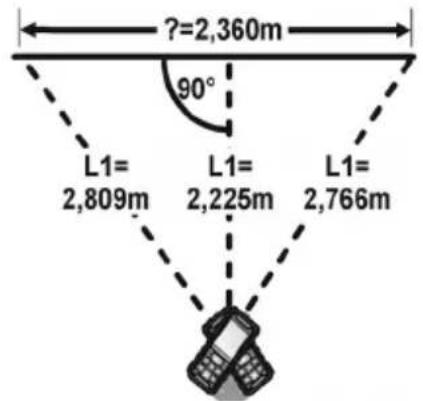
| de | Dauermessung / Maximum-/Minimum-Messung |
| en | Continuous measurement / Maximum/minimum measurement |
| fr | Mesure permanente / Mesure du maximum / minimum |
| it | Misurazione continua / Misurazione del massimo/minimo |
| es | Medición permanente / Medición de máximos y mínimos |
| pt | Medição contínua / Medição máxima/mínima |
| nl | Duurmeting / Maximum-/minimummeting |
| da | Kontinuerlig måling / Max.-/Min.-måling |
| no | Langtidsmåling / Maksimum-/minimum måling |
| sv | Kontinuerlig mätning / Max/Min mätning |
| fi | Jatkuva mittaus / Maksimi-/minimimittaus |
| el | Μέτρηση διαρκείας / Μέτρηση μεγίστου/ελαχίστου |
| pl | Pomiar ciągły / Pomiar Maximum/Minimum |
| hu | Tartós mérés / Maximum-/minimum-mérés |
| cs | Trvalé měření / Měření maxima/minima |
| sk | Trvalé meranie / Meranie maxima/minima |
| et | Pidevmõõtmine / Maksimaalne/minimaalne mõõtmine |
| lt | Nuolatinis matavimas / Didžiausios (mažiausios) vertės matavimas |
| lv | Ilgstoša mērīšana / Maksimuma/minimuma mērījums |
| ru | Продолжительное измерение / Максимальное/Минимальное измерение |
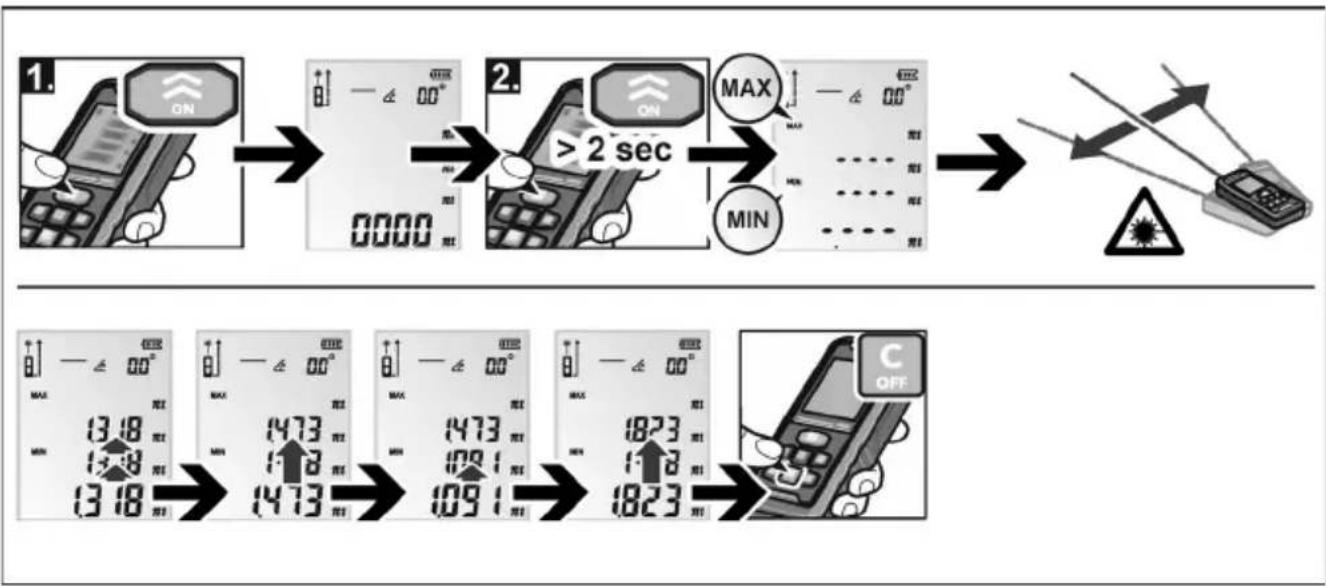
flowchart
graph TD
    A["1. ON"] --> B[">2 sec"]
    B --> C["MAX"]
    C --> D["MIN"]
    D --> E["2. ON"]
    E --> F[">2 sec"]
    F --> G["MAX"]
    G --> H["MIN"]
    H --> I["2. ON"]
    I --> J[">2 sec"]
    J --> K["MAX"]
    K --> L["MIN"]
    L --> M["2. ON"]
    M --> N[">2 sec"]
    N --> O["MAX"]
    O --> P["MIN"]
    P --> Q["2. ON"]
    Q --> R[">2 sec"]
    R --> S["MAX"]
    S --> T["MIN"]
    T --> U["2. ON"]
    U --> V[">2 sec"]
    V --> W["MAX"]
    W --> X["MIN"]
    X --> Y["2. ON"]
    Y --> Z[">2 sec"]
    Z --> AA["MAX"]
    AA --> AB["MIN"]
    AB --> AC["2. ON"]
    AC --> AD[">2 sec"]
    AD --> AE["MAX"]
    AE --> AF["MIN"]
    AF --> AG["2. ON"]
    AG --> AH[">2 sec"]
    AH --> AI["MAX"]
    AI --> AJ["MIN"]
    AJ --> AK["2. ON"]
    AK --> AL[">2 sec"]
    AL --> AM["MAX"]
    AM --> AN["MIN"]
    AN --> AO["2. ON"]
    AO --> AP[">2 sec"]
    AP --> AQ["MAX"]
    AQ --> AR["MIN"]
    AR --> AS["2. ON"]
    AS --> AT[">2 sec"]
    AT --> AU["MAX"]
    AU --> AV["MIN"]
    AV --> AW["2. ON"]
    AW --> AX[">2 sec"]
    AX --> AY["MAX"]
    AY --> AZ["MIN"]
    AZ --> BA["2. ON"]
    BA --> BB[">2 sec"]
    BB --> BC["MAX"]
    BC --> BD["MIN"]
    BD --> BE["2. ON"]
    BE --> BF[">2 sec"]
    BF --> BG["MAX"]
    BG --> BH["MIN"]
    BH --> BI["2. ON"]
    BI --> BJ[">2 sec"]
    BJ --> BK["MAX"]
    BK --> BL["MIN"]
    BL --> BM["2. ON"]
    BM --> BN[">2 sec"]
    BN --> BO["MAX"]
    BO --> BP["MIN"]
    BP --> BQ["2. ON"]
    BQ --> BR[">2 sec"]
    BR --> BS["MAX"]
    BS --> BT["MIN"]
    BT --> BU["2. ON"]
    BU --> BV[">2 sec"]
    BV --> BW["MAX"]
    BW --> BX["MIN"]
    BX --> BY["2. ON"]
    BY --> BZ[">2 sec"]
    BZ --> CA["MAX"]
    CA --> CB["MIN"]
    CB --> CC["2. ON"]
    CC --> CD[">2 sec"]
    CD --> CE["MAX"]
    CE --> CF["MIN"]
    CF --> CG["2. ON"]
    CG --> CH[">2 sec"]
    CH --> CI["MAX"]
    CI --> CJ["MIN"]
    CJ --> CK["2. ON"]
    CK --> CL[">2 sec"]
    CL --> CM["MAX"]
ADM 70 G / ADM 100 G
| de | Addition und Subtraktion |
| en | Addition and subtraction |
| fr | Addition et soustraction |
| it | Addizione e sottrazione |
| es | Adición y sustracción |
| pt | Adição e subtracção |
| nl | Optellen en aftrekken |
| da | Addition og subtraction |
| no | Addisjon og subtraksjon |
| sv | Addition och subtraction |
| fi | Yhteen- ja vähennyslasku |
| el | Прóσθεση και αφαίρεση |
| pl | Dodawanie i odejmowanie |
| hu | Összeadás és kivonás |
| cs | Sčítání a odečítání naměřených hodnot |
| sk | Sčítavanie a odčítavanie nameraných hodnôt |
| et | Liitmine ja lahutamine |
| lt | Sumavimas ir minusavimas |
| lv | Saskaitišana un atņemšana |
| ru | Сложение и вычитание |
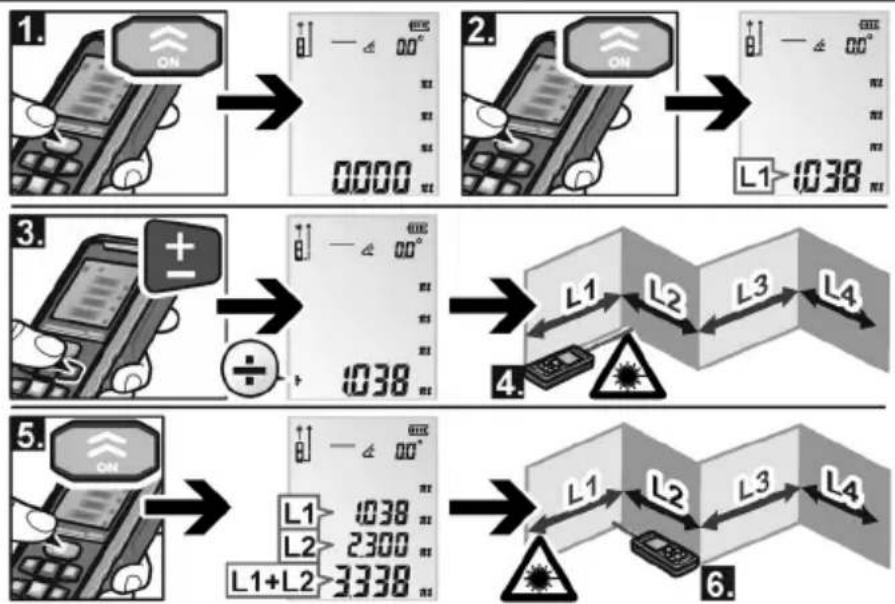
ADM 70 G / ADM 100 G
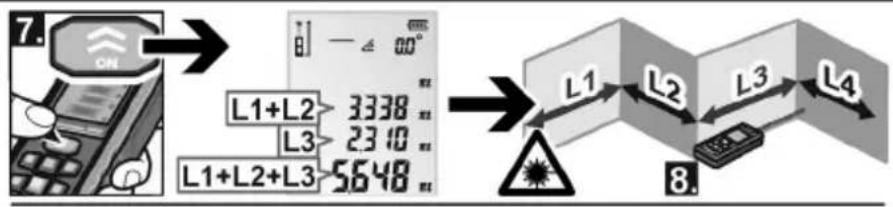
flowchart
graph LR
    A["CN"] --> B["L1+L2"]
    B --> C["3338"]
    B --> D["L3"]
    D --> E["2310"]
    B --> F["L1+L2+L3"]
    F --> G["5648"]
    G --> H["Warning Symbol"]

    I["Output 1"] --> J["L1"]
    J --> K["L2"]
    K --> L["L3"]
    L --> M["L4"]
de Prüfung der Genauigkeit
en Checking precision
fr Vérification de la précision
it Controllo della precisione
es Control de la exactitud
pt Verificação da precisão
nl Controle van de nauwkeurigheid
da Kontrol af nøjagtigheden
no Kontroll av nøyaktigheten
sv Kontroll av noggrannheten
fi Tarkkuuden testaus
el 'Ελεγχος της ακρίβειας
pI Sprawdzenie dokładności pomiaru
hu A pontosság ellenőrzése
cs Kontrola presnosti
sk Kontrola presnosti
et Täpsuse kontrollimine
It Tikslumo tikrinimas
Iv Precizitātes pārbaude
ru Проверка точности
ADM 70 G / ADM 100 G
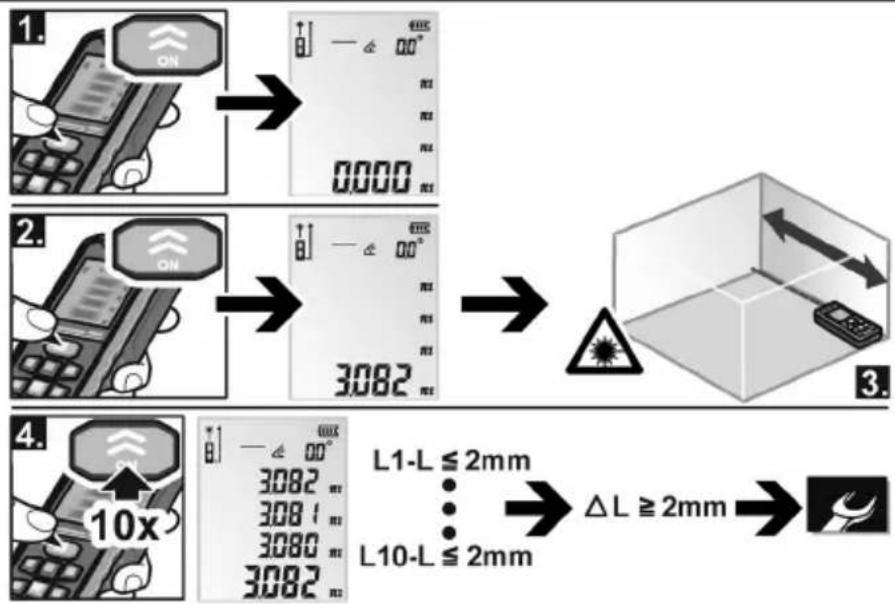
flowchart
graph TD
    A["1. Display with ON"] --> B["2. Display with ON"]
    B --> C["3. 3082"]
    C --> D["4. Display with 10x"]
    D --> E["5. L1-L ≤ 2mm, L10-L ≤ 2mm"]
    E --> F["ΔL ≥ 2mm"]
    F --> G["End"]
ADM 70 G / ADM 100 G
FLEX

- Identification on the device
- Laser radiation
- Laser classification
- Electromagnetic compatibility
- For your safety
- Intended use
- Safety instructions
- WARNING!
- Overview
- Instructions for use
- CAUTION!
- Maintenance and care
- Disposal information
- Exemption from liability
- Table des matières
- Classification laser
- Pour votre sécurité
- ADM 70 G / ADM 100 G
- Innehåll
- Περιεχόμενα
- Spis treści
- Obsah
- Juhtpaneel
- Turinys
- Naudojimo instrukcija
- ISPÉJIMAS!
- Saturs
- Содержание
- FLEX
Brand : Flex
Model : ADM 70 G
Category : Rangefinder