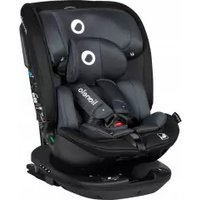
Bastiaan i-Size - Car seat Lionelo - Free user manual and instructions
Find the device manual for free Bastiaan i-Size Lionelo in PDF.


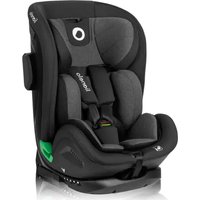
| Product Type | i-Size Car Seat |
| Brand | Lionelo |
| Model | Bastiaan i-Size |
| Safety Standard | R129/03 (i-Size) |
| Child Height | 40 to 150 cm |
| Child Weight | Up to 36 kg (with harness up to 21 kg) |
| Installation | ISOFIX + Top Tether or vehicle seat belt |
| Orientation | Forward-facing or rear-facing |
| Rotation | 360° (with side position for easier installation) |
| Recline Adjustment | 4 positions forward-facing, 1 semi-reclined position rear-facing |
| Harness | 5-point, height-adjustable with headrest |
| Headrest | Height-adjustable (integrated with harness adjustment) |
| Infant Insert | Included for children under 87 cm |
| Cover | Removable and hand-washable at max 30°C |
| Material | Plastic and fabric |
| Usage | Rear seats only (unless airbag deactivated) |
| Top Tether | Upper tether strap included |
| Isofix | Sliding arms with locking indicators |
| Cleaning Plastic Parts | Damp cloth and mild detergent |
| Approval | i-Size (UN R129) |
Frequently Asked Questions - Bastiaan i-Size Lionelo
User questions about Bastiaan i-Size Lionelo
0 question about this device. Answer the ones you know or ask your own.
Ask a new question about this device
Download the instructions for your Car seat in PDF format for free! Find your manual Bastiaan i-Size - Lionelo and take your electronic device back in hand. On this page are published all the documents necessary for the use of your device. Bastiaan i-Size by Lionelo.
USER MANUAL Bastiaan i-Size Lionelo
natural_image
Line drawing of a lionelo car seat assembly (no text or symbols)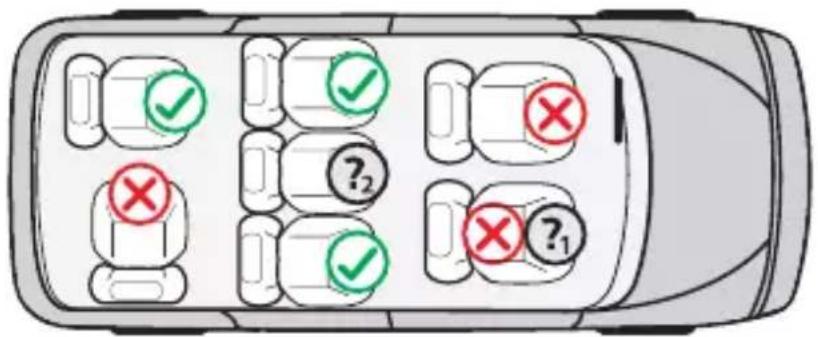
A
natural_image
Simple diagram showing a left-pointing arrow and a folded paper clip inside a rounded square frame (no text or symbols)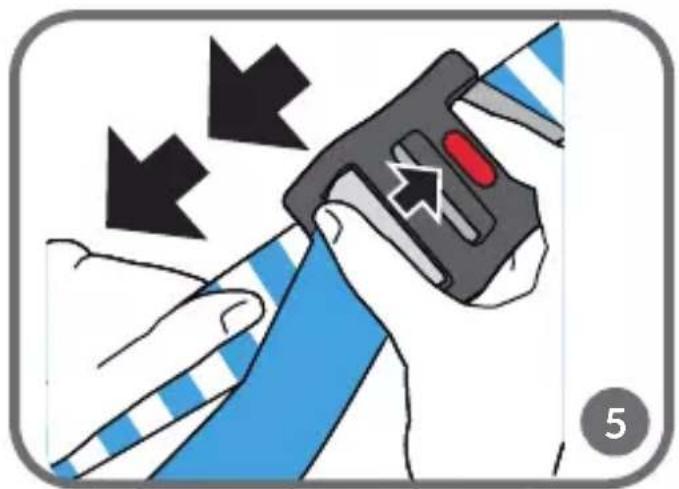
natural_image
Illustration of a hand holding a device with arrows indicating motion or force, no text or symbols present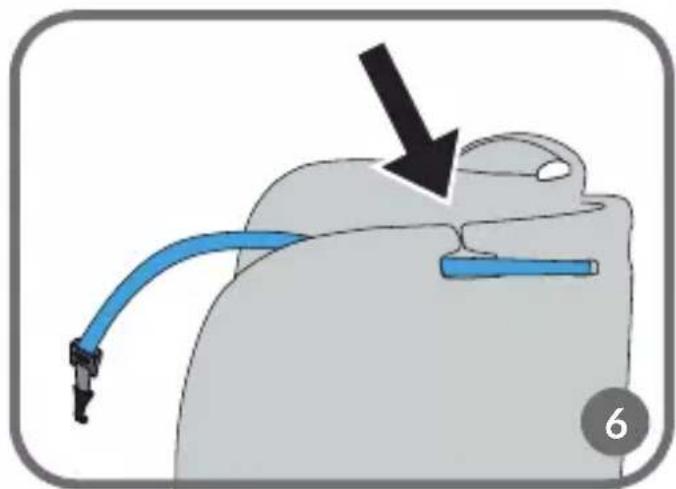
natural_image
Diagram of a mechanical device with a blue cable and black arrow indicating direction (no text or symbols)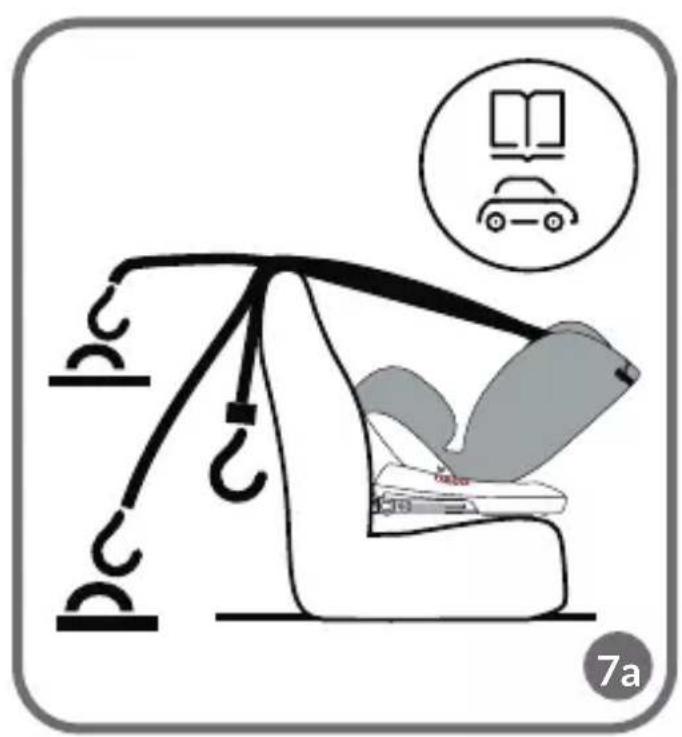
natural_image
Illustration of a car seatbelt with car loading dock and car icon (no text or symbols)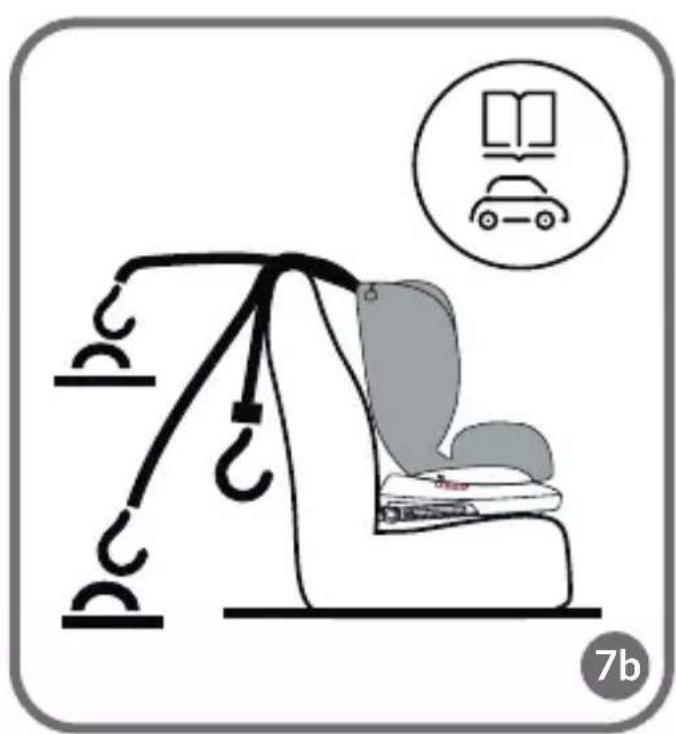
natural_image
Illustration of a car seat with hooks and a book icon, no text or symbols present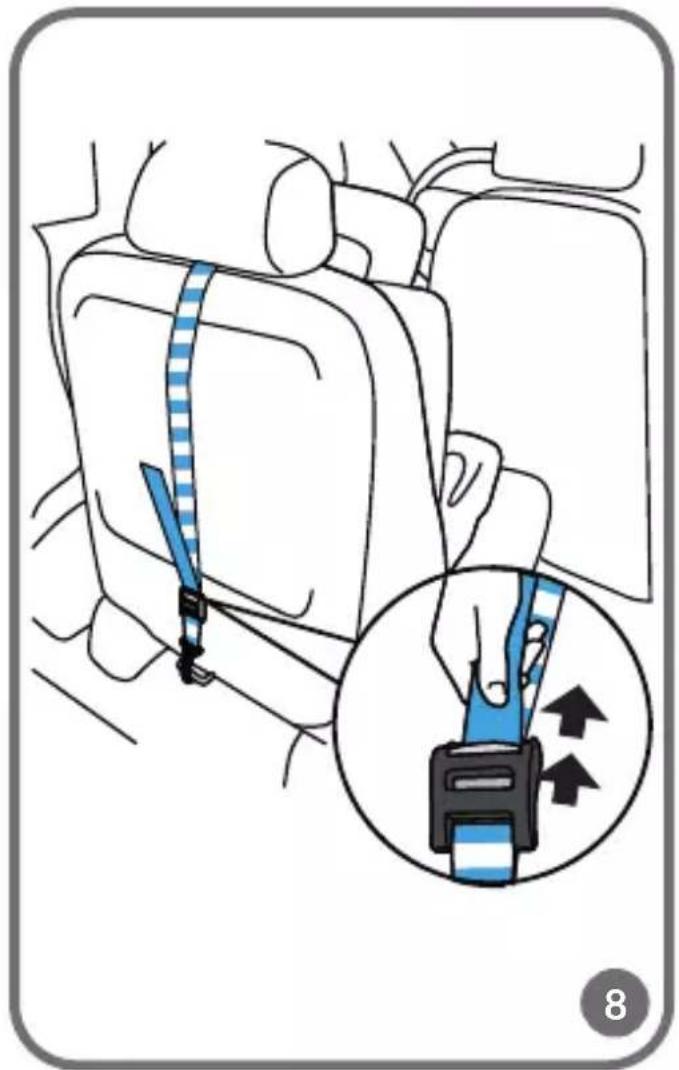
natural_image
Illustration of a person seated in a car seat using a green safety belt, with a circular inset showing a car with a pedestrian crossing (no text or symbols)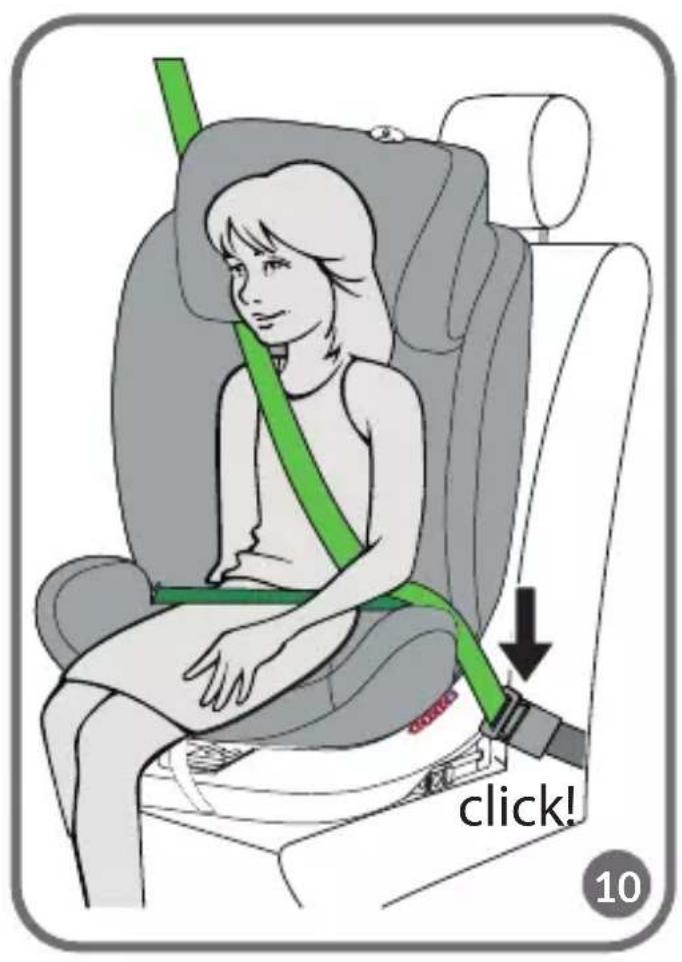
natural_image
Illustration of a car seatbelt buckle being adjusted for a seatbelt, showing the seatbelt being inserted (no text or symbols present)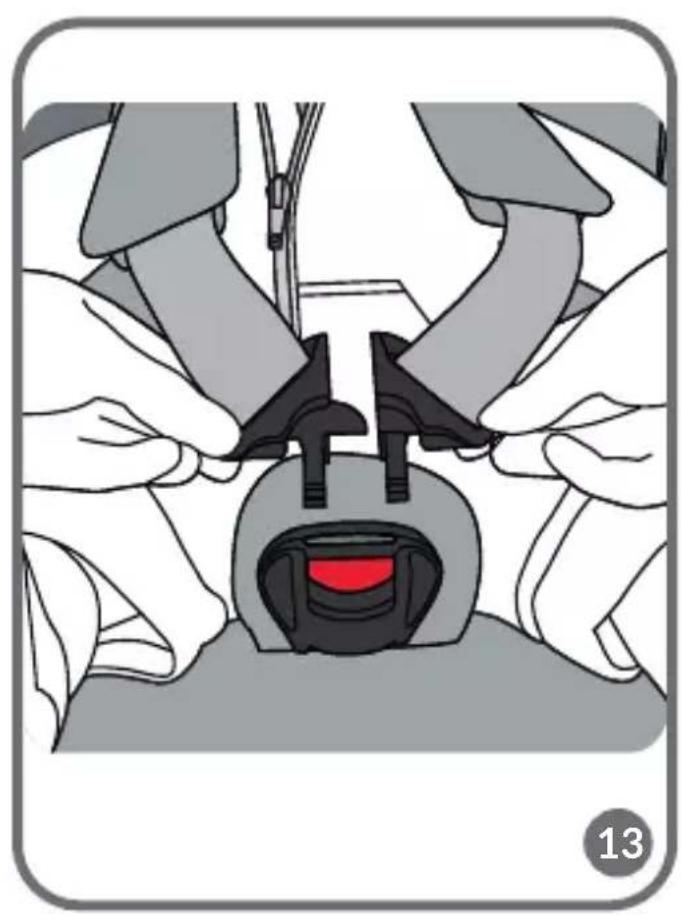
natural_image
Illustration of a medical procedure showing hands adjusting a device with a red accent (no text or symbols)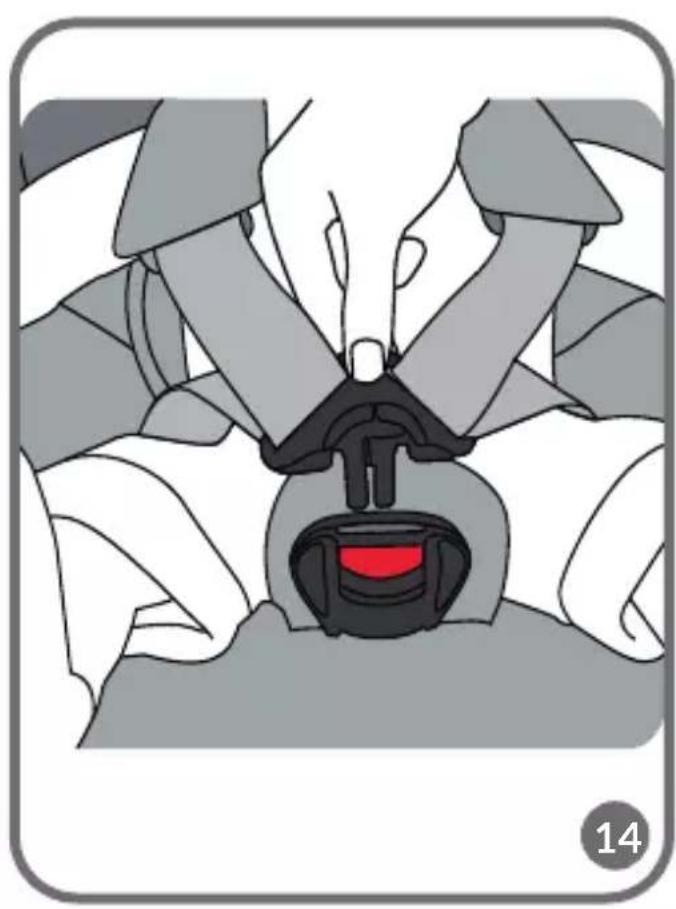
natural_image
Illustration of a car seatbelt with a red accent, no text or symbols present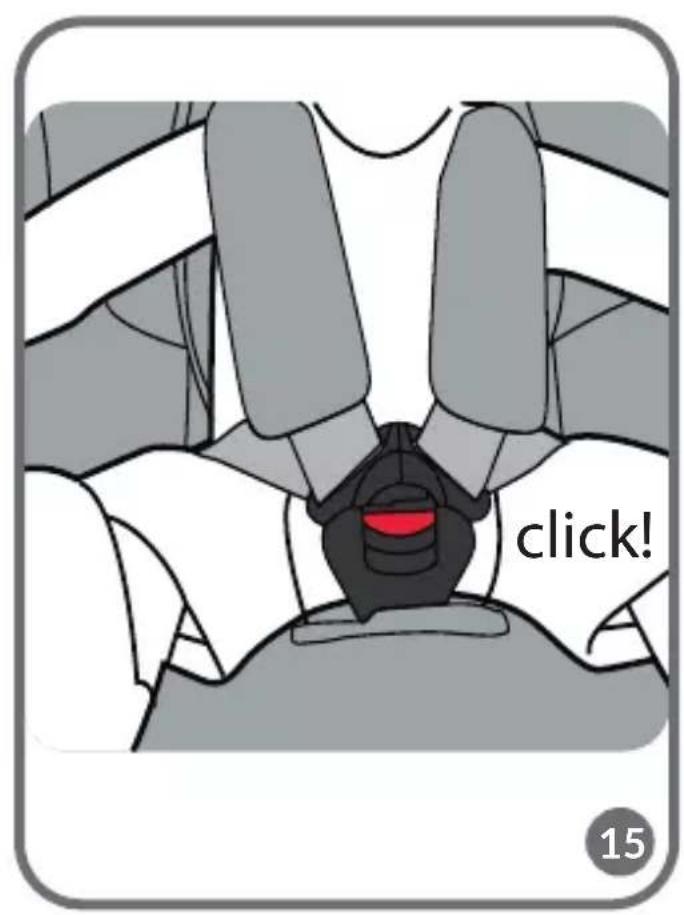
natural_image
Medical illustration showing a hand operating a catheter device with an arrow indicating force or insertion (no text or symbols present)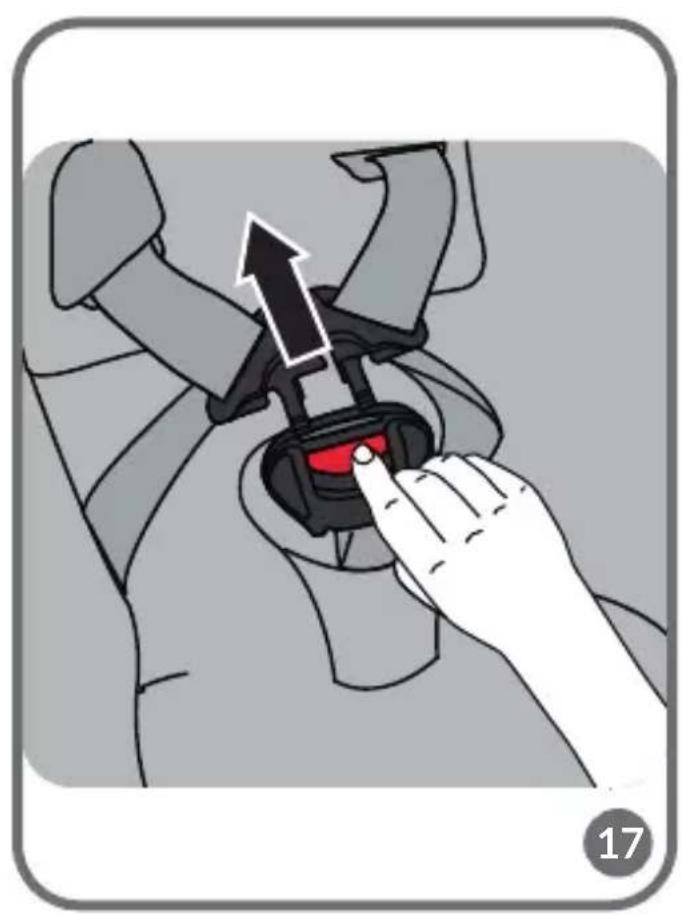
natural_image
Illustration of a hand adjusting a car seatbelt buckle with an arrow indicating the adjustment (no text or symbols present)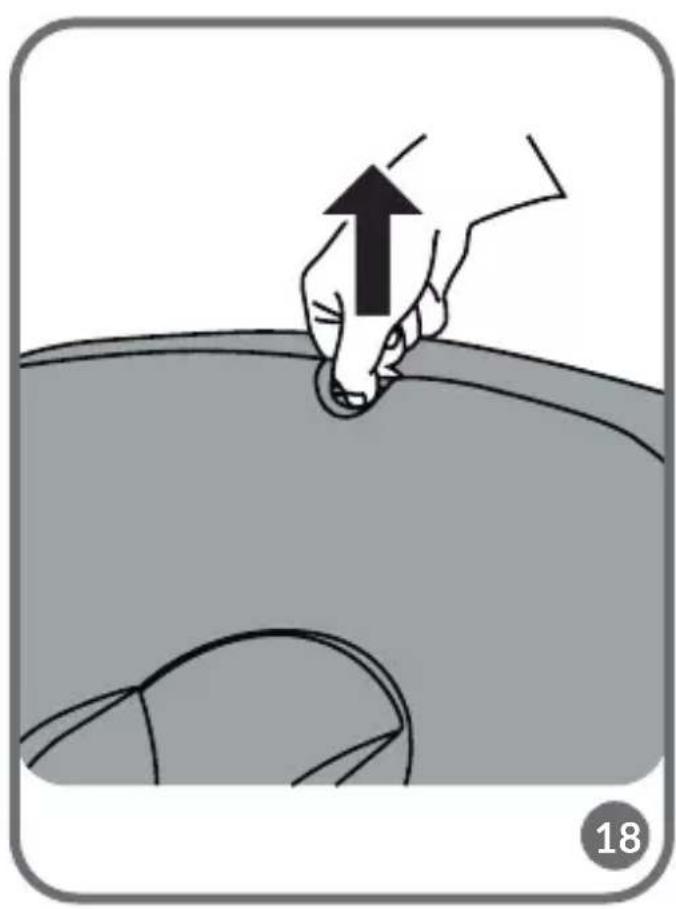
natural_image
Illustration of a hand pressing down on a curved surface with an upward arrow, no text or symbols present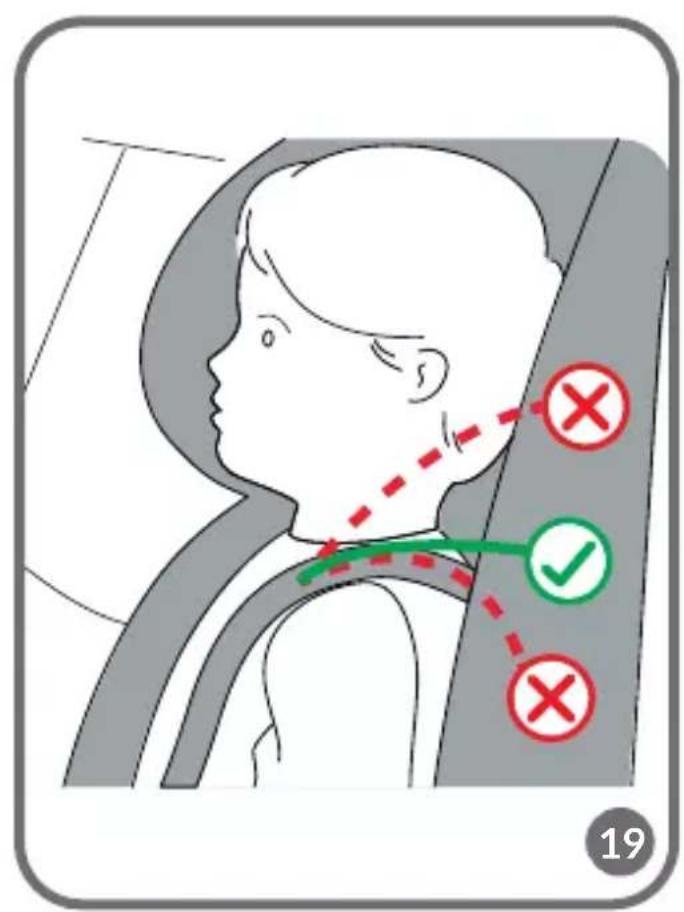
natural_image
Illustration of a hand pressing down on a curved surface with an upward arrow, no text or symbols present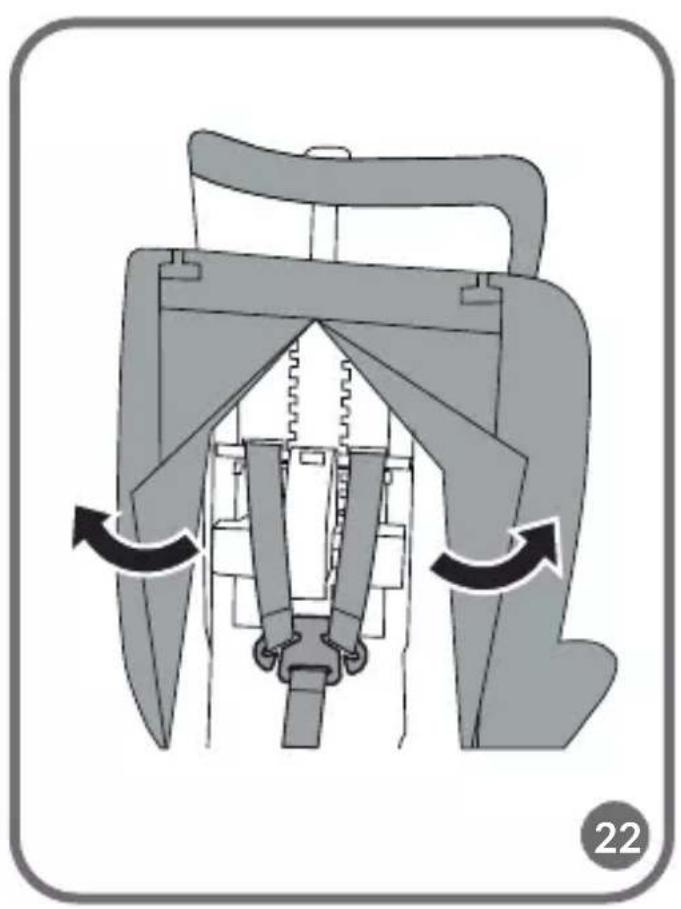
natural_image
Mechanical assembly diagram showing internal components with directional arrows indicating motion (no text or symbols)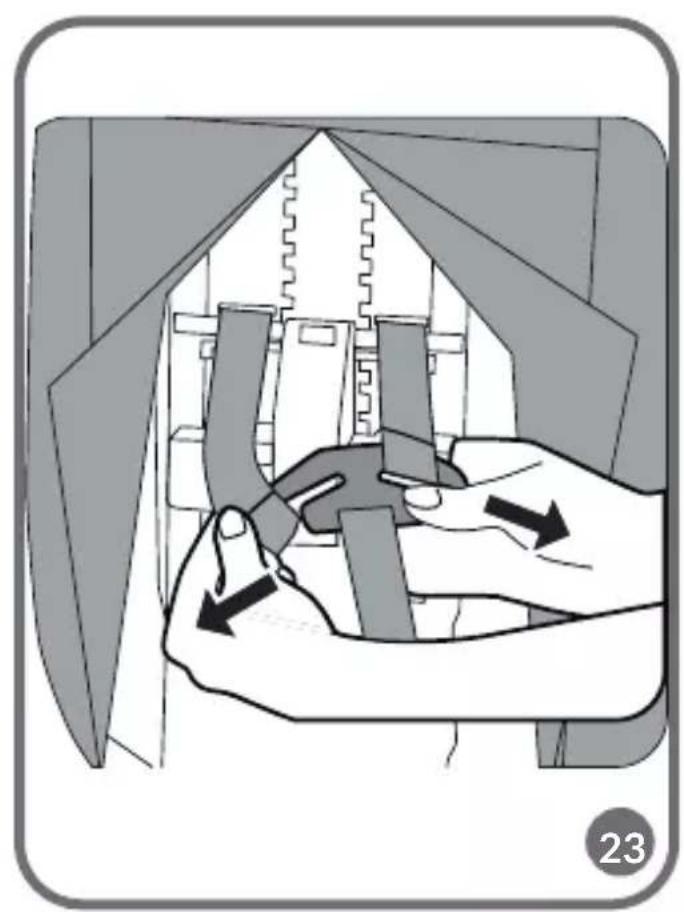
natural_image
Illustration of hands assembling or adjusting a mechanical component, showing a zigzag line and directional arrows (no text or symbols)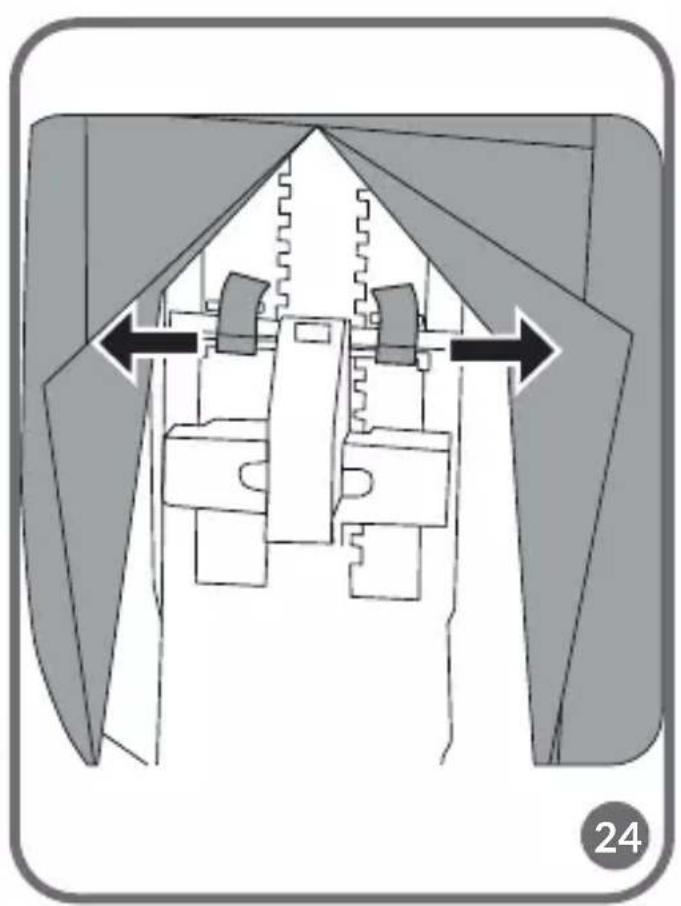
natural_image
Diagram of a mechanical assembly with directional arrows indicating movement or force (no text or symbols)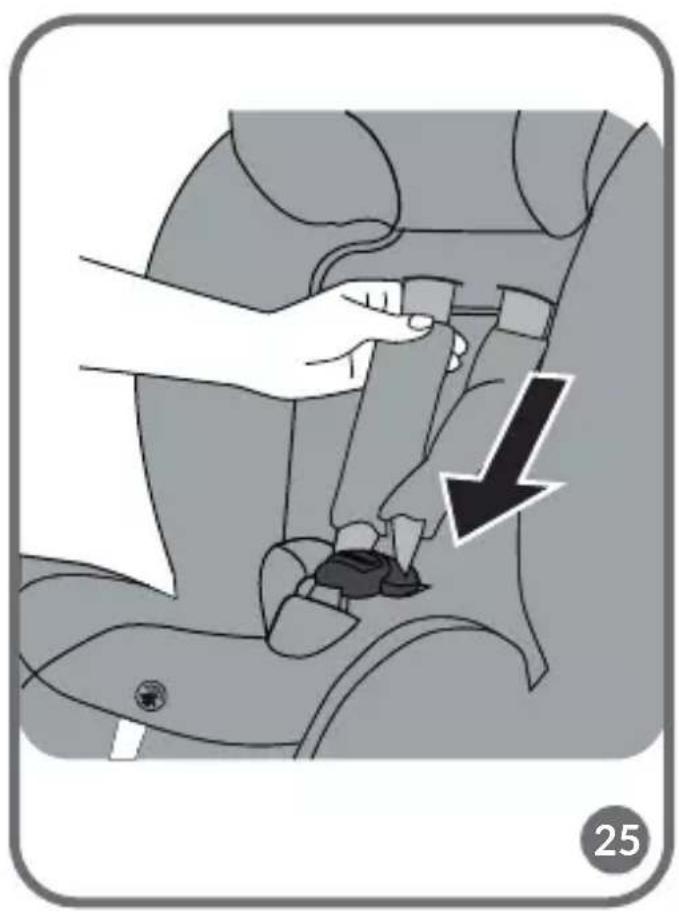
natural_image
Illustration of a car seatbelt buckle being adjusted for a hand, with a black arrow indicating the point of change (no text or symbols present)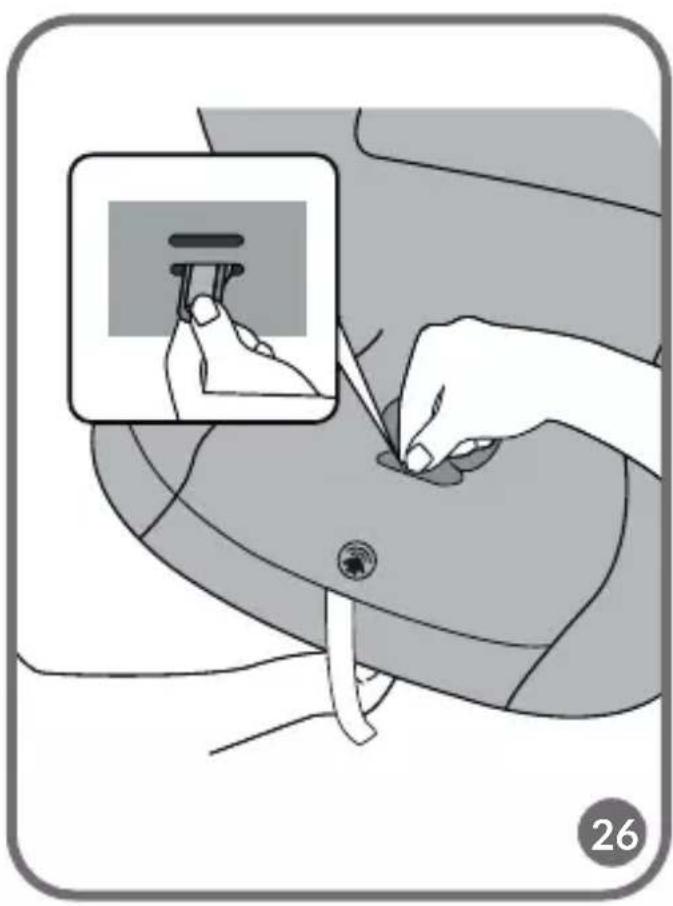
natural_image
Illustration of a hand inserting a plug into a device, showing the insertion process (no text or symbols)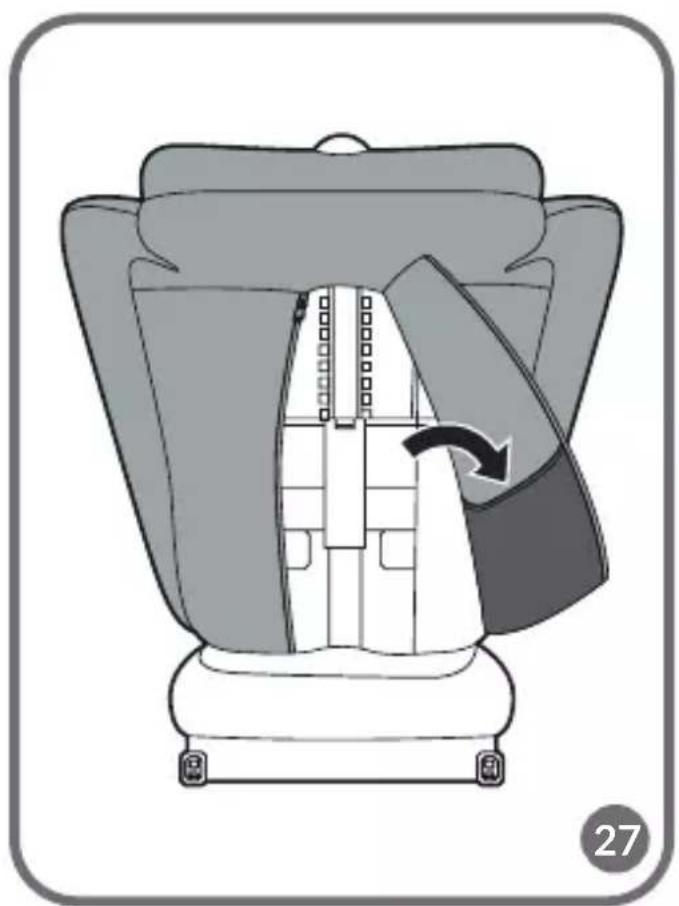
natural_image
Diagram of a car seat assembly with a belt and arrow indicating rotation (no text or symbols)Dear customer!
Should you have any remarks or questions concerning the product, please do not hesitate to contact us: help@lionelo.com
Producer:
BrandLine Group Sp. z o. o.
The product meets the requirements of the standard: R129/03.
Information for the growth group from 40 to 105 cm (maximum weight of the child 21 kg)
NOTICE This is an i-Size Enhanced Child Restraint System. It is approved according to UN Regulation No 129, for use in, i-Size compatible vehicle seating positions as indicated by vehicle manufacturers in the vehicle users' manual. If in doubt, consult either the Enhanced Child Restraint System manufacturer or the retailer.
Information for the growth group from 100 to 150 cm
NOTICE This is a i-Size booster seat Enhanced Child Restraint System. It is approved according to UN Regulation No 129, for use primarily in “i-Size seating positions” as indicated by vehicle manufacturers in the vehicle user’s manual. If in doubt, consult either the Enhanced Child Restraint System manufacturer or the retailer.
The product is suitable for installation only on the places marked with the symbol √ in fig. B, marked i-Size.
The product is suitable for installation in the seat marked with the symbol in fig. A only forward facing and with the airbag inactive. It is recommended to install the seat only on the rear seats of the car.
The product is suitable for installation on the seat marked with the symbol in fig. A only if the seat is equipped with a seat belt.
WARNINGS:
- The product is designed for children weighing up to 36 kg and with a height between 40 and 150 cm.
- If your child is less than 15 months old or less than 76 cm tall, do not use a forward-facing seat.
- Hard parts and plastic parts of the child restraint system should be placed and installed
in such a manner that they cannot be trapped by a sliding seat or vehicle door under normal vehicle operating conditions.
- For rear-facing installation, do not use the seat where the front airbag is active.
- Any seat belts that hold the child must be well-fitted to the child's size. The belts must not be twisted.
- The straps securing the restraint to the vehicle must be tight.
- Make sure the lap belts run low to adequately secure the pelvis.
- If the product has been exposed to strong factors (such as impact), it should be replaced.
- Do not make any changes to the seat or add new components without approval from the approval authority. To ensure maximum safety for your child, the equipment should be attached and used as recommended in the instructions.
- The plastic parts of this seat can heat up in the sun and cause burns on the child's skin.
- Never leave a child alone in a car seat in a vehicle.
- Luggage and other similar items should be secured so that in a collision situation they will not cause any injury.
- Do not use the seat without its fabric cover.
- The cover cannot be replaced with an item from another set. It is an integral part of the set and affects the operation of the restraint.
- Always have this instruction manual with you.
- Refer to the vehicle manufacturer's owner's manual.
- The device may not fit all approved vehicles when adjusted for a range above 135 cm.
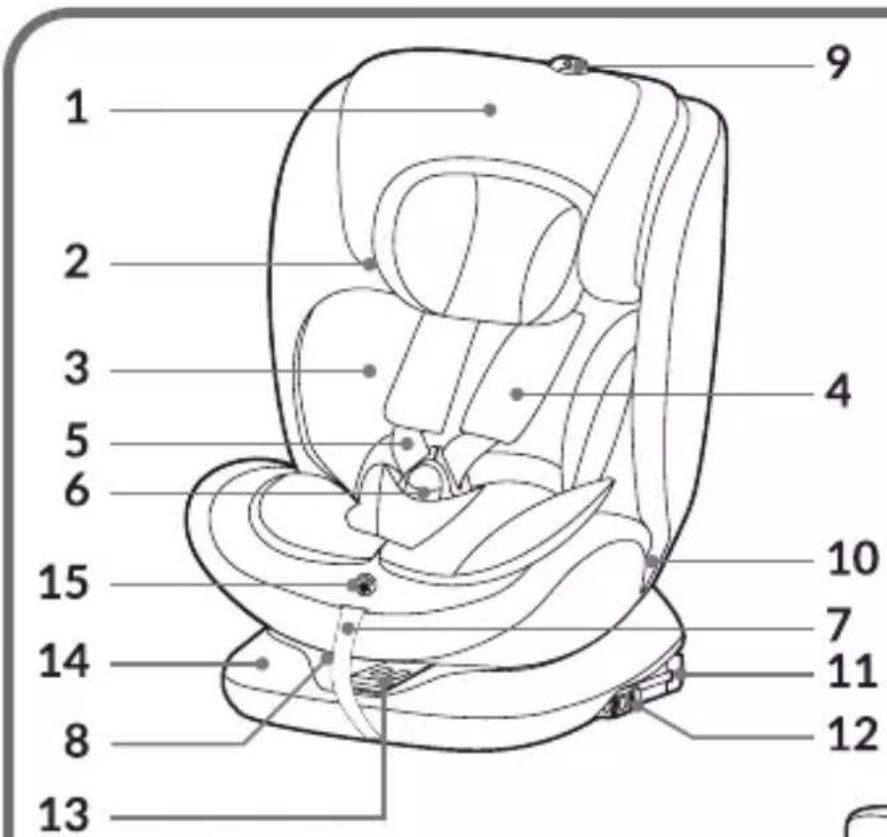
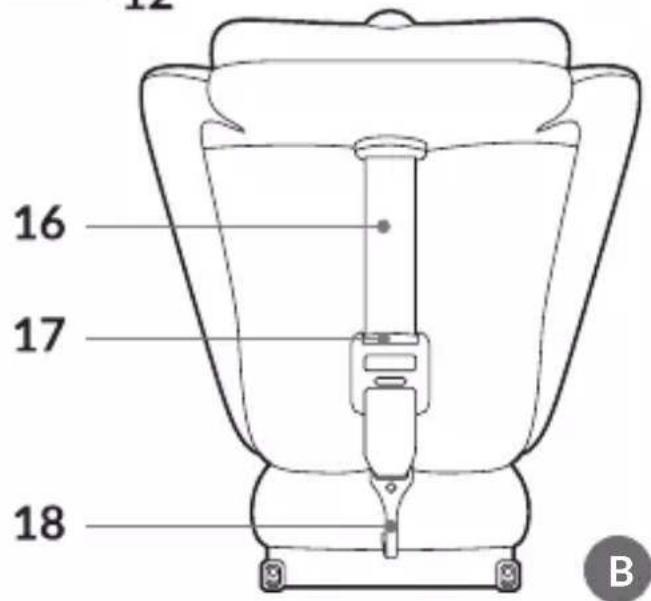
PART DESCRIPTION (FIG. B)
- Headrest
- Shoulder belt guide
- Infant reduction insert
- Protective cushions for 5-point seat belts
- 5-point seat belts
- Seat belt buckle
- Seat belt tension adjustment strap
- Seat tilt adjustment lever
-
Headrest adjustment lever
-
Lap belt guide
- ISOFIX arms
- ISOFIX sliding lever
- Seat rotation button
- Seat base
- Seat belt tension adjustment button
- Top Tether belt
- Top Tether belt length adjuster
- Top Tether belt hook
INSTALLATION IN THE CAR
| Seat installation Seat | orientation | Seat position Child's | dimensions |
| - Installation with ISOFIX and Top Tether belt- Child fastened with seat beltsPut the seat in the semi-reclining position (position “1”). | Rear-facing | 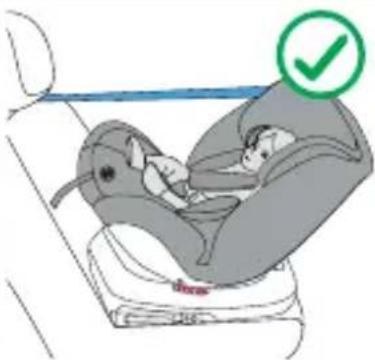 | From 40 to 105 cmChild's weight: maximum 21 kg |
| - Installation with ISOFIX and Top Tether belt- Child fastened with seat beltsAdjust the seat to one of the 4 available positions (see: Seat tilt adjustment). | Forward facing | 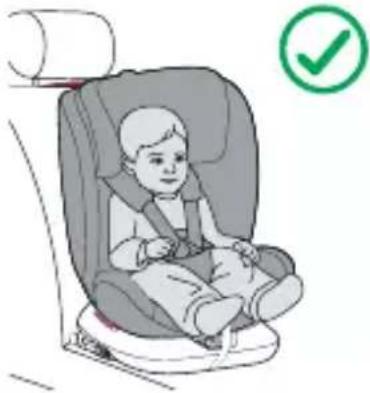 | From 76 to 105 cmChild's weight: maximum 21 kg |
| - Installation with ISOFIX and seat belts - Installation with seat belts aloneAdjust the seat to one of the 4 available positions (see: Seat tilt adjustment). | Forward facing | 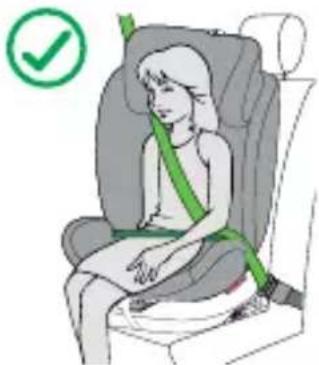 | From 100 to 150 cm |
REAR-FACING (40 - 105 CM)
- Place the seat on the car's bench seat in the space provided for installation.
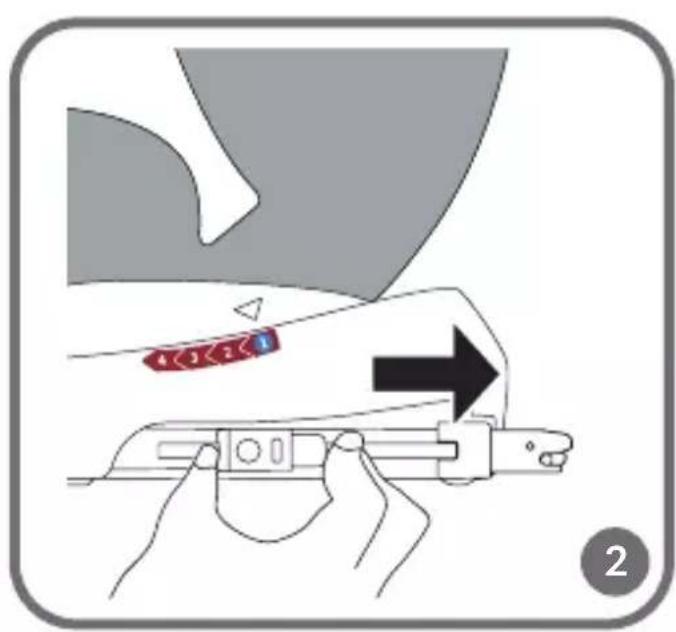
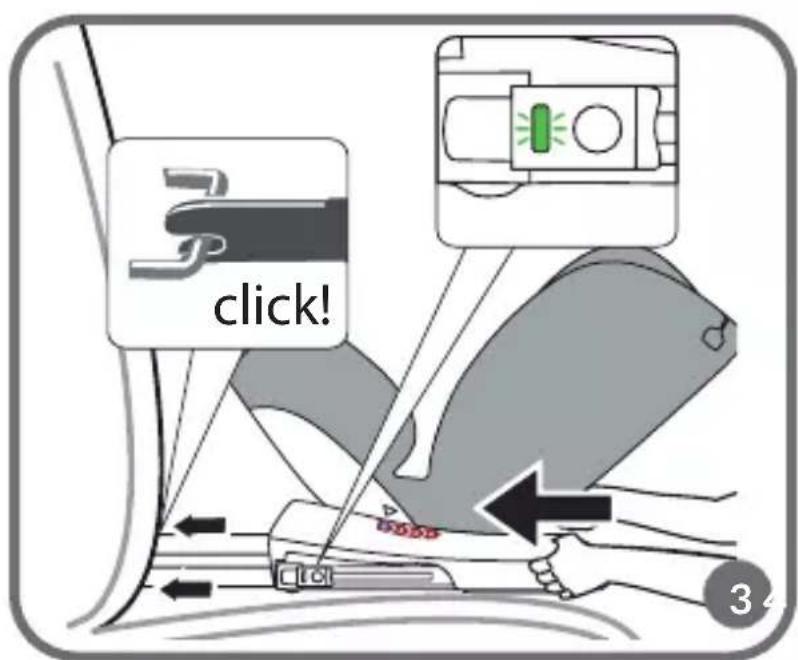
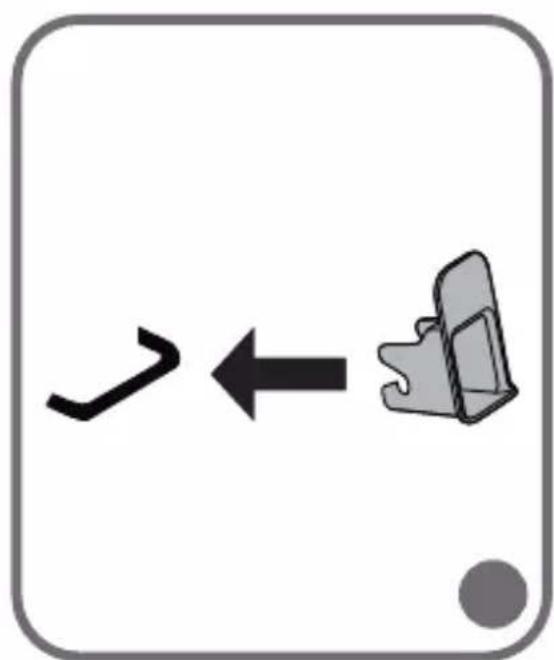
- Push in the ISOFIX sliding lever and extend the ISOFIX arms (fig. 2). Anchor the ISOFIX arms to the attachments located in the car's bench seat. The arms will interlock and you will hear a characteristic click (fig. 3). If necessary, use the plastic guides included in the set to make installation easier (fig. 4).
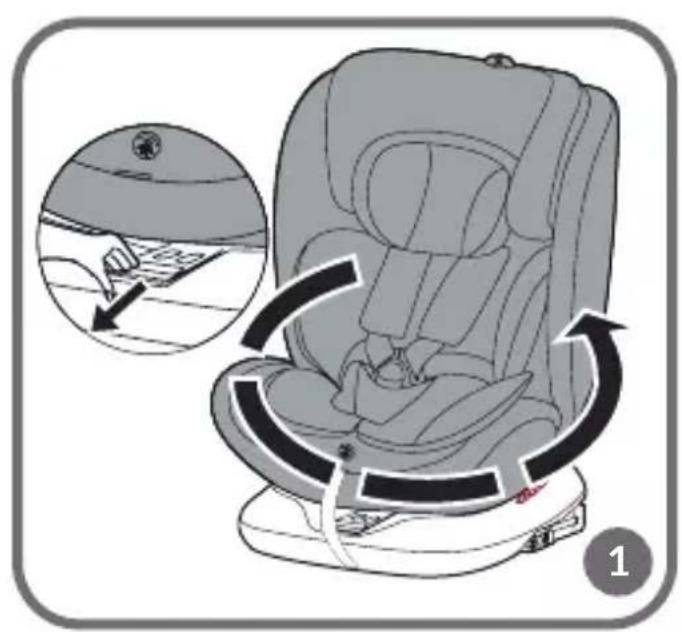
- Press the seat rotation button (13, fig. B), then move the seat to the rear-facing position
(fig. 1). Try to move the seat, properly anchored will not allow you to change position.
- Adjust the tilt of the backrest to the semi-reclining position (position "1"), (see: Seat tilt adjustment).
- Press the seat against the backrest of the car's bench seat. Push the base using a left-right motion toward the backrest to make sure it is pressed as tightly as possible against the car's bench seat.
- The green indicator on the ISOFIX button must be visible on both sides (fig. 3).
- Unbuckle the Top Tether belt, and then slide the buckle and hook (18, fig. B) to the end of the unbuckled belt (fig. 5).
- Guide the belt through the Top Tether belt guide, located at the top of the seat backrest (fig. 6).
- Attach the Top Tether belt to the anchor points in the car. Anchor points can be in different locations depending on the vehicle (fig. 7a).
- Tighten the Top Tether belt and make sure the indicator is green (fig. 8). The seat is now properly installed in the car.
NOTE! When installing a rear-facing car seat, to maintain the functionality of the rotation system and not block it, route the Top Tether belt on the inside of the car.
- Press the seat rotation button (13, fig. B), then move the seat to a lateral position, at a 90° angle. The correct setting will signal a click.
- Place the child in the seat and adjust the headrest (see: Headrest adjustment).
- Fasten the seat belts (see: Fastening and unfastening the child in the seat).
- Press the seat rotation button (13, fig. B), then move the seat to the rear-facing position. Try to move the seat, properly anchored will not allow you to change position.
FORWARD FACING (76 - 105 CM)
- Place the seat on the car's bench seat in the space provided for installation.
- Push in the ISOFIX sliding lever and extend the ISOFIX arms (fig. 2). Anchor the ISOFIX arms to the attachments located in the car's bench seat. The arms will interlock and you will hear a characteristic click (fig. 3). If necessary, use the plastic guides included in the set to make installation easier (fig. 4).
- Press the seat rotation button (13, fig. B), then move the seat to the forward-facing position (fig. 1). Try to move the seat, properly anchored will not allow you to change position.
- Set the seat tilt to one of the 4 available positions (see: Seat tilt adjustment).
- Press the seat against the backrest of the car's bench seat. Push the base using a left-
right motion toward the backrest to make sure it is pressed as tightly as possible against the car's bench seat.
- The green indicator on the ISOFIX button must be visible on both sides (fig. 3).
NOTE! Any change in the tilt of the backrest during use of the seat requires readjustment of the length of the Top Tether belt.
- Unbuckle the Top Tether belt, and then slide the buckle and hook (18, fig. B) to the end of the unbuckled belt (fig. 5).
- Guide the belt through the Top Tether belt guide, located at the top of the seat backrest (fig. 6).
- Attach the Top Tether belt to the anchor points in the car. Anchor points can be in different locations depending on the vehicle (fig. 7b).
- Tighten the Top Tether belt and make sure the indicator is green (fig. 8). The seat is now properly installed in the car.
- Place the child in the seat and adjust the headrest (see: Headrest adjustment).
- Fasten the seat belts (see: Fastening and unfastening the child in the seat).
FORWARD FACING (100 - 150 CM)
- Remove the seat belts (see: Removal of seat belts).
- Press the seat rotation button (13, fig. B), then move the seat to the forward-facing position (fig. 1). Try to move the seat, properly anchored will not allow you to change position.
- Place the seat on the car's bench seat in the space provided for installation.
- Set the seat tilt to one of the 4 available positions (see: Seat tilt adjustment).
Note! If installing without ISOFIX, skip steps 5 to 7.
- Push in the ISOFIX sliding lever and extend the ISOFIX arms (fig. 2). Anchor the ISOFIX arms to the attachments located in the car's bench seat. The arms will interlock and you will hear a characteristic click (fig. 3). If necessary, use the plastic guides included in the set to make installation easier (fig. 4).
- Press the seat against the backrest of the car's bench seat. Push the base using a left-right motion toward the backrest to make sure it is pressed as tightly as possible against the car's bench seat.
- The green indicator on the ISOFIX button must be visible on both sides (fig. 3).
- Place the child in the seat and adjust the headrest (see: Headrest adjustment).
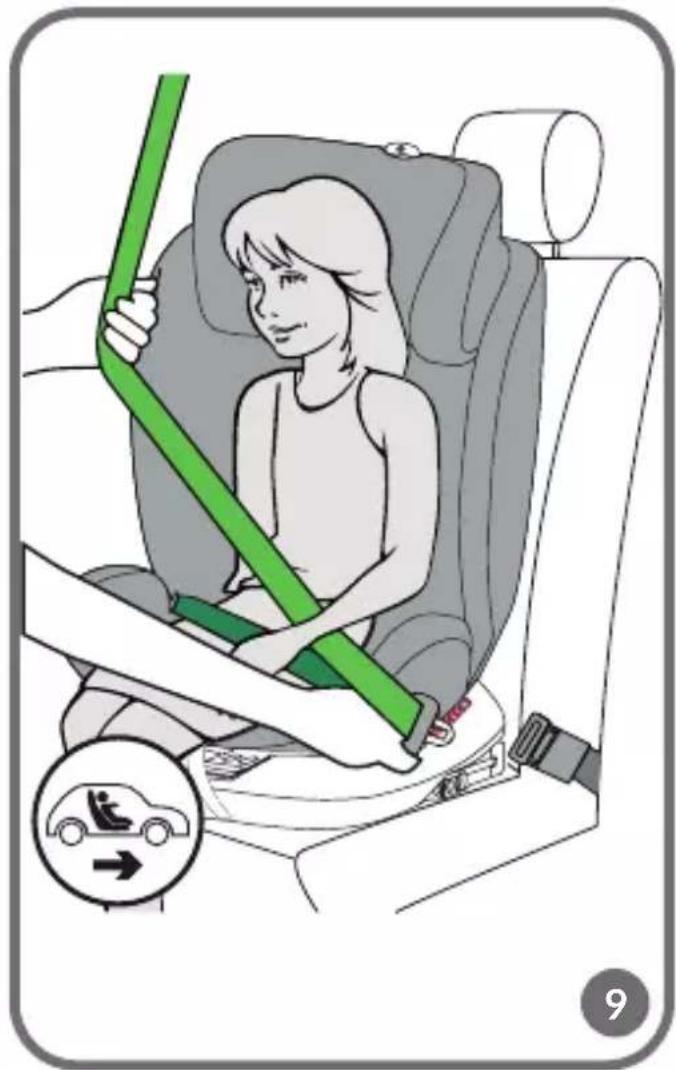
- Pull out the seat belt (fig. 9)
- Guide the shoulder belt through the shoulder belt guide (2, fig. B), which is located
at the bottom of the seat's headrest. Guide the lap belt through the lap belt guide (10, fig. B).
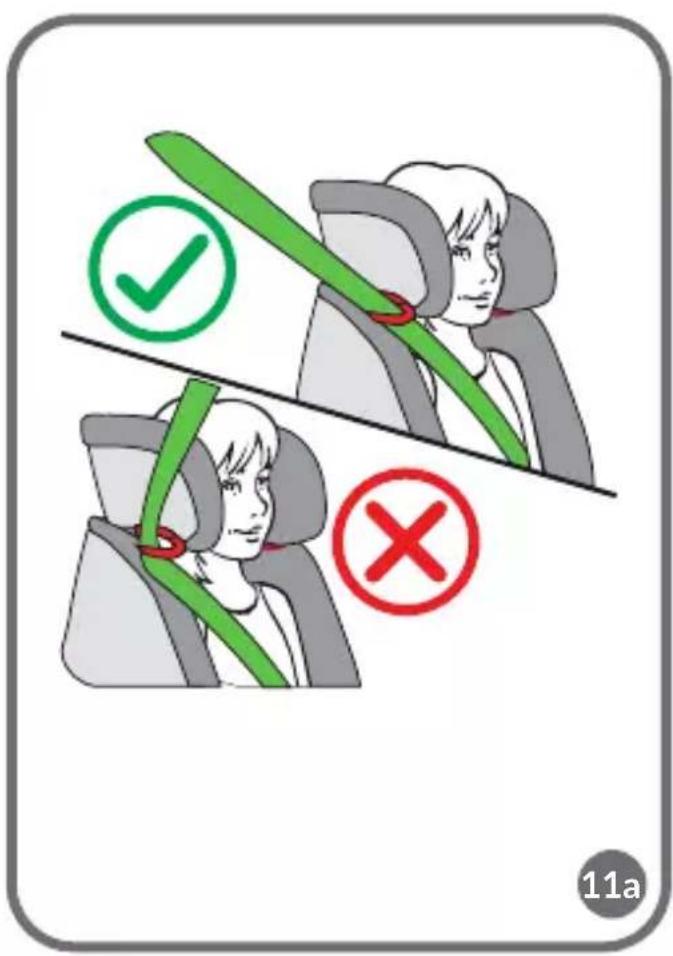
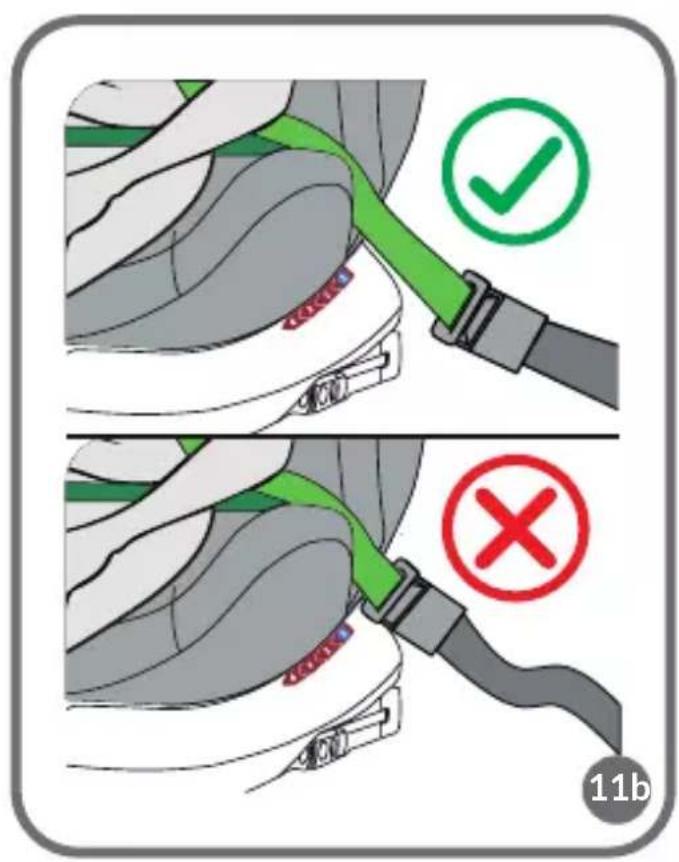
- Fasten the seat belts (fig. 10). You will hear a characteristic click. Make sure the belts are not twisted (fig. 11A).
- Make sure that the belts are correctly positioned in the guides and tightened, and that the buckle is not too close to the lap belt guide (fig. 11B).
FASTENING AND UNFASTENING THE SEAT BELTS
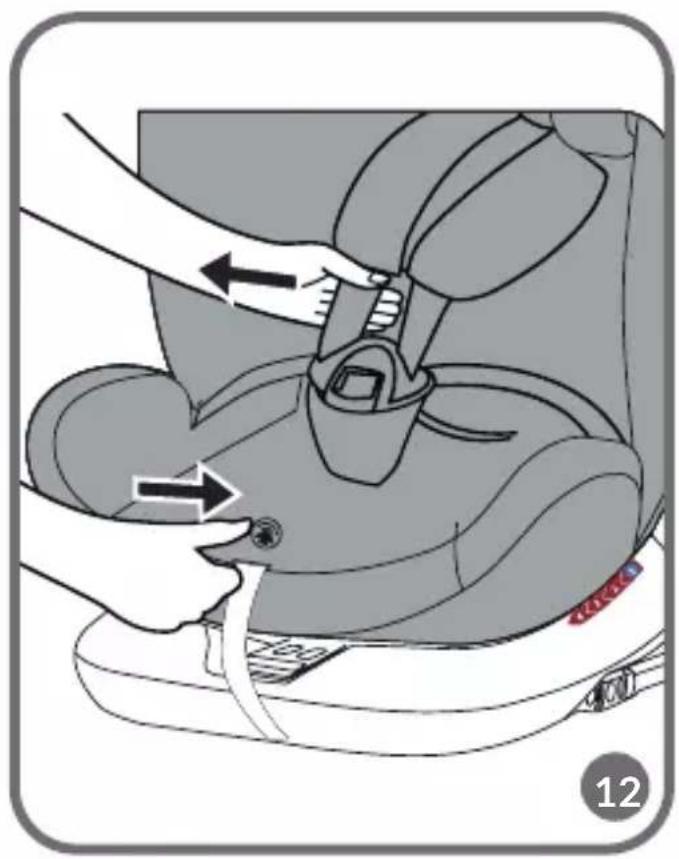
- Loosen the seat belts by pressing the tension adjustment button and pulling on the belts (fig. 12).
- Unfasten the belts by pressing the red button on the buckle (fig. 17).
- Place the child in the seat.
- Adjust the headrest (see: Headrest adjustment).
- Connect the belt connectors (fig. 13), and then insert them into the buckle (fig. 14). You will hear a characteristic click. The seat belts are now fastened (fig. 15).
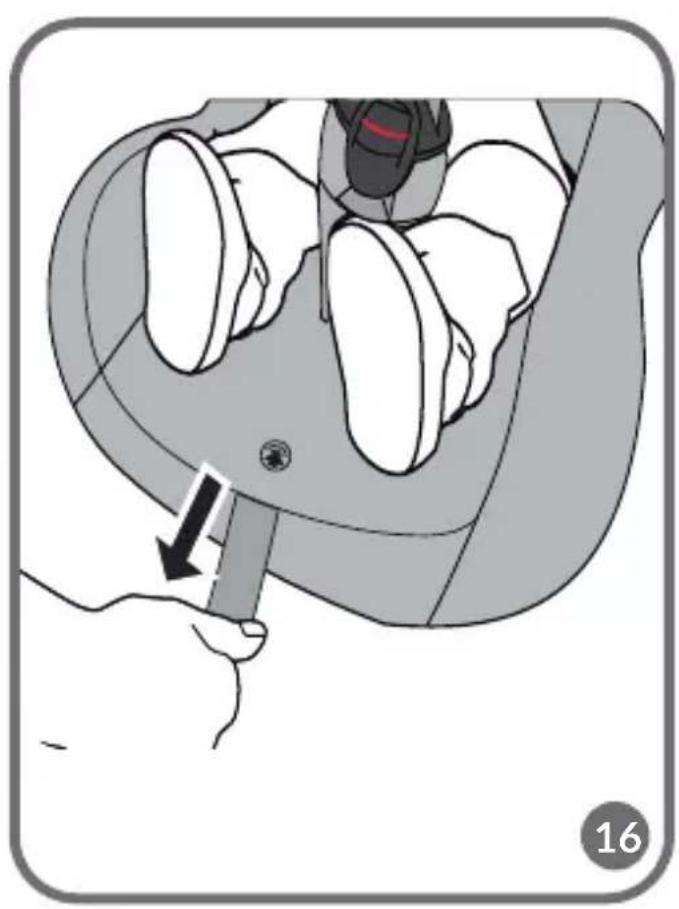
- To tighten the belts, pull the belt tension adjustment strap (fig. 16). To loosen the belts, press the belt adjustment button and pull on the shoulder belts (fig. 12).
Note! Make sure the seat belts are tight, fit tightly around the child's body and are not twisted. Make sure the lap belts run low and protect the child's pelvis. The belts should be tight against the child's body, but should not be too tight and cause discomfort.
Note! Children with a height of less than 87 cm can only use the seat with a reduction insert.
HEADREST ADJUSTMENT
To change the headrest height:
- While holding the seat belt tension adjustment button, unfasten and loosen the seat belts (fig. 12). This will allow you to adjust the height of the headrest more freely.
- Pull the headrest adjustment lever (fig. 18).
The shoulder belt height setting is integrated with the headrest height setting. By adjusting the height of the headrest, the height of the shoulder belts will be set automatically.
Note! The headrest should be adjusted so that the shoulder belts are not too high, such as at or above the ear line, or too low, such as behind the child's back. Shoulder belts should be at the height of the child's shoulders (fig. 19)
REMOVAL OF SEAT BELTS
To remove the seat belts, follow these steps:
- While holding the seat belt tension adjustment button, loosen the belts (fig. 12).
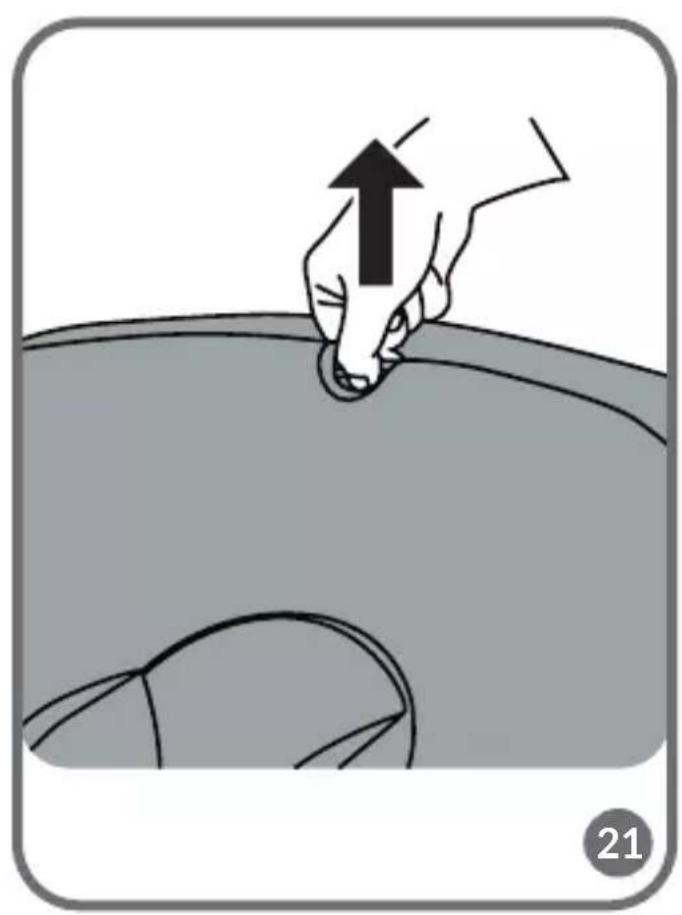
- Pull the headrest adjustment lever and raise the headrest (fig. 21).
- Unzip the cover at the back of the seat (fig. 22).
- Remove the belt loops from the metal connection plate (fig. 23) and the headrest lever (fig. 24).
- Put the upper part of the shoulder belts through the corresponding holes in the seat back (fig. 25).
- Unfasten the seat belts (see: Fastening and unfastening seat belts).
- Remove the seat belt buckle from the protective cushion. Then put the metal end of the belt through the corresponding hole in the seat and remove the belt (fig. 26).
- Place the removed seat belt components in the pocket located on the inside of the cover (fig. 27).
To reinstall the belts, follow the above steps in reverse order.
REMOVAL OF THE SEAT - ISOFIX
To detach the ISOFIX arms, push in the ISOFIX sliding levers on both sides. The indicator on the ISOFIX button will turn red.
REMOVAL OF THE SEAT - TOP TETHER
Unfasten the Top Tether belt from the anchor points in the car. Loosen the belt. The indicator will turn red.
SEAT TILT ADJUSTMENT
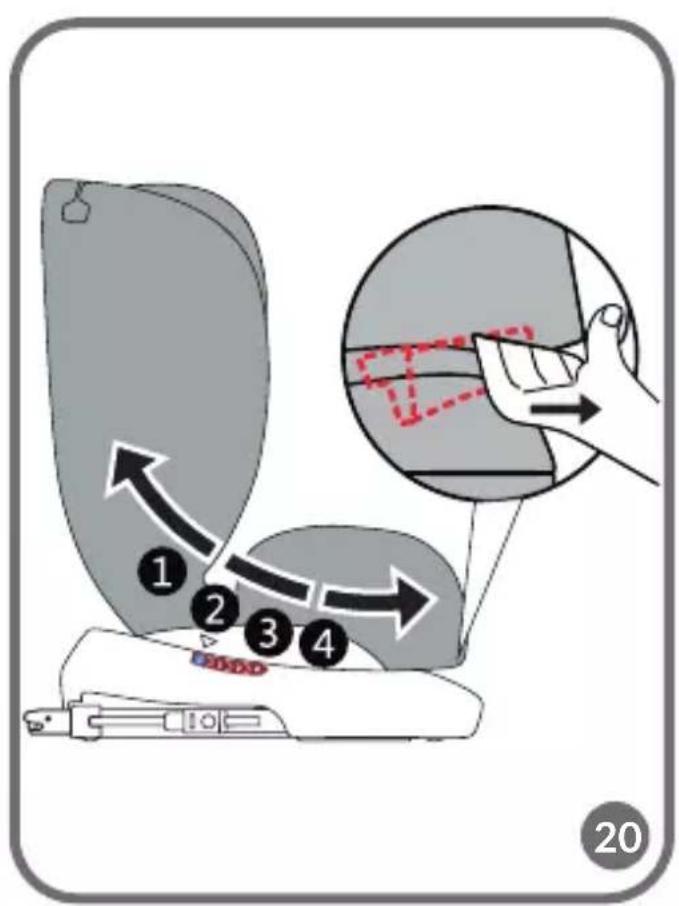
To adjust the seat tilt, press the tilt adjustment lever (8, fig. B) and move the seat to the desired position.
The seat has 4 levels of tilt adjustment in the forward-facing position (fig. 20). In the rear-facing position, place the seat in the semi-reclining position (position "1").
SEAT ROTATION
Press the seat rotation button (13, fig. B), then adjust the seat to the rearward or forward facing position. Try to move the seat, properly anchored will not allow you to change position.
REMOVING AND ATTACHING THE COVER
Unzip the cover and slide it completely off the seat body. To do this:
-
Adjust the headrest to the highest available position (see: Headrest adjustment).
-
Start the removal from the cover located on the headrest.
- Remove the remaining parts of the cover.
To reattach the cover to the seat, follow the above steps in reverse order.
CLEANING AND MAINTENANCE
The cover can be hand washed at a maximum temperature of 30^ C. When drying, do not use dryers. The cover should not be exposed to sunlight for drying. The plastic parts can be cleaned with a damp cloth and mild detergent.
Note! Do not use strong detergents or bleaching agents.
Photos are for reference only, the actual appearance of the products may differ from that shown in the photos.
PL
Drogi Kliencie!
ÎNDEPĂRTAREA SCAUNULUI - TOP TETHER
JUSTERING AV NACKSTÖDET
- Dear customer!
- Producer:
- Information for the growth group from 40 to 105 cm (maximum weight of the child 21 kg)
- Information for the growth group from 100 to 150 cm
- WARNINGS:
- PART DESCRIPTION (FIG. B)
- INSTALLATION IN THE CAR
- REAR-FACING (40 - 105 CM)
- NOTE! When installing a rear-facing car seat, to maintain the functionality of the rotation system and not block it, route the Top Tether belt on the inside of the car.
- FORWARD FACING (76 - 105 CM)
- NOTE! Any change in the tilt of the backrest during use of the seat requires readjustment of the length of the Top Tether belt.
- FORWARD FACING (100 - 150 CM)
- Note! If installing without ISOFIX, skip steps 5 to 7.
- FASTENING AND UNFASTENING THE SEAT BELTS
- HEADREST ADJUSTMENT
- REMOVAL OF SEAT BELTS
- REMOVAL OF THE SEAT - ISOFIX
- REMOVAL OF THE SEAT - TOP TETHER
- SEAT TILT ADJUSTMENT
- SEAT ROTATION
- REMOVING AND ATTACHING THE COVER
- CLEANING AND MAINTENANCE
- Drogi Kliencie!
- ÎNDEPĂRTAREA SCAUNULUI - TOP TETHER
- JUSTERING AV NACKSTÖDET
Brand : Lionelo
Model : Bastiaan i-Size
Category : Car seat