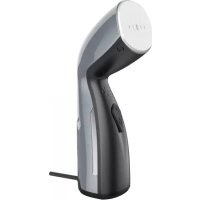
GS2 - Steam cleaner AENO - Free user manual and instructions
Find the device manual for free GS2 AENO in PDF.



| Product Type | Garment Steamer |
| Brand | AENO |
| Model | GS2 (AGS0002 / AGS0002-UK) |
| Power Supply | 220-240 V ~, 50-60 Hz, 4.96 A max |
| Power | 1000-1190 W |
| Water Tank | 110 ml, non-removable |
| Heat-up Time | Up to 40 s |
| Steam Flow Rate | Up to 24 g/min |
| Steam Temperature | Up to 150 °C |
| Continuous Operating Time | Up to 12 min |
| Steaming Types | Vertical and Horizontal |
| Control | Mechanical (steam button and switch) |
| Noise Level | ≥ 60 dB at 20 cm |
| Protection | Against Overheating |
| Material | Polypropylene |
| Color | Gray |
| Dimensions (L×W×H) | 96 × 95 × 258 mm |
| Cable Length | 1.8 m |
| Package Contents | Steamer, measuring cup, protective glove, travel pouch, quick start guide |
| Cleaning and Maintenance | Unplug, cool down, clean with a soft damp cloth, do not immerse |
| Safety | Do not direct steam at people or animals; risk of burns; use with dry hands |
| Operating Conditions | Temperature +5 to +40 °C, RH ≤ 93% |
| Storage Conditions | Temperature -20 to +70 °C, RH ≤ 93% |
| Warranty | 2 years |
| After-sales Service | support@aeno.com, aeno.com/service |
Frequently Asked Questions - GS2 AENO
User questions about GS2 AENO
0 question about this device. Answer the ones you know or ask your own.
Ask a new question about this device
Download the instructions for your Steam cleaner in PDF format for free! Find your manual GS2 - AENO and take your electronic device back in hand. On this page are published all the documents necessary for the use of your device. GS2 by AENO.
USER MANUAL GS2 AENO
natural_image
Line drawing of a hair dryer with decorative patterns and no visible text or symbolsUser Manual
Garment Steamer
GS2
(Models: AGS0002, AGS0002-UK)
v 2.1.1 | 10.03.2025
ENG....6
ARA....10
BOS....13
BUL....17
CES 22
DEU....26
ELL....31
EST....35
FRA....39
HRV 44
HUN....48
HYE....52
ITA....56
KAT 60
KAZ....65
LAV 69
LIT....73
NLD....77
POL....81
POR....85
RON....89
RUS....93
SLK....97
SLV....101
SPA....105
SRP 109
UKR....113
UZB 117
A

4 aeno.com/documents

B
C
aeno.com/documents 5
ENG AENO™ Garment Steamer is designed to remove creases in fabrics using a jet of steam.
Models: AGS0002 (Plug Type E/F), AGS0002-UK (Plug Type G).
Technical Specifications
Power supply (input): 220–240 V (AC), 4.96 A, 50–60 Hz. Power: 1,000.0–1,190.0 W. Water tank: non-removable, 110 ml. Water heating time: up to 40 s. Steam flow rate: up to 24 g/min. Steam temperature: up to +150 °C. Continuous operating time: up to 12 min. Steaming: vertical, horizontal. Control: mechanical. Noise level (at a distance of up to 20 cm): ≥ 60 dB. Overheating protection. Material: polypropylene. Color: Gray. Dimensions (L×W×H): 96×95×258 mm. Power cable length: 1.8 m. Operating conditions: temperature +5...+40 °C, RH ≤ 93 % (non-condensing). Storage conditions: temperature -20...+70 °C, RH ≤ 93 % (non-condensing).
Package Contents (see Fig. A, B)
AENOTM Garment Steamer, measuring cup, protective glove, travel bag, Quick Start Guide.
Device Elements and Accessories (see Fig. A, B)
1 – steamer head, 2 – handle, 3 – water tank plug, 4 – steam button with indicator, 5 – “On/Off” switch, 6 – power cord, 7 – measuring cup, 8 – protective glove, 9 – travel bag.
Limitations and Warnings
ATTENTION! Risk of electric shock.
ATTENTION! The steamer head and the adjacent upper part of the device may become hot during use! To avoid burns, do not touch them until the device has completely cooled down.
If you have any questions or difficulties in using the AENO™ device, please e-mail support at support@aeno.com or chat with us online at
aeno.com/service-and-warranty. The specialists will help you solve the problem, and you will not have to waste time and effort visiting the store.
6 aeno.com/documents
ATTENTION! To avoid burns, do not steam clothing items on yourself, other people or animals. Do not direct a jet of steam at people, animals, plants, or objects that could be damaged by hot steam.
This device is not intended for use by children under the age of 14 or by persons with reduced physical, mental or intellectual abilities unless they have sufficient experience and knowledge of how to use the device and are supervised by a person responsible for their safety. The device is intended for domestic use only. Do not use the device outdoors. Do not let children play with the device and its accessories. Do not drop or throw the device. Do not use a damaged device. If the device has been transported or stored at low temperatures, leave it at room temperature for 2 hours before use. Make sure that the rated voltage and frequency indicated in the technical specifications correspond to the parameters of the electrical network. Handle the device with dry hands only. Do not leave the device unattended while it is plugged in. Unplug the device after use and before cleaning. Unplug the device by grasping the plug, not the power cord. Do not immerse the device, the power plug, or the cord in water or other liquids. Make sure that the power cord is not twisted, bent, pressed against anything, or in contact with hot, sharp objects or heat sources. Check the care information on the product label before using the garment steamer on it. Do not use chemical and harsh detergents, abrasive pastes, products containing acids and solvents, or metal sponges to clean the device. You can find detailed information in the complete User Manual available at aeno.com/documents.
Steam Button Indicators
| Status | Meaning |
| Flashing red light1 | The device is plugged in and switched on, heating in progress |
| Solid red light1 | The device is switched on, heating is complete, you can start steaming |
| Solid blue light | The device is switched on, steaming in progress |
| Off | The device is not pugged in or is switched off |
aeno.com/documents 7
Functions of the Device Controls
| Element | Action | Meaning |
| Steam button | Press once | Turn the steam supply on/off |
| "On/Off" switch | Set to the “On” position | Switch the device on |
| Set to the “Off” position | Switch the device off |
Preparing Device for Operation
-
Carefully open the packaging and remove the device and its accessories.
-
Clean the device (see "Cleaning and Maintenance").
-
Open the plug (3) and fill the tank with water (see Fig. C).
ATTENTION! Use distilled water only.
Use the supplied measuring cup (7). Do not fill the cup above the "100 ml" mark.
-
Secure the plug.
-
Insert the plug of the power cord into an outlet. Set the switch (5) to the "On" position. The steam button indicator (4) will start flashing red.
-
Wait about 40s until the water is heated. When heating is complete, the steam button indicator will turn solid red.
-
Perform a test run of the device (see "Test Run").
Test Run
When turning on the device for the first time, as well as after a long period of storage, it is recommended to perform a test run to clean the steamer head of dust and possible dirt. The test run is the release of the first jet of steam into the air. It is performed as follows:
-
After preparing the device for use, press the steam button once.
-
Press the button again about 5 seconds after the steam starts.
Operation of the Device
-
After preparing the device for use, point the steamer head at the item that needs to be steamed. Hold the item with your free hand while wearing the protective glove.
-
Press the steam button once.
8 aeno.com/documents
- When steaming is complete, press the steam button once.
- Set the switch to the "Off" position and unplug the device.
- Open the tank plug and drain the remaining water.
- Allow the tank to dry completely: to do this, the plug must be open.
Cleaning and Maintenance
ATTENTION! Clean the device only after unplugging it and letting it cool down completely.
ATTENTION! Do not wash the device under running water or immerse it in water.
Clean the device casing with a soft cloth dampened with clean water. If the device is very dirty, wipe it with a soft cloth dampened with a mild soap solution. Then, wipe with a cloth dampened with clean water. After cleaning, wipe the device dry.
Troubleshooting
The device does not turn on. Possible causes: the socket is defective; overheating protection has been triggered. Solution: check if the socket is working correctly by connecting another device to it, if necessary, connect the device to a working socket; unplug the device and wait for it to cool down completely, then plug it in again.
The device does not generate steam. Possible cause: the tank has no water in it. Solution: fill the tank with water.
Water flows out of the tank. Possible cause: the tank is not closed properly.
Solution: properly secure the tank plug.
ATTENTION! If none of the suggested methods have solved the problem, contact your supplier or an authorized service center. Do not disassemble the device or attempt to repair it yourself.
Sthuhlywlu puniwqntn
Uwnph 伍huiwuywnpwnnnlup w2huwuwuph hwduw
-
2qn12nptü puğtp ıhwətəwɪlnpnɪŋ lì huútp uwnpü ni puŋwnphşutpn:
-
Uwupntp uwnpn (untu «Uwppnluf li hufuwdp»):
-
Fugtip lugwup (3) u pupp igntap gnnul (untu üy. C):
NF6U7P0F0-3NF'G: Oqunwqnpdtp uhwj4 jənpwəd ʒnɪp:
Oqunwqnptap szuhs puudwln (7), nnp ütnwnlwd t wnwpüwü chwətjənl: Fuudwln uħ igntip «100 ml» («100 uħ») fuzwuhg pwnān:
-
Woodlun wunin yhuyltp:
-
Uhwgntp hnuwúph lwnp hnuwúph uwnnwuhgh: Ufzwnhyn (5) untnwnhnhutp «On» («Uhwg.») nhpph Qnlnn2ni uwnnwlpwnwpndwi lynbwlh gnighyn (4) lquuh jωwnrəti lwnufhn qnljuni:
-
Uuwutp ünn 40 yln, uhsu gnpp unwpuw: tnp unwpwgnlu wllwnunl, qnnp2nu uwnwnlpwnwpudw lngwlgh gnghsp huluh wupunhwn lwnulq lwpuhpnnl qnljuni:
-
Yuunwntp uwnph yhnǎfuulquí qnpδwnplnú (untu «Φnpǎfuulquí qnpδwnplnú»):
support@aeno.com 56 mbmsob-bs800 398-8396069 aeno.com/service-and-warranty.
ΜΗΜΩΝΟΥ οΦΗΜΩΝΟΥ ΜΟΛΣΟΥ οΒΩΟΣΟΥ
ENG ASBISC reserves the right to modify the device and to revise and change this document without prior notice to users.
The warranty period and service life are 2 years from the date of retail sale of the device. Manufacturer: ASBISC Enterprises PLC, Iapetou, 1, Agios Athanasios, 4101, Limassol, Cyprus. Tel.: +48732080077, info@asbis.com, asbis.com. Made in China. All trademarks used herein are the property of their respective owners. The date of manufacture is marked on the package.
Up-to-date information about and a detailed description of the device, as well as connection instructions, certificates, and details about the companies that deal with quality and warranty claims are available at aeno.com/documents. This device complies with applicable safety requirements.
RoHS Directive. The device complies with the requirements of the Directive 2011/65/EU on the Restriction of Hazardous Substances (RoHS), including the requirements of the RoHS Directive 2015/863/EU.
ENG Recycling information This symbol indicates that you must follow the Waste Electrical and Electronic Equipment (WEEE) and Waste Battery and Battery Regulations when disposing of the device, its batteries and accumulators, and its electrical and electronic accessories. According to the rules, this equipment must be disposed of separately at the end of its service life. Do not dispose of the device, its batteries and accumulators, or its electrical and electronic accessories together with unsorted municipal waste, as this will harm the environment. To dispose of this equipment, it must be returned to the point of sale or turned in to a local recycling facility. You should contact your local household waste disposal service for details.
natural_image
Simple line drawing of a house with no text or symbols
Please contact our online support team if you have any questions or issues with your AENO device.
This is a better option than visiting the store and will save you time and effort

Get support


aeno.com/service-and-warranty
UKR Отримати підтримку BOS Dobijte podršku BUL Получаване на поддрыкка CES Ziskejte podporu DEU Support erhalten ELL Λήψη υποστήριξης EST Saama toetuse FRA Obtenir de l'aide HRV Tražite pomoć na HUN Támogatás megszerzése HYE Ugwulgnipiniu υπωλων ITA Ottieni supporto KAT ∂δαθηρασθημι δησθός KAZ Κολday any LAV Sanemt atbalstu LIT Gauti palaikymą NLD Ondersteuning krijgen POL Uzyskaj pomoc POR Obter apoio RON Obtineçi asistentă RUS Получить поддержку SLK Ziskał podporu SLV Pridobite podpoło SPA Obtener apoyo SRP Tražite pomoć na UZB Qo'llab quvvatlash xizmatidan foydalanish الحصول على الدعم ARA
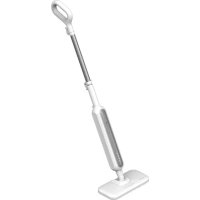
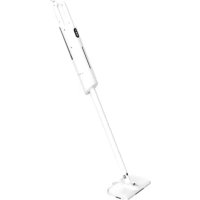

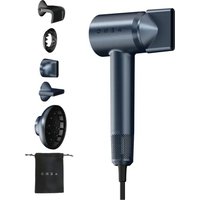

- Garment Steamer
- Technical Specifications
- Package Contents (see Fig. A, B)
- Device Elements and Accessories (see Fig. A, B)
- Limitations and Warnings
- Preparing Device for Operation
- Test Run
- Operation of the Device
- Cleaning and Maintenance
- Troubleshooting
- Sthuhlywlu puniwqntn
- Uwnph 伍huiwuywnpwnnnlup w2huwuwuph hwduw
- Please contact our online support team if you have any questions or issues with your AENO device.
Brand : AENO
Model : GS2
Category : Steam cleaner