MagicWatch MWE860 - Sensor DOMETIC - Free user manual and instructions
Find the device manual for free MagicWatch MWE860 DOMETIC in PDF.


| Product type | Ultrasonic parking aid |
| Brand | Dometic |
| Model | MagicWatch MWE860 |
| Detection range | 0,40 m to 1,6 m |
| Ultrasonic frequency | 40 kHz |
| Supply voltage | 10-24 V |
| Current consumption | 120 mA max |
| Operating temperature | -25 °C to +70 °C |
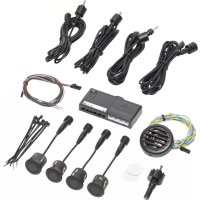
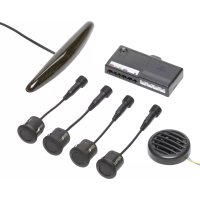
| Delivery contents | 4 ultrasonic detectors, control electronics, connection cables, display (MWE860), mounting hardware |
| Use | Monitoring the space behind the vehicle during maneuvers |
| Signaling | Audible (beeps) and visual (LED display with bars) |
| Installation | On non-metallic bumper, ground clearance 50 cm, 90° angle |
| Settings | Sensitivity (low, medium, high), fixed object suppression, factory reset |
| Warranty | Legal |
| Maintenance | Clean the detectors, do not expose the electronics to humidity |
| Safety | Do not install in the airbag deployment zone, secure mounting in the vehicle |
| Spare parts | Detectors, cables, display, cutting tool (accessory) |
| Repairability | Detectors can be replaced |
| Certification | 030117 |
Frequently Asked Questions - MagicWatch MWE860 DOMETIC
User questions about MagicWatch MWE860 DOMETIC
0 question about this device. Answer the ones you know or ask your own.
Ask a new question about this device
Download the instructions for your Sensor in PDF format for free! Find your manual MagicWatch MWE860 - DOMETIC and take your electronic device back in hand. On this page are published all the documents necessary for the use of your device. MagicWatch MWE860 by DOMETIC.
USER MANUAL MagicWatch MWE860 DOMETIC
MagicWatch MWE820, 860, 890

1
| EN: 5 | PT: 59 | SV: 113 | PL: 165 |
| DE: 18 | IT: 73 | NO: 126 | SK: 179 |
| FR: 31 | NL: 87 | FI: 139 | CS: 192 |
| ES: 45 | DA: 100 | RU: 152 | HU: 205 |
text_image
Technical diagram of various electronic components with numbered labels for identification
2
| EN: 6 | PT: 61 | SV: 114 | PL: 167 |
| DE: 19 | IT: 75 | NO: 127 | SK: 180 |
| FR: 33 | NL: 88 | FI: 140 | CS: 193 |
| ES: 47 | DA: 101 | RU: 153 | HU: 206 |
natural_image
Simple line drawing of a car hood with an explosion warning symbol (no text or labels)3
| EN: 6 | PT: 61 | SV: 114 | PL: 167 |
| DE: 19 | IT: 75 | NO: 127 | SK: 180 |
| FR: 33 | NL: 88 | FI: 140 | CS: 193 |
| ES: 47 | DA: 101 | RU: 153 | HU: 206 |
text_image
max. 0° 50 cm 0° 50 cm4
text_image
< 25 cm 25 - 30 cm 25 - 30 cm < 25 cm 32 cm 32 cm 60 cm 60 cm5
natural_image
Simple line drawing of a curved object with a magnified inset showing a cross symbol (no text or labels)
6
MWE820, 860 MWE890
text_image
1. 2. 1. 2. 1. 2. 1. 2. MWE860 1. 2. 3. 47
natural_image
Line drawing of a car rear bumper with an arrow indicating direction (no text or symbols)8
| EN: 7 | PT: 62 | SV: 115 | PL: 168 |
| DE: 20 | IT: 76 | NO: 128 | SK: 181 |
| FR: 34 | NL: 89 | FI: 141 | CS: 194 |
| ES: 48 | DA: 102 | RU: 154 | HU: 207 |


text_image
C ! X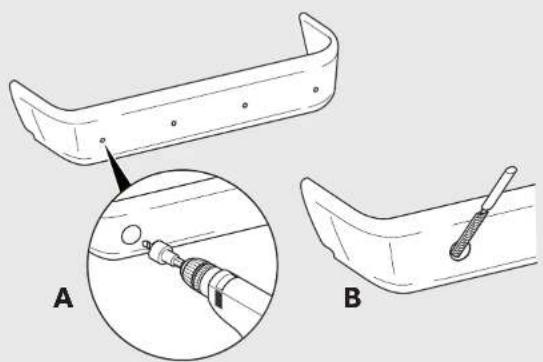
natural_image
Technical illustration of a mechanical component with two views (A and B) showing internal components and a tool inserted into a slot (no text or symbols present)
9
| EN: 7 | PT: 62 | SV: 115 | PL: 168 |
| DE: 20 | IT: 76 | NO: 128 | SK: 181 |
| FR: 34 | NL: 89 | FI: 141 | CS: 194 |
| ES: 48 | DA: 102 | RU: 154 | HU: 207 |
text_image
Clickl10
natural_image
Line drawing of a car interior with exhaust pipes and a tassel, no text or symbols present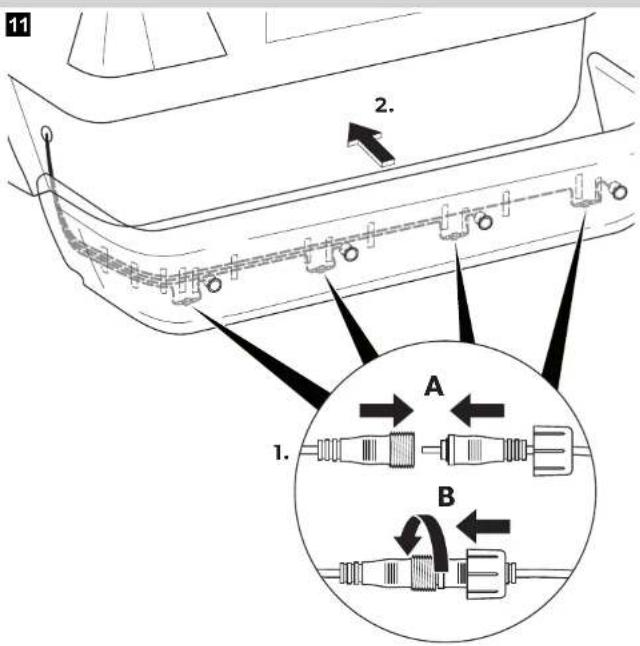
text_image
11 2. A 1. B12
| EN: 8 | PT: 63 | SV: 116 | PL: 169 |
| DE: 21 | IT: 77 | NO: 129 | SK: 182 |
| FR: 35 | NL: 90 | FI: 142 | CS: 195 |
| ES: 49 | DA: 103 | RU: 155 | HU: 208 |
MWE820, 860
text_image
1 2 3 4 5 6 7 8 MWE860 9 br 4 3 sw/bl/ 2 RL/gt R1 bl ge
13
| EN: 8 | PT: 63 | SV: 116 | PL: 169 |
| DE: 21 | IT: 77 | NO: 129 | SK: 182 |
| FR: 35 | NL: 90 | FI: 142 | CS: 195 |
| ES: 49 | DA: 103 | RU: 155 | HU: 208 |
text_image
MWE890 1 2 3 4 5 6 7 8 9 sw/ge ge/ol +30 Am. -15 SW/o br 31 bl ge rt/gr 2.5s14
| EN: 9 | PT: 64 | SV: 117 | PL: 170 |
| DE: 22 | IT: 78 | NO: 130 | SK: 183 |
| FR: 36 | NL: 91 | FI: 143 | CS: 196 |
| ES: 50 | DA: 104 | RU: 156 | HU: 209 |
text_image
4 (STOP) 1 2 3 ~ 75 cm ~ 130 cm ~ 80 cm ~ 60 cm ~ 40 cm ~ 0 cm ~ 0 cm15
natural_image
Isometric line drawing of a device rear panel with labeled ports and a knob (no text or symbols beyond basic labels)| EN: 9 | SV: 117 |
| DE: 22 | NO: 130 |
| FR: 36 | FI: 143 |
| ES: 51 | RU: 156 |
| PT: 65 | PL: 170 |
| IT: 78 | SK: 183 |
| NL: 91 | CS: 196 |
| DA: 104 | HU: 209 |
| EN | DE | FR | ES | PT | IT | NL | DA | |
| bl | BlueBlauBleuAzul | Azul | BluBlauwBla | |||||
| br | Brown | Braun | Marron | Marrón | Castanno | Marrone | Bruin | Brun |
| ge | Yellow | Gelb | Jaune | Amarillo | Amarelo | Gliallo | Geel | Gul |
| gr | Grey | Grau | Gris | Gris | Cinzento | Grigio | GrijsGra | |
| rt | Red | Rot | Rouge | Rojo | Vermelho | Rosso | Rood | Rad |
| sw | Black | Schwarz | Noir | Negro | Preto | Nero | Zwart | Sort |
| SV | NO | FI | RU | PL | SK | CS | HU | |
| bl | Bla | Bla | Sininen | Синий | Niebieski | Modrá | Modrá | Kék |
| br | Brun | Brun | Ruskea | Коричневый | Brazowy | Hneda | Hneda | Barna |
| ge | Gul | Gul | Kerlainen | Желтый | Žolty | Žitá | Žitá | Sarga |
| gr | Grá | Gra | Harmaa | Серый | Szary | Sivá | Šedá | Szürke |
| rt | Röd | Rad | Punainen | Красный | Czerwony | Červená | Červená | Piros |
| sw | Svart | Svart | Musta | Черный | Czamy | Čierna | Černá | Fekete |

DOMETIC
Dometic WAECO International GmbH
Hollefeldstrasse 63
D-48282 Emsdetten
www.dometic.com
DOMETIC
SAFETY & SECURITY
MAGICWATCH
natural_image
Technical line drawing of a sensor device with labeled components including a 50Ω sensor, connector, and wiring (no text or symbols present)MWE820, MWE860, MWE890
EN Parking aid
Installation and Operating Manual.....3
DE Einparkhilfe
Please read this instruction manual carefully before installation and first use, and store it in a safe place. If you pass on the product to another person, hand over this instruction manual along with it.
Contents
1 Safety and installation instructions ....4
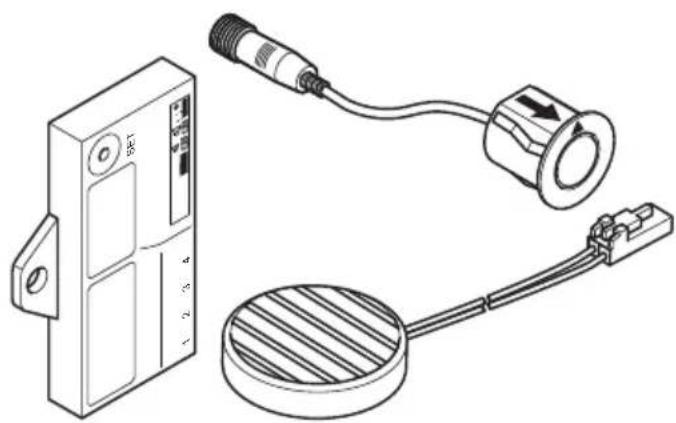
2 Scope of delivery ....5
4 Intended use....6
5 Instructions before installation....6
6 Fitting the parking aid . . . . . . . . . . . . . . . . . . . . . . . . . . . . . . . . . . . . . . . . . . . . . . . . . . . . . . . . . . 7
7 Connecting the parking aid .... 7
8 Detection range 9
9 Setting the system....9
10 Performing a functional test ..... 11
11 Using the parking aid ....12
12 Troubleshooting....13
13 Guarantee....14
14 Disposal....14
15 Technical data....15
1 Safety and installation instructions
The following texts only complete the figures on the supplementary sheet. They do not contain the full installation and operating instructions. Please observe the figures on the supplementary sheet.
Please observe the prescribed safety instructions and stipulations from the vehicle manufacturer and service workshops.
Observe the applicable legal regulations.
The manufacturer accepts no liability for damage in the following cases:
- Damage to the product resulting from mechanical influences and excess voltage
• Alterations to the product without express permission from the manufacturer - Use for purposes other than those described in the operating manual

CAUTION!
- Secure the parts of the parking aid installed in the vehicle in such a way that they cannot become loose under any circumstances (sudden braking, accidents) and cause injuries to the occupants of the vehicle.
- Do not fit the parts of the parking aid installed where an airbag may open. This could cause injury if the airbag opens.
- The parking aid is intended as an additional aid, which means it does not relieve you of the obligation to take due care when manoeuvring.

NOTICE!
- Installing the parking aid can cause problems on vehicles with LED tail lights.
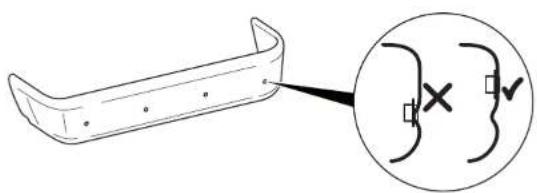
- This parking aid is not suitable for installing in metal bumpers.
- Do not expose the control electronics to dampness.
- The control electronics must not be installed in close proximity to other control modules.
- The sensors may not cover signal lamps.
- When fitting the sensors, make sure there are no objects fixed to the vehicle that are in the detection range of the sensors. Displaying fixed objects, such as trailer hitches, can be suppressed.
- Apply a small amount of grease inside the sensor plug connections.
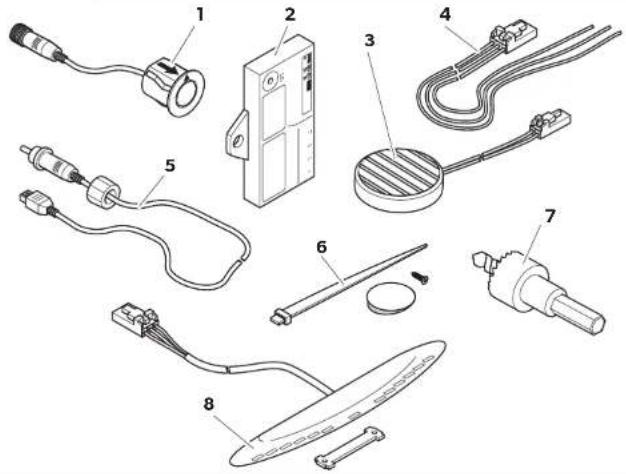
2 S c o p e o f d
See fig. 1
No. Quantity Designation Ref. no.
| 14 Ultrasonic sensors 9101500043 | ||
| 21 Control electronics | ||
| MWE820 | 9101500044 | |
| MWE860 | 9101500046 | |
| MWE890 | 9101500047 | |
| 31 Loudspeaker 9101500051 | ||
| 41 Control electronics connection cable | ||
| 54 Sensors connection cable | ||
| 61 Fastening material | ||
| 71 Core bit 21,5 mm | ||
| 8 | 1 Display (MWE860 only) | 9101500045 |
3 A c c e s s o r i
Available as accessories (not included in the scope of delivery):
| Designation | Ref. no. |
| Punching tool 22 mm | 9101500024 |
| External button (MWE890 only) | 9101500049 |
| Display (MWE890 only) | 9101500045 |
| Extension cable for display, 5 m (MWE860, 890 only) | 9101500053 |
| Connection cable for sensor, 250 cm (MWE820, 860 only) | 9101500048 |
| Connection cable for sensor, 450 cm (MWE890 only) | 9101500050 |
4 Intended use
Magic Watch is an ultrasonic parking aid. It monitors space when manoeuvring
• MWE820, 860: behind the vehicle
• MWE890: in front of the vehicle
It provides an audible and visual warning signal for any obstacles it detects.
Magic Watch is designed for installation in cars.
5 Instructions before installation
5.1 Determining the place of installation for the sensors
See fig. 3 to fig. 6

NOTE
The sensors must be correctly aligned for the device to work properly. If these point to the ground, irregularities and bumps on the surface may be interpreted as obstacles. If they point too far up, obstacles will not be detected at all.
Note the following during installation:
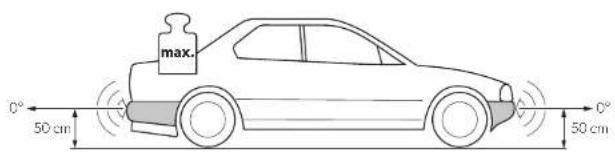
- The distance from the sensors to the ground should be 50 cm (fig. 3).
- For the sensors to function optimally, the angle of the sensor to the road surface should be 90^ (fig. 3). The angle may not be less than 90^ , as the road will otherwise be interpreted by the sensor as an obstacle.
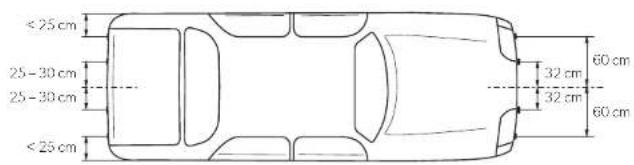
- Observe the positioning of the sensors (fig. 4).
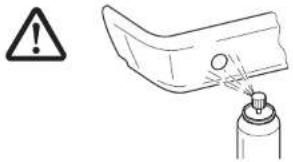
5.2 Painting the sensors
See fig. 2

NOTE
The sensors may be painted. The manufacturer recommends having the sensors painted by a specialist workshop.
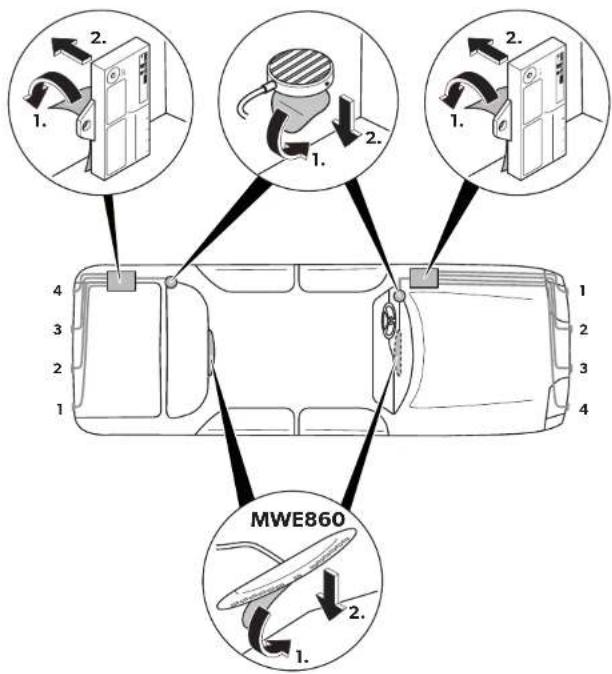
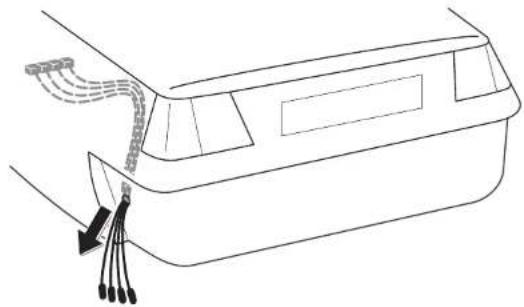
6 Fitting the parking aid
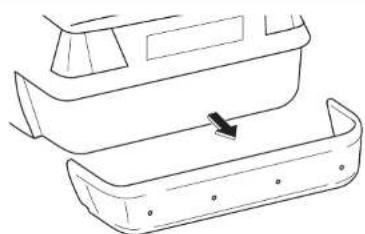
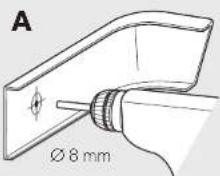
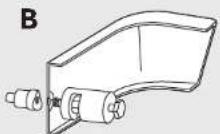
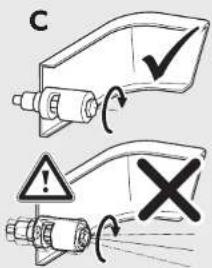
See fig. 7 to fig. 11
Supplementary to fig. 8

NOTICE! Risk of paint damage!
- The ambient temperature may not fall below 18 °C when punching or drilling.
- We recommend using a punching tool.
- Make sure that you do not tilt the punching tool when operating.
▶Deburr the drill holes.
For a more accurate fit, slant the drill downwards slightly on the inside of the bumper when drilling the hole. The sensor housing can now be easily inserted at a downward angle.
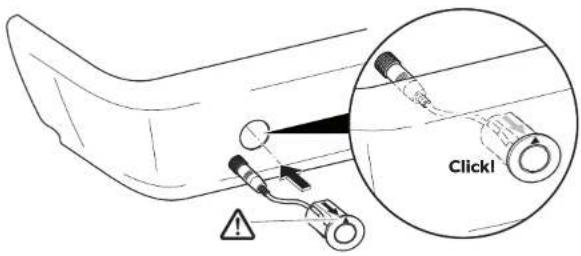
Supplementary to fig. 9

NOTICE! Risk of malfunction
Note that the sensors must be aligned in a particular direction. The top of the sensor is marked with an ▲.
7 Connecting the parking aid

NOTE
- MWE820, 860: On some vehicles, the reversing light only works when the ignition is switched on. In this case, you must switch on the ignition in order to identify the positive and earth wires.
- MWE890: If the speed signal has been connected to the control electronics, the sensors are automatically deactivated at a speed over approx. 15 km/h.
The sensors are reactivated as soon as the speed falls below approx. 15 km/h.
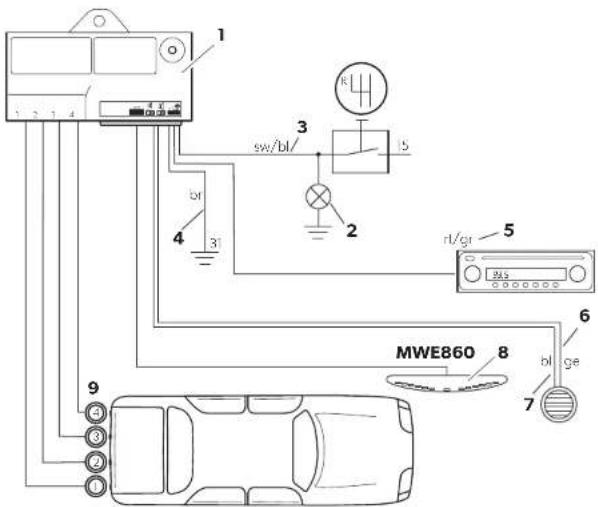
MWE820, 860: The complete circuit diagram can be found in fig. 12.
No. Designation
1 Control electronics
2 Reversing light
3 Black/blue cable: connection to connected positive (+12 V)
4 Brown cable: connection to earth
5 Red/grey cable: connection to the radio's mute connection (optional)
6 Yellow cable from the loudspeaker
7 Blue cable from the loudspeaker
8 Display (MWE860 only)
9 Sensors
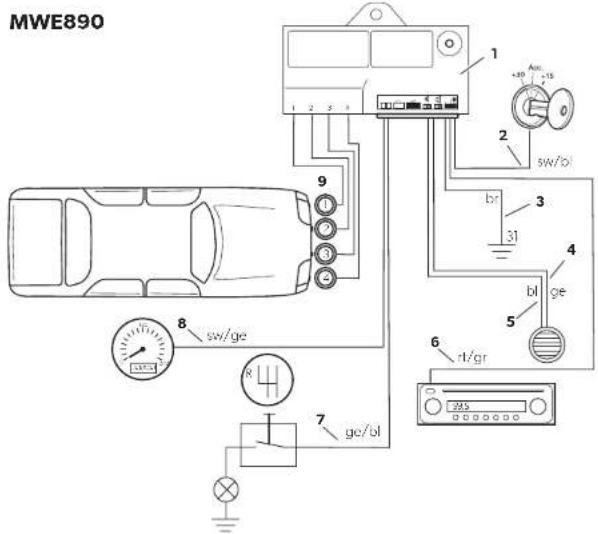
MWE 890: The complete circuit diagram can be found in fig. 13.
No. Designation
1 Control electronics
2 Black/blue cable: connection to connected positive (+12 V)
3 Brown cable: connection to earth
4 Yellow cable from the loudspeaker
5 Blue cable from the loudspeaker
6 Red/grey cable: connection to the radio's mute connection (optional)
7 Yellow/blue cable: connection to reversing light (optional)
8 Black/yellow cable: connection to the speed signal from the speedometer (optional)
9 Sensors
8 D e t e c t i o n
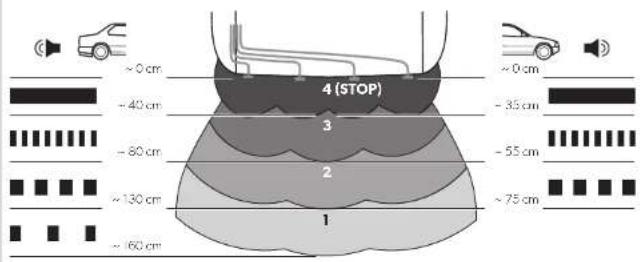
See fig. 14
The detection range of the parking aid is divided into four zones:
• Zone 1 (MWE820, 860 only)
This zone is the first limit range. Small objects or those with poor reflective characteristics may not be detected.
•Zone 2
Nearly all objects are displayed in this zone.
- Zone 3
Nearly all objects in this zone are displayed, however objects may only appear in the sensors' blind spot, or not be detected at all due to their consistency or small size.
- Stop zone (4)
If there are objects in this zone, the parking aid emits a continuous tone warning you to stop.
Nearly all objects in this zone are displayed, however objects may only appear in the sensors' blind spot or not be detected at all due to their consistency or small size.
Displaying fixed objects, such as a trailer hitch, can be suppressed.
9 Setting the system
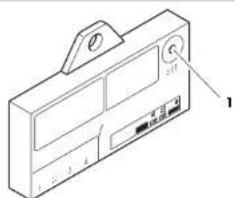
There is a button (fig. 15 1) on the controller for setting the following parameter.
9.1 Setting the sensitivity
▶Switch on the ignition.
▶ Engage the reverse gear (MWE820, 860 only).
▶Press the button for not more than two seconds to set the sensitivity in the following sequence:
– Low sensitivity: the loudspeaker beeps once
– Medium sensitivity (standard): the loudspeaker beeps twice
– High sensitivity: the loudspeaker beeps three times
Pressing the button repeatedly changes the sensitivity in the above sequence.
9.2 Suppressing the display of fixed objects (such as trailer hitches) (MWE820, 860 only)

NOTICE!
Before making the setting, make sure that there are no additional objects in the stop zone, such as people or other vehicles.
▶Switch on the ignition.
▶Engage the reverse gear.
▶ Press the button for three seconds until the loudspeaker beeps briefly.
√The loudspeaker emits short beeps repeatedly.
√The system initialises the fixed object.
▶To end the setting, disengage the reverse gear after a period of at least three seconds.
9.3 Restoring the factory settings
MWE820, 860
▶Switch on the ignition.
▶Engage the reverse gear.
▶Press the button for longer than four seconds.
√The loudspeaker beeps repeatedly.
▶Disengage the reverse gear.
▶Engage the reverse gear again.
√The system has been reset to the default settings.
MWE890

NOTE
If the speedometer speed signal has been disconnected from the control electronics, the default settings must be restored to ensure that the sensors function correctly.
▶Switch on the ignition.
▶Press the button for longer than two seconds.
√The loudspeaker beeps repeatedly.
▶Let go of the button.
√The system has been reset to the default settings.
9.4 Reflecting the display (MWE860 only)
If the obstacles are shown the wrong way round on the display, proceed as follows:
▶Connect the sensor plugs into the sockets on the control module in the reverse order (1 → 4, 2 → 3, 3 → 2, 4 → 1).
10 Performing a functional test
To test the parking aid, drive towards something slowly such as a wall.

NOTICE!
Be very careful when you operate the device for the first time, and make sure that you familiarize yourself with the various sequences of beeps (fig. 14).
11 Using the parking aid
The rear sensors (MWE820, 860) are activated automatically by engaging the reverse gear with the ignition on or the engine running. The speaker will emit a double beep.
The front sensors (MWE 890) are automatically activated as soon as the ignition is switched on and the speed of the vehicle lies between 0 and around 15 km/h.
As an option, instead of being connected to the speed signal, the control electronics of the front sensors can be connected to the reversing light or an external switch.

NOTE
Before using either of these functions, hold down the button on the control electronics for 2 seconds (see chapter "Restoring the factory settings" on page 10).
The sensors are active in the following cases:
- For around 30 seconds after the motor is started
- When the reverse gear is engaged and the control electronics are connected to the reversing light
- For around 30 seconds after the reverse gear is disengaged
- The sensors can be activated with an external button (accessory) for a duration of around 30 seconds.
As soon as there is an obstacle within the detection range, a repeated signal tone is emitted.
As you approach, the tone sequence and the flashing frequency change, depending on the zone in which the obstacle is, thus indicating the distance (fig. 14).
MWE860 (optional MWE890): The nearer the obstacle gets, the more LEDs light up on the display.

NOTICE!
Stop the vehicle immediately and investigate the situation (getting out if necessary), if the following happens while you are manoeuvring: when manoeuvring, the device first indicates an obstacle and the tone sequence speeds up normally (e.g. from slow to medium). Suddenly the signal tone slows down, or no obstacle is indicated at all.
This means that the original obstacle is in the blind spot of the sensors (construction-related characteristic), and it is possible to hit it.
12 Troubleshooting
The device indicates no function.
The voltage supply cable (black/blue and brown wires) is not connected or is incorrectly connected.
▶Check the connections.
The plugs for the sensors are not connected or are not properly plugged into the control electronics.
▶Check the plugs, and make sure they lock into place.
A long tone sounds (approx. 3 seconds) after switching on the ignition
One or more sensors are defective or no longer connected to the control electronics. The loudspeaker indicates the faulty sensor by the number of beeps after the long beep: for example three beeps for sensor 3.
▶Check the plugs and make sure they lock into place.
▶Replace the defective sensor(s).

NOTICE!
The system no longer works reliably if one or more sensors are faulty.
Device indicates obstacles incorrectly.
False alarms may have the following causes:
- For example dirt or frost on the sensors
▶Clean the sensors.
• The sensors were incorrectly installed.
▶ Adjust the direction or height of the sensors (fig. 3).
• The sensors have contact with the chassis.
▶Disconnect the sensors from the chassis.
Objects on the vehicle (e. g. spare wheel) lead to false alarms.
▶ Set the system so that fixed objects are no longer displayed (see chapter "Setting the system" on page 9).
13 Guarantee
The statutory warranty period applies. If the product is defective, please contact the manufacturer's branch in your country (see the back of the instruction manual for the addresses) or your retailer.
For repair and guarantee processing, please send the following items:
- Defect components
• A copy of the receipt with purchasing date - A reason for the claim or description of the fault
14 Disposal
▶ Place the packaging material in the appropriate recycling waste bins wherever possible.

If you wish to finally dispose of the product, ask your local recycling centre or specialist dealer for details about how to do this in accordance with the applicable disposal regulations.
15 Technical data
| MagicWatch | |||
| MWE820 MW | E860 MWE890 | ||
| Ref. no.: 9600000353 96000 | 00354 9600000355 | ||
| Detection range: | Approx. 0.40 m to 1.6 m | Approx. 0,35 m to 0,75 m | |
| Ultrasound frequency: 40 kHz | |||
| Versorgungsspannung: 10 – 24 V | |||
| Supply voltage: max. 120 mA | |||
| Operating temperature: | -25 °C to +70 °C | ||
| Certification: |  030117 030117 | ||

NOTE
The sensors may be painted. The manufacturer recommends having the sensors painted by a specialist workshop.
9 Stille inn systemet
Styreelektronikken har en knapp (fig. 15 1) for innstilling av følgende parametere.
Dometic Australia Pty. Ltd.
1 John Duncan Court
Varsity Lakes QLD 4227
1800212121
+61 7 55076001
Mail: sales@dometic.com.au
AUSTRIA
Dometic Austria GmbH
Neudorferstraße 108
A-2353 Guntramsdorf
+43 2236 908070
+43 2236 90807060
Mail: info@dometic.at
BENELUX
Dometic Branch Office Belgium
Zincstraal 3
B-1500 Halle
+32 2 3598040
+32 2 3598050
Mail: info@dometic.be
BRAZIL
Dometic DO Brasil LTDA
Avenida Paulista 1754, conj. 111
SP 01310-920 Sao Paulo
+551132513352
+551132513362
Dometic Group Asia Pacific
Suites 2207-11 · 22/F · Tower 1
The Gateway · 25 Canton Road,
Tsim Sha Tsui · Kowloon
+852 2 4611386
+85224665553
Mail: info@waeco.com.hk
HUNGARY
Dometic Zrt. Sales Office
Kerékgyártó u. 5.
H-1147 Budapest
+3614684400
+3614684401
Dometic Italy S.r.l.
Via Virgilio, 3
I-47122 Forlì (FC)
+39 0543 754901
+390543754983
Mail: vendite@dometic.it
JAPAN
Dometic KK
Maekawa-Shibaura, Bldg. 2
2-13-9 Shibaura Minato-ku
Tokyo 108-0023
+81 3 5445 3333
+81 3 5445 3339
Mail: info@dometic.jp
MEXICO
Circuito Médicos No. 6 Local 1
Colonia Ciudad Satélite
CP 53100 Naucalpan de Juárez
Estado de México
+52 55 5374 4108
+52 55 5393 4683
Mail: info@dometic.com.mx
NETHERLANDS
Dometic Benelux B.V.
Ecustraat 3
NL-4879 NP Etten-Leur
+31 76 5029000
+31 76 5029019
Mail: info@dometic.nl
NEW ZEALAND
Dometic New Zealand Ltd.
Unite E, The Gate
373 Neilson Street
Penrose 1, Auckland
+6496221490
+6496221573
Mail: customerservices@dometic.co.nz
NORWAY
Dometic Norway AS
∅sterøyveien 46
N-3232 Sandefjord
+47 33428450
+47 33428459
Mail: firmapost@dometic.no
POLAND
Dometic Poland Sp. z o.o.
Ul. Puławska 435A
PL-02-801 Warszawa
+48 22 414 3200
+48 22 414 3201
Mail: info@dometic.pl
PORTUGAL
Dometic Spain, S.L.
Komsomolskaya square 6-1
RU-107140 Moscow
+7 495 780 79 39
+7 495 916 56 53
Mail: info@dometic.ru
SINGAPORE
Dometic Pte Ltd
18 Boon Lay Way 06-140 Trade Hub 21
Singapore 609966
+65 6795 3177
+65 6862 6620
Mail: dometic@dometic.com.sg
SLOVAKIA
Dometic Slovakia s.r.o. Sales Office Bratislava
Nádražná 34/A
900 28 Ivánka pri Dunaji
/ +421 2 45 529 680
Mail: bratislava@dometic.com
SOUTH AFRICA
Dometic (Pty) Ltd.
Regional Office
South Africa & Sub-Saharan Africa
2 Avalon Road
West Lake View Ext 11
Modderfontein 1645
Johannesburg
+27114504978
+27114504976
Mail: info@dometic.co.za
SPAIN
Dometic Spain S.L.
Avda. Sierra del Guadarrama, 16
E-28691 Villanueva de la Cañada
Madrid
+34902111042
+34 900 100 245
Mail: info@dometic.es
SWEDEN
Dometic Scandinavia AB
Gustaf Melins gata 7
Dometic Switzerland AG
Riedackerstrasse 7a
CH-8153 Rümlang
+41 44 8187171
+41 44 8187191
Mail: info@dometic.ch
UNITED ARAB EMIRATES
Dometic Middle East FZCO
P.O.Box17860
S-D 6, Jebel Ali Freezone
Dubai
+97148833858
+97148833868
Mail: info@dometic.ae
UNITED KINGDOM
Dometic UK Ltd.
Dometic House, The Brewery
Blandford St. Mary
Dorset DT119LS
+44 344 626 0133
+44 344 626 0143
Mail: customerservices@dometic.co.uk
USA
Dometic RV Division
1120 North Main Street
Elkhart, IN 46515
+1574-264-2131