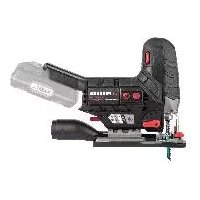
PSSPA 20Li C3 - Electric saw PARKSIDE - Free user manual and instructions
Find the device manual for free PSSPA 20Li C3 PARKSIDE in PDF.



| Product Type | Cordless Jigsaw |
| Brand | Parkside |
| Model | PSSPA 20Li C3 |
| Rated voltage | 20 V |
| Weight (with battery) | 2.2 kg (with Smart PAPS 204 A1 battery) |
| No-load speed | 800 - 3800 min⁻¹ |
| Stroke length | 20 mm |
| Cutting depth (wood) | 90 mm |
| Cutting depth (non-ferrous metals) | 20 mm |
| Cutting depth (mild steel) | 10 mm |
| Cutting angles | -45°, -22.5°, 0°, 22.5°, 45° |
| Pendulum motion | 4 positions (0, 1, 2, 3) |
| Speed adjustment | 7 levels (1-6 + Auto) |
| Sound pressure level | 75.1 dB(A) (K=2 dB) |
| Sound power level | 86.1 dB(A) (K=2 dB) |
| Vibration (wood) | 3.98 m/s² (K=1.5 m/s²) |
| Vibration (metal) | 4.10 m/s² (K=1.5 m/s²) |
| Compatible battery | Lithium-ion 20 V, Parkside 20V-1EAM range (PAP 20 B1, B3, Smart PAPS 204/208 A1) |
| Work light | Integrated LED |
| Dust blow function | Yes |
| Parallel guide | Yes (adjustable) |
| Protection cover | Yes (removable) |
| Delivery contents | Jigsaw, 2 HCS wood blades, 1 BIM metal blade, parallel guide, cover, splinter guard, guide adapter, dust extraction tube, reducer, carrying case |
| Warranty | 5 years |
Frequently Asked Questions - PSSPA 20Li C3 PARKSIDE
User questions about PSSPA 20Li C3 PARKSIDE
0 question about this device. Answer the ones you know or ask your own.
Ask a new question about this device
Download the instructions for your Electric saw in PDF format for free! Find your manual PSSPA 20Li C3 - PARKSIDE and take your electronic device back in hand. On this page are published all the documents necessary for the use of your device. PSSPA 20Li C3 by PARKSIDE.
USER MANUAL PSSPA 20Li C3 PARKSIDE
natural_image
Black Parkside Jigsaw tool with visible branding and mechanical components (no text or symbols on the device itself)
text_image
PDF ONLINE www.lidl-service.comAkku-Stichsäge 20 V / Cordless Jigsaw 20V / Scie sauteuse sans fi | 20 V PSSPA 20-Li C3
DE AT CH
Akku-Stichsäge 20 V
Translation of the original instructions
NL BE
Before reading, unfold the page containing the illustrations and familiarise yourself with all functions of the device.
FR BE
GB / MT Translation of the original instructions Page 21
Service-Center....19
Importeur....19
natural_image
Abstract grayscale graphic with four numbered blocks (0, 1, 2, 3) and a stylized icon resembling a tree or gear, no readable text or symbols.0 Metall
Introduction......21
Proper use.... 21
Scope of delivery/accessories......22
Overview....22
Description of functions.... 22
Technical data....22
Safety information.... 23
Meaning of the safety information...... 24
Pictograms and symbols......24
General Power Tool Safety Warnings.....24
Safety information for reciprocating saws....26
Residual risks....27
Preparation...... 27
Control elements....27
Attaching and removing the saw blade.... 28
Attaching and removing the rip fence..... 28
Bevel cuts....28
External dust extraction.... 29
Attaching and removing the protective cover....29
Attaching and removing the splinter guard....29
Attaching and removing the line guide adaptor....29
Checking the charge status of the battery....29
Charging the battery.... 29
Operation....30
Information on sawing....30
Inserting and removing the battery......30
Switching on and off....31
Lidl Home App.... 31
Transport....32
Cleaning, maintenance and storage....32
Cleaning....32
Maintenance....32
Storage....32
Troubleshooting....33
Disposal/environmental protection....33
Service.... 34
Guarantee....34
Repair service....35
Service Centre....35
Importer....35
Spare parts and accessories......35
Translation of the original EC declaration of conformity.... 36
Exploded view......211
Introduction
Congratulations on purchasing your new cordless sabre saw (hereafter referred to as device or power tool).
You have chosen a high-quality device. This device was quality-tested and subjected to a final inspection during production, therefore ensuring proper functioning of your device.

The instruction manual forms part of this device. It contains important information on safety, use and disposal. Read the instruction manual carefully. Familiarise yourself with the controls and how to use the device correctly. Use the device only as described and for the stated fields of application. Store the instruction manual carefully and ensure that all documents are handed over in the event that the device is passed on to another user.
Proper use
This device is only intended for the following uses:
- Sawing plastic, wood and light metal with firm support
- Sawing straight and curved cuts as well as mitre cuts (only wood and plastic) of up to 45°
- Only operate in dry areas
Please note the information on saw blade types.
Any other use that is not expressly permitted in this instruction manual may pose a serious hazard to the user and result in damage to the device. The operator or user of the machine is
responsible for any accidents or personal injury and/or material damage to third parties or their property. The machine is intended to be used by do-it-yourselfers. It was not designed for heavy commercial use. The warranty is void in the case of commercial use. The manufacturer is not liable for damage caused by improper use or incorrect operation.
The device is part of the -20-V-1EAM series and can be operated with batteries of the -20-V-1EAM series. Batteries of the
- -20-V-1EAM series may only be charged using chargers of the - -20-V-1EAM series.
Scope of delivery/ accessories
Unpack the device and check that everything is present.
Dispose of the packaging material properly.
- Cordless Jigsaw 20V
• 2 Wood saw blade HCS swiss made
• 1 Metal saw blade BIM swiss made - Splinter guard (pre-mounted)
• Line guide adaptor (pre-mounted)
• Guard cover (pre-mounted) - Suction connector (pre-mounted)
- Reducer piece (pre-mounted)
- Parallel guide
- Storage case
• Translation of the original instructions
Battery and charger are not included.
Overview

The illustrations for the device can be found on the front and back fold-out page.
1 Rotary wheel
2 On/Off switch
3 Unlock button
4 Handle (Insulated gripping surface)
5 Lever
6 Switch (dust blower function)
7 Battery holder
8 "Connected" indicator
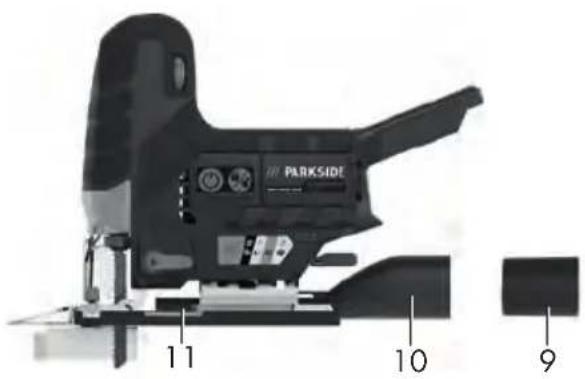
9 Reducer piece
10 Adapter for external dust extraction
11 Footplate
12 Pendulum stroke switch
13 Chuck
14 Guide roller
15 Parallel guide mount
16 Wood saw blade
17 Metal saw blade
18 Retaining screw
19 Line guide adaptor
20 Guard cover
21 LED work light
22 Parallel guide
23 Splinter guard
24 Battery charger
25 Rechargeable battery
26 Charge level indicator
27 Battery release
28 Storage case
Description of functions
With the sabre saw, the saw blade clamped on one side cuts via a stroke movement. With the pendulum stroke, the guide roller moves the saw blade forwards during every upstroke in addition to the vertical saw movement.
Please refer to the descriptions below for information on how the operating elements work.
Technical data
Cordless Jigsaw 20V ... PSSPA 20-Li C3
Rated voltage U 20eV =
Weight with battery (Smart PAPS 204 A1)
z 2%2kg
Idle stroke rate 800-3800 min ^-1
Stroke length ......2öemm
Cutting depth
- Wood ......he1" Demm
- non-ferrous metal ......he20emm
- mild steel ......he10emm
Bevel cutting .. -45°; -22.5°; 0°; 22.5°; 45°
Sound pressure level ( I_pA ).75.1 dB; K_pA2D_edB
Sound power level ( L_WA )
peMeasured 86.1 dB; KWA2DedB
Vibration ( a_h )
- Wood ....3.98 m/s²; K21%Dem/s²
- Metal 4.10 m/s ^2 ; K21%Dem/s ^2
Temperature ≤50^ - Charging 4 - t 0e°C
- Operation ....-20 - D0e°C
- Storage 0 - + De°C
Lidl Smart battery Smart PAPS 204 A1/Smart PAPS 208 A1
pefrequency band ..... 2400–2483.5 MHz petransmitted power .....≤ 20 dBm Levels of noise and vibration were determined according to the standards and regulations in the declaration of conformity.
The specified total vibration value and the stated noise emission value have been measured according to a standardised test method and can be used to compare one power tool with another. The specified total vibration value and the stated specified noise emission value can also be used for a provisional assessment of the load.
⚠-WARNIN( _The vibration and noise emissions may deviate from the specified values during actual use of the power tool, depending on how the power tool is being used. Try to
keep the exposure to vibrations as low as possible. An example of a measure to reduce vibration exposure is limiting the working hours. All parts of the operating cycle have to be considered while doing so (for example, times when the power tool is switched off and times when it is switched on but running without any load).
Charging time
The device is part of the -20-V-1EAM series and can be operated with batteries of the -20-V-1EAM series. Batteries of the -20-V-1EAM series may only be charged using chargers of the -20-V-1EAM series.
We recommend that you operate this appliance with the following batteries only: PAP 20 B1, PAP 20 B3, Smart PAPS 204 A1, Smart PAPS 208 A1
We recommend charging these batteries with the following chargers: PLG 20 A3, PLG 20 A4, PLG 20 C1, PLG 20 C3, PDSLG 20 A1, Smart PLGS 2012 A1
Rechargeable battery and charger technical data: See separate manual.
An up-to-date list of battery compatibility can be found at: www.lidl.de/akku
| Charging time (min.) | PAP-20-A1PAP-20-B1 | PAP-20-A2 | PAP-20-A3PAP-20-B3 | SmartPAPS-207-A1 | SmartPAPS-208-A1 |
| PL(-20-A1PL(-20-A7PL(-20-C1 | 60 90 120 120 210 | ||||
| PL(-20-A2 45 60 80 80 165 | |||||
| PL(-20-A3PL(-20-C3 | 35 45 60 50 120 | ||||
| PDSL(-20-A1 35 45 60 50 120 | |||||
| SmartPLGS-2012-A1 | 35 40 40 40 50 | ||||
Safety information
This section deals with the basic safety instructions for using the device.
⚠-WARNIN( _Injury and property damage due to improper handling of battery. Observe the safety information and notes on charging and proper use as shown in the instruction manual for your battery and charger from the
series - -20-V-1EAM. A detailed description of the charging process and further information can be found in these separate operating instructions.
Meaning of the safety information
A-DAN( 4R_-If you do not observe this safety instruction, an accident will occur. The result of which is severe bodily injury or death.
⚠-WARNIN( _If you do not observe this safety instruction, an accident may occur. The result of which is likely severe bodily injury or death.
A-CAUTI D_-If you do not observe this safety instruction, an accident will occur. The result of which is likely minor or moderate bodily injury.
Nk ÁIUE!-If you do not observe this safety instruction, an accident will occur. The result of which is possible damage to property.
Pictograms and symbols Symbols on the device

The device is part of the -20-V-1EAM series and can be operated with batteries of the -20-V-1EAM series. Batteries of the -20-V-1EAM series may only be charged using chargers of the -20-V-1EAM series.

Observe the operating instructions

Hot surface
Electrical devices must not be disposed of with domestic waste.
Symbols used in the instruction manual

Use hand protection
General Power Tool Safety Warnings
⚠-WARNIN( _-Read all safety warnings, instructions, illustrations and specifications provided with this power tool. Failure to follow all instructions listed below may result in electric shock, fire and/or serious injury. Save all
warnings and instructions for future reference.
The term "power tool" in the warnings refers to your mains-operated (corded) power tool or battery-operated (cordless) power tool.
1. WORK AREA SAFETY
a) Keep work area clean and well lit. Cluttered or dark areas invite accidents.
b) Do not operate power tools in explosive atmospheres, such as in the presence of flammable liquids, gases or dust. Power tools create sparks which may ignite the dust or fumes.
c) Keep children and bystanders away while operating a power tool. Distractions can cause you to lose control.
2. ELECTRICAL SAFETY
a) Power tool plugs must match the outlet. Never modify the plug in any way. Do not use any adapter plugs with earthed (grounded) power tools. Unmodified plugs and matching outlets will reduce risk of electric shock.
b) Avoid body contact with earthed or grounded surfaces, such as pipes, radiators, ranges and refrigerators. There is an increased risk of electric shock if your body is earthed or grounded.
c) Do not expose power tools to rain or wet conditions. Water entering a power tool will increase the risk of electric shock.
d) Do not abuse the cord. Never use the cord for carrying, pulling or unplugging the power tool. Keep cord away from heat, oil, sharp edges or moving parts. Damaged or entangled cords increase the risk of electric shock.
e) When operating a power tool outdoors, use an extension cord suitable for outdoor use. Use of a cord suitable for outdoor use reduces the risk of electric shock.
f) If operating a power tool in a damp location is unavoidable, use a residual current device (RCD) protected supply. Use of an RCD reduces the risk of electric shock.
3. PERSONAL SAFETY
a) Stay alert, watch what you are doing and use common sense when operating a power tool. Do not use a power tool while you are tired or under the influence of drugs, alcohol or medication. A moment of inattention while operating power tools may result in serious personal injury.
b) Use personal protective equipment. Always wear eye protection. Protective equipment such as a dust mask, non-skid safety shoes, hard hat or hearing protection used for appropriate conditions will reduce personal injuries.
c) Prevent unintentional starting. Ensure the switch is in the off-position before connecting to power source and/or battery pack, picking up or carrying the tool. Carrying power tools with your finger on the switch or energising power tools that have the switch on invites accidents.
d) Remove any adjusting key or wrench before turning the power tool on. A wrench or a key left attached to a rotating part of the power tool may result in personal injury.
e) Do not overreach. Keep proper footing and balance at all times. This enables better control of the power tool in unexpected situations.
f) Dress properly. Do not wear loose clothing or jewellery. Keep your hair and clothing away from moving parts. Loose clothes, jewellery or long hair can be caught in moving parts.
g) If devices are provided for the connection of dust extraction and collection facilities, ensure these are connected and properly used. Use of dust collection can reduce dust-related hazards.
h) Do not let familiarity gained from frequent use of tools allow you to become complacent and ignore tool safety principles. A careless action can cause severe injury within a fraction of a second.
4. POWER TOOL USE AND CARE
a) Do not force the power tool. Use the correct power tool for your application. The correct power tool will do the job better and safer at the rate for which it was designed.
b) Do not use the power tool if the switch does not turn it on and off. Any power tool that cannot be controlled with the switch is dangerous and must be repaired.
c) Disconnect the plug from the power source and/or remove the battery pack, if detachable, from the power tool before making any adjustments, changing accessories, or storing power tools. Such preventive safety measures reduce the risk of starting the power tool accidentally.
d) Store idle power tools out of the reach of children and do not allow persons unfamiliar with the power tool or these instructions to operate the power tool. Power tools are dangerous in the hands of untrained users.
e) Maintain power tools and accessories. Check for misalignment or binding of moving parts, breakage of parts and any other condition that may affect the power tool's operation. If damaged, have the power tool repaired before use. Many accidents are caused by poorly maintained power tools.
f) Keep cutting tools sharp and clean. Properly maintained cutting tools with sharp cutting edges are less likely to bind and are easier to control.
g) Use the power tool, accessories and tool bits etc. in accordance with these instructions, taking into account the working conditions
and the work to be performed. Use of the power tool for operations different from those intended could result in a hazardous situation.
h) Keep handles and grasping surfaces dry, clean and free from oil and grease. Slippery handles and grasping surfaces do not allow for safe handling and control of the tool in unexpected situations.
5. BATTERY TOOL USE AND CARE
a) Recharge only with the charger specified by the manufacturer. A charger that is suitable for one type of battery pack may create a risk of fire when used with another battery pack.
b) Use power tools only with specifically designated battery packs. Use of any other battery packs may create a risk of injury and fire.
c) When battery pack is not in use, keep it away from other metal objects, like paper clips, coins, keys, nails, screws or other small metal objects, that can make a connection from one terminal to another. Shorting the battery terminals together may cause burns or a fire.
d) Under abusive conditions, liquid may be ejected from the battery; avoid contact. If contact accidentally occurs, flush with water. If liquid contacts eyes, additionally seek medical help. Liquid ejected from the battery may cause irritation or burns.
e) Do not use a battery pack or tool that is damaged or modified. Damaged or modified batteries may exhibit unpredictable behaviour resulting in fire, explosion or risk of injury.
f) Do not expose a battery pack or tool to fire or excessive temperature. Exposure to fire or temperature above 1" 0e: l ma_ cause explosion.
g) Follow all charging instructions and do not charge the battery pack or tool outside the temperature range specified in the instructions. Char-
ging improperly or at temperatures outside the specified range may damage the battery and increase the risk of fire.
6. SERVICE
a) Have your power tool serviced by a qualified repair person using only identical replacement parts. This will ensure that the safety of the power tool is maintained.
b) Never service damaged battery packs. Service of battery packs should only be performed by the manufacturer or authorized service providers.
Safety information for reciprocating saws
- Hold the power tool by insulated gripping surfaces, when performing an operation where the cutting accessory may contact hidden wiring or its own cord. Cutting accessory contacting a "live" wire may make exposed metal parts of the power tool "live" and could give the operator an electric shock.
- Use clamps or another practical way to secure and support the workpiece to a stable platform. Holding the workpiece by your hand or against the body leaves it unstable and may lead to loss of control.
- Only use accessories recommended by PARKSIDE. Unsuitable accessories may cause electric shock or fire.
Additional safety instructions for jigsaws
- Keep hands away from the sawing area. Do not reach underneath the workpiece. Upon contact with the saw blade there is a risk of injury.
- Only when the electric tool is turned on should the sawing blade be moved against the workpiece. Otherwise, there is a risk of kickback if the attachment tools jam in the workpiece.
- Make sure that the footplate is secure during sawing. A tilted saw blade may break or cause a kickback.
• After you have finished work, turn the power tool off and do not pull the sawblade out of the cut until it has come to a standstill. In this way you will avoid any kickback and can safely put down the power tool.
- Use only undamaged sawblades in perfect condition. Bent or blunt blades can break, adversely affect the cut or cause kickback.
- Do not brake the sawblade after switching the device off by applying side pressure. The saw blade may be damaged, break or cause a kickback.
- Use suitable detectors to determine if there are hidden supply lines or contact the local utility company for assistance. Contact with electric cables can cause fire and electric shock. Damaging gas lines can lead to explosion. Breaking water pipes causes property damage.
• Always wait until the power tool has come to a complete stop before placing it down. The application tool can jam and cause you to lose control of the power tool.
Residual risks
There will always be residual risks even if you operate this power tool according to the instructions. The following hazards may occur in connection with the type and design of this power tool:
- Hearing damage if suitable ear protection is not worn.
- Health injuries resulting from the effect of vibration on the hands and arms in the event that the device is used over a longer period of time or is not used and maintained properly.
- Cutting injuries
A-WARNIN( _-Danger due to electromagnetic field generated while the machine is in operation. Under certain circumstances, this field may negatively affect active or passive medical implants. In order to reduce the danger of serious or fatal injuries, we recommend that individuals who wear medical implants should consult their doctor and the manufacturer of the implant before operating the machine.
Preparation
⚠-WARNIN( _Risk of injury due to unintentional start-up. Only insert the rechargeable battery into the device once the device is fully prepared for use.
Control elements
Familiarise yourself with the operating elements before using the device for the first time.
- Unlock button (3)
- Unlocking: Press ✓The LED work lights light up If no further action follows, the LED work lights go out automatically after 10 s (or after the delay set in the app). The device is locked again.
- Locking: Press ✓The LED work lights go out
- On/Off switch (2)
The device will only switch on when the LED work lights are lit up.
- Switching on: Press
- Switching off: Press
• Pendulum stroke switch (12)
Set pendulum movement of the saw blade in 4 positions:
- 0 - no pendulum motion
• 1 - small pendulum motion
• 2 - medium pendulum motion
• 3 - large pendulum motion
- Rotary wheel (1)
Set stroke rate in 7 levels:
- 1 lowest stroke rate
• 6 highest stroke rate
• A automatic stroke rate adapted to the load
- Switch (dust blower function) (6) Blower function for chip-free cutting line
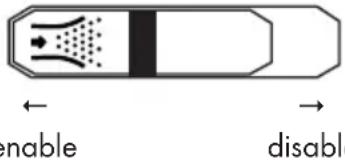
text_image
enable disableAttaching and removing the saw blade

A-CAUTI D_-Risk of injury when touching the saw blade. Wear protective gloves when attaching the saw blade.
Requirements
- The saw blade has a T-shank mount (single lug shank) like the supplied saw blades (16/17).
- The saw blade is suitable for the respective material. Included are a large-toothed saw blade for wood and a fine-toothed saw blade for metal and plastic.
- The chuck is free of splinters or other material residue.
Installing the saw blade (Fig.-B)
- Turn the chuck (13) as far forward as possible and hold it firmly in this position.
- Place the saw blade (16/17) into the chuck (13). When inserting the saw blade, make sure that the back of the saw blade is in the notch of the guide roller (14).
- Release the chuck (13).
- Make sure that the saw blade (16/17) is attached correctly and the teeth are pointing in the cutting direction.
Removing the saw blade (Fig.-B)
- Hold the saw blade (16/17) firmly.
- Turn the chuck (13) as far forward as possible and hold it firmly in this position.
- Remove the saw blade (16/17) from the chuck (13).
- Release the chuck (13).
Attaching and removing the rip fence
The rip fence can be fitted on both sides of the device.
Mounting the rip fence (Fig.-C)
- Loosen the retaining screws (18) if necessary.
- Slide the rip fence (22) into the holders for the rip fence (15).
- Retighten the retaining screws (18).
Removing the rip fence (Fig.-C)
- Loosen the retaining screws (18).
- Pull the rip fence (22) out of the holders for the rip fence (15).
Adjusting the parallel guide (Fig.-C)
- Loosen the retaining screws (18).
- Set the scale on the parallel guide (22) so that you can read the desired cutting width on the splinter guard (23) marking.
- Retighten the retaining screws (18).
- Make a test cut, check the cutting width and correct the position of the parallel guide (22) if necessary.
Bevel cuts
Notes
- You can set the following cutting angles: -45^ ; -22.5^ ; 0^ ; 22.5^ ; 45^
- To set a cutting angle of 45^ , remove the protective cover (20) and the tension tear protection (23).
Procedure (Fig.-D)
- Switch off the device and remove the rechargeable battery. Make sure that all moving parts have come to a complete stop.
- Remove the saw blade (17/16).
- Open the lever (5).
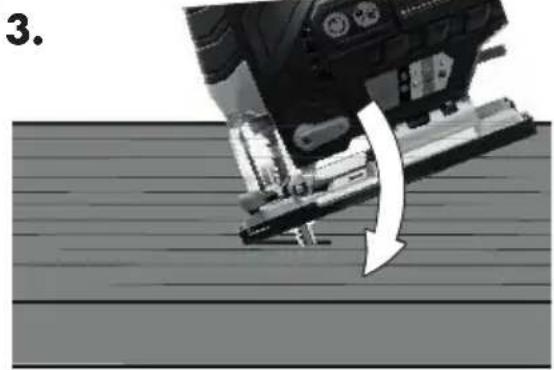
- Press the footplate (11) slightly forward.
- Set the footplate (11) to the desired position.
- Close the lever (5) again to fix the position.
External dust extraction
Connecting external dust extraction (Fig.-4)
- Disable the dust blower function (6).
- Slide the adaptor for external dust extraction (10) as far as it will go into the guide rail between the device and baseplate (11).
- Connect a suitable dust extraction (not included) to the adaptor for external dust extraction (10).
- If the external dust extractor does not fit, use the additional reducer (9).
Removing the external dust extraction (Fig.-4)
- Remove the dust extraction from the adaptor for external dust extraction (10) or reducer piece (9).
- Remove the reducer piece (9) and the adaptor for external dust extraction (10).
Attaching and removing the protective cover
Attaching the protective cover
- Press the two holders on the protective cover (20) into the recesses on the device housing.
√The protective cover clicks into place.
You can fold the fitted protective cover up by 90^ .
Removing the protective cover
- Carefully press the two holders on the protective cover (20) apart.
- Pull the protective cover to the front.
Attaching and removing the splinter guard
Attaching the splinter guard
- Push the splinter guard (23) from the bottom into the recess in the baseplate (11).
Removing the splinter guard
- Press the splinter guard (23) away from the recess in the baseplate (11).
Attaching and removing the line guide adaptor
With the line guide adaptor (19), you can better align with the drawn cutting lines.
Attaching the line guide adaptor
- Push the line guide adaptor (19) from the bottom into the recess at the front of the baseplate (11).
- Fold the line guide adaptor (19) in the direction of the baseplate (11).
√The line guide adaptor clicks into place at the top edge.
Removing the line guide adaptor
- Press on the baseplate from below with your index finger and at the front from above with your thumb against the line guide adaptor (19).
Checking the charge status of the battery
1.

Press the charge level indicator button (26) on the battery (25).
√The charge level of the battery is indicated by illumination of the corresponding LED lights.

red, orange and green Battery charged

red, orange Battery partially charged

red Battery needs to be charged
- Charge the battery (25) when only the red LED on the charge level indicator (26) is illuminated.
Charging the battery
See also the charger instruction manual.
Notes
- If warm, allow the battery to cool before charging.
- Do not expose the battery to direct sunlight for long periods and do not place it on a radiator (max. 50°C).
Charging the battery
- Plug the charger into a socket.
- Slide the battery (25) into the charging slot of the charger.
- Once charging is complete, disconnect the charger from the mains supply.
- Remove the battery from the charger.
Operation
Information on sawing
Selecting a stroke rate
The rotary wheel (1) at the top of the device has 6 levels for achieving the desired stroke rate.
Selecting the pendulum motion
The larger the pendulum motion, the faster your progress.
The optimal pendulum motion can be established through practice; the following settings are recommended:
- For thin material, hard material (e.g. metal) or for cutting curves: Level 0
- Fine and clean cutting edges can be achieved with little or no pendulum motion: Level 0 or 1.
- Soft material (wood, plastic, etc.): Level 2 or 3
The label shows examples on the setting:
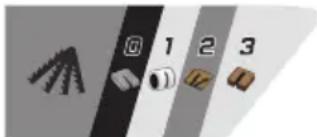
text_image
0 1 2 30 Metal
1 Plastic pipe
2 Thin wood
3 Thick wood
Plunge sawing
Requirements
- Soft materials such as wood, aerated concrete, plasterboard etc.
- Mitre angle: 0^
• Maximum stroke rate selected (level 6) - Short saw blade mounted
Procedure (Fig.-C)
- Place the device with the front edge of the footplate (11) on the workpiece. The saw blade (16) does not touch the workpiece.
- Turn the device on. Wait until the maximum stroke rate has been reached.
- Press the saw blade (16) into the workpiece until the footplate (11) rests on the workpiece.
- Continue sawing along the cutting line.
General Information
With this order, you work safely with the sabre saw and achieve a good result:
- Clamp the workpiece. Use a clamping device for small workpieces.
-
Draw a line to specify the direction in which the saw blade is guided.
-
Hold the device securely by the handle.
-
Set the stroke rate.
-
Set the mitre angle.
-
Set the stroke strength.
-
Turn the device on.
-
Wait until the device has reached its full stroke rate.
-
Place the footplate on the workpiece.
-
Slowly move the device along the marked line, pressing the footplate firmly down onto the workpiece.
-
Do not apply too much pressure in the cutting direction. Let the device do the work.
-
Before shutting down the device, switch it off and wait for it to come to a complete standstill.
Inserting and removing the battery
⚠-WARNIN( _Risk of injury due to unintentional start-up. Only insert the rechargeable battery into the device once the device is fully prepared for use.
Nk ÄIUE!-Risk of damage! An incorrect battery can damage the device and battery. An up-to-date list of battery compatibility can be found at: www.lidl.de/akku
Inserting the battery (Abb.-A)
- Push the battery (25) along the guide into the battery holder (7). √You will hear the battery click into place.
Removing the battery (Abb.-A)
- Press and hold the battery release (27) on the battery (25).
- Pull the battery out of the battery holder (7).
Switching on and off
Switching on
- Insert the rechargeable battery (25) into the device.
- Set the stroke rate using the rotary wheel (1).
- Press the unlock button (3)
√The LED work lights light up, the device is unlocked - Press the On/Off switch (2).
- Wait until the device has reached its full stroke rate.
You can guide the device with the baseplate (Footplate) against the workpiece.
Switching off
- Press the On/Off switch (2).
- Press the unlock button (3)
√The LED work lights go out, the device is locked - Do not pull the sawblade out of the cut until it has come to a standstill.
- Remove the rechargeable battery from the device if you are leaving the device unattended or if you have finished working.
Lidl Home App
With the Lidl Home app, you can monitor the device and control certain functions. The functions may change with updates to the app and firmware. For more information on the Lidl Home app, see the instructions for the smart battery.
Requirements
To find the device in the Lidl Home app, the following requirements must be met:
- The device contains the following battery: Lidl Smart battery Smart PAPSe20t A1 or Smart PAPSe208 A1
The device communicates with the app via the battery.
- The smart battery is connected to the Lidl Home app.
√The connection indicator on the device lights up blue. You may have to turn on the device.
Procedure
- In the Lidl Home app, search for the smart battery that is inserted in the device.
√The device page will be displayed. - If not, press the following row: Device info PSSPA 20-Li C3
√The device page will be displayed.
If you cannot select the device on the smart battery page, make sure you have selected the correct smart battery and that the smart battery is correctly inserted into the device.
Data and functions
• Illustration of the device: Print Illustration shows interactive 3D view of the device.
• Tool Virtual ID: Unique ID of the device
- Tool model: Model name of the device
- Tool rotation speed: Current rotation speed of the device in RPM.
- Tool discharge current: Present current in amperes.
- lamp switch: Switch LED work lights on and off.
- Tool light brightness: Brightness of the LED work lights.
Press row → Adjust the brightness: 1 - 100% (factory setting: 100%).
- Tool light delay off setting: Delay with which the LED work lights remain lit after they are switched off. When the LED work lights are on, the device is not locked. Press row → Set delay 0 p &&es /factory setting 10es!
- Tool total runtime: Total runtime of the device
- Tool locked times: Number of times the device has been blocked.
- Tool overcurrent times: Number of times the device has been overloaded.
- Firmware Version: Current firmware version. A red dot indicates that an update is available. Press the row for an update. Follow the instructions in the app.
- Reset to factory: To reset the device to factory settings, press the following button: RESET
Follow the instructions in the app.
Transport
Information on transporting the device:
- Switch off the device and remove the rechargeable battery. Make sure that all moving parts have come to a complete stop.
- Remove the attachment tool.
• Always carry the device by the handle.
Cleaning, maintenance and storage
A-WARNIN( _Electric shock! Protect yourself when performing maintenance or cleaning work. Turn off the device.
You should have any repair and maintenance work that is not described in these instructions carried out by our Service Centre. Only use original replacement parts.
Cleaning
⚠-WARNIN( _Electric shock Never spray down the device with water.
Nk ÁIUE!-Risk of damage. Chemical substances may attack the plastic parts of the machine. Do not use any cleaning agents or solvents.
- Keep the ventilation slits, motor housing and handles of the machine clean. Use a damp cloth or brush to do this.
Maintenance
The device is maintenance free.
Storage
Always store the device and accessories:
- clean
- dry
- protected against dust
• In the case provided (28)
• out of the reach of children
The storage temperature for the rechargeable battery and the device is between 0^ C and 45^ C. Avoid extreme cold or heat during storage to ensure the battery output is not adversely affected.
Remove the rechargeable battery from the device before storing the device (see the separate operating instructions for the battery and charger).
Troubleshooting
The following table will assist you in fixing faults:
| Problem Possible cause Error correction | ||
| Machine does not start | Rechargeable battery (25) not inserted | Inserting the batterb (Abb.-A), A. v.c |
| On/Off switch (2) is broken contact the service centre. | ||
| Rechargeable battery (25) discharged | Charge the battery (see the separate operating instructions for the rechargeable battery and charger) | |
| Defective motor contact the service centre. | ||
| tions | Internal loose contact contact the service centre.Machine works with interru | |
| On/Off switch (2) is broken contact the service centre. | ||
| Poor sawing performance | Saw blade (16/17) unsuitable for the workpiece to be processed | Insert a suitable saw blade (17/16) |
| Saw blade (16/17) blunt Insert a new saw blade (17/16) | ||
| Low battery power Charge the battery (see the separate operating instructions for the rechargeable battery and charger) | ||
| Incorrect sawing speed Adjust sawing speed | ||
| Saw blade quickly becomes blunt | Saw blade (16/17) unsuitable for the workpiece to be processed | Insert a suitable saw blade (17/16) |
| Too much pressure applied Reduce the pressure | ||
| Sawing speed too high Reduce the sawing speed | ||
Disposal/ environmental protection
Remove the battery from the device and recycle the device, battery, accessories and packaging in an environmentally-friendly manner.
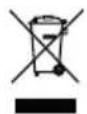
Electrical devices must not be disposed of with domestic waste.
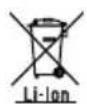
Do not throw batteries into domestic waste, fire (risk of explosion) or water. Damaged batteries can harm the environment and your health if poisonous fumes or liquids escape.
• Take the device to a recycling plant. The plastic and metal parts used on your device can be properly sorted according to materials and grades and efficiently recycled. Please contact our service centre for more information.
- We will dispose of defective devices you ship to us free of charge.
Dispose of the batteries according to local standards. Defective or used batteries must be recycled in accordance with Directive 2006/66/EC. Hand in the batteries at a used battery collection point where they are recycled in an environmentally friendly manner. For more information, please contact your local waste management provider or our service centre.
Dispose of batteries in a discharged state. We recommend covering the contacts with an adhesive strip to protect against short circuits. Do not open the battery.
Service
Guarantee
Dear Customer,
This product is provided with a 5 year guarantee from the date of purchase.
In case of defects, you have statutory rights against the seller of the product. These statutory rights are not restricted by our guarantee presented below.
Terms of Guarantee
The guarantee period begins on the date of purchase. Please retain the original receipt. This document is required as proof of purchase. If a material or manufacturing defect occurs within five years of the date of purchase of this product, we will repair or replace – at our choice – the product for you free of charge. This guarantee requires the defective product and proof of purchase to be presented within the five-year period with a brief written description of what constitutes the defect and when it occurred.
If the defect is covered by our guarantee, you will receive either the repaired product or a new product. No new guarantee period begins on repair or replacement of the product.
Guarantee Period and Statutory Claims for Defects
The guarantee period is not extended by the guarantee service. This also applies for replaced or repaired parts. Any damages and defects already present at the time of purchase must be reported immediately after unpacking. Repairs arising after expiry of the guarantee period are chargeable.
Guarantee Cover
The product has been carefully produced in accordance with strict quality guidelines and conscientiously checked prior to delivery.
The guarantee applies for all material and manufacturing defects. This guarantee does not extend to cover product parts that are subject to normal wear and may therefore be considered as wearing parts (e.g. saw blades) or to cover damage to breakable parts (e.g. switch, tension tear protection).
This guarantee shall be invalid if the product has been damaged, used incorrectly or not maintained. Precise adherence to all of the instructions specified in the operating manual is required for proper use of the product. Intended uses and actions against which the operating manual advises or warns must be categorically avoided.
The product is designed only for private and not commercial use. The guarantee will be invalidated in case of misuse or improper handling, use of force, or interventions not undertaken by our authorised service branch.
Processing in Case of Guarantee
To ensure efficient handling of your query, please follow the directions below:
- Please have the receipt and identification number (IACe" &1000u22011 ready as proof of purchase for all enquiries.
- Please find the item number on the rating plate.
- Should functional errors or other defects occur, please initially contact the service department specified below by telephone or by e-mail. You will then receive further information on the processing of your complaint.
- After consultation with our customer service, a product recorded as defective can be sent postage paid to the service address communicated to you, with the proof of purchase (receipt) and specification of what constitutes the defect and when it occurred.
In order to avoid acceptance problems and additional costs, please be sure to use only the address communicated to you. Ensure that the consignment is not sent carriage forward or by bulky goods, express or other special freight. Please send the appliance inc. all accessories supplied at the time of purchase and ensure adequate, safe transport packaging.
Repair service
For repairs that are not covered by warranty, contact the service centre. They will gladly create a cost estimate for you.
- We can only work on devices which are sent in properly packed and with postage paid.
Note: Please send your device cleaned and with an indication of the defect to the address named for the service centre. - The following are not accepted: devices sent in without prepaid postage, sent as bulky goods, sent as an Express shipment,
or devices sent as any other form of special freight.
- We will dispose of defective devices you ship to us free of charge.
Service Centre

Service Great Britain
Tel:5Ue0800 404 7657
E-mail: grizzlby lidl.co.uk
IAN 391000_2201

Service Malta
Tel5ue80062230
E-mail: grizzlby lidl.co6.6t
IAN 391000_2201
Importer
Please note that the address below is not a service address. Contact the service centre named above first.
Spare parts and accessories
You can get spare parts and accessories from www.grizzlytools.shop. If you have any problems with your order, contact us via our online shop. If you have any other questions, contact the Service Uentre, A.- v 5
Pos. nr. Name Name
| 9, 10 Reducer piece, Adapter for external dust extraction 91105887 |
| 16 Wood saw blade HCS swiss made 13800406 |
| 17 Metal saw blade BIM swiss made 13800408 |
| 20 Guard cover 91105890 |
| 22 Parallel guide 91105888 |
| 23 Splinter guard 91105889 |
Translation of the original EC declaration of conformity
Product: Cordless Jigsaw 20V
Model: PSSPA 20-Li C3
Serial number: 000001-150000
The object of the declaration described above is in conformity with the relevant Union harmonisation legislation:
2006/42/EC ! - 2017/30/4M ! - 2011/65/EU G-é4M)-201m/8K3
Product with battery Smart-PAPS-207 A1/S; art-PAPS-208 A1ü 2014/53/EU
The object of the declaration described above is in conformity with Directive 2011/65/EU of the European Parliament and of the Council of 8 June 2011 on the restriction of the use of certain hazardous substances in electrical and electronic equipment.
To ensure conformity, the following harmonised standards and national standards and regulations have been applied:
4D K2871-1ü201m ! -4D K2871-2-11ü201K/A1ü2020
EN IEC mm017-1ü2021 ! -EN IEC 55014-2:2021
IEC-K27i 1ü200K
Product with battery Smart-PAPS-207 A1/S; art-PAPS-208 A1ü
4D 301 783-1 V2.2.3ü2013 ! -4D 301 783-1i V3.2.7ü2020
4D 300 328 V2.2.2ü2013 ! -4D m0KK3ü201i
EN IEC 63000:2018
This declaration of conformity is issued under the sole responsibility of the manufacturer:

Authorised representative of documentation
Sommaire
Introduction......37
Lidl Home Application......49
Transport......49
Service-Center....55
Importateur....55
text_image
activer désactiver• Levier (5)
Consignes relatives au sciage
Choisir la vitesse
natural_image
Abstract grayscale icons representing geometric shapes and numbers (no text or symbols)0 Métal
Lidl Home Application
Service-Center....72
Importeur....72
Reserveonderdelen en accessoires.... 72
natural_image
Abstract grayscale icons representing geometric shapes and numbers (no text or symbols)0 Metaal
Service-Center....90
Importer....90
natural_image
Abstract grayscale icons representing geometric shapes and numbers (no text or symbols)0 Metal
natural_image
Abstract grayscale icons representing geometric shapes and numbers (no text or symbols)0 kov
natural_image
Four grayscale icons representing different objects or components (no text or symbols)0 Kov
1 Plastová rúra
2 Tenké drevo
3 Hrubé drevo
Ponorné pílenie
Predpoklady
Reparationsservice.... 138
Service-Center.... 138
Importør...... 138
text_image
Cropped image showing numbered icons: a gear, tools, and boxes with numbers 1, 2, 3 in vertical bars.natural_image
Abstract grayscale icons representing tools or components (no text or symbols)0 Metal
natural_image
Abstract grayscale icons representing geometric shapes and numbers (no text or symbols)0 Metallo
1 Tubo di plastica
2 Legno sottile
3 Legno spesso
Tagli a immersione
Requisiti
natural_image
Abstract grayscale icons representing geometric shapes and numbers (no text or symbols)0 Fém
natural_image
Abstract grayscale icons representing geometric shapes and numbers (no text or symbols)0 Kovina
1 cev iz umetne snovi
2 tanek les
3 debel les
Potopno žaganje
Pogoji
natural_image
Close-up of a mechanical device with labeled parts (11 and 5), no readable text or symbols beyond labelsE
text_image
PARKSIDE 11 10 9F
natural_image
Mechanical assembly diagram showing a moving part with a curved arrow indicating motion (no text or symbols present)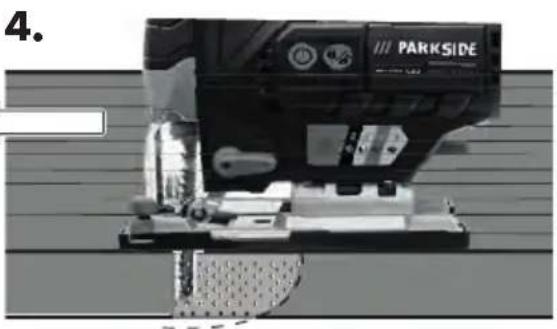
natural_image
Close-up of a black industrial machine labeled 'PARKSIDE' with no visible text or symbols on the device itself.text_image
Exploded view diagram of a mechanical assembly with numbered parts and Chinese labelstext_image
FSC www.fsc.org MIX Paper from responsible sources FSC® C142944