SoloCast - Microphone HYPERX - Free user manual and instructions
Find the device manual for free SoloCast HYPERX in PDF.



| Product Type | Electret Condenser Microphone |
| Brand | HyperX |
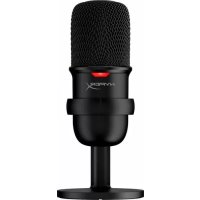
| Model | SoloCast |
| Polar Pattern | Cardioid |
| Frequency Response | 20 Hz – 20 kHz |
| Sensitivity | -6 dBFS (1 V/Pa at 1 kHz) |
| Noise (RMS) | ≤ -74 dBFS (A-weighted) |
| Power Supply | 5 V / 100 mA (USB) |
| Bit Depth | 16-bit |
| Sampling Rate | 48 kHz, 44.1 kHz, 32 kHz, 16 kHz, 8 kHz |
| Connectivity | USB-C (USB cable included) |
| Compatibility | Windows 7 and above, Mac OS, PS4 |
| Cable Length | 2 m |
| Microphone Weight | 261 g |
| Stand Weight | 125 g |
| Total Weight with Cable | 429.9 g |
| Key Features | Touch mute, status LED, swivel, 3/8" and 5/8" mounting thread for microphone stand |
| Maintenance & Cleaning | Clean with a soft, dry cloth. Avoid contact with liquids. |
| Safety | Do not expose to moisture or extreme temperatures. Use only with compliant USB cables. |
| Spare Parts & Repairability | Removable USB cable. Removable microphone stand with standard threading. For repairs, contact HyperX support. |
Frequently Asked Questions - SoloCast HYPERX
User questions about SoloCast HYPERX
0 question about this device. Answer the ones you know or ask your own.
Ask a new question about this device
Download the instructions for your Microphone in PDF format for free! Find your manual SoloCast - HYPERX and take your electronic device back in hand. On this page are published all the documents necessary for the use of your device. SoloCast by HYPERX.
USER MANUAL SoloCast HYPERX
Find the language and latest documentation for your HyperX SoloCast here.
HyperX SoloCast Installation Guide
For instructions in English
Para instrucciones en Español
Für Anleitungen in Deutsch
Pour des instructions en Français
...... Per le istruzioni in Italiano
Por as instruções em Português
Instrukcje w języku Polskim
Для инструкции на Русском
C. Turkce talimatlar icin
日本語マニュアル用
한국어 안내
......คำแนะนำภาษาไทย
Đế xem hướng dẫn bằng tiếng Việt
Simplified Chinese ..... 简体中文说明书
Traditional Chinese ....繁體中文說明
natural_image
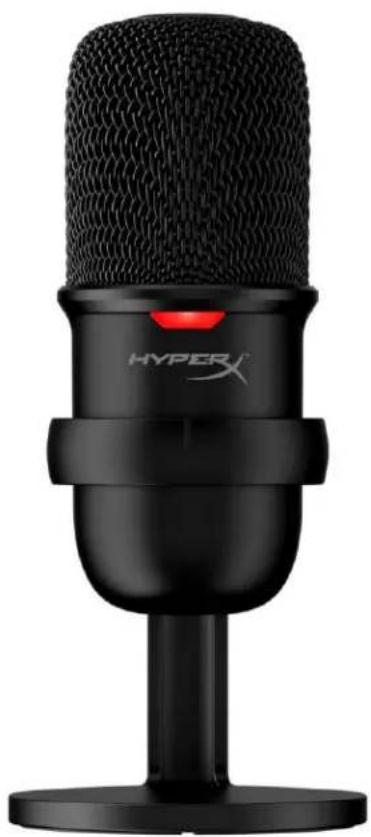
Black HYPER X audio recording microphone on a stand (no text or symbols visible on body)Part Numbers
HMIS1X-XX-BK/G
TABLE OF CONTENTS
Overview....3
Specifications....4
Using with PC or Mac 5
Using with PS4 ^TM 8
Microphone Position 9
Microphone Controls....10
Using a Microphone Mount....11
Questions or Setup Issues.... 12
Overview
text_image
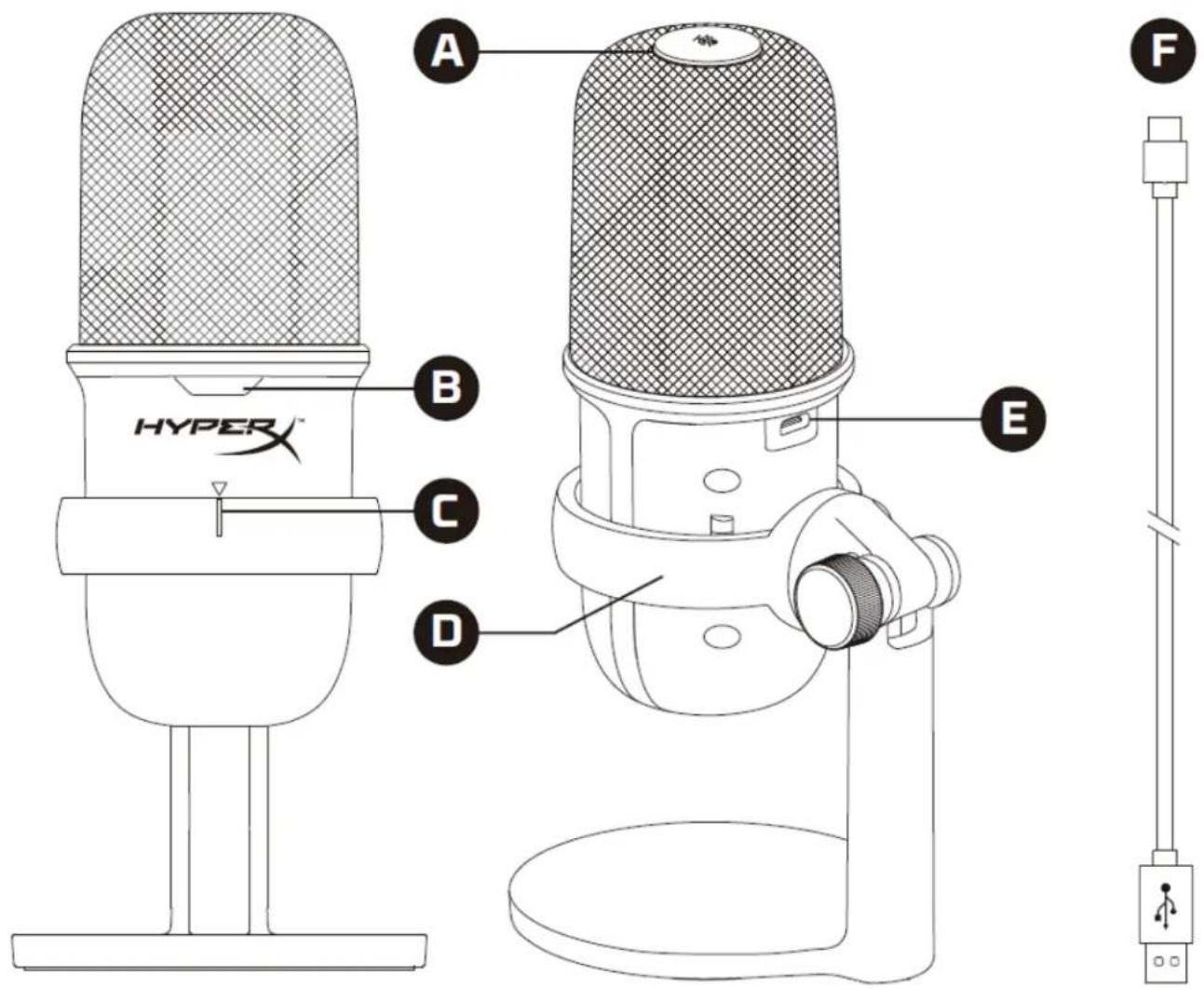
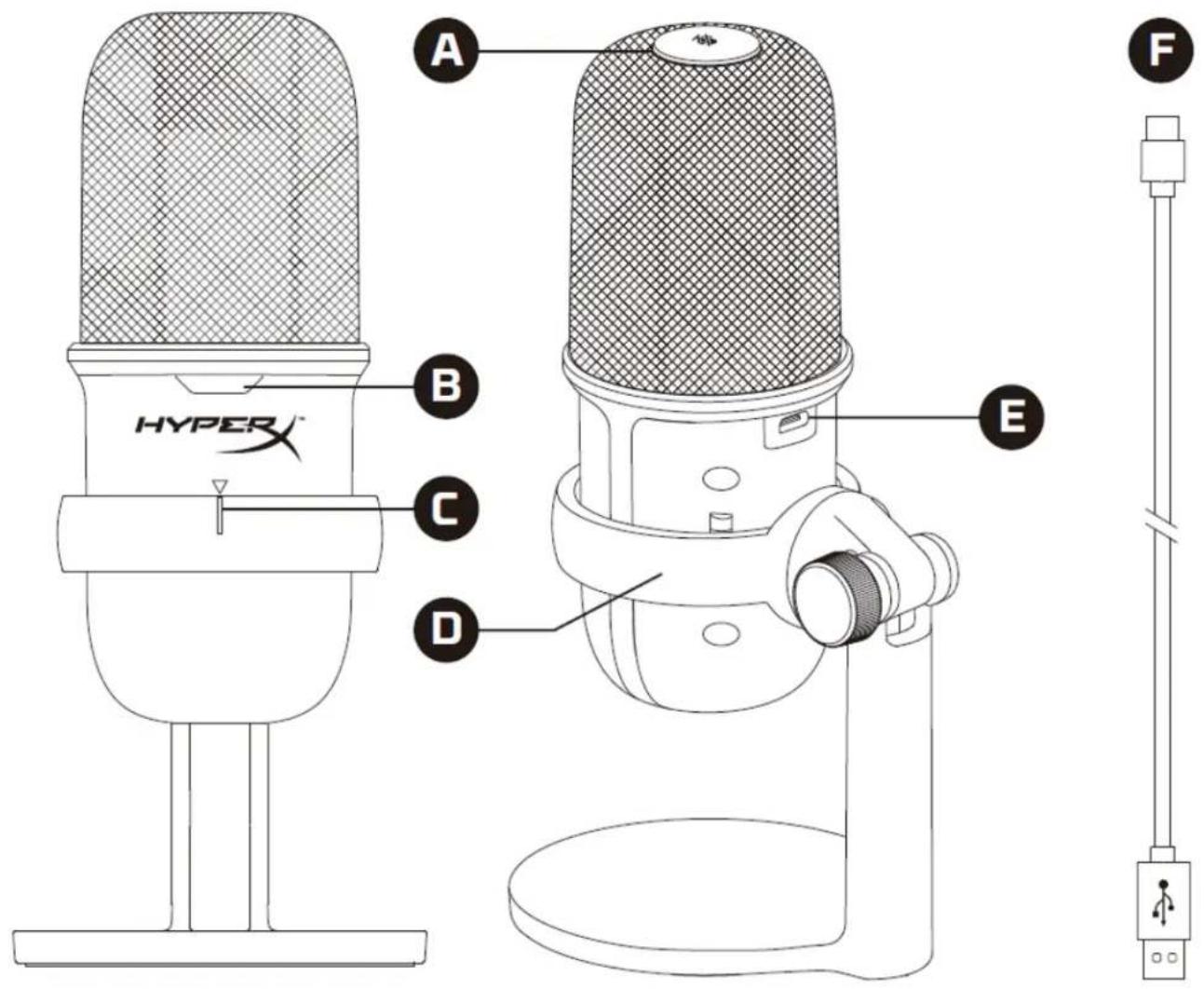
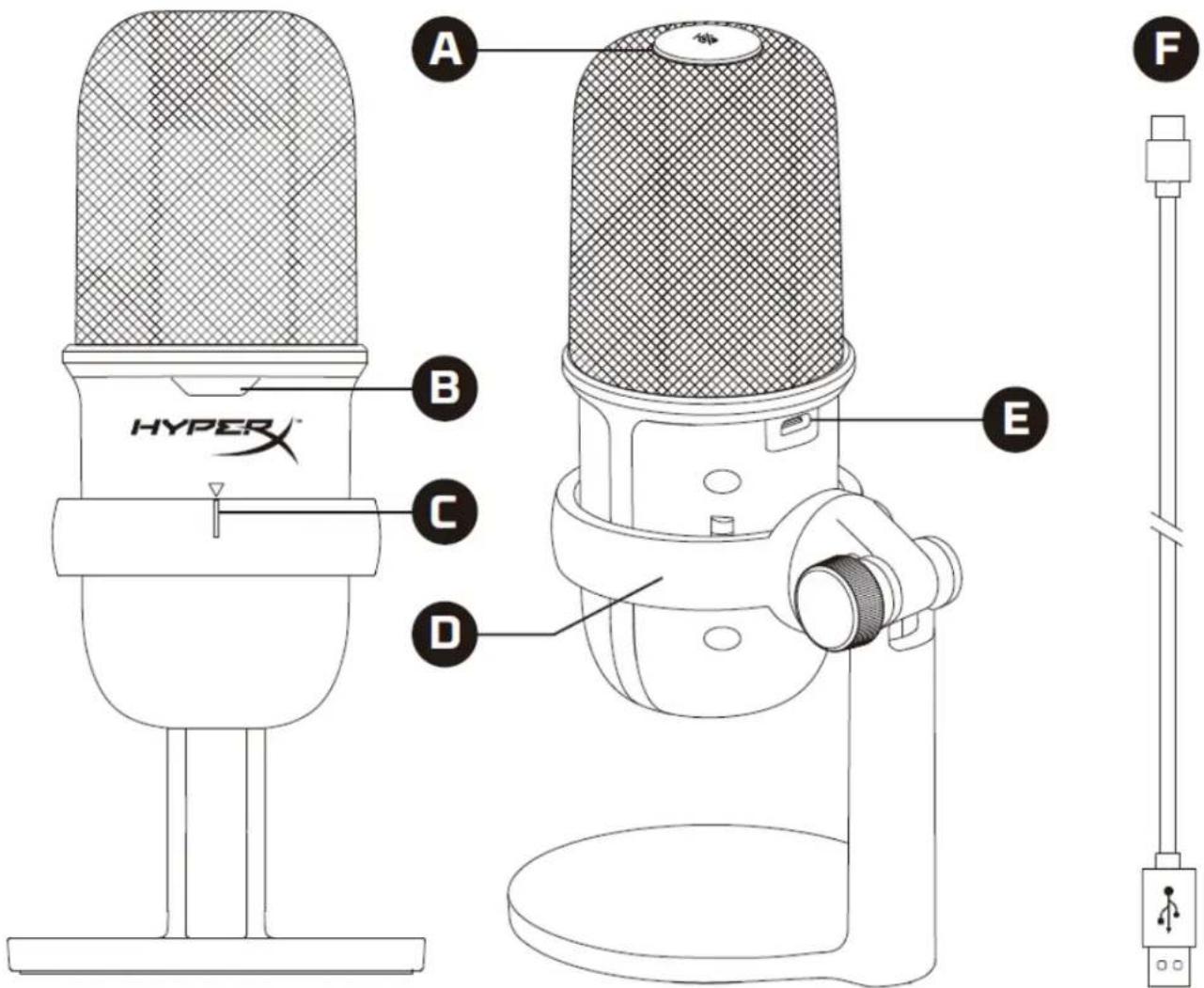
A B C D E F HYPER XA. Tap-to-mute sensor
B. Microphone status LED
C. Microphone alignment guide
D. Microphone stand
E. USB-C port
F. USB cable
Specifications
General
Power supply: 5V/100mA (USB)
Working current: 47mA
USB Specification: USB 2.0 (full speed)
Sampling rates: 48kHz, 44.1kHz, 32kHz, 16kHz, 8kHz
Bit-depth: 16-bit
Compatibility: Windows 7 & above, Mac OS, PS4™
Cable length: 2m
Weight:
- Microphone: 261g
• Microphone stand: 125g
• Total with USB cable: 429.9g
Microphone
Element: Electret condenser microphone
Directivity pattern: Cardioid
Frequency response: 20Hz-20kHz
Sensitivity: -6dBFS (1V/Pa at 1kHz)
Noise (RMS): ≤-74dBFS (A-weighted)
Using with PC or Mac
text_image
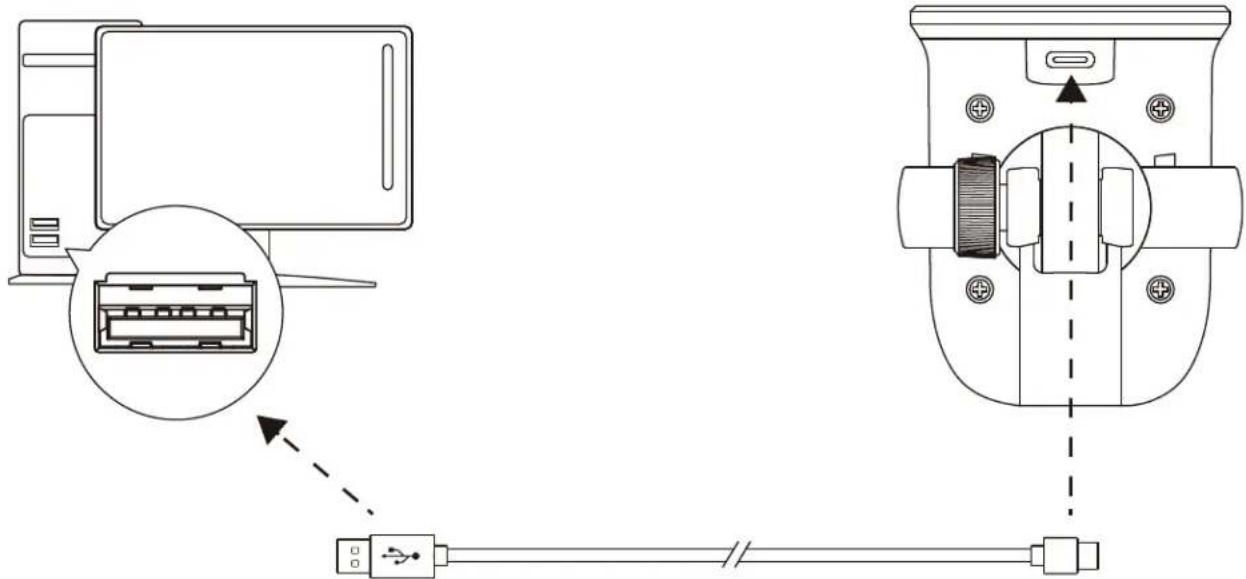
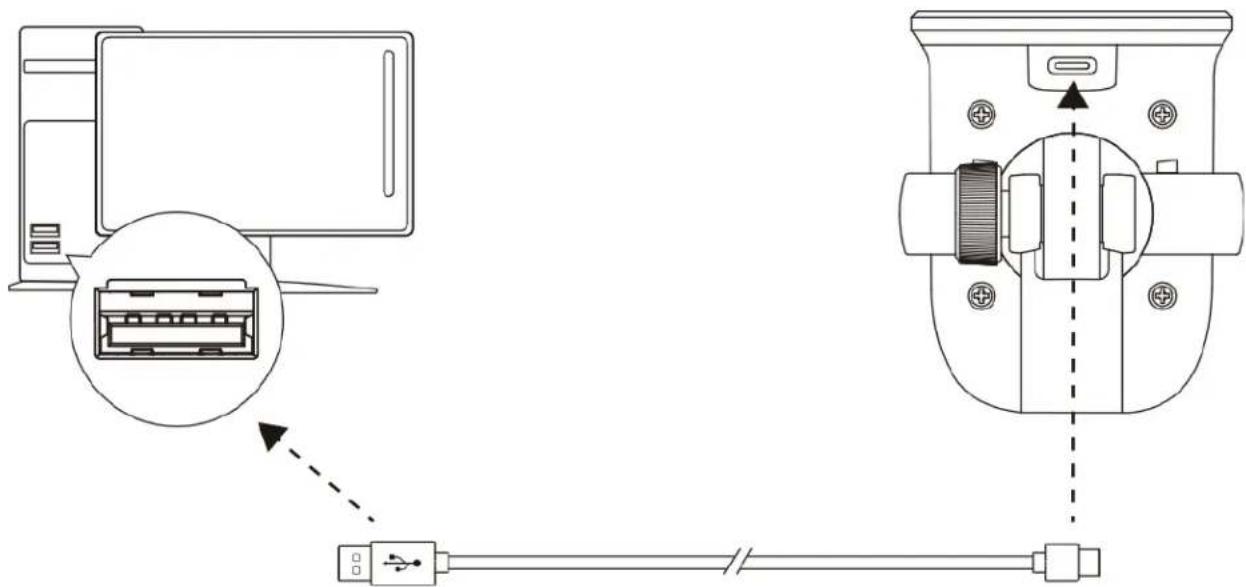
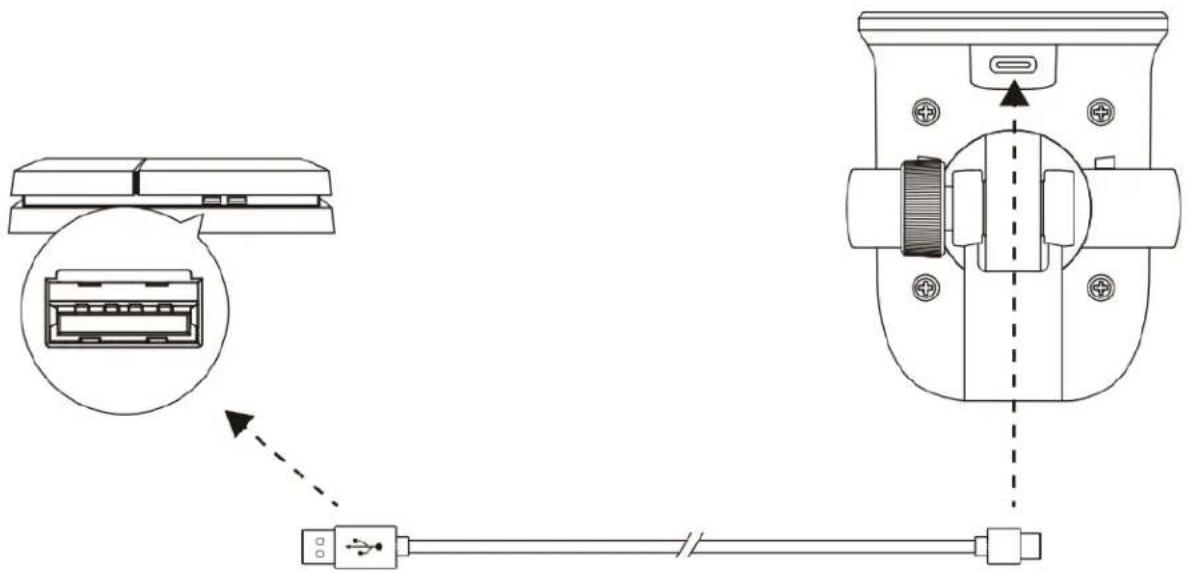
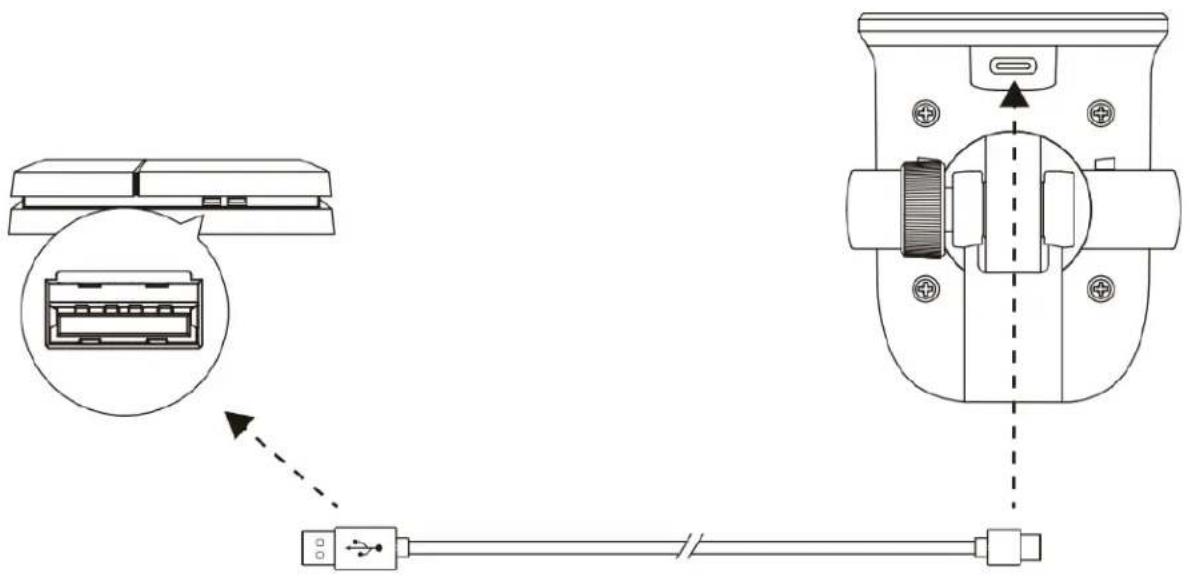
Technical diagram showing connection between a computer and a device with labeled ports and connectorsConnect the microphone to a USB port on the PC or Mac with the included USB cable.
Windows
To ensure the microphone is configured correctly on the PC, follow the steps below:
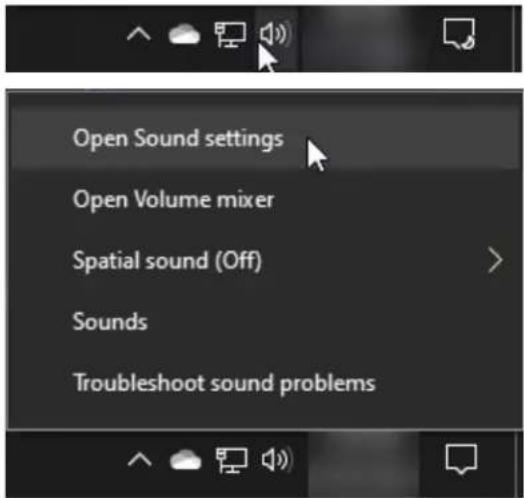
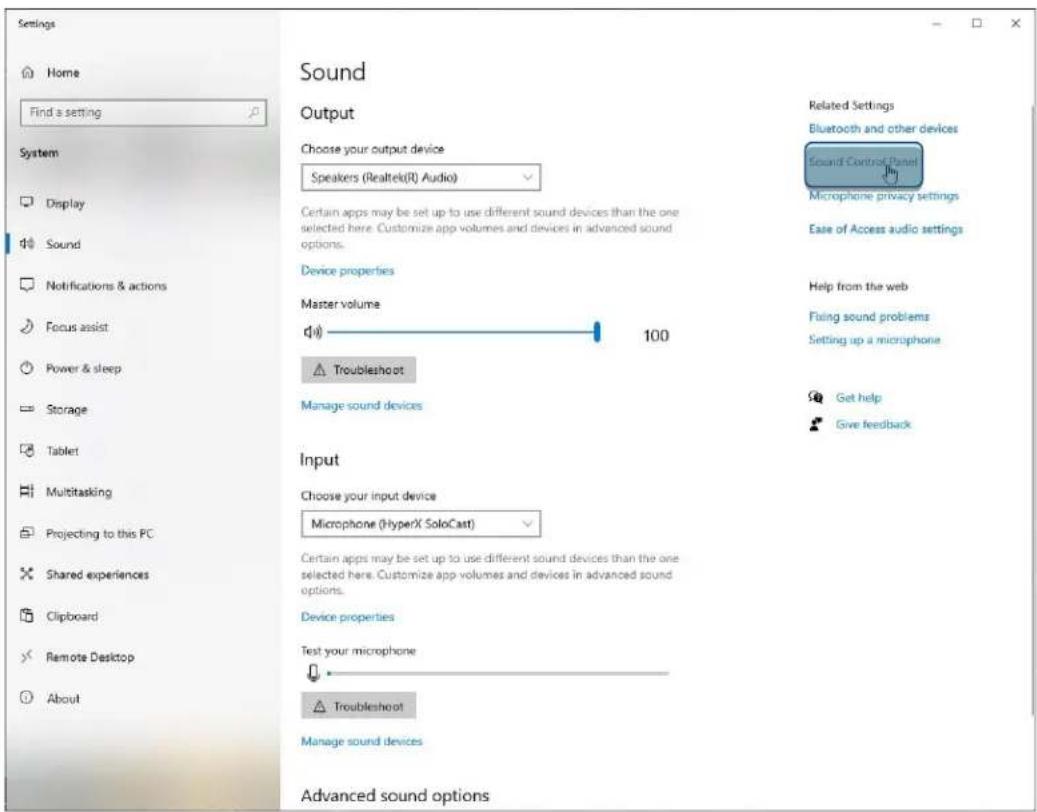
- Right-click on the sound icon in the system tray and select Open Sound Settings.
text_image
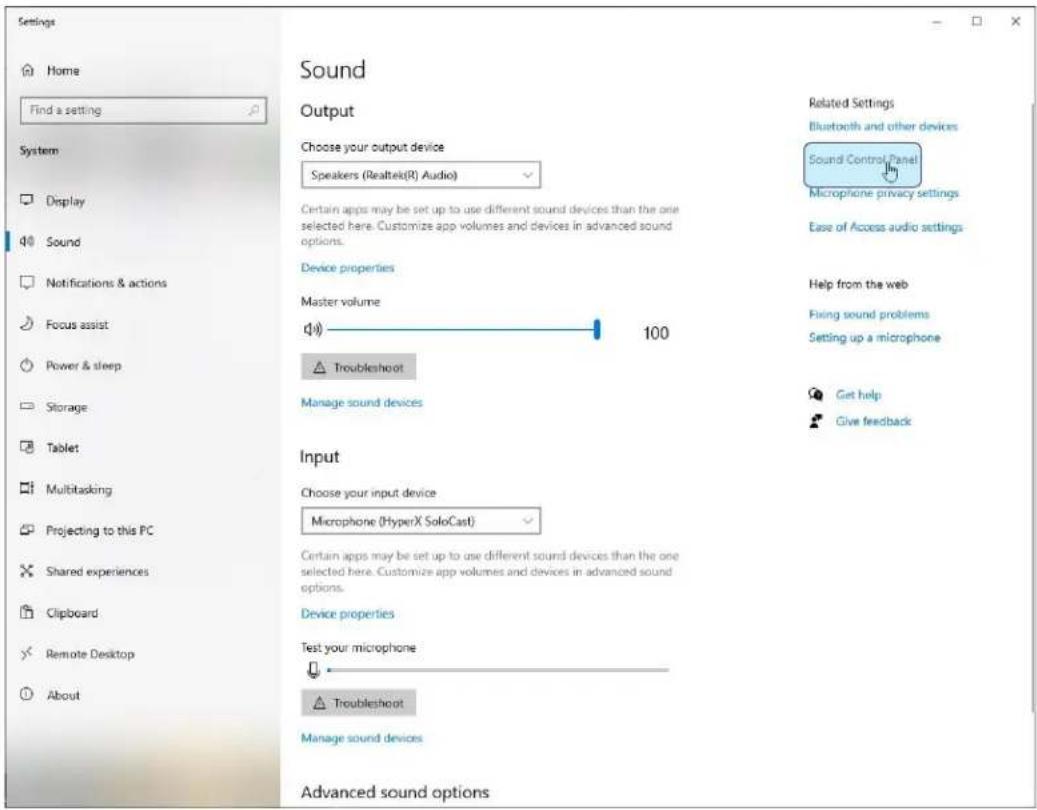
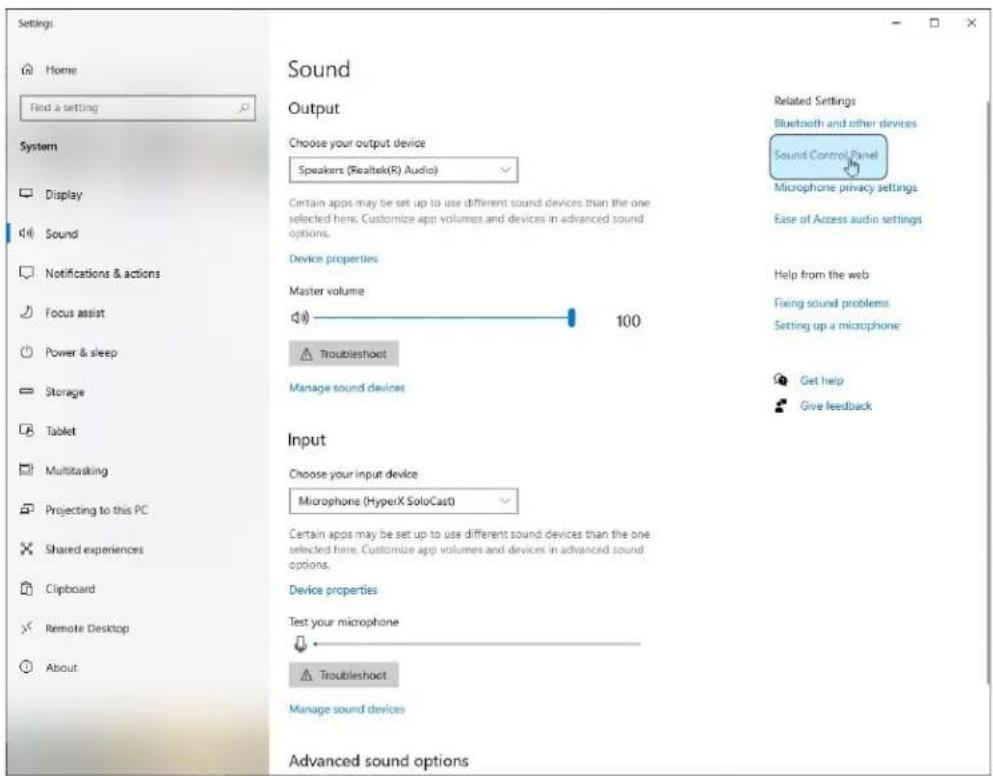
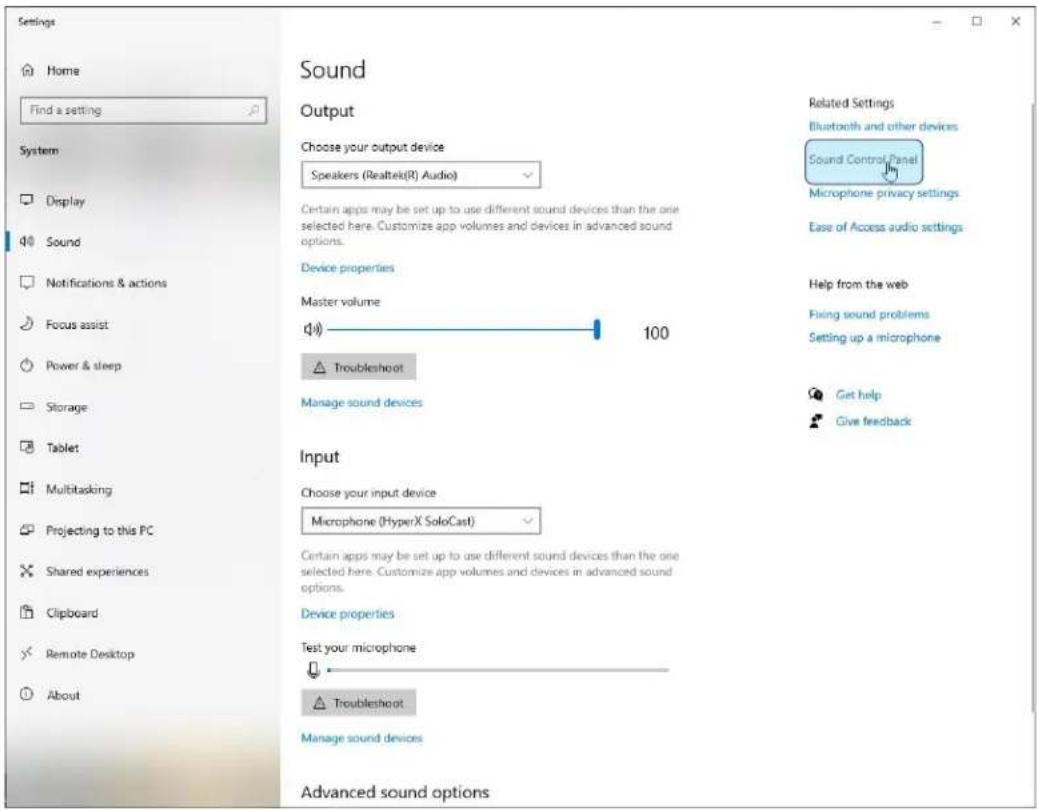
Open Sound settings Open Volume mixer Spatial sound (Off) Sounds Troubleshoot sound problems2. Select Sound Control Panel.
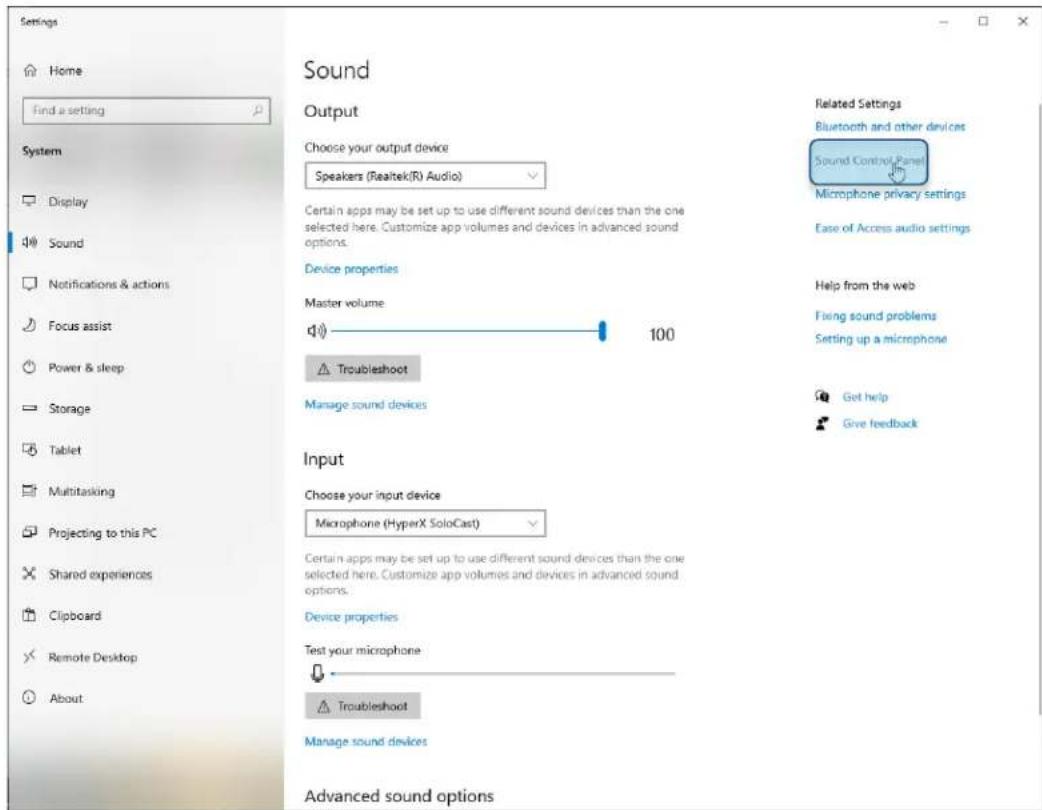
text_image
Settings Home Find a setting System Display Sound Notifications & actions Focus assist Power & sleep Storage Tablet Multitasking Projecting to this PC Shared experiences Clipboard Remote Desktop About Sound Output Choose your output device Speakers (Realtek(R) Audio) Certain apps may be set up to use different sound devices than the one selected here. Customize app volumes and devices in advanced sound options. Device properties Master volume 100 Troubleshoot Manage sound devices Input Choose your input device Microphone (HyperX SoloCast) Certain apps may be set up to use different sound devices than the one selected here. Customize app volumes and devices in advanced sound options. Device properties Test your microphone Troubleshoot Manage sound devices Advanced sound options Related Settings Bluetooth and other devices Sound Control Panel Microphone privacy settings Ease of Access audio settings Help from the web Fixing sound problems Setting up a microphone Get help Give feedback3. On the Recording tab, select Microphone HyperX SoloCast and click on the Set Default button.
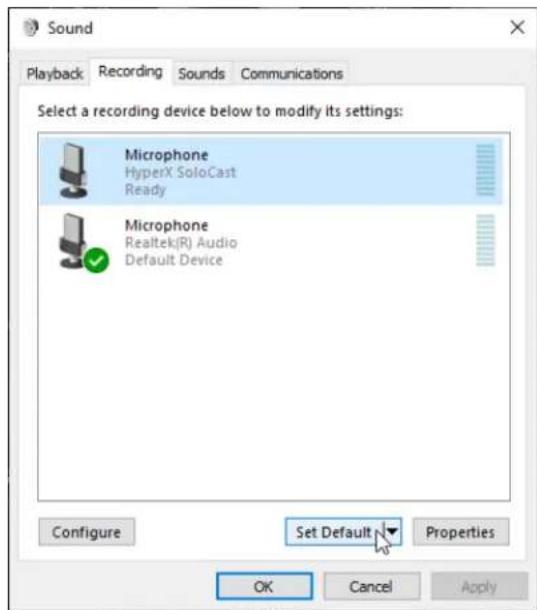
text_image
Sound Playback Recording Sounds Communications Select a recording device below to modify its settings: Microphone HyperX SoloCast Ready Microphone Realtek(R) Audio Default Device Configure Set Default Properties OK Cancel ApplymacOS
To ensure the microphone is configured correctly on the macOS, follow the steps below:
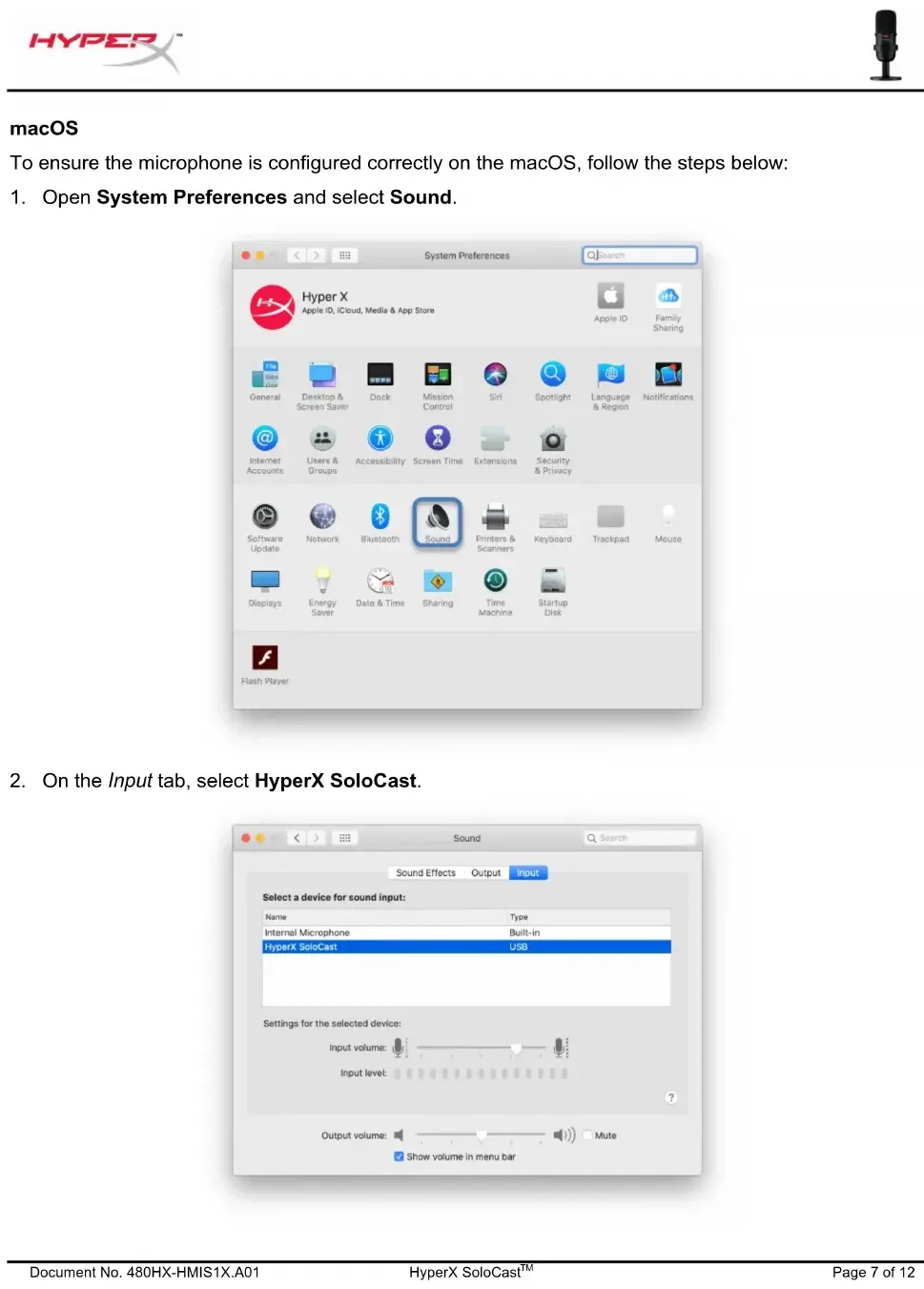
- Open System Preferences and select Sound.
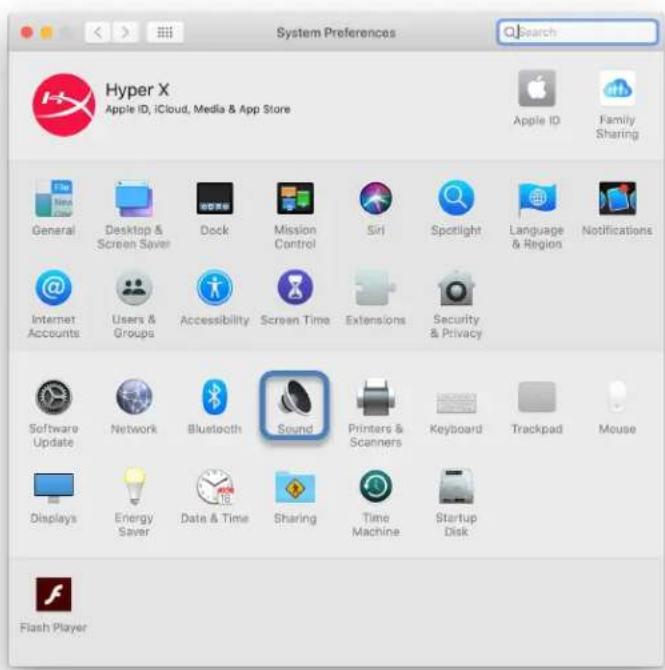
text_image
System Preferences Hyper X Apple ID, iCloud, Media & App Store Apple ID Family Sharing General Desktop & Screen Saver Dock Mission Control Siri Spotlight Language & Region Notifications Internet Accounts Users & Groups Accessibility Screen Time Extensions Security & Privacy Software Update Network Bluetooth Sound Printers & Scanners Keyboard Trackpad Mouse Displays Energy Saver Date & Time Sharing Time Machine Startup Disk Flash Player- On the Input tab, select HyperX SoloCast.
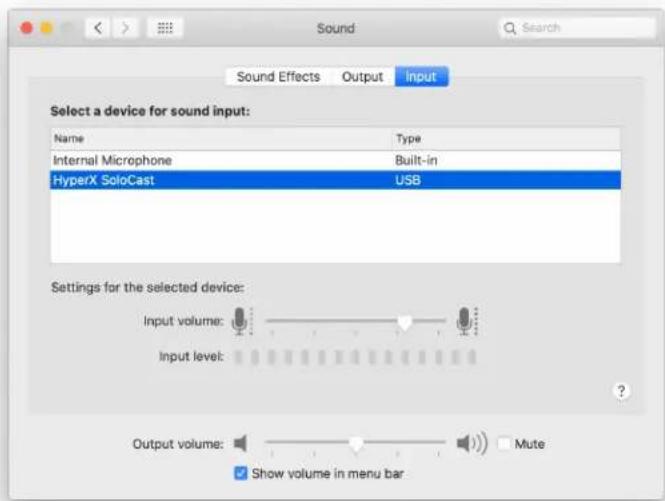
text_image
Sound Effects Output Input Select a device for sound input: Name Type Internal Microphone Built-in HyperX SoloCast USB Settings for the selected device: Input volume: Input level: Output volume: Mute Show volume in menu barUsing with PS4™
text_image
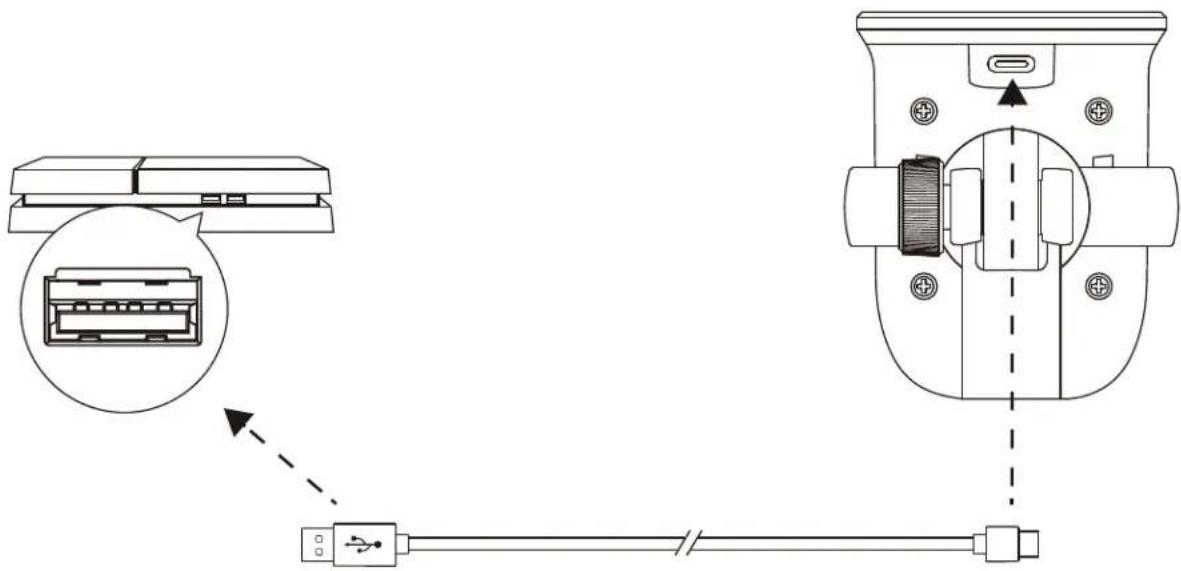
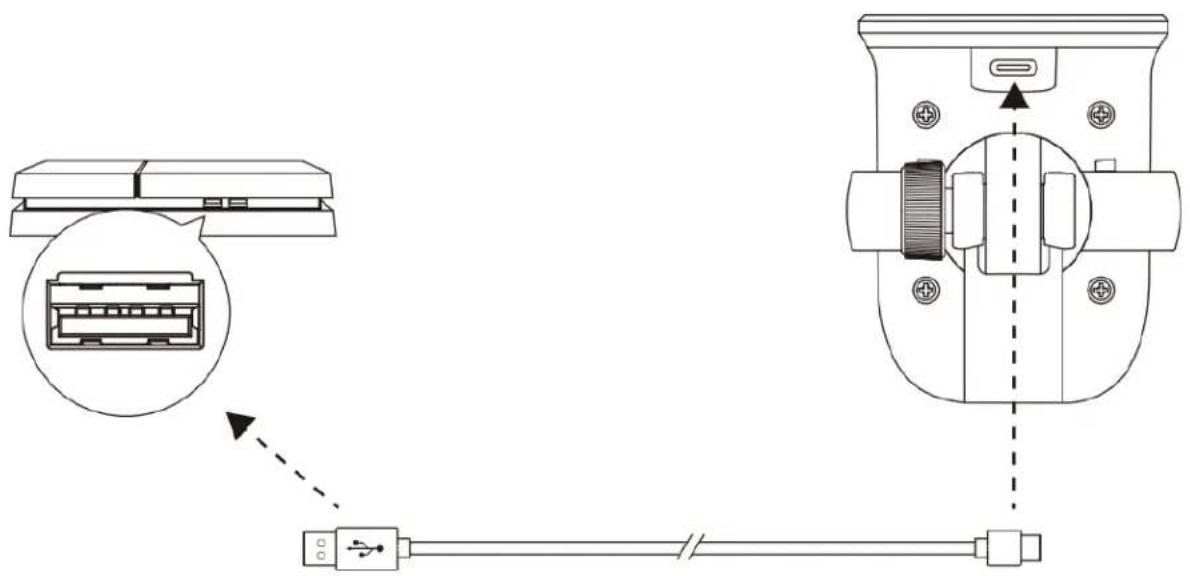
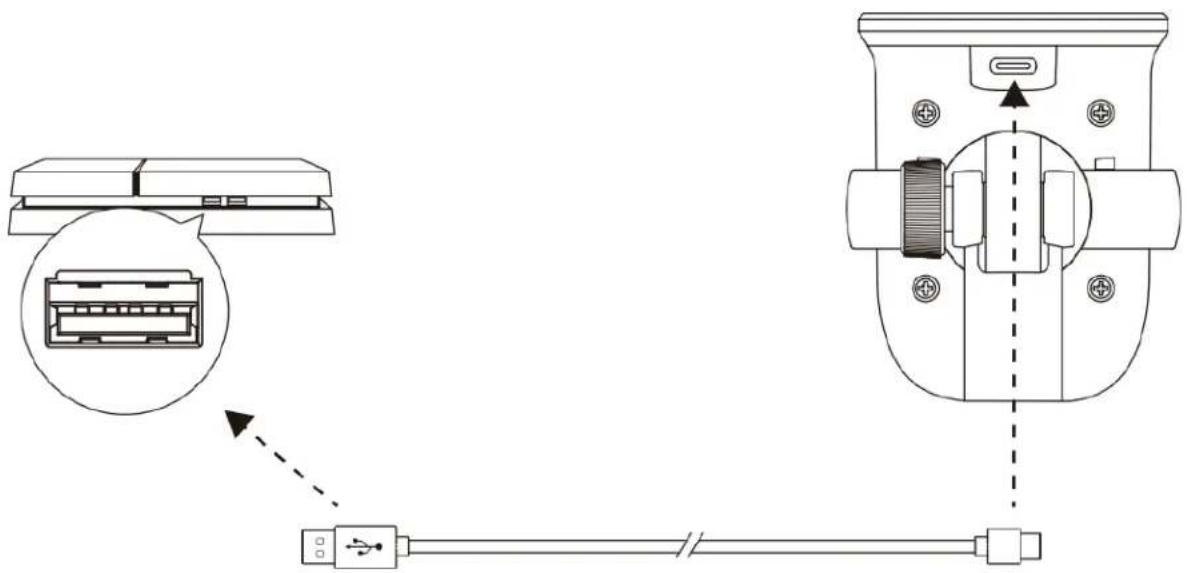
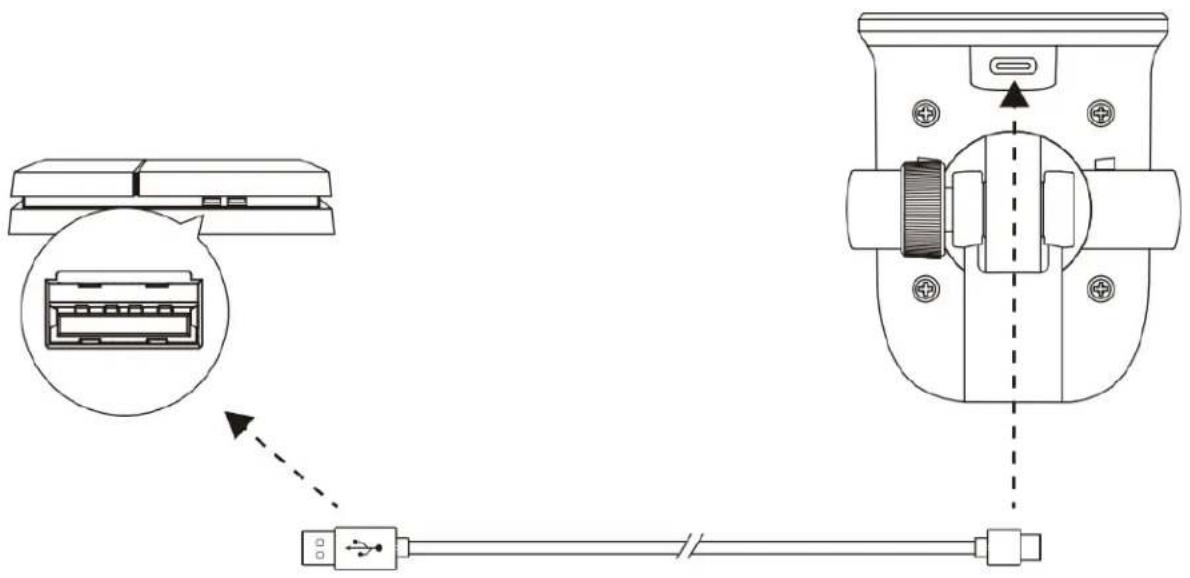
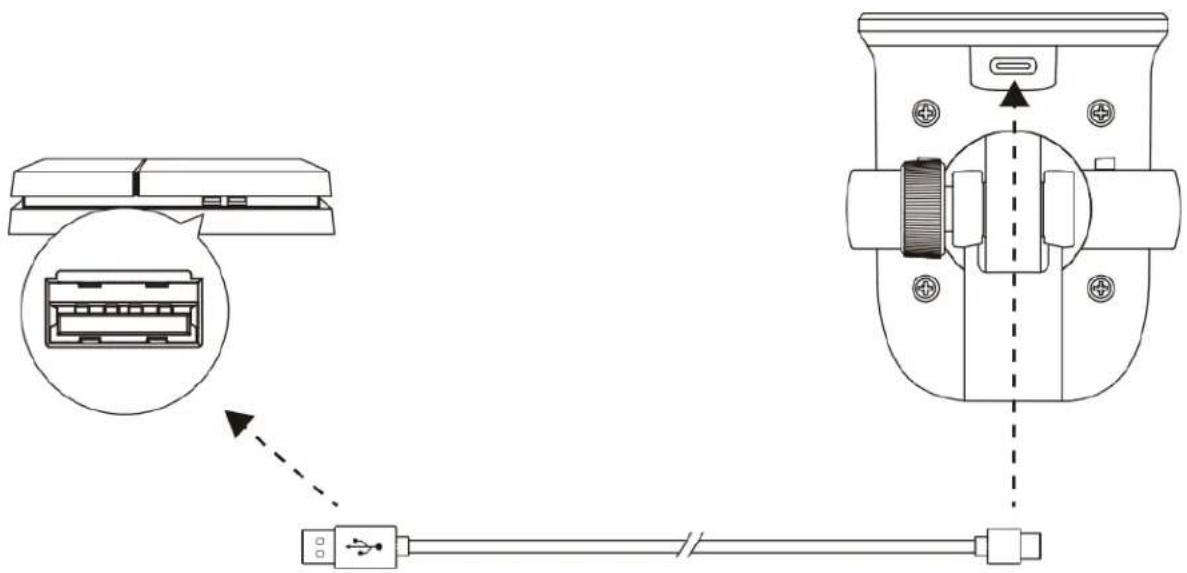
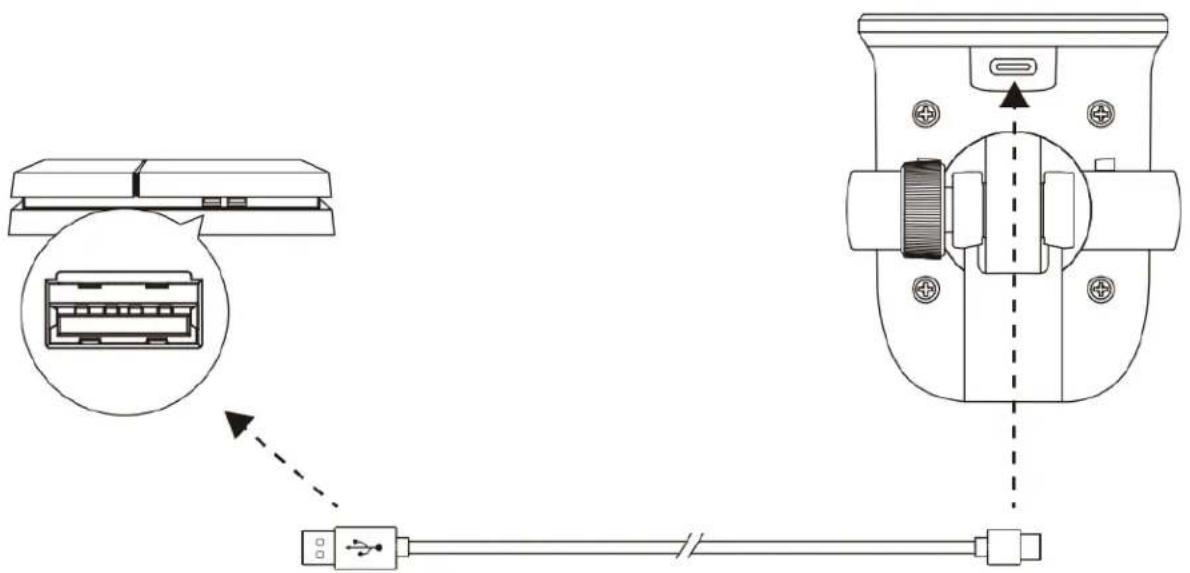
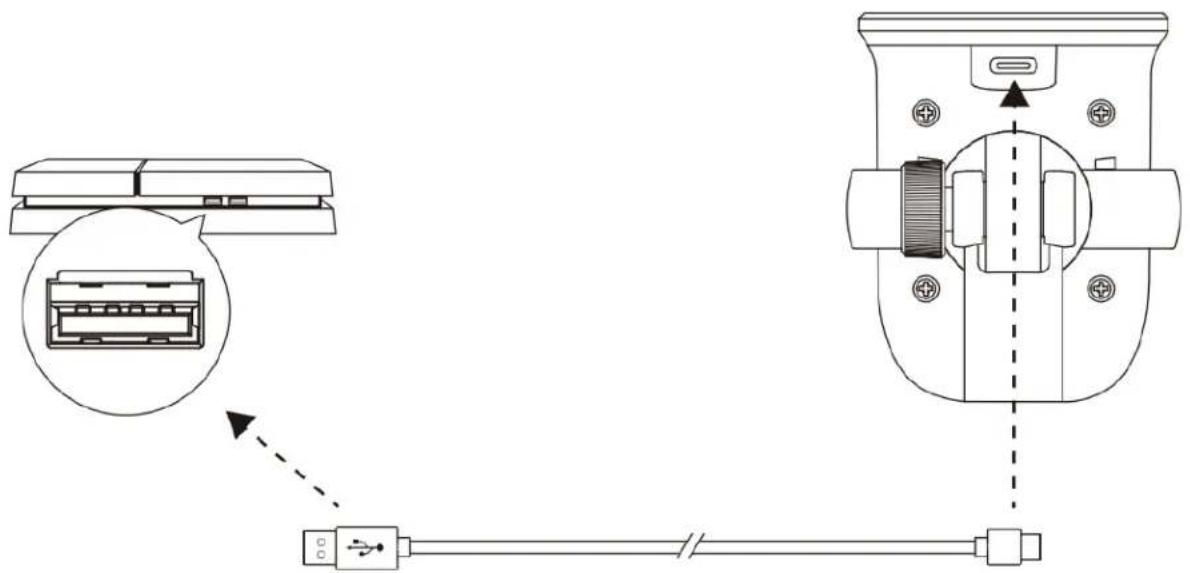
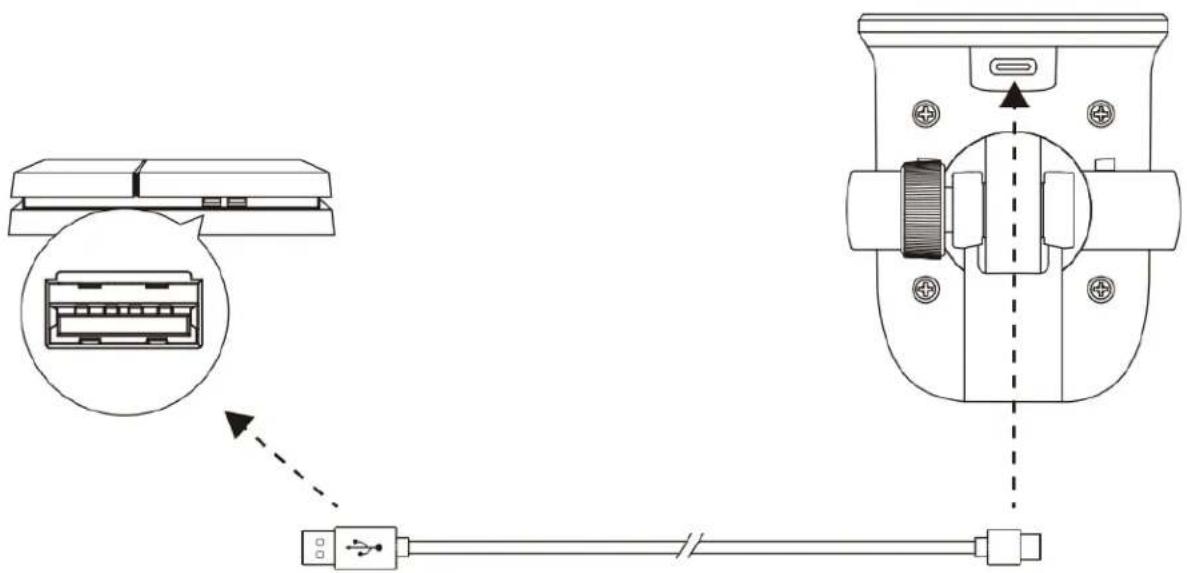
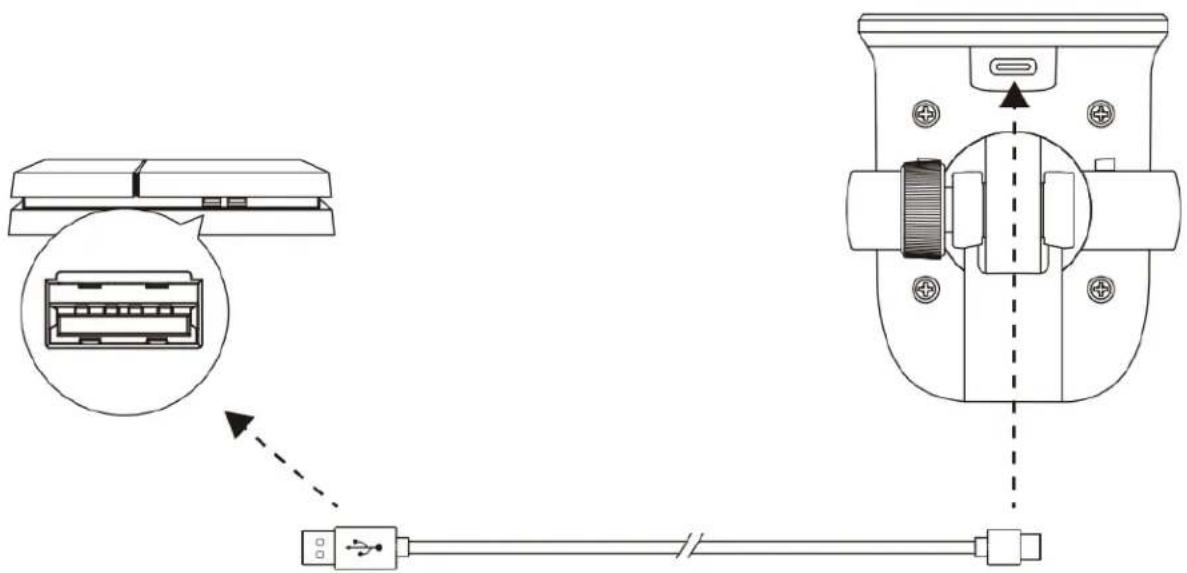
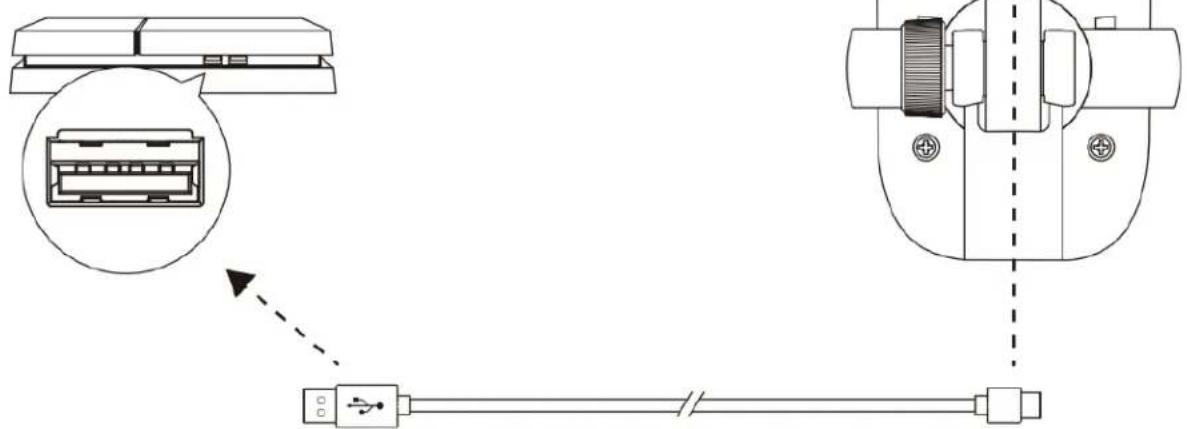
Technical diagram showing connector connection with USB cable and internal components, including a magnified view of the connector.Connect the microphone to a USB port on the PS4 ^TM with the included USB cable.
To ensure the microphone is configured correctly on the PS4 ^TM , follow the steps below:
- From the PS4 ^TM main menu, go to Settings > Devices > Audio Devices.
- Set Input Device to USB Microsoft (HyperX SoloCast).
Audio Devices

Input Device
USB Microphone (HyperX SoloCast)

Output Device
TV or AV Amplifier

Adjust Microphone Level

Volume Control (Headphones)



Output to Headphones
All Audio

Switch Output Device Automatically

Microphone Position
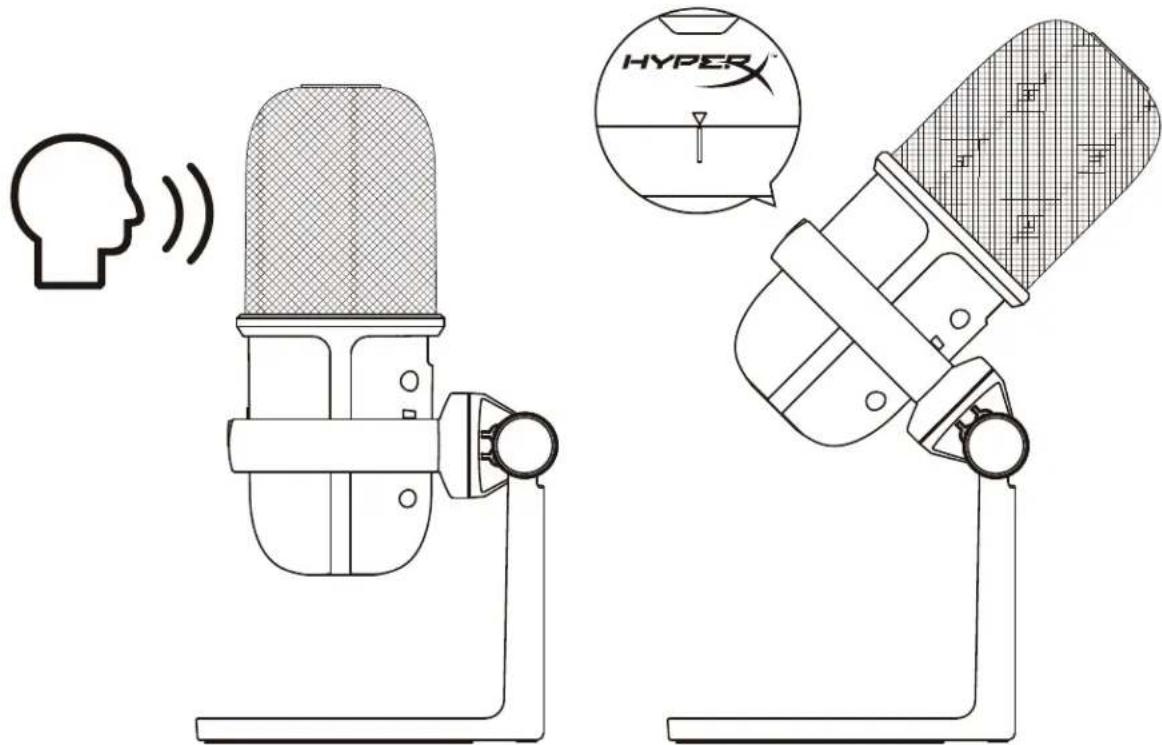
SoloCast should be placed with the front of the microphone facing the sound source. This is indicated by the alignment guide on both the microphone and the stand.
text_image
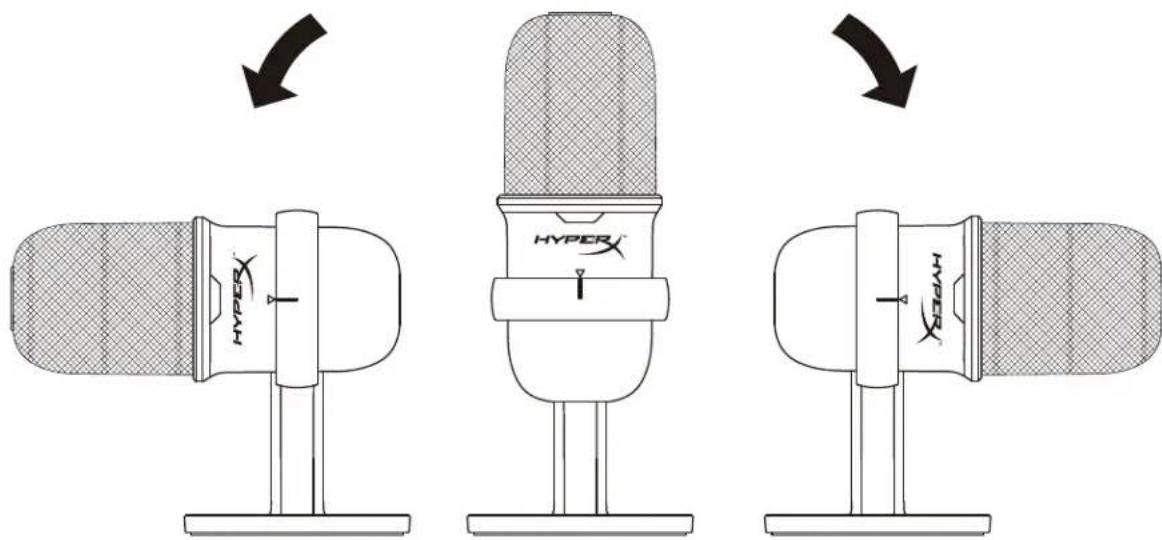
Technical diagram showing two microphone devices with sound waves and a Hyper logo, likely illustrating audio or sound monitoring concepts.SoloCast can be rotated to allow for easy placement under a monitor.
text_image
HYPER HYPERMicrophone Controls
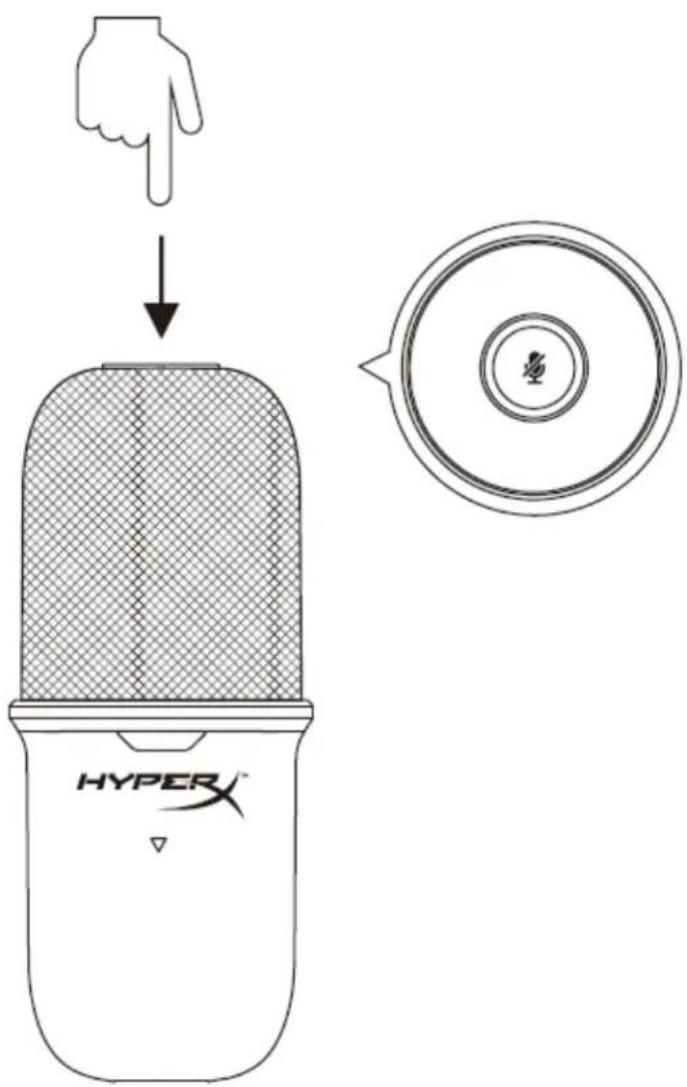
Muting the Microphone
text_image
HYPER™Tap the top of the microphone to mute/unmute the microphone. The microphone LED will indicate the current mute status of the microphone.
| Microphone LED | Mute Status |
| On | Mute off |
| Flashing | Mute on |
Using a Microphone Mount
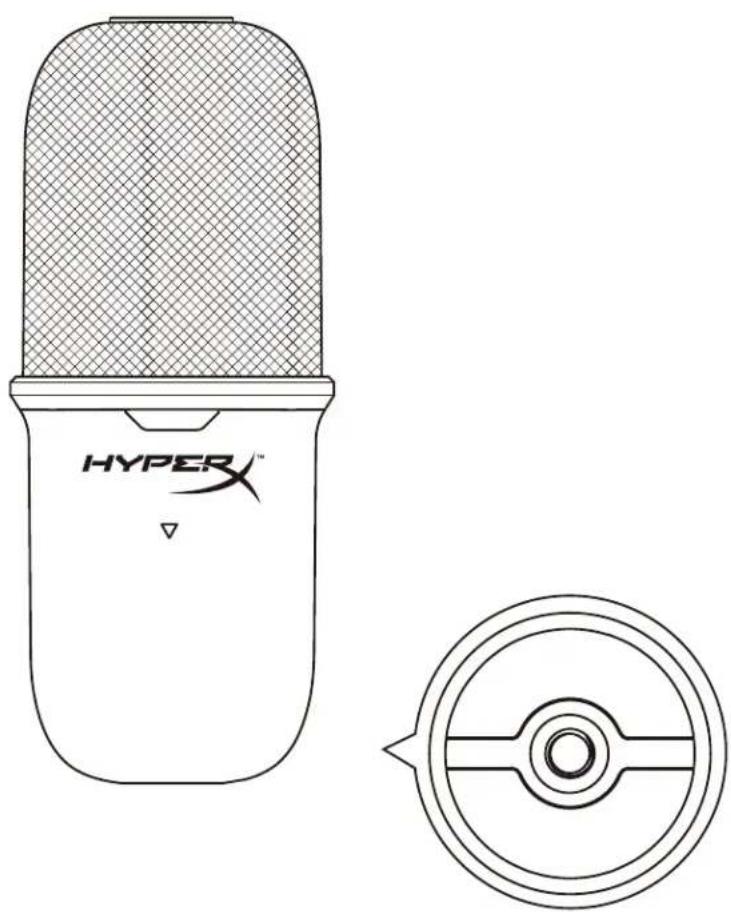
SoloCast can be removed from its stand and used with microphone mounts with either 3/8" or 5/8" threads.
natural_image
Technical line drawing of a HyperX device with top panel and side view (no text or symbols)Questions or Setup Issues
Contact the HyperX support team at: hyperxgaming.com/support/microphones
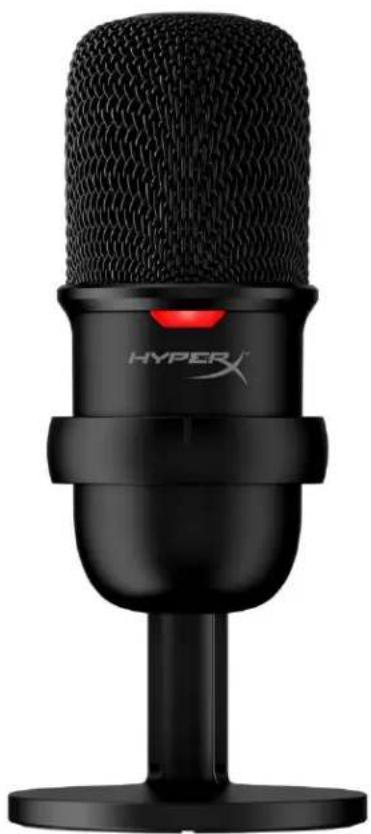
HyperX SoloCast™
natural_image
Black HYPER X audio recording device with black microphone and red indicator light (no text or symbols on body)text_image
Technical diagram showing connection between computer and device via USB cable, with magnified detail of internal components.text_image
Open Sound settings Open Volume mixer Spatial sound (Off) Sounds Troubleshoot sound problemstext_image
Settings Home Find a setting System Display Sound Notifications & actions Focus assist Power & sleep Storage Tablet Multitasking Projecting to this PC Shared experiences Clipboard Remote Desktop About Sound Output Choose your output device Speakers (Realtek(R) Audio) Certain apps may be set up to use different sound devices than the one selected here. Customize app volumes and devices in advanced sound options. Device properties Master volume 100 Troubleshoot Manage sound devices Input Choose your input device Microphone (HyperX'SoloCast) Certain apps may be set up to use different sound devices than the one selected here. Customize app volumes and devices in advanced sound options. Device properties Test your microphone Troubleshoot Manage sound devices Advanced sound options Related Settings Bluetooth and other devices Sound Control Panel Microphone privacy settings Ease of Access audio settings Help from the web Fixing sound problems Setting up a microphone Get help Give feedbacktext_image
Sound Playback Recording Sounds Communications Select a recording device below to modify its settings: Microphone HyperX SoloCast Ready Microphone Realtek(R) Audio Default Device Configure Set Default Properties OK Cancel ApplymacOS
text_image
System Preferences Hyper X Apple ID, iCloud, Media & App Store Apple ID Family Sharing General Desktop & Screen Saver Dock Mission Control Siri Spotlight Language & Region Notifications Internet Accounts Users & Groups Accessibility Screen Time Extensions Security & Privacy Software Update Network Bluetooth Sound Printers & Scanners Keyboard Trackpad Mouse Displays Energy Saver Date & Time Sharing Time Machine Startup Disk Flash Playertext_image
Sound Sound Effects Output Input Select a device for sound input: Name Type Internal Microphone Built-in HyperX SoloCast USB Settings for the selected device: Input volume: Input level: Output volume: Mute Show volume in menu barUso con PS4™
text_image
Technical diagram showing connector connection with labeled components and a dashed line indicating cable routing.USB Microphone (HyperX SoloCast)

Output Device
TV or AV Amplifier

Adjust Microphone Level

Volume Control (Headphones)


Output to Headphones
All Audio

Switch Output Device Automatically

text_image
Technical diagram showing two microphone setups with a speech bubble and a Hyper logo, illustrating audio or sound monitoring concepts.natural_image
Technical line drawing of a HyperX device with top panel and side view (no text or symbols)natural_image
Black HYPER X audio recording device with mesh microphone and stand (no visible text or symbols on body)Artikelnummern
HMIS1X-XX-BK/G
INHALTSVERZEICHNIS
Überblick 3
Spezifikationen 4
text_image
Technical diagram showing connection between a computer and a device with labeled ports and connectorstext_image
Open Sound settings Open Volume mixer Spatial sound (Off) Sounds Troubleshoot sound problemstext_image
Settings Home Find a setting System Display Sound Notifications & actions Focus assist Power & sleep Storage Tablet Multitasking Projecting to this PC Shared experiences Clipboard Remote Desktop About Sound Output Choose your output device Speakers (Realtek(R) Audio) Certain apps may be set up to use different sound devices than the one selected here. Customize app volumes and devices in advanced sound options. Device properties Master volume 100 Troubleshoot Manage sound devices Input Choose your input device Microphone (HyperX SoloCast) Certain apps may be set up to use different sound devices than the one selected here. Customize app volumes and devices in advanced sound options. Device properties Test your microphone Troubleshoot Manage sound devices Advanced sound options Related Settings Bluetooth and other devices Sound Control Panel Microphone privacy settings Ease of Access audio settings Help from the web Fixing sound problems Setting up a microphone Get help Give feedbacktext_image
Sound Playback Recording Sounds Communications Select a recording device below to modify its settings: Microphone HyperX SoloCast Ready Microphone Realtek(R) Audio Default Device Configure Set Default Properties OK Cancel ApplymacOS
text_image
System Preferences Hyper X Apple ID, iCloud, Media & App Store Apple ID Family Sharing General Desktop & Screen Saver Dock Mission Control Siri Spotlight Language & Region Notifications Internet Accounts Users & Groups Accessibility Screen Time Extensions Security & Privacy Software Update Network Bluetooth Sound Printers & Scanners Keyboard Trackpad Mouse Displays Energy Saver Date & Time Sharing Time Machine Startup Disk Flash Playertext_image
Sound Effects Output Input Select a device for sound input: Name Type Internal Microphone Built-in HyperX SoloCast USB Settings for the selected device: Input volume: Input level: Output volume: Mute Show volume in menu barNutzung mit PS4™
text_image
Technical diagram showing connector connection with USB cable and internal components, including a magnified view of the connector.USB Microphone (HyperX SoloCast)

Output Device
TV or AV Amplifier

Adjust Microphone Level

Volume Control (Headphones)


Output to Headphones
All Audits

Switch Output Device Automatically

Mikrofonposition
text_image
Technical diagram showing a microphone setup with sound waves and a Hyper logo, including a human head icon and a close-up of the device.natural_image
Technical line drawing of a HyperX device with top panel and side view (no text or symbols)natural_image
Black HYPER X audio recording device with mesh microphone and red indicator light (no text or symbols on body)text_image
Technical diagram showing connection between a computer monitor and a device with USB cable, including an inset image of the device's internal structure.text_image
Open Sound settings Open Volume mixer Spatial sound (Off) Sounds Troubleshoot sound problemstext_image
Settings Home Find a setting System Display Sound Notifications & actions Focus assist Power & sleep Storage Tablet Multitasking Projecting to this PC Shared experiences Clipboard Remote Desktop About Sound Output Choose your output device Speakers (Realtek(R) Audio) Certain apps may be set up to use different sound devices than the one selected here. Customize app volumes and devices in advanced sound options. Device properties Master volume 100 Troubleshoot Manage sound devices Input Choose your input device Microphone (HyperX SoloCast) Certain apps may be set up to use different sound devices than the one selected here. Customize app volumes and devices in advanced sound options. Device properties Test your microphone Troubleshoot Manage sound devices Advanced sound options Related Settings Bluetooth and other devices Sound Control Panel Microphone privacy settings Ease of Access audio settings Help from the web Fixing sound problems Setting up a microphone Get help Give feedbacktext_image
Sound Playback Recording Sounds Communications Select a recording device below to modify its settings: Microphone HyperX SoloCast Ready Microphone Realtek(R) Audio Default Device Configure Set Default Properties OK Cancel ApplymacOS
text_image
System Preferences Hyper X Apple ID, iCloud, Media & App Store Apple ID Family Sharing General Desktop & Screen Saver Dock Mission Control Siri Spotlight Language & Region Notifications Internet Accounts Users & Groups Accessibility Screen Time Extensions Security & Privacy Software Update Network Bluetooth Sound Printers & Scanners Keyboard Trackpad Mouse Displays Energy Saver Date & Time Sharing Time Machine Startup Disk Flash Playertext_image
Sound Sound Effects Output Input Select a device for sound input: Name Type Internal Microphone Built-in HyperX SoloCast USB Settings for the selected device: Input volume: Input level: Output volume: Mute Show volume in menu bartext_image
Technical diagram showing connector connection with labeled ports and cable, including a zoomed-in view of the internal component.USB Microphone (HyperX SoloCast)

Output Device
TV or AV Amplifier

Adjust Microphone Level

Volume Control (Headphones)


Output to Headphones
All Audio

Switch Output Device Automatically

Position du micro
text_image
Diagram showing two types of microphones with sound waves and a speech bubble labeled 'HYPER' in the center.natural_image
Technical line drawing of a HyperX device with top panel and side view (no text or symbols)natural_image
Black HYPER X audio recording device with mesh microphone and stand (no visible text or symbols on body)Numeri di parte
HMIS1X-XX-BK/G
INDICE
Tipo USB: USB 2.0 (full speed)
text_image
Technical diagram showing connection between a computer and a device with labeled ports and connectorstext_image
Open Sound settings Open Volume mixer Spatial sound (Off) Sounds Troubleshoot sound problemstext_image
Settings Home Find a setting System Display Sound Notifications & actions Focus assist Power & sleep Storage Tablet Multitasking Projecting to this PC Shared experiences Clipboard Remote Desktop About Sound Output Choose your output device Speakers (Realtek(R) Audio) Certain apps may be set up to use different sound devices than the one selected here. Customize app volumes and devices in advanced sound options. Device properties Master volume 100 Troubleshoot Manage sound devices Input Choose your input device Microphone (HyperX SoloCast) Certain apps may be set up to use different sound devices than the one selected here. Customize app volumes and devices in advanced sound options. Device properties Test your microphone Troubleshoot Manage sound devices Advanced sound options Related Settings Bluetooth and other devices Sound Control Panel Microphone privacy settings Ease of Access audio settings Help from the web Fixing sound problems Setting up a microphone Get help Give feedbacktext_image
Sound Playback Recording Sounds Communications Select a recording device below to modify its settings: Microphone HyperX SoloCast Ready Microphone Realtek(R) Audio Default Device Configure Set Default Properties OK Cancel ApplymacOS
text_image
System Preferences Hyper X Apple ID, iCloud, Media & App Store Apple ID Family Sharing General Desktop & Screen Saver Dock Mission Control Sin Spotlight Language & Region Notifications Internet Accounts Users & Groups Accessibility Screen Time Extensions Security & Privacy Software Update Network Bluetooth Sound Printers & Scanners Keyboard Trackpad Mouse Displays Energy Saver Date & Time Sharing Time Machine Startup Disk Flash Playertext_image
Sound Sound Effects Output Input Select a device for sound input: Name Type Internal Microphone Built-in HyperX SoloCast USB Settings for the selected device: Input volume: Input level: Output volume: Mute Show volume in menu bartext_image
Technical diagram showing connector connection with USB cable and internal components, including a magnified view of the connector.USB Microphone (HyperX SoloCast)

Output Device
TV or AV Amplifier

Adjust Microphone Level

Volume Control (Headphones)


Output to Headphones
All Audio

Switch Output Device Automatically

text_image
Diagram showing two types of microphones with sound waves and a Hyper logo, illustrating audio or sound measurement setup.natural_image
Technical line drawing of a HyperX device with top panel and side view (no text or symbols)natural_image
Black HYPER X audio recording device with mesh microphone and red indicator light (no text or symbols on body)Código do Produto
HMIS1X-XX-BK/G
ÍNDICE
Visão geral 3
Using with PC or Mac....5
Using with PC or Mac
text_image
Technical diagram showing connection between a computer and a device with labeled ports and connectorstext_image
Open Sound settings Open Volume mixer Spatial sound (Off) Sounds Troubleshoot sound problems2. Seleccione Painel de Controle de Som
text_image
Settings Home Find a setting System Display Sound Notifications & actions Focus assist Power & sleep Storage Tablet Multitasking Projecting to this PC Shared experiences Clipboard Remote Desktop About Sound Output Choose your output device Speakers (Realtek(R) Audio) Certain apps may be set up to use different sound devices than the one selected here. Customize app volumes and devices in advanced sound options. Device properties Master volume 100 Troubleshoot Manage sound devices Input Choose your input device Microphone (HyperX SoloCast) Certain apps may be set up to use different sound devices than the one selected here. Customize app volumes and devices in advanced sound options. Device properties Test your microphone Troubleshoot Manage sound devices Advanced sound options Related Settings Bluetooth and other devices Sound Control Panel Microphone privacy settings Ease of Access audio settings Help from the web Fixing sound problems Setting up a microphone Get help Give feedbacktext_image
Sound Playback Recording Sounds Communications Select a recording device below to modify its settings: Microphone HyperX SoloCast Ready Microphone Realtek(R) Audio Default Device Configure Set Default Properties OK Cancel ApplymacOS
text_image
System Preferences Hyper X Apple ID, iCloud, Media & App Store Apple ID Family Sharing General Desktop & Screen Saver Dock Mission Control Siri Spotlight Language & Region Notifications Internet Accounts Users & Groups Accessibility Screen Time Extensions Security & Privacy Software Update Network Bluetooth Sound Printers & Scanners Keyboard Trackpad Mouse Displays Energy Saver Date & Time Sharing Time Machine Startup Disk Flash Playertext_image
Sound Sound Effects Output Input Select a device for sound input: Name Type Internal Microphone Built-in HyperX SoloCast USB Settings for the selected device: Input volume: Input level: Output volume: Mute Show volume in menu barUtilizando com PS4™
text_image
Technical diagram showing connector connection with labeled components and a dashed arrow indicating connection direction.USB Microphone (HyperX SoloCast)

Output Device
TV or AV Amplifier

Adjust Microphone Level

Volume Control (Headphones)

|||||||||||||||||||

Output to Headphones
All Audio

Switch Output Device Automatically

text_image
Diagram showing two types of microphones with sound waves, one labeled 'HYPER' and the other with a speech bubble.natural_image
Technical line drawing of a HyperX device with top panel and side view (no text or symbols)natural_image
Black HYPER X audio recording device with mesh microphone and red indicator light (no text or symbols on body)Numery katalogowe
HMIS1X-XX-BK/G
SPIS TREŚCI
Widok urządzenia 3
Dane techniczne 4
Standard USB: USB 2.0 (full speed)
text_image
Technical diagram showing connection between a computer and a device with labeled ports and connectorstext_image
Open Sound settings Open Volume mixer Spatial sound (Off) Sounds Troubleshoot sound problemstext_image
Settings Home Find a setting System Display Sound Notifications & actions Focus assist Power & sleep Storage Tablet Multitasking Projecting to this PC Shared experiences Clipboard Remote Desktop About Sound Output Choose your output device Speakers (Realtek(R) Audio) Certain apps may be set up to use different sound devices than the one selected here. Customize app volumes and devices in advanced sound options. Device properties Master volume 100 Troubleshoot Manage sound devices Input Choose your input device Microphone (HyperX SoloCast) Certain apps may be set up to use different sound devices than the one selected here. Customize app volumes and devices in advanced sound options. Device properties Test your microphone Troubleshoot Manage sound devices Advanced sound options Related Settings Bluetooth and other devices Sound Control Panel Microphone privacy settings Ease of Access audio settings Help from the web Fixing sound problems Setting up a microphone Get help Give feedbacktext_image
Sound Playback Recording Sounds Communications Select a recording device below to modify its settings: Microphone HyperX SoloCast Ready Microphone Realtek(R) Audio Default Device Configure Set Default Properties OK Cancel ApplymacOS
text_image
System Preferences Hyper X Apple ID, iCloud, Media & App Store Apple ID Family Sharing General Desktop & Screen Saver Dock Mission Control Siri Spotlight Language & Region Notifications Internet Accounts Users & Groups Accessibility Screen Time Extensions Security & Privacy Software Update Network Bluetooth Sound Printers & Scanners Keyboard Trackpad Mouse Displays Energy Saver Date & Time Sharing Time Machine Startup Disk Flash Playertext_image
Sound Sound Effects Output Input Select a device for sound input: Name Type Internal Microphone Built-in HyperX SoloCast USB Settings for the selected device: Input volume: Input level: Output volume: Mute Show volume in menu bartext_image
Technical diagram showing connector connection with labeled ports and cable, including a magnified inset of the internal component.USB Microphone (HyperX SoloCast)

Output Device
TV or AV Amplifier

Adjust Microphone Level

Volume Control (Headphones)


Output to Headphones
All Audio

Switch Output Device Automatically

Pozycja mikrofonu
text_image
Diagram showing two types of microphones with sound waves, one labeled 'HYPER' and the other with a speech bubble.natural_image
Technical line drawing of a HyperX device with top panel and side view (no text or symbols)natural_image
Black HYPER X audio recording microphone on a stand (no text or symbols visible on body)Номера по каталогу
HMIS1X-XX-BK/G
СОДЕРЖАНИЕ
Обзор 3
text_image
Technical diagram showing connection between computer and device via USB cable, with magnified detail of internal components.text_image
Open Sound settings Open Volume mixer Spatial sound (Off) Sounds Troubleshoot sound problemstext_image
Settings Home Find a setting System Display Sound Notifications & actions Focus assist Power & sleep Storage Tablet Multitasking Projecting to this PC Shared experiences Clipboard Remote Desktop About Sound Output Choose your output device Speakers (Realtek(R) Audio) Certain apps may be set up to use different sound devices than the one selected here. Customize app volumes and devices in advanced sound options. Device properties Master volume 100 Troubleshoot Manage sound devices Input Choose your input device Microphone (HyperX SoloCast) Certain apps may be set up to use different sound devices than the one selected here. Customize app volumes and devices in advanced sound options. Device properties Test your microphone Troubleshoot Manage sound devices Advanced sound options Related Settings Bluetooth and other devices Sound Control Panel Microphone privacy settings Ease of Access audio settings Help from the web Fixing sound problems Setting up a microphone Get help Give feedbacktext_image
Sound Playback Recording Sounds Communications Select a recording device below to modify its settings: Microphone HyperX SoloCast Ready Microphone Realtek(R) Audio Default Device Configure Set Default Properties OK Cancel ApplymacOS
text_image
System Preferences Hyper X Apple ID, iCloud, Media & App Store Apple ID Family Sharing General Desktop & Screen Saver Dock Mission Control Siri Spotlight Language & Region Notifications Internet Accounts Users & Groups Accessibility Screen Time Extensions Security & Privacy Software Update Network Bluetooth Sound Printers & Scanners Keyboard Trackpad Mouse Displays Energy Saver Date & Time Sharing Time Machine Startup Disk Flash Playertext_image
Sound Search Sound Effects Output Input Select a device for sound input: Name Type Internal Microphone Built-in HyperX SoloCast USB Settings for the selected device: Input volume: Input level: Output volume: Mute Show volume in menu bartext_image
Technical diagram showing connector connection with labeled components and a dashed arrow indicating connection direction.USB Microphone (HyperX SoloCast)

Output Device
TV or AV Amplifier

Adjust Microphone Level

Volume Control (Headphones)


Output to Headphones
All Audio

Switch Output Device Automatically

text_image
Diagram showing two microphone setups with a speech bubble and a Hyper logo, illustrating audio or sound recording setup.natural_image
Technical line drawing of a HyperX device with top panel and side view (no text or symbols)natural_image
Black HYPER X audio recording device with mesh microphone and red indicator light (no text or symbols on body)Parça Numaraları
HMIS1X-XX-BK/G
İÇINDEKILER
Genel Görünüm 3
Teknik Özellikler 4
text_image
Technical diagram showing connection between a computer and a device with labeled ports and connectorstext_image
Open Sound settings Open Volume mixer Spatial sound (Off) Sounds Troubleshoot sound problemstext_image
Settings Home Find a setting System Display Sound Notifications & actions Focus assist Power & sleep Storage Tablet Multitasking Projecting to this PC Shared experiences Clipboard Remote Desktop About Sound Output Choose your output device Speakers (Realtek(R) Audio) Certain apps may be set up to use different sound devices than the one selected here. Customize app volumes and devices in advanced sound options. Device properties Master volume 100 Troubleshoot Manage sound devices Input Choose your input device Microphone (HypeiX SoloCast) Certain apps may be set up to use different sound devices than the one selected here. Customize app volumes and devices in advanced sound options. Device properties Test your microphone Troubleshoot Manage sound devices Advanced sound options Related Settings Bluetooth and other devices Sound Control Panel Microphone privacy settings Ease of Access audio settings Help from the web Fixing sound problems Setting up a microphone Get help Give feedbacktext_image
Sound Playback Recording Sounds Communications Select a recording device below to modify its settings: Microphone HyperX SoloCast Ready Microphone Realtek(R) Audio Default Device Configure Set Default Properties OK Cancel ApplymacOS
text_image
System Preferences Hyper X Apple ID, iCloud, Media & App Store Apple ID Family Sharing General Desktop & Screen Saver Dock Mission Control Siri Spotlight Language & Region Notifications Internet Accounts Users & Groups Accessibility Screen Time Extensions Security & Privacy Software Update Network Bluetooth Sound Printers & Scanners Keyboard Trackpad Mouse Displays Energy Saver Date & Time Sharing Time Machine Startup Disk Flash Playertext_image
Sound Sound Effects Output Input Select a device for sound input: Name Type Internal Microphone Built-in HyperX SoloCast USB Settings for the selected device: Input volume: Input level: Output volume: Mute Show volume in menu barPS4™ ile kullanım
text_image
Technical diagram showing connector connection with USB cable and internal components, including a magnified view of the connector.USB Microphone (HyperX SoloCast)

Output Device
TV or AV Amplifier

Adjust Microphone Level

Volume Control (Headphones)



Output to Headphones
All Audio

Switch Output Device Automatically

Mikrofon Pozisyonu
text_image
Technical diagram showing two microphone setups with a speech bubble and a Hyper logo, illustrating audio or sound monitoring concepts.natural_image
Technical line drawing of a HyperX device with top panel and side view (no text or symbols)natural_image
Black HYPER X audio recording device with mesh microphone and red indicator light (no text or symbols on body)製品番号
HMIS1X-XX-BK/G
目次
各部紹介 3
仕様 4
text_image
Technical diagram showing connection between a computer and a device with labeled ports and connectorstext_image
Open Sound settings Open Volume mixer Spatial sound (Off) Sounds Troubleshoot sound problemstext_image
Settings Home Find a setting System Display Sound Notifications & actions Focus assist Power & sleep Storage Tablet Multitasking Projecting to this PC Shared experiences Clipboard Remote Desktop About Sound Output Choose your output device Speakers (Realtek(R) Audio) Certain apps may be set up to use different sound devices than the one selected here. Customize app volumes and devices in advanced sound options. Device properties Master volume 100 Troubleshoot Manage sound devices Input Choose your input device Microphone (HyperX SoloCast) Certain apps may be set up to use different sound devices than the one selected here. Customize app volumes and devices in advanced sound options. Device properties Test your microphone Troubleshoot Manage sound devices Advanced sound options Related Settings Bluetooth and other devices Sound Control Panel Microphone privacy settings Ease of Access audio settings Help from the web Fixing sound problems Setting up a microphone Get help Give feedbacktext_image
Sound Playback Recording Sounds Communications Select a recording device below to modify its settings: Microphone HyperX SoloCast Ready Microphone Realtek(R) Audio Default Device Configure Set Default Properties OK Cancel ApplymacOS
text_image
System Preferences Hyper X Apple ID, iCloud, Media & App Store Apple ID Family Sharing General Desktop & Screen Saver Dock Mission Control Sir: Spotlight Language & Region Notifications Internet Accounts Users & Groups Accessibility Screen Time Extensions Security & Privacy Software Update Network Bluetooth Sound Printers & Scanners Keyboard Trackpad Mouse Displays Energy Saver Date & Time Sharing Time Machine Startup Disk Flash Playertext_image
Sound Sound Effects Output Input Select a device for sound input: Name Type Internal Microphone Built-in HyperX SoloCast USB Settings for the selected device: Input volume: Input level: Output volume: Mute Show volume in menu barPS4™ との使用
text_image
Technical diagram showing connector connection with labeled components and a USB cable connectionUSB Microphone (HyperX SoloCast)

Output Device
TV or AV Amplifier

Adjust Microphone Level

Volume Control (Headphones)


Output to Headphones
All Audio

Switch Output Device Automatically

マイクの位置
text_image
Diagram showing two microphone setups with a speech bubble and a Hyper logo, illustrating audio or sound recording setup.natural_image
Line drawing of a HyperX-branded battery with mesh top and warning symbol (no text or labels on body)
natural_image
Pure mechanical component diagram with concentric circles and central shaft (no text or symbols)ご質問またはセットアップ上の問題
natural_image
Black HYPER X audio recording device with black microphone and red indicator light (no text or symbols on body)부품 번호
HMIS1X-XX-BK/G
목차
개요 3
사양 4
PC 또는 Mac과 사용 5
PS4™와 사용....8
마이크 위치 9
마이크 제어장치 10
마이크 마운트 사용 시....11
질문 또는 설치 관련 문제 12
개요
text_image
A B C D E F HYPERX™text_image
Technical diagram showing connection between a computer and a device with labeled ports and connectorstext_image
Open Sound settings Open Volume mixer Spatial sound (Off) Sounds Troubleshoot sound problems2. 사운드 제어판을 선택하십시오.
text_image
Settings Home Find a setting System Display Sound Notifications & actions Focus assist Power & sleep Storage Tablet Multitasking Projecting to this PC Shared experiences Clipboard Remote Desktop About Sound Output Choose your output device Speakers (Realtek(R) Audio) Certain apps may be set up to use different sound devices than the one selected here. Customize app volumes and devices in advanced sound options. Device properties Master volume 100 Troubleshoot Manage sound devices Input Choose your input device Microphone (HyperX SoloCast) Certain apps may be set up to use different sound devices than the one selected here. Customize app volumes and devices in advanced sound options. Device properties Test your microphone Troubleshoot Manage sound devices Advanced sound options Related Settings Bluetooth and other devices Sound Control Panel Microphone privacy settings Ease of Access audio settings Help from the web Fixing sound problems Setting up a microphone Get help Give feedbacktext_image
Sound Playback Recording Sounds Communications Select a recording device below to modify its settings: Microphone HyperX SoloCast Ready Microphone Realtek(R) Audio Default Device Configure Set Default Properties OK Cancel ApplymacOS
text_image
System Preferences Hyper X Apple ID, iCloud, Media & App Store Apple ID Family Sharing General Desktop & Screen Saver Dock Mission Control Siri Spotlight Language & Region Notifications Internet Accounts Users & Groups Accessibility Screen Time Extensions Security & Privacy Software Update Network Bluetooth Sound Printers & Scanners Keyboard Trackpad Mouse Displays Energy Saver Date & Time Sharing Time Machine Startup Disk Flash Playertext_image
Sound Sound Effects Output Input Select a device for sound input: Name Type Internal Microphone Built-in HyperX SoloCast USB Settings for the selected device: Input volume: Input level: Output volume: Muto Show volume in menu barPS4™와사용
text_image
Technical diagram showing connector connection with labeled components and a dashed arrow indicating direction of connection.USB Microphone (HyperX SoloCast)

Output Device
TV or AV Amplifier

Adjust Microphone Level

Volume Control (Headphones)


Output to Headphones
All Audio

Switch Output Device Automatically

마이크 위치
text_image
Diagram showing two microphone setups with a speech bubble and a Hyper logo, illustrating audio or sound monitoring concepts.natural_image
Line drawing of a HyperX-branded device with mesh top and body (no text or symbols on the device itself)
natural_image
Pure mechanical component diagram with concentric circles and central shaft (no text or symbols)질문 또는 설치 관련 문제
natural_image
Black HYPER X audio recording device with mesh microphone and red indicator light (no text or symbols on body)หมายเลขชิ้นส่วน
HMIS1X-XX-BK/G
สารบัญ
ภาพรวม 3
text_image
Technical diagram showing connection between a computer and a device with labeled ports and connectorstext_image
Open Sound settings Open Volume mixer Spatial sound (Off) Sounds Troubleshoot sound problemstext_image
Settings Home Find a setting System Display Sound Notifications & actions Focus assist Power & sleep Storage Tablet Multitasking Projecting to this PC Shared experiences Clipboard Remote Desktop About Sound Output Choose your output device Speakers (Realtek(R) Audio) Certain apps may be set up to use different sound devices than the one selected here. Customize app volumes and devices in advanced sound options. Device properties Master volume 100 Troubleshoot Manage sound devices Input Choose your input device Microphone (HyperX SoloCast) Certain apps may be set up to use different sound devices than the one selected here. Customize app volumes and devices in advanced sound options. Device properties Test your microphone Troubleshoot Manage sound devices Advanced sound options Related Settings Bluetooth and other devices Sound Control Panel Microphone privacy settings Ease of Access audio settings Help from the web Fixing sound problems Setting up a microphone Get help Give feedbacktext_image
Sound Playback Recording Sounds Communications Select a recording device below to modify its settings: Microphone HyperX SoloCast Ready Microphone Realtek(R) Audio Default Device Configure Set Default Properties OK Cancel ApplymacOS
text_image
System Preferences Hyper X Apple ID, iCloud, Media & App Store Apple ID Family Sharing General Desktop & Screen Saver Dock Mission Control Siri Spotlight Language & Region Notifications Internet Accounts Users & Groups Accessibility Screen Time Extensions Security & Privacy Software Update Network Bluetooth Sound Printers & Scanners Keyboard Trackpad Mouse Displays Energy Sever Date & Time Sharing Time Machine Startup Disk Flash Playertext_image
Sound Sound Effects Output Input Select a device for sound input: Name Type Internal Microphone Built-in HyperX SoloCast USB Settings for the selected device: Input volume: Input level: Output volume: Mute Show volume in menu barการใช้งานกับ PS4™
text_image
Technical diagram showing connector connection with labeled ports and cable, including a zoomed-in view of the internal structure.USB Microphone (HyperX SoloCast)

Output Device
TV or AV Amplifier

Adjust Microphone Level

Volume Control (Headphones)



Output to Headphones
All Audio

Switch Output Device Automatically

ดำเนื่อนไมโครโฟน
text_image
Diagram showing two devices with sound waves, one labeled 'HYPER', and a speech bubble containing 'HYPER'.natural_image
Line drawing of a HyperX-branded device with mesh top and body (no text or symbols on the device itself)
natural_image
Simple line drawing of a circular mechanical component with central shaft and flange (no text or symbols)natural_image
Black HYPER X audio recording device with mesh microphone and red indicator light (no text or symbols on body)Mã sản phẩm
HMIS1X-XX-BK/G
Mục LỤC
Tổng quát 3
text_image
Technical diagram showing connection between a computer and a device with labeled ports and connectorstext_image
Open Sound settings Open Volume mixer Spatial sound (Off) Sounds Troubleshoot sound problems2. Chọn Sound Control Panel.
text_image
Settings Home Find a setting System Display Sound Notifications & actions Focus assist Power & sleep Storage Tablet Multitasking Projecting to this PC Shared experiences Clipboard Remote Desktop About Sound Output Choose your output device Speakers (Realtek(R) Audio) Certain apps may be set up to use different sound devices than the one selected here. Customize app volumes and devices in advanced sound options. Device properties Master volume 100 Troubleshoot Manage sound devices Input Choose your input device Microphone (HyperX SoloCast) Certain apps may be set up to use different sound devices than the one selected here. Customize app volumes and devices in advanced sound options. Device properties Test your microphone Troubleshoot Manage sound devices Advanced sound options Related Settings Bluetooth and other devices Sound Control Panel Microphone privacy settings Ease of Access audio settings Help from the web Fixing sound problems Setting up a microphone Get help Give feedbacktext_image
Sound Playback Recording Sounds Communications Select a recording device below to modify its settings: Microphone HyperX SoloCast Ready Microphone Realtek(R) Audio Default Device Configure Set Default Properties OK Cancel ApplymacOS
text_image
System Preferences Hyper X Apple ID, iCloud, Media & App Store Apple ID Family Sharing General Desktop & Screen Saver Dock Mission Control Siri Spotlight Language & Region Notifications Internet Accounts Users & Groups Accessibility Screen Time Extensions Security & Privacy Software Update Network Bluetooth Sound Printers & Scanners Keyboard Trackpad Mouse Displays Energy Saver Date & Time Sharing Time Machine Startup Disk Flash Playertext_image
Sound Sound Effects Output Input Select a device for sound input: Name Type Internal Microphone Built-in HyperX SoloCast USB Settings for the selected device: Input volume: Input level: Output volume: Mute Show volume in menu barSử dụng với PS4™
text_image
Technical diagram showing connector connection with labeled components and a dashed line indicating cable routing.USB Microphone (HyperX SoloCast)

Output Device
TV or AV Amplifier

Adjust Microphone Level

Volume Control (Headphones)


Output to Headphones
All Audio

Switch Output Device Automatically

Vị trí micrô
text_image
Technical diagram showing a microphone setup with sound waves and a Hyper logo, including a speech bubble and labeled components.natural_image
Line drawing of a HyperX-branded device with mesh top and body (no text or symbols on the device itself)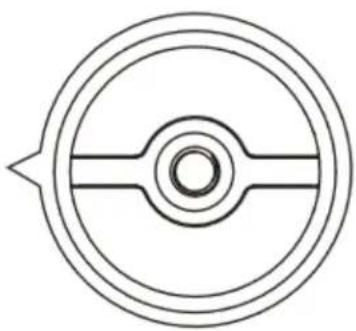
natural_image
Pure technical diagram of a circular mechanical component with central bore and shaft (no text or symbols)natural_image
Black HYPER X audio recording microphone on a stand (no text or symbols visible on body)部件号
HMIS1X-XX-BK/G
目录
概述 3
规格 4
text_image
Technical diagram showing connection between a computer and a device with labeled ports and connectorstext_image
Open Sound settings Open Volume mixer Spatial sound (Off) Sounds Troubleshoot sound problems2. 选择声音控制面板。
text_image
Settings Home Find a setting System Display Sound Notifications & actions Focus assist Power & sleep Storage Tablet Multitasking Projecting to this PC Shared experiences Clipboard Remote Desktop About Sound Output Choose your output device Speakers (Realtek(R) Audio) Certain apps may be set up to use different sound devices than the one selected here. Customize app volumes and devices in advanced sound options. Device properties Master volume 100 Troubleshoot Manage sound devices Input Choose your input device Microphone (HyperX SoloCast) Certain apps may be set up to use different sound devices than the one selected here. Customize app volumes and devices in advanced sound options. Device properties Test your microphone Troubleshoot Manage sound devices Advanced sound options Related Settings Bluetooth and other devices Sound Control Panel Microphone privacy settings Ease of Access audio settings Help from the web Fixing sound problems Setting up a microphone Get help Give feedbacktext_image
Sound Playback Recording Sounds Communications Select a recording device below to modify its settings: Microphone HyperX SoloCast Ready Microphone Realtek(R) Audio Default Device Configure Set Default Properties OK Cancel ApplymacOS
text_image
System Preferences Hyper X Apple ID, iCloud, Media & App Store Apple ID Family Sharing General Desktop & Screen Saver Dock Mission Control Siri Spotlight Language & Region Notifications Internet Accounts Users & Groups Accessibility Screen Time Extensions Security & Privacy Software Update Network Bluetooth Sound Printers & Scanners Keyboard Trackpad Mouse Displays Energy Save Date & Time Sharing Time Machine Startup Disk Flash Playertext_image
Sound Search Sound Effects Output Input Select a device for sound input: Name Type Internal Microphone Built-in HyperX SoloCast USB Settings for the selected device: Input volume: Input level: Output volume: Mute Show volume in menu bar与 PS4 ^TM 一起使用
text_image
Technical diagram showing connector connection with labeled ports and cable, including a zoomed-in view of the internal structure.USB Microphone (HyperX SoloCast)

Output Device
TV or AV Amplifier

Adjust Microphone Level

Volume Control (Headphones)


Output to Headphones
At Audio

Switch Output Device Automatically

麦克风位置
text_image
Technical diagram showing two microphone devices with sound waves and a Hyper logo, including a speech bubble and labeled components.natural_image
Technical line drawing of a HyperX device with top cap and side view showing internal components (no text or symbols)存有疑问或遇到设置问题
natural_image
Black HYPER X audio recording microphone on a stand (no text or symbols visible on body)產品型號
HMIS1X-XX-BK/G
目錄
概觀 3
規格 4
使用於 PC 或 Mac 5
使用於 PS4 ^TM 8
麥克風放置說明 9
麥克風控制.... 10
使用麥克風固定架....11
有任何安裝或使用問題? 12
概觀
text_image
A B C D E F HYPERUSB 規格:USB 2.0 (全速 full speed)
取様率:48kHz, 44.1kHz, 32kHz, 16kHz, 8kHz
位元深度:16 位元
text_image
Technical diagram showing connection between a computer and a device with labeled ports and cable routingtext_image
Open Sound settings Open Volume mixer Spatial sound (Off) Sounds Troubleshoot sound problems2. 選取 [聲音控制台]。
![HYPERX SoloCast - 選取 [聲音控制台]。 - 1](/content/2026/04/587766/images/caa29faa3a67a2b2e977ab705b656873cfb5d3f7bada3acdc8ca079fb10b456f.jpg)
text_image
Settings Home Find a setting System Display Sound Notifications & actions Focus assist. Power & sleep Storage Tablet Multitasking Projecting to this PC Shared experiences Clipboard Remote Desktop About Sound Output Choose your output device Speakers (Realtek(R) Audio) Certain apps may be set up to use different sound devices than the one selected here. Customize app volumes and devices in advanced sound options. Device properties Master volume 100 Troubleshoot Manage sound devices Input Choose your input device Microphone (HyperX SoloCast) Certain apps may be set up to use different sound devices than the one selected here. Customize app volumes and devices in advanced sound options. Device properties Test your microphone Troubleshoot Manage sound devices Advanced sound options Related Settings Bluetooth and other devices Sound Control Panel Microphone privacy settings Ease of Access audio settings Help from the web Fixing sound problems Setting up a microphone Get help Give feedbacktext_image
Sound Playback Recording Sounds Communications Select a recording device below to modify its settings: Microphone HyperX SoloCast Ready Microphone Realtek(R) Audio Default Device Configure Set Default Properties OK Cancel ApplymacOS
text_image
System Preferences Hyper X Apple ID, iCloud, Media & App Store Apple ID Family Sharing General Desktop & Screen Saver Dock Mission Control Siri Spotlight Language & Region Notifications Internet Accounts Users & Groups Accessibility Screen Time Extensions Security & Privacy Software Update Network Bluetooth Sound Printers & Scanners Keyboard Trackpad Mouse Displays Energy Saver Date & Time Sharing Time Machine Startup Disk Flash Playertext_image
Sound Sound Effects Output Input Select a device for sound input: Name Type Internal Microphone Built-in HyperX SoloCast USB Settings for the selected device: Input volume: Input level: Output volume: Mute Show volume in menu bar使用於 PS4 ^TM
text_image
Technical diagram showing connector connection with labeled ports and cable, including a zoomed-in view of the internal structure.USB Microphone (HyperX SoloCast)

Output Device
TV or AV Amplifier

Adjust Microphone Level

Volume Control (Headphones)


Output to Headphones
All Audio

Switch Output Device Automatically

麥克風放置說明
text_image
Diagram showing two microphone setups with a speech bubble and a Hyper logo, illustrating audio or sound recording setup.natural_image
Line drawing of a HyperX-branded device with mesh top and body (no text or symbols on the device itself)
natural_image
Simple line drawing of a circular mechanical component with central bore and flange (no text or symbols)有任何安裝或使用問題?
請聯絡 HyperX 支援團隊,網址為:hyperxgaming.com/support/microphones
HyperX SoloCast™
natural_image
Black HYPER X audio recording microphone on a stand (no text or symbols visible on body)ارقام الأجنبية
HMIS1X-XX-BK/G
لمحتويات جدول
natural_image
Line drawing of a computer monitor with an icon showing a close-up of the internal connector (no text or symbols present)natural_image
Technical line drawing of a mechanical component with no visible text or symbols
text_image
Open Sound settings Open Volume mixer Spatial sound (Off) Sounds Troubleshoot sound problemstext_image
Settings Home Find a setting System Display Sound Notifications & actions Focus assist Power & sleep Storage Tablet Multitasking Projecting to this PC Shared experiences Clipboard Remote Desktop About Sound Output Choose your output device Speakers (Realtek(R) Audio) Certain apps may be set up to use different sound devices than the one selected here. Customize app volumes and devices in advanced sound options. Device properties: Master volume: 100 Troubleshoot Manage sound devices Input Choose your input device Microphone (HyperX SoloCast) Certain apps may be set up to use different sound devices than the one selected here. Customize app volumes and devices in advanced sound options. Device properties: Text your microphone Troubleshoot Manage sound devices Advanced sound options Related Settings Bluetooth and other devices Signal Common Panel Microphone Primary settings Ease of Access audio settings Help from the web Fixing sound problems Setting up a microphone Get help Give feedbacktext_image
Sound Playback Recording Sounds Communications Select a recording device below to modify its settings: Microphone HyperX SoloCast Ready Microphone Realtek(R) Audio Default Device Configure Set Default Properties OK Cancel ApplymacOS
text_image
System Preferences Hyper X Apple ID, iCloud, Media & App Store Apple ID Family Sharing General Desktop & Screen Saver Dock Mission Control Siri Spotlight Language & Region Notifications Internet Accounts Users & Groups Accessibility Screen Time Extensions Security & Privacy Software Update Network Bluetooth Sound Printers & Scanners Keyboard Trackpad Mouse Displays Energy Saver Date & Time Sharing Time Machine Startup Disk Flash Playertext_image
Sound Search Sound Effects Output Input Select a device for sound input: Name Type Internal Microphone Built-in HyperX SoloCast USB Settings for the selected device: Input volume: Input level: ? Output volume: Mate Show volume in menu barالاستخدام مع PS4™
text_image
Technical diagram showing connector connection with labeled ports and cable, including a zoomed-in view of the internal connector.USB Microphone (HyperX SoloCast)

Output Device
TV or AV Amplifier

Adjust Microphone Level

Volume Control (Headphones)


Output to Headphones
Al Audio

Switch Output Device Automatically

موضع الميكروфон
text_image
Technical diagram showing two microphone devices with a head icon and a Hyper logo, illustrating sound or audio signal interaction.natural_image
Line drawing of a HyperX-branded device with mesh top and body (no text or symbols on the device itself)