
Cloud Buds TWS - Earphones HYPERX - Free user manual and instructions
Find the device manual for free Cloud Buds TWS HYPERX in PDF.


| Brand | HyperX |
| Model | Cloud Buds TWS |
| Product Type | True Wireless Stereo (TWS) Earbuds |
| Connectivity | Bluetooth (2.4 GHz) |
| Earbud Battery | 3.7V, 35mAh (0.13Wh) Li-ion |
| Charging Case Battery | 3.7V, 500mAh (1.85Wh) Li-ion |
| Charging Port | USB-C |
| Controls | Touch sensor (tap, double tap, triple tap, hold) |
| Microphone | Built-in |
| Status LED | Charging case and earbuds LED indicators |
| Frequency Band | 2.4 GHz |
| TX Power Range | -6 dBm to +4 dBm |
| Safety Warning | Permanent hearing damage risk if used at high volumes for extended periods |
| Maintenance | Wipe with a soft, dry cloth |
| Reparability | Batteries not replaceable by user; contact HyperX support for service |
| Included Accessories | Charging case, ear tips, USB-C charging cable |
| Compliance | FCC Part 15, CE |
Frequently Asked Questions - Cloud Buds TWS HYPERX
User questions about Cloud Buds TWS HYPERX
0 question about this device. Answer the ones you know or ask your own.
Ask a new question about this device
Download the instructions for your Earphones in PDF format for free! Find your manual Cloud Buds TWS - HYPERX and take your electronic device back in hand. On this page are published all the documents necessary for the use of your device. Cloud Buds TWS by HYPERX.
USER MANUAL Cloud Buds TWS HYPERX
HyperX Cloud Buds TWS
Quick Start Guide
Overview

A touch sensor
Charging pins
G ar tips
B Microphone
E Charging case status LED
Charging contacts
F ISB-C charging port
Powering on and off the Earbuds
To power on the earbuds, open the charging case.
The earbuds will play a rising tone and automatically reconnect to the last paired device.
To power off the earbuds, return them to the charging case and close the lid.
The earbuds will play a falling tone and automatically begin charging.
Pairing the Earbuds

- With the earbuds inserted, open the lid of the charging case.
- If there are no previous connections, the earbuds will automatically enter pairing mode. Otherwise, press and hold the pairing button on the charging case for 3 seconds.
- On your device, search for nearby Bluetooth devices and select HyperX Cloud Buds TWS. The earbuds will play a quick double beep once the connection is successful.
Wearing the Earbuds

- Gently insert the earbuds into the ear canals.
- Slightly rotate the earbuds until the earbuds fit comfortably in the ear and are stable.
Controls
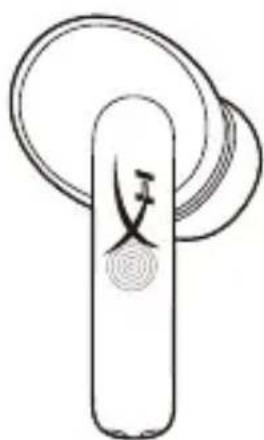
| Tap to play/pause music, answer/end calls | |
| Double tap to skip to next song | |
| Triple tap to go to previous song | |
| Hold for 2 seconds to reject call |
Status LED
To check the charging case battery level, open the lid with the earbuds inside.
| LEDCHARGING CASE | |
| Solid green for 5 seconds50% - 100% | |
| Blinking green for 5 seconds25% - 50% | |
| Breathing red for 5 seconds< 25% |
Charging

| LEDSTATUS | |
| Breathing redCase and earbuds charging | |
| Solid green for 5 minutesCase fully charged | |
| Breathing greenEarbuds charging | |
| OFFEarbuds fully charged |
Questions or Setup Issues?
Contact the HyperX support team or see the user manual at:
hyperxgaming.com/support/headsets
WARNING: Permanent hearing damage can occur if a headset is used at high volumes for extended periods of time.
简体中文
概述
A - 触控板
B - 麦克风
C - 充电触点
D - 充电针
E - 充电盒指示灯
F - Type-C 充电端口
G - 耳套
操作方式
Battery/TX Power Info
| Battery Information |
| Earbuds contain 3.7V, 35mAh Li-ion Battery, 0.13WhCharging case contains 3.7V, 500mAh Li-ion Battery, 1.85WhCannot be replaced by user |
| Frequency & TX Power Information |
| Frequency Bands: 2.4GHzTX Power: -6dBm≤TX≤4dBm) |
FCC Compliance and Advisory Statement
This device complies with Part 15 of the FCC rules. Operation is subject to the following two conditions: (1) this device may not cause harmful interference, and (2) this device must accept any interference received, including interference that may cause undesired operation.
This equipment has been tested and found to comply with the limits for a Class B digital device, according to Part 15 of the FCC rules. These limits are designed to provide reasonable protection against harmful interference in a residential installation.
This equipment generates, uses and can radiate radio frequency energy and if not installed and used in accordance with the instructions, may cause harmful interference to radio communications. However, there is no guarantee that interference will not occur in a particular installation. If this equipment does cause harmful interference to radio or television reception, which can be determined by turning the equipment off and on, the useris encouraged to try correct the interference by one or more of the following measures:
- Reorient the receiving antenna.
- Increase the separation between the equipment and receiver.
- Connect the equipment into and outlet on a circuit different from that to which the receiver is connected.
- Consult the dealer or an experienced radio/TV technician for help.
Any special accessories needed for compliance must be specified in the instruction manual.
Warning: A shielded-type power cord is required in order to meet FCC emission limits and also to prevent interference to the nearby radio and television reception. It is essential that only the supplied power cord be used. Use only shielded cables to connect I/O devices to this equipment.
CAUTION: Any changes or modifications not expressly approved by the party responsible for compliance could void your authority to operate the equipment.
Turkey WEEE Statement
Charging Case/充電盒/充电盒
Brand : HYPERX
Model : Cloud Buds TWS
Category : Earphones